Home

WordPress Development Services: What Businesses Should Expect 

WordPress Development Services: What Businesses Should Expect 

Lorem ipsum dolor sit amet, consectetur adipiscing elit. Ut elit tellus, luctus nec ullamcorper mattis, pulvinar dapibus leo.

Join our Newsletter!

WordPress development services

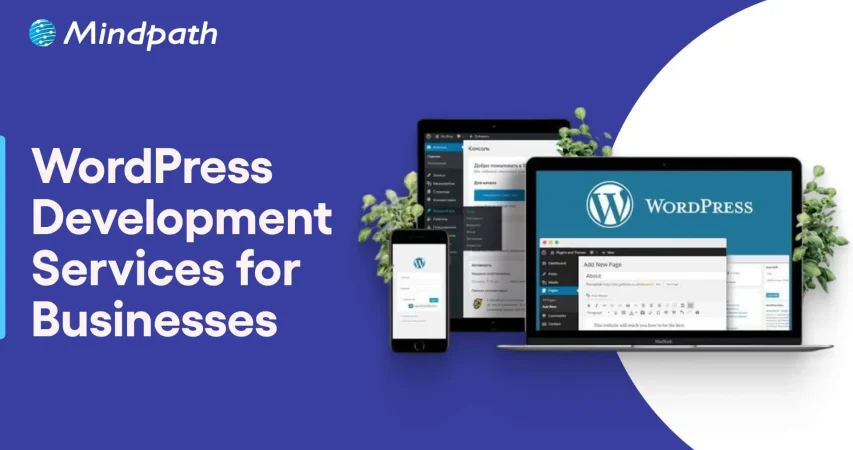
When companies get ready to build a reputable online position, finding well-suited WordPress development services is a critical step. It involves building a functional website that loads quickly and continues to engage the visitor. In a competitive marketplace, companies will be expecting advanced features, secure environments, and designs that reflect their brand. This is where those with professional experience can deliver outstanding results.

What can companies realistically expect from investing in these services? Expectations generally revolve around the key themes of customization, scalability, and ongoing support that allow a business to scale without the technical pieces creating problems. When working with the right website development company, companies can explore solutions that are practicable, innovative, and in line with their goals. In this blog, we will discuss what companies should expect from WordPress services.

Want to build a visually appealing site with a team that thinks beyond code and provides guidance? Mindpath offers wordpress development services that combine design, performance, and transform your website into a powerful business tool.

Understanding WordPress Development Services

The WordPress development service provides businesses with the ability to build, customize, and maintain websites with the WordPress CMS; designing custom themes, building plugins, and making sure the site runs smoothly. They also take an active role in enhancing load time, security, and ensuring mobile adaptability. This way, every website is professional-looking and working efficiently for the user.

These services also involve e-commerce integration through tools such as WooCommerce, so businesses can sell products online with ease. Professionals offer routine updates, troubleshooting, and assistance that keep websites functioning well. Organizations can have scalable and user-friendly platforms that are capable of evolving with their needs.

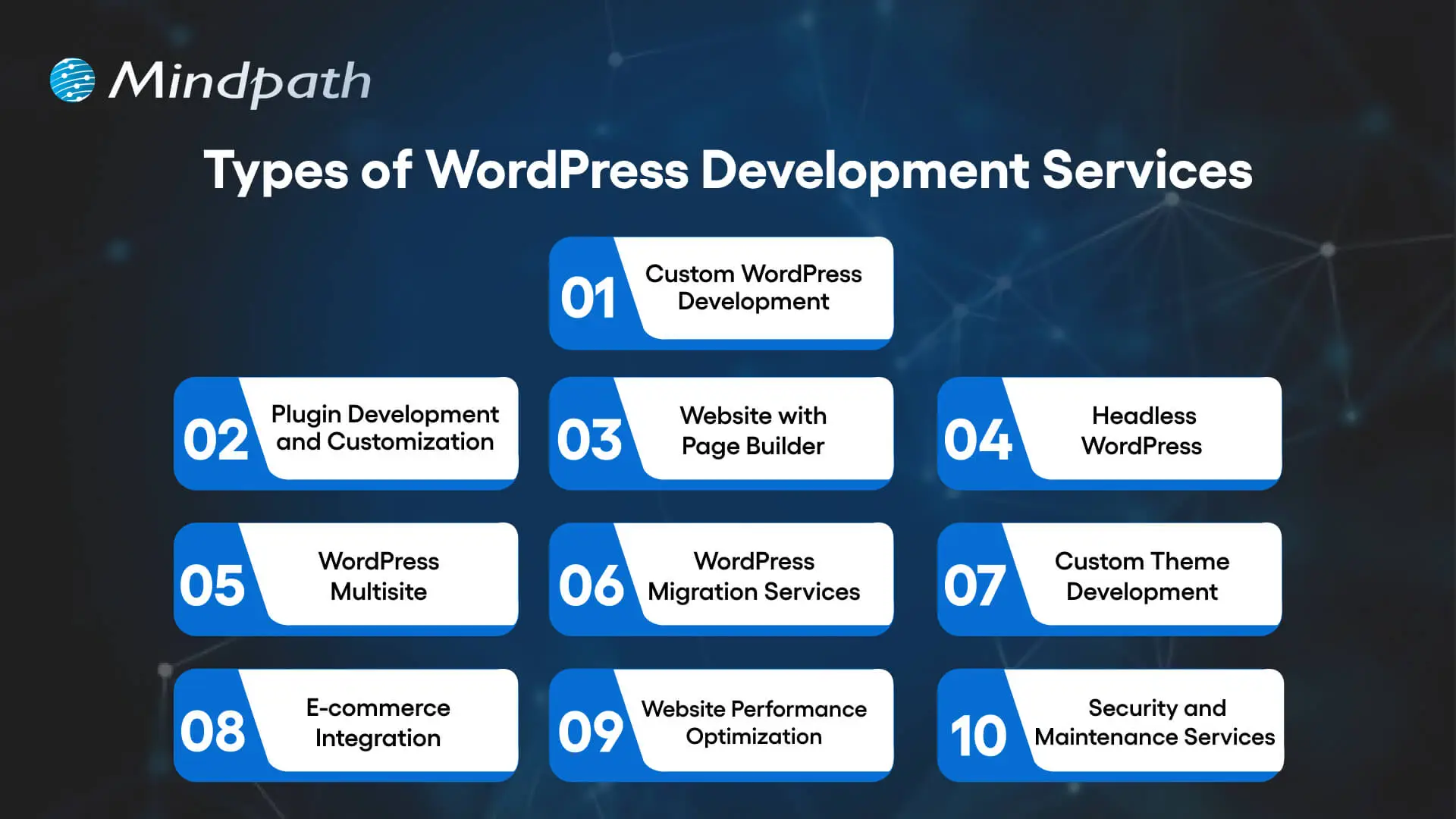
Types of WordPress Development Services

Companies today utilize top WordPress development services for building secure, flexible, and manageable websites. These services offer an array of different solutions for different business needs and establish solid organic growth online.

Types of WordPress Development Services

1. Custom WordPress Development

Custom WordPress development service is aimed at developing websites with custom designs and functions. Developers use tools such as ACF to create custom fields and, in all cases, deliver solutions that meet the needs of the businesses.

2. Plugin Development and Customization

Plugins are used to expand the functionality of a WordPress website to suit particular needs. Developers can build new plugins or customize existing plugins to provide the functions that a business needs exactly.

3. Website with Page Builder

The use of a website page builder like Elementor, Divi, or Beaver Builder makes the design visually attractive and allows for more options for a non-technical person to build and design layouts.

4. Headless WordPress

Headless WordPress separates the back-end and front-end of WP in order to allow a developer to use frameworks like React or Vue.js. This gives you faster speeds and finer items of design customization.

5. WordPress Multisite

Businesses with more than one website can use Multisite to manage many WordPress sites in one installation. An example of a use case would be if a business has a brand site and sub-blogs.

Wondering how to make your WordPress site accessible to all users? Read our web accessibility guidelines blog to learn best practices for inclusive design.

6. WordPress Migration Services

Many times, proper attention is needed when migrating a website to WordPress to ensure there are no downtimes or loss of data in the transition. Specialists assist with a seamless transition by safely transferring the content, settings and functionality from the old website.

7. Custom Theme Development

A custom theme is developed to define an identity and aesthetic style for the website. This service makes certain that the website presents a unique look and feel that fits the brand guidelines.

8. E-commerce Integration

Companies can leverage WooCommerce to transform WordPress into a completely functional online store. Developers will add features like shopping carts, secure payment processing, and product catalogs.

9. Website Performance Optimization

Enhancing website loading speed and overall performance improves user experience and SEO rankings. Developing professionals are working on caching solutions, code optimization, etc. to keep sites and pages loading quickly.

10. Security and Maintenance Services

Continual updates and security are critical to protecting you from threats/downtime. Developers provide site monitoring, timely fixes, and sometimes other unrelated maintenance and management tasks to keep everything operating normally.

Concerned about WordPress security risks? Check out safeguarding common WordPress vulnerabilities to protect your site from common threats.

Advantages of Custom WordPress Development Services

Teaming up with a WordPress web development company you trust provides businesses with additional advantages beyond simply having a website. With professional support, businesses can custom-build solutions that improve performance, provide security, and give assurance of future growth.

1. Expert Knowledge

Expertise in WordPress development will add real value to your website project. WordPress developers code in PHP, CSS, and JavaScript, manage a secure database, and generate a high-quality website design. They can also integrate analytics tools that allow you to track user behavior and engagement trends informing better business decisions.

2. Personalized Solutions

Professional WordPress development services create unique websites that are configured for your specific business needs. They select the appropriate compatible plugins and themes for your site and may develop custom WordPress plugins, if necessary, for unique functionality and features. This guarantees you have a completely customized site that will also not detract from your site’s speed and responsiveness.

3. Save Time and Cost

Partnering with dedicated WordPress development service providers will accelerate website development while ensuring quality work. Their professionals will be effectively using the right tools to work through plugin integration, debugging and theme customization. While there can be an initial investment, it is cost-effective because you can save later on maintenance and updating in the future.

4. Strong Website Security

A competent team providing WordPress application development services uses security measures to ensure your site remains secure. Firewalls, encryption and periodic security audits are some examples of techniques they may use to assess the risk of unauthorized access to your site. As a result, they use these techniques to secure sensitive data and deliver your site reliably.

Want to ensure your WordPress site runs smoothly? Read our WordPress and PHP compatibility guide to understand which PHP versions and practices work best.

5. Better User Experience

Optimization of WordPress site design centers on performance, responsiveness, and usability. Expert designers develop mobile-friendly layouts and seamless user journeys to lower bounce rates. Better user experience leads to increased engagement and higher business revenue overall.

6. Scalable Solutions

Utilizing proficient WordPress development services allows for flexibility in alignment with your business growth. For example, you can hire developers for specific projects like custom WordPress development or for e-commerce extensions, allowing for flexibility in resourcing and flexibility during transitions with the business.

7. SEO-Friendly Content

Developing your website with an expert WordPress development company will position your site to succeed with SEO. They will optimize themes, use meta tags, and initiate your site with several SEO plugins to help showcase your content and reach your intended audience, all while providing a better chance of ranking well in search engines.

8. Access to Latest Trends

WordPress development services are focused on keeping your site fresh in design, technology, and user experience. They all update your site with new features, mobile betterment, and use of new tools to keep ahead of other sites. It is a benefit for your site to meet standards while exciting users.

Ready to Transform Your Website with Expert WordPress Development Services?

Investing in professional WordPress development services ensures your website is fast, secure, and tailored to your business needs. These services offer customization, scalability, and ongoing support to enhance user experience, improve SEO, and drive growth. Companies can rely on experts to deliver solutions that keep their websites modern, functional, and aligned with their brand goals.

At Mindpath, our WordPress development services provide businesses with custom themes, plugin development, and e-commerce integration. We optimize your website for peak performance, security, and user engagement. With our expert team, you can focus on growing your business while we handle all aspects of website design, development, and ongoing support.

Support Is One Click Away

Featured Posts

Related Post

Poc meaning

The fast-paced business landscape has turned into a battleground where companies of different sizes compete against each other. New product ideas that can revolutionize industries have been gaining traction and many of them have transformed into sustainable businesses. Business owners are more curious about POC meaning and how they can incorporate it into their strategies. 

The POC might sound similar to a minimum viable product that helps in creating products aligned with customer needs. On the contrary, it is a type of small experiment to find out whether your product idea will actually work. How is a POC relevant for your business? You can find the answer with a comprehensive guide on POC and how to create one.   

Want to reduce time and cost in testing your new product idea? Mindpath offers POC Development Services to create a working prototype for real-world validation.

Understanding the Definition of POC

Most of the businesses, especially startups, end up with failure in new product development due to various reasons. One of the biggest among them is ignoring the test for feasibility of their product ideas. The POC or Proof of Concept is a small experiment that helps you determine whether a product idea is viable, before you begin full-scale development. It is the ideal solution to find out if your product ideas can work as intended in the real world.

The POC is the first milestone in any product development project where you have to test one component and its feasibility. Many of you might think that this sounds similar to the definition of a MVP or minimum viable product. However, the answers to “what is proof of concept?” emphasize that it is not about selling your idea to the target audience or figuring out how to make it work.  

Developing a POC is similar to a mini experiment that does not require a huge amount of time or resources. If you have a product idea, then a POC helps you test it and find out whether you should pursue the idea. Once you find out that your POC is feasible, then you can move towards prototyping and subsequently build MVP.

Want to understand how to transform your validated idea into a functional product? Learn more about MVP development to build scalable solutions after successful validation.

POC in Context of Software Development

Software development companies are probably the first in churning out the most number of POCs for diverse projects. The meaning of proof of concept for software development points at how it helps in testing a small version of a software application. A POC used for software development focuses on testing whether a specific component works in real conditions as you want. Software POCs help development teams and product owners validate their ideas and identify challenges in the early stages of development. 

You can think of an example of software POC in the case of a fintech startup that aims to create a new AI-powered chatbot. The startup can use software POC to find out the feasibility of different features in the chatbot. It can also show whether the chatbot can effectively support users by answering common questions. 

The benefits of POC in software development also showcase that it can play a major role in reducing various risks. Early validation of functionalities and core features of software helps in checking feasibility of workflows and key functions. Development teams can use the POC to find relevant programming languages, platforms and frameworks for the software. The POC also ensures early identification of potential issues, bottlenecks and bugs in the software.

Looking to build tailored solutions once your idea is validated through a POC? Explore different types of software development to choose the best approach.

Variants of Proof of Concept in Business

The most crucial highlight about POCs is that you cannot rest with just one for a specific product idea. You can reflect on the proof of concept meaning once again to learn that it aims to validate one component at a time. Therefore, you can come across different types of POCs required for your product idea. Each type of POC focuses on validating diverse aspects of a product, ranging from market demand to technology stack. 

The common variants of POC in any project are product POC, technology POC, process POC and market POC. The product POC helps in validating the core functionality of your product and is useful for verifying your product ideas. Technology POC comes into play when you have to find whether a specific technology stack is relevant for your product. 

The search for answers to “what is proof of concept in project management?” also points at process POC. It is a crucial tool for validating the internal workflow and flexibility for operational changes in any project. Finally, you have the market POC that helps you find out whether your product idea has market potential and can garner the interest of real customers.

Curious about selecting the right technologies for different types of POCs? Discover how to choose the right tech stack to ensure efficiency and scalability in your project.

Why Should You Invest in a Proof of Concept?

Business owners, especially in the case of startups, are likely to think twice before building a POC for their next product idea. You may find the answers to “what does POC mean?” and still not understand how it adds value to your business. An overview of the benefits of POCs can help you understand why it is important for success of your project.

1. Driving Strategic Decisions

Almost every business owner who thinks about building a POC needs concrete insights on the feasibility of their product ideas. The POC for any product will offer relevant insights from users, stakeholders and technical experts that can help in driving strategic decision-making. It provides an early impression of the potential value and feasibility of projects, thereby facilitating efficient resource allocation and reducing risks. 

2. Saving Your Time and Money

Businesses should also think about developing a POC to save their valuable time and money. Early validation of key assumptions and concepts can help business owners avoid investments in ideas that won’t work in the long run. POCs help you follow a proactive approach to any project that reduces the possibilities of costly changes and futile use of resources.

3. Shaping Your Product for Target Users

The most promising aspect in answers to “What is POC?” focuses on how it helps in gaining feedback from real users. You can leverage POCs to find out whether your product solves the pain points of your target users. The POC can serve as a crucial tool for identifying the needs and preferences of your customers in early stages. As a result, you can move ahead with your project in the right direction to achieve higher market acceptance and user satisfaction. 

Wondering how real-world solutions like chatbots are validated before full-scale development? Check out an AI chatbot example to understand practical implementation using POC.

Unraveling the Ideal Steps to Create a Proof of Concept

The ability to create a POC for your project ideas is an invaluable competency in the fast-paced business landscape. You can define POC for a new product and test the idea systematically rather than depending solely on assumptions. A clearly structured approach for creating your POC can provide the flexibility and efficiency required to test your new product ideas.

1. Start with a Definition of Your POC Goals

The ideal beginning to any POC development project would focus on identification of the objectives and expected outcomes. You should also identify the financial goals and organizational objectives that you want to achieve with the product idea. It is important to have a clear outline of the problems that you want to solve with your POC.

2. Establish the Scope and Success Criteria

You should define the limitations of the POC to ensure that it focuses on evaluating a specific component of your product. Every POC project must have a clear outline of the specific features and functionalities that you want to test. In addition, you have to specify the criteria for success with measurable goals and objectives. The scope of your POC should also include definition of the different use cases and scenarios for your product.

3. Prepare the Project Team

The next thing you need after establishing the scope of a POC for your product idea is a project team. Your project team can include decision-makers, developers, project stakeholders and technical experts. It is important to define the roles and responsibilities of all team members and establish clear channels for collaboration. 

4. Create the POC and Obtain Feedback

After setting up your project team, you should execute the plan for your POC by using available resources. Once you develop proof of concept, you have to collect technical insights and feedback on it from users and stakeholders. The feedback data is an essential tool to guide informed decision-making and identifying areas for improvement.

5. Evaluating Results and Moving Ahead

The most important step in developing a POC is the analysis of feedback data. It helps in evaluation of the performance of the POC with respect to the predefined success criteria. You should document the results and recommendations for future actions. 

Planning to streamline your development process after validating your idea? Learn how agile methodology helps in iterative progress and faster product delivery.

Final Thoughts

The introduction to POC showcases how it is different from a MVP or minimum viable product. Businesses can leverage POCs to find out whether the ideas they have can actually transform into sustainable products and solutions. As a matter of fact, your POC serves as the foundation on which you can build prototypes and MVPs.

Mindpath is one of the leading solution providers for POC development services across various industries. We have created proof of concept for software with commendable results and pushed the boundaries of innovation. Our experts leverage their experience to deliver strategic POC solutions with efficient use of your resources. Consult with us and discover the optimal approach to create your first POC now.

wordpress-react-combine project
Are you curious about how to elevate your web app to the next level? Imagine combining React’s cutting-edge user interfaces with WordPress’s robust content management. Interesting right? In this blog, we’ll guide you through the process of merging these technologies to build a web app that’s both visually stunning and highly functional. So, let’s dig in! 

Overview of React 

React is a JavaScript library that enables the building of user interfaces, mostly single-page applications. It gives a possibility to create interactive elements and dynamic web pages by breaking their content into smaller, re-usable components. It helps in managing updates to the user interface and hence makes applications faster and more responsive. React is essential to today’s digital makeup since it will help in the creation of a much faster, interactive, and dynamic web application that would go a long way in enhancing user experience. Due to its component-based architecture, React simplifies the development process and supports complex applications with high performance, making it a preferred choice for modern web development, where user engagement and responsiveness count the most. 

Overview of WordPress 

WordPress is an extremely popular content management system, and millions of websites are running on it worldwide. Its user interface is very simple, so users can easily create, edit, and manage website content without needing to know how to code. With high flexibility in themes and various plugins, WordPress can be put to any purpose—from personal blogging to the most complicated business sites. WordPress is important due to the flexibility and user-friendliness in creating and managing websites efficiently for any kind of user. It provides access to unlimited customization because of its extended base of themes and plugins, hence becoming a mainstay tool in the modern world for web developers and content creators. 

Why Combining React and WordPress Can Be Beneficial for Developers.   

Integration of React with WordPress enriches development by putting the power of both together. React is empowered for reusing the components, which means simplicity in terms of coding and speed in development. Fast rendering with efficient state management means web applications work harmoniously and respond as the user expects. JSX syntax, with its combination of JavaScript and HTML, enables easier writing and readability of codes. WordPress complements React by taking care of the content and providing a clear user interface. The fact that React can keep data away from the presentation and manage it nicely helps not to lose data under any conditions. Taken together, React and WordPress make the building process much faster and more convenient for creating powerful and extremely dynamic web apps. 

Key Considerations When Building Your Web App with React and WordPress    

1. Existing Infrastructure  

Your existing infrastructure does affect how well React and WordPress work together. If your current system is compatible, the integration of React will go through smoothly and more quickly. For example, a headless setup where React is doing the front end and WordPress the back end could be best for modern needs. This, however, requires more development work, changes in your back-end system, and special expertise to do it correctly. 

2. Maintenance And Updates  

Regular updating and maintenance are vital in the case of a React and WordPress site. In case you do not update them regularly, your site will eventually have performance issues, it will be vulnerable to security exploits, or even crash. When it’s headless—in a setup where React and WordPress run separately—the updates become easier; one could independently update the front end and back end, which will be helpful in keeping the site’s stability and safety. 

3. Developer Skillset  

It requires a wide skill set to build a website with React and WordPress. One needs to be proficient in JavaScript, to understand JSX, and to use state management tools like Redux. One would also want to be familiar with modern development tools like Webpack and Babel and know how to work with APIs. If these competencies are missing in your team, including an expert on a project basis will make the development process smoother and more efficient. 

4. SEO Considerations 

SEO is critical to have your website show up in search results and bring in visitors. Using React with WordPress, SEO can be a little more complex. As its client-side rendering, React may make it hard for search engines to index your content. You can either implement SSR or SSG to make it easier for search engines to crawl and rank your site. Besides, meta, sitemaps, and canonical URLs should be properly set up for effective SEO within a headless WordPress setup. 

Ready to elevate your website to new heights?

At Mindpath, we seamlessly integrate React with WordPress to create dynamic, responsive web experiences.

Configuring React to Work with WordPress      

1. Write Modular Code 

Breaking your code into smaller, self-contained parts makes it easier to handle and reuse. This is like keeping your workspace organized: when everything has its place, it’s much easier to find anything that you may need and use it. Small, reusable components in React are ways by which you can keep your code neat, making changes or fixes on parts of your site without affecting the other parts. 

2. Use A State Management Library   

A state management library, like Redux, that keeps every bit of information of your app in one place. This is good for complicated websites where you deal with a great deal of information. This way, it becomes easy to handle changes and updates for your website to run smoothly and in the desired manner. 

3. Optimize Performance   

Performance optimization of the website enables quick and enjoyable usability by the user. This is achieved through caching, breaking down the code into smaller pieces that load only when needed, or lazy loading—parts of the website only load after becoming visible to the user. Doing this will get your site up and running quickly; this will also improve responsiveness. 

4. Implement A Consistent API   

A good API—like WordPress REST API or GraphQLwill help your React app and WordPress site to communicate smoothly. A consistent API would mean that data flows between the two without any problems. REST APIs offer flexibility, but their design is often varied. GraphQL APIs are more homogeneous and predictable, so it helps in use and understanding. 

5. Plan For Extensibility   

Make a site that will expand and evolve over time without a problem. That means keeping ahead by finding out ways to add new features or update existing ones without breaking the rest of the site. Having an extensible design means it will let your site easily change to meet future needs without having to start from square one. 

6. Automated Testing 

Automated testing means running your code for errors using tools automatically. This will ensure that mistakes are noted and cured in the beginning, thus ensuring that your website does what you want it to. Automated testing saves time and keeps your site stable; this reduces the chances of problems frustrating users. 

Build Your Web Using React and WordPress with Mindpath    

The experienced team at Mindpath uses React to improve user experience and WordPress as the foundation for creating powerful websites. With its incredibly strong and practical content management system, editing and managing website material is effortless. By integrating React, we can increase your site’s speed and amount of interaction while engaging users on a deeper level. Create a dynamic frontend for your website using React to make it load quickly and react to user input as smoothly as possible.

Mindpath offers the best of both worlds: the ease and versatility of WordPress paired with the contemporary, dynamic capabilities of React. We take care of the technical setup and customization so you can have an outstanding website experience and concentrate on your content and business objectives. 

Conclusion  

Combining React and WordPress gives synergy to your Web application, offering a digital experience that is at once impressive and compelling. Being able to interact with dynamically displayed interfaces from React and a robust content management system like WordPress, you are assured of having a site that is at once engaging, powerful, yet very easy to manage. Inherently, this automatically ensures the improvement of user interaction and performance while also making it seamless to update content and manage sites. Embrace this mix of technologies to develop a web app which would be fast, functional, and future-ready. This way, your web presence will always be at the top of its game.
Mindpath excels at bringing this integration to life. Our expert team combines the power of React with WordPress to deliver an ultra-fast, interactive site that is also easy to maintain and update. With Mindpath, you can confidently navigate the complexities of modern web development, ensuring your digital presence is both cutting-edge and effortlessly managed. 

Looking to enhance your WordPress site with cutting-edge React features?

Mindpath is your go-to partner! We specialize in integrating React’s dynamic capabilities with WordPress’s robust CMS to deliver stunning web experiences.

Combine WordPress and React for powerful web apps. Discover how to leverage robust content management with dynamic interfaces for enhanced user experience.
GenAI tools for teachers

The year is 2026 and AI isn’t just knocking at the doors of the education industry as it has become an integral part of the classroom, research lab and faculty room. Educators have been burdened with expectations and exhaustion due to changing curriculum designs in different parts of the world. The arrival of GenAI tools in education sector has marked the introduction of many new opportunities for educators.

Generative AI is gradually becoming an indispensable companion of teachers worldwide for many reasons. Most important of all, gen AI tools are not replacing the human element in the teaching experience. On the contrary, generative AI empowers teachers and helps them provide personalized learning experiences to every student. Let us find out the top generative AI tools that can help teachers.

Want to stay ahead in the education sector by offering smarter, more efficient solutions? Mindpath offers generative AI development services to help education businesses build custom, scalable AI tools tailored to their needs.

Understanding the Significance of Generative AI for Teachers

The biggest problem for teacher in the modern education industry is the burden of tedious and repetitive administrative tasks. Imagine the stress on teachers who have to evaluate the test papers of each student and prepare lesson plans for the next day. The use of GenAI tools for teachers can help in reducing the burden of administrative tasks, especially with automated grading and generation of personalized learning materials. Generative AI tools can allow teachers to invest their efforts in interacting with students, fostering creativity and nurturing critical thinking skills.

Teachers should understand that generative AI is not just another technological trend that will fade away with time. As a matter of fact, generative AI signifies a major paradigm shift in the domain of education. You can notice the broader impact of generative AI in education sector in different solutions like personalized learning at scale, automated content generation and better student engagement. Generative AI can help learners by creating adaptive learning systems that align with the learning style, strengths and weaknesses of each learner.

The reduced administrative burden on educators helps them interact directly with students and craft innovative teaching strategies. GenAI tools also help educators provide instant feedback on student assignments thereby allowing students to learn quickly from their mistakes. Teachers can rely on generative AI to improve student engagement by creating interactive content and personalized assessments. As a result, generative AI helps educators transform learners into active participants in the learning journey.

Looking for ways to integrate cutting-edge AI into your teaching strategy? Read this blog on generative AI trends to stay ahead with the newest AI innovations.

What are the Top Generative AI Tools for Teachers?

The blend of artificial intelligence and education brings promising results for learners as well as educators. You might be wondering about the top generative AI tools preferred by teachers and their special features. The following list of generative AI tools can help you understand the significance of gen AI in the education sector.

1. ChatGPT

The biggest generative AI tool that attracts the attention of educators worldwide is ChatGPT. It is still one of the basic tools that transformed how we interacted with artificial intelligence. Educators can trust ChatGPT for its versatility and use it as an assistant for different types of tasks. ChatGPT is one of the top 10 AI tools in education for drafting lesson plans, summarizing research papers or providing answers to difficult student questions. Educators can trust ChatGPT for brainstorming, content creation and delivering responsive student support.

2. Sendsteps

Sendsteps AI is a unique platform that makes the process of creating assignments a lot easier for learners. It relies on the power of natural language processing to understand the teacher’s instructions with accuracy. The AI tool uses teacher instructions to craft content personalized to specific needs and learning objectives of students. Educators can also use Sendsteps for creating interactive quizzes with the facility of automatic grading.

3. Google Gemini

Another big name among the best AI tools for students and teachers is Google Gemini. It stands out with multimodal capabilities that make it better than text-only models. Google Gemini can not only generate text but also images and audio content, thereby enhancing its versatility for classroom applications. Teachers can rely on Gemini to create lesson materials, interactive quizzes with audio prompts and explanation of scientific concepts with diagrams.

4. Canva Magic Studio

You cannot think about AI tools in the field of education without focusing on Canva and its ‘Magic Studio’ AI features. Canva is a distinct AI tool in education that allows you to create visually stunning presentations effortlessly. Teacher can also use it to craft compelling educational videos, infographics and interactive worksheets. The ‘Magic Studio’ feature of Canva also provides personalized recommendations for content generation while creating teaching aids.

5. Quizizz

Quizizz is another generative AI platform that helps teachers in creating interactive quizzes. It can help teachers in crafting engaging quizzes, interactive lessons and polls from different source materials. The AI tool can also help in generating different types of questions, such as open-ended or multiple-choice questions. Educators can transform quizzes and assessments into fun experiences for students with Quizizz while obtaining an accurate impression of student performance.

6. Socrative

The list of top generative AI tools that can help teachers also includes Socrative, an AI-powered student response system. Socrative is the best example of using generative AI for educators to enhance their capabilities for evaluating student assignments. Teachers can use Socrative to create open-ended questions and quizzes to collect formative assessment data. The data obtained from such tests can help teachers recognize the weaknesses and students and modify their teaching approaches.

7. Nearpod

Nearpod is also a useful generative AI tool for embedded open-ended questions, quizzes and polls in presentations. Teachers can use Nearpod as one of the top education AI tools to create engaging lessons for students. The tool also provides valuable data on student performance along with creative tools for educators. The creative tools can help in creating interactive learning experiences that boost critical thinking and creativity of learners.

8. Flipboard

One of the most interesting AI tools that teachers can use in 2025 is Flipboard. It is the best AI for education delivery in a completely new and innovative format. Flipboard helps educators in combining articles, videos and other web content on a specific topic in the format of a digital magazine. Educators can share the digital magazines with students through links that can enhance the learning experience.

9. Magic School AI

Magic School AI is a comprehensive collection of AI tools for educators, focused on automation of common classroom tasks. It is one of the best generative AI tools to create subject-specific lesson plans, worksheets and rubrics. Teachers can find more than 60 tools in Magic School AI for different aspects of the teaching experience.

10. Curipod

The collection of GenAI tools for education must also include Curipod for its capabilities as a lesson planning assistant. It helps in making classroom learning more engaging with interactive activities. Curipod can create presentations with interactive elements to encourage student participation. Teachers can use Curipod as a trusted solution for real-time understanding of student performance and fostering active learning.

Could understanding AI applications in other industries help you choose the best tools for your classroom? Discover how generative AI in market research, providing insights that can spark innovation in teaching.

11. Eduaide.AI

Eduaide.AI is one of the few generative AI tools created specifically for educators. It helps in streamlining lesson planning and creation of learning resources. The AI tool can help in generating lessons plans aligned with popular standards. The intuitive interface of the platform combined with emphasis on pedagogical support makes it an invaluable tool for educators.

12. Otter.AI

Otter.AI is also another notable example of education AI tool with distinctive features. The AI-powered transcription service leverages generative AI for real-time transcription of spoken language in class lectures or parent-teacher conferences. The tool plays a crucial role in enhancing accessibility of education and efficiency of taking notes.

13. Evernote

Evernote is a comprehensive organizational tool for an educator, which utilizes generative AI for content curation. Teachers can use Evernote to save videos, articles and other web content to create educational content. The AI tool helps in effective collection and organization of research materials, creation of lesson plans and sharing personalized learning resources with students.

14. Gradescope

Gradescope also showcases another example of using generative AI tools for learning improvement through the use of AI for simpler and faster grading process. Teachers can use Gradescope for automated assessment of complex assignments like essays, code submissions or problem sets. The AI-powered features of the platform not only save the time of teachers but also ensure grading consistency and offers accurate analytics for student performance.

15. Raindrop.io

Raindrop.io is another promising addition to the list of top gen AI tools in the domain of education. It is a bookmarking tool that helps teachers in saving and organizing web content alongside creating collections of bookmarks. Teachers can share the bookmarks with learners, which may be videos, articles or any relevant web content for future reference.

Curious about the most impactful ways generative AI is being applied across different industries and classrooms? Explore detailed generative AI use cases in our comprehensive guide to see how these tools are transforming education and beyond.

Ready to Transform Education with Generative AI?

Generative AI tools are revolutionizing education by reducing administrative burden, enabling personalized learning, and boosting student engagement. Educators can focus on creativity, critical thinking, and meaningful interactions while students enjoy adaptive and interactive learning experiences in the classroom.

At Mindpath, AI development services help education businesses build custom, scalable generative AI solutions. From automating lesson plans and grading to creating personalized learning platforms, our expert team designs tailored AI tools that empower teachers and enhance student engagement.