
How Much Does a Website Development Cost in 2026 

Join our Newsletter!

Featured Posts

Support Is One Click Away

Home

How Much Does a Website Development Cost in 2026 

Website Development Cost

How Much Does a Website Development Cost in 2026 

It may sound easy to create a site in 2026, yet one must be very careful with planning. The web development cost is a topic that can cause a real debate between business owners and project teams. People desire to make a good investment. Although a budget is significant, the ultimate outcomes must be considered first. The overall cost is dependent on the design, features, and future needs. Having experience in a tech-expert company, we observe that people tend to stop at this point and reconsider themselves. Such a break enables them to become wiser with digital decisions.

In fact, knowing the cost is not just a matter of money. It is a matter of aligning your idea with the appropriate solution. Companies nowadays require speedy websites that can develop without any problems and remain safe. The prices are being influenced by these demands gradually. However, the latter still goes on changing because of new tools and trends. This puts cost planning at a higher level than before. So, in this blog, we explain what shapes website development prices in 2026 and how to plan them clearly.

Want a website that works effectively for your business without exceeding your budget? Mindpath’s web development services create tailored solutions that are reliable, scalable, and affordable.

Why Cost Matters While Creating a Website?

Cost planning determines the degree of strength of your website, and it influences all decisions. Website development cost determines the quality of the design, the functionality you can provide, and the growth you can realize in the future. An effective budget allows one to employ talented professionals and prevent poor growth. This solution enhances the speed, security and user experience. Webpage development cost also includes hosting, tools, and testing. A combination of these components forms a site that can support the business objectives and generate long-term value.

The site also requires routine maintenance to continue to be useful after launching. Web development service costs involve updates, security checks, and performance improvements. These measures make the site stable and reliable. A preplanned budget also regulates the alterations in features and averts unnecessary costs. You can monitor the leads and sales with proper cost planning. This enables the site to be a powerful, quantifiable business resource.

Want to avoid unexpected website development costs? Check out the web development roadmap to understand project milestones and cost drivers.

Factors Influencing Website Development Costs in 2026

Website expenses in 2026 are based on a combination of various intertwined aspects that will inform the course of planning decisions. Webpage development and website design cost makes businesses understand how to establish a realistic budget early.
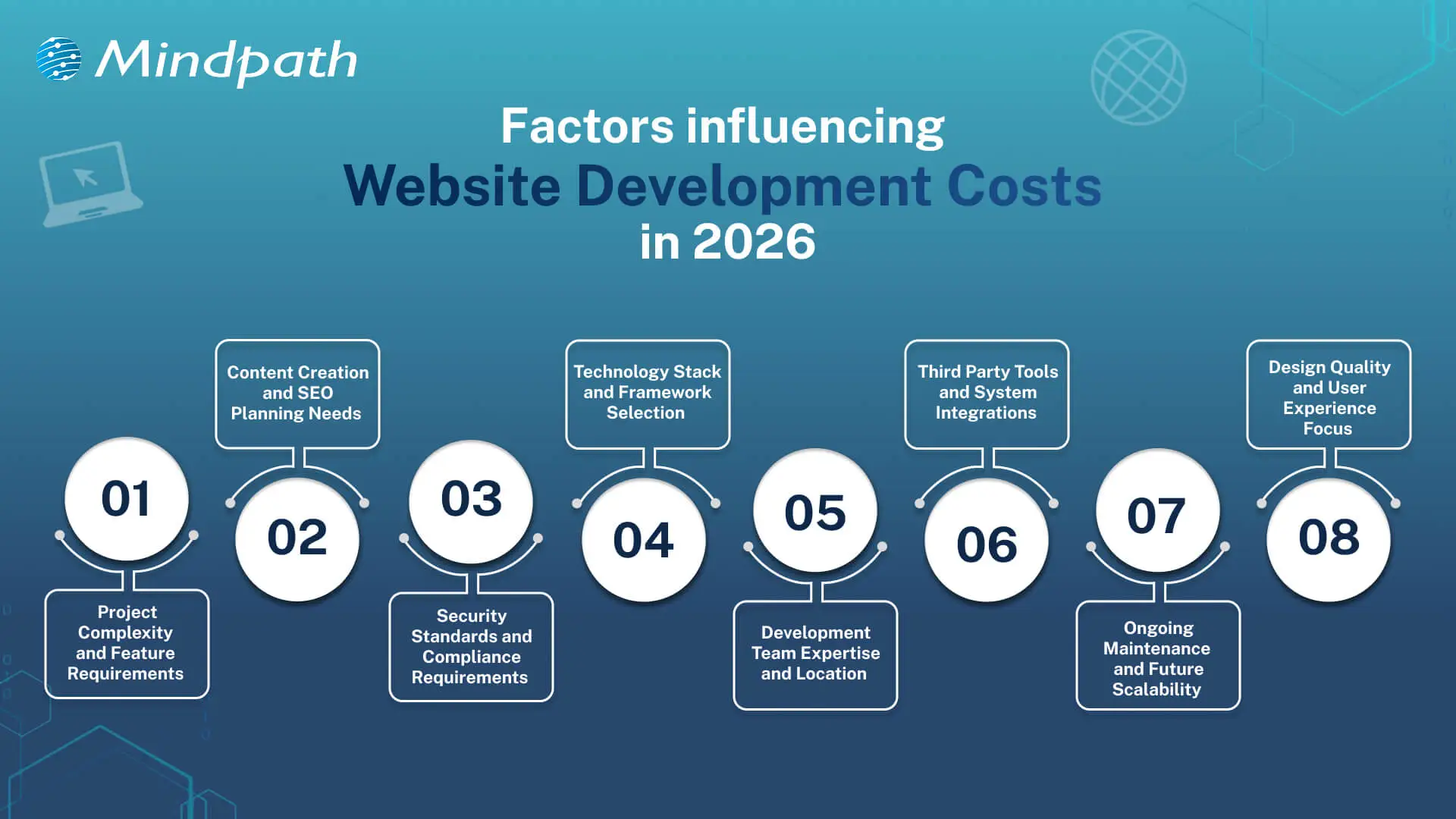
Factors Influencing Website Development Costs in 2026

1. Project Complexity

Basic websites are inexpensive and will satisfy fundamental requirements. The inclusion of more specific features like e-commerce or user accounts complicates and adds more planning. All these additions increase the average website development costs.

2. Content and SEO Requirements

Excellent content is advantageous to the user and the search engines. Establishing the SEO takes serious planning and technical effort. This increases visibility but increases the budget.

3. Security and Compliance Needs

Secure websites save the data of users and maintain the reputations of the business. Compliance regulations impose additional development phases, which introduce relevant layers of costs.

4. Technology Stack Choices

The contemporary tools determine the strength of a web site. It is time-consuming to work with AI, AR, and sophisticated frameworks. This option has a powerful influence on the website development costs.

Curious why some web projects cost more than others? Discover web development tools and see how technology choices influence productivity and expenses.

5. Development Team and Location

Expert teams provide scalable and stable websites. Compared to freelancers, agencies are more expensive due to their wider knowledge. Location is also a factor that affects rates and total expenditure.

6. Third Party Integrations

Websites usually have a connection with payment or CRM tools. Additional setup and testing time is added in every connection. An increase in integrations implies increased development effort.

7. Maintenance and Scalability

Websites need updates after launch. Hosting, fixes, and growth planning require steady investment. These costs support long-term performance and ROI.

8. Design and User Experience

Good design improves trust and user flow. Custom layouts need research and testing across devices. This work increases value and raises the average website development cost.

Looking to understand how emerging trends affect website development costs? Check out the latest web development trends to see how new technologies and practices influence project scope.

Understanding Website Development Costs

Website development costs depend on planning, technology, and business goals working together. Understanding these costs helps businesses make smart decisions before starting development.

1. Enterprise Website

The cost usually starts from £50,000 and can exceed £150,000 based on scale. Pricing increases due to security, integrations, and multi-language requirements.

2. Single-Page Website

Costs typically range between £250 and £800 for a basic setup. The price stays low because development time and features remain minimal.

3. Custom Web Platform

These platforms cost between £15,000 and £75,000 or more depending on logic. Higher costs reflect custom development, testing, and long build cycles.

Curious how web development costs compare to full-scale software projects? Discover software development cost insights to understand long-term budgeting and investment planning.

4. Small Business Website

The average cost falls between £800 and £3,000 for 5 to 10 pages. Pricing depends on CMS use, design level, and basic SEO setup.

5. E-Commerce Website

Costs usually start around £2,500 and can exceed £20,000. The final price depends on products, payment systems, and inventory complexity.

6. Advanced Brochure Website

Pricing ranges from £3,000 to £8,000 for custom design builds. Costs rise due to animations, performance hosting, and lead-focused features.

Planning your web development budget more effectively? Explore web development technologies to see how choosing the right stack affects cost and performance.

Ready to Plan Your Website Budget with Confidence?

Planning a website in 2026 needs clarity and smart thinking. Costs connect with design, features, security, and growth plans. Website development costs change with every decision you make. Clear planning avoids confusion later. It also helps balance value and spending. When you understand web development pricing, you invest with purpose and confidence.

Mindpath web development services focus on clarity, quality, and growth. Our teams plan projects with clear goals and transparent charges for website development. We build secure, scalable websites that support real business needs. Every solution balances performance and cost. With Mindpath, planning stays simple and results stay strong.

Related Post

Discover the basics of Large Language Models (LLMs) and how Mindpath can help you build a customized AI solution to enhance efficiency and drive innovation.
Unlock the power of Node.js for scalable web apps. Discover expert tips for hiring the perfect Node.js developer for your project with Mindpath.

Related Post

what is data-decision making

Every prosperous company in today’s modern world relies on insights, not on instincts. The importance of data-driven decision-making is that it turns the daily choices made by human beings into strategic moves guided by genuine facts. Businesses that rely on data are better positioned to identify new opportunities, make decisions faster to adapt to change, and make decisions accordingly to grow. Data-driven decisions are the difference between guessing your next step and knowing your next step. 

As companies embrace data as a trustworthy guide, they promote a culture of clarity and accountability. Decisions are sharper, and strategies are more in sync with customer and market needs. This pragmatic use of data helps organizations to keep their focus on the future and to remain competitive in today’s digital-first environment. In this blog, we are going to outline why data-driven decision-making is a crucial component of contemporary business success.

Data-driven decisions help businesses move with clarity and confidence. With our AI development services, you can turn complex data into valuable insights that improve performance and drive growth.

What is Data-Driven Decision Making?

Data-driven decision making (DDDM) refers to making business decisions on the basis of facts, figures, and analysis rather than personal opinions or gut feelings.  It reduces uncertainty by collecting data from various sources that examine the relationship between actions taken, such as customer behavior, sales tracking, or market data on trends, to identify what is really working for the business.

When organizations use this approach, they make data-based decisions with direct evidence that reduces risks and reveals new opportunities. Analyzing data patterns enables businesses to plan more effectively and achieve success easily.

Must Read: AI in Decision Making

Here are the key fundamentals of data-driven decision-making:

1. Focus on Business Goals

Every data initiative must have a direct link to business goals. When teams better define their objectives, they can evaluate data with intention and make decisions that result in observable growth for the business.

2. Keep Data Clean and Reliable

All insights must be accurate, and therefore, the data must be from a trusted source. Ongoing checks for data quality and best practices in data cleaning should be conducted to guarantee decisions are based on sound data and not on missing or stale data.

3. Use Data as Proof, Not Assumptions

Effective decisions are built on true evidence. The importance of data-driven decision-making is that it eliminates the guessing and offers visibility that leads the decision-maker to act faster and more reflectively.

4. Make It a Continuous Effort

Data-based decision-making is an integral process. Companies should be consistently collecting, monitoring, and analyzing data so they can keep pace with shifts in market trends and customer needs.

5. Encourage Team Collaboration

Strong insights often develop in collaboration. When departments share their insights and discuss results, they create a collective plan that produces better and more consistent outcomes.

Want to know how modern businesses manage and analyze large volumes of data efficiently? Explore cloud‑native development to understand how cloud-native systems optimize data-driven operations.

The Importance of Data-driven Decision Making

Understanding the importance of data-based decision-making supports businesses in formulating better rationales and better results. It instills a culture of fact-based, accountable decision-making to foster growth and transparency in increasingly dynamic markets.

1. Smarter Communication Across Teams

Effective communication is one of the main benefits of data-driven decision-making. When all departments are working with the same reliable insights, updates are easier to share and alignment of goals is simpler. With transparency, collaboration is fostered, and coordination is improved. This enables leaders to make quicker, smarter choices for improved business performance overall.

2. Continuous Growth and Progress

The importance of data-driven decision-making is tied to its support for constant growth in the business. By looking at across practice areas to identify patterns that drive success, teams can recognize what affects success and improve decisions. Each decision that relies on evidence is a barometer for the future and ensures steady improvement. With time, this will fortify the organization and provide continued success.

3. Unlocking New Business Opportunities

Making decisions based on data allows organizations to discover new areas of growth and opportunities. When teams analyze customer behavior and market trends, they may identify opportunities that they never considered. This approach can result in more confidence in expansions, partnerships, and innovations. When focused by data, it allows the organization to have a distinct competitive advantage.

Must Read: Benefits of Using AI for Customer Service

4. Building Knowledge and Innovation

Organizations that leverage data-based decisions regularly outperform firms that don’t. Studies have shown that data-driven firms have higher productivity and higher profitability. When we start considering information to be a valuable asset, teams begin to actually have a learning culture, where information flows both ways. This kind of culture leads to smarter thinking and out-of-the-box problem-solving.

5. Reducing Costs and Avoiding Mistakes

Choosing to make decisions based on gut feelings can lead to poor and costly outcomes in a business scenario. When leaders choose to make decisions based on data, they are making decisions based on certainty that is based on fact, instead of hunches. Relying on evidence instead of instincts leads to companies using their resources more efficiently. More clarity leads to reduced time and waste and naturally occurs in the flow of achieving sustainable cost efficiency.

6. Adapting to Market Changes Easily

Another importance of data-driven decision-making is its ability to assist organizations in being adaptable. Market conditions change and customer expectations fluctuate, and data keeps companies prepared. When companies can monitor trends and performance as they are happening, they can react quickly and with confidence. This ability to be adaptive will help to keep organizations competitive, relevant, and profitable.

Wondering how different AI systems impact decision-making in organizations? Discover types of Artificial Intelligence – ANI, AGI, and ASI and see which technologies can optimize your business insights.

Ready to Strengthen Your Business with Smarter Data Decisions?

The importance of data-driven decision-making is that it enables an entity to convert unprocessed data into efficient and effective measures. Businesses using data as their main resource are in a position to make decisions without hesitation, spot trends quickly, and hence, execute plans deftly to reach a steady level of growth. It becomes their corporate culture that they have fact-based support for every decision made, which eventually results in enhanced operational efficiency, greater flexibility, and durability in a very dynamic business environment.

At Mindpath, we empower businesses to harness the power of data through our advanced AI development services. Our experts design AI-driven tools that simplify complex processes, enhance decision accuracy, and drive smarter outcomes. By combining innovation with intelligent data use, Mindpath helps organizations improve productivity, streamline operations, and achieve measurable results that strengthen their competitive edge in the digital-first business world.

AI implementation
Have you ever wondered how companies such as Amazon or Google come to decisions quickly and easily, and how they use technology to simplify complex tasks? The answer lies in Artificial Intelligence (AI). But how can you harness this powerful technology to transform your own business? In this blog we will explore the implementation of Artificial Intelligence which can be the solution for you. So, let us dive in! 

What is AI Implementation?   

AI implementation makes use of smart technology in making your business function better. It simply embeds AI tools into your daily activities to make them easier and more efficient. This could be anything from responding to customer inquiries to analyzing massive data or even predicting what the next possible sale to a given customer would be. Basically, this is meant to save time and improve customer service and think smarter. This way, your business will be able to grow and make your goals a reality very fast due to working smarter, not harder.  Artificial Intelligence is important in today’s world because it makes life and working procedures easy. It helps organizations in automating tasks, analyzing data, and making speedy decisions. AI improves healthcare by supporting doctors in the diagnoses of diseases and improves the customer experience within retail shops through the personalization of shopping activities. As technology grows, AI becomes even more vital in helping us innovate and stay competitive. 

AI Implementation Strategy    

1. Data Type   

If you really want to start leveraging the power of AI properly, then it becomes quite important to use the right model for your data type. Use models that treat pictures well for image data, those that understand the language for text, and those that track changes over time for time-based information such as stock prices. Using the appropriate AI model according to your data makes it work better and gives you more accurate results. 

2. Problem Complexity   

Keep in mind how complex your problem will be when using AI. Easy problems likely can be satisfactorily solved with some pre-trained model that has been set up for common issues. For more unique or complex problems, you will want an AI tailor-made for your requirements. Matching an AI model with your problem’s complexity enables much better results and effective solutions. 

3. Labeled Data  

Deep learning requires a lot of labeled data—information that has been tagged with correct answers. Check whether you have enough labeled data for the project to be executed; otherwise, you can use techniques such as transfer learning, where you get a model that is already trained on similar data. In that case, you can still have good results with limited labeled data. 

4. Managing Computational Resources  

While using AI, do not forget to think about what kind of computing power you have. Big models, like GPT-3, really eat through resources—of course, not all companies will have these resources. Therefore, ensure that your infrastructure can sustain the computing burden for the kind of AI model you intend to use. This way, it will align the needs of the model with your computing means, thus implementing both smoothly and effectively. 

5. Interpretability  

Consider the interpretability at which you need to understand how your AI model works. In domains like healthcare or finance—where models must explain their decisions to be compliant and build trust—choose AI models that are transparent enough to interpret and justify their outputs. 

Step For Successful AI Implementation   

1. Set Clear Goals and Objectives  

Clearly define what you want to achieve before implementing AI in business. Be specific on the problems that must be solved, the gains to be achieved, improve customer satisfaction, or boost productivity. Knowing the target will help in choosing the correct tools and technologies of AI for you. 

2. Find the Best Data Sources  

AI’s ability to work correctly depends on the use of relevant data sources. This can involve using either internally generated data, like customer information or financial information, or even external sources such as social media and news feeds. Ensure that data used is relevant, accurate, and up to date. 

3. Pick the Right AI Tools  

With the plethora of tools in artificial intelligence at your fingertips, select only those that work for your business. These could be machine learning, language processing, or even analytic tools. Consider things like cost, scalability, and usability in finding the right fit for your business. 

4. Create a Solid Data Plan  

AI systems require enormous amounts of data to perform well. Build a robust data plan indicating how you will collect, store, process, and analyze your data. This includes setting up data management policies, ensuring the security and privacy of your data, and architecting a data system that works for your AI needs. 

5. Invest in Training and Skill Development  

An AI business can only succeed past the tools if equipped with the right people for the job. Invest in training and education for workers so that they develop appropriate skills for working with AI. The upskilling may entail learning more about data science, machine learning, or other skills that are relevant in AI. This will equip your team to effectively use the AI system to maximize its benefits. 

6. Start with Small Projects and Expand  

AI implementations can be very complex and time-consuming. Start small, engage in doable tasks that will yield some sense of how AI works for you in business. Test it in only one area or department of your business. From the experience and confidence, you will build from these first projects, over time, you can spread AI to other areas of your business. 

7. Monitor and Adjust 

Once your AI system is in place, monitor its performance. Key metrics should be observed, which include accuracy, speed, and efficiency. Monitor user feedback and adjust your AI algorithms or data strategy accordingly. Regular adjustments help ensure that your AI will continue working effectively for you.

Ready to take your business to the next level with AI?

At Mindpath, we offer cutting-edge AI development services designed to enhance efficiency and drive innovation.

AI Development Services at Mindpath    

Enrich your business with cutting-edge AI development services at Mindpath. We deal in predictive analytics, helping you foresee future trends and make decisions in advance. Machine learning applications will let you create automated decision-making for the enhancement of operational efficiency in your business. Additionally, data-driven insights are delivered to let your business understand and act upon the data appropriately. Our Business Intelligence services turn raw data into insightful visualizations and comprehensive reports so that you have a view of the performance of your business from a bird’s eye perspective. You could, therefore, make informed decisions that would drive strategic planning and make processes optimized with data-driven intelligence.  We also offer conversational AI services in developing smart chatbots and virtual assistants that increase engagement, provide real-time support, and automate tasks to create a seamless, highly personalized experience for users. At Mindpath, our AI development services are designed to innovate efficiency in your business to make it thrive in the rapidly changing digital landscape. 

Conclusion 

Artificial Intelligence offers transformative power to any business that can innovate and adapt. It aids in understanding and implementation of artificial intelligence at each level of your journey—from defining clear goals and selecting the right tools for your job through managing data—so that you unlock new levels of efficiency and insight. The AI development services offered at Mindpath will help you harness this power by turning complex data into actionable intelligence and automating processes for fueling growth. Embrace the future of technology with AI and see your business not only competing but leading in today’s dynamic market. 

Want to see how AI can revolutionize your business?

Mindpath’s expert team is here to help you leverage advanced AI technologies for smarter decision-making and greater success.

Discover how AI can revolutionize your business with predictive analytics, machine learning, and conversational AI for smarter decisions and improved efficiency.
WordPress maintenance
Is your WordPress site running as smoothly as possible? Do you know what kind of essential maintenance activities should be done on your website to keep it secure and running well? In this blog, we will explore the essential maintenance tasks that will keep your WordPress site in top shape. So, let’s dive in! 

Importance Of Website Maintenance   

Routine WordPress maintenance will help your website to be stable, secure, with better loading speed, and compatible with different browsers and devices. Regular backups guarantee that there is no loss of data in case of website crashing or malware attacks. Up-to-date plugins will ensure that slowdowns and security risks are prevented. Monitoring and analytics on user behavior help you make informed decisions and optimize your content. This provides better maintenance of your website, thus keeping it in top shape, and gives a better experience to the visitor. 

How Much Does WordPress Maintenance Cost?  

The cost of maintaining a WordPress site will be based on the size and complexity of the website. Routine maintenance in 2024 can range from as low as $5 a month to $120 per month or $40 a year to $1,200 a year. For a personal site, maintenance might be as low as $4 a month or $40 annually. Business sites usually start at about $8 per month or $80 per year. The pricing for running corporate websites is usually in the region of $12 a month or $120 yearly. The websites related to entertainment and eCommerce usually cost more, with the former starting at $16 per month and the latter at $20 a month. Routine maintenance includes updating plugins, themes, and WordPress core, managing backups, ensuring security, and keeping up performance. 

The Complete Checklist of Monthly WordPress Maintenance Tasks   

1. Optimize Your Database   

Over time, your WordPress database can become bloated with extraneous data from things like old post revisions, spammy comments, and deleted items, which slow down your site. To clean up your database, first back it up using a tool like Solid Backups to ensure all your data is safe. Then use a plugin such as WP Optimize to clear out any unnecessary data and boost database performance. Alternatively, if you know how to manipulate a database, you can clean up manually with phpMyAdmin. This method is useful when custom settings must be considered, and in all probability, it would be good to talk this over with a developer in case you are unsure. 

2. Manage Backups   

Backing up your website is something you should do regularly for safety against losses and quick recoveries in case of issues. Besides, with Solid Backups, you can configure backups automatically by using the plug-in known as UpdraftPlus. Schedule the backups frequently and let them be safely kept in the cloud, optimally. Moreover, review the process of restoration month by month to confirm that your backup procedure is working well, and in case of need, you will be in a good position to recover your site. 

3. Update WordPress Core, Plugins, And Themes   

WordPress core, theme, and plugin updating have implications for security, compatibility, and accessing new features. According to the Wordfence 2022 State of WordPress Security report, plugins in particular are a weak point, so keeping them up to date is very important. Keep checking for updates, and when found, update them one after the other. Begin with the WordPress core and then proceed to plugins and themes. Remember to always back up before doing any big update and update on a staging site so you can be sure everything works well with your current setup. 

4. Perform Security Scans   

Security scans to vulnerabilities, malware, and unauthorized access should be regularly scheduled. Run full site scans with a plugin like Shield Security, check the logs for any suspicious activity, and configure settings. You should, however, schedule these scans to run periodically, but at least revise them once a month. 

5. Analyze Site Speed   

A website’s speed has a massive impact on user experience and SEO. Among others, you can use Google PageSpeed Insights, GTmetrix, or Pingdom to check how fast your website loads. After testing, fix performance issues of your website against the results. If the speed problems continue, see if there’s a need to review and upgrade your hosting plan. 

6. Check For Broken Links   

Checking for broken links is important both for delivering a good user experience and SEO. Broken links may make visitors and search engines end up in so-called ‘dead ends,’ harming your site’s rankings and authority. Run a check using a plugin such as Broken Link Checker. Thereafter, repair or remove broken links upon finding them, possibly looking into scheduling automated checks to help identify new broken links in the future. 

7. Optimize Images   

Optimizing images will help to increase your site speed and performance radically, particularly when you have a heavy share of images on the site. Tools like Smush or ShortPixel do really well when it comes to compressing existing images. Remember the right formats—JPEG for photos and PNG for graphics where the requirement is transparency. Enable lazy loading; this defers the loading of off-screen images to further speed up page load times. 

8. Submit Your Sitemap   

Making sure that you are regularly submitting your sitemap to search engines will let them index your website in a better way and give you more exposure. Use a plugin such as Yoast SEO to create an updated sitemap, then take the time to manually submit this to search engines via their webmaster tools—like Google Search Console—to check that all your pages are correctly crawled and indexed for maximum search engine visibility. 

9. Monitor Site Performance   

Monitoring your site’s performance frequently will let you know when there is a problem. It helps in making informed decisions and will let you act swiftly. Use tools like Google Analytics and Jetpack to look through key metrics such as page views, bounce rate, and conversion rates. This setting of performance alerts about major changes or problems will let action be taken in time and thus your site runs smoothly. 

10. Test Your Forms   

Testing of forms at regular intervals is paramount to ensure that they work right and harvest data from users effectively. All forms should work well, and process input correctly. Check that email notifications are going to the right addresses, then test for user experience to make sure forms are usable, accessible, and responsive on different browsers and devices. 

11. Clear Site Cache 

It ensures that your site visitors have the most recent content. In addition, it will boost your website’s performance. Sometimes, cached data can become corrupt or outdated, causing display issues and slowing download time. Flush the server cache, then reset any plugin-built caches. Test your site for improved performance after flushing the cache. This can also be done in many ways depending on your unique setup. If you are not comfortable doing it yourself, use something like WP Super Cache and W3 Total Cache

Ready to optimize Your WordPress Experience?

Learn More About Mindpath’s Maintenance Services!

WordPress Development Services at Mindpath   

At Mindpath, we ensure your WordPress website runs at its best with comprehensive maintenance services. This includes regular updates to WordPress Core, plugins, and themes; daily backups for data security; and optimization of the performance of the site so that it loads faster. Our team conducts security scanning to save from threats, monitors and fixes broken links, and looks through analytics to bring about better user engagement. We test forms to make sure they are working well. You just focus on your business while we keep your site secure and efficient with our expert maintenance. 

Conclusion 

Maintenance, on the other hand, will ensure your WordPress site is not only smooth, safe, and high performing, but it will also be defended from many problems for the best user experience. From checking for broken links to analyzing site speed or running security scans, every step is important in keeping your website at its best. 

At Mindpath, we cut down the complexity of WordPress maintenance by offering every necessary service in one place to keep your site in top condition. Let our team take care of updates, backups, performance optimization, security checks, and more, so you can focus on growing your business while we work on keeping your website reliable and engaging. Our expert team at Mindpath makes sure your WordPress site is running at peak performance, ensuring you can get on with business and not worry about it. 

Want to achieve a Faster, Safer WordPress Site?

Find Out More About Mindpath’s Maintenance Solutions!

Ensure your WordPress site runs smoothly with essential maintenance tasks like updates, backups, security scans, and performance optimization.