Custom WordPress Development: Why Your Business Needs It?

Join our Newsletter!

Featured Posts

Support Is One Click Away

Home

Custom WordPress Development: Why Your Business Needs It?

custom wordpress development

Custom WordPress Development: Why Your Business Needs It?

In the rapidly changing digital age, your website is more than just a digital face or a virtual business card. It creates a foundation to support your brand identity, marketing strategy, and customer experience. With more than 43% of websites powered by WordPress (source: w3techs), it is clear that WordPress is an excellent choice for website development. There are different pre-built WordPress themes that provide you with an affordable and easy way to bring your business online. However, they may not be able to meet the unique requirements of your growing business. This is where a custom WordPress development comes in.

Whether you are a local business, an enterprise, or a startup, a custom-built website can unlock performance, long-term growth, and brand credibility. In this guide, you will learn more about custom WordPress development and understand why it is crucial for your business. Besides, we will also discuss the best practices and how to choose the right custom WordPress development company to enjoy the desired results.

Want to elevate your online presence with a custom WordPress site tailored to your business objectives? Mindpath’s offers wordpress developemnt services that help you in creating a unique digital website that sets you apart from your competitors.

Custom WordPress Development- An Introduction

In simple words, custom WordPress development involves creating a website from scratch, tailored to your unique requirements. Instead of using pre-made themes or inefficient plugins, a professional WordPress developer utilizes tailored themes, functionalities, and plugins that align with your business goals. It gives you complete control over all aspects of your website, including performance, security, scalability, and design. Custom development can be an excellent solution for organizations looking for:

1. Advanced functionality

2. Unique custom WordPress website design and branding

3. Optimized SEO and performance

4. Hassle-free third-party integration

5. Robust security and long-term scalability

Custom WordPress development services can transform your generic site into a strategic digital asset to drive growth.

Now that you understand what it is, let’s understand the limitations of using a standard WordPress theme and the benefits you will witness by opting for custom development.

Must Read: Safeguarding WordPress Vulnerabilities

The Need for Custom WordPress Development

Pre-built themes are easy to use, and you can use them with minimal technical knowledge. However, they come with various drawbacks that can greatly affect your site’s potential.

1. Bloated Code

WordPress’s theme store has a lot of themes with a large number of unnecessary plugins and features. Such features and code can reduce your website’s performance, affecting ranking and user experience.

2. Security Issues

If the themes are not updated regularly by the developer, it can become a major security risk, damaging your business’s credibility.

3. Generic Design

You can find a pre-made theme being used by thousands of websites. Using them, it will be challenging for your site to stand out. Such themes lack uniqueness and may not meet your brand’s needs.

4. Lack of Functionality

Such themes offer limited functionalities and features. You will have to use additional plugins to add more features, and this can cause compatibility issues and reduced speed.

Planning upgrading your website but unsure if switching from HTML to WordPress is the right move? Learn the benefits of converting HTML to WordPress and how it can boost your site’s performance, scalability, and user experience.

Key Benefits of Custom WordPress Development

Generic themes may help you get your brand online, but as mentioned above, you will have to compromise on a lot of things. By opting for custom development services, you can create a tailor-made digital asset. Here are some major benefits of custom WordPress development.

1. Tailored Design

Your website should have elements to reflect your brand’s unique tone, personality, and value. Custom development lets you create a custom WordPress website design and a unique user interface based on your target audience. Developers can integrate creative layouts to boost user interaction. Besides, you can customize various website elements, from color schemes and typography to animation and layouts, to make your website stand out.

2. Enhanced Security

Custom WordPress websites allow you to add and configure advanced security mechanisms. This way, you can ensure data confidentiality, integrity, as well as availability. You can implement security measures like SSL certificates, custom security plugins, two-factor user authentication, data validation, and more.

3. Optimized Website Performance

Custom WordPress sites are faster as they don’t have unnecessary plugins and bloated code. As your site will load faster, you will witness improvements in bounce rates, SEO rankings, and user experience. Besides, developers can use techniques such as caching, lazy loading, CDN integration, and image compression to reduce load time.

4. Scalability

As your business expands, your website should grow with it. Custom WordPress websites are developed with future scalability in mind. It allows you to add new pages, new features, additional external tools such as payment gateways, CRM tools, and more. Custom WordPress development will make it easier to adjust your site for increasing traffic without facing any performance issues.

5. Optimized SEO Aspects

Custom websites have structured data, optimized speed, and clean code, which are crucial for better search engine visibility. Developers can use custom metadata, URL structure, and advanced schema markup to boost organic traffic.

6. Hassle-Free Third-Party Integrations

Do you want to connect your website with useful tools like Salesforce, Mailchimp, HubSpot, etc.? Well, custom website developers ensure seamless API integrations designed for your workflow. This will improve data flow as well as automation across multiple platforms.

7. Content Management Flexibility

With a custom site, users will enjoy flexible backend interfaces. As a result, non-technical users can easily manage content. Developers can create custom fields, taxonomies, and post types, simplifying content updates and publishing.

Are you unsure if your website development project is on the right track? Discover our WordPress developer checklist to ensure every critical step is covered for a smooth and successful website launch.

Major Components of Custom WordPress Development

A custom WordPress design and development may include multiple components based on your business goals. However, some core components are:

1. Custom Website Development

It involves creating a fully functional website with custom design, structure, functionalities, and features. It also includes performance optimization, layout design, navigation configuration, etc.

2. Custom Theme Development

Developers create unique themes that meet your brand identity. It includes creating responsive themes that can offer a seamless user experience.

3. Backend Customization

It covers customization of the admin panel to make it easy to use for users. Developers may add user roles, dashboards, custom taxonomies, and post types while prioritizing the site’s security.

4. Plugin Development

Developing custom plugins for your WordPress site that can help increase functionality without affecting performance. Experts focus on creating scalable and secure plugins based on your unique needs.

5. Migration Services

It includes offering migration services for hassle-free data transfer with minimal downtime.

6. API Integration

This process involves connecting your site with third-party platforms, marketing tools, CRMs, or payment gateways.

Want to make sure your WordPress website runs seamlessly with the latest technology? Discover how WordPress PHP compatibility can protect your site and enhance its performance.

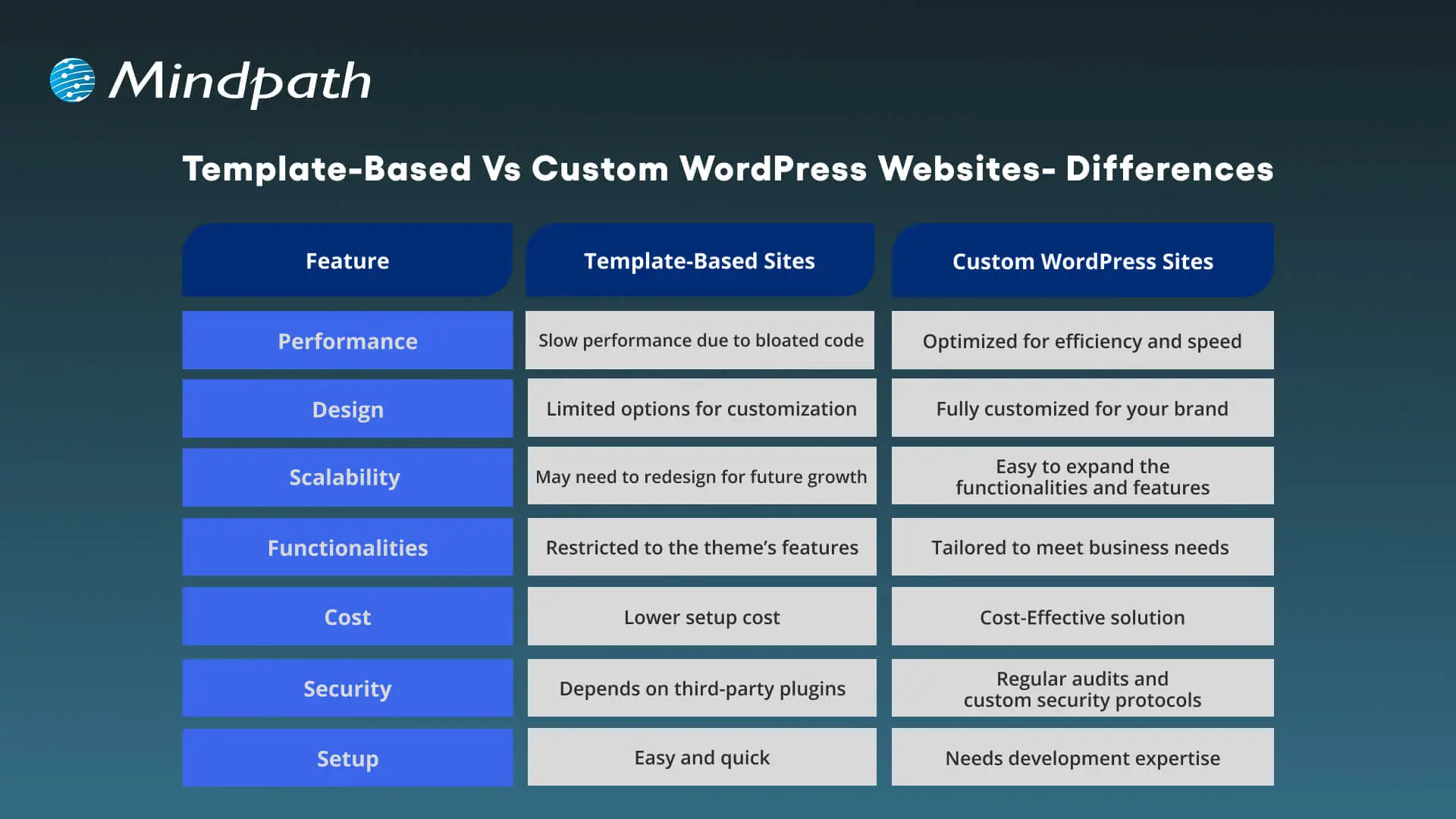
Template-Based Vs Custom WordPress Websites – Differences

Choosing between a custom WordPress site and a template-based site can greatly impact scalability, flexibility, as well as cost. Understanding the differences will help you make the right decision.
Template-Based Vs Custom WordPress Websites

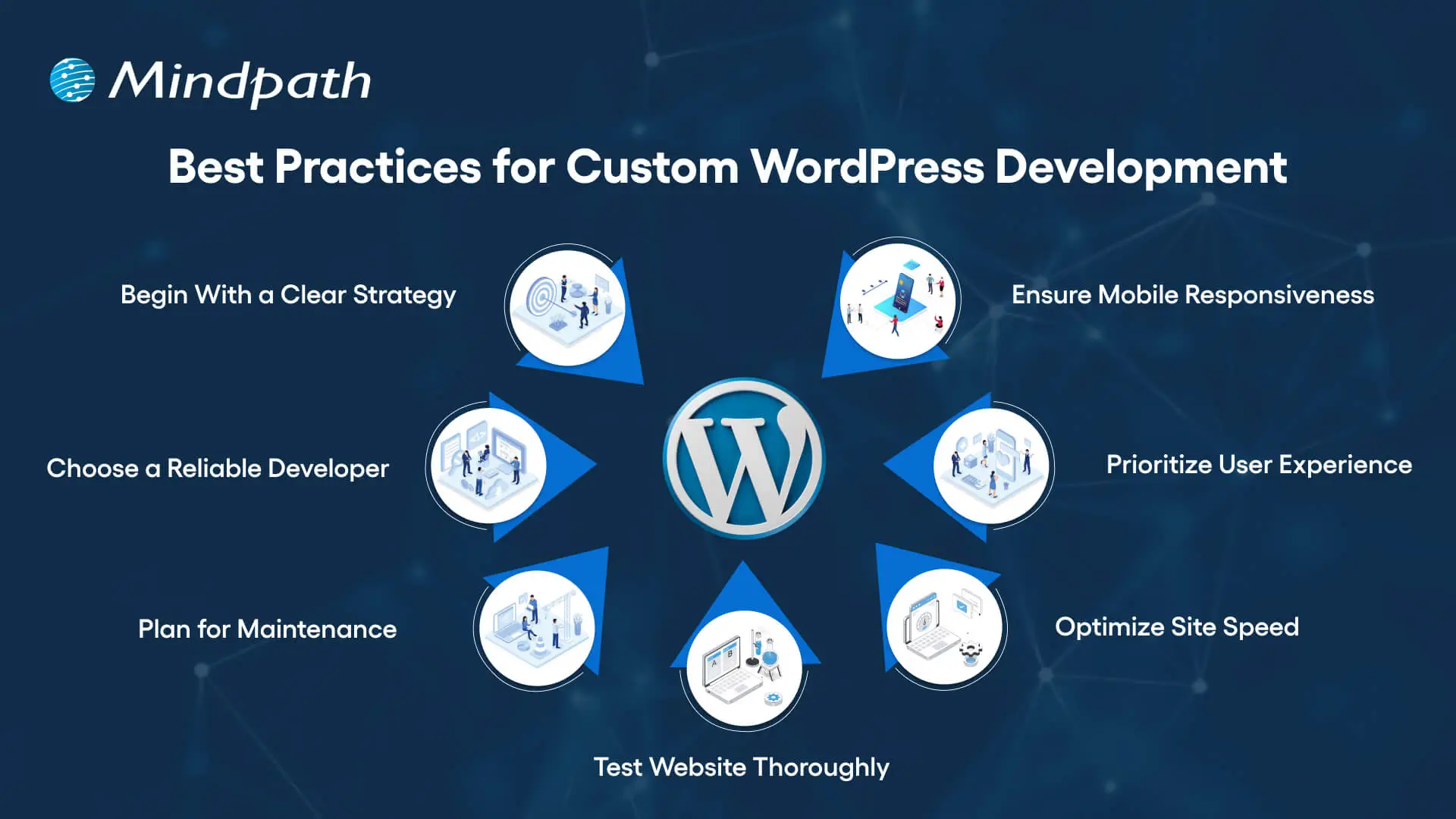
Best Practices for Custom WordPress Development

To make sure your new custom WordPress development project offers desired results, it is advisable to follow these best practices:
Best Practices for Custom WordPress Development

1. Begin With a Clear Development Strategy

Whether you need WordPress development for a small business or a large organization, you should first understand your target audience, desired functionalities, and goals. A well-documented strategy can help prevent scope creep, and you can ensure a perfect alignment between developers and stakeholders.

2. Focus on Mobile Responsiveness

With people increasingly using mobile phones and tablets for browsing, you should ensure that your website is responsive across all browsers and screen sizes. Custom WordPress development involves the use of a mobile-first design, which can boost SEO and usability.

3. Prioritize User Experience

Even though you have a beautiful website, it will be useless if users face issues while using it. An experienced developer will focus on a smooth user experience, making it easier for visitors to locate the things they need.

4. Optimize Your Site for Maximum Speed

Utilize techniques such as caching, image compression, CDN, and lazy loading to make sure your site loads faster. Tools such as Lighthouse, GTmetrix, Pingdom, and SEO Site Checkup can be used to detect bottlenecks.

5. Test Your Website Thoroughly

Before you make your site live, make sure that it has gone through proper testing. It helps identify compatible issues, loopholes, and missing functionalities. Prefer to carry out device testing, usability testing, and cross-browsing testing. Refine UX and optimize elements based on user feedback.

6. Plan For Smooth Maintenance

A custom WordPress site needs regular security checks, backups, and updates. So, create a proper maintenance plan or work with a professional WordPress developer to ensure constant support. Ongoing maintenance is crucial to keep your site functional and secure.

7. Partner With a Reliable Developer

Work with an experienced and trustworthy development company with a proven track record of offering quality WordPress website development services and creating high-performance websites. While helping you with technical execution, they can offer strategic input.

Do you want your website to be accessible to every visitor? Learn how to improve WordPress web accessibility can help you reach more users and create an inclusive online experience.

Tips to Choose The Right WordPress Development Company

Choosing the right expert for custom WordPress development is crucial to ensure success. While looking for the best one, prefer to consider the following points:

1. Evaluate The Experience

Ensure that the developer has years of experience in WordPress, especially in custom development. Go through their portfolio and check if they have ever created similar websites that you want to create. They should have a deep knowledge of the best practices and core functionalities of WordPress.

2. Technical Expertise

Confirm that the service provider has proficiency in JavaScript, CSS, MySQL, HTML, PHP, plugins, and more. Choose one with strong technical skills for the desired results.

3. Check Their Process:

Ask the company who they plan, carry out, and test the development projects. Ensure that they can offer a comprehensive custom development service based on your requirements.

4. Transparency and Communication

Only a trusted partner can keep you informed through the WordPress development project and will remain transparent about the costs and timelines. Choose one who prioritizes clear reporting and reacts to your queries promptly.

5. SEO Knowledge

The custom WordPress development expert should have a proper understanding of the latest SEO trends and be able to deploy necessary on-page optimization from the beginning. Furthermore, they should know how to configure different SEO plugins.

6. Post-Launch Support

Without regular updates and maintenance, your site will become vulnerable to various issues. So, partner with a development company that offers additional support along with maintenance services to keep your site performing at its best.

This is how you can hire an expert for professional WordPress web development to get your website listed higher in SERPs.

Wondering how to hire the right WordPress developer to help your business grow online? Explore our detailed guide to hire WordPress Developer to discover expert insights that guide you toward making the best hiring decision.

Looking to Elevate Your Business with Custom WordPress Development?

Undoubtedly, WordPress offers organizations the flexibility, affordability, and speed they need to start. Custom WordPress development is more than just writing code and creating a website. It is a strategic process to craft a unique digital experience that can effectively support your organizational goals, reflect your brand, and scale with you. It provides you with robust security, future scalability, and innovations that you will not get with template-based solutions.

If you want to elevate your business’s online presence and are looking for a future-proof platform, you can always count on Mindpath’s WordPress development service. As a leading WordPress development company, we combine custom development with scalable architecture and creative design to bring your unique vision to life. At Mindpath, we understand that every business needs uniqueness when it comes to developing a website. That’s why we offer tailored solutions that can set you apart from your competitors. We specialize in CMS development, custom plugin development, theme development, and more. Create a solid presence in this evolving digital landscape with us!


Frequently Asked Questions

1. Is custom WordPress development really worth the extra investment compared to just using a free theme?

For businesses serious about growth, yes. Free themes come with limitations that quietly cost more over time through poor performance, security risks, and constant plugin workarounds. A custom build gives you a site that actually works for your specific goals.

2. How long does a custom WordPress development project typically take from start to finish?

It depends on the complexity and features required. A straightforward custom site can take four to eight weeks, while larger projects with complex integrations and custom functionality can run three to six months. Clear planning upfront keeps timelines on track.

3. Can a small business afford custom WordPress website development, or is it only practical for larger companies?

Small businesses can absolutely invest in custom development, especially when the site is central to revenue. Many development companies offer phased approaches, meaning you build what you need now and scale later without rebuilding the entire site from scratch.

4. What happens to the website after launch and who is responsible for keeping it maintained?

Maintenance is often overlooked during planning. Regular updates, security patches, backups, and performance checks are essential. Most reliable development partners offer post-launch support packages so the site stays secure and functional well after it goes live.

5. How do you know if the WordPress development company you are considering is actually the right fit?

Look beyond the portfolio. Ask how they handle communication, testing, and unexpected problems mid-project. A good partner is transparent about timelines and costs, asks the right questions early, and treats your goals as their own throughout the entire process.

Related Post

Explore how healthcare software development enhances patient care and operations. Discover services like EHR, medical databases, and more. Transform your practice today!
Find out what makes a great ReactJS developer! Explore core skills like component-based architecture, hooks, state management, and more.

Related Post

Web application scaling 

Growing a digital product in 2026 means having to think smarter and act sharper. Web application scaling is a permanent debate of teams that desire continuous growth without performance problems. The higher the user demand, the higher the expectations of speed, reliability, and experience. The pressure mounts up as the traffic increases, and systems become overstretched. This is a moment that is forcing businesses to reconsider the level of preparedness of their platforms.

As the growth escalates, all the technical decisions start to have an impact on stability and user trust. Thus, teams need to think ahead and at the same time, they need to be flexible to change. Scaling must help in momentum rather than decelerate the momentum. An effective strategy assists companies in managing growth with certainty and sanity. When properly done, growth becomes purposeful and manageable instead of being in a rush. The purpose of this blog is to explain how to tackle the idea of scaling websites in 2026 with importance and intent. Are you worried about scaling web applications? Keep reading further to know the best strategies!

Want to ensure your website can handle rapid growth without compromising performance? Mindpath’s web development services help you build scalable websites that grow with your business.

What is Web Application Scaling?

Web application scaling refers to developing an application that is capable of expanding without compromising its speed and performance. It assists apps to deal with additional users and operations without obstruction. Scaling web apps aims at maintaining consistency of performance as demand grows. Teams design systems which remain steady in the process of expanding. This will secure user experience and will help to grow the business in the long term.

With the increase in the number of users, apps need to adapt resources to prevent delays in loading or failure. In order to scale web application capacity, teams anticipate increased traffic and usage. An online service can increase to hundreds and thousands of users each day. This phase of growth ensures that pages remain fast and reliable with smooth interactions as a result of proper scaling.

The following are 2 main types of web application scaling:

1. Horizontal Scaling

Horizontal scaling involves the addition of additional servers to distribute the load. Traffic is distributed through a number of systems and this enhances stability and reliability. This approach increases scalability of web applications and it helps to grow without putting strain on individual server.

2. Vertical Scaling

Vertical scaling refers to the improvement of a single server to support additional work. Teams can be used to increase the CPU, memory, or storage in order to enhance performance. This is a method of maintaining scalability in web applications, but it ceases when the server gets saturated.

Planning to grow your website without compromising security? Discover application security best practices for web and mobile apps to check out strategies for safe and reliable scaling.

Effective Strategies for Web Application Scaling

Modern web application scaling needs proper planning and solid technical selection. In order to scale application growth without failure, teams should create scalable applications that remain fast, reliable and available to the growing demand of the user base. The right scaling strategy encourages long-term performance and contributes to the expansion of businesses.

1. Design for Flexibility First

A flexible structure facilitates growth and not confusion. Smaller services maintain system organization and are easy to manage. The teams make updates more quickly, without working on the entire product. This architecture will enable scalable web applications and alleviate technical pressure on a long-term basis.

2. Make Data Systems Growth-Ready

Powerful data processing maintains apps at high-speed in the case of expansion. Readable schemas assist systems to access information faster. Smart indexing also minimizes the unnecessary work of the database. The steps will create an effective base for web application scaling as the use of the application grows over time.

3. Balance Traffic Across Systems

Evenly distributed traffic maintains the stability of systems. There are several servers that distribute the workload. No individual server is overstrained. Such a balance enhances uptime and improves scalability in web application environments when it is at its peak.

4. Manage User Sessions with Care

Applications are usually executed on more than one server. State in one system should remain accessible in other systems. Interactions are consistent in external session storage. This would ensure that there is a reliable scalable web application experience among the users.

Must Read: Custom web application development

5. Reduce Load with Smart Caching

Caching keeps the repeated data nearer to the users. Reduced system effort is through faster access. Many repeated requests are not processed by the servers. The caching is more efficient in Web application scaling processes by enhancing speed and reliability.

6. Scale Resources Based on Demand

Traffic does not always remain at the same level all day long. Auto scaling will adjust the resources according to the change in usage. There is no lost capacity or performance loss within teams. This approach promotes a regulated expansion of any scalable application.

7. Speed Up Content Delivery

The speed of content delivery enhances customer satisfaction. CDNs will be used to serve files that are local. Smaller assets take shorter time to load in any device. Accelerated delivery enables platforms to scale to any part of the world without slowdown.

8. Watch Performance in Real Time

The growth requires constant visibility. Performance data illuminates the areas of weakness in an early stage. The notifications are directed at teams to take action when concerns extend. Real-time monitoring assists in making successful and predictable scaling choices.

Looking to scale your website smoothly without technical bottlenecks? Check out right tech stack for your web application to learn how the right stack ensures stability and speed.

Core Challenges of Web Application Scaling

Web application scaling is associated with distinct challenges that may influence the performance and user experience. The identification of the major issues assists the teams in planning more effectively and reaching the level of scalability in websites.

1. Limited Flexibility in Large Codebases

Monolithic systems are more difficult to upgrade and expand since each feature is closely interconnected. This restricts web application scalability and impedes the attempt to scale web sites effectively.

2. Slow Database Operations

Slow response is caused by inefficient queries and inefficient database structure. During the growth, teams find it difficult to preserve the performance, which influences the web application scaling.

3. Unequal Traffic Distribution

Excessive load balancing overloads certain servers but leaves others with nothing to do. This slows the web application scalability and also reduces reliability.

Must Read: High Performing Web Apps Features

4. Managing Sessions Across Multiple Servers

It becomes complicated in order to synchronize user sessions among numerous servers. Due to lack of planning, it restricts the ease of scaling of the web site.

5. Challenges in Caching and Data Updates

Incorrect cache management can serve outdated information to users. This disrupts web application scalability and reduces the effectiveness of scalable web applications.

6. Latency Issues for Distant Users

Applications with users spread across regions may experience slow response times. High latency can affect web application scaling and overall user satisfaction.

Want to plan your website’s growth with a clear development strategy? Explore web app development roadmap to learn how a structured plan ensures smooth scaling.

Ready to Scale Your Web Application Confidently?

Building a scalable web application requires careful planning, smart architecture, and efficient resource management. Teams must focus on performance, reliability, and growth readiness. By balancing traffic, managing sessions, optimizing databases, and implementing caching strategies, businesses can ensure smooth expansion. Following these strategies helps maintain speed, stability, and a strong user experience while scaling for increased demand.

At Mindpath, we help businesses develop scalable web applications through expert web development services tailored to growth and user needs. Our experts design flexible architectures, optimize databases, implement auto-scaling, and improve content delivery. We ensure your app remains fast, reliable, and ready for any increase in traffic. Partnering with us guarantees smooth growth, strong performance, and a consistent user experience.

conversational AI use cases

Businesses are becoming keen on smarter ways to engage their customers and streamline their overall operations. This is where conversational AI has stepped in as a foremost option. As per the reports of McKinsey, around 78% of companies have integrated conversational AI into at least one of their major operational areas. Further, most of them are achieving steady returns and better efficiency. According to the recent reports, around 80% of organizations are planning to adopt AI-integrated solutions for customer service improvement.

So, starting from intelligent virtual assistants to automated customer support, conversational AI use cases have been rapidly growing across industries. But what exactly makes this technology so superior in the recent age? Let’s find out the reason in this blog along with its major use cases.

Looking to leverage AI to automate processes, enhance decision-making, and drive business growth? At Mindpath, we offer AI development services that help businesses build intelligent, scalable solutions tailored to their unique needs.

Conversational AI

What are Conversational AI Solutions?

Conversational AI is known to be a major subset of artificial intelligence that enables you to have human-like interactions between humans and computers. It uses natural language processing and machine learning to access machines to understand processes and respond to human language.

Further, it mimics natural human-like conversations. Conversation AI solutions have made a significant impact in multiple industries while easing the customer servicing efforts.

How Does Conversational AI Work for Multiple Industries?

If you have ever thought, “How does conversational AI work?”, it adopts the relevance of multiple technologies as listed here.

  • Natural Language majorly helps AI to understand your language and the intent of your customers.
  • Machine learning enables you to assess the past interactions of the customers while improving them for the betterment.
  • Speech recognition can convert your voice into text through voice-based assistants.
  • Context management ensures the conversations are error-free and maintains human-like emotions.

Top Conversational AI Use Cases that Are Benefiting Industries

You will be going through some of the most relevant conversational AI examples and applications in this section. Additionally, these use cases have been leveling up the operations and engagement.

1. E-commerce

When we think of e-commerce trends, conversational AI chatbots can be very prominent. Additionally, it improves customer satisfaction by helping them with the purchase.

  • AI chatbots offer personalized product recommendations based on your user behavior & assist them with order tracking.
  • Further, it helps with recovering the carts by helping customers in real-time.
  • By offering real-time assistance during checkout, it can boost conversions.

2. Customer Support Automation

This is one of the most adopted conversational AI applications. Businesses use AI-powered chatbots to manage high-volume customer queries quickly and conveniently. Moreover, these chatbots can instantly answer your queries while eliminating common issues.

  • It sends complicated tasks to human agents where it needs more factual assessment.
  • This feature decreases response time while supporting you throughout the journey.

3. Lead Generation

Conversational AI can easily automate the lead generation process.

  • AI bots can catch the attention of users through interactive conversations. Further, it gathers necessary data for future usage.
  • It assesses responses and can identify high-quality leads and prioritize them for the sales team.
  • This ensures that your business can focus its efforts on prospects with higher conversion potential. Further, it can save your time and overall sales efficiency.

4. Healthcare Assistance

Conversational AI is broadening engagement while making medical assistance accessible to many patients at a time. This is one of the incredible benefits of conversational AI for business.

  • AI systems can help you with appointment scheduling & symptom assessments.
  • Offer mental health support through guided conversations.
  • Such tools can ease the stress of healthcare practitioners & can offer needed assistance to patients.
  • Moreover, they ensure continuous assessment & follow-ups. This way, your healthcare delivery will be much more efficient & result-oriented.

5. Banking and Financial Services

Financial organizations are using conversational AI to offer secure, fast, and efficient customer interactions.

  • AI chatbots can handle tasks like checking account balances and offering transaction updates. Moreover, it can make you aware of fraudsters in real-time.
  • These features can satisfy your customers while making you follow strict regulations.
  • By automating your routine banking efforts, you can minimize the operational charges while making the digital experience error-free.

6. Human Resource

HR departments are mainly using conversational AI to streamline recruitment and employee engagement processes. Further, AI chatbots can screen candidates while scheduling their interviews at their convenience.

  • The tools can help your team with HR related questions, such as onboarding steps and leave policies.
  • This can also ease the burden of administrative workload while improving the hiring process.
  • It also keeps the discussion between the candidates and the employees clear.

7. IT and Helpdesk Automation

Conversational AI is mainly used in IT support to automate repetitive and time-consuming tasks.

  • AI bots can easily erase technical glitches and can guide your users through complete solutions. Further, it can help with password resetting and instant support.

Want to see how evolving AI trends are enhancing the capabilities of conversational AI? Discover the top AI trends that are driving innovation and growth.

Real-World Adoptions of Conversational AI

Here are some top conversational AI examples across multiple industries throughout the world.

Real-world Examples of Conversational AI
Amazon AlexaIt can answer your queries, play music and manage smart home devices.
Apple SiriIt is only available on iOS devices and employs voice interactions to send messages or schedule reminders.
Google AssistantIt can promptly follow your voice to execute tasks like sending text messages.
CortanaIt is Microsoft’s personal productivity assistant that executes a series of functions.
Samsung’s BixbyBixby can perform multiple functions like fetching location-specific weather updates, sending messages and much more.

Conversational AI Industry Trends

The conversational AI industry is evolving rapidly, shifting through valuable advancements. Some of the major trends have been given here.

  • Conversational AI is acquiring more power by adopting generative AI tools.
  • Virtual assistants have been growing in number. Around 69% of companies claimed that these assistants have helped them improve their customer service.
  • Multilingual conversations have also been drawing the attention of customers from any cultural background.

Bottom Line

Conversational AI has given rise to a new era of possibilities across major industries. Its integration into the sectors has majorly changed how businesses engage with customers and streamline their internal operations. Conversational AI solutions are helping businesses operate more efficiently with advanced inclusions.

If you also want to unlock such opportunities, Mindpath stands out as a prominent choice. With our AI development services, companies can seamlessly implement conversational AI into their workflows while staying ahead in the digital world.

Conversational AI

FAQs

Are Chatbots and Conversational AI Similar?

Chatbots are generally common applications, whereas conversational AI is the major underlying technology that empowers them.

What are Some Evident Applications of Conversational AI?

Conversational AI works with NLP and ML to understand the users’ requirements. It also offers accurate responses in real-time for better engagement.

Which Industries Utilize Conversational AI the Most?

The conversational AI industry is widely adopted in the e-commerce sector. It is also widely adopted in the healthcare and banking industries.

How Long Does It Takes to Integrate Conversational AI Systems?

The timeline for the implementation varies depending on the approach, along with the complexity of your use cases.

Is Conversational AI Safe for Handling Sensitive Data?

When it is implemented correctly on a secure platform, conversational AI is completely safe with sensitive information.

Cloud cost optimization

Cloud expenses continue to grow with the expansion of apps, new services, and bolt-on speedy releases. Cloud cost optimization is now the core of every intelligent IT plan. You spend on flexibility and speed, but at the end of the month, you are surprised by the costs, which often exceed your budget due to unforeseen usage spikes and the complexity of managing multiple cloud services. So, what drives this gap? More importantly, how can you gain control without hindering innovation?

Contemporary companies require performance, safety, and swiftness simultaneously. Uncontrolled resources, idle work loads and lack of visibility, however, consume budgets very fast. Hence, leaders should reconcile finance and engineering using well-defined cost objectives. Intelligent budgeting turns cloud expenditure into quantifiable value. This blog will show a practical way of gaining control of cloud investments.

Ready to take control of your cloud costs and get more from your investment? Mindpath offers cloud infrastructure services to help businesses optimize cloud usage, reduce waste, and scale efficiently.

What is Cloud Cost Optimization?

Cloud cost optimization refers to the utilization of cloud resources in a smartest manner to prevent wastage and manage costs. Companies check the usage, eliminate unnecessary services, and select appropriate pricing frameworks. This will enhance performance and minimize the unwarranted expenditure as well as keep cloud investment in line with the business objectives.

Cloud cost management helps in this endeavor to track, analyze, and plan cloud expenditure. Teams create the budgets, keep track of their usage, and reallocate the resources according to the demand. A combination of these practices aids companies in becoming financially clear, enhancing efficiency, and making superior decisions in long-term growth.

Must Read: Cloud Computing Trends 2026

Why is Cloud Cost Optimization Important?

Cloud services enable businesses to invest heavily in order to achieve growth, speed, and innovation. The reasons why cloud cost management is of critical importance in safeguarding budgets and enhancing financial control are as follows.

benefits of cloud cost optimization

1. Maximize ROI

Cloud expense optimization enables businesses to match expenditures with objective goals. They make sure that each dollar helps in growth, performance, and quantifiable business worth.

2. Eliminate Waste

Teams eliminate wastage of resources and storage before their expenses increase. Cloud cost optimization assists businesses in ceasing spending on services that are unnecessary.

3. Improve Performance

Organizations right-size the workloads on the basis of actual demand. This balance is also fast and reliable, as it keeps the costs down, which ultimately supports the organization’s ability to invest in new projects and innovations.

4. Enable Financial Clarity

Leaders follow usage real-time and make budgets confidentially. Being visible will avert the presence of surprise bills and enable smarter forecasting, which allows leaders to make informed financial decisions and allocate resources more effectively.

5. Support Innovation

Firms invest saved amounts in product development and online expansion. Expenditures that are managed efficiently leave opportunity for new ideas and expediency.

6. Strengthen Sustainability

Economic utilization of resources minimizes energy wastage and decreases carbon influence. Clear governance also develops team and departmental accountability.

Want to reduce cloud costs while also making your infrastructure more eco-friendly? Explore sustainable technology to build efficient and environmentally responsible systems.

Cloud Cost Optimization Strategies for Modern Businesses

Contemporary companies require effective means to regulate cloud expenses without compromising performance and scalability. Some major strategies that help companies achieve effective cloud cost optimization include the following.

cloud cost optimization for modern businesses

1. Build a Cost Aware Culture

Clear ownership and shared responsibility are the beginning of strong cloud cost optimization. Leaders establish FinOps team and establish explicit spending policies. Teams go through regular reviews on usage and align the decisions with the business goals.

2. Automate Idle Resource Control

Unutilized servers and storage add up to high bills. Teams automate the scheduling of shutdowns and the removal of unused assets. Automation enhances the ability to optimize cost in the cloud because it avoids silent waste, which refers to the ongoing costs associated with unused resources that are not actively managed or monitored.

3. Choose Smart Discount Options

Cloud service providers also have savings plans and spot instances regarding flexibility in workloads. Workload stability is examined by teams, and then discount models are chosen. Smart commitments minimize the long-term expenses without jeopardizing performance.

Want to protect your cloud environment while optimizing costs? Explore cloud security to safeguard your systems and data effectively.

4. Right Size Every Workload

Excessively provisioned resources cost money and minimize efficiency. The teams keep tracking the CPU, memory, and storage usage. They align types of instances to actual workload requirements to facilitate cost optimization of clouds.

5. Detect Spending Spikes Early

Unplanned cost surges are hurtful to budgets and slow down planning. Real time alerts are used by teams to spot unusual usage in a short time. Timely behavior safeguards the financial control and enhances the cloud cost optimization.

6. Review Bills and Usage Regularly

The frequent examination of bills discloses outliers of costs and inefficiencies. The teams compare the present usage and the trends to identify gaps. This is followed up by constant monitoring of expenditure to ensure its congruence with approved budgets.

7. Use Data to Plan Commitments

Long-term contracts demand proper forecasting and clarity. Before commitment plans are locked teams analyze performance metrics. Data based decisions minimize risk and lead to a higher cost-efficiency.

Curious about how cloud migration supports cost optimization strategies? Check out the benefits of cloud migration to maximize your ROI.

Key Cloud Cost Optimization Tools

Businesses today need the appropriate tools to manage their expenditure and enhance visibility in the cloud setting. These are some of the important tools that can enable successful cloud cost optimization and smarter financial decisions.

1. Azure Cost Management + Billing assists teams to monitor their spending, budget and optimize Azure resources with visibility.

2. CloudZero relates cloud costs to products, features, and teams to make decisions related to the business.

3. AWS Cost Explorer and Trusted Advisor share cost-related information, usage data, and can offer recommendations applicable to make the process efficient.

4. Finout provides in-depth cost allocation analysis between various cloud and SaaS providers.

5. Google Cloud Cost Management helps to track spending and optimize usage in the GCP setups.

6. ProsperOps automates Savings Plans and Reserved Instances in order to make the maximum savings in the long term.

7. CloudHealth Victor by VMware provides business-level management, visibility and cost control in the environment.

8. Vantage provides visualized current multi cloud cost with straightforward and accurate reporting.

9. nOps applies AI based recommendations on the most economical AWS resources.

Wondering which cloud model can help you control costs and improve performance? Explore multi cloud vs. hybrid cloud to gain the clear insights.

Ready to Take Control of Your Cloud Spending?

Cloud cost optimization is beneficial to the modern business to perform cost control and enhance the performance and visibility. Businesses that audit usage, optimize resources, and automate the process of waste elimination obtain better financial control. Definite plans transform the investments in clouds into quantifiable value. By having teams focus on finance as well as engineering, teams eliminate surprise and develop long term and sustainable growth.

Mindpath is a leading provider of cloud infrastructure services, according to your business objectives. Our team is an analysis of how we use, and how we could use to waste less and be smarter with automation. We assist in the process of visibility enhancement, enhanced governance and increased returns on cloud investments. Collaborate with Mindpath to turn cloud spending into a competitive edge.

FAQs

1. What are the best practices for long term cloud cost optimization?

The following are the most appropriate practices towards long term cloud cost optimization:

  • Establish effective team ownership and accountability.
  • Set quantifiable cost targets and performance review monthly.
  • Automation is used to implement policies and avoid cost drift.
  • Use technical metrics with financial data to make smarter decisions.
  • Focus on permanent betterment to keep pace with the changing business priorities.

2. How often should businesses review their cloud cost strategy?

The teams need to observe the expenditure weekly and perform more thorough reviews every month. The regular tracking will enable the identification of trends before they turn into issues. Companies that view optimization as a continuous study make financial stability strong and give better predictions with time.

3. How can leadership teams support cloud cost management efforts?

The leadership needs to encourage transparency and foster common responsibility in spending. Effective communication between the engineering and finance enhances decision-making. Deliberate cloud cost management processes plus executive backing allow teams to remain efficiency-centered, accountable, and result-oriented.

4. What technical metrics should the team track for better cost control?

Teams need to keep track of the use of CPU resources, memory, the expansion of storage, and the pattern of data transfer. They should also monitor costs per workload and per user. These indicators assist engineers to fine-tune resources beforehand and uphold good performance without wasting resources.

5. How can Mindpath strengthen cloud cost optimization initiatives?

Mindpath provides intelligent cost control through its cloud services which offer strategic planning, automation and advanced analytics. Our professionals develop a scalable system of governance and introduce performance-driven optimization models. We assist the companies to develop sustainable cloud cost optimization that aids in growth and financial clarity.