Home

How Long Does It Take to Build and Deploy a Custom AI Agent? 

How Long Does It Take to Build and Deploy a Custom AI Agent? 

Join our Newsletter!

AI Agent development time

Building a custom AI solution starts with understanding the expected AI agent development time for your business goals. Every project follows a different schedule because business requirements, system integrations, data quality, testing, and deployment needs directly influence the overall development process. Knowing these factors helps businesses plan realistic implementation timelines and make informed investment decisions.

Key Takeaways

  • 01
    AI agent development time varies based on complexity, integrations, testing, and deployment requirements. 
  • 02
    Clear project planning helps reduce delays and improves overall development efficiency significantly. 
  • 03
    Custom AI agents require multiple development stages before successful production deployment begins. 
  • 04
    Project costs increase with advanced features, enterprise integrations, and autonomous AI capabilities. 
  • 05
    Choosing an experienced development partner accelerates delivery while maintaining quality and security. 

Many businesses also ask how long to build an AI agent before planning budgets and implementation strategies. The answer depends on project scope, customization requirements, existing infrastructure, and deployment readiness rather than a fixed timeline. In this blog, you will learn the typical AI agent development timeline, key factors affecting project duration, and practical ways to accelerate deployment successfully. So, let’s keep reading further!

Want to accelerate your AI agent development without compromising quality? We offer AI Agent Development Services to build reliable, business-ready AI solutions.

What Determines AI Agent Development Time?

The time to deploy AI agent solutions depends on more than writing code or selecting AI models. Every project follows a unique path based on business objectives, technical requirements, and implementation readiness. Understanding these foundations helps businesses set realistic expectations before starting AI agent development.

1. AI Agent Complexity

The type of AI agent has the biggest impact on how long to build an AI agent. Simple agents finish faster, while autonomous and multi-agent systems require additional development, coordination, and testing.

2. System Integrations

AI agents deliver better results when they connect with business tools and applications. Integrating multiple APIs, legacy systems, or custom databases increases development time and technical effort.

3. Security and Approval Controls

Secure AI agents need safeguards before handling business tasks or sensitive information. Teams must build validation checks and approval workflows to ensure reliable and controlled operations.

4. Testing and Performance Validation

Development continues after coding because every AI agent requires thorough testing. Teams evaluate reasoning quality, accuracy, response speed, and reliability before deployment.

5. Development Approach

The chosen development method directly affects project timelines. Pre-built frameworks speed up delivery, while fully custom development takes longer because every feature requires dedicated implementation.

How Long Does It Take to Build an AI Agent?

The AI agent build time depends on project complexity, business goals, and technical requirements. While simple AI agents may take only a few weeks, advanced enterprise solutions require additional development, testing, and deployment. The table below provides a realistic timeline for different types of custom AI agents.

AI Agent Type Typical Use Case Estimated Development Time Estimated Deployment Time Estimated Cost (USD)
Proof of Concept (PoC) AI Agent Validate an idea with limited functionality 2–4 weeks 2–5 days $10,000–$25,000
Simple Task Automation Agent FAQ support, document search, email assistance 4–6 weeks 3–7 days $25,000–$50,000
Business Workflow AI Agent Customer support, HR, sales, internal operations 6–10 weeks 1–2 weeks $50,000–$100,000
Decision Support AI Agent Financial analysis, legal review, business recommendations 8–12 weeks 2–3 weeks $80,000–$150,000
Custom AI Agent with Multiple Integrations CRM, ERP, databases, APIs, enterprise tools 10–16 weeks 2–4 weeks $120,000–$250,000
Autonomous or Multi-Agent Enterprise System End-to-end workflow automation across multiple departments 4–9 months 4–8 weeks $250,000–$1M+

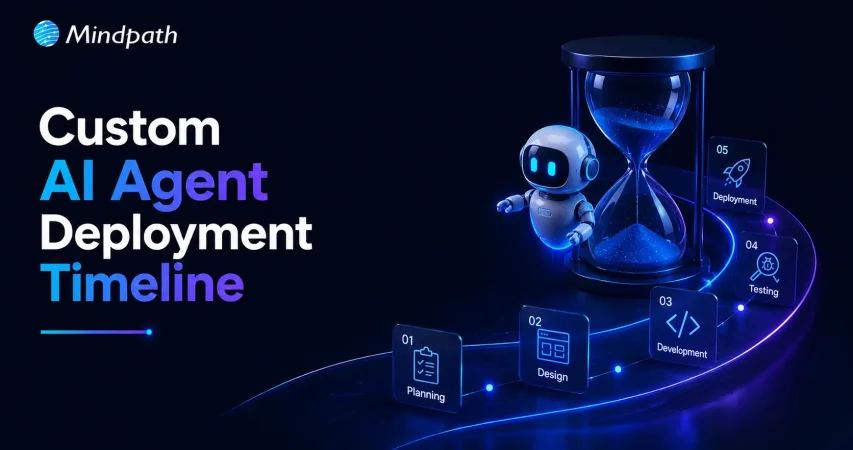
AI Agent Development Timeline: Key Stages Explained

Understanding each development stage helps businesses estimate AI agent development time more accurately. Every phase serves a specific purpose, from planning and development to testing and deployment, ensuring the final AI agent performs reliably and meets business requirements.

1. Define Goals and Project Scope

Every successful AI agent starts with clear business objectives and measurable outcomes. Teams identify the problem, expected results, and project requirements before beginning development.

2. Design the AI Agent Architecture

Developers create the technical foundation by selecting suitable AI models, frameworks, and data structures. This stage ensures the AI agent can handle business tasks efficiently and scale when needed.

3. Build and integrate the AI Agent

Developers create prompts, connect business applications, and integrate external tools and knowledge sources. Secure integrations help the AI agent perform real business tasks with accurate information.

4. Test and Improve Performance

Teams evaluate the AI agent through multiple testing scenarios before production deployment. They refine prompts, fix workflow issues, and improve accuracy to deliver reliable performance.

5. Deploy the AI Agent

After successful testing, the AI agent moves into the production environment with controlled access and security measures. The time to deploy AI agent solutions depends on deployment readiness, governance checks, and rollout strategy.

6. Monitor and Optimize Continuously

Development continues after deployment through regular monitoring and performance improvements. Teams analyze user interactions, update capabilities, and optimize the AI agent for better long-term results.

How to Build an AI Agent Faster Without Compromising Quality?

  • Define clear business goals before starting development.
  • Prioritize high-impact features for the first AI agent release.
  • Prepare clean and organized business data early.
  • Choose the right AI development partner with proven expertise.
  • Use existing systems instead of building everything from scratch.
  • Test continuously throughout development to avoid costly delays.
  • Start with an MVP before expanding advanced capabilities.
  • Review project scope regularly to prevent timeline extensions.

Ready to Build Your Custom AI Agent?

The right AI agent delivers the best results when businesses plan realistic timelines, define clear requirements, and choose the right development approach. Understanding every stage, from planning to deployment, helps reduce delays, control costs, and achieve long-term business value with confidence.

At Mindpath, we deliver custom AI Agent Development Services tailored to your business goals, workflows, and scalability needs. Our experts build secure, high-performing AI agents with faster delivery and reliable implementation. Contact us to discuss your project and find the right AI solution for your business.


Frequently Asked Questions

Start by defining your business goals, required features, integrations, and expected outcomes. A development partner can evaluate these requirements and provide a realistic timeline based on project complexity, technical dependencies, testing needs, and deployment readiness instead of offering a fixed estimate.
Project delays often result from changing requirements, complex integrations, poor-quality data, extended testing cycles, or additional security and compliance reviews. Clear planning, organized data, and regular stakeholder feedback help minimize unexpected delays throughout the development lifecycle.
A proof of concept helps validate your idea before making a larger investment. It allows businesses to test functionality, identify technical challenges, gather user feedback, and confirm business value before expanding into a production-ready AI agent solution.
Connecting an AI agent with CRMs, ERPs, databases, and third-party applications requires additional development and testing. The number and complexity of integrations directly influence implementation timelines because each connection must remain secure, accurate, and reliable during deployment.
Businesses can reduce development time by defining clear objectives, preparing quality data, prioritizing essential features, and working with experienced AI specialists. Continuous testing and phased deployment also help deliver reliable AI agents while maintaining security and long-term performance.

Support Is One Click Away

Featured Posts

Related Post

WordPress maintenance
Is your WordPress site running as smoothly as possible? Do you know what kind of essential maintenance activities should be done on your website to keep it secure and running well? In this blog, we will explore the essential maintenance tasks that will keep your WordPress site in top shape. So, let’s dive in! 

Importance Of Website Maintenance   

Routine WordPress maintenance will help your website to be stable, secure, with better loading speed, and compatible with different browsers and devices. Regular backups guarantee that there is no loss of data in case of website crashing or malware attacks. Up-to-date plugins will ensure that slowdowns and security risks are prevented. Monitoring and analytics on user behavior help you make informed decisions and optimize your content. This provides better maintenance of your website, thus keeping it in top shape, and gives a better experience to the visitor. 

How Much Does WordPress Maintenance Cost?  

The cost of maintaining a WordPress site will be based on the size and complexity of the website. Routine maintenance in 2024 can range from as low as $5 a month to $120 per month or $40 a year to $1,200 a year. For a personal site, maintenance might be as low as $4 a month or $40 annually. Business sites usually start at about $8 per month or $80 per year. The pricing for running corporate websites is usually in the region of $12 a month or $120 yearly. The websites related to entertainment and eCommerce usually cost more, with the former starting at $16 per month and the latter at $20 a month. Routine maintenance includes updating plugins, themes, and WordPress core, managing backups, ensuring security, and keeping up performance. 

The Complete Checklist of Monthly WordPress Maintenance Tasks   

1. Optimize Your Database   

Over time, your WordPress database can become bloated with extraneous data from things like old post revisions, spammy comments, and deleted items, which slow down your site. To clean up your database, first back it up using a tool like Solid Backups to ensure all your data is safe. Then use a plugin such as WP Optimize to clear out any unnecessary data and boost database performance. Alternatively, if you know how to manipulate a database, you can clean up manually with phpMyAdmin. This method is useful when custom settings must be considered, and in all probability, it would be good to talk this over with a developer in case you are unsure. 

2. Manage Backups   

Backing up your website is something you should do regularly for safety against losses and quick recoveries in case of issues. Besides, with Solid Backups, you can configure backups automatically by using the plug-in known as UpdraftPlus. Schedule the backups frequently and let them be safely kept in the cloud, optimally. Moreover, review the process of restoration month by month to confirm that your backup procedure is working well, and in case of need, you will be in a good position to recover your site. 

3. Update WordPress Core, Plugins, And Themes   

WordPress core, theme, and plugin updating have implications for security, compatibility, and accessing new features. According to the Wordfence 2022 State of WordPress Security report, plugins in particular are a weak point, so keeping them up to date is very important. Keep checking for updates, and when found, update them one after the other. Begin with the WordPress core and then proceed to plugins and themes. Remember to always back up before doing any big update and update on a staging site so you can be sure everything works well with your current setup. 

4. Perform Security Scans   

Security scans to vulnerabilities, malware, and unauthorized access should be regularly scheduled. Run full site scans with a plugin like Shield Security, check the logs for any suspicious activity, and configure settings. You should, however, schedule these scans to run periodically, but at least revise them once a month. 

5. Analyze Site Speed   

A website’s speed has a massive impact on user experience and SEO. Among others, you can use Google PageSpeed Insights, GTmetrix, or Pingdom to check how fast your website loads. After testing, fix performance issues of your website against the results. If the speed problems continue, see if there’s a need to review and upgrade your hosting plan. 

6. Check For Broken Links   

Checking for broken links is important both for delivering a good user experience and SEO. Broken links may make visitors and search engines end up in so-called ‘dead ends,’ harming your site’s rankings and authority. Run a check using a plugin such as Broken Link Checker. Thereafter, repair or remove broken links upon finding them, possibly looking into scheduling automated checks to help identify new broken links in the future. 

7. Optimize Images   

Optimizing images will help to increase your site speed and performance radically, particularly when you have a heavy share of images on the site. Tools like Smush or ShortPixel do really well when it comes to compressing existing images. Remember the right formats—JPEG for photos and PNG for graphics where the requirement is transparency. Enable lazy loading; this defers the loading of off-screen images to further speed up page load times. 

8. Submit Your Sitemap   

Making sure that you are regularly submitting your sitemap to search engines will let them index your website in a better way and give you more exposure. Use a plugin such as Yoast SEO to create an updated sitemap, then take the time to manually submit this to search engines via their webmaster tools—like Google Search Console—to check that all your pages are correctly crawled and indexed for maximum search engine visibility. 

9. Monitor Site Performance   

Monitoring your site’s performance frequently will let you know when there is a problem. It helps in making informed decisions and will let you act swiftly. Use tools like Google Analytics and Jetpack to look through key metrics such as page views, bounce rate, and conversion rates. This setting of performance alerts about major changes or problems will let action be taken in time and thus your site runs smoothly. 

10. Test Your Forms   

Testing of forms at regular intervals is paramount to ensure that they work right and harvest data from users effectively. All forms should work well, and process input correctly. Check that email notifications are going to the right addresses, then test for user experience to make sure forms are usable, accessible, and responsive on different browsers and devices. 

11. Clear Site Cache 

It ensures that your site visitors have the most recent content. In addition, it will boost your website’s performance. Sometimes, cached data can become corrupt or outdated, causing display issues and slowing download time. Flush the server cache, then reset any plugin-built caches. Test your site for improved performance after flushing the cache. This can also be done in many ways depending on your unique setup. If you are not comfortable doing it yourself, use something like WP Super Cache and W3 Total Cache

Ready to optimize Your WordPress Experience?

Learn More About Mindpath’s Maintenance Services!

WordPress Development Services at Mindpath   

At Mindpath, we ensure your WordPress website runs at its best with comprehensive maintenance services. This includes regular updates to WordPress Core, plugins, and themes; daily backups for data security; and optimization of the performance of the site so that it loads faster. Our team conducts security scanning to save from threats, monitors and fixes broken links, and looks through analytics to bring about better user engagement. We test forms to make sure they are working well. You just focus on your business while we keep your site secure and efficient with our expert maintenance. 

Conclusion 

Maintenance, on the other hand, will ensure your WordPress site is not only smooth, safe, and high performing, but it will also be defended from many problems for the best user experience. From checking for broken links to analyzing site speed or running security scans, every step is important in keeping your website at its best. 

At Mindpath, we cut down the complexity of WordPress maintenance by offering every necessary service in one place to keep your site in top condition. Let our team take care of updates, backups, performance optimization, security checks, and more, so you can focus on growing your business while we work on keeping your website reliable and engaging. Our expert team at Mindpath makes sure your WordPress site is running at peak performance, ensuring you can get on with business and not worry about it. 

Want to achieve a Faster, Safer WordPress Site?

Find Out More About Mindpath’s Maintenance Solutions!

Ensure your WordPress site runs smoothly with essential maintenance tasks like updates, backups, security scans, and performance optimization.
WordPress Vulnerabilities

WordPress powers more than 43.4 percent of the websites (Source: W3Techs), making it a top choice among businesses, developers, and bloggers. However, with immense popularity comes a higher risk. WordPress’s widespread use and open-source nature have made it a prime target for malicious exploits, cyberattacks, and data breaches. So, it is crucial for site owners to understand and mitigate WordPress vulnerabilities.

A compromised website can cause various devastating consequences, including damage to your business reputation and financial loss. Some major reasons behind security breaches are weak credentials, outdated software, insecure configuration, and third-party plugins. 

This detailed guide will help you learn more about the common WordPress security vulnerabilities. Besides, you will explore some actionable strategies to protect your website. 

If you want to safeguard your WordPress site against attacks, expert intervention can make all the difference. Mindpath offers WordPress development services where we focus on building secure websites according to your business needs.

How Secure is WordPress- Is it Really Vulnerable?

Given WordPress’s dominance on the web, it is no surprise that it attracts malicious attacks frequently. Vulnerabilities in third-party plugins and themes are the most common entry points, a pattern confirmed repeatedly in the WordPress vulnerability database. A notable example is CVE-2024-10924, a critical authentication bypass flaw in the “Really Simple Security” plugin. It allowed attackers to log into WordPress sites with administrative rights and execute code across millions of sites remotely.

There are other WordPress security issues that can expose your site to attackers, like exposed endpoints, arbitrary file uploads, and path traversal. These are regularly documented in the WordPress vulnerability database. While this CMS remains a robust platform, these threats have forced businesses to focus more on ongoing vigilance.

Why Should Businesses Prioritize WordPress Security?

Before exploring the “how”, let’s understand the ”why”. Remember that a security breach can lead to disastrous consequences for businesses. Some impactful consequences of WordPress exploits are: 

1. Search Engine Blacklisting

If your website is compromised, search engines can flag it as malicious redirects, malware, or spammy backlinks. As a result, your site may get blacklisted, affecting your organic traffic and visibility. 

2. Dat Breaches

A vulnerable website makes it easier for hackers to access sensitive data, including users’ names, payment details, addresses, passwords, and more. This can erode customer trust and attract legal penalties. 

3. Downtime

Cyberattacks can lead to a complete shutdown or defacement of your website. Besides, it can take several days or weeks to recover your site, leaving your business inaccessible to customers. 

4. Financial Fallout

The cost of a data breach can go beyond just technical cleanup. Affected businesses face legal penalties, reputational damage, and more. For small businesses, it can be catastrophic.

5. Loss of Admit Control

Attackers can lock out users, escalate privileges, and change credentials, making it challenging to regain admin control without technical intervention. 

The only way to avoid such consequences is by securing your WordPress site with proper security measures. Besides, it is crucial to check website safety regularly. Read on to know more about WordPress Vulnerabilities and how to fix them. 

Do you want your website to be accessible to every visitor? Learn how to improve WordPress web accessibility can help you reach more users and create an inclusive online experience.

Major WordPress Security Vulnerabilities and Solutions

While WordPress itself is regularly maintained and updated, WordPress exploits generally arise from outdated components, insecure integration, etc. Understanding those security risks is the first step toward creating a resilient and secure website. Below, we have listed some common vulnerabilities along with effective mitigation tactics.

1. Outdated Components- The Biggest Threat

Most dangerous and frequent WordPress vulnerabilities arise from outdated components, such as plugins, themes, and the core. Outdated components can offer an easy entry point to hackers. WordPress core updates come with crucial security patches, and the same applies to plugins and themes. 

 Solutions:

  • Regularly check for updates to plugins, core, and themes. 
  • Enable automatic updates wherever possible.
  • Remove unsupported and unused extensions. 
  • Use a WordPress vulnerability scanner to check the website regularly. 

2. Brute Force Attacks

Attackers use trial-and-error methods to guess user login credentials, exploiting common and weak passwords. Once they gain access, hackers can take over the site and carry out various malicious actions.

Solutions:

  • Deploy robust password policies and create passwords combining special symbols and numbers. 
  • Enable 2FA or two-factor authentication to access the admin panel. 
  • Use security plugins such as Limit Login Attempts Reloaded to prevent unauthorized logins. 
  • Be careful while assigning user roles. 

3. Vulnerable Themes and Plugins

Not all plugins are the same. Poorly coded extensions can lead to serious security issues, including XSS or Cross-site Scripting, SQL injection, as well as remote code execution. 

Solutions:

  • Check update history, active installations, and reviews before installing a plugin.
  • Install plugins and themes only from WordPress.org and trusted developers, like the WordPress Cue theme. 
  • Use powerful security plugins such as Sucuri and Wordfence to effectively monitor WordPress plugins vulnerabilities
  • Stay away from pirated themes to prevent potential malware attacks.  

4. Malware Infections

Malicious software programs are designed to steal data, damage systems, and disrupt regular operations. Malware can take different forms, like trojans, ransomware, or spyware. These infections are challenging to detect. 

Solutions:

  • Keep the system updated and ensure you are using the latest version of WordPress. 
  • Limit admis access and follow secure login practices. 
  • Schedule regular malware and backups utilizing advanced tools. 

5. Cross-Site Scripting

This is a common type of injection attack where attackers inject malicious scripts into websites. Poor security configurations and outdated components let attackers inject JavaScript or client-side scripts into a website. Once injected, attackers can access credentials, session cookies, and can also redirect visitors to a malicious site. 

Solutions:

  • Validate and sanitize every user input. 
  • Prefer to encode output data to avoid script execution.
  • Carry out a detailed WPcheck and use response headers to control browser behavior.

Unsure whether your WordPress project is following the right development standards and best practices? Check out our WordPress developer checklist to make sure every essential step is covered for a smooth and successful build.

6. SQL Injections

This WordPress vulnerability happens when attackers inject SQL code through input fields such as contact forms, login, or signup to access the database. This vulnerability can expose sensitive information, compromise credentials, and alter your site content. 

Solutions:

  • Change the WordPress database prefix in the config.php file. 
  • Install a WAF or Web Application Firewall to prevent injection attempts. 
  • Properly sanitize as well as validate user inputs. 

7. DDoS Attacks

Distributed Denial-of-Service is a type of attack where attackers overwhelm servers with fake traffic, making your website inaccessible to visitors. This can cause SEO damage, and downtime. 

Solutions:

  • Carefully monitor your website traffic patterns for unusual spikes.
  • Use rate-limiting tools and extra server bandwidth.
  • Deploy a firewall service or CDN, such as Cloudflare or Bunny.net, to reduce the risk of DDoS.

8. Poor Hosting Platforms

Shared or insecure hosting platforms can expose your site to various WordPress vulnerabilities from other websites using the same hosting environment. A compromised server can damage multiple websites, causing widespread damage. 

Solutions:

  • Choose a trusted and managed WordPress hosting provider.
  • Ensure that the hosting has strong security protocols.
  • Opt for a dedicated IP address.
  • Ensure the hosting offers regular backups, malware scanning, and firewalls

9. Phishing Attacks

Deceptive messages and emails trick users into sharing personal data or clicking on malicious links. After clicking the links, attackers get access to credentials and can inject malware into websites. 

Solutions:

  • Don’t respond to unknown senders or URLs. 
  • Regularly inspect the website’s code to identify and remove phishing pages. 
  • Take backups of your website regularly and before changing code. 

10. CSRF or Cross-Site Request Forgery

Also known as session riding, it tricks visitors into carrying out unintended activities through deceptive forms or links. A CSRF attack can lead to admin-level exploits, data exposure, and unauthorized transactions. 

Solutions:

  • Deploy session validation and secure coding practices.
  • Educate admins and users about social engineering techniques and phishing tactics. 
  • Verify user requests using CSRF tokens. 

Now that you understand the common WordPress vulnerabilities and how to fix them, it’s time to explore some powerful tools that can help you in this. 

Want to make sure your WordPress website runs seamlessly with the latest technology? Discover how WordPress PHP compatibility can protect your site and enhance its performance.

Top WordPress Security Plugins to Consider

To effectively protect your site from a wp vulnerability, using the right security plugins is crucial. Security Plugins listed below offer proactive monitoring, protection, as well as recovery features, helping to reduce the risk. 

Plugin Key Features
Sucuri Security Remote malware and WordPress vulnerabilities scanning, website firewall, malware removal, CDN, and security activity auditing
Wordfence Security Malware scanner, country blocking, live traffic monitoring, and login security
MalCare One-click malware removal, regular malware scanning, offsite scanning, and brute force protection
SecuPress Anti-brute force, security scanner, 2FA, backup and malicious IPs blocking
Cloudflare Turnstile CAPTCHA, free SSL certificate, email routing, and DNSSEC- Domain Name System Security Extension 
SolidWP Magic Link, version management, regular backups, and continuous monitoring
Defender Pro Firewall rules, malware scanning, IP blocking, login protection, and vulnerability reports
Jetpack Security Real-time backups, brute-force protection, spam filtering, and downtime monitoring 

Selecting the right WordPress vulnerable plugins depends on your WordPress website’s requirements. However, installing any of these can boost your website’s security features. 

Planning to upgrade your website but unsure if switching from HTML to WordPress is the right move? Learn the benefits of converting HTML to WordPress and how it can boost your site’s performance, scalability, and user experience.

WordPress Post-Hack Protocol- Follow These Steps

Even with the best WordPress vulnerability scanner and necessary security strategies, no site is 100 percent safe. If your WordPress site has been hacked, a strategic and swift action is crucial. With a clear post-hack strategy, you can restore functionality and regain control. 

1. Immediately restrict public access to your site to prevent further damage. 

2. Change the database password and administrative passwords immediately. 

3. Restore your website using a backup created before the hack. 

4. Use reliable security plugins to detect infected files, entry points, and unauthorized changes. 

5. After restoring your site, patch all the components with the latest updates. 

6. Change default login URLs, implement strong firewalls, and disable the file editing function. 

7. Establish continuous security scans and monitor activity logs to identify potential threats early. 

8. If the hack has exposed user data, inform your users about the breach. 

9. In the wp-config.php file, change the security salts and keys. 

A proactive WordPress recovery plan ensures your site bounces back more secure and stronger from WordPress vulnerabilities.

Wondering how to hire the right WordPress developer to help your business grow online? Explore our detailed guide on Hiring a WordPress Developer to discover expert insights that guide you toward making the best hiring decision.

Build A Secure and Resilient Website with The Right Security Measures

Securing your WordPress website against these WordPress vulnerabilities is vital in this digital world, where cyberattacks are common and increasing. Understanding major flaws, applying the right security measures, and partnering with a trusted WordPress developer can reduce the chance of cyberattacks while keeping your site running smoothly.

Mindpath’s web development team has years of experience in creating secure, accessibility-compliant, and scalable WordPress websites. Our experts keep themselves updated with the latest WordPress security problems and vulnerabilities to offer you end-to-end WordPress development services. From plugin vetting and WordPress vulnerability audits to security configuration and continued support, we will help you stay ahead of every WordPress exploit while ensuring a seamless user experience. 

Frequently Asked Questions

AI in finance

Generative AI in finance transforms raw data into actionable insights, automates complex reporting, and models dynamic scenarios using large language models (LLMs). This revolution is the biggest force of transformation in the financial services industry right now, marking a significant leap for practical applications of AI across various sectors. You can find different examples of AI in finance that have been setting new benchmarks for innovation. Banking and financial services companies perceive generative AI as something more than a prevailing technology trend.

A report by McKinsey reveals that generative AI will have a significant impact on the banking and financial services sector. The report mentions that generative AI can deliver additional value of almost $240 billion to $340 billion every year in the banking industry. Companies in the financial services industry must know how generative AI can unlock new opportunities and prepare the foundation for innovation in finance.

Planning to integrate AI into your finance strategy to drive smarter decisions and growth? Mindpath’s AI Development Services provides customized AI solutions that turn data into actionable insights and innovation.

Is Generative AI Right for the Financial Services Sector?

Business leaders in the financial services industry know the challenges and complexities that come in the way of business growth. Starting from the intricacies of digital transformation to the continuous changes in customer habits, finance leaders have to deal with multiple responsibilities. You must know that the adoption of Generative AI for Business in finance creates new opportunities to achieve better efficiency.

You will find many examples of banking and finance companies that have adopted AI and transformed the way they work. Financial service providers have achieved faster budget cycle times and reduction in uncollectible balances with artificial intelligence. As the complexity of financial operations continues growing, companies look up to generative AI for various reasons. Companies in the banking and finance industry can use generative AI to find new opportunities for streamlining workflows with automation.

Planning to deliver highly customized financial services using AI? Learn about AI in personalized banking experiences to discover strategies that improve customer satisfaction and operational efficiency.

Key Benefits of Generative AI in Financial Services

The interplay between AI and finance has created the foundation to achieve many new benchmarks in the industry. With the help of AI, financial institutions can meet emerging expectations of customers and resolve inefficiencies across various financial operations. The applications of generative AI in the domain of financial services offer more than just automation.

1. Enhancing Accuracy

One of the prominent reasons to rely on AI revolves around the assurance of freedom from human errors. The use cases of AI in compliance checks, financial reporting and audits provide the advantage of reduced errors. Artificial intelligence takes care of such tasks where attention to detail is extremely crucial and helps in reducing inconsistencies that may manifest due to human error. AI models can analyze large datasets and find anomalies to ensure strict regulatory compliance. As a result, all stakeholders can fulfill compliance requirements while ensuring better performance.

2. Introducing Hyper-Personalization

Personalization of products and services is one of the crucial measures to improve customer engagement in any industry. Generative AI finance applications can provide hyper-personalized solutions that deliver exactly what customers want. Generative AI can help in obtaining valuable and relevant insights from the financial history, spending patterns and risk profiles of customers. With the help of those insights, financial institutions can offer highly personalized recommendations to customers. For example, AI systems can recommend the ideal investment strategy depending on the portfolio and risk appetite of customers.

The biggest strength of artificial intelligence is the capability for real-time data analysis. Financial institutions can leverage this facility to make well informed decisions at a faster pace, using AI in decision making to guide strategy and reduce errors. The use of artificial intelligence for finance helps in navigating volatile markets with more efficiency, where companies have to respond to sudden changes and take decisions instantly. You can find the best example of using AI for improved decision-making in systems that identify early signals of market instability. The ability to identify flaws earlier helps financial institutions follow preventive measures without discrepancies.

3. Optimizing Operational Costs

Cost optimization is a major advantage of applying artificial intelligence in the financial services sector. By automating repetitive and time-consuming tasks, generative AI offers the ideal instrument for cutting operating costs. Generative AI can be used by financial institutions to generate documents, answers common customer service questions and process insurance claims. AI systems also help in reducing costs through automation of mundane tasks that can be completed without human intervention. One of the best examples of cost optimization with AI is visible in the use of AI chatbots for customer service.

Ready to upgrade customer interactions using AI in finance? Discover conversational AI chatbot to learn how intelligent assistants improve efficiency and deliver tailored support.

Unraveling the Use Cases of AI in Financial Services

Many organizations believe that adopting artificial intelligence in financial services is a daunting challenge. Generative AI is a game-changer for many functions in financial institutions with proven and tested use cases. Understanding the use cases of generative AI across different financial operations can help you get a better idea of how to make the most of the technology in practical scenarios.

1. Risk Management

Artificial intelligence delivers the power to create tools that can evaluate market volatility, operational threats and credit risks. The ability to simulate various scenarios with artificial intelligence can help in creating synthetic datasets which provide the foundation for robust risk management strategies.

2. Customer Experience

Generative AI is already playing a vital role in transforming customer experiences with the help of virtual assistants. These assistants leverage artificial intelligence to provide personalized financial advice and resolve the queries of customers. Artificial intelligence is capable of analyzing customer profiles in real-time and offering personalized solutions that guarantee seamless service delivery.

3. Portfolio Optimization

You can also notice the growing influence of AI in financial industry for the use cases in investment. Generative AI can help you created advanced predictive models that provide asset performance analysis and portfolio diversification. Financial advisors can use generative AI to draw simulations of investment outcomes, thereby offering better and more accurate recommendations.

4. Fraud Prevention

The financial services industry is plagued by cases of fraud that lead to losses worth billions of dollars annually. Financial institutions can leverage generative AI to learn from large datasets of transactions to identify anomalies in transaction patterns. It provides the ideal tool for real-time fraud detection, thereby providing a heads up before malicious agents make their move. Generative AI also helps in simulation of different fraud scenarios and fine-tuning algorithms to detect emerging threats.

Want to stay ahead of the curve in AI-driven finance? Discover Gen AI trends to learn how emerging technologies are shaping smarter strategies and innovative solutions.

Success Stories of Generative AI in the World of Finance

The best way to learn how artificial intelligence has revolutionized finance would involve a review of some success stories. The advantages of AI in financial services have garnered the attention of numerous top companies. Companies in the domain of banking and finance need to take inspiration from institutions that have successfully used generative AI to address critical concerns.

Quest IndexGPT, an innovative generative AI solution developed by JP Morgan, has revolutionized the creation of investment indices.

JP Morgan created Quest IndexGPT, a revolutionary tool for creating investment indices by using generative AI. On the other hand, MasterCard leveraged generative AI for creating a proactive fraud detection system. The fraud detection technology helped MasterCard reduce false positives, thereby ensuring seamless customer experiences.

Ready to adopt the latest AI technologies for finance innovation? Explore Generative AI tools to check out how these platforms are reshaping analytics, automation, and personalized services.

Final Thoughts

You can notice the transformative impact of artificial intelligence in the domain of financial services across various areas. The growing use of AI in banking and finance has created new opportunities for transforming the way financial institutions work. In addition, artificial intelligence revolutionizes customer experience and risk management in the finance industry.

Mindpath is one of the leading providers of AI solutions tailored to client expectations. We have been delivering end-to-end generative AI development services for different industries, including the financial services sector. Our experience speaks for itself in the success stories shared by our clients. Book your first consultation with us and achieve new levels of efficiency in the financial services industry.

Frequently Asked Questions