Home

How to Hire Dedicated Developers for Your Startup: Step-by-Step Process 

How to Hire Dedicated Developers for Your Startup: Step-by-Step Process 

Join our Newsletter!

Hire Dedicated Developers

Growing a start-up can be thrilling, but every technical choice made carries a lot of responsibility for your company’s future. You need to hire dedicated developers who will be able to transform your ideas into reality. When you look for developers, you are looking for someone with dedication, dependability, and shared intention.

At this point in time, there is usually a lot of pressure and excitement. You want your developers to be able to work together as a team and complete their tasks smoothly and efficiently. You want to set an example of how to maintain a good pace in this process by establishing expectations about pace, important tasks, and accountability.

When the momentum is strong, the hiring mindset gets more and more refined and purposeful. You actually look for clarity, consistency, and long-term alignment. Stable developers make your rapid plans more viable. On the other hand, bad choices can waste your time and confuse your team. Having a well-defined hiring approach saves you from that kind of trouble. It makes it easier to take good decisions and execute your plans without hitches. In this article, we will explain the steps that will give you confidence and guidance in hiring the right developers.

Want to hire dedicated developers who can bring your startup ideas to life efficiently and reliably? Mindpath provides expert developers and custom solutions that help startups build scalable and high-performing web applications.

Why Do Companies Need to Hire Dedicated Developers?

The companies that opt for dedicated teams benefit from their ability to provide consistent focus and measurable results. When you hire dedicated developers who work on a single project, the efficiency and effectiveness of the development team increase. Developers also bring an entirely different approach to the project based on their expertise. They create quality code that is free from errors, thus improving the quality and decreasing the time to market. In addition, dedicated teams are typically less expensive than managing a full-in-house team.

This method enables businesses to be adaptable and grow over time. Firms are able to hire developers according to the requirements of the project. Also, they have the freedom to extend their workforce without any waiting time or interruption. Skilled developers bring down the chances of unsuccessful outcomes by efficient organizing. Experienced developers also provide updates and support after the launch of a new product. Therefore, businesses continue to have direct control over their business goals and outcomes.

Key Responsibilities of a Dedicated Developer

1. A committed programmer assumes full ownership of the product. They deal with frontend and backend and mobile requirements with great ownership and coherency.

2. They create the MVP within a short time to gauge ideas in the market. This assists startups to learn quickly and adapt without wasting time.

3. They develop the product to expand alongside the business. They take care of updates, corrections and long-term support as well.

4. They introduce expertise that startups usually do not have in-house. That is the reason why most startups prefer to hire dedicated developers at an early stage.

5. They are knowledgeable about the startup vision, culture, and roadmap. This orientation maintains development towards actual business objectives.

6. Startups hire remote developers as part of the core team that works in the same direction. This guarantees quickness, efficiency, and good cooperation.

Planning to build and launch your product efficiently? Explore how creating an MVP for startups helps validate ideas faster and ensures you hire the right developers for early-stage success.

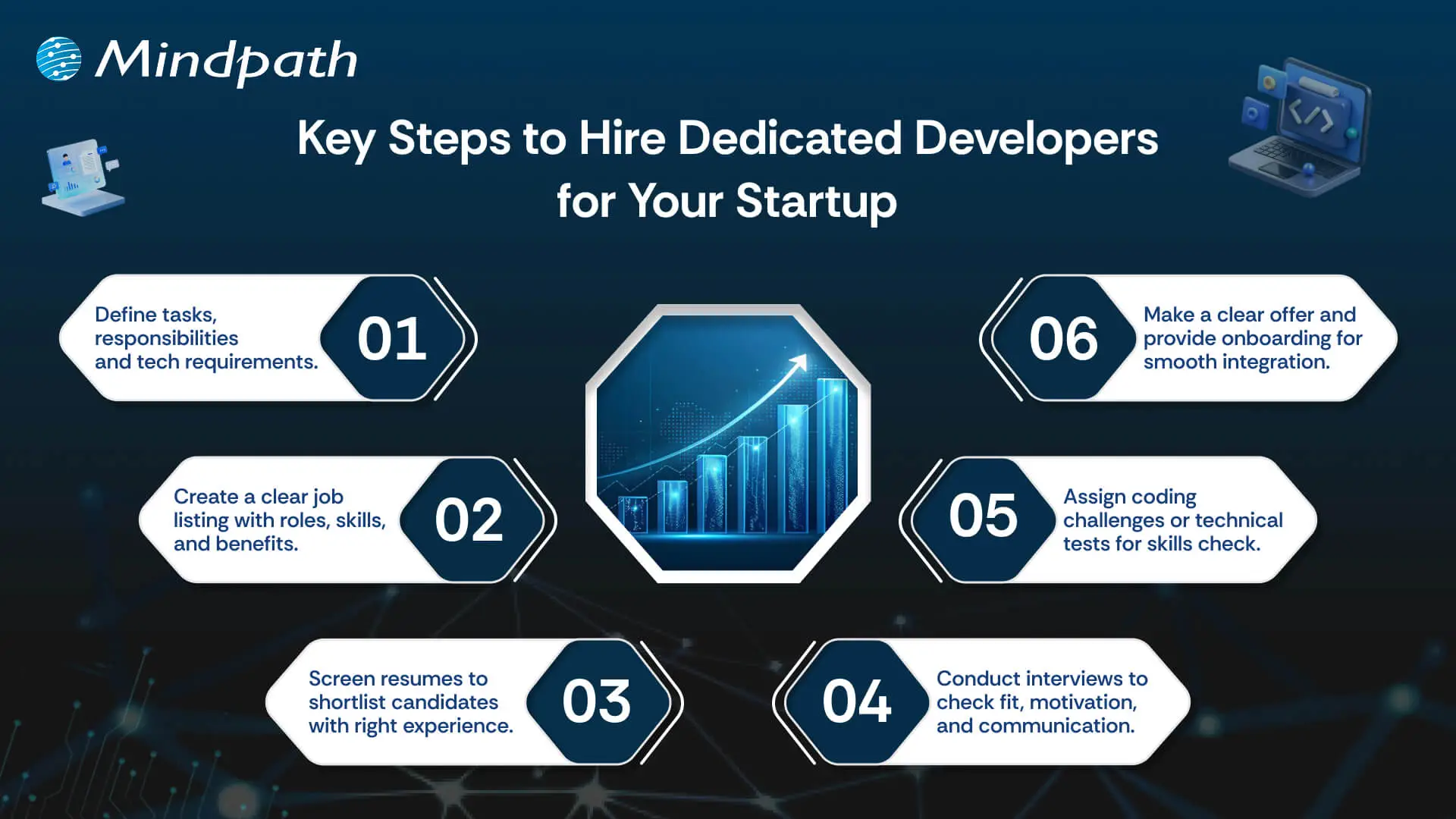
Key Steps to Hire Dedicated Developers for Your Startup

Recruiting appropriate technical talent determines the manner in which a startup is formed and developed. These are the major steps to hire dedicated developers for your startup in a clear-cut and controlled manner.
hire dedicated developer for your startup

1. Define Your Development Needs

Be clear about the tasks, responsibilities, and objectives of the developer position. Choose the technical infrastructure, level of experience, and the soft skills. Share these requirements to get the right candidates that would fit into your startup vision and culture. This will guarantee that you get the perfect match prior to the hiring process.

2. Create an Attractive Job Listing

Prepare a precise and brief job advertisement specifying the job, the requirements, and company benefits. Exhibit growth prospects and culture. Advertise in job boards, social media and professional networks to access competent candidates. A good listing attracts and enhances the quality of response.

3. Screen Resumes Efficiently

Filter through applications to identify those candidates who meet your requirements. Check technical skills, experience and applicable education. Find the transferable skills where necessary. Filter out applicants to proceed to the next step. This can save time and concentrate on the best talent.

4. Conduct Initial Interviews

Screen shortlisted candidates on the phone or via video call. Evaluate cultural fit, motivation, and communication skills. Question regarding experience and problem-solving. Present your business, objectives, and culture. This assists the two parties in assessing their compatibility prior to proceeding.

5. Test Technical Skills

Give coding challenges or relevant technical tasks. Evaluate skills based on your project needs. Ensure tests reflect real-world tasks they will handle. Review results carefully to confirm the candidate can deliver high-quality work. This step ensures practical readiness.

6. Make an Offer and Onboard

Share a clear job offer with salary, benefits, and start date. Upon acceptance, offer adequate on-boarding and support to ensure that they settle as soon as possible. Cultivate learning and development to create long-term engagement. This assists startups to successfully hire dedicated developers and assimilate them seamlessly.

Need to scale your development team quickly without long-term commitments? Explore our staff augmentation guide to learn how startups can add skilled developers on demand while staying flexible and cost-effective.

Ready to Hire Dedicated Developers in UK for Your Startup?

How well you hire the right tech candidate will help you to decide your startup’s future. If you stick to the proper procedure, you can effectively hire committed developers without wasting time. This will allow you to quickly develop and launch products, produce high-quality work, and build for long-term success. Defining what you are looking for, reviewing candidates, and assessing competencies helps minimize risks associated with the hiring process. Using this method will provide your company with a more effective development process and consequently generate superior business results.

Mindpath is your option to get the best solutions if you want to hire dedicated web developers for your startup. Our teams are committed to delivering bespoke web development services that are focused, fast, and of high quality. We are a perfect fit with your objectives as we keep on supporting and updating you. By selecting Mindpath, we guarantee your projects will be carried out efficiently, and with high technical standards.

Need a Dedicated Development Team?

Get engineers who work only on your product, start to finish.

Frequently Asked Questions

Dedicated developers provide consistent project focus, specialized expertise, and flexibility, helping startups build products faster without immediately creating a large internal development team.
Start by defining technical requirements, reviewing relevant experience, assessing communication skills, and testing practical abilities before making the final hiring decision.
Yes, dedicated developers can reduce hiring overhead while giving startups access to specialized skills and flexible development support based on project requirements.
Developers should have relevant technical expertise, problem-solving ability, communication skills, project experience, and an understanding of the technologies required for your product.
A dedicated team focuses consistently on one project, reducing context switching and helping startups move from planning and development to launch more efficiently.

Support Is One Click Away

Featured Posts

Related Post

CI/CD Pipelines

Continuous Integration and Continuous Deployment (CI/CD) pipelines have revolutionized modern DevOps best practices. In fact, they are the backbone of DevOps in recent years. CI/CD pipelines allow teams to release high-quality software faster and more reliably. This is possible because a CI/CD pipeline can automate the key stages of the software development lifecycle.

CI/CD Pipelines have empowered software teams and developers like never before. You need to have an in-depth understanding of what is CI/CD in DevOps, as it has been acting as a game-changer. In the business context, a CI/CD Pipeline allows faster product releases and creates value by reducing costs and streamlining the overall development process. It is time to explore what is CI/CD pipeline at a deeper level.

Want to reduce deployment delays and boost business efficiency? Mindpath’s DevOps Consultation and Implementation services streamline DevOps processes to deliver smooth and scalable software delivery.

CI/CD Pipeline Meaning: Continuous Integration and Continuous Deployment

CI/CD, short for Continuous Integration and Continuous Deployment, is an automated workflow that enables software teams to build, test, and release code changes rapidly and reliably. A CI/CD pipeline refers to the series of steps that automate this process, helping teams deliver new software versions while minimizing manual errors and ensuring every code change is validated before it reaches users. CI/CD pipelines are also defined as the practice that improves software delivery throughout the development lifecycle, and they have been transforming the software development process through automation.

CI/CD pipeline introduces automation throughout diverse stages such as development, testing, production, and monitoring.  Teams are in a position to develop top-quality software in a fast and secure manner. The automated testing process allows the identification of dependencies and other issues at an early stage, thereby saving valuable time later. 

Ready to maximize the impact of your CI/CD workflows? Explore the benefits of DevOps to understand how it boosts performance, reduces errors, and accelerates releases.

Mechanism of CI/CD Pipeline

Now that you know CI,CD pipeline full form, and its meaning, it is time to explore its underlying mechanism. The insight can definitely help you understand how a CI/CD pipeline works. To understand how it works, you need to bear in mind that there exist three interrelated methods, including Continuous Integration, Continuous Delivery, and Continuous Deployment.

1. Continuous Integration

Continuous Integration refers to the process of fusing changes to code into a shared repository several times a day. An automated system is responsible for building the app and running tests every time the developer works on the code. CI fundamentally encompasses automated unit tests and static code analysis.

The fundamental goal at this stage is to discover issues relating to integration. In the absence of continuous integration, bugs may surface after multiple changes have been made at the time of a major release. This makes it challenging to find as well as fix them. Continuous Integration minimizes the specific threat by performing tests of every minute change in an isolated manner. 

2. Continuous Delivery

Continuous delivery lays emphasis on the automation of the process that takes place after the code passes the CI stage. CD prepares each change for release so that the deployment can be done smoothly to production at a given time. In the case of a CD pipeline, after the verification of the build, it is moved through the staging environment as well as the pre-production environment in an automatic manner.

It is essential to bear in mind that continuous delivery does not involve the deployment of code to production in an automatic way. The codebase is kept in a deployment-ready state so that software development teams will be able to release as per their need or convenience. CD enables organizations to release software more regularly. 

3. Continuous Deployment

Continuous deployment is responsible for automatically releasing code changes to end-users after passing a series of predefined tests. These predefined tests could be integration tests that test code in a copycat environment and help to ensure code integrity.

This automated process of releasing software code changes directly to the production environment after they have passed all the necessary automated tests eliminates the need for manual intervention. It enables teams to deliver updates and new features to users quickly. It also helps to fix bugs fast. Basically, it accelerates the feedback loop with customers and minimizes the risk relating to large and infrequent releases.   

Looking to understand how CI/CD pipelines are becoming smarter and more efficient? Check out the role of AI in DevOps to learn how automation and intelligence are transforming pipeline performance and reliability.

Key Benefits of CI/CD Pipeline

Now that you know what is CI/CD pipeline it is time to look at some of its key benefits. CI/CD pipeline benefits allow software teams to develop software in an agile manner while ensuring quality. Some of the top benefits include:

1. Faster Time to Market

One of the main benefits of CI/CD pipelines is that teams are able to deliver new features and fix bugs for users faster as well as more often. In fact, this is how major tech giants have been making incremental improvements in their products and creating value for their target market audience. 

With the help of CI/CD tools in DevOps businesses are able to quickly respond to user feedback and develop quality software apps. A typical CI/CD pipeline example automates the build, test, and deployment of a web application, thereby ensuring that the software is introduced in the market in a timely manner. 

2. High-Quality Codes

While releasing software, the role of proper testing is of paramount importance. Now that you know what is CI/CD in DevOps, you can say that high priority is given to testing. A central part of any CI/CD pipeline involves a series of automated tests that are run on every build. 

Automated tests ensure that teams can perform tests in a continuous manner, and the quality of software solutions can be maintained. The automated nature of tests plays a key role in enhancing the quality of code that is generated. 

3. Shorter Feedback Loops

While talking about the CI/CD pipeline example, a thing that is non-negotiable is rapid feedback. Getting feedback early ensures that teams can save sufficient time as well as effort while developing software applications. Teams are able to give frequent updates, which helps in receiving immediate feedback from the users. It thus helps to bring about appropriate changes and increase user satisfaction. 

4. Less Downtime

Even with automated testing, there is a possibility that bugs may sometimes sneak their way through production. A key benefit of using CI/CD tools in DevOps and making regular updates is that it makes it easier to locate the cause of an issue. As the commits are smaller, teams and developers can roll back the change without having to remove necessary elements. This certainly simplifies how issues are fixed and reduces the overall downtime. 

5. Better Communication and Collaboration

One of the main benefits of CI/CD pipelines revolves around improved communication and collaboration among team members. This practice enables members to function in a cohesive manner and make changes to the code. They can also respond to the queries and comments of one another in a transparent manner. The ongoing feedback loop makes sure that there is no communication gap among the team members. The rise in effectiveness in team collaboration is reflected in the ultimate software solution. 

Wondering how CI/CD pipelines are evolving in modern DevOps practices? Discover the latest DevOps trends to learn which tools, methodologies, and innovations are driving smarter and more reliable pipelines.

Final Words

In the prevailing software development arena, the concept of CI/CD pipeline has emerged as a breath of fresh air. It has shown the power that automation can bring while developing software solutions. Some of the key benefits of CI/CD pipelines that you should be aware of include high-quality code, faster time to market, and many more. The explanation of the underlying mechanism of the CI/CD pipeline is there so that you can understand how the process works. 

Mindpath’s top-grade DevOps solutions can certainly assist modern business organizations to leverage CI/CD pipelines to the fullest. Our experts will ensure that, through continuous integration and continuous delivery, your business can develop excellent software applications that can improve user satisfaction. 

Wordpress vs workflow

In the year 2025, the debate of WordPress vs Webflow is hotter than ever. This is because business entities and content creators are looking for the best platform to build secure as well as SEO-friendly websites. It is true that WordPress has been dominating the CMS market thanks to its vast plugin ecosystem coupled with high flexibility. But it is essential to bear in mind that Webflow has been gaining momentum with designers as well as startups, thanks to its no-code visual editor along with built-in hosting. 

In case you are wondering, is Webflow better than WordPress? You need to look at the main difference between these tools. You need to know which one is better so that you can choose the tool that perfectly aligns with your needs. The guide breaks down everything you need to know while choosing Webflow or WordPress.

Choosing the right platform makes all the difference when it comes to performance and growth for your online presence. Explore Mindpath’s WordPress development services for expert guidance on what your business needs.

A Deep Dive into WordPress

WordPress is the most popular content management system (CMS) in the world, currently powering over 40% of all websites on the internet. It lets you create, build, and manage your own website without needing coding knowledge. WordPress has gained massive popularity thanks to its ease of use coupled with flexibility, making it an ideal tool for beginners, professionals, and businesses alike.

At its core, WordPress is a free, open-source content management system. This means anyone can use, modify, or distribute it at no cost, and it’s continually improved by a global community of developers. One of the biggest strengths of WordPress is its SEO-friendly structure. The novel platform generates clean and crawlable code that adds value to search engines’ index content efficiently. Users can even leverage useful plugins such as Yoast SEO and Rank Math for optimizing titles and meta descriptions that can improve the visibility in search results.

An Insight into Webflow

Webflow is a cloud-based visual web development platform that lets you design, build, and launch responsive websites without writing code. It bridges the gap between design and development by letting users design visually on a canvas while the platform automatically generates clean, production-ready HTML, CSS, and JavaScript in the background. This makes Webflow a favorite among designers who want creative freedom without relying on developers.

A standout feature of Webflow that you need to be aware of is related to its design flexibility. Users have the option to create fully custom layouts as well as animations without having to write a single line of code. Webflow basically combines the best of graphic design tools with the functionality of a content management system (CMS), generating clean HTML, CSS, and JavaScript behind the scenes as you design. For businesses that need more tailored solutions, custom WordPress development offers similar flexibility with the added power of plugins, themes, and scalability, allowing organizations to build websites that precisely meet their unique requirements. It serves as a valuable tool for businesses and startups that wish to leverage its ability to deliver professional and responsive websites effectively and efficiently.

Comparison Between WordPress and Webflow

Now that you have an insight into Webflow and WordPress, it is time to look at the difference between these novel tools. Developers as well as businesses need to understand the difference between WordPress and Webflow so that they can make a wise selection. The core differences have been presented by focusing on specific areas such as ease of use, design, customisation, and many other features. 

1. Ease of Use

Webflow offers a visual no-code editor. It is highly appealing to designers as well as marketers. In fact, it is great for rapid prototyping along with pixel-perfect layouts. On the other hand, WordPress requires setup with a theme or page builder. So beginners may take some time to learn how to use the tool. However, developers with proper knowledge and experience can get full control over the tool. Thus, while discussing Webflow vs WordPress, a major difference between them revolves around the ease of use.  

2. Design and Customization

Webflow serves as an ideal tool for making custom designs without requiring any coding. The responsive control built in can ensure that users can derive optimum value from the tool even if they have limited coding-related skills. On the other hand, WordPress has a large ecosystem of themes as well as plugins. These elements make it highly customizable in nature. But this maturity also makes it plugin-dependent at times.

3. SEO Features

Webflow provides built-in SEO tools such as meta tags and schema options. It even delivers strong performance when it comes to integrated hosting. However, WordPress relies on plugins such as Yoast SEO for advanced SEO control. Thus, this feature makes WordPress extremely powerful, which is capable of precise optimization. You need to bear in mind that, starting from Webflow to WordPress, the role of top SEO features is a must for users.

Stuck deciding whether WordPress or Drupal is a better match for your business? Our WordPress vs Drupal guide breaks down key differences to help you pick the perfect solution.

4. Security

While talking about WordPress vs Webflow, it is a must to take into account the security aspects. Webflow is certainly more secure by default in comparison to WordPress. This is mainly because it offers built-in security features such as DDoS and SSL protection. The top-notch security feature of Webflow acts as its major strength. When it comes to WordPress, the security mainly depends on users. You need to manage separate security plugins and carry out frequent maintenance in order to prevent vulnerabilities. In order to boost the level of security, you need to make sure that you, as a user, maintain cybersecurity resilience while developing your website. 

5. Performance

Webflow is capable of offering better out-of-the-box performance. This is mainly because of integrated hosting coupled with a global Content Delivery Network and clean code. On the other hand, when it comes to WordPress, its performance mainly depends on the chosen hosting and plugins. The selected theme can also impact the performance that is delivered by the tool. If you use Webflow, your website can load faster by default. But if you choose WordPress, you can rest assured about the site performance if you choose appropriate hosting. 

6. Pricing

If you are wondering – is Webflow similar to WordPress in terms of pricing, the answer is no. The pricing of WordPress is variable in nature. You may have to incur separate costs for different things, such as hosting and a domain. Similarly, the price also depends on the chosen plugins and themes. So it may seem cheaper initially, but its price may increase with additional functionality. When it comes to Webflow, the pricing is based on the all-inclusive subscription model. It can become expensive for you if you opt for higher-tier plans.  

Want to make sure your WordPress site is accessible to everyone? Check out our post on improve WordPress web accessibility to learn practical steps for making your site more inclusive and user-friendly.

WordPress vs Webflow – Comparison Table

The difference between WordPress and Webflow has been presented in the table below. You need to understand how Webflow and WordPress are different from each other so that you can choose the ideal tool wisely. The insight can surely guide you to decide which platform you intend to use to fulfil your specific needs. 

Features Webflow WordPress
Ease of Use  No Coding Knowledge needed  Coding knowledge is not strictly needed but can help for advanced customization
Design and Customization Highly flexible in nature  Availability of extensive themes for customization
SEO Features Built-in SEO tools Availability of SEO friendly structure 
Security  High security  Low security 
Performance High optimization for speed Performance depends on hosting 
Pricing Subscription-based pricing model Variable pricing model

Final Winner Between WordPress and Webflow

You must choose Webflow if you prioritize visual design control along with built-in hosting. Webflow is the better choice if you need to manage your website in a simple way. It is well-suited for small business entities as well as startups that want to launch their site quickly with a clean and modern design.

WordPress is an ideal choice for you if you are looking for scalability and advanced SEO capabilities, along with flexibility through plugins. In such cases, WordPress can certainly act as a stronger platform that can meet your needs perfectly. The platform is best-suited for enterprises and e-commerce stores that wish to have full control over SEO as well as integrations. 

Therefore, both Webflow and WordPress serve as useful tools. You need to choose between WordPress and Webflow by considering your needs. In case you are wondering – Does Webflow work with WordPress? The good news is, yes! Webflow can definitely work along with WordPress if you utilize the official Webflow Pages plugin. It will certainly allow you to build pages in Webflow while serving them on your WordPress site.

Worried about security risks and vulnerabilities on your WordPress site? Read our guide on safeguarding WordPress vulnerabilities to learn how to protect your site and keep it secure against threats.

Final Words

The emergence of WordPress and Webflow has been transformational in the prevailing business world. Both these platforms have their unique strengths and advantages. The ultimate choice between WordPress and Webflow in the year 2026 mainly depends on the goals of your website and your budget. You also need to take into consideration the long-term growth plan before making the choice between WordPress and Webflow.

If you wish to derive optimum value from WordPress, you need to partner with a reliable partner. Mindpath’s top-grade WordPress development services can certainly help you develop a world-class website. It can offer the ultimate go-to solution in terms of scalability as well as limitless customization. You can also take advantage of the advanced SEO-friendly structure in order to boost the online visibility of your website. It can certainly give an edge to businesses in the competitive business world.

SaaS Development Services

Selecting the appropriate SaaS development services may seem like walking through a rapidly shifting technological environment. Businesses in the present day require solutions that are innovative, scalable, and flexible. You may end up comparing different providers, and each one of them claims to have unique expertise. The difficulty lies in finding a service that is consistent with your objectives and generates real value. It involves thinking outside the box and taking into account teamwork, problem-solving, and sustainability. So, how are you going to find a service that best suits your business vision?

The key is to find a partner that is knowledgeable about your growth strategy and technology needs. Successful SaaS development services engage both hands-on experience and progressive innovation. When you are seeking options, make sure you take into account compatibility with your team, development strategy, and scalability. You require a clear understanding of procedures, communication, and delivery schedule. This blog will help you make the right decision in your SaaS development journey. Let’s dive in together!

Want to choose the right partner to build scalable and efficient SaaS software for your business? Mindpath’s  SaaS Development Services provide expert developers and custom solutions to deliver growth-oriented applications.

Understanding Software-as-a-Service (SaaS) Development

SaaS development refers to the development, deployment, and maintenance of software applications delivered over the Internet as a service. These applications are cloud-based, unlike the conventional software. They are available to users either on a web browser or on an app interface. An effective SaaS development service makes applications to be scalable, secure and user-friendly. It concentrates on delivering constant updates and excellent user experiences across all devices.

SaaS development needs proper software engineering and cloud knowledge. Developers should also know what customers require and what is trending in the market. This understanding enables the creation of software, which is efficient, reliable, and sustainable. SaaS development focuses on cooperation, problem-solving, and constant enhancement in order to fulfill business objectives. It guarantees the product to expand with the user requirements without compromising the performance or security at any point.

Want to understand how SaaS can streamline your operations and drive business growth more efficiently? Discover our guide on the benefits of SaaS to explore how it enhances scalability, flexibility, and cost savings.

The following are reasons why businesses today require SaaS development services:

1. Cost Optimization

SaaS reduces start-up infrastructure and the cost of licensing. Companies enjoy the benefit of stable prices and expenditure.

2. Scalable Architecture

SaaS software development is capable of scaling users and features in an easy way. The systems can easily adapt to growth and demand.

3. Anywhere Accessibility

The use of the cloud allows remote and distributed teams. Users can be able to work anywhere safely.

4. Rapid Deployment

The SaaS solutions take a shorter time to launch via browsers. This minimizes the setup time and fast-tracks time to value.

5. Simplified Maintenance

Service providers deal with updates, security, and performance. SaaS developers assist in lowering internal IT workloads.

6. Innovation Readiness

SaaS solutions are compatible with contemporary tools and artificial intelligence. This helps companies remain competitive and data oriented.

Wondering how AI can transform your SaaS product with automation and predictive capabilities? Read our guide on the benefits of AI to discover its impact on growth and efficiency.

Key Steps to Choose the Right SaaS Development Services

The choice of SaaS development services requires a clear idea, planning, and business orientation. The most important steps to selecting SaaS application development services that facilitate long-term growth are as follows.

Key Steps to Choose the Right SaaS Development Services

1. Define Your SaaS Idea and Objectives

Be clear about your SaaS concept, what problem it will address, and who your audience will be. Clear goals contribute to the alignment of attributes, functionality, and business objectives in the long run. This transparency enables the SaaS development services to create a product that is focused and efficient.

2. Research Potential Development Partners

Begin by doing research on credible SaaS development companies that have a successful track record with SaaS projects. Check their portfolios, case studies, and feedback from clients to determine credibility. This study can assist you in narrowing down partners who can provide scalable solutions.

3. Assess Technical Skills and Expertise

Evaluate the technical competence of the in-house development team in the front end, back end, and cloud computing. Ensure that they know the process of developing secure and scalable SaaS applications. Well-developed technical capabilities reduce the development risks and improve the overall performance of the product.

4. Review Project Management Practices

Understand how the company manages schedules, work and communication in the development process. Agile project management is flexible and responds more rapidly to changes. Analytical thinking will ensure consistency and quality in development.

5. Understand the Development Process

Inquire about their entire development cycle such as designing, testing, and implementation. Make sure that security and performance, as well as scalability, are considered at an early stage. A trusted Saas development platform enhances easier cooperation and implementation.

6. Check Industry Experience

Experience in the industry helps teams to know more about your business challenges. Experienced developers are able to foresee risks and recommend workable improvements. This results in improved custom SaaS development projects.

7. Prioritize Security and Compliance

Make sure that the development team has good security standards and compliance requirements. The process of development should include data protection and compliance with regulations. This ensures the safety of user information and builds up confidence in the product.

8. Evaluate Support and Make the Final Decision

Evaluate the capacity of the company to offer long-term support and maintenance. Constant improvement and interaction are key to successful products. Select SaaS development services, which reflect your growth plans and vision.

Want to stay ahead in the competitive market by understanding how SaaS is evolving? Discover our guide on SaaS trends to explore the latest innovations shaping the future of the industry.

Ready to Transform Your Business with SaaS?

Selecting the appropriate SaaS development services will keep your company competitive, scalable and efficient. Successful SaaS products are the result of clear planning, technical expertise and strong project management. Using systematic steps assists in choosing partners who provide secure, reliable and innovative solutions. Having the right team ensures your software keeps up with the business requirements and enhances performance and user satisfaction.

At Mindpath, we provide professional custom SaaS development services based on your business objectives. We are a team of prolific developers and present scalable, secure, and user-friendly solutions. Our priorities are innovation, a smooth partnership, and continuous support to achieve optimal performance of your SaaS product. Mindpath is the choice that ensures a future-proofed platform that is designed to expand with your users and business vision.