DevOps Best Practices for Business in 2026

Join our Newsletter!

Featured Posts

Support Is One Click Away

Home

DevOps Best Practices for Business in 2026

devops best practices

DevOps Best Practices for Business in 2026

Does your team prepare itself well enough to handle the fast pace of software development in 2026? As there are so many changes happening in the way businesses build and deliver products, it is very important to pause and think about what’s working and what’s not, isn’t it? The perfect solution for this lies in following DevOps best practices, so that you can keep your software development processes smooth and your teams connected.  

Well, DevOps can help your business improve teamwork, speed up release, and even reduce errors. Its goal is to create a robust process supporting development and operations. If you are asking what the best practices for DevOps are, and how they may help your business improve on delivery, performance, and collaborate between teams, then this blog can serve you better. 

Before delving into the main topic, let us first understand the fundamentals of DevOps. 

Want to reduce downtime and accelerate software delivery? Mindpath offers expert DevOps services, which help streamline your workflows, automate deployments, and improve overall efficiency.

What is DevOps?

DevOps is a proactive approach to linking development and IT operations teams to collaboratively work in a way that transforms the software development process. With DevOps, both teams can share responsibilities in building, testing, and releasing software. The main purpose of it is to improve speed, reduce errors, and deliver better results.

DevOps also improves communication across teams, which reduces delays and results in fewer disruptions. Automating repetitive tasks gives teams more time to focus on solving problems. It also allows for faster feedback loops, meaning teams can address problems quickly and improve product quality over time. This approach allows teams to adapt to change more easily while also scaling systems and keeping up with customer demand. 

Looking to elevate your business with smarter workflows? Check out our Benefits of DevOps blog to learn how it accelerates innovation while fostering collaboration across teams.

What are the 7 Key Principles of DevOps?

There are several main principles that define how teams work and deliver software. These principles provide an underpinning to enhance collaboration, automation, and improvement across a work ecosystem. Now, let’s explore the 7 key principles of DevOps: 

1. Strong Team Collaboration

DevOps brings developers and operations teams together to work as one. This helps solve problems faster and build better software. 

2. Customer-Centric Approach

Every decision is made by keeping the customer in mind. Teams collect feedback and use real-time tools to improve the user experience. 

3. Data-Driven Decisions

DevOps teams rely on real data-driven decisions before making changes. This helps them choose the right tools and improve their results with confidence. 

4. Automation Across the Workflow

Tasks like testing, deployment, and setup are automated to save time. This lets teams focus on planning, solving problems, and improving the product. 

5. Continuous Improvement

DevOps supports small and frequent updates instead of waiting for one big release. This helps teams meet user needs quickly and make steady progress. 

6. Embracing Failure as Learning

If something goes wrong, teams treat it as a chance to learn. This mindset helps them improve and make smarter decisions in the future. 

7. Shared Responsibility

In DevOps, the entire team takes responsibility for the software from beginning to end. Developers and operations work closely at every stage to build, test, and fix issues together. 

Struggling with speed, collaboration, or automation in DevOps? Our DevOps Challenges and Solutions blog explains how modern businesses address these issues.

What are the DevOps Best Practices?

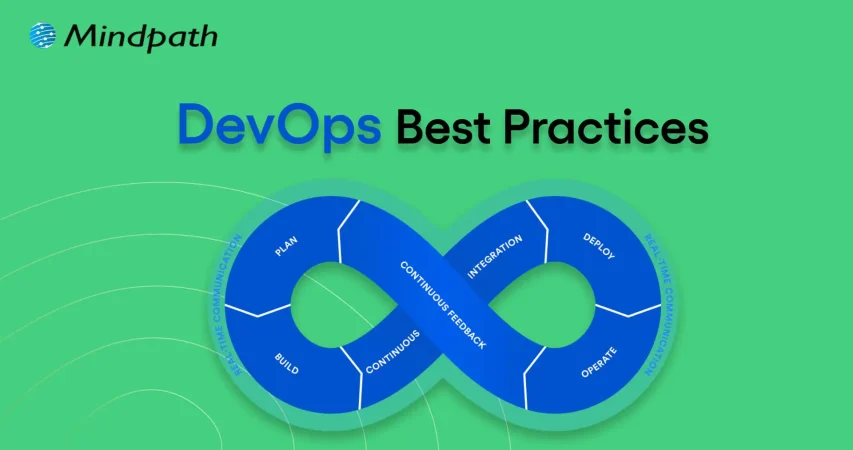
To get the most out of DevOps, teams follow a set of proven methods that support faster delivery, better quality, and stronger teamwork. These top DevOps practices help create smooth workflows and make it easier to manage changes and fix problems quickly. Let’s explore the most effective DevOps methods that can drive real results. 

1. Continuous Integration/Continuous Deployment (CI/CD)

One helpful way to speed up your CI/CD pipeline is by using a smart testing platform that runs tests faster and more efficiently. It allows teams to run large sets of tests in parallel, get faster feedback, and use resources wisely to lower costs. A key benefit is that it keeps your tests stable across different environments, which helps improve software quality and delivery speed. 

2. Use Infrastructure as Code (IaC) for Better Control

Infrastructure as Code lets teams manage and set up their infrastructure using code instead of doing it manually. This makes deployments faster and keeps environments consistent across all stages of software delivery. Using IaC also helps track changes easily and improves teamwork by allowing developers to handle infrastructure in a clear and organized way. 

3. Integrate Security into Your DevOps Process

Adding security checks early in the development pipeline helps find and fix vulnerabilities before they cause problems. This approach keeps your software safe and ensures it meets important security rules. Using automated security tools makes it easier for teams to maintain strong protection without slowing down delivery. 

4. Leverage Configuration Management Tools

Configuration Management tools help automate system setup and updates to keep environments consistent across teams. They work well with CI/CD pipelines to speed up deployments and make collaboration easier. By using these tools, teams can also enforce security rules and track changes to meet compliance requirements. 

5. Adopt Shift-Left Testing for Faster Issue Detection

Starting to test early in the development process helps find problems before they grow bigger. Using automated and AI-driven testing tools makes it easier to catch errors quickly and improve the quality of the code. This approach also speeds up delivery by reducing the time spent fixing issues later on. 

Must Read: DevOps Trends

6. Automate Testing for Reliable Software

Automated testing is a key DevOps best practice that helps check code quality quickly and consistently. By using automated test tools in your DevOps pipeline, teams can find and fix problems early. This ensures every change is tested before going live, making software more reliable and ready for continuous delivery.  

7. Use Cloud Services for Flexibility and Speed

Cloud services make it easy to quickly set up and scale resources as needed while automating many tasks. They support key DevOps practices like automated pipelines, security integration, and managing infrastructure with code. Using cloud platforms helps teams deliver software faster and maintain smooth, reliable operations. 

8. Adopt Containerization

Using containerization is a smart DevOps best practice that helps keep software running the same way in development, testing, and production. Containers make it easier to scale applications and use resources more efficiently. This approach reduces errors and speeds up delivery by ensuring consistency across all stages. 

9. Implement Microservices Architecture

Microservices break down applications into smaller, independent parts that can be updated and scaled down on their own. This makes it easier for teams to manage and improve specific services without affecting the whole system. To make this work well, strong monitoring, testing, and automation are important to keep everything running smoothly. 

10. Focus on Continuous Improvement

Continuous improvement means always looking for ways to do things better by learning from past experiences. Teams can use the Plan-Do-Check-Act cycle to test small changes, check results, and keep improving. This helps them build better software faster and fix issues more quickly. 

Wondering how DevOps can accelerate growth and efficiency in your organization? Read our blog on DevOps for Businesses to discover strategies that streamline operations, enhance collaboration, and improve software delivery.

Want to Transform Your Software Delivery with DevOps Best Practices?

Following DevOps best practices helps teams build software faster, reduce errors, and work better together. By using automation, cloud tools, and early testing, your team can improve software quality and speed up delivery. These practices make workflows smoother and help your business keep up with fast-changing demands with time. 

At Mindpath, we apply proven DevOps practices like CI/CD, containerization, and infrastructure as code to streamline software delivery. Our expert teams focus on collaboration, automation, and continuous improvement to ensure secure, high-quality releases. With our DevOps-centric approach, your business can achieve better performance and faster results. 

Related Post

Learn how Cloud Disaster Recovery safeguards your business with flexible, cost-effective solutions for fast recovery and data protection.

Related Post

application security best practices

In this modern tech world, keeping your app safe and secure isn’t just a minor task anymore, but rather it has become a business priority. Whether you have built a mobile app or a web platform, the users trust you with their personal information every time they log in or make any transaction. Isn’t it true? This is the reason for which you should follow application security best practices because it can help you in protecting your app from hackers, data leaks and even costly breaches.

Strong security starts when you understand the correct strategy, starting from secure coding to regular updates and data protection. Do you want to know what is the best practice for application security for your web and mobile apps? Don’t worry, we will cover essential techniques for securing your applications in this blog, which can help you in staying one step ahead of threats and building trustworthy digital experience.

According to MarketsandMarkets Analysis, The mobile apps and web analytics market is expected to grow from 9.4 billion in 2022 to USD 20.2 billion by 2027, at a CAGR of 16.4%.

What is Application Security?

Application security refers to the practice of protecting your apps from threats that could steal all the data and even harm the system. It involves adding security features during the development stage and continuing to protect your app even after it is launched. This can ensure that both your app as well as the information it handles, are safe from hackers and other risks.

This protection can include hardware tools, software settings and regular security settings. For instance, a powerful router that obscures a device’s IP address provides hardware protections, while an application firewall embedded in the software frames actions. Security protocols, such as routine testing and upgrades, help to ensure risks are identified and rectified quickly so that the app continues to secure itself for years to come.

Want to transform your ideas into seamless applications?  Our Web and Mobile Application Development Services offer end-to-end development to create scalable and high performing apps which are designed accoridng to the business needs.

What are the 3 Pillars of Application Security?

To build a strong foundation for protecting any app, it’s important to focus on the core elements of security. These three pillars work together to keep applications safe and trustworthy.

1. Process:

This pillar includes the policies, procedures, and workflows that help manage and secure applications. These processes are designed to reduce risk and protect the app throughout its entire lifecycle.

2. Technology

Technology covers the tools and security controls used to keep applications safe. While new solutions keep emerging, it’s important to focus on the core security needs that protect the application effectively.

3. People

People are often the most overlooked part of application security, even though they play a key role. This pillar focuses on managing human risk, which includes the behaviors and actions of employees, contractors, and partners who have access to the system.

Also Read: Custom Web Development Services

Web Application Security Best Practices

In today’s digital world, keeping your application and security strong is more important than ever. A single loophole can lead to serious trouble. That’s why it’s essential to follow a smart plan to protect your app from threats. Here are some best practices you can follow:

1. Spot and Understand the Weak Points in Your App

After setting up your app security plan, it’s time to check for weak spots. You are likely to find many issues, but not all are serious. Focus on the most dangerous ones first. Use a custom threat model or OWASP risk scores to help you sort and fix them smartly

2. Use Quick Fixes Like Virtual Patching and WAF

Waiting months to fix app issues is risky. Virtual patching and a Web Application Firewall (WAF) can protect your app right away. They block attacks, even before a complete fix is ready. Also, limit app features and keep watching traffic to catch problems early and stay safe.

3. Start with Fixing the Most Important Issues

Fixing every issue at once can feel overwhelming. Focus first on the critical and high risks that could hurt your business or brand the most. Once those are handled, move on to the lower-risk ones. This smart step-by-step plan helps save time and protects what matters most.

4. Group Your Apps by Risk Level

When you have many apps, it helps to sort them by priority. Put them in buckets like critical, serious, and normal based on how sensitive the data is. Fix the most important ones first. Retire unused apps, and keep your list updated to stay organized and reduce risk.

5. Build a Clear Map of Your App Security

When apps grow fast, it’s easy to lose track. Start by making a full list of all your apps, their purpose, and update status. Add details like how they’re used and update security steps. This clear picture helps you fix issues quickly and build stronger web application security.

6. Monitor Your Application Every Time

Virtual patching through a WAF helps you fix issues faster and keeps your app under watch. It shows which attacks are blocked and where they come from. This ongoing monitoring builds useful security insights and also helps stop app-layer DDoS attacks before they cause trouble.

Curious about the next step in mobile innovation? Explore Progressive Web Apps (PWA): The Future of Mobile-First Development to see how PWAs combine the best of web and mobile apps for faster, engaging experiences.

Mobile Application Security Best Practices

Mobile apps are a big part of our daily lives and keeping them secure is a must. Whether you’re building an app or managing one, these simple practices can help you protect your users and data from unwanted threats.

1. Be Careful with Third-Party Libraries

Third-party libraries can save time but might bring security risks if not handled right. Always keep them updated and patched. Take time to check their safety before using them to avoid accidentally opening doors for hackers.

2. Make Login Stronger with Better Authentication

Use strong login methods to keep your app safe. Combine passwords with extra checks like one-time codes or fingerprint scans. Multi-factor authentication (MFA) makes sure only the right users can get in by asking for two or more ways to prove who they are.

3. Monitor and React to Threats Instantly

Use tools that keep an eye on your app and spot threats right away. When something suspicious happens, act quickly to protect your app. Having a clear plan for responding helps your team fix issues fast and keeps your app secure, following the best mobile security practices.

Also Read – Top Mobile App Development Trends in 2025

4. Set Clear Access Controls

Control what users can see and do in your app to keep data safe. By limiting access, you prevent unauthorized people from reaching sensitive information. This simple step is key to strong mobile app security and helps protect your app and users effectively.

5. Keep Your App Secure with Regular Updates

Regularly update your app and fix any security issues quickly. Patching helps close gaps that hackers could exploit. Setting up a routine for updates ensures your app stays protected and reduces the chance of breaches, keeping both your app and users safe.

6. Protect Your App with Tamper Detection

Use tamper detection to spot if your app’s code has been changed. Tools like checksums or digital signatures check the app’s integrity. If something is off, the app can stop running, alert your team, or even erase sensitive data to keep everything secure.

Wondering how a mobile app can boost your business? Explore the Benefits of Mobile App Development to discover how apps improve engagement, sales, and customer loyalty.

Are You Protecting Your App in the Right Way?

Application security best practices matter for everyone, not just tech teams. They help build trust, prevent data leaks, and keep users safe. Simple actions like checking your code, controlling access, and updating often can make a big difference. Staying secure today means staying ahead of threats.

At Mindpath, building secure digital experiences is our priority. Our web and mobile application development services follow proven application security best practices to ensure safety, performance, and reliability at every step. Partner with us to deliver robust and secure solutions you can trust.

Benefits of AI consulting

In today’s fast-paced digital world, organizations need direction, as well as technology. Understanding the benefits of AI consulting can help companies see their way through the muddy landscape of choices and complex AI opportunities. Organizations need to understand how AI can be a catalyst for efficiency, better decision-making, and other growth-related opportunities; it is vital to bring experts who guarantee concrete results.

AI consultants help organizations turn abstract possibilities into concrete, achievable strategies that generate measurable outcomes and prepare the organization for the future. Working alongside AI specialists, organizations can identify high-value opportunities for companies to take action and execute a plan of action that blends seamlessly with their day-to-day work.

AI consultants provide clarity through roadmaps to success, help organizations identify pain points, and create value while ensuring projects remain aligned with strategic goals. Working together smooths the pathway toward innovation, builds organizational AI capabilities, and instills confidence for teams to lead AI adoption. In this blog, we will discuss AI consulting benefits and the superiority of helping your organization succeed.

Curious about how AI is transforming business as a game-changer? Explore our AI Consulting Services to discover how we turn cutting-edge technology into powerful growth opportunities.

Why Do Businesses Need AI Consulting?

Businesses regularly encounter obstacles such as complicated AI technologies and limitations of expertise in-house. Hiring an experienced AI consultant helps organizations overcome these complications by designing tailored solutions for companies that build towards their strategic goals. By doing this, they make sure that AI initiatives return value, increase efficiencies, and have longevity so that AI can be adopted organization-wide in a fluid and meaningful way.

AI consulting provides organizations with the guidance and direction to be successful with artificial intelligence. The major benefits of hiring an AI consultant include improved operations, smarter decision-making, and actionable productivity yields. AI consultants offer specialized as well as targeted strategies for businesses or organizations. They engage businesses to analyze their needs, flag viable AI applications, and pinpoint an ideal approach to navigating operational demands.

Also Read: AI transforming future.

Key Benefits of AI Consulting

As AI continues to drive change across the landscape of business and industry, companies are often grappling with knowing and deploying it effectively. Below are the benefits of AI consulting and notes about why organizations are increasingly turning to professionals with expertise in complex AI decision-making and delivering solutions.

1. Expert AI Guidance

AI consulting firms possess specialized knowledge in machine learning, predictive analytics, and natural language processing. They will help to design solutions for your complex problems to assist you in developing creative and customized solutions for your business. They will also guide you through applying the newest methods and tools and the industry’s best practices to yield measurable and sustainable results for your company.

2. Tailored AI Solutions

The benefits of AI consulting include developing solutions built around your business goals and business challenges. The AI consultant evaluates your business and recognizes areas where AI can improve efficiencies, increase automation, and drive enhanced customer experiences. They provide a comprehensive, customized service to ensure your business achieves higher outcomes and makes the most of its return on investment.

3. Scalability and Flexibility for Growth

AI business consulting focuses on creating systems that are adaptable to shifting business necessities and workloads. Consultants build solutions that can accommodate more data better and new capabilities or functionalities at your pace as your business grows. The key to unlocking your long-term AI return on investment is flexibility to change and support new long-term growth.

4. Cost Efficiency

Companies get a much higher ROI from AI consulting when they prioritize the high-impact areas and avoid spending unnecessarily. AI consultants then deliver scalable solutions that save costs compared to having a hospitality AI team in-house. By working with a consultant, it also lowers the cost of trial and error and optimizes value from every AI initiative.

5. Data-Driven Decision Making

AI consulting for enterprises helps to analyze extremely large amounts of data to make sense of it. AI consultants use an AI analytics tool to identify trends, improve processes, support strategic decisions, and answer more complex questions. These insights give companies speed to insight, speed to decisions, and maintain their market competitiveness.

Want to know how an AI Consultant helps businesses in driving digital transformation? Explore our detailed blog on the role of AI consultant.

6. Enhanced Customer Experience

The benefits derived from AI consulting are enhancing the way businesses think about their relationship with customers through the interaction of AI-powered tools. AI consultants offer chatbots, recommendation engines, and sentiment analysis to help provide instant, thorough, and personalized support for every question. All these features can help increase engagement, loyalty, and satisfaction for AI consulting customers.

7. Reduced Business Risks

The benefits of AI consulting also cover risks associated with how companies use and apply AI technologies. Consultants will address issues around data security, compliance with regulations and other operational issues. In general, the consultant’s expertise helps lower operational and legal risk, thus implementing AI is a safer and more reliable prospect.

8. Stronger Competitive Edge

A benefit of AI in business strategy consulting is that we support organizations in implementing innovative solutions that give them an advantage in the marketplace. We help consultants create and develop AI tools for improving operations, delivering services, and minimizing expenses. Positioning improvements like these take you to the forefront of your field and maximize your chances for sustainable growth.

9. Ongoing Support and Optimization

The benefits of AI consulting services are more extensive due to continuous support for maintaining AI systems. In general, consultants make updates as needed, optimize algorithms, and resolve problems quickly. A lasting commitment on the part of consultants equates to effectiveness, dependability, and consistency in delivering results will be sustained over time.

10. Stay Ahead with Latest Innovations

One of the major benefits of AI consulting is allowing your business to maintain knowledge about current and developing AI technologies, etc. Consultants will keep your systems fresh, modern, efficient, and relevant to the marketplace. This way, you give your company every chance to prepare for the future and remain competitive.

Organizations are relying on AI, but don’t know the right way to use it effectively. Discover why organizations need AI consulting services to unlock growth and guide their business towards success.

Want to Unlock the Full Potential of AI?

AI consulting advances organizations to operate smarter and faster while driving real business value. By collaborating with an expert, organizations can undertake AI initiatives that can be scaled, adjusted, and cost-controlled while delivering tangible benefits to customer experiences, decreasing operational and legal risks, and enhancing competitive edge. Working with an AI consultant allows organizations to implement strategies with confidence and better utilize their resources while monitoring changing technology trends that can prepare them for the future and help sustain innovation and success.

Our AI consulting services help businesses create and implement AI strategies that align with organizational goals. The team provides ongoing support, integrates state-of-the-art AI technologies, and ensures every AI project maximizes return on investment. Mindpath enables smooth implementation, operational efficiencies, and ongoing value by providing practical, hands-on solutions to companies.

low code development

In the past, when we would build software, we would talk about long timelines, large budgets and complex code. But things have shifted, and businesses are demanding faster results, meaning teams need to leverage simpler tools to build applications without completely relying on developers. This dramatic change would not be possible without low-code development. Low code provides a more intelligent way for people to develop applications through visual, straightforward logic and less coding. The hope is that this will translate into shorter timeframes, lower costs, and faster teams. Doesn’t that sound exciting?

So, many companies are using these platforms to build apps for websites, mobiles, and internal use that can be launched without waiting months. Are you interested in finding out more about this technology? Great, because this blog is going to teach you everything you need to know about low-code development! 

Want to modernize your business applications without long development cycles or heavy coding? Contact us to get the needed expertise from Mindpath to turn your low-code strategy into results.

What is Low-Code Development?

Low-code development refers to the simplest and fastest way to build software. Instead of writing long lines of code, developers can now use visual tools to create apps by just clicking, dragging and choosing from ready-made features that are available. This method can help in saving a lot of time and making the whole process easier, even for teams without deep coding experience.  

It provides developers with a very flexible and user-friendly space to build anything starting from small tools to full business apps. It has many features like drag-and-drop editors, built-in templates and easy-to-use interfaces, which make it possible for low-code platforms to design and launch apps quickly. This can contribute in businesses growing faster, working more efficiently and getting better results from their software projects.

Must Read: Low-Code vs. No-Code Development

Don’t know what is a low-code platform? Let’s learn about that too!

A low-code platform is a tool that helps people build software without writing a lot of code. It uses a simple visual interface where users can drag and drop elements to create apps. This makes it much easier for both developers and non-technical users to build digital solutions. These platforms come with ready-made features like templates, forms, and automation tools. They reduce the need for complex coding and speed up the development process.  

An interesting study according to Fortune Business Insights reveals that the global low-code development platform market size was valued at USD 28.75 billion in 2024. It is expected to grow to USD 264.40 billion by 2032, showing a strong CAGR of 32.2% during the forecast period. This rapid growth highlights how more businesses are turning to low-code development platforms for faster and smarter software development. 

Low Code Development Platform Market

Benefits of Low-Code

Low-code is shaping how organizations approach application and software development. By streamlining the process and reducing the need for manual coding, they offer practical advantages for both technical and business teams. Here are some of the key benefits: 

1. Speeds Up App Delivery

Low-code tools come with drag-and-drop features and built-in parts, so building apps is much quicker. Both tech teams and non-tech users can build apps quickly with the help of these pre-built components. This means businesses can launch apps in weeks, not months. 

2. Boosts Team Productivity

With low-code, business teams can build their own apps without always needing help from developers. This means less waiting around and more work getting done. It’s a great way to turn ideas into real solutions quickly. 

3. Makes Updates Simple

Low-code apps are easier to manage and update because they use pre-built parts that work well together. Changes can be made without breaking existing features, which means the business can stay up to date without major disruptions. 

4. Reduces Development Costs

Since low-code tools require less coding, businesses don’t need to hire large teams of developers. Projects take less time to complete, which saves both time and money. This makes it a cost-effective choice, especially when building multiple apps. 

5. Improves Business Agility

Low-code helps businesses respond quickly to changes in the market. When a new tool or feature is needed, it can be built and launched without delay. This keeps companies flexible and ahead of the competition. 

6. Enhances Decision Making

Low-code apps connect with real-time data, giving teams fast access to the insights they need. This allows business leaders to make informed decisions more quickly. Having accurate information often leads to stronger results. 

7. Enable the Use of New Technologies

Low-code makes it easier to add modern features like AI and automation into applications. These advanced tools can be integrated without needing complex coding skills. It helps businesses stay up-to-date and competitive in a fast-moving digital world. 

Curious how low-code platforms are integrating cutting-edge technologies like artificial intelligence to build smarter apps? Explore the latest AI trends to see how your business can leverage automation and intelligence for more innovative solutions.

Now let us have a quick look at the features of low-code: 

Key Features of Low-Code Development

Low-code stands out because of the powerful features it brings to the table. These features make it easier to build, customize, and manage applications with less effort. Let’s take a look at what makes low-code so efficient and user-friendly: 

1. Simple Drag-and-Drop Design

The drag-and-drop feature is one of the most useful parts of low-code. It lets users add buttons, fields, and other elements by simply placing them on the screen. This is helpful for both business users and developers who want to build apps quickly as it saves time and keeps things organized. 

2. Easy Visual Tools

Low-code platforms come with visual tools that help show how an app works in a way that everyone can understand. These tools use built-in blocks to represent processes and data clearly. Whether someone is a beginner or an experienced developer, the visual approach is helpful. It makes the development process simple and easy to follow. 

3. Ready-to-Use Templates

Many parts of an app are already built into the platform and can be reused. These pre-made modules make it faster to build new apps without starting from scratch. Teams can also save and share parts of their apps with others, which improves teamwork and speeds up future projects. 

4. Model-Based Development

Model-based development helps users create apps faster by using visual flows and logic. It allows business teams to build what they need by following models they already understand. This makes the process smoother, especially for those who are not expert coders. A good low-code platform supports this method, so users can focus on logic, not code. 

5. Cross-Platform Accessibility

Low-code makes it easy to build apps that work on different devices like phones, tablets, and desktops. This means teams can use the app from anywhere, whether in the office or on the move. It also helps companies stay connected with their teams. A flexible app is always more useful in today’s fast-paced work environment. 

Cross-platform apps are more powerful when they leverage AI to engage users intelligently. Check out these real-life AI chatbot examples to see how automation and smart interactions can enhance your app’s reach and performance.

Want to Boost Your Business Growth with Low-Code?

Low-code development is changing the way software is built by making it faster and easier. It helps teams create apps quickly using simple visual tools instead of writing complex code. This approach is helping businesses stay flexible and move ahead in a fast-changing world. 

At Mindpath, we offer powerful application development services using low-code platforms. Whether it’s for internal tools or customer-facing apps, our team makes development smooth and affordable. Let us help turn your ideas into working solutions faster than ever before.