Home

AI Agents vs RPA: Which is Better for Business Automation?

AI Agents vs RPA: Which is Better for Business Automation?

Join our Newsletter!

AI Agents vs RPA

Choosing between AI agents vs RPA is becoming a practical automation decision for businesses. RPA remains effective for predictable, rule-driven workflows, while AI agents can handle tasks that require context, interpretation, and changing inputs. The right approach depends on how the process operates and what the automation needs to accomplish.

Key Takeaways

  • 01
    RPA suits stable, repetitive workflows with clear rules and predictable outcomes.
  • 02
    AI agents handle dynamic processes requiring context, interpretation, and decision-making.
  • 03
    Process stability, data quality, security, and integration needs influence automation choices.
  • 04
    RPA and AI agents can complement each other within a broader automation strategy.
  • 05
    Automation success depends on measurable business outcomes, proper governance, and ongoing maintenance.

A workflow with fixed rules may benefit from structured automation, while a process involving multiple systems, exceptions, or judgment may need a more adaptive approach. Understanding these differences helps teams avoid automating the wrong process with the wrong technology. In this blog, we compare AI agents and RPA to help businesses identify the right fit for different automation needs.

Ready to build smarter business automation? Mindpath offers AI Development Services to help businesses build scalable AI-powered automation solutions.

What are AI Agents?

AI agents are software systems designed to achieve specific goals by understanding information, making decisions, and taking actions. They can work across multiple steps, use connected tools, and adjust their actions based on context instead of following one fixed workflow.

For businesses exploring AI automation, agents can support processes that involve unstructured data, changing conditions, and decisions. They are useful when a task requires the system to understand what is happening and determine the next appropriate action.

1. Interpret Natural Language and Unstructured Information

2. Make Context-Based Decisions Within Defined Boundaries

3. Work Across Multiple Applications and Tools

4. Adapt Actions When Process Conditions Change

5. Support Research, Customer Service, Analysis, and Workflow Orchestration

What is RPA?

RPA, or Robotic Process Automation, uses predefined rules and workflows to automate repetitive digital tasks. It follows configured instructions to interact with software applications, move information, and complete routine operations consistently without requiring the reasoning capabilities associated with AI agents.

RPA works particularly well for structured processes where inputs, actions, and expected outcomes are predictable. In the AI agents vs RPA discussion, RPA remains relevant for high-volume tasks that follow stable rules and require reliable execution.

1. Follow Predefined Rules and Workflows

2. Automate Repetitive, Structured Tasks

3. Transfer Data Between Business Applications

4. Execute High-Volume Processes Consistently

5. Support Tasks Such as Data Entry, Invoice Processing, Reporting, and Record Updates

AI Agents vs RPA: Key Differences

AI agents and RPA can both automate business processes, but they approach automation differently. The key differences become clearer when you look at how each technology handles decisions, data, process changes, and execution.

1. Decision-Making

RPA follows predefined rules, while AI agents can interpret context and determine the next action.

2. Process Flexibility

RPA works best with stable workflows, while AI agents can handle greater process variation.

3. Data Handling

RPA is suited to structured data, while AI agents can work with documents, conversations, and other unstructured information.

4. Task Execution

RPA repeats configured actions, while AI agents can coordinate multiple steps toward a defined goal.

5. Human Involvement

RPA typically escalates predefined exceptions, while AI agents may require human oversight for complex or high-impact decisions.

6. Maintenance

RPA workflows need rule updates, while AI agent systems require monitoring of models, prompts, tools, and policies.

The following comparison highlights the practical differences between RPA vs AI across common business automation requirements:

Comparison Factor RPA AI Agents
How it works Executes predefined rules and step-by-step workflows Understands a goal, evaluates context, and determines actions
Decision-making Executes actions based on predefined rules and conditions. Makes context-based decisions within defined boundaries
Type of work Repetitive, predictable, rule-based tasks Dynamic, multi-step, judgment-based tasks
Data handled Structured data such as forms, fields, and spreadsheets Structured and unstructured data such as documents, emails, and conversations
Response to changes Requires workflow or rule changes Can adapt its actions based on changing context
Task complexity Best for individual or clearly defined workflows Can coordinate multiple tasks toward a broader goal
System interaction Performs configured actions in specific applications Can use multiple tools, APIs, databases, and applications
Typical example Copying invoice data into an accounting system Reviewing an invoice, identifying an issue, checking related records, and deciding the next workflow
Human oversight Mainly required when predefined exceptions occur Often required for approvals, sensitive actions, or uncertain decisions
Best suited for Stable processes with clear rules and predictable outcomes Processes requiring interpretation, adaptability, and contextual decision-making

Where RPA and AI Agents Fit Best?

The right automation approach depends on the nature of the process. RPA is well suited to workflows that follow consistent steps and produce predictable outcomes. AI agents are better suited to processes where information changes, exceptions occur, or actions depend on context.

RPA works well for: 

1. RPA Works Well for Repetitive Tasks With Clearly Defined Steps

2. RPA Works Well for Structured Data Entry and Transfer

3. RPA Works Well for Recurring Reporting and Record Updates

4. RPA Works Well for Rule-Based Invoice and Document Processing

5. RPA Works Well for High-Volume Workflows With Predictable Outcomes

AI agents work well for: 

1. AI Agents Work Well for Processes Involving Unstructured Information

2. AI Agents Work Well for Tasks Requiring Interpretation and Contextual Decisions

3. AI Agents Work Well for Workflows With Frequent Changes or Exceptions

4. AI Agents Work Well for Multi-Step Processes Involving Different Tools and Systems

5. AI Agents Work Well for Research, Analysis, Customer Interactions, and Task Coordination

This distinction helps businesses build intelligent automation around actual process requirements instead of applying the same technology to every workflow. Stable and predictable tasks can remain rule-driven, while more dynamic processes can use AI agents where adaptability and contextual decision-making add value.

Business Value of AI Agents and RPA

Automation should be evaluated by the business value it creates, not simply by the number of tasks it can perform. RPA can reduce manual effort in repetitive workflows, improve process consistency, and handle high transaction volumes. AI agents can extend automation into processes that require interpretation, coordination, and contextual decisions.

The value also depends on the process being automated. RPA can deliver measurable efficiency when workflows are stable and rules are clear. AI agents can support productivity in more variable processes by handling information, coordinating tasks, and assisting employees with decision-heavy work. In the AI agents vs RPA comparison, factors such as implementation effort, maintenance, scalability, error handling, and oversight should all be considered.

1. Operational Efficiency

Automate repetitive work and reduce manual processing time.

2. Error Reduction

Apply consistent processes and reduce avoidable manual mistakes.

3. Employee Productivity

Free teams to focus on higher-value activities.

4. Scalability

Handle increasing workloads without proportionally increasing manual effort.

5. Cost Management

Evaluate automation costs against process volume, complexity, and maintenance needs.

6. Process Consistency

Standardize routine activities across teams and business functions.

What to Consider Before Choosing an Automation Approach?

Choosing an automation technology starts with understanding the process itself. A workflow may look suitable for automation but still require significant preparation before implementation. Process stability, data quality, system dependencies, and the level of human judgment involved can all affect the right approach.

Businesses should also consider how the automation will be governed after deployment. Access permissions, data security, auditability, human oversight, and ongoing maintenance become increasingly important as automation takes on more complex responsibilities.

1. Process Stability

Determine whether the workflow follows consistent steps or changes frequently.

2. Data Quality

Check whether the required data is accurate, accessible, and structured appropriately.

3. Integration Complexity

Identify the applications, APIs, databases, and legacy systems involved.

4. Security

Define what information the automation can access and which actions it can perform.

5. Governance

Establish permissions, approval controls, monitoring, and audit trails.

6. Human Oversight

Decide which actions require review or approval before execution.

7. Maintenance

Plan for workflow updates, system changes, performance monitoring, and exception handling.

Which Automation Approach Fits Your Business Best?

RPA works well for stable, repetitive workflows governed by clear rules, while AI agents are suited to dynamic processes that require context, interpretation, and decision-making. The right choice depends on process complexity, data, risk, and desired outcomes. In many cases, combining both can create a practical and scalable automation strategy.

Mindpath helps businesses identify suitable automation opportunities and build AI-powered workflows aligned with their operational goals. Our AI development services cover AI agents, data engineering, RAG, model fine-tuning, and related capabilities needed to move from automation planning to production.
Not Sure Where AI Fits Your Business?

We assess your processes and recommend where to start.

Frequently Asked Questions

Yes. AI agents can handle interpretation and decisions, while RPA can execute structured tasks across existing business applications.
Consider process variability, decision requirements, data types, integration needs, security controls, and the level of human oversight required.
Not necessarily. Stable RPA workflows can continue operating while AI agents are introduced for processes requiring greater flexibility or contextual understanding.
Frequent process changes, poor data quality, unclear ownership, complex exceptions, or missing governance controls can create challenges during implementation.
Track processing time, manual effort, errors, exceptions, operating costs, workflow completion, and employee adoption against a defined baseline.

Support Is One Click Away

Featured Posts

Related Post

Hire wordpress developer

You have a great business idea and you just discovered that WordPress can help you build high-quality websites from scratch. Would you go for the DIY approach or choose an expert for the job? Many would choose to hire WordPress developer with the skills required to take up your project. With a large pool of WordPress developers in the world, it is difficult to navigate the hiring process.

The right WordPress developer can change the course of your web project with their skills to utilize available resources in the most efficient way. You may be launching a new site or switching your existing site to WordPress and in every case, you will need skilled developers to do the job. This guide will help you understand the hiring process for bringing a skilled WordPress developer to your team.

Ready to transform your online presence with a website designed to grow your business? At Mindpath, we offer expert WordPress development services to customize high-performing websites that drive your growth.

Unraveling the Reasons to Hire a WordPress Developer

The first thought that might come to your mind when conceptualizing a web project is the availability of website builders. You can use the ‘drag-and-drop’ features of website builders to create a website from scratch with preset themes. Why should you hire dedicated WordPress developers when you can do it on your own? When your website grows, you will need more features, specific design elements or better performance. Therefore, you cannot ignore the importance of a WordPress developer in the modern digital landscape.

You can rely on a professional developer to tailor the design of your website in a way that reflects your brand identity. Developers can add new features without relying solely on plugins and scale up your website as your business grows. Experienced developers also ensure that your website design is optimize for mobile devices and search engines. With the intervention of custom  WordPress development experts, you can create websites that work seamlessly on all types of devices and are more visible on search engines.

The next prominent advantage of WordPress experts for hire in any region is the assurance of security. Developers can take care of the security best practices, such as cleaning the code, using secure plugins and creating custom login URLs. In addition, you can rely on WordPress development professionals for ongoing maintenance and support services to keep your website running according to your expectations.

How Many Types of WordPress Developers are there?

Hiring professionals for WordPress development is quite difficult as you have to identify the right person for the role. Depending on the requirements of your project, you will have to hire the type of developer who will be the right fit for the project. While looking for expert WordPress developers, you must know that there are five distinct types of WordPress development experts.

The frontend developers work on user interface and design of websites with the help of JavaScript, HTML and CSS. Backend developers are responsible for creating the server-side logic, functionalities and managing database of the website with PHP and MySQL. If you need someone who can do both, then you should hire a full-stack developer.

The other notable types of WordPress development experts you will come across are WordPress theme developers and plugin developers. WordPress theme developers specialize in creating and customizing WordPress themes that you can use for your website. Similarly, WordPress plugin developers help in creating custom plugins that can help you add new features in a website.

What Does a WordPress Developer Do?

Anyone with general knowledge about WordPress would know that creating websites with WordPress doesn’t require coding. However, businesses want to hire WordPress programmers with design skills who can take care of their web projects. As a WordPress developer, you will have to fulfill various responsibilities that require programming skills. For instance, WordPress developer writes the code required to customize core WordPress files.

The WordPress developer is also responsible for testing and debugging the core WordPress software. In addition, developers have to update WordPress websites on a regular basis while working with different stakeholders. Another crucial responsibility of a WordPress developer revolves around creating WordPress themes and plugins according to client requirements.

Curious if your WordPress site is using the right PHP version for best performance and security? Our WordPress PHP Compatibility Guide will help you stay aligned with best practices and avoid technical issues.

Which Skills Should You Look for In a WordPress Developer?

The common thing about every business looking for a WordPress developer is that everyone wants the best professionals. How can you identify a WordPress expert from the crowd of applicants? Recruiters should have a candidate profile that helps them identify the essential skills required from a WordPress developer for their web projects.

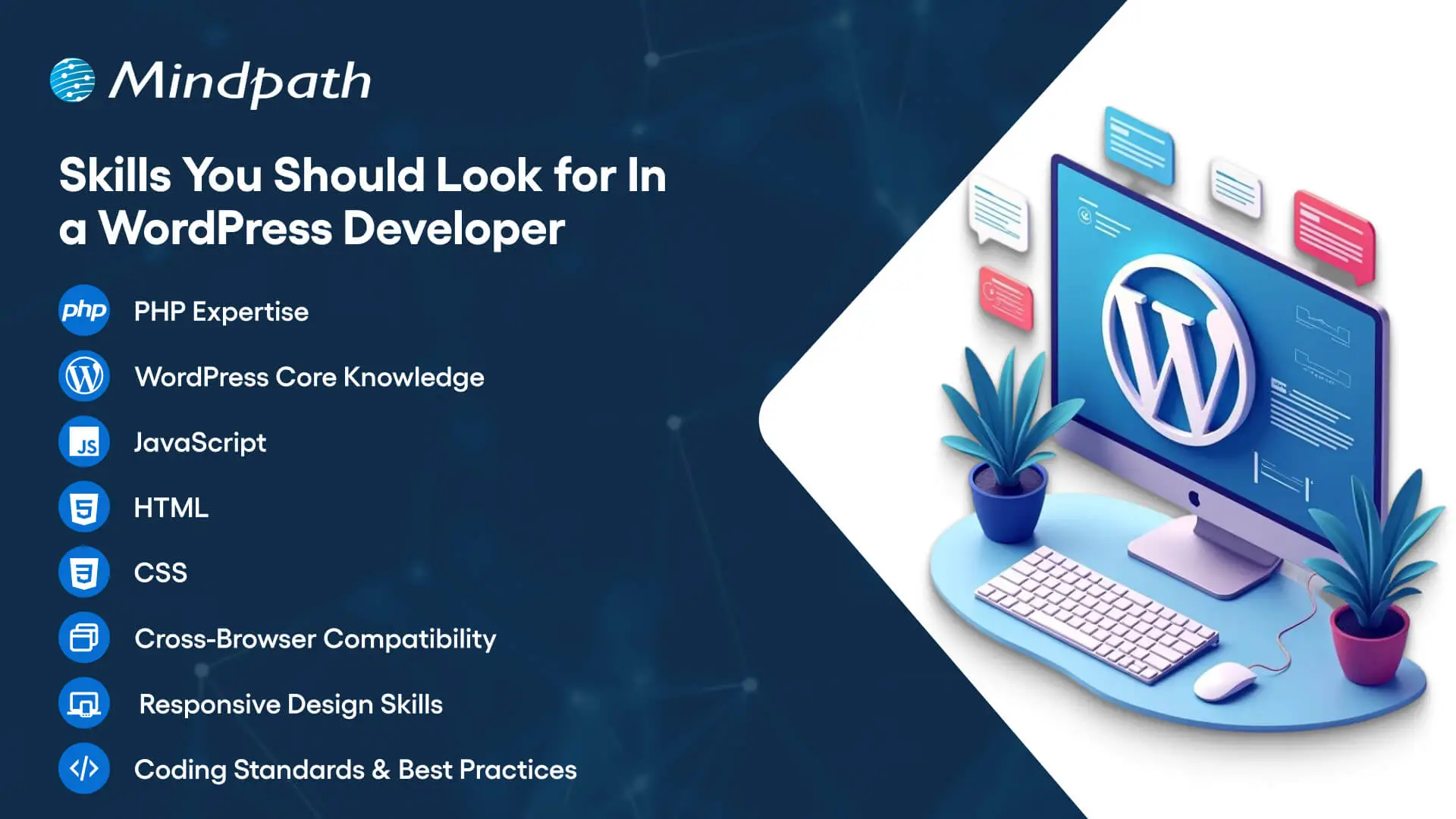
Skills You Should Look for In a WordPress Developer

You should focus on the core competencies first to identify professionals who are capable of leveraging the capabilities of WordPress.

1. A skilled WordPress developer must be fluent in PHP, WordPress core, JavaScript, HTML and CSS.

2. The wordpress developer should have in-depth understanding and practical experience in building WordPress themes and plugins.

3. The core competencies of WordPress development experts also revolve around skills for ensuring cross-browser compatibility and responsive design.

4. A WordPress developer is expected to know the coding standards and best practices for WordPress development.

Ready to make your hiring process smooth and avoid picking the wrong developer? Our WordPress Developer Checklist gives you a clear, step-by-step framework to evaluate every candidate.

Are Core Competencies Enough for a WordPress Developer?

The core skills required from a WordPress developer showcase only one half of the picture. Recruiters must also look for candidates with additional skills that can bring more value to web projects. Business can hire remote WordPress developers or dedicated in-house experts after checking their capability to go beyond the norm. Candidates who know more than the core skills of a WordPress developer can take care of different aspects of web projects with minimal assistance.

You should look for candidates with experience in version control and performance optimization. On top of it, a WordPress developer who has in-depth understanding of SEO principles can be a valuable asset. The other additional skills that you can look for in a WordPress developer include familiarity with SQL and database management. Candidates with knowledge of working with WordPress REST API and RESTful APIs will definitely elevate the chances of creating better web projects.

While technical skills are a must-have for WordPress developers, it is impossible to ignore the importance of business acumen and soft skills. Any WordPress developer with business acumen can understand the vision and goals of a web project. In addition, they also need soft skills like communication and time management to work in a team and deliver their best performance.

Unsure if your WordPress site meets accessibility standards for all users? Explore our article on how to improve WordPress web accessibility and ensure your site is usable by everyone.

Which Hiring Model Should You Choose?

Diving straight into the hiring process without choosing a hiring option can lead recruiters into many roadblocks in future. Business owners and hiring managers must know the strengths and setbacks of each hiring model to figure out the ideal option for their web project. You can hire freelance developers or opt for an in-house developer and capitalize on different advantages. For instance, freelance developers are the best picks for web projects of small companies or startups. Freelance developers can work on tight budgets and serve as the most efficient assets for one-time web development projects.

The freelance hiring model may seem appealing due to the lower costs than hiring a dedicated in-house developer. However, many people don’t pay attention to the limitations that come with freelance developers. It is difficult to manage freelancers as they may be working with multiple clients and could not deliver your project on time. The alternative to a WordPress freelancer is an in-house developer who will work in your office. In-house developers understand your business goals and customer expectations more closely, which helps them create effective products.

You may have assumed that an in-house WordPress developer will be the ideal choice for your next web project. The problem with in-house developers is the cost and time required to welcome them into your team. Apart from the costs of salary and infrastructure, you will have to bear the burden of time required for onboarding an in-house developer.

Interestingly, you can find a solution to this setback in professional WordPress development agencies. Professional agencies offer access to a team of developers with full-stack development expertise and the assurance of project management. With a professional agency, you don’t have to worry about overheads or continuous maintenance and support.

Looking to scale your web project without long-term commitments? Check out our guide to hire a freelance full-stack developer and discover how to find skilled freelancers who meet your needs.

What are the Costs of Hiring WordPress Developers?

The type of hiring model you choose to hire expert WordPress developers for your web project will have a significant impact on the hiring costs. On top of it, you must also consider the location and experience of the developer to determine the hiring costs. It is also important to note that businesses can choose between hourly pricing and fixed pricing for different hiring models. For instance, a freelancer will charge around $20 to $100 per hour for their services or take a salary of $65,000 to $70,000 per year for different projects.

The location where a WordPress developer will work also has a significant influence on the hiring costs. The average WordPress developer salary in the United States varies between $42,000 and $103,000. On the other hand, the salary of a WordPress developer in Australia can be somewhere between $91,000 and $179,000. It is also important to note that the salary of WordPress developers may vary with changes in demand for talent and complexity of projects. Awareness of salary ranges can help you ensure that you make the right offers to skilled candidates.

Roadmap for Hiring an Expert WordPress Developer

Once you know what you are looking for, the search for a skilled WordPress developer becomes a lot easier. You can follow a few simple steps to establish a solid hiring process for WordPress development projects.

1. Know Your Business Goals

The first step in the hiring process involves understanding that you are not listing WordPress jobs to follow a trend. You must identify the problems you want to solve with the help of a WordPress developer. Understanding your problems and business goals will help you identify developers with the skills required to solve them.

2. Establish a Clear Budget

Another area where you should be very clear while hiring WordPress development experts is the budget. As a matter of fact, your budget will determine the type of hiring model that will suit your project. The important factors that help you define a budget for web projects include the scope of the project and its complexity. On top of it, the experience of developers will also come into play as you will have to pay more to senior developers.

3. Rigorous Testing and Interview Process

The most common mistake recruiters make while hiring a WordPress developer is the lack of attention to the testing and interview process. You should use different types of tests to evaluate the proficiency of candidates in PHP, HTML, JavaScript and SQL. The best way to test the technical proficiency of candidates involves providing hands-on assignments. Furthermore, the interview process should be more sophisticated with questions to evaluate the business knowledge and soft skills of candidates.

4. Finalize the Hiring Process

After identifying the right candidate for your WordPress project, you can complete the hiring process. It is important to create verified contracts that include comprehensive details about the project scope, terms of payment and timeline of the project. The hiring contract must also specify the clauses of confidentiality, ownership rights and terms of contract termination. With both parties agreeing to the contract, you can finalize the hiring process and welcome the developer into your team.

Ready to upgrade your HTML site to something more powerful and manageable? Explore why converting HTML to WordPress can streamline updates and improve your online presence.

Ready to Hire the Right WordPress Developer for Your Project?

The benefits of working with a professional WordPress developer can elevate your web project. You can hire offshore WordPress developers or choose an in-house developer for your team, depending on your requirements. However, the process to choose the ideal candidate for WordPress development projects remains the same in almost every case.

Mindpath is a trusted WordPress development company that has been helping businesses discover new solutions to a better digital presence. Our experience in working on different types of WordPress development projects has empowered us with the skills and confidence to deliver the best results. We offer WordPress development services tailored to the needs and vision of each business, thereby ensuring that you get desired outcomes from your web projects. Consult with us and make the most of WordPress for web development projects now.

Learn how to hire the ideal freelance WordPress developer with our guide. From defining needs to securing the right talent, ensure a high-performance website.
Unlocking Cyber Security

Ever wondered how secure your business really is in today’s digital age? What if we tell you that there are better ways to protect your digital assets from emerging threats? As cyber-attacks become more sophisticated, it’s essential to stay ahead of the curve. In this blog, we’ll explore effective strategies to enhance your business’s cyber security.

Cybersecurity refers to protecting your computer systems and data against cyber-attacks. These risks include hackers attempting to steal or destroy your data, malware that locks your files until you pay a fee, and attacks that interrupt your business. With so many gadgets and more skilled hackers, it is essential to employ numerous levels of security. This includes employing tools to detect and resolve issues, as well as ensuring that your people and procedures are prepared to respond. Cybersecurity is all about integrating smart technology and behaviors to keep your digital world safe. Cybersecurity is essential because it protects us from online threats that might lead to catastrophic consequences, such as identity theft or data loss. Our everyday lives rely on secure systems like power plants, hospitals, and banking. If these systems are not secured, they can harm everyone.

So, let’s dive in to explore the ways in which we can increase cyber security!

Ways to Increase Cyber Security

1. Regular Updates

To keep your computers safe, update them on a regular basis. This includes desktop computers, laptops, and mobile devices. Keep your operating systems and web browsers up to date to guard against emerging threats. Check for updates to any software on your computer, including security programs. Cloud-based software often updates automatically, so you don’t have to worry about it. If the employees use mobile devices for work, make sure they maintain their software up to date, particularly security programs. This helps keep all your gadgets safe.

2. Training Employees

Make sure your staff are aware of your company’s security plan. Begin by developing a cybersecurity policy that specifies best practices and processes for keeping information secure. This policy ought to specify what procedures to take if there is a security breach. Encourage staff to adopt strong, unique passwords for all accounts and devices. They should use different passwords for their PC, mobile devices, and corporate accounts. Whenever possible, enable two-factor authentication. This provides an additional security layer by needing a second device or code to complete the sign-in procedure. This helps to safeguard your accounts even when passwords are stolen. Additionally, provide regular training for your employees on cybersecurity. This helps them stay informed about the latest threats and best practices.

3. Limiting Access

Make sure that only authorized individuals have access to company computers and accounts. Even trustworthy people should not access information or equipment that they are not authorized to use. For example, do not allow a customer to use a work laptop to search something up. Different workers may require varying degrees of access depending on their positions. Ensure that staff do not reveal their account details. For example, an accountant should never share their accounting software password with a salesman. When feasible, build unique logins for each employee. This enables you to restrict and limit what each individual may access depending on their function, therefore improving overall security.

4. Securing Wi-Fi

If your business’s Wi-Fi is not sufficiently safeguarded, it might pose a security concern. Make sure your Wi-Fi is password-protected so that only employees have access to it. Ideally, keep the WiFi password secret from employees. If you need to provide Wi-Fi connectivity to customers, create a separate network exclusively for them. This guest network should be separate from the network of your company to avoid unauthorized access to important files and data. Keeping these networks distinct helps secure your company’s information from potential security attacks.

5. Create Backups

To avoid data loss, back up your computer’s information on a regular basis. If files are stolen or go missing, maintaining a backup allows you to restore them. Make sure that all vital data is backed up. For example, if you have vendor information on your desktop, keep a copy on the cloud. Both copies should be encrypted and password-protected to prevent unauthorized access. This way, if something goes wrong, you’ll still have access to vital data.

6. Create Mobile Action Plan

Mobile devices may be a security issue, especially if they hold sensitive information or provide access to your business network. To reduce these dangers, ask users to password lock their devices and encrypt their data. Encourage them to use security programs to protect their information, particularly while accessing public networks. In addition, create explicit protocols for reporting missing or stolen devices. This allows you to respond swiftly to security breaches and guarantees that your data and network are protected.

7. Passwords and Authentications

Ensure that staff use unique passwords for each account and update them every three months. To improve security, use multi-factor authentication (MFA), which needs more than just a password to access accounts and typically includes a second form of verification, such as a code texted to a mobile device. Additionally, check with providers who handle sensitive data, such as banking services, to determine if they provide MFA for your accounts. This extra step helps to secure your information from unauthorized access.

Increase Your Cyber Security at Mindpath

At Mindpath, we make it easier to safeguard your company from cyber-attacks. We assist you in increasing your security by using strong passwords, keeping software up to date, and implementing additional levels of protection such as multi-factor authentication. Our staff guarantees that your data is safe and secure, providing you peace of mind while enabling you to concentrate on your company. Let us assist you in keeping your digital world safe!

Wrapping Up!

Cybersecurity is more essential than ever in today’s digital environment. You can significantly boost your company’s cyber security by applying the measures we’ve covered, which include frequent updates, complete staff training, restricted access, secure Wi-Fi, dependable backups, a mobile action plan, and strong password restrictions. Our web development services are devoted to assisting you in navigating these challenges with ease. Our team is committed to providing you with the resources and assistance you require to safeguard your digital assets and keep your peace of mind.

Ready to fortify your business against cyber threats?

Connect with Mindpath for top-notch security solutions tailored to your needs.


Contact Us!

what is conversational ai

Companies today understand that it’s essential to have satisfied customers at every touchpoint, to keep in front, and that is where the magic of Conversational AI resides. Are you wondering what is conversational AI? It is the technology that informs smart chatbots and virtual assistants that provide 24/7 interactions for infinitely scalable engagements. Organizations leverage conversational AI to reduce waiting hours, respond to customer inquiries in real-time, and keep delivering a consistent quality of service.

This amazing technology is enhancing efficiencies, saving costs, and maximizing customer satisfaction. Conversational AI stands to revolutionize the performance of an organization, as well as the measurement of its growth, by automating processes with personalized support. If you’re interested in how it works and what benefits it has in store for you, let’s discuss all its amazing features in this blog, step by step.

Are you looking to implement smart chatbots or a virtual assistant in your business to enhance customer engagement? Mindpath’s AI Development Services will help you achieve customer satisfaction with 24/7 support.

What is Conversational AI?

Conversational AI is smart technology that helps artificial intelligence bots like chatbots and virtual assistants talk with people in a natural, human-like way. It’s all about making AI more human, so interactions feel real and engaging. By understanding what we say and how we say it, these systems make conversations easier and more helpful for everyone.

Conversational AI is built using machine learning and natural language processing, and it harnesses the knowledge of millions of conversations. Learning from these conversations allows artificial intelligence bots to improve upon responding to questions, solving problems, and predicting what a customer may need next more accurately. It’s a powerful step toward making AI more human and building better customer experiences.

Types of Conversational AI

There are different types of Conversational AI technologies a business can use to meet customers and deliver its services to them. Each one operates in its own way and could have its own niche when it comes to customer support, sales, or engagement objectives.

1. Voice Bots/Assistants

Voice bots and assistants are a type of conversational technology that interacts with people through spoken language. They listen to what a person says, figure out what they need, and respond naturally. This makes everyday tasks easier, from playing music to managing smart home devices.

2. AI Chatbots

AI chatbots are a powerful type of conversational AI designed to hold natural, human-like chats. These conversational agents use advanced language models to understand context and respond in a way that feels personal and clear. They help businesses handle complex questions and provide better support around the clock.

3. Interactive voice response (IVR)/Interactive voice assistants (IVA)

Interactive Voice Response and Interactive Voice Assistants are a type of conversational AI that helps people navigate phone systems using voice or keypad inputs. They understand what a caller needs and guide them to the right solution without long wait times. This makes customer service smoother, faster, and more convenient.

Wondering how conversational AI is advancing into systems capable of autonomous action and decision-making? Explore how Agentic AI is redefining intelligent, self-directed digital behavior.

Advantages of Conversational AI

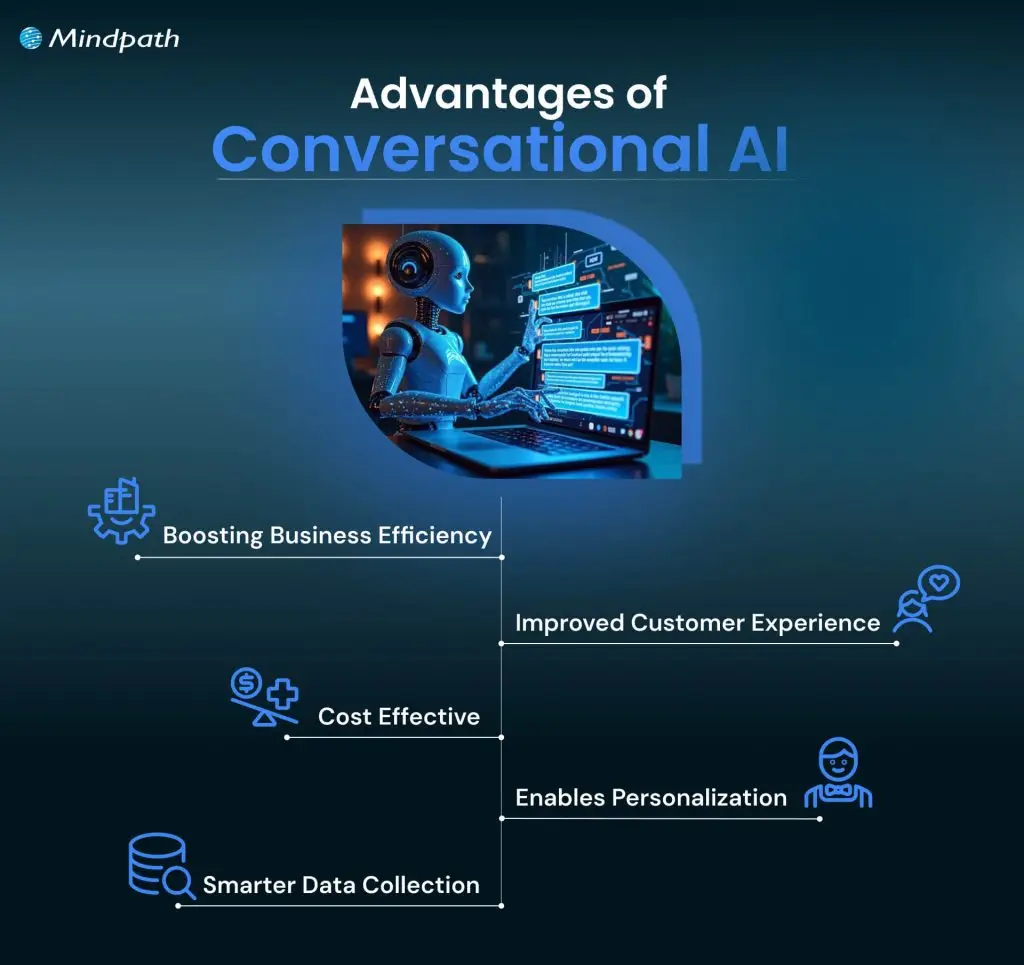
Conversational AI has become an important part of how companies connect with people today. Here are some key advantages it can bring to your business.

Advantages of Conversational AI

1. Boosting Business Efficiency

Conversational Artificial Intelligence can manage many routine tasks without needing a human agent every time. This means your team can spend more time on important work while the AI handles simple customer conversations. With artificial intelligence conversation tools available 24/7, your business can solve customer queries faster and work more efficiently, showcasing the many benefits of chatbot technology for operational productivity.

2. Cost-Effective

A good conversational AI platform can handle customer calls and chats automatically, with little need for extra staff. By making AI more human and accurate, it helps you manage high volumes of requests without extra cost. This saves money on daily operations and reduces mistakes, keeping your business cost-effective.

3. Improved Customer Experience

Artificial intelligence bots make it easy for customers to get quick answers and help whenever they need it. This technology offers personalized replies and a smooth, contactless service for people all over the world. It creates a better customer experience and keeps people happy with your business.

4. Enables Personalization

This technology learns from each customer’s information, like location and past interactions, to offer a more personal chat experience. It can suggest helpful answers and next steps based on what each person needs. This makes solving problems faster and reduces the need for follow-up calls.

5. Smarter Data Collection

This technology helps you collect useful information from every customer conversation. By tracking what people say and how they interact, you can spot trends and understand what customers really want. This makes it easier to improve your sales and marketing strategies over time.

Want to explore the innovations shaping the future of conversational AI? Explore our blog on the top AI trends to discover the emerging technologies redefining intelligent communication.

Use Cases of Conversational AI

Conversational AI can be used in many ways to make business operations smoother and customer interactions better. Here are some common use cases that show how an example of conversational AI works in real life.

1. Conversational IVR Systems

Modern IVR systems let customers speak naturally instead of pressing buttons to find help. For example, airlines now use conversational IVR to let travelers say things like “Change my flight” or “Check flight status” and get quick answers without waiting for a live agent.

2. Seamless Transfer to Live Agents

When a bot can’t handle a request, it passes the chat to a live agent along with all the details, so nothing gets lost. For example, a telecom company’s virtual assistant can detect when a billing issue is too complex and smoothly transfer the full conversation to a specialist who can resolve it faster.

3. Round-the-Clock Support

These chatbots answer simple customer questions at any time of day without needing a live agent. For example, an online retailer’s chatbot can help shoppers check order status or find return instructions even after business hours.

4. Tailored Product Recommendation

This technology suggests items people might like based on what they’ve bought or browsed before. For example, a streaming service’s chatbot can recommend new shows or movies based on what you’ve just finished watching.

Ready to build conversational AI that boosts sales and strengthens customer engagement? Learn how AI in e-commerce transforms online shopping experiences and drives measurable business growth.

5. Effortless Onboarding

These assistants help new employees feel confident and prepared by guiding them through company policies and tasks step by step. For example, an HR team can use an AI onboarding assistant to help new hires complete paperwork, set up work tools, and get reminders about training sessions.

6. Task Automation

These bots connect chats to your business tools, so tasks like updating customer records or creating tickets happen instantly. For example, the best conversational AI chatbot for an e-commerce store can automatically create a return request and send an update to the warehouse team.

7. Faster Lead Conversion

These chatbots ask visitors the right questions to see if they’re a good fit for your product or service. For example, a real estate company’s chatbot can collect details about a buyer’s budget and location, then connect them with the right agent.

8. Timely Updates

These AI tools send helpful reminders and updates before customers even ask, keeping everyone informed and stress-free. For example, a healthcare provider can use this to remind patients about upcoming appointments or share wellness tips.

If you want to use AI to improve your healthcare services. Learn from our blog AI in Healthcare, where we highlight real-world use cases of conversational systems supporting medical professionals and patients.

Conversational AI Best Practices

Using Conversational AI, the right way can help you get the best results for your business and your customers. Here are some best practices to keep in mind as you build and manage your AI solutions.

Conversational AI Best Practices

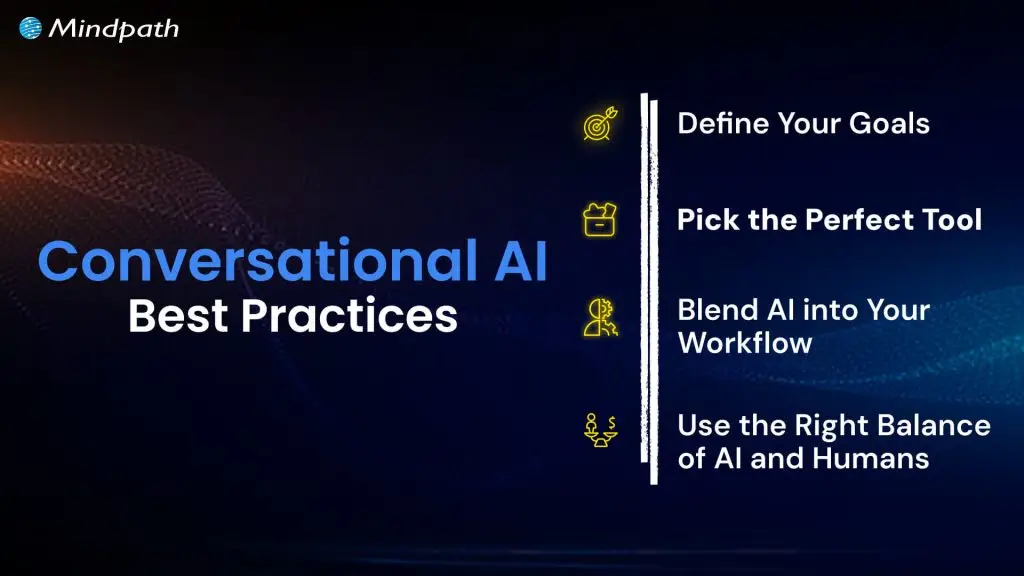
1. Define Your Goals

Always be clear about why you want to use conversational AI and what you want to achieve. Make sure it fits well with your bigger business plans, so it truly adds value.

2. Pick the Perfect Tool

Pick a conversational AI tool that fits your industry and matches your budget and goals. Make sure it can grow with your business, so you get the most value over time.

3. Blend AI into Your Workflow

Connect your conversational AI with your other business tools so it works smoothly with your daily tasks. This makes your processes faster, more accurate, and more useful for your team.

4. Use the Right Balance of AI and Humans

Let AI handle simple, repetitive tasks while your team focuses on work that needs a human touch. Always set clear points where the bot should hand over to a person for the best customer experience.

Curious how AI can optimize your workforce and improve business outcomes? Check out AI redefining job roles in Tech to see how intelligent systems are reshaping employee roles and driving operational efficiency.

Ready to Take the Next Step with Conversational AI?

Conversational AI is transforming how businesses connect with people by making everyday interactions faster and more personal. It helps companies work smarter, serve customers better, and grow with less effort. Now that you know what is conversational AI, you can start using it to create more value.

Mindpath offers professional custom chatbot development services to help you build and launch conversational AI that matches your business goals. Our experts create secure, easy-to-scale chatbots, voice assistants, and smart integrations. Let us help you deliver great customer experiences and stay ahead in the AI space.

Frequently Asked Questions

1. What industries benefit the most from conversational AI?

Industries like ecommerce, healthcare, banking, travel, education, and telecom benefit greatly from conversational AI. These businesses handle large customer interactions daily, so AI helps improve response times, customer engagement, and operational efficiency without increasing support workload.

2. Can conversational AI handle complex customer conversations?

Modern conversational AI can manage many complex conversations by understanding context and customer intent. When situations become too advanced, the system can transfer the conversation to a human agent while keeping the discussion history for a smoother experience.

3. How does conversational AI improve customer retention?

Conversational AI improves retention by providing quick support, personalized recommendations, and consistent communication. Customers are more likely to stay loyal to businesses that respond fast, solve problems easily, and offer convenient experiences across different channels.

4. Is conversational AI difficult for employees to use?

Most conversational AI platforms are designed with simple dashboards and easy management tools. Employees usually need minimal training to monitor conversations, update responses, and manage workflows, making adoption much easier for teams across departments.

5. How can businesses measure the success of conversational AI?

Businesses can track metrics like response time, customer satisfaction, lead conversion, support cost reduction, and resolution rates. Monitoring these results helps companies understand how conversational AI improves operations and customer experiences over time.

Discover the power of Conversational AI! Learn its benefits, features, and how Mindpath can help transform your customer interactions.