Home

AI Solutions for Small Businesses and Startups

AI Solutions for Small Businesses and Startups

Join our Newsletter!

ai solutions for small businesses

AI solutions for small businesses help owners and startup teams automate routine work, improve customer communication, analyze business information, and create content with fewer manual steps. These solutions range from ready-to-use AI applications to custom systems integrated with a company’s existing software. The right choice depends on the business problem, available budget, team capacity, and data requirements.

Key Takeaways

  • 01
    AI solutions for small businesses can support content creation, customer service, marketing, bookkeeping, reporting, and routine workflow automation.
  • 02
    The main benefits include reduced manual effort, more consistent workflows, faster access to information, and better support for business decisions.
  • 03
    Tools such as ChatGPT, Microsoft 365 Copilot, HubSpot AI, Canva Magic Studio, and customer support platforms serve different business needs.
  • 04
    Businesses should compare features, pricing, integrations, privacy controls, and expected value before selecting an AI solution.
  • 05
    Starting with a measurable, low-risk use case helps small teams test AI, review the results, and expand adoption responsibly.

Small businesses do not need to build a complex AI system to benefit from the technology. They can begin with focused tasks such as drafting emails, organizing customer enquiries, summarizing documents, analyzing sales data, or preparing marketing content. By selecting tools that solve specific problems and measuring their results, smaller teams can evaluate AI’s value before making a larger investment.

Looking to apply AI to your business workflows? Mindpath’s AI development services can help you evaluate suitable solutions and plan an implementation aligned with your business goals.

What are AI Solutions for Small Businesses?

AI solutions for small businesses are tools and applications that use artificial intelligence to assist with specific business activities. Depending on the product, they may generate text, summarize information, answer customer questions, classify documents, analyze data, recommend actions, or automate parts of a workflow.

These solutions include ready-to-use software, AI features built into existing business platforms, and custom applications developed for particular requirements. A small retailer might use AI to prepare product descriptions, while a professional services firm could use it to summarize documents or organize client enquiries. A startup with more specialized needs might integrate an AI model with its customer relationship management system or internal knowledge base.

The objective is not to introduce AI into every process. It is to identify tasks where AI can provide practical value while maintaining appropriate human review, data protection, and quality standards. Businesses can begin with AI for customer service or other focused applications before considering more advanced implementations.

Benefits of AI Solutions for Small Businesses and Startups

Small businesses often work with limited budgets and lean teams. AI can help address some operational constraints by assisting with repetitive tasks and making business information easier to use. The actual benefits depend on the chosen tool, the process being improved, and how effectively the solution is implemented.

1. Increased Productivity

AI writing assistants, summarization tools, and workflow applications can help employees complete routine tasks with fewer manual steps. For example, a team member could use AI to prepare a first draft of a proposal, summarize a lengthy report, or organize notes from a meeting.

Employees should still review the output for accuracy and relevance. Measuring time saved and the amount of rework required can help businesses determine whether the tool improves productivity.

2. Improved Customer Engagement

AI can support customer communication by helping businesses draft personalized messages, answer common questions, summarize support conversations, and organize incoming requests. AI-enabled chatbots can also handle selected routine enquiries when connected to reliable information sources.

Businesses should make it easy for customers to reach a human representative when an issue is sensitive, complex, or outside the system’s capabilities. Customer satisfaction and resolution quality are more useful measures than automation volume alone.

3. Automation of Repetitive Tasks

AI-enabled applications can assist with tasks such as scheduling, document classification, data extraction, email drafting, and processing routine enquiries. When connected to business software, they may help coordinate multiple steps in a workflow.

Not every repetitive task requires AI. Fixed, predictable processes may be better suited to conventional automation. Businesses should choose the simplest approach that reliably addresses the problem.

4. Better-Informed Business Decisions

AI-powered analytics tools can help business owners summarize sales records, identify patterns, compare performance indicators, and prepare forecasts. These insights can support decisions about inventory, marketing campaigns, staffing, and customer retention.

AI-generated analysis should be checked against the underlying data and business context. Owners remain responsible for interpreting results and considering factors the system may not capture. Read our guide to AI decision-making use cases for related applications.

5. More Consistent Marketing and Content

AI tools can help small teams generate content outlines, prepare social media drafts, rewrite product descriptions, and adapt messages for different channels. They can also support brainstorming and editing when a business has limited in-house marketing resources.

Human review remains important for factual accuracy, brand voice, originality, and audience relevance. AI-generated content should reflect the company’s expertise and actual offerings rather than relying on generic material.

6. Support for Business Growth

As a business grows, the volume of customer enquiries, transactions, documents, and internal coordination can increase. Suitable AI tools may help a small team manage some of this additional work without immediately adding manual steps to every process.

Growth still depends on product quality, customer demand, sound operations, and effective management. AI can support these activities, but it does not guarantee revenue growth or eliminate the need for skilled employees.

For a broader view of business applications, read our article on the benefits of artificial intelligence.

11 AI Solutions Small Businesses Can Consider

The right AI tool depends on the work a business needs to improve. Some applications focus on writing and content creation, while others support customer service, marketing, accounting, analytics, or online store management. The following options reflect the tools covered in this guide; available features, product names, integrations, and plans may change over time.

Tool Primary use Potential business application What to evaluate
ChatGPT Writing, analysis, brainstorming, and general assistance Drafting emails, preparing outlines, summarizing documents, and organizing ideas Output accuracy, data handling, and suitability for the task
Microsoft 365 Copilot Assistance within supported Microsoft applications Working with documents, email, meetings, and business data Plan availability, application support, and organizational permissions
HubSpot AI Marketing, sales, and CRM assistance Supporting outreach, CRM workflows, and customer communication Existing CRM setup, feature availability, and pricing
Shopify Sidekick Assistance for Shopify merchants Supporting store-related tasks and understanding store information Shopify plan, supported capabilities, and store requirements
Grammarly Writing and communication support Reviewing grammar, clarity, tone, and professional messages Language support, integrations, and data policies
Canva Magic Studio Visual design and content creation Preparing marketing graphics, social content, and presentations Design requirements, brand consistency, and usage rights
Bookkeeping.ai Bookkeeping-related assistance Supporting transaction organization and financial workflows Accounting integrations, accuracy, and review requirements
Zendesk AI Customer service and support workflows Supporting ticket classification, responses, and service operations Support volume, integration needs, and plan availability
Tableau Pulse Business intelligence and metric insights Reviewing business performance and key indicators Data sources, analytics requirements, and licensing
Buffer Social media management Planning posts and coordinating social media activity Supported channels, scheduling needs, and available AI features
Lumen5 Video content creation Turning written material into video content Video formats, branding needs, licensing, and plan limits

1. ChatGPT

ChatGPT can assist small businesses with drafting content, brainstorming ideas, summarizing information, analyzing supported data, and preparing customer communication. For example, a business owner could use it to draft a product description, organize a meeting agenda, or create an initial response to a frequently asked question.

The tool is most useful when employees provide clear context, review the output, and adapt it to the business’s needs. Sensitive customer information and confidential company data should only be shared in accordance with the organization’s privacy requirements and the tool’s applicable data controls.

2. Microsoft 365 Copilot

Microsoft 365 Copilot brings AI assistance into supported Microsoft applications and workflows. Depending on the plan and configuration, businesses may use it to help draft documents, summarize meetings, work with email, or analyze information in supported applications.

It may be useful for small teams that already rely on Microsoft 365. Before adopting it, businesses should review licensing, supported features, data access permissions, and how the tool works with their existing documents and collaboration practices.

3. HubSpot AI

HubSpot offers AI capabilities across parts of its customer relationship management, marketing, sales, and service platform. Depending on the available features and plan, businesses can use AI assistance to support content creation, customer communication, sales workflows, and the organization of CRM information.

For a small business managing leads and customer relationships, the main consideration is how well the platform fits its current sales process. Review available integrations, automation limits, data quality requirements, and pricing before moving essential workflows into a new system.

4. Shopify Sidekick

Shopify Sidekick is an AI assistant designed for Shopify merchants. Depending on the supported capabilities, it can help store owners work with store information, understand business activity, and carry out selected store-management tasks.

An online retailer should assess whether the available features address its actual needs, such as managing product information or reviewing store performance. Verify the current availability and scope of features for the store’s plan before relying on them in daily operations.

5. Grammarly

Grammarly provides writing assistance that can help businesses improve grammar, clarity, tone, and professional communication. It may be useful when preparing proposals, customer emails, internal documents, and marketing copy.

Writing assistance can reduce editing effort, but it cannot replace subject-matter review. Employees should confirm names, figures, contractual details, and other important information before sending or publishing a document.

6. Canva Magic Studio

Canva Magic Studio provides AI-powered features for supported design and content workflows. Small businesses can use available capabilities to help prepare social media graphics, presentations, promotional materials, and other visual assets.

These tools can help teams produce initial design concepts, but the results should be checked for brand consistency, readability, factual accuracy, and appropriate use of visual assets. Important brand materials may still require review by a professional designer.

7. Bookkeeping.ai

Bookkeeping.ai is a bookkeeping-focused option to evaluate when looking for support with financial administration. Depending on its current capabilities and integrations, a tool in this category may help organize transaction information, support reconciliation workflows, or prepare financial summaries.

Financial records require a high degree of accuracy. Before adopting any bookkeeping tool, verify its supported accounting systems, data security practices, audit trail, and review process. Reconciliation results, tax-related information, and financial reports should be checked by a qualified person where appropriate.

8. Zendesk AI

Zendesk offers AI capabilities for customer service workflows. Depending on the configuration and plan, these may support ticket classification, response assistance, customer self-service, and other support operations.

Businesses with recurring customer enquiries can assess whether these features reduce manual triage and help representatives resolve cases efficiently. They should also define escalation rules for sensitive issues, complaints, and requests that require human judgment.

9. Tableau Pulse

Tableau Pulse is designed to help users engage with business metrics and data insights through supported analytics capabilities. Small businesses with organized sales, marketing, or operational data may use business intelligence tools to review performance and identify areas that need attention.

The usefulness of analytics depends on accurate data, well-defined metrics, and appropriate interpretation. Businesses should confirm that the product fits their data sources, licensing requirements, reporting needs, and level of analytical complexity.

10. Buffer

Buffer helps businesses organize and schedule social media content across supported platforms. Its available AI-assisted features may help users brainstorm ideas or prepare and adapt post drafts.

For a small marketing team, the main benefit is having a more organized publishing workflow. Content should still be reviewed for accuracy, brand voice, platform requirements, and relevance to the intended audience.

11. Lumen5

Lumen5 is a video creation platform that can help turn written material into video content using supported templates and media features. Small businesses may evaluate it when adapting blog posts, scripts, or other content into videos for marketing and communication.

Before choosing a video tool, assess the available formats, editing controls, branding options, media licensing, and export limits. Generated videos should be reviewed for visual consistency, captions, factual accuracy, and accessibility.

For more content-focused options, read our guide to generative AI tools for content creation.

How to Choose the Right AI Solution for Your Small Business

The best AI solution is not necessarily the one with the largest feature set. Small businesses should choose tools based on their most pressing needs, existing systems, budget, and ability to maintain the solution over time.

1. Identify a Specific Business Problem

Start by identifying a task that consumes time, creates avoidable errors, or delays customer service. Examples include drafting routine emails, sorting enquiries, preparing reports, or organizing product information. Define what a successful improvement would look like before choosing a tool.

2. Compare Features and Total Cost

Compare the features required for the task rather than paying for capabilities the team may not use. Consider subscription costs, usage limits, setup time, integration expenses, training, and ongoing maintenance when estimating the total cost of adoption.

3. Check Integrations and Compatibility

An AI tool is easier to adopt when it works with the software the business already uses. Check whether it integrates with existing email, accounting, CRM, e-commerce, or collaboration systems. Also consider whether information can be exported if the business changes tools later.

4. Review Privacy and Security

Understand what information the tool processes, how data is stored, who can access it, and what controls are available. Avoid entering sensitive business, financial, employee, or customer information into a service without reviewing its data handling practices and the business’s obligations.

5. Test Before Expanding

Run a small pilot with a defined workflow and a limited group of users. Compare the results with the existing process, including time required, error rates, output quality, and user experience. Expand adoption only when the results justify the cost and the risks are adequately managed.

How Small Businesses Can Implement AI Step by Step

A practical implementation process helps small teams move from experimentation to reliable use without committing to a large project too early.

1. Document the Current Workflow

Record how the task is completed today, who is involved, which systems are used, and where delays or errors occur. This provides a baseline for evaluating whether AI improves the process.

2. Select a Low-Risk Use Case

Choose a task where errors can be identified and corrected easily, such as preparing internal summaries or drafting marketing content. Keep a human reviewer involved while the team evaluates the output.

3. Configure the Tool and Set Guidelines

Define the information employees can use, the tasks the AI may support, the outputs that need review, and the situations that require escalation. Provide examples and instructions that help employees use the tool consistently.

4. Train Employees and Review Results

Show employees how to use the tool, recognize unreliable output, protect confidential information, and report problems. Collect feedback from the people using the system and compare performance with the original baseline.

5. Expand Based on Evidence

If the pilot produces meaningful improvements, consider applying the approach to similar tasks. Review the cost, accuracy, employee experience, and operational risks before expanding to more complex workflows or introducing greater automation.

Challenges of Using AI in Small Businesses

AI tools can be accessible, but adoption still involves practical considerations. Recognizing these challenges early can help small businesses select suitable applications and avoid unnecessary expense.

1. Cost and Subscription Management

Multiple subscriptions, usage-based charges, integrations, and training can increase the total cost of adoption. Businesses should review recurring expenses and confirm that the solution provides enough value to justify its ongoing cost.

2. Accuracy and Reliability

AI-generated text, analysis, or recommendations can contain errors or omit important context. Establish review procedures for customer-facing content, financial information, legal documents, and other outputs where mistakes could have significant consequences.

3. Privacy and Data Protection

Small businesses may handle confidential client records, financial information, or employee data. Review the provider’s data practices, set appropriate access controls, and ensure that employees understand what information can be entered into AI tools.

4. Employee Training and Adoption

A tool may not deliver value if employees do not understand how to use it or when to question its output. Provide practical training, clear usage guidelines, and a process for sharing feedback and resolving problems.

5. Choosing the Right Level of Automation

Not every task should be automated completely. Begin with AI assistance or draft generation when human judgment is important. Allow systems to take actions only when permissions, testing, monitoring, and recovery procedures are appropriate for the task.

The Future of AI Solutions for Small Businesses

AI tools continue to develop across content creation, analytics, customer support, workflow automation, and business software. Small businesses may increasingly encounter AI features built directly into applications they already use, reducing the need to adopt a separate tool for every task.

AI agents may also help coordinate multiple steps across connected systems, while low-code and no-code platforms can make selected workflows easier to configure. However, more advanced capabilities may introduce additional costs, integration requirements, and governance needs.

Rather than adopting technology based on predictions alone, businesses should evaluate new features against real operational needs. Tools that fit existing processes, protect business data, and deliver measurable improvements are more useful than systems selected simply because they are new.

For a related topic, read our guide to conversational AI and its role in customer communication.

Choose AI Solutions That Support Your Business Goals

AI solutions for small businesses can support everyday work across customer service, marketing, content creation, reporting, and operations. The most effective approach is to start with a clear business problem, choose a tool that fits the team’s requirements, and measure whether it improves the existing process.

As requirements become more specialized, businesses may need integrations or custom AI applications that connect their data, workflows, and existing systems. A planned approach helps teams balance potential benefits with cost, reliability, privacy, and ongoing maintenance.

Mindpath provides AI development services for businesses evaluating tailored AI solutions. Discuss your goals and technical requirements to determine whether an existing tool, an integration, or a custom application is the right fit.


Can AI Grow Your Business?

Simplify operations with practical AI solutions.

Frequently Asked Questions

AI automates repetitive tasks, improves customer support, analyzes business data, enhances marketing, and increases productivity while reducing operational costs.
AI chatbots, marketing automation, predictive analytics, CRM automation, inventory management, and AI-powered content creation are widely adopted.
Yes. Many cloud-based AI solutions offer scalable pricing, allowing small businesses to adopt AI without significant upfront investment.
Yes. AI chatbots provide instant support, answer common questions, qualify leads, and deliver personalized customer experiences around the clock.
Identify a business challenge, choose a suitable AI tool, begin with a pilot project, measure results, and expand implementation gradually.

Support Is One Click Away

Featured Posts

Related Post

freelance full stack developer

In the current business landscape, business entities are engaging in a wide range of projects. Due to the high diversity coupled with the complexity of projects, many companies are hiring the best freelance full-stack developers for their projects. According to the reports, full-stack developer jobs are one of the most in-demand jobs since their year-over-year postings are rising by more than 35 %.

Key Takeaways

  • 01
    Freelance full-stack developers handle both front-end and back-end work independently.
  • 02
    Hiring freelancers cuts costs by avoiding employee benefits and long contracts.
  • 03
    Their agility helps businesses launch web apps with shorter delivery timelines.
  • 04
    Strong cloud and testing skills ensure scalable and reliable applications.
  • 05
    Growing demand makes freelance full-stack developers valuable for future projects.

As the reliance of companies across industries on digital technologies rises, the demand for full-stack development freelance services is likely to surge. Businesses that prioritise their digital transformation journey have been considering freelance full-stack developers. If you wish to excel in your tech projects, you must definitely consider the best freelance full-stack developer for hire.

If you’re looking to hire full-stack developers who see beyond code and focus on your future transformation, Full Stack Development Services will provide you with forward-thinking professionals who deliver innovative solutions that drive business growth.

Who is a Freelance Full-Stack Developer?

Before deciding whether a freelance full-stack developer is an ideal choice for your project or not, you must familiarise yourself with the particular role. A Freelance Full-Stack Developer is a professional who is proficient in the front-end and backend components of a web application. These developers have solid expertise in a broad range of technologies such as CSS, HTML, React, JavaScript, and many more. As in recent years, a greater number of businesses are integrating digital technologies into their processes, and the reliance on capable freelance full-stack developers has skyrocketed. 

The high versatility of these professionals while building entire web apps from scratch gives rise to benefits for businesses. Apart from their prowess to create apps, these professionals are capable of managing databases and deploying and maintaining software in a cloud environment. Thus, businesses that decide to hire a freelance full-stack developer can succeed in their technology-driven projects. 

Looking for the best way to scale? Explore how full-stack development for web projects improves flexibility and long-term growth. 

Skills of a Freelance Full-Stack Developer

Businesses need to familiarise themselves with the top skills and expertise of a Freelance and remote full-stack developer. The insight in this specific area can certainly help you understand the true potential of these professionals. The top skills that these professionals leverage in order to help business firms excel in their web development projects are:

1. High proficiency in front-end technologies

A capable Freelance Full-Stack Developer is proficient in popular front-end languages such as Angular, React, and CSS. 

2. Expertise in backend aspects

A highly skilled Freelance Full-Stack Developer has immense knowledge relating to database management, along with popular languages Python and Node.js. The professional also has expertise in API development, which equips them to handle backend operations flawlessly.

Also Read: Full-stack Development with Node.js

3. Solid foundation in cloud technologies

Talented Freelance Full-Stack Developers possess solid insight into cloud technologies. The rich insight empowers them to design highly scalable and secure applications for businesses. 

4. Testing and debugging skills

The skills relating to testing and debugging processes enable these professionals to develop robust and well-functioning applications. By conducting rigorous testing, they are able to locate flaws or vulnerabilities in web apps and adopt appropriate remedial measures in a prompt manner. 

5. Robust version control

Freelance Full-Stack Developers are capable of tracking changes to code. The skill pertaining to version control ensures that the quality of code can be maintained throughout the app development process. Furthermore, these developers focus on collaborating with others to ensure the success of projects. 

Want to gain deeper insight into which development role best suits your business needs? Explore our blog – Front-End vs Back-End vs Full-Stack Developer.

How Can a Freelance Full-Stack Developer Add Value to Your Project?

In the digitalised business realm, it is a necessity for businesses to consider partnering with the best freelance full-stack developers. Businesses can derive immense value if they decide to partner with a top Freelance Full-Stack Developer or hire a remote full-stack developer.

1. Expertise to handle end-to-end projects

By hiring the best Freelance Full-Stack Developers, you can rest assured about the entire web development lifecycle. These professionals will capitalise on their skills and expertise to handle a diverse range of projects efficiently. As they can work on the entire project lifecycle in an independent manner, you do not have to rely on other teams or professionals. 

2. Cost-effective solutions

Hiring the best Freelance Full-Stack Developers is undoubtedly a highly cost-effective solution for businesses. By choosing freelance full-stack developers, you can eliminate unnecessary costs relating to employee benefits or long-term contracts. Additionally, you do not have to hire entire project management teams to work on your web development projects. Moreover, by leveraging the expertise of these professionals, you can surely excel in your project in an efficient manner. 

3. High agility

Generally, Freelance Full-Stack Developers are highly agile as well as adaptable when it comes to handling web app development projects. As a result, they can deliver results for businesses with shorter delivery timelines. Furthermore, their ability to work in an independent manner can decrease the overall time taken to work on projects for businesses. Businesses can certainly derive immense value from their ability to launch their web apps in the market successfully. 

4. Flexible way of handling projects

By joining hands with Freelance Full-Stack Developers, businesses can handle their projects in a flexible manner. As these professionals work as freelancers, they offer flexible options for their business clients. Based on your exact project needs, these web developers can deliver tailored solutions to meet your specific project objectives. 

5. Capitalising on transferable abilities

Freelance Full-Stack Developers have highly transferable abilities thanks to their comprehensive knowledge of web development. As a result, business entities can take advantage of full-stack developers to take care of their varying needs relating to web design and web app development. The transferable abilities of these professionals undoubtedly empower businesses to reduce the overall complexity of their projects. 

Planning to validate your product idea quickly? Discover how hiring a full-stack developer for MVP accelerates product validation.

Promising Future of Freelance Full-Stack Developers

The future of Freelance Full-Stack Developers is full of possibilities in the current times. This is mainly because of the rising demand for these professionals in the contemporary business world. The skills that Freelance Full-Stack Developers possess make them highly dependable professionals. Furthermore, their proficiency makes them capable of tech agility and working on complete projects independently. 

The future-proof skills and prowess of full-stack developers increase their worth for companies. In the future, as more businesses engage in web development projects, the dependence on these developers may further increase. Such a trend is likely to increase the full-stack developer’s salary significantly in the long run.

Some of the chief reasons for the bright and prosperous future of freelance full-stack developers include:

  1. The growing demand for flexible web app development solutions in the business world.
  2. The ability of these professionals to offer end-to-end web app development solutions to businesses. 
  3. The flexible nature of solutions that are offered by full-stack developers in the evolving business climate.
  4. The updated knowledge of these developers about the latest industry trends, as well as the latest technology tools. 
  5. The ability to solve diverse web app projects with varying levels of complexity.     

Also Read: Full-stack Development Trends

Final Words

The emergence of the role of freelance full-stack developers has been a boon for modern business entities. In order to thrive in the tech-driven business landscape, a majority of businesses are hiring full-stack developers who can handle their web development projects efficiently. These professionals are undoubtedly playing a catalytic role in helping firms excel in their development projects. 

If you wish to capitalise on the skills of the best freelance full-stack developers, you must consider partnering with Mindpath. By leveraging its staff augmentation services, you can hire full-stack developers who can drive your projects towards success. Therefore, by integrating highly skilled professionals, your business can boost its project management capabilities.  

Frequently Asked Questions

1. How does a business find a reliable freelance full-stack developer for a long-term project?

Look for proven experience across front-end and back-end technologies, along with a strong portfolio. Checking past client feedback and conducting a small trial task can help verify reliability before committing to a longer engagement or a larger, more complex project.

2. What is the difference between hiring a freelance full-stack developer and a full development agency?

A freelance developer typically works independently and offers more flexibility and lower costs. An agency provides a larger team with broader resources but often comes at a higher price. The right choice depends on project size, budget, and timeline requirements.

3. Can a freelance full-stack developer handle an entire project without additional support?

For most small to mid-sized projects, yes. Their end-to-end expertise allows them to manage design, development, and deployment independently. Larger or highly complex projects may still benefit from additional specialists, but a skilled freelancer can cover most core requirements.

4. How do businesses ensure smooth communication when working with a freelance full-stack developer remotely?

Setting clear expectations early, using shared project management tools, and scheduling regular check-ins helps maintain alignment. Most experienced freelancers are comfortable working across time zones and adapt well to a client’s preferred communication style and reporting frequency.

5. Is hiring a freelance full-stack developer a cost-effective option for short-term projects?

Yes, especially for short-term or one-time projects. Businesses avoid the overhead of full-time hiring while still gaining access to specialized skills. This makes freelance developers a practical choice for startups or companies testing new product ideas quickly.

Discover why hiring a freelance full-stack developer in 2024 can boost your project’s efficiency, quality, and cost-effectiveness. Learn more with Mindpath!
AI chatbots in education

The AI chatbot market is all set to grow incredibly at a rate of 23% annually. Further, the global market is expected to reach USD 15.5 billion by 2028. Around 78% of companies use AI in at least one of their integral business functions. Along with all the other dominated industries, the education sector is also undergoing a major digital change. One of the biggest drivers behind this growing shift is the rise of AI chatbots in education.

A series of chatbots has been effectively embraced in the learning environment. Moreover, it is changing how you learn and interact. Let us further explore the AI chatbot in the education industry in a better form. Additionally, let us highlight how this massive change has become a successful addition to a learner’s life.

Want to deliver 24/7 student support while optimizing academic and administrative processes? Mindpath offers custom AI development services that empower educational organizations with intelligent, scalable solutions tailored to their needs.

What is the Role of Artificial Intelligence in Education?

The role of artificial intelligence in education is way more than just automation. AI accesses smarter and data-rich learning ecosystems where students receive customized support. Further, educators can prioritize teaching instead of focusing on repetitive tasks.

  • AI-powered systems, like educational chatbots, use natural language processing to understand and respond to queries in real time.
  • Such systems can work as your virtual assistants, support agents, and tutors. Further, they are available 24/7.
  • This way, AI in education is not just boosting efficiency but also improving the overall learning experience.

The Common Usage of AI Chatbots in Education

Chatbots in education are considered to be intelligent software programs curated to simulate human-like conversations with your users. They can assist your students while automating your overall institutional workflows. Further, you can get instant information to strengthen your decision-making abilities.

These AI-powered chatbot solutions are mainly used for student support and query resolution. They have also shown incredible results in admissions and enrollment assistance. AI chatbots can also assist you with course recommendations and feedback gathering. So, AI in the education sector is acting as a bridge between human interaction and technologies.

What exactly is a chatbot, and how does it work in transforming industries like education? Discover the fundamentals and real-world applications of chatbots in this comprehensive guide. 

What are Some Benefits of AI Chatbots in the Education Industry?

Let’s break down the essential benefits of AI chatbots in the education industry in a more precise way.

1. 24/7 Availability

Unlike people who can assist for some hours a day, chatbots are available 24/7 to serve you quickly. They can assist you with any of your queries. This ensures that you can have the proper access to information at any time of the day.

2. Cost Saving

Chatbots work as a valuable assistance by managing repetitive tasks while saving your time for more essential tasks. This way, you can reduce your staff hiring for small tasks while sticking to cost-efficiency.

3. Self-Learning Mechanism

There is no need to initiate training for the chatbot consistently to get the desirable answers and to fuel its database. It consists of a self-learning algorithm, and it needs minimal effort to make it think and act like human beings.

4. Minimal Administrative Burden

Managing a series of administrative tasks can waste most of your essential time. So, an AI-powered chatbot can ease your tasks by automating them. This includes answering the queries of students and handling admission queries. It can also schedule your classes. This allows teachers and administrators to prefer delivering quality education instead of being worried about their routine work.

5. Better Results

With the inclusion of AI chatbots in education, learners can customize their learning process to suit their personal requirements. Moreover, chatbots are capable of tracing progress while offering you better study materials. They can also offer you genuine feedback on your performance.

6. Aligned Communication

Effective communication is the core of an educational environment. Conversational AI chatbots can effectively align your communication between teachers, students, and other administrative staff. From sending essential announcements to resolving questions, chatbots can ensure your information flow remains authentic.

7. Data Rich Insights

Another essential advantage of AI in the education sector is the potential to go through a bulk of essential data. Additionally, chatbots can assess your learning patterns and engagement levels to create valuable insights. Educational institutions can use such content to strengthen their curriculum.

Ready to enhance learning experiences with AI-powered solutions? Check out our blog on Generative AI in education to explore its benefits, features, and real-world applications.

AI Chatbot Examples in the Education Sector

There are several AI chatbot examples that highlight how institutions are benefiting through this futuristic feature.

 AI Chatbot Examples
Virtual Tutors You can gain subject-oriented guidance and aligned explanations.
Campus Assistants It offers updates on your current schedules and deadlines.
Admission Bots It can help you with course selection and your eligibility criteria.
Language Learning Bots Practice conversation to make it effective in the real time.

Incredible Features Your AI Chatbot Should Consist Of

Here are some essential features that your AI chatbot must adopt in the education industry.

1. Multi-Language Support

This feature lets you bypass the language barrier and allows learners to communicate and learn in their preferred languages.

2. Progress Assessment

This essential feature can help you track the learning progress of your students. Further, it can help you learn new trends in education and analyze the competitiveness of the market.

3. Consider Privacy

Make sure to integrate data protection and gather minimal data from the users to run your software.

Curious about how technology is transforming the future of learning? Discover the applications of AI in education and explore their real-world impact on modern learning environments.

What is the Future of AI in the Education Sector?

The future of automation in the education sector looks promising. As per the reports of Gartner, 25% of companies will include chatbots as their main customer service tool by next year. With advancements in machine learning & NLP, chatbots are becoming more intelligent & human-like.

  • Voice-enabled AI assistants.
  • Integration with Learning Management Systems.
  • Predictive analytics for student success.
  • AI-driven career guidance.

Challenges of Using AI Chatbots in Education

While the benefits of AI chatbots in education are significant, you might experience certain challenges, as given here.

  • Concerns related to privacy.
  • Extreme dependency on AI tools.
  • Authenticity of the data.
  • Need for human assistance.

Ready to Get the Benefits of AI in Education Industry?

AI chatbots in education have become extremely vital and are quickly adopted in the learning environment. It is simply changing the way students learn and interact. Starting from personalizing the learning assistance to enabling automation, chatbots are helping institutions create more efficient and student-centric systems.

If your organization is ready to extend its features through AI, consider Mindpath as your convenient partner. We offer advanced AI development services that can help your educational institute scale precisely. We can help you integrate chatbot systems curated for modern learning environments.

what is a chabot

In this fast-paced world of business, companies are actively seeking smarter tools to improve customer service and communication. Chatbots are one of the most common, and a great way to get attention. If you have engaged with a virtual assistant on a website, chances are that you have seen it in action. So, what is a chatbot? You may have wondered about this when you are chatting with a brand online or if you are shopping on a website where you are getting instant replies.

As these types of digital assistants proliferate, they are quickly becoming an essential aspect of how businesses operate in 2026. With faster response times and the ability to interact with multiple customers at once, it is no surprise that chatbots are altering how companies relate to their customers. In this blog, we will provide you with everything you need to know about chatbots including benefits, features and examples of chatbots in action.

Struggling to keep up with customer queries or deliver 24/7 support efficiently? Mindpath’s GenAI-driven chatbot development services can help you manage customer service and boost business performance.

What is a Chatbot in Simple Words?

A chatbot is an artificial intelligence (AI) software application that is designed to have human-like conversations. They use natural language processing (NLP) to understand what users are stating and respond in a way that feels natural in a conversation and is helpful. They can help with answering questions, can guide the user, and can perform some tasks.

Chatbots can be a part of a website, an app, a messaging app, or a voice assistant. AI chatbots help businesses communicate with customers 24/7. They can perform tasks like making bookings, solving common problems, and providing information. AI chatbots are invaluable tools for improving customer experience and communication.

How does a Chatbot Work?

Chatbots work by using artificial intelligence and natural language processing to understand what users are saying. When someone types or speaks to a chatbot, it reads the message and tries to figure out what the person wants. It does this by matching the message with words or phrases it already knows.

Once the chatbot understands the request, it picks the most suitable response and replies to the user. Some chatbots follow simple rules, while others learn from past conversations to improve over time. This process allows chatbots to provide quick and helpful replies in a natural and professional way.

What are the Benefits of Using AI Chatbots for Businesses?

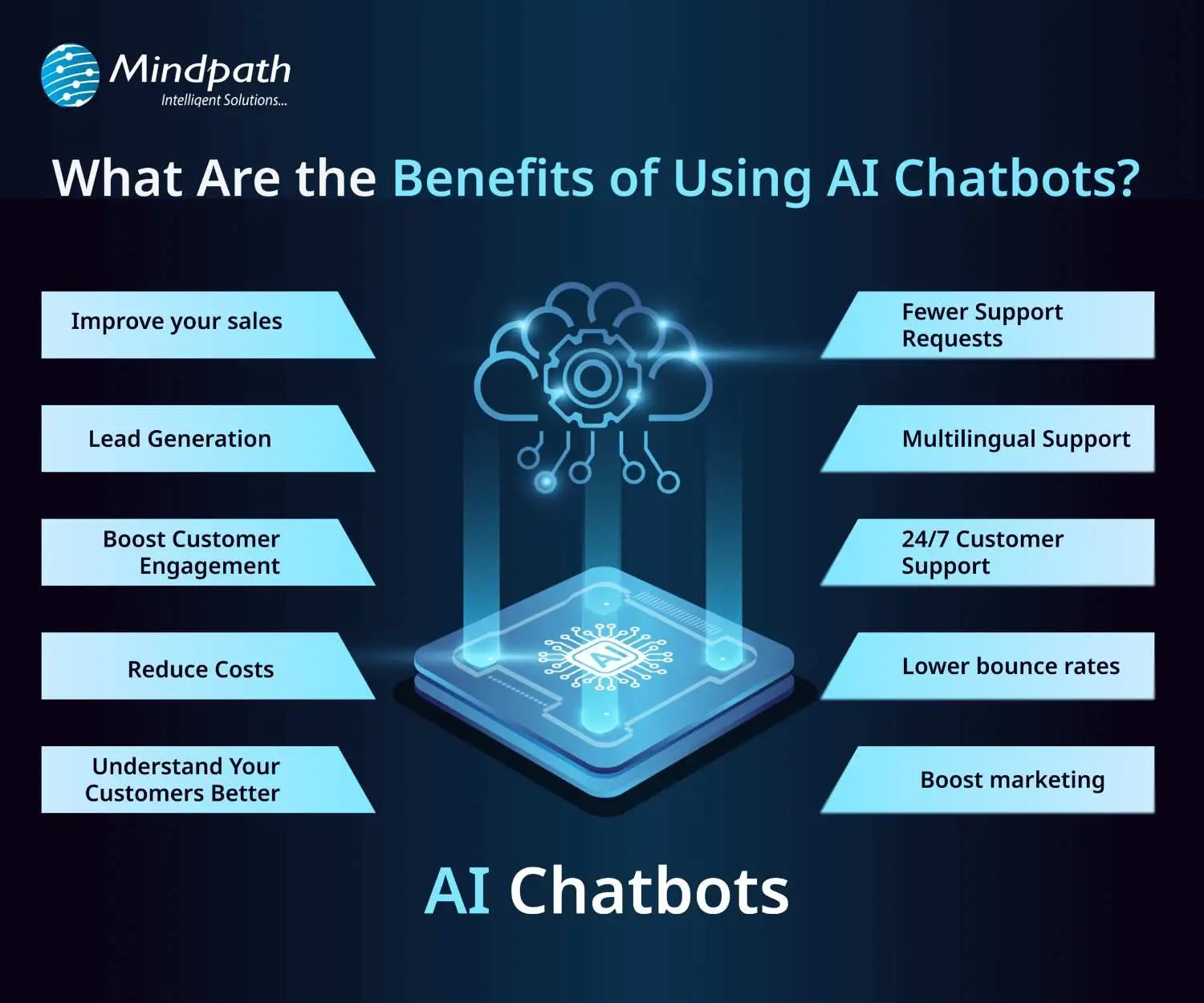
AI chatbots are now widely used by businesses to improve customer interaction and automate routine tasks. Here are some of the key benefits of chatbot technology that can help boost your business:

benefits-of-ai-chatbots-scale

1. Improve Sales

Chatbots can increase sales by showing new products or offering special discounts to website visitors. They send helpful messages that guide users toward making a purchase. These bots also assist in product selection and order placement. This makes it easier for new visitors to become paying customers.

2. Lead Generation

Chatbots help gather leads even before a conversation starts. They ask visitors for basic details like name and email to begin the chat. They can also qualify these leads by asking relevant questions based on customer needs. This helps your sales team know who they’re speaking with and what the customer is looking for.

3. Boost Customer Engagement

Chatbots make online experiences more interactive and personal. Instead of searching through a website, users can chat and get instant answers. Bots reply with clear information based on user questions. This keeps customers engaged and helps them find what they need quickly.

4. Reduce Costs

Using chatbots is more affordable than hiring multiple support agents. They can handle many tasks like answering FAQs or booking appointments, which saves time and money. You’ll still need some team members, but bots make the process faster. This is especially helpful for managing high volumes without extra costs.

5. Understand Your Customers Better

As chatbots collect important customer data during conversations, they can also run surveys to check customer satisfaction. By reviewing these chats, businesses can find out what customers like or dislike. This feedback helps improve products and services over time.

Wondering why chatbots are becoming essential for modern businesses? Explore the top Benefits of Chatbots Every Business Leader Should Know and learn how they drive growth.

6. Fewer Support Requests

Chatbots handle many common questions, which reduces the number of queries sent to human agents. This helps agents focus on more complex issues. It also improves customer satisfaction by providing quick solutions. A chatbot for business can balance automation and personal support effectively.

7. Multilingual Support

Multilingual support allows chatbots to speak different languages. This is helpful if your business has customers from various countries. The bot can reply in the language your customer prefers. This makes a chatbot for small businesses and large companies more accessible to global audiences.

8. 24/7 Customer Support

Chatbots are always available, even when your team is offline. If someone is browsing late at night and needs help, the bot can step in. It can guide them to the right product or answer their questions. This leads to better customer service and more satisfied clients.

9. Lower Bounce Rates

Chatbots can keep users on your site longer by offering help when someone is about to leave. They provide answers or discounts that encourage people to stay. This improves your website’s engagement and SEO performance. Visitors feel supported and are more likely to explore further.

10. Boost Marketing

Marketing chatbots can suggest products, offer deals, and guide customers through the buying process. They also collect useful data for future campaigns. One of the ideas can be a spinning wheel offering discounts, which encourages users to buy. This creates an engaging and effective marketing strategy.

How can conversational AI take your customer engagement to the next level? Explore the power of Conversational AI Chatbots for Business Growth and discover how they drive results.

Real-World Use Cases of Chatbots

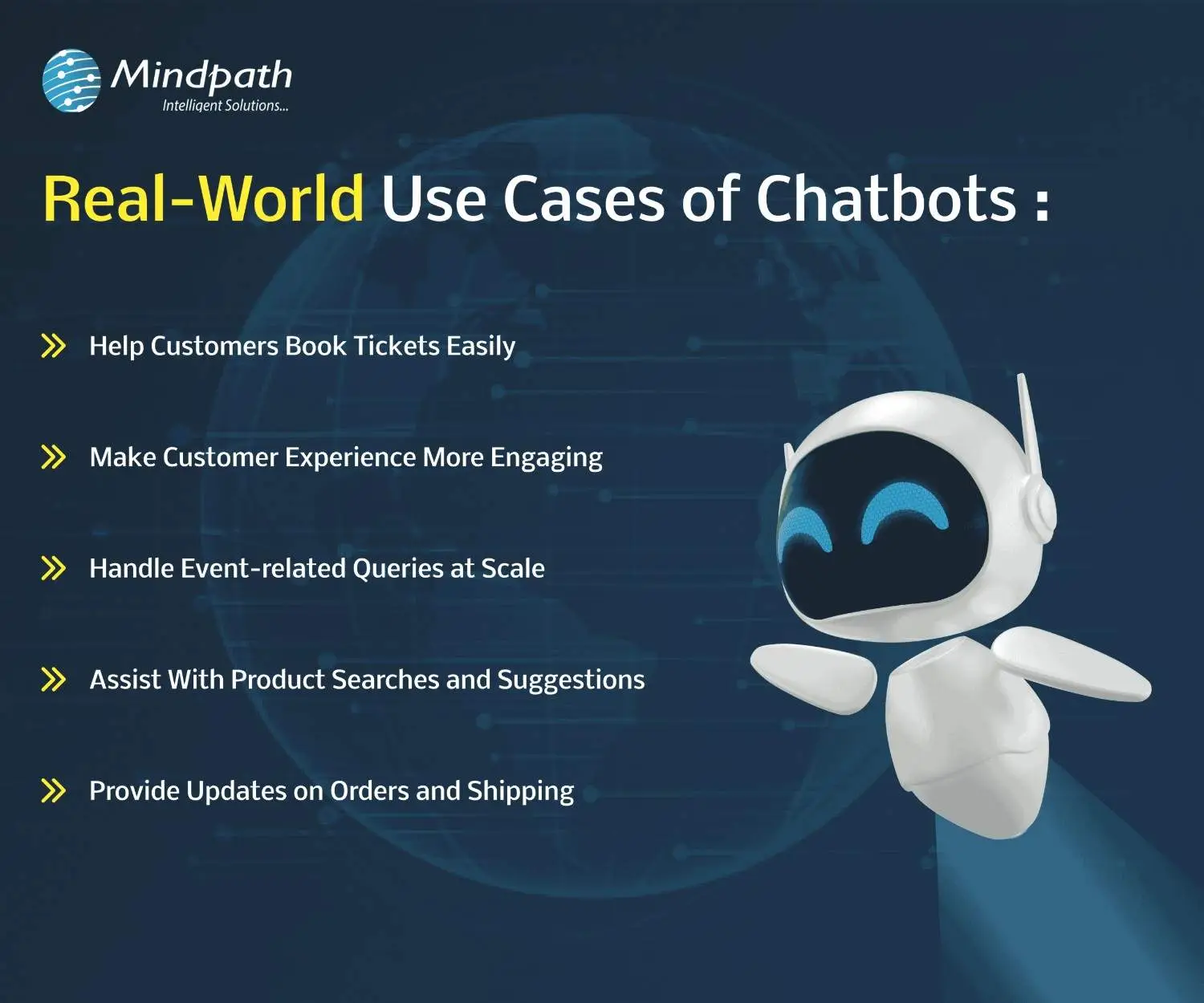
Chatbots are being used across many industries to simplify tasks and improve customer experiences. Here are some real-world chatbot examples that show how businesses are using them effectively for different needs.

use-cases-of-chatbots-scale

1. Help Customers Book Tickets Easily

A chatbot can answer common questions like seat availability, movie timings, and refund policies while guiding users to book tickets smoothly. PVR Cinemas uses this on their website to help visitors quickly complete bookings and check offers.

2. Make Customer Experience More Engaging

Chatbots can add personality by offering quizzes, jokes, and product suggestions in a fun and helpful way. LEGO’s chatbot Ralph helps users find the right gift through playful questions and interactive chat.

3. Handle Event-related Queries at Scale

When thousands of people need answers about an event, a chatbot can respond instantly with details like schedules, speakers, and directions. Slush uses one to manage large volumes of attendee questions efficiently on their event site.

4. Assist With Product Searches and Suggestions

A chatbot can search inventory and offer personalized product recommendations based on customer preferences. Sephora’s chatbot does this well by guiding users to suitable makeup products and checking stock availability.

5. Provide Updates on Orders and Shipping

Instead of navigating emails and websites, customers can enter their order ID in a chatbot to get instant shipping updates. H&M allows shoppers to track their deliveries directly through its chatbot.

Thinking about Using Chatbots to Elevate Customer Experience?

Chatbots are transforming how businesses interact with customers by offering fast, helpful, and personalized service. From booking tickets to answering questions, these tools simplify tasks and improve user satisfaction. With so many benefits, it’s no surprise that more companies are embracing chatbot technology to stay ahead in 2026.

At Mindpath, we offer custom chatbot development tailored to your business goals. Our chatbot development services are designed to help you improve customer interactions, increase engagement, and streamline operations. Whether you need a simple support bot or a fully integrated solution for sales, marketing, or service, our expert team builds smart, reliable chatbots that deliver real results.

Frequently Asked Questions

1. How can a chatbot improve customer experience on a website?

A chatbot improves customer experience by offering instant responses, guiding users to the right information, and reducing wait times. It creates a smooth journey by helping visitors find what they need quickly, which increases satisfaction and encourages them to stay longer on the website.

2. What is a chatbot used for in daily business operations?

A chatbot is used for handling routine tasks like answering FAQs, booking appointments, collecting customer data, and assisting with purchases. It helps teams save time by automating repetitive work while ensuring customers receive quick and consistent support throughout their interaction.

3. Can chatbots work effectively for both small and growing businesses?

Yes, chatbots are useful for both small and growing businesses. They help manage customer queries without needing a large team, making operations more efficient. As the business grows, chatbots can scale easily to handle more interactions without increasing costs significantly.

4. What should businesses consider before implementing a chatbot?

Before implementing a chatbot, businesses should define clear goals, understand customer needs, and choose the right type of chatbot. It is also important to plan integration with existing systems and ensure proper testing to deliver a smooth and effective user experience.

5. What is a chatbot’s role in improving website engagement?

A chatbot plays an important role in keeping users engaged by starting conversations, offering assistance, and providing relevant suggestions. It reduces bounce rates and encourages interaction, helping businesses create a more interactive and user-friendly website experience that keeps visitors interested.