Staff Augmentation vs Traditional Hiring: Which One is Better?

Home

Staff Augmentation vs Traditional Hiring: Which One is Better?

Staff Augmentation vs Traditional Hiring: Which One is Better?

Join our Newsletter!

Staff augmentation meaning 

The hiring process for finding the right employees is more complex than ever before. In today’s world, businesses are under constant pressure to grow quickly, remain lean and produce results. Leaders can make better workforce decisions when they grasp the staff augmentation meaning. It’s not all about filling seats. It’s all about the right team at the right time. Many companies continue to hire traditionally because that’s the way they’ve always done it. But the world of business has undergone significant changes. So, the question is, is traditional hiring still the most effective approach?

This answer will depend upon your objectives. Projects require permanent staff members for long periods of time. Others require skills that are specialized for several months. Both models have their own merits and demerits. You could lose time, money, and momentum if you select the wrong one. Talent markets will become more competitive, and flexibility will be a game-changer. We will explain these two models in this blog in a clear way, so that you can make a confident selection. So, let us keep reading further!

Looking for a reliable partner who handles the entire talent search so you can stay focused on delivery? Mindpath offers end-to-end IT staff augmentation services that connect you with experienced professionals who are ready to contribute from day one.

What is Staff Augmentation?

Staff augmentation meaning is easy to understand. Essentially, you bring in outside experts on a temporary basis to enhance your current team. These experts are not separate from your staff but rather work with them. They help in areas where skills are lacking without the need for permanent hires. Companies in various industries like IT, finance, healthcare, etc. adopt this model. It allows them to get the right people at the right time.

Think of it as a hiring strategy that offers a lot of flexibility. Rather than spending lots of time hiring, you simply get highly-skilled professionals who are ready to work almost immediately. Typically, a third-party staffing agency takes care of uncovering candidates for you. Not only will your workforce be strengthened but also your work will be expedited by this method. It’s as simple as that.

Must Read: Staff Augmentation Trends

Key Benefits of Staff Augmentation

Staff augmentation offers more than just the number of workers. It provides the enterprise a wise, speedy, and adaptable route to expansion. Here are the main advantages of why most companies decide to switch.

1. Access to Specialized Skills

Skill deficiencies may hinder progress of ambitious projects. With staff augmentation, you can get niche experts right away, be it AI developers or specialized engineers, without spending months on training.

2. Faster Hiring

Traditional recruitment methods only offer the quality of well vetted, experienced professionals but it takes the advantage of time. Staff augmentation meaning is that it can give you professionals who are ready to work at a short notice.

3. Control Over Projects

In ‍‌‌‌‍staff augmentation work, you are given full control over the management team which is completely different from traditional outsourcing. You are the one leading the team, deciding the priorities and having full control over every project ‍ ‌‍ ‍‌decision.

4. Enhanced Productivity

Overworking your permanent team is a sure way to cause burnout and reduce productivity. Hiring augmented personnel is an effective way to balance the workload efficiently, enabling each team member to deliver their highest level of performance.

5. Flexibility and Scalability

Project needs are always changing, and your team size has to change accordingly. Staff augmentation gives you the opportunity to increase or decrease your team size with great simplicity. It makes your business able to respond to changes at all times.

Drawbacks of Staff Augmentation

Each of the hiring models presents its own set of challenges. Here are some of the disadvantages to consider.

  • Contract rates are higher on extended projects than on full-time salaries.
  • It takes time for external personnel to get to know the internal processes.
  • Transient employees have a difficult time with company culture.
  • Important project information is lost when the contract is terminated.
  • Access to the system for others poses significant threats to data security.
  • Taking on external professionals puts additional strain on the internal managers.

What is Traditional Hiring?

Traditional hiring meaning is a simple concept. First, a business posts the available position, then goes through the submitted resumes, eventually interviewing the potential candidates, and ultimately deciding on the one that is the best fit. Companies assess individuals mainly on their qualifications, work history, and alignment with company culture. For many years, it has been the default method of recruitment.

This model emphasizes on long-term commitment of both sides. The employer spends time and other resources to recruit a permanent employee who will fit the company well. The process is quite extensive but the progress is usually slow. It is the most appropriate model when a company needs devoted, full-time employees for their continuous positions.

Key Benefits of Traditional Hiring

Let’s examine the main advantages that continue to make traditional hiring a relevant and widely trusted method.

1. Stronger Team Cohesion

Working in permanent teams helps establish closer relationships and make collaboration smoother as time passes. Regular teamwork tends to establish trust and boost productivity.

2. Better Cultural Alignment

Traditional recruitment enables you to hire candidates that fit your values perfectly. Employees who are a good cultural match adjust more quickly and make a significantly higher contribution.

3. Greater Long-Term Commitment

When a person works full-time, they usually immerse themselves fully in the growth and success of your business. Their dedication leads to stability and a greater feeling of personal responsibility.

4. Continuous Skill Development

Businesses have the option of upskilling their employees and preparing them for bigger responsibilities down the line. This not only results in a skilled and dedicated team but also reduces the need for frequent external hiring.

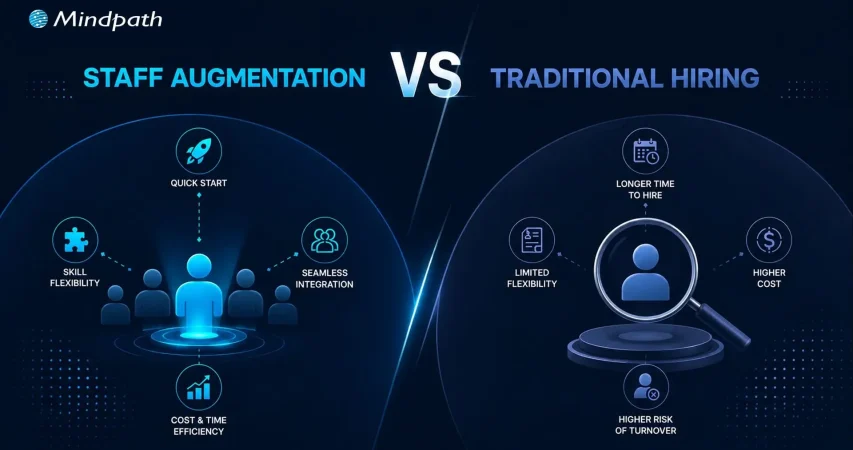
Staff Augmentation vs Traditional Hiring: A Comparison Table

Figuring out which model suits your business better is way easier when you put them next to each other visually. Here’s an overview that explains what is staff augmentation meaning and how do the traditional hiring compare to staff augmentation on the aspects that matter the most to your company.

Criteria   IT Staff Augmentation   Traditional Hiring  
Flexibility High – Can scale up/down as needed Low – Fixed, long-term commitments
Cost Cost-effective, reduced overhead Higher costs, including benefits and office space
Time to Hire Quick onboarding with pre-vetted candidates  Lengthy recruitment and onboarding process
Access to Talent Access to specialized, global talent quickly Limited to available local talent
Project Adaptability Easily adapt to changing project needs Rigid, less adaptable to project changes
Commitment Short-term or project-based Long-term employment contracts

Which Hiring Model is Right for Your Business?

Traditional hiring has its place, but today’s fast-moving business world demands more flexibility. Staff augmentation meaning becomes clear when speed, skills, and cost-efficiency matter most. When comparing staff augmentation or traditional hiring, augmentation consistently proves smarter for businesses that need to scale without long-term burdens or heavy recruitment cycles.

At Mindpath, we provide staff augmentation services that connect you with top-tier talent instantly. Our vetted professionals plug into your team seamlessly and deliver results from day one. Let us help you build smarter, move faster, and grow confidently.
Frequently Asked Questions

1. Is staff augmentation only suitable for large enterprises?

Not at all. Businesses of every size use staff augmentation today. Startups benefit greatly from accessing senior talent without full-time costs. It is equally powerful for mid-sized companies managing rapid growth or unexpected project demands.

2. What is the typical duration of a staff augmentation contract?

Contracts vary based on project needs. Some last a few weeks, others run for several months. The flexibility is actually one of its strongest advantages, letting businesses extend or conclude engagements based on real-time project progress.

3. How is staff augmentation meaning different from a freelancer arrangement?

Freelancers work independently on their own terms. Staff augmentation professionals, however, work directly under your management and follow your processes. They function as true team extensions, not outside contractors operating on a separate agenda.

4. Can augmented staff work remotely or only on-site?

Both options are completely viable. Many businesses today prefer remote augmented teams for cost savings and wider talent access. On-site arrangements work better for projects requiring close collaboration or access to physical infrastructure.

5. What industries benefit the most from staff augmentation?

Technology, healthcare, finance, and e-commerce lead the way. However, any industry facing skill shortages or fluctuating project demands can benefit. The model adapts well across sectors wherever speed and specialized expertise are business priorities.

Related Post

AI readiness checklist

Artificial intelligence has heralded the beginning of a new era, the one of swift digital transformation with AI. The equation of AI and digital transformation has attracted the attention of businesses in almost every sector. As a matter of fact, adopting AI for digital transformation is no longer considered a luxury but a necessity. However, many business leaders feel that their organization is not ready for AI.

As artificial intelligence changes the course of digital transformation in the next few years, you cannot sit on the sidelines. Business leaders have to identify the best practices for integrating AI in their existing systems and workflows to solve real problems and create sustainable value. Let us discover a checklist to find out whether your business is “AI-ready”.

AI can revolutionize your business, but it requires the right guidance and support. Mindpath’s AI development services are designed to turn your challenges into opportunities and help you build future-ready solutions.

Why is AI Readiness Important in 2025?

No other technology trend has had a disruptive impact like artificial intelligence. The growth in demand for AI-driven digital transformation is not just an aftermath of the hype around AI. As a matter of fact, artificial intelligence has been responsible for inducing fundamental changes in the global business landscape. You can come across some of the common use cases of AI in every industry, such as automation of repetitive tasks and offering customer data analytics. 

Business owners must find the ideal solutions to harness the transformative power of AI unless they want to risk falling behind their competitors. On top of it, they must also understand that AI transformation is not just about adding new software to their workflow. It is important to acknowledge that adopting AI implies a paradigm shift in how an organization operates, competes in the market, and fosters innovation.  

Anyone cannot just introduce AI in their business and expect it to work like magic without preparing a strong foundation. The journey of AI-powered transformation of a business requires a holistic approach that blends technology with data, people, processes, governance, and strategy. When your business fulfills all the criteria of AI readiness, you can tap into the full potential of artificial intelligence.  

Why Do You Need an AI Checklist for Your Business?

The advantages of AI for businesses offer a credible set of reasons to embrace AI adoption right away. On the other hand, adopting AI directly without preparation can lead to poor implementation and wasted resources. At this point in time, you must know the answer to “What is an AI readiness checklist?” and how the checklist can help you with AI adoption. The readiness checklist can work as a manual for preparation to welcome AI into your organization. 

Business owners need the artificial intelligence readiness checklist to make smarter decisions for integrating AI in their operations and systems. Most importantly, the checklist can help in addressing most of the implementation challenges, such as resistance from teams. 

Important Points in Artificial Intelligence Readiness Checklist

The checklist to measure the AI readiness of your business might vary from source to source. However, the best AI readiness checklist is one that covers the essential facets that you must consider before embracing AI. You can use the following checklist for the critical evaluation of the preparedness of your business for artificial intelligence. 

1. Availability of Centralized and Clean Data

Data is the lifeblood of AI, and without quality data, artificial intelligence is helpless. You may have multiple artificial intelligence business ideas and still fail due to the lack of data. What is the significance of centralized and clean data? Centralization of data ensures that it is not scattered across different systems. Clean data is also essential for AI adoption as it ensures freedom from inconsistencies, duplicates, and errors in the data. 

Assume an example of an e-commerce company that wants to use AI for offering personalized product recommendations. With the browsing data, demographic information and purchase history of customers spread across different databases, the company cannot use AI to build accurate customer profiles. The same outcome is expected in cases where the data contains inaccuracies or errors. Therefore, you must check whether you have a centralized data warehouse and clean data before adopting AI.

2. Alignment of AI Use Cases and Business Goals

Businesses cannot just adopt AI without any purpose unless they want to waste resources. The AI readiness checklist for businesses also focuses on identifying clear AI use cases that directly address specific business problems. On top of it, the use cases should align with the broader strategic goals of your business. The use cases of AI in business may bring opportunities such as improving customer service, enhancing product recommendations, and automating internal communications. 

You can think of an example of a manufacturing plant that uses AI for predictive maintenance to reduce operational costs and machinery downtime. The manufacturing plant uses AI for a specific application to achieve its overall strategic goal of enhancing operational efficiency. 

3. Perception of AI by Teams in an Organization

One of the common misconceptions about AI is that it will replace humans from many jobs. On the contrary, businesses must show that AI will empower teams in an organization with diverse functionalities. Most of the guides on how to prepare for digital transformation with AI emphasize redesigning workflows where AI adds the most value for teams. If the teams in your organization perceive AI as a threat to their roles, then you might encounter trouble in AI adoption.

The best way to ensure that teams understand how AI fits into their workflows requires mapping the current process. Business leaders must recognize repetitive and data-intensive tasks that can be augmented or automated with AI. You have to make employees believe that AI is their partner to tap into the best of artificial intelligence.

4. Commitment of Leadership to AI-powered Innovation

Does your business leadership want to promote innovation with AI? The answer to such questions is crucial for business transformation using AI, as leadership plays a major role in successful AI adoption. Business leaders set the tone for AI integration initiatives and provide the strategic direction alongside access to essential resources.

Active participation of leaders in championing AI initiatives showcases the significance of AI to every member in the organization. For instance, if the CEO publicly endorses an AI-powered project and allocates a dedicated budget to the project, then they show their commitment to AI. As a result, more employees will buy into the projec,t and leaders can avoid potential roadblocks.       

5. Support for Cloud Solutions in the Technical Infrastructure

Business owners must also know that AI systems require significant amounts of computational power and data storage. Therefore, cloud-based solutions have emerged as the most beneficial components in the technical infrastructure of modern AI systems. The ideal checklist for AI-powered business transformation will ask you to prepare a robust technology infrastructure that supports cloud-based solutions.  

Let us assume that a business wants to use AI for analyzing large volumes of transaction data for fraud detection. The business owner must choose scalable cloud infrastructure like Google Cloud, Azure, or AWS that offers the flexibility and power to handle the humongous collection of transaction data. 

6. Attention to Data Privacy and Compliance Protocols

The dependency of AI on data calls for unconditional attention to the concerns of data privacy and compliance. You can guide your business through strategic AI adoption only with robust data privacy and compliance protocols. Some of the notable protocols that businesses should not ignore are GDPR and HIPAA. The primary purpose of these protocols is to ensure ethical data management and mitigation of legal risks. 

You can notice that healthcare providers using AI are the best examples of why data privacy and compliance protocols are important. For example, a healthcare institution using AI for patient diagnosis should follow strict patient data privacy rules. Protocols for secure data storage and data anonymization can safeguard sensitive information and earn the trust of users.

7. Accessibility of Ideal AI Tools and Technology Partners

The successful implementation of AI in your business operations and workflows depends a lot on the selection of the right AI tools and strategic partners. Businesses can improve their readiness for AI and automation with custom-built solutions or off-the-shelf AI platforms. Some leaders may also opt for collaborations with AI consulting firms or development services to integrate AI in their business.

What would a small e-commerce business do while implementing AI-powered personalized recommendations? A pre-built solution with AI features might be the best answer. On the other hand, a larger organization should collaborate with an AI development company to create custom solutions aligned with business requirements and goals.

8. Support for Experimentation and Agile Innovation

AI adoption is not a one-time process, as many business owners might have believed. Adopting AI in your processes and systems requires an iterative approach and calls for continuous learning and improvement. As a business leader, your digital transformation roadmap for AI must emphasize experimentation and agile methods. You must be comfortable with learning from failures and adapting your strategies according to emerging requirements.

Consider the example of a software development company that aims to use AI for optimizing code generation. The company can rely on experiments and agile approaches to test different AI models and collect feedback. Subsequently, the company can repeat the process to create more refined AI solutions.        

9. Clear Metrics to Evaluate AI Outcomes

Without the KPIs or Key Performance Indicators for your AI projects, you will be shooting in the dark. Business owners can measure the value of AI for their organization only with KPIs that will also guide improvements in their AI adoption strategy. The metrics for your AI projects must align with your business goals.

If you want to use an AI chatbot for customer service, then the KPIs will focus on the number of escalated tickets or an increase in customer satisfaction scores. A clear definition of KPIs helps businesses determine the effectiveness of AI and make data-driven decisions for improvement.

10. Willingness of Staff to Learn AI Skills

The success of your AI initiatives also depends significantly on the dedication of the workforce to learn AI skills. You cannot think about preparing your business for AI integration without resistance from employees. Therefore, you must foster a culture of continuous learning and upskilling to encourage employees to learn how to work with AI tools. 

Business owners must design special training programs to help their employees understand how to use AI-powered platforms and solutions. With a proactive approach to AI training and upskilling, your organization can harness the full power of the human element in your AI initiatives.

11. Realistic Expectations for AI Budget

The budget of a business for AI initiatives also plays a crucial role in determining the success of the initiatives. As a business owner, you must set some realistic expectations for the budget of AI projects. It will ensure that your AI project does not get derailed due to a lack of funds. 

The budget for AI adoption must include the initial development and licensing costs as well as the cost of ongoing maintenance, training, and data infrastructure. In addition, you should also pay attention to the costs of data acquisition and integration with existing systems.

12. Opportunities for Cross-Functional Collaboration

The scope of AI projects will include multiple departments, thereby calling for cross-functional collaboration. The best practices for future-proofing business with AI require business owners to understand how cross-functional collaboration can offer diverse perspectives on AI projects. 

You can promote cross-functional collaboration by developing a set of shared goals and creating open communication channels between relevant departments. Cross-functional collaboration offers a more holistic approach to AI integration while addressing the needs of every stakeholder.

13. Pilot or Prototype for AI Use Cases

Running a pilot project before full-scale deployment can help you save a lot of resources. The pilot use case or prototype for AI projects helps in testing and refining AI systems within controlled environments. For instance, you might use an AI-powered fraud detection system on a subset of transactions for the pilot use case.

The pilot use cases or prototype help in identifying potential issues, especially in the areas of model accuracy and data quality. On top of it, a successful pilot project will improve your confidence and offer valuable insights about AI systems before large-scale deployment.

14. Continuous Improvement with Feedback Loops

AI models have to go through dynamic changes as they learn from new data. Therefore, businesses must have frameworks for continuous monitoring and refining the models. Business leaders must implement feedback loops that allow AI systems to learn and evolve with time. 

The best example of continuous improvement with feedback loops is an AI-powered customer service chatbot. For instance, the chatbot can analyze user interactions, identify its weaknesses, and give that information to the model for retraining. As a result, the AI will not only provide effective answers but also adapt to new conditions and data.

15. Long-Term Roadmap for AI Adoption

The search for answers to “How can AI drive digital transformation in business?” will help you understand that AI adoption is a long-term journey. Businesses must have a long-term AI adoption roadmap to follow a strategic plan to expand their AI initiatives. The AI adoption roadmap will also guide business owners for deeper integration of AI in their business. 

The adoption roadmap must include an outline of future AI projects, planned updates, ongoing training requirements, and necessary infrastructure upgrades. With a clear roadmap, your business can follow the best strategic direction for AI investments and ensure sustained growth.

Ready to Turn Your AI Readiness Into Real Business Results?

The AI readiness checklist shows the most important things you must keep in mind while embracing AI in your business. As the popularity of artificial intelligence gains momentum, every business wants to measure its preparedness for AI. Mindpath is one of the prominent emerging leaders in end-to-end AI solution development for businesses across all industries. 

We have become the best choice for end-to-end AI development services due to our ability to articulate client requirements into tangible solutions. Our experts pay attention to client requirements, such as scalability, data privacy, and cost transparency, to help them embrace AI seamlessly in all business processes. Consult with our experts to find out the best path for integrating AI in your business systems, processes, or workflows now.

Frequently Asked Questions

1. How do you know if your business is actually ready for AI, or just thinks it is?

Readiness goes beyond having the budget or the enthusiasm. It comes down to whether your data is clean, your teams are aligned, and your goals are specific. Many businesses skip these fundamentals and struggle later when implementation begins.

2. What is an AI readiness checklist and does every business really need one?

An AI readiness checklist is essentially a structured way to evaluate whether your operations, data, people, and infrastructure can support AI adoption. Without it, businesses tend to rush in without a foundation, which leads to wasted resources and failed projects.

3. Can small businesses benefit from AI transformation, or is it mostly for large enterprises?

Absolutely, small businesses can benefit just as much. Pre-built AI tools make entry-level adoption very accessible today. Starting small with one specific use case, like customer support or inventory management, often delivers quicker results than large-scale rollouts.

4. What usually goes wrong when a company tries to adopt AI without proper preparation?

The most common problems are poor data quality, resistance from employees, and unclear goals. Teams that were never consulted during planning tend to push back hard. Without defined KPIs, there is also no way to measure whether the AI is actually working.

5. How long does it realistically take for a business to see results after adopting AI?

It depends heavily on the complexity of the use case and how prepared the organization was before starting. A focused pilot project can show measurable results within a few months, while broader transformation across departments typically takes a year or more to fully stabilize.

cloud native development

Cloud-native development is redefining the way organizations are evolving in the digital-first world. It enables teams to develop applications that are resilient, can be easily updated, and allow sophisticated scaling without compromising development speed. An increasing number of organizations are gravitating towards a cloud-native approach to meet the modern-day demands for agility, innovation, and customer experience. If your organization values being competitive and evolving at the speed the digital world enables, but not constrained by legacy solutions, cloud-native development could be the evolution opportunity you are seeking.

This method of breaking up large applications into smaller constituents via microservices allows organizations the opportunity to manage and improve everything much easier. With new technologies enabling containers and automation, organizations with the right supporting tools are able to deliver, test, and fix features faster than ever. It is no longer just about trying to keep pace; it is about leading a system that embraces change. In this blog post, we will discuss how cloud-native development enables organizations to scale up their businesses with greater control, pace, and certainty. So, let’s explore!

Looking to elevate your business with Cloud-Native Development? Contact us, and our experts will turn your ideas into high-performing cloud-native solutions.

What Is Cloud Native?

Cloud-native computing is a way of building and running applications that are built for the cloud. Cloud-native development provides developers with a way to build software that is flexible, adaptable, and able to handle dramatic change without breaking the overall architecture. Instead of building one huge system or application, the developer builds the application in independent pieces called microservices that work together. This approach allows for building and testing in more manageable pieces over time.

According to MarketsandMarkets, the cloud native applications market is expected to grow from USD 5.9 billion in 2023 to USD 17.0 billion by 2028. This shows that more companies are choosing this method to stay competitive and meet user demands. Tools like containers and automation help developers launch updates quickly without stopping the service. Cloud native makes it possible to move faster, reduce costs, and build stronger, more reliable software.

Must Read: Multi Cloud vs. Hybrid Cloud

Components of Cloud-Native Development

Cloud-native relies on a set of modern tools and practices that work together to build fast, flexible, and reliable applications. Here are the key components that make this approach effective:

1. Containers

Containers bundle code with everything it needs to run, making apps work smoothly across different environments. Tools like Kubernetes and Amazon ECS manage these containers to help with deployment, scaling, and maintenance. They are a key part of cloud native technologies, ensuring consistency and efficiency.

2. APIs

APIs, or Application Programming Interfaces, allow different software parts to communicate with each other. In cloud native development, microservices rely on APIs to share data and functions. This setup is lightweight and uses fewer resources compared to traditional systems.

3. Microservices

Microservices are small, independent parts of an application that work separately but communicate with each other using APIs. They are easy to update without affecting the whole system, which makes the app more stable. This structure supports cloud native development by making applications easier to build, test, and scale.

4. CI/CD Pipelines

CI/CD pipelines are used to automate the process of building, testing, and deploying code. They allow developers to work faster and reduce errors by using shared code repositories and automated workflows. This approach plays an important role in the cloud native landscape.

5. DevOps

DevOps brings together development and operations teams to automate and streamline the app development process. It helps in delivering software quickly and reliably with a focus on collaboration. DevOps practices are essential in the cloud native landscape to keep up with modern development needs.

Struggling with speed, collaboration, or automation in DevOps? Our DevOps Challenges and Solutions blog explains how modern businesses address these issues.

Benefits of Cloud Native Development

Cloud-native approach offers clear advantages that go beyond just building applications differently. These benefits are helping businesses improve the way they deliver, manage, and scale digital solutions across industries.

1. Reduced Operational Costs

Using open-source tools and serverless models helps cut down infrastructure and licensing costs. Businesses only pay for what they use, saving money and resources.

2. Effortless Scaling and Deployment

Cloud-native workflows automate how apps and infrastructure are deployed. With container orchestration, apps scale easily based on real-time demand.

3. Modernized Legacy Applications

Older apps can be updated to work better with modern cloud systems. Cloud-native development makes it easier to improve and connect them with new projects.

4. Greater Development Flexibility

Containers package apps with everything they need to run across different setups. This gives developers the freedom to build without being tied to one system.

5. Efficient Microservice Management

Kubernetes helps manage and scale container-based apps more efficiently. It simplifies deploying microservices while ensuring better performance.

6. Improved Application Stability

Cloud systems stay available even when one part fails. Microservices architecture ensures the app keeps working smoothly without full downtime.

7. Aligned Tech and Business Goals

A product-based approach aligns tech efforts with business goals. It boosts teamwork and supports faster responses to changing needs.

8. Boosted DevOps Efficiency

Cloud-native practices help speed up development, testing, and deployment. This leads to quicker, more reliable updates with fewer manual steps.

9. Low-Code and No-Code

Low-code and no-code platforms allow more people to build apps with simple tools. This makes development faster and less dependent on technical teams.

10. Minimized Vendor Lock-In

Cloud-native applications can run across multiple cloud platforms. This gives businesses the freedom to switch providers and avoid getting locked in.

Want to know what’s next for the cloud in 2025? Read our blog on Cloud Computing Trends to discover the technologies and innovations shaping the future of business.

Best Practices for Cloud-Native Development

To get the most out of cloud-native development, it’s important to follow proven methods that support speed, reliability, and scalability. These best practices help teams build stronger applications while keeping systems flexible and efficient.

1. Use Containers Effectively

Containers package apps with their dependencies, making them easy to run across different environments. This boosts reliability and simplifies deployment, helping teams work faster and more efficiently.

2. Take Ownership of Products

Following a product-focused mindset gives teams control over development from start to finish. It encourages innovation and quality, aligning with the goals of the cloud native foundation.

3. Automate CI/CD Pipelines

Continuous Integration and Continuous Deployment (CI/CD) automate testing and delivery, reducing errors and saving time. This helps teams release updates faster with higher confidence.

4. Build with Microservices

Microservices divide the application into smaller, focused services that can be built, deployed, and managed independently. This structure improves fault tolerance, speeds up development, and supports scalable cloud native solutions.

5. Apply Infrastructure as Code (IaC)

IaC lets teams manage infrastructure with code, allowing easy updates, version control, and automation. It brings consistency and reduces the chances of manual errors during setup or changes.

6. Focus on Resilience and Fault Tolerance

Design apps to handle failure using retries, timeouts, and automated recovery. This ensures your cloud native applications stay stable and available during unexpected problems.

Want to cut costs and speed up app deployments? Read our blog on Serverless Architecture in Cloud Computing to see how your business can scale efficiently.

Unlocking the Power of Cloud-Native Development

Cloud-native development is helping businesses move faster, scale smarter, and build more resilient applications. From modernizing legacy systems to enabling flexible and efficient operations, it’s shaping the future of digital transformation. By adopting the right strategies and tools, organizations can respond to change with greater confidence and deliver value to customers more effectively.

At Mindpath, we help businesses transform their software approach with our expert cloud-native development services. From planning architecture to seamless deployment, our team supports every step. We simplify operations, modernize infrastructure, and create scalable applications that align with your goals. With Mindpath, you build software that’s fast, flexible, and ready for what’s next.

Frequently Asked Questions

1. How is cloud-native development different from traditional application development?

Cloud-native development focuses on building applications specifically for cloud environments using microservices, containers, and automation. Traditional development often relies on monolithic systems that are harder to scale and update. This modern approach allows faster releases, better resilience, and easier scalability across environments.

2. What kind of businesses benefit the most from cloud-native development?

Businesses that require scalability, frequent updates, and high availability benefit the most. This includes startups, SaaS companies, and enterprises handling dynamic workloads. It is especially useful for organizations aiming to innovate quickly and deliver consistent digital experiences across multiple platforms.

3. Is migrating to cloud-native architecture a complex process?

Migration can be complex depending on existing systems and architecture. It often involves breaking down monolithic applications, adopting new tools, and retraining teams. A phased approach, starting with smaller components, helps reduce risk and ensures smoother transition without disrupting ongoing operations.

4. How does cloud-native development improve application reliability?

Cloud-native systems are designed with fault tolerance in mind. If one microservice fails, others continue to function without affecting the entire application. Features like automated scaling, monitoring, and self-healing systems help maintain performance and ensure minimal downtime for users.

5. What skills are important for teams working with cloud-native technologies?

Teams need skills in containerization, microservices architecture, cloud platforms, and automation tools. Knowledge of CI/CD pipelines, DevOps practices, and infrastructure as code is also important. Continuous learning is essential as cloud-native technologies evolve rapidly and require up-to-date expertise.

Discover the power of cloud-native development! Learn its benefits and how it helps businesses enhance security, efficiency, and performance.

Support Is One Click Away

Featured Posts

Related Post

Discover the top 7 tools for managing remote development teams, boosting collaboration, communication, and productivity.
Enhance your WordPress site’s inclusivity with our expert tips and services. Discover how to improve accessibility and explore our comprehensive WordPress solutions.