Home

An Overview of Healthcare Development Services and Guide to Hire Right Service Providers.

An Overview of Healthcare Development Services and Guide to Hire Right Service Providers.

Join our Newsletter!

healthcare software development services

Ever Wondered how technology is really influencing the healthcare sector? From electronic health records and telemedicine to mobile health apps, today healthcare software development plays a great role in changing the way patients receive and providers provide treatment.

But what exactly are healthcare software development services, and why are they crucial for modern medicine? In this blog we will explore healthcare software development services and how these cutting-edge solutions are going to shape the future of healthcare, improve patient outcomes, and smooth operations.

What is Healthcare Software?  

Healthcare software development is the process of developing individualistic computer programs designed for hospitals, clinics, and all other types of healthcare organizations. These programs assist in enhancing how healthcare providers render care by making processes more effective, accurate, and oriented towards patients. Healthcare software creates a complete digital system within a healthcare organization.

This allows medical professionals to offer better and more accurate clinical services. To doctors, this represents an easy way to do follow-ups and monitor the health of their patients, schedule appointments, and get access to medical reports, all from the comfort of managing staff. To patients, it offers online appointment booking, live chat with doctors, sharing of medical reports, and receiving health advice.

These software solutions come with various benefits associated with the improvement in patient care, efficiency, and reduction in medical errors. They can digitize the traditional paper-based systems and take care that patient care is performed quicker and much more safely. Healthcare software is further creating new sectors, such as patient engagement, clinical robotics, and telehealth, driving a lot of startups to bring ideas into life.

 Types of Healthcare Software Development Services
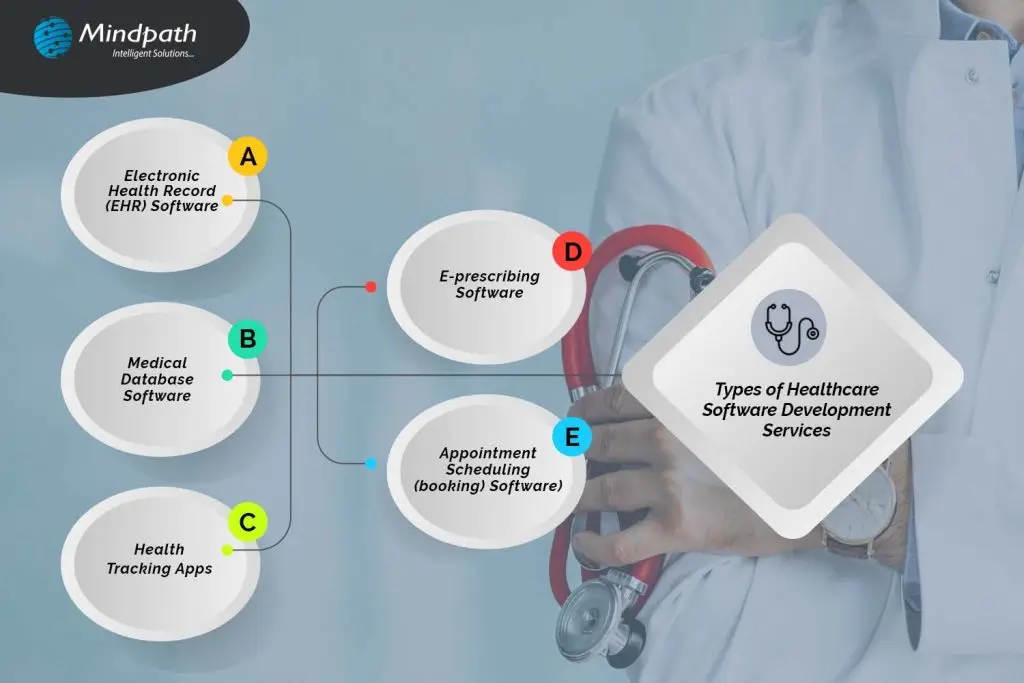
Types of Healthcare Software Development Services - infographic

1. Electronic Health Record (EHR) Software

EHR software is being used by hospitals and clinics like any CRM, but with a healthcare tune. It contains all the relevant information concerning every patient, among them what medicines they use, the various doctors’ advice, and the medical processes that they have gone through. Many EHRs incorporate mechanisms for billing, collection, and even a patient portal that allows patients to view consultation history, medical records, and prescriptions. There are two types of EHR software: the electronic patient record, which is used in hospitals for management purposes concerning a patient internally, and the electronic medical record, which keeps track of information like medications, past and future procedures, and how well the patient is recovering.

2. Medical Database Software

Medical database software can be called a huge library of information about medicine, not according to the profiles of patients but according to diseases. This tool aids doctors in looking through cases like one that is being treated and thus making informed decisions about its cure. It is also used for learning by allowing doctors to know more about certain diseases. For example, a dermatologist using medical database software can view all the patients diagnosed with Atopic Dermatitis, compare their symptoms, treatments, and recovery plans, and find the best approach for their current patients.

3. Health Tracking Apps

Health-tracking apps are part of the fast-growing industry called mHealth, which stands for “mobile health.” This industry, valued at $37 billion globally for 2019 alone, allows users to trace and manage their health from their smartphones. Some of the popular health monitoring apps include fitness apps such as 8fit, diet apps such as Fitatu Calorie. For instance, sleeping patterns are monitored by the FitBit wristband, while the Oura Ring is responsible for monitoring several health metrics. Others include glucometers for testing blood sugar levels and, of course, thermometers in general—for instance, tracking menstrual cycles like the Kindara app. All these tools work together to give users a better understanding of their health and wellness.

4. E-prescribing Software

The e-prescribing software is becoming a tool that every doctor must have, with countries all over the world rapidly adopting electronic prescriptions. Such software allows doctors to easily manage all prescriptions for all patients by tracking, renewing, and canceling them as need be. It is also connected to national drug reference databases that help in picking up the right medications and making sure there is no error. Examples include MediTab and ScriptSure, two software programs designed to ease e-prescribing and improve the capabilities of health professionals to deliver accurate and effective care.

5. Appointment Scheduling (booking) Software

Appointment scheduling software is designed to assist hospitals, clinics, and medical practices in managing their appointments online. This normally allows the provision of a user-friendly platform through which patients can easily book appointments via an app or website without calling up the office. This type of software normally features email notifications and automatically sends reminders to doctors and patients about upcoming appointments. It accommodates multiple doctors’ schedules, cancellations, or rescheduling of appointments, and does much more to provide appointment trend data that helps in bringing efficiency to the practice. Additionally, AI chatbots are integrated into these systems to enhance the booking experience. These chatbots can handle appointment scheduling, provide immediate responses to patient inquiries, and assist with rescheduling or cancellations.


Get In Touch!

Looking to boost your healthcare operations with top-tier software solutions?

At Mindpath, we deliver cutting-edge, customized healthcare software to empower efficiency and elevate patient care.

Why Are Healthcare Practitioners Going Digital?

Health practitioners use digital technologies greatly because of the great advantages they present in improving patient care and practice management. Digital healthcare solutions help doctors in the management of patient information. Therefore, record-keeping becomes more accurate and efficient while diminishing the burdens of paperwork.

Healthcare IT has been one of the fast-growing markets and is expected to grow further. From $303.4 billion in 2022, this is projected to rise as high as $974.5 billion by 2027 with a good annual growth rate. The market is expected to grow to $728.63 billion by 2029 and even further to $1,069.13 billion by 2032. Healthcare provider solutions take up about 38% of the market, such as those in Electronic Health Records. On the other hand, IT services form 52% of the market, including online payments and cybersecurity. Growth is fueled by new technologies, increased spending by consumers, and government initiatives; however, challenges persist, with the most important ones being related to cybersecurity risks. It has the maximum market share in North America due to its better and advanced infrastructure. The European region is predicted to grow fast with government help and support, adoption of AI soon. Some major players in this field are GE Healthcare and Philips, which are carrying the industry forward.

Leading Healthcare Software Development Services at Mindpath

Mindpath offers a full cycle of healthcare software development services that meet all the needs of healthcare providers, patients, and all those concerned. Our offered solutions work toward better patient care while easing operations. Here are the services we provide:
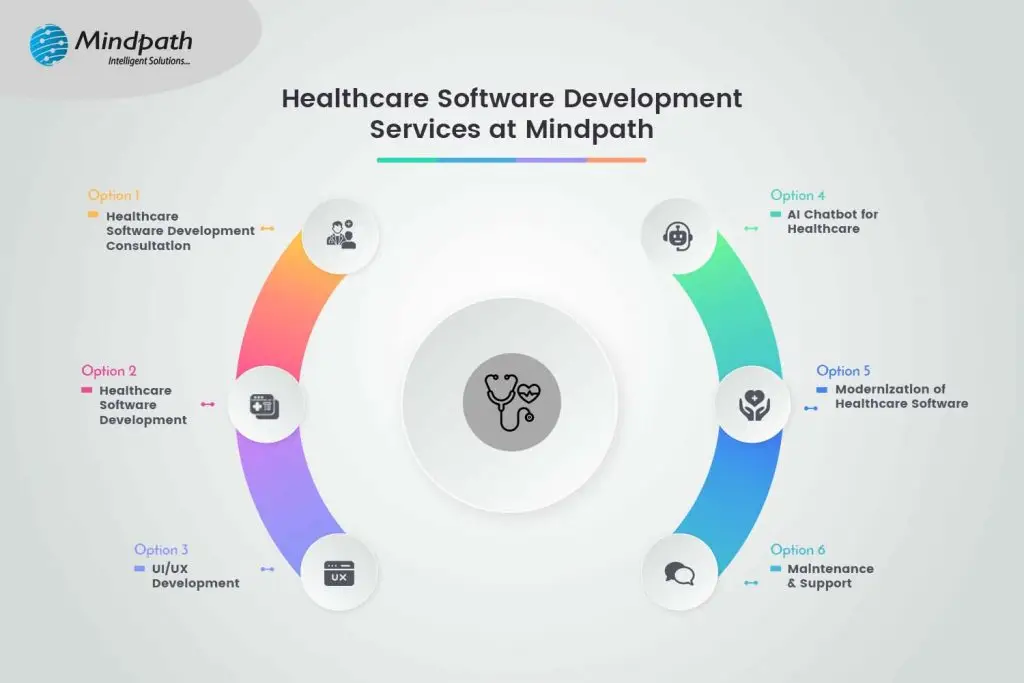
Leading Healthcare Software Development Services at Mindpath - infographic format

1. Healthcare Software Development Consultation:

We assist in planning and designing your healthcare software project from an idea to detailed planning. Our advice ensures you will have a clear roadmap for developing effective healthcare solutions.

2. Healthcare Software Development:

We develop various healthcare IT software solutions, including Electronic Health Record (EHR) software, practice management systems, patient portals, among others. The solutions are secure, scalable, and well-built according to the industry regulations to ensure better patient care and efficiency.

3. UI/UX Development:

We design easy-to-use interfaces that will be convenient and pleasant for the eye. We focus on bringing your healthcare software both functionality and user experience.

4. AI Chatbot for Healthcare:

Our AI chatbots for healthcare answer questions, provide appointment scheduling, and disseminate medical information. They help improve interaction with patients and relieve some workload from the health staff.

5. Modernization of Healthcare Software:

Legacy system upgrade and migration to state-of-the-art platforms, enrichment of new functionalities, and updating of old technologies to manage your software and keep it relevant.

6. Maintenance & Support:

Ongoing support and maintenance are available to make sure that your healthcare software keeps running smoothly and aligns with your changing needs.

Conclusion

The huge effects of rapid growth in technology reshaping healthcare to become more effective, accessible, and patient-centered are undeniable. It is evident from the adoption of electronic health records and e-prescribing software at the end of the spectrum to health-tracking apps and AI-driven tools that are revolutionizing how healthcare providers care for patients and their practices.

Such innovations not only improve the quality of care provided to patients but also the administrative flow, hence making healthcare very responsive and effective. Adopting the newest technology is crucial for healthcare organizations to keep ahead of these trends as the sector continues to change. This is where a holistic approach to healthcare software development is necessary. Healthcare providers may enhance patient outcomes, streamline operations, and more adeptly navigate the digital terrain by incorporating cutting-edge software solutions.

At Mindpath, we are dedicated to supporting healthcare providers through every step of this transformation. From development and consultation to UI/UX design and modernization—our services cover a large area of needs, all meant to make sure you can drive positive change in healthcare through digital technology. Be it building new systems, updating existing ones, or ensuring ongoing support, Mindpath makes sure that your healthcare software is of the highest quality and effectiveness.


Connect With Us!

Are you curious about how cutting-edge medical software might transform your business?

At Mindpath, we develop solutions that improve patient care and expedite operations.

Frequently Asked Questions

Support Is One Click Away

Featured Posts

Related Post

AI chatbots in education

The AI chatbot market is all set to grow incredibly at a rate of 23% annually. Further, the global market is expected to reach USD 15.5 billion by 2028. Around 78% of companies use AI in at least one of their integral business functions. Along with all the other dominated industries, the education sector is also undergoing a major digital change. One of the biggest drivers behind this growing shift is the rise of AI chatbots in education.

A series of chatbots has been effectively embraced in the learning environment. Moreover, it is changing how you learn and interact. Let us further explore the AI chatbot in the education industry in a better form. Additionally, let us highlight how this massive change has become a successful addition to a learner’s life.

Want to deliver 24/7 student support while optimizing academic and administrative processes? Mindpath offers custom AI development services that empower educational organizations with intelligent, scalable solutions tailored to their needs.

What is the Role of Artificial Intelligence in Education?

The role of artificial intelligence in education is way more than just automation. AI accesses smarter and data-rich learning ecosystems where students receive customized support. Further, educators can prioritize teaching instead of focusing on repetitive tasks.

  • AI-powered systems, like educational chatbots, use natural language processing to understand and respond to queries in real time.
  • Such systems can work as your virtual assistants, support agents, and tutors. Further, they are available 24/7.
  • This way, AI in education is not just boosting efficiency but also improving the overall learning experience.

The Common Usage of AI Chatbots in Education

Chatbots in education are considered to be intelligent software programs curated to simulate human-like conversations with your users. They can assist your students while automating your overall institutional workflows. Further, you can get instant information to strengthen your decision-making abilities.

These AI-powered chatbot solutions are mainly used for student support and query resolution. They have also shown incredible results in admissions and enrollment assistance. AI chatbots can also assist you with course recommendations and feedback gathering. So, AI in the education sector is acting as a bridge between human interaction and technologies.

What exactly is a chatbot, and how does it work in transforming industries like education? Discover the fundamentals and real-world applications of chatbots in this comprehensive guide. 

What are Some Benefits of AI Chatbots in the Education Industry?

Let’s break down the essential benefits of AI chatbots in the education industry in a more precise way.

1. 24/7 Availability

Unlike people who can assist for some hours a day, chatbots are available 24/7 to serve you quickly. They can assist you with any of your queries. This ensures that you can have the proper access to information at any time of the day.

2. Cost Saving

Chatbots work as a valuable assistance by managing repetitive tasks while saving your time for more essential tasks. This way, you can reduce your staff hiring for small tasks while sticking to cost-efficiency.

3. Self-Learning Mechanism

There is no need to initiate training for the chatbot consistently to get the desirable answers and to fuel its database. It consists of a self-learning algorithm, and it needs minimal effort to make it think and act like human beings.

4. Minimal Administrative Burden

Managing a series of administrative tasks can waste most of your essential time. So, an AI-powered chatbot can ease your tasks by automating them. This includes answering the queries of students and handling admission queries. It can also schedule your classes. This allows teachers and administrators to prefer delivering quality education instead of being worried about their routine work.

5. Better Results

With the inclusion of AI chatbots in education, learners can customize their learning process to suit their personal requirements. Moreover, chatbots are capable of tracing progress while offering you better study materials. They can also offer you genuine feedback on your performance.

6. Aligned Communication

Effective communication is the core of an educational environment. Conversational AI chatbots can effectively align your communication between teachers, students, and other administrative staff. From sending essential announcements to resolving questions, chatbots can ensure your information flow remains authentic.

7. Data Rich Insights

Another essential advantage of AI in the education sector is the potential to go through a bulk of essential data. Additionally, chatbots can assess your learning patterns and engagement levels to create valuable insights. Educational institutions can use such content to strengthen their curriculum.

Ready to enhance learning experiences with AI-powered solutions? Check out our blog on Generative AI in education to explore its benefits, features, and real-world applications.

AI Chatbot Examples in the Education Sector

There are several AI chatbot examples that highlight how institutions are benefiting through this futuristic feature.

 AI Chatbot Examples
Virtual Tutors You can gain subject-oriented guidance and aligned explanations.
Campus Assistants It offers updates on your current schedules and deadlines.
Admission Bots It can help you with course selection and your eligibility criteria.
Language Learning Bots Practice conversation to make it effective in the real time.

Incredible Features Your AI Chatbot Should Consist Of

Here are some essential features that your AI chatbot must adopt in the education industry.

1. Multi-Language Support

This feature lets you bypass the language barrier and allows learners to communicate and learn in their preferred languages.

2. Progress Assessment

This essential feature can help you track the learning progress of your students. Further, it can help you learn new trends in education and analyze the competitiveness of the market.

3. Consider Privacy

Make sure to integrate data protection and gather minimal data from the users to run your software.

Curious about how technology is transforming the future of learning? Discover the applications of AI in education and explore their real-world impact on modern learning environments.

What is the Future of AI in the Education Sector?

The future of automation in the education sector looks promising. As per the reports of Gartner, 25% of companies will include chatbots as their main customer service tool by next year. With advancements in machine learning & NLP, chatbots are becoming more intelligent & human-like.

  • Voice-enabled AI assistants.
  • Integration with Learning Management Systems.
  • Predictive analytics for student success.
  • AI-driven career guidance.

Challenges of Using AI Chatbots in Education

While the benefits of AI chatbots in education are significant, you might experience certain challenges, as given here.

  • Concerns related to privacy.
  • Extreme dependency on AI tools.
  • Authenticity of the data.
  • Need for human assistance.

Ready to Get the Benefits of AI in Education Industry?

AI chatbots in education have become extremely vital and are quickly adopted in the learning environment. It is simply changing the way students learn and interact. Starting from personalizing the learning assistance to enabling automation, chatbots are helping institutions create more efficient and student-centric systems.

If your organization is ready to extend its features through AI, consider Mindpath as your convenient partner. We offer advanced AI development services that can help your educational institute scale precisely. We can help you integrate chatbot systems curated for modern learning environments.

progressive web apps

Businesses are rethinking how they deliver digital experiences as more customers browse, shop, and interact with services on mobile devices. Progressive web apps (PWAs) offer one way to meet these expectations by combining the accessibility of a website with selected capabilities commonly associated with mobile applications.

A well-designed PWA can load quickly, adapt to different screen sizes, support installation on compatible devices, and provide access to selected content when a network connection is unavailable. These capabilities can help businesses reduce friction for users without automatically requiring separate native applications for every platform. The right approach depends on the product’s requirements, audience, and technical constraints.

Key Takeaways

  • 01
    Progressive web apps combine web accessibility with selected app-like capabilities, including installation on supported devices.
  • 02
    Responsive design, caching, and performance optimization can help PWAs deliver reliable experiences across devices and network conditions.
  • 03
    PWAs can simplify distribution and maintenance, but development costs and platform capabilities depend on the project’s requirements.
  • 04
    Brands such as Starbucks, Flipkart, Pinterest, and Uber are frequently discussed in connection with PWA strategies and mobile web experiences.
  • 05
    Businesses should evaluate offline needs, device support, security, integrations, and user expectations before choosing a PWA.
Planning a mobile-first digital product? Contact Mindpath to discuss your web application requirements and evaluate an approach suited to your business goals.

What Is a Progressive Web App?

A Progressive Web App (PWA) is a web application built with web technologies that can provide selected app-like features on compatible browsers and devices. Users access it through a URL, and depending on the browser and platform, they may be able to install it on their device for convenient access.

Unlike a traditional native application, a PWA can deliver its core experience through the web. Developers can use responsive layouts to support different screen sizes, service workers to manage selected background tasks and caching, and web app manifests to describe how an installable application should appear when launched.

Offline access is possible when developers deliberately cache the necessary resources or data. However, not every PWA works fully offline, and features such as installation, push notifications, and background processing vary across browsers and operating systems.

How Does a PWA Work?

A progressive web app combines several web technologies and development practices to provide a reliable experience. The exact implementation depends on the application, but common components include:

  • Responsive web design: Adapts the interface to different screen sizes, including mobile phones, tablets, and desktops.
  • Service workers: Run separately from the main page and can manage caching, network requests, and certain background capabilities where supported.
  • Web app manifest: Provides information such as the application’s name, icons, display preferences, and launch behavior for supported installation experiences.
  • HTTPS: Provides an encrypted connection and is required for service workers in normal production environments.
  • Caching and performance optimization: Help reduce repeat loading times and can make selected resources available during network interruptions.

Together, these components help developers build web applications that feel more integrated with a device while remaining accessible through a browser. The benefits depend on the quality of the implementation and the capabilities available on the user’s platform.

Related reading: ReactJS for Progressive Web App Development covers ReactJS in the context of PWA development.

Benefits of Progressive Web Apps

Progressive web apps can be a practical option for businesses that want to improve their mobile web experience without maintaining separate native applications for every use case. Their value depends on the target audience, required functionality, and how the application is designed.

Key benefits of progressive web apps, including accessibility, responsive design, and performance

1. Potentially Lower Development and Maintenance Costs

A PWA can allow a business to maintain one primary web application instead of building separate applications for every platform. This can reduce duplicated development and maintenance work when the required features can be delivered effectively through the web.

However, cost savings are not guaranteed. Complex integrations, device-specific functionality, performance requirements, and browser compatibility testing can still require substantial development effort. Businesses should compare the total cost of ownership against the requirements of their proposed solution.

2. Responsive Experiences Across Devices

Responsive design allows a PWA to adapt its layout and interactions to different screen sizes. Users can access the same service through compatible mobile browsers, tablets, laptops, and desktop computers without needing a separate interface for every device category.

For example, an online retailer can provide product listings, filters, account access, and checkout through a responsive web experience. The design should still be tested on real devices to ensure that navigation, forms, and other essential tasks work well on smaller screens.

3. Updates Through the Web

Businesses can update the web application without requiring users to download every release through an app store. When users access the updated application, they can receive the latest content and functionality according to the application’s caching and update strategy.

Developers must still manage cached resources, service worker updates, and release compatibility carefully. A poorly configured cache can cause users to see outdated assets or encounter inconsistent behavior during a deployment.

4. Convenient Access and Installation

Users can visit a PWA through a direct URL, making it easy to share through messages, email, or other digital channels. On supported browsers and devices, users may also be able to install the application or add it to their home screen.

Installation behavior is not identical across all platforms. Businesses should test how their target users access and install the application rather than assuming that every browser offers the same prompt or installation process.

5. Easier Sharing and Distribution

A PWA can be distributed through an ordinary web link. Customers do not necessarily need to search an app store before opening the service, which can simplify access from campaigns, social media posts, search results, and existing websites.

This distribution model can be especially useful for content platforms, retail experiences, booking systems, and other services where a direct link helps users reach a specific page or task.

6. Selected App-Like Capabilities

Depending on browser and operating system support, PWAs can offer features such as home-screen installation, caching for offline access, and push notifications. These capabilities can make a web application more convenient for repeat visitors.

The available features and permission requirements vary across platforms. Businesses should also use notifications responsibly, obtain permission where required, and provide a clear benefit to users instead of treating notifications as a guaranteed way to increase engagement.

Related reading: Application Security Best Practices outlines important considerations for protecting web and mobile applications.

Real-World Examples of Progressive Web Apps

Several well-known brands have been associated with progressive web app strategies or app-like mobile web experiences. These examples illustrate different product goals, from mobile shopping to content discovery and customer ordering. The precise capabilities of each service can change over time, so historical case studies should not automatically be treated as descriptions of its current implementation.

Examples of brands associated with progressive web apps and mobile web experiences

1. Starbucks

Starbucks has been widely cited as an example of PWA-based ordering experiences. A mobile web ordering interface can help customers browse products, customize orders, and access relevant store information without first installing a separate application.

For businesses considering a similar approach, the key lesson is to make the main customer journey straightforward. Product selection, customization, location details, and checkout should work smoothly on mobile devices and under realistic network conditions.

2. Flipkart

Flipkart’s Progressive Web App, commonly discussed as Flipkart Lite, became a notable example of using mobile web technology to reach shoppers. An app-like web experience can help customers browse products and access shopping features through a browser, including in situations where users prefer not to install a full native application.

For e-commerce businesses, this approach highlights the importance of keeping product discovery, category navigation, and shopping flows usable on mobile devices. Performance and low-bandwidth behavior should be measured rather than assumed.

3. Walmart

Walmart operates digital shopping experiences across web and mobile platforms. Retailers such as Walmart illustrate why a consistent shopping journey matters: customers need to search products, review availability, manage their carts, and complete transactions across different devices.

Before describing a specific current Walmart feature as PWA-powered, verify the implementation against a current technical or company source. The broader lesson for retailers is to prioritize performance, accessibility, and a reliable checkout process.

4. Pinterest

Pinterest has been cited as an example of an app-like mobile web experience designed to make visual content accessible through the browser. For a discovery platform, an effective mobile web interface needs to support image loading, scrolling, navigation, and sharing without making the experience unnecessarily heavy.

Businesses building content-heavy websites can apply the same principle by optimizing image sizes, limiting unnecessary scripts, and testing how the page performs on mobile networks.

5. Twitter Lite

Twitter Lite was a widely discussed example of a lightweight, mobile-focused web experience. Its historical use case demonstrated the value of reducing data usage and simplifying access for people using mobile devices or slower network connections.

The service and its branding have changed since that period, so historical performance claims should be verified before being used as current statistics. The practical takeaway remains relevant: lighter pages and efficient resource loading can improve usability on constrained connections.

6. Uber

Uber has also been associated with lightweight web experiences that help users access key ride-booking functions through a browser. This type of interface can be useful when a user needs a service quickly or is using a device where installing an application is inconvenient.

For booking and on-demand services, a PWA project should focus on a clear user journey, reliable form handling, secure account access, and dependable connections to location and payment services where required. Whether a PWA can meet those requirements depends on the specific device capabilities and integrations involved.

Planning your application architecture? Read How to Choose the Right Tech Stack for a Web App to understand the factors that influence technology selection.

Progressive Web Apps vs. Native Mobile Apps

A PWA and a native mobile app can both provide useful digital experiences, but they differ in distribution, implementation, and access to device features. The right choice depends on the functionality the business needs and the expectations of its users.

Factor Progressive Web App Native Mobile App
Access Typically accessed through a web URL and may be installable on supported devices. Usually installed through a platform’s app distribution system or another supported installation method.
Development approach Can share a web codebase across multiple device categories. May require platform-specific development or a cross-platform framework.
Updates Web content and application resources can be updated through a managed web deployment process. Updates generally follow the app’s release and distribution process, although details vary.
Offline support Possible for resources and data deliberately cached or stored by the application. Can be designed for offline use, depending on the application.
Device integration Depends on browser and operating system support for the required web APIs. Can offer broader or more direct access to platform capabilities, subject to permissions and platform rules.
Best fit Experiences where web reach, shareable URLs, and cross-device access are priorities. Products that depend on specific native capabilities or platform-level integration.

A PWA is not automatically cheaper or better than a native app. Teams should compare performance requirements, device integrations, security, accessibility, distribution, and ongoing maintenance before deciding which approach best fits the product.

When Should a Business Consider a PWA?

A progressive web app can be a strong candidate when a business wants to improve its mobile web experience, make services accessible through a URL, or support selected app-like features without building separate native applications for every platform.

  • E-commerce: Product discovery, category browsing, account access, and checkout.
  • Content platforms: Articles, media libraries, and other experiences where direct linking and responsive layouts matter.
  • Booking services: Appointment scheduling, reservations, and other browser-based workflows.
  • Customer portals: Account dashboards and self-service functions that work across device categories.
  • Field and operational tools: Selected workflows that may need access to cached resources during network interruptions.

A native application or hybrid approach may be more appropriate when a product relies heavily on platform-specific functionality, extensive background processing, specialized hardware access, or integrations that are not adequately supported by browsers on the target devices.

Important Considerations Before Building a PWA

1. Browser and Device Compatibility

PWA capabilities differ across browsers and operating systems. Before development, identify the target devices and verify support for installation, notifications, background behavior, and any required web APIs.

2. Offline Data and Caching Strategy

Offline functionality requires deliberate planning. Teams should decide which resources and data can be stored locally, how cached content is refreshed, and what users should see when a request cannot be completed without a network connection.

3. Security and Privacy

PWAs should use secure connections, appropriate authentication, safe storage practices, and carefully controlled permissions. Sensitive information should not be placed in client-side storage without evaluating the risks, and service workers should be managed as part of the application’s security and deployment process.

4. Performance and Accessibility

A PWA should be tested on lower-powered devices and slower networks, not just modern desktop hardware. Optimize images, scripts, and other resources; provide accessible controls; and measure real user performance to identify issues that affect the customer journey.

5. Integrations and Maintenance

Applications may depend on payment services, analytics, customer relationship management systems, APIs, or other business tools. Validate the required integrations early, and plan for browser updates, dependency maintenance, monitoring, and compatibility testing after launch.

Conclusion: Are Progressive Web Apps Right for Your Business?

Progressive web apps offer a practical way to combine the reach of the web with selected app-like capabilities. Responsive layouts, installation on supported devices, carefully implemented caching, and efficient loading can help businesses provide convenient mobile experiences while maintaining a web-based delivery model.

However, a PWA is not the right solution for every product. Businesses should assess device support, offline requirements, security, performance, integrations, and user expectations before choosing between a PWA, native application, or another architecture.

At Mindpath, we help businesses evaluate and build digital solutions around their product requirements. Our web development team can discuss your application goals, technical constraints, and options for delivering a responsive digital experience.

Magento vs wordpess

The question relating to Magento vs WordPress is not new in 2025. However, businesses as well as professionals need to know how these platforms are different from one another so that they can make a wise selection. With Adobe pushing major updates to Magento WordPress has been continuing to dominate the CMS landscape like never before. 

Several modern businesses and professionals all across the globe have been wondering, “Which is better, Magento or WordPress?” You should be able to answer this question as well. This is because the WordPress vs Magento debate has been directly impacting how online stores compete with each other in the crowded digital marketplace. Let us look at these platforms at a deeper level so that you can choose the ideal tool that perfectly aligns with your needs. 

Selecting the right platform can define website success. At Mindpath, we offer WordPress development services that help you elevate your business by creating a custom website that maximizes performance and drives results.

What is Magento?

Magento is a popular open-source e-commerce platform used by businesses to build and manage online stores, founded in 2008. Acquired by Adobe in 2018, it is now officially known as Adobe Commerce. Over the years, it has emerged as a powerful eCommerce platform built for mid-to-large enterprises, growing online retailers, and B2B businesses.

One of its unique features that has contributed to its popularity is its scalability. Magento supports large product catalogs and multi-store management. It has novel B2B features going beyond the capabilities of usual CMS platforms. It offers businesses robust tools for diverse purposes, including checkout optimization and marketing automation. Over the years, Magento has gained high popularity in the dynamic business community. 

What is WordPress?

WordPress is a free, open-source content management system (CMS) that powers over 43% of all websites on the internet. Built for flexibility and ease of use, it comes with a vast plugin ecosystem that lets businesses launch everything from blogs and corporate sites to online stores, without worrying about high development overhead. Custom WordPress development takes this further by tailoring the platform to unique business needs, giving companies a scalable foundation that grows with them.

Some of the core strengths of WordPress lie in content publishing as well as SEO optimization with robust tools such as Yoast and Rank Math. Another unique feature of WordPress is the ability to scale through a large number of themes and extensions. It is time to answer the question: Is Magento better than WordPress?

Key Differences between Magento and WordPress

WordPress and Magento have emerged as revolutionary forces in the contemporary business world. It is a must for professionals and businesses, especially e-commerce businesses, to know about Magento vs WordPress. Some of the major differences between WordPress vs Magento that you must take into account are

1. Purpose of the Platform

One of the key differences between Magento and WordPress is related to the purpose of the platforms. Magento or Adobe Commerce has been built primarily for enterprise-grade eCommerce. Its unique features relating to catalog management and multi-store support are specifically designed to create value for e-Commerce businesses. especially as AI in e-commerce becomes more influential in driving personalization and automation. WordPress was originally created as a content management system. However, it can be extended into the e-Commerce realm through plugins. It is specifically ideal for small to medium-sized online stores.

2. Performance and Scalability

Magento is capable of handling large product catalogs and high traffic. It is also an ideal tool that is designed for complex integrations. It certainly serves as the best tool for mid-sized and large enterprise businesses. It is definitely easier to set up WordPress. In fact, users can scale it for moderate traffic. However, the specific platform may require managed hosting or heavy optimization for handling large stores.

3. Ease of Use

While choosing a platform, it is fundamental for you to take into account the ease of use. WordPress is certainly more user-friendly than Magento. In fact, professionals as well as businesses can easily navigate the tool even if they have limited technical knowledge. However, that is not the case with Magento. This is because it is more complex in nature and requires technical knowledge. You need to bear in mind that it is not beginner-friendly. In case you plan to use Magento, you need to seek support from experts. 

Worried about security risks and vulnerabilities on your WordPress site? Read our guide on safeguarding WordPress vulnerabilities to learn how to protect your site and keep it secure against threats.

4. Customization

Both WordPress and Magento offer extensive customization to users. Magento allows business entities to build custom product pages. You can also integrate third-party tools in a seamless manner. Users even have the option to capitalize on its advanced features and capabilities so that their needs can be perfectly met. Even though WordPress is also customizable in nature, it highly relies on plugins. It is true that essential e-Commerce functionalities are available. However, business entities may require additional plugins for features relating to payment gateways and inventory management.  

5. SEO Capabilities

If you wish to compare WordPress or Magento, it is a must to look at their SEO capabilities. This is because search engine optimization is a must for the success of e-commerce businesses in the prevailing business landscape. Both WordPress and Magento offer robust SEO capabilities to users. But WordPress has a small edge over Magento thanks to its large library of SEO plugins. The specific tool makes it easier for businesses to optimize their content and meta tags. You can certainly leverage these capabilities of WordPress and help your business website rank higher online. Although Magento offers excellent SEO capabilities, you need to possess technical knowledge to leverage them in an optimal manner. 

6. Security Features

One of the most common concerns for online businesses today revolves around cybersecurity. So it is critical to take into account the security features while choosing a novel platform for your e-Commerce business. One of the key strengths of Magento is related to its robust security features. It has built-in security patches along with data encryption features. Another key feature that you should not miss is related to advanced fraud protection features. These security features undoubtedly make Magento a reliable and safe choice for e-commerce businesses.  In the case of WordPress, the security fundamentally depends on third-party plugins. As WordPress is commonly used, there is a chance for you to get targeted by online hackers or cybercriminals. 

Ready to make your hiring process smooth and avoid picking the wrong developer? Our WordPress Developer Checklist gives you a clear, step-by-step framework to evaluate every candidate.

Magento vs WordPress – Comparison Table

The table below gives an insight into the major differences between WordPress and Magento. As the WordPress Magento debate is gaining momentum in the e-commerce realm, you need to look at the differences so that you can choose the ideal platform that best suits your needs. However, an important thing to bear in mind while looking at the differences is that users can use Magento in WordPress in order to use them together.

Magento WordPress
Platform Purpose Designed for e-Commerce Content Management System and can be extended to e-Commerce 
Performance and Scalability Ideal for large e-Commerce businesses Well-suited for small and medium-sized business sites 
Ease of Use Need for technical knowledge Easier to use 
Customization
SEO Capabilities Depends on technical expertise  Better SEO Capabilities 
Security Features High security  Lower security

Who is the Winner: WordPress or Magento?

The exact choice between Magento and WordPress entirely depends on the needs of the users, including their business size, goals, and technical needs. You need to remember that there is no clear winner between these two platforms. 

Magento is suited for enterprise-level stores, and it is ideal for high-volume sales along with multi-store management. In case your business needs advanced features such as B2B support along with custom checkout flows, you must choose the specific platform. You can definitely leverage its strong scalability and enterprise-grade security. However, you need to remember that if you choose Magento, your business must be ready to make a higher investment, and it must possess the necessary technical expertise.

WordPress is definitely a better choice for small to mid-sized businesses. It is an excellent choice for users who are in search of a simple and pocket-friendly tool. The strengths of WordPress, such as its excellence in content publishing and SEO flexibility, can create value for both businesses and professionals. 

Want to ensure your WordPress site is running on the right PHP version for top performance and security? Check out our guide on WordPress PHP compatibility to keep your site efficient, stable, and future-ready.

Final Words

While making the comparison between Magento vs WordPress, you need to remember that there exists no one-size-fits-all solution. Magento stands out for enterprises and fast-scaling retailers that depend on novel features. WordPress is a simpler choice for small and medium-sized businesses. It is great for you if you are in search of flexibility and lower upfront costs. The best platform for you entirely depends on your business needs and goals, its size, and the available technical resources.

If you’re planning to build a website and want to use the best of WordPress, Mindpath WordPress development services will help you with that. Our experts ensure that the capabilities and functionalities of the platform can be optimally utilized to create value for your business. The decision can certainly give an edge to your business in the competitive space.