

Mastering Full-Stack Development with Node.js

Join our Newsletter!

Featured Posts

Support Is One Click Away

Home

Mastering Full-Stack Development with Node.js

full stack nodejs

Mastering Full-Stack Development with Node.js

Companies are now seeking scalable and robust applications, which can meet both years of functional performance and user expectations. That’s when full-stack Node.js development comes into play, uniting the power of frontend and backend within a single environment. It allows developers to build faster and smarter while creating applications to remain adaptable as the business continues to grow.

In this way, constructing end-to-end solutions is more fluid and intelligent. With cohesive databases, APIs, and user interfaces integrating and interfacing, developers can automate some of the hassle proactively. Understanding full-stack Node.js ultimately gives developers an advantage to think forward as technology grows and gives organizations tangible opportunities to grow with applications that perform and scale easily. So, let’s dive in to know how this expertise truly makes a difference.

Want to build an advanced application without compromising performance? At Mindpath, our full-stack development services will help you provide the best solutions, handling both front-end and back-end with efficiency.

Understanding the Fundamentals of Full-Stack Development

Full-stack development means developing on the front end and back end of a web application. The front end refers to all the things that the user responds to and interacts with, such as buttons, layouts, designs, etc. The back end refers to all of the things that run in the background, like databases, servers, etc., and all the logic that makes it run smoothly, working together.

A full-stack developer has the capability to deal with both sides. They are capable of building UX and the technology that serves the app. This gives them agile skills that allow them to build comprehensive applications entirely from front to back.

Understanding the Basics of Node.js

Node.js is a platform that allows you to run JavaScript code in a JavaScript runtime outside of the browser. It is built on Google’s V8 engine, which is extremely fast and built to be efficient. Node.js allows developers to write server-side applications using the same exact language as for the front end, making development and management easier and smoother.

An advantage of Node.js is that it operates asynchronously, which allows tasks to not have to wait for one another to complete, meaning that applications can handle multiple requests at once. Because of this, the use of full-stack Node.js is quickly becoming a good choice when building scalable, real-time, and modern applications.

The success of using Node.js in full-stack development depends on hiring the best developer. Discover the key Factors to Consider while Hiring Node.js Developers.

Why is Node.js Important for Full-Stack Development?

Utilizing Node.js full-stack technology is an impressive approach to developing a complete web application. Here are reasons that Node.js is a valuable technology option in the full-stack.
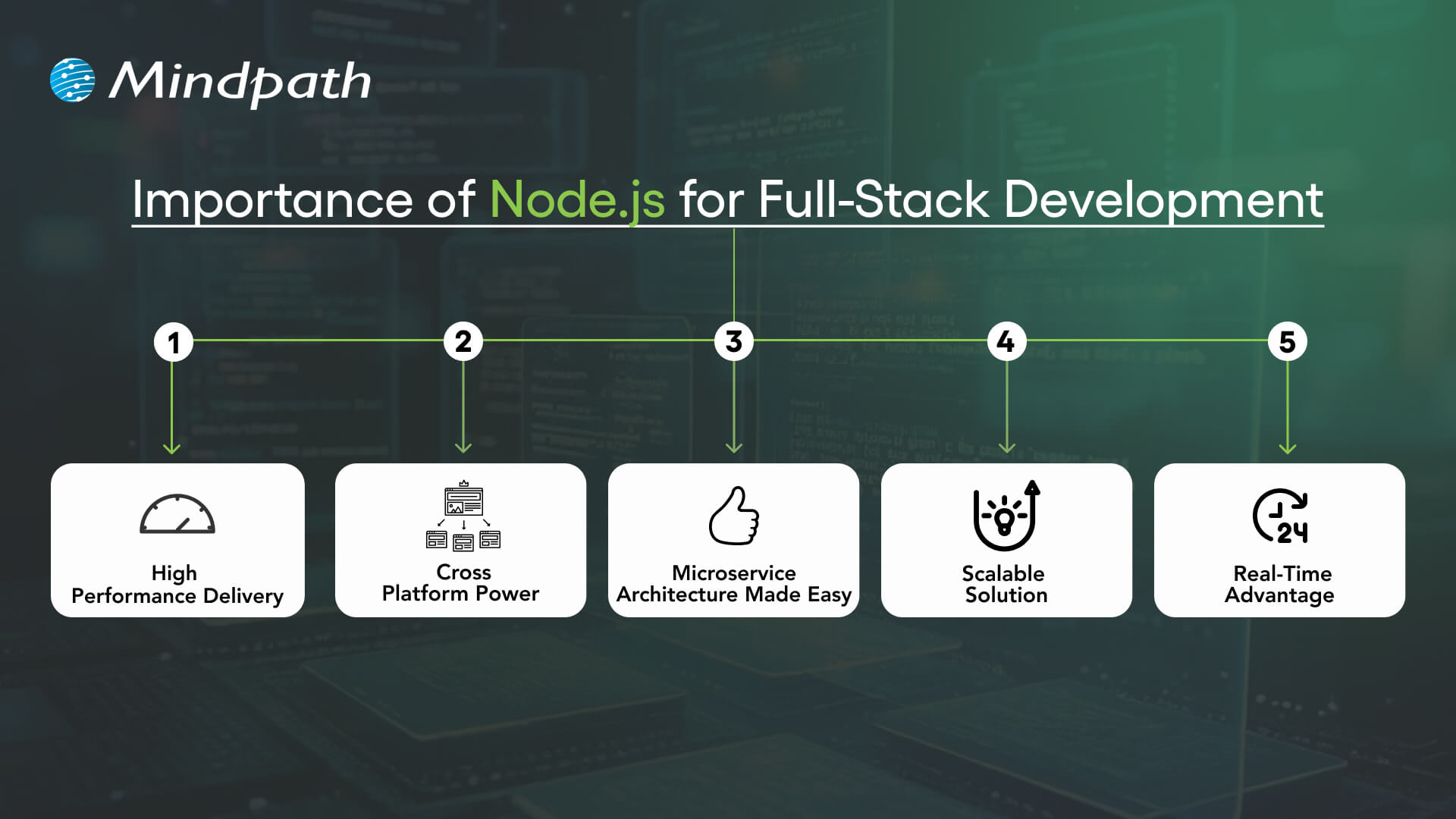
Importance of Node.js for Full-Stack Development

1. High Performance Delivery

Node.js utilizes a non-blocking I/O hardware model that can handle hundreds or even thousands of requests simultaneously, providing faster response times and greater user-specific.

2. Cross-Platform Power

With the Node.js full stack, developers can write mobile and desktop apps to run on Windows, macOS, Linux, and more. By relying on a single JavaScript code base, developers can save time and effort writing for multiple platforms.

3. Microservice Architecture Made Easy

Full-stack Node allows users to break one larger application down to multiple smaller independent services using infrastructure that is easier to work with. This approach lets developers build faster, stay flexible, and rely on proven solutions.

4. Scalable Solution

Full-stack Node.js is used by major players like Walmart, Uber, and Trello to handle millions of users. It helps to lower load time significantly, and it ensures your applications will scale seamlessly, as your demands increase.

5. Real-Time Advantage

When it comes to applications that leverage chat, live streaming, food delivery, or payments, Node.js full-stack is the way to go. It seamlessly provides real-time updates to keep the user engaged and connected.

Also Read: Full-stack Development for Web Projects

Key Steps to Use Node.js in Full-Stack Development

A full-stack Node.js developer is involved in both the front end and the back end of web application development and will work to build complete web applications. Below is a synopsis of the primary steps to utilize Node.js in full-stack development that is easy and productive.
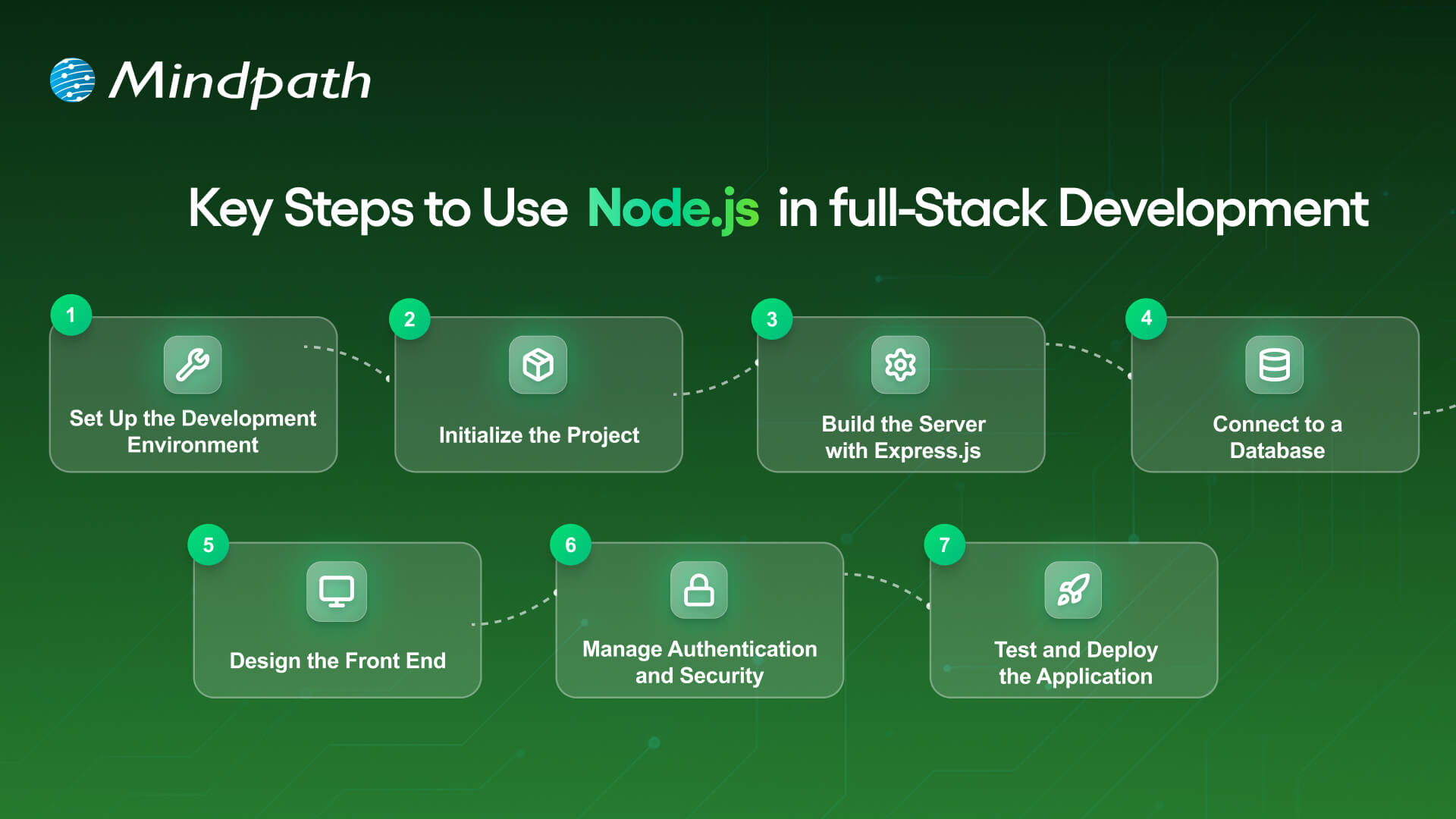
Key Steps to Use nodejs in full stack development

1. Set Up the Development Environment

To begin your application-building experience, you will need to install Node.js and npm (Node Package Manager). These tools will allow you to execute JavaScript beyond the browser, and they will also help manage libraries with ease. Verify the setup by checking versions with simple commands in your terminal.

2. Initialize the Project

Make a new folder for your app, and use ‘npm init’ to create a ‘package.json’ file. A package.json file holds important information, such as your project name, dependencies, and scripts. It will serve as the basis for managing everything in your project.

3. Build the Server with Express.js

Install Express.js so you’ll be able to set up the backend server and handle all of the different routes. Express.js makes handling requests, responses and APIs supposedly easy. This step will ensure the backend runs appropriately with the frontend.

Must Read: Full-stack development trends

4. Connect to a Database

Based on your needs for this project, select a database like MongoDB or PostgreSQL. This should be paired with a Node.js library like Mongoose or Sequelize, which will allow you to connect to and perform both read and write operations on your data. At this point, you will have the ability for your application to persist and retrieve your data.

5. Design the Front-End

Build the front-end using a library such as React, Angular, or Vue. You can link the front-end through RESTful APIs or GraphQL to your Node.js back end. At this point, players will finish the bridge for a Full-stack Node.js application.

6. Manage Authentication and Security

Use libraries like Passport.js or JWT to add secure login and registration. Secure necessary paths so that any authorized user can get to those routes. You should always consider security in any Full-stack Node.js application.

7. Test and Deploy the Application

Create unit and integration tests to ensure that your application does what you intended. Deploy the application to cloud hosting solutions like Google Cloud, AWS, or Heroku. To utilize your Full-stack Node.js application’s performance tool on different scales, you should monitor its performance!

Looking to integrate AI in your Node.js projects? Explore our Ultimate Guide to Node.js Libraries for AI Integration to discover the most effective libraries for building smart, scalable, and future-ready applications.

Ready to Unlock the Power of Full-Stack Node.js?

Full-stack Node.js has proved to be a smart choice for building scalable, high-performing, and real-time applications. It unites front-end and back-end seamlessly, helping developers create complete solutions with speed and flexibility. With its ability to handle microservices, cross-platform apps, and real-time updates, it has become an essential technology for modern web development.

At Mindpath, we provide expert full-stack development services designed to match your business goals. Our skilled Node.js developers bring deep technical knowledge and practical experience to build secure, scalable, and user-friendly applications. If you are looking to transform your digital ideas into reality, hiring a Node.js expert from our team ensures growth and lasting impact.

Related Post

Discover the top Node.js trends shaping digital technology in 2024, from AI and TypeScript to IoT and cloud computing. Explore how Node.js drives innovation!
Discover the top data and analytics trends for 2025, from AI and ML to hybrid cloud and edge analytics and learn how Mindpath can help.

Related Post

Generative AI for business

What if your business could automate creative tasks, generate innovative product designs, or even personalize customer interactions without manual effort? How are companies across different industries already harnessing the power of Generative AI to solve challenges and improve efficiency? Could Generative AI be the key to unlocking new levels of innovation and growth for your business? In this blog, we will explore the use cases of Generative AI that is shaping the future of business operations. 

Generative artificial intelligence (generative AI) is a form of AI capable of producing new content and ideas, such as conversations, stories, images, videos, and music. AI technologies aim to replicate human intelligence in nontraditional computer tasks such as image identification, natural language processing (NLP), and translation. Generative AI represents the next phase in artificial intelligence. You can teach it to understand human language, programming languages, art, chemistry, biology, or any other complicated topic. It leverages previously trained data to tackle new issues. For example, it can acquire English vocabulary and compose a poem using the words it processes. Your organization can utilize generative AI for a variety of applications, including chatbots, media production, and product development and design.   

So, let’s explore the use cases of Generative AI! 

Use Cases of Generative AI

1. Cybersecurity And Fraud Prevention

Many cybersecurity organizations are leveraging generative AI to improve their solutions for detecting suspicious activity on consumer networks and systems. These AI systems can accurately anticipate acts of fraud by analyzing transaction patterns and user behaviors. 

This technology enables firms to respond swiftly to possible attacks, which improves their entire security posture. Generative AI continually learns from fresh data, adjusting to evolving risks and assisting security teams in staying one step ahead of hackers. As cyber threats get more complex, using AI for fraud detection and cybersecurity is becoming increasingly important for businesses looking to secure their assets and retain customer trust.  

2. Drug Discovery

Generative AI is revolutionizing drug development by modelling complicated molecules and predicting their interactions faster than existing approaches. This technique has the potential to greatly speed up the development of new drugs. 

It enables pharmaceutical firms to forecast drug interactions, reuse current drugs, and develop personalized treatments based on a patient’s genetic profile. Furthermore, new AI-powered platforms are being developed to focus on healthcare and improve drug discovery procedures. Many in the biotech and pharmaceutical sectors think that generative AI will transform how new drugs are found and created, opening the path for speedier and more effective therapies. 

3. Marketing Assistance

Many experts feel that marketing support is one of generative AI’s primary capabilities. This technology can generate personalized marketing materials, analyze consumer data, and help with content production. It simplifies processes like content creation and social media administration, allowing marketing professionals to focus on more essential operations while saving time and money. 

Generative AI can also conduct market analysis by examining product feedback and forecasting client difficulties before they occur. Understanding client feedback is essential for product firms; they must know what their consumers like or dislike, predict developing trends, and recognize regional preferences. 

4. Coding Assistants

One of the most popular uses for generative AI is as a coding assistant. This technique can produce simple software code, freeing programmers to concentrate on more sophisticated tasks. 

Coding assistants help programmers stay focused by delivering solutions right in the code rather than requiring them to look for answers online. By leaving a remark, developers may let the AI finish their work, allowing them to keep their “flow state” and remain productive. Generative AI is particularly beneficial in web development since it can generate website code rapidly and effectively, decreasing the time and cost of upgrades. Even people with less technical knowledge may utilize technologies such as ChatGPT to create and implement code on their websites, making the development process more accessible. 

5. Digital Assistants

Many big IT businesses are supporting generative AI digital assistants, also known as copilots, despite some CIOs’ concerns about the return on investment. These assistants can search for information inside the organization, prepare papers and PowerPoint presentations, and summaries email threads and video conversations. They can also produce supply chain documentation, such as supplier quote requests. 

Some videoconferencing programs now include transcription and summary features, while independent applications can do similar duties. Grammarly, for example, may help you repair faults in grammar, spelling, and punctuation. Digital assistants can also be adapted to individual needs. For example, if a corporation routinely acquires delicate chemical or biological components, generative AI can add appropriate handling instructions to the purchase order. 

6. Business Process Enhancement

Generative AI is proving to be very effective in improving business processes within organizations. Companies are increasingly utilizing this technology to boost efficiency in workflows that are vital to their operations and customized for their respective sectors. In industries such as banking and insurance, some organizations are using generative AI to assist underwriters in appraising prospective clients.  

This method allows underwriters to work more effectively and conduct faster, more accurate risk evaluations, which is essential for the success of fintech businesses that rely on prompt funding decisions. Generative AI successfully empowers professionals, allowing them to focus on more strategic duties and increasing overall productivity. 

7. Advanced Chatbots

While simple chatbots that recognize words and phrases have been available for a while, modern chatbots powered by generative AI can conduct more lifelike conversations and handle a broader variety of client demands. Generative AI for language and AI agents is gaining popularity as a top emerging technology. These smart chatbots are intended to handle client enquiries more efficiently, resulting in considerable cost savings for enterprises. 

Although there are worries about inaccuracy, particularly in how they process requests, the impact of minor errors is frequently minimal. This enables businesses to improve customer service while successfully controlling related risks, making sophisticated chatbots an important tool in customer care. 

Generative AI Services at Mindpath

Mindpath offers generative AI services to help organizations improve their operations and promote innovation. We create compelling content, analyze massive datasets for important insights, and provide intelligent chatbots for effective customer care. We also priorities personalizing client experiences based on individual preferences and automating repetitive chores to free up your team’s time. By utilizing our generative AI solutions, you may enhance your business processes, save time, and remain competitive in today’s fast-paced marketplace. 

Final Note

Generative AI is changing the way organizations function by offering creative solutions that increase efficiency, creativity, and consumer relationships. By automating monotonous operations, personalizing experiences, and providing strong analytical tools, generative AI allows organizations to focus on strategic goals and achieve higher success. As businesses across sectors continue to use the possibilities of this technology, they are not only tackling present difficulties but also opening new avenues for development and innovation. Embracing generative AI might be the key to being competitive in today’s quickly changing industry. At Mindpath, we are dedicated to assisting your company in fully utilizing generative AI, ensuring that you remain at the forefront of your industry. 

Is your business ready to embrace the power of generative AI?

Mindpath offers tailored AI services to help you stay ahead in your industry.

Discover how Generative AI for business is revolutionizing efficiency, driving innovation, and enhancing customer experiences.
Cloud Computing Attacks

Is your cloud data truly safe? As cloud computing becomes essential for businesses, the risk of cyberattacks grows. Are you aware of the vulnerabilities that hackers often exploit? How can you stay one step ahead and secure your cloud? In this blog, we will explore practical ways to protect your data and keep cyber threats at bay. 

Cloud computing refers to the ability to access a wide range of computer resources over the internet, such as data storage, virtual and physical servers, networking capabilities, software, and sophisticated technologies such as AI analytics. Instead of investing in and managing these resources themselves, customers can leverage cloud providers’ infrastructure on a pay-per-use basis, resulting in more flexibility, scalability, and cost-efficiency. This method enables firms to access high-performance tools and store on demand, reducing the need for substantial on-site equipment. 

Preventing threats to cloud computing is important because it helps keep your data, applications, and systems safe from cyberattacks. When threats aren’t controlled, hackers could access sensitive information, disrupt services, or cause data loss, which can harm a business’s reputation and lead to financial losses. By focusing on security, you can protect your information, build customer trust, and make sure that your business operations continue smoothly without unexpected interruptions. 

Let’s explore the steps on how to prevent cloud computing attacks! 

Guide to Prevent Cloud Computing Attacks

1. Use Cloud Security Posture Management (CSPM)

Cloud Security Posture Management (CSPM) tools are essential for defending against cloud computing attacks. These technologies assist you in keeping your cloud environment secure by continually scanning for security vulnerabilities and ensuring that everything adheres to the proper protocols. They can also give advice on how to resolve any issues that are discovered. One of the most effective uses of CSPM is to ensure that your cloud environment adheres to security standards at all times. These technologies can automatically assess whether your system complies with relevant laws and regulations. You can employ tools like AWS Security Hub, Google Cloud Security Command Centre, and Azure Security Centre to monitor and update your cloud security.  

2. Encrypt Data Stored and in Transit

To protect against cloud computing attacks, encrypt your data both at rest and in transit. Encryption protects your data from unauthorized access by making it unreadable to anybody without the right key. 

To protect data at rest, employ encryption tools provided by your cloud provider to safeguard information kept in databases, storage, or backups. To protect your data, AWS offers services such as AWS Key Management Service (KMS) and Amazon S3 Server-Side Encryption. Data in transit must be encrypted using secure protocols such as TLS/SSL as it flows between your systems and the cloud. This ensures that the data can’t be intercepted or altered by attackers while it’s being transmitted. By encrypting both at rest and in transit, you can greatly reduce the risk of data breaches and ensure your information stays secure. 

3. Monitor and Act on Threats

To defend your cloud from attacks, you must continually check for unexpected behavior and respond promptly to threats. Monitoring user requests and database updates can aid in identifying possible security threats before they cause damage. Start by monitoring user requests. Monitor API calls and user behaviors for signals of danger, such as a high number of unsuccessful login attempts, unusual traffic spikes, or unauthorized access attempts. Also, keep an eye on your database for any unauthorized modifications, such as efforts to steal data or edit sensitive information. 

To provide the greatest security, employ technologies like AWS CloudTrail, Azure Security Centre, or Google Cloud Security Command Centre to monitor your cloud environment in real time. These technologies allow you to view everything that is going on and immediately spot any risks. 

4. Protect Your APIs

Securing APIs is essential for securing cloud services and data. APIs serve as messengers, allowing various software programs to communicate and share information. They play a vital role in cloud computing and are frequently targeted by attackers because they can store sensitive data such as user credentials, financial information, or secret corporate information. If an API is hacked, it can pose major security concerns to the entire system. 

API gateways are an excellent solution for protecting your APIs. An API gateway manages and secures the traffic that flows to and from your APIs. It works as a filter, processing only authorized queries. You can enhance security by activating features like rate restriction, authentication and authorization checks, enforcing HTTPS, and detecting attacks patterns through the gateway. 

5. Establish Identity and Access Management (IAM)

Managing access to your cloud resources is essential for ensuring their security. Strong Identity and Access Management (IAM) procedures guarantee that only the appropriate individuals and services have access to your cloud data, and only to the level required. This helps to prevent unauthorized access and mitigates the harm if an account is hacked. 

Following the principle of least privilege is a great practice. This implies granting users and services just the rights they require to fulfil their responsibilities. By limiting access to only what is required, you lessen the likelihood of abuse if an account is hacked. It’s also important to conduct regular audits and reviews of your access policies. This ensures that access permissions are still relevant and aligned with the current roles and needs of your users. Regular checks help maintain a secure environment and quickly identify any unnecessary or outdated access. 

Also Read: DevSecOps in the Cloud: A Complete Implementation Guide

Cloud Computing at Mindpath

At Mindpath, we offer cloud computing services to help businesses manage their data, applications, and resources more easily and securely. With our cloud solutions, you can store your information safely, access powerful tools over the internet, and scale your resources as needed—all without having to manage complex hardware yourself.  Whether you’re looking to improve security, reduce costs, or increase efficiency, our cloud computing services are designed to meet your unique needs. We use the latest technologies to ensure your data is safe, accessible, and ready to support your business growth. Let us help you take advantage of the flexibility and power of the cloud. 

Final Thought!

Preventing cloud computing attacks is essential for protecting your data, apps, and company processes. Implementing strong security practices such as Cloud Security Posture Management (CSPM), encrypting data at rest and in transit, continuously monitoring for threats, securing your APIs, and managing access through Identity and Access Management (IAM) can significantly reduce the risk of cyberattacks. Mindpath is dedicated to offering safe, versatile, and scalable cloud solutions that fit your company’s requirements. With the proper cloud security measures in place, you can focus on development and innovation while ensuring your data is protected. Let us assist you in developing a robust, secure cloud infrastructure that will support business success in today’s digital environment. 

Ready to secure your cloud environment?

Partner with Mindpath for reliable, scalable cloud solutions that protect your data and drive business growth.

Learn how to prevent cloud computing attacks with practical tips on security, API protection, and IAM to safeguard your business and data.
top AI trends

AI trends are growing at an accelerated rate, creating new opportunities and challenges for leaders in today’s workforce. From intelligent automation to advanced data analysis, AI is delivering smarter and leaner business processes, and playing a critical role in AI in decision-making. Fascinating, isn’t it? AI now permeates companies of all sizes for improving decision-making and performance. These transitions are already contributing to how businesses will operate and compete across every industry in 2025!

It is vital to keep up with the trends in AI because they are directly relevant to how businesses grow, change, and ultimately fulfill growing expectations. The faster leaders recognize trends, the smarter they can invest and prepare their teams, in order to gain an advantage over their competitors. If you do not pay attention to these trends, you may run the risk of missing advancements in tools, significant improvements in workflows, and smart strategies.

Want to know what are the top AI trends for 2025? This blog will provide you with all the AI trends business leaders will want to be aware of and should pay particular attention to in 2025.

Wondering how to get started with AI development the right way? Our AI Development Services can help you build impactful solutions from concept to deployment.

What is Artificial Intelligence (AI)?

Artificial Intelligence (AI) is a type of technology that helps computers in thinking, learning, and making choices like people. It allows machines to use language, read information, and analyze data to give helpful responses. In business, AI is primarily being utilized to make workflow quicker and smarter.

For example, AI allows an organization to better appreciate the needs of its customers, and provide its products or services to them, when they need them, in a timelier manner. AI functions for businesses efficiently by helping cut down the time taken for a task that people typically take a lot longer to do. AI can minimize errors, take care of repeated and tedious work, and it can operate indefinitely without breaks.

It means that an organization can receive a product quicker, save time to increase productivity, and use their time to pursue other important goals. AI can also help organizations improve the quality of their products and services by being able to produce and share insights derived from their data, helping ensure smarter, and more informed decisions.

Let us know about some AI statistics that highlight how organizations are adopting and managing AI technologies in 2025:

  • According to Statista, the AI market is expected to reach US$244.22 billion in 2025 and grow to US$1.01 trillion by 2031, with a CAGR of 26.60%.
  • As per McKinsey AI report, more than three-quarters of organizations now use AI in at least one business function.
  • An artificial intelligence survey from Forbes reveals that 25% of enterprises will deploy AI agents in 2025 to handle complex, multi-step tasks.
  • Analytics Insight states that 80% of retail executives plan to accelerate AI adoption through automation by the end of 2025.

Is your business missing out on the advantages AI can offer? Explore the benefits of AI from increasing efficiency and cutting costs to making smarter, data-driven decisions that drive growth.

Top AI Trends for 2025

Trends in artificial intelligence are shaping how businesses operate, innovate, and grow in 2025. As more companies start using AI to improve workflows and decision-making, these key developments are driving real impact across industries.

1. AI Reasoning Gets Smarter

Among the latest developments in AI, one major shift is its growing ability to reason and make sense of complex situations. In 2025, large language models can think more like humans, helping businesses go beyond basic insights. They now support smarter planning and stronger decision-making. This means companies are using AI not just to understand data, but to act on it more confidently.

2. Generative AI Reshaping Content Strategy

The best artificial intelligence trend in 2025 is the rise of generative AI in content creation. It allows businesses to create text, visuals, and videos instantly from basic prompts. This helps teams produce more personalized content at scale without extra effort. It’s making content strategies faster, smarter, and more effective across industries.

Also Read: Top GenAI Trends 

3. AI Agents Redefining Business Efficiency

One exciting use of AI in business is the rise of intelligent AI agents that act like real team members. These smart tools handle tasks like finding new leads, managing admin work, and analyzing data in real time. By doing this, they help teams work faster and focus on bigger goals. Companies are now seeing lower costs and fewer errors due to these advanced AI systems.

4. Multi-Agent Systems Streamlining Workflows

A new shift in AI is the use of multiple agents working as a team to handle complex business tasks. Each AI agent focuses on a specific job, like customer service or finance, and they all work together smoothly. This makes it easier to automate detailed processes that once needed people to manage them. The result is faster work, better accuracy, and stronger connections between business systems.

5. Industry-Driven AI in Action

Different industries are now using AI in ways that fit their unique needs. Sectors like finance, healthcare, insurance, and manufacturing are leading the way because they already follow strong rules around data and systems. These fields need custom AI tools for tasks like managing claims, tracking supply chains, or handling appointments. Tailored AI solutions are helping these industries work faster, meet rules, and serve people better.

How is AI reshaping the way websites are built and optimized? Explore our detailed article on AI in Web Development to see how it’s driving smarter design, faster deployment, and better user experiences.

6. GPUs Powering the Future of AI

A key new technology in AI is the growing use of GPUs to run advanced models. These powerful chips help process large amounts of data quickly, which is essential for AI tasks. As AI adoption grows, the demand for GPUs is rising across both cloud and on-premise systems. They now play a central role in building fast, efficient, and scalable AI infrastructure.

7. A Shift Towards Small Language Models (SLMs)

One trend catching the eye of artificial intelligence companies to invest in is the move from large to small language models. These smaller models, called SLMs, can do many of the same tasks as LLMs but use fewer resources. They are faster, cheaper to run, and easier to manage, making them a smart choice for everyday use. With techniques like pruning and knowledge sharing, SLMs are becoming more efficient without losing quality.

8. Businesses Turn to Open-Source AI

Open-source AI is becoming a strong choice for businesses that want more freedom and flexibility. Unlike closed systems, open-source models let companies build and manage AI tools on their own, keeping data private and costs lower. They can also fine-tune models using their own data to get better results. This shift is helping more businesses create powerful AI solutions without relying on big tech providers.

9. RAG Brings More Accuracy

One growing method to reduce wrong answers from AI is called Retrieval-Augmented Generation, or RAG. It helps AI pull information from reliable and current sources, making responses more accurate. While it improves relevance, it doesn’t always provide personalized answers without added context. Still, RAG is becoming a valuable tool for businesses looking to make AI more useful and trustworthy.

10. Swarm Learning Driving AI Progress

Swarm learning is a new way for AI systems to grow by sharing what they learn with each other. Instead of learning alone, connected AIs exchange knowledge in real time. This helps them improve faster and solve problems more efficiently. It’s a smart way to build stronger AI by working as a team.

Looking for smarter ways to handle customer queries and optimize workflows? Explore our blog to see how conversational AI chatbots can transform your business.

Is Your Business Aligned with the Top AI Trends?

AI trends are reshaping how businesses grow, compete, and deliver value across every industry. From reasoning models to open-source tools and AI agents, these trends are helping companies simplify operations, improve decision-making, and stay ahead. By understanding what’s emerging in 2025, leaders can better prepare for new opportunities and future success.

At Mindpath, we offer AI development services that align with the latest AI trends and business goals. We create intelligent tools, automation systems, and custom AI models that improve decision-making and increase efficiency. Our solutions are built to fit your operations, boost productivity, and support long-term growth. With Mindpath, businesses gain reliable and future-focused AI support.