Home

Top 10 Questions to Ask a Website Design Company before Hiring Them

Top 10 Questions to Ask a Website Design Company before Hiring Them

Join our Newsletter!

website design company

Your website is the foundation of your online growth strategy, brand identity, and user experience. Whether you want to launch a new website, upgrade, or rebrand your digital presence, hiring the best website design company is a vital decision. A small mistake in this, and you would end up with a site that is unappealing, slow, and poorly optimized. 

However, with hundreds of web development agencies promising fast turnarounds and impressive designs, how do you pick the right web design company? Well, it lies in asking the right questions when hiring. 

This detailed guide breaks down the top 10 questions that you need to ask a website development company before making your final decision. Let’s get started with this. 

Want to build a high-performing website that defines uniqueness and provides you competitive advantage? Mindpath’s web development services will bring your ideas to life.

Why Choosing the Right Web Designer Partner Matters?

Selecting a professional website designer is an important decision that directly influences your business’s digital success. The right agency will be your strategic partner, helping you create a platform that can effectively drive conversions, growth, and engagement. Looking for more reasons to partner with a reliable website development company? Check the points below. 

1. SEO Optimization

Professional agencies deploy the best SEO practices into design and development, making your site attract more organic traffic and rank higher. 

2. User Experience

A certified website design company crafts intuitive navigation, responsive layouts, and fast-loading web pages to keep visitors engaged. 

3. Flexibility and Scalability

The right digital partner will offer solutions by keeping the future growth in mind. For this, they will ensure smooth integration, timely performance enhancement, and easy updates. 

4. Accessible Web Design

These experts create inclusive design and follow the POUR or Perceivable, Operable, Understandable, and Robust guidelines. That means your site will remain accessible to all audiences, including users with disabilities. 

5. Performance and Security

Professional web designers use secure coding practices. Besides, they optimize the code for speed, lowering bounce rates. It would not be wrong to say that investing in the top website design company can help you set a robust foundation for your current and future digital success. 

Want to see how AI can change the game for building and maintaining websites? Check out our post on AI in web development to learn how AI can make your site smarter, faster, and more efficient.

10 Questions to Ask a Website Design Company

Hiring a web design company is a process of choosing a strategic partner who can understand your business, long-term goals, and audience. Here are 10 questions you should ask before hiring these experts to avoid any costly mistakes in the future.

1. Do You Have Experience with My Business Type or Industry?

Remember that not all web design agencies are the same. While some specialize in service-based businesses, others are in e-commerce. By understanding an agency’s industry experience, you can decide whether they can create a site for your audience. 

Why It Matters:

  • You don’t have to spend hours explaining your business model.
  • Familiarity with necessary compliance is important.
  • Industry-specific expertise can result in a better understanding of UI/UX design trends and decisions. 

2. Do You Use Templates or Create Custom Designs? 

This question helps you analyze the agency’s design capabilities. Templates are cost-effective, but custom designs are great for uniqueness, scalability, and flexibility. Other benefits you will enjoy are: 

  • Accurate reflection of your brand identity 
  • smooth integrations and long-term growth
  •  Robust security features

3. What Are Your Strategies to Make a Site Mobile Responsive? 

Your website should look and function perfectly across desktops, tablets, smartphones, and web browsers. Ensure that their strategies include the following points: 

  • Creation of clear menus
  • Testing across various screen sizes and devices 
  • Checking compatibility with Edge, Chrome, Safari, etc.
  • Use of plugins for image optimization

4. What CMS Do You Always Recommend and Why?

The CMS, or Content Management System, decides how smoothly you can manage content, update the site, and scale. Some widely used platforms are Drupal, WordPress, Shopify, Webflow, and Joomla. With a robust CMS, you will enjoy benefits like: 

  • Solid security
  • Plugin compatibility
  • Ease of use 
  • Better SEO
  • Hassle-free integration with third-party systems

5. What is Your SEO Implementation Strategy in the Design Process?

Even though you have a great site, it will be useful if it is not ranking. An expert should implement the right SEO techniques during the design process. This may include site architecture, on-page optimization, and technical SEO. Things that you need to consider are: 

  • Core Web Vitals and mobile optimization
  • Faster loading and clearer code
  • Keyword-friendly metadata and URLs
  • Schema markup  

Ask them whether they provide a detailed SEO audit after the launch.

Must Read: WordPress vs Drupal

6. What type of Quality Assurance and Testing Method Do You Use?

Before the final launch, it is crucial to carry out rigorous testing of your site to detect bugs, layout issues, bottlenecks, and broken links. Only a trustworthy website design company will follow a structured QA process. Look at their checklist and ensure that it covers: 

  • Performance and load testing 
  • Functional testing of elements like navigation, forms, buttons, etc. 
  • Security audits 
  • Accessibility check following WCAG guidelines 

To know more, you can ask for a sample report of their previous projects.

7. Why Should I Select You Over Other Agencies?

This is a crucial question that can help you understand what sets a website design company apart. A transparent and confident agency will never fail to explain the reasons clearly. A reliable agency will highlight factors like: 

  • Their past results and expertise
  • Commitment to customer satisfaction and quality
  • Their approach aligns with your unique business goals
  • Process transparency

If they are not clear and confident while answering this question, you should look for another web design and development service provider agency.

8. What Ongoing and Website Maintenance Solutions Do You Offer?

Your website is a living asset. To keep running smoothly, they need backups, bug fixes, performance monitoring, and regular updates. So, while hiring an expert, clarify what type of support they offer and what will be billed separately. Some common support options to consider are: 

  • Plugin management
  • CMS update
  • Uptime monitoring and security patches
  • Monthly maintenance packages 
  • Performance reports 

Ask the agency about Service Level Agreements and evaluate their response times for support queries.

9. How Will You Communicate About the Project Progress?

We all know that clear communication is key to successful collaboration. So, while hiring web developers and designers, ask about the tools they use to communicate, their project management style, and the frequency of updates. Some important things to clarify are: 

  • Communication channels they use, i.e., Slack, Asana, Trello, email, etc. 
  • Point of contact (developer, designer, or project manager) 
  • Feedback and optimization protocols
  • Milestone reviews or weekly updates 

Apart from this, you should also understand how they handle unexpected delays and scope changes.

10. What Is Your Pricing Method, and What Is Covered?

Transparency in pricing can help prevent surprises in the future. So, clearly understand what is included in the service quote and what may lead to extra charges. In general, pricing models can include: 

  • Hourly billing
  • Fixed project charge
  • Monthly packages 
  • Cost of logo design, content creation, custom fonts, and custom graphics 
  • Hosting fees and domain registration

Always ask for a comprehensive quote and proposal with clear timelines, payment terms, and deliverables. 

Looking for a website that truly reflects your brand and scales with your growth? Check out our blog on the benefits of custom website development services to discover why custom development pays off in the long run.

Common Red Flags to Consider

As mentioned above, selecting the web design and development agency is a strategic decision. While asking questions, it is also crucial to understand the warning signs that may lead to issues. So, watch out for these five red flags while hiring an agency. 

1. Evasive or Vague Response

If a firm struggles to explain their web design process, gives generic answers, and doesn’t share their past work, stay away from the firm. It clearly shows a lack of transparency and experience. 

2. Overpromising

Be careful with the agencies that guarantee higher rankings, unrealistic timelines, and instant conversions without any analytics and case studies to support their claims. 

3. No Clear Timeline

A reliable website design company should clearly outline deliverables, milestones, as well as review cycles. A lack of a structured plan can lead to scope creep and delays. 

4. Not Focusing on Mobile Optimization and Accessibility

Well, these are non-negotiables when it comes to making your digital asset successful. If these are not present on your site, it may fall short on compliance reach and performance. 

5. Selection of Wrong CMC Platform

A bad agency may use a low-quality CMS, as it will be easier for them to create a beautiful website. But it would lack the features your business needs. 

Always opt for a web development company that is transparent, listens to your needs, and is committed to your long-term success. 

Want to build a complete website without coordinating with multiple developers? Explore our post on full-stack development for web projects to discover how a full-stack approach simplifies your workflow and accelerates delivery.

Make the Right Choice for a Successful Digital Future

Partnering with the right website design company sets the foundation your business needs to achieve the desired online success. By asking these questions and understanding red flags, you can make an informed decision. Remember that only the right agency can align with your business goals and develop a website that will not only look great, but also scale, perform, and convert. 

Choosing Mindpath as your website design and development partner can help you stay ahead in this competitive market. We always go beyond surface-level web design. Our experienced team combines the latest SEO strategies, an accessibility-first approach, as well as platform-specific optimization to offer websites that are high-performing and inclusive. Let Mindpath assist you with your next web development project and witness remarkable results. 

Frequently Asked Questions

Choosing the Right Website Development Partner?

Know what to ask before hiring a development company and make a confident technology decision.

Frequently Asked Questions

Ask about their industry experience, portfolio, design process, SEO expertise, pricing, timelines, and post-launch support to ensure they can deliver a website aligned with your business goals.
A portfolio showcases the agency’s design quality, technical expertise, and experience delivering successful projects, helping you evaluate whether they’re the right fit for your business.
Yes. A reliable web design company should implement SEO best practices, including mobile optimization, site speed, clean code, and search-friendly architecture during development.
Ongoing support includes security updates, bug fixes, performance monitoring, and maintenance, ensuring your website remains secure, functional, and optimized as your business grows.
Choose a company with transparent pricing, clear communication, proven client success, structured project management, and scalable solutions that support your long-term digital growth.

Support Is One Click Away

Featured Posts

Related Post

Mobile app development 

In this fast-paced digital world, mobile app development has become a key channel for businesses to help grow and support their customers. Every tap, click and swipe is part of the user’s experience and lasting commitment to the brand. As customers rely more on their smartphones for shopping, entertainment, and other services, those companies that develop an intuitive e-commerce mobile app will have a better competitive advantage and will have their customers engaged with them.

As technology progresses every day, businesses can no longer rely solely on traditional platforms. Mobile apps now offer convenience, personalization, and live interaction that websites often cannot provide. Mobile apps help brands deliver seamless experiences and help build awareness and growth. This blog post will provide key advantages of mobile app development and help take your business to new heights.

Want to fully experience the benefits of mobile app development in your business? Mindpath offers mobile app development services, which help your business unlock new opportunities through innovative design and seamless functionality.

What is Mobile App Development?

Mobile app development refers to building software applications that are operated on mobile devices such as smartphones and tablets. Mobile app development is simply the process of designing the app’s interface and coding the app itself. These apps are designed to serve particular functions, which means they will facilitate the ability for a user to use services, shop online, or stay connected to others.

Mobile applications are capable of making use of the integrated functionality offered by a device, such as GPS, camera, bluetooth, and microphone, which sets them apart from traditional software. Developers today create the majority of applications for the Android or iOS platforms because these two dominate the worldwide market. Developers may use various frameworks & tools to construct applications that function smoothly, are visually attractive, and work seamlessly across devices.

What is the Process of Mobile App Development?

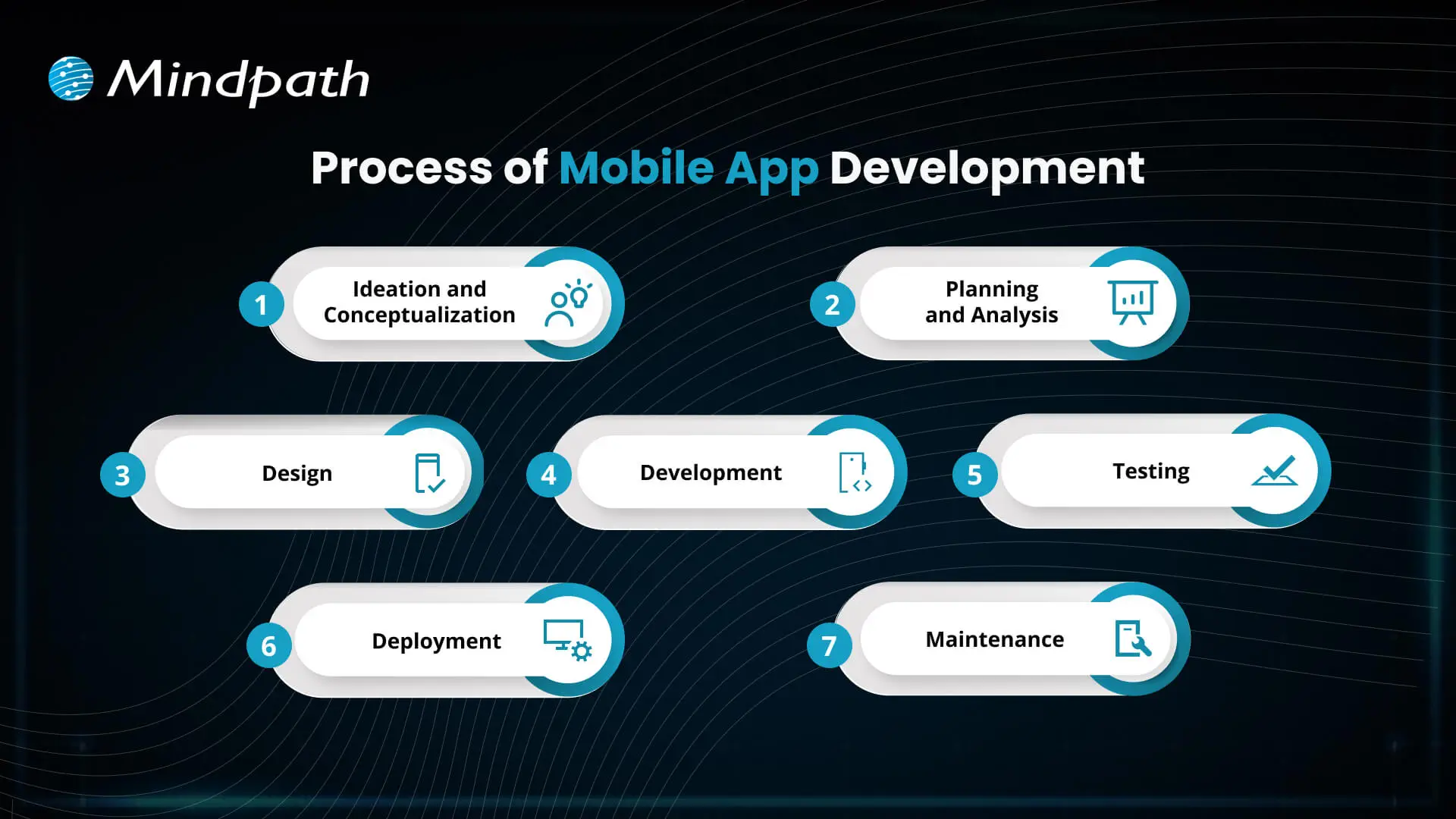
Developing a mobile application involves several necessary steps to take your idea to a working app. Each step plays a role in enabling usability, reliability, and scalability of the mobile app that is aligned with the business goals.

Process of Mobile App Development

1. Ideation and Conceptualization

The first step in the mobile app development process is coming up with a concept for your app. The teams think of an exciting mobile app development idea, find a way to solve problems for users, depict their target audiences, and identify key features.

2. Planning and Analysis

During this step, the teams conduct market research, determine app features, and establish goals. A proper framework documents timelines, budgets, and resources that will enable mobile app development startups and teams to stay on track.

3. Design

Designers create the aesthetic design and layout of the app to ensure it looks pleasing and is easy to use. Designing with simplicity and enjoyment in mind will allow users to navigate the app easily and have a positive experience while working.

4. Development

This is where developers start coding and building both the front and back ends of the app. The mobile app development process at this stage focuses on creating functional features that bring the design to life.

5. Testing

Before an app is launched, several tests are conducted to identify any malfunctions, like bugs or performance problems. This is a necessary step in order to ensure that the app is performing normally and responding correctly for the users.

6. Deployment

After the application has successfully gone through the testing stage, the app is published on the app stores, i.e., Google Play or Apple App Store. Companies that provide mobile app development will also develop a listing and promotional materials to be prepared for the launch.

7. Maintenance

Once the app has launched, it should be updated on a regular basis to fix bugs and continue to work with new devices or software versions. Maintaining the app will give users satisfaction, and enjoying the app for an extended period of time will keep users active.

Is your business app prepared to handle today’s security challenges? Discover how application security best practices for web and mobile apps keep user data safe while supporting sustainable growth.

Benefits of Mobile App Development

The advantages of mobile app development support businesses in more easily reaching customers and accelerating growth. By utilizing a mobile app development service, businesses can build simple and effective mobile apps that enhance user experience and increase engagement.

1. Enhance Customer Engagement

Mobile apps enable users to engage with your brand more often, keeping your business top of mind and relevant. Mobile app development allows businesses to develop features such as favorites, shopping lists, and review capabilities, all of which act as tools to enhance engagement.

2. Build Strong Brand Identity

An app that is well-designed becomes a permanent ambassador for your brand. Mobile app developers can collect relevant user data through the app, which can help improve your brand and continue to deliver value to your audience.

3. Increase Customer Loyalty

Mobile applications can host loyalty programs that encourage customers to revisit and repeat purchases. By giving discounts or rewards instantly, the app creates a sense of engagement with the app and helps build longer-term positive relationships.

4. Improve Customer Interaction

Mobile applications provide a convenient way for customers to purchase products because the app saves payment details and even previously favorite products. This all allows for an easier customer experience, which leads to convenience, improves customer satisfaction, and increases future conversions.

5. Personalize Marketing Efforts

Businesses can provide targeted offers and recommendations based on how users interact with their app. Personalized communication helps make users feel appreciated and encourages engagement.

Looking to build apps faster and smarter? Explore how mobile app development tools streamline development and boost productivity.

6. Boost Profits

Mobile apps typically drive sales and reduce marketing expenses by improving engagement, loyalty, and the overall user experience. Investing in the app is worthwhile because it is an efficient means of maximizing return.

7. Leverage Social Media Integration

Mobile applications can seamlessly connect to their social media channels, allowing individuals to easily share products or submit reviews. This advertising practice provides brands with exposure and social proof.

8. Provide Unique Value to Customers

Apps can offer features that are not available anywhere else, such as augmented reality try-ons, AI in mobile app development for intelligent chat support, and app-exclusive discounts. This adds convenience and encourages individuals to visit again.

9. Target Your Niche Market

Mobile apps provide a competitive advantage over other markets with specialized features and experiences. Businesses can effectively target and engage a broader segment of their target market.

10. Strengthen Communication

Push notifications ability and geotargeting gives businesses the ability to communicate with users in real time. Apps allow businesses to send relevant and time-sensitive messages without interruption from other communication channels.

Want to stay ahead in app innovation? Discover how mobile app development technologies power scalable, future-ready applications

Ready to Elevate Your Business with Mobile Apps?

Mobile app development offers businesses a powerful way to engage customers, build loyalty, and boost growth. By leveraging AI in mobile apps, companies can deliver smarter personalization, real-time support, and data-driven user experiences that stand out in competitive markets.. Leveraging the benefits of mobile apps helps businesses strengthen their brand, improve customer experience, and maximize sales in today’s digital world.

Mindpath provides professional mobile app development services to help businesses turn ideas into functional, user-friendly apps. Our team of experts focuses on designing apps that engage users, integrate key features, and deliver measurable results. With Mindpath, companies can launch high-quality apps that drive growth, enhance customer experience, and ensure long-term success.

remote work security

Remote work security refers to the practices, technologies, and policies that protect corporate data and networks when employees work outside a traditional office environment. Teams operate across devices, networks, and locations every day, and without corporate firewalls in place, even small gaps can create serious vulnerabilities. The risks evolve quickly, which is why businesses need protection strategies built on strict user verification, encrypted network connections, and continuous endpoint monitoring without disrupting daily workflows or user experience.

Decisions on security must be clear and consistent as organizations increase remote setups. Leaders need to pose the correct questions and take actions. Meanwhile, employees require straightforward and easy to use systems that facilitate day-to-day operations. Consequently, there is a need to have a balanced approach to succeed in the long term. This blog will provide explanations of important aspects of remote work cybersecurity in a clear and practical manner. So, keep reading further!

Ready to secure your remote workforce and protect your business from evolving cyber threats? Contact us to explore how our team can help you build a safer and more resilient remote work environment.

The Growing Cyber Risk in Remote Work Environments

Not only in the office, remote work also faces rising cyber threats today. Remote work security is vital because employees are using their personal networks and devices to access systems. These are some of the weak points that hackers attack. Consequently, minimal security breaches have the potential to compromise business information and interrupt routine business activities within a short time.

Simultaneously, remote workforce cybersecurity is exposed to increasing threats as the techniques of attacks advance daily. Phishing, ransom, and identity attacks are growing at a high rate. Remote setups are fast to adapt to cybercriminals. Thus, organizations need to remain vigilant and increase security to manage these changing threats.

Want to better understand how to scale teams without increasing security risks? Explore the benefits of hiring remote developers to balance flexibility with control.

Here are some of the remote workforce security risks:

1. Unsecured Network Risks

At home or cafes, employees tend to connect to unsecured networks. These connections can easily be intercepted by attackers to get sensitive data.

2. Weak Password Security Risks

A large number of users use the same password on several accounts. A single breach may reveal multiple systems within a short time.

3. Personal Device Security Risks

Individual gadgets frequently lack frequent security patches and safeguards. This provides malware and attacks with easy entry points.

4. Phishing and Social Engineering Risks

To deceive users, hackers use spoofed emails, or messaging. Such attacks seek to steal usernames or confidential information.

5. Shadow IT Security Risks

Employees sometimes use apps without company approval for convenience. This bypasses security controls and increases risk.

6. Software Update Security Risks

Remote devices might not get security patches in a timely manner. This exposes systems to well-known threats and vulnerabilities.

7. Physical Security Risks

The devices may be lost or found in high-traffic or communal areas. Critical business information may be put at risk as a result of unauthorized access.

Looking to simplify how your remote teams stay connected and secure daily? Discover powerful remote work tools that support safer collaboration.

Importance of Cybersecurity in Remote Work

Remote work security is key in safeguarding data and systems when working remotely. Here are the reasons why solid cybersecurity is still needed in the daily remote work setting.

1. Protecting Expanding Digital Entry Points

Remote work adds devices, networks and points of access to systems. Cybersecurity for remote work helps control risks in these expanded environments.

2. Securing Sensitive Business Data

Every day, employees gain access to and share crucial information that is not secured by office infrastructure. Work from home security will also protect data when storing and transferring data.

3. Reducing Phishing and Online Fraud Risks

Users who are distantly located are faced with rising phishing attacks in the form of emails and fraudulent communications. High level of security awareness will avoid unintentional sharing of sensitive login information.

4. Maintaining Strong Security Standards

Both personal and shared devices may not have consistent security updates and protection tools. The use of consistent policies guarantees similar protection standards across all systems.

5. Ensuring Business Continuity

Cyber attacks have the ability to interrupt workflow and slow down processes happening remotely. Good security control mechanisms assist in stability and prompt recovery exercises.

6. Building Trust and Meeting Compliance

Data security breaches may destroy reputation and decrease customer confidence within a short time. Adequate security would keep the rules and guard business reputation.

Planning to strengthen your security foundation as your business grows? Read about application security best practices to protect your systems effectively.

Cybersecurity Best Practices

Remote working security requires effective habits to safeguard information and systems in remote configurations. These are the best practices that can be implemented in order to enhance safety and minimize risks.

1. Safe Network Access (VPN Use)

Connect with secure VPN to all remote work activities on a daily basis. This secures information transfer among the commonly shared and open internet systems.

2. Home Network Protection

Protect home routers by using strong passwords and updating encryption parameters. Store smart devices on different networks to minimize security risks.

3. Timely Software Updates

Automatically update all systems and security applications. Frequent patches seal identified vulnerabilities and thwart cyber attacks in real-time.

4. Stronger Login Protection (MFA)

Implement several authentication measures whenever accessing the company system. Remote work security enhances safety of access via additional authentication measures.

5. Strong Password Management

Use different passwords on each account using secure password tools. Do not use the same passwords in personal and work accounts.

6. Employee Security Awareness

Train employees on how to detect phishing emails and suspicious online activities. Establish a powerful security culture to avoid unintentional data breaches.

Is Your Organization Truly Ready for Strong Remote Workforce Security?

Remote work has transformed the way teams work and exchange information on a daily basis. Powerful Remote Work Security assists in safeguarding information, hardware, and networks during the increase in cybercrime. It guarantees safer communication, stronger control, and minimized risks in the distributed work setting in the long term business stability and trust.

At Mindpath, we offer remote work security solutions to secure modern distributed teams with robust, trustworthy systems. Our strategy revolves around safe access, data security and risk mitigation. We assist companies to create secure remote working environments that do not affect productivity at all.

Learn essential cybersecurity practices for remote work and how Mindpath can help protect your business with expert solutions.
legacy modernization

Technology is a high-paced thing, and companies are under pressure to keep up with it. Legacy Modernization has come to be a serious agenda among companies that currently use the old systems to conduct their daily operations. You may find that the performance is slowing down, maintenance costs are increasing, and security threats are increasing yearly. All these problems cause tension amongst teams and restrict innovation. Then, what actually happens when the old systems are retarding progress? And how do companies get back in control without derailing the fundamental processes?

Meanwhile, leaders desire systems that can enable development, flexibility, and more intelligent decision-making. Their goals are to enhance performance besides safeguarding the vital data and business logic. Such an equilibrium needs a good technical direction and strategy. Thus, it is critical to comprehend the acceptable strategy to achieve success in the long term. This blog will discuss all the major points of legacy modernization step by step.

Ready to move beyond outdated systems that slow down your business? Mindpath offers legacy modernization services to help you upgrade and transform legacy applications into scalable and future-ready solutions.

What is Legacy Modernization?

Legacy modernization is the strategic process of updating, re-architecting, or replacing outdated software systems to align with modern technology capabilities, security standards, and business objectives. It improves performance, security, and scalability while preserving core business logic. Businesses rely on it to remain competitive, reduce technical debt, and drive growth transforming aging systems into scalable, agile, and cost-effective solutions without disrupting day-to-day operations.

However, legacy system modernization goes beyond technical upgrades. Companies need to reconsider procedures, user experience and long term objectives. They enhance efficiency, mitigate risk and facilitate innovativeness with strategic change. An effective modernization strategy puts technology into business performance and establishes a platform to achieve the long-term digital development.

Why is Legacy Modernization Important?

Outdated systems slow progress and increase risk. The modernization of legacy applications helps businesses improve performance, security, and flexibility. Here are some of its key benefits:

1. Legacy modernization reduces high maintenance and infrastructure costs. It also reduces the reliance on the old systems and costly specialists support.

2. It enhances the rate of speed and general dependability of the system. Teams are also able to update at a higher pace and handle changes with ease.

3. It enhances security because it eliminates the risks associated with outdated software. Organizations remain updated on new compliance standards and regulations as well.

4. It improves agility and promotes inter-team innovation. Companies are able to introduce new functionality in a shorter time and react to the needs of the market.

5. Contemporary systems can easily manage increasing traffic and information. They are also compatible with cloud computing and other sophisticated analytics solutions.

6. It improves user experience by making the user interfaces and performance cleaner. There is a greater work efficiency and confidence among the employees when using the system.

Curious about the best way to transition from legacy systems to modern platforms? Check out our legacy modernization roadmap blog to uncover proven steps and strategies.

How to Modernize Legacy Applications?

Organizations must take a clear and strategic approach to legacy modernization to avoid disruption and control risk. A structured plan helps teams upgrade systems efficiently while supporting business goals and future growth.

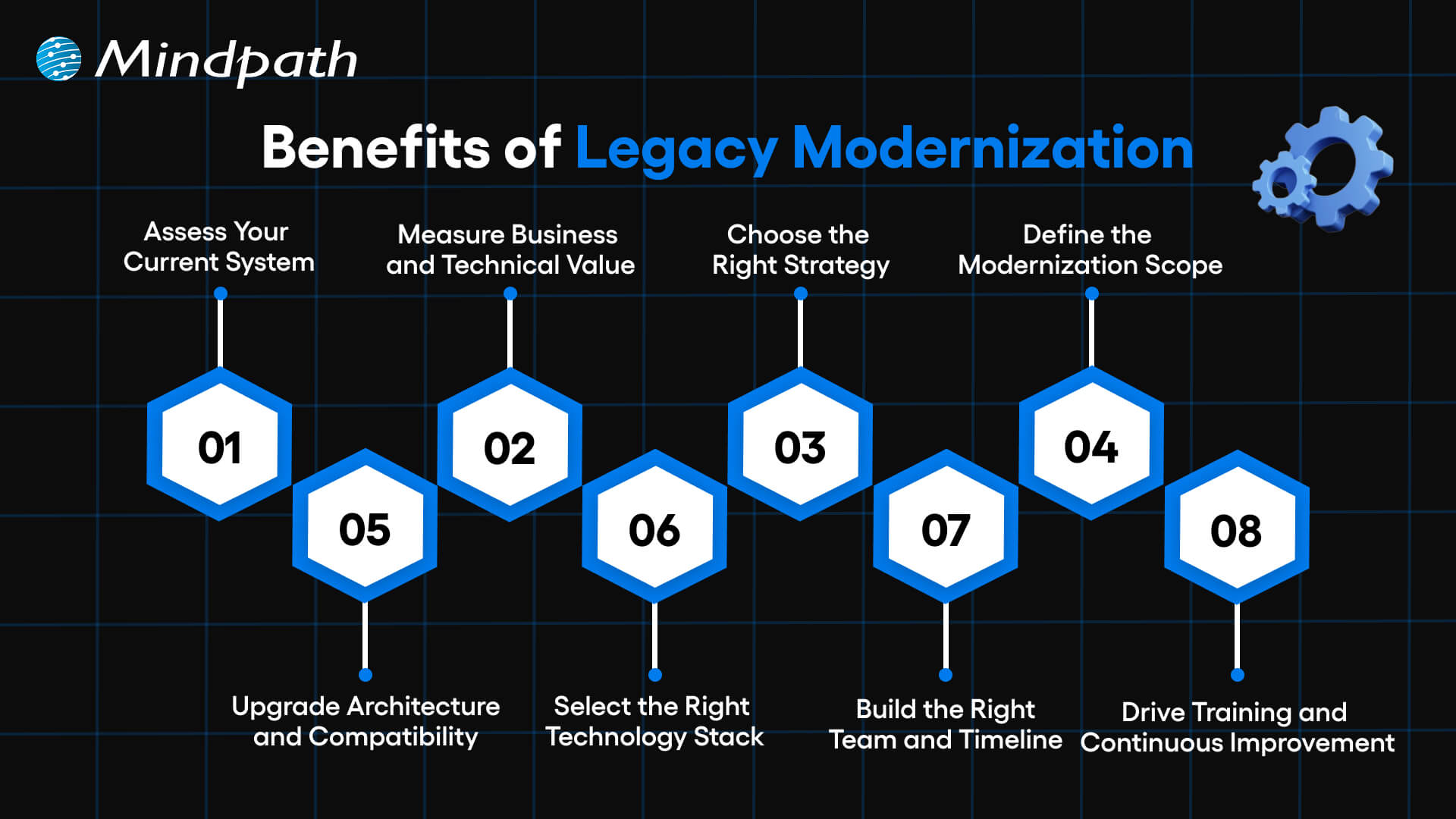
benefits of legacy modernization

1. Assess Your Current System

Evaluate your applications both business and IT. Determine deficiencies in performance, security and scalability. This step builds a strong base for legacy modernization decisions.

2. Measure Business and Technical Value

Assess business fit, agility, cost, complexity and risk. Know the amount of value each system brings in the present day. Clear insights strengthen your legacy app modernization strategy.

3. Choose the Right Strategy

Select a legacy modernization approach that aligns with business goals. Compare such options as rehost, refactor, rebuild or replace. Take the course of action that brings more quickly and reduces the risk.

4. Define the Modernization Scope

Target key points that lead to business performance. Eliminate the old and unwanted functions that complicate things. A clear scope helps teams modernize legacy applications with confidence.

5. Upgrade Architecture and Compatibility

Use scalable architecture when needed e.g. microservices. Enhance dynamism and streamline administration of the system. Enhance seamless integration with other tools/ platforms.

6. Select the Right Technology Stack

Select technologies that will be able to accommodate existing needs and expand in the future. Never act on your judgment without consulting experts. Good testing will guarantee effectiveness, protection and dependability.

7. Build the Right Team and Timeline

Create a cross functional team with established responsibilities and ownership. Develop and maintain documentation. Set realistic milestones to guide legacy modernization progress.

8. Drive Training and Continuous Improvement

Train the staff on effective use of the new system. Onboarding is encouraged by means of structured support. Continuous updates keep legacy modernization relevant and sustainable.

Want to align your legacy systems with your long-term business goals? Explore the legacy modernization strategy for business growth to build a result-driven transformation plan.

Key Challenges in Legacy Modernization

There are some valid advantages of legacy modernization, but it also possesses actual challenges. During the transition, organizations have to be ready to overcome technical, financial, and operational challenges.

1. Complex Legacy Code

Systems are difficult to comprehend and expand due to old-fashioned code and lack of documentation. Such complexity slows the development and raises its maintenance costs.

2. Integration Barriers

The old systems also fail to make connections with cloud providers and new APIs. Architecture reengineering will require teams to be mindful of downtime and the gaps in security.

3. Security and Compliance Gaps

The existing security and regulations are not met in aging systems. It is necessary that Legacy Modernization involves proactive protocols, encryption, and compliance control updates.

4. High Costs and Limited Resources

Modernization demands investment in equipment, education, and infrastructures. Lack of a proper roadmap will increase costs and strain internal resources.

5. User Resistance to Change

Employees tend to be at ease with the well-known systems. Good communication, training will enable teams to adjust to Legacy Modernization programs.

6. Performance and Scalability Limits

Old applications are unsuitable to meet the increasing data and user requirements. Legacy Modernization enhances speed, stability, as well as long term scalability.

7. Knowledge and Skill Gaps

It may be challenging to locate professionals with knowledge of old technologies. Lack of experience will put risks and time delays at a higher level and make the project more complex.

8. Data Migration Risks

Migration of mass volumes of old data can result in loss, corruption or compatibility problems. There has to be audits, backups and testing of data to ensure data integrity in Legacy Modernization.

Planning to integrate AI into your legacy infrastructure for better decision-making? Learn about AI-driven legacy system modernization to transform your systems intelligently.

8 Legacy Modernization Strategies for Modern Businesses

Companies must have a strategy in place when modernizing old systems. The right legacy modernization strategies assist in decreasing risk and faster business worth.

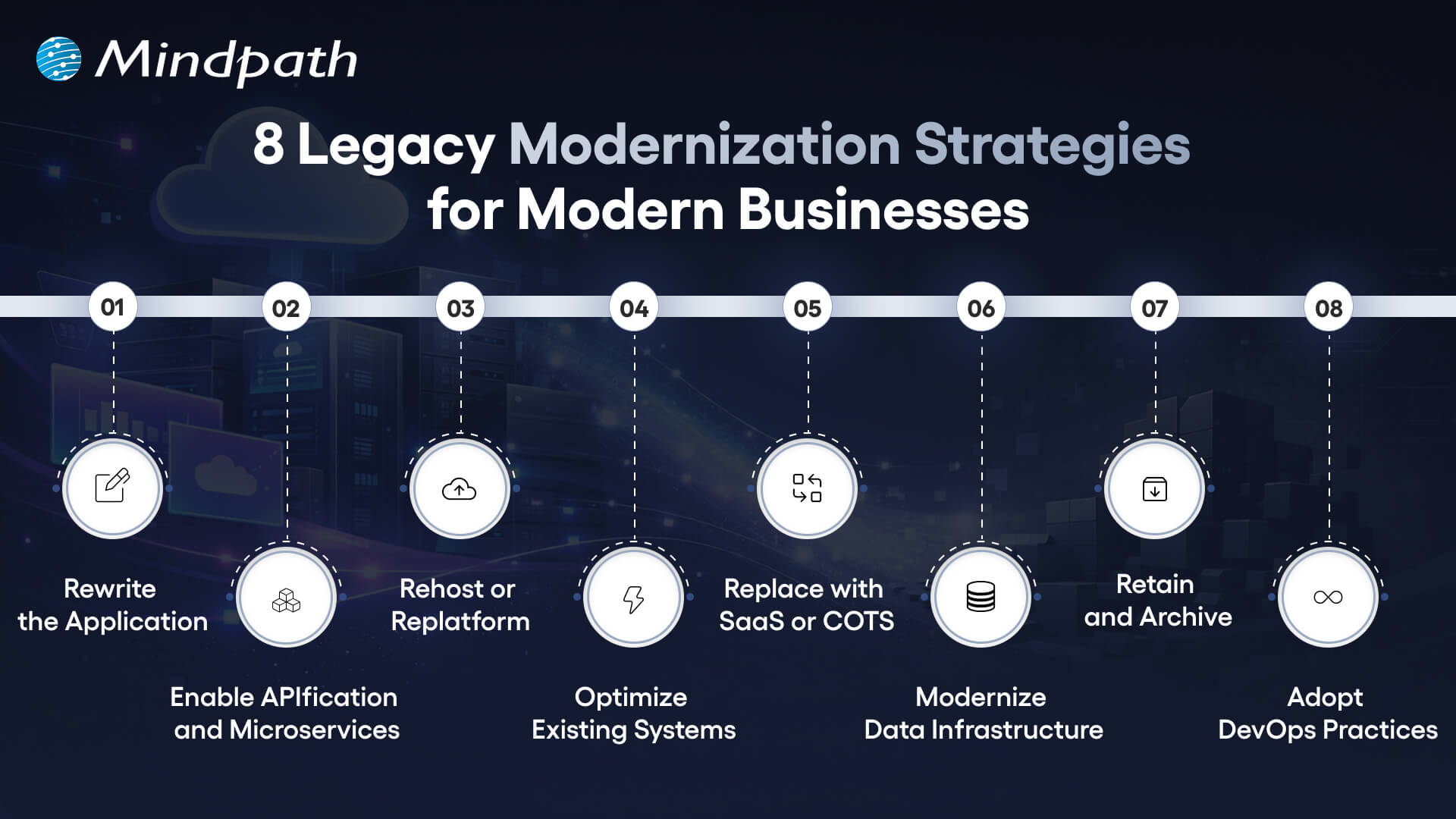
8 legacy modernization strategies for modern businesses

1. Rewrite the Application

Rewrite the old systems using new languages. This strategy will modernize the application and enhance quicker updates. It also reduces the long term maintenance.

2. Enable APIfication and Microservices

Divide monolithic systems into small services. APIs can be used to better integrate them. Innovation is accelerated through this model.

3. Rehost or Replat form

Migration to the cloud with minimal code modification. It is a move that minimizes infrastructure expenses within a very short time. The teams enhance scalability without causing much disturbance.

4. Optimize Existing Systems

Check the workloads as well as code performance gaps. Minimize the usage of infrastructure and operations expenditures. Utilize savings to finance additional upgrades.

5. Replace with SaaS or COTS

Use pre-made platforms that will satisfy business requirements. Accomplish security and compliance. Implement solutions in a shorter time and with reduced risk.

6. Modernize Data Infrastructure

Move the old databases to scaled systems. Enhance the speed, analytics, and flexibility. This step should be aligned to Legacy Modernization.

7. Retain and Archive

Retain those systems that retain the necessary value. Audits of applications that are rarely used in the archive. Unnecessary changes and risks should be avoided.

8. Adopt DevOps Practices

Implement continuous integration and testing. Publishing is faster and teamwork becomes better. Enhance the performance and stability of the systems.

Planning to enhance your modernization efforts with better automation and continuous delivery? Discover DevOps best practices to build a more agile and scalable transformation process.

Key Trends for Legacy Modernization System

Organizations are still redefining their technology environment to remain competitive. The modernization trends point to the new directions that lead to faster, smarter and more scalable transformation.

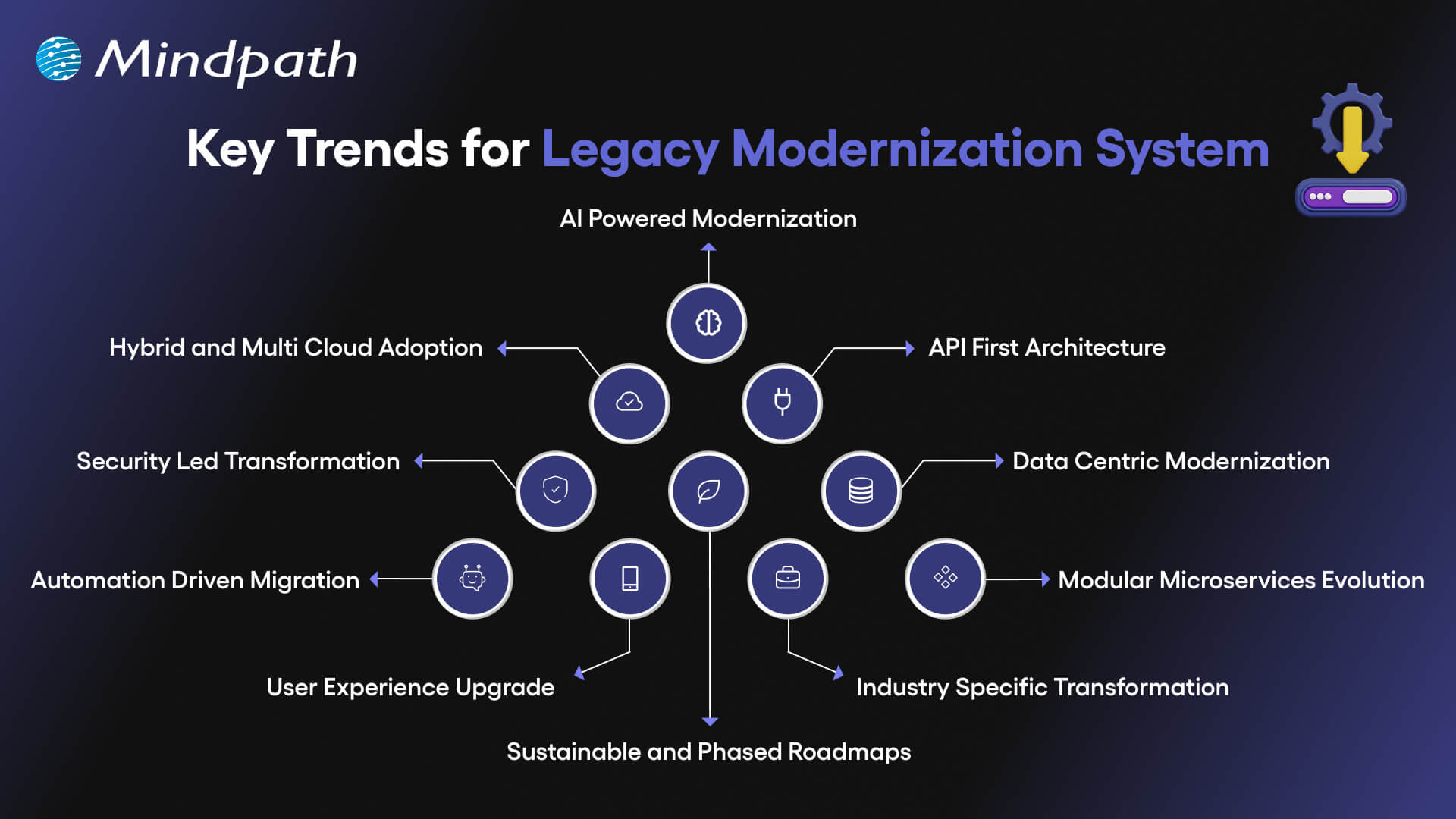
key trends for legacy modernization system

1. AI Powered Modernization

Code refactoring, re-architecture and system analysis are now assisted by AI. According to legacy modernization trends, many enterprises spend lots of money in AI. It enhances preciseness, less threat, and accelerates change.

2. Hybrid and Multi Cloud Adoption

Organizations have stopped relying on one cloud provider. They operate hybrid and multi cloud environments to be flexible and resilient. Container platforms assist systems to operate efficiently in environments.

3. API First Architecture

Enterprises substitute monolithic models with modular API based models. The APIs enhance integrations, scalability, and expedited feature upgrade. The change holds its ground in the contemporary legacy modernization patterns.

4. Security Led Transformation

The presence of stringent rules encourages companies to advance the old security checks. Zero trust models, encryption, and enhanced access management are implemented in teams. Every modernization roadmap is currently being influenced by security.

5. Data Centric Modernization

Isolated data warehouses are sent to unified lake house platforms by businesses. This measure enhances real-time understanding and information controls. Powerful data strategy is a key to successful legacy software modernization.

Curious about how AI can reduce costs and improve system capabilities? Check out the benefits of AI to transform your business operations.

6. Automation Driven Migration

Code scanning, risk detection, and recommendation are processes performed by AI-based tools. Jurisdictional testing and documentation lowers the manual work involved. These applications reduce migration time.

7. Modular Microservices Evolution

Businesses upgrade microservices using containers and orchestration technology. AI assists in tracking and optimization of working loads. This will enhance system stability and scalability.

8. User Experience Upgrade

The future UX concentrates on customization, usability, and functionality. Component based design models substitute strict legacy interfaces. These enhancements are in line with wider patterns of legacy modernization.

9. Industry Specific Transformation

Banks, healthcare providers, and manufacturers need individual solutions. Modern systems are now able to comply with strict industry rules. A strong legacy modernization framework supports niche requirements effectively.

10. Sustainable and Phased Roadmaps

Companies are ready to upgrade slowly than to rewrite everything. Planned phase will guarantee the sustainability of long term and reduce disruption. This approach makes modernization anticipative and expandable.

Want to make your legacy modernization efforts more environmentally responsible? Explore sustainable technology to build eco-friendly and future-ready systems.

Examples of Legacy Systems

Several organizations are still using the old systems to execute important activities. These are the legacy systems that are still in use and support day-to-day processes in spite of low adaptability and scalability.

1. Cloud Enablement in Financial Services

To enhance scaling and reporting, a fintech company has transferred the core systems to the cloud. This legacy modernization decreased manual labor and increased reliability.

2. Clinical Platform Enhancement

A microservices-based upgrade of an oncology system to speed up its performance. The transformations enhanced integration and helped to make medical decisions faster.

3. High-Performance Trading Systems

Microservices and automated deployments were embraced in a trading platform. This legacy modernization enabled speed and increased volume of transactions.

4. Digital Leasing Transformation

One leasing system upgraded its infrastructure to initiate operations more quickly. The upgrade made the operations less complex and efficient.

5. Smart Assessment Innovation

One of the education platforms presented AI-based grading tools. The educators used to save some time and received more rapid performance feedback.

6. Scalable K-12 Learning Infrastructure

One school system optimized its cloud environment to its maximum. The upgrade also enhanced the uptime and made the learning process stable.

Wondering how to connect legacy modernization with broader business goals? Explore about digital transformation for business to align technology with strategic growth.

Ready to Future Proof Your Business?

Legacy systems limit growth, increase risk, and slow innovation. Organizations that invest in legacy modernization improve performance, security, and scalability while reducing long term costs. A clear strategy helps teams modernize in phases and avoid disruption. With the right approach, businesses build flexible systems that support innovation, improve user experience, and create lasting competitive advantage in a fast changing digital market.

Mindpath stands as a trusted legacy modernization service provider delivering practical and scalable solutions. Our team assesses existing systems, defines a clear roadmap, and executes modernization with minimal disruption. We focus on performance, security, and cloud readiness to create measurable business value. With proven expertise and strong technology partnerships, Mindpath helps enterprises modernize confidently and achieve sustainable digital growth.