Home

Hire Expert Node.js Developers in London for Your Next Project

Hire Expert Node.js Developers in London for Your Next Project

Join our Newsletter!

The Complete Guide to Hiring Expert Node.js Developers in London

Are you looking to hire experienced Node.js developers in London to build a fast, scalable, and high-performing web application? Choosing the right development team is essential for creating reliable digital solutions that support your business goals. Whether you are a startup launching a new product or an established enterprise modernising its technology, Node.js offers the flexibility and performance needed for modern application development.

Key Takeaways

  • 01
    Node.js is an effective technology for developing scalable, high-performance backend applications.
  • 02
    Businesses can use Node.js for SaaS platforms, APIs, e-commerce applications, and real-time systems.
  • 03
    Experienced Node.js developers should have knowledge of JavaScript, TypeScript, databases, APIs, and cloud technologies.
  • 04
    Evaluate portfolios, technical skills, communication, and project experience before hiring.
  • 05
    Choosing the right development partner helps businesses build maintainable applications that support long-term growth.

Node.js is an open-source JavaScript runtime environment that allows developers to build server-side applications using JavaScript. Its event-driven, non-blocking architecture makes it suitable for applications that need to handle multiple requests efficiently.

Working with skilled Node.js Developers in London can help businesses develop custom applications, APIs, enterprise platforms, and real-time solutions. Let’s explore why Node.js is a valuable technology and how to find the right developers for your next project.

Looking to build high-quality applications with experienced NodeJS developers? Mindpath helps you hire expert NodeJS developers who deliver scalable, reliable solutions aligned with your business goals.

Why Choose Node.js for Your Business Application?

Node.js has become a popular choice for modern backend development because of its performance, flexibility, and extensive ecosystem. It helps businesses create applications that can adapt to changing user requirements.

Here are some important benefits:

1. High Performance and Scalability

Node.js uses a non-blocking, event-driven architecture that efficiently handles multiple simultaneous connections. This makes it suitable for applications such as online marketplaces, streaming platforms, SaaS products, and real-time dashboards.

Developers can also use scalable architectural patterns to support increasing application traffic and business growth.

2. Faster Development Process

One major advantage of Node.js is that developers can use JavaScript across both frontend and backend development. This reduces the need to work with multiple programming languages and helps teams maintain consistent development practices.

Using reusable packages from the npm ecosystem also helps accelerate development and simplify implementation.

3. Real-Time Application Development

Node.js is particularly useful for applications that require instant communication between users and servers.

For example, businesses can use Node.js to develop:

  • Real-time messaging applications.

  • Live collaboration platforms.

  • Online gaming applications.

  • Real-time analytics dashboards.

  • Live notification systems.

Technologies such as Socket.IO can help developers implement real-time communication features.

4. Cost-Effective Development

Node.js supports JavaScript-based full-stack development, which can simplify team collaboration and technology management. Its open-source ecosystem also provides access to numerous development libraries and tools.

However, the overall project cost depends on application complexity, developer experience, infrastructure, and maintenance requirements.

Why Hire Node.js Developers in London?

London has a diverse technology ecosystem with businesses operating across fintech, healthcare, retail, education, and SaaS industries. Companies in these sectors increasingly need reliable backend systems to manage digital operations and customer experiences.

Hiring experienced Node.js developers in London can help businesses:

  • Build customised backend applications.

  • Develop secure RESTful and GraphQL APIs.

  • Integrate third-party platforms and services.

  • Improve application performance.

  • Develop cloud-ready software solutions.

  • Maintain and modernise existing applications.

When hiring developers, businesses should prioritise technical expertise, project experience, communication skills, and the ability to understand specific business requirements.

Essential Skills to Look for in Node.js Developers

Before hiring a developer, evaluate their technical knowledge and practical experience. A qualified Node.js developer should understand the following technologies and concepts.

1. Strong JavaScript and TypeScript Knowledge

Developers should have a strong understanding of JavaScript, ES6+ features, asynchronous programming, promises, and async/await. TypeScript knowledge is also valuable for building maintainable applications with better type safety.

2. Experience with Node.js Frameworks

Look for developers familiar with popular Node.js frameworks such as Express.js, NestJS, and Fastify. These frameworks help structure backend applications, manage APIs, and simplify development.

3. Database Management

Node.js developers should understand both SQL and NoSQL databases, depending on project requirements.

Popular database technologies include:

  • MongoDB

  • PostgreSQL

  • MySQL

  • Redis

Their experience should include database design, query optimisation, data management, and performance improvement.

4. API Development and Integration

A skilled developer should be comfortable building and integrating REST APIs and GraphQL APIs. They should also understand authentication, authorisation, API security, and error handling.

5. Cloud and Deployment Knowledge

Modern applications often require cloud infrastructure and automated deployment processes. Knowledge of AWS, Microsoft Azure, Docker, Kubernetes, and CI/CD pipelines can be beneficial for building and maintaining scalable applications.

How to Hire the Right Node.js Developers in London

Finding the right development talent requires more than reviewing resumes. Follow these steps to make an informed hiring decision.

Step 1: Define Your Project Requirements

Start by identifying your business objectives, application features, technology requirements, budget, and expected delivery timeline. Determine whether you need a backend developer or a full-stack development team.

Step 2: Review Portfolios and Experience

Examine previous projects to understand the developer’s experience with Node.js applications, API integrations, database management, and scalable architectures.

Step 3: Conduct Technical Assessments

Use practical coding assignments and technical interviews to evaluate JavaScript knowledge, debugging abilities, problem-solving skills, and backend development experience.

Step 4: Evaluate Communication and Collaboration

Developers should communicate clearly, understand project expectations, provide regular updates, and collaborate effectively with designers, project managers, and other developers.

Step 5: Choose the Right Hiring Model

Depending on your project requirements, consider hiring dedicated Node.js developers, extending your existing team through staff augmentation, or outsourcing the complete development project.

How Mindpath Helps You Build Scalable Node.js Applications

Choosing the right technology partner can make a significant difference in your software development journey.

At Mindpath, we help businesses turn their technology ideas into practical digital solutions through custom software development, web development, and dedicated development team services.

Our development approach focuses on understanding business requirements, selecting suitable technologies, building scalable architectures, and delivering solutions aligned with project objectives.

Whether you are developing a new web application, modernising an existing backend system, or integrating APIs, our team can help you identify the right development approach.

Looking to strengthen your development capabilities? Contact Mindpath to discuss your project requirements and explore suitable development solutions.

Ready to Hire in London?

Get Node.js engineers matched to your stack and timeline.

Frequently Asked Questions

Hiring Node.js developers in London can help businesses access development expertise for building scalable web applications, APIs, enterprise software, and real-time platforms.
A professional Node.js developer should understand JavaScript, TypeScript, Express.js or NestJS, database management, REST APIs, GraphQL, authentication, and cloud deployment.
Yes. Node.js can support enterprise applications through scalable architectures, API integrations, asynchronous processing, and cloud infrastructure. The architecture should be designed according to the application’s workload and security requirements.
The cost depends on experience, technical expertise, project complexity, engagement model, and hiring location. Businesses should compare the overall value, not just hourly rates, when selecting developers.
Yes. Node.js supports real-time applications such as chat platforms, live dashboards, collaboration tools, and notification systems using technologies such as WebSockets and Socket.IO.

Support Is One Click Away

Featured Posts

Related Post

Have you recognized how AI for customer service is changing the way you receive services from your favorite brands? Perhaps you’ve engaged with a virtual assistant at midnight or received an immediate answer without waiting on hold. It feels good, right? That’s the benefit of smart technology working behind the scenes for you. Companies all around the world are now depending on AI to deliver fast, friendly, and 24/7 customer support. It’s amazing that using AI is transforming the future of customer service; every interaction you have will ultimately be quicker and more personal.

The adoption of smart tools is indeed one of the most important ways businesses gain an edge and keep you satisfied in 2026. From chatbots that understand your problem much better than any human agent to virtual agents that don’t get tired of responding, it makes you feel like somebody is listening and making sure you are being helped every time you reach out. The benefits of chatbots help brands get better at solving problems faster and even predict what you might want next, resulting in an environment that you would love to come back to. In this blog, you’ll learn about the top benefits of using AI for customer service in 2026.

Planning to gain a competitive edge by providing exceptional customer support? Mindpath’s AI development services can help you deliver exceptional customer experience and unlock growth! 

What is AI in Customer Service?

AI in customer service is all about using intelligent technology to support customers in accessing customer support efficiently and conveniently. It includes services like chatbots and virtual assistants that can understand questions, respond to questions, and fix basic issues 24/7. This means consumers can access customer support for basic requests and not wait in long queues or hold to speak with a person.

With AI taking care of regular tasks such as order tracking, password resets, or account changes, human agents can dedicate their time and energy to more personalized or complex issues that need a human touch. AI can also provide insight into the customer’s previous interactions to make the service seem more tailored to the customer and more supportive in general. AI in business strategy helps businesses to better understand the needs of customers. Overall, AI makes the service process faster, more efficient, and more comfortable for both businesses and customers.

Benefits of AI for Customer Service

There are numerous advantages of AI for customer service that are changing the way customer relations are formed. Companies today use intelligent tools to improve the performance of their service and the way they follow through on solving problems. Let’s look closely at what makes this initiative worthwhile.

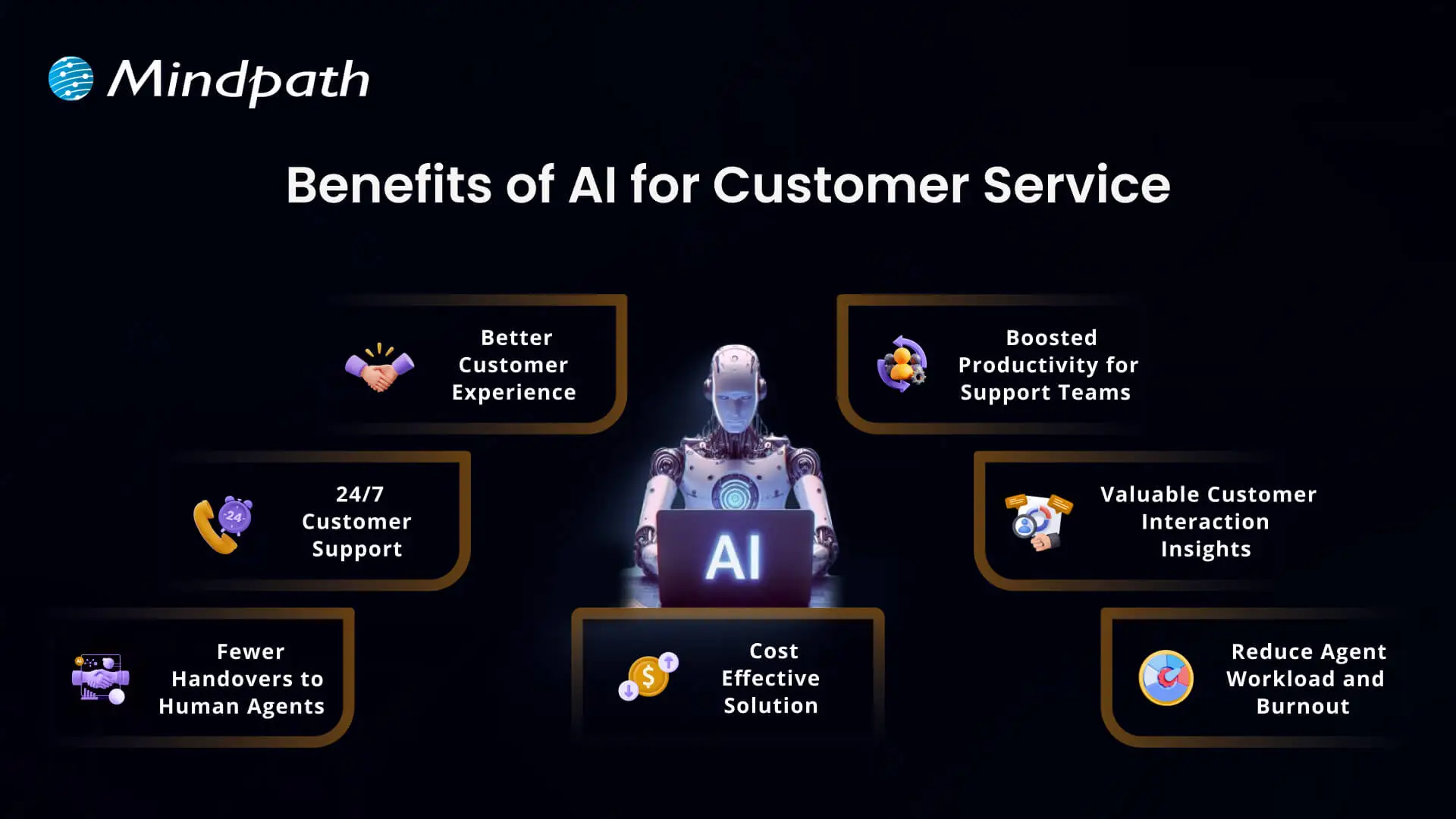
Benefits of AI for Customer Service

1. Better Customer Experience

AI can help create a better experience in customer service by making every interaction easier and more efficient for the customer. People are more comfortable engaging in conversations with chatbots and virtual assistants to get instant answers to their questions than they ever were before. AI tools such as agent assist and sentiment analysis can break down what customers want and prioritize how to respond, which allows support teams to drive a faster and more personal experience to satisfy customers.

2. 24/7 Customer Support

One of the main benefits of AI is that it offers businesses the opportunity to provide customer support 24/7 and every day of the year. With customer service AI tools such as virtual agents and voice bots, customers can get help immediately, even outside normal business hours. This has the impact of conveniences customers and keeping them happy. It also demonstrates how the benefits of AI chatbots improve customer service, making it quicker, easier, and always available.

3. Fewer Handovers to Human Agents

With smarter chatbots today, AI tools for customer service are becoming more human-like in their conversations and helping customers with simple questions. As a result, customers receive a quick answer, without having to wait for a human agent. Support teams now spend more time aiding customers with complex issues which require a more human touch. This solution was designed to balance the workload and ultimately improve the overall support experience.

4. Cost Effective Solution

Using AI customer services helps companies spend less on handling customer questions and problems. Chatbots and voice bots can answer many requests on their own, which means fewer calls and messages for human agents. These AI tools work all day and night without extra pay or breaks. This saves money on hiring, training, and keeping large support teams.

5. Boosted Productivity for Support Teams

AI makes customer service agents more productive by handling simple tasks automatically. It can sort and route requests and even suggest answers, so agents work faster and more accurately. This means they have more time to focus on complex problems that need a human touch. So, AI helps support teams get more done and provide better service.

6. Valuable Customer Interaction Insights

Using AI to track how customers feel during calls gives businesses a clearer picture of every interaction. It helps measure customer satisfaction and see where service can improve. Managers can also spot training needs for their team based on these insights. Looking at past data, AI can even help predict what customers might expect in the future.

7. Reduce Agent Workload and Burnout

Working in customer service can be stressful and lead to burnout when agents handle too many repetitive tasks. AI helps by taking care of simple questions and routine work, so agents have more time for important tasks. This reduces daily pressure and keeps the workload more balanced. Over time, it can help teams feel more supported and less burned out.

Want to know if your business is ready to implement AI in the right way? Explore our blog – AI Readiness Checklist.

Examples of Utilizing AI for Customer Service

Companies across industries are finding new ways to use AI to improve how they help their customers. This smart technology is making customer service more effective and reliable than ever. Let’s explore some real-world examples of how this is happening.

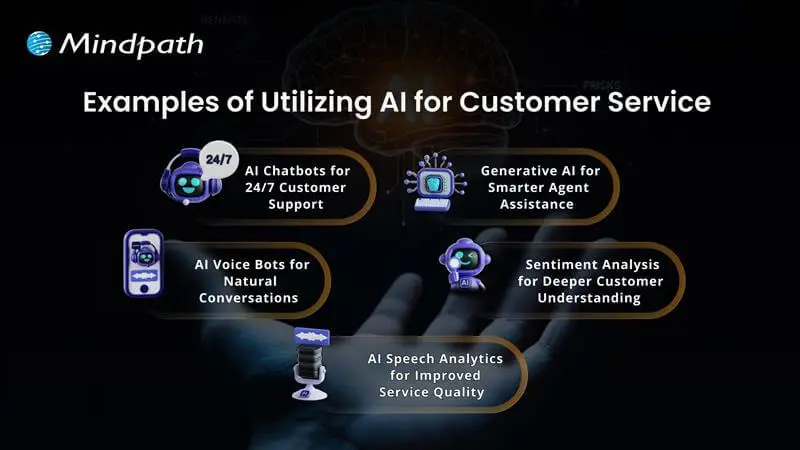
Examples of Utilizing AI for Customer Service 

1. AI Chatbots for 24/7 Customer Support

Conversational AI chatbots help businesses assist customers in getting answers any time, day or night. They can handle common questions, check orders, and even help with returns. This keeps support teams free for more complex problems.

2. AI Voice Bots for Natural Conversations

AI voice bots answer calls and talk to customers naturally, just like a human agent. They can share product details, update accounts, or book appointments. This reduces routine calls for human teams and keeps service smooth.

3. AI Speech Analytics for Improved Service Quality

AI speech analytics tools listen to customer calls to find useful patterns. They help managers see what customers care about and how agents are doing. This helps improve service and spot issues early.

4. Sentiment Analysis for Deeper Customer Understanding

Sentiment analysis uses AI to understand how a customer feels during a call. It looks at tone and pitch to score conversations as positive, neutral, or negative. This helps companies see where they can do better and train their teams.

5. Generative AI for Smarter Agent Assistance

Generative AI helps support agents work faster by giving them ready-made answers. It pulls information from your knowledge base and CRM, so agents don’t waste time searching. This means customers get quicker, more accurate help.

Ready to adopt the recent trends of Gen AI into your business? Read our detailed blog on Gen AI trends, which provides a deeper understanding of how to implement Gen AI into your business for future growth.

Ready to Unlock the Full Potential of AI for Customer Service?

Using AI for customer service is one of the smartest ways to keep your customers happy and your support teams working smoothly. From 24/7 chatbots to tools that understand customer feelings, AI makes service faster and more personal. By adding these smart solutions now, businesses can handle more requests, save time, and build stronger customer trust for the future.

At Mindpath, we provide custom AI development services that help companies improve customer service and stay ahead of the curve. Our team can build AI chatbots, voice bots, analytics, and more, all tailored to your business goals. We focus on making your service more efficient and personal. Connect with our experts to see how our AI development services can transform your customer experience.

what is data-decision making

Every prosperous company in today’s modern world relies on insights, not on instincts. The importance of data-driven decision-making is that it turns the daily choices made by human beings into strategic moves guided by genuine facts. Businesses that rely on data are better positioned to identify new opportunities, make decisions faster to adapt to change, and make decisions accordingly to grow. Data-driven decisions are the difference between guessing your next step and knowing your next step. 

As companies embrace data as a trustworthy guide, they promote a culture of clarity and accountability. Decisions are sharper, and strategies are more in sync with customer and market needs. This pragmatic use of data helps organizations to keep their focus on the future and to remain competitive in today’s digital-first environment. In this blog, we are going to outline why data-driven decision-making is a crucial component of contemporary business success.

Looking to turn your business data into actionable insights? Explore Mindpath’s AI Data Analytics Services to uncover trends, improve decision-making, and drive measurable business growth.

What is Data-Driven Decision Making?

Data-driven decision making (DDDM) refers to making business decisions on the basis of facts, figures, and analysis rather than personal opinions or gut feelings.  It reduces uncertainty by collecting data from various sources that examine the relationship between actions taken, such as customer behavior, sales tracking, or market data on trends, to identify what is really working for the business.

When organizations use this approach, they make data-based decisions with direct evidence that reduces risks and reveals new opportunities. Analyzing data patterns enables businesses to plan more effectively and achieve success easily.

Core Principles of Data-Driven Decision Making

1. Focus on Business Goals

Every data initiative must have a direct link to business goals. When teams better define their objectives, they can evaluate data with intention and make decisions that result in observable growth for the business.

2. Keep Data Clean and Reliable

All insights must be accurate, and therefore, the data must be from a trusted source. Ongoing checks for data quality and best practices in data cleaning should be conducted to guarantee decisions are based on sound data and not on missing or stale data.

3. Use Data as Proof, Not Assumptions

Effective decisions are built on true evidence. The importance of data-driven decision-making is that it eliminates the guessing and offers visibility that leads the decision-maker to act faster and more reflectively.

4. Make It a Continuous Effort

Data-based decision-making is an integral process. Companies should be consistently collecting, monitoring, and analyzing data so they can keep pace with shifts in market trends and customer needs.

5. Encourage Team Collaboration

Strong insights often develop in collaboration. When departments share their insights and discuss results, they create a collective plan that produces better and more consistent outcomes.

Want to know how modern businesses manage and analyze large volumes of data efficiently? Explore cloud‑native development to understand how cloud-native systems optimize data-driven operations.

Top Benefits of Data-Driven Decision Making

Understanding the importance of data-based decision-making supports businesses in formulating better rationales and better results. It instills a culture of fact-based, accountable decision-making to foster growth and transparency in increasingly dynamic markets.

1. Smarter Communication Across Teams

Effective communication is one of the main benefits of data-driven decision-making. When all departments are working with the same reliable insights, updates are easier to share and alignment of goals is simpler. With transparency, collaboration is fostered, and coordination is improved. This enables leaders to make quicker, smarter choices for improved business performance overall.

2. Continuous Growth and Progress

The importance of data-driven decision-making is tied to its support for constant growth in the business. By looking at across practice areas to identify patterns that drive success, teams can recognize what affects success and improve decisions. Each decision that relies on evidence is a barometer for the future and ensures steady improvement. With time, this will fortify the organization and provide continued success.

3. Unlocking New Business Opportunities

Making decisions based on data allows organizations to discover new areas of growth and opportunities. When teams analyze customer behavior and market trends, they may identify opportunities that they never considered. This approach can result in more confidence in expansions, partnerships, and innovations. When focused by data, it allows the organization to have a distinct competitive advantage.

4. Building Knowledge and Innovation

Organizations that leverage data-based decisions regularly outperform firms that don’t. Studies have shown that data-driven firms have higher productivity and higher profitability. When we start considering information to be a valuable asset, teams begin to actually have a learning culture, where information flows both ways. This kind of culture leads to smarter thinking and out-of-the-box problem-solving.

5. Reducing Costs and Avoiding Mistakes

Choosing to make decisions based on gut feelings can lead to poor and costly outcomes in a business scenario. When leaders choose to make decisions based on data, they are making decisions based on certainty that is based on fact, instead of hunches. Relying on evidence instead of instincts leads to companies using their resources more efficiently. More clarity leads to reduced time and waste and naturally occurs in the flow of achieving sustainable cost efficiency.

6. Adapting to Market Changes Easily

Another importance of data-driven decision-making is its ability to assist organizations in being adaptable. Market conditions change and customer expectations fluctuate, and data keeps companies prepared. When companies can monitor trends and performance as they are happening, they can react quickly and with confidence. This ability to be adaptive will help to keep organizations competitive, relevant, and profitable.

Wondering how different AI systems impact decision-making in organizations? Discover types of Artificial Intelligence – ANI, AGI, and ASI and see which technologies can optimize your business insights.

Ready to Strengthen Your Business with Smarter Data Decisions?

The importance of data-driven decision-making is that it enables an entity to convert unprocessed data into efficient and effective measures. Businesses using data as their main resource are in a position to make decisions without hesitation, spot trends quickly, and hence, execute plans deftly to reach a steady level of growth. It becomes their corporate culture that they have fact-based support for every decision made, which eventually results in enhanced operational efficiency, greater flexibility, and durability in a very dynamic business environment.

At Mindpath, we empower businesses to harness the power of data through our advanced AI development services. Our experts design AI-driven tools that simplify complex processes, enhance decision accuracy, and drive smarter outcomes. By combining innovation with intelligent data use, Mindpath helps organizations improve productivity, streamline operations, and achieve measurable results that strengthen their competitive edge in the digital-first business world.

Wordpress vs workflow

In the year 2025, the debate of WordPress vs Webflow is hotter than ever. This is because business entities and content creators are looking for the best platform to build secure as well as SEO-friendly websites. It is true that WordPress has been dominating the CMS market thanks to its vast plugin ecosystem coupled with high flexibility. But it is essential to bear in mind that Webflow has been gaining momentum with designers as well as startups, thanks to its no-code visual editor along with built-in hosting. 

In case you are wondering, is Webflow better than WordPress? You need to look at the main difference between these tools. You need to know which one is better so that you can choose the tool that perfectly aligns with your needs. The guide breaks down everything you need to know while choosing Webflow or WordPress.

Choosing the right platform makes all the difference when it comes to performance and growth for your online presence. Explore Mindpath’s WordPress development services for expert guidance on what your business needs.

A Deep Dive into WordPress

WordPress is the most popular content management system (CMS) in the world, currently powering over 40% of all websites on the internet. It lets you create, build, and manage your own website without needing coding knowledge. WordPress has gained massive popularity thanks to its ease of use coupled with flexibility, making it an ideal tool for beginners, professionals, and businesses alike.

At its core, WordPress is a free, open-source content management system. This means anyone can use, modify, or distribute it at no cost, and it’s continually improved by a global community of developers. One of the biggest strengths of WordPress is its SEO-friendly structure. The novel platform generates clean and crawlable code that adds value to search engines’ index content efficiently. Users can even leverage useful plugins such as Yoast SEO and Rank Math for optimizing titles and meta descriptions that can improve the visibility in search results.

An Insight into Webflow

Webflow is a cloud-based visual web development platform that lets you design, build, and launch responsive websites without writing code. It bridges the gap between design and development by letting users design visually on a canvas while the platform automatically generates clean, production-ready HTML, CSS, and JavaScript in the background. This makes Webflow a favorite among designers who want creative freedom without relying on developers.

A standout feature of Webflow that you need to be aware of is related to its design flexibility. Users have the option to create fully custom layouts as well as animations without having to write a single line of code. Webflow basically combines the best of graphic design tools with the functionality of a content management system (CMS), generating clean HTML, CSS, and JavaScript behind the scenes as you design. For businesses that need more tailored solutions, custom WordPress development offers similar flexibility with the added power of plugins, themes, and scalability, allowing organizations to build websites that precisely meet their unique requirements. It serves as a valuable tool for businesses and startups that wish to leverage its ability to deliver professional and responsive websites effectively and efficiently.

Comparison Between WordPress and Webflow

Now that you have an insight into Webflow and WordPress, it is time to look at the difference between these novel tools. Developers as well as businesses need to understand the difference between WordPress and Webflow so that they can make a wise selection. The core differences have been presented by focusing on specific areas such as ease of use, design, customisation, and many other features. 

1. Ease of Use

Webflow offers a visual no-code editor. It is highly appealing to designers as well as marketers. In fact, it is great for rapid prototyping along with pixel-perfect layouts. On the other hand, WordPress requires setup with a theme or page builder. So beginners may take some time to learn how to use the tool. However, developers with proper knowledge and experience can get full control over the tool. Thus, while discussing Webflow vs WordPress, a major difference between them revolves around the ease of use.  

2. Design and Customization

Webflow serves as an ideal tool for making custom designs without requiring any coding. The responsive control built in can ensure that users can derive optimum value from the tool even if they have limited coding-related skills. On the other hand, WordPress has a large ecosystem of themes as well as plugins. These elements make it highly customizable in nature. But this maturity also makes it plugin-dependent at times.

3. SEO Features

Webflow provides built-in SEO tools such as meta tags and schema options. It even delivers strong performance when it comes to integrated hosting. However, WordPress relies on plugins such as Yoast SEO for advanced SEO control. Thus, this feature makes WordPress extremely powerful, which is capable of precise optimization. You need to bear in mind that, starting from Webflow to WordPress, the role of top SEO features is a must for users.

Stuck deciding whether WordPress or Drupal is a better match for your business? Our WordPress vs Drupal guide breaks down key differences to help you pick the perfect solution.

4. Security

While talking about WordPress vs Webflow, it is a must to take into account the security aspects. Webflow is certainly more secure by default in comparison to WordPress. This is mainly because it offers built-in security features such as DDoS and SSL protection. The top-notch security feature of Webflow acts as its major strength. When it comes to WordPress, the security mainly depends on users. You need to manage separate security plugins and carry out frequent maintenance in order to prevent vulnerabilities. In order to boost the level of security, you need to make sure that you, as a user, maintain cybersecurity resilience while developing your website. 

5. Performance

Webflow is capable of offering better out-of-the-box performance. This is mainly because of integrated hosting coupled with a global Content Delivery Network and clean code. On the other hand, when it comes to WordPress, its performance mainly depends on the chosen hosting and plugins. The selected theme can also impact the performance that is delivered by the tool. If you use Webflow, your website can load faster by default. But if you choose WordPress, you can rest assured about the site performance if you choose appropriate hosting. 

6. Pricing

If you are wondering – is Webflow similar to WordPress in terms of pricing, the answer is no. The pricing of WordPress is variable in nature. You may have to incur separate costs for different things, such as hosting and a domain. Similarly, the price also depends on the chosen plugins and themes. So it may seem cheaper initially, but its price may increase with additional functionality. When it comes to Webflow, the pricing is based on the all-inclusive subscription model. It can become expensive for you if you opt for higher-tier plans.  

Want to make sure your WordPress site is accessible to everyone? Check out our post on improve WordPress web accessibility to learn practical steps for making your site more inclusive and user-friendly.

WordPress vs Webflow – Comparison Table

The difference between WordPress and Webflow has been presented in the table below. You need to understand how Webflow and WordPress are different from each other so that you can choose the ideal tool wisely. The insight can surely guide you to decide which platform you intend to use to fulfil your specific needs. 

Features Webflow WordPress
Ease of Use  No Coding Knowledge needed  Coding knowledge is not strictly needed but can help for advanced customization
Design and Customization Highly flexible in nature  Availability of extensive themes for customization
SEO Features Built-in SEO tools Availability of SEO friendly structure 
Security  High security  Low security 
Performance High optimization for speed Performance depends on hosting 
Pricing Subscription-based pricing model Variable pricing model

Final Winner Between WordPress and Webflow

You must choose Webflow if you prioritize visual design control along with built-in hosting. Webflow is the better choice if you need to manage your website in a simple way. It is well-suited for small business entities as well as startups that want to launch their site quickly with a clean and modern design.

WordPress is an ideal choice for you if you are looking for scalability and advanced SEO capabilities, along with flexibility through plugins. In such cases, WordPress can certainly act as a stronger platform that can meet your needs perfectly. The platform is best-suited for enterprises and e-commerce stores that wish to have full control over SEO as well as integrations. 

Therefore, both Webflow and WordPress serve as useful tools. You need to choose between WordPress and Webflow by considering your needs. In case you are wondering – Does Webflow work with WordPress? The good news is, yes! Webflow can definitely work along with WordPress if you utilize the official Webflow Pages plugin. It will certainly allow you to build pages in Webflow while serving them on your WordPress site.

Worried about security risks and vulnerabilities on your WordPress site? Read our guide on safeguarding WordPress vulnerabilities to learn how to protect your site and keep it secure against threats.

Final Words

The emergence of WordPress and Webflow has been transformational in the prevailing business world. Both these platforms have their unique strengths and advantages. The ultimate choice between WordPress and Webflow in the year 2026 mainly depends on the goals of your website and your budget. You also need to take into consideration the long-term growth plan before making the choice between WordPress and Webflow.

If you wish to derive optimum value from WordPress, you need to partner with a reliable partner. Mindpath’s top-grade WordPress development services can certainly help you develop a world-class website. It can offer the ultimate go-to solution in terms of scalability as well as limitless customization. You can also take advantage of the advanced SEO-friendly structure in order to boost the online visibility of your website. It can certainly give an edge to businesses in the competitive business world.