
Your Go-To WordPress Maintenance Checklist: Keep Your Site Running Smoothly

Join our Newsletter!

Featured Posts

Support Is One Click Away

Home

Your Go-To WordPress Maintenance Checklist: Keep Your Site Running Smoothly

WordPress maintenance

Your Go-To WordPress Maintenance Checklist: Keep Your Site Running Smoothly

Is your WordPress site running as smoothly as possible? Do you know what kind of essential maintenance activities should be done on your website to keep it secure and running well? In this blog, we will explore the essential maintenance tasks that will keep your WordPress site in top shape. So, let’s dive in! 

Importance Of Website Maintenance   

Routine WordPress maintenance will help your website to be stable, secure, with better loading speed, and compatible with different browsers and devices. Regular backups guarantee that there is no loss of data in case of website crashing or malware attacks. Up-to-date plugins will ensure that slowdowns and security risks are prevented. Monitoring and analytics on user behavior help you make informed decisions and optimize your content. This provides better maintenance of your website, thus keeping it in top shape, and gives a better experience to the visitor. 

How Much Does WordPress Maintenance Cost?  

The cost of maintaining a WordPress site will be based on the size and complexity of the website. Routine maintenance in 2024 can range from as low as $5 a month to $120 per month or $40 a year to $1,200 a year. For a personal site, maintenance might be as low as $4 a month or $40 annually. Business sites usually start at about $8 per month or $80 per year. The pricing for running corporate websites is usually in the region of $12 a month or $120 yearly. The websites related to entertainment and eCommerce usually cost more, with the former starting at $16 per month and the latter at $20 a month. Routine maintenance includes updating plugins, themes, and WordPress core, managing backups, ensuring security, and keeping up performance. 

The Complete Checklist of Monthly WordPress Maintenance Tasks   

1. Optimize Your Database   

Over time, your WordPress database can become bloated with extraneous data from things like old post revisions, spammy comments, and deleted items, which slow down your site. To clean up your database, first back it up using a tool like Solid Backups to ensure all your data is safe. Then use a plugin such as WP Optimize to clear out any unnecessary data and boost database performance. Alternatively, if you know how to manipulate a database, you can clean up manually with phpMyAdmin. This method is useful when custom settings must be considered, and in all probability, it would be good to talk this over with a developer in case you are unsure. 

2. Manage Backups   

Backing up your website is something you should do regularly for safety against losses and quick recoveries in case of issues. Besides, with Solid Backups, you can configure backups automatically by using the plug-in known as UpdraftPlus. Schedule the backups frequently and let them be safely kept in the cloud, optimally. Moreover, review the process of restoration month by month to confirm that your backup procedure is working well, and in case of need, you will be in a good position to recover your site. 

3. Update WordPress Core, Plugins, And Themes   

WordPress core, theme, and plugin updating have implications for security, compatibility, and accessing new features. According to the Wordfence 2022 State of WordPress Security report, plugins in particular are a weak point, so keeping them up to date is very important. Keep checking for updates, and when found, update them one after the other. Begin with the WordPress core and then proceed to plugins and themes. Remember to always back up before doing any big update and update on a staging site so you can be sure everything works well with your current setup. 

4. Perform Security Scans   

Security scans to vulnerabilities, malware, and unauthorized access should be regularly scheduled. Run full site scans with a plugin like Shield Security, check the logs for any suspicious activity, and configure settings. You should, however, schedule these scans to run periodically, but at least revise them once a month. 

5. Analyze Site Speed   

A website’s speed has a massive impact on user experience and SEO. Among others, you can use Google PageSpeed Insights, GTmetrix, or Pingdom to check how fast your website loads. After testing, fix performance issues of your website against the results. If the speed problems continue, see if there’s a need to review and upgrade your hosting plan. 

6. Check For Broken Links   

Checking for broken links is important both for delivering a good user experience and SEO. Broken links may make visitors and search engines end up in so-called ‘dead ends,’ harming your site’s rankings and authority. Run a check using a plugin such as Broken Link Checker. Thereafter, repair or remove broken links upon finding them, possibly looking into scheduling automated checks to help identify new broken links in the future. 

7. Optimize Images   

Optimizing images will help to increase your site speed and performance radically, particularly when you have a heavy share of images on the site. Tools like Smush or ShortPixel do really well when it comes to compressing existing images. Remember the right formats—JPEG for photos and PNG for graphics where the requirement is transparency. Enable lazy loading; this defers the loading of off-screen images to further speed up page load times. 

8. Submit Your Sitemap   

Making sure that you are regularly submitting your sitemap to search engines will let them index your website in a better way and give you more exposure. Use a plugin such as Yoast SEO to create an updated sitemap, then take the time to manually submit this to search engines via their webmaster tools—like Google Search Console—to check that all your pages are correctly crawled and indexed for maximum search engine visibility. 

9. Monitor Site Performance   

Monitoring your site’s performance frequently will let you know when there is a problem. It helps in making informed decisions and will let you act swiftly. Use tools like Google Analytics and Jetpack to look through key metrics such as page views, bounce rate, and conversion rates. This setting of performance alerts about major changes or problems will let action be taken in time and thus your site runs smoothly. 

10. Test Your Forms   

Testing of forms at regular intervals is paramount to ensure that they work right and harvest data from users effectively. All forms should work well, and process input correctly. Check that email notifications are going to the right addresses, then test for user experience to make sure forms are usable, accessible, and responsive on different browsers and devices. 

11. Clear Site Cache 

It ensures that your site visitors have the most recent content. In addition, it will boost your website’s performance. Sometimes, cached data can become corrupt or outdated, causing display issues and slowing download time. Flush the server cache, then reset any plugin-built caches. Test your site for improved performance after flushing the cache. This can also be done in many ways depending on your unique setup. If you are not comfortable doing it yourself, use something like WP Super Cache and W3 Total Cache

Ready to optimize Your WordPress Experience?

Learn More About Mindpath’s Maintenance Services!

WordPress Development Services at Mindpath   

At Mindpath, we ensure your WordPress website runs at its best with comprehensive maintenance services. This includes regular updates to WordPress Core, plugins, and themes; daily backups for data security; and optimization of the performance of the site so that it loads faster. Our team conducts security scanning to save from threats, monitors and fixes broken links, and looks through analytics to bring about better user engagement. We test forms to make sure they are working well. You just focus on your business while we keep your site secure and efficient with our expert maintenance. 

Conclusion 

Maintenance, on the other hand, will ensure your WordPress site is not only smooth, safe, and high performing, but it will also be defended from many problems for the best user experience. From checking for broken links to analyzing site speed or running security scans, every step is important in keeping your website at its best. 

At Mindpath, we cut down the complexity of WordPress maintenance by offering every necessary service in one place to keep your site in top condition. Let our team take care of updates, backups, performance optimization, security checks, and more, so you can focus on growing your business while we work on keeping your website reliable and engaging. Our expert team at Mindpath makes sure your WordPress site is running at peak performance, ensuring you can get on with business and not worry about it. 

Want to achieve a Faster, Safer WordPress Site?

Find Out More About Mindpath’s Maintenance Solutions!
Related Post

Unlock the benefits of modernizing legacy systems, from increased productivity to growth, with Mindpath’s expert solutions.
Discover the key factors influencing software development costs and how to optimize your budget. Learn how Mindpath can help.

Related Post

Cloud security tools

The rising popularity of cloud computing technology in the business world has automatically led to the popularity of cloud security tools. If you leverage cloud solutions in any manner, you need to be aware of the top cloud-based security tools that are available in the market right now. These tools can certainly make or break the cloud cybersecurity posture of your organization. 

Now is the best time to learn about the top 10 cloud security tools. The insight can definitely empower you to derive optimum benefits from these tools while leveraging cloud computing technology. It is time to dive into the world of the best cloud security tools.

Want to stay ahead of evolving cloud security threats with the right tools? Mindpath’s managed cloud services combine expert management with advanced security tools to keep your cloud safe and optimized.

What are Cloud Security Tools?

Cloud security tools include a diverse range of technologies, practices, and controls. They collaborate in order to protect data, the cloud infrastructure, along with all the applications within the cloud environment. The main objective of cloud computing security tools is to defend users against internal or external cybersecurity threats. They also play a catalytic role in mitigating business disruptions that may be caused by power outages, natural disasters, or other kinds of serious events. 

Business entities need to bear in mind that the need for cloud security solutions is multidimensional in nature. Encryptions as well as antimalware tools help shield applications and data from possible threats. Similarly, firewalls are responsible for regulating traffic flows to cloud resources for determining which data can pass through. Identity and Access Management (IAM) solutions make sure that only authorized individuals can be given access to resources on the cloud. The role of cloud security tools and solutions is of high strategic importance for organizations.

Wondering how emerging trends are shaping cloud security? Check out the latest cloud computing trends to learn what’s driving secure cloud adoption.

Top 10 Cloud Security Tools

Now that you have a basic understanding of cloud computing security solutions, it is essential to look at some of the top cloud security products that are available to you. You need to familiarize yourself with the most popular tools so that you can choose the best product that can meet all your needs perfectly.

1. Auth0

Auth0 is a well-known identity and access management solution that is available in the market today. It can enhance cloud security by offering secure authentication as well as authorization for applications, users, and APIs. It is a highly developer-friendly platform that offers flexible security solutions. 

It is highly adaptable in nature, which makes it extremely suitable for businesses of varying sizes. Its robust APIs, coupled with extensive integration options, make it simpler to embed identity and access management into the applications of organisations without compromising the experience of users.

2. Datadog

Datadog is a highly versatile and robust cloud monitoring platform. It integrates in a seamless manner with popular cloud service providers such as AWS, Google Cloud, and Microsoft Azure. The real-time analytics, as well as customizable dashboards, make it easy for businesses to not only track but also to secure their cloud environments. The tool offers the right kind of insights that businesses require in order to maintain security while scaling their operations in a flexible manner.

3. Microsoft Defender for Cloud

These cloud security products offer robust security solutions for Google Cloud, Azure, and AWS. The best thing about this tool is that it perfectly integrates with the Microsoft ecosystem of other security solutions. Some of its core offerings include vulnerability management, threat detection, and compliance monitoring. The built-in automation feature can even help business organizations to detect and mitigate different types of cybersecurity risks and threats.

Also Read: AI in Cybersecurity

4. Wiz

Wiz is a robust cloud security platform that offers complete visibility along with protection across diverse cloud environments. This tool is capable of continuously scanning the cloud infrastructure, containers, and virtual machines for the purpose of identifying misconfigurations. 

It also helps locate vulnerabilities as well as compliance risks.  It adopts an agentless approach, unlike conventional agents. It connects directly to cloud service providers for rapid deployment.  It not only correlates security findings to highlight the most critical risks, but it also helps teams prioritize the remedial solution.

5. Sysdig

Sysdig is among the popular cloud security tools that can monitor as well as safeguard cloud native applications and services. With the help of this tool, business entities can ensure real-time compliance. A unique feature of this cloud security tool is that it makes use of an open-source threat detection engine. This tool can scan container images prior to their deployment, thereby preventing vulnerabilities. Some of the other offerings of Sysdig include runtime protection, visibility, and cloud audit activities.

Planning to build scalable applications without managing servers? Check out our blog on serverless architecture in cloud computing to learn how it simplifies deployment while supporting secure and efficient workloads.

6. Tenable Cloud Security

Tenable Cloud Security is a popular tool in the market that can safeguard your cloud workloads. It can even monitor threats and assess vulnerabilities in an effective and efficient manner. It is considered to be an ideal solution for dynamic cloud environments. With Tenable, you can customize your security policies and streamline the compliance of your cloud infrastructure. You can leverage the continuous monitoring feature in order to keep a constant tab on cloud activities on a frequent basis.

7. Check Point Cloud Guard

Check Point Cloud Guard is a holistic cloud security platform. It has been designed to protect workloads, assets, and applications across private, public, and hybrid cloud environments. It serves as a useful tool since it offers advanced threat prevention along with posture management and network security. 

It offers proper visibility into configurations and helps in detecting misconfigurations as well as vulnerabilities on the cloud. Check Point Cloud Guard helps business entities maintain a solid cloud security thanks to its AI-driven threat intelligence coupled with unified management.

Must Read: Benefits of AI

8. Palo Alto Networks Prisma Cloud

Palo Alto Networks Prisma Cloud is a highly scalable cloud security tool that is available in the market today. It safeguards hybrid environments along with multi-cloud environments. This tool places high emphasis on proactive detection of cloud computing threats and their mitigation. You can leverage this tool to ensure there is seamless compliance as well as risk assessment management. This solution integrates advanced analytics along with AI insights to strengthen security on the cloud.

9. Trend Vision One Cloud Security

Trend Vision One Cloud Security is among the best cloud native security tools that you can find today. It is designed to secure cloud environments throughout their entire lifecycle. This tool offers visibility along with compliance management and threat detection. It effectively integrates cloud workload protection and cloud security posture management, which can help in the identification of vulnerabilities and misconfigurations on a real-time basis. It helps business entities detect, investigate, and respond to threats quickly since it is powered by AI-driven analytics and threat intelligence.

10. CrowdStrike Falcon Cloud Security

In order to address cloud security risks, you can choose CrowdStrike Falcon Cloud Security. It serves as a comprehensive platform that can secure your workloads, containers, and the entire cloud infrastructure. These cloud security solutions offer real-time visibility and threat detection. You can use the flexible tool in order to update or change your cloud security strategy. This tool can connect with the cloud ecosystems and identify and resolve cloud computing attacks and risks. You can also discover misconfigurations and ensure data security. 

There exists a diverse range of cloud computing security tools today. You need to know your needs well. The insight can certainly help you choose the right tools and solutions in order to deal with cloud computing vulnerabilities and risks.

Looking to improve cloud security as environments become more complex? Learn more about cloud-native development and how it supports secure and scalable apps.

Final Words

You need to familiarize yourself with the best cloud security tools that are available for users today. Your ideal choice depends on diverse factors such as your needs, the features of the tool, and many more. Some of the top tools that exist today include Auth0, Datadog, Microsoft Defender for Cloud, and many more. You need to know the strengths of each of these tools so that you can effectively identify the tool that perfectly aligns with your needs. 

Mindpath’s excellent managed cloud services can help businesses effectively identify and choose the best cloud computing security solutions. The experts will use their capabilities and experience to help businesses find the best security solution that perfectly aligns with their business needs and expectations. You can definitely rest assured by partnering with the trusted name.   

full stack nodejs

Companies are now seeking scalable and robust applications, which can meet both years of functional performance and user expectations. That’s when full-stack Node.js development comes into play, uniting the power of frontend and backend within a single environment. It allows developers to build faster and smarter while creating applications to remain adaptable as the business continues to grow.

In this way, constructing end-to-end solutions is more fluid and intelligent. With cohesive databases, APIs, and user interfaces integrating and interfacing, developers can automate some of the hassle proactively. Understanding full-stack Node.js ultimately gives developers an advantage to think forward as technology grows and gives organizations tangible opportunities to grow with applications that perform and scale easily. So, let’s dive in to know how this expertise truly makes a difference.

Want to build an advanced application without compromising performance? At Mindpath, our full-stack development services will help you provide the best solutions, handling both front-end and back-end with efficiency.

Understanding the Fundamentals of Full-Stack Development

Full-stack development means developing on the front end and back end of a web application. The front end refers to all the things that the user responds to and interacts with, such as buttons, layouts, designs, etc. The back end refers to all of the things that run in the background, like databases, servers, etc., and all the logic that makes it run smoothly, working together.

A full-stack developer has the capability to deal with both sides. They are capable of building UX and the technology that serves the app. This gives them agile skills that allow them to build comprehensive applications entirely from front to back.

Understanding the Basics of Node.js

Node.js is a platform that allows you to run JavaScript code in a JavaScript runtime outside of the browser. It is built on Google’s V8 engine, which is extremely fast and built to be efficient. Node.js allows developers to write server-side applications using the same exact language as for the front end, making development and management easier and smoother.

An advantage of Node.js is that it operates asynchronously, which allows tasks to not have to wait for one another to complete, meaning that applications can handle multiple requests at once. Because of this, the use of full-stack Node.js is quickly becoming a good choice when building scalable, real-time, and modern applications.

The success of using Node.js in full-stack development depends on hiring the best developer. Discover the key Factors to Consider while Hiring Node.js Developers.

Why is Node.js Important for Full-Stack Development?

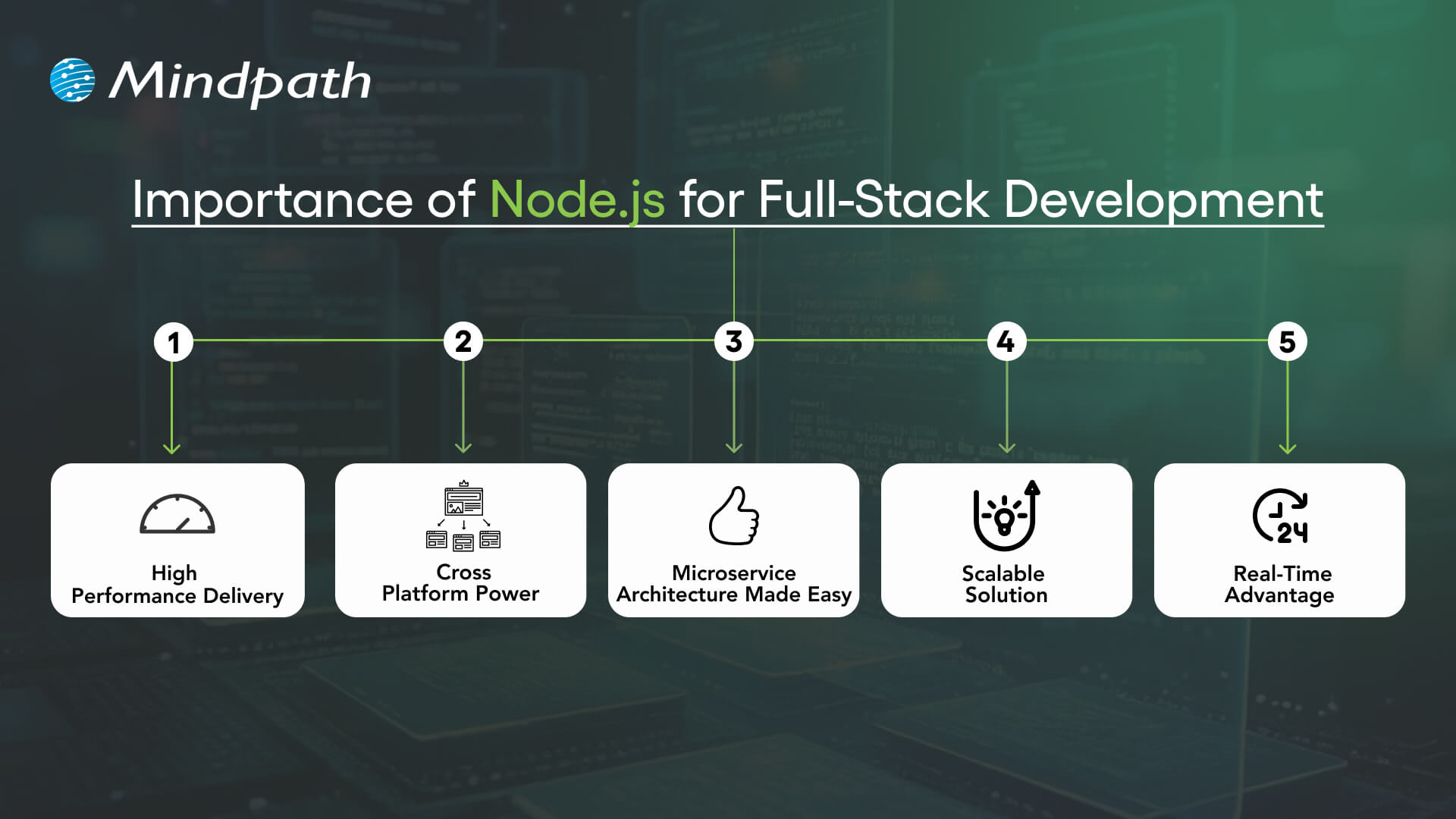
Utilizing Node.js full-stack technology is an impressive approach to developing a complete web application. Here are reasons that Node.js is a valuable technology option in the full-stack.

Importance of Node.js for Full-Stack Development

1. High Performance Delivery

Node.js utilizes a non-blocking I/O hardware model that can handle hundreds or even thousands of requests simultaneously, providing faster response times and greater user-specific.

2. Cross-Platform Power

With the Node.js full stack, developers can write mobile and desktop apps to run on Windows, macOS, Linux, and more. By relying on a single JavaScript code base, developers can save time and effort writing for multiple platforms.

3. Microservice Architecture Made Easy

Full-stack Node allows users to break one larger application down to multiple smaller independent services using infrastructure that is easier to work with. This approach lets developers build faster, stay flexible, and rely on proven solutions.

4. Scalable Solution

Full-stack Node.js is used by major players like Walmart, Uber, and Trello to handle millions of users. It helps to lower load time significantly, and it ensures your applications will scale seamlessly, as your demands increase.

5. Real-Time Advantage

When it comes to applications that leverage chat, live streaming, food delivery, or payments, Node.js full-stack is the way to go. It seamlessly provides real-time updates to keep the user engaged and connected.

Also Read: Full-stack Development for Web Projects

Key Steps to Use Node.js in Full-Stack Development

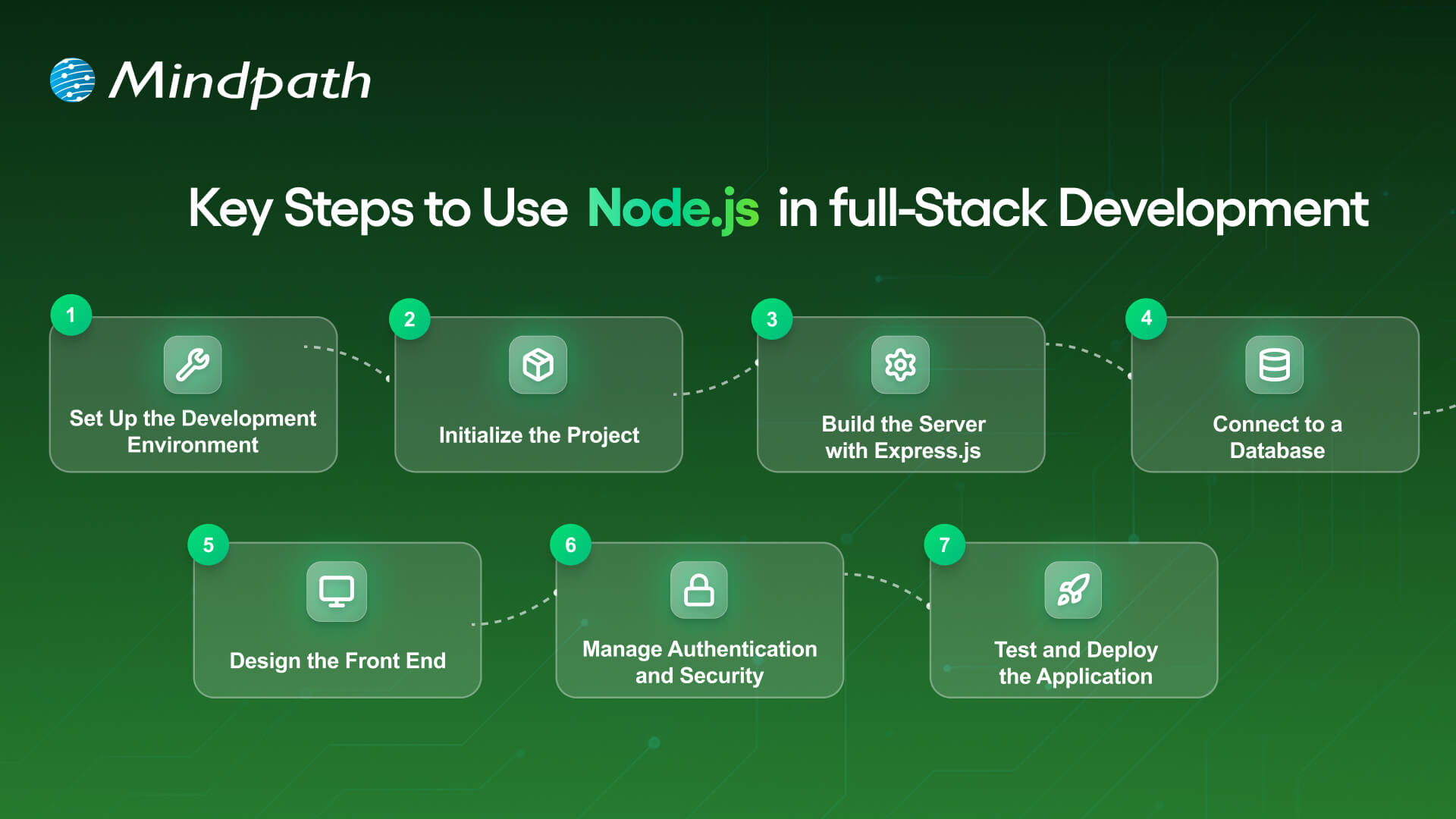
A full-stack Node.js developer is involved in both the front end and the back end of web application development and will work to build complete web applications. Below is a synopsis of the primary steps to utilize Node.js in full-stack development that is easy and productive.

Key Steps to Use nodejs in full stack development

1. Set Up the Development Environment

To begin your application-building experience, you will need to install Node.js and npm (Node Package Manager). These tools will allow you to execute JavaScript beyond the browser, and they will also help manage libraries with ease. Verify the setup by checking versions with simple commands in your terminal.

2. Initialize the Project

Make a new folder for your app, and use ‘npm init’ to create a ‘package.json’ file. A package.json file holds important information, such as your project name, dependencies, and scripts. It will serve as the basis for managing everything in your project.

3. Build the Server with Express.js

Install Express.js so you’ll be able to set up the backend server and handle all of the different routes. Express.js makes handling requests, responses and APIs supposedly easy. This step will ensure the backend runs appropriately with the frontend.

Must Read: Full-stack development trends

4. Connect to a Database

Based on your needs for this project, select a database like MongoDB or PostgreSQL. This should be paired with a Node.js library like Mongoose or Sequelize, which will allow you to connect to and perform both read and write operations on your data. At this point, you will have the ability for your application to persist and retrieve your data.

5. Design the Front-End

Build the front-end using a library such as React, Angular, or Vue. You can link the front-end through RESTful APIs or GraphQL to your Node.js back end. At this point, players will finish the bridge for a Full-stack Node.js application.

6. Manage Authentication and Security

Use libraries like Passport.js or JWT to add secure login and registration. Secure necessary paths so that any authorized user can get to those routes. You should always consider security in any Full-stack Node.js application.

7. Test and Deploy the Application

Create unit and integration tests to ensure that your application does what you intended. Deploy the application to cloud hosting solutions like Google Cloud, AWS, or Heroku. To utilize your Full-stack Node.js application’s performance tool on different scales, you should monitor its performance!

Looking to integrate AI in your Node.js projects? Explore our Ultimate Guide to Node.js Libraries for AI Integration to discover the most effective libraries for building smart, scalable, and future-ready applications.

Ready to Unlock the Power of Full-Stack Node.js?

Full-stack Node.js has proved to be a smart choice for building scalable, high-performing, and real-time applications. It unites front-end and back-end seamlessly, helping developers create complete solutions with speed and flexibility. With its ability to handle microservices, cross-platform apps, and real-time updates, it has become an essential technology for modern web development.

At Mindpath, we provide expert full-stack development services designed to match your business goals. Our skilled Node.js developers bring deep technical knowledge and practical experience to build secure, scalable, and user-friendly applications. If you are looking to transform your digital ideas into reality, hiring a Node.js expert from our team ensures growth and lasting impact.

Master full-stack development with Node.js! Its scalability, performance, and seamless frontend-backend integration.
full stack development benefits

In our fast-paced digital world, businesses are seeking better and smarter solutions for their digital presence. One proven method is embracing full-stack development benefits to handle both visual and functional components of web and app development projects. Full-stack development enables a company to be more responsive to market demand and build a seamless overall digital experience. One approach to ensure you are keeping up and growing with the pace of technology is to study full-stack development for long-lasting success.

By combining front-end and back-end development in one united team, it serves to harmonize your collaboration and streamline your processes. When one team completes the entire process, it enables faster turnarounds, greater risk control, and cost savings. Full-stack development is a workable option whether you’re a startup or a large organization looking for an efficient way to scale. In this blog, we’ll explore how full-stack development can bring these advantages to your business. So, let’s dig in!

Want to use full-stack development benefits in your business? Mindpath’s full-stack development services will help you in designing an effective way to scale your business.

What is Full-Stack Development?

Full-stack development is the complete process of building a web application from beginning to end, including both the client-side and server-side aspects. Full-stack developers will work with front-end technologies like HTML, CSS, and JavaScript, as well as back-end technologies such as Node.js and PHP, or Ruby on Rails. They deal with the interface that the user sees, as well as the server-side logic that operates behind the scenes as it interacts with APIs and databases.

A full-stack developer is comfortable working on both front-end and back-end development, which means they can handle the entire application lifecycle. They write code, test and deploy that code, and interact with databases. They often integrate third-party services into their applications as well. These professionals know how each layer of the web application connects, from the user interaction to processing data. Their variable skill set makes them important in a team setting where communication is essential between the layers, specifically for performance, scalability, and maintenance.

Explore: Full-stack vs traditional web development 

Key Components of Full-Stack Development

Getting an idea of the major components of full-stack development for business is necessary for creating effective and scalable digital products. These different components ensure that each piece of the application operates seamlessly together.

Key Components of Full-Stack Development

1. Front-end Development

Front-end development focuses on building the user interface using technologies like HTML, CSS, and JavaScript. It ensures that users can interact smoothly with the application through a responsive and visually clear layout.

2. Back-end Development

Back-end development handles the server-side logic, managing tasks like database operations, server communication, and authentication. Developers use languages such as Python, Java, or Node.js to ensure that the core application functions run efficiently.

Looking for an effective way through which you can build scalable applications? Discover how full-stack development with Node.js can enhnace your business growth.

3. API Development

API development allows applications to communicate with each other by creating structured pathways for data exchange. One of the full-stack development benefits is the ability to build and manage APIs that integrate various services into a single application.

4. Database Management

This involves designing and maintaining structured databases using systems like MySQL, MongoDB, or PostgreSQL. Efficient database management is key to ensuring secure data storage, fast retrieval, and overall system reliability.

5. Version Control

Version control helps teams manage code changes and collaborate effectively using tools like Git. It keeps track of every update, allowing developers to maintain stability, fix bugs quickly, and work on features without conflicts.

Full-Stack Development Benefits for Businesses

Many businesses today are choosing full-stack development to streamline their digital projects and improve overall efficiency. Here are some key advantages of full-stack development for businesses that highlight why this approach is gaining popularity across industries.

full stack development benefits for business

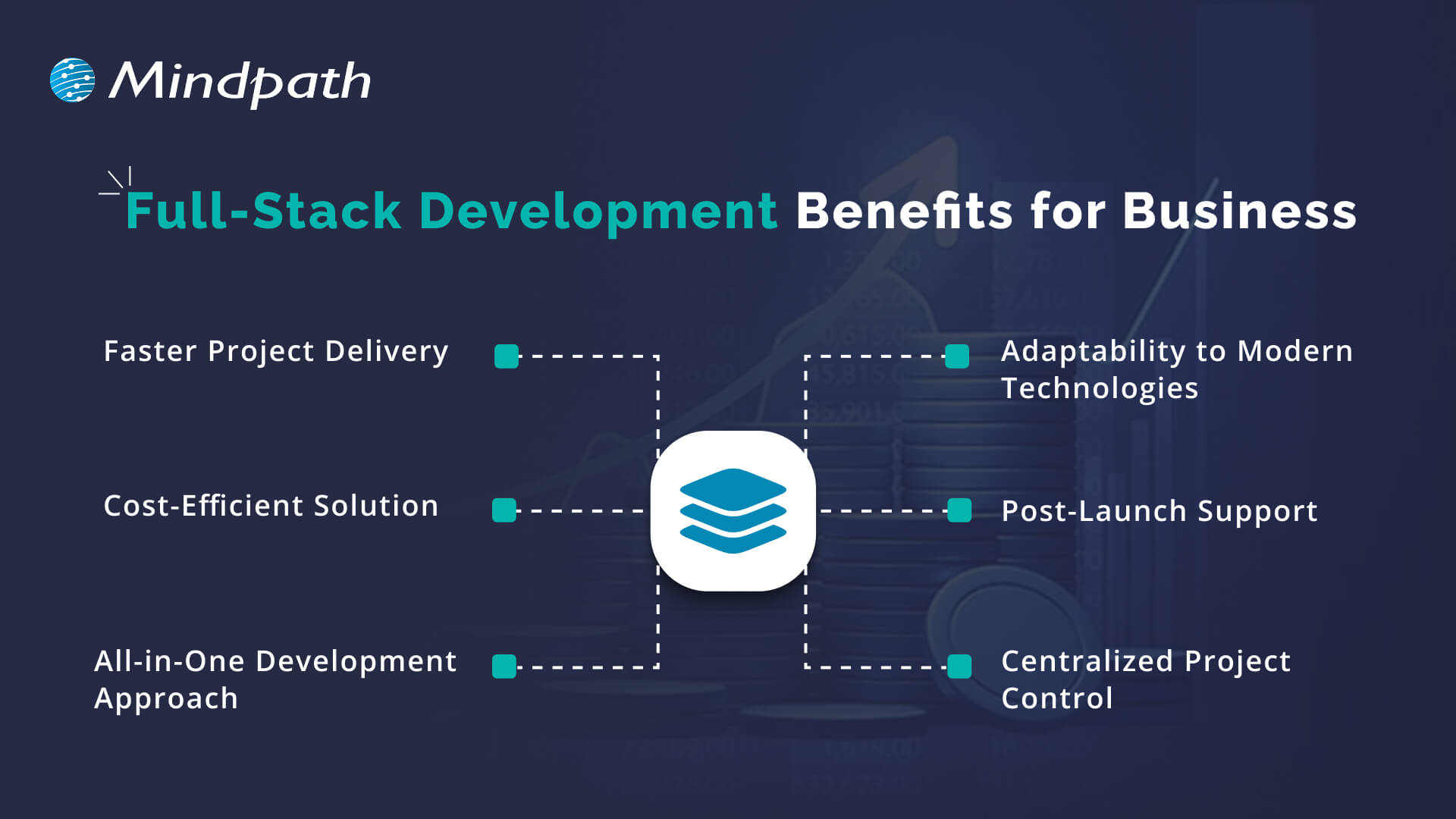
1. Faster Project Delivery

One of the key full-stack web development advantages is faster project completion, as the same team handles both front-end and back-end tasks. This reduces delays caused by waiting on separate teams and keeps the development flow going smoothly. With better collaboration and fewer hands-off, businesses can launch products more quickly and efficiently.

2. Cost-Efficient Solution

Hiring freelance Full-stack developers helps cut costs by handling the entire development process without needing multiple experts. This simplifies team structure and lowers overall development expenses. This business benefit of full-stack developers is especially valuable for startups and growing companies with limited budgets.

3. All-in-One Development Approach

Full-stack developers have the skills to manage every layer of a web application, including frontend, backend, and databases. Their broad knowledge allows them to build efficient, stable, and well-integrated solutions. This results in fewer errors, faster development, and a smoother launch process.

4. Adaptability to Modern Technologies

Full-stack development benefits include staying aligned with evolving technologies like AI, machine learning, and modern web frameworks. Developers apply the right tools to build responsive, feature-rich applications that match today’s user expectations. Their up-to-date knowledge of full-stack development trends supports faster innovation and long-term system improvements.

5. Post-Launch Support

Full-stack development benefits businesses by offering complete support even after the product goes live. Developers can manage updates, fix bugs, and maintain both frontend and backend systems efficiently. This ongoing support ensures long-term stability and performance for digital applications.

6. Centralized Project Control

Full-stack developers take full responsibility for the entire codebase, covering both front-end and backend. This avoids delays caused by switching between separate teams and helps solve issues faster. With complete control, the development process stays organized and efficient.

Also Read: Full-stack Development for Web Projects.

Business Use Cases of Full-Stack Development

Full-stack development offers flexible solutions that fit a wide range of business needs. Here are some practical use cases where this approach adds value across different industries and project types.

1. Enterprise Applications

Companies use full-stack development to build scalable enterprise tools that support internal workflows and boost productivity. These applications can connect departments, automate tasks, and improve overall business performance.

2. Content Management Systems (CMS)

With full-stack development, businesses can create flexible CMS solutions tailored to their content strategies. These systems make it easier to manage digital assets, add SEO tools, and track performance through built-in analytics.

3. Real-time Applications

Applications like messaging platforms and live dashboards rely on real-time data updates and user interactions. Full-stack development benefits these projects by ensuring fast communication between front-end and back-end components.

4. E-commerce Platforms

Full-stack development supports building responsive and secure e-commerce websites with integrated features like product search, payments, and user accounts. It allows businesses to deliver a seamless shopping experience while managing inventory and customer data effectively.

5. Big Data and Analytics Platforms

Businesses use full-stack development to build platforms that handle and visualize large volumes of data efficiently. Full-stack development benefits these solutions by enabling the smooth integration of data processing, analysis tools, and user-friendly dashboards.

Curious about how different developer roles can transform your business needs?? Explore our detailed blog on front-end vs back-end vs full-stack.

Looking to Scale Smarter with Full-Stack Development?

Full-stack development benefits help businesses simplify workflows, reduce costs, and build stronger digital solutions. With complete control over the front-end and back-end, it brings speed, flexibility, and long-term support. From e-commerce platforms to real-time apps, full-stack development continues to be a smart choice for businesses aiming to stay competitive in a fast-changing digital world.

At Mindpath, we offer expert full-stack development services tailored to your business needs. Our skilled team brings deep technical knowledge, reliable support, and fast delivery. If you’re ready to hire full-stack developers who deliver results, we’re here to help you scale with confidence.