How to Convert HTML to WordPress? (Step by Step Guide)

Join our Newsletter!

Featured Posts

Support Is One Click Away

Home

How to Convert HTML to WordPress? (Step by Step Guide)

convert html to Wordpress

How to Convert HTML to WordPress? (Step by Step Guide)

The transition from purely text-based web experiences to interactive websites has been possible due to WordPress. It is the most powerful content management system that has made it easier for anyone to create and manage websites. Therefore, businesses want to convert HTML to WordPress websites and capitalize on its benefits. Does that mean an end to the dominance of HTML in website development?

HTML is still here, with HTML5 offering a promising tool to build high-quality websites without a content management system. However, the rising adoption of WordPress indicates that more people are switching to the CMS platform for its diverse advantages. You have arrived at the right place if you want to switch your HTML website to WordPress. 

Want to convert your HTML site to WordPress but don’t know where to start? Hire expert WordPress developers from Mindpath who assist every step of the way to ensure a smooth HTML to WordPress conversion.

Is it Right to Convert Your Website to WordPress?

The thought of converting your HTML website into WordPress might have given you sleepless nights. You can overcome all doubts regarding the utility of WordPress for your website by learning about its benefits. With a HTML to WordPress converter service, you can transition to a dynamic web presence. WordPress offers more flexibility for modifying the content and design of your website without coding skills. You have the final say in deciding the appearance and functionalities of your website with complete control over design and features.

The biggest strength of WordPress is dynamic content management which removes the burden of writing markups for each page. On top of it, you will find an extensive library of themes and plugins that allow you to change designs and introduce new features in your website. Another prominent reason to embrace WordPress over HTML is the support for search engine optimization with different SEO plugins. As a result, you can not only create and manage websites with WordPress but also ensure that they rank well on search engines.    

Still wondering why businesses prefer converting static HTML websites into WordPress?
Explore the key benefits of converting HTML to WordPress and discover how it improves scalability, performance, and content management.

How Can You Switch to WordPress from HTML?

Once you have decided to convert your HTML website to WordPress, you have three options. The primary objective in each process revolves around changing your HTML design to WordPress theme, which will give it the look and experience of a WordPress website. You can choose any process depending on the time you have, personal preferences, coding skills and amount of money you want to invest. 

1. Manually convert HTML websites to WordPress themes.

2. Use the WordPress Child Theme to convert HTML to WordPress.

3. Import content to WordPress from HTML sites with plugins.

Before finding the best HTML website to WordPress converter tool, you must keep some prerequisites in mind. The foremost things you need to take into account are the time and budget you have for the conversion process. If you want quick results, then hiring professional developers will help albeit with a burden on your budget. 

The other important requirements for the transition from HTML to WordPress include a code editor and hosting service. You must choose a suitable code editor that can help in modifying HTML code of your website according to WordPress guidelines. Similarly, you should pick a hosting service that fits your requirements and delivers credible services. 

Must Read: WordPress vs Drupal

Converting Your HTML Website to WordPress Manually

You are a traditionalist if you want to create a WordPress site for your HTML website from scratch. The traditional approach to converting HTML to WordPress may seem intimidating to many people. However, it is not that difficult once you know each step of the process, and you can get things done without advanced technical knowledge.
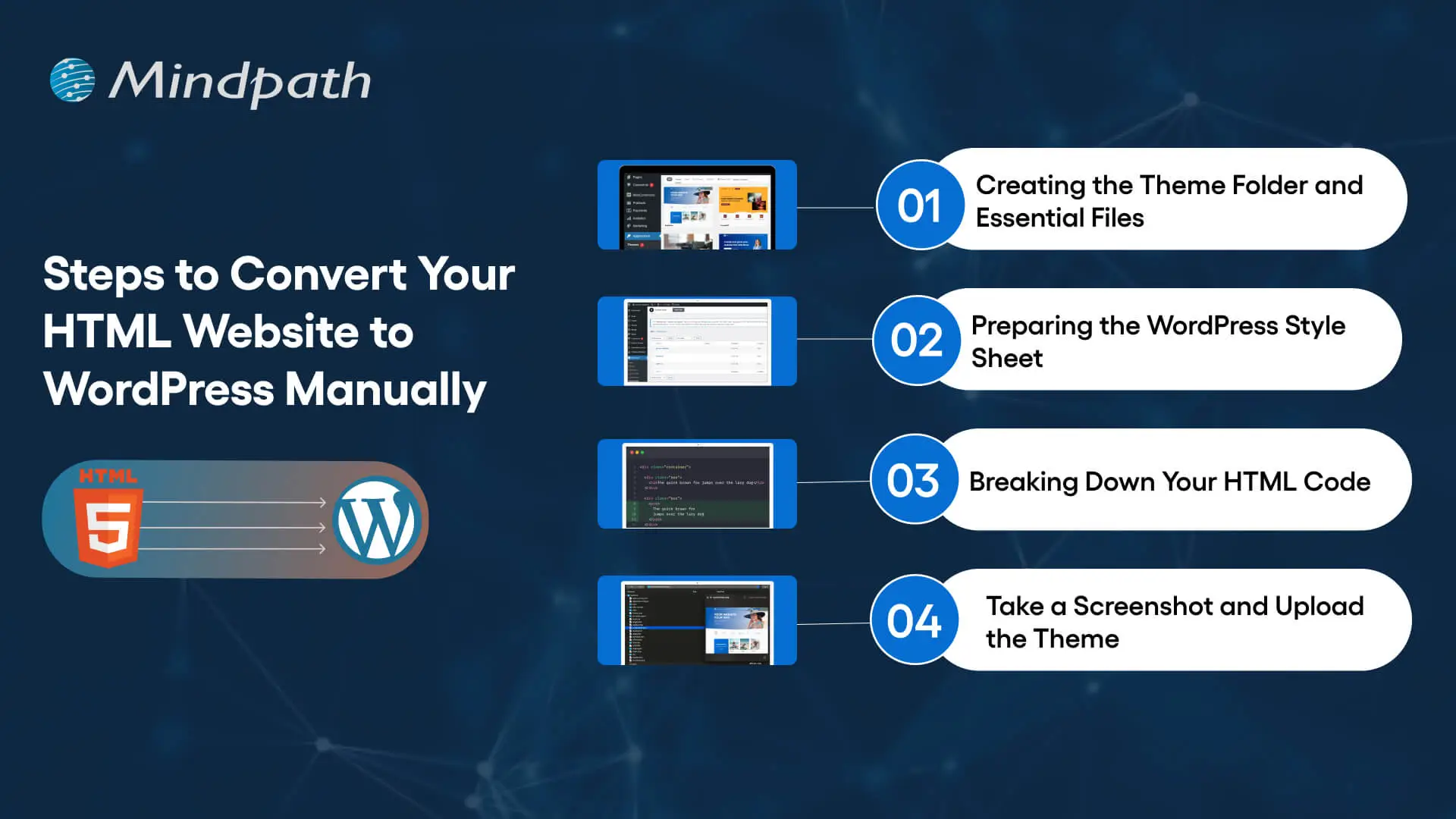
Steps to Convert Your HTML Website to WordPress Manually

Step 1: Creating the Theme Folder and Essential Files

You can begin the conversion process by creating a new theme folder on your desktop. You can follow the same process as you would for creating another directory on your system. Once you have created the theme folder, you can give it a specific name as per your requirements. 

After creating the theme folder, you must open the code editor and create different text files. You can name them as ‘style.css’, ‘index.php’, ‘sidebar.php’, ‘footer.php’, and ‘header.php’. 

The number of files you have to create in this step will depend on the features and design you want in the WordPress theme. You don’t have to do anything else with the files in the code editor now and keep the code editor open as we will need the files in the next step.

Step 2: Preparing the WordPress Style Sheet

You can start the actual preparations for converting your HTML website to WordPress with the WordPress style sheet. Do you remember the ‘style.css’ file you left open in the code editor in the first step? Open it and paste the important details in the style sheet header enclosed within “/*” and “*/”. 

Any guide on HTML to WordPress converter online will focus on the details provided in the style sheet header. The important information included in the style sheet header includes the theme name, theme URI, author name, author URI, description and version. In addition, the style sheet header must also specify license details and tags, which are crucial requirements to add your theme to the WordPress theme directory. 

After providing the essential details in the header, you have to copy and paste the CSS of your HTML website. Make sure that you save the ‘style.css’ file in the theme folder you have created and then close it. 

Is a basic WordPress setup enough to support your growing business needs?
Read more about custom WordPress development and discover how tailored solutions can enhance functionality and user experience.

Step 3: Breaking Down Your HTML Code

One of the most important things you must know about WordPress is that it leverages PHP to extract information from its database. Therefore, you have to break down the existing HTML of your website into different pieces. It will help WordPress put them together in the right way. 

This part of the process of converting HTML to WordPress may seem challenging to beginners. However, it is extremely simple as you have to copy different parts of the HTML document and paste them into different PHP files. Do you remember the PHP files created in the code editor in the first step? They will play a crucial role in this step of the HTML to WordPress conversion process.

You have to open the main file of your HTML website, or ‘index.html’, and copy its content into different PHP files. After copying, you must save the ‘index.php’ file and close it to add the theme to your WordPress website.

Step 4: Take a Screenshot and Upload the Theme

The theme screenshot is a valuable resource that offers a preview of the backend of your WordPress website. It is also important to note that the theme screenshot will also include information from the style sheet header. You cannot convert HTML site to WordPress without knowing how your website works in the WordPress backend. 

Contrary to your assumptions, you don’t have to follow a complex process to take the theme screenshot. You can open the existing HTML site in a browser and take a screenshot with any method you want. After taking the screenshot, you can use an image editing software to crop the screenshot image to 880×660 pixels. Once you save the screenshot as a ‘screenshot.png’ file in the theme folder, you can upload the theme. 

The process to upload your WordPress theme starts with the WordPress Admin Dashboard. You should access the “Appearances” section, where you will find the “Themes” option. Now, you must click on “Add New” and then choose the “Upload Themes” option. Find the theme folder and click on “Install Now,” followed by activating the theme. 

Are you unsure if your website development project is on the right track? Discover our WordPress developer checklist to ensure every critical step is covered for a smooth and successful website launch.

How Will Your WordPress Theme Become More Responsive?

Switching your HTML website to a WordPress theme alone is not enough to get the best results. Anyone who knows how to download WordPress can follow the manual process and get their website on the CMS platform. However, you must also ensure that your website will look good and function seamlessly across all devices. The solution to such problems lies in creating a responsive design, and you can make it happen with a few crucial steps.

First of all, you should choose a responsive framework like CSS or Bootstrap. These frameworks not only save your time but also ensure an effective design that aligns with tested principles. You should also use flexible images to ensure that they don’t pop out of the boxes on mobile devices. In addition, CSS media queries can help you detect small screen sizes, and you should use a mobile menu that offers clean navigation on mobile screens. 

Want to make sure your WordPress website runs seamlessly with the latest technology? Discover how WordPress PHP compatibility can protect your site and enhance its performance.

Final Thoughts

You have decided to convert an HTML website to WordPress to capitalize on the benefits of the most popular CMS platform. With big brands choosing WordPress for their websites, it is reasonable to pick the platform for revamping your website. The manual process of converting HTML-based websites to the WordPress theme is extremely simple and easy to follow. At the same time, you must also ensure that your new WordPress website features a responsive design and works effectively on all devices.

Mindpath has been a pioneer in helping businesses transition to WordPress from outdated formats. We are the trusted specialists in WordPress development with a successful record in empowering websites for the modern business landscape. Our expert WordPress developers conduct comprehensive site analysis and develop custom themes that align with your design needs. With Mindpath at your service, you don’t have to worry about content integration or CMS integration. Consult with our experts and switch to WordPress right now.
Related Post

Related Post

chatbots in education

The education industry is evolving and the dominance of AI in the sector will serve as a primary reason for inducing transformation on a large scale. One of the notable applications of AI in education that often goes unnoticed is the use of chatbots. The blend of artificial intelligence and education aims to make learning more productive and chatbots are the perfect example of the same. Students, educators and institutions can rely on modern educational chatbots for their adaptive nature and intelligent capabilities. Let us learn about the top ten real-world examples of chatbots that have been revolutionizing education.

Planning to transform student experiences with intelligent chatbots? With Mindpath’s AI development services, you can design and implement tailored tools that make learning smarter and more personalized.

Impact of Chatbots on Education

Conversational AI is responsible for changing the viewpoint of many people about accessibility of AI technologies. Imagine talking to an AI tool and finding solutions to a problem in your mathematics textbook. Conversational AI chatbots are the best example of tools which can interact with users in natural language. The use of chatbots in education involves the combination of machine learning and natural language processing to understand student queries and provide relevant answers. The core strength of chatbots revolves around offering instant assistance personalized at scale for each user.

Chatbots offer better results than human support, primarily due to their round-the-clock availability. Student can get support and relevant information whenever required from chatbots, thereby reducing delays. Chatbots analyze the data of individual students and adapt their content recommendations in a way that helps students with personalized learning. Educators can use chatbots to craft interactive quizzes and provide instant feedback to learners. At the same time, chatbots also reduce the administrative burden on teachers and allow them to focus on more complex tasks.

Want to understand how chatbots can improve learning experiences? Check out the benefits of chatbots to learn how they enhance engagement and efficiency.

Discovering the Top Ten AI Chatbots for the Education Sector

AI chatbots are the most innovative tools in the domain of education with a wide range of benefits. Chatbots can not only provide instant support and personalized learning experiences to students but also empowers teachers with resources to become more productive. The rising popularity of educational chatbot applications has drawn the limelight towards their transformative impact on classroom and online learning. The following AI chatbot examples being used in education will showcase their significance for the long-term growth of the industry.

1. Socratic

One of the most notable additions among AI chatbots used in the field of education is Socratic. Created by Google, Socratic is a chatbot that helps in breaking down complex academic questions and offers easily comprehensible explanations. The core strength of Socratic as an education chatbot is in the step-by-step solutions offered for problems in different subjects like mathematics, literature and science. It also adds visual aids and diagrams in its answers to provide easier explanation for abstract concepts alongside recommending online resources, articles and videos for better understanding of learners.

2. Zendesk Chat

Zendesk Chat is also a popular AI chatbot solution for higher education institutions. It is useful for managing queries, enhancing student engagement and providing responsive support. Zendesk Chat is one of the best examples of chatbots for higher educational institutions with its distinctive features. For instance, Zendesk Chat supports seamless integration with different CRM systems, thereby empowering educators to monitor conversations and evaluate engagement data. As a multilingual chatbot, Zendesk Chat can enhance student engagement even with presence of diverse groups.

3. IBM Watson

The IBM Watson Assistant is another example of using an AI chatbot for education, especially in higher education. The chatbot by one of the leading tech giants offers highly customizable tools to enhance student engagement and streamline communication. It also supports CRM integration to ensure cohesive support across different platforms. IBM Watson uses advanced natural language processing to provide nuanced answers to complex student queries. Furthermore, IBM Watson also uses an adaptive learning model that helps it evolve with student interactions.

4. Microsoft Copilot

The list of chatbots used in the field of education will be incomplete without including Microsoft Copilot. Learners and educators can access the functionalities of this intelligent assistant in the complete Microsoft suite of products. Copilot is one of the best chatbot examples that can help students in creating compelling presentations and essays alongside refining the content with insightful recommendations. Another notable application of Copilot in education focuses on quick summaries of web pages or documents.

5. Pounce

Another example of innovative chatbots in the domain of education is Pounce. It has been created by the Georgia State University to address the problems of declining enrollment. The chatbot helps in sending timely reminders and notifications about important deadlines, orientation details and steps to obtain financial aid. Pounce also offers personalized outreach by interacting with every student to ensure that they complete the enrolment process.

Want to understand how AI can enhance workflows and decision-making? Check out AI consulting to learn how expert guidance helps implement AI solutions effectively.

6. MATHiaU

Carnegie Learning has come up with MATHiaU, as a dedicated AI chatbot to teach mathematics. It leverages AI to create personalized learning paths for university students while adjusting the difficulty of content according to real-time student performance. MATHiaU serves step-by-step guidance that can help students overcome their doubts without feeling overwhelmed. Most important of all, the chatbot can recognize specific learning gaps and offer suggestions to address the setbacks.

7. Ivy.ai

Ivy.ai also deserves a place in this list of AI chatbots, especially for its emphasis on higher education institutions. As a matter of fact, it is one of the top education chatbot examples that have achieved promising results in enhancing student engagement. The chatbot can handle different types of queries, ranging from admission to the financial aid processes. Students can also rely on Ivy.ai for access to campus information, such as details about events and facilities.

8. Cara

Cara is another example of AI chatbots developed by educational institutions to address longstanding problems. It is a chatbot tailored for offering administrative support to the students of the University of Galway. Cara helps in addressing a wide range of administrative questions with quick and relevant answers. Cara reduces the administrative burden on the university staff by handling routine questions effectively. The introduction of Cara has led to enhancements in student satisfaction and engagement while allowing educators to focus on more complex tasks.

9. Duolingo

Duolingo is one of the top examples of “how are chatbots used in education” for its ability to help students gain fluency in new languages. It will serve as a huge catalyst for breaking down the language barriers in education. Duolingo offers a safe environment for students to learn how to speak and write in a new language with confidence. The instant feedback on pronunciation, vocabulary and grammar offers ideal prospects for immediate correction of mistakes.

10. Querium

The final addition among the top AI chatbots for enhancing education is Querium. It is an AI-powered platform created for promoting STEM education through comprehensive, step-by-step guidance to solve problems. The strength of Querium revolves around helping students find solutions to complex STEM problems with detailed explanations. Another special feature of Querium is concept reinforcement, in which it connects problems to the underlying theoretical concepts for better understanding.

Curious how AI-powered chatbots help generate more qualified leads? Discover lead generation chatbot to check out strategies for increasing conversions.

Final Thoughts

The advantages of chatbot in education can provide a completely new direction to the experience of students, educators and institutions. You can notice how each chatbot in this list offers diverse benefits such as personalized content creation, automated administration or student performance monitoring. As the AI landscape expands, you can expect more chatbots to make an impact on the education sector. Mindpath helps you leverage AI development services to create custom chatbots and intelligent learning tools tailored to your educational needs.

benefits of hiring remote developers

Understanding the benefits of hiring remote developers can unlock thrilling possibilities for organizations looking to grow faster and smarter. In today’s world, companies tap into skilled workers worldwide instead of relying only on local talent. But how does the shift to remote development impact projects and teams? When organizations hire the right remote developers, they can deal with challenges more effectively, enlist more talent and expertise, and receive additional lateral thinking that may not always be available nearby.

At the same time, it’s not just about broadening the talent pool. Hiring remote developers allows companies to maximize savings, increase performance, and yield faster delivery speed. Isn’t that exactly what companies are looking for as they continue to modernize? With the pace of technology increasing, it’s more important than ever to tap into professionals who can adapt to change quickly and produce results. This is why businesses are employing remote teams as a sound way to grow and remain competitive. In this blog, we will outline some of the benefits that should make remote developers a consideration for any business.

Looking to scale your business that provides growth and innovation? Contact us, and we will help you explore how you can access fast and quick results.

Growing Demand for Remote Developers

The demand for remote developers is increasing rapidly with global hiring and flexible working arrangements. After COVID-19, companies learned that they could function just as well without physical workspaces, and developers discovered the advantages of flexible work. Companies now want specialized skills; they want specialized skills faster and cheaper, developers want remote or hybrid work, and specialized skill developers want fast and cheap work.

Taking everything into account, some of the key factors driving this new reality include shifting cultural dynamics post-COVID, the speed and efficiency of AI and cloud technology, and the ability to pull skills from anywhere in the world. Organizations can now create effective teams independent of place, reduce costs, and maintain a competitive position in an increasingly digital world.

Also Read: Remote Work Tools for Developers

Benefits of Hiring Remote Developers

Understanding the advantages of hiring dedicated developers has shown us how powerful hiring talent remotely has become. Companies can scale at an accelerated pace, reduce costs, and fill unique skills that might not exist locally. When companies find the right remote dedicated team, they can expect a well-thought-out project and long-lasting value.

Benefits of Hiring Remote Developers

1. Cost Efficiency

Remote hiring can decrease expenses on space, utilities, and other operational costs. When hiring developers from places with lower costs of living, companies save even more on employee salaries and daily overheads, which can then be reinvested into research or innovation or even into paying for employee benefits. This enables companies to experience growth while continuing to be fiscally responsible.

2. Access to Global Talent

One of the major benefits of remote work is the opportunity to recruit talented professionals to join the team from anywhere in the world. Workers and their companies no longer have to feel restricted in the talent they can recruit, and many companies are developing diverse teams together with specialized skills and knowledge. Companies can now combine talent in technical skills, such as machine learning, with more creative areas, such as UI and UX design.

3. Stronger Employee Retention

One of the important benefits of hiring remote developers is increased employee retention, which is important for business stability. Employees have less stress from long commutes and improved work-life balance, which leads to increased job satisfaction. With higher satisfaction comes increased loyalty and lower turnover. This stability provides companies with predictable productivity, more control of expenditures, and longer-term growth.

4. Access to Specialized Skills

Remote hiring allows companies to locate developers and other providers with specialized skills that they may not have locally. Companies can search worldwide for developers skilled in machine learning, React development, healthcare technology, etc.

Even non-technology companies can find programmers and service providers in the specialized pathways without the need for in-house technical capacity. The appropriate specialized talent makes it possible to achieve quality, safety, and reliability standards for projects.

Looking for guidance on hiring specialized developers for your projects? Check out our detailed guide on hiring expert ReactJS developers to find the perfect match.

5. Quick Disaster Recovery

An additional benefit of hiring remote developers is business continuity. When a local office experiences disruption due to power outages or extreme weather, remote teams can maintain the pace of project execution. By engaging in a distributed team model, work is not curtailed at one point in the system. That is, it allows a project to better meet deadlines, reinforces trust with clients, and increases anchoring with the robustness of the overall business model and operations.

6. Lower Employee Overhead Costs

A key advantage of hiring a remote development team is the significant reduction in costs exceeding rent, utilities and office supplies. Onboarding is less expensive with remote developers because they are working off their own setups, so they will utilize minimal in-house resources. Training is also delivered through online modules, which will save costs and help keep teams up to date without wasting time.

7. Quick Time-to-Market

The biggest benefits of hiring remote developers is that it really helps to speed up product launches. As teams are already distributed around the world in different time zones, development, testing, and deployment can continue all day. This Shortens project cycles and allows businesses to meet deadlines in a timely manner. Being able to deliver faster keeps companies agile and gives them a significant competitive advantage.

8. Faster Hiring Process

Remote hiring allows companies to source and onboard the right talent quickly for projects on short notice due to access to a global talent pool. Many recruitment teams know that hiring offshore means you do not have to worry about relocation and cannot be delayed by a lengthy recruitment process. Skilled developers can start working on a project within a week. This speed allows companies more time for development, testing, and entering the market.

Need a faster way to scale your development team without long-term commitments? Discover how staff augmentation enables businesses to add skilled developers quickly while maintaining flexibility and cost efficiency.

9. Flexibility and Autonomy for Teams

One of the key advantages of employing remote developers is that it affords teams higher flexibility and autonomy in how they choose to work. Since developers can work at a time that suits them best, they produce higher-quality work.

Using this flexible work model creates lower stress, higher job satisfaction, and engagement. Businesses with flexible work models not only benefit from motivated teams but also from teams that achieve better results in less time.

10. Better Work-Life Balance

Remote developers benefit from the flexibility to have a day that will fit their personal and professional needs. This flexibility provides remote developers with the opportunity to spend time with family, for fitness, and for personal well-being, without worrying about any impact on their productivity.

As a direct result, mental and physical well-being improve, and performance at work improves as well. The benefits of hiring remote developers result in a happier team that will be focused and more efficient in tackling each project successfully.

11. Build a Global Team Culture

The benefits of hiring remote developers extend to creating a diverse team culture that blends ideas from around the world. Different perspectives and experiences lead to more creativity and stronger problem-solving. Online collaboration tools make it easy for teams to connect, share, and work together across borders. This global culture not only strengthens teamwork but also supports innovation and business growth.

12. Expand Market Reach Globally

With remote developers located across different regions, businesses gain real-time insights into diverse markets. These developers can share valuable knowledge on local consumer preferences, trends, and cultural expectations. This localized input helps tailor products or services for specific audiences more effectively. The benefits of hiring remote developers include faster, smarter market expansion with fewer blind spots.

Want to leverage remote talent for faster product launches worldwide? Explore how custom software development can help your business scale efficiently.

Ready to Experience the Benefits of Remote Working?

The benefits of hiring remote developers clearly show how powerful and practical this model has become for modern businesses. Companies gain access to global skills, improve retention, reduce overhead, and accelerate delivery. By building flexible and resilient teams, organizations can stay ahead of the competition and create sustainable growth in today’s fast-changing digital landscape.

At Mindpath, we make hiring remote developers simple and effective. Our dedicated developers bring specialized skills, innovation, and flexibility to your projects. With a focus on efficiency and quality, we help businesses scale faster, cut costs, and deliver solutions that drive real results. Partner with Mindpath and unlock the true potential of remote working.

Discover how hiring remote developers can drive startup success by tapping into global talent, enhancing productivity, and reducing costs.
ai in retail industry

Undoubtedly, the global retail landscape is going through a massive transformation. A major architect of this transformation is Artificial Intelligence, or AI. Today’s customers demand convenience, immediacy, as well as personalization. They expect companies to anticipate their needs. Well, AI in retail industry helps brands to achieve that. 

If you want to create a seamless shopping experience and boost customer engagement, retail AI would be an excellent option. Today, we are moving beyond simple automation to a new phase of creative and predictive intelligence. So, this blog explores how generative AI in retail and other AI tools are enhancing customer engagement. Besides, we will discuss some AI in retail examples to get a better idea about this.  

Looking to go beyond generic AI tools to create truly personalized retail experiences? Our AI development services help retailers build custom solutions that boost customer engagement and drive smarter growth.

AI in Retail Industry- A Short Brief

Artificial intelligence in retail store means the use of natural language processing, machine learning, generative AI, and computer vision to enhance or automate decision-making. These technologies also play a crucial role in streamlining operations and personalizing customer journeys. 

Offering predictive recommendations and data-driven insights, AI in retail industry boosts customer satisfaction and revenue. As per a recent survey, the use of AI in the retail sector can increase customer experience by 59 percent (Source: World Tea News). 

Besides, generative AI creates massive economic potential for retailers. It is projected to offer between USD 240 billion to USD 390 billion in economic value (Source: McKinsey).

Whether it is a recommendation engine suggesting useful products or a retail AI chatbot helping shoppers, AI can be embedded in all aspects of the customer journey. 

Must Read: AI in E-commerce

Generative AI in Retail- A Game-Changer for Customer Engagement

Generative AI for retail is now pushing boundaries by offering personalized and dynamic content at scale. Well, here is how it plays a crucial role in creating customer engagement strategies. 

1. Hyper-Personalized Product Recommendation

AI in retail industry effectively analyzes customers’ purchase history, preferences, and behaviour. It can provide customized product recommendations based on the gathered data. In addition, such recommendations can appear in applications, emails, or websites, which enhances the conversion rates. 

Customer satisfaction, shopping experience, and loyalty can be improved by offering the customers relevant products at the right time. 

2. Smart Virtual Assistants and Chatbots

Retailers are able to provide 24/7 customer support using generative AI chatbots. Bots can easily handle multiple queries without any issues. Furthermore, they can guide purchases. 

Over time, these intelligent bots can learn from customer interactions, improving personalization and accuracy. Besides, you will be able to reduce the cost of customer support when using a chatbot.

Want to offer instant and personalized support to your online shoppers? Explore conversational AI chatbots to learn how they improve customer engagement and boost conversions.

3. Demand Forecasting 

AI-driven demand forecasting involves using ML and data and analytics trends for predicting the demand of products in the future. Retailers can optimize inventory, improve logistics and reduce waste by analyzing market data, sales, and customers.

These models may be trained to respond to changes in the market, assisting retailers in better planning than the rest. So, they can react swiftly to the changes.

4. Dynamic SMS and Email Campaigns

Advanced AI tools for retail industry can create personalized SMS and email campaigns. For this, they consider various elements like behavioral data, seasonal trends, and customer segments. Speaking about some useful AI-powered tools you can use are OptiGenie, HubSpot, Canva, and AdCreative.ai.

These messages or emails are relevant and engaging, leading to higher click-throughs, open rates, and conversions. Furthermore, retailers can also automate outreach using these tools. 

5. Visual Search and Styling

Thanks to generative AI, customers can now find their desired products quickly. They just need to upload an image of the product, and the search engine will then display similar products instantly. 

Besides, these tools also offer styling suggestions based on the customer’s input. It is this visual search that can enhance product discovery and interaction while minimizing friction. It is used by retailers to offer a shopping experience that is immersive and intuitive. 

Planning to personalize every customer interaction at scale? Discover generative AI for customer service to learn how it delivers tailored responses and smarter assistance.

6. Custom Rewards and Loyalty Programs

AI assists retailers to design custom loyalty and reward programs by analyzing the frequency and preferences of purchases. Special offers, targeted incentives, and personalized rewards generate increased brand loyalty and purchase repetitions. 

The use of AI in retail industry ensures that all customers feel appreciated, establishing stronger customer relationships.

7. Sentiment Analysis

The use of AI in retail industry promotes sentiment analysis to monitor the emotions of the customers. These tools analyze social media, reviews, feedback, etc, to understand customers. With the right data, retailers will be able to respond to all negative sentiments positively. 

In addition, the insights are also used in the development of marketing plans and brand communication, which is in line with customer expectations.

Artificial Intelligence is no longer a futuristic concept. It is changing customer interaction by hyper-personalizing automated customer support, visual search, etc.  

Wondering how to connect customer data with long term planning? Check out AI in business strategy and discover how it improves forecasting, personalization, and operational efficiency.

Key AI Use Cases in Retail

Now, we shall find out the key AI use cases in retail industry that have contributed to the smooth transformation of the retail sector.

Use Cases Description
Inventory Optimization AI helps retailers stock the right products using predictive analytics. This helps avoid stockouts and overstock issues. 
Customer Segmentation AI can categorize customers based on their demographics, preferences, and behaviour for targeted marketing. 
Fraud Prevention AI tools regularly monitor transactions for suspicious activities, protecting customers and retailers. 
Price Optimization Retail AI tools adjust pricing based on competition, demand, and customer behaviour. 
Virtual Try-Ons AI allows shoppers to try products digitally, lowering return rates and enhancing customer engagement. 
Route Planning AI-assisted route planning helps retailers eliminate service disruption and manage changing conditions. 

A Few Real-World Examples of Generative AI in Retail

The influence of AI in retail industry revolves around the behavior of the customers. Some of the established retailers are using AI to offer superior experiences. The following are some real-world AI in retail examples that can be considered to have a clear picture.

1. Amazon Go Stores

These stores use computer vision, deep learning, and sensors and help customers purchase their preferred products. The AI tools monitor purchases and automatically charge the customer’s account. 

2. Shopify

Shopify Magic is a new product offered by Shopify that understands your retail store and creates content automatically. 

3. Sephora

It supports AI-based virtual try-ons for beauty products, increasing sales and improving customer confidence in the product. 

4. Walmart

They have implemented AI for predictive analytics as well as inventory management.

5. Zara

It applies predictive modeling systems that are supported by AI to analyze fashion trends. These models track social media platforms, sales data, etc to know what the customers truly desire. The company is also able to streamline supply chains with the help of AI. 

6. The North Face

They use IBM’s Watson to offer customers a conversational shopping assistant. 

Looking to anticipate market shifts before your competitors do? Discover Generative AI trends to learn how predictive insights shape smarter retail strategies.

Technologies and Tools Powering AI in Retail

AI in retail industry is driven by a robust ecosystem of tools and technologies. Both facilitate operational efficiency, and smarter decision-making. Read on to know a few major innovations that are supporting the retail sector.

1. Big Data & Predictive Analytics

Evaluate large datasets to predict customer behavior, trends, as well as inventory requirements. 

2. Data Management Tools

Help in organizing and retrieving both unstructured and structured data to support decision-making and personalization. 

3. Salesforce Einstein

Offers features such as automated workflows, predictive analytics, and powerful generative AI tools.

4. NLP

Natural Language Processing helps understand as well as respond to customer queries, feedback, and reviews. It powers chatbots as well as allows personalized communication.

5. Computer Vision

This technology helps with shelf monitoring, smart mirrors, and visual search by processing video data and images in the retail stores.

6. IoT or Internet of Things

IoT involves devices that are connected and used to detect foot traffic and monitor inventory.

These technologies assist retailers in ensuring that customers remain the focal point in the interaction process, enabling them to stay competitive in this changing market. 

Want to make faster and more accurate business choices in retail? Discover AI in decision making to learn how data driven insights improve customer engagement and operational efficiency.

AI and Retail- What Comes Next?

Due to the ongoing development of AI technology, the future of AI in retail industry promises a more personalized shopping experience. Retailers worldwide will implement AI more often for operational efficiency, customer service, and personalization, thus eliminating the lines between digital and physical commerce.

In the future, we can expect:

1. Application of Emotion AI

AI will be in a position to understand customer emotions and assist retailers in enhancing customer satisfaction.

2. Hyper-Personalization

Generative AI in retail will offer context-aware and real-time experiences across multiple channels. 

3. Sustainability Insights

AI will assist retailers in tracking and lowering their environmental impact. 

4. Virtual Shopping Assistants

AI-powered virtual shopping assistants will offer real-time and personalized shopping support. 

5. Blockchain Integration

Retail and e-commerce sectors will become more transparent and secure with the help of blockchain and AI.

Retailers who leverage AI will successfully meet customer expectations. Result? Increased customer engagement, loyalty, and growth.  

Curious why businesses are rapidly adopting intelligent technologies? Check out the benefits of AI and discover how it improves decision making and competitive advantage in retail and e commerce.

Ready to Transform Your Retail Business with AI?

Artificial intelligence is revolutionizing retail by enhancing customer engagement, personalizing shopping experiences, and improving operational efficiency. Retailers leveraging AI gain a competitive edge, optimize processes, and deliver smarter, data-driven experiences that delight customers and drive growth.

At Mindpath, we provide tailored AI development services for the retail sector. Our experts design custom AI solutions that streamline operations, enable predictive analytics, and boost customer engagement. Partner with us to harness AI strategically and create innovative, scalable retail experiences that drive measurable results.