Home

AI Agents That Work Across CRM, ERP, and Business Systems

AI Agents That Work Across CRM, ERP, and Business Systems

Join our Newsletter!

AI Agent for CRM & ERP

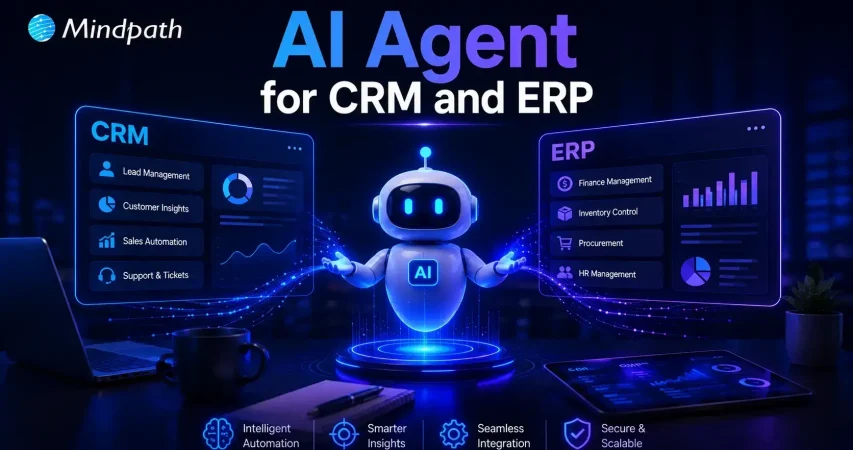
Artificial intelligence is changing how organizations manage everyday operations. AI agents for CRM and ERP help businesses connect systems, automate workflows, and reduce manual effort. They improve data accuracy, support faster decisions, and keep teams working with consistent information across departments.

Key Takeaways

  • 01
    AI agents connect CRM, ERP, and enterprise systems to create a unified business ecosystem.
  • 02
    They automate repetitive workflows while improving speed, efficiency, and accuracy.
  • 03
    Real-time synchronization enables faster business decisions and better collaboration.
  • 04
    Businesses can automate sales, inventory, invoicing, forecasting, and customer service.
  • 05
    A phased implementation ensures secure integration, scalability, and long-term value.

Yet many organizations still struggle with disconnected software, scattered data, and inefficient processes. What makes AI agents different from traditional automation, and why are enterprises adopting them rapidly? In this blog, we’ll explore how AI agents connect CRM, ERP, and business systems to improve efficiency and drive smarter operations.

Ready to build AI agents that seamlessly connect your CRM, ERP, and business systems? At Mindpath, we offer AI Agent Development Services to create intelligent, scalable AI agents tailored to your business needs.

Why Do Businesses Need AI Agents Across CRM, ERP, and Enterprise Systems?

In today’s enterprises, connected systems are essential for efficient operations. AI agents eliminate disconnected workflows, automate routine tasks, and enable intelligent decision-making across departments.

1. Eliminating Data Silos

AI agents connect CRM, ERP, and other enterprise applications into a single source of truth. This removes duplicate records and ensures every department works with accurate, real-time information.

2. Synchronizing Cross-System Data

Customer records, inventory updates, purchase orders, and financial transactions remain synchronized across multiple platforms. Employees no longer need to manually transfer information, reducing delays and human errors.

3. Automating End-to-End Workflows

AI agents execute complete business processes automatically from processing customer requests to validating invoices and updating ERP records—reducing repetitive work and accelerating operations.

4. Managing Exceptions Proactively

Instead of waiting for employees to identify issues, AI agents monitor workflows continuously. They detect shipment delays, invoice mismatches, approval bottlenecks, and vendor issues before they impact operations.

5. Improving Predictive Decision-Making

By analyzing historical and real-time business data, AI agents forecast customer demand, optimize inventory, improve cash flow planning, and reduce operational risks.

6. Supporting Faster Business Decisions

Business leaders receive real-time insights gathered from multiple enterprise systems in one place, enabling quicker responses to customer needs, financial performance, and supply chain changes.

How Do AI Agents Connect CRM, ERP, and Other Business Applications?

Modern organizations rely on enterprise software integration to keep information flowing seamlessly. AI agents act as intelligent connectors that automate data exchange and coordinate workflows.

1. Connecting Through APIs

AI agents securely exchange data between CRM, ERP, and other business applications using APIs, eliminating manual transfers.

2. Synchronizing Business Data

Customer information, inventory records, financial data, and sales information stay consistent across all connected systems.

3. Automating Cross-System Workflows

AI agents coordinate tasks involving multiple business applications from start to finish, reducing manual work and improving operational speed.

4. Triggering Intelligent Actions

When predefined business events occur, AI agents automatically create tasks, update records, notify teams, or initiate the next workflow.

5. Providing Real-Time Insights

AI agents collect data from different platforms and present a unified business view, helping decision-makers access actionable insights quickly.

6. Maintaining Secure Data Exchange

AI agents follow enterprise security policies and access controls while transferring business information, ensuring secure and reliable integration.

Real Business Use Cases of AI Agents for CRM and ERP Integration

Understanding how AI agents connect CRM and ERP becomes easier by looking at real-world business applications. These intelligent agents streamline operations, improve data accuracy, and automate workflows across multiple departments with minimal human intervention.

1. Sales Order Processing

AI agents capture customer orders directly from the CRM and instantly update the ERP system. This reduces manual data entry, speeds up order fulfillment, and minimizes processing errors.

2. Inventory Management

By combining real-time ERP inventory data with CRM sales information, AI agents monitor stock levels, predict demand, and help businesses avoid stock shortages or overstocking.

3. Customer Service Automation

Support teams gain instant access to complete customer histories by combining CRM and ERP data. This enables faster issue resolution and delivers a more personalized customer experience.

4. Invoice and Payment Management

AI agents automatically generate invoices after verifying completed orders and delivery status. They also synchronize payment updates with financial records to improve accounting accuracy.

5. Sales Forecasting and Planning

AI agents analyze CRM sales pipelines together with ERP financial and operational data to generate more accurate forecasts for budgeting, resource planning, and business growth.

6. Procurement and Vendor Coordination

AI agents monitor inventory thresholds and automatically initiate procurement workflows. They update vendor records, track purchase orders, and ensure timely replenishment of inventory.

Key Benefits of AI Agents for Enterprise Workflow Automation

AI agents help organizations automate complex business processes while improving operational efficiency, reducing manual work, and enabling intelligent decision-making.

1. Autonomous Task Execution

AI agents execute multi-step workflows without continuous human intervention. From order processing to invoice approvals, they complete tasks consistently and accurately.

2. Seamless Cross-System Integration

AI agents connect CRM, ERP, finance, HR, and other enterprise applications, eliminating information silos and enabling smooth data flow across departments.

3. Greater Accuracy and Fewer Errors

Before updating enterprise systems, AI agents validate information automatically, reducing manual errors and ensuring high-quality business data.

4. Improved Scalability

As business operations grow, AI agents handle increasing workloads without requiring additional employees, allowing organizations to scale efficiently.

5. Faster Business Operations

By automating repetitive administrative work, AI agents reduce processing times from hours to minutes, helping businesses respond faster to customer and market demands.

6. Intelligent Decision Support

AI agents analyze enterprise data from multiple systems and generate real-time insights, enabling business leaders to make informed strategic decisions.

7. Adaptive Problem Resolution

When workflow exceptions occur, AI agents identify issues automatically, recommend corrective actions, and keep business operations running with minimal disruption.

8. Higher Workforce Productivity

By taking over repetitive operational tasks, AI agents allow employees to focus on innovation, strategic planning, customer relationships, and higher-value business activities.

How to Successfully Implement AI Agents Across Your Business Systems

A structured implementation strategy helps businesses maximize the value of AI agents while minimizing deployment risks. By focusing on the right processes, systems, and governance, organizations can achieve long-term success.

1. Identify High-Impact Workflows

Start by identifying repetitive, time-consuming business processes that provide the greatest opportunity for automation. Prioritize workflows that deliver measurable business value.

2. Connect Enterprise Systems

Integrate AI agents with CRM, ERP, HR, finance, and other core business applications using secure APIs. Seamless connectivity ensures consistent data across every system.

3. Establish Data Governance

Ensure high-quality data, strong security policies, role-based access controls, and compliance standards before deploying AI agents across enterprise systems.

4. Monitor and Optimize Performance

Continuously track workflow accuracy, automation efficiency, business KPIs, and user adoption. Regular optimization helps AI agents deliver greater long-term value.

5. Scale Gradually

Begin with a pilot project, validate business results, and expand AI agents to additional departments and workflows as confidence grows.

Ready to Implement AI Agents for CRM and ERP?

AI agents are transforming enterprise operations by connecting systems, automating workflows, and enabling smarter business decisions. Organizations that embrace AI-powered automation can eliminate manual processes, improve operational efficiency, and create a connected digital ecosystem that supports sustainable growth.

If you’re looking for reliable AI agents for business automation, Mindpath delivers customized AI agent development and enterprise integration solutions. Our experts design, develop, and optimize AI agents that seamlessly connect CRM, ERP, and enterprise applications to accelerate digital transformation and drive measurable business outcomes.


Frequently Asked Questions

Yes. AI agents integrate with existing CRM, ERP, and enterprise applications through APIs and connectors, allowing businesses to automate workflows without replacing their current software investments.
Implementation timelines depend on business size, system complexity, and integration requirements. Most organizations begin with pilot deployment before expanding AI agents across additional departments.
Businesses should prioritize repetitive, high-volume processes such as order management, invoice processing, customer support, inventory updates, and approval workflows to achieve faster returns.
AI agents continuously synchronize data between connected systems, validate information before updates, and reduce manual data entry, helping maintain consistent and reliable business records.
Businesses should evaluate data quality, integration readiness, security policies, workflow priorities, and performance goals to ensure successful deployment and long-term value from AI agents.

Support Is One Click Away

Featured Posts

Related Post

convert html to Wordpress

The transition from purely text-based web experiences to interactive websites has been possible due to WordPress. It is the most powerful content management system that has made it easier for anyone to create and manage websites. Therefore, businesses want to convert HTML to WordPress websites and capitalize on its benefits. Does that mean an end to the dominance of HTML in website development?

HTML is still here, with HTML5 offering a promising tool to build high-quality websites without a content management system. However, the rising adoption of WordPress indicates that more people are switching to the CMS platform for its diverse advantages. You have arrived at the right place if you want to switch your HTML website to WordPress. 

Want to convert your HTML site to WordPress but don’t know where to start? Hire expert WordPress developers from Mindpath who assist every step of the way to ensure a smooth HTML to WordPress conversion.

Is it Right to Convert Your Website to WordPress?

The thought of converting your HTML website into WordPress might have given you sleepless nights. You can overcome all doubts regarding the utility of WordPress for your website by learning about its benefits. With a HTML to WordPress converter service, you can transition to a dynamic web presence. WordPress offers more flexibility for modifying the content and design of your website without coding skills. You have the final say in deciding the appearance and functionalities of your website with complete control over design and features.

The biggest strength of WordPress is dynamic content management which removes the burden of writing markups for each page. On top of it, you will find an extensive library of themes and plugins that allow you to change designs and introduce new features in your website. Another prominent reason to embrace WordPress over HTML is the support for search engine optimization with different SEO plugins. As a result, you can not only create and manage websites with WordPress but also ensure that they rank well on search engines.    

Still wondering why businesses prefer converting static HTML websites into WordPress?
Explore the key benefits of converting HTML to WordPress and discover how it improves scalability, performance, and content management.

How Can You Switch to WordPress from HTML?

Once you have decided to convert your HTML website to WordPress, you have three options. The primary objective in each process revolves around changing your HTML design to WordPress theme, which will give it the look and experience of a WordPress website. You can choose any process depending on the time you have, personal preferences, coding skills and amount of money you want to invest. 

1. Manually convert HTML websites to WordPress themes.

2. Use the WordPress Child Theme to convert HTML to WordPress.

3. Import content to WordPress from HTML sites with plugins.

Before finding the best HTML website to WordPress converter tool, you must keep some prerequisites in mind. The foremost things you need to take into account are the time and budget you have for the conversion process. If you want quick results, then hiring professional developers will help albeit with a burden on your budget. 

The other important requirements for the transition from HTML to WordPress include a code editor and hosting service. You must choose a suitable code editor that can help in modifying HTML code of your website according to WordPress guidelines. Similarly, you should pick a hosting service that fits your requirements and delivers credible services. 

Converting Your HTML Website to WordPress Manually

You are a traditionalist if you want to create a WordPress site for your HTML website from scratch. The traditional approach to converting HTML to WordPress may seem intimidating to many people. However, it is not that difficult once you know each step of the process, and you can get things done without advanced technical knowledge.

Steps to Convert Your HTML Website to WordPress Manually

Step 1: Creating the Theme Folder and Essential Files

You can begin the conversion process by creating a new theme folder on your desktop. You can follow the same process as you would for creating another directory on your system. Once you have created the theme folder, you can give it a specific name as per your requirements. 

After creating the theme folder, you must open the code editor and create different text files. You can name them as ‘style.css’, ‘index.php’, ‘sidebar.php’, ‘footer.php’, and ‘header.php’. 

The number of files you have to create in this step will depend on the features and design you want in the WordPress theme. You don’t have to do anything else with the files in the code editor now and keep the code editor open as we will need the files in the next step.

Step 2: Preparing the WordPress Style Sheet

You can start the actual preparations for converting your HTML website to WordPress with the WordPress style sheet. Do you remember the ‘style.css’ file you left open in the code editor in the first step? Open it and paste the important details in the style sheet header enclosed within “/*” and “*/”. 

Any guide on HTML to WordPress converter online will focus on the details provided in the style sheet header. The important information included in the style sheet header includes the theme name, theme URI, author name, author URI, description and version. In addition, the style sheet header must also specify license details and tags, which are crucial requirements to add your theme to the WordPress theme directory. 

After providing the essential details in the header, you have to copy and paste the CSS of your HTML website. Make sure that you save the ‘style.css’ file in the theme folder you have created and then close it. 

Is a basic WordPress setup enough to support your growing business needs?
Read more about custom WordPress development and discover how tailored solutions can enhance functionality and user experience.

Step 3: Breaking Down Your HTML Code

One of the most important things you must know about WordPress is that it leverages PHP to extract information from its database. Therefore, you have to break down the existing HTML of your website into different pieces. It will help WordPress put them together in the right way. 

This part of the process of converting HTML to WordPress may seem challenging to beginners. However, it is extremely simple as you have to copy different parts of the HTML document and paste them into different PHP files. Do you remember the PHP files created in the code editor in the first step? They will play a crucial role in this step of the HTML to WordPress conversion process.

You have to open the main file of your HTML website, or ‘index.html’, and copy its content into different PHP files. After copying, you must save the ‘index.php’ file and close it to add the theme to your WordPress website.

Step 4: Take a Screenshot and Upload the Theme

The theme screenshot is a valuable resource that offers a preview of the backend of your WordPress website. It is also important to note that the theme screenshot will also include information from the style sheet header. You cannot convert HTML site to WordPress without knowing how your website works in the WordPress backend. 

Contrary to your assumptions, you don’t have to follow a complex process to take the theme screenshot. You can open the existing HTML site in a browser and take a screenshot with any method you want. After taking the screenshot, you can use an image editing software to crop the screenshot image to 880×660 pixels. Once you save the screenshot as a ‘screenshot.png’ file in the theme folder, you can upload the theme. 

The process to upload your WordPress theme starts with the WordPress Admin Dashboard. You should access the “Appearances” section, where you will find the “Themes” option. Now, you must click on “Add New” and then choose the “Upload Themes” option. Find the theme folder and click on “Install Now,” followed by activating the theme. 

Are you unsure if your website development project is on the right track? Discover our WordPress developer checklist to ensure every critical step is covered for a smooth and successful website launch.

How Will Your WordPress Theme Become More Responsive?

Switching your HTML website to a WordPress theme alone is not enough to get the best results. Anyone who knows how to download WordPress can follow the manual process and get their website on the CMS platform. However, you must also ensure that your website will look good and function seamlessly across all devices. The solution to such problems lies in creating a responsive design, and you can make it happen with a few crucial steps.

First of all, you should choose a responsive framework like CSS or Bootstrap. These frameworks not only save your time but also ensure an effective design that aligns with tested principles. You should also use flexible images to ensure that they don’t pop out of the boxes on mobile devices. In addition, CSS media queries can help you detect small screen sizes, and you should use a mobile menu that offers clean navigation on mobile screens. 

Past the content here

Want to make sure your WordPress website runs seamlessly with the latest technology? Discover how WordPress PHP compatibility can protect your site and enhance its performance.

Final Thoughts

You have decided to convert an HTML website to WordPress to capitalize on the benefits of the most popular CMS platform. With big brands choosing WordPress for their websites, it is reasonable to pick the platform for revamping your website. The manual process of converting HTML-based websites to the WordPress theme is extremely simple and easy to follow. At the same time, you must also ensure that your new WordPress website features a responsive design and works effectively on all devices.

Mindpath has been a pioneer in helping businesses transition to WordPress from outdated formats. We are the trusted specialists in WordPress development with a successful record in empowering websites for the modern business landscape. Our expert WordPress developers conduct comprehensive site analysis and develop custom themes that align with your design needs. With Mindpath at your service, you don’t have to worry about content integration or CMS integration. Consult with our experts and switch to WordPress right now.

Generative AI Use Cases
Have you ever wondered how generative AI is reshaping various industries right before our eyes? How is it enhancing creativity in art and design? What role does it play in streamlining business operations? In this blog, we’ll explore fascinating use cases of generative AI across different sectors.   Generative AI is a sort of artificial intelligence that is intended to generate fresh and unique content, such as images, writing, or music, without being constrained by precise rules. Instead of just obeying predefined instructions, generative AI learns from enormous volumes of data and applies this knowledge to develop solutions that are both creative and humanlike. It can develop material based on patterns that it recognizes, making it more adaptable and inventive than standard AI.  The significance of generative AI is enormous since it is altering several sectors. From automating content production to accelerating software development, these technologies make tasks quicker and more creative.   So, let’s dive in to explore the generative AI use cases in diverse industries! 

Generative AI Use Cases Across Different Industries

1. Finance And Trading

Generative AI is revolutionizing the financial and manufacturing industries by increasing efficiency and optimizing operations. In finance, it creates algorithmic trading strategies by analyzing past market data and executing exact trades.

It also offers predictive market analysis, which assists specialists in forecasting trends, as well as high-frequency trading by developing rapid algorithms for swift order execution. It also enhances risk management and fraud detection by monitoring transactions for unusual trends, therefore safeguarding customers from identity theft. In manufacturing, generative AI improves efficiency by finding bottlenecks and lowering costs. It provides predictive maintenance by anticipating equipment breakdowns and reducing downtime.

AI also improves supply chain management by analyzing logistics and inventory data to ensure timely delivery and optimal resource utilization 

2. Healthcare

Generative AI is transforming the healthcare industry by improving diagnostics, medication development, and personalized treatment strategies. In medical imaging, AI aids in the creation of synthetic MRI, CT, and X-ray pictures, allowing for more precise diagnosis and treatment planning. It improves image quality and detail, allowing medical experts to more accurately spot abnormalities. 

Generative AI speeds up drug discovery by optimizing chemical structures and anticipating medication interactions, allowing researchers to better understand potential adverse effects. It also creates customized drug delivery systems to guarantee that drugs reach their intended targets with minimal adverse effects. 

Furthermore, generative AI promotes personalized medicine by analyzing genetic data to find genetic markers, allowing healthcare practitioners to customize treatment programs for patients. By anticipating therapy responses based on previous patient data, AI enables clinicians to optimize methods for better results and recommend patient-specific medicine compositions. 

3. Gaming and Virtual Reality

Generative AI is transforming the gaming and virtual reality landscape by making games more interesting and immersive. In gaming, AI contributes to the creation of engaging game material by analyzing how people play and what they enjoy, ensuring that each player’s experience is unique and suited to their tastes. AI also aids in the creation of enormous gaming worlds that change with each play session, providing players with fresh experiences.

Non-player characters (NPCs) in video games are becoming smarter, acting more like real people and responding to how players interact with them. This enhances the game experience and makes it seem more realistic. 

Furthermore, Artificial Intelligence may adapt game stories based on player decisions, resulting in a personalized storytelling experience that keeps players engaged. AI is used in virtual reality (VR) to build realistic and engaging worlds, making VR experiences more pleasurable, whether for gaming or teaching. AI even creates virtual landscapes and interactive features, resulting in spectacular and responsive VR content.

4. Cybersecurity

Generative AI is helping to strengthen cybersecurity by enhancing how we detect and avoid threats. It analyses large amounts of data, such as network traffic and user behavior, to swiftly identify potential security concerns. This implies that risks can be addressed before causing harm. 

Intrusion Detection Systems (IDS) driven by artificial intelligence (AI) monitor networks and systems for suspicious activity. They notify security professionals in real time if they discover something strange, therefore keeping systems safe.

Another key use of AI is behavioral analysis, which involves learning what normal behavior looks like. If it notices anything unexpected, such as abnormal patterns from a person or system, it might alert you to a potential problem.

Generative AI is also beneficial for detecting advanced dangers that are difficult to spot. It searches through previous data and network behavior to detect these clever attacks. AI can detect irregularities in network traffic, allowing organizations to respond to possible breaches before they get worse. AI can also assist identify insider threats, which are security dangers posed by persons within an organization. By analyzing how people interact and access information, it can detect odd behavior that may suggest a problem. 

5. Autonomous Vehicles

Generative AI is transforming autonomous vehicles by improving their safety and efficiency. AI uses real-time data from sensors and traffic to assist autonomous vehicles make speedy choices. It recognizes items such as pedestrians and other cars, assuring appropriate reactions. Adaptive cruise control systems adjust speed in response to traffic, whereas collision avoidance systems forecast and prevent accidents. 

AI also generates virtual surroundings for testing, allowing engineers to replicate various driving situations, including bad weather. This guarantees that vehicles perform reliably in real-world circumstances. Additionally, AI simulates interactions with pedestrians and bicycles, assisting vehicles in securely engaging with road users.  

6. Robotics

Generative AI is improving robotics by making them smarter and more adaptive. It lets robots learn from their environment and adapt to changes, allowing them to deal with unforeseen events. AI enables robots to interpret human motions and expressions, resulting in improved communication and collaboration. This means they can operate comfortably among others in common settings like factories or houses. 

In manufacturing, for example, generative AI optimizes how machines and people collaborate, increasing productivity by coordinating jobs and motions. This collaboration increases efficiency while also making it easier for robots to assist human workers.

7. Fashion Industry

Generative AI is transforming the fashion industry by enhancing the way designers and businesses produce, promote, and sell garments. AI helps designers produce original fashion ideas by analyzing trends and styles, making it easier for them to experiment with new looks. For marketing purposes, AI can generate blog entries and social media material that engage customers, keeping companies new and relevant. It also helps you write appealing advertisements for certain audiences. 

Additionally, generative AI assists companies in understanding what customers think of their products through sentiment analysis, predicting which things will be popular, and forecasting future trends. It can also power virtual fashion advisers who suggest clothing based on a person’s style and preferences, making shopping more personal.  

Generative AI Services at Mindpath

Mindpath uses the potential of generative AI to accelerate innovation and improve business operations. We create unique AI models that optimize workflows, enhance decision-making, and increase productivity in a variety of sectors.

Our artificial intelligence solutions automate content production for blogs, social media, and marketing materials, ensuring that your outputs are both engaging and relevant. We also use generative AI for intelligent data analysis, which allows organizations to foresee trends, comprehend attitudes among customers, and make intelligent choices.

Furthermore, our AI-powered virtual assistants improve client interactions by offering personalized advice and help, resulting in a better overall user experience. We also provide generative AI in design, which creates unique concepts for goods, marketing campaigns, and branding that stand out in a competitive market. 

Wrapping Notes

Generative AI is changing the way businesses function, increasing innovation and efficiency across several industries. Its potential ranges from increasing innovation in fashion to revolutionizing safety in autonomous vehicles. Businesses that adopt cutting-edge technology find new ways to improve operations, enhance consumer experiences, and stay ahead of market trends. Mindpath is devoted to using the potential of generative AI to provide organizations with bespoke solutions that drive growth, optimize operations, and generate creativity. The future has arrived, and with generative AI, the possibilities are endless. 

Wondering how generative AI can reshape your industry?

Mindpath specializes in AI-driven solutions that unlock new possibilities.

Explore top generative AI use cases transforming industries like finance, healthcare, fashion, and more, driving innovation, efficiency, and creativity across sectors.
Benefits of AI in Customer Service

Have you recognized how AI for customer service is changing the way you receive services from your favorite brands? Perhaps you’ve engaged with a virtual assistant at midnight or received an immediate answer without waiting on hold. It feels good, right? That’s the benefit of smart technology working behind the scenes for you. Companies all around the world are now depending on AI to deliver fast, friendly, and 24/7 customer support. It’s amazing that using AI is transforming the future of customer service; every interaction you have will ultimately be quicker and more personal.

The adoption of smart tools is indeed one of the most important ways businesses gain an edge and keep you satisfied in 2026. From chatbots that understand your problem much better than any human agent to virtual agents that don’t get tired of responding, it makes you feel like somebody is listening and making sure you are being helped every time you reach out. The benefits of chatbots help brands get better at solving problems faster and even predict what you might want next, resulting in an environment that you would love to come back to. In this blog, you’ll learn about the top benefits of using AI for customer service in 2026.

Planning to gain a competitive edge by providing exceptional customer support? Mindpath’s AI development services can help you deliver exceptional customer experience and unlock growth! 

What is AI in Customer Service?

AI in customer service is all about using intelligent technology to support customers in accessing customer support efficiently and conveniently. It includes services like chatbots and virtual assistants that can understand questions, respond to questions, and fix basic issues 24/7. This means consumers can access customer support for basic requests and not wait in long queues or hold to speak with a person.

With AI taking care of regular tasks such as order tracking, password resets, or account changes, human agents can dedicate their time and energy to more personalized or complex issues that need a human touch. AI can also provide insight into the customer’s previous interactions to make the service seem more tailored to the customer and more supportive in general. AI in business strategy helps businesses to better understand the needs of customers. Overall, AI makes the service process faster, more efficient, and more comfortable for both businesses and customers.

Benefits of AI for Customer Service

There are numerous advantages of AI for customer service that are changing the way customer relations are formed. Companies today use intelligent tools to improve the performance of their service and the way they follow through on solving problems. Let’s look closely at what makes this initiative worthwhile.

Benefits of AI for Customer Service

1. Better Customer Experience

AI can help create a better experience in customer service by making every interaction easier and more efficient for the customer. People are more comfortable engaging in conversations with chatbots and virtual assistants to get instant answers to their questions than they ever were before. AI tools such as agent assist and sentiment analysis can break down what customers want and prioritize how to respond, which allows support teams to drive a faster and more personal experience to satisfy customers.

2. 24/7 Customer Support

One of the main benefits of AI is that it offers businesses the opportunity to provide customer support 24/7 and every day of the year. With customer service AI tools such as virtual agents and voice bots, customers can get help immediately, even outside normal business hours. This has the impact of conveniences customers and keeping them happy. It also demonstrates how the benefits of AI chatbots improve customer service, making it quicker, easier, and always available.

3. Fewer Handovers to Human Agents

With smarter chatbots today, AI tools for customer service are becoming more human-like in their conversations and helping customers with simple questions. As a result, customers receive a quick answer, without having to wait for a human agent. Support teams now spend more time aiding customers with complex issues which require a more human touch. This solution was designed to balance the workload and ultimately improve the overall support experience.

4. Cost Effective Solution

Using AI customer services helps companies spend less on handling customer questions and problems. Chatbots and voice bots can answer many requests on their own, which means fewer calls and messages for human agents. These AI tools work all day and night without extra pay or breaks. This saves money on hiring, training, and keeping large support teams.

5. Boosted Productivity for Support Teams

AI makes customer service agents more productive by handling simple tasks automatically. It can sort and route requests and even suggest answers, so agents work faster and more accurately. This means they have more time to focus on complex problems that need a human touch. So, AI helps support teams get more done and provide better service.

6. Valuable Customer Interaction Insights

Using AI to track how customers feel during calls gives businesses a clearer picture of every interaction. It helps measure customer satisfaction and see where service can improve. Managers can also spot training needs for their team based on these insights. Looking at past data, AI can even help predict what customers might expect in the future.

7. Reduce Agent Workload and Burnout

Working in customer service can be stressful and lead to burnout when agents handle too many repetitive tasks. AI helps by taking care of simple questions and routine work, so agents have more time for important tasks. This reduces daily pressure and keeps the workload more balanced. Over time, it can help teams feel more supported and less burned out.

Want to know if your business is ready to implement AI in the right way? Explore our blog – AI Readiness Checklist.

Examples of Utilizing AI for Customer Service

Companies across industries are finding new ways to use AI to improve how they help their customers. This smart technology is making customer service more effective and reliable than ever. Let’s explore some real-world examples of how this is happening.

Examples of Utilizing AI for Customer Service 

1. AI Chatbots for 24/7 Customer Support

Conversational AI chatbots help businesses assist customers in getting answers any time, day or night. They can handle common questions, check orders, and even help with returns. This keeps support teams free for more complex problems.

2. AI Voice Bots for Natural Conversations

AI voice bots answer calls and talk to customers naturally, just like a human agent. They can share product details, update accounts, or book appointments. This reduces routine calls for human teams and keeps service smooth.

3. AI Speech Analytics for Improved Service Quality

AI speech analytics tools listen to customer calls to find useful patterns. They help managers see what customers care about and how agents are doing. This helps improve service and spot issues early.

4. Sentiment Analysis for Deeper Customer Understanding

Sentiment analysis uses AI to understand how a customer feels during a call. It looks at tone and pitch to score conversations as positive, neutral, or negative. This helps companies see where they can do better and train their teams.

5. Generative AI for Smarter Agent Assistance

Generative AI helps support agents work faster by giving them ready-made answers. It pulls information from your knowledge base and CRM, so agents don’t waste time searching. This means customers get quicker, more accurate help.

Ready to adopt the recent trends of Gen AI into your business? Read our detailed blog on Gen AI trends, which provides a deeper understanding of how to implement Gen AI into your business for future growth.

Ready to Unlock the Full Potential of AI for Customer Service?

Using AI for customer service is one of the smartest ways to keep your customers happy and your support teams working smoothly. From 24/7 chatbots to tools that understand customer feelings, AI makes service faster and more personal. By adding these smart solutions now, businesses can handle more requests, save time, and build stronger customer trust for the future.

At Mindpath, we provide custom AI development services that help companies improve customer service and stay ahead of the curve. Our team can build AI chatbots, voice bots, analytics, and more, all tailored to your business goals. We focus on making your service more efficient and personal. Connect with our experts to see how our AI development services can transform your customer experience.

Frequently Asked Questions

1. What are the most practical benefits of AI for customer service that businesses see immediately?

The most immediate wins are 24/7 availability, faster response times, and reduced agent workload on repetitive queries. Customers stop waiting on hold for basic requests, agents focus on complex issues, and overall satisfaction improves noticeably. Businesses typically see measurable cost reductions and efficiency gains within the first few months of implementation.

2. Will AI customer service tools eventually replace human support agents entirely?

Not realistically. AI handles routine, repetitive tasks exceptionally well but struggles with emotionally complex or nuanced situations that genuinely require human judgment. The most effective customer service models combine both, letting AI manage high-volume simple requests while human agents focus their energy on interactions that truly need a personal, empathetic touch.

3. How does sentiment analysis actually improve the customer service experience?

Sentiment analysis reads tone and emotional cues during customer interactions, flagging negative experiences in real time. This allows managers to intervene before situations escalate and identify recurring pain points across thousands of conversations simultaneously. Over time, these insights directly shape better training, smarter responses, and noticeably improved overall service quality.

4. Is AI customer service only practical for large enterprises with big budgets?

Not anymore. Scalable AI tools have become significantly more accessible and affordable for businesses of all sizes. Small and mid-sized businesses now deploy chatbots and voice bots without massive infrastructure investments. The cost savings from reduced staffing needs and improved efficiency typically outweigh implementation costs relatively quickly regardless of company size.

5. How does AI actually reduce burnout among customer service teams?

By consistently absorbing the high volume of repetitive, low-complexity queries that drain agent energy daily. When AI handles password resets, order tracking, and FAQs automatically, agents spend their time on meaningful, engaging work. This shift in daily responsibilities keeps teams more motivated, reduces turnover, and creates a noticeably healthier working environment.