Home

How AI and Automation Accelerate Legacy System Modernization? 

How AI and Automation Accelerate Legacy System Modernization? 

Join our Newsletter!

AI-driven legacy system modernization

AI-driven legacy system modernization helps businesses upgrade outdated technology, improve efficiency, and stay competitive. By using AI and automation, companies can modernize legacy workflows while balancing innovation and system stability.

The adoption of smart solutions enables organizations to be agile and fast in integrating main systems. They are able to detect bottlenecks, minimize mistakes and streamline processes to a much greater accuracy. This solution triggers the debate of efficiency and future-proofing.

Looking to future-proof your legacy applications with AI-driven solutions? Mindpath’s legacy modernization services help organizations upgrade systems efficiently and stay ahead in the digital landscape.

What is AI-Driven Legacy System Modernization?

AI-driven legacy system modernization is the use of artificial intelligence and machine learning to update, translate, and migrate outdated enterprise software into modern, cloud-native environments. It automates key activities such as code refactoring, documentation, and testing while identifying system dependencies and preserving core business logic without requiring high-risk “rip and replace” overhauls. This approach accelerates modernization, reduces errors, and lowers costs, helping organizations transition ageing systems into agile and cloud-ready infrastructure.

The adoption of AI in legacy modernization will allow decisions to be made more intelligently when upgrading the system. Machine learning suggests trends, risks forecasts and provides best optimized solutions. Generative AI can help generate proper code and documentation and minimal disruption. Through AI, organizations can modernize in a shorter time, continue working with the existing systems, and optimize them to grow in the future.

Why AI-Driven Legacy Modernization Matters?

Old systems have been known to slack innovation and amplify risks in operation. These are the advantages of AI and automation in legacy system modernization.

1. Faster Modernization Cycles

AI-driven legacy system modernization speeds up system upgrades by automating repetitive tasks. Organizations accomplish projects in lesser time, downtime is minimized and efficiency enhanced.

2. Cost Reduction

AI maximizes the investment of the resources and reduces errors that reduce the expenses of the modernization. The process of legacy application modernization is predictable and more cost-effective.

3. Improved Accuracy

AI is very accurate in analyzing code and data which minimizes human errors. This makes sure that the updates do not affect business logic and system stability.

4. Enhanced Security

Artificial intelligence-based devices identify threats immediately and indicate vulnerabilities. Companies enhance protection and comply successfully.

5. Scalability and Flexibility

AI allows legacy systems to manage increasing data and traffic. They are unified with modernization based on cloud, IoT, and advanced platforms.

6. Future-Proofing Operations

AI-driven legacy system modernization supports incremental upgrades, extending system lifespan while adapting to evolving technologies. This makes systems up to date and capable of future expansion.

Wondering how to balance AI innovation with a strong modernization plan? Discover the legacy modernization strategy to achieve a more effective transformation.

Role of AI in Legacy System Modernization

AI-driven legacy system modernization is reshaping how organizations update and optimize outdated systems. Here are the roles of AI-driven legacy system modernization in transforming legacy operations efficiently.
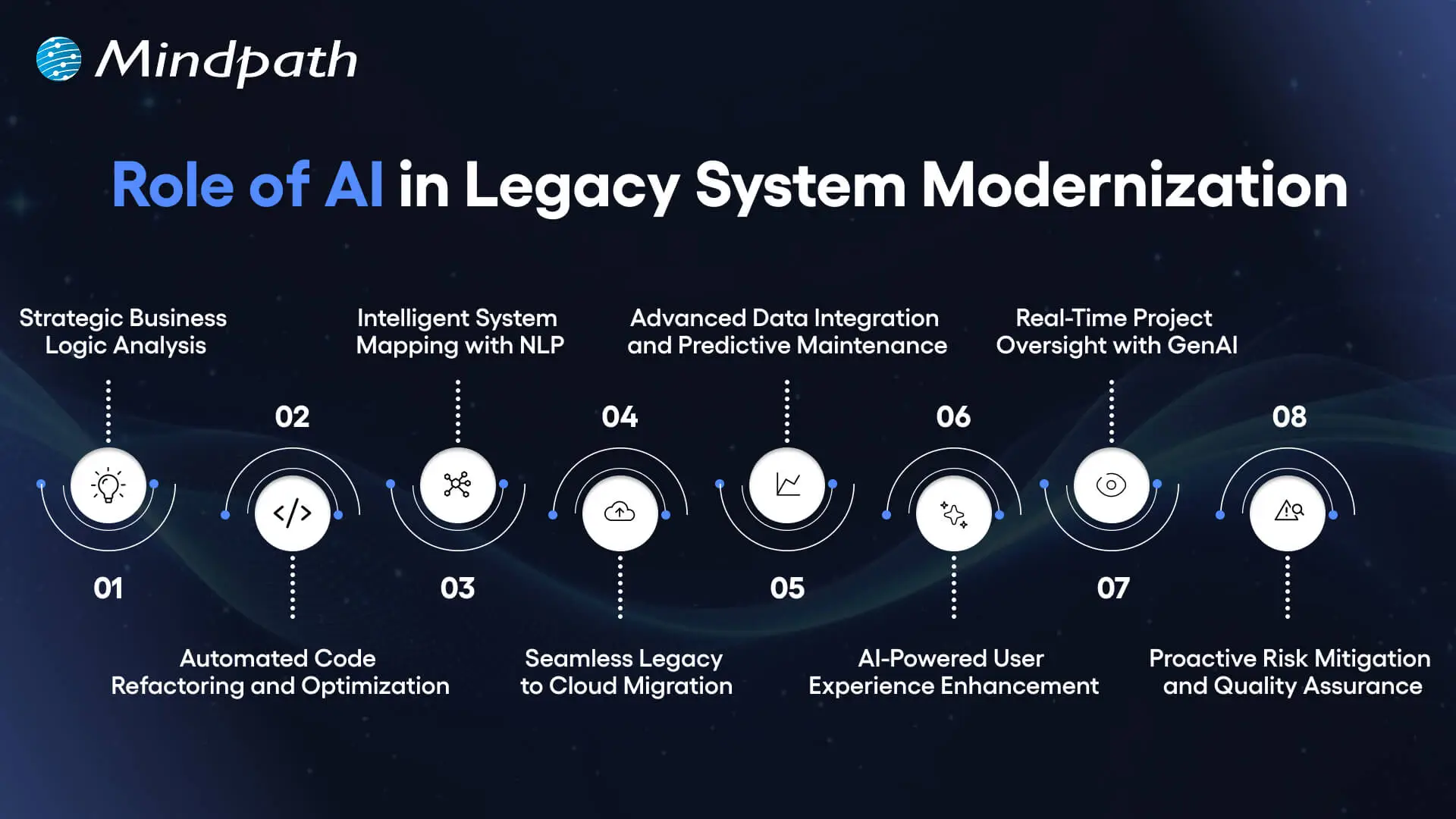
role of ai in legacy system modernization

1. Strategic Business Logic Analysis

AI-driven legacy system modernization starts by uncovering hidden business logic. It plots dependencies and decision rules. Modernization becomes smarter and data-driven, and teams are given a clear understanding.

2. Automated Code Refactoring and Optimization

AI rewrites the old code to new cloud-ready codes. Refactoring is faster, fewer errors in the system, and the system itself is much better with generative AI.

3. Intelligent System Mapping with NLP

Natural language processing transforms the complex old code into canned knowledge. Inefficiencies and bottlenecks are promptly found and assist in accelerating modernization.

4. Seamless Legacy-to-Cloud Migration

AI-driven legacy system modernization enables smooth cloud transitions. It also re-architectures code to reflect the current architectures and best practices.

5. Advanced Data Integration and Predictive Maintenance

AI integrates multiple sources of data to allow a smooth integration. Predictive analytics will identify possible problems before they happen and minimize downtime and operational problems.

6. AI-Powered User Experience Enhancement

AI interprets the user behavior in order to streamline interfaces. Chatbots and virtual assistants automate the repetitive field of work making it more engaging and efficient.

7. Real-Time Project Oversight with GenAI

AI offers invaluable real-time insight into the state of modernization. Predictive analytics and automated documentation keep the stakeholders updated and project on schedule.

8. Proactive Risk Mitigation and Quality Assurance

AI reduces the human factor and promotes uniformity. Modernization with structures and low risk can have safety nets that are provided through automated testing and monitoring.

Looking to create a clear path for modernization powered by AI and automation? Check out the legacy modernization roadmap to organize your approach effectively.

Ready to Transform Your Legacy Systems?

AI-driven legacy system modernization empowers businesses to update old systems quickly and accurately. It reduces errors, lowers costs, and improves performance. Companies gain clear insights into business logic and system dependencies, enabling smarter decisions. Modernization also ensures systems stay scalable, secure, and ready to support future growth efficiently.

Mindpath legacy modernization services help organizations implement AI-driven solutions smoothly. Our team analyzes existing systems, refactors code, and enables cloud integration. We provide predictive analytics, risk mitigation, and real-time monitoring. With our services, companies can modernize legacy systems efficiently while preserving core business logic and maintaining operational continuity.

Ready to Modernize Legacy Systems?

Upgrade legacy systems with intelligent AI solutions.

Frequently Asked Questions

AI-driven legacy system modernization helps companies scale systems to handle more data and traffic. It ensures faster decision-making, improves performance, and keeps core business logic intact. Mindpath’s services guide businesses in adopting AI to modernize efficiently and support long-term growth.
Yes. AI-driven legacy system modernization enables integration with cloud platforms, IoT, and modern applications. Mindpath’s legacy modernization services ensure your system becomes compatible with emerging technologies while maintaining stability and operational continuity.
Modernization reduces manual work, shortens upgrade timelines, and minimizes errors. By applying AI-driven legacy system modernization, companies achieve faster operations, lower costs, and higher system reliability. Mindpath helps organizations implement these efficiency improvements effectively.
AI maps business logic, automates code refactoring, analyzes dependencies, and predicts potential failures. Tools like generative AI and NLP convert complex legacy code into modern, cloud-ready formats. Mindpath applies these techniques to ensure smooth, accurate modernization.
AI identifies vulnerabilities, monitors system performance, and flags potential failures early. AI-driven legacy system modernization reduces errors and ensures consistent updates. Mindpath’s services integrate these safeguards, creating structured, low-risk modernization projects.

Support Is One Click Away

Featured Posts

Related Post

remote work security

Remote work security refers to the practices, technologies, and policies that protect corporate data and networks when employees work outside a traditional office environment. Teams operate across devices, networks, and locations every day, and without corporate firewalls in place, even small gaps can create serious vulnerabilities. The risks evolve quickly, which is why businesses need protection strategies built on strict user verification, encrypted network connections, and continuous endpoint monitoring without disrupting daily workflows or user experience.

Decisions on security must be clear and consistent as organizations increase remote setups. Leaders need to pose the correct questions and take actions. Meanwhile, employees require straightforward and easy to use systems that facilitate day-to-day operations. Consequently, there is a need to have a balanced approach to succeed in the long term. This blog will provide explanations of important aspects of remote work cybersecurity in a clear and practical manner. So, keep reading further!

Ready to secure your remote workforce and protect your business from evolving cyber threats? Contact us to explore how our team can help you build a safer and more resilient remote work environment.

The Growing Cyber Risk in Remote Work Environments

Not only in the office, remote work also faces rising cyber threats today. Remote work security is vital because employees are using their personal networks and devices to access systems. These are some of the weak points that hackers attack. Consequently, minimal security breaches have the potential to compromise business information and interrupt routine business activities within a short time.

Simultaneously, remote workforce cybersecurity is exposed to increasing threats as the techniques of attacks advance daily. Phishing, ransom, and identity attacks are growing at a high rate. Remote setups are fast to adapt to cybercriminals. Thus, organizations need to remain vigilant and increase security to manage these changing threats.

Want to better understand how to scale teams without increasing security risks? Explore the benefits of hiring remote developers to balance flexibility with control.

Here are some of the remote workforce security risks:

1. Unsecured Network Risks

At home or cafes, employees tend to connect to unsecured networks. These connections can easily be intercepted by attackers to get sensitive data.

2. Weak Password Security Risks

A large number of users use the same password on several accounts. A single breach may reveal multiple systems within a short time.

3. Personal Device Security Risks

Individual gadgets frequently lack frequent security patches and safeguards. This provides malware and attacks with easy entry points.

4. Phishing and Social Engineering Risks

To deceive users, hackers use spoofed emails, or messaging. Such attacks seek to steal usernames or confidential information.

5. Shadow IT Security Risks

Employees sometimes use apps without company approval for convenience. This bypasses security controls and increases risk.

6. Software Update Security Risks

Remote devices might not get security patches in a timely manner. This exposes systems to well-known threats and vulnerabilities.

7. Physical Security Risks

The devices may be lost or found in high-traffic or communal areas. Critical business information may be put at risk as a result of unauthorized access.

Looking to simplify how your remote teams stay connected and secure daily? Discover powerful remote work tools that support safer collaboration.

Importance of Cybersecurity in Remote Work

Remote work security is key in safeguarding data and systems when working remotely. Here are the reasons why solid cybersecurity is still needed in the daily remote work setting.

1. Protecting Expanding Digital Entry Points

Remote work adds devices, networks and points of access to systems. Cybersecurity for remote work helps control risks in these expanded environments.

2. Securing Sensitive Business Data

Every day, employees gain access to and share crucial information that is not secured by office infrastructure. Work from home security will also protect data when storing and transferring data.

3. Reducing Phishing and Online Fraud Risks

Users who are distantly located are faced with rising phishing attacks in the form of emails and fraudulent communications. High level of security awareness will avoid unintentional sharing of sensitive login information.

4. Maintaining Strong Security Standards

Both personal and shared devices may not have consistent security updates and protection tools. The use of consistent policies guarantees similar protection standards across all systems.

5. Ensuring Business Continuity

Cyber attacks have the ability to interrupt workflow and slow down processes happening remotely. Good security control mechanisms assist in stability and prompt recovery exercises.

6. Building Trust and Meeting Compliance

Data security breaches may destroy reputation and decrease customer confidence within a short time. Adequate security would keep the rules and guard business reputation.

Planning to strengthen your security foundation as your business grows? Read about application security best practices to protect your systems effectively.

Cybersecurity Best Practices

Remote working security requires effective habits to safeguard information and systems in remote configurations. These are the best practices that can be implemented in order to enhance safety and minimize risks.

1. Safe Network Access (VPN Use)

Connect with secure VPN to all remote work activities on a daily basis. This secures information transfer among the commonly shared and open internet systems.

2. Home Network Protection

Protect home routers by using strong passwords and updating encryption parameters. Store smart devices on different networks to minimize security risks.

3. Timely Software Updates

Automatically update all systems and security applications. Frequent patches seal identified vulnerabilities and thwart cyber attacks in real-time.

4. Stronger Login Protection (MFA)

Implement several authentication measures whenever accessing the company system. Remote work security enhances safety of access via additional authentication measures.

5. Strong Password Management

Use different passwords on each account using secure password tools. Do not use the same passwords in personal and work accounts.

6. Employee Security Awareness

Train employees on how to detect phishing emails and suspicious online activities. Establish a powerful security culture to avoid unintentional data breaches.

Is Your Organization Truly Ready for Strong Remote Workforce Security?

Remote work has transformed the way teams work and exchange information on a daily basis. Powerful Remote Work Security assists in safeguarding information, hardware, and networks during the increase in cybercrime. It guarantees safer communication, stronger control, and minimized risks in the distributed work setting in the long term business stability and trust.

At Mindpath, we offer remote work security solutions to secure modern distributed teams with robust, trustworthy systems. Our strategy revolves around safe access, data security and risk mitigation. We assist companies to create secure remote working environments that do not affect productivity at all.

Learn essential cybersecurity practices for remote work and how Mindpath can help protect your business with expert solutions.
outsourcing software development

The modern world requires rapidity, precision, and intelligent choices in the construction of excellent software. Teams tend to take breaks and reconsider the scaling of their work without the loss of control or quality. That is where the outsourcing software development comes into the discussion and alters the speed. It generates interest, brings up practical issues and encourages open-minded judgment. Consequently, making the appropriate development decision becomes a business decision, rather than a band-aid solution.

Additionally, this method leads to knowledge, adaptability and quicker advances when managed with caution. It helps leaders to think more incisively questions and demand more definitive results. Simultaneously, it requires planning, trust and effective communication. Then the question is how do you take a step in confidence and purpose? In this blog, we walk through the complete picture, helping businesses understand the path, mindset, and decisions involved.

Planning to outsource software development to accelerate growth and reduce operational costs? Mindpath’s software development services offer reliable and customized solutions that ensure timely delivery and excellent performance.

What is Outsourcing Software Development?

Software development outsourcing is the practice of hiring external firms or freelance developers to handle software projects, from building applications to system upgrades, testing, and optimization, instead of relying solely on an in-house team. Businesses use it as a strategic tool to cut costs, access specialized global talent, and speed up project timelines without long-term hiring commitments, while keeping internal teams focused on core priorities.

Nowadays, outsourcing software development is not only about saving money. They are able to reach efficient engineers and new technologies more quickly. This model minimizes pressure on hiring and day-to-day management. Teams are easily scaled according to the requirements of the project. Consequently, companies become more rapid and provide high-quality digital products.

The three types of outsourcing software development are as follows:

1. Offshore Outsourcing

Offshore outsourcing is associated with teams located in distant countries with distinct time zones. In outsourcing software development, businesses prefer this model to save money and grow more quickly with global talent.

2. Nearshore Outsourcing

Nearshore outsourcing collaborates with teams in local countries with close time zones. This model fosters outsourcing software development through enhanced communication and faster cooperation.

3. Onshore Outsourcing

Onshore outsourcing employs developers in the same country. This model of outsourcing software development is highly favored by companies due to its high compliance, security, and real-time coordination.

Looking to access specialized talent beyond your local market? Check out offshore software development and discover how it improves efficiency and project flexibility.

Key Benefits of Outsourcing Software Development

The current businesses desire quicker outcomes and greater technological skills. Software outsourcing enables businesses to remain focused and expand effectively, and below are the main advantages that businesses enjoy.

1. Lower Development Costs

By outsourcing software development, businesses save on the cost of hiring, training and infrastructure costs. Teams handle budgets more efficiently and have a stable project development.

2. Access to Skilled Talent

The companies network with seasoned developers in various technologies. This access enhances the quality of projects and sustains technical-specific requirements.

3. Flexible Team Scaling

Businesses can easily change the size of teams according to project needs. This flexibility ensures business continues uninterrupted when the business grows or slows down.

4. Faster Hiring Process

External partners provide ready developers without long recruitment delays. Projects continue without interruptions caused by staffing gaps.

5. Specialized Technical Skills

Teams gain direct access to experts in advanced technologies. This approach saves time and avoids heavy internal training efforts.

6. Quicker Product Launch

Development moves faster through parallel work and clear coordination. Companies release products sooner and stay competitive in dynamic markets.

Want to choose the right approach before outsourcing your next tech project? Discover types of software development to learn which model best fits your business goals and budget.

Key Factors to Consider Before Outsourcing Software Development

Selecting the appropriate partner must be well planned and with good business alignment. Outsourcing software development services is most effective when the companies consider the needs, risks, and long term objectives.

1. Clear Project Requirements

First, define goals, features, and budget limits clearly. Outsourcing software development succeeds when teams share the same understanding early.

2. Transparent Pricing Structure

Next, review pricing models and payment terms carefully. This move prevents unnoticed expenses and contributes to assured financial decisions.

3. Proven Expertise and Portfolio

Then, study previous projects and industry experience closely. Outsourcing software development works best when partners show strong, relevant results.

4. Reliable Delivery Timelines

After that, confirm the company meets deadlines consistently. Proper planning and skilled teams keep progress steady.

5. Company Reputation and Reviews

Also, read genuine client feedback on trusted platforms. These reviews show how the company handles challenges and commitments.

6. Strong Security and Communication

Finally, check data protection practices and communication tools. Regular updates and secure systems build trust throughout the project.

Curious how successful companies manage development from planning to deployment? Check out Software Development Life Cycle and discover how it improves transparency, control, and scalability.

Common Pitfalls to Avoid When Outsourcing Software Development

There are numerous companies that make haste decisions, and regret it subsequently. When teams are aware of likely risks and take action, outsourcing software development can result in success.

1. Most teams do not consider post-launch support and regret later. In the process of outsourcing software development, maintenance scope must always be verified to prevent security and performance problems.

2. There are companies that do not thoroughly investigate their partners and use Internet feedback as the only source. This shortcut tends to create low fit and project expectation failure.

3. Time zone issues and cultural differences are quick to decimate progress. These problems become severe in situations where projects require intense teamwork and expedited decision making.

4. Even in competent teams, weak communication leads to misunderstandings. Constant updates and discussions make the development stay on track with business objectives.

5. Most companies never pay attention to terms of NDA when signing contracts. This is an error that transfers the risk and restricts services even when fully paid.

Want to hire the right talent for your outsourced development projects? Discover the qualities of a good software engineer to learn what skills and traits ensure project success.

Ready to Make Smarter Software Decisions?

Outsourcing of software development assists businesses to operate at quicker speed without compromising on quality and control. It introduces talent and certain expertise, focus, and malleable development within a single strategy. This method is beneficial when organized effectively and helps to achieve improved outcomes and reduce risks. By making the right partner and goal alignment at an early stage, companies build confidence when selecting partners. Long-term success is defined by good communication and expectations.

At Mindpath, we support businesses with reliable teams and proven delivery experience. As a trusted software development outsource company, Mindpath focuses on clarity, speed, and quality. Our custom software development outsourcing services help you scale confidently while staying aligned with business goals. We value transparency, security, and strong collaboration at every step.

Chatbots to Agentic AI

Businesses today move fast. Customer expectations move even faster. The old model of deploying a simple chatbot to handle FAQs and call it “AI adoption” no longer cuts it in 2026. The real shift happening right now is the leap from chatbots to agentic AI, and it is reshaping how small and mid-sized businesses operate, compete, and grow. This is no longer a futuristic concept. It is an active, measurable business decision.

Key Takeaways

  • 01
    Agentic AI executes complete workflows autonomously, while chatbots only answer questions.
  • 02
    SMBs adopting agentic AI gain a measurable competitive edge over slower-moving peers.
  • 03
    Agents integrate directly with your existing tools, eliminating manual hand-offs entirely.
  • 04
    No-code platforms make agentic AI deployment accessible for non-technical SMB founders today.
  • 05
    Starting with one repetitive task is the smartest and fastest path to implementation.

So, think about this for a moment. Your competitors are not just automating conversations anymore. They are automating decisions, workflows, and outcomes. Agentic AI does not wait for instructions at every step. It reasons, plans, and acts autonomously across your entire business stack. SMBs that recognize this shift early will set the pace. Those that wait will spend the next few years catching up. In this blog, we break down exactly what this transition means, why it matters deeply for your business, and how you can start making it work today.

Looking to move beyond basic chatbots? Our Agentic AI development services help businesses build intelligent AI agents that deliver real business value.

How Does Agentic AI Differ from a Chatbot?

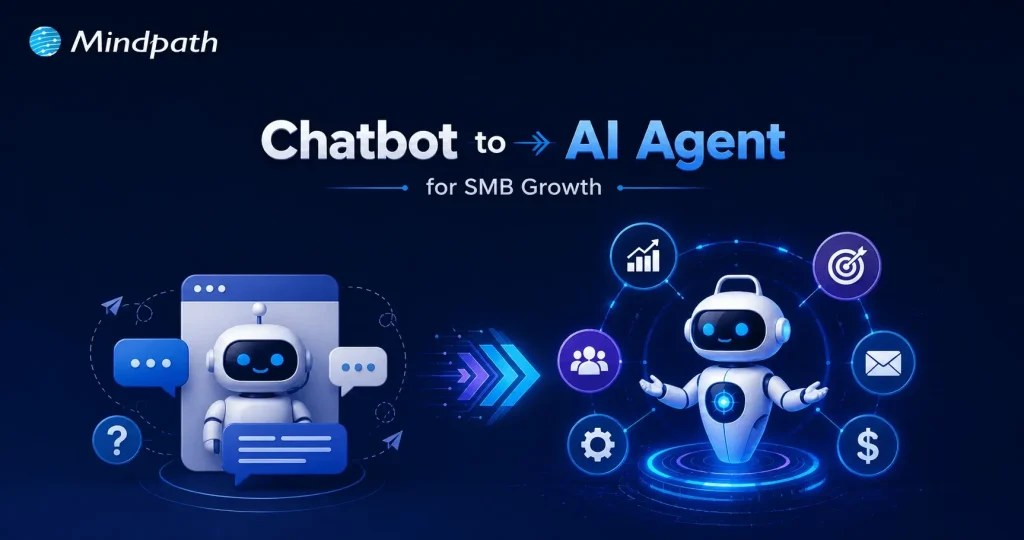
A chatbot is a rule-based conversational tool. It responds to queries, retrieves information, and operates within predefined boundaries. Agentic AI is an autonomous intelligence system. It receives a high-level goal, reasons through complexity, and executes multi-step tasks across tools, APIs, and workflows independently.

Consequently, the evolution from chatbots to agentic AI represents a fundamental shift in capability. A chatbot delivers an answer. An agent delivers an outcome. It plans, decides, coordinates across systems, and completes entire business processes without requiring human intervention at each step.

Let’s have a glance at the key difference through this table:

Category  Agentic AI  Chatbot 
Primary Purpose Works toward a goal and completes tasks from start to finish. Answers questions and responds to user messages.
Autonomy Can make decisions, plan actions, and work with minimal human input. Requires continuous user prompts and instructions.
Task Execution Handles complex, multi-step workflows and can adapt when situations change. Typically manages simple conversations or predefined tasks.
Tool & System Access Uses APIs, databases, business software, browsers, and other tools to perform actions. Mostly provides information; limited ability to take real actions.
Memory & Context Maintains task history, user preferences, and long-term context across interactions. Usually remembers only the current conversation session.
Outcome Delivers completed results (e.g., creates reports, books meetings, processes requests). Delivers responses, suggestions, or information only.

Why are SMBs Choosing Agentic AI Over Traditional Chatbots in 2026?

SMBs are not adopting agentic AI out of curiosity. They are doing it because the gap between a chatbot to AI agent is now a gap between falling behind and staying competitive. The business case is clear, measurable, and growing stronger every quarter. Here are the reasons why SMBs are making the switch right now.

1. Always-On Execution

Agentic AI operates continuously across time zones without failing. It handles complex, multi-threaded tasks around the clock, functioning truly as a 24/7 digital employee for your business.

2. End-to-End Automation

Unlike AI chatbots for customer service that stop at answering queries, agents take direct action. One agent can check inventory, process a return, and update your CRM automatically without a single human hand-off.

3. Autonomous Problem Solving

Agents use a built-in reasoning layer to break high-level goals into actionable steps. They analyze context in real time and respond decisively without waiting for human instruction at every turn.

4. Deep System Integration

Agents connect directly via API to your existing tech stack, including Slack, Google Drive, and inventory systems. They pull data, update records, and execute changes securely across your entire business infrastructure.

5. Real Cost Savings

Running an agentic workflow costs a fraction of a full-time employee’s salary. SMBs consistently recover significant operating capital monthly while eliminating the inefficiencies tied to manual staff time.

6. Dynamic Adaptability

Traditional chatbot flows break the moment a variable changes. The shift from chatbots to agentic AI means your system now adapts in real time, handles ambiguity, and course-corrects when processes go wrong.

7. No-Code Deployment

Advanced no-code platforms allow non-technical SMB founders to build and launch role-specialized agents quickly. You do not need a large in-house IT team to start seeing immediate, measurable value.

8. Scalability Without Hiring

Agentic workflows allow SMBs to handle sudden spikes in traffic or rapid business expansion confidently. You scale operations without the immediate pressure to hire, onboard, and train new employees.

Must-Know Insights on SMBs Using AI

  • Over 75% of SMBs actively use or experiment with AI today.
  • 97% of SMBs using voice AI agents report direct revenue increases.
  • Gartner predicts 25% of all IT work will run on AI agents by 2030.
  • 91% of SMBs adopting AI report measurable revenue gains consistently.
  • Growing SMBs lead AI adoption at 83%, far ahead of stagnant peers.

How to Transition Your SMB from a Chatbot to Agentic AI in 2026?

Making the switch sounds complex, but it does not have to be. Most SMBs already have the tools and workflows needed to start deploying conversational AI agents today. Here is exactly how you move from intention to implementation.

1. Start Small

Identify one high-value, repetitive task your team handles manually every day. Build your first agent around that single workflow before expanding further.

2. Map the Workflow

Write down every trigger, system, and decision rule a human follows to complete the task. This plain-language process becomes the core instruction set for your agent.

3. Connect Your Stack

A customer service agentic AI chatbot without tool access is simply a smarter chatbot. Equip your agent with API connections to the software your team already uses daily.

4. Set Human Guardrails

Identify every point in the workflow where an agent mistake would carry significant cost. Program the agent to pause and request human approval at each of those critical steps.

5. Pick Your Platform

The transition from chatbots to agentic AI no longer requires a large technical team. Explore no-code and low-code visual builder platforms to design and deploy workflows without writing a single line of code.

Is Your Business Ready to Move Beyond the Chatbot?

The shift from chatbots to agentic AI is not a distant trend. It is happening right now, and SMBs that act early will hold a serious competitive edge. The technology is accessible, the results are proven, and the window to move first is still open.

At Mindpath, we provide AI development services that help SMBs make this transition confidently. We build, integrate, and deploy agentic solutions tailored to your exact business needs. Let us help you move from conversation to action, starting today.