Home

Top Mobile App Development Technologies 

Top Mobile App Development Technologies 

Join our Newsletter!

Mobile app development technologies

Mobile app development technologies are important in the fast-paced environment of technology because they define how companies engage with users and keep them engaged. Each swipe, tap, and click is based on technology that is getting faster, smarter, and more interactive. If you’ve ever noticed, some apps feel effortlessly smooth, and others do not. The difference is usually related to the frameworks and platforms chosen for the business objectives and user expectations, and understanding these technologies provides a big advantage over others.

Delving into the newest trends in mobile application development often presents a plethora of choices that can seem confusing. However, choosing the appropriate technology can improve app performance, security, and the overall user experience. Developers routinely test technologies, frameworks, languages, and software solutions to create apps that can more easily rise above the fray. In this blog, we will explore the latest trends and the specific technologies that power the successful mobile app today.

Want to use top mobile app development technologies into a functional app? Mindpath offers mobile app development services, which will turn your imagination into a fully working, high-quality app.

What are Mobile App Development Technologies?

Mobile app development technologies are the programming languages, frameworks, and tools used to design, build, and deploy software applications for smartphones and tablets. These technologies enable developers to create compatible applications that run across platforms such as Android and iOS, while determining core factors like performance, development speed, and overall project budget.

The landscape of mobile development technologies broadly falls into two primary categories: native (platform-specific) tools and cross-platform frameworks, along with supporting backend services. The combination of these tools enables the development of applications that provide rich user experiences, work with cloud services, and utilize the native features provided by the device. Choosing the appropriate technology allows developers to build all of these easily, efficiently, and in a scalable way.

Also Read: AI in Mobile Apps

Top Mobile App Development Technologies in 2026

In order to remain competitive as an app developer, it is important to stay informed about the best technology for mobile app development in 2026. The choice of development tools can positively affect the performance, usability, and scalability of modern applications.

1. Flutter 3.22

Flutter 3.22 is a highly favored mobile app development platform to help developers develop applications for mobile devices, the web, desktop, and embedded devices. It provides high-performance and smooth animations that allow applications to run quickly and feel responsive. Developers also appreciate its professionally designed UI components, making it easy for developers to create stunning and consistent user interfaces.

2. Kotlin Multiplatform Mobile (KMM)

Kotlin Multiplatform Mobile (KMM) is a mobile app development framework that allows developers to share code for Android and iOS apps. It utilizes the modern, efficient programming language Kotlin to simplify the process of creating a mobile app for two platforms at once. This translates into a significant time saving, might help to reduce errors, and assure consistent behavior across your Android and iOS devices.

3. C++

C++ is among the most robust mobile app development technologies currently available for building high-performance applications. It enables developers to take direct control of system resources, which is often favored for complex applications or graphics-intensive applications. Also, by using C++, you can rest assured your apps are running as efficiently as possible, even as they traverse between different platforms.

4. Swift

Swift, a mobile application technology developed by Apple, is for building native iOS applications. It is fast, safe, and reliable, while also allowing seamless integration into AI and machine learning. With Swift, developers can build iPhone and iPad apps that are fast, safe, and modern.

5. AR/VR Integration Tools

AR/VR integration tools are tools for mobile app development that help developers add augmented reality and virtual reality features to an app. Integrating augmented and virtual reality features into apps is a valuable way to engage users while making an experience much more entertaining or immersive. These integrations are extremely popular in gaming and even found in some education and retail apps to enhance user experiences.

Ready to build smart mobile apps, but still wondering how AI can transform your development approach? Discover our blog on the benefits of AI in mobile app development to understand how AI can reshape modern app development.

6. AI-Assisted Development Tools

AI-Assisted Development Tools refer to tools such as GitHub Copilot and Amazon CodeWhisperer that support the automation of coding tasks. They streamline developers’ efforts in application development through code suggestions, error detection, and execution of tests. The upshot is that developers can create apps faster and also more efficiently.

7. React Native

React Native is another top mobile app development technology that enables developers to create apps for both iOS and Android using JavaScript. It provides a native look and feels with one complete codebase, reducing development time and duplication of effort. Companies are drawn to React Native because of its quick development period and strong support from the community.

8. Ionic

Ionic is a hybrid app framework and is a popular option among mobile app development technologies, allowing developers to write cross-platform apps using HTML, CSS, and JavaScript. It allows developers to write one codebase to operate on multiple devices. Ionic is very much favored by developers to create efficient and visually striking apps.

9. NativeScript

NativeScript is a flexible framework that matches the up-to-date trends in mobile application development with the ability to create fully native apps using JavaScript, TypeScript, Angular, or Vue.js. With NativeScript, you have full access to the native APIs offered by the OS, meaning that your application will work and perform like a truly native solution. NativeScript enables developers to build highly efficient and rich-featured mobile applications.

10. Xamarin (.NET MAUI)

Xamarin (.NET MAUI) is a framework aligned with mobile app development trends through the creation of native apps for Android, iOS, Windows, and macOS. While using C# and the .NET ecosystem, developers can share code and have a consistent experience across all platforms. Overall, this reduces development time, and provides high-quality apps.

Want to understand where custom mobile applications are creating real competitive advantages across the market? Discover our blog on the Custom Mobile Application Development Services to uncover high-impact opportunities and emerging trends.

Ready to Build the Next Successful Mobile App?

Mobile app development technologies continue to evolve, offering smarter tools and faster frameworks to help developers create better apps. Choosing the appropriate technology guarantees improved performance, security, and scalability. With the growth of innovation, staying up to date with current tools is critical for a company to provide seamless and engaging mobile experiences.

At Mindpath, we provide expert mobile app development services intended to turn your ideas into strong digital solutions. Our experienced developers create secure, high-performing, and easy-to-use applications by applying modern tools and proven approaches. Partner with us to build an app that empowers your brand and creates long-lasting value for your users.


Native, Hybrid, or Cross-Platform?

We help you choose the right approach for your app.

Frequently Asked Questions

Popular technologies include Flutter, React Native, Swift, Kotlin, Xamarin, and Node.js, enabling developers to build scalable, secure, and high-performance mobile applications.
The right technology depends on project goals, target platforms, performance requirements, scalability, budget, and long-term maintenance needs.
Native development builds platform-specific apps for better performance, while cross-platform frameworks allow developers to create apps for multiple platforms using a single codebase.
Flutter and React Native are among the most popular cross-platform frameworks, offering faster development, reusable code, and near-native user experiences.
A suitable technology stack improves application performance, scalability, security, maintainability, and future expansion while reducing long-term development costs.

Support Is One Click Away

Featured Posts

Related Post

Emerging Technologies

Emerging technologies are changing how businesses develop products, serve customers, manage operations, and make decisions. Artificial intelligence, robotics, blockchain, connected devices, and other innovations offer new ways to improve efficiency and address business challenges. However, their value depends on how well they fit an organization’s goals, infrastructure, and resources.

For business leaders, understanding emerging technologies is not simply about following the latest trends. It involves identifying practical applications, assessing implementation costs, managing risks, and deciding which investments can deliver measurable results. This guide covers eight emerging technologies, their business applications, and the factors organizations should consider before adopting them.

Key Takeaways

  • 01
    Emerging technologies can help businesses improve productivity, automate processes, strengthen decision-making, and develop new digital services.
  • 02
    AI, robotics, IoT, blockchain, and immersive technologies address different business needs and require different levels of investment.
  • 03
    Technology adoption should begin with a defined business problem, measurable objectives, and a realistic assessment of implementation requirements.
  • 04
    Data privacy, cybersecurity, integration, employee readiness, and regulatory requirements must be considered before deployment.
  • 05
    Pilot projects and performance measurements help organizations determine whether a technology delivers sufficient business value to justify wider adoption.

What are Emerging Technologies?

Emerging technologies are developing or evolving technologies whose capabilities, applications, or commercial adoption are still changing. They may introduce new ways to solve existing problems, improve established processes, or create products and services that were previously impractical.

Examples include artificial intelligence, agentic AI, robotics, quantum computing, blockchain, and the Internet of Things (IoT). These technologies do not all have the same level of maturity. Some already support everyday business operations, while others remain limited to specialized applications or ongoing research.

For businesses, the important question is whether a technology can solve a relevant problem more effectively than the current approach. Potential benefits should be evaluated alongside costs, operational requirements, security risks, and the time needed to implement the solution.

Eight Emerging Technologies Shaping the Digital World

The following technologies have different capabilities and adoption requirements. Their relevance depends on the industry, business model, technical environment, and objectives of the organization.

1. Artificial Intelligence

Artificial intelligence (AI) enables computer systems to perform tasks such as recognizing patterns, processing language, generating content, making predictions, and supporting decisions. Businesses already use AI in customer service, software development, data analysis, fraud detection, and process automation.

For example, an organization can use AI to categorize customer requests, summarize documents, identify unusual transactions, or assist employees with routine research. The results depend on data quality, model capabilities, workflow design, and appropriate human oversight.

Business value: AI can reduce repetitive work, help teams process information, and support faster decisions when the use case is well defined.

What businesses should consider: Data privacy, output accuracy, integration costs, intellectual property, and human review requirements should be evaluated before deployment.

Businesses considering AI adoption can also review emerging technologies for small businesses for additional business-focused context.

2. Virtual Reality and Augmented Reality

Virtual reality (VR) places users in computer-generated environments, while augmented reality (AR) adds digital information to a view of the physical world. Both technologies can support experiences that are difficult to deliver through conventional screens alone.

Businesses can use VR for employee training, equipment simulations, and immersive product demonstrations. AR can help technicians view instructions while repairing equipment or allow customers to preview products in their surroundings.

Business value: Immersive experiences can support training, product visualization, and selected customer or employee workflows.

What businesses should consider: Hardware costs, user comfort, content development, accessibility, and the frequency of use should influence investment decisions.

3. Blockchain

Blockchain is a type of distributed ledger that records transactions across a network. Depending on its design, it can provide shared records, traceability, and mechanisms for verifying changes. Its usefulness depends on the participants, governance model, and problem being addressed.

Potential business applications include supply chain tracking, shared transaction records, digital asset management, and selected processes that involve multiple organizations. A blockchain is not automatically more secure or efficient than a conventional database, so the architecture should match the use case.

Business value: Blockchain may improve record traceability and coordination when several parties need to work with a shared transaction history.

What businesses should consider: Transaction costs, privacy, regulatory obligations, governance, system integration, and whether a conventional database would be simpler.

4. Internet of Things

The Internet of Things (IoT) connects physical devices, sensors, and equipment so they can collect and exchange data. Businesses can use this information to monitor conditions, understand asset performance, and automate selected operational responses.

In manufacturing, connected sensors can identify unusual equipment behavior, while tracking devices in logistics provide shipment updates. Similarly, connected systems in buildings monitor energy use and help improve facility management efficiency.

Business value: IoT can improve visibility into physical operations and help teams identify maintenance needs or resource inefficiencies.

What businesses should consider: Device security, network reliability, data storage, interoperability, and the cost of maintaining connected equipment.

5. Robotics

Robotics combines hardware, software, sensors, and control systems to perform physical tasks. Robots can support repetitive, precise, or hazardous work in environments such as factories, warehouses, laboratories, and selected service operations.

For example, a manufacturer may use robotic systems for repetitive assembly tasks, while a warehouse may deploy robots to move goods between designated locations. The level of automation depends on the task, environment, and required safety controls.

Business value: Robotics can improve consistency, throughput, and workplace safety for suitable tasks.

What businesses should consider: Equipment costs, maintenance, integration with existing systems, employee training, and safety requirements.

6. Agentic AI

Agentic AI refers to AI systems designed to pursue defined objectives through multiple steps. Depending on their configuration, these systems may use tools, retrieve information, plan actions, and respond to changing inputs with varying levels of autonomy.

Business applications may include routing service requests, coordinating parts of a workflow, preparing reports, or assisting with internal operations. These systems need clearly defined permissions and safeguards, particularly when they can change records, communicate externally, or trigger consequential actions.

Business value: Agentic AI may help coordinate multi-step tasks and reduce manual handoffs in workflows that can be clearly defined and monitored.

What businesses should consider: Reliability, access controls, audit logs, error handling, human approval, and the ability to stop or reverse actions.

Read more about agentic AI and its potential role in business workflows.

7. Quantum Computing

Quantum computing uses principles of quantum mechanics to process information in ways that differ from conventional computing. It is an evolving field with potential applications in selected areas of chemistry, materials research, optimization, and cryptography-related research.

For most businesses, quantum computing is not a general replacement for conventional computers. Its practical value depends on the problem, hardware capabilities, software maturity, and the availability of suitable algorithms.

Business value: In the longer term, quantum computing may help address certain specialized computational problems that are difficult for conventional systems.

What businesses should consider: Current technical limitations, research maturity, investment horizon, and potential implications for cryptographic security.

8. Ambient Computing

Ambient computing describes technology that operates in the background and responds to context, user needs, or environmental signals. It can combine connected devices, sensors, automation, and AI to make selected interactions more seamless.

Examples include smart building systems that adjust lighting based on occupancy, connected workplaces that automate routine environmental settings, and devices that provide contextual information when needed.

Business value: Ambient computing can reduce manual interaction and support more responsive environments in workplaces, facilities, and selected customer experiences.

What businesses should consider: Consent, data privacy, device interoperability, reliability, and the consequences of automated decisions.

Emerging Technologies Compared: Business Applications and Readiness

Not every emerging technology is appropriate for immediate investment. Comparing the business use case, expected value, and adoption requirements helps organizations decide where to focus their resources.

Technology Potential business applications Primary consideration
Artificial intelligence Customer support, analytics, document processing, and decision support Data quality, accuracy, privacy, and human oversight
VR and AR Training, product visualization, and equipment guidance Hardware, content development, and user adoption
Blockchain Shared records, traceability, and selected multi-party transactions Governance, privacy, cost, and whether a shared ledger is necessary
IoT Asset monitoring, predictive maintenance, and facility management Device security, connectivity, and data management
Robotics Manufacturing, material handling, and repetitive physical tasks Safety, maintenance, integration, and capital investment
Agentic AI Multi-step workflows, task coordination, and operational assistance Permissions, reliability, monitoring, and approval controls
Quantum computing Specialized research, optimization, and computational experiments Technical maturity and problem-specific feasibility
Ambient computing Smart workplaces, contextual automation, and connected environments Privacy, interoperability, and dependable operation

This comparison is a starting point rather than a universal ranking. A technology that provides value to a manufacturer may have little relevance to a professional services company. Businesses should evaluate each option against their own requirements rather than adopting it because it receives market attention.

How Businesses Can Choose the Right Emerging Technologies

A practical technology strategy begins with business needs, not a list of tools. Organizations can use the following steps to determine whether an emerging technology is worth adopting.

1. Identify a Specific Business Problem

Define the problem that needs to be solved, such as slow customer response times, high maintenance costs, manual data processing, or limited visibility into operations. A clear problem statement helps teams assess whether a new technology is necessary.

2. Establish Measurable Objectives

Decide how success will be measured before implementation. Relevant measures may include processing time, error rates, operating costs, service response times, equipment downtime, or customer satisfaction.

3. Assess Data and Infrastructure Readiness

Review the quality of available data, existing software, network capacity, security controls, and integration requirements. Some technologies require significant infrastructure improvements before they can deliver value.

4. Run a Limited Pilot

Test the technology in a controlled environment before deploying it across the organization. A pilot helps identify practical limitations, estimate operating costs, and gather feedback from employees and customers.

5. Review Risks and Governance

Identify privacy, security, legal, operational, and ethical risks. Define who can access the system, who is accountable for its outputs, how incidents will be handled, and when human approval is required.

6. Compare Costs With Business Value

Consider implementation expenses, licenses, integration, training, maintenance, and future upgrades. Compare the total cost with the expected benefits and the results achieved during the pilot.

7. Scale Only When the Evidence Supports It

If the pilot meets its objectives and the risks are manageable, plan a wider rollout. Continue monitoring performance after deployment and adjust the system as business needs change.

For a broader implementation perspective, read our digital transformation guide.

Challenges Associated With Emerging Technologies

Emerging technologies can create business opportunities, but adoption also introduces technical, operational, and governance challenges. Addressing these issues early helps organizations make informed investment decisions.

1. Data Privacy and Security

New systems may process customer information, business records, sensor data, or confidential documents. Organizations should assess data collection, storage, access, retention, and sharing before implementation. Security reviews should cover both the technology itself and the systems connected to it.

2. Ethical Concerns and Accountability

AI-driven systems can produce inaccurate or biased results, while automated workflows may make decisions that require human judgment. Businesses should define accountability, review consequential outputs, and provide a clear process for correcting errors.

3. Integration With Existing Systems

New technology may not work seamlessly with legacy software, existing databases, or established workflows. Integration planning, testing, documentation, and employee training help reduce disruption during adoption.

4. Cost and Uncertain Returns

Some technologies require specialist expertise, infrastructure changes, hardware, or ongoing support. Businesses should assess the full cost of ownership and avoid assuming that a promising demonstration will translate directly into measurable business results.

5. Regulatory and Compliance Requirements

Requirements vary according to the technology, industry, jurisdiction, and type of data involved. Organizations should identify applicable legal and contractual obligations before deploying a system, particularly when handling sensitive information or automating consequential decisions.

Prepare Your Business for Technology-Driven Change

Emerging technologies such as AI, robotics, IoT, blockchain, and immersive systems offer different ways to address business challenges. Their value depends on the problem being solved, the maturity of the technology, and the organization’s ability to implement and manage it effectively.

Businesses should focus on practical use cases, measurable objectives, and responsible adoption rather than following every new trend. A clear strategy, limited pilots, appropriate safeguards, and continuous evaluation can help organizations make better technology investment decisions.

Mindpath supports businesses with digital solutions aligned with their technical requirements and operational goals. Organizations evaluating new technology initiatives can discuss their needs with a qualified technology team and identify an approach that fits their priorities.

Explore emerging technologies like robotics, AI, and cybersecurity innovations and driving future success for businesses.
UX audit

The digital landscape has gone beyond normal trends. 8 out of 10 users are willing to pay more for a detailed user experience. Further, research shows that around USD 1 invested in UX is supposed to bring USD 100 in return. So, any usability defect on your website is way more than just a design flaw. Your users are not just directly comparing you with your competitors. But they are comparing you to the seamless and effective digital experience they have ever experienced.

This is where the relevance of a UX audit comes into the picture. So, this process doesn’t just verify visual inconsistencies or defective navigation. In fact, it unveils hidden frictions that can make your users frustrated and abandon the site.

Ready to enhance your user experience and uncover opportunities for improvement? Contact us today to get expert guidance and start optimizing your website for better engagement and conversions.

What is a UX Audit?

A UX audit is generally known as a user experience audit. It is a systematic evaluation of digital interfaces like mobile applications, websites, or any software platforms. Further, this approach is used to identify usability issues that can affect your users’ ability to reach their goals. According to the research by the Nielsen Norman Group, an average website loses around 67% of its visitors before they reach a certain conversion point.

So, a website UX audit can help you understand what is working well and what is not. Everything is decided based on the research, data, and industry-standard UX regulations.

How is a UX Audit Different from a UI Audit?

A UI UX audit majorly prioritizes the visual design of the interface. So, it mainly includes color contrast, visual hierarchy, spacing, and all. On the other hand, a UX audit targets the entire journey of the users that includes certain factors as given below.

  • Interaction flows.
  • User behavior and interest.
  • Clarity of the content.
  • Conversion barriers.

Most of the audits combine both UX and UI elements to offer a detailed analysis of the performance of your digital product. This is why a UX and user interface audit is necessary for maximum results.

Looking to design experiences that captivate and retain users? Discover our guide on UI/UX design trends to explore approaches that boost usability and appeal.

Why You Should Conduct a User Experience Audit for Robust Digital Performance?

Investing in UX audit services offers strategic benefits to your digital product. Additionally, here are some effective UX audit benefits listed below.

1. Better Conversion Rate

It eliminates friction in major user flows like purchases, sign-ups, and form submissions. Further, it can directly boost your goal completions.

2. Encourages User Satisfaction

If your navigation remains intuitive along with clear content, your users will feel more connected to your products, and the engagement rate will increase.

3. Strong Brand Perception

A well-maintained and consistent user interface can build credibility while boosting your trustworthiness in the marketplace.

4. Data-Rich Redesigns

Insightful data from the website UX audit can value UX improvements while eliminating the guesswork. Further, it can prevent you from costly redesign mistakes.

5. Keeps You Ahead

Even a small usability improvement can keep you unique in this competitive edge. So, users are more likely to trust you over your competitors.

Looking to enhance your UX audit process with scalable and efficient tools? Discover the benefits of SaaS to explore how cloud-based solutions can streamline workflows and improve collaboration.

Who Can Benefit from a UX Audit?

No doubt, UX audits can be beneficial for anyone who is developing a SaaS product or complicated web apps. However, they are more reliable for a certain type of business, as given below.

  • Organizations that are aware of their product requirements but are confused about where and how to begin.
  • Businesses without any research of UX design teams and a desire to refine their UI/UX values in the digital space.
  • Companies that are willing to do Agile product development want to be assured that their UC enhancements are aligned with the users’ expectations.

What are Some Efficient Types of UX Audit Techniques?

There is no one-size-fits-all approach. So, UX audits have been divided into many significant types that developers should be aware of.

1. Usability Audit

This approach goes deeper into your users’ journey to discover if they have been facing any usability issues. So, usability testing can be incorporated to analyze essential factors like interaction design, navigation flow, and overall functionality. This ensures that your users are seamlessly navigating your product without any frustration.

2. Information Architecture Audit

This type assesses the structure of your content labelled along with the product. Further, it also verifies if users can effectively locate what they require. Further, such an audit type easily reveals your content gaps along with confusing structures that can hinder the users’ journey.

3. Accessibility Audit

An accessibility audit can assure you of your product’s usability to everyone, including people who are differently abled. Additionally, this audit proves compliance with WCAG by valuing the color schemes, keyword navigation, and screen reading metrics.

4. Design Audit

This kind of UI UX audit takes care of the design components. This includes the product’s color schemes along with your brand consistency. This ensures the design aligns with your brand identity while keeping your visual experience intact. By effectively assessing each of your design references, the visual audit ensures that the visuals support usability.

5. Content Audit

Content audit includes evaluating the relevance, quality, and tone of your product content. Moreover, it ensures that the content matches the requirements of users while sticking to your brand values. By refining the content, your business can easily strengthen users’ trust while bringing clarity and engagement.

Planning to create a website that combines stunning design with seamless functionality? Discover our guide on web design and development services to explore how professional solutions can elevate your digital presence.

How to Initiate a UX Audit Thoroughly for the Best Results?

Here, you can go through the structured process to make sure your audit UX UI is efficient and result-driven. Apart from this, when you desire to carry out a UX audit, you need to consider whether it is viable for your in-house team or if you should hire an external agency.

1. Be Assured of Your Objectives

It is important to conduct a meeting with all your stakeholders. This approach can streamline your objectives while increasing conversions. You can easily enhance your user experience while addressing suitable goals. This effective alignment can help your team plan the tasks.

2. Gather Product Insights and UX Metrics

Before initiating the assignment, it is important to assess the documents, such as the goals of the product, the user journey, and the user behavior. Additionally, this can help you understand the intent behind the project.

After this phase, you need to gather all necessary performance analytics that include your users’ time spent on certain pages, clicks, and frequency. So, these relevant data can help you assess how the users are engaging with your product.

3. Perform UX Design Audit

After verifying the defective areas in your user experience, you need to apply Usability Heuristics and design principles to assess multiple design mishaps. Such a step in the UX Audit website can be used to evaluate the interface with consistent design, error prevention, flexibility, etc.

4. Run User Testing Sessions

Invite your representative users to complete the real necessary tasks. This includes observing the points of confusion and navigation errors. User testing can offer you authentic details about how your users think and behave in a real scenario.

5. Get a UX Report

Once you are done with gathering all the crucial data, it’s time for you to effectively document your findings into a structured UX audit report. The report generally includes severity rating, issues verified, evidence, expected impact, etc.

A strong report ensures your stakeholders can understand and act as per the requirements.

Planning to work with a web design firm but unsure which questions will reveal their expertise? Check out our guide on questions to ask a website design company to learn how to evaluate potential partners.

A Completely Free UX Audit Checklist

Here is a detailed UX audit checklist you can thoroughly apply to any of your interfaces.

1. Navigation and Structure

  • Logical menu structure.
  • Streamlined menu labels.
  • Effective search functionality.
  • Breadcrumbs, if necessary.

2. Visual Design and UI Elements

  • Precise contrast level for readability.
  • Consistent color schemes and typography.
  • Clickable and attractive buttons and links.
  • Intuitive and meaningful icons.

3. Content and Messaging

  • CTAs are available above the fold.
  • Headlines are clear and to the point.
  • Body content is aligned with proper subheadings.
  • No fluff and jargon.

4. Form and Crucial Inputs

  • Labels are specific and goal-oriented.
  • Errors are displayed clearly.
  • Submit buttons should communicate actions.

5. Interaction and Feedback

  • Loading times are bearable.
  • User actions have confirmation.
  • Interactive elements.
  • No unnecessary or broken links.

6. Mobile and Responsiveness

  • Buttons are spaced effectively.
  • Layouts can be adjusted to all screen sizes.
  • Content fits without needing any horizontal scroll.
  • Navigation suits mobile devices.

7. Conversion Management

  • Secondary CTAs are effective and non-intrusive.
  • Primary call to action remains unique.
  • Trust indicators like feedback and reviews are present.
  • Funnels have minimal friction.

Wondering how much it really costs to build a professional and effective website? Discover our guide on website development cost to explore factors that impact pricing and plan your budget wisely.

Real-World UX Audit Examples

There are certain real-world UX audit examples that can deepen your understanding. Further, it can encourage you to go through the checklist for being authentic.

1. E-commerce Checkout

Many e-commerce sites abandon their purchases at the payment step. So, a UX audit checklist can help you discover unexpected shipping charges and complicated multi-step checkout. You can address this by simplifying the form while adding the progress bar.

2. SaaS Onboarding Flow

When a SaaS company discovers through session recordings and heatmaps that users drop off mid-onboarding, the audit can make you aware of a lack of a progress indicator and an inefficient CTA. You can simplify the features to improve your product’s CTA.

When Should You Conduct a UX Audit?

A UX audit can easily fix what is broken and can accelerate the experience of your users. While you can leverage a UX audit at any stage, there are some critical moments that are essential to consider.

1. Pre-launch and Redesigning

Before you go live with your product, verifying the usability issues in the early phase can minimize the risks while preventing you from costly mishaps. Further, a UX audit report can assess the current experience of your consumers while helping you track the elements that are desirable.

2. As a Critical Part of Your Ongoing Improvement

Doing UX audits twice a year might help you maintain your quality, as your users’ expectations might change with the evolving trends. Moreover, adding new functionalities and features can disturb your existing workflows. An audit can keep the user experience intact.

3. To Battle Performance Issues

Fewer session times and minimal return visits can highlight that there are some issues with your UX. So, to back up your engagement, you need to value the UX audit as very critical. If your users are not completing their key actions, an audit can help you address the real issue behind the drop-off.

4. For Strategic Insights

Comparing your user experience with your competitors can reveal gaps and opportunities. So, demonstrating a strong and effective experience can boost your business value.

How to Prioritize UX Audit Findings?

A UX audit template unveils a series of opportunities. So, value the issues as per these standards.

Priority Level of Impact Implementation Effect
Major Fixes High High
Quick Wins High Low
Minor Improvements Low Low

Challenges You Might Expect in UX Audit

Apart from a series of UX audit benefits, the process might leverage certain challenges, especially when your team depends on assumptions instead of real user data. Limited access to users and biased internal opinions can lead you towards misleading conclusions. You might face a problem in balancing business goals with your user requirements.

Looking for an UX Audit Service Provider for your Website?

A UX audit checklist can be noted as a practical tool that offers structure to your evaluation process. Further, it can help you identify areas that need improvement and help enterprise products become more user-friendly. It also aligns the user experience with your business motive and enhances the overall customer satisfaction.

If you are also ready to leverage the best of UX audit services from the professionals, Mindpath can be your reliable partner. The experts here can help you elevate your user experience and product performance to another level.

Web development roadmap

Producing impactful online experiences begins with a clearly defined web development roadmap. The ultimate goal is to create an application where every click, scroll, and animation feels natural and engaging. You are not simply building webpages; you are creating experiences that resonate with people and enable ideas to be expressed, although it is an endless process that presents incredible skills to learn, tools to manipulate, and decisions that will define how your web applications will perform, appear, and feel.

Every step of this journey adds a new dimension to your skills and perspectives. From planning your layouts, designing usable interactions, creating activities, and optimizing the performance, all are built to produce something fantastic. The web development roadmap acts like a compass, guiding you towards building valuable applications for users that “stand out” in a digital moving landscape.

If you are planning to build an ultimate web app development? Mindpath’s web app development services will bring expertise and deliver digital solutions that enhance your business performance.

Understanding the Basics of Web Development

Web development is the act of developing and maintaining websites and web applications. It involves tasks like coding, design, testing, and maintaining that ensure everything is performing as it should for the user. All of these different platforms allow businesses, educational entities, governments, and other organizations to distribute information, market and sell products, provide services, and communicate with others online. Well-developed websites and web applications improve user experience, improve accessibility to information, and support business objectives, which is why they play a major role in achieving success in presently shared digital and real-world spaces.

Collectively, Business Insight Research has valued the global web development market at USD 70.6 billion in 2024, which is expected to grow to USD 141.49 billion by 2033, with a CAGR of 8.03% between 2025 and 2033. The growth is attributed to the proliferation of the internet, smartphones, and e-commerce. The globalization of business has led organizations to invest in professionals to create websites that are visually appealing, fast, and have a highly navigable experience to stay profitable.

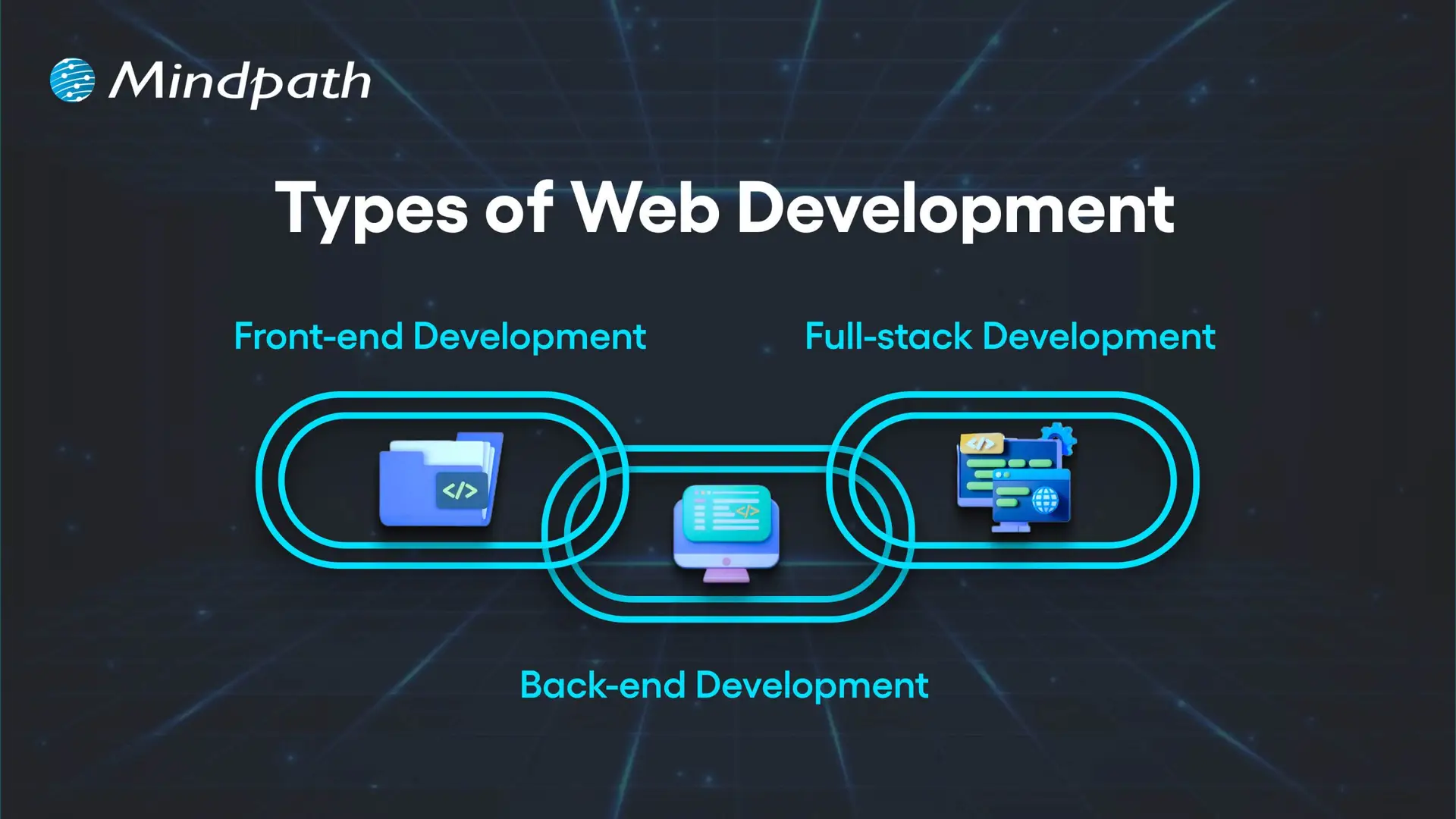
Here are the three types of Web Development

Types of Web Development

1. Front-end Development

Front-end development refers to all the content and elements that appear on the screen in a web browser. Developers using HTML, CSS, and JavaScript create page layouts, decorative elements, and interactive front-end functionality. The purpose of each front-end web page is to be visually appealing, responsive, and usable. Understanding this part is essential in any web development roadmap.

2. Back-end Development

Back-end development refers to everything that happens server-side in order for a website to run properly. Developers will work with data, databases, and user authentication and will largely be responsible for connecting the front-end to the server through application programming interfaces (API). Essentially, back-end development means processing data, executing business logic, and making sure everything is secure.

3. Full-stack Development

Full-stack development encompasses both front-end and back-end development as a way to build fully operating web apps. Developers take on user interface design, server-side, database operation, and everything in between. In this, developers are able to drive every aspect of a project and maximize consistency in integrating the interface visited by a user and the underlying system.

Curious how a web application actually works behind the scenes? Explore the role of frontend and Backend to understand how both layers drive performance and user experience.

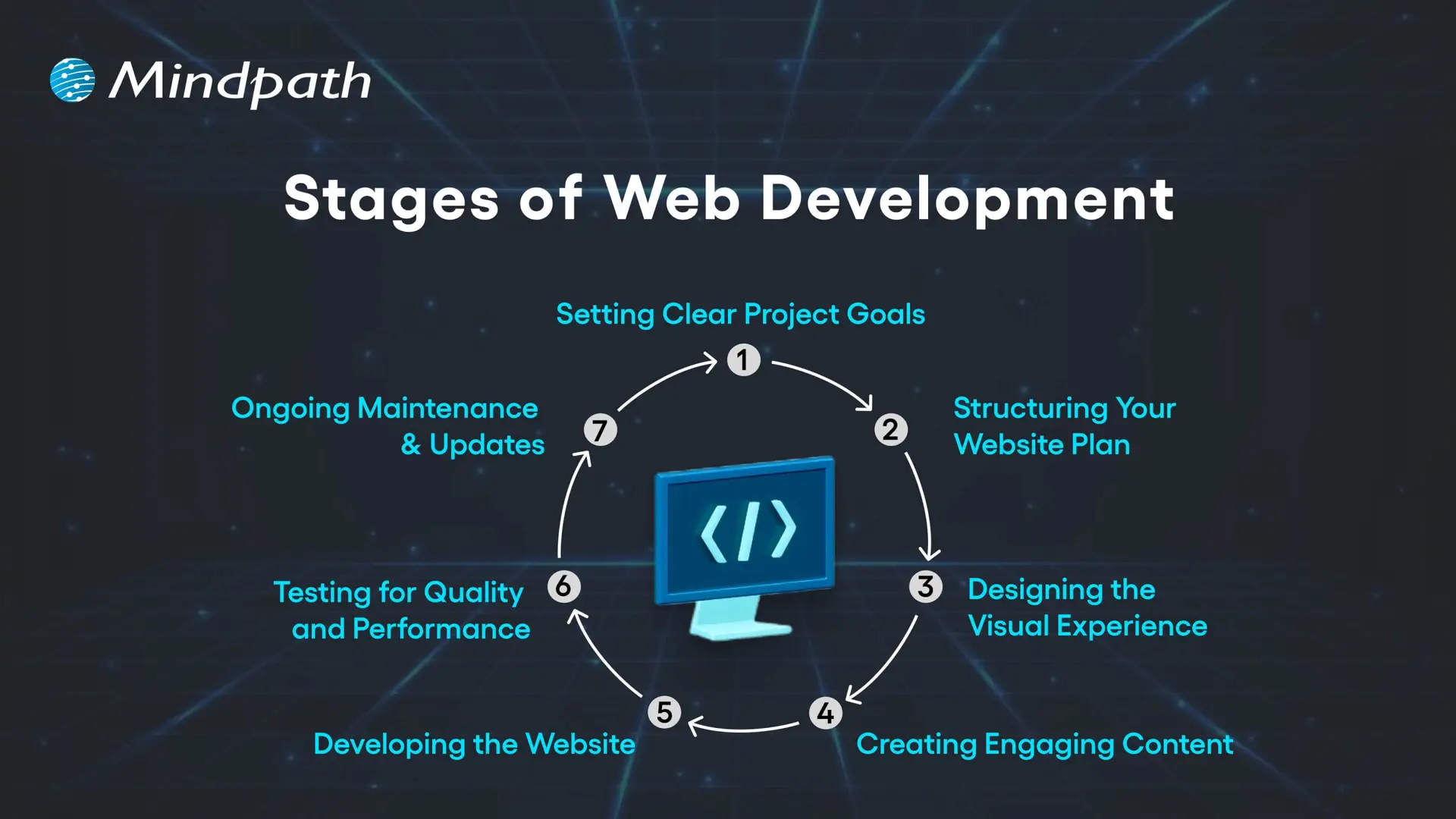
What are the 7 Stages of Web Development?

Web development is a precise discipline as it transforms ideas into interactive digital experiences. In web development, everything is sequenced and implemented purposefully, which culminates in a well-polished, functional product that leaves an impression. Each stage is dependent on the prior stage, which allows web developers to build a website or web application for a target audience. Grasping these stages is an essential step in building a successful web development roadmap.

Stages of Web Development

1. Setting Clear Project Goals

Identifying the purpose of your site is the first step, as well as how it will serve your audience. You need to identify your business goals, unique value proposition, audience preferences, and competitive space. A clear vision is the basis of the whole web development plan.

2. Structuring Your Website Plan

Developing a full model for your website will include solid materials such as sitemaps and wireframes. The sitemap will tell you how pages are linked, while the wireframes provide a visual representation of how you want the major elements of your site structured and what areas they will fill. Getting this correct will help ensure that your website navigation, layout, and the way users will travel around the site are thought out in a solid manner from the start.

3. Designing the Visual Experience

At this stage, we start to think about site aesthetic and brand elements, color, typeface, imagery, and iconography. The design must remain uniform across channels to build brand awareness. User user-friendly and aesthetically pleasing design can draw people in and build trust!

4. Creating Engaging Content

At this stage, you’ll develop content for landing pages, product descriptions, blogs, images, videos, etc., in more detail. Content not only needs to align with the needs and questions of your audience, but content also provides engagement opportunities. Keywords will be employed, and if we do this strategically, we can improve reach and connect with specific traffic that can bring targeted traffic to your site.

5. Developing the Website

Once everything about your design and content has been established, developers will start building the front end (client side) and back end (server side) of your website. Their job is to code your site, code in your required functionalities, and build a technical foundation on which the site can grow as needed. It is essential that you have the technical foundation in place, as having the right technical foundation allows your site to function seamlessly while hopefully supporting businesses in their growth.

6. Testing for Quality and Performance

Everything on your website needs to work correctly before the site launches. Prior to launch, the site must be tested on different devices and different browsers. This testing will include broken link checking, speed optimization, and mobile responsiveness. Testing is considered a crucial step in the process to ensure that the user experience is flawless when the user first experiences the website.

7. Ongoing Maintenance & Updates

Once a website is launched, it must be updated on a regular basis to remain useful, secure, and on trend. Updating a website can mean a lot of things and can include adding content, fixing bugs, adding features or functionality, and backing up. Frequent maintenance will keep you more competitive and help with longer-term success. Mastering these stages plays a vital role in shaping a clear and effective web development roadmap.

Is your web application prepared to handle modern security threats? Explore application security best practices for Web and Mobile Apps to learn how to protect your data, users, and business operations.

Web Development Roadmap 2026: A Step-by-Step Guide

A website development roadmap is a structured plan that outlines the stages, tasks, and goals involved in building and launching a website. This web development roadmap for beginners explains what a website roadmap is by showing how each step connects, helping you create a professional, user-friendly site that meets your goals and performs well in 2026.

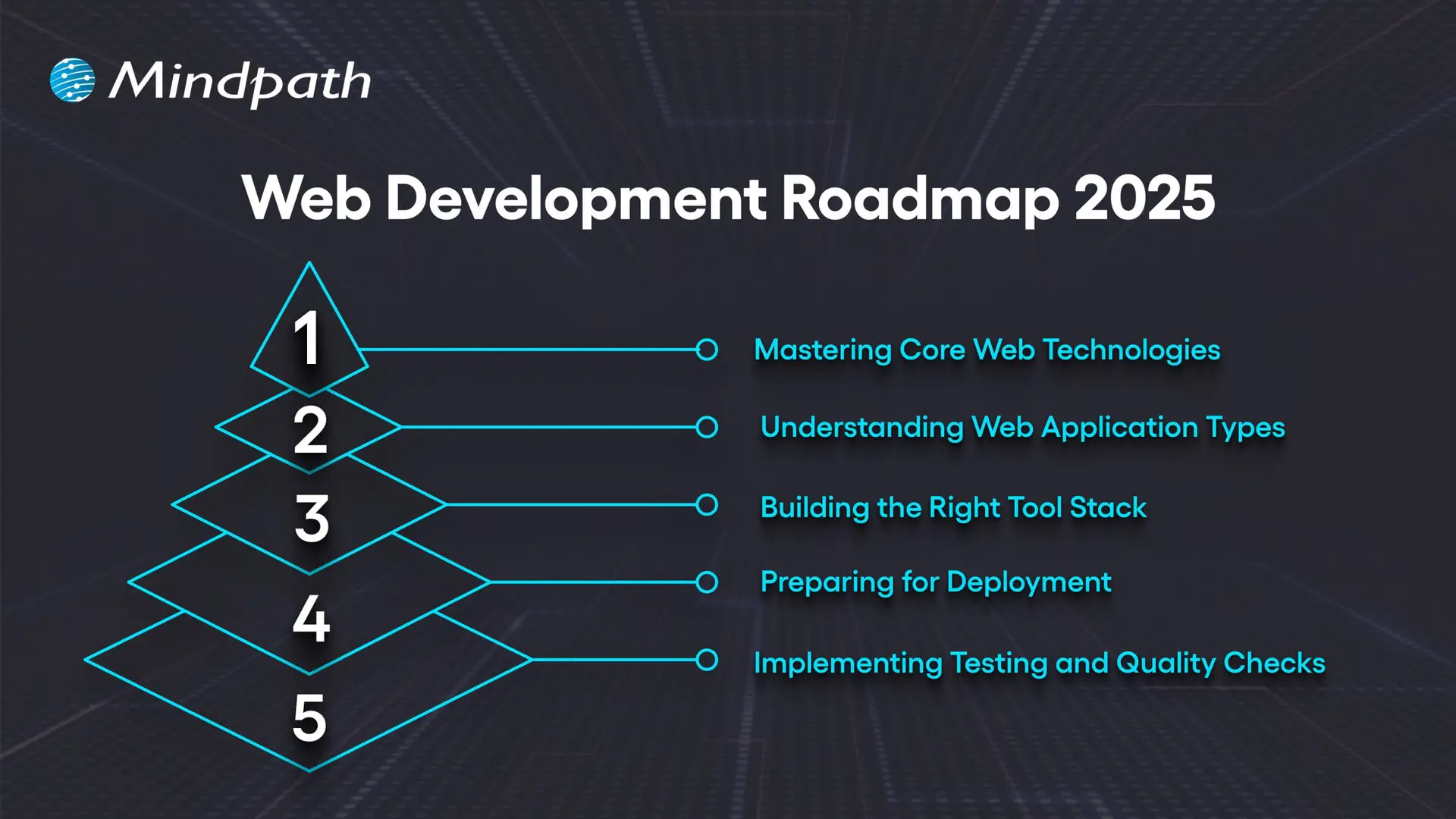
Web Development Roadmap 2025

1. Mastering Core Web Technologies

The important first part of the web development roadmap is getting familiar with the core technologies that underpin the internet. HTML provides the structure, CSS provides the layout, and JavaScript provides interactivity to web pages. Developers should be familiar with some protocols like HTTP/HTTPS, FTP, and TCP/IP that define how data is transferred between the server and the browser. The basics of accessibility, usability, and web semantics are important to know to create accessible, well-structured websites. The fundamentals are the starting point for anyone on the roadmap.

2. Understanding Web Application Types

Before you start building, it’s a good idea to understand the different kinds of web applications and their use cases. Static HTML pages indicate fixed content. Dynamic pages have content that changes based on user interaction. Server-side applications deliver content through languages like PHP, Python, and Java.

Single-page applications provide fast and fluid experiences, with only slight page reloads. Progressive web apps provide offline capabilities and app-like experiences. Hybrid apps combine web and native features. Understanding these types of web applications familiarizes web developers with the appropriate way to develop for each available project.

3. Building the Right Tool Stack

A complete full-stack web development roadmap involves selecting the proper tool set to orchestrate front- and back-end work simultaneously. For the front end, tools like React, Angular, and Vue.js facilitate responsive and interactive interfaces supported by a variety of CSS pre-processors like Sass for long-term maintainability. For the back end, languages like Java, Python, and PHP power the application logic supported by frameworks like Express.js and Django.

Databases like MySQL and MongoDB facilitate data storage. APIs link the client and server, which helps decouple the presentation of data and business logic. There are many elements that the client and server need against the tool stack for productivity, scaling, and performance.

4. Preparing for Deployment

Deployment refers to the process of making your application available to users on the internet. While the use of Git version control helps keep track of application code changes, Docker guarantees the environment in which we run applications will be consistent. Orchestration tools such as Kubernetes are used to serve developer needs when we are doing large deployments.

Most CI/CD pipelines, like Jenkins and GitLab CI, work together to automate the build and release process for applications. Many providers in the cloud space, such as AWS, Azure, and Google Cloud, give us secure environments where our products can be built and serve to scale with ease. Finally, monitoring tools will allow a web developer to track the service performance and ensure their application is performing as expected post-launch.

5. Implementing Testing and Quality Checks

Testing is vital in web development because it ensures that the website is functioning across devices, browsers, and user conditions. Testing types include unit tests, which test individual items (API, elements, etc at the component level) integration testing, which tests that the pieces of the application work together correctly, and end-to-end testing, such as Cypress or Selenium, which will simulate user behaviors to verify a complete workflow. Accessibility testing is a type that checks that the website can be accessed by individuals with disabilities, and performance testing looks to see how quickly the site responds and how it responds under heavy load conditions.

Periodic testing is an essential factor of this process that leads to quality and reliability in the web. The integration testing tests the pieces of the application work together correctly; and end-to-end testing, such as Cypress or Selenium, which will simulate user behaviors to verify a complete workflow.

Not sure which technologies are right for your web app? Explore the tech stack for your web app success to make informed decisions that drive growth and reliability.

Want to Turn Your Web Development Roadmap into a Success Story?

Following a clear web development roadmap ensures you move through each stage with purpose and precision. It helps align design, functionality, and performance to create websites that truly serve their audience. By mastering core technologies, understanding application types, and implementing strong testing, you build projects that are scalable, secure, and ready for long-term success.

At Mindpath, we create websites that are fast, secure, and built to grow with your business. Our web development services cover everything from front-end design to back-end functionality, ensuring a seamless user experience. We specialize in custom web applications, e-commerce platforms, CMS solutions, API integrations, and performance optimization. With a focus on scalability, usability, and innovative design, we turn your ideas into high-performing digital solutions that engage users and deliver results.