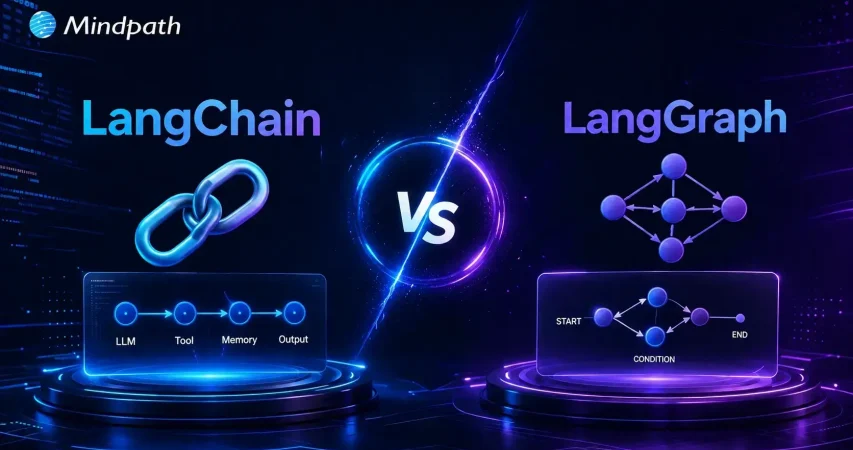
Enterprise AI is rapidly evolving from simple chatbots to intelligent systems that automate workflows, coordinate AI agents, and support business decisions. As organizations build more advanced AI applications, choosing the right framework becomes essential. The discussion around LangChain vs LangGraph is growing because each framework is designed to solve different enterprise AI challenges and development requirements.
Key Takeaways
- 01
Choose frameworks based on business needs, not popularity. - 02
LangChain simplifies building AI applications with reusable components. - 03
LangGraph supports complex, stateful, multi-agent AI workflows. - 04
Both frameworks serve different enterprise AI development requirements. - 05
Combining both frameworks delivers greater flexibility for enterprise AI.
While LangChain focuses on building AI applications with structured workflows, LangGraph is designed for stateful, multi-agent orchestration and complex decision-making. Understanding their differences helps enterprises select the right framework for long-term scalability and performance. In this blog, we will compare LangChain vs LangGraph and help you choose the best fit for enterprise AI.
Looking to build enterprise AI applications that align with your business goals? At Mindpath, we offer AI development services that help businesses design, develop, and deploy scalable AI solutions using frameworks like LangChain and LangGraph for intelligent automation and enterprise workflows.
What is LangChain? An Overview
LangChain is an open-source framework that helps developers connect large language models with external tools, business data, APIs, and memory. The LangChain framework for AI agents simplifies building intelligent, task-driven applications.
It provides reusable components for prompt management, retrieval, tool integration, and workflow creation. This modular approach enables developers to build scalable AI applications that can perform complex business tasks with greater efficiency.
Core Components of LangChain
- Models: Connects applications with different large language models seamlessly.
- Prompt Templates: Creates consistent, reusable prompts using dynamic input variables.
- Chains: Combines multiple AI tasks into structured sequential workflows.
- Memory: Maintains conversation context across multiple user interactions effectively.
- Indexes and Retrievers: Retrieves relevant business data for accurate AI responses.
- Agents: Enables AI to choose tools and execute tasks.
Advantages of LangChain
- Faster Development: Accelerates AI application development using reusable framework components.
- Easy Model Switching: Switches between AI models with minimal code changes.
- Private Data Integration: Connects securely with enterprise data using RAG techniques.
- Context and Memory: Preserves conversation history for better contextual AI responses.
- Autonomous Workflows: Automates complex tasks through intelligent AI agent workflows.
Drawbacks at a Glance
- Over-Abstraction: Hides application logic behind multiple framework layers.
- Limited Control: Reduces flexibility for implementing custom AI workflows.
- Frequent Updates: Breaking changes increase maintenance and upgrade complexity.
- Difficult Debugging: Complex stack traces make troubleshooting production issues harder.
What is LangGraph? An Overview
LangGraph is an open-source framework for building stateful AI applications using graph-based workflows. It enables LangGraph multi agent orchestration, allowing multiple AI agents to collaborate, share context, and complete complex tasks.
Instead of linear workflows, LangGraph uses interconnected nodes and persistent state to manage decisions and long running processes. This architecture makes it well suited for enterprise AI applications requiring reliability, scalability, and workflow control.
Core Components of LangGraph
- State: Stores shared application data across workflow execution steps.
- Nodes: Execute individual tasks, logic, or external tool operations.
- Edges: Connect nodes to define workflow execution sequence clearly.
- Conditional Edges: Route execution dynamically based on current application state.
- Checkpointing: Saves workflow state for recovery and debugging purposes.
- START and END: Define workflow entry and completion points clearly.
Advantages of LangGraph
- Cyclical Workflows: Supports loops, retries, and dynamic workflow execution paths.
- Persistent State Management: Maintains shared state throughout entire workflow execution.
- Human-in-the-Loop: Enables user reviews before critical workflow decisions.
- Multi-Agent Coordination: Orchestrates multiple AI agents working toward shared goals.
- Built-in Checkpointing: Automatically saves workflow progress for seamless recovery.
Drawbacks at a Glance
- Overkill for Simple Tasks: Adds unnecessary complexity for straightforward AI applications.
- Steep Learning Curve: Requires understanding graphs, states, and workflow architecture.
- Maintenance Burden: Complex state management increases long term maintenance efforts.
- Ecosystem Friction: Frequent updates may introduce compatibility and integration challenges.
LangChain Vs LangGraph: A Comparison Table
Understanding the difference between LangChain vs LangGraph helps enterprises select the right framework for their AI requirements. While both support AI application development, they differ in architecture, workflow design, scalability, and enterprise capabilities. The comparison below highlights their key differences.
| Feature | LangChain | LangGraph |
|---|---|---|
| Primary Purpose | Build LLM applications using reusable AI components. | Orchestrate complex, stateful AI agent workflows. |
| Architecture | Linear chains and pipelines. | Graph based architecture with nodes and conditional edges. |
| Workflow Type | Sequential execution. | Non linear execution with loops and branching. |
| State Management | Limited by default, requires additional handling. | Persistent state maintained throughout execution. |
| AI Agent Support | Supports single and simple tool using agents. | Designed for advanced multi agent orchestration. |
| Decision Making | Best for straightforward task execution. | Supports dynamic decision-making during workflows. |
| Control Flow | Fixed execution sequence. | Flexible routing based on workflow state. |
| Human in the Loop | Requires custom implementation. | Native support for approvals and interruptions. |
| Checkpointing | Not available by default. | Built in checkpointing and workflow recovery. |
| Memory Handling | Conversation memory through integrated components. | Shared workflow state across every execution step. |
| Complex Workflow Support | Moderate. | Excellent for enterprise grade AI automation. |
| Scalability | Suitable for small to medium AI applications. | Built for long running, scalable enterprise systems. |
| Development Speed | Faster for prototypes and MVPs. | Slower initial setup but stronger production control. |
| Learning Curve | Easier for beginners and AI developers. | Steeper due to graph concepts and state management. |
| Debugging | Can become difficult in larger applications. | Easier with checkpoints, traces, and workflow visibility. |
| Integration | Extensive integrations with models, vector databases, APIs, and tools. | Uses the same ecosystem while adding orchestration capabilities. |
| Enterprise Use Cases | Chatbots, RAG applications, document search, AI assistants. | Multi-agent systems, autonomous workflows, compliance processes, enterprise automation. |
| Best For | Rapid AI application development with minimal complexity. | Mission critical AI systems requiring reliability and orchestration. |
| Typical Business Choice | Organizations launching AI products quickly. | Enterprises deploying production ready AI agents at scale. |
Which Is Better: LangChain or LangGraph?
There is no universal winner in the LangChain vs LangGraph comparison because each framework is built for different enterprise AI requirements. The right choice depends on your application complexity, workflow design, scalability needs, and long term business goals.
When to Use LangChain?
Choose LangChain if your organization needs:
- AI chatbots and virtual assistants
- RAG based knowledge retrieval applications
- Rapid prototyping and faster development
- Sequential AI workflows with minimal orchestration
- Flexible integration with LLMs, APIs, and vector databases
When to Use LangGraph?
Choose LangGraph if your organization needs:
- Multi agent AI systems with shared responsibilities
- Long running, stateful AI workflows
- Human approval and compliance checkpoints
- Dynamic routing, loops, and conditional execution
- Enterprise grade automation requiring reliability and scalability
For organizations building advanced autonomous AI systems, LangGraph is often the best framework for AI agents. However, many enterprises achieve the best results by combining LangChain for application development with LangGraph for orchestration and workflow management.
Which Framework Should Enterprises Choose for AI?
Choosing the right framework depends on your enterprise AI goals, workflow complexity, and scalability requirements. Instead of asking is LangGraph better than LangChain, organizations should evaluate which framework aligns with their application architecture, operational needs, and long-term AI strategy for maximum business value.
At Mindpath, we build enterprise AI solutions tailored to your business requirements, from intelligent assistants to advanced multi agent systems. Our AI development experts help organizations design, develop, integrate, and scale secure AI applications using the right frameworks for long term success.