Home

DevOps vs. Traditional IT: Which Approach is Right for Your Business?

DevOps vs. Traditional IT: Which Approach is Right for Your Business?

Join our Newsletter!

DevOps vs Traditional IT

The technology landscape has been drastically developing at a great pace. Businesses are under pressure to innovate faster and deploy more reliable customer experiences. At this great transformation, the conversation around DevOps vs. Traditional IT has become critical. So, the right approach can influence your speed, innovation, costs, and even customer satisfaction.

Further, there are some companies that still benefit from the structure and control of traditional models. On the other hand, others need the agility and automation that DevOps delivers. In this blog, you are going to understand the difference. This can also help you make the right choice that matches your business goals.

Planning to modernize your IT operations for faster and more efficient delivery? Mindpath offers DevOps services that help streamline workflows, enhance collaboration, and accelerate your development lifecycle.

What is Traditional IT?

The global IT services market size has already reached USD 1,652.27 billion this year. Further, it is going to expand to reach USD 3,299.78 billion by 2033. So, traditional IT values a structured process and initiates work step-by-step. Here, different teams manage multiple parts of the software development lifecycle. For example, developers write the code, and testers will verify if the system has any issues.

This structure majorly values the Waterfall model, where every phase must be completed before shifting to the next one. One of the best parts of traditional IT infrastructure is that it ensures thorough documentation and testing. But it somehow makes the process slower and more rigid. Any last-minute change can include major delays and disturbances.

  • You can have clear department roles and responsibilities.
  • It is a better option for legacy applications.
  • You can have strong control over infrastructure and other processes.
  • It is easily compliant in highly regulated environments.

What is DevOps?

The DevOps market size is expected to reach USD 108.26 billion by 2035. As per the recent statistics, around 72% developers are using the Agile method, whereas 46% of organisations are combining methodologies. So, DevOps is a modern and collaborative approach that combines development and operations into an individual workflow.

Instead of working in isolated teams, DevOps creates a culture of shared responsibility. Further, your whole team can leverage the relevance of automation and continuous improvements.

  • Unlike a traditional system, DevOps values agile principles.
  • It initiates modern IT operations that automate tasks like testing, integration, and deployment.
  • Additionally, this approach can help you reduce errors while improving the overall efficiency.

The Major Difference Between DevOps vs. Traditional IT

Both approaches aim to support your business technology. However, they hold some prominent differences as given below.

1. Deployment Speed

Traditional IT mainly uses scheduled releases, sometimes weekly or monthly. On the other hand, DevOps supports continuous releases through automation. This means you can go live with your features, fixes, and updates faster.

2. Team Structure

Your whole team might remain separated in traditional IT. Developers need to write the code, and they deploy it while handling the issues in the later stage. This can create communication gaps and delays. However, in DevOps, teams can work together from the beginning. This is one of the biggest DevOps benefits for business. Your developers and testers will have ownership.

3. Infrastructure Management

Traditional environments majorly depend on physical servers or manually managed systems. But DevOps relies on cloud environments, containers, and automation to handle infrastructure effectively.

4. Risk Handling

Traditional IT might avoid changes because it can introduce instability in the whole system. However, DevOps is capable of handling risks differently. Instead of making fewer big changes, it allows you to include smaller and more frequent updates.

Top DevOps Benefits for Business and IT Operations

Here are some top DevOps benefits for business that can incredibly encourage your performance in the long run.

1. Faster Time to Market

One of the biggest advantages of DevOps is speed. With automation, you can reduce the chances of delays in testing, deployment, and monitoring. This means your business can launch new products or features much faster.

2. Effective Collaboration

Instead of your teams blaming each other when issues arise, DevOps allows you to have better communication. They can work together and share goals and vision.

3. Higher Reliability

DevOps is not just about moving fast. It accesses continuous monitoring, automated testing, and smaller releases. This makes your systems stable over time.

4. Reduced Operational Charges

Manual processing can be expensive for you. Repetitive deployments, testing, and infrastructure management can consume your time and resources. So, DevOps can reduce these defects through precise automation.

5. Improved Security

With the right DevOps implementation, security assessment and monitoring tools can be directly added to your delivery pipeline. So, fewer blind spots mean faster issue assessment.

Why are Traditional IT Advantages Still Making Sense?

With the ultimate rise of DevOps, traditional models are still relevant in the market. Here are the situations where traditional advantages can be more prominent than speed.

  • You handle a strict environment with severe policy regulations.
  • Your application updates are infrequent and not very urgent.
  • Your internal team is structured around conventional infrastructure management.

A Brief Comparison Between Traditional IT vs. DevOps

Here are some key aspects that define the values of DevOps vs. traditional IT in a structured way.

Factors Traditional IT DevOps
Core Strength Stability and Control. Speed and collaboration.
Team Structure Excludes teams from development and operations. Make a team to work together.
Infrastructure Values manual proceedings. Use automation.
Business Impact Helps in maintaining stable IT environments. Supports modern IT operations.
Best For Regulated Industries Fast-Growing Businesses

The Best Approach for Many Businesses

You need to understand that organizations don’t just jump directly from traditional IT infrastructure to full DevOps. In fact, they change with time. They start by automating the testing phase while influencing the operation pipelines. Further, they might move selected workloads to the cloud while modernizing one application at a time. This hybrid approach can work best because it reduces disruptions while still bringing in the benefits of modern IT operations.

Conclusion

When it comes to DevOps vs. Traditional IT, both approaches come with their own uniqueness. But, in today’s highly developing technological world, DevOps is becoming a serious choice among competitive businesses. However, the best approaches depend on your business goals and growth plans.

If you are ready to make the shift to DevOps and future-proof your business, Mindpath can be your ideal partner. With our cloud and DevOps services, we help bridge the gap through automation, scalable infrastructure, and DevOps-led transformation solutions.


Still Running Releases the Old Way?

Move to automated delivery without disrupting your current setup.

Frequently Asked Questions

The main difference is that traditional IT works in separate departments, whereas DevOps can encourage precise collaboration and automation.
DevOps is ideal for businesses that need speed and continuous updates. On the other hand, traditional IT can work well for highly regulated environments.
Some of the essential benefits include faster time to market and better collaboration while valuing operational charges and improved reliability.
Many businesses take a hybrid approach by keeping stable legacy systems in place. They use DevOps practices for newer applications.
The best way to shift from traditional IT to DevOps is through automation and cloud migration. You can also initiate it by improving collaboration between development and operations teams.

Support Is One Click Away

Featured Posts

Related Post

AI in mobile app development

Artificial intelligence is rapidly transforming from a buzzword to a necessity for businesses in all industries. You must have noticed the impact of AI in mobile app development with examples of voice assistants like Google Assistant and Siri. Why is artificial intelligence useful for mobile app development? Mobile app developers can use AI to capitalize on a broad range of capabilities, including smart automation and better efficiency.

AI is no longer just about science fiction as businesses leverage it for different operations. The adoption of AI for developing mobile apps creates a new perspective on how companies pursue growth. Artificial intelligence not only simplifies the work of developers but also ensures seamless experiences for users. An overview of the benefits of AI in developing mobile apps can help you understand its significance. 

Using AI in mobile applications can be beneficial, but many businesses struggle to implement it. Mindpath’s mobile app development services will deliver full-proof planning and execution, ensuring innovation and efficiency in every project.

Understanding the Fundamentals of AI in Mobile App Development

AI in mobile app development refers to integrating artificial intelligence into the process of building mobile applications and embedding smart features within them. By combining machine learning (ML), natural language processing (NLP), and computer vision, developers can create intuitive, self-improving apps, while also streamlining the development process itself.

AI-powered mobile apps analyze user data in real time to make intelligent, context-aware decisions — delivering personalized experiences without manual input. This allows apps to adapt dynamically to what each user actually needs. The best thing is that mobile apps can achieve all this without human intervention. The utility of different technologies in mobile apps can help you understand how AI revolutionizes mobile app development.

How AI Technologies Power Smarter Mobile Apps?

AI mobile apps use machine learning algorithms to continuously learn from user behavior and refine their performance over time, automatically aligning with evolving user expectations.

Developers can capitalize on the benefits of AI in mobile apps to deliver a broad range of functionalities to users. For instance, natural language processing (NLP) enables in-app chatbots to interpret user queries contextually and respond in natural, human-like language. AI mobile applications deliver more than just automation as you can rely on artificial intelligence to create next-gen apps that can adapt to the future. 

How Have Developers Used AI for Mobile Apps?

The distinct functionalities of AI technologies for mobile app development reveal crucial insights about growing popularity of AI-powered mobile apps. You can come across many new AI features in mobile applications used by millions worldwide. The functionalities of artificial intelligence in modern mobile apps can help you understand why AI-powered mobile apps are a necessity now.

1. Chatbots and Virtual Assistants

You must have seen or used chatbots on many mobile apps that make intelligent conversations with users. Chatbots and virtual assistants use AI for customer service without the involvement of humans. For instance, healthcare apps can rely on AI chatbots to provide accurate medical diagnosis on the basis of symptoms. Voice assistants like Siri and Alexa can interact with users and help them with different tasks, like searching information and setting reminders. 

2. Personalization of User Experiences

Developers have discovered that AI can play a major role in personalizing user experiences according to each user’s preferences. The use of AI tools for mobile app development ensures that artificial intelligence can analyze user behavior, past interactions and preferences to find personalized content and recommendations. As a result, your mobile app can be more engaging for users by delivering the relevant services. Netflix is one of the biggest examples of using AI for personalizing user experiences as it recommends content on the basis of your watch history.

3. Facial Recognition

Computer vision is one of the formidable AI technologies that have gained recognition in mobile app development workflows. An overview of new mobile app development trends reveals how facial recognition has become a necessity in modern apps. Developers can use computer vision in their mobile apps to recognize faces and patterns. AI-powered mobile apps can leverage facial recognition to offer better security. The best example of using AI for facial recognition in mobile apps is Instagram, which offers AR filters with computer vision.

4. Power of AI Automation

Developers cannot think about using artificial intelligence for developing mobile apps without incorporating automation. As a matter of fact, automation is the biggest strength of AI that helps in streamlining repetitive tasks. With AI taking care of manually intensive tasks, mobile apps can offer better efficiency and productive user experiences. You can notice the best example of AI automation in mobile apps in Gmail, which automatically classifies emails into different categories.

Want to streamline your operations and build smarter workflows using the latest tools? Explore our blog on mobile app development tools for a better understanding.

Why Should Developers Trust AI for Mobile App Development?

Artificial intelligence contributes to diverse aspects of mobile app development and offers numerous benefits. Businesses can rely on AI mobile app development experts to capitalize on these advantages and create cutting-edge apps. An overview of the advantages of AI in developing mobile apps can help you understand why AI-powered mobile apps are gaining traction.

1. Seamless Automation in Mobile Apps

Automation is one of the biggest advantages you can get from using artificial intelligence to create mobile apps. Your mobile app works on many background tasks, including data entry and content moderation, while delivering what the users want. Artificial intelligence can do the heavy lifting for your mobile apps by automating these tasks, thereby achieving better efficiency. At the same time, users can also get faster access to the app’s functionalities and services.

2. Creating Custom Experiences for Each User

Custom user experiences are the next big thing in mobile app development as user behavior trends favor personalization. Every mobile app user needs services and content personalized according to their behavior and preferences. The utility of AI in application development primarily revolves around creating apps that can adapt to each user and their needs. Artificial intelligence can empower your mobile app to provide personalized content and product recommendations to users.  

3. Smarter Decision Making

Mobile apps are not autonomous agents who can take decisions independently on behalf of customers. AI in decision-making can empower mobile apps with the capability to analyze patterns and detect trends or anomalies. The growing popularity of AI app ideas depends significantly on how artificial intelligence provides actionable insights. Mobile apps can use the insights to optimize strategies for customer engagement and pricing with the ability to make better decisions. 

4. Breaking the Language Barriers

Artificial intelligence also contributes significantly to expanding the global reach of mobile apps. Language is one of the biggest obstacles for the expansion of mobile apps in international markets. However, a reliable AI app development company can help you overcome these barriers as AI technology offers real-time language translation features in mobile apps. Artificial intelligence in mobile apps will emerge as a prominent trend to make mobile apps usable across all countries.

5. Enhanced Accessibility and Inclusivity

AI breaks the language barrier and also makes your mobile apps more accessible to different users. Users with disabilities can capitalize on voice recognition features to access all the functionalities in a mobile app. For instance, visually challenged users can access different features on your mobile app with speech-to-text typing and voice-controlled navigation. Artificial intelligence ensures that literally everyone can become a user of your mobile apps.

6. Improvements in Operational Efficiency

Artificial intelligence also helps in enhancing the operational efficiency of your mobile apps. You can rely on AI for boosting app performance with efficient resource allocation, performance monitoring and predictive maintenance tasks. It plays a crucial role in reducing downtime, optimizing backend processes and ensuring smooth functionality of your app. 

Most of the guides on how to develop an AI mobile app also emphasize how AI can optimize app performance. Artificial intelligence can help in optimizing battery consumption, reducing unnecessary background processes and managing memory usage. The enhanced operational efficiency translates directly into a more responsive and faster user experience.

Want to build high-performance digital products and stay updated on the latest mobile app development technologies shaping modern businesses? Check out our guide on mobile app development technologies to explore the best tools and frameworks for creating scalable, future-ready applications.

What are the Challenges of Adopting AI for Mobile App Development?

The benefits of AI for developing mobile apps create a strong case for developers to embrace artificial intelligence. However, developing efficient and powerful mobile apps with AI brings some formidable challenges. First of all, the development costs will be higher as developers will need expensive AI tools. Developers will also have to think about issues with data quality and privacy. On top of it, mobile processing power is limited and using AI can lead to problems with performance and battery life.

Unlock the Full Potential of AI in Mobile Apps

The uses of AI in mobile app development will introduce a new perspective on mobile app user experiences. Artificial intelligence not only contributes to automation but also enhances scalability and performance of mobile apps in different scenarios. You can notice how AI makes mobile apps more accessible to users by removing language barriers and introducing facial recognition and speech-to-text typing features.

Mindpath is your trusted destination for mobile app development services with the AI advantage. We have been creating mobile apps for clients from different industry verticals with the assurance of efficiency and enhanced productivity. You can rely on our experts to develop mobile apps that reflect your brand identity and achieve excellence on all benchmarks. Consult with our experts and find the best services for AI-powered mobile app development now.

what is a chabot

In this fast-paced world of business, companies are actively seeking smarter tools to improve customer service and communication. Chatbots are one of the most common, and a great way to get attention. If you have engaged with a virtual assistant on a website, chances are that you have seen it in action. So, what is a chatbot? You may have wondered about this when you are chatting with a brand online or if you are shopping on a website where you are getting instant replies.

As these types of digital assistants proliferate, they are quickly becoming an essential aspect of how businesses operate in 2026. With faster response times and the ability to interact with multiple customers at once, it is no surprise that chatbots are altering how companies relate to their customers. In this blog, we will provide you with everything you need to know about chatbots including benefits, features and examples of chatbots in action.

Struggling to keep up with customer queries or deliver 24/7 support efficiently? Mindpath’s GenAI-driven chatbot development services can help you manage customer service and boost business performance.

What is a Chatbot in Simple Words?

A chatbot is an artificial intelligence (AI) software application that is designed to have human-like conversations. They use natural language processing (NLP) to understand what users are stating and respond in a way that feels natural in a conversation and is helpful. They can help with answering questions, can guide the user, and can perform some tasks.

Chatbots can be a part of a website, an app, a messaging app, or a voice assistant. AI chatbots help businesses communicate with customers 24/7. They can perform tasks like making bookings, solving common problems, and providing information. AI chatbots are invaluable tools for improving customer experience and communication.

How does a Chatbot Work?

Chatbots work by using artificial intelligence and natural language processing to understand what users are saying. When someone types or speaks to a chatbot, it reads the message and tries to figure out what the person wants. It does this by matching the message with words or phrases it already knows.

Once the chatbot understands the request, it picks the most suitable response and replies to the user. Some chatbots follow simple rules, while others learn from past conversations to improve over time. This process allows chatbots to provide quick and helpful replies in a natural and professional way.

What are the Benefits of Using AI Chatbots for Businesses?

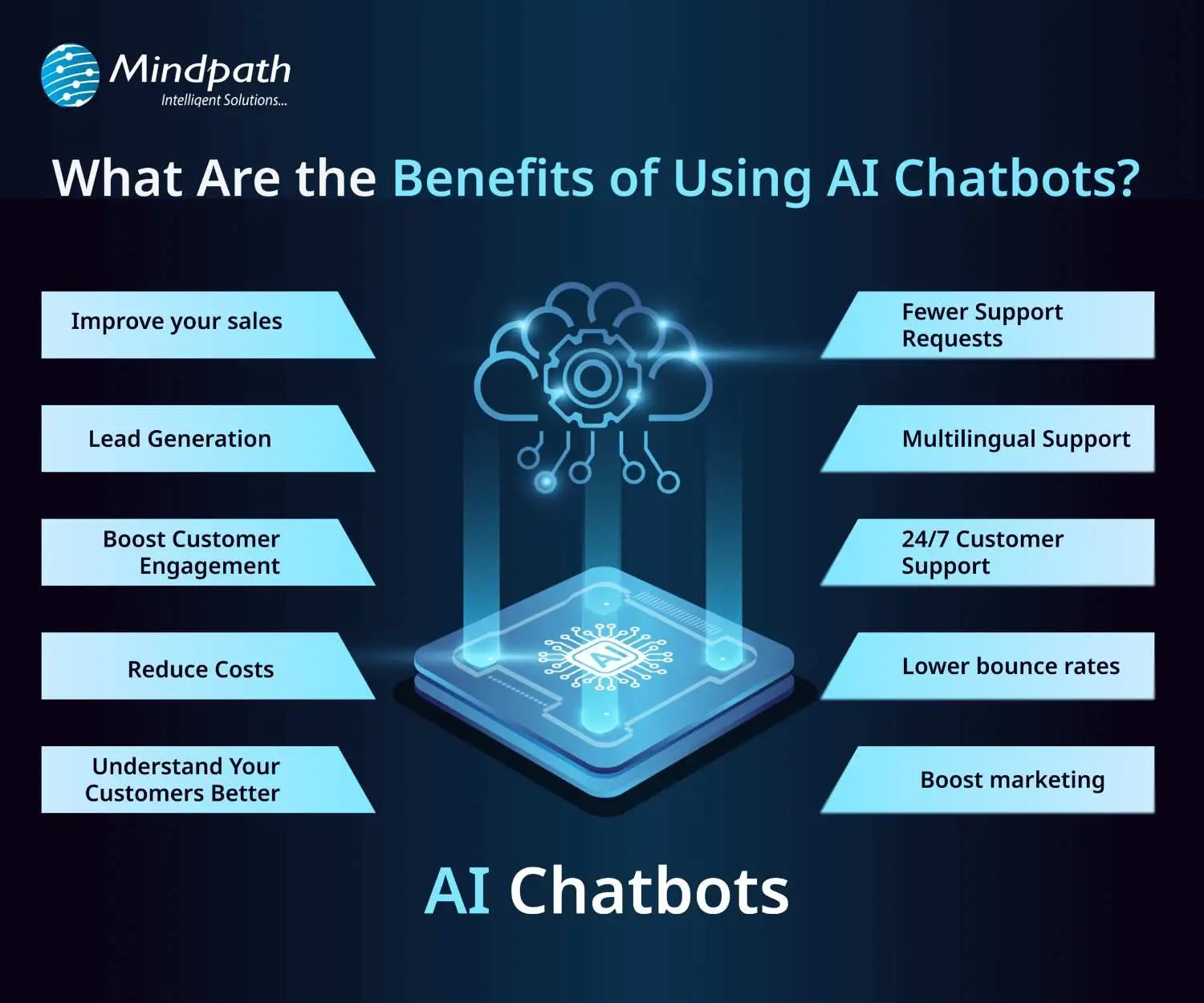
AI chatbots are now widely used by businesses to improve customer interaction and automate routine tasks. Here are some of the key benefits of chatbot technology that can help boost your business:

benefits-of-ai-chatbots-scale

1. Improve Sales

Chatbots can increase sales by showing new products or offering special discounts to website visitors. They send helpful messages that guide users toward making a purchase. These bots also assist in product selection and order placement. This makes it easier for new visitors to become paying customers.

2. Lead Generation

Chatbots help gather leads even before a conversation starts. They ask visitors for basic details like name and email to begin the chat. They can also qualify these leads by asking relevant questions based on customer needs. This helps your sales team know who they’re speaking with and what the customer is looking for.

3. Boost Customer Engagement

Chatbots make online experiences more interactive and personal. Instead of searching through a website, users can chat and get instant answers. Bots reply with clear information based on user questions. This keeps customers engaged and helps them find what they need quickly.

4. Reduce Costs

Using chatbots is more affordable than hiring multiple support agents. They can handle many tasks like answering FAQs or booking appointments, which saves time and money. You’ll still need some team members, but bots make the process faster. This is especially helpful for managing high volumes without extra costs.

5. Understand Your Customers Better

As chatbots collect important customer data during conversations, they can also run surveys to check customer satisfaction. By reviewing these chats, businesses can find out what customers like or dislike. This feedback helps improve products and services over time.

Wondering why chatbots are becoming essential for modern businesses? Explore the top Benefits of Chatbots Every Business Leader Should Know and learn how they drive growth.

6. Fewer Support Requests

Chatbots handle many common questions, which reduces the number of queries sent to human agents. This helps agents focus on more complex issues. It also improves customer satisfaction by providing quick solutions. A chatbot for business can balance automation and personal support effectively.

7. Multilingual Support

Multilingual support allows chatbots to speak different languages. This is helpful if your business has customers from various countries. The bot can reply in the language your customer prefers. This makes a chatbot for small businesses and large companies more accessible to global audiences.

8. 24/7 Customer Support

Chatbots are always available, even when your team is offline. If someone is browsing late at night and needs help, the bot can step in. It can guide them to the right product or answer their questions. This leads to better customer service and more satisfied clients.

9. Lower Bounce Rates

Chatbots can keep users on your site longer by offering help when someone is about to leave. They provide answers or discounts that encourage people to stay. This improves your website’s engagement and SEO performance. Visitors feel supported and are more likely to explore further.

10. Boost Marketing

Marketing chatbots can suggest products, offer deals, and guide customers through the buying process. They also collect useful data for future campaigns. One of the ideas can be a spinning wheel offering discounts, which encourages users to buy. This creates an engaging and effective marketing strategy.

How can conversational AI take your customer engagement to the next level? Explore the power of Conversational AI Chatbots for Business Growth and discover how they drive results.

Real-World Use Cases of Chatbots

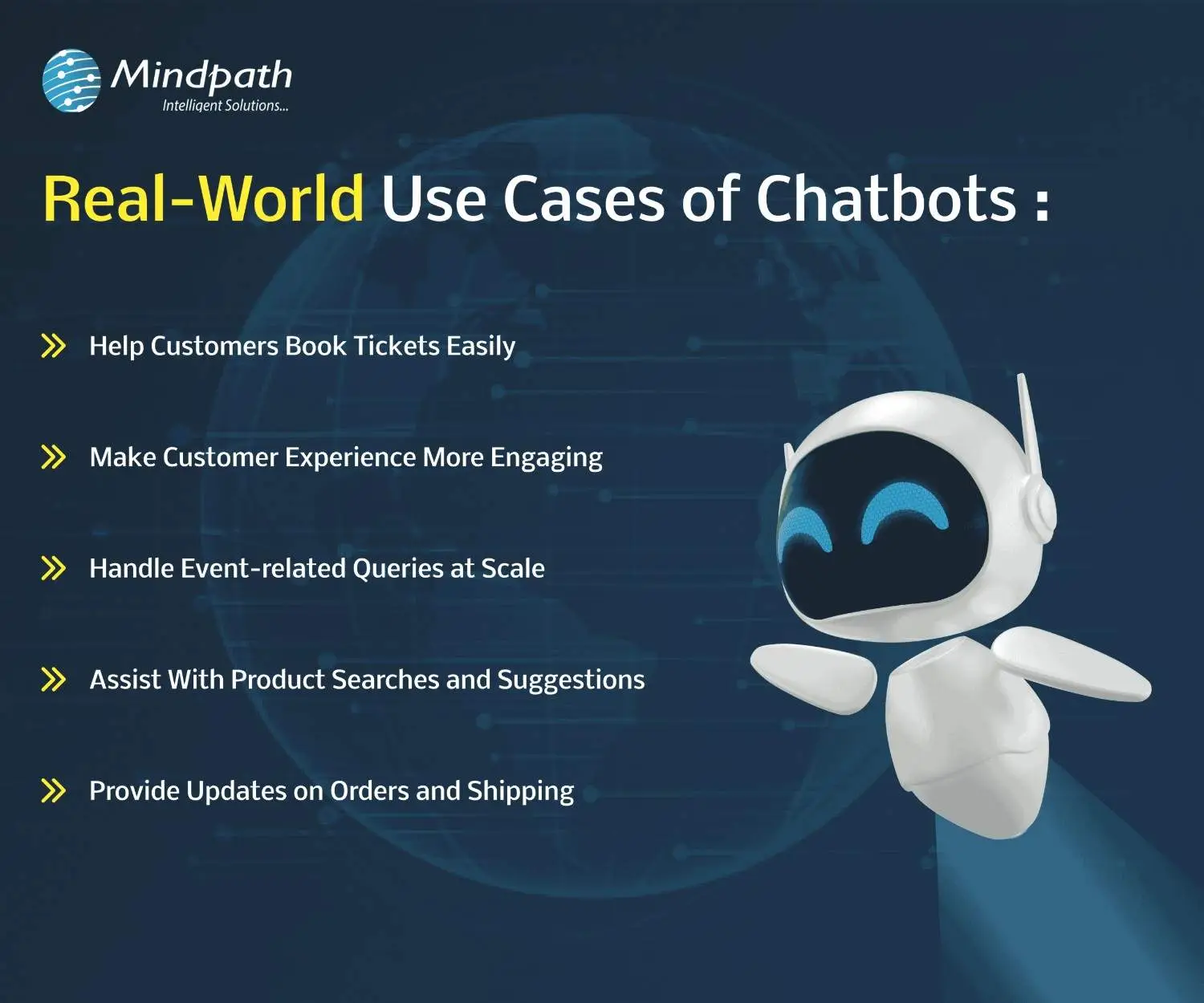
Chatbots are being used across many industries to simplify tasks and improve customer experiences. Here are some real-world chatbot examples that show how businesses are using them effectively for different needs.

use-cases-of-chatbots-scale

1. Help Customers Book Tickets Easily

A chatbot can answer common questions like seat availability, movie timings, and refund policies while guiding users to book tickets smoothly. PVR Cinemas uses this on their website to help visitors quickly complete bookings and check offers.

2. Make Customer Experience More Engaging

Chatbots can add personality by offering quizzes, jokes, and product suggestions in a fun and helpful way. LEGO’s chatbot Ralph helps users find the right gift through playful questions and interactive chat.

3. Handle Event-related Queries at Scale

When thousands of people need answers about an event, a chatbot can respond instantly with details like schedules, speakers, and directions. Slush uses one to manage large volumes of attendee questions efficiently on their event site.

4. Assist With Product Searches and Suggestions

A chatbot can search inventory and offer personalized product recommendations based on customer preferences. Sephora’s chatbot does this well by guiding users to suitable makeup products and checking stock availability.

5. Provide Updates on Orders and Shipping

Instead of navigating emails and websites, customers can enter their order ID in a chatbot to get instant shipping updates. H&M allows shoppers to track their deliveries directly through its chatbot.

Thinking about Using Chatbots to Elevate Customer Experience?

Chatbots are transforming how businesses interact with customers by offering fast, helpful, and personalized service. From booking tickets to answering questions, these tools simplify tasks and improve user satisfaction. With so many benefits, it’s no surprise that more companies are embracing chatbot technology to stay ahead in 2026.

At Mindpath, we offer custom chatbot development tailored to your business goals. Our chatbot development services are designed to help you improve customer interactions, increase engagement, and streamline operations. Whether you need a simple support bot or a fully integrated solution for sales, marketing, or service, our expert team builds smart, reliable chatbots that deliver real results.

Frequently Asked Questions

1. How can a chatbot improve customer experience on a website?

A chatbot improves customer experience by offering instant responses, guiding users to the right information, and reducing wait times. It creates a smooth journey by helping visitors find what they need quickly, which increases satisfaction and encourages them to stay longer on the website.

2. What is a chatbot used for in daily business operations?

A chatbot is used for handling routine tasks like answering FAQs, booking appointments, collecting customer data, and assisting with purchases. It helps teams save time by automating repetitive work while ensuring customers receive quick and consistent support throughout their interaction.

3. Can chatbots work effectively for both small and growing businesses?

Yes, chatbots are useful for both small and growing businesses. They help manage customer queries without needing a large team, making operations more efficient. As the business grows, chatbots can scale easily to handle more interactions without increasing costs significantly.

4. What should businesses consider before implementing a chatbot?

Before implementing a chatbot, businesses should define clear goals, understand customer needs, and choose the right type of chatbot. It is also important to plan integration with existing systems and ensure proper testing to deliver a smooth and effective user experience.

5. What is a chatbot’s role in improving website engagement?

A chatbot plays an important role in keeping users engaged by starting conversations, offering assistance, and providing relevant suggestions. It reduces bounce rates and encourages interaction, helping businesses create a more interactive and user-friendly website experience that keeps visitors interested.

small language models vs large language models
Businesses want AI that delivers strong results without creating unnecessary costs, complexity, or infrastructure demands. Small language models vs LLM has therefore become an important discussion for teams planning AI adoption. While SLMs offer speed and efficiency for focused tasks, LLMs provide broader capabilities for complex business requirements.

Key Takeaways

  1. SLMs suit focused tasks requiring speed and efficiency.
  2. LLMs handle complex workloads requiring broader capabilities.
  3. Model size alone does not determine business value.
  4. SLMs can reduce infrastructure and inference costs.
  5. Hybrid models can balance cost, speed, and accuracy.

Choosing the right model depends on the workload, data, accuracy expectations, deployment environment, response speed, and budget. A larger model may offer greater flexibility, but a smaller one can be more practical for specific applications. This blog compares both approaches to help businesses make informed AI decisions.

Understanding Both Small and Large Language Models

Small language models (SLMs) are compact AI models designed to handle specific tasks with fewer computational resources. Their focused architecture can deliver faster responses, lower infrastructure requirements, and more efficient deployment. Businesses can use SLMs for tasks such as classification, summarization, document processing, internal knowledge queries, and workflow automation where highly specialized performance matters.

Large language models (LLMs) are built with significantly larger parameter sets and broader training capabilities. They can understand diverse instructions, manage complex context, generate detailed content, and support advanced reasoning across different business scenarios. For LLM vs SLM for business, the right choice depends on the complexity of the workload, expected performance, deployment requirements, and available budget.

The key difference is not simply model size. It is how effectively each model matches the task it needs to perform. An SLM can be highly effective for a focused workflow, while an LLM can provide greater flexibility for applications requiring broader capabilities. Businesses can also explore this large language model guide to understand LLM capabilities in greater detail.

How Do Language Models Work?

Language models learn patterns in text and use those patterns to generate relevant responses based on the input they receive. During training, a model processes large amounts of data and adjusts its parameters to recognize relationships between words, concepts, and context. During inference, it uses this learned knowledge to predict and generate an appropriate output.

The main difference between small and large models comes from their scale, training approach, and resulting capabilities. SLMs generally use fewer parameters and require less computing power, making them suitable for focused tasks. LLMs use larger architectures that can handle broader context, complex instructions, and diverse workloads. However, model size alone does not determine performance. Data quality, fine-tuning, retrieval, prompting, and evaluation also influence how effectively a model performs for a business use case.

Businesses considering model customization can also explore RAG vs fine-tuning to understand different approaches for improving AI performance.

Lightweight AI Models vs Large Language Models: Key Business Differences

Choosing between SLMs and LLMs requires looking beyond model size. The small language models vs LLM decision should consider how each option performs against practical business requirements such as speed, accuracy, infrastructure, privacy, and customization.

1. Performance and Accuracy

LLMs generally have an advantage when applications require complex reasoning, broad knowledge, or varied instructions. SLMs can deliver strong results for narrowly defined tasks, especially when they are trained or fine-tuned for a specific business domain.

2. Speed and Latency

Smaller models typically need fewer computational resources, which can support faster responses. This makes SLMs useful for high-volume applications where even small delays can affect user experience or operational efficiency.

3. Infrastructure Requirements

LLMs often require greater memory and computing capacity for deployment and scaling. SLMs can operate with lighter infrastructure, making them attractive for businesses with limited resources or applications that need local or edge deployment.

4. Privacy and Control

Businesses handling sensitive information may prefer architectures that provide greater control over where data is processed. Smaller models can support private or controlled deployments, although security ultimately depends on the complete AI architecture, data practices, and access controls.

5. Customization

SLMs can be highly effective when a business has a clearly defined use case. Fine-tuning or domain adaptation can help optimize them for specialized tasks, while LLMs provide broader capabilities when applications need to support many different types of requests.

The better choice depends on the workload. Businesses should evaluate actual performance, operating costs, infrastructure needs, and business outcomes instead of assuming that the largest model will deliver the best overall value. An AI readiness checklist can also help businesses assess their requirements before selecting an AI approach.

Small Language Models vs Large Language Models: Comparison

Factor Small Language Models (SLMs) Large Language Models (LLMs)
Model Size Smaller and task-focused Larger with broader capabilities
Performance Strong for specific workloads Strong for complex, diverse workloads
Response Speed Generally faster Can require more processing time
Infrastructure Lower compute and memory requirements Higher infrastructure requirements
Operating Cost Typically lower at scale Typically higher at scale
Accuracy High for well-defined tasks Better suited to complex and varied tasks
Customization Easier to optimize for specific use cases Broad customization across diverse applications
Privacy & Deployment Well suited to controlled or local environments Often requires more robust deployment infrastructure
Scalability Efficient for high-volume, repetitive tasks Better for applications with varied and growing demands
Best For Classification, extraction, summarization, focused automation Complex assistants, reasoning, content generation, broad AI applications

Small Language Model vs LLM Cost: What Should Businesses Consider?

Cost can vary significantly based on model size, usage volume, hosting, and infrastructure. The small language models vs LLM decision should therefore consider total operating cost, not model pricing alone.

1. Compute Requirements

SLMs generally require lower computing resources than LLMs, which can make them more practical for workloads where infrastructure efficiency is a priority.

2. Infrastructure Cost

SLMs generally require lower infrastructure resources, while LLMs often require more powerful computing capacity for deployment and scaling.

3. Inference Cost

SLMs can have lower inference costs for many high-volume tasks. LLMs can cost more when workloads require larger amounts of computation.

4. Hosting

SLMs can run on lighter infrastructure, making them suitable for certain controlled or local environments. LLMs often need more powerful compute to maintain expected performance.

5. Scaling Cost

Smaller models can be more economical for repetitive, high-volume workloads. LLM costs can increase significantly as usage grows, particularly for resource-intensive applications.

6. Fine-Tuning

Fine-tuning can be practical for SLMs when the objective is to optimize performance for a focused task. LLM fine-tuning may require greater compute resources depending on the model and approach.

7. Operational Cost

SLMs generally consume fewer resources, while LLMs can require greater infrastructure and operational capacity.

8. Best Cost Advantage

SLMs can offer a strong cost advantage for high-volume, specialized tasks. LLMs can justify higher costs when advanced reasoning, flexibility, or broader capabilities directly support valuable business outcomes.

The most cost-effective option depends on the workload. An SLM can reduce recurring compute expenses, while an LLM may justify its higher cost when advanced reasoning, flexibility, or broader capabilities directly support business value. Businesses can also explore the cost of AI agents to better understand how AI architecture can affect operating expenses.

Small Language Model vs LLM for Business: Which Use Cases Fit Each?

The right model depends on what the business needs the AI system to accomplish. SLMs are often effective for focused, repetitive workloads, while LLMs are better suited to applications that require broader knowledge, complex reasoning, and flexible interactions.

1. When Small Language Models Make Sense

  1. Text classification: Categorize customer requests, documents, or internal records.
  2. Information extraction: Identify names, dates, entities, and other structured information.
  3. Summarization: Condense reports, tickets, meeting notes, and internal documents.
  4. Workflow automation: Handle predictable steps within business processes.
  5. Internal knowledge tasks: Answer focused questions using company-specific information.
  6. High-volume processing: Manage repetitive requests where speed and operating cost matter.

These use cases can benefit from efficient models that deliver consistent performance without requiring the broader capabilities of a large model. Businesses can also explore relevant AI use cases for business when identifying opportunities for specialized AI models.

2. When Large Language Models Make Sense

  1. Complex reasoning: Analyze situations that require multiple steps or broader context.
  2. Customer-facing assistants: Handle diverse questions and changing conversation flows.
  3. Content generation: Create detailed marketing, business, technical, or creative content.
  4. Coding assistance: Support development tasks across multiple programming languages and frameworks.
  5. Complex document analysis: Understand and connect information across lengthy or varied documents.
  6. General-purpose AI applications: Support multiple business functions through a single flexible model.

LLMs can be valuable when applications need to support diverse requirements through a flexible model. Businesses integrating AI into existing systems can also review AI integration in business for additional considerations.

3. When a Hybrid Approach Works Better

Businesses do not always need to choose one model for every task. A hybrid architecture can route simple requests to an SLM while sending complex or uncertain queries to an LLM. This approach can help balance cost, speed, accuracy, and capability as AI workloads grow.

Which Language Model Is Right for Your Business?

Choosing between an SLM and an LLM should start with the business problem, not the model’s size. Small models can deliver speed, efficiency, and lower costs for focused workloads, while LLMs offer broader capabilities for complex applications. The right choice depends on performance needs, data, infrastructure, scalability, and long-term business value.

Mindpath AI development services help businesses select, build, fine-tune, and optimize AI models around their specific requirements. From model selection and fine-tuning to RAG development and AI application development, Mindpath helps create AI architectures that balance performance, cost, security, and scalability.