Home

Choosing the Right Legacy Modernization Strategy for Business Growth 

Choosing the Right Legacy Modernization Strategy for Business Growth 

Join our Newsletter!

Legacy modernization strategy

The technology environment that you operate in determines the rate at which your firm develops and competes. A clear legacy modernization strategy gives structure to change and turns outdated systems into growth drivers. You might feel like upgrading, but you need to know and understand. So, where do you start and how are you balancing technology objectives and business performance?

Nevertheless, modernization goes beyond updating the system. It must have a dedicated strategy that enhances scalability, security, and performance. Consequently, leaders should reason in the future and be purposeful. Innovative choices now result in robust systems in the future. In this blog, we look at how to make the correct decision that would be helpful in sustainable business growth.

Ready to turn legacy systems into growth enablers? Mindpath’s legacy modernization services guide organizations in choosing and executing strategies that unlock operational efficiency and business value.

What is a Legacy Modernization Strategy?

A legacy modernization strategy is a structured plan to update, transition, or replace outdated software and IT infrastructure, transforming legacy systems into agile, scalable digital platforms. Its core goal is to align foundational technology with current business demands, helping companies minimize technical debt, strengthen security, improve cost efficiency, and boost overall performance. When technology is aligned with business objectives, organizations build a platform that supports innovation, easier integration of advanced technologies like AI and data analytics, and sustained long-term growth.

Legacy system modernization consists of more practical strategies, including rehosting, replacing the platform or refactoring into microservices, or replacing systems with SaaS offerings. All the methods facilitate the adoption of clouds and efficiency. Organizations will be able to modernize with the right direction and remain stable and deliver improved user experiences.

Wondering how legacy upgrades can improve security and system reliability? Explore the benefits of modernizing legacy systems to strengthen your infrastructure.

Key Strategies of Legacy System Transformation

1. Refactoring

Enhance current code to eliminate technical debt to increase the efficiency without altering the experience of users using the system.

2. Replacing

Existing system to replace the old system and install a new SaaS or commercial system.

3. Rehosting

The application can be moved to newer infrastructure such as cloud with minimal or no changes in code.

4. Encapsulation (API-enabled)

Sometimes wrap legacy code with APIs to allow them to interface well with modern applications.

5. Re-architecting

Re-design the system into a new structure, e.g. microservices, to open up new possibilities.

6. Replatforming

Change to a new platform with some slight alterations in order to enhance performance without changing the core code.

7. Rebuilding or Rewriting

Build the system with a new technology but keeping the same business logic.

Looking to improve system flexibility during your modernization journey? Learn from monolith to microservices to enable faster and easier updates.

How to Choose the Right Legacy Modernization Strategy?

To make the appropriate decision, one has to be clear, plan and well aligned with business objectives. The right legacy modernization strategy depends on your system complexity, budget, risk tolerance, and long-term growth plans.

key steps to choose the right legacy modernization strategy

1. Perform a Comprehensive Assessment

Start with an elaborate system, dependency, and technical debt audit. Trace the architecture and locate the performance bottlenecks. Isolate mission critical components and features that are old. This evaluation strengthens your legacy modernization framework and guides smart investment decisions.

2. Define Clear Business Goals

Align your Legacy modernization strategy with measurable business outcomes. Clarify the need of modernization such as cost control, agility, or improved security. Establish targets of performance and scalability. Then choose an Application modernization strategy that directly supports these goals.

3. Evaluate Risk Tolerance

Determine the extent to which your organization can cope. Few risk solutions are API encapsulation or cloud rehosting. High transformation goals may require a bold legacy modernization technique like rearchitecting. Striking a balance between innovation and operational consistency is advisable before taking the final decision.

4. Prioritize Data Integrity and Security

Protect critical and historical data during every transition phase. Create a structured migration plan with validation checkpoints. Embed security controls while modernizing legacy systems. Adopt zero trust practices to reduce exposure to cyber threats.

5. Adopt a Phased Approach

Secure valuable and historical data at all levels of transition. Develop a systematic migration strategy that has checkpoints. Embed security controls while modernizing legacy systems. Employ the concept of zero trust in order to minimize exposure to cyber threats.

6. Assess Internal Capabilities and Partner Support

Analyze the internal knowledge of innovative tools and websites. Identify skill gaps that may delay your Legacy modernization strategy. Arrange training of the plan or external assistance where necessary. Collaborate with skilled professionals offering end to end solutions.

Looking to simplify your modernization process with a proven framework? Learn from the legacy modernization roadmap to move forward with confidence.

Ready to Build a Smarter Future with the Right Strategy?

Choosing the right legacy modernization strategy drives growth, resilience, and long-term performance. Companies that think strategically lower the risk and open other digital opportunities. Clarity, planned implementation, and good governance bring sustainable value. By combining technology with business vision, leaders enhance their agility, security, and scalability and remain competitive in a fast-changing market.

Being a reliable legacy modernization service provider, Mindpath delivers practical and growth-oriented solutions. Our specialists evaluate systems, build customized road maps, and implement contemporary modernization accurately. We assist organizations to minimize technical debt and increase innovation. Mindpath provides sustainable transformation, with immense technical know-how and strategic acumen, to strengthen operations and ensure quantifiable business success.


Is Legacy Software Slowing You Down?

Modernize in stages, without pausing daily operations.

Frequently Asked Questions

A clear legacy modernization strategy helps your business stay competitive in a fast moving digital market. It improves agility, reduces maintenance costs, and strengthens security. Without a defined plan, outdated systems slow innovation and increase operational risk over time.
Frequent downtime, high maintenance costs, security gaps, and difficulty integrating new tools indicate aging systems. If your technology limits growth or delays product launches, you likely need a structured modernization plan to support scalability and long term performance.
Mindpath’s legacy modernization services focus on assessment, roadmap creation, migration, and optimization. Our experts align technology upgrades with business goals. As an experienced partner, we help organizations modernize confidently while maintaining operational continuity and measurable growth outcomes.
System architecture, data complexity, integration dependencies, and cloud readiness shape your legacy modernization strategy. Teams must evaluate technical debt, scalability limits, and security posture. These factors determine if rehosting, refactoring, or rearchitecting delivers the best performance improvement.
Technical teams must design structured migration plans with validation checkpoints and backup mechanisms. Strong encryption, access controls, and testing protocols reduce risks. Mindpath’s legacy modernization services implement secure data transition practices that protect critical business information throughout transformation.

Support Is One Click Away

Featured Posts

Related Post

application security best practices

In this modern tech world, keeping your app safe and secure isn’t just a minor task anymore, but rather it has become a business priority. Whether you have built a mobile app or a web platform, the users trust you with their personal information every time they log in or make any transaction. Isn’t it true? This is the reason for which you should follow application security best practices because it can help you in protecting your app from hackers, data leaks and even costly breaches.

Strong security starts when you understand the correct strategy, starting from secure coding to regular updates and data protection. Do you want to know what is the best practice for application security for your web and mobile apps? Don’t worry, we will cover essential techniques for securing your applications in this blog, which can help you in staying one step ahead of threats and building trustworthy digital experience.

According to MarketsandMarkets Analysis, The mobile apps and web analytics market is expected to grow from 9.4 billion in 2022 to USD 20.2 billion by 2027, at a CAGR of 16.4%.

What is Application Security?

Application security refers to the practice of protecting your apps from threats that could steal all the data and even harm the system. It involves adding security features during the development stage and continuing to protect your app even after it is launched. This can ensure that both your app as well as the information it handles, are safe from hackers and other risks.

This protection can include hardware tools, software settings and regular security settings. For instance, a powerful router that obscures a device’s IP address provides hardware protections, while an application firewall embedded in the software frames actions. Security protocols, such as routine testing and upgrades, help to ensure risks are identified and rectified quickly so that the app continues to secure itself for years to come.

What are the 3 Pillars of Application Security?

To build a strong foundation for protecting any app, it’s important to focus on the core elements of security. These three pillars work together to keep applications safe and trustworthy.

1. Process:

This pillar includes the policies, procedures, and workflows that help manage and secure applications. These processes are designed to reduce risk and protect the app throughout its entire lifecycle.

2. Technology

Technology covers the tools and security controls used to keep applications safe. While new solutions keep emerging, it’s important to focus on the core security needs that protect the application effectively.

3. People

People are often the most overlooked part of application security, even though they play a key role. This pillar focuses on managing human risk, which includes the behaviors and actions of employees, contractors, and partners who have access to the system.

Web Application Security Best Practices

In today’s digital world, keeping your application and security strong is more important than ever. A single loophole can lead to serious trouble. That’s why it’s essential to follow a smart plan to protect your app from threats. Here are some best practices you can follow:

Web application security Best Practices

1. Spot and Understand the Weak Points in Your App

After setting up your app security plan, it’s time to check for weak spots. You are likely to find many issues, but not all are serious. Focus on the most dangerous ones first. Use a custom threat model or OWASP risk scores to help you sort and fix them smartly

2. Use Quick Fixes Like Virtual Patching and WAF

Waiting months to fix app issues is risky. Virtual patching and a Web Application Firewall (WAF) can protect your app right away. They block attacks, even before a complete fix is ready. Also, limit app features and keep watching traffic to catch problems early and stay safe.

3. Start with Fixing the Most Important Issues

Fixing every issue at once can feel overwhelming. Focus first on the critical and high risks that could hurt your business or brand the most. Once those are handled, move on to the lower-risk ones. This smart step-by-step plan helps save time and protects what matters most.

4. Group Your Apps by Risk Level

When you have many apps, it helps to sort them by priority. Put them in buckets like critical, serious, and normal based on how sensitive the data is. Fix the most important ones first. Retire unused apps, and keep your list updated to stay organized and reduce risk.

5. Build a Clear Map of Your App Security

When apps grow fast, it’s easy to lose track. Start by making a full list of all your apps, their purpose, and update status. Add details like how they’re used and update security steps. This clear picture helps you fix issues quickly and build stronger web application security.

6. Monitor Your Application Every Time

Virtual patching through a WAF helps you fix issues faster and keeps your app under watch. It shows which attacks are blocked and where they come from. This ongoing monitoring builds useful security insights and also helps stop app-layer DDoS attacks before they cause trouble.

Curious about the next step in mobile innovation? Explore Progressive Web Apps (PWA): The Future of Mobile-First Development to see how PWAs combine the best of web and mobile apps for faster, engaging experiences.

Mobile Application Security Best Practices

Mobile apps are a big part of our daily lives and keeping them secure is a must. Whether you’re building an app or managing one, these simple practices can help you protect your users and data from unwanted threats.

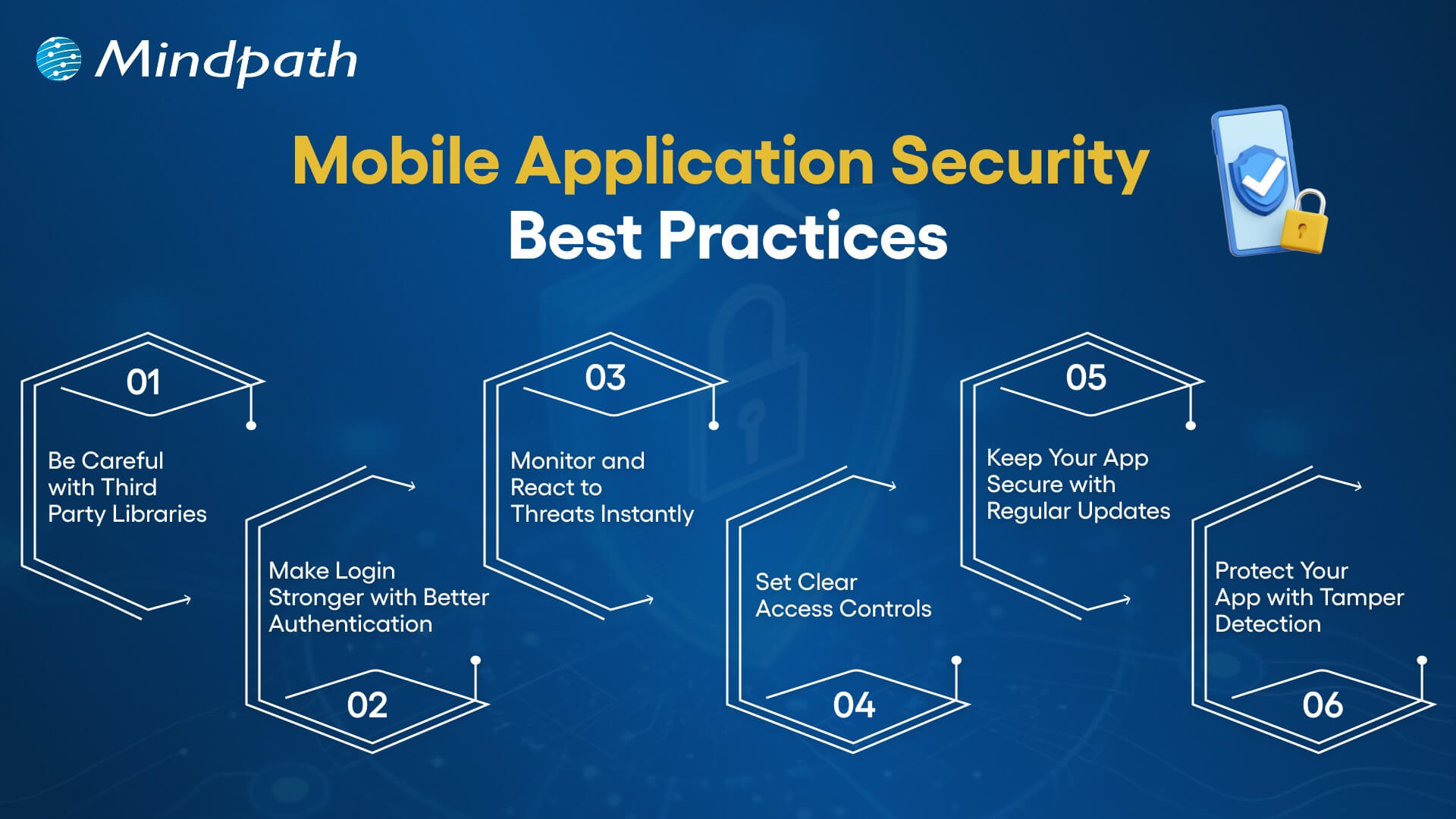
mobile application security best practices

1. Be Careful with Third-Party Libraries

Third-party libraries can save time but might bring security risks if not handled right. Always keep them updated and patched. Take time to check their safety before using them to avoid accidentally opening doors for hackers.

2. Make Login Stronger with Better Authentication

Use strong login methods to keep your app safe. Combine passwords with extra checks like one-time codes or fingerprint scans. Multi-factor authentication (MFA) makes sure only the right users can get in by asking for two or more ways to prove who they are.

3. Monitor and React to Threats Instantly

Use tools that keep an eye on your app and spot threats right away. When something suspicious happens, act quickly to protect your app. Having a clear plan for responding helps your team fix issues fast and keeps your app secure, following the best mobile security practices.

4. Set Clear Access Controls

Control what users can see and do in your app to keep data safe. By limiting access, you prevent unauthorized people from reaching sensitive information. This simple step is key to strong mobile app security and helps protect your app and users effectively.

5. Keep Your App Secure with Regular Updates

Regularly update your app and fix any security issues quickly. Patching helps close gaps that hackers could exploit. Setting up a routine for updates ensures your app stays protected and reduces the chance of breaches, keeping both your app and users safe.

6. Protect Your App with Tamper Detection

Use tamper detection to spot if your app’s code has been changed. Tools like checksums or digital signatures check the app’s integrity. If something is off, the app can stop running, alert your team, or even erase sensitive data to keep everything secure.

Wondering how a mobile app can boost your business? Explore the Benefits of Mobile App Development to discover how apps improve engagement, sales, and customer loyalty.

Are You Protecting Your App in the Right Way?

Application security best practices matter for everyone, not just tech teams. They help build trust, prevent data leaks, and keep users safe. Simple actions like checking your code, controlling access, and updating often can make a big difference. Staying secure today means staying ahead of threats.

At Mindpath, building secure digital experiences is our priority. Our web and mobile application development services follow proven application security best practices to ensure safety, performance, and reliability at every step. Partner with us to deliver robust and secure solutions you can trust.

Frequently Asked Questions

1. Why are application security best practices important for both web and mobile apps?

Application security best practices help protect user data, prevent unauthorized access, and reduce the risk of cyberattacks. Since both web and mobile apps handle sensitive information, following these practices ensures safer user experiences and helps maintain trust over time.

2. When should application security best practices be applied during development?

Security should be considered from the very beginning of the development process, not added later. Building security into design, coding, testing, and deployment stages helps prevent vulnerabilities early and reduces the chances of costly fixes after launch.

3. What are common mistakes that can weaken application security?

Common mistakes include ignoring regular updates, using outdated libraries, weak authentication methods, and poor access control. These gaps can make applications vulnerable to attacks, which is why consistent monitoring and timely fixes are essential for maintaining strong security.

4. How often should applications be tested for security issues?

Applications should be tested regularly, especially after updates or new feature releases. Continuous testing, including vulnerability scans and security audits, helps identify risks early and ensures the app remains protected against evolving threats over time.

5. Can small businesses also follow strong application security practices?

Yes, even small businesses can implement effective security measures. Simple steps like using secure coding practices, enabling strong authentication, and keeping systems updated can significantly reduce risks without requiring large resources or complex infrastructure.

Custom software development mistakes

What can cause a well-planned software project to stray off track? Have you ever thought about this? Most of you must have found yourself in a similar situation, right? If so, you are not alone. Many organizations, just like yours, start with the right intentions, a highly skilled team, and a strong idea, but often face delays or an unexpected outcome. Typically, the problem dwells in small custom software development mistakes that begin in the early phases, and it ultimately grows into bigger challenges. If you ignore the early warning signs, it can quickly slow down the whole process. So, how do you keep a custom software project on target, on a clear and quick path toward your business goals?

Every custom software project is full of important decisions that shape the final product. From how you outline your needs to how your team communicates, every aspect matters a little more than you think. Without a defined process, even good ideas have a tendency to derail. In this blog, we will highlight the key custom software development pitfalls you need to avoid, making sure your custom software project stays on track! So, keep reading to find out!

Looking forward to tailoring a software which exactly fit your organizational needs? At Mindpath, we offer custom software development services that help in designing and developing software that meets your business goals.

Why Choose Custom Software Development for Your Business?

Custom software development is a process to create tailor-made software for your organization. It reflects your exact workflow, needs, and goals of the users. It is designed to suit your needs by solving your problems, rather than using predefined features as is the case with off-the-shelf software. Custom software offers better performance, is easily scaled, and puts you in control of the functionality, design, and updates as your business adapts and grows.

Standard software may be quicker to set up; however, it is inflexible, comes with ongoing licensing, and requires ongoing hardware changes. Custom software, on the other hand, is a long-term investment. It does not have unnecessary features, it supports your effective operation, and it also fits in smoothly with your systems. Interestingly, if it is designed by your team, it reduces time, minimizes long-term costs to improve decision-making throughout your business.

Let us take a quick dive into the benefits of custom software development:

1. Custom software will scale with your business as it grows. It also adapts easily when you expand your services or change your processes without incurring the costs of upgrades.

2. It is developed around your specific workflows and business objectives. This provides you with smoother operations without the restrictions and inefficiencies of a one-size-fits-all system.

3. Custom software also integrates well with your current systems. It allows data to flow from one platform to another with minimal manual work and with fewer mistakes.

4. It ultimately saves you money over time, and you won’t incur future licensing fees. You pay for only what you require, and the total cost of ownership is lower.

5. Custom solutions differentiate you in the marketplace. With unique features and enhancements to the user experience, you can be more competitive and more customer-centric.

6. It makes teams more productive in their daily tasks. When software matches each role, teams work faster, make fewer mistakes, and deliver better results.

Want to know more about the benefits of custom software development for your business? Head to our blog: Top Benefits of Custom Software Development

Top Mistakes to Avoid in Custom Software Development

Knowing the common challenges of custom software development is important for creating a successful solution. Many teams overlook some small but critical details, which are often the reason why custom software projects fail or are delayed.

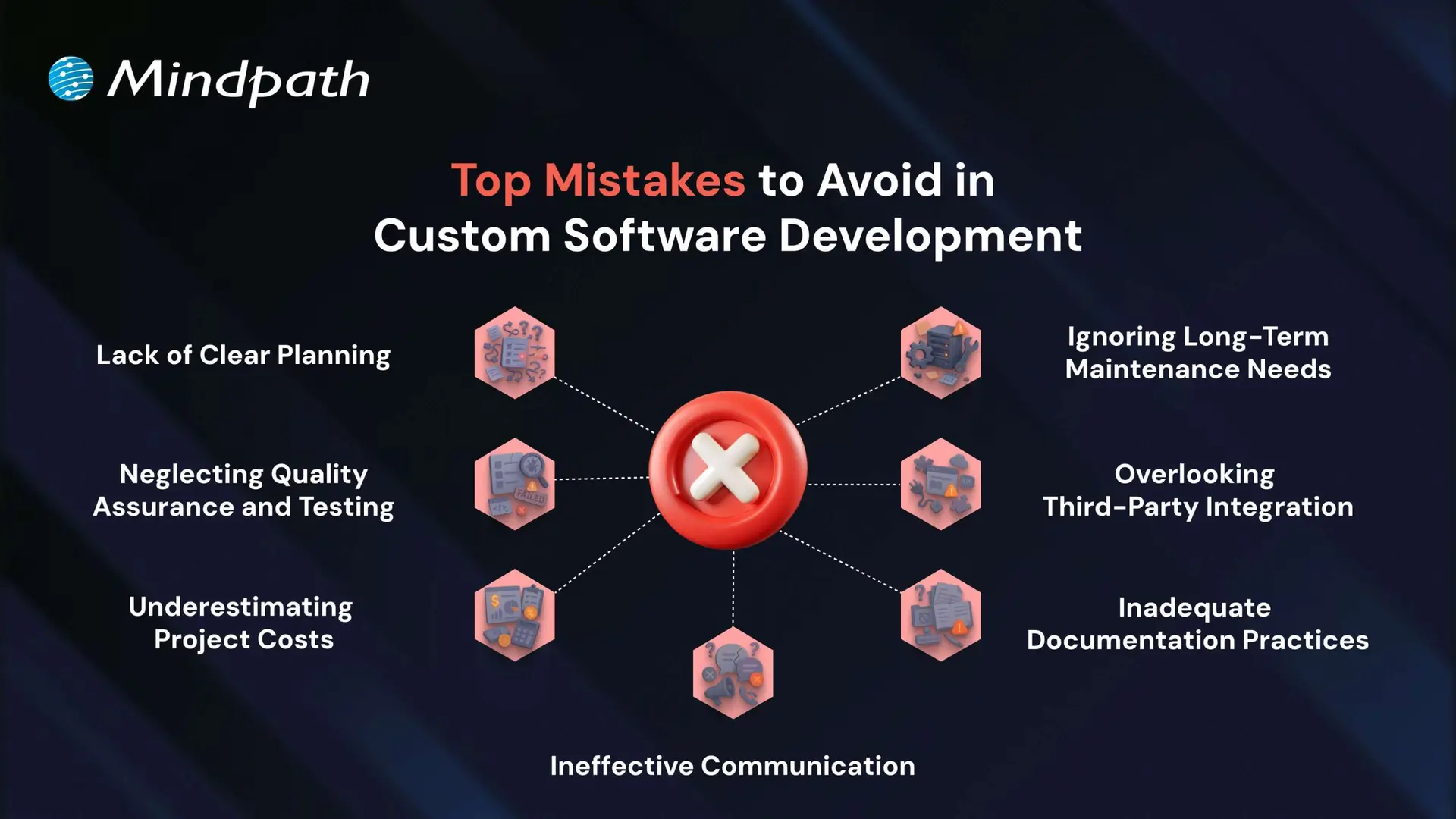
Top Mistakes to Avoid in Custom Software Development

1. Lack of Clear Planning

A very frequently made mistake in custom software development is a lack of planning. If the business objectives are unclear and there is no well-structured roadmap in place, projects like these can end up with inflated costs and delays.

To prevent this, first ensure that key stakeholders are engaged and assess current processes, technologies, and long-term needs. Specify system requirements in detail, including integrations, UI/UX, architecture, and security, before you start the development.

2. Neglecting Quality Assurance and Testing

Omitting or neglecting testing is one of the common custom software development mistakes that can result in considerable problems post-launch. In many instances, some form of quality assurance takes place; however, in sufficient time to perform quality assurance, or altogether ignoring QA means bugs are left unidentified until it has become much harder (and much more expensive to fix).

In order to eliminate custom software mistakes like this, testing should be completed by qualified individuals using legitimate QA and UAT practices to deliver software that provides the customer or user, by and large, what they require to a fully qualified and operational level.

3. Underestimating Project Costs

Cost overruns are one of the most frequent custom software mistakes, primarily due to vague requirements and complexities not being properly assessed. When there is no clear requirement scope, budgets can easily become unbounded, creating delays and the likelihood of project failure.

To tackle this issue, establish a clear MVP with key features and distinguish them from desirable features. This will lead to realistic budgets and phases that can be developed incrementally and in alignment with business goals.

4. Ignoring Long-Term Maintenance Needs

Lack of planning for the ongoing maintenance of software is a challenge in the software development process. It can result in performance and obsolescence issues. Many well-built software solutions are inefficient and potentially vulnerable when support doesn’t happen, and you should not be surprised if yours is in the same boat when software support does not take place.

How can you prevent this? One place to start is with a clear maintenance strategy from the beginning. Budget for planned updates, security patches, and feature improvements so your software can run efficiently and securely.

If you’re planning a custom solution, our step-by-step guide to the custom software development process will help you understand each stage clearly.

5. Overlooking Third-Party Integration

Not considering compatibility issues with third-party systems is a custom software development mistake that can slow down development and reduce software performance. A poor integration strategy can result in data flow problems, missing functionality, and even unanticipated system failures.

To avoid this possibility, complete a full tech audit and feasibility study at the beginning of the project to help ensure the intended integration will go smoothly when the project is complete. This allows you to make informed decisions to move forward with a strategy that meets your business needs.

6. Inadequate Documentation Practices

Poor documentation is a custom software development mistake that results in a misalignment of expectations, confusion, and challenges for long-term maintenance. Documenting decisions and details of the project is imperative. Without documentation, teams cannot go back to understand or support the software later.

To avoid this mistake, be sure to define the scope of the project in advance and document as you go. Another solid practice is to have complete user documentation and technical documentation to enhance transparency, ease of handoff, and longevity.

7. Ineffective Communication

Poor communication is a common issue that leads to misunderstandings, missed deadlines, and project inefficiencies. When teams and stakeholders are not aligned, important decisions and updates can be lost or misinterpreted.

Following custom software development best practices involves maintaining open communication channels, regular check-ins, and clear documentation. This helps ensure transparency, accountability, and better collaboration throughout the development process.

Want to Build Smarter by Avoiding Common Custom Development Mistakes

Successful software projects rely on clear planning, communication, testing, and proper budgeting. Avoiding these common custom software development mistakes helps keep your solution on track and aligned with your business goals. By recognizing early pitfalls and following best practices, your team can build scalable, efficient software that delivers long-term value.

As a trusted custom software development company, we at Mindpath provide tailored solutions built around your unique business goals. Our custom software development services ensure seamless integration, ongoing support, and full transparency throughout the project lifecycle. Partner with us to turn your vision into a secure, high-performing solution that grows with your business.

AI in software engineering

Artificial intelligence is the biggest force of transformation in software development, with AI tools enhancing innovation and productivity. The applications of AI in software engineering also draw attention towards the utility of artificial intelligence in software maintenance. Artificial intelligence has been helping with automated code generation and optimizing the testing and deployment processes. Where does AI come into play in the maintenance of software applications?

AI technologies can contribute to software maintenance with automated debugging and testing to identify areas for improvement. Software engineers can also use advanced AI tools to avoid future issues with proactive maintenance strategies. Furthermore, artificial intelligence also expedites other maintenance tasks, such as resource allocation and real-time performance monitoring. As AI continues evolving, it may introduce fundamental changes in all aspects of software maintenance. 

Planning to use AI to optimise your software engineering workflows? Mindpath’s software maintenance and support services provide smart solutions that simplify maintenance and support growth.

Unraveling the Role of AI in Maintaining Software Applications

How do you ensure that software applications work exactly as you intended after launching them? Many people don’t understand how important maintenance in software applications can be, especially for critical apps. Traditional software maintenance practices involve identifying and fixing bugs, introducing updates and implementing new improvements like security patches. The other responsibilities involved in software maintenance include troubleshooting issues, understanding legacy code, analyzing logs and resolving user complaints.

Most of the work in software maintenance required manual effort, which led to many other problems. The biggest problems in traditional software maintenance approaches include the possibilities of human error, intensive resource allocation and extended response times. Artificial intelligence revolutionizes software maintenance by automating different tasks and improving overall efficiency. With the power of automation and predictive analytics, AI can provide a strong foundation for proactive software maintenance.

Want to understand what makes engineers thrive in AI-powered development environments? Check out our qualities of a good software engineer blog to discover the traits that set top professionals apart.

Why Should AI Be Your First Choice for Software Maintenance?

You can notice one of the prominent reasons to use AI for software application maintenance in how AI tools can analyze code and identify vulnerabilities. The utility of AI in software development extends beyond automated code generation or creation of test cases. Developers and engineers can rely on AI for automated bug detection for better advantages than manual code testing. Artificial intelligence also empowers developers with the capability for identifying trends and patterns that would have been impossible with manual methods. 

The primary reason to choose AI for more efficient software maintenance revolves around the assurance of multiple benefits. You can notice a significant reduction in time and effort required for software maintenance with artificial intelligence. AI-powered tools can help with automatic creation of code documentation, thereby saving the valuable time of maintenance teams. 

The applications of AI in software maintenance also help developers in focusing on the critical issues. With AI handling automatic bug detection and creation of bug reports, developers can achieve more effective software maintenance. For example, AI tools can use past instances of bug fixes to come up with solutions for similar issues. As a result, you can enjoy faster resolution along with access to knowledge that can help with future maintenance activities.

Want to better plan your project budget and avoid unexpected expenses? Discover our software development cost blog to learn the key factors that influence overall development pricing.

Understanding the Use Cases of AI for Software Maintenance

Artificial intelligence might seem like the omniscient computer systems from science fiction movies and novels. Have you ever wondered how AI is used in software development and maintenance? The use cases of AI for maintenance of software applications involve the use of machine learning, large language models, natural language processing and other AI technologies. The integration of these technologies in software maintenance services can improve accuracy and ensure seamless functionality of software applications. 

1. Predictive or Proactive Maintenance

One of the most noticeable applications of artificial intelligence in software maintenance points at predictive maintenance. It enables a proactive approach to software maintenance by identifying and resolving issues before they happen. AI tools can leverage machine learning to learn from historical data of bug repositories and version control systems. 

Artificial intelligence can predict potential areas in the code where you can find bugs and vulnerabilities. As a result, developers can rely on a proactive approach to software maintenance with artificial intelligence. Predictive analytics with AI can help with assessment of system health, prior incidents and usage patterns. Software maintenance teams can take preemptive action in situations where manual maintenance approaches would have failed.

2. Bug Detection and Resolution

Another common way in which IT software support teams can enhance maintenance with artificial intelligence is bug detection. AI algorithms can facilitate easier detection and classification of bugs in software applications. Artificial intelligence offers the power for analyzing logs, code repositories and telemetry data for faster bug detection. Machine learning algorithms in AI tools can identify recurring patterns, create bug reports and identify vulnerable aspects of the code. On top of it, AI tools can also recommend ways to resolve the bugs efficiently.

3. Automatic Code Refactoring

Software developers and engineers can also leverage AI tools for automated code refactoring to achieve more efficient software maintenance. Automated code refactoring refers to the process of breaking down a code to discover potential areas for improvement. The significance of AI in software engineering is clearly evident in how AI algorithms can recommend improvements for performance, readability and ease of maintenance. As a result, developers can achieve easier code optimization alongside reducing technical complexity. 

4. Resolving Support Tickets

Internal teams also raise support tickets along with users, thereby making ticket resolution an important priority in software maintenance. NLP algorithms can help with automatic classification and prioritization of new maintenance support tickets according to urgency. You can also find some platforms with AI tools that recommend suggestions to resolve the support tickets. The use of AI in resolving maintenance support tickets reduces the burden on human support teams. 

Want to stay ahead of evolving development practices? Discover our software development trends blog to explore what’s shaping the future of software.

New Trends Expected in AI-Powered Software Maintenance

The evolution of artificial intelligence has brought many new enhancements across different industries. You can also expect the role of AI in software development and maintenance to grow bigger with the arrival of new AI capabilities. The latest developments in AI will play a major role in redefining software maintenance in the future.

1. Adoption of AI Agents in Software Maintenance

Agentic AI is one of the biggest trends that have been grabbing headlines everywhere in the domain of AI. Many businesses have embraced autonomous or semi-autonomous AI agents for software maintenance tasks, including software developers and technical support agents. AI agents can perform regular maintenance tasks, such as rolling out new updates, applying patches or restarting services without direct human intervention.

2. Using Generative AI to Improve Legacy Code

Legacy code is a formidable challenge in software maintenance as engineers have to check old codebases to identify errors and vulnerabilities. With the help of generative AI, software development teams can now analyze legacy codebases easily at a faster pace. On top of it, generative AI tools can help with detection of security issues and suggest patches. Some platforms also offer the advantage of rewriting old modules in new programming languages.

3. Reinforcement Learning in Software Maintenance

The next promising way in which AI can become a part of software maintenance involves the use of reinforcement learning. You can improve maintenance in software applications by using reinforcement learning algorithms to learn from feedback. The insights gained from feedback will help in improving performance, especially for complex software maintenance tasks. 

Ready to invest in technology built specifically around your goals? Check out our custom software development blog to learn why customization matters.

Final Thoughts

The reasons to adopt artificial intelligence in software maintenance revolve primarily around enhancing speed and efficiency. You can notice how AI improves software maintenance by facilitating automated detection and resolution of bugs. Artificial intelligence can empower software maintenance companies to adopt new trends like AI agents and generative AI for effective maintenance.

Mindpath is a trusted name for software maintenance and support services with tangible proof of expertise in artificial intelligence. Our software engineering services have been delivering excellence to all our clients with capabilities to leverage AI technologies in software maintenance. We have earned the love of clients with software maintenance and support services that deliver exactly what they want. Consult with our experts now and find the best ways to integrate artificial intelligence into your software maintenance workflows.  

Frequently Asked Questions