Home

How Long Does It Take to Build and Deploy a Custom AI Agent? 

How Long Does It Take to Build and Deploy a Custom AI Agent? 

Join our Newsletter!

AI Agent development time

Building a custom AI solution starts with understanding the expected AI agent development time for your business goals. Every project follows a different schedule because business requirements, system integrations, data quality, testing, and deployment needs directly influence the overall development process. Knowing these factors helps businesses plan realistic implementation timelines and make informed investment decisions.

Key Takeaways

  • 01
    AI agent development time varies based on complexity, integrations, testing, and deployment requirements. 
  • 02
    Clear project planning helps reduce delays and improves overall development efficiency significantly. 
  • 03
    Custom AI agents require multiple development stages before successful production deployment begins. 
  • 04
    Project costs increase with advanced features, enterprise integrations, and autonomous AI capabilities. 
  • 05
    Choosing an experienced development partner accelerates delivery while maintaining quality and security. 

Many businesses also ask how long to build an AI agent before planning budgets and implementation strategies. The answer depends on project scope, customization requirements, existing infrastructure, and deployment readiness rather than a fixed timeline. In this blog, you will learn the typical AI agent development timeline, key factors affecting project duration, and practical ways to accelerate deployment successfully. So, let’s keep reading further!

Want to accelerate your AI agent development without compromising quality? We offer AI Agent Development Services to build reliable, business-ready AI solutions.

What Determines AI Agent Development Time?

The time to deploy AI agent solutions depends on more than writing code or selecting AI models. Every project follows a unique path based on business objectives, technical requirements, and implementation readiness. Understanding these foundations helps businesses set realistic expectations before starting AI agent development.

1. AI Agent Complexity

The type of AI agent has the biggest impact on how long to build an AI agent. Simple agents finish faster, while autonomous and multi-agent systems require additional development, coordination, and testing.

2. System Integrations

AI agents deliver better results when they connect with business tools and applications. Integrating multiple APIs, legacy systems, or custom databases increases development time and technical effort.

3. Security and Approval Controls

Secure AI agents need safeguards before handling business tasks or sensitive information. Teams must build validation checks and approval workflows to ensure reliable and controlled operations.

4. Testing and Performance Validation

Development continues after coding because every AI agent requires thorough testing. Teams evaluate reasoning quality, accuracy, response speed, and reliability before deployment.

5. Development Approach

The chosen development method directly affects project timelines. Pre-built frameworks speed up delivery, while fully custom development takes longer because every feature requires dedicated implementation.

How Long Does It Take to Build an AI Agent?

The AI agent build time depends on project complexity, business goals, and technical requirements. While simple AI agents may take only a few weeks, advanced enterprise solutions require additional development, testing, and deployment. The table below provides a realistic timeline for different types of custom AI agents.

AI Agent Type Typical Use Case Estimated Development Time Estimated Deployment Time Estimated Cost (USD)
Proof of Concept (PoC) AI Agent Validate an idea with limited functionality 2–4 weeks 2–5 days $10,000–$25,000
Simple Task Automation Agent FAQ support, document search, email assistance 4–6 weeks 3–7 days $25,000–$50,000
Business Workflow AI Agent Customer support, HR, sales, internal operations 6–10 weeks 1–2 weeks $50,000–$100,000
Decision Support AI Agent Financial analysis, legal review, business recommendations 8–12 weeks 2–3 weeks $80,000–$150,000
Custom AI Agent with Multiple Integrations CRM, ERP, databases, APIs, enterprise tools 10–16 weeks 2–4 weeks $120,000–$250,000
Autonomous or Multi-Agent Enterprise System End-to-end workflow automation across multiple departments 4–9 months 4–8 weeks $250,000–$1M+

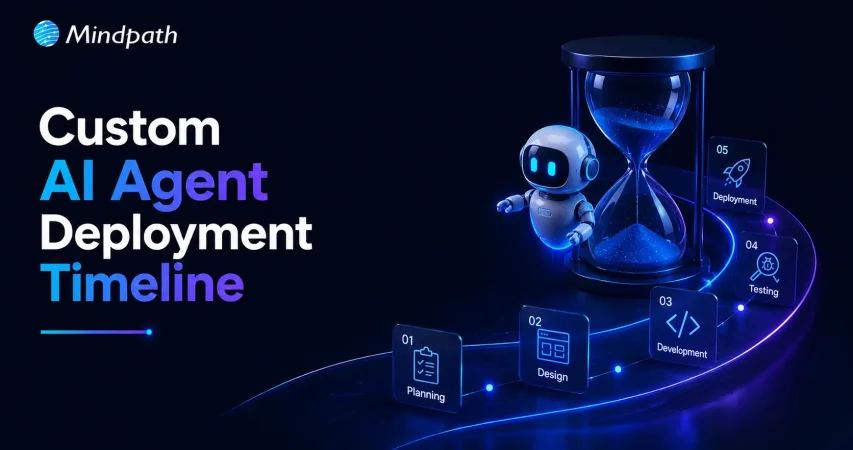
AI Agent Development Timeline: Key Stages Explained

Understanding each development stage helps businesses estimate AI agent development time more accurately. Every phase serves a specific purpose, from planning and development to testing and deployment, ensuring the final AI agent performs reliably and meets business requirements.

1. Define Goals and Project Scope

Every successful AI agent starts with clear business objectives and measurable outcomes. Teams identify the problem, expected results, and project requirements before beginning development.

2. Design the AI Agent Architecture

Developers create the technical foundation by selecting suitable AI models, frameworks, and data structures. This stage ensures the AI agent can handle business tasks efficiently and scale when needed.

3. Build and integrate the AI Agent

Developers create prompts, connect business applications, and integrate external tools and knowledge sources. Secure integrations help the AI agent perform real business tasks with accurate information.

4. Test and Improve Performance

Teams evaluate the AI agent through multiple testing scenarios before production deployment. They refine prompts, fix workflow issues, and improve accuracy to deliver reliable performance.

5. Deploy the AI Agent

After successful testing, the AI agent moves into the production environment with controlled access and security measures. The time to deploy AI agent solutions depends on deployment readiness, governance checks, and rollout strategy.

6. Monitor and Optimize Continuously

Development continues after deployment through regular monitoring and performance improvements. Teams analyze user interactions, update capabilities, and optimize the AI agent for better long-term results.

How to Build an AI Agent Faster Without Compromising Quality?

  • Define clear business goals before starting development.
  • Prioritize high-impact features for the first AI agent release.
  • Prepare clean and organized business data early.
  • Choose the right AI development partner with proven expertise.
  • Use existing systems instead of building everything from scratch.
  • Test continuously throughout development to avoid costly delays.
  • Start with an MVP before expanding advanced capabilities.
  • Review project scope regularly to prevent timeline extensions.

Ready to Build Your Custom AI Agent?

The right AI agent delivers the best results when businesses plan realistic timelines, define clear requirements, and choose the right development approach. Understanding every stage, from planning to deployment, helps reduce delays, control costs, and achieve long-term business value with confidence.

At Mindpath, we deliver custom AI Agent Development Services tailored to your business goals, workflows, and scalability needs. Our experts build secure, high-performing AI agents with faster delivery and reliable implementation. Contact us to discuss your project and find the right AI solution for your business.


Frequently Asked Questions

Start by defining your business goals, required features, integrations, and expected outcomes. A development partner can evaluate these requirements and provide a realistic timeline based on project complexity, technical dependencies, testing needs, and deployment readiness instead of offering a fixed estimate.
Project delays often result from changing requirements, complex integrations, poor-quality data, extended testing cycles, or additional security and compliance reviews. Clear planning, organized data, and regular stakeholder feedback help minimize unexpected delays throughout the development lifecycle.
A proof of concept helps validate your idea before making a larger investment. It allows businesses to test functionality, identify technical challenges, gather user feedback, and confirm business value before expanding into a production-ready AI agent solution.
Connecting an AI agent with CRMs, ERPs, databases, and third-party applications requires additional development and testing. The number and complexity of integrations directly influence implementation timelines because each connection must remain secure, accurate, and reliable during deployment.
Businesses can reduce development time by defining clear objectives, preparing quality data, prioritizing essential features, and working with experienced AI specialists. Continuous testing and phased deployment also help deliver reliable AI agents while maintaining security and long-term performance.

Support Is One Click Away

Featured Posts

Related Post

UX audit

The digital landscape has gone beyond normal trends. 8 out of 10 users are willing to pay more for a detailed user experience. Further, research shows that around USD 1 invested in UX is supposed to bring USD 100 in return (Source). So, any usability defect on your website is way more than just a design flaw. Your users are not just directly comparing you with your competitors. But they are comparing you to the seamless and effective digital experience they have ever experienced.

This is where the relevance of a UX audit comes into the picture. So, this process doesn’t just verify visual inconsistencies or defective navigation. In fact, it unveils hidden frictions that can make your users frustrated and abandon the site.

Ready to enhance your user experience and uncover opportunities for improvement? Contact us today to get expert guidance and start optimizing your website for better engagement and conversions.

What is a UX Audit?

A UX audit is generally known as a user experience audit. It is a systematic evaluation of digital interfaces like mobile applications, websites, or any software platforms. Further, this approach is used to identify usability issues that can affect your users’ ability to reach their goals. According to the research by the Nielsen Norman Group, an average website loses around 67% of its visitors before they reach a certain conversion point.

So, a website UX audit can help you understand what is working well and what is not. Everything is decided based on the research, data, and industry-standard UX regulations.

How is a UX Audit Different from a UI Audit?

A UI UX audit majorly prioritizes the visual design of the interface. So, it mainly includes color contrast, visual hierarchy, spacing, and all. On the other hand, a UX audit targets the entire journey of the users that includes certain factors as given below.

  • Interaction flows.
  • User behavior and interest.
  • Clarity of the content.
  • Conversion barriers.

Most of the audits combine both UX and UI elements to offer a detailed analysis of the performance of your digital product. This is why a UX and user interface audit is necessary for maximum results.

Looking to design experiences that captivate and retain users? Discover our guide on UI/UX design trends to explore approaches that boost usability and appeal.

Why You Should Conduct a User Experience Audit for Robust Digital Performance?

Investing in UX audit services offers strategic benefits to your digital product. Additionally, here are some effective UX audit benefits listed below.

1. Better Conversion Rate

It eliminates friction in major user flows like purchases, sign-ups, and form submissions. Further, it can directly boost your goal completions.

2. Encourages User Satisfaction

If your navigation remains intuitive along with clear content, your users will feel more connected to your products, and the engagement rate will increase.

3. Strong Brand Perception

A well-maintained and consistent user interface can build credibility while boosting your trustworthiness in the marketplace.

4. Data-Rich Redesigns

Insightful data from the website UX audit can value UX improvements while eliminating the guesswork. Further, it can prevent you from costly redesign mistakes.

5. Keeps You Ahead

Even a small usability improvement can keep you unique in this competitive edge. So, users are more likely to trust you over your competitors.

Looking to enhance your UX audit process with scalable and efficient tools? Discover the benefits of SaaS to explore how cloud-based solutions can streamline workflows and improve collaboration.

Who Can Benefit from a UX Audit?

No doubt, UX audits can be beneficial for anyone who is developing a SaaS product or complicated web apps. However, they are more reliable for a certain type of business, as given below.

  • Organizations that are aware of their product requirements but are confused about where and how to begin.
  • Businesses without any research of UX design teams and a desire to refine their UI/UX values in the digital space.
  • Companies that are willing to do Agile product development want to be assured that their UC enhancements are aligned with the users’ expectations.

What are Some Efficient Types of UX Audit Techniques?

There is no one-size-fits-all approach. So, UX audits have been divided into many significant types that developers should be aware of.

1. Usability Audit

This approach goes deeper into your users’ journey to discover if they have been facing any usability issues. So, usability testing can be incorporated to analyze essential factors like interaction design, navigation flow, and overall functionality. This ensures that your users are seamlessly navigating your product without any frustration.

2. Information Architecture Audit

This type assesses the structure of your content labelled along with the product. Further, it also verifies if users can effectively locate what they require. Further, such an audit type easily reveals your content gaps along with confusing structures that can hinder the users’ journey.

3. Accessibility Audit

An accessibility audit can assure you of your product’s usability to everyone, including people who are differently abled. Additionally, this audit proves compliance with WCAG by valuing the color schemes, keyword navigation, and screen reading metrics.

4. Design Audit

This kind of UI UX audit takes care of the design components. This includes the product’s color schemes along with your brand consistency. This ensures the design aligns with your brand identity while keeping your visual experience intact. By effectively assessing each of your design references, the visual audit ensures that the visuals support usability.

5. Content Audit

Content audit includes evaluating the relevance, quality, and tone of your product content. Moreover, it ensures that the content matches the requirements of users while sticking to your brand values. By refining the content, your business can easily strengthen users’ trust while bringing clarity and engagement.

Planning to create a website that combines stunning design with seamless functionality? Discover our guide on web design and development services to explore how professional solutions can elevate your digital presence.

How to Initiate a UX Audit Thoroughly for the Best Results?

Here, you can go through the structured process to make sure your audit UX UI is efficient and result-driven. Apart from this, when you desire to carry out a UX audit, you need to consider whether it is viable for your in-house team or if you should hire an external agency.

1. Be Assured of Your Objectives

It is important to conduct a meeting with all your stakeholders. This approach can streamline your objectives while increasing conversions. You can easily enhance your user experience while addressing suitable goals. This effective alignment can help your team plan the tasks.

2. Gather Product Insights and UX Metrics

Before initiating the assignment, it is important to assess the documents, such as the goals of the product, the user journey, and the user behavior. Additionally, this can help you understand the intent behind the project.

After this phase, you need to gather all necessary performance analytics that include your users’ time spent on certain pages, clicks, and frequency. So, these relevant data can help you assess how the users are engaging with your product.

3. Perform UX Design Audit

After verifying the defective areas in your user experience, you need to apply Usability Heuristics and design principles to assess multiple design mishaps. Such a step in the UX Audit website can be used to evaluate the interface with consistent design, error prevention, flexibility, etc.

4. Run User Testing Sessions

Invite your representative users to complete the real necessary tasks. This includes observing the points of confusion and navigation errors. User testing can offer you authentic details about how your users think and behave in a real scenario.

5. Get a UX Report

Once you are done with gathering all the crucial data, it’s time for you to effectively document your findings into a structured UX audit report. The report generally includes severity rating, issues verified, evidence, expected impact, etc.

A strong report ensures your stakeholders can understand and act as per the requirements.

Planning to work with a web design firm but unsure which questions will reveal their expertise? Check out our guide on questions to ask a website design company to learn how to evaluate potential partners.

A Completely Free UX Audit Checklist

Here is a detailed UX audit checklist you can thoroughly apply to any of your interfaces.

1. Navigation and Structure

  • Logical menu structure.
  • Streamlined menu labels.
  • Effective search functionality.
  • Breadcrumbs, if necessary.

2. Visual Design and UI Elements

  • Precise contrast level for readability.
  • Consistent color schemes and typography.
  • Clickable and attractive buttons and links.
  • Intuitive and meaningful icons.

3. Content and Messaging

  • CTAs are available above the fold.
  • Headlines are clear and to the point.
  • Body content is aligned with proper subheadings.
  • No fluff and jargon.

4. Form and Crucial Inputs

  • Labels are specific and goal-oriented.
  • Errors are displayed clearly.
  • Submit buttons should communicate actions.

5. Interaction and Feedback

  • Loading times are bearable.
  • User actions have confirmation.
  • Interactive elements.
  • No unnecessary or broken links.

6. Mobile and Responsiveness

  • Buttons are spaced effectively.
  • Layouts can be adjusted to all screen sizes.
  • Content fits without needing any horizontal scroll.
  • Navigation suits mobile devices.

7. Conversion Management

  • Secondary CTAs are effective and non-intrusive.
  • Primary call to action remains unique.
  • Trust indicators like feedback and reviews are present.
  • Funnels have minimal friction.

Wondering how much it really costs to build a professional and effective website? Discover our guide on website development cost to explore factors that impact pricing and plan your budget wisely.

Real-World UX Audit Examples

There are certain real-world UX audit examples that can deepen your understanding. Further, it can encourage you to go through the checklist for being authentic.

1. E-commerce Checkout

Many e-commerce sites abandon their purchases at the payment step. So, a UX audit checklist can help you discover unexpected shipping charges and complicated multi-step checkout. You can address this by simplifying the form while adding the progress bar.

2. SaaS Onboarding Flow

When a SaaS company discovers through session recordings and heatmaps that users drop off mid-onboarding, the audit can make you aware of a lack of a progress indicator and an inefficient CTA. You can simplify the features to improve your product’s CTA.

Want to design products that leverage the latest in SaaS technology? Discover our guide on SaaS trends to explore strategies for more effective and engaging experiences.

When Should You Conduct a UX Audit?

A UX audit can easily fix what is broken and can accelerate the experience of your users. While you can leverage a UX audit at any stage, there are some critical moments that are essential to consider.

1. Pre-launch and Redesigning

Before you go live with your product, verifying the usability issues in the early phase can minimize the risks while preventing you from costly mishaps. Further, a UX audit report can assess the current experience of your consumers while helping you track the elements that are desirable.

2. As a Critical Part of Your Ongoing Improvement

Doing UX audits twice a year might help you maintain your quality, as your users’ expectations might change with the evolving trends. Moreover, adding new functionalities and features can disturb your existing workflows. An audit can keep the user experience intact.

3. To Battle Performance Issues

Fewer session times and minimal return visits can highlight that there are some issues with your UX. So, to back up your engagement, you need to value the UX audit as very critical. If your users are not completing their key actions, an audit can help you address the real issue behind the drop-off.

4. For Strategic Insights

Comparing your user experience with your competitors can reveal gaps and opportunities. So, demonstrating a strong and effective experience can boost your business value.

How to Prioritize UX Audit Findings?

A UX audit template unveils a series of opportunities. So, value the issues as per these standards.

Priority Level of Impact Implementation Effect
Major Fixes High High
Quick Wins High Low
Minor Improvements Low Low

Challenges You Might Expect in UX Audit

Apart from a series of UX audit benefits, the process might leverage certain challenges, especially when your team depends on assumptions instead of real user data. Limited access to users and biased internal opinions can lead you towards misleading conclusions. You might face a problem in balancing business goals with your user requirements.

Looking for an UX Audit Service Provider for your Website?

A UX audit checklist can be noted as a practical tool that offers structure to your evaluation process. Further, it can help you identify areas that need improvement and help enterprise products become more user-friendly. It also aligns the user experience with your business motive and enhances the overall customer satisfaction.

If you are also ready to leverage the best of UX audit services from the professionals, Mindpath can be your reliable partner. The experts here can help you elevate your user experience and product performance to another level.

Frequently Asked Questions

1. How Long Does It Take to Complete the Whole UX Audit Process?

A UX audit can be completed within one to six weeks. However, it completely depends on your data availability and business motive.

2. How is a UX Audit Different from Usability Testing?

A UX audit is a detailed assessment using multiple methods. On the other hand, usability testing specifically observes real users completing the tasks.

3. Is It Possible to Handle A UX Audit on Our Own?

It is possible, but it includes multiple perspectives that a professional can handle. As a result, you can have better and in-depth insights.

4. Is a UX Audit Only Initiated for Websites?

You can apply UX audits to your mobile apps, desktop software, and physical and digital products.

5. How Much Does a Professional UX Audit Service Cost?

The pricing of UX audits varies based on the complexity of your projects, along with their deliverables and the expertise of the professionals.

fine tuning ai mistakes

Artificial intelligence has come far beyond a futuristic concept for us. Recently, almost every industry has sought the expertise of AI. As per the statistics, the AI market size is going to reach USD 434.42 billion in 2026. Starting from powering personalized recommendations to adopting advanced diagnostics, nothing can beat the accuracy of AI. So, while pre-trained models can offer a strong foundation, fine-tuning is what fuels them to offer business-ready results.

However, fine-tuning is not as easy as a plug-and-play process. You might face unexpected outputs, performance decline, scalability issues due to fine-tuning AI mistakes, and much more. Such mistakes not only waste your time and resources but can also restrict the real potential of AI. This is why we are here to analyze some of the leading fine-tuning AI issues throughout the blog. Further, this guide is curated to answer your real concerns while making you confident about the fine-tuning process.

Want to make sure your AI models are fine-tuned for accuracy and effectiveness? Mindpath’s AI development services help you design, optimize, and deploy AI solutions that align with your business goals.

Importance of AI Models Fine-Tuning

Before we highlight the mistakes, it is necessary for you to understand what fine-tuning AI is. So, it is simply a process of adapting a pre-trained AI model to perform better on a specific industry, task, or dataset. Instead of training a model from scratch, fine-tuning allows you to modify your existing model’s parameters. This is how the model can align more closely with your usage scenario.

If you are asking why fine-tuning is essential for your project, it saves immense time while conserving your computational power. Further, training a large model from scratch can take months while draining your pockets intensively. So, fine-tuning becomes a cost-effective alternative.

While improving accuracy for specific tasks, it reduces the chances of generic or irrelevant responses. Fine-tuning AI can enhance the tone of the output while making it consistent. However, if you do it incorrectly, fine-tuning can introduce new issues that can have a negative impact.

Want to understand the foundations behind large AI models before fine-tuning? Discover Large Language Models (LLM) to learn how large language models work and why proper handling is key to avoiding mistakes.

What are Some Evident Tuning Mistakes that You Might Commit?

While fine-tuning leverages a series of advantages, it’s not without its challenges. As AI models evolve and your apps become more specific, you might face new challenges. So, it’s necessary to understand such complexities. This is your ultimate way to build high-performing and robust AI systems that never fail.

1. Fine-Tuning Without Proper Objectives

Many teams consider fine-tuning to be their next logical step that needs to be initiated for AI adoption. However, without a proper goal, you can’t expect the performance to improve and align with your business motives. Moreover, fine-tuning without clarity can keep your performance without any gains. Your models will start behaving inconsistently. This is one of the most overlooked fine-tuning AI mistakes many developers commit.

How to Avoid it?

To avoid such an issue, make sure to clearly define what problem the model must solve before you initiate fine-tuning. Further clarify what is better performance as per your point of view. In order to do this, you should also analyze whether fine-tuning is necessary or if prompt optimization will be enough. Fine-tuning should always be intentional without any experimental guesswork.

2. Overfitting the Model

Overfitting happens when a model becomes too specialized in the fine-tuning dataset and loses its ability to generalize. So, an overfitted model might perform well during the testing period but fails to showcase its prominence in real-world scenarios. It produces rigid outputs and struggles with unseen outputs.

How to Avoid it?

You must use validation and test datasets while applying early stopping techniques. Adjust your learning rates and include diverse examples to keep your dataset matched to every type of real scenario. Moreover, your ultimate goal is adaptability, not memorization. So, this fine-tuning AI approach can be your biggest effort.

Ready to streamline your fine-tuning process with the right technical approach? Discover the OpenAI Fine-Tuning API Tutorial to check out detailed implementation steps and optimization tips.

3. Using Low-Quality Training Data

Many organizations rush with their data collection aspect. They assume more data leads to better outcomes. But, in reality, quality matters more than quantity. Moreover, poor data gives rise to inaccurate data predictions and includes biases. It also increases the rate of hallucinations in language models. This is one of the most damaging fine-tuning AI issues because the model learns exactly what it sees.

How to Avoid it?

Make sure to normalize and clean datasets before initiating the training process. Remove outdated, duplicate, or conflicting samples. Ensure the examples are aligned directly to your target tasks. Quality being the most essential aspect of fine-tuning, you must balance the datasets to keep the outputs streamlined while restricting any unevenness.

4. Underfitting Due to Lack of Proper Training

Some developers lag behind in training or don’t use datasets that are small. This makes the model inefficient. Underfitted models generally showcase minimal improvements over the base models. It fails to capture task-specific orders and offers inconsistent outputs.

How to Avoid it?

It is essential to get a sufficient dataset size as per the complexity of the task. Moreover, monitor training loss and performance trends. Maximize your training potential and be assured of the outcomes. Here, you need to focus on balancing the training efforts to make the results more efficient.

5. Wrong Data Formatting

Many AI models can’t perform efficiently if the input format is not convenient. Formatting mistakes can lead to poor learning signals and incomplete or broken outputs. This is one of the concerning fine-tuning AI mistakes.

How to Avoid it?

It is essential to match tokenizers to the base level and maintain prompt-response structures consistently. Further, validate your data formats before training. Giving foremost attention to technical details can prevent hidden failures.

Facing unexpected roadblocks while implementing AI after fine-tuning? Identify the challenges of AI adoption and discover how to overcome barriers that impact scalability and ROI.

6. Neglecting Evaluation and Real-World Assessment

There are many developers who majorly prioritize training metrics and don’t care much about practical testing. So, without real-world evaluation, your models might fail in production. Your edge cases might remain undiscovered, and the business impact also remains unclear.

How to Avoid it?

It is important to initiate task-centric evaluation metrics. Further, test edge cases and unusual outputs. Most importantly, compare the results with alternative approaches for better results. Proper evaluation ensures fine-tuning AI encourages actual value.

7. Ignoring Safety and Alignment

Fine-tuning can unintentionally weaken safety mechanisms built into pre-trained models. Such issues can lead to biased outputs and unsafe responses. Further, this can put your organization at risk while ruining its reputational values.

How to Avoid it?

The evaluation pipelines must include safety checks, and you should initiate bias audits. If possible, maximize the model’s performance through human review. You must be assured of responsible fine-tuning that keeps the performance result-oriented.

Wondering why your fine-tuned AI model still lacks contextual accuracy? Check out the role of vector database in AI application to discover how semantic search enhances results.

What are Some Effective Strategies to Tackle Fine-Tuning AI Risks?

Your strategies and practices should be effective enough to prevent fine-tuning AI issues. Along with the best practices, you need to be aware of the tools that keep the process successful.

1. Invest in Quality Data and Assessment

Prioritize collecting high-quality data. Further, use intelligent augmentation techniques to expand your limited datasets and increase model generalization.

2. Adopt Parameter-Centric Tuning Approaches

Include methods like LoRA and Adapters to keep the process active. Such techniques can also reduce the computational risks while making the process accessible and cost-effective.

3. Consider Cloud Essentiality

For your scalable storage, cloud platforms can be the most essential factor. You can leverage the use of spot instances to analyze your cloud spend. Further, you can use serverless functions and reserved instances where necessary.

4. Include MLOps Practices

Consider your AI models like software products only. Initiate automated pipelines for development, deployment, testing, and rigorous monitoring. This stabilizes reliability while accessing rapid iteration.

5. Stick to Expert Guidance

Tuning AI issues sometimes requires special knowledge and suitable guidance. So, partnering with professional AI development teams can easily bridge the knowledge gaps. They can also help you accelerate your projects while helping you include cutting-edge solutions efficiently.

Planning to fine-tune models but unsure how they prioritize key data points? Learn about attention mechanism explained to discover how it strengthens language understanding and output quality.

How to Decide if Fine-Tuning AI is the Preferred Approach as Per Your Use Case?

Not every AI issue requires fine-tuning, and adopting it unnecessarily can give rise to complexities and cost. In cases like workflow management and prompt engineering, you can get authentic results without making any changes in the model. So, fine-tuning AI issues is necessary if you demand consistent output behavior at a large scale. You need to assess factors like data availability and performance gaps, and decide whether fine-tuning is necessary for you or not.

Final Words

Fine-tuning has the capability to present domain-centric results. However, it has to be done correctly for valuable outputs. Starting from clear objectives to evaluation gaps, the right strategies and expertise can help you avoid fine-tuning AI mistakes. Organizations that treat fine-tuning as a goal-driven process are more likely to get high-performing and quality AI systems. With data quality and evaluation, you can easily decrease the chances of fine-tuning while keeping the overall outcomes impactful.

This is where professional AI development partners like Mindpath play a crucial role. We can help your organizations design and fine-tune while deploying AI solutions that are practical. Further, we ensure sticking to ethical and future-ready approaches to make your fine-tuning efforts more effective and user-centric. We assist businesses in tackling fine-tuning challenges, whether it’s insufficient data or going through overfitting. Our customized AI development services are designed to align with your objectives while keeping your AI models’ performance consistent and efficient.

wordpress-react-combine project
Are you curious about how to elevate your web app to the next level? Imagine combining React’s cutting-edge user interfaces with WordPress’s robust content management. Interesting right? In this blog, we’ll guide you through the process of merging these technologies to build a web app that’s both visually stunning and highly functional. So, let’s dig in! 

Overview of React 

React is a JavaScript library that enables the building of user interfaces, mostly single-page applications. It gives a possibility to create interactive elements and dynamic web pages by breaking their content into smaller, re-usable components. It helps in managing updates to the user interface and hence makes applications faster and more responsive. React is essential to today’s digital makeup since it will help in the creation of a much faster, interactive, and dynamic web application that would go a long way in enhancing user experience. Due to its component-based architecture, React simplifies the development process and supports complex applications with high performance, making it a preferred choice for modern web development, where user engagement and responsiveness count the most. 

Overview of WordPress 

WordPress is an extremely popular content management system, and millions of websites are running on it worldwide. Its user interface is very simple, so users can easily create, edit, and manage website content without needing to know how to code. With high flexibility in themes and various plugins, WordPress can be put to any purpose—from personal blogging to the most complicated business sites. WordPress is important due to the flexibility and user-friendliness in creating and managing websites efficiently for any kind of user. It provides access to unlimited customization because of its extended base of themes and plugins, hence becoming a mainstay tool in the modern world for web developers and content creators. 

Why Combining React and WordPress Can Be Beneficial for Developers.   

Integration of React with WordPress enriches development by putting the power of both together. React is empowered for reusing the components, which means simplicity in terms of coding and speed in development. Fast rendering with efficient state management means web applications work harmoniously and respond as the user expects. JSX syntax, with its combination of JavaScript and HTML, enables easier writing and readability of codes. WordPress complements React by taking care of the content and providing a clear user interface. The fact that React can keep data away from the presentation and manage it nicely helps not to lose data under any conditions. Taken together, React and WordPress make the building process much faster and more convenient for creating powerful and extremely dynamic web apps. 

Key Considerations When Building Your Web App with React and WordPress    

1. Existing Infrastructure  

Your existing infrastructure does affect how well React and WordPress work together. If your current system is compatible, the integration of React will go through smoothly and more quickly. For example, a headless setup where React is doing the front end and WordPress the back end could be best for modern needs. This, however, requires more development work, changes in your back-end system, and special expertise to do it correctly. 

2. Maintenance And Updates  

Regular updating and maintenance are vital in the case of a React and WordPress site. In case you do not update them regularly, your site will eventually have performance issues, it will be vulnerable to security exploits, or even crash. When it’s headless—in a setup where React and WordPress run separately—the updates become easier; one could independently update the front end and back end, which will be helpful in keeping the site’s stability and safety. 

3. Developer Skillset  

It requires a wide skill set to build a website with React and WordPress. One needs to be proficient in JavaScript, to understand JSX, and to use state management tools like Redux. One would also want to be familiar with modern development tools like Webpack and Babel and know how to work with APIs. If these competencies are missing in your team, including an expert on a project basis will make the development process smoother and more efficient. 

4. SEO Considerations 

SEO is critical to have your website show up in search results and bring in visitors. Using React with WordPress, SEO can be a little more complex. As its client-side rendering, React may make it hard for search engines to index your content. You can either implement SSR or SSG to make it easier for search engines to crawl and rank your site. Besides, meta, sitemaps, and canonical URLs should be properly set up for effective SEO within a headless WordPress setup. 

Ready to elevate your website to new heights?

At Mindpath, we seamlessly integrate React with WordPress to create dynamic, responsive web experiences.

Configuring React to Work with WordPress      

1. Write Modular Code 

Breaking your code into smaller, self-contained parts makes it easier to handle and reuse. This is like keeping your workspace organized: when everything has its place, it’s much easier to find anything that you may need and use it. Small, reusable components in React are ways by which you can keep your code neat, making changes or fixes on parts of your site without affecting the other parts. 

2. Use A State Management Library   

A state management library, like Redux, that keeps every bit of information of your app in one place. This is good for complicated websites where you deal with a great deal of information. This way, it becomes easy to handle changes and updates for your website to run smoothly and in the desired manner. 

3. Optimize Performance   

Performance optimization of the website enables quick and enjoyable usability by the user. This is achieved through caching, breaking down the code into smaller pieces that load only when needed, or lazy loading—parts of the website only load after becoming visible to the user. Doing this will get your site up and running quickly; this will also improve responsiveness. 

4. Implement A Consistent API   

A good API—like WordPress REST API or GraphQLwill help your React app and WordPress site to communicate smoothly. A consistent API would mean that data flows between the two without any problems. REST APIs offer flexibility, but their design is often varied. GraphQL APIs are more homogeneous and predictable, so it helps in use and understanding. 

5. Plan For Extensibility   

Make a site that will expand and evolve over time without a problem. That means keeping ahead by finding out ways to add new features or update existing ones without breaking the rest of the site. Having an extensible design means it will let your site easily change to meet future needs without having to start from square one. 

6. Automated Testing 

Automated testing means running your code for errors using tools automatically. This will ensure that mistakes are noted and cured in the beginning, thus ensuring that your website does what you want it to. Automated testing saves time and keeps your site stable; this reduces the chances of problems frustrating users. 

Build Your Web Using React and WordPress with Mindpath    

The experienced team at Mindpath uses React to improve user experience and WordPress as the foundation for creating powerful websites. With its incredibly strong and practical content management system, editing and managing website material is effortless. By integrating React, we can increase your site’s speed and amount of interaction while engaging users on a deeper level. Create a dynamic frontend for your website using React to make it load quickly and react to user input as smoothly as possible.

Mindpath offers the best of both worlds: the ease and versatility of WordPress paired with the contemporary, dynamic capabilities of React. We take care of the technical setup and customization so you can have an outstanding website experience and concentrate on your content and business objectives. 

Conclusion  

Combining React and WordPress gives synergy to your Web application, offering a digital experience that is at once impressive and compelling. Being able to interact with dynamically displayed interfaces from React and a robust content management system like WordPress, you are assured of having a site that is at once engaging, powerful, yet very easy to manage. Inherently, this automatically ensures the improvement of user interaction and performance while also making it seamless to update content and manage sites. Embrace this mix of technologies to develop a web app which would be fast, functional, and future-ready. This way, your web presence will always be at the top of its game.
Mindpath excels at bringing this integration to life. Our expert team combines the power of React with WordPress to deliver an ultra-fast, interactive site that is also easy to maintain and update. With Mindpath, you can confidently navigate the complexities of modern web development, ensuring your digital presence is both cutting-edge and effortlessly managed. 

Looking to enhance your WordPress site with cutting-edge React features?

Mindpath is your go-to partner! We specialize in integrating React’s dynamic capabilities with WordPress’s robust CMS to deliver stunning web experiences.

Combine WordPress and React for powerful web apps. Discover how to leverage robust content management with dynamic interfaces for enhanced user experience.