Home

How to Choose the Right SaaS Development Services?

How to Choose the Right SaaS Development Services?

Lorem ipsum dolor sit amet, consectetur adipiscing elit. Ut elit tellus, luctus nec ullamcorper mattis, pulvinar dapibus leo.

Join our Newsletter!

SaaS Development Services

Selecting the appropriate SaaS development services may seem like walking through a rapidly shifting technological environment. Businesses in the present day require solutions that are innovative, scalable, and flexible. You may end up comparing different providers, and each one of them claims to have unique expertise. The difficulty lies in finding a service that is consistent with your objectives and generates real value. It involves thinking outside the box and taking into account teamwork, problem-solving, and sustainability. So, how are you going to find a service that best suits your business vision?

The key is to find a partner that is knowledgeable about your growth strategy and technology needs. Successful SaaS development services engage both hands-on experience and progressive innovation. When you are seeking options, make sure you take into account compatibility with your team, development strategy, and scalability. You require a clear understanding of procedures, communication, and delivery schedule. This blog will help you make the right decision in your SaaS development journey. Let’s dive in together!

Want to choose the right partner to build scalable and efficient SaaS software for your business? Mindpath’s  SaaS Development Services provide expert developers and custom solutions to deliver growth-oriented applications.

Understanding Software-as-a-Service (SaaS) Development

SaaS development refers to the development, deployment, and maintenance of software applications delivered over the Internet as a service. These applications are cloud-based, unlike the conventional software. They are available to users either on a web browser or on an app interface. An effective SaaS development service makes applications to be scalable, secure and user-friendly. It concentrates on delivering constant updates and excellent user experiences across all devices.

SaaS development needs proper software engineering and cloud knowledge. Developers should also know what customers require and what is trending in the market. This understanding enables the creation of software, which is efficient, reliable, and sustainable. SaaS development focuses on cooperation, problem-solving, and constant enhancement in order to fulfill business objectives. It guarantees the product to expand with the user requirements without compromising the performance or security at any point.

Want to understand how SaaS can streamline your operations and drive business growth more efficiently? Discover our guide on the benefits of SaaS to explore how it enhances scalability, flexibility, and cost savings.

The following are reasons why businesses today require SaaS development services:

1. Cost Optimization

SaaS reduces start-up infrastructure and the cost of licensing. Companies enjoy the benefit of stable prices and expenditure.

2. Scalable Architecture

SaaS software development is capable of scaling users and features in an easy way. The systems can easily adapt to growth and demand.

3. Anywhere Accessibility

The use of the cloud allows remote and distributed teams. Users can be able to work anywhere safely.

4. Rapid Deployment

The SaaS solutions take a shorter time to launch via browsers. This minimizes the setup time and fast-tracks time to value.

5. Simplified Maintenance

Service providers deal with updates, security, and performance. SaaS developers assist in lowering internal IT workloads.

6. Innovation Readiness

SaaS solutions are compatible with contemporary tools and artificial intelligence. This helps companies remain competitive and data oriented.

Wondering how AI can transform your SaaS product with automation and predictive capabilities? Read our guide on the benefits of AI to discover its impact on growth and efficiency.

Key Steps to Choose the Right SaaS Development Services

The choice of SaaS development services requires a clear idea, planning, and business orientation. The most important steps to selecting SaaS application development services that facilitate long-term growth are as follows.
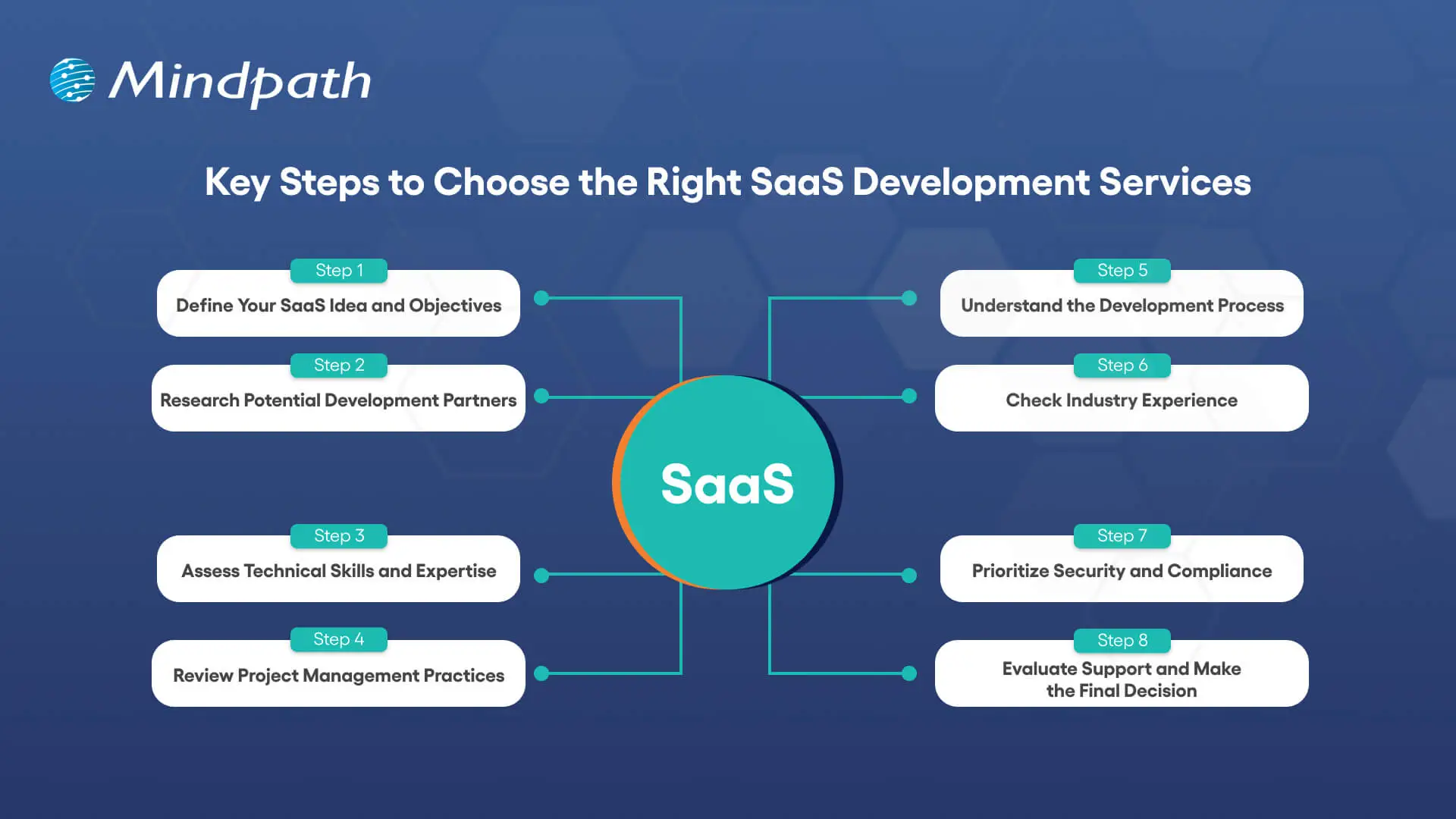
Key Steps to Choose the Right SaaS Development Services

1. Define Your SaaS Idea and Objectives

Be clear about your SaaS concept, what problem it will address, and who your audience will be. Clear goals contribute to the alignment of attributes, functionality, and business objectives in the long run. This transparency enables the SaaS development services to create a product that is focused and efficient.

2. Research Potential Development Partners

Begin by doing research on credible SaaS development companies that have a successful track record with SaaS projects. Check their portfolios, case studies, and feedback from clients to determine credibility. This study can assist you in narrowing down partners who can provide scalable solutions.

3. Assess Technical Skills and Expertise

Evaluate the technical competence of the in-house development team in the front end, back end, and cloud computing. Ensure that they know the process of developing secure and scalable SaaS applications. Well-developed technical capabilities reduce the development risks and improve the overall performance of the product.

4. Review Project Management Practices

Understand how the company manages schedules, work and communication in the development process. Agile project management is flexible and responds more rapidly to changes. Analytical thinking will ensure consistency and quality in development.

5. Understand the Development Process

Inquire about their entire development cycle such as designing, testing, and implementation. Make sure that security and performance, as well as scalability, are considered at an early stage. A trusted Saas development platform enhances easier cooperation and implementation.

6. Check Industry Experience

Experience in the industry helps teams to know more about your business challenges. Experienced developers are able to foresee risks and recommend workable improvements. This results in improved custom SaaS development projects.

7. Prioritize Security and Compliance

Make sure that the development team has good security standards and compliance requirements. The process of development should include data protection and compliance with regulations. This ensures the safety of user information and builds up confidence in the product.

8. Evaluate Support and Make the Final Decision

Evaluate the capacity of the company to offer long-term support and maintenance. Constant improvement and interaction are key to successful products. Select SaaS development services, which reflect your growth plans and vision.

Want to stay ahead in the competitive market by understanding how SaaS is evolving? Discover our guide on SaaS trends to explore the latest innovations shaping the future of the industry.

Ready to Transform Your Business with SaaS?

Selecting the appropriate SaaS development services will keep your company competitive, scalable and efficient. Successful SaaS products are the result of clear planning, technical expertise and strong project management. Using systematic steps assists in choosing partners who provide secure, reliable and innovative solutions. Having the right team ensures your software keeps up with the business requirements and enhances performance and user satisfaction.

At Mindpath, we provide professional custom SaaS development services based on your business objectives. We are a team of prolific developers and present scalable, secure, and user-friendly solutions. Our priorities are innovation, a smooth partnership, and continuous support to achieve optimal performance of your SaaS product. Mindpath is the choice that ensures a future-proofed platform that is designed to expand with your users and business vision.


Support Is One Click Away

Featured Posts

Related Post

WordPress maintenance
Is your WordPress site running as smoothly as possible? Do you know what kind of essential maintenance activities should be done on your website to keep it secure and running well? In this blog, we will explore the essential maintenance tasks that will keep your WordPress site in top shape. So, let’s dive in! 

Importance Of Website Maintenance   

Routine WordPress maintenance will help your website to be stable, secure, with better loading speed, and compatible with different browsers and devices. Regular backups guarantee that there is no loss of data in case of website crashing or malware attacks. Up-to-date plugins will ensure that slowdowns and security risks are prevented. Monitoring and analytics on user behavior help you make informed decisions and optimize your content. This provides better maintenance of your website, thus keeping it in top shape, and gives a better experience to the visitor. 

How Much Does WordPress Maintenance Cost?  

The cost of maintaining a WordPress site will be based on the size and complexity of the website. Routine maintenance in 2024 can range from as low as $5 a month to $120 per month or $40 a year to $1,200 a year. For a personal site, maintenance might be as low as $4 a month or $40 annually. Business sites usually start at about $8 per month or $80 per year. The pricing for running corporate websites is usually in the region of $12 a month or $120 yearly. The websites related to entertainment and eCommerce usually cost more, with the former starting at $16 per month and the latter at $20 a month. Routine maintenance includes updating plugins, themes, and WordPress core, managing backups, ensuring security, and keeping up performance. 

The Complete Checklist of Monthly WordPress Maintenance Tasks   

1. Optimize Your Database   

Over time, your WordPress database can become bloated with extraneous data from things like old post revisions, spammy comments, and deleted items, which slow down your site. To clean up your database, first back it up using a tool like Solid Backups to ensure all your data is safe. Then use a plugin such as WP Optimize to clear out any unnecessary data and boost database performance. Alternatively, if you know how to manipulate a database, you can clean up manually with phpMyAdmin. This method is useful when custom settings must be considered, and in all probability, it would be good to talk this over with a developer in case you are unsure. 

2. Manage Backups   

Backing up your website is something you should do regularly for safety against losses and quick recoveries in case of issues. Besides, with Solid Backups, you can configure backups automatically by using the plug-in known as UpdraftPlus. Schedule the backups frequently and let them be safely kept in the cloud, optimally. Moreover, review the process of restoration month by month to confirm that your backup procedure is working well, and in case of need, you will be in a good position to recover your site. 

3. Update WordPress Core, Plugins, And Themes   

WordPress core, theme, and plugin updating have implications for security, compatibility, and accessing new features. According to the Wordfence 2022 State of WordPress Security report, plugins in particular are a weak point, so keeping them up to date is very important. Keep checking for updates, and when found, update them one after the other. Begin with the WordPress core and then proceed to plugins and themes. Remember to always back up before doing any big update and update on a staging site so you can be sure everything works well with your current setup. 

4. Perform Security Scans   

Security scans to vulnerabilities, malware, and unauthorized access should be regularly scheduled. Run full site scans with a plugin like Shield Security, check the logs for any suspicious activity, and configure settings. You should, however, schedule these scans to run periodically, but at least revise them once a month. 

5. Analyze Site Speed   

A website’s speed has a massive impact on user experience and SEO. Among others, you can use Google PageSpeed Insights, GTmetrix, or Pingdom to check how fast your website loads. After testing, fix performance issues of your website against the results. If the speed problems continue, see if there’s a need to review and upgrade your hosting plan. 

6. Check For Broken Links   

Checking for broken links is important both for delivering a good user experience and SEO. Broken links may make visitors and search engines end up in so-called ‘dead ends,’ harming your site’s rankings and authority. Run a check using a plugin such as Broken Link Checker. Thereafter, repair or remove broken links upon finding them, possibly looking into scheduling automated checks to help identify new broken links in the future. 

7. Optimize Images   

Optimizing images will help to increase your site speed and performance radically, particularly when you have a heavy share of images on the site. Tools like Smush or ShortPixel do really well when it comes to compressing existing images. Remember the right formats—JPEG for photos and PNG for graphics where the requirement is transparency. Enable lazy loading; this defers the loading of off-screen images to further speed up page load times. 

8. Submit Your Sitemap   

Making sure that you are regularly submitting your sitemap to search engines will let them index your website in a better way and give you more exposure. Use a plugin such as Yoast SEO to create an updated sitemap, then take the time to manually submit this to search engines via their webmaster tools—like Google Search Console—to check that all your pages are correctly crawled and indexed for maximum search engine visibility. 

9. Monitor Site Performance   

Monitoring your site’s performance frequently will let you know when there is a problem. It helps in making informed decisions and will let you act swiftly. Use tools like Google Analytics and Jetpack to look through key metrics such as page views, bounce rate, and conversion rates. This setting of performance alerts about major changes or problems will let action be taken in time and thus your site runs smoothly. 

10. Test Your Forms   

Testing of forms at regular intervals is paramount to ensure that they work right and harvest data from users effectively. All forms should work well, and process input correctly. Check that email notifications are going to the right addresses, then test for user experience to make sure forms are usable, accessible, and responsive on different browsers and devices. 

11. Clear Site Cache 

It ensures that your site visitors have the most recent content. In addition, it will boost your website’s performance. Sometimes, cached data can become corrupt or outdated, causing display issues and slowing download time. Flush the server cache, then reset any plugin-built caches. Test your site for improved performance after flushing the cache. This can also be done in many ways depending on your unique setup. If you are not comfortable doing it yourself, use something like WP Super Cache and W3 Total Cache

Ready to optimize Your WordPress Experience?

Learn More About Mindpath’s Maintenance Services!

WordPress Development Services at Mindpath   

At Mindpath, we ensure your WordPress website runs at its best with comprehensive maintenance services. This includes regular updates to WordPress Core, plugins, and themes; daily backups for data security; and optimization of the performance of the site so that it loads faster. Our team conducts security scanning to save from threats, monitors and fixes broken links, and looks through analytics to bring about better user engagement. We test forms to make sure they are working well. You just focus on your business while we keep your site secure and efficient with our expert maintenance. 

Conclusion 

Maintenance, on the other hand, will ensure your WordPress site is not only smooth, safe, and high performing, but it will also be defended from many problems for the best user experience. From checking for broken links to analyzing site speed or running security scans, every step is important in keeping your website at its best. 

At Mindpath, we cut down the complexity of WordPress maintenance by offering every necessary service in one place to keep your site in top condition. Let our team take care of updates, backups, performance optimization, security checks, and more, so you can focus on growing your business while we work on keeping your website reliable and engaging. Our expert team at Mindpath makes sure your WordPress site is running at peak performance, ensuring you can get on with business and not worry about it. 

Want to achieve a Faster, Safer WordPress Site?

Find Out More About Mindpath’s Maintenance Solutions!

Ensure your WordPress site runs smoothly with essential maintenance tasks like updates, backups, security scans, and performance optimization.
Staff Augmentation vs Managed Services

The employees of a company are no doubt the most essential assets. In the recent scenario, businesses have plenty of choices to keep their team more robust and result-oriented. With the rise of remote work and technology, you don’t need to limit your team to a certain geographic location. Further, you can leverage the excellence of the worldwide talent pool.

A number of companies are choosing to outsource their tasks and project development. In fact, the global outsourcing market size is USD 1.02 trillion, and it is going to double by 2031 (Source). In this blog, let us compare two of the most essential outsourcing approaches: staff augmentation vs managed services. This can help you pick the right service that goes well with your company’s structure.

Want a team that can help you to stay competitive with evolving project demands? At Mindpath, we offer staff augmentation services that enable you to scale your workforce efficiently and cost-effectively.

What is Staff Augmentation?

Staff augmentation is a flexible outsourcing strategy where businesses temporarily hire external professionals to fill skill gaps, meet project demands, or scale operations, without the overhead of permanent, full-time hires. The process is quick, and you can augment capacity as per your current team’s needs. You can leverage near-shore, onshore, and offshore talent and scale the team as per the demands.

  • When it comes to the IT industry, businesses can use staff augmentation for multiple stages of the development process. Additionally, this includes workflow optimisation, programming, quality assurance, etc.
  • This can help you overcome specific challenges while hiring key skills that your internal team may be missing.
  • Talking about staff augmentation vs managed services, staff augmentation is cost-effective and offers flexibility.
  • It is a temporary solution that accesses your existing team and resources, and gets the benefits of outside talent while reducing the operational charges.

What are Managed Services?

Managed services are an integral approach to software development that allows you to outsource your IT functions to a provider from another region. Moreover, your business can outsource the work virtually to managed IT services. This can include anything from data migration to cybersecurity, and much more.

  • Managed service providers don’t integrate with your internal team but operate on their own.
  • They can offer you a reliable quote and project timelines. After you approve them, they will start working on the designated task while maintaining continuous communication.
  • The managed services model is cost-efficient as it lessens the requirement for overhead and resource management.
  • Your company can prioritize other business tasks and can check on the progress instead of assessing the work on a daily basis.

Looking to stay ahead in your hiring strategy with evolving workforce models? Check out the latest staff augmentation trends to learn what’s shaping the future of talent.

What are Some Key Differences between Managed Services vs Staff Augmentation?

To get a detailed knowledge of managed services vs staff augmentation, let us go through some of its key aspects. Here is a table that highlights all the essential features that these models consist of.

Important Features Staff Augmentation Managed Services
Benefits Cost efficiency is one major staff augmentation benefits. This model leverages a fixed rate and can be your long-term partner.
You can have access to a wide range of talented professionals. Prevents you from the risk of managing in-house teams.
It enables you to scale the team as per project demands. Provides access to a team with expertise across multiple elements.
Bridges temporary skills gaps. Allows the internal team to prioritize core operations.
Disadvantages It is a bit risky to integrate a new team to your existing operations. Integrating external resources might require extreme knowledge.
Risk of dependency on external providers for critical works. You need to depend on the provider to drive process success.
It needs a strong internal management capacity to handle the external professionals. No control over your project, team, or the development process.
Flexibility Your teams can be scaled quickly as per the existing skills gaps. Flexibility remains limited, and changes might give rise to additional payments.
Expertise It offers access to specific skills or expertise for a required timeframe. Offers a wide range of expertise and a supportive environment.
Responsibility The client is responsible for your project’s success and workflows. This model provider owns the project and offers a product as per the agreed requirements.
Focus Area It is task-specific and viable for short-term projects. It leveraged end-to-end solutions.
Customization This model is fully customizable as per your team dynamics. Follows the terms that is written on the agreement.
Best For Quick scaling where your workload is heavy. Suitable for long-term project commitments.

When Should You Prefer Staff Augmentation Services?

After assessing the staff augmentation benefits and other critical factors, let us understand when you should leverage this outsourcing model.

1. Your Need is Project-Specific

If your requirement is temporary, staff augmentation can help you bring in the specialized talent for a specific time period. Further, you can easily access the services as per your project demands without seeking any long-term commitments.

2. You Need Direct Assessment

When your company has a strong team, staff augmentation allows the external team to work under your supervision. So, this ensures your priorities are fulfilled with quality. Additionally, your existing team’s capabilities will also increase with better insights.

3. You are Handling a Strict Deadline

If your project’s timeline is critical and hiring full-time employees would take too long, staff augmentation provides rapid onboarding of skilled professionals. Further, this can help you maintain your project speed.

Want to avoid common onboarding challenges with external talent? Learn through our augmented staff onboarding guide for a smoother transition.

When Should You Prefer Hiring Managed Services?

Here are the instances where managed IT services can be your utmost preference.

1. You Desire Strategic IT Management

If your organization doesn’t have the leadership to manage all its internal IT operations, managed services can access the experts to take complete responsibility. Moreover, this ensures professional oversight for better performance management. Your team gets the freedom to focus on core functionalities.

2. You Need Predictable Solutions

When your company depends on consistent system performance and reliability, managed services can deliver structured processes. So, it keeps your team balanced while lessening the operational charges. Moreover, your plans will have that strategic influence on your audience.

3. Your Company Needs Long-Term Commitments

Managed services can offer continuous expertise when it comes to fulfilling your ongoing requirements.  Instead of hiring an internal team, you can get dedicated support that can encourage your overall functions.

Curious about hiring the right talent for short-term and long-term projects? Check out our staff augmentation hiring guide to learn practical hiring insights.

Cost Considerations of Both IT Outsourcing Models

It is important for you to understand that saving money is not always the primary goal. You also need to value precise creation. Here, go through the cost approaches of both the IT outsourcing models.

1. Staff Augmentation Costs

In this model, you need to pay only for the expertise you need. You can control the resource allocation, and there is no overhead of benefits, training, and recruitment. However, the charges might increase if you demand some change in the middle of your project.

2. Managed Services Costs

This model can assure you of predictable or fixed charges. It sometimes includes service level agreements for performance. The essential providers can handle multiple clients effectively. But managed services sometimes come with longer contractual commitments.

Looking to improve project delivery with the right technical expertise? Check out our IT staff augmentation guide to learn how to bring in skilled professionals.

Final Words

Staff augmentation and managed services can assist your business in completing the development projects more efficiently. However, when it comes to staff augmentation vs managed services, you need to assess their elements prior. Staff augmentation can be a great solution for businesses that need flexibility and short-term goals. On the other hand, managed services are best suited for long-term assistance.

Our experts at Mindpath can help you with both aspects. Partnering with us can offer you the support that you desire while filling the gap needed for your IT foundation.

Frequently Asked Questions

Decide between staff augmentation or managed services for your business. Explore their benefits and find out which is best for your IT needs.
remote work security

Remote work security refers to the practices, technologies, and policies that protect corporate data and networks when employees work outside a traditional office environment. Teams operate across devices, networks, and locations every day, and without corporate firewalls in place, even small gaps can create serious vulnerabilities. The risks evolve quickly, which is why businesses need protection strategies built on strict user verification, encrypted network connections, and continuous endpoint monitoring without disrupting daily workflows or user experience.

Decisions on security must be clear and consistent as organizations increase remote setups. Leaders need to pose the correct questions and take actions. Meanwhile, employees require straightforward and easy to use systems that facilitate day-to-day operations. Consequently, there is a need to have a balanced approach to succeed in the long term. This blog will provide explanations of important aspects of remote work cybersecurity in a clear and practical manner. So, keep reading further!

Ready to secure your remote workforce and protect your business from evolving cyber threats? Contact us to explore how our team can help you build a safer and more resilient remote work environment.

The Growing Cyber Risk in Remote Work Environments

Not only in the office, remote work also faces rising cyber threats today. Remote work security is vital because employees are using their personal networks and devices to access systems. These are some of the weak points that hackers attack. Consequently, minimal security breaches have the potential to compromise business information and interrupt routine business activities within a short time.

Simultaneously, remote workforce cybersecurity is exposed to increasing threats as the techniques of attacks advance daily. Phishing, ransom, and identity attacks are growing at a high rate. Remote setups are fast to adapt to cybercriminals. Thus, organizations need to remain vigilant and increase security to manage these changing threats.

Want to better understand how to scale teams without increasing security risks? Explore the benefits of hiring remote developers to balance flexibility with control.

Here are some of the remote workforce security risks:

1. Unsecured Network Risks

At home or cafes, employees tend to connect to unsecured networks. These connections can easily be intercepted by attackers to get sensitive data.

2. Weak Password Security Risks

A large number of users use the same password on several accounts. A single breach may reveal multiple systems within a short time.

3. Personal Device Security Risks

Individual gadgets frequently lack frequent security patches and safeguards. This provides malware and attacks with easy entry points.

4. Phishing and Social Engineering Risks

To deceive users, hackers use spoofed emails, or messaging. Such attacks seek to steal usernames or confidential information.

5. Shadow IT Security Risks

Employees sometimes use apps without company approval for convenience. This bypasses security controls and increases risk.

6. Software Update Security Risks

Remote devices might not get security patches in a timely manner. This exposes systems to well-known threats and vulnerabilities.

7. Physical Security Risks

The devices may be lost or found in high-traffic or communal areas. Critical business information may be put at risk as a result of unauthorized access.

Looking to simplify how your remote teams stay connected and secure daily? Discover powerful remote work tools that support safer collaboration.

Importance of Cybersecurity in Remote Work

Remote work security is key in safeguarding data and systems when working remotely. Here are the reasons why solid cybersecurity is still needed in the daily remote work setting.

1. Protecting Expanding Digital Entry Points

Remote work adds devices, networks and points of access to systems. Cybersecurity for remote work helps control risks in these expanded environments.

2. Securing Sensitive Business Data

Every day, employees gain access to and share crucial information that is not secured by office infrastructure. Work from home security will also protect data when storing and transferring data.

3. Reducing Phishing and Online Fraud Risks

Users who are distantly located are faced with rising phishing attacks in the form of emails and fraudulent communications. High level of security awareness will avoid unintentional sharing of sensitive login information.

4. Maintaining Strong Security Standards

Both personal and shared devices may not have consistent security updates and protection tools. The use of consistent policies guarantees similar protection standards across all systems.

5. Ensuring Business Continuity

Cyber attacks have the ability to interrupt workflow and slow down processes happening remotely. Good security control mechanisms assist in stability and prompt recovery exercises.

6. Building Trust and Meeting Compliance

Data security breaches may destroy reputation and decrease customer confidence within a short time. Adequate security would keep the rules and guard business reputation.

Planning to strengthen your security foundation as your business grows? Read about application security best practices to protect your systems effectively.

Cybersecurity Best Practices

Remote working security requires effective habits to safeguard information and systems in remote configurations. These are the best practices that can be implemented in order to enhance safety and minimize risks.

1. Safe Network Access (VPN Use)

Connect with secure VPN to all remote work activities on a daily basis. This secures information transfer among the commonly shared and open internet systems.

2. Home Network Protection

Protect home routers by using strong passwords and updating encryption parameters. Store smart devices on different networks to minimize security risks.

3. Timely Software Updates

Automatically update all systems and security applications. Frequent patches seal identified vulnerabilities and thwart cyber attacks in real-time.

4. Stronger Login Protection (MFA)

Implement several authentication measures whenever accessing the company system. Remote work security enhances safety of access via additional authentication measures.

5. Strong Password Management

Use different passwords on each account using secure password tools. Do not use the same passwords in personal and work accounts.

6. Employee Security Awareness

Train employees on how to detect phishing emails and suspicious online activities. Establish a powerful security culture to avoid unintentional data breaches.

Is Your Organization Truly Ready for Strong Remote Workforce Security?

Remote work has transformed the way teams work and exchange information on a daily basis. Powerful Remote Work Security assists in safeguarding information, hardware, and networks during the increase in cybercrime. It guarantees safer communication, stronger control, and minimized risks in the distributed work setting in the long term business stability and trust.

At Mindpath, we offer remote work security solutions to secure modern distributed teams with robust, trustworthy systems. Our strategy revolves around safe access, data security and risk mitigation. We assist companies to create secure remote working environments that do not affect productivity at all.

Frequently Asked Questions

Learn essential cybersecurity practices for remote work and how Mindpath can help protect your business with expert solutions.