Home

Proof of Concept vs. Prototype: What’re the Differences?

Proof of Concept vs. Prototype: What’re the Differences?

Join our Newsletter!

prototype vs. proof of concept

Businesses have to come up with new products to maintain their competitive edge and expand market share alongside meeting new user expectations. You may have an exciting idea for a new digital product or an application and still not be able to find how to translate the idea into a real solution. This is where you must know about the prototype vs. proof of concept debate and how to use them to validate your product ideas. 

As the competition and challenges for businesses continues growing, you need more than a brilliant idea to be successful. Business owners must understand that the transition of an idea into a full-fledged product is not a process to complete in one step but a journey. The proof of concept or POC and prototype are two distinct milestones in product development that offer methodical validation. Understanding the differences between them will empower you to navigate the journey of product development with ease.

Wondering how to validate your idea before building a full product? Mindpath offers Proof-of-Concept (POC) development services to help businesses test concepts quickly and reduce risk of investing in ideas that may not succeed.

Unraveling the Best Explanation for Proof of Concept

The most common assumption that business owners share is that a proof of concept is the same as a prototype. This assumption arises from the lack of a clear understanding of the definition of both terms. The easiest way to draw out a proof of concept vs. prototype comparison is to reflect on an ideal explanation of their definitions. Proof of concept or POC is a feasibility study that helps businesses in validating new product ideas. The primary goal of developing a POC revolves around testing the general assumptions associated with the idea and verifying whether it can be executed in the real world.

You should know that a proof of concept is not a basic version of the product you want to build with minimal features. On the contrary, it is a standalone project tailored specifically to validate a product idea. If the proof of concept delivers a negative result, then businesses can avoid spending time and money on the project. In the case of a positive result, you can have the assurance of building the complete product. The proof of concept works like an experiment where you find out whether your product idea can be technically feasible. 

Wondering how you can translate a validated concept into a full software solution? Check out MVP for software development to efficiently move from POC to a functional product.

Why Do You Need a Proof of Concept?

Many business owners may believe that investing in a proof of concept is a waste of time and resources. The difference between proof of concept and prototyping tells otherwise as there are many reasons to start a POC project. Every business owner should know that a proof of concept offers more than technical validation for their product ideas. It plays a major role in saving resources and reducing development concepts while pushing your potential for competition and innovation. 

The data and feedback obtained for your proof of concept can provide strong reasons to attract initial investment and stakeholders. Your proof of concept also serves as a useful resource to help your team understand how the product works. At the same time, it enables easier identification of bugs and risks in early stages of development. The proactive identification of risks helps you prepare the most effective mitigation strategies and accelerates time-to-market for new products.

Looking to bring your idea closer to the market while reducing risks? Learn how MVP development helps startups and businesses build products quickly after validation.

Understanding the Actual Meaning of a Prototype

Business owners are also likely to think that a prototype is similar to the minimum viable product or MVP. Even though they share some similarities, a prototype is not exactly the minimum viable product you would introduce to target users. The comparison between a proof of concept and prototype becomes easier when you know that a prototype is a visualization of how your product would look like. It is a preliminary version of your product that helps in testing the user interface and user experience with different functionalities of the product. 

The primary objective of creating a prototype for your product is to determine whether your users are having a positive experience with the product. You can rely on a prototype to understand how users will navigate your product and identify its utility. In simple words, you can think of a prototype as the first draft for your product after you validate an idea with proof of concept. Business owners should know that prototyping is a more complex and iterative process than developing a POC. The proof of concept offers technical validation for your product idea and a prototype helps you obtain initial feedback on how users feel about your product.

Curious how to transform your prototype into a product that users can interact with? Discover how to build MVP to bridge the gap between prototypes and final products.

Why Do You Need a Prototype?

People who don’t know the difference between proof of concept and prototype are likely to think that a prototype is not necessary when you have proof of concept. On the contrary, a prototype is a critical milestone in product development journeys as they help in determining potential flaws in product design. Prototyping offers immediate feedback on the reaction of your target users to the UX of a product. You can draw a similarity between POCs and prototypes in the fact that both of them save your time and resources by identifying issues in early stages of product development.

One of the significant reasons for every business owner to build a prototype is the ability to attract more early adopters and investors. The prototype serves as a better representation of how your final product will look like. As a result, investors and stakeholders can gain confidence in the market potential of your product. You can rely on a prototype to refine the product design before you move to the next step or developing the MVP.

Want to create a minimal version of your product to test in real conditions? Check out MVP for startups to validate market fit and gain early adopters efficiently.

Decoding the Differences between Proof of Concept and Prototype

The definitions of proof of concept and prototypes provide a lot of clarity on the differences between them. You can achieve a seamless shift from concept to prototype only by learning how a POC is different from prototype. Any confusion between the two terms can land you up with wasted resources and lack of direction for product development. Business owners, startup founders, development teams and product managers must know the unique role of POCs and prototypes.

1. Objectives

The foremost line of comparison between POCs and prototyping is evident in their objectives. The primary objective of a proof of concept is to validate the technical feasibility of a product idea. On the other hand, a prototype aims to test the product design and its user interface and user experience. The primary goal of a prototype is to show you how a product will look and feel.

2. Target Audience

You can expand the POC vs. prototype comparison by looking at the target audience they are intended for. The proof of concept is created for the technical stakeholders, investors and internal teams of an organization. However, the prototype is exposed to stakeholders, investors and early adopters.

3. Cost and Resources

Another critical point of difference between proof of concepts and prototypes revolves around the cost and resources required for them. In the case of a proof of concept, a business will have to incur limited expenses due to low coding and resource requirements. Developing a prototype requires more costs and resources as it involves coding and expenses on product design.

4. Expected Outcomes

The next notable aspect in the difference between POC and prototype is about the outcomes expected from them. A proof of concept will offer technical validation for a product idea and help in determining the ideal technology stack. The POC provides a clear demonstration of the feasibility of the concept you have for a product. Upon completing prototype development, you will have a visual representation of the product and a first draft for your MVP. The prototype showcases the working of a specific functionality and the UI/UX of your product.

Planning to stay ahead of design trends while developing prototypes and MVPs? Learn about the latest UX/UI design trends to enhance user experience and engagement in your product.

Here is an overview of the differences between proof of concept and prototype in a table.

Criteria Proof of Concept Prototype
Objectives Validating technical feasibility of product ideas. Testing the design and UI/UX of the product.
Target Audience Internal teams, stakeholders and investors. Stakeholders, investors and early adopters.
Cost and Resources Low costs due to limited coding and resource requirements. Higher costs than POC development due to expenses on product design and coding.
Expected Outcomes Technical validation for product idea and identifying relevant technology stack. Visual representation of the product design and its user interface and user experience.

Final Thoughts

If you want to shape your next big idea into a product that drives sustainable business, then you need a proof of concept and prototypes. Most important of all, you should understand the notable points in a prototype vs. proof of concept comparison to learn about their significance in the product development journey. An overview of their objectives, target audience and expected outcomes can help you capitalize on their value efficiently.

Mindpath is your best option when it comes to developing proof of concept and prototypes for your brilliant product ideas. We leverage years of experience and the most relevant tools to help you determine whether your idea can transform into a profitable product. Our POC development services and experts will guide you through the different stages of product development with clear roadmaps and continuous support. Reach out to us for your first consultation and turn your ideas into reality now.


Need to Prove an Idea First?

We build POCs and prototypes that answer real questions fast.

Frequently Asked Questions

A proof of concept validates whether an idea is technically feasible, while a prototype demonstrates the product’s design, functionality, and user experience before full-scale development.
A proof of concept should be developed early to test technical feasibility, identify potential risks, and validate whether the proposed solution can be successfully implemented.
A prototype helps stakeholders visualize the product, test usability, gather user feedback, and refine the design before building a minimum viable product (MVP).
Yes. Many successful products begin with a proof of concept to validate feasibility, followed by a prototype to test user experience before developing the final product.
A proof of concept typically comes first to confirm technical viability. Once validated, a prototype is created to evaluate design, functionality, and user interactions.

Support Is One Click Away

Featured Posts

Related Post

Web apps features

A successful web application requires more than an attractive interface or fast loading times. The right web app features help users complete tasks efficiently, access services securely, and interact with a product across different devices. For businesses, these capabilities can support customer engagement, operational efficiency, and long-term product growth.

Key Takeaways

  • 01
    High-performing web applications need scalable architecture, reliable performance, and security controls to support changing business requirements.
  • 02
    Progressive web app capabilities, real-time functionality, and third-party integrations can improve access and streamline user workflows.
  • 03
    Simple navigation, responsive design, and accessibility help users interact with web applications across devices and abilities.
  • 04
    AI-driven personalization and analytics can support relevant experiences and better-informed business decisions when implemented responsibly.
  • 05
    Clear requirements, testing, deployment planning, and ongoing maintenance help businesses build reliable web applications.

In 2026, users expect web applications to be responsive, accessible, reliable, and easy to navigate. Depending on the use case, they may also need real-time updates, personalized experiences, secure integrations, and useful reporting tools. Businesses must prioritize these capabilities according to their users’ needs rather than adding features without a clear purpose.

This guide explains the 10 essential features of high-performing web applications, how to prioritize them, and the development practices that help maintain application quality over time.

What is a Web Application?

A web application is an interactive software application accessed through a web browser. Unlike traditional desktop software that generally requires local installation, a web application typically runs through a browser and communicates with server-side services to process information and deliver functionality.

Examples include online banking platforms, project management tools, e-commerce systems, customer portals, booking platforms, and business dashboards. Depending on the architecture, a web application may also support installation or selected offline capabilities through progressive web app technologies.

Businesses use web applications to manage information, automate workflows, support transactions, and deliver digital services. Their effectiveness depends on several factors, including usability, performance, security, reliability, and how well the application meets its intended business objectives.

Planning a web application? Review Mindpath’s web development roadmap for guidance on planning, building, testing, and maintaining a web solution.

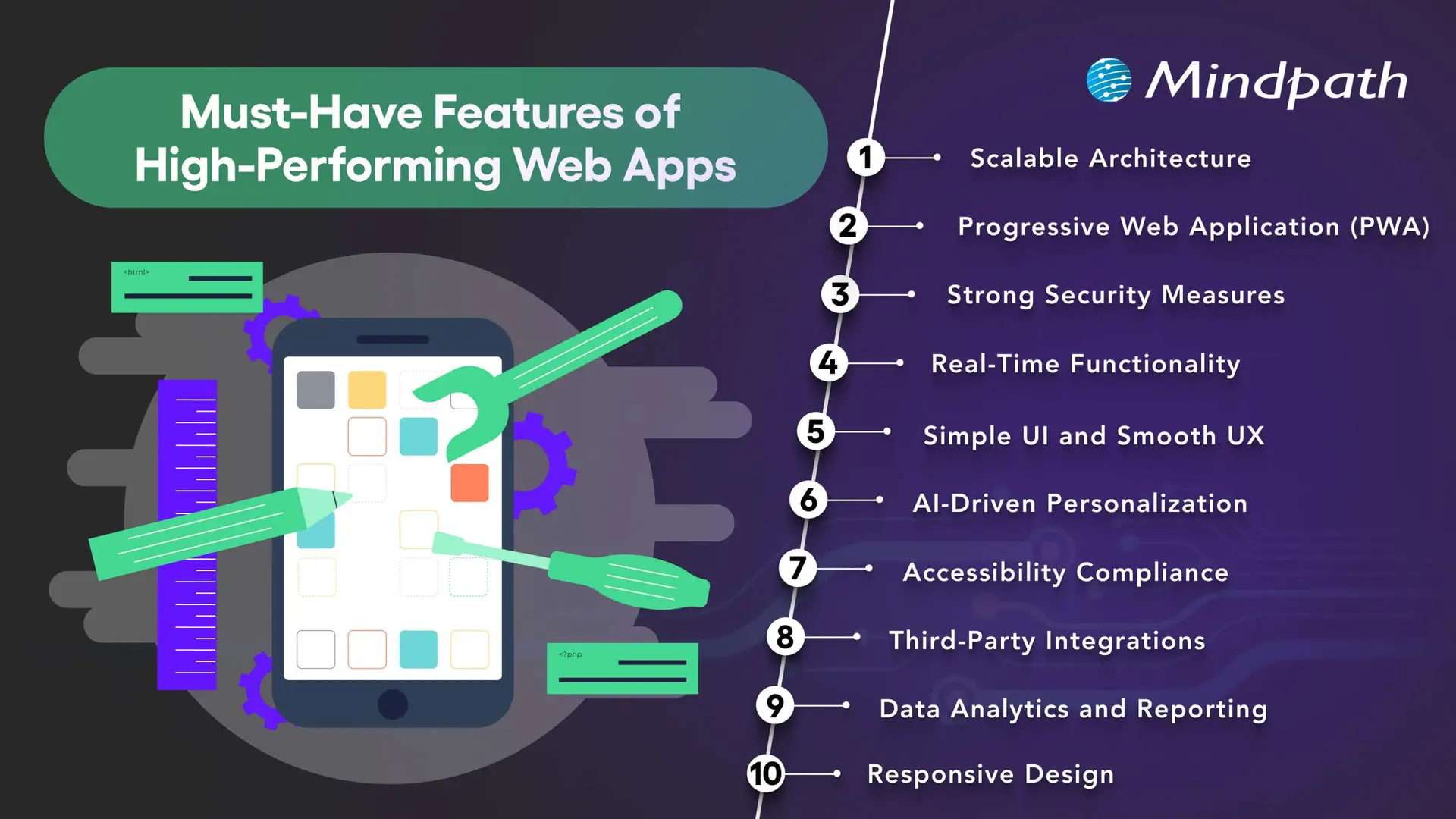
10 Must-Have Features of High-Performing Web Apps

The right combination of features depends on the application’s purpose, audience, and technical requirements. The following capabilities provide a practical foundation for many modern web applications.

10 essential features of high-performing web applications

1. Scalable Architecture

A scalable architecture allows a web application to accommodate changing demand, new features, and increasing data volumes without requiring a complete redesign every time the business grows.

Depending on the application’s needs, scalability may involve cloud infrastructure, caching, database optimization, load balancing, and modular services. Microservices can be useful for systems with independently deployable components, but they also introduce additional operational complexity. A well-structured monolithic application may be more appropriate for a smaller product.

Businesses should plan for realistic usage patterns, monitor performance, and test how the application behaves under expected and peak workloads. The goal is to choose an architecture that supports growth without introducing unnecessary cost or complexity.

2. Progressive Web App Capabilities

Progressive web apps (PWAs) use web technologies to provide app-like experiences through supported browsers. Depending on the platform, they can offer installation, offline access to selected content, caching, and push notifications.

These capabilities can be useful when businesses want users to access services conveniently across devices without maintaining separate native applications for every platform. Service workers can support offline behavior, while responsive layouts help the interface adapt to different screen sizes.

PWA capabilities vary across browsers and operating systems. Before adopting this approach, businesses should confirm which features their target users’ devices support and test the experience under different connectivity conditions.

Related reading: Progressive web apps.

3. Strong Security Measures

Security is essential for applications that process personal information, business records, payments, or confidential data. Security controls should be built into the architecture and development process rather than added only after the application is complete.

Depending on the use case, important measures include HTTPS, secure authentication, multi-factor authentication where appropriate, role-based access controls, input validation, encryption, and protected API endpoints. Developers should also review third-party dependencies and conduct security testing before and after launch.

Applications that handle sensitive data may require additional privacy controls, retention policies, audit logs, and compliance reviews. No single security feature guarantees protection, so businesses need an ongoing process for identifying and addressing vulnerabilities.

Related reading: Web application security.

4. Real-Time Functionality

Real-time functionality allows an application to deliver updates with minimal delay when the use case requires it. Examples include collaborative editing, live dashboards, messaging, order status updates, and notifications about important events.

Technologies such as WebSockets, server-sent events, and event-driven systems support different types of real-time communication. The appropriate choice depends on whether the application needs two-way communication, server-to-client updates, or occasional notifications.

Not every application needs real-time processing. Businesses should consider the value of immediate updates alongside infrastructure costs, connection management, reliability, and the consequences of delayed information.

5. Simple UI and Smooth UX

A clear user interface and intuitive user experience help people understand an application and complete tasks with less friction. Consistent navigation, readable content, predictable layouts, helpful feedback, and clear error messages make it easier for users to interact with the product.

Businesses should design interfaces around real user journeys rather than simply displaying every available feature. Usability testing can reveal confusing steps, unnecessary fields, and navigation problems before they affect a larger audience.

Useful UX measures include task completion rates, form abandonment, user feedback, and the time required to complete key activities. These indicators help teams identify where improvements are needed.

Want to improve the usability of your application? Read about UI/UX design trends for ideas on designing more effective digital experiences.

6. AI-Driven Personalization

AI-driven personalization can help web applications adapt content, recommendations, search results, or assistance to users’ needs. For example, an e-commerce platform may recommend relevant products, while a business application may help users locate information in a large document collection.

The value of personalization depends on the quality of the data, the relevance of the recommendations, and how transparently information is used. Businesses should provide appropriate privacy controls, avoid unnecessary data collection, and evaluate whether personalization improves the intended user outcome.

AI features should also be tested for accuracy and reliability. Where a generated response or recommendation could affect an important decision, suitable verification and human oversight may be necessary.

Related reading: AI in web development.

7. Accessibility and Inclusive Design

Accessible web applications help people with different abilities use digital services. Accessibility considerations include keyboard navigation, visible focus indicators, sufficient color contrast, descriptive labels, meaningful headings, captions where needed, and compatibility with assistive technologies.

Developers should use semantic HTML and test important user journeys with keyboards, screen readers, and accessibility evaluation tools. Automated checks can identify some issues, but they do not replace manual testing or feedback from people with disabilities.

Businesses should assess applicable accessibility requirements and use the Web Content Accessibility Guidelines (WCAG) as a reference when planning and evaluating their applications.

Related reading: Web accessibility guidelines and improvements.

8. Third-Party Integrations

Integrations allow a web application to exchange information with other software and services. Depending on the business requirements, an application may connect to payment gateways, customer relationship management platforms, analytics tools, inventory systems, identity providers, or communication services.

Well-planned integrations can reduce duplicate data entry and connect workflows across business systems. APIs commonly support these connections, but their reliability depends on authentication, permissions, error handling, rate limits, and the availability of the external service.

Businesses should document integration dependencies, protect credentials, validate incoming data, and plan for service interruptions. Each integration should have a clear purpose and contribute to the application’s intended functionality.

9. Data Analytics and Reporting

Analytics and reporting help businesses understand how users interact with an application and whether key workflows are performing as expected. Depending on the product, useful measures may include feature adoption, completed transactions, search activity, error rates, task completion, and support requests.

Dashboards and reports can turn these measurements into information that teams use to prioritize improvements. Event tracking should be designed around specific questions, and the collected data should be accurate, relevant, and handled according to applicable privacy requirements.

Analytics alone does not explain why a behavior occurs. Teams should combine quantitative measurements with user feedback, usability testing, and operational context before deciding which changes to make.

10. Responsive Design

Responsive design allows a web application to adapt its layout and interactions to different screen sizes and input methods. Users should be able to complete essential tasks on smartphones, tablets, laptops, and desktop computers without unnecessary scrolling or broken layouts.

Responsive implementation typically uses flexible layouts, suitable breakpoints, scalable media, and touch-friendly controls. Developers should also test forms, navigation menus, tables, dialogs, and other interactive elements on smaller screens.

Responsive design supports usability across devices, but it should be combined with good content structure, accessibility, and performance optimization. Businesses should test the application using representative devices and realistic network conditions.

Security should remain a priority throughout development. Review application security best practices for additional guidance on protecting web and mobile applications.

Web App Features: Priority Comparison

Not every application needs all 10 features at the same level. Use the following table as a starting point when prioritizing development work according to the product’s purpose.

Feature Primary business value Priority guidance
Scalable architecture Supports growth and changing workloads. Plan early according to expected demand and complexity.
PWA capabilities Can improve access and support selected offline experiences. Prioritize when installation or offline access benefits users.
Security measures Protects data, accounts, and application functionality. Essential for every application, with controls based on risk.
Real-time functionality Provides timely updates and supports collaboration. Prioritize for workflows where delays affect the user experience.
Simple UI and UX Helps users complete tasks efficiently. Essential for every application.
AI personalization Can improve recommendations and information discovery. Add when there is a clear use case and suitable data.
Accessibility Supports inclusive use across abilities and assistive technologies. Include from the design and development stages.
Third-party integrations Connects application workflows and existing systems. Prioritize integrations required for core user tasks.
Analytics and reporting Helps teams measure performance and identify improvements. Define metrics around the application’s goals.
Responsive design Supports usability across screen sizes and devices. Essential for applications serving users across devices.

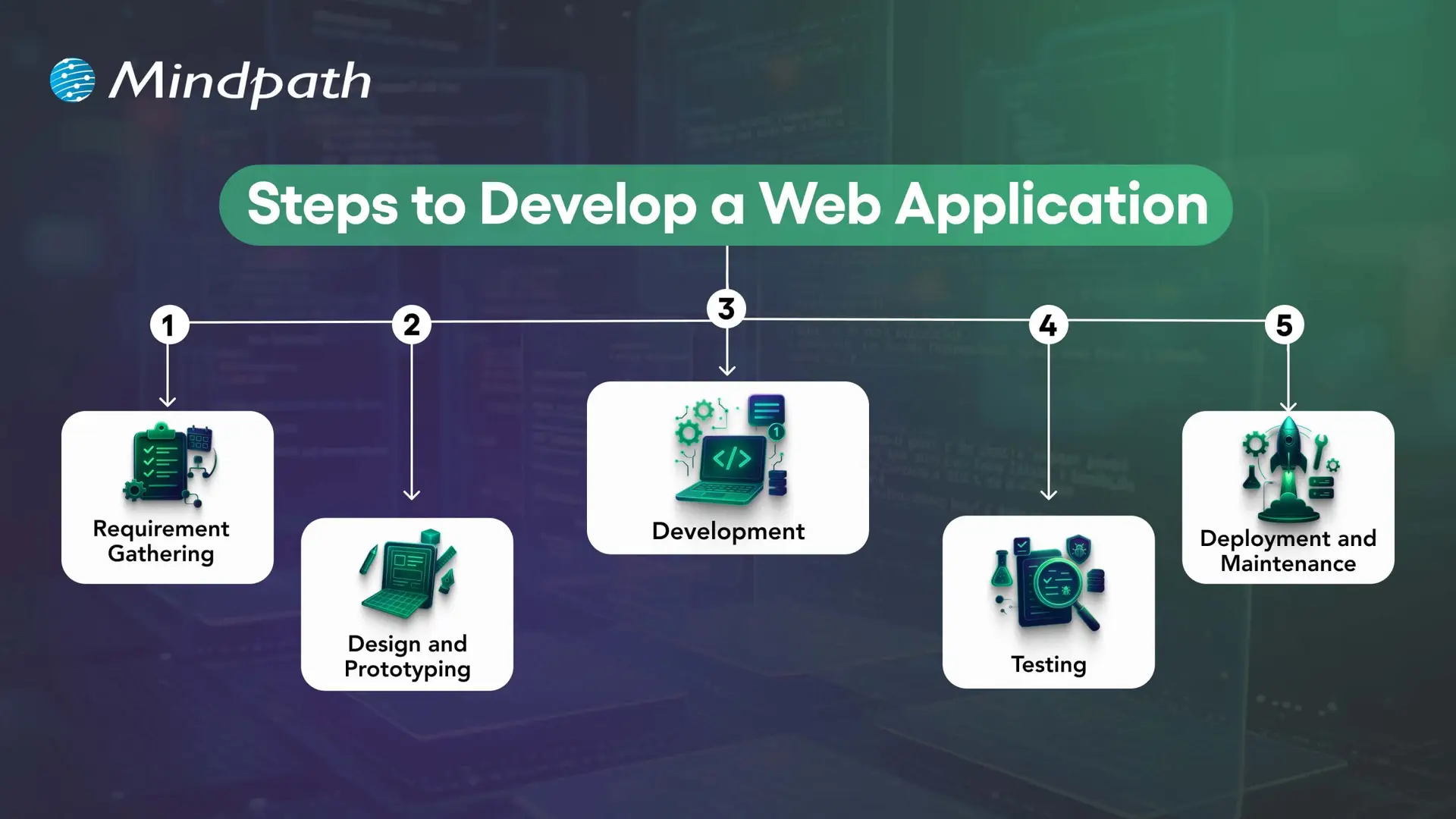
How to Develop a High-Performing Web Application

Successful web application development requires a structured process that connects business objectives, user needs, technical decisions, and ongoing improvement.

Key stages in web application development

1. Define Requirements and Plan the Application

Identify the problem the application will solve, its target users, essential workflows, and business objectives. Document functional requirements, security needs, integrations, expected traffic, and success measures before finalizing the scope.

2. Design the User Experience and Architecture

Create wireframes and prototypes to validate navigation, layouts, and key user journeys. At the same time, plan the application architecture, data model, integrations, and hosting approach. Early validation helps teams identify usability and technical issues before full development.

3. Develop the Front End and Back End

Front-end development implements the interface and user interactions, while back-end development handles business logic, data access, authentication, and APIs. The technology stack should match the application’s requirements and the team’s ability to maintain it.

4. Test Functionality, Performance, and Security

Unit tests check individual components, integration tests verify interactions between systems, and end-to-end tests validate important user journeys. Accessibility, security, performance, and user acceptance testing should also be included according to the project’s risks and requirements.

5. Deploy, Monitor, and Maintain

Deploy the application using a controlled release process and monitor errors, performance, availability, and user feedback. Ongoing maintenance includes fixing defects, updating dependencies, reviewing security, and improving features as business requirements evolve.

Need functionality tailored to your business? Read about custom web application development and how a purpose-built solution can address specific workflows.

How to Measure Web Application Performance?

Businesses should define measurable outcomes before launching a web application. The most useful metrics depend on the product, but the following indicators can help teams evaluate performance and identify areas for improvement.

Measurement area Example metrics What to assess
Loading performance Largest Contentful Paint (LCP), page load behavior How quickly important content becomes visible.
Interactivity Interaction to Next Paint (INP), task response times How quickly the interface responds to user interactions.
Visual stability Cumulative Layout Shift (CLS) Whether page elements move unexpectedly during loading.
Reliability Error rates, crash reports, service availability Whether users can complete tasks consistently.
User engagement Feature adoption, task completion, repeat usage Whether the application meets users’ needs.
Business outcomes Conversion rate, completed transactions, support volume Whether the application contributes to its intended business goals.

For web performance, Google’s Core Web Vitals provide useful reference thresholds: LCP of 2.5 seconds or less, INP of 200 milliseconds or less, and CLS of 0.1 or less. These are recommended targets, not guarantees of high rankings or business results. Evaluate performance using real-user data where available and test the pages and workflows that matter most.

Build a Future-Ready Web Application With Mindpath

High-performing web applications combine usability, responsive design, security, suitable architecture, and reliable functionality. Additional capabilities such as AI personalization, real-time updates, analytics, and third-party integrations can improve the experience when they address clear user and business needs.

The right development approach starts with well-defined requirements and continues through testing, deployment, performance monitoring, and maintenance. Businesses should prioritize features according to their users’ needs, technical constraints, and measurable objectives.

Mindpath provides web application development services tailored to business requirements. Our approach focuses on building secure, scalable, and maintainable solutions that support effective digital experiences and evolving operational needs.

Hire NodeJS Developers in Canada

Are you looking for a skilled Node.js developer in Canada to bring your project to life? Do you need a reliable expert who can build fast, scalable, and high-performing applications? Finding the right developer can be challenging, but with the right approach, you can hire a top Node.js professional who fits your needs perfectly.

Hiring a skilled Node.js developer in Canada is essential for businesses looking to build fast, scalable, and efficient applications. With its non-blocking architecture and real-time capabilities, Node.js is a powerful choice for web and software development. Whether you’re developing a dynamic website, an API-driven platform, or a complex enterprise solution, finding the right developer ensures seamless performance and long-term success. Understanding the key factors in hiring a Node.js expert will help you make an informed decision and achieve the best results for your project.

Let’s explore how you can make the best choice!

Steps to Hire Node.js Developers in Canada

1. Define Your Project Requirements

To hire the right Node.js developer, you must first define your project’s technical and business needs. Outline the core functionalities, expected performance, and scalability requirements of your application. Identify the frameworks and tools you want to use, such as Express.js, Nest.js, or MongoDB, and specify whether the role requires front-end expertise alongside back-end development. Additionally, determine the level of experience required—junior developers handle basic tasks, mid-level developers work on feature-rich applications, while senior developers manage architecture and complex integrations. Having a well-documented project scope ensures that candidates understand your expectations from the start. A detailed job description outlining skills, responsibilities, and project goals will help attract the right talent. Without clarity, the hiring process can become inefficient, leading to mismatches in skills and expectations. A structured approach helps filter candidates early and ensures that only those with relevant expertise apply.

2. Source Qualified Candidates

Finding skilled Node.js developers in Canada requires using multiple recruitment channels. Start by posting job listings on platforms like LinkedIn, Indeed, and Glassdoor, which are popular among Canadian job seekers. Consider using tech-specific job boards such as Stack Overflow Jobs or GitHub Jobs to target professionals with strong development experience. Additionally, networking within Canada’s growing tech community can help you connect with skilled developers—attend industry conferences, local meetups, and online forums to discover potential candidates. If you prefer a more streamlined approach, working with tech recruitment agencies can save time by providing pre-screened candidates. Another option is hiring freelancers through platforms like Toptal or Upwork but ensure that remote hiring aligns with your business needs and legal considerations. A strong sourcing strategy increases the likelihood of finding a developer who meets both your technical and cultural requirements, ensuring a smoother hiring process.

3. Conduct Technical Screening

After gathering applications, the next step is to assess candidates based on their technical skills and experience. Start with a resume review, focusing on past projects, relevant experience, and familiarity with the required Node.js frameworks. Candidates should demonstrate hands-on experience in building scalable applications, working with APIs, and optimizing back-end performance. To ensure technical proficiency, conduct coding assessments through platforms like HackerRank or Codility. These tests evaluate problem-solving abilities, efficiency in writing clean code, and understanding of Node.js fundamentals. Additionally, assess candidates’ experience with database management, security best practices, and cloud-based deployments. An effective screening process filters out underqualified applicants early, allowing only the most capable developers to move forward. By implementing structured assessments, you can streamline hiring and ensure that your chosen developer has the technical expertise necessary to contribute effectively to your project.

4. Assess Technical and Problem-Solving Skills

Once candidates pass the initial screening, conduct in-depth technical interviews to evaluate their problem-solving abilities. Ask questions about key Node.js concepts such as asynchronous programming, event-driven architecture, API development, and database management. Provide real-world scenarios related to your project and assess how they would approach challenges. A practical coding exercise or take-home assignment can help evaluate their thought process and coding efficiency. In addition to technical expertise, consider their ability to design scalable solutions and optimize application performance. Discuss their experience with DevOps practices, cloud computing, and microservices architecture if relevant to your project. Soft skills are equally important—effective communication, adaptability, and teamwork play a significant role in long-term success. The goal is to hire a developer who not only writes efficient code but also collaborates well with your team and adapts to evolving project needs.

5. Make the Right Hiring Decision

After evaluating technical skills, problem-solving abilities, and soft skills, the final step is making an informed hiring decision. Compare candidates based on performance in technical interviews, problem-solving assessments, and cultural fit. Strong communication and teamwork are crucial, as developers often collaborate with designers, project managers, and other team members. Additionally, check references to validate past work experience and reliability. When making an offer, consider industry-standard salaries in Canada and ensure compliance with local labor laws. Offering a competitive package, including professional development opportunities and flexible work arrangements, can help attract top talent. If hiring full-time isn’t feasible, explore freelance or contract-based options. A well-structured hiring process ensures you bring in a skilled Node.js developer who aligns with your technical needs and business goals, setting your project up for long-term success.

Looking to hire top Node.js developers in Canada? At Mindpath, we provide skilled developers who specialize in building high-performance, scalable applications tailored to your business needs. Whether you need full-time developers or project-based support, our experts ensure seamless development with industry-leading technologies.

Let’s bring your vision to life! Contact Mindpath today to hire the best Node.js talent for your next project.

Hire skilled Node.js developers in Canada with our step-by-step guide. Learn how to source, screen, and hire top talent for your project.
Cyber Security for business 

You depend on computer systems to manage business, data storage, and customer services on a daily basis, isn’t it? Cyber security for business now plays a critical role in keeping everything stable and secure. Nevertheless, not every organization realizes how rapidly risks develop and to what extent they could influence development. In that case, is your business ready to face the threats that continuously evolve in size and complexity?

Simultaneously, companies seek to develop, innovate, and remain competitive continuously. Thus, security can no longer remain in the background as a fundamental role. Instead, it requires a more agile, responsive strategy that complies with the business objectives. In this blog, you will discover how the contemporary strategies are defining the tougher protection and smarter decision-making. So, let’s dive in!

Planning to build a security infrastructure that’s monitored, maintained, and always ready for emerging threats? Mindpath offers end-to-end managed IT services that cover security protocols and 360-degree infrastructure monitoring for businesses of every size.

What is Cyber Security?

Cyber security for business focuses on protecting systems, networks, and critical data from digital threats. It assists organizations to avoid unauthorized entry, loss of data and disruption of operations. Today, businesses are dependent on effective security measures to protect sensitive data, uphold trust, and guarantee a smooth business process in an increasingly interconnected and risk-based world.

Concurrently, business cyber security requires a multi-layered structure that incorporates people, procedures, and high-tech systems. In addition, companies enhance greater security defenses in instances where they integrate security measures with business operations. With the increasing complexity of threats, businesses should remain vigilant, operate fast and provide a higher level of protection to ensure long-term stability and ensure growth that is safe.

What is the Importance of Cyber Security for Businesses?

There is an increasing trend in cyber risks as companies increase the reliance on digital systems and data. Therefore, everyorganization requires high levels of protection to prevent disruption and retain confidence. The following are the main reasons why cyber security is one of the most important aspects of growth and stability protection.

1. Securing Critical Business Data

Companies need to secure confidential data including personal information and financial data of customers. Strong Business data security helps prevent breaches that lead to losses and damage. In addition, a focused approach to data protection in cyber security keeps valuable assets safe and reliable.

2. Ensuring Smooth Business Continuity

Cyber threats have the potential to disrupt day-to-day activities and reduce productivity. As a result, a strong cyber security for business strategy helps avoid downtime and keeps systems running. This enables teams to operate without interruption and be able to remain on a steady performance.

3. Meeting Compliance Requirements

Companies have to take stringent measures on keeping their customer and company data secure. For this reason, security practices can be used to address these standards and mitigate legal risks. This will guarantee easier operations without fines and legal regulations.

4. Strengthening Customer Confidence

Customers want businesses to ensure that their personal information is always safeguarded. Moreover, good security administration develops trust and is responsible. This results in long-term relationships and an improved customer loyalty.

5. Gaining a Competitive Edge

Organizations having high levels of security are distinguished in the competitive market. Consequently, they minimize risks and emphasize more on growth and innovation. This brings a stable situation where long-term business success can occur.

Modern Cyber Security Approaches for Businesses

Cyber threats keep changing and pushing the conventional security measures. Therefore, organizations can no longer afford to rely on passive methods of protection. Here are the modern approaches that strengthen cyber security for business.

1. Building Employee Awareness

The employees are important to recognize the risks and avoid threats. For example, frequent training enhances the quality of decision-making and minimizes errors. This directly strengthens Cyber Security for business by minimizing human-related risks.

2. Applying Strong Access Controls

Companies need to restrict the access to sensitive data in accordance with the roles. As a result, implementation of controlled access minimizes the possibilities of misuse both internal and external. This approach builds a stronger foundation for IT Security across systems.

3. Using Strong Passwords and Authentication

Secure passwords are used to secure systems against intrusion. In addition, multi-factor authentication involves an additional authentication process. These steps follow essential cybersecurity best practices and improve overall protection.

4. Keeping Systems Updated and Backed Up

Periodic fixes address the security lapses and enhance performance of the system. Meanwhile, important data is safeguarded through backups in case of unforeseen circumstances. They assist one another to ensure uniform and stable operations.

5. Creating Adaptive Security Policies

The security policies should be modified with the varying technologies and threats. Therefore, exceptional guidelines make the employees stick to the proper practices. This guarantees greater organization and discipline in the organization.

6. Working Closely with IT Teams

Business executives have to collaborate with IT departments to control risks. Furthermore, teamwork enhances the speed of response in case of security situation. This further supports Cyber Security for business in a structured way.

7. Monitoring Third-Party Access

Third-party users may bring risks to business systems. For this reason, tracking their activity assists in detection of abnormal behavior at an early stage. This limits possibility of data breach and misuse of the systems.

8. Conducting Regular Security Audits

Audits in security assist in determining the loopholes in the systems. In addition, they offer precise lessons in order to enhance protection initiatives. Frequent audits help businesses to remain safe and legal.

9. Promoting Continuous Security Training

Constant learning ensures that employees are kept abreast of the emerging threats. As a result, it creates awareness and enhances security practices. This develops a powerful and insecure working culture.

Ready to Strengthen Your Business Security Today?

Cyber threats are constantly increasing and weighing down on all organizations. Therefore, organizations need to take decisive and concrete measures to remain secure. An excellent Cyber security solution can minimize the risks and enhance stability. It also helps in improved decision making and long-term development. Ultimately, companies can secure data, preserve trust, and run their operations without challenges in an evolving rapid digital environment with the right approach.

At Mindpath, we provide quality cybersecurity services to meet the needs of current business. Our specialists aim at developing powerful strategies that safeguard systems and information. In addition, we assist companies in enhancing security, minimizing risks, and remaining ready against the changing threats. Having a pragmatic and outcome-driven strategy, Mindpath can help organizations create a secure and confident future.