AI in Mobile Apps – Benefits, Applications, and Use Cases

Join our Newsletter!

Featured Posts

Support Is One Click Away

Home

AI in Mobile Apps – Benefits, Applications, and Use Cases

ai in mobile apps

AI in Mobile Apps – Benefits, Applications, and Use Cases

Every day, AI in mobile apps revolutionizes user interaction with technology. Just think of a single application that understands your behavior, foresees your requirements, and adjusts its capabilities for a smooth and unique experience. Enterprises are equipped with smart features such as conversational agents, personalized algorithms, and speech assistants to attract user interaction in a better way. This transformation is making regular applications become intelligent friends that facilitate actions and offer answers that are convenient and timely.

Beyond convenience, AI in application development brings innovation and returns efficiency. In a nutshell, developers can analyze real-time data, discover patterns, and tailor personalized experiences for users, keeping them more engaged for longer periods. Companies can gain insight into users through actionable data, and users enjoy quicker, seamless, and more meaningful interactions. As the future of AI continues to unfold, this new progress opens the doors to new opportunities in retailing, healthcare, education, and entertainment. This article shall delve into the positive impacts, utilization, and practical scenarios of AI in mobile apps. So, keep reading further!

Ready to bring AI into your mobile app development, but confused about where to start? Mindpath provides full guidance on mobile app development services to help you gain user attraction and create powerful digital experiences.

Evolution of AI in Mobile App Development

AI in mobile app evolution has changed the design of the same user simple tools into smart, user-engagement-focused experiences. The earliest examples of AI in mobile applications were predictive text and basic speech recognition, while mid-level AI brought in personalized recommendations, more intelligent search functions, and AI-enabled chatbots. All these technological innovations enabled the most efficient user-behavior apps to comprehend and reply to users without wasting time.

Currently, artificial intelligence in mobile applications powers advanced features such as real-time analytics, augmented reality, and the ability for apps to operate autonomously. Besides, AI dramatically simplifies the development process by automatic testing, code generation, and cross-platform integration. These innovations reflect the consistent trend of AI eventually transforming mobile into more intelligent, rapid, and personalized user experiences, hence driving app usage to be a natural daily occurrence.

Looking to understand how mobile apps can enhance the impact of AI and unlock greater value for your business? Discover more insights in our blog on the Mobile App Development, which benefits your business by improving customer engagement and driving measurable growth.

Benefits of Artificial Intelligence in Mobile Apps

AI-enabled mobile app development is a game-changer as it opens opportunities for intuitive, personalized and efficient apps. Developers can thus use smart features to build apps that not only attract users but also make their routine tasks effortless.

1. Tailored Experiences for Users

Mobile applications powered by Artificial Intelligence will eventually have the capability to study user behavior and preferences so as to offer customized content and recommendations. This means that the applications will be more engaging, and the users will have a custom-made experience which gives them the impression that the entire thing is just for them.

2. Stronger Security Measures

AI is one of the factors that revolutionize the environment of mobile applications to uncover unconventional user behaviour patterns with the aid of artificial intelligence technology, to prevent unauthorized access, and ensure the safety of the data. If you associate with a firm that is proficient in AI app development, then you will definitely have security protocols being implemented in a proper way.

3. Instant Customer Support

AI-driven virtual assistants solve problems right away, thus increasing user delight. Consequently, the need for human support is made smaller although the speed and correctness of the answers are maintained.

Also Read: AI for Customer Services 

4. Smarter Search and Navigation

The power of AI allows applications to interpret voice inputs, pictures and even the users’ thoughts in order to deliver more accurate search results. Thus, users are able to locate their desired items in less time, which means the experience is more fluid and user-friendly.

5. Predicting Trends and Behavior

The AI in mobile apps is capable of studying user actions which were done in the past to predict their future inclinations and the general trend of the market. Thus, enterprises will be able to have a clearer vision of the suitable decisions to take, which will further promote the involvement of clients.

6. Streamlined Tasks and Efficiency

Artificial intelligence can automate the execution of monotonous operations that include scheduling, setting of reminders, data handling, and so on, thereby saving valuable time and eliminating errors. A company can utilize AI app ideas to create apps that are both quality-excellence and user-friendly.

Curious how mobile apps can leverage AI to transform your business and stay ahead in 2025? Explore our blog on Mobile App Development Trends to discover how these innovations can enhance user experiences.

Use Cases of AI in Mobile App Development

Artificial Intelligence is transforming how mobile applications function and enabling them to become smarter, faster, and more adaptable. The use of artificial intelligence in mobile application development is progressing and promotes opportunities for interesting new applications across industries.

1. Personalized Content and Recommendations

AI in mobile apps can use advanced data analytics of users’ intent and behaviors to formulate personalized content and product recommendations and offerings. By suggesting items or services they might like, apps proactively enhance user engagement and satisfaction, and they also help businesses utilize data to make informed decisions.

2. Intelligent Virtual Assistants

Applications incorporate artificial intelligence technology for mobile app development, and voice assistants now exist that can take user directions. These voice assistants can help navigate tasks quickly, without even using your hands, allowing access to information obtained faster and can speed up your daily tasks.

3. Automated Task Management

AI takes over basic responsibilities, such as scheduling and reminders, or the organization of emails from mobile applications. This increases efficiency and minimizes the time a user will spend on monotonous tasks.

4. Enhanced Security and Fraud Detection

AI in mobile apps identifies unusual patterns of user behaviour and prevents fraud from happening right away. Businesses can leverage advanced monitoring and threat detection functionality to safeguard sensitive information and ensure user safety.

5. Industry-Specific Smart Solutions

Artificial intelligence powers the development of applications in the healthcare, finance, and e-commerce arenas which can provide personalized services, forecasts, and automation. Working with an AI application development company can help ensure applications comply with industry standards, while also improving the user experience.

Want to make sure that your applications are not only functional but also secure, compliant, and trustworthy for your users? Discover our blog on application security best practices to explore essential techniques for protecting your software and building trust.

Real-World AI in Mobile Application Examples

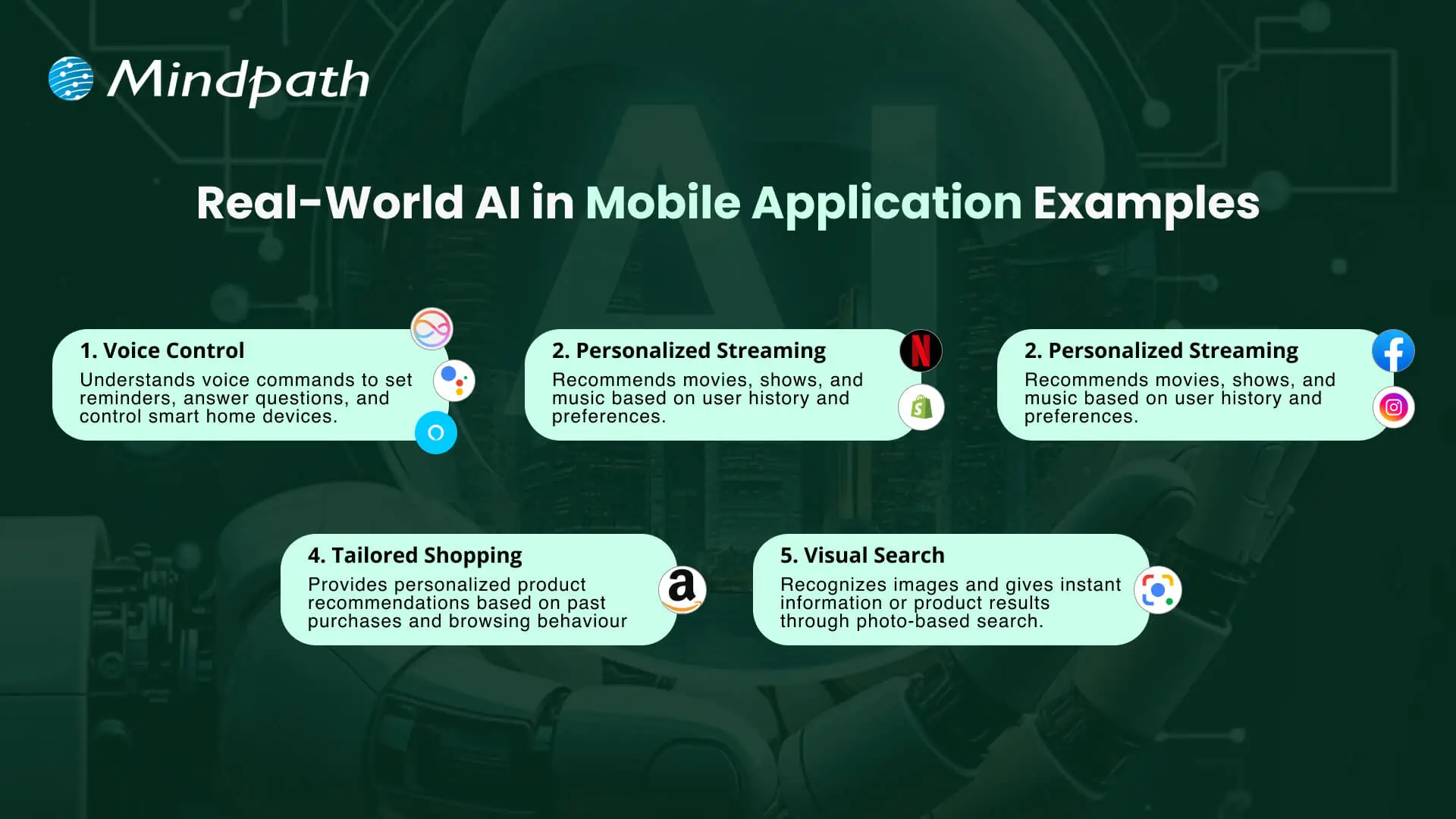
AI in mobile apps is transforming everyday interactions by making them smarter, faster, and more intuitive. Real-world examples show how AI improves user experiences, streamlines tasks, and delivers personalized solutions across different industries.
Real-World AI in Mobile Application Examples

1. Voice Control with Siri, Google Assistant, and Alexa

These virtual assistants use artificial intelligence in mobile applications to understand voice commands and perform tasks like setting reminders or controlling smart home devices.

2. Personalized Streaming on Netflix and Spotify

Streaming apps use AI in mobile apps to analyze user behavior and recommend movies, shows, or music that match individual preferences.

3. Smart Social Feeds on Facebook and Instagram

Social media platforms use AI mobile app development to personalize news feeds and suggest relevant content, friends, and groups for each user.

4. Tailored Shopping on Amazon

Amazon uses AI in mobile apps to recommend products based on browsing history and past purchases, creating a personalized shopping experience.

5. Visual Search with Google Lens

Google Lens uses AI technology for mobile app development to recognize images and provide instant results through photo-based searches.

Want to build a mobile app but don’t know which technology to use for better execution? Learn from the mobile app development technologies blog to understand what suits best for your business.

Ready to Build Smarter Mobile Apps with AI?

The use of AI in mobile apps introduces new opportunities for businesses and users. This advancement creates great user experiences, strengthens security, and provides more effective daily interaction. As industries pursue innovation, apps will work smarter, adapt more quickly, and become infinitely personal, helping brands engage with users, in meaningful and authentic ways.

Working with Mindpath gives organizations access to superior AI mobile application development services built for measurement. We build intelligent, fast, and user-friendly applications to support your organizational priorities. We provide a blend of strategy, innovation, and technology to design digital solutions that drive growth and maintain user engagement.


Related Post

Discover the ultimate guide to hiring Node.js developers in London. Learn about the skills, benefits, and cost factors involved in finding the right talent for your project.
Explore how digital transformation reshapes businesses, boosts efficiency, enhances customer experiences, and drives sustainable growth for success.

Related Post

Web accessibility guidelines

Your website acts as the gateway to your business’s digital world. It is the first impression that visitors get. However, for millions of users around the globe, those with motor, visual, cognitive, and hearing impairments, that door can remain locked if your website is not completely accessible. This is where web accessibility guidelines become pivotal. 

For WordPress website owners, implementing the web accessibility standards not only enhances usability but also increases SEO, brand reputation, and user engagement. In this detailed blog, you will learn more about web page accessibility and explore important accessibility principles and effective strategies. Besides, we have also mentioned some useful tools that can help you ensure your site meets the necessary standards. 

Looking to make your website accessible for your visitors and users? Mindpath’s WordPress development services help you create a user-friendly website that will meet accessibility standards and deliver seamless results.

Web Accessibility and Its Importance

In simple words, it means designing and creating websites that can be easily used and navigated by every user, including users with disabilities. Web accessibility ensures equal access to functionality as well as information to all, aligning with various legal mandates and standards, such as: 

1. The Americans with Disabilities Act or ADA

2. Section 508 of the Rehabilitation Act of 1973 (USA)

3. The Rights of Persons with Disabilities or RPWD Act (India)

4. The European Accessibility Act 2019

5. Equality Act 2001 (the United Kingdom)

6. Web Content Accessibility Guidelines 2.1 and 3.0

Accessible sites don’t just benefit individuals with disabilities or temporary impairment. Such websites tend to rank higher in SERPs due to their enhanced usability and semantic structure. 

Web Accessibility Standards- POUR Principles

Apart from the specific requirements, businesses should familiarize themselves with the key principles of web accessibility guidelines. These are known by the acronym- POUR. 

1. Perceivable

The interface and content of websites should be presented in such a way that every user can perceive or interpret, regardless of their disabilities. 

2. Operable

Visitors should be able to interact and navigate with websites utilizing different input methods, including assistive devices and keyboards. 

3. Understandable

Content as well as functionality of a website should be consistent, clear, and comprehensible for users with different cognitive levels. 

4. Robust

Websites should be compatible with various modern assistive technologies. This helps ensure long-term reliability and accessibility. 

Is your WordPress site truly secure from cyber threats and vulnerabilities? Find out how safeguarding WordPress vulnerabilities can help you protect your website and maintain your customers’ trust.

Accessibility in WordPress: Why it Matters?

WordPress powers a major portion of the web, making it an important platform for accessibility. Whether you have an e-commerce platform, a blog site, or a business website, you should carry out a web accessibility test and ensure it meets all the standards. WordPress accessibility is crucial for many reasons, like: 

1. Aider Audience Reach

By creating a website with an inclusive design, you can make it accessible for individuals with disabilities. Besides, it shows your business supports disabled people and understands their needs. 

2. Legal Protection

Following the required accessibility standards, you can avoid penalties and lawsuits. 

3. Better SEO

All search engines favor accessible WordPress websites with proper alt text, semantic structure, etc. 

4. Establishing Reputation

Digital accessibility has become an ethical issue. If you are not following the web accessibility guidelines, it can affect the reputation of your business.

5. Better UX

With the help of various accessibility features, you can boost usability for every user, including those with physical limitations and mobile visitors. 

Want to ensure your WordPress site is running on the right PHP version for top performance and security? Check out our guide on WordPress PHP compatibility to keep your site efficient, stable, and future-ready.

Some Common Web Accessibility Barriers

Before diving into the solutions to meet accessibility web standards, it is important to understand some common accessibility barriers that can significantly affect user experience while limiting your website’s inclusivity. 

1. Use of incorrect and missing Alt Text of images

2. Non-descriptive link text like “read more” or “click here.”

3. Poor color contrast between the background and the text

4. Use of inaccessible forms, lacking keyboard support

5. Keyboard navigation problems

6. Lack of transcripts or captions for multimedia

7. Wrong heading structure

8. Auto-play content with missing controls

Recognizing these issues is the first step toward crafting a more accessible and inclusive WordPress website that can serve every user ethically as well as effectively. 

Are you struggling to decide which platform will best support your business goals? Compare Magento vs WordPress to discover which option offers the features and flexibility your website needs.

Strategies to Boost Your WordPress Website Accessibility

Now that we have understood the importance of web accessibility and common barriers to it, it’s time to move to the practical solutions. Increasing your WordPress site’s accessibility doesn’t require a complete transformation. It can be achieved through the right web accessibility tool, thoughtful adjustment, and an inclusive design. Here are actionable ways to make your website more accessible and compliant. 

1. Opt For an Accessibility-Ready WordPress Theme

When working on web accessibility, always begin with a solid foundation, i.e., themes. You should always choose an accessibility-ready theme. Such themes follow the web page accessibility guidelines, such as keyboard navigation, semantic HTML, and more. 

Some popular accessible WordPress themes you can try are: 

  • Monument Valley
  • Gutenix
  • Neve
  • Icelander
  • OceanWP 
  • Astra

While choosing a theme, always check for WCAG compliance and evaluate the performance with a screen reader. 

2. Proper Heading Structure and Semantic HTML

Semantic HTML allows assistive technologies to properly interpret your website content. Ensure that all the headers are used in a logical order, like H1, H2, H3, so that users can easily understand the page structure. Here are some best practices to keep in mind: 

  • Only use one heading per page, generally the title.
  • Use proper headings for main sections and subsections
  • Don’t skip heading levels 

You can use a web accessibility tool like Axe to check heading structure and make changes accordingly. 

3. Install Right Accessible Plugins

Plugins are great ways to add new functionality and features to your website. However, if not selected carefully, you may end up with various accessibility problems. Always use plugins designed to make your site more accessible. Some recommended plugins are:

  • Equalize Digital: Offers a plugin to test websites for WCAG compliance.
  • WP Accessibility: Helps identify common web accessibility problems. 
  • One Click Accessibility: Allows an easy way to add various accessibility features.
  • Accessible Poetry: Helps enhance accessibility by integrating features such as focus styles and skip links

These plugins can complement your selected accessibility-ready theme and keep your site compliant.

4. Ensure Sufficient Color Contrast

While creating an accessible WordPress website, ensure that the color contrast between background and text meet necessary WCAG guidelines. It should be at least 4.5:1 for normal text. 

High contrast enhances readability for individuals with visual impairment. There are many WordPress accessibility-ready themes that offer easy ways to customize colors to meet web accessibility guidelines.

Apart from this, you should also use a readable font size and line height. Recommended font size is at least 16 pixels. The line height and word spacing should be 1.5x and 0.16x of the font size, respectively.  

Must Read: Custom WordPress Development

5. Tab Indexing

Users with motor skill challenges generally depend on keyboard navigation, especially the Tab key, to navigate through your website. Unlike trackpad or mouse users, they rely on a predictable, logical tab order to access buttons, menus, and other interactive elements. So, ensure that you have enabled tab indexing for your site. 

Furthermore, make sure that all interactive elements follow the correct flow, i.e., left to right and top to bottom. A well-designed tab index can create a more inclusive and smoother browsing experience. 

6. Offer a Consistent and Clear Navigation

Even though you have deployed tab indexing for smooth navigation, there are other important things you should consider.

  • Breadcrumbs: Use breadcrumbs to show users their current location within your website, reducing confusion. 
  • Descriptive links: Prefer to use descriptive link text that clearly shows action or destination. Skip using phrases like “read more” or “click here”. 
  • Consistent navigation menu: Make sure that your site’s menu is consistent across all pages. 

Clear and consistent navigation is vital for user experience as well as accessibility. 

7. Optimize Media and Images

Media and images are crucial elements of a website. To ensure their accessibility, consider these web accessibility examples:

  • Captions and Transcripts: Use captions for videos and transcripts for audio content. This will help users with hearing impairments and who prefer to read instead of listening. 
  • Alt Text: For images, you should use descriptive alt text. This will help a screen reader to describe images to users. 
  • Descriptive File Name: Using descriptive file names for media files and images can help you boost SEO and web accessibility. 

With accessible images and media, it will be easier to make your site compatible with assistive technologies. 

8. Leverage Access Keys

Access keys work like keyboard shortcuts, enabling users to jump to a specific section of the website using assigned keys. For example, by pressing a key like “1”, they can go to the homepage, and by pressing “2”, they can access your contact page. 

9. Avoid Auto-Animations and Flashing Content

Blinking and flashing content can cause seizures in individuals with photosensitive epilepsy. Besides, auto-animations can also cause distraction among users. Best practices to follow here are: 

  • Don’t flash content more than three times per second
  • Allow users to pause animations
  • Utilize motion purposefully

By following the above-mentioned tips, you can ensure that your website welcomes all users while offering a user-friendly web experience. 

Ready to upgrade your HTML site to something more powerful and manageable? Explore why converting HTML to WordPress can streamline updates and improve your online presence.

Tools to Ensure Your Site’s Accessibility

Once you are done with implementing accessibility features following the web accessibility guidelines, you should carry out a comprehensive test to ensure your site is working as intended. Here are some useful tools to test your site.

1. WAVE

Web Accessibility Evaluation Tool, designed by WebAI, helps content creators and developers to make sure their websites are accessible for all. It offers visual feedback on the web content’s accessibility, making it easier to detect and resolve accessibility problems. It’s free to use. 

2. EqualWeb

This tool is designed to offer manual and automated accessibility solutions. Using this, businesses can stay compliant with ADA standards and WCAG 2.1. With AI-powered features, EqualWeb offers an easy way to identify and fix accessibility issues.  

3. Axe

This powerful web accessibility test tool can be integrated into any browser and development environments for a detailed web accessibility analysis. 

4. Level Access

This web accessibility checker provides developers with an API and a web interface, making it a highly flexible tool for testing accessibility throughout the web development lifecycle. 

5. NVDA

NonVisual Desktop Access is an open-source, free-to-use screen reader for Windows. Using this, visually impaired individuals can easily interact with your digital content. Developers can use it to evaluate web applications and websites’ accessibility. 

Wondering how to hire the right WordPress developer to help your business grow online? Explore our detailed guide on Hiring a WordPress Developer to discover expert insights that guide you toward making the best hiring decision.

Create an Inclusive Website that Welcomes Everyone

Web accessibility goes beyond just legal compliance. It focuses on fostering empathy, digital equity, and inclusion. By following web accessibility guidelines and leveraging the robust ecosystem of WordPress, you can create a website that is intuitive, usable, and can help all users. 

Making your site accessible is a journey of continuous improvement, and Mindpath can be an ideal partner in this journey. With our web accessibility services designed for this changing digital space, you can witness the desired results. Our expert guidance and tailored solutions, created based on web accessibility guidelines, will help you meet all compliance requirements and create a website that embodies innovation, openness, and user engagement. 

Enhance your WordPress site’s inclusivity with our expert tips and services. Discover how to improve accessibility and explore our comprehensive WordPress solutions.
Recruiting a Node.js developer in California inecessitates a thorough assessment of technical knowledge, soft skills, market trends, and the recruiting process. With the state’s highly competitive technology economy, finding the appropriate personnel requires going beyond coding abilities. A good Node.js engineer should be familiar with backend frameworks, databases, and cloud technologies, as well as possess excellent communication and problem-solving skills. Understanding California’s employment market and creating an efficient recruiting procedure can also help you attract the top applicants. Here are some important aspects to consider when hiring a Node.js developer in California.

1. Technical Proficiency and Experience

When hiring a Node.js developer, make sure they are proficient in JavaScript, asynchronous programming, and Node.js frameworks such as Express.js or Nest.js. Knowledge of databases (MongoDB, PostgreSQL), RESTful APIs, and cloud services (AWS, Azure) is essential for developing scalable apps. Experience with unit testing, CI/CD pipelines, and version control (Git) contributes to a smoother development process. Additionally, match their experience level with the intricacy of your project to obtain the appropriate competence. Reviewing their previous projects and contributions to open-source repositories might help them evaluate their real-world coding abilities.

2. Soft Skills and Team Collaboration

A Node.js developer should be able to communicate effectively, work well in groups, and solve problems. They must work well with front-end developers, designers, and product managers to ensure that the project runs smoothly. Adaptability is also important, as the Node.js environment changes frequently with new upgrades and best practices. Look for applicants that can troubleshoot effectively, think critically, and perform well under deadlines. A developer with great soft skills can easily fit into your team and contribute to a healthy work atmosphere.

3. Understanding California's Market Trend

The California tech business is very competitive, with a growing demand for talented Node.js developers. Salaries vary according to experience, region, and sector, so analyzing market trends and pay packages is essential. Companies in large tech hubs such as San Francisco, Los Angeles, and San Diego frequently provide competitive bonuses to attract top people. Offering remote or hybrid work opportunities might also help your job commercial stand out. Understanding these variables allows you to establish an effective hiring strategy and attract the best developers for your company.

4. Interviewing and Hiring Process

A systematic interview method helps you hire the top Node.js developers. Begin with a technical test, such as coding challenges, whiteboarding activities, or homework projects, to measure their problem-solving abilities. Next, perform behavioral interviews to assess communication skills, collaboration, and flexibility. Reviewing their portfolio and GitHub contributions provides insight into their real-world development experience. Finally, base your compensation, perks, and job expectations on market research. A well-planned recruiting strategy can help you identify the best Node.js talent for your project.

Finding the right Node.js developer can be challenging but Mindpath makes it easy! Our experienced Node.js developers specialize in building scalable, high-performance applications tailored to your business needs. Whether you need backend development, API integration, or cloud-based solutions, we have the expertise to deliver.
Ready to build your next project with top Node.js talent? Partner with Mindpath today and bring your vision to life!

Discover the ultimate guide to hiring Node.js developers in London. Learn about the skills, benefits, and cost factors involved in finding the right talent for your project.
generative ai in market research

Generative AI is undoubtedly among the most promising technologies that have come into existence in recent years. The impact of Generative AI can be felt in diverse domains such as healthcare, business, and many more. The global generative AI market size is expected to touch USD 890.59 billion by the year 2032.

A particular area where generative AI is being used as a revolutionary tool is market research. Typically, businesses conduct market research, which helps them to make strategic decisions. In recent times, businesses across diverse industries have been leveraging generative AI in order to simplify their market research process. If you are curious to know, ‘How is generative AI in market research?’ You will find an answer to this question now.

Ready to take advantage of generative AI for smarter market research? At Mindpath, we offer AI development services to build custom solutions that deliver actionable insights and a competitive edge.

Role of Generative AI in Market Research

Before understanding the exact role of generative AI in market research, one must have clarity on “what is generative AI.” Generative AI refers to the type of AI technology that is capable of creating new content. Thus, this novel technology can create content in diverse formats like images, texts, video, and audio. It relies on the patterns that it has learned from the existing data.

Today, the role of generative AI in market research is of immense value. By integrating this novel technology, businesses are able to gain valuable insights into the latest market trends. Moreover, they are able to predict customer behavior and needs in an effective manner and deliver offerings in a prompt manner. According to McKinsey AI Report 2025, the potential of generative AI is immense. This innovative technology has the power to maximize the productivity of businesses.

Must Read: Generative AI Tools for Content & Code Creation

Benefits of Generative AI in Market Research

The economic potential of generative AI in the next productivity frontier is immense. In the market research landscape, generative AI is already playing an instrumental role in creating value for businesses. Some of the chief benefits of generative AI include:

1. Ability to gain faster insights

Generally, market research is a lengthy process for businesses. Traditionally, businesses took several days or even weeks to conduct market research. However, the adoption of generative AI in market research has simplified the entire process. Businesses can conduct market research in an efficient and accurate manner with the help of generative AI. Thanks to the novel technology, the boundaries of market research AI have expanded for businesses.

2. The bigger picture of customers

Thanks to generative AI, businesses are able to get a bigger picture of their existing as well as potential customers. By using the capabilities of generative AI, businesses are in a position to understand the exact preferences of their target audience. Moreover, they are able to create detailed customer profiles, which helps to create value for them.

3. Improved cost efficiency

Previously, businesses had to incur significant costs to carry out market research. Many businesses had to hire researchers or interviewers. Even if research was carried out in-house, it was time-consuming and expensive. However, the integration of generative AI in the market research process has made it much more cost-efficient. By adopting the novel technology, businesses are able to automate recurring tasks. Thus, the possibility of human errors is reduced significantly.

Curious how the generative AI revolution is reshaping market research? Explore the generative AI revolution to see how it’s transforming insights and decision-making.

Top Use Cases

Today, a greater number of businesses have started to rely on generative AI to conduct market research.  In order to understand the potential of this innovative technology, it is necessary to look at the real-world use cases of it. Some of the top use cases include:

1. Automation of data collection

Many business entities are adopting generative AI to automate how they gather data from the market. For example, they are able to generate survey questions. Moreover, this novel technology enables business entities to analyze the responses of their audience in an instant manner. As a result, it is possible to save valuable time and resources while undertaking market research activities.

2. Generation of research reports

After conducting research, businesses create reports based on the research findings and insights. The adoption of generative AI in the market research process has simplified how businesses create content for their reports. Instead of relying on manual report generation, businesses are able to use it to generate quality and accurate reports that are based on their market research. Thus, they can refer to these informative documents to craft their business strategies and plans.

3. Information synthesis

In the current era, a large number of data is available for businesses. This automatically makes the market research process very tedious in nature. However, by using generative AI for market research purposes, businesses today are able to synthesize information effectively. This is because generative AI is capable of sifting through a large volume of data in a precise and efficient manner. By synthesizing information at a comprehensive level, businesses are able to gain valuable and accurate insights.

Wondering how generative AI is changing industries beyond tech? Check out generative AI use cases in diverse industries to see its impact on marketing, healthcare, finance, and more.

Future Trends

The future trends for generative AI in market research are full of new opportunities and possibilities. It may redefine the entire market research landscape. As the impact of it can already be felt today, it is necessary for businesses to keep a tab on future trends. Some of the top future trends include:

1. Better collaboration between AI and humans

In the future, the use of generative AI for conducting market research may facilitate better collaboration between AI technology and human researchers. As a result, the overall richness of the research process may be enhanced. This type of collaboration can help businesses get better insights, which can impact their operations.

2. Higher personalization in research

The integration of generative AI in market research may contribute to heightened personalization. Businesses may rely on AI-driven solutions so that they can tailor their research approaches as well as strategies. So they may be in a position to get their hands on more precise and accurate insights. It can certainly empower business entities to take advantage of their research findings and create value for their market audience.

3. Real-time research

By using generative AI, businesses may be able to carry out research activities on a real-time basis. In the evolving market landscape, such a research technique can be of high strategic relevance for businesses. By gaining accurate insights in real time, businesses can deploy strategies in a proactive manner. Moreover, new opportunities can arise in their path to move ahead of their competition.

Looking to leverage the best tools for generative AI in market research? Explore top GenAI tools to learn how cutting-edge solutions enhance data analysis, insights, and decision-making.

Final Words

The adoption of generative AI in market research has been nothing less than revolutionary. The rapid adoption of novel technology in diverse areas is likely to contribute to the growth of the generative AI market in the future. Gradually, businesses have started realizing the amazing potential of it.

The benefits, as well as the use cases of generative AI in market research, highlight its promising nature. In fact, the future of generative AI in the market research context is very bright. Business entities need to capitalize on the capabilities of generative AI so that they can strengthen their market research process and gain an edge over their competitors. AI development services can help organizations design and implement custom generative AI solutions tailored to their market research needs.

Explore how generative AI is transforming market research, enhancing data management, collection, analysis, and insight sharing for smarter decision-making.