Home

10 Best WordPress Security Plugins to Protect Your Site (Tested 2026)

10 Best WordPress Security Plugins to Protect Your Site (Tested 2026)

Join our Newsletter!

WordPress Security Plugins

Operating a website means managing constant threats that are trying to invade your data and ultimately ruin all of your hard work. This brings us to selecting the perfect WordPress security plugins, which is a necessary action for anyone who owns a website. Instead of taking risks, it’s always better to be one step ahead and protect your site with the best tools available to you that won’t compromise site performance. Ultimately, your site should have strong protection that does not detract from performance.

There is no doubt that, with intelligent attacks being developed and stronger defences put in place in 2026, there is an urgent need for updated solutions. You cannot just depend on old methods and expect them to still work. So again, the smarter choice is to explore plugins and services that professionals worldwide test, prove, and depend on. By using the best plugins and services, you will protect your site and continue its growth without interruption. In this blog, we are going to discuss some of the best security plugins for WordPress, which can protect your website in the best way.

Want to strengthen your WordPress site’s security and performance? Mindpath offers WordPress development services, providing expert assistance in building a safe and high-performing website.

What are WordPress Security Plugins?

WordPress security plugins are tools installed on a website to protect it from common internet threats. These tools perform functions such as scanning for malware, preventing harmful traffic, and blocking brute-force attempts. These plugins add a layer of protection to your site from malicious behavior and can help prevent serious security issues for WordPress.

These plugins enhance security by providing login protection, firewall capabilities, and monitoring for suspicious activity. The plugins protect websites in real time to interrupt hackers before they cause damage to your website. Using the right plugin can mitigate WordPress security problems early to ensure the site is running smoothly.

Worried about exploits that bypass basic WordPress security plugins? Discover safeguarding common WordPress vulnerabilities to check out best practices for stronger site defense.

Best WordPress Security Plugins in 2026

When it comes to ensuring the safety of your site, the proper security tools can make a huge difference. Here are the best WordPress security plugins in 2026 that effectively combine advanced defense with consistent performance for meeting today’s increasing online threats.

1. Wordfence Security

Wordfence Security provides protection for your site against the most common WordPress security issues by offering powerful features like a firewall, malware scanner, and brute force protection. It allows you to monitor your site by having live traffic information, login logs, and detecting suspicious activity, so you can identify and stop a threat before it can become an issue. Developers will also like Wordfence for its multi-site licenses, and other helpful features like comment spam filters and login security, which make it easy to keep all of your sites secure.

2. MalCare Security

MalCare Security is among the top WordPress security plugins that secures your site with cloud-based malware scanning, bot protection, and login security. It enables you to remove malware with a single click and blocks suspicious traffic to protect your WordPress security. The plugin monitors uptime, sends alerts when you have a problem, and does this while staying light so your website remains fast and fully secured.

Want to ensure your WordPress site is accessible to every user while staying secure? Explore our blog on web accessibility guidelines to learn how inclusive design strengthens user trust.

3. All In One WP Security & Firewall

The All-In-One WP Security & Firewall protects your website against many common WordPress security problems by enhancing the security of user accounts, login pages, and database files. The plugin has transparent graphs, which show the strength of your site’s security, and makes recommendations for improvement, so it’s useful for both novice and advanced users. As a free WP security plugin, it also blocks intruders, hides sensitive information from your site, and allows an emergency lockdown by making your site unavailable.

4. SecuPress

SecuPress is one of the best security plugins for WordPress that protects your site against malware, viruses, and suspicious activity. It offers protection against brute-force logins, blocking IP addresses, and bot protection to add layers to your website’s security. It is user-friendly, gives you security alerts when something is wrong, and scans your website in detail. In short, this plugin gives you the best control over your website’s protection.

5. BulletProof Security

BulletProof Security is a feature-rich WordPress security solution that adds a layer of security to your site with login security, database backups, malware scanners, and anti-spam features. Additionally, unique features such as folder hiding, intrusion detection, and maintenance mode expand the protection of your website. There are free and premium features that allow developers and site owners to effectively handle security.

Concerned about plugin conflicts caused by WordPress and PHP version mismatches? Check out WordPress and PHP compatibility to learn how proper alignment keeps your site secure and stable.

6. Sucuri Security

Sucuri Security is among the most reliable plugins for WordPress security, shielding your website with malware scanning and integrity checks, as well as security hardening. It observes activity and alerts you in real-time about issues that could affect your website or business. The plugin includes premium features in conjunction with your free download such as advanced firewalls, DDoS protection, and post-cleanup reports as all-encompassing tools for the management and protection of your website, regardless of the attack scenario.

7. Shield Security

Shield Security is a trustworthy WordPress security solution that protects your web from hacks, bots, and intrusions. It activates immediately to protect your site and provides features such as brute-force protection, firewalls, and two-factor authentication. Shield actively repairs any threats it detects, monitors traffic, and gives professionals advanced scans for deeper security.

8. WP Activity Log

WP Activity Log is a WordPress security plugin that monitors and records all actions on your website in real time. It keeps a record of all changes made to posts, pages, user profiles, and plugins allowing you to identify irregular activity and solve problems fast. The plugin tells you who made each change, notifies you when an issue arises, and allows you to keep your site secure by managing your users easily.

Ready to move beyond plugins for stronger and more flexible WordPress security? Discover custom WordPress development to check out how custom builds enhance site protection.

9. WP Fail2ban

WP fail2ban is a WordPress security plug-in that protects your site against brute force attacks by monitoring and logging all login attempts and blocking suspicious users from logging in to your site. It can ban users either hard or soft. The plug-in also integrates with Cloudflare (the only plugin on this list to do so), provides more surface area on WordPress multisite sites, and enhances security accordingly. WP fail2ban tracks spam, comments, and other user activity on your site, and helps to prevent attacks from reaching your login page.

10. VaultPress

VaultPress is a security plugin for WordPress that provides real-time and daily backups to keep your site secure. It allows you to quickly restore files with just one click. It keeps track of suspicious activity and provides detailed stats, logging every backup and restore action for better tracking. VaultPress will also make incremental backups, allow you to create multiple versions of your site’s data, and give you complete control of your site’s security and data.

Planning to move beyond basic plugins for long-term WordPress protection? Check out why it makes sense to hire a WordPress developer for stronger security.

Are You Ready to Secure Your WordPress Site?

Keeping your website safe is critical in 2026. Using the best WordPress security plugins ensures protection from malware, hackers, and suspicious activity while keeping your site fast and reliable. Choosing the right plugins helps you monitor, block, and repair threats. Also it gives you confidence that your website remains secure and operates smoothly for visitors and users.

At Mindpath, we offer expert WordPress development services to help you build secure, high-performing websites. Our team integrates reliable security solutions, custom features, and regular monitoring to prevent WordPress security issues. We focus on creating sites that are fast, scalable, and safe, allowing your business to grow confidently while keeping your data and visitors protected from online threats.


Need a More Secure WordPress Website?

Strengthen your WordPress website with the right security strategy and expertise.

Frequently Asked Questions

Security plugins add protection against common threats by providing features such as malware scanning, firewall protection, login security, and suspicious activity monitoring.
Look for malware scanning, firewall protection, brute-force prevention, login security, monitoring, alerts, and features that match your website’s security requirements.
No. Plugins provide an important security layer, but regular updates, strong passwords, secure hosting, backups, and proper configuration are also necessary.
Some plugins can affect performance depending on their features and configuration. Choosing a lightweight solution and optimizing settings can reduce unnecessary impact.
Security should be monitored regularly rather than occasionally. Updates, scans, access controls, backups, and suspicious activity should be reviewed consistently.

Support Is One Click Away

Featured Posts

Related Post

offshore software development for business growth

Would you like to grow your business quickly without spending a lot of money? If so, offshore software development may be an appealing option for you. Many companies today are choosing this model due to the cost-saving element, access to global talent, and keeping pace with digital technology. So, for companies that want to grow fast and provide more resources to their primary company without the pressure on their in-house or workforce, offshore development is a viable choice.

Now with this increased interest, offshore development services in 2026 are perceived as a way to stay agile and innovate faster while providing the continued influx of technology in the marketplace. Businesses of all sizes, including small startups and large enterprise clients, are increasingly leveraging offshore teams to produce robust and dependable software solutions. In this blog, we will explore why this trend is growing and how your organization can benefit from it.

Ready to take your business to the next level? Partner with Mindpath for expert offshore development services that drive innovation, efficiency, and growth. Contact Us!

What is Offshore Development?

Offshore development refers to hiring a software development team from abroad to either build or manage your software projects. It’s a form of software development outsourcing and allows companies to choose to work with teams located in different countries. It is beneficial for companies to consider going offshore for lower costs, accessing greater developer skill sets, and spending their time on their core business processes.

For instance, if a company in the UK hires a software development team from India to develop its web application, the rates in India will be cheaper than in the UK, while still maintaining high-skilled developers. Thus, using offshore development can help a company scale quickly and effectively with good quality work.

According to a Business Research Insights Survey, the software offshore market was worth roughly USD 160.9 billion in 2024, and is on track to reach USD 413 billion by 2033, with a CAGR of 11.04%.

Offshore Development Benefits for Businesses

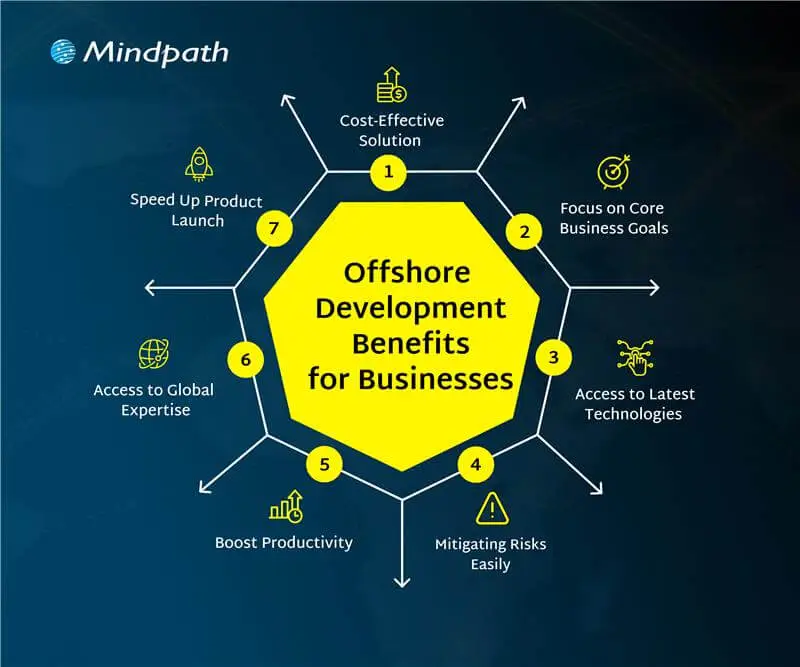
There is a growing number of businesses opting for offshore teams to deliver their software needs. The benefits of offshore development have made it a popular option for organizations seeking smart and adaptable options for growth. Let’s have a look:

offshore development benefits for businesses

1. Cost-Effective Solution

Offshore development services help businesses lower their software development costs without losing quality. Companies can hire skilled developers from countries where salaries are more affordable compared to local markets. This approach offers a smart way to achieve cost-effective software development without compromising on results. The money saved can then be used in other important areas like marketing, research, or improving infrastructure.

2. Focus on Core Business Goals

Offshore development lets companies’ hand over routine tech tasks to external teams. This helps free up internal staff to work on more important goals and long-term plans. With fewer day-to-day responsibilities, businesses can focus better on innovation and growth. It also gives them more time to strengthen their position in the market.

3. Access to Global Expertise

Working with global software development teams allows companies to tap into a wide range of skills and knowledge. They can bring in experts who specialize in tools or technologies that are hard to find or too expensive locally. This helps businesses build better solutions and stay updated with the latest trends. It also brings fresh ideas and faster problem-solving from experienced professionals around the world.

4. Mitigating Risks Easily

Working with offshore teams helps reduce risks that may affect your local operations. This includes not just natural disasters or political changes, but also technical issues like system failures or delays in development. Offshore partners can quickly step in to handle problems and share responsibility when challenges arise. This setup keeps your projects moving and makes your business more stable and prepared.

5. Boost Productivity

Offshore teams usually have clear roles and focus on getting results. This helps manage projects better and use resources more effectively. Many offshore developers work in well-organized environments that support smooth and efficient work. As a result, they often deliver high-quality work on time and sometimes even ahead of expectations.

6. Access to Latest Technologies

Offshore teams give businesses access to modern tools like AI, cloud computing, blockchain, and IoT. Many offshore developers already have experience with these technologies and know how to use them well. This helps companies stay up to date and try new ideas without spending extra on training or new systems. It also supports faster innovation and better tech solutions.

7. Speed Up Product Launch

Tech talent outsourcing helps businesses work faster by using teams in different time zones. When one team finishes their day, the offshore team can continue the work, keeping the project going around the clock. This constant progress helps fix issues quickly and speeds up development. As a result, companies can launch their products sooner and meet deadlines with ease.

Want to know how this round-the-clock development approach works best ? Understanding the stages of the software development life cycle helps ensure offshore teams collaborate efficiently while maintaining quality and timelines.

Are you facing any confusion between offshore software development and onshore software development? Let us learn about the difference between them.

Offshore vs Onshore Development: A Comparison Table

When planning a software project, businesses often choose between offshore and onshore development based on their goals, budget, and timeline. Both options have their own advantages and challenges. The table below gives a clear comparison to help you decide which model suits your business needs best.

Factor 

Onshore Development 

Offshore Development 

Definition  Development done by a local team Development handled by a team in another country
Location Within the same country Access to cost-effective global locations
Proximity Easy access to the team Remote but manageable with clear planning
Cultural Fit  Shared work culture Diverse perspectives and global work culture
Communication Face-to-face communication possible Efficient digital communication tools
Talent Base Limited to local skills Broader access to global tech talent
Language Barrier Minimal language issues Clear strategies help overcome language gaps
Time Zone Same time zone, easy scheduling 24/7 progress through time zone advantage
Work Cycle Fixed to local business hours Continuous work with round-the-clock development

Looking to Scale Smartly with Offshore Software Development?

Offshore software development continues to be a smart and flexible solution for businesses in 2026. It helps reduce costs, improves access to global talent, and supports faster innovation. By using offshore teams, companies can stay competitive, scale quickly, and focus on their main business goals. No matter if you’re a startup or an established company, offshore development can support your long-term growth.

At Mindpath, we offer reliable offshore development services tailored to your business needs. Our expert teams are equipped with the latest tools and technologies to deliver high-quality solutions on time. With a focus on communication, transparency, and results, Mindpath helps you build the right IT outsourcing strategy for long-term success.

Frequently Asked Questions

1. How do offshore development services ensure quality work when teams are remote?

Offshore teams follow structured processes, regular updates, and clear communication to maintain quality. Many companies also use agile methods, testing practices, and performance tracking tools. With the right planning and collaboration, remote teams can deliver reliable and high-quality results consistently.

2. Is offshore software development suitable for small businesses or only large enterprises?

Offshore software development is suitable for both small businesses and large enterprises. Startups can benefit from lower costs and faster development, while larger companies use it to scale operations. It offers flexibility for any business aiming to grow efficiently without heavy investment in local hiring.

3. What challenges can businesses face with offshore development, and how can they manage them?

Common challenges include time zone differences, communication gaps, and cultural differences. These can be managed by setting clear expectations, using collaboration tools, and scheduling regular meetings. A well-defined workflow and strong project management help ensure smooth coordination and project success.

4. How do offshore development services help businesses stay competitive in a fast-changing market?

Offshore development services give access to global talent, faster delivery cycles, and modern technologies. This allows businesses to innovate quickly and adapt to market changes. With continuous development and cost savings, companies can focus more on strategy and stay ahead of competitors.

5. What factors should be considered before choosing an offshore development partner?

It is important to check the partner’s experience, technical expertise, communication approach, and past projects. Understanding their work process and support system is also key. Choosing the right partner ensures better collaboration, smoother execution, and long-term project success.

Discover the benefits of offshore development, including cost savings, access to skilled talent, and enhanced flexibility.
top AI models

The world is experiencing a huge technological transition, driven by emerging AI trends. This shift is justified by the active development of Artificial Intelligence and powerful AI models. They are high-end neural networks that have the capability to generate code, pictures, videos, and text. The selection of the top AI models can be a breakthrough for a company.

Whether you are launching new products or developing your strategy of content, the best AI models can make all the difference. However, which is the most appropriate one to meet your business requirements? Well, there is no need to fret about it, as this best AI models list contains the top 10 options that are dominating the AI arena. Let’s have a look.

Ready to implement advanced AI models but unsure which ones can truly move your business forward? Mindpath offers expert AI development services that help you build customised, high-performance AI solutions tailored to your goals.

AI Models – Understand the Basics

Before we dive deep into the list of most popular AI models, let’s understand what AI models actually are. 

AI models refer to complex computer programs that are used to interpret different patterns and provide results depending on the data. These models power modern tools that code, comprehend languages, and create images.

While certain top AI models are built to perform simple tasks, others focus on domain-specific tasks. The use of AI tools and models is growing with time. In fact, more than 88% of businesses are now using AI tools, and in 2004, it was 78% (Source: McKinsey). 

Another report for Gartner informs that total spending on generative AI is projected to cross USD 644 billion in 2026, around a 76% increase from 2025. These numbers clearly prove the rising importance of AI for today’s business. 

Want to understand the different kinds of artificial intelligence? Explore types of AI to learn about ANI, AGI, and ASI, and how each is applied in real-world scenarios.

Now, let’s talk about the top AI models you can opt for in 2026 that can support your workflows and business growth.

Top 10 AI Models for Modern Businesses

The best AI models are not just designed to process data. In fact, they have the ability to think and create. Some models can interact like humans, and some can easily explain complex logic. Here are the 10 most popular AI models that define innovation and power. 

1. GPT-5

When talking about which AI models are the most popular right now, we can’t ignore GPT-5. Developed by OpenAI, this is the most powerful AI model available to all. It can handle multiple tasks, including code generation, audio, images and text creation. GPT-5 is now powering tools like ChatGPT and Microsoft Copilot. 

This model helps users plan, write and solve issues with ease. Besides, it supports ultra-long conversations. That means when you use it, you will feel like interacting with an intelligent assistant. GPT-5 is a versatile model and can be used for personal productivity apps or enterprise tools. 

Want to customise AI models for your specific needs? Check out our OpenAI Fine-Tuning API tutorial to learn step-by-step how to fine-tune models for better performance and accuracy.

2. Claude Sonnet 4.5

It is one of the most advanced AI models by Anthropic. Claude Sonnet is developed for power users looking for deep reasoning, speed and precision. This model offers impressive results on maths, long-running tasks and coding.  

It is an excellent option for businesses that prioritize ethical AI, reliable automation and compliance. With a 200K token input and powerful tools like content editing, it can handle various complex workflows easily. 

3. Gemini 3

Searching for top AI models that can help you bring your ideas to life? Gemini 3 can be a top choice. Developed by Google DeepMind, this model supports sophisticated reasoning and helps users learn and create anything they want. 

People like to use Gemini, as it is smart and feels intuitive. Whether you want to analyze complex data, summarize documents, or brainstorm new ideas, Gemini can be your reliable assistant. 

4. DeepL

Another popular AI model you can consider is DeepL. It offers quick and accurate translation services. It is popular for its amazing human-like output and impressive accuracy. The model supports multiple languages, more than 30 languages. 

Content creators, businesses, and professionals use it for translating documents, emails, and websites. Recently, the company introduced DeepL Write, which helps users with spelling, grammar, and more.

5. Grok 4.1

It is xAI’s most powerful and intelligent AI model and is integrated into X. The model is designed for collaborative, creative, and emotionally intelligent interactions. As a result, all conversations feel more engaging and natural. 

The model is generally trained on social media data and can be easily adapted to evolving internet culture. Built on a large-scale reinforcement learning infrastructure, it offers a more compelling and perceptive experience. 

Also Read: Benefits of AI

6. Mistral AI’s Mistral Large 2

Mistral Large is an advanced and high-performance language model introduced by Mistral AI. The model is capable enough to handle advanced reasoning and multilingual tasks. It is optimized for accuracy and speed. If you are developing chatbots or want to optimize technical workflows, you can give it a try.

Different from other Mistral models, it activates all parameters and offers consistent results. It can achieve an accuracy rate of 84 percent for code generation (Source: Mistral AI). 

7. DeepSeek VL

The AI models list will remain incomplete without covering this particular AI model. This open-source Vision Language model is quite efficient for real-world language and vision applications. It can understand logical diagrams, scientific literature, charts, diagrams, web pages, and more. 

Educators and researchers utilize it to analyze scientific papers and make complex concepts easy to understand. The company is now working on a new model that can perform multi-step and complex actions with less human input. 

8. Llama

Introduced by Meta, Llama models are developed based on an open-source approach. The latest model released by the company is Llama 4, and it includes two multimodal models, such as Llama 4 Maverick and Llama 4 Scout. 

All these models can process short videos, images, and text. As these are based on a MoE- Mixture-of-Experts architecture, they demonstrate increased efficiency. Its open-source nature provides developers with better control and flexibility. You can fine-tune it as per your requirements. 

9. Stable Diffusion

It is an open-source AI image creation model based on the Stable Diffusion XL model. The model is popular for generating high-quality images using various text inputs such as frame, presets or style. 

Besides, it can also replace or add parts of any images through “outpainting”. Whether you need help for digital storytelling, concept art or marketing, Stable Diffusion can offer you a perfect kickstart. Its speed, community-driven ecosystem and flexibility make it one of the top AI models among designers, artists and content creators. 

Wondering how AI can understand and generate human-like text? Check out our Large Language Model (LLM) blog to learn how LLMs power smarter applications and chatbots.

10. Cohere Command R+

This powerful large-language model is built for accuracy, speed and smooth private deployment. It is developed for enterprise-grade search and document analysis. By combining real-time document processing with large language models, it offers accurate question answering and summarization. 

Thanks to its API-first design, you can easily integrate it into your existing system. Most businesses are using it for customer support, legal discovery and knowledge management. In an environment where context and accuracy are vital, this model offers reliable performance. 

Tips to Choose the Right AI Models

Well, it is common to feel overwhelmed as the options are more. However, by considering these simple tips, you can come up with an informed decision. 

1. Understand how you want to use an AI model, for content creation or other purposes.

2. Now, consider your budget as well as your technical skills. If you are using a model for the first time, you can go for GPT 5 or Gemini. Mistral and Llama require technical skills.

3. Don’t forget to check context length. Longer context windows are good for performing multi-step tasks.

4. Go for the free web version and test models properly. Compare the results before making your final decision. 

Want to know how AI models focus on important information? Read our attention mechanism explained blog to understand this key concept behind modern AI and LLMs.

Let the Experts Help You Choose the Best AI Models

The AI model arena is evolving rapidly. Some top AI models such as GPT-5 and Gemini, are establishing a new level of accuracy and performance. Specialised models, such as Cohere and Stable Diffusion, on the other hand, are dominating their niches.

Still don’t know which top AI models to use for your business? Allow Mindpath to help to make the right decision. Our team can help you identify, deploy, and fine-tune AI models best suited for you. We also help businesses with AI development services, which guarantee scalability and performance.

Frequently Asked Questions

web scraping with node js

Web scraping with Node.js allows developers to collect and use website data quickly and efficiently. It is useful to make smarter decisions, automate tasks, and enhance digital projects. The process is easy and feasible as Node.js is speedy and is compatible with JavaScript. Mastering this skill will create new prospects of dealing with real-time information and putting it into practical use in the contemporary web development projects.

This blog describes the concept of web scraping and how web scraping works in a step-by-step manner. You will get to know what web scraping is, why you should use Node.js, and how to begin using it in your projects. All ideas are simple to comprehend and straightforward. At the end, you will have a clear background on how to effectively gather, store and utilize web data for real-life applications.

Planning to gather web data efficiently for your business? Mindpath offers expert Node.js development services to create fast, scalable scraping solutions.

What is Node.js Web Scraping?

Web scraping with Node.js lets developers collect website data automatically and use it for real projects. Node web scraping refers to the creation of scripts that will retrieve web documents. These scripts read their contents and retrieve information such as prices, contacts, or news. It is easy to process static sites with such tools as Axios or Cheerio. The interactive websites can be managed with the aid of Puppeteer. The speed and efficiency of Node.js ensure a more scalable and faster scraping.

The Node web scraping operates by making requests, retrieving HTML, and extracting data on the page. JavaScript is used to handle both the static and dynamic sites. Using Node.js, developers have the ability to automate the process of logging in to a website. They can click buttons and gather information on numerous websites simultaneously. This strategy makes the process effective, valid, and prepared to apply it in the real world.

Curious why developers choose Node.js for large-scale web scraping? Explore the advantages of Node.js to see how its performance and event-driven model simplify data extraction.

Key Benefits of Web Scraping with Node.js

High-speed and efficient web scraping with Node.js provides developers with a quick and efficient tool to deal with web data. It assists teams to process vast information without any additional effort. These are the best advantages that make Node.js a robust option in the collection and use of data in real projects.

1. Fast and Efficient Processing

A Node.js scraper does not have to wait to make a number of web requests. Node.js web scraping will allow you to gather massive data within a short time.

2. Handles Modern Websites

It is common to use dynamic JavaScript loading content on websites today. Such tools as Puppeteer or Playwright allow developers to see a complete page and obtain data correctly.

3. Single Language Development

JavaScript can be utilized by developers to perform front-end and backend scraping. This makes coding easier and allows the workflow to be similar.

4. Wide Range of Tools

Node.js scraper may utilize such libraries as Axios to make requests, Cheerio to process them, and Puppeteer to automate. These are the tools that can make web scraping using Node.js flexible to any project.

5. Scalable for Growth

The ability to work with large number of data streams simultaneously makes Node.js relevant to the large-scale web scraping project. It is capable of expanding along with your data requirements.

6. Easy Integration

Scraped information is often included in the form of JSON, which is automatically processed by the Node.js. This information may be inputted directly into web applications, databases, or analytics pipelines.

7. Automates Repetitive Tasks

Web scraping with Node.js provides an ability to log in, click on buttons, and scroll the pages automatically. A scraper made with Node.js saves time and makes the data collection regular.

8. Real-Time Data Monitoring

Using a Node.js scraper, it is possible to make continuous updates on the sites. This assists in the collection of new information within a short time to analyze or report.

Looking to ensure your Node.js scraping applications run fast and efficiently? Check out web performance with Node.js to learn how optimization techniques improve speed, scalability, and reliability.

Steps to Build a Node.js Web Scraper

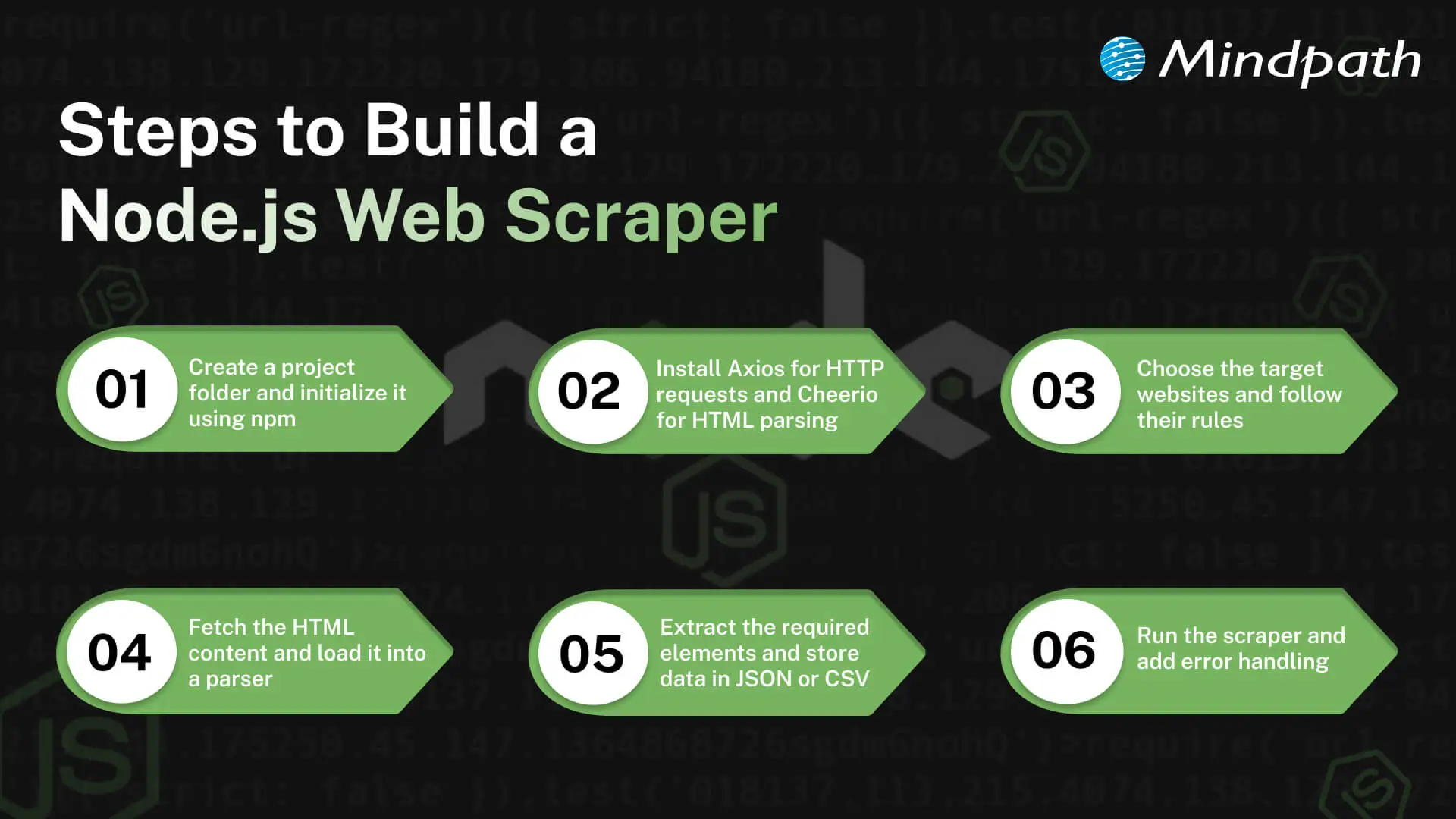
Web scraping with Node.js lets developers collect data efficiently and apply it to real projects. A scraper to build needs the right planning and procedures. The key actions to develop a Node.js web scraper and begin the data extraction process successfully include the following.

Steps to Build a Node JS Scraper

1. Set Up Your Project

Make a new project folder and get it started using npm. This prepares your Node.js environment for web scraping with Node.js. The project will manage all dependencies through a package.json file.

2. Install Necessary Libraries

Install such tools as Axios to make the HTTP requests and Cheerio as the HTML parsing tool. The libraries simplify the creation of a Node.js scraper. They give you the core tools for web scraping with Node.js.

3. Choose Target Websites

Choose the sites that you would like to scrape. Ensure that you are obeying their rules and law. Target selection helps to make sure your web scraping of Node.js is safe and effective.

4. Fetch and Parse Pages

Get the HTML of the page using Axios or any other HTTP library. Load it into Cheerio or other similar to navigate and choose elements. The next thing that needs to be done is to prepare your data that your Node.js scraper will extract.

5. Extract and Organize Data

Even define the information you require, such as prices, titles, or links. It should be collected using CSS selectors. Export the data that has been extracted in a simple, easy-to-use format: JSON, CSV, or database.

6. Execute and Improve

Install and run your Node.js scraper and verify the output. Include error management and rate limiting to prevent problems. Refining your process ensures web scraping with Node.js runs smoothly and efficiently.

Looking to simplify web scraping with Node.js? Explore essential Node.js libraries to make data extraction faster and more reliable.

Ready to Unlock the Power of Web Scraping with Node.js?

Web scraping with Node.js allows developers to collect and use data efficiently, making it easier to support smarter decisions, automation, and digital innovation. By understanding the right tools, techniques, and workflows, businesses that hire Node.js developer can work seamlessly with both static and dynamic websites, manage large datasets, integrate data into applications, and gain real-time insights to enhance project prosperity

Mindpath is a trusted Node.js development company offering expert web and Node.js development services to build fast, scalable, and secure applications. Their team creates custom solutions for web scraping, data integration, and automation. With experience in modern technologies, they deliver efficient and reliable results. Choosing Mindpath ensures your Node.js projects run smoothly, save time, and meet your business goals with high-quality support.