Web Application Security – A Business Guide 

Join our Newsletter!

Featured Posts

Support Is One Click Away

Home

 Web Application Security – A Business Guide 

web application security

 Web Application Security – A Business Guide 

In the fast-paced digital era, a secure web application is the foundation of a reliable online business. Web application security ensures sensitive data remains protected, prevents cyber threats, and supports uninterrupted operations. Without robust protection measures, even high-performing applications are vulnerable to breaches that can disrupt business continuity and compromise user trust.

The importance of web application security goes far beyond preventing attacks. It supports compliance with regulations, protects brand reputation, and ensures consistent user experiences. Without it, businesses risk downtime, financial losses, and reputational harm. By prioritizing robust security strategies, companies position themselves for long-term success in an environment where trust and reliability define competitiveness. Are you interested in knowing more? In this blog, we will walk you through how you can protect your web application while, at the same time, building stronger trust with your customers. Keep reading to explore!

Looking for a web application that prioritizes both performance and security? Our web development services can help you explore how we can help you achieve your business goals.

What is Web Application Security?

When we talk about the definition of application security, we simply mean protecting your web applications from unwanted threats, attacks, and misuse. In other words, it focuses on keeping your applications safe. It guarantees that your data is safe, hackers are kept out of reach, and your online platforms run smoothly without any difficulty or fear. These protections start during the design and development stages of your application and continues even after the application goes live so that it is kept secure over time.

Interestingly, a report from Fortune Business Insights shows that the global application security market was valued at USD 8.86 billion in 2022 and is forecasted to reach USD 25.30 30 billion by 2030. The continued increase shows that the business community is increasingly coming to terms with security as a necessity to protect its operations, to protect sensitive information, and to protect the trust of customers in an online space.

Concerned about rising threats and how AI can help your security strategy? Explore our blog on AI in cybersecurity to discover AI‑driven approaches that boost threat detection and resilience.

Most Common Web Application Threats

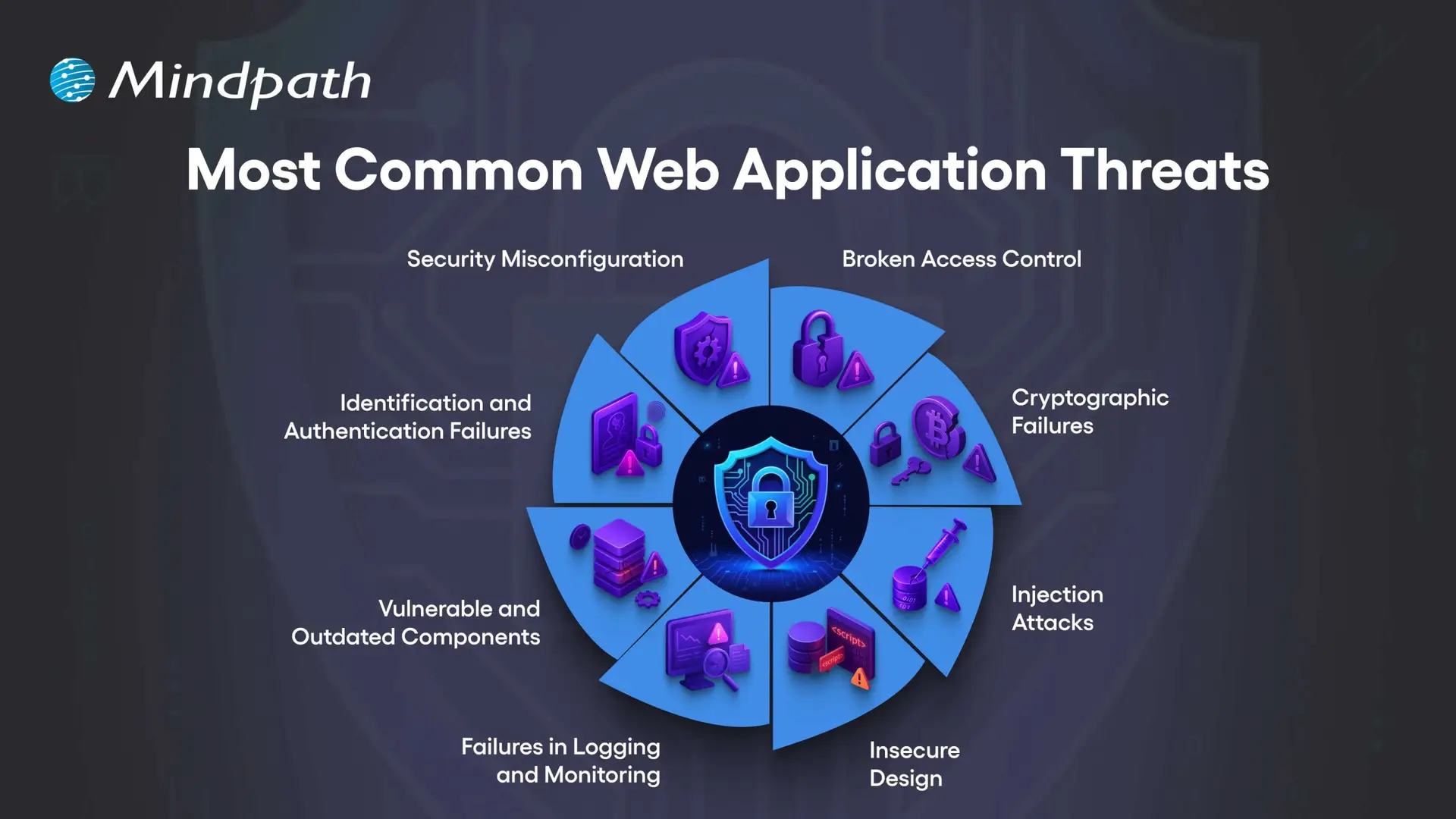
Let us have a clear look at some of the most common web application security risks that each and every business should have an idea of, to keep their online platforms safe:
Most Common Web Application Threats

1. Security Misconfiguration

This usually occurs when your web application security settings are wrong or incomplete, leaving the app open to attacks.

2. Broken Access Control

This happens when users can access data or features they should not be allowed to see or use.

3. Cryptographic Failures

This occurs when sensitive data is not encrypted properly, making it easier for attackers to steal.

4. Injection Attacks

This occurs only when attackers insert malicious code into your application through the input fields or forms.

Can a better user interface design also improve security awareness in apps? Discover UI/UX design trends in web application development to learn how thoughtful design can enhance both usability and security.

5. Insecure Design

This usually means that your app’s basic design has weak points that can be easily exploited by hackers.

6. Failures in Logging and Monitoring

When you have security issues that are not logged and monitored, your attacks will go unnoticed.

7. Vulnerable and Outdated Components

This is when your apps use old or unsafe software parts that hackers can target easily.

8. Identification and Authentication Failures

This happens when you have weak login systems, which make it much easier for an attacker to steal your user accounts.

Unsure how the technology you pick affects your application’s security posture? Read our guide on choosing the right tech stack to discover how secure, scalable technologies support safer web app development.

The Importance of Web Application Security

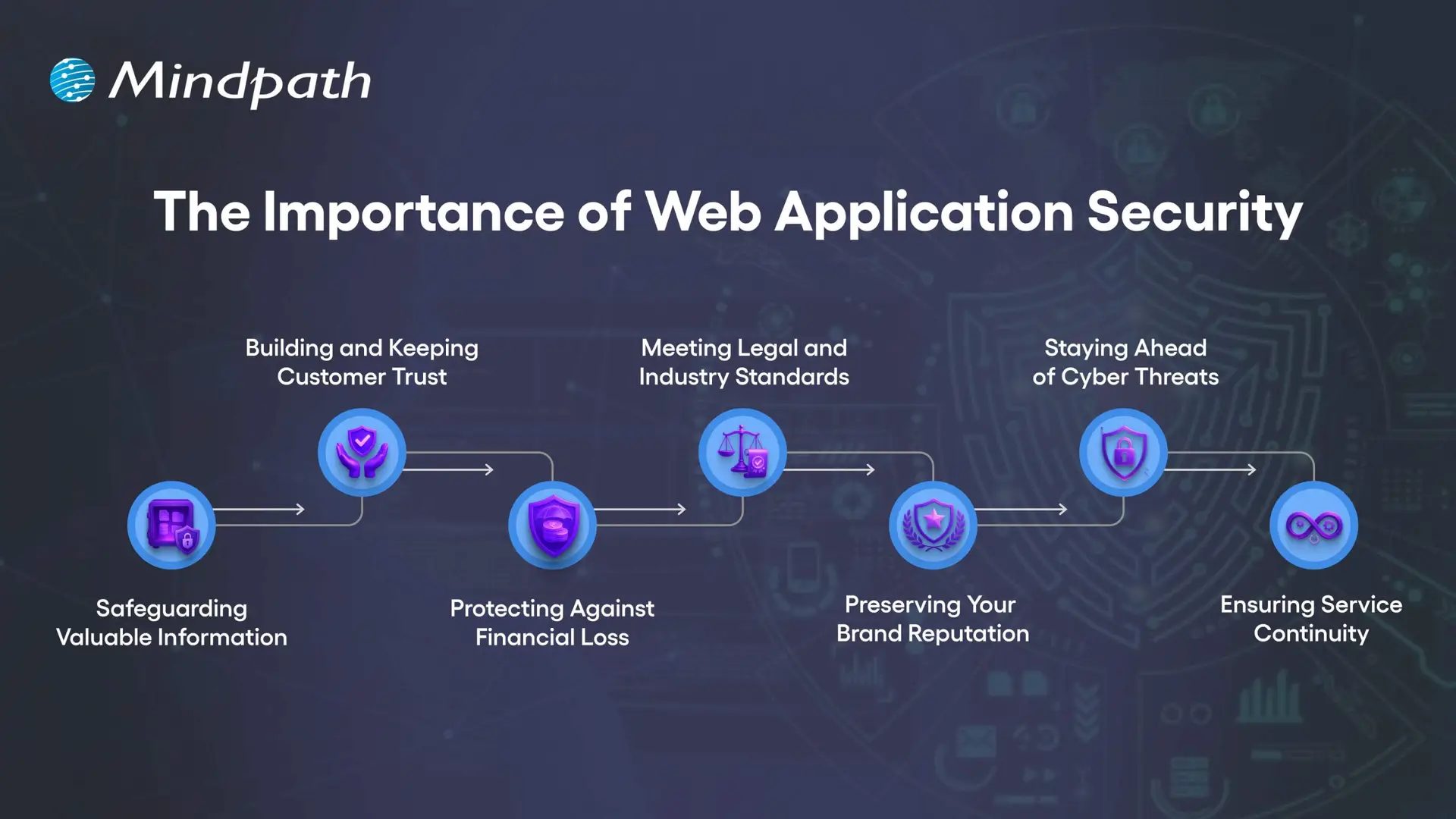
Robust web app protection is absolutely vital to protect your organization from online attacks and data loss. When you pay for your web app security, you are protecting sensitive information and building trust with your customers, while ensuring your operations are running smoothly.
The Importance of Web Application Security

1. Safeguarding Valuable Information

Web applications collect sensitive information such as customer data, payment information, and company documentation. Any exposed information by attackers can be stolen and improperly used. Good web application security utilizes encryption, secure storage, and restricted access to protect the information.

2. Building and Keeping Customer Trust

When people use your online services, they trust you with their private information. A breach of security can cause that trust to break and hurt your business’s reputation. By focusing on web application security, you contribute to two goals: to show the customer that privacy and safety are important to you.

3. Protecting Against Financial Loss

Cyberattacks can cause massive damage to finances, from stolen funds to expensive recovery steps to legal fees, and also regulatory fines. A proper investment in web app security protects those risks and your profits.

4. Meeting Legal and Industry Standards

Numerous sectors must comply with strict data protection requirements. Failing to meet these requirements can result in costly fines and a loss of reputation. The web security basics and continual assurance will demonstrate that your web secure application meets these requirements..

5. Preserving Your Brand Reputation

A single security incident can tarnish your brand identity for years. Once lost, customers may not trust your company again, and negative word of mouth spreads quickly. By prioritizing web application security, you can avoid this type of loss and continue to preserve brand integrity.

6. Staying Ahead of Cyber Threats

Cybercriminals are always trying to exploit any weaknesses in an application. Regular web application scanning and updates may close off the weaknesses before an attacker finds them. Using a trusted web application vulnerability scanner allows you to improve your system.

7. Ensuring Service Continuity

Some ransomware and malware attacks are meant to stop or disrupt your online services. DDoS protection, load balancing, and secure configuration can keep your platform running. There are reliable web security applications to protect against these problems and keep your business producing.

Want to make sure security is built into every phase of your web development process? Explore our web app development roadmap for 2026 to discover how planning with security in mind improves reliability and trust.

Essential Best Practices for Strong Web Application Security

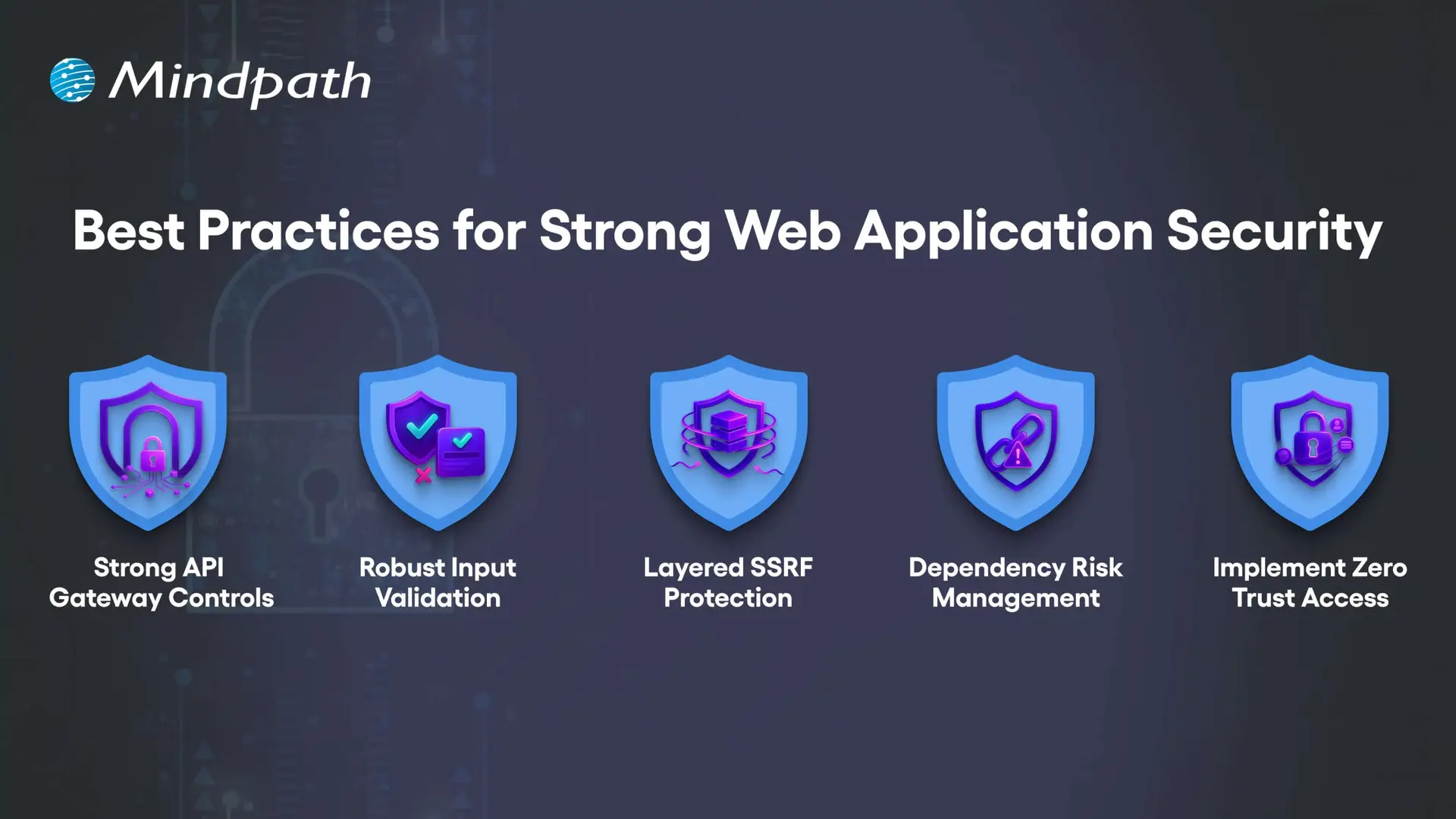
Securing your online properties requires more than basic protection. By implementing web application security best practices, organizations can reduce risks, better protect sensitive data, and provide a safer, trusted experience for each user.
Best Practices for Strong Web Application Security

1. Strong API Gateway Controls

APIs should be protected with advanced rate limiting that adapts to user behavior, not just request counts. Tools like Kong or Envoy help apply different limits per endpoint while blocking abusive traffic patterns without slowing legitimate users.

2. Robust Input Validation

Validation must match the exact place where data is used, such as in SQL, HTML, or JavaScript. This means building rules for each context and scanning all inputs like headers, cookies, and hidden fields to block malicious payloads.

3. Layered SSRF Protection

SSRF attacks can trick servers into accessing internal systems or cloud metadata. Use strict allowlists, block private IP ranges, and inspect resolved IPs to prevent bypass tricks hidden in DNS lookups.

4. Dependency Risk Management

Not all vulnerabilities in dependencies are equally dangerous. Context-aware scanners like OSV or npm-audit help you find and fix the risks that truly matter to your application’s security.

5. Implement Zero Trust Access

Never assume a request inside your network is safe. Segment services, enforce mutual TLS, and verify identity for every request to reduce the risk of internal compromise.

Concerned about app vulnerabilities? Read application security best practices to learn proven ways to strengthen security across platforms.

Are You Ready to Strengthen Your Web Application Security?

In today’s digital world, investing in strong web application security is no longer optional. By understanding common threats and implementing proven best practices, you protect sensitive data, maintain customer trust, and keep your online services running without disruption. The earlier you act, the stronger your defense against costly cyberattacks will be.

At Mindpath, we create secure, high-performing web applications designed to withstand evolving cyber threats. Our web application development process integrates advanced web application security measures from planning to deployment, ensuring your platform is protected and reliable. With a tailored approach, we help your business deliver safe, seamless user experiences while meeting compliance and performance goals.


Related Post

Discover how top companies like LinkedIn, Netflix, and Walmart leverage Node.js for performance, scalability, and faster development. Learn more with Mindpath’s services.

Related Post

custom mobile application development services

In an ever-quickening pace of digital development, businesses strive for differentiators that can engage their audiences in new ways. Custom mobile application development services provide the means to actually deliver, providing a way for businesses to develop apps that serve their needs perfectly. Using unique features connected to smooth user experiences, organizations build engagement, access to efficiencies, and value delivery. Have you noticed how apps designed with intention often make a bigger impact than off-the-shelf solutions?

Keeping up with mobile app development trends ensures that these custom solutions remain relevant, innovative, and aligned with evolving user expectations. These services create opportunities for organizations to reconsider customer engagement and organizational workflows in a fundamentally different way. Through dedicated solutions, organizations can have a competitive advantage and respond quickly to the changes in market demands. The custom mobile application’s ability to do so goes beyond its convenience. It helps to shape strategies, improve growth potential, and establish connections. In this blog, we are exploring the top seven industries that have benefited from custom mobile application development services and how. So, let’s dig in!

Looking to stay ahead in today’s fast-paced technology world, businesses are looking to customize apps that are tailored to meet their specific demands. Mindpath’s mobile app development services will deliver high-performing solutions that give real results.

A Quick Dive into Custom Mobile Application Development Services

Custom mobile app development services involve developing mobile applications for a particular objective or purpose, rather than depending on off-the-shelf solutions. This process involves the planning, design, development, testing, and deployment of mobile applications, resulting in applications that provide personalized user experiences, enhanced usability, integration with existing systems, and strong security. Custom applications also allow the business flexibility and scalability to tailor the app to its needs as it evolves over time.

These services are developed to deliver applications that are agile, scalable, and secure. Custom solutions can effortlessly merge with an existing system and adapt to changing needs in the business. When companies invest in their respective user experience, they can enhance their engagement while properly managing sensitive information. Custom mobile app development services will provide sustainability for the long term, and a strategic and effective digital presence that supports competitiveness and adaptability.

Also Read: Mobile App Development Tools

Industries Benefiting from Custom Mobile Application Development Services

Many sectors are changing how they operate and engage customers with custom app development services. These services help businesses create mobile apps that cater to their specific goals, workflows, and the needs of their customers. Through customization, companies from many sectors can enhance efficiency, increase engagement, and achieve measurable growth.

1. E-Commerce and Retail

Custom app development services plays a significant role. It provides seamless and engaging shopping experiences to brands in the e-commerce and retail industry. Personalized recommendations, customer-friendly navigation, and secure payments are some of the app features that businesses can create to keep customers happy. Retailers not only increase customer loyalty by incorporating features such as loyalty programs and real-time updates but also can gain steady sales growth.

2. Healthcare

The healthcare industry is changing rapidly, as you would expect from a sophisticated mobile application development platform. Making use of customized healthcare apps will allow patients to have much simpler access to booking their visits and managing online consultations.

Hospitals also enjoy a more efficient patient care process. The implementation of electronic prescriptions and the employment of telemedicine innovations. All of which results in the saving of time and resources and the maintenance of high-quality care.

3. Education

One of the innovations that the education sector is adopting is the use of tailor-made mobile applications. The implementation of these applications has brought ease in the management of virtual classes, assignments, and attendance for schools, universities, and e-learning platforms.

Through the use of custom apps, education can be more stimulating, adaptable, and available to students from any location as these apps provide interactive learning experiences and instant communication.

4. Finance

One of the major trends in the finance and banking industry is the use of custom mobile application development services to revolutionize customer experience. These applications not only allow the users to carry out banking, investing, and loan activities effortlessly but also ensure that the data security is at a very high level.

Some of the latest security and convenience features, such as biometric authentication, instant payments, and personalized insights, have empowered customers to become more loyal. This makes them feel more comfortable with their financial institutions.

Looking to prioritize security in your application lifecycle? Discover useful strategies in our blog on application security best practices and explore how to make security a core part of your development roadmap.

5. Logistics and Transportation

One of the main factors for better efficiency in the logistics and transportation industry is custom application development services which develop various applications for business use. This kind of apps will allow companies to manage their routes, shipments tracking, and fleet operations. Not only in person but also in real time.

Advanced analytics and the usage of GPS as standard technology in many different fields have definitely helped in optimizing fuel consumption as well as in savings and in making sure deliveries are on time and are reliable.

6. Real Estate

Custom mobile application development services have a major impact on the real estate sector, which changes the way the market has been operating for a long time. With these new applications, end-users can go through listings, practically visit properties, and get in touch with agents at once. Thus, it speeds up and clarifies the entire process.

Apart from that, real estate companies are also benefiting from these applications. They can manage their leads more efficiently and correspond with clients comfortably. Thus making the property experience more productive and enjoyable.

7. Travel and Hospitality

Innovative custom mobile application development services have become an effective way for the travel and hospitality industry to improve customer experience. By using these apps, individuals can quickly reserve trips, keep track of their schedules and have seamless access to different departments at any time.

As a result of incorporating functionalities such as up-to-the-minute updates, location maps, and tailored gifts & services, travel companies. They have the opportunity to create customer loyalty and provide their travellers with a more exciting and integrated outing.

Curious about the tools and frameworks driving the future of mobile apps? Explore and discover key innovations in our blog on mobile app development technologies that can empower your business to build smarter, more efficient apps.

Ready to Transform Your Business with a Custom Mobile App?

Custom mobile application development services are helping industries innovate, improve customer engagement, and achieve lasting growth. Businesses across sectors now rely on tailored apps to enhance user experience, streamline operations, and stay competitive. With the right strategy and expert support, these apps can become a long-term asset for business success.

As a trusted custom mobile app development company, Mindpath delivers powerful website and mobile app development solutions designed for your unique goals. Our expert team builds secure, scalable, and user-friendly apps that help your business connect better with customers and perform efficiently. Partner with Mindpath to bring your app idea to life and move your business ahead with confidence.

The current cloud landscape challenges business organizations to reconsider security on a daily basis. Organizations are currently concerned about ways to prevent cloud computing attacks in distributed systems. Attack patterns are becoming smarter and defenders need to think quicker with greater visibility. Lots of teams cannot find the balance between speed, access and protection in cloud operations. This change requires a more profound insight into the changing risks and response plans.

The old fashioned perimeter defenses are no longer applicable to cloud environments. They are now able to align identity controls, monitoring and configuration practices accurately. Each tier of cloud infrastructure needs constant consideration and more intelligent decision making. Organizations also require regular awareness of the adaptation of threats across services. This blog discusses the practical methods used to enhance the cloud security posture. So, let’s begin!

What are Cloud Computing Attacks?

Cloud computing attacks refer to security attacks that are directed at cloud systems, data, and services. The attackers aim at stealing, destroying, or abusing the information stored in the cloud platforms. They frequently take advantage of weak access controls, system vulnerabilities or human error. These attacks interfere with a regular business and reveal sensitive information.

Organizations are at risk of things such as unauthorized access, data leaks, and spreading malware in cloud environments. Good cloud security will help a company figure out if there is any suspicious activity and how to reduce the damage. To prevent cloud computing attacks from happening, a business must improve its capability of supervision and control. In turn, it leads to the building of trust and safety of the cloud systems.

Why is Cloud Computing Security Important for Businesses?

Most companies nowadays use cloud systems to run their business and operate with sensitive data all the time. This turns the security against cyber security attacks into a must-have for any organization. These are the main reasons why security is a key factor in the success of a business.

1. Protection of Sensitive Information

Cloud security solutions safeguard workers, clients, and company data from being inadvertently accessed or stolen. They play a major role in helping organizations avoid or minimize their risk to various digital threats.

2. Data Breach Prevention

Strong controls prevent attackers from leveraging weak cloud configurations. This method also helps prevent cloud computing attacks effectively.

3. Regulatory Compliance

Security measures guide companies in complying with regulations such as GDPR and HIPAA. As a result, not only do these practices make a company’s situation legally safe but they also enhance their clients’ confidence in them.

4. Business Continuity and Data Recovery

Backup systems and recovery tools are really the backbone of a company; they keep operations going when failures happen.

5. Insider Threat Protection

Implementing a good access control system can help greatly reduce the risk of employees or other internal users misusing their privileges. This way, the security risks, whether accidental or deliberate, are significantly lowered.

6. Stronger Security Systems

With intelligent monitoring, advanced tools can detect threats at an early stage. In fact, businesses can raise their level of overall protection by implementing proactive defense systems.

How to Prevent Cloud Computing Attacks?

Cloud is the constant target of cyber attackers since it is the platform where businesses operate and store their data. Organizations will have to keep their guard up and fortify their security measures against emerging threats.

Here are some ways to prevent cyber-attacks in cloud computing:

1. Secure API Access

Access to cloud applications should be granted only through reliable and secure APIs. This will help curb the chances of misuse and lower the vulnerability to the cyber threats.

2. Data Encryption Protection

Data ‍ ‌‍ ‍has to be encrypted during its transfer, storage, and use. Not only does this step prevent hacker from decrypting or harming any stolen data, but also it works as a major way to prevent cloud computing ‌‌‍ ‍‌attacks.

3. Identity Verification Control

Users are required to prove their identity through identity management prior to gaining access to the system. As a result, it lowers the chances of risks arising due to stolen credentials and unauthorized logins.

4. Access Control Management

Users should have only the access, which is necessary/required for their work role. This drastically reduces the scope of damage from the insider threats and also from the compromised user accounts.

5. Cybersecurity Audits

Periodic evaluations are key to identifying misconfigured settings and security loopholes. They not only reinforce the protection capabilities of the entire system but also enhance security in the cloud.

6. Intrusion Detection Systems

Detection systems watch computer systems for unusual activities and attacks. These can be crucial to locate a threat as soon as possible and limit the scare and damage.

Cloud Computing Security Best Practices

Clouds are used in business processes and in the storage of sensitive information on a daily basis. Effective cloud computing attacks and security threats prevention require powerful practices.

  • Understand shared responsibility model and secure your own cloud data properly.
  • Test security, compliance, and incident response of cloud providers.
  • Implement identity and access control on strict least privilege and multifactor authentication.
  • Create explicit cloud security policies and implement zero trust architecture between systems.
  • Secure data transmission and storage to prevent unauthorized access.
  • Conduct regular audits and penetration testing to identify and fix vulnerabilities quickly.

Ready to Strengthen Your Cloud Security Strategy?

Cloud security requires consistent effort, smart planning, and strong controls across every layer of infrastructure. Businesses must stay proactive to prevent cloud computing attacks and protect data, systems, and users from evolving digital risks.

At Mindpath, we provide cloud security solutions that help businesses build safer and scalable cloud environments. Our team focuses on strong protection, monitoring, and compliance to keep your systems secure and reliable.

Frequently Asked Questions

1. What are the early signs of cloud security risks that businesses often ignore?

Unusual login attempts, unexpected data transfers, and sudden system slowdowns often signal security risks. Weak access control or misconfigured settings can quietly expose data before detection, increasing the chance of attacks and operational disruptions.

2. How often should cloud security settings be reviewed in a business environment?

Security settings should be reviewed regularly, especially after system updates or team changes. Frequent checks help maintain proper configurations, reduce vulnerabilities, and ensure cloud systems remain aligned with security policies and evolving threat landscapes.

3. What role does employee behavior play in cloud security protection?

Human actions significantly impact cloud safety, especially when handling passwords or access permissions. Simple mistakes like sharing credentials or ignoring alerts can expose systems to threats, making awareness and training essential for stronger protection.

4. Why do businesses struggle to prevent cloud computing attacks even with security tools?

Even with tools in place, misconfigurations and poor monitoring often create gaps. Without proper strategy and continuous oversight, attackers can still exploit weak points, making it harder to prevent cloud computing attacks effectively.

5. Can small businesses also face advanced cloud security threats like large enterprises?

Small businesses often face similar threats as larger companies because attackers target any vulnerable system. Limited resources and weaker configurations can increase risks, making cloud security essential for organizations of all sizes.

Learn how to prevent cloud computing attacks with practical tips on security, API protection, and IAM to safeguard your business and data.
custom wordpress development

In the rapidly changing digital age, your website is more than just a digital face or a virtual business card. It creates a foundation to support your brand identity, marketing strategy, and customer experience. With more than 43% of websites powered by WordPress (source: w3techs), it is clear that WordPress is an excellent choice for website development. There are different pre-built WordPress themes that provide you with an affordable and easy way to bring your business online. However, they may not be able to meet the unique requirements of your growing business. This is where a custom WordPress development comes in.

Whether you are a local business, an enterprise, or a startup, a custom-built website can unlock performance, long-term growth, and brand credibility. In this guide, you will learn more about custom WordPress development and understand why it is crucial for your business. Besides, we will also discuss the best practices and how to choose the right custom WordPress development company to enjoy the desired results.

Want to elevate your online presence with a custom WordPress site tailored to your business objectives? Mindpath’s offers wordpress developemnt services that help you in creating a unique digital website that sets you apart from your competitors.

Custom WordPress Development- An Introduction

In simple words, custom WordPress development involves creating a website from scratch, tailored to your unique requirements. Instead of using pre-made themes or inefficient plugins, a professional WordPress developer utilizes tailored themes, functionalities, and plugins that align with your business goals. It gives you complete control over all aspects of your website, including performance, security, scalability, and design. Custom development can be an excellent solution for organizations looking for:

1. Advanced functionality

2. Unique custom WordPress website design and branding

3. Optimized SEO and performance

4. Hassle-free third-party integration

5. Robust security and long-term scalability

Custom WordPress development services can transform your generic site into a strategic digital asset to drive growth.

Now that you understand what it is, let’s understand the limitations of using a standard WordPress theme and the benefits you will witness by opting for custom development.

Must Read: Safeguarding WordPress Vulnerabilities

The Need for Custom WordPress Development

Pre-built themes are easy to use, and you can use them with minimal technical knowledge. However, they come with various drawbacks that can greatly affect your site’s potential.

1. Bloated Code

WordPress’s theme store has a lot of themes with a large number of unnecessary plugins and features. Such features and code can reduce your website’s performance, affecting ranking and user experience.

2. Security Issues

If the themes are not updated regularly by the developer, it can become a major security risk, damaging your business’s credibility.

3. Generic Design

You can find a pre-made theme being used by thousands of websites. Using them, it will be challenging for your site to stand out. Such themes lack uniqueness and may not meet your brand’s needs.

4. Lack of Functionality

Such themes offer limited functionalities and features. You will have to use additional plugins to add more features, and this can cause compatibility issues and reduced speed.

Planning upgrading your website but unsure if switching from HTML to WordPress is the right move? Learn the benefits of converting HTML to WordPress and how it can boost your site’s performance, scalability, and user experience.

Key Benefits of Custom WordPress Development

Generic themes may help you get your brand online, but as mentioned above, you will have to compromise on a lot of things. By opting for custom development services, you can create a tailor-made digital asset. Here are some major benefits of custom WordPress development.

1. Tailored Design

Your website should have elements to reflect your brand’s unique tone, personality, and value. Custom development lets you create a custom WordPress website design and a unique user interface based on your target audience. Developers can integrate creative layouts to boost user interaction. Besides, you can customize various website elements, from color schemes and typography to animation and layouts, to make your website stand out.

2. Enhanced Security

Custom WordPress websites allow you to add and configure advanced security mechanisms. This way, you can ensure data confidentiality, integrity, as well as availability. You can implement security measures like SSL certificates, custom security plugins, two-factor user authentication, data validation, and more.

3. Optimized Website Performance

Custom WordPress sites are faster as they don’t have unnecessary plugins and bloated code. As your site will load faster, you will witness improvements in bounce rates, SEO rankings, and user experience. Besides, developers can use techniques such as caching, lazy loading, CDN integration, and image compression to reduce load time.

4. Scalability

As your business expands, your website should grow with it. Custom WordPress websites are developed with future scalability in mind. It allows you to add new pages, new features, additional external tools such as payment gateways, CRM tools, and more. Custom WordPress development will make it easier to adjust your site for increasing traffic without facing any performance issues.

5. Optimized SEO Aspects

Custom websites have structured data, optimized speed, and clean code, which are crucial for better search engine visibility. Developers can use custom metadata, URL structure, and advanced schema markup to boost organic traffic.

6. Hassle-Free Third-Party Integrations

Do you want to connect your website with useful tools like Salesforce, Mailchimp, HubSpot, etc.? Well, custom website developers ensure seamless API integrations designed for your workflow. This will improve data flow as well as automation across multiple platforms.

7. Content Management Flexibility

With a custom site, users will enjoy flexible backend interfaces. As a result, non-technical users can easily manage content. Developers can create custom fields, taxonomies, and post types, simplifying content updates and publishing.

Are you unsure if your website development project is on the right track? Discover our WordPress developer checklist to ensure every critical step is covered for a smooth and successful website launch.

Major Components of Custom WordPress Development

A custom WordPress design and development may include multiple components based on your business goals. However, some core components are:

1. Custom Website Development

It involves creating a fully functional website with custom design, structure, functionalities, and features. It also includes performance optimization, layout design, navigation configuration, etc.

2. Custom Theme Development

Developers create unique themes that meet your brand identity. It includes creating responsive themes that can offer a seamless user experience.

3. Backend Customization

It covers customization of the admin panel to make it easy to use for users. Developers may add user roles, dashboards, custom taxonomies, and post types while prioritizing the site’s security.

4. Plugin Development

Developing custom plugins for your WordPress site that can help increase functionality without affecting performance. Experts focus on creating scalable and secure plugins based on your unique needs.

5. Migration Services

It includes offering migration services for hassle-free data transfer with minimal downtime.

6. API Integration

This process involves connecting your site with third-party platforms, marketing tools, CRMs, or payment gateways.

Want to make sure your WordPress website runs seamlessly with the latest technology? Discover how WordPress PHP compatibility can protect your site and enhance its performance.

Template-Based Vs Custom WordPress Websites – Differences

Choosing between a custom WordPress site and a template-based site can greatly impact scalability, flexibility, as well as cost. Understanding the differences will help you make the right decision.

Template-Based Vs Custom WordPress Websites

Best Practices for Custom WordPress Development

To make sure your new custom WordPress development project offers desired results, it is advisable to follow these best practices:

Best Practices for Custom WordPress Development

1. Begin With a Clear Development Strategy

Whether you need WordPress development for a small business or a large organization, you should first understand your target audience, desired functionalities, and goals. A well-documented strategy can help prevent scope creep, and you can ensure a perfect alignment between developers and stakeholders.

2. Focus on Mobile Responsiveness

With people increasingly using mobile phones and tablets for browsing, you should ensure that your website is responsive across all browsers and screen sizes. Custom WordPress development involves the use of a mobile-first design, which can boost SEO and usability.

3. Prioritize User Experience

Even though you have a beautiful website, it will be useless if users face issues while using it. An experienced developer will focus on a smooth user experience, making it easier for visitors to locate the things they need.

4. Optimize Your Site for Maximum Speed

Utilize techniques such as caching, image compression, CDN, and lazy loading to make sure your site loads faster. Tools such as Lighthouse, GTmetrix, Pingdom, and SEO Site Checkup can be used to detect bottlenecks.

5. Test Your Website Thoroughly

Before you make your site live, make sure that it has gone through proper testing. It helps identify compatible issues, loopholes, and missing functionalities. Prefer to carry out device testing, usability testing, and cross-browsing testing. Refine UX and optimize elements based on user feedback.

6. Plan For Smooth Maintenance

A custom WordPress site needs regular security checks, backups, and updates. So, create a proper maintenance plan or work with a professional WordPress developer to ensure constant support. Ongoing maintenance is crucial to keep your site functional and secure.

7. Partner With a Reliable Developer

Work with an experienced and trustworthy development company with a proven track record of offering quality WordPress website development services and creating high-performance websites. While helping you with technical execution, they can offer strategic input.

Do you want your website to be accessible to every visitor? Learn how to improve WordPress web accessibility can help you reach more users and create an inclusive online experience.

Tips to Choose The Right WordPress Development Company

Choosing the right expert for custom WordPress development is crucial to ensure success. While looking for the best one, prefer to consider the following points:

1. Evaluate The Experience

Ensure that the developer has years of experience in WordPress, especially in custom development. Go through their portfolio and check if they have ever created similar websites that you want to create. They should have a deep knowledge of the best practices and core functionalities of WordPress.

2. Technical Expertise

Confirm that the service provider has proficiency in JavaScript, CSS, MySQL, HTML, PHP, plugins, and more. Choose one with strong technical skills for the desired results.

3. Check Their Process:

Ask the company who they plan, carry out, and test the development projects. Ensure that they can offer a comprehensive custom development service based on your requirements.

4. Transparency and Communication

Only a trusted partner can keep you informed through the WordPress development project and will remain transparent about the costs and timelines. Choose one who prioritizes clear reporting and reacts to your queries promptly.

5. SEO Knowledge

The custom WordPress development expert should have a proper understanding of the latest SEO trends and be able to deploy necessary on-page optimization from the beginning. Furthermore, they should know how to configure different SEO plugins.

6. Post-Launch Support

Without regular updates and maintenance, your site will become vulnerable to various issues. So, partner with a development company that offers additional support along with maintenance services to keep your site performing at its best.

This is how you can hire an expert for professional WordPress web development to get your website listed higher in SERPs.

Wondering how to hire the right WordPress developer to help your business grow online? Explore our detailed guide to hire WordPress Developer to discover expert insights that guide you toward making the best hiring decision.

Looking to Elevate Your Business with Custom WordPress Development?

Undoubtedly, WordPress offers organizations the flexibility, affordability, and speed they need to start. Custom WordPress development is more than just writing code and creating a website. It is a strategic process to craft a unique digital experience that can effectively support your organizational goals, reflect your brand, and scale with you. It provides you with robust security, future scalability, and innovations that you will not get with template-based solutions.

If you want to elevate your business’s online presence and are looking for a future-proof platform, you can always count on Mindpath’s WordPress development service. As a leading WordPress development company, we combine custom development with scalable architecture and creative design to bring your unique vision to life. At Mindpath, we understand that every business needs uniqueness when it comes to developing a website. That’s why we offer tailored solutions that can set you apart from your competitors. We specialize in CMS development, custom plugin development, theme development, and more. Create a solid presence in this evolving digital landscape with us!