Home

AI Tech Stack Guide for Building AI-Powered Applications

AI Tech Stack Guide for Building AI-Powered Applications

Join our Newsletter!

AI Tech Stack Guide

A solid and consistent AI tech stack is crucial to building powerful AI applications that actually operate. It merges the right data tools, machine learning frameworks, cloud environments, and deployment platforms to ensure your app absorbs data, learns from it, and improves over time. Smart decisions made at each layer will create a smoother development cycle, giving you a more powerful and scalable final product.

Every component of an AI tech stack combines to enable your application to be precise, quick, and able to handle real-world obstacles. Understanding how each piece is put together will enable you to sidestep potential obstacles and build smarter solutions. In this blog, you will see how to combine all of these pieces to build AI-powered applications that pass the real-world test.

Want to enhance your product with intelligent features? From recommendation engines to predictive analytics, Mindpath’s AI development services bring advanced capabilities to your applications.

What is a Tech Stack?

A tech stack is the group of tools and technologies used to build and run a software application. It includes everything from the AI programming languages and frameworks to the databases, servers, and APIs that help different parts work together. Every choice you make for your tech stack shapes how your product works, how easily it can grow, and what skills your team will need to keep it running smoothly.

A good tech stack also makes it easier to track how people use your product and see where you can improve. For any company building software, investing in the right tech stack is an important step. It gives your team what they need to create, maintain, and improve your product, so it keeps meeting customer needs as you grow.

What Does AI Tech Stack Mean?

An AI tech stack encompasses all of the required tools, frameworks, libraries, and systems for the full development, deployment, and management of an AI-powered application. It covers the whole journey of an AI application from when you find and clean data, to training your model, to getting it in action. Whether it is a chatbot, image analysis, or a predictor, the right tech stack will seamlessly work in the background to optimize the performance of your solution while it learns.

Finding the right combination of tools can keep your team organized and the project prepared to scale. Having a clear tech stack allows you to spend less time fixing a glitch and more time creating a smart feature that provides value. Preparing a clear tech stack can also provide you with a solid foundation to better manage more users, test new ideas and iterate on the AI solution, while adapting to the changing requirements of the technology.

Looking to align your AI tech stack with the most impactful advancements in the industry? Discover the top AI trends shaping the next generation of intelligent solutions.

Types of AI Tech Stack

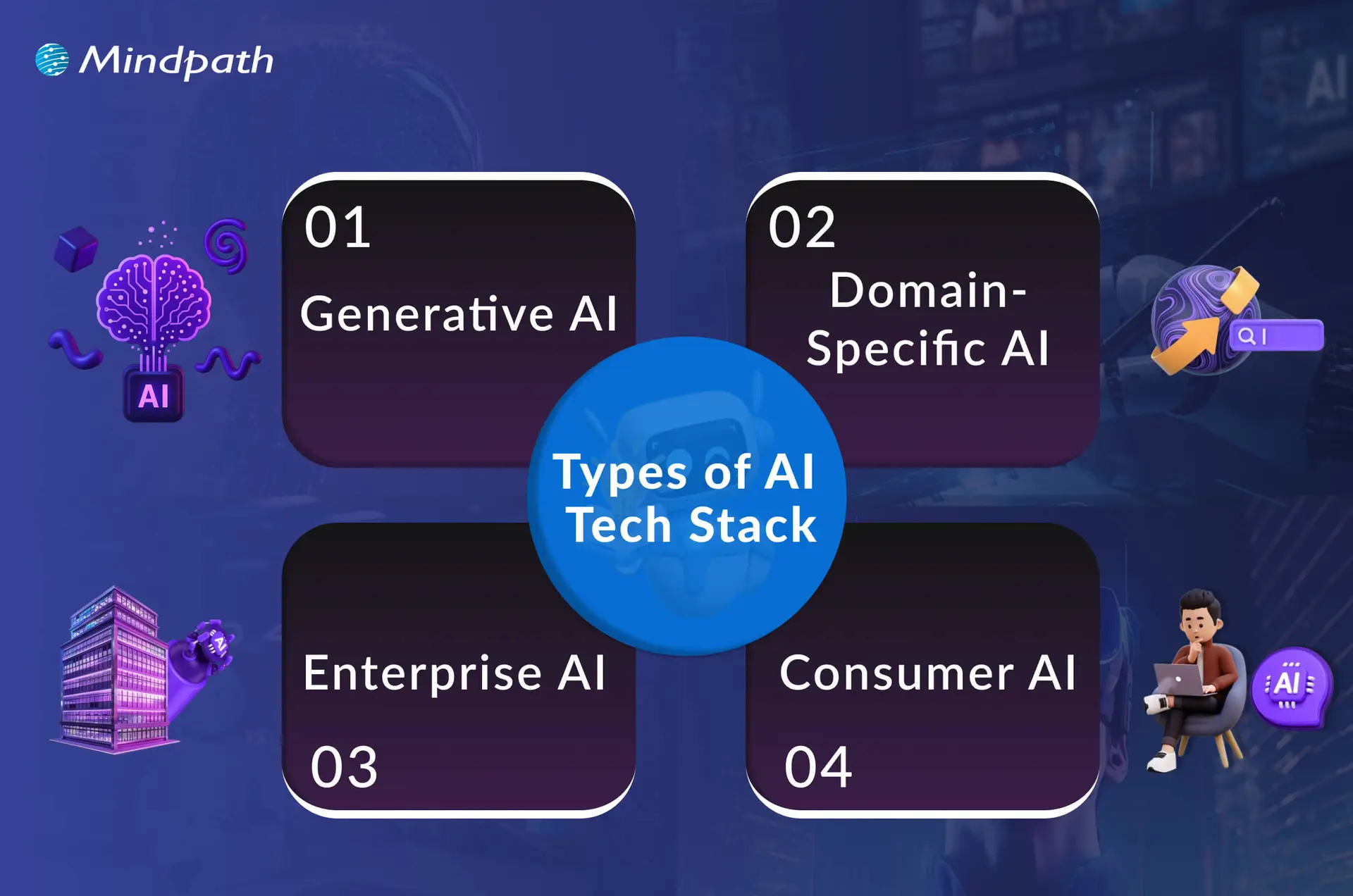
There are different types of Artificial Intelligence tech stacks, each designed to handle specific tasks and goals. Understanding these categories helps you choose the right tools for your project’s needs.
Types of AI Tech Stack

1. Generative AI

The GenAI tech stack provides the means to build intelligent systems that can produce new products like text, images, or audio. It blends together the powerful models available, the right data, and the handiest tools to streamline and improve development.

2. Domain-Specific AI

Some sectors require targeted stacks to accommodate specialized needs and regulations, such as healthcare, finance, and retail, that engage with trusted AI outcomes.

3. Enterprise AI

This works with large organizations and allows them to develop their own AI capabilities with respect to their internal processes and suitability for their growth. It integrates bespoke development, optimal operations, and seamless integration, providing an organized approach to their more complex requirements.

4. Consumer AI

It focuses on delivering users top-level, helpful, simple, and fast AI experiences they can engage with every day. Consumer AI taps into models, smart apps, and solid cloud or edge connections to produce a seamless experience for users.

Curious about where AI is headed? Head to our blog The Future of AI: How AI is Transforming the World to learn more!

Layers of an AI Tech Stack

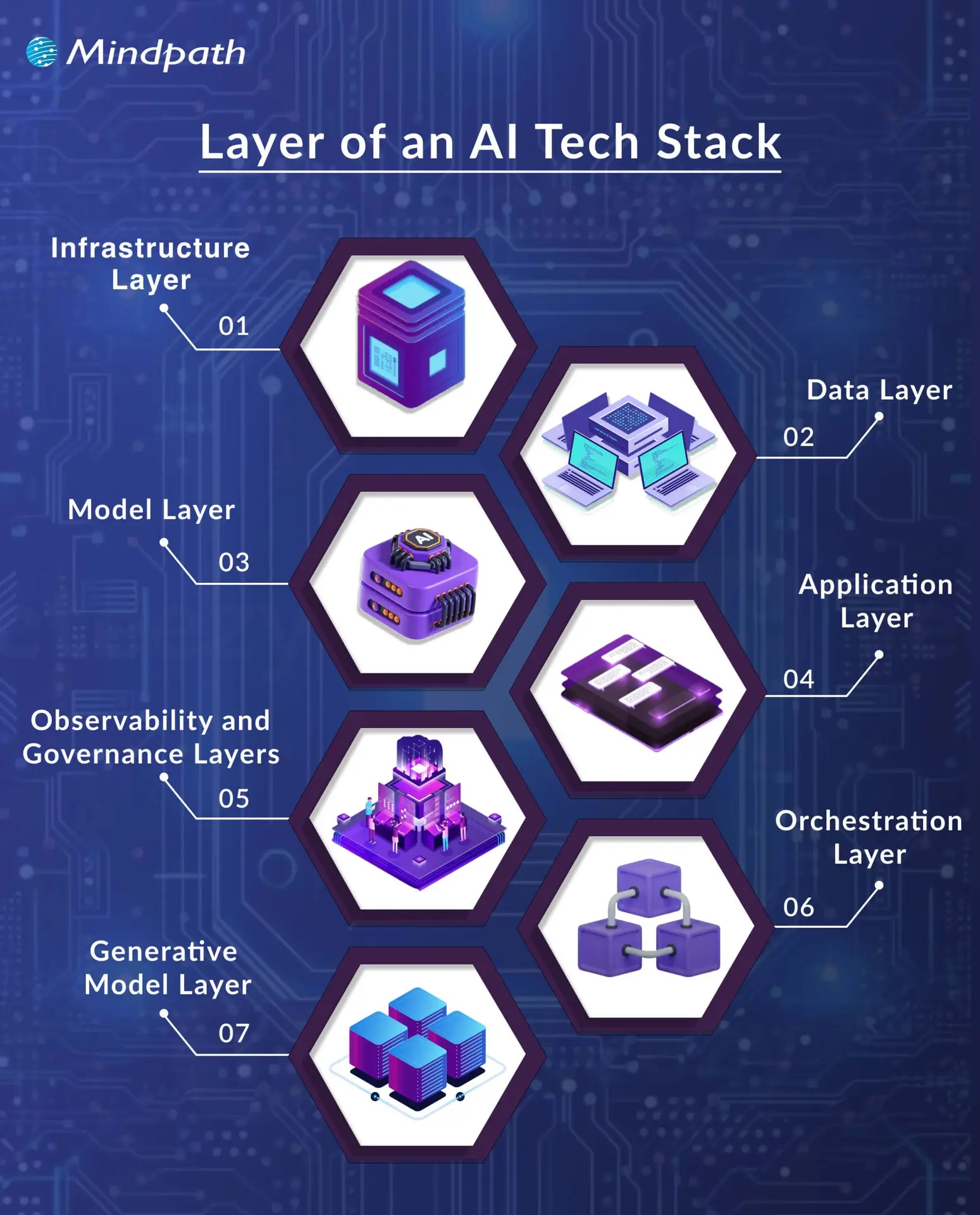
Building an effective AI system means understanding how each layer supports the next. These layers work together to turn raw data into smart, reliable applications.
layer of an AI tech stack

1. Infrastructure Layer

This layer forms the base of a modern AI stack, giving you the hardware and software needed to build and run AI systems. It covers everything from powerful processors to storage and operating systems that keep everything running smoothly. Without a strong foundation here, AI development would be slow and unreliable.

2. Data Layer

Good data is the heart of AI application development. This layer handles how data is collected, stored, cleaned, and prepared for use. Clean, well-organized data helps models learn accurately and perform better.

3. Model Layer

This layer is where you build and train the brains of your AI. It includes frameworks and tools that make it easier to design, test, and deploy models. A well-managed model layer speeds up AI app development and boosts results.

4. Application Layer

Here, all your hard work connects directly with users. This AI tech stack layer includes the user interface, APIs, and logic that bring your AI features to life. A clear application layer ensures people get real value from your AI.

5. Observability and Governance Layers

These layers help you keep an eye on how well your AI works and that it stays secure and fair. They cover monitoring, performance checks, and rules for data protection. Together, they build trust and long-term success.

6. Orchestration Layer

This part keeps every piece of your AI system working together smoothly. It manages workflows and automates tasks to save time. Proper orchestration means you spend less effort fixing things and more time improving them.

7. Generative Model Layer

This layer focuses on models that can create new content like text or images. It uses strong foundation models and customizes them for what your project needs. A good setup here drives innovation for creative AI solutions.

Struggling to choose the right AI model to power your AI-driven application? Explore our detailed guide on the top AI models to understand their capabilities, strengths, and real-world applications

Best Practices for Building an AI Technology Stack

Building an effective AI tech stack takes careful planning and the right approach for your goals. Following best practices helps you make smart choices and get the most out of your AI development tools and resources.

1. Define Your AI Goals Clearly

Start by knowing exactly what you want your AI tech stack to do. Clear goals help you choose the right tools and avoid wasting time on things you don’t need. It could be improving customer service, automating tasks, or predicting trends. When everyone understands the goal, the project runs smoother and stays focused.

2. Prioritize Good Data Early

Good AI starts with good data that’s clean, organized, and reliable. Make sure you have a strong system to collect and manage your data from day one. Accurate data helps your models learn better and make smarter decisions. Invest time in setting up clear data processes to get the best results.

3. Keep It Flexible and Automated

A flexible setup makes it easier to update or add new tools as your needs change. Modular systems let you swap parts without starting over, saving time and money. Use automation to handle boring, repetitive tasks, so your team can focus on important work. This approach helps you scale and stay ready for growth.

Wondering which generative AI tools are transforming modern AI application development? Learn more about the top GenAI tools for the future of AI development to strengthen your AI tech stack.

4. Ensure Security and Teamwork 

Keeping your AI secure should always be a top priority, especially when handling private data. Follow all rules and regulations to stay compliant and avoid risks. Make sure your team works well together by setting clear roles and sharing information. Strong teamwork and security build trust in your AI system.

5. Keep Improving Your Models

Your AI models should never stand still. Create a process to check how they perform and update them with fresh data. This helps your system stay smart and relevant as things change. Regular updates mean better results and a competitive edge.

6. Plan for Easy Growth

Think ahead so your system can handle more users, bigger data, and new features as you grow. A scalable setup saves you from costly rebuilds later. Make sure your tools and infrastructure can expand without any problems. This way, your AI stays strong no matter how much your business grows.

Not sure how to strategically implement AI beyond just the technical stack? Explore our detailed guide on AI in business strategy to understand how to turn AI capabilities into measurable business value.

Looking to Power Your Business with Smart AI Tech Stack?

A clear and well-structured AI tech stack makes it easier to turn complex ideas into reliable AI applications. By choosing the right tools and following smart practices, you can handle data better, keep your systems secure, and scale with confidence. A good foundation now means your solutions will adapt smoothly as your needs and goals grow.

At Mindpath, we offer trusted AI development services to help you build and maintain AI solutions that work in real business scenarios. Our team combines the best tools and strategies to design applications that learn, perform, and deliver results. Let us help you leverage AI to achieve your goals and maximize the value of your investment.
Support Is One Click Away

Featured Posts

Related Post

Software development trends

Software development trends are changing businesses and their innovation and competitiveness. The rapid changes in technology present businesses with risks and opportunities where using the correct tools and methodologies can be the difference between success and failure. New frameworks, better automation, and cloud-based solutions are driving change to every aspect of software development and creation. Teams are adjusting strategies rapidly, exploring AI-driven development, and integrating collaborative platforms.

As new trends continue to gather momentum, leaders must start considering how current processes might be adjusted to create opportunities today. Agile practices, low-code platforms, and modern cybersecurity are rapidly reaching a baseline requirement for organizations. Knowing these trends and making the necessary adjustments allows businesses to work smarter, drive out cost, and improve user experience moving forward into 2026. So, keep reading to know more about the trends in software development in this blog.

Ready to achieve your unique business goals with custom software solutions? Mindpath offers custom software development services, which will provide you with more knowledge on how we turn your ideas into real-world solutions.

A Quick Dive into the Software Development

Software development is the systematic process of designing, coding, testing, and maintaining applications to solve problems or meet business goals, spanning everything from initial requirements gathering to final deployment and ongoing support. It can deliver service improvements, increased efficiency and scalability, and a better user experience. Companies utilize software development to automate, optimize, and support business goals. The four main types of software development are web development, mobile development, enterprise solutions, and application software. Each of these helps companies achieve their business goals.

Grand View Research reported that the global software market stood at USD 730.70 billion in 2024 and will likely reach USD 1,397.31 billion by 2030, growing with a CAGR of 11.3% in the forecast period of 2026 – 2030. The emergence of ongoing research, new technologies, and government initiatives that promote software is helping drive this growth, further fueling software development trends across industries.

Software Development Trends 2026

New trends in software development are changing the way businesses are building smarter, faster, and more secure solutions. When companies understand these advances, they can effectively prepare for the future of software development to keep ahead of the competition.

Software Development Trends


1. Low-Code and No-Code Solutions

Low-code/no-code tools enable a business to build apps with simple visual designs. The low-code and no-code platforms change the scope of full-code requirements and benefit non-developers with workarounds to build their own solutions.

This distance from the original requirement allows for enterprises and startups to accelerate their launch products. This balance between the two reflects a software development trend that benefits everyone, especially startup and enterprise applications.

2. AI Tools Boost Development Speed

AI-enabled tools are reshaping software writing and release processes for developers. GitHub Copilot instantly suggests code and removes repetitive tasks. Testing tools such as Test.ai extrapolate early bugs and generate stable releases.

This software development trend demonstrates how AI makes the overall software writing process more accurate, more rapid, and prepared for the future with cloud, along with more automation.

3. Python and JavaScript

Python and JavaScript remain at the forefront of software industry trends because of their extensive usage and flexibility. It drives AI, automation, and heavy data tasks, while JavaScript powers responsive web apps and cloud apps.

They both facilitate development cycles that enable more rapid innovation. These languages show how software development trends connect directly to real-world needs and digital transformation.

4. Security with DevSecOps

DevSecOps incorporates security into every process of the software development lifecycle. Automated scans, code checks, and in-flight monitoring can identify risks before they become threats. These tools allow teams to ensure software safety with tools like SonarQube and Checkmarx, without slowing down releases. In addition to the multitude of software engineering trends, DevSecOps is a notable software development trend that enables speed without sacrificing safety.

5. Cloud-Native and Microservices

Microservices are foundational for cloud-native development. With microservices-based applications, teams can deploy and update smaller components of an application without impacting the entire application. Docker and Kubernetes enable microservices-based development for organizations of every size. Cloud-native development is one of the many trends taking root in software development, allowing freedom of flexibility while supporting speed to growth.

Curious how cloud-native approaches boost software development agility? Discover the latest cloud computing trends that are driving innovation and growth in the industry.

6. 5G Enables Real-Time Apps

5G networks provide improved connectivity with almost no latency. This enables acceleration of applications that support smart cities, healthcare, and autonomous vehicles. For consumers, 5G improves mobile applications through richer and more interactive experiences. This advance is correlated with trending technologies in the software industry and also advances a software development trend focused on instant, connected solutions.

7. Quantum Computing Emerges

Quantum computing helps solve problems that classical systems simply cannot solve. Industries expect quantum computing to revolutionize processes like financial modeling, supply chains, and drug discovery. Quantum encryption will help keep sensitive data safe in the future.

Experts already list it as a technology trend in the Gartner Technology Trends 2026 report. This means it is a dominant trend in software development and will have a long-term impact.

8. Edge Computing Grows

Edge computing processes data close to where it is collected for faster results. This is helpful for smart factories, vehicles, and IoT devices. It allows organizations to use predictive maintenance and monitor in real time. Edge computing, as the newest form of software development technologies, allows further performance advantages and reduces the dependence on cloud computing.

9. CI/CD Speeds Releases

CI/CD pipelines enable teams to deploy faster while having fewer bugs. Developers integrate code multiple times a day, and automated deployments uphold stability and quality. This supports agility and reduces downtime. It highlights software industry trends where automation drives faster product improvement.

10. UX Becomes a Priority

User experience determines the success of modern software. Companies design apps to be intuitive, analyze behaviors, and test interface engagement. Both AR and VR make experiences immersive and interactive. One of the new technologies for software development is UX innovation, a software development trend that creates customer trust and loyalty.

11. AR and VR

Augmented reality and virtual reality are providing opportunities beyond entertainment in sectors like healthcare, training, and retail. Medicine professionals use VR to more accurately and affordably simulate surgeries; retailers use AR to display previews of products.

Both technologies provide value in learning and interaction and help to improve the customer experience. These represent the latest software development technologies to redefine industries through immersive digital experiences.

Want to know how much building software really costs? Check out our blog on software development cost to plan efficiently and maximize value.

Want to Stay Ahead with the Current Trends in Software Development?

Software development trends are reshaping the way businesses build, innovate, and compete. By adopting new technologies such as AI, DevSecOps, edge computing, and low-code solutions, companies can transform challenges into opportunities. Staying agile and forward-focused allows leaders to unlock growth, deliver better user experiences, and position themselves for success in 2026 and beyond.

At Mindpath, we align our software development services with the latest software development trends to help businesses stay competitive. Our team delivers solutions built on innovation, scalability, and security. By combining deep expertise with modern practices, we create applications that support growth and efficiency. Partnering with us helps your business achieve its digital transformation goals.

Frequently Asked Questions

Html to Wordpress

Anyone who has a HTML website might feel left out in the era of websites that load within seconds. Did you know that HTML websites were a thing when there was not content management system in the market? The transition from HTML to WordPress is no longer an option in an extremely competitive digital market. With static HTML pages, you would have to struggle to get the top ranks in search engine results.

Key Takeaways

  • 01
    WordPress loads faster and ranks better than static HTML websites today.
  • 02
    Anyone can manage a WordPress site without needing advanced coding skills.
  • 03
    Regular security updates and plugins keep WordPress websites well protected.
  • 04
    Mobile responsive themes ensure websites perform well across all devices.
  • 05
    Plugins let businesses add new features without relying on developers.

The biggest problem with HTML websites is that they come with duplicate code on every page, thereby making them slow. On the other hand, WordPress is faster, more secure and offers more flexibility to build any type of website. As a matter of fact, more than 43% of websites in the world run on WordPress. Let us find out why you should ditch HTML and switch to WordPress now.

Want to convert your static HTML site into a fully functional WordPress site with enhanced features and performance? Mindpath offers WordPress development services to help you build a custom website according to your business demands.

The Rise of WordPress in Website Building

WordPress started off as a blogging platform and the open source nature empowered it to transform into a website builder. Before WordPress, you would need a technical team to create a website and manage it. The search for a HTML to WordPress converter tool has been growing because WordPress has made it easier to build websites. You can now install the WordPress software and use the desired themes or plugins to develop websites with sophisticated functionalities and updated designs.

If you have been wondering whether switching to WordPress is a good decision, then you must take a look at websites powered by WordPress. Big names in the world of business such as Disney, Times Magazine, Sony Music and many others use WordPress. The versatile mix of power and simplicity with WordPress has been one of the biggest reasons for its widespread adoption.      

Is WordPress a Reliable CMS for Website Building?

Giving up on HTML, which has been a trusted ally of website developers for a long time, can be difficult. However, the need to convert HTML to WordPress is growing as WordPress is the top content management system in the world right now. It works as an open-source ecosystem that offers benefits for beginners as well as experienced developers.

WordPress offers a user-friendly interface in its dashboard, which you can use to create websites from scratch. The best thing about the WordPress dashboard is that you don’t need advanced technical expertise to use it. In addition, you can also find thousands of themes and plugins in WordPress that help you customize your website the way you want.

Want to build a website that truly reflects your brand’s unique identity and goals? Explore our guide to custom WordPress development to discover how tailored solutions can enhance your site’s performance and impact.

Why Should You Choose WordPress Over HTML?

With so many powerful features, it is hard to ignore the urge to switch to WordPress right away. You should search for a HTML website to WordPress converter that makes it easier to embrace the benefits of WordPress. Don’t you know how WordPress will enhance your HTML website? An overview of the advantages of transitioning to WordPress can offer some help in finding the answer to such questions.

Key Reasons to Choose WordPress Over HTML

1. Easy for Beginners

The best thing about WordPress is that beginners will find it easy to use without any technical complexities. You don’t need coding skills to create your website and manage it on WordPress. The intuitive dashboard of WordPress allows you to create customized layouts, add more pages and update menus at one place. 

WordPress offers better flexibility than traditional website development approaches with more control over design, content management and functionality. Furthermore, the themes and plugins offered by WordPress help you add new features without waiting for developers. In other words, anyone can build a website without technical skills when they know how to use WordPress.   

2. Optimize Your Website for Smartphones

Do you know that most of the traffic to your business will come from mobile users? Many of you would need a HTML to WordPress converter online when you discover that WordPress offers mobile responsiveness. Most of the WordPress themes are tailored to function seamlessly on different screen sizes and device types. 

The interesting part of mobile responsiveness with WordPress is that your website will have the same aesthetic appeal on all devices. Apart from the consistent user experience on different devices, mobile responsiveness also makes your website rank higher on Google. With a few modifications to theme files and some new WordPress plugins, your static HTML website will run seamlessly on all mobile devices.

3. Assurance of Better Security

Businesses should also trust WordPress for its commitment to safeguarding any website hosted on the platform. You will get regular security updates on WordPress, which help in combating new security threats. On top of it, WordPress also offers additional security plugins and SSL certificates to enhance your website’s security. The biggest benefit of converting HTML to WordPress is visible in the efforts made by WordPress to address emerging vulnerabilities.

You must understand that modern approaches to website security need multiple layers of protection. For instance, you will need data encryption, backup systems and malware scanning to maintain the security of your website. WordPress offers the complete package to safeguard your website from hackers and unprecedented security breaches.

4. Build Any Type of Website

In its initial days, WordPress served as a useful tool for blogging alone. The transition of WordPress to a powerful driving force behind some of the biggest websites shows how it has evolved over the course of time. You should know how to add HTML to WordPress for switching from an outdated format to a versatile toolset. You can use WordPress for any type of website, whether it is for a small business or a large corporation.

WordPress is capable of hosting e-commerce websites, communities or social media networks. Businesses can always find WordPress plugins that will make their website better. Most important of all, you don’t have to worry about adaptability when your website needs to grow alongside your business. It is definitely a huge advantage for websites in an extremely competitive business landscape.

Unsure whether your WordPress project is following the right development standards and best practices? Check out our WordPress developer checklist to make sure every essential step is covered for a smooth and successful build.

5. Adopt the Design You Want

The problem with a static HTML website is that you don’t have any control over the design once it’s published. WordPress does not let you worry about changing the design of your website according to emerging trends. When you convert a website to WordPress, you get the advantage of capitalizing on its extensive theme library. You can have a business site, blog or an ecommerce site and still ensure that their design matches with your needs and style. 

The theme library of WordPress offers free and premium themes that you can choose for your website. You can also find additional themes from third-party developers and design marketplaces that bring unique features and layouts. The live previews of each theme help you check each design without affecting website functionality or content.  

6. Rank Higher with SEO Support

WordPress stands out as the most popular option to create websites now because of its SEO support. What will you gain from a website that never shows up on the first page of search results? You can download WordPress and capitalize on its strong SEO foundation to ensure a higher rank on search engines. The advantages of WordPress for SEO revolve around its strict coding guidelines that call for clean and structured code.

The code is not the only thing that makes WordPress websites easier to rank on Google and other search engines. You will also find user-friendly URLs, meta-descriptions and titles to gain more visibility in search engines. On top of it, the SEO plugins on WordPress will provide a lot of support in optimizing your website.

7. Vibrant Community of Developers

The biggest strength of WordPress is its large and active community of developers. As an open-source platform, WordPress continues growing with the contributions of multiple users and developers. The community not only introduces updates to the source files but also makes WordPress more secure and updated along the lines of latest trends. 

Another promising reason to convert HTML to WordPress theme for your website is the accessibility to website creation tools offered by the community. It ensures that developers alone don’t have the exclusive rights to use WordPress tools. Even a blogger or business owner can be a part of the WordPress community and capitalize on its diverse offerings.

8. Add New Features without Developers

Websites have to evolve and add new features to accommodate the emerging requirements of users. WordPress allows you to add new features to your website without the intervention of developers. The collection of powerful plugins available with WordPress can help you introduced advanced features without code changes. 

Plugins are the ideal tools for adding shopping carts, contact forms and other features on WordPress websites. You can also explore custom WordPress plugins by third-party developers to enhance their websites. On top of it, you can activate or deactivate plugins as required, which offers the flexibility for customizing a website to your needs. 

Final Thoughts

The decision to convert your website from HTML to WordPress should not be a difficult one, considering the benefits of WordPress. It allows anyone to create a website without technical knowledge alongside offering the flexibility to add new features. In addition, you cannot ignore the benefits of regular security updates, a supportive community and control over website design. 

Mindpath specializes in converting HTML websites to WordPress for any type of website. We have years of experience in WordPress development that brings more credibility to our services. Our services for switching your website to WordPress also offer the assurance of an easy conversion procedure. If you want a website that is easier to update and maintain, then Mindpath is here to help you.

Frequently Asked Questions

1. How long does it usually take to convert an HTML website to WordPress?

The timeline depends on website size and complexity. Simple sites can be converted within a few days, while larger websites with custom features may take a few weeks to ensure everything transfers smoothly without losing existing content or functionality.

2. Will switching from HTML to WordPress affect existing search engine rankings?

A proper conversion process actually tends to improve rankings over time. WordPress offers stronger SEO support through clean code and optimization plugins. However, redirects and URL structures need careful handling during migration to avoid any temporary ranking drops.

3. Can an existing HTML website design be preserved after converting to WordPress?

Yes, the existing design can often be recreated or closely matched using custom WordPress themes. Developers can convert the original HTML layout into a WordPress theme, keeping the same look while adding the flexibility WordPress offers for future updates.

4. Is WordPress secure enough for businesses handling sensitive customer information?

WordPress provides solid security through regular updates, SSL support, and dedicated security plugins. Businesses handling sensitive data should still follow best practices like strong passwords, backups, and trusted plugins to maintain a secure and reliable website environment.

5. Does converting to WordPress require ongoing technical maintenance after launch?

Some maintenance is recommended, such as updating plugins, themes, and the WordPress core regularly. However, WordPress is designed to be manageable even for non-technical users, making routine upkeep far simpler compared to maintaining a static HTML website.

MLOps essentials

The global artificial intelligence market size is expected to reach USD 2480.05 billion by 2034. Yet many organisations fail to translate such huge investments in favour of their business values. Many generative AI projects are going to lose their efficiency recently due to challenges like poor data quality.

Further, inadequate risk controls have been increasing the costs. So, the major issue lies in filling the gap between predictive models and implementing them into your business workflows. This is where the relevance of MLOps essentials comes into the picture. MLOps have the capacity to align the life cycle of machine learning while incorporating continuous monitoring.

Looking to integrate AI into your existing systems without disrupting operations? At Mindpath, we offer AI development services that ensure smooth implementation and measurable results.

What is MLOps?

MLOps, or Machine Learning Operations, is a set of practices that unifies machine learning model development, deployment, and operations. By combining ML with standard software DevOps principles, it automates and streamlines the entire ML lifecycle, ensuring models remain accurate, scalable, and reliable in real-world production environments.

Unlike traditional ML development, where models were often operated in a single system, MLOps treats the complete lifecycle of ML as a software product lifecycle. This means you can be assured of better collaboration, reproducibility, scalability and automation.

  • MLOps can help your team take ML models from experimentation to production level safely and quickly.
  • It manages the models reliably over time and collaborates across engineering, data science and operations teams.

How MLOps Essentials Overpowers the Traditional DevOps while Solving Leading ML Challenges?

MLOps and DevOps take complete responsibility for automating processes while encouraging collaboration between teams. But MLOps is capable of tackling unique challenges of machine learning that DevOps can’t necessarily address.

  • In traditional software systems, once you deploy your app, it is mandatory to work within a stable environment with minimal challenges.
  • However, ML models heavily depend on data and need continuous updates and validation when new data enters.
  • DevOps prioritises managing the software code and the infrastructure. On the other hand, MLOps essentials include handling the lifecycle of models that can degrade over time.
  • This involves addressing many major issues like data drift, model degradation, and model performance. All of these risks need periodic retraining and real-time assessment.

Planning AI initiatives but unsure where to start? Explore the complete AI roadmap guide to understand how to structure, prioritize, and scale your AI initiatives effectively.

What are Some Core Components of an MLOps Architecture?

The MLOps architecture can differ as per your organisational requirements. Some of the major components are here in this section for a complete reference.

1. Data Layer

This involves storage, data ingestion, preprocessing and versioning. As your models completely depend on data, tracking and handling their quality is necessary.

2. Development Environment

This is where the data scientists create and train models using their notebooks or integrated development environments. So, your experiments must be reproducible. This means the data, code and the environment settings are versioned.

3. Model Registry

This works as the main repository where the trained models are stored along with the metadata like deployment status. This feature can ensure you of data governance.

4. Monitoring

Once you complete the deployment process, your models must offer you accurate predictions. Moreover, precise and continuous assessment can offer you better performance while predicting potential defects. So, your model can also be relevant in the real-world usage.

5. Data Regulations

The regulatory efforts have been broadening due to major AI usage. So, your organization must prioritize relevant rules. Following the relevant practices can help your model serve trustworthiness.

Facing challenges in optimizing large models for scalable deployment? Learn how Low-Rank Adaptation streamlines fine-tuning with minimal resource overhead. 

List of Top MLOps Tools You Should Adopt in 2026

Let us further highlight some of the best MLOps tools for your model development and monitoring. All these tools have the ability to simplify and streamline the ecosystem of your machine learning.

1. LangChain

It is a versatile and effective framework developers use to initiate apps powered by language models. It leverages several components that enable you to build, deploy and monitor context-rich applications. The following framework consists of some major components like libraries, templates, LangServe and LangSmith.

2. Qdrant

This is one of the best MLOps tools in 2026 that is taking the market by storm. It is an open-source search engine that offers a production-ready service with a viable API. Moreover, it allows you to store, manage and search the vector embeddings. As it is written by Rust, it remains extremely quick and efficient even you work with it under high load.

3. MLFlow

MLFlow is an open-source tool that enables you to handle the core parts of the ML lifecycle. Developers majorly use it for experiment tracking. However, you can also utilise it for deployment, reproducibility, and model registry.

4. Prefect

When talking about MLOps essentials, this tool leads the competitive edge. This is a modern data stack, people use for coordinating and monitoring the workflows across multiple applications. It is a light-weight and open-source tool created for an end-to-end MLOps pipeline.

Must Read: Low Code Developement 

What are Some Benefits of MLOps Service?

The MLOps market size is going to extend to USD 25.93 billion by 2034. So, the adoption of MLOps has been increasing efficiently while fueling model deployment and automating monitoring. Businesses now understand that adopting MLOps can bring them a series of benefits, as given below.

1. Better ROI

As per the reports from Deloitte, organisations using MLOps technology claim an average ROI of 28% with better returns. This remains consistent with the growing demand of the market trends, where AI and ML are going to drive business value.

2. Increases Efficiency

Around 94% of companies initiate time-consuming and repetitive tasks. So, MLOps service can automate such processes while boosting your job satisfaction level. Further, this allows your team to prioritise strategic activities while improving your operational efficiency.

3. Faster Delivery

MLOps essentials allow you to lessen the deployment times by automating your CI/CD pipelines. This enables your business to adapt quickly as per the market changes and use AI-driven insights without any delays.

4. Serves Cost-Effective Results

Automating the manual tasks through MLOps architecture, you can minimise the chances of human error and high operational charges. Additionally, it allows your business to simplify the workflows while allocating the resources in a better way.

Want to make your model deployment process more environmentally responsible? Explore how energy-efficient computing drives sustainable innovation.

How to Implement MLOps Seamlessly?

You need to value a structured approach when it comes to MLOps implementation. Here, you can go through some major steps that serve efficiency.

1. Get Your Data Prepared

Before anything else, you need to prioritise the quality of your data. Start by gathering, cleaning and organising data to make them ready for action.

2. Create Your ML Model

Now that you have the best shape for your data, it’s time for you to leverage a model. So, prefer your features, algorithms and fine-tune the hyperparameters to gather the best results.

3. Deploy Your Model

Deployment is all about leveraging your model in the real world for a service or business application.

4. Assess the Performance

ML models might differ in their performance when the conditions change. So, you need to continuously monitor its accuracy.

5. Retrain for the best Results

Retraining your model time to time can help you get accurate and relevant data that can fulfil your current customers ‘requirements.

Curious about which AI models can accelerate your machine learning workflows? Learn more about the top AI models and how they fit into effective MLOps practices.

Conclusion

Whether you are looking to automate the process or to enhance your model’s governance, MLOps essentials remain the major aspect to stay competitive in the current scenario. Further, MLOps can improve your time to market. However, you need to prefer the right approach and mindset to leverage the best of MLOps.

If you are looking for expert support that can optimise your MLOps strategy and implementation, Mindpath can be your perfect pick. This company can help your machine learning management turn into production-rich success.

Frequently Asked Questions

Learn how automating model deployment with MLOps strategies improves efficiency, security and performance for machine learning models.