Home

AI in Web Development – Everything You Need to Know

AI in Web Development – Everything You Need to Know

Join our Newsletter!

ai in web development

Have you ever pondered if machines could design, code or even personalize user experiences better than humans? Sounds like a dream, right? Well, this isn’t a dream anymore, it is the power of Artificial Intelligence. You heard it right; artificial intelligence is becoming a powerful tool in web development in today’s digital world. Want to know how AI in web development can be beneficial for you? From accelerating development to building smarter sites, AI is quietly revolutionizing the construction and experience of digital platforms. 

But what does this revolution look like? And why are businesses and developers embracing AI more than ever? The answers may surprise you. Stay tuned as we uncover the ways AI is transforming the future of web development! 

Are you ready to elevate your website? Contact us for top-notch AI development services and we will bring your AI-driven web vision to life.

Role of AI in Web Development

AI in web development refers to the use of artificial intelligence to build, test, and maintain websites faster, smarter, and easier to manage. It helps with writing code, fixing bugs, automating repetitive tasks, and even assisting with design. AI saves time, reduces errors, and enables developers to create more personalized web experiences. That said, human oversight remains essential for security, architecture decisions, and design consistency. AI works best as a tool that supports developers, not replaces them.

AI plays a major role in making websites better by suggesting designs, writing parts of the code and even testing how well a website works. Once the site goes live, AI can watch how people use it and make things smoother. Now you must have got a good idea about AI in web development. Let us also learn about some of its benefits: 

Benefits of AI in Web Development

AI is simplifying website creation for everyone. It assists with coding, designing, and even communicating with users. If you’re creating a website or just beginning, AI can help you save time and get things to work more efficiently. Here are some easy ways it can actually help.
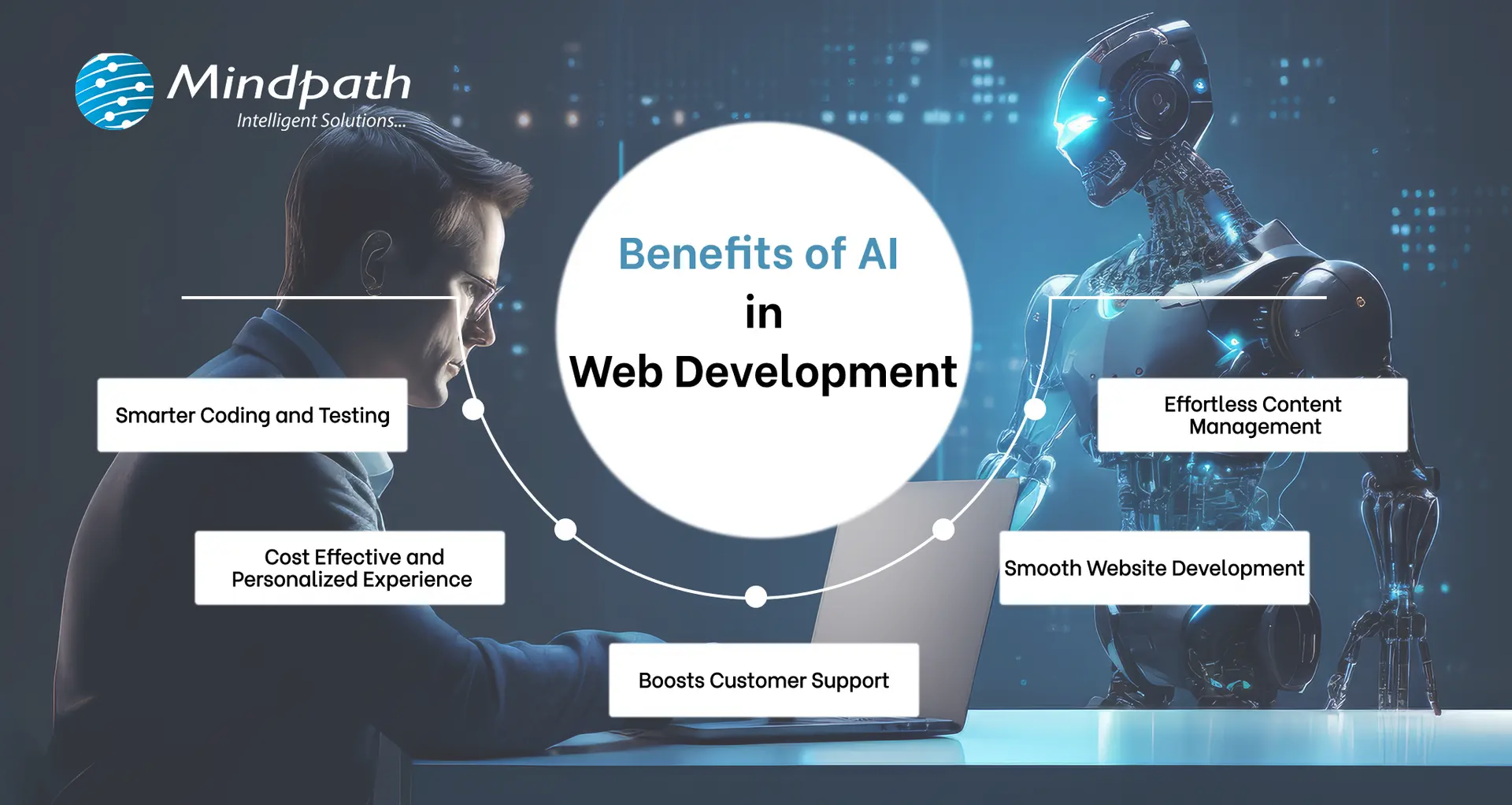
Benefits of AI in Web Development

1. Smarter Coding and Testing

The powerful combination of AI and web development can help developers to write cleaner codes by spotting bugs early and improving how the code works. With deep learning, AI-based tools also facilitate automated testing, which assists quality assurance teams in verifying whether the website functions correctly. Although some problematic areas continue to require manual testing, AI streamlines the process and reduces costs. That’s one of the reasons why QA and testing budgets have declined over the past few years, and why more individuals are using AI websites for improved results. 

2. Smooth Website Development

AI in web development handles mundane and time-consuming work so developers can concentrate on the larger aspects of a project. With smart tools and data-driven choices, the entire web development process becomes more efficient and faster. This is incredibly useful, particularly if you’re new to it. By using AI to create websites, you save time and effort while building something awesome and making web development feel less stressful and a lot more efficient from the very start. 

3. Boosts Customer Support

AI in customer service makes it simple to integrate smart chatbots onto websites that are able to engage with visitors’ day and night. These virtual assistants comprehend questions and respond in natural, friendly terms. They provide instant answers, resolve issues rapidly, and never require breaks. This allows owners of websites to assist users without requiring a support team full-time. It’s an easy method to ensure visitors are satisfied and that they always receive assistance, even when there is no one present. 

4. Cost Effective and Personalized Experience

With the help of AI tools, websites are now able to provide customers with a more personalized and seamless experience at reasonable costs. Work that required time can now be processed automatically, saving time for both users and website owners. AI also assists in identifying fraudulent or toxic activities, protecting users. This is why many top AI websites utilize intelligent features to serve customers better. Ultimately, AI assists in providing more value to the customer at a low cost. 

5. Effortless Content Management

Website content management becomes a lot simpler with the assistance of AI. Through analyzing user behavior on a website, AI provides clear concepts regarding what type of content users like most. Website owners can develop improved posts, videos, or pages that genuinely interest visitors due to this. With the assistance of AI web templates and smart recommendation tools, you can lead users to whatever they require and retain them for a longer period. It’s an easy way to make content better and make each visit feel more personal.

Is your business making the most of AI to stay ahead of the competition? Explore how integrating AI in your business strategy can optimize processes, drive growth, and improve decision-making.

How to Use AI in Web Development?

Today, web development thrives on the partnership between AI and human expertise. While AI handles repetitive tasks and enhances efficiency, it still relies on human creativity and problem-solving. Here’s how you can use AI in web development to streamline your process and improve results. 

1. Artificial Design Intelligence (ADI)

Artificial Design Intelligence (ADI) assists you in creating a complete website by simply responding to a few simple questions. It selects the most suitable layout, design, and content depending on your requirements. It’s like having an intelligent assistant that designs a professional-looking site that reflects your style and objectives. This AI website generator makes the process fast and efficient, ensuring you get the site you want with minimal effort.  

2. Search Easier with Voice Assistants

Rather than typing and reading lengthy pages, users can simply speak their question. Voice AI listens, the correct answer quickly, and voices it back. Voice AI assists websites in providing rapid and clear responses, speeding up searches, making it easier, and more accessible to all. 

3. Coding Assistants

Developers can use smart coding assistants to speed up their work. These tools suggest code, spot errors, and help build websites faster. Even when working on big ideas, they take care of the small stuff. It’s like having a smart helper while writing your code. 

4. Personalize User Help with Chatbots

AI chatbots make it easy for users to get the info they need. They can ask questions in simple language, and the bot instantly provides answers or links. The benefit of chatbot is that it provides fast, accurate responses, making the experience more personal and efficient by using the website’s content.

5. Easy Search Engine Optimization (SEO)

AI can make SEO much easier by providing the best keywords, topics, and headlines for your content. It can even write parts of your text, ensuring the right keyword density for better search engine rankings. This helps your website attract more visitors without the hassle of manual research. 

AI is reshaping industries by automating the processes, empowering faster decision-making, and providing data-driven insights. Learn how AI is e-commerce is transforming the future of e-commerce sector.

Ready to Transform Your Website with AI?

AI is changing web development by making tasks faster and more efficient. From designing and coding to improving user experience, AI helps developers focus on what truly matters. By integrating AI, your website can become smarter, more personalized, and easier to manage for everyone involved. 

Mindpath offers top-tier AI development services and delivers high-performing artificial intelligence solutions that enhance your website’s design, performance, and functionality. Our expert team utilizes AI tools to streamline processes, boost user experience, and create custom solutions.  

Frequently Asked Questions

Want AI Built Into Your Website?

Add search, chat, and personalization that actually get used.

Frequently Asked Questions

Yes, AI in web development is highly suitable for small businesses and startups. It helps reduce development costs, automate repetitive tasks, and speed up website launches. Even with limited resources, businesses can build professional, scalable, and user-friendly websites without needing a large technical team.
No, AI is designed to assist, not replace, web developers. While it can automate coding suggestions, testing, and design support, human creativity, strategy, and problem-solving remain essential. Developers use AI as a productivity tool to work faster and more efficiently, not as a substitute for expertise.
AI-powered websites can be highly secure when properly configured. AI tools can detect unusual behavior, prevent fraud, and monitor vulnerabilities in real time. However, security also depends on proper development practices, regular updates, and human oversight to ensure strong protection against evolving cyber threats.
AI in web development enhances user engagement by analyzing visitor behavior and delivering personalized content, recommendations, and experiences. It can adjust layouts, suggest relevant products or articles, and provide instant support through chatbots, making interactions more meaningful and increasing the chances of conversions.
To start using AI in web development, basic knowledge of programming, APIs, and web frameworks is helpful. Familiarity with AI tools, automation platforms, and data analysis can be beneficial. However, many modern AI platforms are beginner-friendly and require minimal technical expertise to get started.

Support Is One Click Away

Featured Posts

Related Post

WordPress maintenance
Is your WordPress site running as smoothly as possible? Do you know what kind of essential maintenance activities should be done on your website to keep it secure and running well? In this blog, we will explore the essential maintenance tasks that will keep your WordPress site in top shape. So, let’s dive in! 

Importance Of Website Maintenance   

Routine WordPress maintenance will help your website to be stable, secure, with better loading speed, and compatible with different browsers and devices. Regular backups guarantee that there is no loss of data in case of website crashing or malware attacks. Up-to-date plugins will ensure that slowdowns and security risks are prevented. Monitoring and analytics on user behavior help you make informed decisions and optimize your content. This provides better maintenance of your website, thus keeping it in top shape, and gives a better experience to the visitor. 

How Much Does WordPress Maintenance Cost?  

The cost of maintaining a WordPress site will be based on the size and complexity of the website. Routine maintenance in 2024 can range from as low as $5 a month to $120 per month or $40 a year to $1,200 a year. For a personal site, maintenance might be as low as $4 a month or $40 annually. Business sites usually start at about $8 per month or $80 per year. The pricing for running corporate websites is usually in the region of $12 a month or $120 yearly. The websites related to entertainment and eCommerce usually cost more, with the former starting at $16 per month and the latter at $20 a month. Routine maintenance includes updating plugins, themes, and WordPress core, managing backups, ensuring security, and keeping up performance. 

The Complete Checklist of Monthly WordPress Maintenance Tasks   

1. Optimize Your Database   

Over time, your WordPress database can become bloated with extraneous data from things like old post revisions, spammy comments, and deleted items, which slow down your site. To clean up your database, first back it up using a tool like Solid Backups to ensure all your data is safe. Then use a plugin such as WP Optimize to clear out any unnecessary data and boost database performance. Alternatively, if you know how to manipulate a database, you can clean up manually with phpMyAdmin. This method is useful when custom settings must be considered, and in all probability, it would be good to talk this over with a developer in case you are unsure. 

2. Manage Backups   

Backing up your website is something you should do regularly for safety against losses and quick recoveries in case of issues. Besides, with Solid Backups, you can configure backups automatically by using the plug-in known as UpdraftPlus. Schedule the backups frequently and let them be safely kept in the cloud, optimally. Moreover, review the process of restoration month by month to confirm that your backup procedure is working well, and in case of need, you will be in a good position to recover your site. 

3. Update WordPress Core, Plugins, And Themes   

WordPress core, theme, and plugin updating have implications for security, compatibility, and accessing new features. According to the Wordfence 2022 State of WordPress Security report, plugins in particular are a weak point, so keeping them up to date is very important. Keep checking for updates, and when found, update them one after the other. Begin with the WordPress core and then proceed to plugins and themes. Remember to always back up before doing any big update and update on a staging site so you can be sure everything works well with your current setup. 

4. Perform Security Scans   

Security scans to vulnerabilities, malware, and unauthorized access should be regularly scheduled. Run full site scans with a plugin like Shield Security, check the logs for any suspicious activity, and configure settings. You should, however, schedule these scans to run periodically, but at least revise them once a month. 

5. Analyze Site Speed   

A website’s speed has a massive impact on user experience and SEO. Among others, you can use Google PageSpeed Insights, GTmetrix, or Pingdom to check how fast your website loads. After testing, fix performance issues of your website against the results. If the speed problems continue, see if there’s a need to review and upgrade your hosting plan. 

6. Check For Broken Links   

Checking for broken links is important both for delivering a good user experience and SEO. Broken links may make visitors and search engines end up in so-called ‘dead ends,’ harming your site’s rankings and authority. Run a check using a plugin such as Broken Link Checker. Thereafter, repair or remove broken links upon finding them, possibly looking into scheduling automated checks to help identify new broken links in the future. 

7. Optimize Images   

Optimizing images will help to increase your site speed and performance radically, particularly when you have a heavy share of images on the site. Tools like Smush or ShortPixel do really well when it comes to compressing existing images. Remember the right formats—JPEG for photos and PNG for graphics where the requirement is transparency. Enable lazy loading; this defers the loading of off-screen images to further speed up page load times. 

8. Submit Your Sitemap   

Making sure that you are regularly submitting your sitemap to search engines will let them index your website in a better way and give you more exposure. Use a plugin such as Yoast SEO to create an updated sitemap, then take the time to manually submit this to search engines via their webmaster tools—like Google Search Console—to check that all your pages are correctly crawled and indexed for maximum search engine visibility. 

9. Monitor Site Performance   

Monitoring your site’s performance frequently will let you know when there is a problem. It helps in making informed decisions and will let you act swiftly. Use tools like Google Analytics and Jetpack to look through key metrics such as page views, bounce rate, and conversion rates. This setting of performance alerts about major changes or problems will let action be taken in time and thus your site runs smoothly. 

10. Test Your Forms   

Testing of forms at regular intervals is paramount to ensure that they work right and harvest data from users effectively. All forms should work well, and process input correctly. Check that email notifications are going to the right addresses, then test for user experience to make sure forms are usable, accessible, and responsive on different browsers and devices. 

11. Clear Site Cache 

It ensures that your site visitors have the most recent content. In addition, it will boost your website’s performance. Sometimes, cached data can become corrupt or outdated, causing display issues and slowing download time. Flush the server cache, then reset any plugin-built caches. Test your site for improved performance after flushing the cache. This can also be done in many ways depending on your unique setup. If you are not comfortable doing it yourself, use something like WP Super Cache and W3 Total Cache. 

Ready to optimize Your WordPress Experience?

Learn More About Mindpath’s Maintenance Services!

WordPress Development Services at Mindpath   

At Mindpath, we ensure your WordPress website runs at its best with comprehensive maintenance services. This includes regular updates to WordPress Core, plugins, and themes; daily backups for data security; and optimization of the performance of the site so that it loads faster. Our team conducts security scanning to save from threats, monitors and fixes broken links, and looks through analytics to bring about better user engagement. We test forms to make sure they are working well. You just focus on your business while we keep your site secure and efficient with our expert maintenance. 

Conclusion 

Maintenance, on the other hand, will ensure your WordPress site is not only smooth, safe, and high performing, but it will also be defended from many problems for the best user experience. From checking for broken links to analyzing site speed or running security scans, every step is important in keeping your website at its best. 

At Mindpath, we cut down the complexity of WordPress maintenance by offering every necessary service in one place to keep your site in top condition. Let our team take care of updates, backups, performance optimization, security checks, and more, so you can focus on growing your business while we work on keeping your website reliable and engaging. Our expert team at Mindpath makes sure your WordPress site is running at peak performance, ensuring you can get on with business and not worry about it. 

Want to achieve a Faster, Safer WordPress Site?

Find Out More About Mindpath’s Maintenance Solutions!

Ensure your WordPress site runs smoothly with essential maintenance tasks like updates, backups, security scans, and performance optimization.
custom wordpress development

In the rapidly changing digital age, your website is more than just a digital face or a virtual business card. It creates a foundation to support your brand identity, marketing strategy, and customer experience. With more than 43% of websites powered by WordPress (source: w3techs), it is clear that WordPress is an excellent choice for website development. There are different pre-built WordPress themes that provide you with an affordable and easy way to bring your business online. However, they may not be able to meet the unique requirements of your growing business. This is where a custom WordPress development comes in.

Whether you are a local business, an enterprise, or a startup, a custom-built website can unlock performance, long-term growth, and brand credibility. In this guide, you will learn more about custom WordPress development and understand why it is crucial for your business. Besides, we will also discuss the best practices and how to choose the right custom WordPress development company to enjoy the desired results.

Want to elevate your online presence with a custom WordPress site tailored to your business objectives? Mindpath’s offers wordpress developemnt services that help you in creating a unique digital website that sets you apart from your competitors.

Custom WordPress Development- An Introduction

In simple words, custom WordPress development involves creating a website from scratch, tailored to your unique requirements. Instead of using pre-made themes or inefficient plugins, a professional WordPress developer utilizes tailored themes, functionalities, and plugins that align with your business goals. It gives you complete control over all aspects of your website, including performance, security, scalability, and design. Custom development can be an excellent solution for organizations looking for:

1. Advanced functionality

2. Unique custom WordPress website design and branding

3. Optimized SEO and performance

4. Hassle-free third-party integration

5. Robust security and long-term scalability

Custom WordPress development services can transform your generic site into a strategic digital asset to drive growth.

Now that you understand what it is, let’s understand the limitations of using a standard WordPress theme and the benefits you will witness by opting for custom development.

The Need for Custom WordPress Development

Pre-built themes are easy to use, and you can use them with minimal technical knowledge. However, they come with various drawbacks that can greatly affect your site’s potential.

1. Bloated Code

WordPress’s theme store has a lot of themes with a large number of unnecessary plugins and features. Such features and code can reduce your website’s performance, affecting ranking and user experience.

2. Security Issues

If the themes are not updated regularly by the developer, it can become a major security risk, damaging your business’s credibility.

3. Generic Design

You can find a pre-made theme being used by thousands of websites. Using them, it will be challenging for your site to stand out. Such themes lack uniqueness and may not meet your brand’s needs.

4. Lack of Functionality

Such themes offer limited functionalities and features. You will have to use additional plugins to add more features, and this can cause compatibility issues and reduced speed.

Planning upgrading your website but unsure if switching from HTML to WordPress is the right move? Learn the benefits of converting HTML to WordPress and how it can boost your site’s performance, scalability, and user experience.

Key Benefits of Custom WordPress Development

Generic themes may help you get your brand online, but as mentioned above, you will have to compromise on a lot of things. By opting for custom development services, you can create a tailor-made digital asset. Here are some major benefits of custom WordPress development.

1. Tailored Design

Your website should have elements to reflect your brand’s unique tone, personality, and value. Custom development lets you create a custom WordPress website design and a unique user interface based on your target audience. Developers can integrate creative layouts to boost user interaction. Besides, you can customize various website elements, from color schemes and typography to animation and layouts, to make your website stand out.

2. Enhanced Security

Custom WordPress websites allow you to add and configure advanced security mechanisms. This way, you can ensure data confidentiality, integrity, as well as availability. You can implement security measures like SSL certificates, custom security plugins, two-factor user authentication, data validation, and more.

3. Optimized Website Performance

Custom WordPress sites are faster as they don’t have unnecessary plugins and bloated code. As your site will load faster, you will witness improvements in bounce rates, SEO rankings, and user experience. Besides, developers can use techniques such as caching, lazy loading, CDN integration, and image compression to reduce load time.

4. Scalability

As your business expands, your website should grow with it. Custom WordPress websites are developed with future scalability in mind. It allows you to add new pages, new features, additional external tools such as payment gateways, CRM tools, and more. Custom WordPress development will make it easier to adjust your site for increasing traffic without facing any performance issues.

5. Optimized SEO Aspects

Custom websites have structured data, optimized speed, and clean code, which are crucial for better search engine visibility. Developers can use custom metadata, URL structure, and advanced schema markup to boost organic traffic.

6. Hassle-Free Third-Party Integrations

Do you want to connect your website with useful tools like Salesforce, Mailchimp, HubSpot, etc.? Well, custom website developers ensure seamless API integrations designed for your workflow. This will improve data flow as well as automation across multiple platforms.

7. Content Management Flexibility

With a custom site, users will enjoy flexible backend interfaces. As a result, non-technical users can easily manage content. Developers can create custom fields, taxonomies, and post types, simplifying content updates and publishing.

Are you unsure if your website development project is on the right track? Discover our WordPress developer checklist to ensure every critical step is covered for a smooth and successful website launch.

Major Components of Custom WordPress Development

A custom WordPress design and development may include multiple components based on your business goals. However, some core components are:

1. Custom Website Development

It involves creating a fully functional website with custom design, structure, functionalities, and features. It also includes performance optimization, layout design, navigation configuration, etc.

2. Custom Theme Development

Developers create unique themes that meet your brand identity. It includes creating responsive themes that can offer a seamless user experience.

3. Backend Customization

It covers customization of the admin panel to make it easy to use for users. Developers may add user roles, dashboards, custom taxonomies, and post types while prioritizing the site’s security.

4. Plugin Development

Developing custom plugins for your WordPress site that can help increase functionality without affecting performance. Experts focus on creating scalable and secure plugins based on your unique needs.

5. Migration Services

It includes offering migration services for hassle-free data transfer with minimal downtime.

6. API Integration

This process involves connecting your site with third-party platforms, marketing tools, CRMs, or payment gateways.

Want to make sure your WordPress website runs seamlessly with the latest technology? Discover how WordPress PHP compatibility can protect your site and enhance its performance.

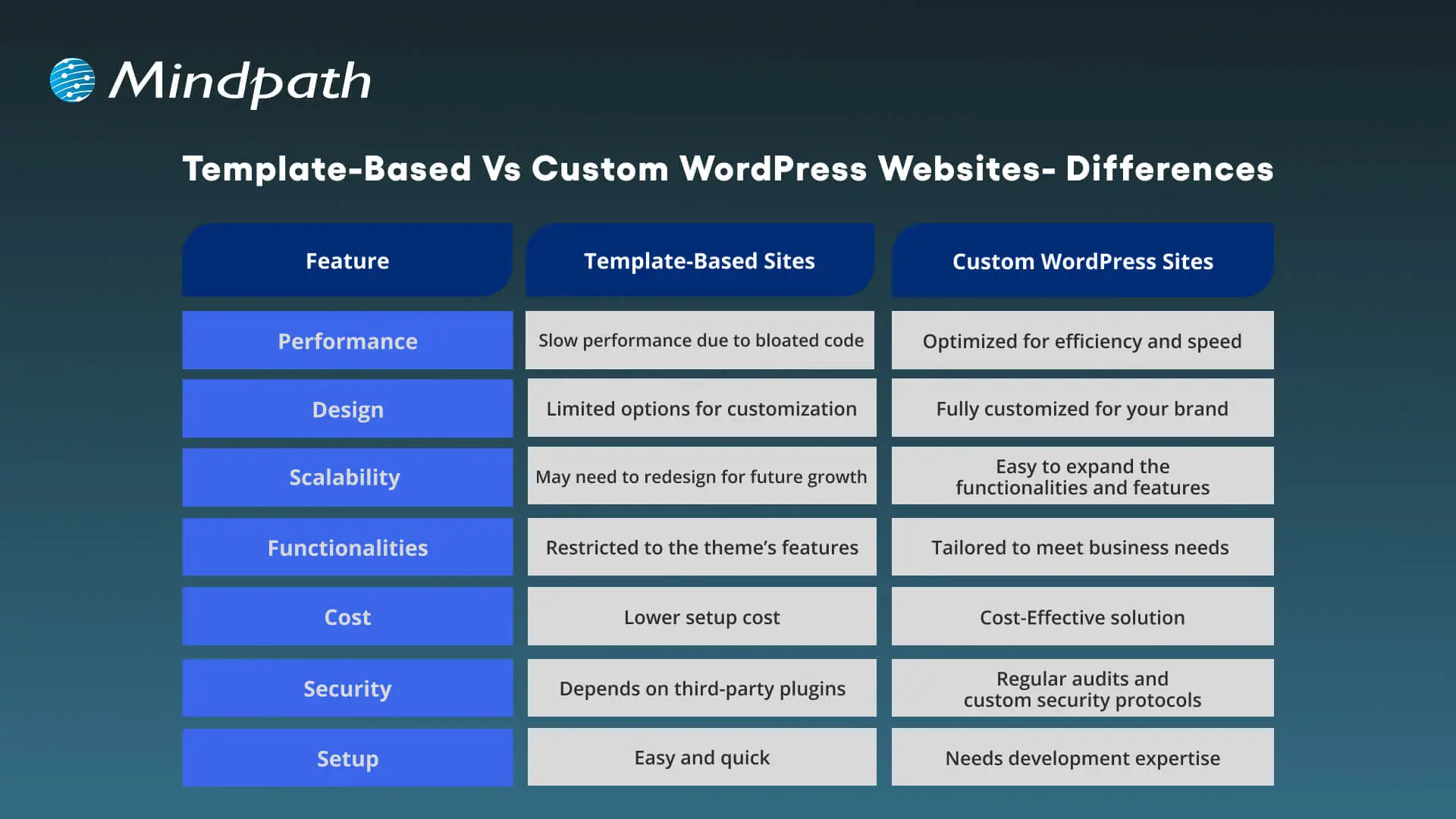
Template-Based Vs Custom WordPress Websites – Differences

Choosing between a custom WordPress site and a template-based site can greatly impact scalability, flexibility, as well as cost. Understanding the differences will help you make the right decision.

Template-Based Vs Custom WordPress Websites

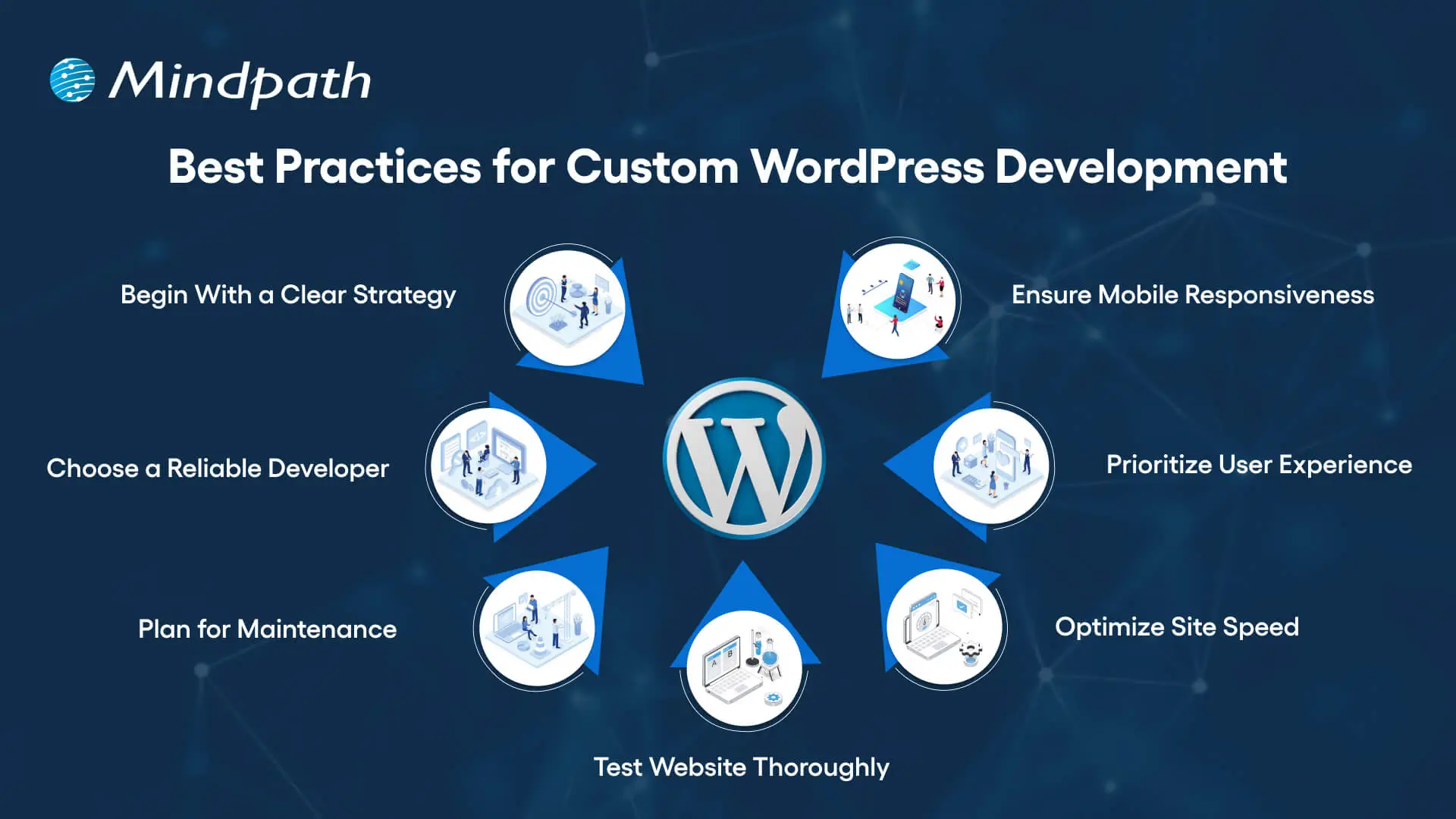
Best Practices for Custom WordPress Development

To make sure your new custom WordPress development project offers desired results, it is advisable to follow these best practices:

Best Practices for Custom WordPress Development

1. Begin With a Clear Development Strategy

Whether you need WordPress development for a small business or a large organization, you should first understand your target audience, desired functionalities, and goals. A well-documented strategy can help prevent scope creep, and you can ensure a perfect alignment between developers and stakeholders.

2. Focus on Mobile Responsiveness

With people increasingly using mobile phones and tablets for browsing, you should ensure that your website is responsive across all browsers and screen sizes. Custom WordPress development involves the use of a mobile-first design, which can boost SEO and usability.

3. Prioritize User Experience

Even though you have a beautiful website, it will be useless if users face issues while using it. An experienced developer will focus on a smooth user experience, making it easier for visitors to locate the things they need.

4. Optimize Your Site for Maximum Speed

Utilize techniques such as caching, image compression, CDN, and lazy loading to make sure your site loads faster. Tools such as Lighthouse, GTmetrix, Pingdom, and SEO Site Checkup can be used to detect bottlenecks.

5. Test Your Website Thoroughly

Before you make your site live, make sure that it has gone through proper testing. It helps identify compatible issues, loopholes, and missing functionalities. Prefer to carry out device testing, usability testing, and cross-browsing testing. Refine UX and optimize elements based on user feedback.

6. Plan For Smooth Maintenance

A custom WordPress site needs regular security checks, backups, and updates. So, create a proper maintenance plan or work with a professional WordPress developer to ensure constant support. Ongoing maintenance is crucial to keep your site functional and secure.

7. Partner With a Reliable Developer

Work with an experienced and trustworthy development company with a proven track record of offering quality WordPress website development services and creating high-performance websites. While helping you with technical execution, they can offer strategic input.

Do you want your website to be accessible to every visitor? Learn how to improve WordPress web accessibility can help you reach more users and create an inclusive online experience.

Tips to Choose The Right WordPress Development Company

Choosing the right expert for custom WordPress development is crucial to ensure success. While looking for the best one, prefer to consider the following points:

1. Evaluate The Experience

Ensure that the developer has years of experience in WordPress, especially in custom development. Go through their portfolio and check if they have ever created similar websites that you want to create. They should have a deep knowledge of the best practices and core functionalities of WordPress.

2. Technical Expertise

Confirm that the service provider has proficiency in JavaScript, CSS, MySQL, HTML, PHP, plugins, and more. Choose one with strong technical skills for the desired results.

3. Check Their Process:

Ask the company who they plan, carry out, and test the development projects. Ensure that they can offer a comprehensive custom development service based on your requirements.

4. Transparency and Communication

Only a trusted partner can keep you informed through the WordPress development project and will remain transparent about the costs and timelines. Choose one who prioritizes clear reporting and reacts to your queries promptly.

5. SEO Knowledge

The custom WordPress development expert should have a proper understanding of the latest SEO trends and be able to deploy necessary on-page optimization from the beginning. Furthermore, they should know how to configure different SEO plugins.

6. Post-Launch Support

Without regular updates and maintenance, your site will become vulnerable to various issues. So, partner with a development company that offers additional support along with maintenance services to keep your site performing at its best.

This is how you can hire an expert for professional WordPress web development to get your website listed higher in SERPs.

Wondering how to hire the right WordPress developer to help your business grow online? Explore our detailed guide to hire WordPress Developer to discover expert insights that guide you toward making the best hiring decision.

Looking to Elevate Your Business with Custom WordPress Development?

Undoubtedly, WordPress offers organizations the flexibility, affordability, and speed they need to start. Custom WordPress development is more than just writing code and creating a website. It is a strategic process to craft a unique digital experience that can effectively support your organizational goals, reflect your brand, and scale with you. It provides you with robust security, future scalability, and innovations that you will not get with template-based solutions.

If you want to elevate your business’s online presence and are looking for a future-proof platform, you can always count on Mindpath’s WordPress development service. As a leading WordPress development company, we combine custom development with scalable architecture and creative design to bring your unique vision to life. At Mindpath, we understand that every business needs uniqueness when it comes to developing a website. That’s why we offer tailored solutions that can set you apart from your competitors. We specialize in CMS development, custom plugin development, theme development, and more. Create a solid presence in this evolving digital landscape with us!

role of vector database in ai application

Have you ever thought to yourself about how AI can interpret images, voices, or texts so accurately? Well, it is due to the rapid growth of the role of vector databases in AI applications. Standard databases do a good job of storing structured data, while much of AI work involves dealing with complex and unstructured information. Vector databases provide methods for storing and comparing information which allow machines to recognize patterns, context, and meaning much faster and with higher accuracy.

As AI systems become more intelligent, the demand for methods to support thinking beyond the simple data is also increasing. Vector databases provide that opportunity for AI to correlate information, learn from it, and generate more impactful results. They are quickly becoming the framework of modern AI innovation. In this blog, we will take a look at the power of vector databases in AI applications and why they are a necessary future element of intelligent systems.

Key Takeaways

  • 01
    Vector databases help AI applications search and compare information based on meaning and context.
  • 02
    They support AI use cases such as semantic search, RAG, recommendations, and computer vision.
  • 03
    Vector embeddings convert text, images, audio, and other data into numerical representations that AI can compare.
  • 04
    Fast similarity search allows AI systems to retrieve relevant information from large and complex datasets.
  • 05
    Vector databases can act as a memory layer for AI systems and agents that need to store and retrieve contextual information.

Looking for a way to enhance personalization with the help of AI in your apps using a vector database? Explore Mindpath’s AI development services, which provide expert guidance and knowledge on how to maximize the value of the vector database to elevate your AI capabilities.

What is a Vector Database for AI?

A vector database is a specific type of database that enables storing and searching for data represented as vectors. Vectors are sets of numbers that represent the meaning or features of data such as text, images, and audio. Instead of searching for exact matches of data, a vector database searches for similar items, based on the context, illuminating AI’s capacity to perform at a more intelligent level based on context.

In basic terms, it works like the brain of AI systems that require memory and comparison. A vector database in AI enables quick and accurate data searches among very large and complex datasets. They are often used in applications such as chatbots, recommendation engines, and image searches where the response time and clearly related results mean everything.

In simple terms, a vector database helps AI applications store, search, and retrieve information based on meaning rather than exact keyword matches.

Curious how AI chatbots can boost engagement and revenue? Discover AI Chatbot examples to learn how vector database-driven intelligence improves customer interactions.

How Does a Vector Database Work?

Vector databases assist artificial intelligence to comprehend and look through data in terms of meaning rather than precise words. Data is stored as numbers that illustrate what the data depicts. This helps AI connect ideas, find similarities, and give more accurate and useful results.

1. Creating vector embeddings

AI models process raw data to create vectors, which are sets of numbers that represent the meaning of the data. Vectors are mechanisms for AI to understand the connections among different data points.

2. Storing and indexing vectors

The vectors are kept within a vector database, which can be indexed with smart indexing methods, such as HNSW (Hierarchical Navigable Small World) or IVF (Inverted File Index). The role of vector databases in AI applications here is to store, group, and quickly find similar data when needed.

3. Performing similarity search

When the search begins, it will convert the query into a vector, which it begins to compare to other stored vectors. The database returns the closest elements based on meaning, so the AI can accurately and relevantly respond to the user.

Looking to optimize AI models without heavy computational costs? Explore Low-Rank Adaptation (LoRA) to discover techniques that improve vector database-powered AI efficiently.

Role of Vector Databases in AI Applications

The importance of the vector database for the AI application is becoming more necessary and prevalent as AI works with larger and more complicated data. Below are the main ways in which it helps and enhances the AI systems.

1. Smarter Search with Meaning

An AI application that utilizes a vector database can perform searches on meaning, rather than just a specific word. It finds things that are contextually similar in vector space; this is a lot more precise and much more human-like. This is incredibly useful, because the AI system can determine what users mean, not simply what they type.

2. Supporting Retrieval-Augmented Generation (RAG)

Vector databases provide large language models with access to current facts, knowledge, and data points from the public domain. The user’s inquiry is converted to a vector, which retrieves information from data similar to that represented in the user’s question. The information and materials retrieved help the AI provide responses that are elevated in relevance and made to be factually accurate.

3. Managing Complex Data Types

The role of vector database in AI application is to be able to manage unstructured data including images, text, and audio. A vector database does this by representing the unstructured data as numerical vectors that convey meaning. This allows AI to be able to compare unstructured data types more easily.

4. Enabling Fast Similarity Search

Vector databases leverage novel algorithms to identify similar items quickly, even among massive datasets. This capability is crucial for a number of artificial intelligence (AI) applications that depend on real-time results. The vector database in the AI application in this case is to return results quickly and still maintain precision.

5. Improving Recommendations

Recommendation systems utilized vector databases to recommend similar attributes to items or products that users had liked before. AI uses patterns in the vectors and can customize content for each individual. This leads to a more meaningful and engaging experience for the user.

6. Powering Computer Vision

In computer vision, a vector database in AI helps identify and compare images or videos efficiently. It supports tasks like face recognition, image search, and visual content filtering. By finding visually similar vectors in AI systems it improves speed and accuracy.

7. Building AI Memory

The role of the vector database in AI applications is that it is a dependable memory mechanism for the AI agents. It strengthens the AI agent’s ability to store and retrieve information in support of reasoning and decision-making. Thus, vector capacity increases the multi-step capabilities of AI agents when solving complex tasks.

8. Hybrid and Refined Search

Vector databases have the ability to merge traditional filters like date or category with similarity search. This hybrid effort increases the precision and relevance of a search result. Users can quickly and clearly find exactly what they are looking for.

Wondering how AI systems focus on the most important information in complex datasets? Discover the Attention Mechanism to learn how it enhances AI performance in combination with vector databases.

Ready to Build Smarter AI Solutions with Vector Databases?

Vector databases are transforming how AI systems process and understand information. They enable faster searches, handle complex data, and make AI responses more meaningful and accurate. As technology continues to advance, the role of vector databases in AI applications will remain central to building intelligent and scalable solutions across industries.

At Mindpath, our AI development services combine the power of vector databases with advanced machine learning models to build smarter and more efficient systems. We help businesses create intelligent applications that learn, adapt, and deliver real results. Partner with us to design AI solutions that drive innovation and long-term success.