Home

React vs Vue: Which JavaScript Framework is Best for Frontend Development?

React vs Vue: Which JavaScript Framework is Best for Frontend Development?

Lorem ipsum dolor sit amet, consectetur adipiscing elit. Ut elit tellus, luctus nec ullamcorper mattis, pulvinar dapibus leo.

Join our Newsletter!

React vs Vue

The software development industry keeps evolving incredibly with new technologies and innovations, breaking down traditional precedents. At the same time, software applications have become more complicated as businesses seek better ways to come up with successful products. The React vs Vue debate plays a major role in determining the difference between success and failure for your new software solutions. You might have many questions about the need to focus specifically on these two frontend development tools. Let’s dive in to get answers to all your questions.

With more frontend development technologies coming to the forefront, it is difficult to make the right choice for your project. React and Vue are the most preferred JavaScript technologies for web development. Both of them have become the strongest competitors among frontend development frameworks for their unique features. Let us learn the differences between React.js and Vue.js to choose the ideal pick according to your requirements.

Struggling to choose the right frontend framework for building fast and interactive web applications? Mindpath offers expert ReactJS development services to help you create scalable, high-performance solutions that align with your growth goals.

Understanding the Fundamentals of React and Vue

If you take a look at the top apps you use in everyday lives, most of them have either React.js or Vue.js in their tech stack. Choosing one of the ideal frameworks for software development can pose significant challenges. You must know what each of them has to offer for frontend development before making a decision. The following sections will provide insights on the fundamental details of React and Vue that can help you compare them.

Quick Overview of React

React.js is a well-known javascript framework for frontend development that delivers promising edge in creating interactive user interfaces (UI). Remarkable features of this tool include its origin which – it was created by Facebook in 2011 for internal purposes. Although most of us frequently refer to React as a framework, it’s an open-source javascript library for frontend development. One of the notable aspects in the Vue vs React debate is the use of JSX in React.js syntax. The role of JSX (JavaScript Syntax Extension) is very important in writing HTML elements in JavaScript code without making use of JavaScript functions.

React is among popular, dynamic, and versatile JavaScript frontend libraries used for developing frontend applications. It is most preferably used to create scalable applications with dynamic user interfaces and cross-platform capabilities. React developer tools also provide the support to identify performance issues and ensure a faster debugging process. Another striking feature of React is the flexibility to develop single-page applications and server-side apps as well as mobile apps.

Quick Overview of Vue

While React is a JavaScript library, Vue is an open-source JavaScript framework for frontend development. Vue.js grabbed headlines upon its arrival in 2014 for the shorter and simpler learning curve. As a matter of fact, the React vs Vue vs Angular comparison reflects on the fact that the design of Vue draws inspiration from Angular. The creator of Vue, a former Google engineer, picked the best components of Angular and the same approach as React.js to create a versatile framework.

Developers choose Vue for its easy-to-use interface and efficiency in developing web apps with a component-based model. The framework also includes a large library that empowers developers to create apps with better performance. Many developers prefer Vue over React for its simpler approach to coding with a less complex structure and plain syntax. On top of it, the collection of plugins available with Vue ensures efficient incorporation of additional functionalities in the app.

Looking to build a high-performance frontend that scales with your business and delivers real ROI? Learn from our ReactJS for App Development guide to understand how React empowers business owners to make smarter, future-ready technology decisions.

Let’s have a look at the React vs Vue comparison with Google Trends:
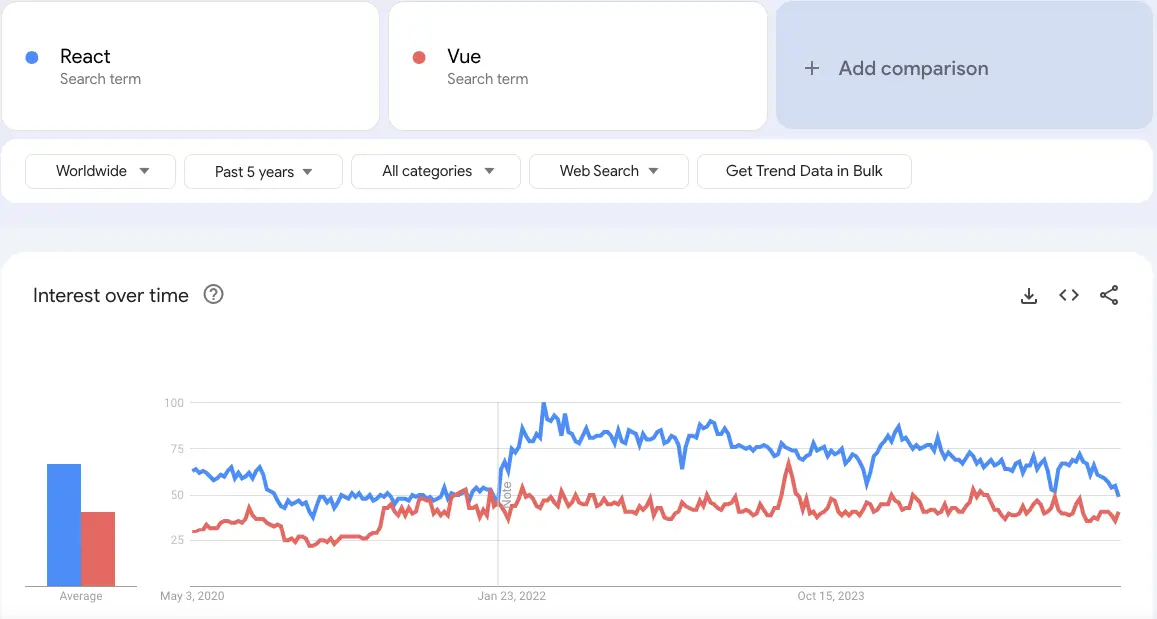
react vs vue google trends

Unraveling the Differences between React and Vue

While React is a JavaScript library, Vue is an open-source JavaScript framework for frontend development. Vue.js grabbed headlines upon its arrival in 2014 for the shorter and simpler learning curve. As a matter of fact, the React vs Vue vs Angular comparison reflects on the fact that the design of Vue draws inspiration from Angular. The creator of Vue, a former Google engineer, picked the best components of Angular and the same approach as React.js to create a versatile framework.

Developers choose Vue for its easy-to-use interface and efficiency in developing web apps with a component-based model. The framework also includes a large library that empowers developers to create apps with better performance. Many developers prefer Vue over React for its simpler approach to coding with a less complex structure and plain syntax. On top of it, the collection of plugins available with Vue ensures efficient incorporation of additional functionalities in the app.

1. App Size and Performance

The size of app in each framework speaks a lot about the ReactJS performance they can offer in the development process. You can use the Vue vs React performance benchmark to discover how Vue.js is the better pick to create small and faster apps. Vue allows you to compress the code so that it can consume significantly less space. As a matter of fact, applications created in Vue are almost 10% to 30% smaller than React-based applications.

The smaller app size enables faster coding as you will need limited inputs, thereby providing the assurance of better performance. Vue also stands as a formidable contender in terms of performance with its efficient default library. The testing library of Vue.js makes applications run quickly and more efficiently. On the other hand, React requires you to download additional libraries to introduce new features that increase app size and reduce performance.

2. Scalability

Another noticeable factor in the comparison between React.js and Vue.js is scalability as businesses seek ways to expand their apps with new functionalities. Which JavaScript frontend framework can come to your rescue when your app attracts more customers? React and Vue have efficient scalability solutions, albeit for different categories of apps. While React is the best pick to create large and complex apps, Vue is suitable for faster and simpler apps.

However, Vue and React both works on the same infrastructure and relies on a unidirectional data flow. In addition, Vue also offers support for two-way reactive data binding that allows simpler data management. The reactivity system of Vue ensures that you can track changes and introduce updates in the DOM. While React has a larger developer ecosystem and more templates and tools, Vue provides the guarantee of better scalability.

Where does React fail when it comes to scalability? You can find smart components in React.js that feature state management library functions. On the other hand, the dumb components help in executing simple functions and presenting things to the virtual DOM.

3. Operational Performance

The next important point of the difference between React and Vue will focus on their performance in different operations. Vue has been the favourite of companies as it offers exceptional performance in less complex and smaller projects. According to recent tests conducted on both frameworks, the operational performance depends on type of tasks where you can apply them. The tests focused on important metrics such as memory usage, rendering time and row creation speed for operations like clearing large tables or introducing updates.

React.js leverages a virtual DOM to ensure efficient management of UI updates and showcases impressive performance in all benchmarks. The operational performance of React is significantly higher in scenarios that require dynamic updates and content rendering. On the other side of the debate, Vue.js also leverages a virtual DOM alongside offering a reactive data-binding system. Vue has consistently shown competitive performance at par with React in different test scenarios.

4. Syntax and Learning Curve

You should also review the React js vs Vue js debate from the perspective of their syntax. React uses the JSX syntax while Vue uses the template syntax for developing user interfaces. Vue uses HTML templates by default albeit with the option to write code in JSX. On the other hand, React relies solely on JSX for the syntax. The isolation of HTML, JS and CSS in Vue ensures that beginners can also create web application frontends with ease. Developers with limited experience in JavaScript or the ones who have been using HTML/CSS will love working with Vue.

React presents a steeper learning curve as developers need in-depth understanding of JavaScript to work with the framework. Even if JSX offers more power and flexibility, beginners will find it more complex for frontend development.

5. Official Documentation

The documentation for React and Vue also play a crucial role in the React vs Vue comparison. Official documentation of any framework or library provides guidance on their components and the best ways to use them. Tools with clear and comprehensive documentation can also attract businesses which need clear directions for usage and troubleshooting. Vue has always maintained well-organized documentation that serves as its formidable strength. The decision to choose from React or Vue becomes simpler with the assurance of the simpler learning process and troubleshooting in Vue. On top of it, the latest improvements in official Vue documentation provide more comprehensive resources to help developers.

React is far behind Vue in terms of documentation because it focused only on basic concepts and advanced uses. The updated version of React documentation promises some changes such as better accessibility, clear explanations and real-world examples. With time, React will also have documentation that will help developers learn about its functionalities and best practices.

Wondering what separates a good ReactJS project from a truly successful one? Read the essential ReactJS Developer Skills for successful web projects to make smarter hiring and development decisions.

2025 Developer Survey by Stack Overflow

The 2025 Developer Survey by Stack Overflow, recorded the responses of over 65,000 developers about the technologies, coding, and tools they are interested to learn and use, and experience at work. Here’s the outcome of 38,132 (58.3%) responses received by professional developers on the popularity of web frameworks and technologies.
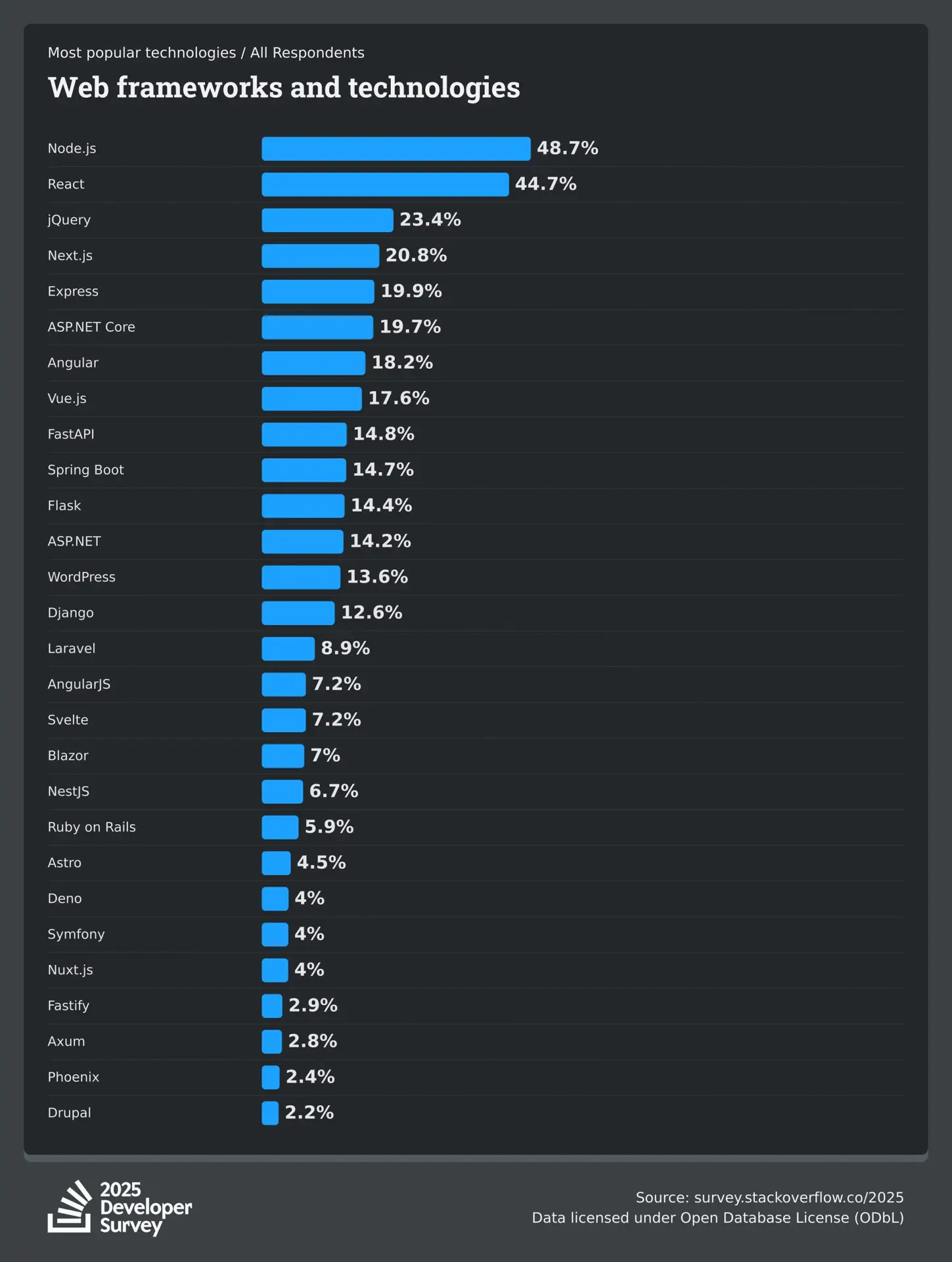
Stack Overflow Developer Survey

ReactJS vs VueJS: Which is Better for Your Project?

The differences between React and Vue mentioned above depict that each one of them has some distinguishing pulses and minuses. It is important to use the example of a React-based application and the example of a Vue-based application at the same time to understand their adoption in the real world. Some of the noteworthy companies that use React.js are instagram, Netflix, and Uber.

On the other side of the spectrum, industry giants like GitLab, Zoom, Upwork use Vue.js. Therefore, the choice of a frontend development framework depends completely on your needs. Still confused about choosing the right framework for your next project? No worries, Mindpath offers ReactJS development services and is ready to help you make the right decision. Take the first step now to choose the right framework for your dream project.


Frequently Asked Questions

1. How do I decide between React and Vue for a long-term project? 

When comparing React vs Vue, consider your project size, team expertise, and future scalability plans. React is often chosen for enterprise-level applications with complex requirements, while Vue works well for faster development cycles. Maintenance needs, ecosystem maturity, and community support also influence long-term sustainability.

2. Is React or Vue better for hiring developers?

React has a larger global talent pool, which can make hiring developers easier for growing businesses. Vue developers are also in demand, but React’s widespread adoption often gives companies more hiring flexibility. The decision depends on project complexity and long-term technical strategy. 

3. Can React and Vue be integrated with existing backend systems?

Yes, both frameworks integrate smoothly with REST APIs, GraphQL, and modern backend technologies. They work well with backend stacks like Node.js, Python, and PHP, as well as cloud services. This flexibility allows businesses to upgrade the frontend without rebuilding their entire backend system. 

4. How does state management differ in React and Vue?

In the React vs Vue comparison, React typically uses external libraries like Redux or the Context API for complex state handling. Vue provides built-in reactivity with structured tools such as Vuex or Pinia. Vue feels more guided, while React offers greater flexibility for large-scale applications. 

5. Which framework performs better in server-side rendering?

Both frameworks support server-side rendering to improve SEO and performance. React commonly uses Next.js, while Vue relies on Nuxt.js. Performance mainly depends on project architecture and optimization strategies. The implementation approach plays a bigger role than the framework choice itself. 

Support Is One Click Away

Featured Posts

Related Post

Staff augmentation meaning 

The hiring process for finding the right employees is more complex than ever before. In today’s world, businesses are under constant pressure to grow quickly, remain lean and produce results. Leaders can make better workforce decisions when they grasp the staff augmentation meaning. It’s not all about filling seats. It’s all about the right team at the right time. Many companies continue to hire traditionally because that’s the way they’ve always done it. But the world of business has undergone significant changes. So, the question is, is traditional hiring still the most effective approach?

This answer will depend upon your objectives. Projects require permanent staff members for long periods of time. Others require skills that are specialized for several months. Both models have their own merits and demerits. You could lose time, money, and momentum if you select the wrong one. Talent markets will become more competitive, and flexibility will be a game-changer. We will explain these two models in this blog in a clear way, so that you can make a confident selection. So, let us keep reading further!

Looking for a reliable partner who handles the entire talent search so you can stay focused on delivery? Mindpath offers end-to-end IT staff augmentation services that connect you with experienced professionals who are ready to contribute from day one.

What is Staff Augmentation?

Staff augmentation meaning is easy to understand. Essentially, you bring in outside experts on a temporary basis to enhance your current team. These experts are not separate from your staff but rather work with them. They help in areas where skills are lacking without the need for permanent hires. Companies in various industries like IT, finance, healthcare, etc. adopt this model. It allows them to get the right people at the right time.

Think of it as a hiring strategy that offers a lot of flexibility. Rather than spending lots of time hiring, you simply get highly-skilled professionals who are ready to work almost immediately. Typically, a third-party staffing agency takes care of uncovering candidates for you. Not only will your workforce be strengthened but also your work will be expedited by this method. It’s as simple as that.

Must Read: Staff Augmentation Trends

Key Benefits of Staff Augmentation

Staff augmentation offers more than just the number of workers. It provides the enterprise a wise, speedy, and adaptable route to expansion. Here are the main advantages of why most companies decide to switch.

1. Access to Specialized Skills

Skill deficiencies may hinder progress of ambitious projects. With staff augmentation, you can get niche experts right away, be it AI developers or specialized engineers, without spending months on training.

2. Faster Hiring

Traditional recruitment methods only offer the quality of well vetted, experienced professionals but it takes the advantage of time. Staff augmentation meaning is that it can give you professionals who are ready to work at a short notice.

3. Control Over Projects

In ‍‌‌‌‍staff augmentation work, you are given full control over the management team which is completely different from traditional outsourcing. You are the one leading the team, deciding the priorities and having full control over every project ‍ ‌‍ ‍‌decision.

4. Enhanced Productivity

Overworking your permanent team is a sure way to cause burnout and reduce productivity. Hiring augmented personnel is an effective way to balance the workload efficiently, enabling each team member to deliver their highest level of performance.

5. Flexibility and Scalability

Project needs are always changing, and your team size has to change accordingly. Staff augmentation gives you the opportunity to increase or decrease your team size with great simplicity. It makes your business able to respond to changes at all times.

Drawbacks of Staff Augmentation

Each of the hiring models presents its own set of challenges. Here are some of the disadvantages to consider.

  • Contract rates are higher on extended projects than on full-time salaries.
  • It takes time for external personnel to get to know the internal processes.
  • Transient employees have a difficult time with company culture.
  • Important project information is lost when the contract is terminated.
  • Access to the system for others poses significant threats to data security.
  • Taking on external professionals puts additional strain on the internal managers.

What is Traditional Hiring?

Traditional hiring meaning is a simple concept. First, a business posts the available position, then goes through the submitted resumes, eventually interviewing the potential candidates, and ultimately deciding on the one that is the best fit. Companies assess individuals mainly on their qualifications, work history, and alignment with company culture. For many years, it has been the default method of recruitment.

This model emphasizes on long-term commitment of both sides. The employer spends time and other resources to recruit a permanent employee who will fit the company well. The process is quite extensive but the progress is usually slow. It is the most appropriate model when a company needs devoted, full-time employees for their continuous positions.

Key Benefits of Traditional Hiring

Let’s examine the main advantages that continue to make traditional hiring a relevant and widely trusted method.

1. Stronger Team Cohesion

Working in permanent teams helps establish closer relationships and make collaboration smoother as time passes. Regular teamwork tends to establish trust and boost productivity.

2. Better Cultural Alignment

Traditional recruitment enables you to hire candidates that fit your values perfectly. Employees who are a good cultural match adjust more quickly and make a significantly higher contribution.

3. Greater Long-Term Commitment

When a person works full-time, they usually immerse themselves fully in the growth and success of your business. Their dedication leads to stability and a greater feeling of personal responsibility.

4. Continuous Skill Development

Businesses have the option of upskilling their employees and preparing them for bigger responsibilities down the line. This not only results in a skilled and dedicated team but also reduces the need for frequent external hiring.

Staff Augmentation vs Traditional Hiring: A Comparison Table

Figuring out which model suits your business better is way easier when you put them next to each other visually. Here’s an overview that explains what is staff augmentation meaning and how do the traditional hiring compare to staff augmentation on the aspects that matter the most to your company.

Criteria   IT Staff Augmentation   Traditional Hiring  
Flexibility High – Can scale up/down as needed Low – Fixed, long-term commitments
Cost Cost-effective, reduced overhead Higher costs, including benefits and office space
Time to Hire Quick onboarding with pre-vetted candidates  Lengthy recruitment and onboarding process
Access to Talent Access to specialized, global talent quickly Limited to available local talent
Project Adaptability Easily adapt to changing project needs Rigid, less adaptable to project changes
Commitment Short-term or project-based Long-term employment contracts

Which Hiring Model is Right for Your Business?

Traditional hiring has its place, but today’s fast-moving business world demands more flexibility. Staff augmentation meaning becomes clear when speed, skills, and cost-efficiency matter most. When comparing staff augmentation or traditional hiring, augmentation consistently proves smarter for businesses that need to scale without long-term burdens or heavy recruitment cycles.

At Mindpath, we provide staff augmentation services that connect you with top-tier talent instantly. Our vetted professionals plug into your team seamlessly and deliver results from day one. Let us help you build smarter, move faster, and grow confidently.

Frequently Asked Questions

1. Is staff augmentation only suitable for large enterprises?

Not at all. Businesses of every size use staff augmentation today. Startups benefit greatly from accessing senior talent without full-time costs. It is equally powerful for mid-sized companies managing rapid growth or unexpected project demands.

2. What is the typical duration of a staff augmentation contract?

Contracts vary based on project needs. Some last a few weeks, others run for several months. The flexibility is actually one of its strongest advantages, letting businesses extend or conclude engagements based on real-time project progress.

3. How is staff augmentation meaning different from a freelancer arrangement?

Freelancers work independently on their own terms. Staff augmentation professionals, however, work directly under your management and follow your processes. They function as true team extensions, not outside contractors operating on a separate agenda.

4. Can augmented staff work remotely or only on-site?

Both options are completely viable. Many businesses today prefer remote augmented teams for cost savings and wider talent access. On-site arrangements work better for projects requiring close collaboration or access to physical infrastructure.

5. What industries benefit the most from staff augmentation?

Technology, healthcare, finance, and e-commerce lead the way. However, any industry facing skill shortages or fluctuating project demands can benefit. The model adapts well across sectors wherever speed and specialized expertise are business priorities.

application security best practices

In this modern tech world, keeping your app safe and secure isn’t just a minor task anymore, but rather it has become a business priority. Whether you have built a mobile app or a web platform, the users trust you with their personal information every time they log in or make any transaction. Isn’t it true? This is the reason for which you should follow application security best practices because it can help you in protecting your app from hackers, data leaks and even costly breaches.

Strong security starts when you understand the correct strategy, starting from secure coding to regular updates and data protection. Do you want to know what is the best practice for application security for your web and mobile apps? Don’t worry, we will cover essential techniques for securing your applications in this blog, which can help you in staying one step ahead of threats and building trustworthy digital experience.

According to MarketsandMarkets Analysis, The mobile apps and web analytics market is expected to grow from 9.4 billion in 2022 to USD 20.2 billion by 2027, at a CAGR of 16.4%.

What is Application Security?

Application security refers to the practice of protecting your apps from threats that could steal all the data and even harm the system. It involves adding security features during the development stage and continuing to protect your app even after it is launched. This can ensure that both your app as well as the information it handles, are safe from hackers and other risks.

This protection can include hardware tools, software settings and regular security settings. For instance, a powerful router that obscures a device’s IP address provides hardware protections, while an application firewall embedded in the software frames actions. Security protocols, such as routine testing and upgrades, help to ensure risks are identified and rectified quickly so that the app continues to secure itself for years to come.

Want to transform your ideas into seamless applications?  Our Web and Mobile Application Development Services offer end-to-end development to create scalable and high performing apps which are designed accoridng to the business needs.

What are the 3 Pillars of Application Security?

To build a strong foundation for protecting any app, it’s important to focus on the core elements of security. These three pillars work together to keep applications safe and trustworthy.

1. Process:

This pillar includes the policies, procedures, and workflows that help manage and secure applications. These processes are designed to reduce risk and protect the app throughout its entire lifecycle.

2. Technology

Technology covers the tools and security controls used to keep applications safe. While new solutions keep emerging, it’s important to focus on the core security needs that protect the application effectively.

3. People

People are often the most overlooked part of application security, even though they play a key role. This pillar focuses on managing human risk, which includes the behaviors and actions of employees, contractors, and partners who have access to the system.

Web Application Security Best Practices

In today’s digital world, keeping your application and security strong is more important than ever. A single loophole can lead to serious trouble. That’s why it’s essential to follow a smart plan to protect your app from threats. Here are some best practices you can follow:

Web application security Best Practices

1. Spot and Understand the Weak Points in Your App

After setting up your app security plan, it’s time to check for weak spots. You are likely to find many issues, but not all are serious. Focus on the most dangerous ones first. Use a custom threat model or OWASP risk scores to help you sort and fix them smartly

2. Use Quick Fixes Like Virtual Patching and WAF

Waiting months to fix app issues is risky. Virtual patching and a Web Application Firewall (WAF) can protect your app right away. They block attacks, even before a complete fix is ready. Also, limit app features and keep watching traffic to catch problems early and stay safe.

3. Start with Fixing the Most Important Issues

Fixing every issue at once can feel overwhelming. Focus first on the critical and high risks that could hurt your business or brand the most. Once those are handled, move on to the lower-risk ones. This smart step-by-step plan helps save time and protects what matters most.

4. Group Your Apps by Risk Level

When you have many apps, it helps to sort them by priority. Put them in buckets like critical, serious, and normal based on how sensitive the data is. Fix the most important ones first. Retire unused apps, and keep your list updated to stay organized and reduce risk.

5. Build a Clear Map of Your App Security

When apps grow fast, it’s easy to lose track. Start by making a full list of all your apps, their purpose, and update status. Add details like how they’re used and update security steps. This clear picture helps you fix issues quickly and build stronger web application security.

6. Monitor Your Application Every Time

Virtual patching through a WAF helps you fix issues faster and keeps your app under watch. It shows which attacks are blocked and where they come from. This ongoing monitoring builds useful security insights and also helps stop app-layer DDoS attacks before they cause trouble.

Curious about the next step in mobile innovation? Explore Progressive Web Apps (PWA): The Future of Mobile-First Development to see how PWAs combine the best of web and mobile apps for faster, engaging experiences.

Mobile Application Security Best Practices

Mobile apps are a big part of our daily lives and keeping them secure is a must. Whether you’re building an app or managing one, these simple practices can help you protect your users and data from unwanted threats.

mobile application security best practices

1. Be Careful with Third-Party Libraries

Third-party libraries can save time but might bring security risks if not handled right. Always keep them updated and patched. Take time to check their safety before using them to avoid accidentally opening doors for hackers.

2. Make Login Stronger with Better Authentication

Use strong login methods to keep your app safe. Combine passwords with extra checks like one-time codes or fingerprint scans. Multi-factor authentication (MFA) makes sure only the right users can get in by asking for two or more ways to prove who they are.

3. Monitor and React to Threats Instantly

Use tools that keep an eye on your app and spot threats right away. When something suspicious happens, act quickly to protect your app. Having a clear plan for responding helps your team fix issues fast and keeps your app secure, following the best mobile security practices.

4. Set Clear Access Controls

Control what users can see and do in your app to keep data safe. By limiting access, you prevent unauthorized people from reaching sensitive information. This simple step is key to strong mobile app security and helps protect your app and users effectively.

5. Keep Your App Secure with Regular Updates

Regularly update your app and fix any security issues quickly. Patching helps close gaps that hackers could exploit. Setting up a routine for updates ensures your app stays protected and reduces the chance of breaches, keeping both your app and users safe.

6. Protect Your App with Tamper Detection

Use tamper detection to spot if your app’s code has been changed. Tools like checksums or digital signatures check the app’s integrity. If something is off, the app can stop running, alert your team, or even erase sensitive data to keep everything secure.

Wondering how a mobile app can boost your business? Explore the Benefits of Mobile App Development to discover how apps improve engagement, sales, and customer loyalty.

Are You Protecting Your App in the Right Way?

Application security best practices matter for everyone, not just tech teams. They help build trust, prevent data leaks, and keep users safe. Simple actions like checking your code, controlling access, and updating often can make a big difference. Staying secure today means staying ahead of threats.

At Mindpath, building secure digital experiences is our priority. Our web and mobile application development services follow proven application security best practices to ensure safety, performance, and reliability at every step. Partner with us to deliver robust and secure solutions you can trust.

Frequently Asked Questions

1. Why are application security best practices important for both web and mobile apps?

Application security best practices help protect user data, prevent unauthorized access, and reduce the risk of cyberattacks. Since both web and mobile apps handle sensitive information, following these practices ensures safer user experiences and helps maintain trust over time.

2. When should application security best practices be applied during development?

Security should be considered from the very beginning of the development process, not added later. Building security into design, coding, testing, and deployment stages helps prevent vulnerabilities early and reduces the chances of costly fixes after launch.

3. What are common mistakes that can weaken application security?

Common mistakes include ignoring regular updates, using outdated libraries, weak authentication methods, and poor access control. These gaps can make applications vulnerable to attacks, which is why consistent monitoring and timely fixes are essential for maintaining strong security.

4. How often should applications be tested for security issues?

Applications should be tested regularly, especially after updates or new feature releases. Continuous testing, including vulnerability scans and security audits, helps identify risks early and ensures the app remains protected against evolving threats over time.

5. Can small businesses also follow strong application security practices?

Yes, even small businesses can implement effective security measures. Simple steps like using secure coding practices, enabling strong authentication, and keeping systems updated can significantly reduce risks without requiring large resources or complex infrastructure.

benefits of cloud migration 

The contemporary business strives after speed, control, and smarter growth on daily basis. Those objectives are currently propelled by technology. That is where the benefits of cloud migration begin to have a bearing. Businesses desire rapid and easy-scaled systems. They also seek transparency in terms of expenditure and performance. The use of clouds provides a clear solution to those requirements. It transforms teamwork, planning, and value delivery. Being a technology-oriented organization, we believe this change transforms the decision-making process in industries. The debate on cloud has continued to become intense.

Additionally, cloud migration does not feel like an experiment anymore. It is powerful like a strategic move. Companies demand fluidity, trust, and space to become innovative. They desire mechanisms that will aid growth without dragging the momentum. Cloud systems assist teams to be more collaborative and adapt more easily. They also make the operations and planning easy. These benefits are directly related to long-term competitiveness. So, this blog discusses the actual business value realized through cloud migration in the currently digital-first world. Let’s dive in further!

Want to simplify moving to the cloud while keeping expenses in check? Mindpath’s cloud infrastructure services make it easy to migrate, optimize, and scale efficiently.

What is Cloud Computing Migration?

Cloud migration refers to the process of transferring information, applications, and systems from the local servers to the cloud. Companies make this decision in order to modernize IT activities. The migration to cloud computing helps teams work with online infrastructure instead of physical setups. It transforms the manner in which businesses handle technology and day-to-day workload.

This involves the migration of files, software, and complete environments to cloud. Planning is an important part of teams to prevent disruption. The benefits of cloud migration often drive interest, but understanding the process comes first. An obvious strategy assists companies to be geared towards long-term digitalization.

What is the Process for Cloud Migration?

The process of cloud migration has a systematic way of movement so that there is control and smooth flow of systems. The knowledge of cloud migration phases assists businesses to plan better and prevent risks of operations before the process of cloud migration can take place.

1. Assess and Plan

Teams establish specific objectives in the business and evaluate the existing systems. This step builds the base for the benefits of cloud migration without rushing decisions.

2. Create the Foundation

Teams create a cloud-enabled team and work out the foundation. They prepares security, network and storage to allow smooth movement.

3. Migrate and Improve

Teams migrate data and applications in a predetermined sequence. Their performance and security are tested immediately after the move.

4. Monitor and Optimize

Teams monitor the performance and manage cloud costs on a daily basis. They optimize systems to ensure that the operations are efficient and stable.

Wondering how to balance performance and cost in your cloud environment? Explore cloud cost optimization to achieve better financial control.

Why Migrate to Cloud?

The following are the major reasons why businesses opt to adopt the cloud today. The benefits of moving to the cloud align closely with speed, flexibility, and modern operational needs.

key benefits of cloud migration

1. Scalable Performance on Demand

Cloud platforms are adaptable and modify resources in real-time. Elimination of team performance problems when there are traffic spikes. During peak demand systems remain stable. This flexibility highlights the benefits of cloud migration clearly.

2. Faster Product Innovation

Cloud environments have fast development and testing processes. In a team, features are released quicker without heavy infrastructure undertakings. The use of automation enhances faster delivery schedules. These gains reflect core benefits of cloud migration for growing businesses.

Want to understand the potential risks that come with cloud migration? Explore cloud computing vulnerabilities to strengthen your security strategy.

3. Strong Business Continuity

Cloud implementations operate in different locations. During system failures, there is no downtime in the teams. The recovery process occurs very fast following disruptions. This reliability shows key benefits of cloud migration in action.

4. Smarter Cost Control

Cloud pricing is equivalent to real usage patterns. Spending is tracked by the use of transparent dashboards by teams. The planning of the budget is simplified and precise. Cost clarity remains one of the benefits of cloud migration.

5. Improved Security Management

Cloud platforms also have built-in security controls. There are defined roles in access control by teams. The process of monitoring is continuous and centralized. Such controls enhance risk management in general.

6. Better Data Insights

The analytics tools are used in cloud processing to analyze data in real time. Teams have quicker decision-making knowledge. Information is used to support operations and strategy on a daily basis. This capability reflects real cloud migration benefits.

7. Higher Developer Productivity

Ready environments are available and set up without delays by the developers. Repetitive work is eliminated through automation. Teams are more concerned with feature building. Long-term innovation objectives are supported in productivity.

8. Faster Market Adaptation

Cloud systems are able to facilitate a speedy service change. Teams experiment and change direction easily. Companies become responsive to customer demands. This agility shows clear advantages of moving to the cloud.

9. Sustainable IT Operations

Cloud vendors upgrade to energy-saving infrastructure. The businesses cut down on the general waste of resources. Scalable systems work effectively. Sustainability is in line with the present-day business demands.

Looking to optimize energy usage in your cloud infrastructure? Learn from sustainable technology to improve efficiency and reduce waste.

10. Stronger Team Collaboration

Shared cloud environments connect teams easily. Developers and operations work closer together. Feedback loops stay fast and clear. Collaboration improves delivery quality.

11. Flexible Business Models

Cloud architectures support hybrid and multi-cloud setups. Businesses avoid dependency on one provider. Teams design solutions for future growth. Flexibility drives long-term resilience and innovation.

Ready to Move Your Business to the Cloud with Confidence?

The benefits of cloud migration help companies to remain dynamic, safe, and future proof. It helps to accelerate innovation, wiser scaling, and enhanced system control. Organizations become adaptable to change and evolve in a steady manner. By making migration a transparent process in teams, cloud adoption will form a powerful base of digital advancement and success in a competitive market.

At Mindpath, we assist companies to map and implement cloud journeys without any hassles through our cloud infrastructure services. Our specialists aim at safe architecture, scalable design, and comprehensible cost management. We match cloud strategies and business objectives. Mindpath also provides organizations with dependable support, current cloud computing, and a systematic strategy that will propel performance, stability, and long-term digital advancement.

FAQs

1. What does cloud migration mean for a business?

Cloud migration refers to the transfer of applications, data, and systems to cloud-based systems. It assists companies in the modernization of IT processes. Teams become more flexible and have improved control of the system. The transformation helps in the development of digital and equips organizations with evolving technology requirements.

2. Is cloud migration suitable for small and mid-sized businesses?

Yes, cloud migration can be effective with small and mid-sized companies. It minimizes the infrastructure load and enhances the scalability. Companies only pay on what they use. This strategy will enable emerging businesses to compete without excessive spending on technologies.

3. How long does a typical cloud migration take?

Migration schedules are based on the size and complexity of systems. Small workloads are fast to execute with planning. Depending on the size of the environment, a staged implementation is required. Having goals and evaluation can prevent any delays and maintain stable operations during transitions in teams.

4. How does Mindpath support cloud migration projects?

Mindpath supports cloud migration through structured planning and expert execution. Our teams design secure architectures and scalable environments. They focus on performance and cost clarity. This approach helps businesses move confidently and maintain long-term cloud efficiency.

5. Why should businesses choose Mindpath for cloud computing services?

Mindpath cloud computing services align technology with business goals. Experts guide strategy, migration, and optimization. Teams ensure smooth transitions and reliable operations. Businesses gain a trusted partner focused on growth, stability, and modern cloud success.