Unlocking Growth: Why Modern Organizations Need AI Consulting Services

Join our Newsletter!

Featured Posts

Support Is One Click Away

Home

Unlocking Growth: Why Modern Organizations Need AI Consulting Services

AI consulting services

Unlocking Growth: Why Modern Organizations Need AI Consulting Services

In today’s competitive environment, organizations are consistently searching for more intelligent ways to grow, innovate, and differentiate themselves. AI consulting services support organizations to seize the opportunities that become realizable by developing distinct ways to harness data and technology as opportunities. As the velocity of digital innovation changes radically for organizations, it is clear that we can no longer take the same approaches. Why not explore the tools and experience that enable organizations to remain fluid and agile?

While organizations continue to embrace new technologies, the challenge comes in figuring out how to apply them effectively. The value of having expert advice is where the innovation matches business objectives, ultimately with measurable outcomes. Instead of being confused when adopting new technology, organizations are provided with clarity and direction as a result of skilled consultants. The right balance between strategy and technology allows organizations to leverage their growth journey with smarter decisions and sustainable results. This blog will explore why today’s organizations should consider AI consulting services as their path forward.

Want to lead the future with the use of AI in your organization, but don’t know where to begin? Our AI consulting services will guide you at every step to stay ahead and unlock measurable growth.

The Growing Demand for AI Consulting Services

Future Market Insights projects that the global AI consulting services market will grow from USD 11.07 billion in 2025 to USD 90.99 billion in 2035, representing a CAGR of 26.2% during this period. This increase represents a substantial business demand for specialist expertise as businesses look to consulting firms to navigate the additional complexities around AI adoption.

Among various industries, such as finance, healthcare, retail, and manufacturing, are generating demand from their businesses through their significant investments in AI-driven transformation. Many industries have developed into vastly different businesses fueled by big data, cloud computing, and advanced analytics, and companies are seeking AI consulting firms to provide clout to their AI strategy, system integration, governance, and security. As the use of digital technology expands through adoption, consulting firms help ensure the efficiency, ethics, and scale of innovation.

Also Read: AI in Healthcare.

Why Modern Businesses Need AI Consulting Services?

A powerful AI strategy for business growth will help organizations remain competitive in a digital world. Here are the key points to illustrate the significance of AI consulting services for contemporary businesses.

1. Expertise That Drives Value

AI consulting services give businesses the opportunity to have professionals who understand machine learning, natural language processing, and data analytics review the work. Their job is to take complex technology and make it into solutions that provide measurable outcomes. This prevents companies from spending time on unscheduled or misguided AI initiatives.

2. Building the Right Strategy

Building an AI business strategy necessitates linking technology to the company’s goals. AI consultants collaborate with the leadership teams of the companies to develop a strategy that places short-term wins and the ultimate goal into context. Understanding that context to forge the innovation pathway creates more informed decisions than through deliberations without a guide, which highlights the value of AI consulting services.

3. Assessing AI Readiness

An effective AI readiness assessment enables organizations to determine where they have gaps in data, infrastructure, and skills. Before deploying a project, AI experts from consulting firms will assess these aspects to mitigate risks and adopt AI with far fewer hurdles. This preparation will allow organizations to take advantage of the potential upside expected from their AI investment, with support from AI consulting services.

4. Guiding Through Adoption

Companies using AI adoption consulting move faster from experimentation to actual production performance. The consultant will work to apply these frameworks and best practices in a manner that creates successful adoption of AI within the company’s workflow, while avoiding disruption to current operations. The consultants direct what companies should be doing to innovate at a reasonable execution speed that allows safe scaling of that innovation.

5. Risk and Compliance Management

AI raises ethical, fairness, and compliance issues. AI consulting services provide a risk management set of capabilities that will enable organizations first to satisfy impending laws, second to safeguard their reputation, and third to make sure that every AI solution that is implemented is fair, transparent, and trusted.

Curious about what the actual benefit of AI consulting provides to your business in managing complex operations? Discover our blog on the benefits of AI consulting to understand how AI expertise and guidance can help business growth.

6. Cost-Effective Solutions

To pursue an AI consultant for businesses is likely cheaper than assembling a large internal AI team. The consultant already has the knowledge and reuses it. This minimizes time spent building knowledge and making mistakes. As such, companies are spending their time and money growing rather than waiting for long training cycles, which is why many turn to AI consulting services.

7. Driving Innovation Across Industries

Artificial Intelligence consulting companies are experts in new technology. They bring businesses new opportunities that leverage predictive analytics, computer vision, and automation that the in-house team may not even be aware of. This engages the workforce to think innovatively and keeps the enterprise ahead of the competition.

8. Tailored Support for Smaller Enterprises

AI consulting for small businesses ensures that even the smallest of businesses have access to cutting-edge expertise. The consultants are used to delivering tailored and scalable solutions that meet the budget but still provide excellent value. It allows start-ups and SMEs to compete using AI.

9. Creating a Practical Guide

An AI Consulting guide developed by consultants helps organizations understand the steps from planning to deployment. This guide covers tools, talent, risks, and governance practices tailored to the company. It acts as a reference point for making confident AI decisions.

10. Partnering With AI Consulting Firms for Growth

The biggest reason for hiring AI consulting firms is that they can integrate strategy, technology, and execution. The consultants help customers accelerate projects, reduce risks, and build systems that yield predictable business outcomes. Therefore, consultants become trusted partners under long-term digital transformation.

Many businesses have successfully driven digital transformation with the help of AI consultants. Learn more about this in our blog on the role of AI consultant.

Ready to Unlock Your Business Potential with AI?

AI consulting services enable organizations to use technology to improve processes, facilitate innovation, and demonstrate value. With the help of professional advice, organizations can navigate their AI adoption, mitigate risks, and scale their efforts and solutions. This can help align the use of AI to specific business goals and generate demonstration efficiencies, growth, and long-term value amid a rapidly changing digital and competitive landscape.

At Mindpath, we offer customized consulting services for AI that help organizations develop actionable plans, realize more advanced solutions, and optimize outcomes. Mindpath experts assist organizations with AI readiness, AI adoption, and AI innovation. They ensure that the technology aligns with unique business objectives. Mindpath focuses on measurable impact to enable enterprises to speed up growth, lower risks, and achieve ongoing success.

Related Post

Explore how to structure React components for maintainability, efficiency, and scalability in large-scale applications.

Related Post

Model Deployment

Have you ever wondered how machine learning models make their way from development to production? What if there was a way to simplify and automate this process? In the world of MLOps, deploying models efficiently is key to success. But how can tools and strategies streamline this journey? Let’s explore how automating model deployment transforms the way machine learning works in real-world applications. 

What is Model Deployment?

Model deployment is the process of preparing a machine learning model built on data for usage in real-world applications. The model begins to perform its true function at this point, evaluating fresh data to produce forecasts or insights. This includes creating the model with all of its necessary tools and dependencies, configuring a system to respond to user requests or data inputs, and ensuring that everything operates smoothly. It also entails periodically monitoring the model’s performance to detect any problems, keeping logs of its activity for analysis, and making adjustments to increase its accuracy or meet new needs. Automating this process not only saves time but also assures deployment efficiency, reliability, and scalability, allowing the model to work seamlessly even as workloads increase.  

Strategies for Automating Model Deployment

1. Managing Model Versions

Model versioning is the process of tracking distinct versions of a machine learning model as they are updated or improved. It ensures that any update to the model is recorded and easily accessible if necessary. Tools such as MLflow and Seldon Core are widely used for this purpose since they provide capabilities that allow for effective version management. One significant advantage of versioning is the ability to swiftly roll back to a stable version if a new upgrade creates difficulties. For example, if a new model version makes incorrect predictions or creates system issues, an automated rollback method can quickly replace it with a previous version that functioned properly. This eliminates downtime and the danger of disrupting the user experience. 

2. Tracking and Monitoring

Monitoring and logging are crucial for verifying that a machine learning model functions as intended once it is deployed. Monitoring entails tracking the model’s performance and identifying any unusual patterns or flaws. Prometheus and Grafana are popular tools for measuring performance indicators and displaying them in easy-to-read visual forms. Logging, on the other hand, maintains a full record of the model’s operations, such as forecasts, mistakes, and system events. This data is extremely useful for troubleshooting and understanding how the model performs over time. Automated logging simplifies this procedure by continually gathering and organizing data. Monitoring and logging work together to offer a full view of a model’s performance in real time and over a longer period.  

3. Testing and Validation

Automated testing is essential for ensuring that machine learning models perform as intended once deployed. It entails executing tests to evaluate the model’s performance, accuracy, and functionality in real-world scenarios. These tests assist to uncover any issues before the model is completely incorporated into the production system. Continuous testing frameworks, which are frequently used in CI/CD (Continuous Integration/Continuous Deployment) pipelines, allow issues to be identified early in the development and deployment cycle. This guarantees that any defects or performance decreases are identified before they impact the model in production. Automated testing saves time, minimizes mistakes, and guarantees that models consistently fulfil their performance objectives, making it an essential stage in the deployment process. 

4. Ensuring Security and Compliance

When deploying machine learning models, security and compliance are essential to ensure that both the data and the deployment process fulfil the necessary requirements. Encryption is essential for protecting data during both transmission and storage. This prevents unauthorized access and protects vital data. Furthermore, implementing strict access controls guarantees that only authorized individuals can interact with the model or data. Regular audits of security rules assist in keeping things up to date and handling new dangers as they occur. Prioritizing security and compliance allow you to preserve sensitive data, safeguard your deployment process, and guarantee compliance with all applicable rules. 

5. Handling Scalability and Load

Scalability and load control are crucial for ensuring that your model can handle fluctuations in demand without compromising performance. When developing your deployment strategy, it’s essential to account for various load conditions, such as a rapid rise in user activity and times of low traffic. Tools like Kubernetes and cloud-based solutions like AWS Auto Scaling enable dynamically modifying the resources required to manage shifting demand, ensuring that your model stays efficient and cost effective. Load balancing is another important feature that distributes incoming traffic evenly across numerous instances of your model. This guarantees that no single instance is overburdened, avoiding slowdowns or crashes. Spreading the load allows you to maintain high availability and enhance the model’s overall responsiveness. 

Also Read: DevOps Trends for Business Success to Look Out For

How Can Mindpath Help?

Mindpath specializes in assisting organizations with the seamless deployment and management of machine learning models. Our staff employs cutting-edge technologies and tactics to ensure that your model runs smoothly, is safe, and can manage any amount of demand. We assist with every stage, from setting up model versioning and automated testing to ensuring your model is secure and complies with industry standards. We also prioritize scalability, ensuring that your model can readily accommodate increases in traffic while providing quick, consistent performance. With our monitoring and logging skills, we can watch your model’s performance in real time and rapidly resolve any issues that develop. Mindpath provides the experience and technologies to enable model deployment, security, and growth. 

Wrapping Note!

In the field of machine learning, automating model deployment is essential for guaranteeing efficiency, dependability, and scalability. Businesses can streamline the deployment process and ensure consistent performance by implementing solutions such as model versioning, continuous monitoring, automated testing, and security and compliance checks. Scalability technologies like Kubernetes and cloud-based solutions improve the model’s capacity to manage changing levels of demand. Mindpath is here to guide organizations through the complexity of installing machine learning models, providing professional assistance at every stage. From building strong deployment pipelines to guaranteeing the security and scalability of your model, we provide the tools and experience you need to succeed.  

Ready to streamline your machine learning model deployment?

Let Mindpath help you achieve seamless, secure, and scalable solutions.

Learn how automating model deployment with MLOps strategies improves efficiency, security and performance for machine learning models.
Web accessibility guidelines

Your website acts as the gateway to your business’s digital world. It is the first impression that visitors get. However, for millions of users around the globe, those with motor, visual, cognitive, and hearing impairments, that door can remain locked if your website is not completely accessible. This is where web accessibility guidelines become pivotal. 

For WordPress website owners, implementing the web accessibility standards not only enhances usability but also increases SEO, brand reputation, and user engagement. In this detailed blog, you will learn more about web page accessibility and explore important accessibility principles and effective strategies. Besides, we have also mentioned some useful tools that can help you ensure your site meets the necessary standards. 

Looking to make your website accessible for your visitors and users? Mindpath’s WordPress development services help you create a user-friendly website that will meet accessibility standards and deliver seamless results.

Web Accessibility and Its Importance

In simple words, it means designing and creating websites that can be easily used and navigated by every user, including users with disabilities. Web accessibility ensures equal access to functionality as well as information to all, aligning with various legal mandates and standards, such as: 

1. The Americans with Disabilities Act or ADA

2. Section 508 of the Rehabilitation Act of 1973 (USA)

3. The Rights of Persons with Disabilities or RPWD Act (India)

4. The European Accessibility Act 2019

5. Equality Act 2001 (the United Kingdom)

6. Web Content Accessibility Guidelines 2.1 and 3.0

Accessible sites don’t just benefit individuals with disabilities or temporary impairment. Such websites tend to rank higher in SERPs due to their enhanced usability and semantic structure. 

Web Accessibility Standards- POUR Principles

Apart from the specific requirements, businesses should familiarize themselves with the key principles of web accessibility guidelines. These are known by the acronym- POUR. 

1. Perceivable

The interface and content of websites should be presented in such a way that every user can perceive or interpret, regardless of their disabilities. 

2. Operable

Visitors should be able to interact and navigate with websites utilizing different input methods, including assistive devices and keyboards. 

3. Understandable

Content as well as functionality of a website should be consistent, clear, and comprehensible for users with different cognitive levels. 

4. Robust

Websites should be compatible with various modern assistive technologies. This helps ensure long-term reliability and accessibility. 

Is your WordPress site truly secure from cyber threats and vulnerabilities? Find out how safeguarding WordPress vulnerabilities can help you protect your website and maintain your customers’ trust.

Accessibility in WordPress: Why it Matters?

WordPress powers a major portion of the web, making it an important platform for accessibility. Whether you have an e-commerce platform, a blog site, or a business website, you should carry out a web accessibility test and ensure it meets all the standards. WordPress accessibility is crucial for many reasons, like: 

1. Aider Audience Reach

By creating a website with an inclusive design, you can make it accessible for individuals with disabilities. Besides, it shows your business supports disabled people and understands their needs. 

2. Legal Protection

Following the required accessibility standards, you can avoid penalties and lawsuits. 

3. Better SEO

All search engines favor accessible WordPress websites with proper alt text, semantic structure, etc. 

4. Establishing Reputation

Digital accessibility has become an ethical issue. If you are not following the web accessibility guidelines, it can affect the reputation of your business.

5. Better UX

With the help of various accessibility features, you can boost usability for every user, including those with physical limitations and mobile visitors. 

Want to ensure your WordPress site is running on the right PHP version for top performance and security? Check out our guide on WordPress PHP compatibility to keep your site efficient, stable, and future-ready.

Some Common Web Accessibility Barriers

Before diving into the solutions to meet accessibility web standards, it is important to understand some common accessibility barriers that can significantly affect user experience while limiting your website’s inclusivity. 

1. Use of incorrect and missing Alt Text of images

2. Non-descriptive link text like “read more” or “click here.”

3. Poor color contrast between the background and the text

4. Use of inaccessible forms, lacking keyboard support

5. Keyboard navigation problems

6. Lack of transcripts or captions for multimedia

7. Wrong heading structure

8. Auto-play content with missing controls

Recognizing these issues is the first step toward crafting a more accessible and inclusive WordPress website that can serve every user ethically as well as effectively. 

Are you struggling to decide which platform will best support your business goals? Compare Magento vs WordPress to discover which option offers the features and flexibility your website needs.

Strategies to Boost Your WordPress Website Accessibility

Now that we have understood the importance of web accessibility and common barriers to it, it’s time to move to the practical solutions. Increasing your WordPress site’s accessibility doesn’t require a complete transformation. It can be achieved through the right web accessibility tool, thoughtful adjustment, and an inclusive design. Here are actionable ways to make your website more accessible and compliant. 

1. Opt For an Accessibility-Ready WordPress Theme

When working on web accessibility, always begin with a solid foundation, i.e., themes. You should always choose an accessibility-ready theme. Such themes follow the web page accessibility guidelines, such as keyboard navigation, semantic HTML, and more. 

Some popular accessible WordPress themes you can try are: 

  • Monument Valley
  • Gutenix
  • Neve
  • Icelander
  • OceanWP 
  • Astra

While choosing a theme, always check for WCAG compliance and evaluate the performance with a screen reader. 

2. Proper Heading Structure and Semantic HTML

Semantic HTML allows assistive technologies to properly interpret your website content. Ensure that all the headers are used in a logical order, like H1, H2, H3, so that users can easily understand the page structure. Here are some best practices to keep in mind: 

  • Only use one heading per page, generally the title.
  • Use proper headings for main sections and subsections
  • Don’t skip heading levels 

You can use a web accessibility tool like Axe to check heading structure and make changes accordingly. 

3. Install Right Accessible Plugins

Plugins are great ways to add new functionality and features to your website. However, if not selected carefully, you may end up with various accessibility problems. Always use plugins designed to make your site more accessible. Some recommended plugins are:

  • Equalize Digital: Offers a plugin to test websites for WCAG compliance.
  • WP Accessibility: Helps identify common web accessibility problems. 
  • One Click Accessibility: Allows an easy way to add various accessibility features.
  • Accessible Poetry: Helps enhance accessibility by integrating features such as focus styles and skip links

These plugins can complement your selected accessibility-ready theme and keep your site compliant.

4. Ensure Sufficient Color Contrast

While creating an accessible WordPress website, ensure that the color contrast between background and text meet necessary WCAG guidelines. It should be at least 4.5:1 for normal text. 

High contrast enhances readability for individuals with visual impairment. There are many WordPress accessibility-ready themes that offer easy ways to customize colors to meet web accessibility guidelines.

Apart from this, you should also use a readable font size and line height. Recommended font size is at least 16 pixels. The line height and word spacing should be 1.5x and 0.16x of the font size, respectively.  

Must Read: Custom WordPress Development

5. Tab Indexing

Users with motor skill challenges generally depend on keyboard navigation, especially the Tab key, to navigate through your website. Unlike trackpad or mouse users, they rely on a predictable, logical tab order to access buttons, menus, and other interactive elements. So, ensure that you have enabled tab indexing for your site. 

Furthermore, make sure that all interactive elements follow the correct flow, i.e., left to right and top to bottom. A well-designed tab index can create a more inclusive and smoother browsing experience. 

6. Offer a Consistent and Clear Navigation

Even though you have deployed tab indexing for smooth navigation, there are other important things you should consider.

  • Breadcrumbs: Use breadcrumbs to show users their current location within your website, reducing confusion. 
  • Descriptive links: Prefer to use descriptive link text that clearly shows action or destination. Skip using phrases like “read more” or “click here”. 
  • Consistent navigation menu: Make sure that your site’s menu is consistent across all pages. 

Clear and consistent navigation is vital for user experience as well as accessibility. 

7. Optimize Media and Images

Media and images are crucial elements of a website. To ensure their accessibility, consider these web accessibility examples:

  • Captions and Transcripts: Use captions for videos and transcripts for audio content. This will help users with hearing impairments and who prefer to read instead of listening. 
  • Alt Text: For images, you should use descriptive alt text. This will help a screen reader to describe images to users. 
  • Descriptive File Name: Using descriptive file names for media files and images can help you boost SEO and web accessibility. 

With accessible images and media, it will be easier to make your site compatible with assistive technologies. 

8. Leverage Access Keys

Access keys work like keyboard shortcuts, enabling users to jump to a specific section of the website using assigned keys. For example, by pressing a key like “1”, they can go to the homepage, and by pressing “2”, they can access your contact page. 

9. Avoid Auto-Animations and Flashing Content

Blinking and flashing content can cause seizures in individuals with photosensitive epilepsy. Besides, auto-animations can also cause distraction among users. Best practices to follow here are: 

  • Don’t flash content more than three times per second
  • Allow users to pause animations
  • Utilize motion purposefully

By following the above-mentioned tips, you can ensure that your website welcomes all users while offering a user-friendly web experience. 

Ready to upgrade your HTML site to something more powerful and manageable? Explore why converting HTML to WordPress can streamline updates and improve your online presence.

Tools to Ensure Your Site’s Accessibility

Once you are done with implementing accessibility features following the web accessibility guidelines, you should carry out a comprehensive test to ensure your site is working as intended. Here are some useful tools to test your site.

1. WAVE

Web Accessibility Evaluation Tool, designed by WebAI, helps content creators and developers to make sure their websites are accessible for all. It offers visual feedback on the web content’s accessibility, making it easier to detect and resolve accessibility problems. It’s free to use. 

2. EqualWeb

This tool is designed to offer manual and automated accessibility solutions. Using this, businesses can stay compliant with ADA standards and WCAG 2.1. With AI-powered features, EqualWeb offers an easy way to identify and fix accessibility issues.  

3. Axe

This powerful web accessibility test tool can be integrated into any browser and development environments for a detailed web accessibility analysis. 

4. Level Access

This web accessibility checker provides developers with an API and a web interface, making it a highly flexible tool for testing accessibility throughout the web development lifecycle. 

5. NVDA

NonVisual Desktop Access is an open-source, free-to-use screen reader for Windows. Using this, visually impaired individuals can easily interact with your digital content. Developers can use it to evaluate web applications and websites’ accessibility. 

Wondering how to hire the right WordPress developer to help your business grow online? Explore our detailed guide on Hiring a WordPress Developer to discover expert insights that guide you toward making the best hiring decision.

Create an Inclusive Website that Welcomes Everyone

Web accessibility goes beyond just legal compliance. It focuses on fostering empathy, digital equity, and inclusion. By following web accessibility guidelines and leveraging the robust ecosystem of WordPress, you can create a website that is intuitive, usable, and can help all users. 

Making your site accessible is a journey of continuous improvement, and Mindpath can be an ideal partner in this journey. With our web accessibility services designed for this changing digital space, you can witness the desired results. Our expert guidance and tailored solutions, created based on web accessibility guidelines, will help you meet all compliance requirements and create a website that embodies innovation, openness, and user engagement. 

Enhance your WordPress site’s inclusivity with our expert tips and services. Discover how to improve accessibility and explore our comprehensive WordPress solutions.
Benefits of AI in Customer Service

Have you recognized how AI for customer service is changing the way you receive services from your favorite brands? Perhaps you’ve engaged with a virtual assistant at midnight or received an immediate answer without waiting on hold. It feels good, right? That’s the benefit of smart technology working behind the scenes for you. Companies all around the world are now depending on AI to deliver fast, friendly, and 24/7 customer support. It’s amazing that using AI is transforming the future of customer service; every interaction you have will ultimately be quicker and more personal.

The adoption of smart tools is indeed one of the most important ways businesses gain an edge and keep you satisfied in 2025. From chatbots that understand your problem much better than any human agent to virtual agents that don’t get tired of responding, it makes you feel like somebody is listening and making sure you are being helped every time you reach out. The benefits of chatbots help brands get better at solving problems faster and even predict what you might want next, resulting in an environment that you would love to come back to. In this blog, you’ll learn about the top benefits of using AI for customer service in 2025.

Planning to gain a competitive edge by providing exceptional customer support? Mindpath’s AI development services can help you deliver exceptional customer experience and unlock growth! 

What is AI in Customer Service?

AI in customer service is all about using intelligent technology to support customers in accessing customer support efficiently and conveniently. It includes services like chatbots and virtual assistants that can understand questions, respond to questions, and fix basic issues 24/7. This means consumers can access customer support for basic requests and not wait in long queues or hold to speak with a person.

With AI taking care of regular tasks such as order tracking, password resets, or account changes, human agents can dedicate their time and energy to more personalized or complex issues that need a human touch. AI can also provide insight into the customer’s previous interactions to make the service seem more tailored to the customer and more supportive in general. AI in business strategy helps businesses to better understand the needs of customers. Overall, AI makes the service process faster, more efficient, and more comfortable for both businesses and customers.

Must Read: Gen AI for Customer Service

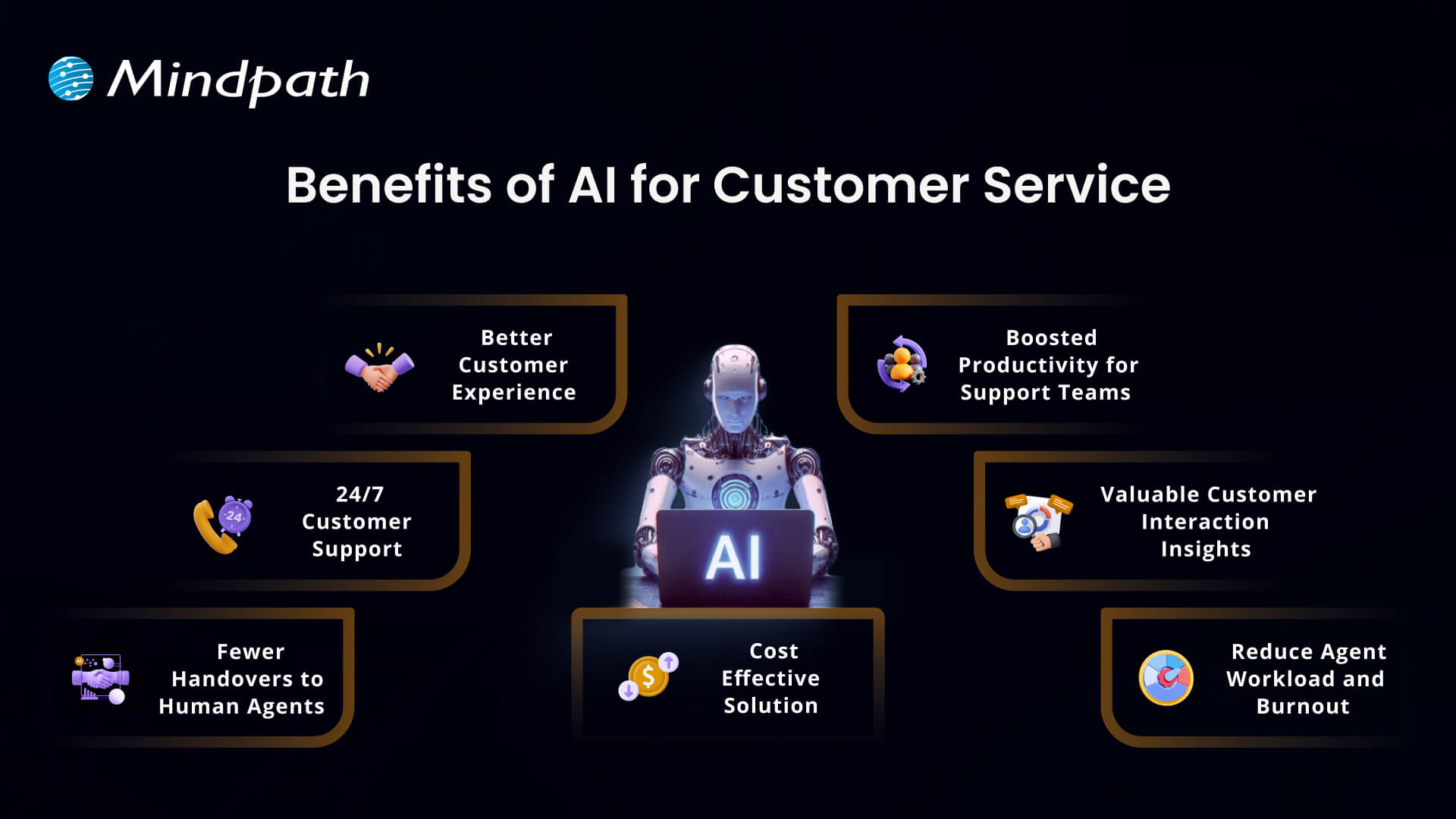
Benefits of AI for Customer Service

There are numerous advantages of AI for customer service that are changing the way customer relations are formed. Companies today use intelligent tools to improve the performance of their service and the way they follow through on solving problems. Let’s look closely at what makes this initiative worthwhile.

Benefits of AI for Customer Service

1. Better Customer Experience

AI can help create a better experience in customer service by making every interaction easier and more efficient for the customer. People are more comfortable engaging in conversations with chatbots and virtual assistants to get instant answers to their questions than they ever were before. AI tools such as agent assist and sentiment analysis can break down what customers want and prioritize how to respond, which allows support teams to drive a faster and more personal experience to satisfy customers.

2. 24/7 Customer Support

One of the main benefits of AI is that it offers businesses the opportunity to provide customer support 24/7 and every day of the year. With customer service AI tools such as virtual agents and voice bots, customers can get help immediately, even outside normal business hours. This has the impact of conveniences customers and keeping them happy. It also demonstrates how the benefits of AI chatbots improve customer service, making it quicker, easier, and always available.

3. Fewer Handovers to Human Agents

With smarter chatbots today, AI tools for customer service are becoming more human-like in their conversations and helping customers with simple questions. As a result, customers receive a quick answer, without having to wait for a human agent. Support teams now spend more time aiding customers with complex issues which require a more human touch. This solution was designed to balance the workload and ultimately improve the overall support experience.

4. Cost Effective Solution

Using AI customer services helps companies spend less on handling customer questions and problems. Chatbots and voice bots can answer many requests on their own, which means fewer calls and messages for human agents. These AI tools work all day and night without extra pay or breaks. This saves money on hiring, training, and keeping large support teams.

5. Boosted Productivity for Support Teams

AI makes customer service agents more productive by handling simple tasks automatically. It can sort and route requests and even suggest answers, so agents work faster and more accurately. This means they have more time to focus on complex problems that need a human touch. So, AI helps support teams get more done and provide better service.

6. Valuable Customer Interaction Insights

Using AI to track how customers feel during calls gives businesses a clearer picture of every interaction. It helps measure customer satisfaction and see where service can improve. Managers can also spot training needs for their team based on these insights. Looking at past data, AI can even help predict what customers might expect in the future.

7. Reduce Agent Workload and Burnout

Working in customer service can be stressful and lead to burnout when agents handle too many repetitive tasks. AI helps by taking care of simple questions and routine work, so agents have more time for important tasks. This reduces daily pressure and keeps the workload more balanced. Over time, it can help teams feel more supported and less burned out.

Want to know if your business is ready to implement AI in the right way? Explore our blog – AI Readiness Checklist.

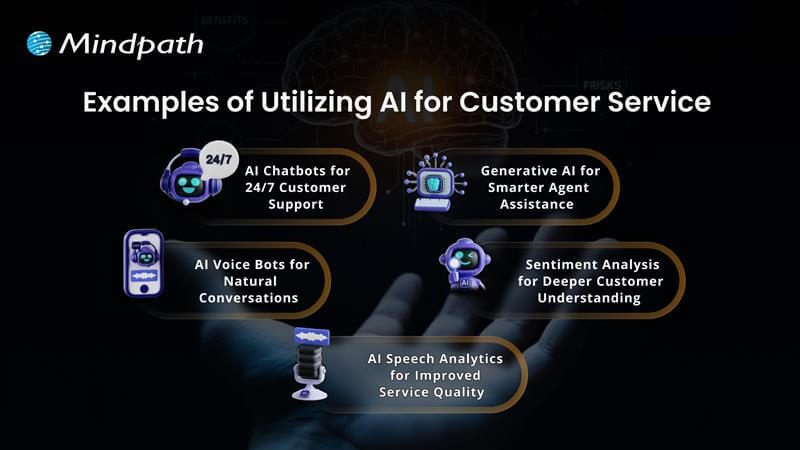
Examples of Utilizing AI for Customer Service

Companies across industries are finding new ways to use AI to improve how they help their customers. This smart technology is making customer service more effective and reliable than ever. Let’s explore some real-world examples of how this is happening.

Examples of Utilizing AI for Customer Service 

1. AI Chatbots for 24/7 Customer Support

Conversational AI chatbots help businesses assist customers in getting answers any time, day or night. They can handle common questions, check orders, and even help with returns. This keeps support teams free for more complex problems.

2. AI Voice Bots for Natural Conversations

AI voice bots answer calls and talk to customers naturally, just like a human agent. They can share product details, update accounts, or book appointments. This reduces routine calls for human teams and keeps service smooth.

3. AI Speech Analytics for Improved Service Quality

AI speech analytics tools listen to customer calls to find useful patterns. They help managers see what customers care about and how agents are doing. This helps improve service and spot issues early.

4. Sentiment Analysis for Deeper Customer Understanding

Sentiment analysis uses AI to understand how a customer feels during a call. It looks at tone and pitch to score conversations as positive, neutral, or negative. This helps companies see where they can do better and train their teams.

5. Generative AI for Smarter Agent Assistance

Generative AI helps support agents work faster by giving them ready-made answers. It pulls information from your knowledge base and CRM, so agents don’t waste time searching. This means customers get quicker, more accurate help.

Ready to adopt the recent trends of Gen AI into your business? Read our detailed blog on Gen AI trends, which provides a deeper understanding of how to implement Gen AI into your business for future growth.

Ready to Unlock the Full Potential of AI for Customer Service?

Using AI for customer service is one of the smartest ways to keep your customers happy and your support teams working smoothly. From 24/7 chatbots to tools that understand customer feelings, AI makes service faster and more personal. By adding these smart solutions now, businesses can handle more requests, save time, and build stronger customer trust for the future.

At Mindpath, we provide custom AI development services that help companies improve customer service and stay ahead of the curve. Our team can build AI chatbots, voice bots, analytics, and more, all tailored to your business goals. We focus on making your service more efficient and personal. Connect with our experts to see how our AI development services can transform your customer experience.