




Unlocking Business Potential: Integrating ReactJS with Cutting-Edge Technologies

Join our Newsletter!

Featured Posts

Support Is One Click Away

Home

Unlocking Business Potential: Integrating ReactJS with Cutting-Edge Technologies

ReactJS

Unlocking Business Potential: Integrating ReactJS with Cutting-Edge Technologies

Are you ready to unlock the full potential of your business? Imagine combining the power of ReactJS with other cutting-edge technologies to boost your growth and enhance your digital presence. In this blog, we will explore how integrating ReactJS with other tools can transform your business operations, improve user experiences, and drive long-term success.  

In today’s fast-paced digital environment, businesses must use the correct technologies to remain competitive and provide the greatest customer service. Integrating ReactJS into your applications is an essential step towards doing this. Businesses can utilize ReactJS when combined with other technologies to develop quicker, more responsive websites and apps that are easier to maintain and grow. This connection improves performance, enriches user experiences, and enables organizations to remain adaptable in an ever-changing market. 

Curious to see how this synergy can work for you? Let’s dive in and discover the possibilities! 

Integrating ReactJS with Other Technologies
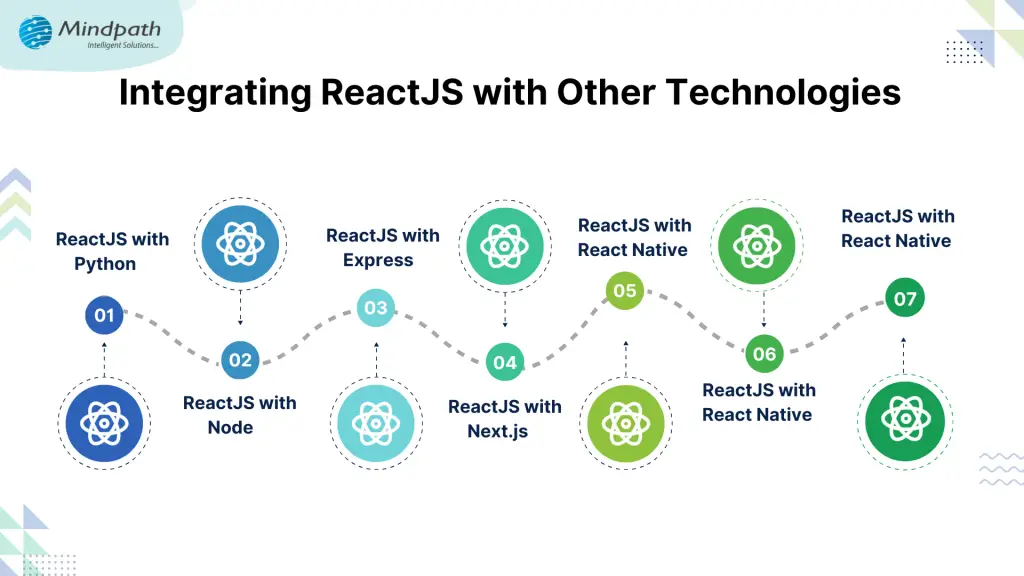
1. ReactJS with Python

Combining ReactJS and Python provides a robust platform for developing full-stack apps. ReactJS is well-known for its dynamic and interactive user interfaces, but Python excels at sophisticated server-side activities and data processes. Businesses that use Python for backend operations can power ReactJS apps more effectively, particularly when dealing with massive quantities of data or real-time processing. 

One of the primary benefits of combining ReactJS with Python is the speed with which data can be handled. Python is perfect for applications that must manage complicated data, such as single-page apps that require speedy and precise data retrieval. Many well-known firms have profited from this combo. Spotify, for example, employs ReactJS for its front end and Python for data processing on the back end. Similarly, Instagram uses ReactJS and Python to manage millions of user interactions while ensuring seamless performance.  

2. ReactJS with Node

By combining ReactJS and Node.js, developers can construct full-stack JavaScript apps that use the same language on both the client and server sides. This integration simplifies and speeds up the development process by requiring developers to focus on only one language throughout the stack. One of the primary advantages of mixing ReactJS and Node.js is the ability to create real-time apps. Node.js is recognized for its event-driven architecture, which makes it ideal for real-time data handling. When combined with ReactJS’ interactive, dynamic user interfaces, it provides users with a smooth and responsive experience. 

Major organizations such as LinkedIn and Uber use this mix for their platforms. LinkedIn employs ReactJS and Node.js to provide a quick, real-time user experience, whereas Uber depends on ReactJS for the front end and Node.js to manage real-time location updates and ride requests, providing smooth communication and a unified experience for users. 

3. ReactJS with Express

Combining ReactJS with Express provides a solid basis for building full-stack JavaScript apps, easing both front-end and back-end development. This combination increases the development workflow and overall efficiency by managing dynamic user interfaces on the client side with ReactJS and server side with Express. 

One distinguishing aspect of ReactJS and Express is their ability to efficiently manage asynchronous tasks. Both technologies are excellent at managing asynchronous data queries, making them suitable for creating dynamic, data-driven single-page applications (SPAs). This leads to a quicker, smoother user experience with continuous updates and interactions, eliminating the need for frequent page reloads. 

When combined, ReactJS and Express offer a powerful solution for building fast, scalable, and efficient web applications, where both the front-end and back-end work in perfect harmony to deliver an optimal user experience. 

4. ReactJS with Next.js

Combining ReactJS and Next.js provides significant advantages for developing modern online apps that are quick, scalable, and SEO friendly. Next.js allows React developers to construct server-rendered apps that not only reduce load speeds but also improve search engine optimization (SEO), guaranteeing that your website ranks higher and performs better. 

One of the primary benefits of combining Next.js and ReactJS is Server-Side Rendering (SSR). SSR enables React apps to be pre-rendered on the server before being delivered to clients, resulting in quicker load times and improved SEO performance. Next.js now supports Static Site Generation (SSG), which allows you to create static pages ahead of time. This strategy is appropriate for dynamic websites that need to be fast and optimized while still giving an outstanding user experience.  

5. ReactJS with React Native

Integrating ReactJS with React Native provides significant benefits for creating online and mobile applications in a single environment. This combination enables developers to construct cross-platform mobile apps with near-native performance while using the same codebase as for web app development. 

One significant advantage of utilizing ReactJS with React Native is the ability to reuse code between web and mobile platforms. This not only speeds up the development process but also assures consistency, saving time and effort in creating distinct apps for different platforms. React Native also offers a near-native mobile experience, with smooth and responsive performance on iOS and Android devices. 

6. ReactJS with Redux

Combining ReactJS and Redux provides an effective approach for handling complicated states in large-scale applications. Redux is an effective approach to manage the state of your project, making it easy to trace changes and assure consistency throughout the application. 

One of the primary advantages of integrating Redux with ReactJS is centralized state control. Redux lets you maintain the application’s state in one location, ensuring that updates are consistent throughout the program. This is especially useful for big web applications where handling states across numerous components can be onerous. Redux facilitates the predictable flow of data, making it easier to manage even the most complicated ReactJS applications. Another advantage is the ease of testing and debugging. Since Redux acts as a single source of truth for the application state, it becomes much easier to trace errors and identify problems, streamlining the debugging process and improving the reliability of your app.  

7. ReactJS with Java

Combining ReactJS and Java is a potent combination for developing enterprise-grade online apps, where the power of Java on the backend meets the flexibility of ReactJS on the frontend. This connectivity enables developers to build dynamic, scalable systems capable of handling complicated needs. 

One of the primary advantages of combining ReactJS with Java is having to have a robust backend powered by Java while utilizing ReactJS for a flexible and dynamic frontend. Java’s strong nature guarantees that the program scales effectively, while ReactJS allows for building responsive, user-friendly interfaces with seamless interactions. 

Furthermore, integrating ReactJS and Java provides cross-platform compatibility, allowing online apps to execute effortlessly across several platforms. This allows firms to reach a larger audience while maintaining fast performance and consistent functionality across devices. 

Also Read: 5 Key Benefits of React JS Development Services in 2024

Integrate ReactJS with Technologies at Mindpath

At Mindpath, we specialize in integrating ReactJS with various technologies to build powerful, scalable, and efficient web applications. By combining ReactJS with other tools and frameworks, we can deliver smooth, interactive user interfaces alongside strong, reliable backends.  Whether it’s ReactJS paired with Node.js for faster development, Express for efficient state management, or Python for handling complex data operations, we ensure that your application performs seamlessly across all platforms. Our expertise in integrating ReactJS with technologies like Redux, Next.js, and more allows us to create real-time, SEO-friendly, and mobile-optimized applications. 

Wrapping Note!

Integrating ReactJS with other advanced technologies is a game-changer for businesses aiming to enhance their digital presence, streamline operations, and deliver superior user experiences. By combining ReactJS with tools like Python, Node.js, Express, and Redux, businesses can create dynamic, fast, and scalable web applications that meet the demands of today’s competitive market. Whether you’re building complex data-driven platforms or developing mobile apps with seamless user experiences, ReactJS offers the flexibility and power to take your projects to the next level. At Mindpath, we are committed to harnessing the potential of ReactJS and other cutting-edge technologies to help your business thrive. Let us help you unlock new possibilities and achieve long-term success by integrating the best tools for your digital transformation journey. 

Ready to take your business to the next level?

Partner with Mindpath for seamless ReactJS integrations and cutting-edge technology solutions.

Related Post

Discover top tech trends transforming the travel industry, from AI to IoT, and learn how Mindpath can help your business stay ahead.
Discover how to hire a freelance software developer with our easy guide. Learn steps to define needs, evaluate talent, and set clear terms for success.

Related Post

Web accessibility guidelines

Your website acts as the gateway to your business’s digital world. It is the first impression that visitors get. However, for millions of users around the globe, those with motor, visual, cognitive, and hearing impairments, that door can remain locked if your website is not completely accessible. This is where web accessibility guidelines become pivotal. 

For WordPress website owners, implementing the web accessibility standards not only enhances usability but also increases SEO, brand reputation, and user engagement. In this detailed blog, you will learn more about web page accessibility and explore important accessibility principles and effective strategies. Besides, we have also mentioned some useful tools that can help you ensure your site meets the necessary standards. 

Looking to make your website accessible for your visitors and users? Mindpath’s WordPress development services help you create a user-friendly website that will meet accessibility standards and deliver seamless results.

Web Accessibility and Its Importance

In simple words, it means designing and creating websites that can be easily used and navigated by every user, including users with disabilities. Web accessibility ensures equal access to functionality as well as information to all, aligning with various legal mandates and standards, such as: 

1. The Americans with Disabilities Act or ADA

2. Section 508 of the Rehabilitation Act of 1973 (USA)

3. The Rights of Persons with Disabilities or RPWD Act (India)

4. The European Accessibility Act 2019

5. Equality Act 2001 (the United Kingdom)

6. Web Content Accessibility Guidelines 2.1 and 3.0

Accessible sites don’t just benefit individuals with disabilities or temporary impairment. Such websites tend to rank higher in SERPs due to their enhanced usability and semantic structure. 

Web Accessibility Standards- POUR Principles

Apart from the specific requirements, businesses should familiarize themselves with the key principles of web accessibility guidelines. These are known by the acronym- POUR. 

1. Perceivable

The interface and content of websites should be presented in such a way that every user can perceive or interpret, regardless of their disabilities. 

2. Operable

Visitors should be able to interact and navigate with websites utilizing different input methods, including assistive devices and keyboards. 

3. Understandable

Content as well as functionality of a website should be consistent, clear, and comprehensible for users with different cognitive levels. 

4. Robust

Websites should be compatible with various modern assistive technologies. This helps ensure long-term reliability and accessibility. 

Is your WordPress site truly secure from cyber threats and vulnerabilities? Find out how safeguarding WordPress vulnerabilities can help you protect your website and maintain your customers’ trust.

Accessibility in WordPress: Why it Matters?

WordPress powers a major portion of the web, making it an important platform for accessibility. Whether you have an e-commerce platform, a blog site, or a business website, you should carry out a web accessibility test and ensure it meets all the standards. WordPress accessibility is crucial for many reasons, like: 

1. Aider Audience Reach

By creating a website with an inclusive design, you can make it accessible for individuals with disabilities. Besides, it shows your business supports disabled people and understands their needs. 

2. Legal Protection

Following the required accessibility standards, you can avoid penalties and lawsuits. 

3. Better SEO

All search engines favor accessible WordPress websites with proper alt text, semantic structure, etc. 

4. Establishing Reputation

Digital accessibility has become an ethical issue. If you are not following the web accessibility guidelines, it can affect the reputation of your business.

5. Better UX

With the help of various accessibility features, you can boost usability for every user, including those with physical limitations and mobile visitors. 

Want to ensure your WordPress site is running on the right PHP version for top performance and security? Check out our guide on WordPress PHP compatibility to keep your site efficient, stable, and future-ready.

Some Common Web Accessibility Barriers

Before diving into the solutions to meet accessibility web standards, it is important to understand some common accessibility barriers that can significantly affect user experience while limiting your website’s inclusivity. 

1. Use of incorrect and missing Alt Text of images

2. Non-descriptive link text like “read more” or “click here.”

3. Poor color contrast between the background and the text

4. Use of inaccessible forms, lacking keyboard support

5. Keyboard navigation problems

6. Lack of transcripts or captions for multimedia

7. Wrong heading structure

8. Auto-play content with missing controls

Recognizing these issues is the first step toward crafting a more accessible and inclusive WordPress website that can serve every user ethically as well as effectively. 

Are you struggling to decide which platform will best support your business goals? Compare Magento vs WordPress to discover which option offers the features and flexibility your website needs.

Strategies to Boost Your WordPress Website Accessibility

Now that we have understood the importance of web accessibility and common barriers to it, it’s time to move to the practical solutions. Increasing your WordPress site’s accessibility doesn’t require a complete transformation. It can be achieved through the right web accessibility tool, thoughtful adjustment, and an inclusive design. Here are actionable ways to make your website more accessible and compliant. 

1. Opt For an Accessibility-Ready WordPress Theme

When working on web accessibility, always begin with a solid foundation, i.e., themes. You should always choose an accessibility-ready theme. Such themes follow the web page accessibility guidelines, such as keyboard navigation, semantic HTML, and more. 

Some popular accessible WordPress themes you can try are: 

  • Monument Valley
  • Gutenix
  • Neve
  • Icelander
  • OceanWP 
  • Astra

While choosing a theme, always check for WCAG compliance and evaluate the performance with a screen reader. 

2. Proper Heading Structure and Semantic HTML

Semantic HTML allows assistive technologies to properly interpret your website content. Ensure that all the headers are used in a logical order, like H1, H2, H3, so that users can easily understand the page structure. Here are some best practices to keep in mind: 

  • Only use one heading per page, generally the title.
  • Use proper headings for main sections and subsections
  • Don’t skip heading levels 

You can use a web accessibility tool like Axe to check heading structure and make changes accordingly. 

3. Install Right Accessible Plugins

Plugins are great ways to add new functionality and features to your website. However, if not selected carefully, you may end up with various accessibility problems. Always use plugins designed to make your site more accessible. Some recommended plugins are:

  • Equalize Digital: Offers a plugin to test websites for WCAG compliance.
  • WP Accessibility: Helps identify common web accessibility problems. 
  • One Click Accessibility: Allows an easy way to add various accessibility features.
  • Accessible Poetry: Helps enhance accessibility by integrating features such as focus styles and skip links

These plugins can complement your selected accessibility-ready theme and keep your site compliant.

4. Ensure Sufficient Color Contrast

While creating an accessible WordPress website, ensure that the color contrast between background and text meet necessary WCAG guidelines. It should be at least 4.5:1 for normal text. 

High contrast enhances readability for individuals with visual impairment. There are many WordPress accessibility-ready themes that offer easy ways to customize colors to meet web accessibility guidelines.

Apart from this, you should also use a readable font size and line height. Recommended font size is at least 16 pixels. The line height and word spacing should be 1.5x and 0.16x of the font size, respectively.  

Must Read: Custom WordPress Development

5. Tab Indexing

Users with motor skill challenges generally depend on keyboard navigation, especially the Tab key, to navigate through your website. Unlike trackpad or mouse users, they rely on a predictable, logical tab order to access buttons, menus, and other interactive elements. So, ensure that you have enabled tab indexing for your site. 

Furthermore, make sure that all interactive elements follow the correct flow, i.e., left to right and top to bottom. A well-designed tab index can create a more inclusive and smoother browsing experience. 

6. Offer a Consistent and Clear Navigation

Even though you have deployed tab indexing for smooth navigation, there are other important things you should consider.

  • Breadcrumbs: Use breadcrumbs to show users their current location within your website, reducing confusion. 
  • Descriptive links: Prefer to use descriptive link text that clearly shows action or destination. Skip using phrases like “read more” or “click here”. 
  • Consistent navigation menu: Make sure that your site’s menu is consistent across all pages. 

Clear and consistent navigation is vital for user experience as well as accessibility. 

7. Optimize Media and Images

Media and images are crucial elements of a website. To ensure their accessibility, consider these web accessibility examples:

  • Captions and Transcripts: Use captions for videos and transcripts for audio content. This will help users with hearing impairments and who prefer to read instead of listening. 
  • Alt Text: For images, you should use descriptive alt text. This will help a screen reader to describe images to users. 
  • Descriptive File Name: Using descriptive file names for media files and images can help you boost SEO and web accessibility. 

With accessible images and media, it will be easier to make your site compatible with assistive technologies. 

8. Leverage Access Keys

Access keys work like keyboard shortcuts, enabling users to jump to a specific section of the website using assigned keys. For example, by pressing a key like “1”, they can go to the homepage, and by pressing “2”, they can access your contact page. 

9. Avoid Auto-Animations and Flashing Content

Blinking and flashing content can cause seizures in individuals with photosensitive epilepsy. Besides, auto-animations can also cause distraction among users. Best practices to follow here are: 

  • Don’t flash content more than three times per second
  • Allow users to pause animations
  • Utilize motion purposefully

By following the above-mentioned tips, you can ensure that your website welcomes all users while offering a user-friendly web experience. 

Ready to upgrade your HTML site to something more powerful and manageable? Explore why converting HTML to WordPress can streamline updates and improve your online presence.

Tools to Ensure Your Site’s Accessibility

Once you are done with implementing accessibility features following the web accessibility guidelines, you should carry out a comprehensive test to ensure your site is working as intended. Here are some useful tools to test your site.

1. WAVE

Web Accessibility Evaluation Tool, designed by WebAI, helps content creators and developers to make sure their websites are accessible for all. It offers visual feedback on the web content’s accessibility, making it easier to detect and resolve accessibility problems. It’s free to use. 

2. EqualWeb

This tool is designed to offer manual and automated accessibility solutions. Using this, businesses can stay compliant with ADA standards and WCAG 2.1. With AI-powered features, EqualWeb offers an easy way to identify and fix accessibility issues.  

3. Axe

This powerful web accessibility test tool can be integrated into any browser and development environments for a detailed web accessibility analysis. 

4. Level Access

This web accessibility checker provides developers with an API and a web interface, making it a highly flexible tool for testing accessibility throughout the web development lifecycle. 

5. NVDA

NonVisual Desktop Access is an open-source, free-to-use screen reader for Windows. Using this, visually impaired individuals can easily interact with your digital content. Developers can use it to evaluate web applications and websites’ accessibility. 

Wondering how to hire the right WordPress developer to help your business grow online? Explore our detailed guide on Hiring a WordPress Developer to discover expert insights that guide you toward making the best hiring decision.

Create an Inclusive Website that Welcomes Everyone

Web accessibility goes beyond just legal compliance. It focuses on fostering empathy, digital equity, and inclusion. By following web accessibility guidelines and leveraging the robust ecosystem of WordPress, you can create a website that is intuitive, usable, and can help all users. 

Making your site accessible is a journey of continuous improvement, and Mindpath can be an ideal partner in this journey. With our web accessibility services designed for this changing digital space, you can witness the desired results. Our expert guidance and tailored solutions, created based on web accessibility guidelines, will help you meet all compliance requirements and create a website that embodies innovation, openness, and user engagement. 

Enhance your WordPress site’s inclusivity with our expert tips and services. Discover how to improve accessibility and explore our comprehensive WordPress solutions.
Cybersecurity
In a world where working from home has become the norm, have you ever wondered how safe your digital workspace is? With employees connecting from various locations, the threat of cyberattacks has grown significantly. Hackers are constantly on the lookout for vulnerabilities, and remote workers often unknowingly become easy targets. What steps can you take to protect sensitive data while working remotely? How can businesses ensure their teams stay secure online?  Cybersecurity is all about protecting your data, devices, and online activities against dangers such as hackers, malware, and scams. It is essential because, without effective safeguards, sensitive information might slip into the wrong hands. This could include personal information, financial records, or even crucial corporate data, resulting in severe losses and harm to confidence. In the era of remote work, this is even more important. When people work from home or other locations, they frequently utilize personal devices and home internet connections, which might not be as secure as the office setting. Hackers are aware of this and use poor security systems to steal data, implant malware, or disrupt operations. A single breach can reveal personal information, impair a company’s reputation, or cause financial problems. With remote teams depending on capabilities such as video conferencing, cloud storage, and online collaboration platforms, the risk of cyberattacks has grown. Strong cybersecurity measures are required to provide a secure digital environment for employees and organizations. It promotes seamless operations, increases trust among clients, and safeguards vital information.  Let’s dive into the world of cybersecurity for remote work and uncover the solutions to the pressing challenges! 

Best Practices of Cybersecurity in the Era of Remote Work

1. Use Safe Communication Tools

Keeping communication secure is one of the most essential cybersecurity measures for remote workers. Begin by utilizing technologies to safeguard your messages and data, such as emails with encryption that scrambles information so that only the intended recipient can view it. A Virtual Private Network (VPN) is also useful since it masks your internet connection, making it more difficult for hackers to monitor your online activity. Adding two-step logins, also known as two-factor authentication, adds an extra degree of security by requiring a password and a unique code to access your accounts. You should also be cautious about whatever applications or platforms you utilize at work. Choose ones that are reputable and provide robust security measures. Avoid exchanging sensitive information on unprotected networks or apps that do not have encryptionBy using safe ways to communicate, you can protect important information and make sure it stays in the right hands.  

2. Check Security Often

To keep your remote work secure, be sure to verify all devices and software on a frequent basis. This includes the PCs, cellphones, and tablets that your staff utilizes at work. Regular inspections can help you identify any vulnerabilities or security breaches that hackers can exploit to get access. Update all software, applications, and operating systems with the most recent security updates, often known as patches. These upgrades assist in avoiding assaults by protecting against new threats. It’s also a good idea to ensure that all devices have up-to-date security software, such as antivirus and firewalls. Regular audits can help to identify problems early on and ensure that all systems are functioning properly. This easy action helps secure both corporate and personal data from being exposed or stolenBy checking everything often, you’re staying ahead of any potential security risks.  

3. Teach Employees About Safety

Training your staff on how to be safe online is an essential step towards safeguarding your remote work environment. Teach them how to identify and prevent phishing scams, which attempt to fool people into giving personal information. Show them how to safeguard their own devices, such as using strong passwords and enabling two-factor authentication for more safety. It’s also crucial to educate staff to use strong, unique passwords and change them on a frequent basis. The more everyone understands online hazards and how to avoid them, the safer your business and data will be. Security training enables employees to make better online decisions and prevent mistakes that could lead to security concerns. 

4. Control Who Can Access Data

Enforcing access controls entails restricting who can view or use certain information depending on their job duties. For example, not everyone in the firm needs access to sensitive data, thus it is essential to ensure that only authorized personnel can view or handle it. By implementing these safeguards, you can reduce the likelihood of unauthorized access or data breaches. This is particularly essential while working remotely. Employees work from many places, thus ensuring that only those who genuinely need access to certain data have access to it provides an added degree of security. This helps to avoid data breaches and protects your organization from cyber-attacks. So, as remote work becomes more common, it’s crucial for organizations to have clear access rules and strong cybersecurity policies to protect sensitive information from potential risks. 

5. Create Strong Security Rules

A well-thought-out cybersecurity policy is crucial for guaranteeing safe remote work. This policy should explicitly outline the procedures workers must take to secure corporate information, whether they are working from home or another location. It should address issues such as strong passwords, safe online behaviors, and how to handle sensitive data. Furthermore, the policy should provide instructions for using corporate equipment and software properly, such as the need for frequent software upgrades, secure communication tools, and encrypted connections. Employees should also be instructed on how to handle possible security issues, such as phishing emails or strange URLs. Having a complete policy in place reduces confusion, assures consistency across teams, and gives a clear reaction strategy in the event of a security incident. By establishing these rules, organizations can reduce the risk of cyberattacks and ensure that workers understand their responsibility in keeping a safe and secure workplace. 

How Can Mindpath Help?

At Mindpath, we understand how essential it is to keep your organization secure, especially in the age of remote work. We can help by delivering experienced cybersecurity solutions that are suited to your specific requirements. Our experts can help you set up secure communication platforms, install access restrictions, and develop robust cybersecurity policies to protect your data. We also provide quarterly audits to verify that all systems are up to date and secure against attacks. Our experts can teach your workers about best practices for internet security, such as recognizing phishing schemes and protecting their personal devices. With Mindpath’s assistance, you can focus on expanding your business while we manage the security, ensuring that your remote work environment is safe and secure. 

Wrapping Note!

As remote work continues to grow, keeping your digital workspace secure has never been more important. By following simple yet effective cybersecurity practices like using secure communication tools, checking security often, training employees, controlling access to sensitive data, and creating strong security rules, you can protect your business from online threats. At Mindpath, we’re here to help you safeguard your organization by providing expert cybersecurity solutions that fit your needs. With our support, you can ensure your remote work environment is safe, so you can focus on what really matters—growing your business. 

Ready to secure your remote work environment?

Partner with Mindpath today for expert cybersecurity solutions tailored to your business needs and stay protected!

Learn essential cybersecurity practices for remote work and how Mindpath can help protect your business with expert solutions.
full stack development trends

The full-stack development landscape is changing rapidly, and 2026 is already showing great possibilities for new ideas and better tools. Getting familiar with the newest full-stack development trends can help developers, startups, and businesses create smarter solutions. User needs are increasing, along with the requirement for flexible and efficient development solutions, which means teams are taking a fresh look at how they build, test, and scale applications. Knowing how to navigate these changes can have a significant impact next time whenever you develop a new item or launch a new product.

With speed, scalability, and seamless user experience as the new focus, developers are integrating advanced front-end technologies with back-end solutions to develop modern digital products. With cloud platforms available everywhere and low-code solutions evolving more rapidly, full-stack development is moving to a whole new level.  These solutions are transforming processes that not only save time but also improve quality and naturally foster greater teamwork. In this blog, we will provide further insight into the most important trends shaping full-stack development in 2026.

Want to stay ahead in this competitive market requires the right expertise. Mindpath’s Full Stack Development Services offer comprehensive solutions tailored to modern business needs.

Understanding Full-Stack Development

Full-stack development refers to building both the front-end and back-end of a software application. Let’s dive in to understand! Every application has two main sections. The front-end is what users see and interact with, like buttons, images, and forms. The backend encompasses all the activities that take place in the background – saving data, running logic, interacting with other systems, etc.

Each side requires different skill sets and tool sets. Full-stack development combines both sides into one process. Full-stack development enables developers to create complete applications and allows us to develop the application seamlessly from the user interface through the server and database. This means that the application includes both of those components as one shared system, which makes development more efficient and organized.

Ready to level up your development strategy? Explore this blog highlighting the major benefits of full-stack development in building robust and efficient applications.

Some advantages of full-stack development include:

1. A full-stack developer saves money by doing both front-end and back-end work, minimizing the need for multiple specialists.

2. They speed up the development process by working across the entire tech stack, ensuring faster delivery and smooth collaboration.

3. With strong knowledge of current tools and trends, they support modern full-stack development by integrating advanced features like AI and responsive design.

4. Full-stack developers take full ownership of the codebase, simplifying responsibility and streamlining debugging.

5. They deliver well-rounded, quality solutions by working across the UI, backend logic and business processes, database activities and data expansion, and testing.

6. They even provide ongoing support and maintenance, which ensures long-term stability, security, and enhancement.

Thinking about improving your web application strategy? Explore full stack-development for web projects and learn how integrated development drives efficiency.

Top Full-Stack Development Trends 2026

As technology continues to grow, developers are embracing smarter tools and faster methods to build complete applications. The emerging trends in full-stack development are shaping how teams work, improve performance, and deliver better user experiences in 2026. Here are the top trends to watch:

Full-Stack Development Trends 2025

1. Artificial Intelligence

Artificial Intelligence is one of the key full-stack development trends shaping how modern applications are built. It helps solve complex problems faster and allows systems to work without human interruption. Full-stack developers are well-suited for AI roles because they understand both design and logic, making it easier to build intelligent solutions. As the future of full-stack development evolves, AI will play a major role in improving performance and user experience.

2. Cloud Computing

Cloud computing is a fast-growing technology that allows access to data storage, processing power, and other resources over the internet. It supports the future tech stack for developers by offering flexibility, easy scaling, and pay-as-you-go pricing. Full-stack cloud developers are in demand to build and manage cloud-based applications that support collaboration and performance. To grow in this area, developers should understand IaaS, PaaS, SaaS and gain hands-on experience with platforms like AWS, Azure, and Google Cloud.

Also Read: Cloud Computing Trends

3. DevOps

DevOps is a practice that combines development and operations to improve how software is built, tested, and deployed. It helps teams work better together and use tools like continuous integration and delivery to release updates faster. DevOps plays an important role in improving application speed, quality, and reliability. As part of full-stack development trends, it supports the demand for efficient workflows and strong collaboration in building modern applications.

4. Progressive Web Apps

Progressive Web Apps (PWAs) are web applications that offer an app-like experience using modern browser features. They work offline, load quickly, send push notifications, and can be installed on devices without using much storage. As part of web development trends 2026, PWAs help businesses reach more users, especially on mobile, while keeping development simple and cost-effective. Their flexibility and performance make them a smart choice for companies looking to improve user experience.

5. Blockchain

Blockchain is a secure and transparent technology that stores data across a network of computers, making it difficult to change or hack. It is widely used in industries like finance and healthcare to protect transactions and manage decentralized systems. As part of full-stack development trends and the latest trends in web development, blockchain allows developers to build safer and more reliable applications. To work in this area, full-stack developers need skills in decentralized tools, enterprise systems, and Web3 architecture.

Must Read: AI in Cybersecurity

6. Cybersecurity

Cybersecurity is the practice of protecting systems, networks, and applications from online threats like malware, phishing, and DDoS attacks. It has become a key part of full stack development trends as developers need to build secure applications from the ground up. Companies are now including cybersecurity in their future tech stack for developers to keep data and systems safe. Full-stack developers aiming to work in this field should learn network security, web application security, cryptography, and secure coding practices.

7. Low-Code and No-Code Development

Low-code and no-code development platforms allow users to build websites and apps with minimal or no programming skills. These tools are growing as part of full stack development trends because they save time, reduce costs, and make development accessible to more people. While they are great for simple projects, they may not be suitable for complex or large-scale solutions. As part of the trends in software development, LCNC tools offer fast results and full-stack capabilities for quick product launches.

Curious about how development roles differ in modern projects? Explore Front End vs Back End vs Full Stack Developer to see how each contributes to building applications.

Ready to Leverage Full-Stack Development Trends for Your Next Project?

Full-stack development trends are shaping how modern applications are built, improved, and maintained. With advancements like AI, cloud, DevOps, and PWAs, developers and businesses can achieve faster, smarter, and more secure results. Staying updated with these trends will help you build stronger digital products that meet the growing demands of users in 2026 and beyond.

At Mindpath, we offer expert full-stack development services tailored to your business goals. Our skilled developers handle everything from front-end design to back-end logic, delivering complete, scalable solutions. If you’re looking to hire full-stack developers who understand the latest tools and technologies, our team is here to help you build your web and mobile applications with confidence and efficiency.