Hiring a WordPress Developer – An Ultimate Checklist

Join our Newsletter!

Featured Posts

Support Is One Click Away

Home

Hiring a WordPress Developer – An Ultimate Checklist

hiring a wordpress developer

Hiring a WordPress Developer – An Ultimate Checklist

WordPress remains a top choice for website development due to its scalability, ease of use, and flexibility. However, to unlock WordPress’s true potential, it is crucial to hire the right developer- an expert who can understand your goals, the technical nuances of WordPress, and your customers. Yet, hiring a WordPress developer is a major investment.

It is not just about finding a professional who can write code; it is a strategic partnership between your business and an expert who can offer you the required solutions. Besides, it involves more than just checking technical skills. This detailed hiring WordPress developer guide will guide you through the hiring process, helping you make an ultimate hiring a WordPress developer checklist.

Are you looking for expert help to build your WordPress site? At Mindpath, you can hire WordPress developers who are highly skilled and dedicated to building high-performing websites that drive measurable results.

Top Reasons for Hiring a WordPress Developer

Before diving into the WordPress developer checklist to ensure a successful hiring, let’s understand why you should hire expert WordPress developer.
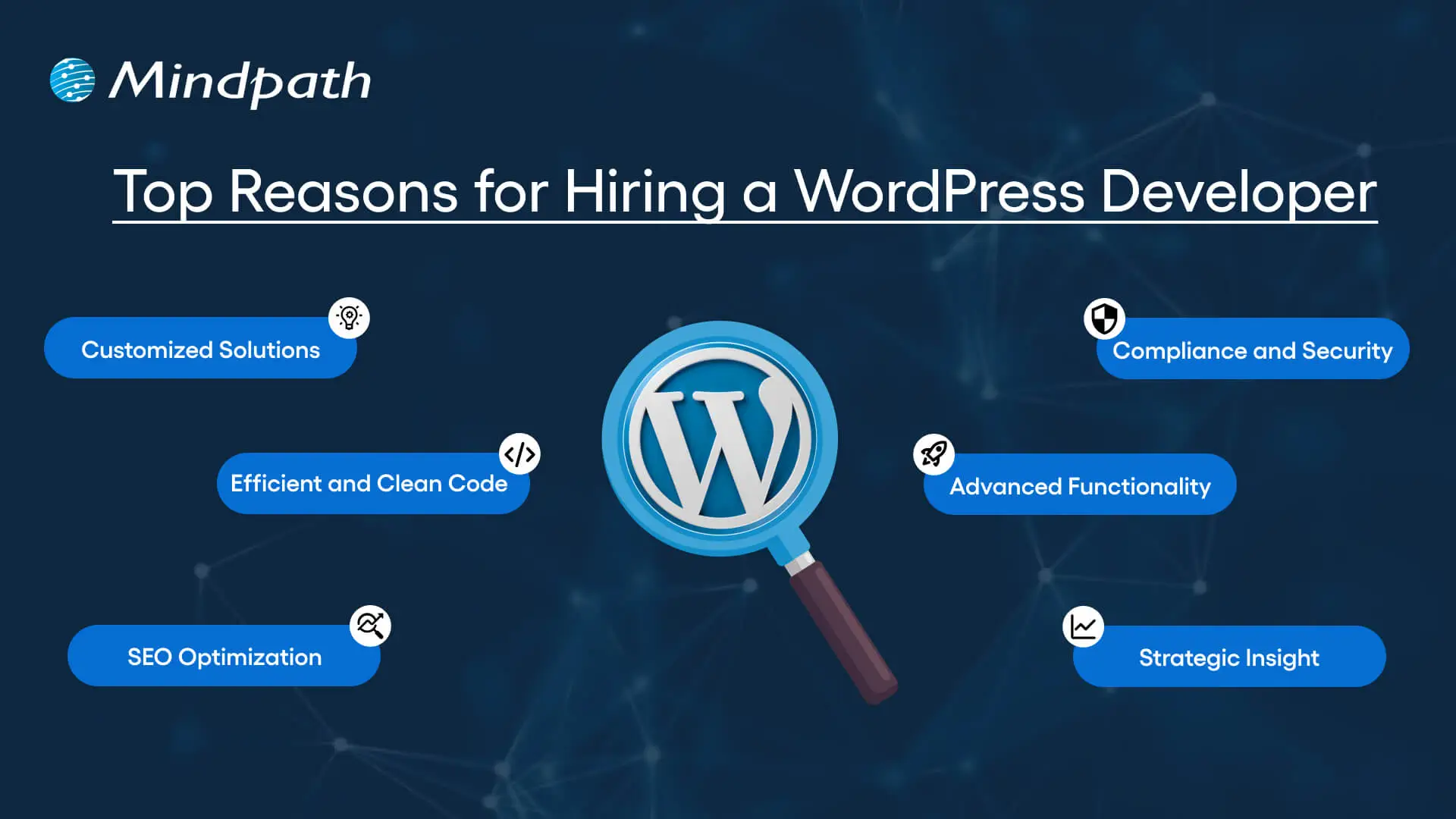
Top Reasons for Hiring a WordPress Developer

1. Customized Solutions

A professional WordPress developer can provide custom WordPress development for the site to match your unique brand identity, functional requirements, and user experience goals. Pre-built themes or plugins won’t offer you such flexibility.

2. Efficient and Clean Code

Skilled developers always prioritize writing scalable, secure, and optimized code. This ensures better SEO scores, fewer compatibility issues, and faster load times.

3. SEO Optimization

Developers know how to develop a website for search engines. For example, they use schema markup, semantic HTML, image optimization tools, and caching techniques that boost visibility and improve rankings.

4. Compliance and Security

From database protection to SSL configuration and plugin installation, professional WordPress developers deploy best security practices to protect your site from data breaches and malware. Besides, they ensure that all the plugins and elements are updated to the latest versions.

5. Advanced Functionality

Do you need a custom API integration or booking system? Well, a skilled WordPress developer knows how to integrate complex features that align with your user needs and business goals. They can also create custom plugins to expand the features of your site.

6. Strategic Insight

Apart from coding, WordPress developers help businesses to get detailed insight into conversion optimization, user behavior, latest trends, and more. All these things will help businesses in making smarter decisions.

Want to make sure your WordPress site is accessible to everyone? Check out our post on improve WordPress web accessibility to learn practical steps for making your site more inclusive and user-friendly.

Types of WordPress Experts- Which One Should You Hire

Understanding the benefits and value a developer can bring is just the beginning. To make the right decision on hiring a WordPress Developer, it is crucial to learn about the different types of WordPress developers you can hire. Remember that each brings a unique focus area and skill set.

1. Front-End WordPress Developers

These experts specialize in interactive and visual aspects of websites. They manage styling, layouts, and user experience and responsiveness using JavaScript, CSS, page builders, and HTML.

2. Back-End WordPress Developers

They focus on database management, server-side functionality, custom theme development, and plugin development. They work with WordPress core functions, MySQL, PHP, and more to create scalable websites.

3. Full-Stack WordPress Developers

Such experts handle back-end and front-end development tasks. They can create a website from scratch while ensuring seamless integration.

While hiring dedicated WordPress developer, you should choose the right type of developer to ensure your project aligns with the design goals, technical needs, and vision.

Curious about which developer’s role best suits your project? Dive into our article on Front-End vs Back-End vs Full-Stack to understand each role and decide which path aligns with your website’s needs.

WordPress Developer Checklist- Skills to Consider

Your hiring WordPress developer checklist should cover the key skills of WordPress developers. HTML, CSS, PHP, MySQL, and JavaScript rank among the key languages for WordPress development. Most developers are familiar with these languages, but knowledge of these technologies is not enough. Here are some skills that matter the most.

Hard Skills or Technical Capabilities

  • Knowledge of using core languages such as jQuery, JS, HTML5, CSS3, PHP, MySQL, React.js, and other languages.
  • Clear understanding of plugin architecture and WordPress core.
  • Building and customizing themes from scratch, and experience with various page builders like Beaver Builder, Gutenberg, Thrive Architect, Elementor, and Themify Builder.
  • Familiarity with REST API.
  • Knowledge of various optimization methods like scheme markup, image compression, caching, Core Web Vitals, minifying CSS, use of CDN, and more.
  • Understating security issues and applying fixes

Soft Skills

  • Ability to explain technical concepts in practical and simple terms.
  • Habit of making clear documentation.
  • Clarity and responsiveness in replies.
  • Ability to collaborate with backend teams and designers.
  • Familiarity with various management tools such as Jira, Trello, and Slack.
  • Willingness to accept feedback and incorporate it quickly.

Some Bonus Skills that Add Value

These skills are not that important for every project, but they can make a developer more valuable. These skills can include:

  • Experience in handling WooCommerce.
  • Knowledge about Headless WordPress configurations.
  • Use of Git or similar tools to manage collaborative workflows and code.
  • Experience in creating responsive and accessible designs to help websites meet the legal requirements of ADA.gov, etc.
  • A better understanding of the business’s goals, like lead generation, conversions, etc.

Want a more flexible and user-friendly website than a static HTML page can offer? Explore our blog on converting HTML to WordPress to see how shifting to WordPress can simplify maintenance and boost performance.

Hiring A WordPress Developer: Best Practices

Hiring a skilled WordPress developer can be a challenging process. That’s why utilizing a structured hiring a WordPress developer checklist is vital. A well-defined hiring checklist can help you save time, and you can hire the best talent for your projects. Here is how to begin your process to hire expert WordPress developer using a proven checklist.

1. Understand your Project Requirements and Goals

Before starting to search for a WordPress developer, it would be better for you to understand your project requirements. Do you want to create a new WordPress site from scratch or optimize an existing site? Are you creating a blog site, business website, or eCommerce platform?

Understanding these things will help narrow down the skills required. For instance, if you want to integrate APIs or advanced features into your site, then hiring a developer with skills in JavaScript or PHP would be a great choice.

Avoiding this step can lead to mismatched expectations. The more precise your needs, the easier your hiring a WordPress developer would be.

2. Selecting the Right Hiring Model

While hiring a WordPress developer, selecting the right engagement model is vital to aligning your development project budget, timeline, and scope. In general, WordPress developers come under three key categories these are:

  • Freelancers: Ideal for short-term and small projects due to their cost-effectiveness and flexibility.
  • Agencies: Offer complete solutions, including website design, development, SEO optimization, and maintenance. Agencies are ideal for large-scale and complex projects.
  • In-House Web Developers: They are best for organizations with ongoing development requirements. Businesses will enjoy faster turnaround and full control. However, this model requires businesses to invest in salaries, management overhead, and benefits.

Consider your budget, long-term objectives, and project size to choose the right model.

3. Developer’s Industry Experience

When using a hiring WordPress developer checklist, an important factor to consider is the developer’s industry-specific experience.

Working with a WordPress developer familiar with your business niche can significantly improve the outcomes while reducing costly trial and error. For instance, for creating an eCommerce website, hiring a developer with WooCommerce expertise will be the best option.

On the other hand, for a blog site, you should prefer to hire an expert with deep SEO and performance optimization knowledge.

This approach will accelerate development and boost functionality. And always ask developers whether they have built websites like yours.

4. Check References and Review Portfolios

Start by examining developers’ portfolios for design consistency, quality, and diversity of development projects that match your business niche. Also, check the custom developer tasks completed by developers to get an idea about their technical skills as well as problem-solving skills.

If possible, assess site performance, usability, and responsiveness to understand the developer’s attention to detail. Also, go through client references to confirm the developer’s support quality, professionalism, and reliability.

5. Conduct Technical Tests and Interviews

Don’t just rely on resumes. Conduct thorough practical tests and interviews. Start by creating targeted interview questions. For instance, you can ask, “How do you solve plugin conflicts”? Or “How do you check a site’s responsiveness?”

Practical tests can include fixing a site speed problem or creating a custom feature or post type. Such tests show developers’ technical skills, efficiency, and creativity. Besides, it helps you to know whether they can work under pressure. This step is pivotal for confident hiring decisions.

Stuck deciding whether WordPress or Drupal is a better match for your business? Our WordPress vs Drupal guide breaks down key differences to help you pick the perfect solution.

Common Mistakes to Avoid

Even with a solid WordPress checklist, mistakes can happen. Here are some common mistakes that you should avoid during the hiring process.

1. Don’t hire an expert based on just low rates. Focusing on the cost factor over quality can lead to poor site performance, missed deadlines, and you may end up with a site that may not meet your business goals.

2. Avoid developers who don’t want to sign confidential agreements. After all, keeping your business data, personal information, and intellectual property safe is important, especially when sharing sensitive details and backend access.

3. Don’t overlook maintenance service and ongoing support offered by the developer. Without this, your site may become vulnerable to bugs and security issues, affecting user experience, speed, and scalability.

4. Don’t ignore red flags such as lack of references, unclear communication, or vague answers.

5. Don’t make your hiring process long and complicated. Excessive interview rounds and lengthy assessments can frustrate candidates, and you may lose top talent.

6. Developers can only create and customize your site. They are not content strategist or designers. So, expecting them to handle everything would be a big mistake, leading to missed opportunities and misaligned results.

Want to ensure your WordPress site is running on the right PHP version for top performance and security? Check out our guide on WordPress PHP compatibility to keep your site efficient, stable, and future-ready.

Hire Smart and Built Better with Mindpath

Hiring a WordPress developer is a major investment that you make in your business. This can greatly influence your business’s digital future. By following this detailed WordPress developer checklist, you can avoid common mistakes and find a WordPress developer who can create a website that will boost your online presence.

If you are searching for a trusted platform to hire an experienced WordPress developer, you may not find a better option than Mindpath. We specialize in providing the industry’s best WordPress developers, who combine creative design skills, deep technical knowledge, and commitment to quality to develop a perfect solution. Your website needs creative vision, thoughtful design, and expert attention that can bring your brand to life. And for this, you can always count on Mindpath.
Related Post

Discover the top 8 emerging technologies set to revolutionize business decision-making in the near future, including Generative AI, Web3, Blockchain, and more.
Discover how IT staff augmentation boosts project scalability with quick access to talent, cost-effective scaling, and expert support.
Discover the ultimate guide to hiring Node.js developers in London. Learn about the skills, benefits, and cost factors involved in finding the right talent for your project.

Related Post

Understanding Causal AI

Ever wondered how some businesses make decisions that seem almost too good to be true? What if there was a way to predict outcomes with greater accuracy and solve problems more effectively? Welcome to the world of Causal AI! In this blog, we’ll explore how Causal AI is not just a buzzword but a powerful tool transforming industries. So, let’s dig in! 

What is Causal AI?

Causal AI is a type of artificial intelligence that focusses on understanding the causes behind events. Unlike other AI systems, that only look at patterns and trends, Causal AI investigates deeper to determine cause-and-effect connections. This implies that Causal AI doesn’t only predict what will happen next based on previous data; it also explains why something happened in the first place. By determining these causes, people can gain greater insights and make more intelligent decisions. In short, Causal AI is about discovering the “why” behind the “what,” making it a valuable tool for analyzing difficult circumstances and enhancing decision-making. 

Why is Causal AI Essential?

Causal AI is significant because it helps us understand the root cause of events rather than simply predicting what will happen next. Most AI systems utilize past information to estimate future results, but they frequently ignore the real reasons for these outcomes, which can lead to errors. For example, if a corporation utilizes AI to anticipate sales but looks at previous sales data, it could overlook why particular goods performed better during specific times of year. Causal AI can determine if greater sales were due to holiday advertising or changes in customer behavior. This greater insight enables the organization to make more accurate projections and better judgments regarding future promotions and inventories. 

Benefits of Causal AI

1. Cost Efficiency

Causal AI is cost-effective as it enables businesses to learn vital information from data without requiring costly and time-consuming experiments. Traditional approaches can include conducting complex and expensive experiments to determine what causes certain outcomes, which can prove both time-consuming and highly resource intensive. Businesses can employ Causal AI to analyze data and determine the causes of events without the need for these complex setups. This method saves both money and time, enabling businesses to get useful insights and make intelligent decisions swiftly.  

2. Risk Assessment

Causal AI enables businesses to identify the true causes of potential problems, making it easier to develop risk reduction methods. Instead of just forecasting that something would go wrong, Causal AI examines the elements that contribute to failures, providing businesses with an improved understanding of what may occur. This allows firms to figure out how many factors may create problems and take preventative measures before they arise. For example, if a corporation is concerned about possible supply chain concerns, Causal AI may help identify the root causes of these risks. With this knowledge, the organization can plan and implement actions to minimize the effects of these issues, allowing them to remain ahead and reduce unforeseen unexpected events. 

3. Durability and Flexibility

Causal AI provides durability and flexibility by focusing on understanding relationships that remain the same even when their surroundings change. This means that AI models established on causal knowledge are durable and adaptive. For organizations, this implies that their AI systems will continue to function well even if external variables change, such as market trends or fresh challenges. Instead of dealing with faulty predictions when things change, Causal AI helps to keep systems functional and accurate. This way, businesses can rely on their AI technologies to work consistently, regardless of how everything changes around them. 

4. Better Decision Making

Causal AI improves decision-making by assisting organizations in understanding how various actions will affect their outcomes. It demonstrates how various adjustments or decisions may affect results, allowing businesses to foresee what may occur and plan appropriately. This implies that firms can prepare for potential future events rather than simply reacting to issues as they arise. For example, if a corporation plans to launch a new product, Causal AI can help them understand how many circumstances can influence the product’s performance. With this knowledge, businesses can make better judgments and manage their plans more efficiently, ensuring they are prepared for many scenarios rather than merely coping with unexpected. 

5. Root Cause Analysis (RCA)

Causal AI excels in identifying the actual causes of issues or failures in business operations. Instead of just knowing that something went wrong, Causal AI investigates further to determine the root reasons of the problems. This thorough insight enables organizations to target particular areas that require improvement. For example, if a production line is constantly suffering delays, Causal AI can figure out if the cause is equipment failure, staffing issues, or something else completely. By identifying the root causes, businesses can implement targeted remedies to avoid future problems. This technique helps avoid continuous problems and reduces downtime and increases operational reliability, resulting in smoother and more efficient company performance. 

6. Clear Explainability

Causal AI models make it easier to figure out how and why decisions are made by highlighting the cause-and-effect relationships within the data. This implies that organizations can understand exactly how different elements contribute to certain outcomes, making the findings more transparent and reliable. For businesses, this level of transparency is essential. It enables people to comprehend how AI systems arrive at conclusions, which is essential for winning stakeholder trust. When the rationale behind AI-driven judgements is transparent, everyone involved may have more confidence in their accuracy and fairness. This transparency promotes confidence and ensures that decisions are made based on trustworthy and clear information. 

Want to stay ahead with cutting-edge technology?

Discover the benefits of Causal AI with Mindpath and drive your business forward.

Implement Causal AI for your Business with Mindpath

Implementing Causal AI for your company with Mindpath may drastically improve the way you utilize data to make decisions.  

Mindpath helps you make smarter decisions using Causal AI by delivering explicit insights into cause-and-effect relationships. Whether you want to improve your products, simplify your operations, or alter your tactics, our expertise guarantees that you receive reliable and useful data. This understanding enables you to address problems more effectively and keep them from being repeated, resulting in smoother and more efficient business operations. 

By choosing Mindpath, you are not only implementing new technology; you are also redefining how you comprehend and act on data, making your company smarter and more efficient.  

Final Thought!

Causal AI represents a significant shift in how organizations comprehend and use data. Causal AI enables organizations to make better decisions, foresee possible hazards, and increase operational efficiency by uncovering the underlying causes of events and outcomes. It provides not just a clearer picture of what transpired, but also a plan for handling future obstacles with greater certainty and accuracy.  

Implementing Causal AI with Mindpath calls for embracing a new way of thinking about data and decision-making. We are here to assist you navigate this new strategy and unleash its full potential to create success and achieve your company objectives. 

Ready to elevate your business with Causal AI?

Partner with Mindpath to unlock powerful insights and make smarter decisions.

Cloud Disaster Recovery

Have you ever wondered what would happen to your business if a disaster struck and you lost access to critical data or systems? Whether it’s a hardware failure, cyberattack, or even a natural disaster, the impact can be devastating. But what if there was a way to ensure that your business could quickly recover and keep running smoothly? That’s where Cloud Disaster Recovery comes in. In this blog, we will explore how this powerful solution can safeguard your data and help your business bounce back faster than ever. Let’s dive in! 

What Is Cloud Disaster Recovery?

Cloud Disaster Recovery (Cloud DR) is a dependable method for organizations to backup and recover essential data and systems in the event of an unforeseen catastrophe. It entails keeping copies of apps, information, and resources in a secure cloud setting. When disaster strikes, such as a hardware breakdown or a cyberattack, organizations can swiftly recover their data and restart operations. Cloud DR also includes capabilities like automation, which make the recovery process faster and more efficient. It is adaptable, letting businesses scale their storage and recovery requirements as they develop, assuring ongoing protection and minimal downtime. 

Why is Cloud Disaster Recovery Important?

Cloud Disaster Recovery is vital because it enables organizations to remain safe and recover rapidly when unforeseen difficulties arise, such as system outages, cyberattacks, or natural catastrophes. Losing data or access to vital systems can result in delays, financial losses, and reputational damage. Businesses can use Cloud DR to swiftly recover their data and resume operations without taking extensive interruptions. It guarantees that essential information is always secure and ready for use. It also saves time and money by automating the recovery process and offering a flexible option to scale with the company’s demands. This makes it a wise and dependable option for being prepared.

Advantages of Cloud Disaster Recovery

1. Flexible Scaling

Traditional disaster recovery systems frequently rely on physical data centers, which can be expensive and limited in flexibility. Businesses must purchase servers, storage devices, and networking equipment while also maintaining the complete system for recovery operations. This method not only requires a significant initial expenditure, but it also fails to respond rapidly to changing needs. Cloud Disaster Recovery addresses this issue by providing flexible and scalable solutions. Businesses can employ resources on demand through services such as public cloud alternatives or Disaster Recovery as a Service (DRaaS). This means customers can adjust the capacity they require, like storage or processing power, immediately through user-friendly websites. This strategy saves money by removing the need for costly physical infrastructure and maintenance. It also enables organizations to adapt rapidly to expansion or unanticipated events, ensuring that they have the necessary resources when they need them. Businesses who migrate to cloud disaster recovery benefit from a cost-effective and adaptive solution to preserve their data and systems while focusing on their core activities. 

2. Fast Recovery

Cloud-based disaster recovery guarantees faster and easier recovery operations, allowing organizations to minimize downtime. One of the primary benefits is the usage of virtual machines (VMs), which allow you to verify workload availability without impacting everyday operations. This allows firms to routinely review their recovery plans and ensure they are prepared to respond in the event of an emergency. The cloud also provides high-speed bandwidth and enhanced disc performance that can be customized to meet certain recovery time objectives (RTOs). These customizable solutions let firms recover vital systems and data more effectively. Unlike traditional techniques, which rely on physical resources, cloud services allow faster access to the tools and backups required for recovery. Cloud disaster recovery minimizes the time required to restart regular operations after an interruption by combining simplicity of testing, customizable choices, and quicker data retrieval. This guarantees that firms remain robust, retain loyal customers, and reduce financial and operational losses. 

3. No Location Limits

Cloud Disaster Recovery (Cloud DR) has the benefit of being independent of a specific physical location. Unlike traditional disaster recovery solutions, which rely on local or remote data centers, Cloud DR enables enterprises to store backups in data centers located anywhere in the world. This avoids the possibility of losing access to important data and systems if a calamity strikes the principal site of the organization’s equipment. Businesses can utilize Cloud DR to pick backup facilities in various geographic areas, ensuring that their data is secured from local threats such as floods, fires, and power outages. This flexibility enables businesses to develop a disaster recovery strategy that meets their specific demands while avoiding any disruptions caused by physical location limits. Additionally, the cloud’s global reach enables organizations to expand and modify their recovery solutions to individual requirements, without being constrained by on-premises equipment. This gives greater protection and business continuity, regardless of where the calamity occurs. 

4. Geo-Redundant Backup

Geo-redundancy in cloud disaster recovery improves data security and availability by utilizing a cloud provider’s worldwide network of data centers. These data centers are dispersed across numerous areas, allowing firms to store disaster recovery resources in various places. This regional spread serves as a safety net against local calamities such as earthquakes, floods, and power outages that can affect a particular region. Businesses that deploy disaster recovery resources in several areas can ensure that if one data center fails, backup systems in other places will continue to function. This not only improves the dependability of disaster recovery plans, but it also minimizes the likelihood of downtime and data loss. Geo-redundancy also offers shorter recovery times by allowing firms to retrieve their data from neighboring regions if one location faces issues. This worldwide approach to data security is especially useful for enterprises that operate in numerous locations, as it provides a resilient and scalable solution for protecting essential data and maintaining uninterrupted operations in the face of regional interruptions. 

5. Usage-Based Pricing

The cloud disaster recovery pay-as-you-go model gives companies a cost-effective method to set up recovery facilities without having to pay large upfront fees. Unlike traditional managed co-location providers, which sometimes demand long-term contracts, cloud services allow businesses to pay only for the resources they utilize. This means that organizations might avoid making large initial expenditures and instead see catastrophe recovery costs as continuous, flexible expenses. With this strategy, corporations can adjust their payments depending on their real needs, adding or subtracting resources as needed. This allows organizations to grow their disaster recovery solutions without worrying about paying for wasted capacity. Pay-per-use alternatives assist firms in maintaining a cost-effective and adaptive data security strategy by converting substantial capital expenditures into affordable operational costs. 

Also Read: Cloud Computing Attacks: A Comprehensive Guide for Prevention

Cloud Computing Services at Mindpath

Mindpath provides flexible and dependable cloud computing services to match your company requirements. Our cloud solutions provide safe data storage and access from anywhere. We have you covered for disaster recovery, data storage, and scalable computing power. Our pay-as-you-go strategy allows you to pay for just the resources you use, making it both cost-effective and flexible. This allows you to scale up or down as needed, without incurring significant upfront expenditures. Our cloud services are supported by a worldwide network of data centers, which guarantees excellent availability and security. Fast recovery options allow you to swiftly get back on track if something goes wrong.  

Final Note!

Cloud Disaster Recovery is a crucial option for organizations seeking to secure data and reduce downtime in the event of unforeseen interruptions. Businesses can safeguard their operations while controlling costs by utilizing flexible scalability, rapid recovery, geo-redundancy, and usage-based pricing. The cloud provides unrivalled flexibility, speed, and global reach, making it the best option for modern disaster recovery. Mindpath offers dependable and scalable cloud computing services to help you stay safe, adaptive, and prepared for any emergency. With our pay-as-you-go strategy, you can focus on your core business while we handle catastrophe recovery, ensuring that your data and systems are always secure and accessible.  

Ready to protect your business with reliable cloud solutions?

Partner with Mindpath today and discover how our flexible, cost-effective cloud computing services can keep you secure and run smoothly.

Learn how Cloud Disaster Recovery safeguards your business with flexible, cost-effective solutions for fast recovery and data protection.
Mobile app development tools

In today’s rapid technological environment, businesses and developers are always trying to find new ways to create apps that engage users and run efficiently. This is why understanding what is mobile application development is essential. In short, mobile application development is the creation of software applications that run on mobile devices, such as smartphones and tablets, involving both creativity and technical skill. Selecting the best mobile app development tools can greatly enhance speed, quality, and innovation. The right tools will make coding, design, testing, and deployment easier for teams of people. It fosters the idea developed into a real app more quickly and effectively.

Investigation into the mobile app development ecosystem demonstrates a rapid and reliable delivery of apps to users. Tools shape the entire process, from user interface design to backend integration. This indicates that choices of tools are critical to success. The right set of tools maximizes people’s efficiency while conserving time, minimizing mistakes, and encouraging collaboration on projects. This provides support for more modern amenities. In this blog, we will highlight some of the best mobile development tools that are leading the industry today. So, keep reading further!

With advanced knowledge and expertise, Mindpath offers mobile app development services that are designed to deliver high-performing and user-centric apps, also ensure that your mobile product stands out in performance and design.

What is a Mobile App Development Tool?

A mobile app development tool is designed to simplify the process of creating mobile applications. It offers developers tools such as integrated development environments, templates, and code-free solutions to make the app-building process faster and easier. These also enable API integration, data syncing, and analytics in the app creation process, while still aiming to build robust and user-friendly apps.

By employing mobile app development tools, developers can operate in a visual environment with hardware reliability and flow design. They also simplify the backend of features such as push notifications and cloud services. App development becomes equitable, faster, organized, and with fewer errors leading developers to be able to innovate and enhance quality.

Want to build a mobile app but don’t know which technology to use for better execution? Learn from the mobile app development technologies blog to understand what suits best for your business.

Top 10 Mobile App Development Tools

Selecting the appropriate mobile app development tools is essential for developing performant and conveniently accessible applications. The right development tool simplifies coding and design, enhances collaboration, and increases testing and deployment features. It helps developers bring their ideas to reality more effectively. Here is a list of some of the best mobile app development tools:

1. React Native

React Native is one of the best mobile application development frameworks for producing high-quality applications across platforms. It lets developers apply their existing expertise in JavaScript and React framework to develop native-like interactions for iOS, Android, and other platforms. The cross-platform features of React Native let developers build applications with a higher degree of speed, efficiency, and consistency while maintaining performance.

2. Ionic

Ionic is another notable cross-platform mobile app development tool that allows developers to create applications for iOS, Android, and the web, all using standard web technologies, such as HTML, CSS, and JavaScript. It offers a vast set of UI components that have been pre-designed to help you build engaging and visually enhancing applications. It allows developers to enhance their engagement in the applications while maintaining a consistent level of speed and efficiency for multi-platform development.

3. Xamarin

Xamarin is a powerful mobile app development software that provides developers the ability to build Android, iOS, and Windows apps using a single C# codebase. It integrates nicely with Microsoft Visual Studio, allowing developers to build apps more quickly and efficiently. Xamarin allows the development of high-performance apps that will feel and appear native-like while multiplexing and simplifying maintenance.

4. Flutter

Flutter is a widely used development framework by Google that enables developers to build native applications for iOS, Android, the web, and even desktop, all from a single codebase. Thanks to its large offering of fully customizable widgets, developing visually attractive, highly responsive applications is easy. Its cross-platform capability allows teams to develop applications rapidly while continuing to provide a level of consistency across devices.

5. Xcode

Xcode is a full-fledged development environment focused on developing applications on Apple devices (iOS, macOS, iPadOS, watchOS, tvOS). It is an integrated development environment (IDE) that has a structured interface, designed to create, debug, and manage a significant project effectively. Additionally, it provides support for a number of languages, enabling developers to produce the high quality of Apple’s native applications.

Also Read: Application Security Best Practices 

6. Swift

Swift is regarded as one of the top tools for mobile application development, specifically for creating apps on iOS, macOS, and watchOS. Its speed, security, and user-friendliness enable developers to build high-performance native applications easily and swiftly. Modern syntax and capabilities make Swift the preferred programming language for application development work on Apple.

7. Kotlin Multiplatform

Kotlin Multiplatform is considered one of the best tools in mobile app development because it allows developers to share code across platforms but still maintain native performance. That is, it allows you to build apps for Android, iOS, and more using a single codebase and reusing your business logic, while still using the native user interface libraries. With support from Google and a growing community, Kotlin Multiplatform is an excellent option for cross-platform mobile app development.

8. Firebase

Firebase is one of the top mobile application development tools. It supplies developers with a complete backend platform for constructing mobile applications and continually enhancing, updating, or developing for future use. It also provides high-level services such as, real-time databases, authentication, analytics, and cloud messaging to make managing a mobile app much easier. Firebase allows developers to solely focus on the front end of the mobile app. Developers use Firebase when they want a fully functioning backend infrastructure that allows for the mobile app to run smoothly.

9. Apache Cordova

Apache Cordova is a mobile app development tool that is popular among developers because it provides the framework to create cross-platform applications using standard web technologies (HTML, CSS, and JavaScript). It makes it easy to develop applications for an entire app by interfacing with native device features through a variety of plugins. Cordova supports faster development and an easy maintenance process while delivering applications that run effectively and efficiently across multiple platforms.

10. Titanium SDK

Titanium SDK is a widely used mobile application development tool framework that affords developers the ability to create native applications for iOS and Android using a single codebase in JavaScript. It also provides access to native device features and enables teams to test simultaneously across platforms. Titanium SDK helps teams iterate faster at development without sacrificing performance or consistency of mobile applications.

Curious how mobile apps can leverage AI to transform your business and stay ahead in 2025? Explore our blog on Mobile App Development Trends to discover how these innovations can enhance user experiences.

Ready to Choose the Right Mobile App Development Tool?

Selecting the right mobile app development tools can make a significant difference in creating high-quality, efficient, and engaging applications. The tools highlighted in this blog help streamline coding, design, testing, and deployment, enabling developers to deliver reliable and innovative apps faster. Choosing the right framework ensures better performance, consistency, and a smoother development process.

At Mindpath, we offer professional mobile app development services that help businesses turn their ideas into fully functional applications. Their team uses modern tools and frameworks to deliver scalable, secure, and high-performing apps for iOS, Android, and cross-platform projects. Mindpath focuses on quality, efficiency, and user experience, ensuring that your app stands out in today’s competitive market.