Home

How an AI Consultant Helps Businesses in Driving Digital Transformation? 

How an AI Consultant Helps Businesses in Driving Digital Transformation? 

Join our Newsletter!

AI consultant

How can organizations navigate the dizzying speed of change in technology while being sure that they are creating action at every juncture? This is where the AI consultant comes in. The AI consultant is a facilitator who provides leaders with the ability to make decisions that create real change, instead of jumping from trend to trend with no direction other than the next trend. The role of AI consultant is all about actions that create a clear path forward. Isn’t it better to trust expertise that brings certainty to uncertainty?

Digital transformation then clearly becomes a much less daunting task. With appropriate direction, businesses can streamline processes, strengthen data-driven decisions, and increase customer experience.  Leaders can then invest in strategies that produce measurable results. No more guessing. Once each leader knows the target, transformation becomes an adventure where challenges can be tackled with purpose and growth can become scalable. In this blog, we will get into how an AI consultant can support companies pursuing digital transformation.

The expertise brought in by the AI consulting brings technical insights as well as strategic thinking. Mindpath’s AI Consulting Services help unlock new effectiveness and innovations in your business.

Why Do Businesses Need an AI Consultant?

An artificial intelligence consultant provides businesses with insight into how artificial intelligence can not only solve the problems they currently face but also improve operational effectiveness. They assess the company and what it needs and determine options for AI tools based on those needs, ensuring alignment through every stage of growth, operational efficiency, and an enhanced decision-making process going forward.

The consultant can also help address the gap between innovating AI technology and implementing that technology into the enterprise. They have both technical depth and strategic insight and offer organizations a roadmap to assist leaders in planning and applying solutions to achieve succinct outcomes. The prime focus is on measuring outcomes that create value, improve competitiveness, and position organizations for a digital transformation journey in the months and years ahead.

Responsibilities of an AI Consultant

By partnering with an AI consulting firm, businesses are able to work with experts who know how to make technology work for them. Their work includes strategy and planning as well as execution, ensuring AI solutions fit the overall business goals and create value that can be measured.

1. Finding the Right AI Opportunities

An AI consultant analyzes the existing processes of an organization to identify how artificial intelligence can offer measurable business value. They identify the use cases for an organization, including, but not limited to, automation, predictive insights, or improved customer experience, that can help to drive better results. This essentially creates the foundation for organizations to develop better opportunities from standard quotidian tasks that allow for AI business transformation.

2. Selecting the Right Tools and Platforms

An AI consulting service helps organizations determine the correct platforms and technology for their size, budget, and goals. For large enterprises, the consultant might recommend complex on-premises systems. For startups, a cloud solution might be the better choice. The right choice means that overall, AI adoption will go more smoothly, and you’re more likely to get better results from every project.

3. Training and Testing AI Models

The AI consultant regulates the building, training, and evaluation process before deployment. The AI consultant creates test cases for both accuracy and performance so that the solution sufficiently meets the business requirements. This process is crucial to the establishment of AI that can produce reliable and predictable results and information. This is also a part of AI consulting for business growth.

4. Preparing and Analyzing Data

All AI solutions require quality data, and this is why the AI consultant is so important. They clean, structure, and prepare datasets to make sure machine learning models can run reliably and accurately. Investing your data quality efforts in these specific steps provides the best foundation for solution scenarios like churn prediction or demand forecasting.

5. Monitoring and Improving AI Systems

Once deployed, AI systems require ongoing attention and refinement to remain effective. The AI consultant updates and operates the AI models, ensures the system scales, and deals with ethical implications. This continuing process facilitates flexible technology to adapt to the changing needs of the client’s business and ensures ongoing return on investment resulting from AI business transformation.

AI consulting is helping businesses in strategy making to become industry leaders. If you also want to know how, check out our blog: AI in business startegy

How Does an AI Consultant Drive Digital Transformation?

Understanding how AI consultants propel transformation is important for businesses that want to make better decisions and remain competitive. They can help organizations use AI in a more effective way and make sure that everything they do will lead to real change and long-lasting success.
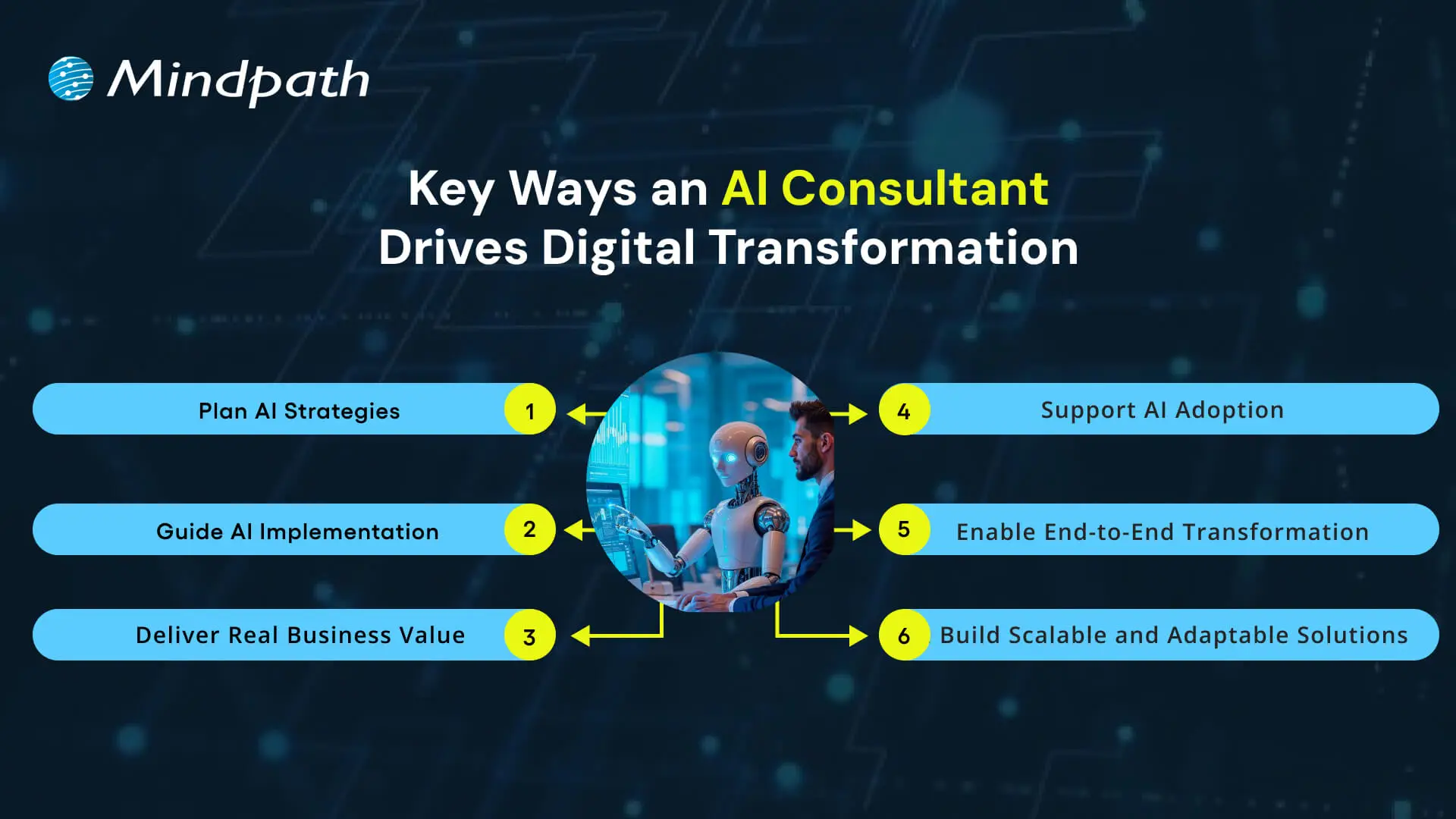
Key Ways an AI Consultant Drives Digital Transformation

1. Plan AI Strategies

An AI consultant assists organizations in synchronizing AI initiatives with fundamental business priorities while emphasizing outcomes over simply tools. They structure strategies that will connect data, technology, and business objectives into practical plans of action that ensure that digital transformation with AI delivers measurable outcomes throughout the organization.

2. Guide AI Implementation

Experts ensure teams apply AI technologies correctly in the right context, considering infrastructure, data, and practical implementation throughout the process. The increased exposure ensures reduced failed experiments, while returning greater proportions of success to AI projects.

3. Deliver Real Business Value

They emphasize outcomes that impact performance, not to simply automate. They work with experts to help companies develop smarter products, optimize workflows, and enhance the customer experience. All AI solutions are focused on achieving measurable outcomes and long-term benefits.

4. Support AI Adoption

Utilizing AI is much more than a technical shift; it’s an organizational change. They provide teams with tools to help them change their workflows, train them, and support their integration of AI tools into their regular workflows; all of which encourage a short adoption window, continued use of AI across the organization.

5. Enable End-to-End Transformation

Experts advocate total digital transformation through the alignment of people, processes, and technology, connecting leadership with technical and non-technical teams to maximize the impact of AI on transforming the future. The holistic nature of these AI consultant roles makes them central to any successful long-term transformation program.

6. Build Scalable and Adaptable Solutions

They will help provide assurance that these AI systems can be flexible and scalable to adapt to future needs when business requirements change. They monitor the AI systems are performing correctly and making iterative improvements as the businesses grow continuously. The continuous support allows organizations to realize the best potential of their AI systems over extended periods.

AI consulting is transforming the way modern businesses grow and compete in the market. Discover more on why organizations need AI consulting services to unlock growth and drive innovation in a rapidly changing market.

Want to Unlock the Full Potential of AI for Your Business?

Digital transformation is only effective when organizations thoughtfully and strategically leverage AI to transform processes, decisions, and experiences. An AI consultant partners with organizations to identify overall goals, align technology to deliver on those goals, build actionable plans, and deliver measurable results. With AI applied in a measured and thoughtful manner across all functions and operations, organizations can gain long-term growth, efficiency, and competitive advantage while using technology as a true driver and enabler of success.

We at Mindpath provide expert AI consulting services that guide businesses through planning, implementation, and scaling of AI solutions. Our team ensures every initiative aligns with strategic priorities, enabling measurable results and continuous improvement. By combining technical expertise with business insight, we empower organizations to leverage AI effectively and gain lasting value from their digital transformation efforts.


Frequently Asked Questions

1. How does an AI consultant actually drive digital transformation without disrupting what is already working in a business?

That balance is exactly what separates a good consultant from a generic one. They assess existing workflows first, identify where AI adds value without breaking things, and implement changes gradually. The goal is progress without unnecessary operational chaos or team resistance.

2. What is the difference between hiring an AI consultant and simply purchasing an AI software solution for the business?

Software gives you a tool. A consultant gives you a strategy for using it correctly. Without proper alignment to business goals, even the best AI platform underdelivers. Consultants ensure the technology actually solves the right problems rather than creating new ones.

3. How do businesses know whether an AI consultant is genuinely delivering results or just running up hours?

Set clear KPIs before the engagement begins. Results should show up in operational metrics, cost savings, or customer experience improvements within defined timeframes. A trustworthy consultant welcomes accountability and ties every recommendation directly to measurable business outcomes from day one.

4. Do businesses need to have existing AI infrastructure in place before working with a consultant?

Not at all. Many engagements start from scratch. Consultants begin by assessing what exists, identifying gaps, and building a roadmap suited to the current state. Starting without infrastructure is common and often makes the consulting process cleaner and more focused.

5. How long does it typically take before a business starts seeing tangible results from an AI consulting engagement?

Quick wins can appear within the first few months through process automation or better data use. Deeper transformation across departments takes longer, often six months to a year. Realistic timelines set upfront prevent frustration and keep expectations aligned throughout the engagement.

Support Is One Click Away

Featured Posts

Related Post

Image showing a person using a digital tablet.

Eliza, the first ever publicly demonstrated chatbot, was created using a rule-based approach in the 1960s. With the onset of artificial intelligence and big data, these chatbots have now become advanced with capabilities like providing information and feedback, clear doubts, etcetera, and are transforming the face of education in the best possible way.

Artificial intelligence (AI) provides advanced education solutions and is being leveraged at scale by various institutions to achieve their digital transformation goals. This is evident with the growing demand for AI-driven online learning platforms with AI in education market revenue unanticipated to cross $20billion by 2027.

Illustration of the letters AI

Source: 

AI Chatbots In Education- The Need Of The Hour.

In a 2016 interview, Microsoft founder Bill Gates pointed out the relevance of AI in improving the quality and effectiveness of personalized teaching approaches.

“The idea that you could talk to an [virtual] advisor that would understand different misconceptions and arbitrary linguistics around it, that’ll certainly come in the next decade. And they’ll be a very nice supplement”– Bill Gates.

Truly so, after almost half a decade, AI chatbots are being instrumental in helping institutions provide interactive, streamlined, and personalized learning environments for students.

Conversational AI or AI chatbots are a subset of AI solutions. It is constantly explored to fill the gaps between teaching and learning, and achieve seamless education at all levels.

How do AI Chatbots Help In Teaching And Learning?

AI chatbots use natural language processing(NLP) to decode the intent and keywords according to a specific algorithm, and perform a set of functions.

NLP is among the most promising branches of AI which uses data science to facilitate interaction of humans and computers. The effectiveness of NLP in making computers as smart as people, fueled its growth, with the NLP market anticipated to reach $28.6 billion in 2026.

The AI chat bot processes a set of commands to understand the questions and offer appropriate answers to the same. It can either be in the form of text, or audio-video, pictures, etc.  In the educational realm, this proves to be an interactive way for institutions, both online and offline, to create intuitive and interactive classrooms.

Impact of AI Chatbots on Education

The new-age technology has seemingly replaced the physical library with search engines and created virtual classrooms that have students from different parts of the world.

Apart from these visible technological advancements, conversational AI is also driving the future of eLearning and has already shown signs of transformation in the education realm. As students gain more easy access to high-speed internet and mobile devices, the use-cases of such modern technology also increase.

Let us now look at how AI chatbots are changing the landscape of the traditional education system.

1.    Enhanced Personalized Learning

Personalized learning promotes self-advocacy skills in students. It helps them to focus on their flaws and empower their skills. It involves creating a learning structure that is tailored to each student’s abilities in a way that motivates them. This way, teachers can ensure every student learns together but at their learning rate.

However, in a traditional classroom, providing such assistance can be an excruciating task for the teachers. With AI-enabled chatbots, it is easy to optimize teaching as per the learning abilities of each student. It ensures every student continues to follow the curriculum but at their own pace.

AI chatbots interact with students and understand their specific needs via a set of standard text, audio, and video messages. These chatbots use their inference to create a personalized curriculum that matches their needs.

2.    Smart And Quick Feedback

Feedback whether from a student or a teacher is effective only if it specifically addresses the areas of improvement. Conventionally, feedback would be in the form of written applications or online forums that take time to process and produce relevant results.

With the power of AI, an interactive way to understand the point of view of a student or teacher through surveys is now possible. The AI chatbot automatically cumulates and analyses the responses and publishes the results, making the whole process simple and fast. It provides results on time which the institutions can use to amend their teaching or administrative ways.

For students, detailed feedback from teachers is a comprehensive way to explore their inner strengths and flaws as a learner. For teachers, such feedback is an effective means to understand their student’s expectations and improve their teaching methods accordingly.

3.    Improved Student Engagement

Effective student engagement involves developing the knowledge absorbing skills of students by imbibing a positive thirst to learn new things. AI chatbots break the long lectures into small text or interactive media messages so that it looks like a virtual chat room. This way the tedious lecturers transform into an interactive learning experience.

Many universities have deployed chatbots to streamline student-teacher communication.

For instance, the University of Murcia, Spain rolled out AI chatbots to answer queries from students regarding matters of campus and field of study. The chatbot successfully answered with 91% accuracy to around 38,708 questions.

4.    Better Teaching Assistance

AI chatbots are dedicated virtual teaching assistants that are available 24/7 to help students with clearing the concepts. It also helps teachers to evaluate test papers and detect plagiarism and grammar issues.

With AI chatbots, teachers can optimize their tasks and leverage the time in creating strategies that impart quality education to their students.

5.    Better Student Support

As technology advances, AI chatbots are being trained to provide more personalized counseling sessions to students and guide them to choose the best course.  The AI chatbots mainly focus on three factors responsible for higher student persistence as perceived by Vincent Tinto, University Professor of Sociology (emeritus) at Syracuse University- students’ self-efficacy, sense of belonging and perceived value of the curriculum.

AI chatbots with human monitoring can also be used for improving on-campus mental health counseling, and help students manage their stress efficiently.

Illustration of the letter 'A' and the number

Source:

Bottom Line

The education industry is now witnessing a major paradigm shift from traditional ways of teaching. Even though no AI chatbot can replace a passionate and dedicated teacher, it can surely improve the quality of the overall learning experience.

Choosing the right chatbot is crucial in determining the effectiveness of AI-based tutoring. eBotify has all the elements that make it a perfect choice to deploy as a virtual administrative, teaching, and student assistant.

Contact us with your requirements and our technical team will provide the solutions for you right away!


Explore how AI chatbots are revolutionizing the education sector, providing personalized learning, smart feedback, improved engagement, teaching assistance, and better student support.
Web accessibility guidelines

Your website acts as the gateway to your business’s digital world. It is the first impression that visitors get. However, for millions of users around the globe, those with motor, visual, cognitive, and hearing impairments, that door can remain locked if your website is not completely accessible. This is where web accessibility guidelines become pivotal. 

Key Takeaways

  • 01
    Web accessibility ensures every visitor, including those with disabilities, can use a site.
  • 02
    The POUR principles guide websites to be perceivable, operable, understandable, and robust.
  • 03
    Accessible WordPress themes and plugins make compliance easier without major redesigns.
  • 04
    Proper alt text, color contrast, and heading structure improve usability and SEO.
  • 05
    Regular accessibility testing with tools like WAVE keeps websites compliant and inclusive.

For WordPress website owners, implementing the web accessibility standards not only enhances usability but also increases SEO, brand reputation, and user engagement. In this detailed blog, you will learn more about web page accessibility and explore important accessibility principles and effective strategies. Besides, we have also mentioned some useful tools that can help you ensure your site meets the necessary standards. 

Looking to make your website accessible for your visitors and users? Mindpath’s WordPress development services help you create a user-friendly website that will meet accessibility standards and deliver seamless results.

Web Accessibility and Its Importance

In simple words, it means designing and creating websites that can be easily used and navigated by every user, including users with disabilities. Web accessibility ensures equal access to functionality as well as information to all, aligning with various legal mandates and standards, such as: 

1. The Americans with Disabilities Act or ADA

2. Section 508 of the Rehabilitation Act of 1973 (USA)

3. The Rights of Persons with Disabilities or RPWD Act (India)

4. The European Accessibility Act 2019

5. Equality Act 2001 (the United Kingdom)

6. Web Content Accessibility Guidelines 2.1 and 3.0

Accessible sites don’t just benefit individuals with disabilities or temporary impairment. Such websites tend to rank higher in SERPs due to their enhanced usability and semantic structure. 

Web Accessibility Standards- POUR Principles

Apart from the specific requirements, businesses should familiarize themselves with the key principles of web accessibility guidelines. These are known by the acronym- POUR. 

1. Perceivable

The interface and content of websites should be presented in such a way that every user can perceive or interpret, regardless of their disabilities. 

2. Operable

Visitors should be able to interact and navigate with websites utilizing different input methods, including assistive devices and keyboards. 

3. Understandable

Content as well as functionality of a website should be consistent, clear, and comprehensible for users with different cognitive levels. 

4. Robust

Websites should be compatible with various modern assistive technologies. This helps ensure long-term reliability and accessibility. 

Is your WordPress site truly secure from cyber threats and vulnerabilities? Find out how safeguarding WordPress vulnerabilities can help you protect your website and maintain your customers’ trust.

Accessibility in WordPress: Why it Matters?

WordPress powers a major portion of the web, making it an important platform for accessibility. Whether you have an e-commerce platform, a blog site, or a business website, you should carry out a web accessibility test and ensure it meets all the standards. WordPress accessibility is crucial for many reasons, like: 

1. Aider Audience Reach

By creating a website with an inclusive design, you can make it accessible for individuals with disabilities. Besides, it shows your business supports disabled people and understands their needs. 

2. Legal Protection

Following the required accessibility standards, you can avoid penalties and lawsuits. 

3. Better SEO

All search engines favor accessible WordPress websites with proper alt text, semantic structure, etc. 

4. Establishing Reputation

Digital accessibility has become an ethical issue. If you are not following the web accessibility guidelines, it can affect the reputation of your business.

5. Better UX

With the help of various accessibility features, you can boost usability for every user, including those with physical limitations and mobile visitors. 

Want to ensure your WordPress site is running on the right PHP version for top performance and security? Check out our guide on WordPress PHP compatibility to keep your site efficient, stable, and future-ready.

Some Common Web Accessibility Barriers

Before diving into the solutions to meet accessibility web standards, it is important to understand some common accessibility barriers that can significantly affect user experience while limiting your website’s inclusivity. 

1. Use of incorrect and missing Alt Text of images

2. Non-descriptive link text like “read more” or “click here.”

3. Poor color contrast between the background and the text

4. Use of inaccessible forms, lacking keyboard support

5. Keyboard navigation problems

6. Lack of transcripts or captions for multimedia

7. Wrong heading structure

8. Auto-play content with missing controls

Recognizing these issues is the first step toward crafting a more accessible and inclusive WordPress website that can serve every user ethically as well as effectively. 

Are you struggling to decide which platform will best support your business goals? Compare Magento vs WordPress to discover which option offers the features and flexibility your website needs.

Strategies to Boost Your WordPress Website Accessibility

Now that we have understood the importance of web accessibility and common barriers to it, it’s time to move to the practical solutions. Increasing your WordPress site’s accessibility doesn’t require a complete transformation. It can be achieved through the right web accessibility tool, thoughtful adjustment, and an inclusive design. Here are actionable ways to make your website more accessible and compliant. 

1. Opt For an Accessibility-Ready WordPress Theme

When working on web accessibility, always begin with a solid foundation, i.e., themes. You should always choose an accessibility-ready theme. Such themes follow the web page accessibility guidelines, such as keyboard navigation, semantic HTML, and more. 

Some popular accessible WordPress themes you can try are: 

  • Monument Valley
  • Gutenix
  • Neve
  • Icelander
  • OceanWP 
  • Astra

While choosing a theme, always check for WCAG compliance and evaluate the performance with a screen reader. 

2. Proper Heading Structure and Semantic HTML

Semantic HTML allows assistive technologies to properly interpret your website content. Ensure that all the headers are used in a logical order, like H1, H2, H3, so that users can easily understand the page structure. Here are some best practices to keep in mind: 

  • Only use one heading per page, generally the title.
  • Use proper headings for main sections and subsections
  • Don’t skip heading levels 

You can use a web accessibility tool like Axe to check heading structure and make changes accordingly. 

3. Install Right Accessible Plugins

Plugins are great ways to add new functionality and features to your website. However, if not selected carefully, you may end up with various accessibility problems. Always use plugins designed to make your site more accessible. Some recommended plugins are:

  • Equalize Digital: Offers a plugin to test websites for WCAG compliance.
  • WP Accessibility: Helps identify common web accessibility problems. 
  • One Click Accessibility: Allows an easy way to add various accessibility features.
  • Accessible Poetry: Helps enhance accessibility by integrating features such as focus styles and skip links

These plugins can complement your selected accessibility-ready theme and keep your site compliant.

4. Ensure Sufficient Color Contrast

While creating an accessible WordPress website, ensure that the color contrast between background and text meet necessary WCAG guidelines. It should be at least 4.5:1 for normal text. 

High contrast enhances readability for individuals with visual impairment. There are many WordPress accessibility-ready themes that offer easy ways to customize colors to meet web accessibility guidelines.

Apart from this, you should also use a readable font size and line height. Recommended font size is at least 16 pixels. The line height and word spacing should be 1.5x and 0.16x of the font size, respectively.  

5. Tab Indexing

Users with motor skill challenges generally depend on keyboard navigation, especially the Tab key, to navigate through your website. Unlike trackpad or mouse users, they rely on a predictable, logical tab order to access buttons, menus, and other interactive elements. So, ensure that you have enabled tab indexing for your site. 

Furthermore, make sure that all interactive elements follow the correct flow, i.e., left to right and top to bottom. A well-designed tab index can create a more inclusive and smoother browsing experience. 

6. Offer a Consistent and Clear Navigation

Even though you have deployed tab indexing for smooth navigation, there are other important things you should consider.

  • Breadcrumbs: Use breadcrumbs to show users their current location within your website, reducing confusion. 
  • Descriptive links: Prefer to use descriptive link text that clearly shows action or destination. Skip using phrases like “read more” or “click here”. 
  • Consistent navigation menu: Make sure that your site’s menu is consistent across all pages. 

Clear and consistent navigation is vital for user experience as well as accessibility. 

7. Optimize Media and Images

Media and images are crucial elements of a website. To ensure their accessibility, consider these web accessibility examples:

  • Captions and Transcripts: Use captions for videos and transcripts for audio content. This will help users with hearing impairments and who prefer to read instead of listening. 
  • Alt Text: For images, you should use descriptive alt text. This will help a screen reader to describe images to users. 
  • Descriptive File Name: Using descriptive file names for media files and images can help you boost SEO and web accessibility. 

With accessible images and media, it will be easier to make your site compatible with assistive technologies. 

8. Leverage Access Keys

Access keys work like keyboard shortcuts, enabling users to jump to a specific section of the website using assigned keys. For example, by pressing a key like “1”, they can go to the homepage, and by pressing “2”, they can access your contact page. 

9. Avoid Auto-Animations and Flashing Content

Blinking and flashing content can cause seizures in individuals with photosensitive epilepsy. Besides, auto-animations can also cause distraction among users. Best practices to follow here are: 

  • Don’t flash content more than three times per second
  • Allow users to pause animations
  • Utilize motion purposefully

By following the above-mentioned tips, you can ensure that your website welcomes all users while offering a user-friendly web experience. 

Ready to upgrade your HTML site to something more powerful and manageable? Explore why converting HTML to WordPress can streamline updates and improve your online presence.

Tools to Ensure Your Site’s Accessibility

Once you are done with implementing accessibility features following the web accessibility guidelines, you should carry out a comprehensive test to ensure your site is working as intended. Here are some useful tools to test your site.

1. WAVE

Web Accessibility Evaluation Tool, designed by WebAI, helps content creators and developers to make sure their websites are accessible for all. It offers visual feedback on the web content’s accessibility, making it easier to detect and resolve accessibility problems. It’s free to use. 

2. EqualWeb

This tool is designed to offer manual and automated accessibility solutions. Using this, businesses can stay compliant with ADA standards and WCAG 2.1. With AI-powered features, EqualWeb offers an easy way to identify and fix accessibility issues.  

3. Axe

This powerful web accessibility test tool can be integrated into any browser and development environments for a detailed web accessibility analysis. 

4. Level Access

This web accessibility checker provides developers with an API and a web interface, making it a highly flexible tool for testing accessibility throughout the web development lifecycle. 

5. NVDA

NonVisual Desktop Access is an open-source, free-to-use screen reader for Windows. Using this, visually impaired individuals can easily interact with your digital content. Developers can use it to evaluate web applications and websites’ accessibility. 

Wondering how to hire the right WordPress developer to help your business grow online? Explore our detailed guide on Hiring a WordPress Developer to discover expert insights that guide you toward making the best hiring decision.

Create an Inclusive Website that Welcomes Everyone

Web accessibility goes beyond just legal compliance. It focuses on fostering empathy, digital equity, and inclusion. By following web accessibility guidelines and leveraging the robust ecosystem of WordPress, you can create a website that is intuitive, usable, and can help all users. 

Making your site accessible is a journey of continuous improvement, and Mindpath can be an ideal partner in this journey. With our web accessibility services designed for this changing digital space, you can witness the desired results. Our expert guidance and tailored solutions, created based on web accessibility guidelines, will help you meet all compliance requirements and create a website that embodies innovation, openness, and user engagement. 

Frequently Asked Questions

1. How do web accessibility guidelines actually impact a website’s search engine ranking?

Search engines favor accessible websites because they often have cleaner code, proper heading structures, and descriptive alt text. These same elements that help users with disabilities also help search engines understand content better, which can lead to improved visibility in search results over time.

2. Does making a WordPress website accessible require a complete redesign from scratch?

Not at all. Most accessibility improvements can be made through theme adjustments, plugin installations, and small content changes. Switching to an accessibility-ready theme and fixing common issues like contrast or missing alt text often goes a long way without rebuilding the entire site.

3. What legal risks does a business face if its website does not meet accessibility standards?

Businesses can face lawsuits, penalties, or compliance issues depending on regional regulations like the ADA or the European Accessibility Act. Beyond legal exposure, failing to meet accessibility standards can also damage brand reputation and exclude a significant portion of potential customers from engaging with the site.

4. How can a business test whether its WordPress site actually meets accessibility standards?

Tools like WAVE, Axe, and NVDA allow businesses to run accessibility audits and identify specific issues. Combining automated testing with manual checks, such as navigating the site using only a keyboard, gives a more complete picture of how accessible the website truly is for real users.

5. Why should accessibility be a priority even for small businesses with limited website traffic?

Accessibility is not just about traffic volume, it reflects inclusivity and ethical responsibility. Even small businesses risk excluding potential customers and facing legal consequences without proper compliance. Building accessibility in early also saves time and cost compared to retrofitting a website later as the business grows.

Enhance your WordPress site’s inclusivity with our expert tips and services. Discover how to improve accessibility and explore our comprehensive WordPress solutions.
AI use cases 

Currently, cloud computing, data analytics, and machine learning are influencing the way companies are innovating. Do companies have the capability to leverage AI use cases to remain competitive in the market? All industries are under pressure to become efficient and customer-focused and make better decisions. Investigating these technologies stimulates novelties and challenges leaders with the need to reconsider the old methods.

With smarter systems embraced in organizations, the actual question is what AI applications are the most valuable. Is it possible to have teams that open up and simultaneously cut down on mistakes and costs? Numerous leaders are creating, trying and revising solutions every day. In this blog, we are going to examine the most successful AI business use cases that are going to transform business in 2026. So, keep reading further!

Planning to adopt AI but unsure how to turn emerging use cases into measurable business outcomes? Mindpath offers end-to-end AI development services that guide you from strategy to implementation.

Why are Businesses Turning to Artificial Intelligence?

Businesses embrace the use of artificial intelligence to operate more quickly, cheaply, and make better decisions. Numerous businesses using AI automate routine work and enhance day-to-day operations. Data insights help the leaders to influence strategy and planning. McKinsey reports that about two thirds of organizations continue to test or pilot AI with careful adoption across industries.

Careful consideration of real value AI use cases has become a priority among companies. Teams make the experiences of customers personal and their supply chains efficient through intelligent systems. According to McKinsey, 64 percent of the respondents claim that AI helps support innovation goals. Companies that pair AI with their expansion policies tend to achieve greater productivity and quicker innovations and improved competitive placements.

Not sure how to move from AI ideas to real business impact? Discover the AI roadmap to check out how structured planning turns AI use cases into scalable results.

Practical AI Use Cases Driving Business Transformation

Businesses do not consider AI as an experiment anymore, they use it to solve daily problems. The current trends of many businesses utilizing artificial intelligence are based on measurable results and quicker outcomes. AI helps make smarter decisions, smoother operations and makes industry growth scalable. Below are the use cases that demonstrate how companies can transform AI strategies into a real business impact.

1. Personalized Customer Journeys

AI assists brands to know customer preferences and behavior patterns in real time. The AI use cases in teams are used to customize recommendations and interactions. This will enhance interactivity and customer retention. The experiences offered by many companies using AI make them appear relevant and timely.

2. Predictive Equipment Monitoring

AI monitors the machine information by sensors and performance history. Such AI applications detect problems prior to failure. There is a decrease in downtime and maintenance costs incurred in business. Repairs are scheduled ahead of time and unexpected breakdowns prevented.

3. Intelligent Customer Support

AI chatbots respond to queries in real-time in digital mediums. These applications of AI decrease response time and workload. Customers are provided with regular assistance all the time. Support teams are responsive to complicated customer demands.

Looking for practical inspiration beyond theoretical AI use cases? Discover AI chatbot examples to check out how businesses are automating support, sales, and workflows.

4. Smart Workforce Planning

AI forecasts the staffing requirement based on the previous demand. AI use cases provide managers with the ability to manage workloads. Staffs are given timetables that are based on availability and capabilities. Teams do not experience staffing problems during peak times.

5. Content and Campaign Creation

AI examines trends with the purpose of recommending topical content. GenAI use cases assist teams to write articles and social posts more quickly. Marketers minimize tasks used up in repetitive work. Creative teams dwell on message and strategy.

6. Advanced User Security

AI makes authentication based on biometrics and behavioral monitoring. These AI use cases minimize fraud and unauthorized entry. Real-time systems identify the abnormal activity. The users enjoy secure and easier logins.

7. Quality Testing Automation

During development cycles, AI tests applications are tested continuously. Enterprise AI use cases enable teams to identify defects in the beginning. Products are developed to fix bugs prior to release. Enterprises provide quality software with a reduced amount of errors.

Want to know what makes AI applications smarter behind the scenes? Check out the role of vector databases in AI applications and discover how they improve relevance and decision-making.

8. Operational Intelligence Management

AI is used to keep track of systems in order to detect problems in performance. AI use cases help teams to avoid service outages. Issues are resolved faster with the use of automated alerts. Operations continue to be stable and efficient.

9. Safety and Risk Monitoring

AI examines the surroundings based on camera and live data. There are the AI use cases that detect risks in advance of events. Companies enhance the safety conformity in operations. Simultaneously, the teams react quicker to threats.

10. Conversational Product Assistance

Artificial intelligence assistants help customers in choosing products. AI agents use cases provide real-time questions and recommendations. Customers get the correct answers immediately. Brands enhance interactivity and buying assurance.

Ready to understand what powers self-learning and action-oriented AI applications? Discover the role of AI agents to learn how they manage tasks, decisions, and execution end to end.

Real-World AI Use Cases Examples

Companies have outgrown strategy and are concerned with real achievement in their daily activities. These AI use cases demonstrate how companies use intelligence to address real-world problems in various sectors. The following are illustrative of the ways AI is providing quantifiable value to real businesses.

1. Amazon suggests products about browsing and buying history, enhancing cross-selling and upselling using the AI use cases in action.

2. Netflix applies AI to recommend films and movies according to viewing history to keep the users active and decrease churn.

3. Tesla enhances car security through the Autopilot that helps them monitor the road and drivers to avoid collisions.

3. Apple makes iPhones secure using Face ID which offers quick and smooth authentication but ensures sensitive user data remains intact.

4. Walmart trains new workers with AI, which guarantees consistency in training and leaves managers to do valuable work.

5. Coca-Cola manages logistics and inventory through AI to enhance the efficiency of the supply chain and minimize operational expenses.

6. IBM uses Robotic Process Automation on routine work, enhancing precision and allowing workers to undertake high-value tasks.

7. L’Oréal applies conversational AI to provide individual beauty tips and recommendations, which enhances engagement and purchases.

Wondering what separates traditional automation from true AI-driven transformation? Learn about AI models to check out how they power modern enterprise use cases.

Ready to Transform Your Business with AI?

AI is reshaping how companies operate, improve efficiency, and engage customers. Practical AI use cases help businesses automate tasks, enhance decision-making, and boost innovation. From personalized experiences to predictive maintenance, AI is driving measurable value. Companies adopting these technologies can grow faster, reduce costs, and stay ahead in competitive markets while building smarter and scalable operations.

At Mindpath, we offer expert AI development services to help businesses implement these solutions. Our team builds custom AI systems, chatbots, and predictive tools that fit your operations. With Mindpath, companies using artificial intelligence can automate workflows, personalize customer experiences, and improve efficiency. We guide businesses to apply AI effectively and achieve real growth through smart technology.

FAQs

1. What are common AI use cases in business?

Artificial intelligence is used to automate work, assess information, and create better customer experiences. There are numerous applications of AI use cases in many businesses aimed at efficiency. Predictive analytics, chatbots, and recommendation engines are commonly used.

2. How do businesses identify the right AI use cases?

Begin with redundant operations or data-intensive processes that reduce the speed of teams. Analyze the areas that businesses using artificial intelligence achieve the best outcomes. Focus on the high-value areas in accordance to the goals.

3. Will AI replace human jobs in companies?

AI does the routine work and human beings concentrate on strategy and creativity. AI in real life is not a substitute, but a partner. Reskilling will be fundamental due to its increasing adoption.

4. What industries lead in adopting AI technologies?

AI is applied in finance, healthcare and retail to make predictions, analyze and recommend. Enterprise AI use cases are effective in boosting efficiency and customer experience. Every industry implements AI to address certain issues.

5. How can small businesses benefit from AI adoption?

AI schedules, reports and supports small teams automatically. Companies using AI are able to conserve time and minimize errors. Smart tools allow small businesses to compete better.