Home

AI Consulting: A Complete Guide for Business Leaders 

AI Consulting: A Complete Guide for Business Leaders 

Join our Newsletter!

AI consulting 

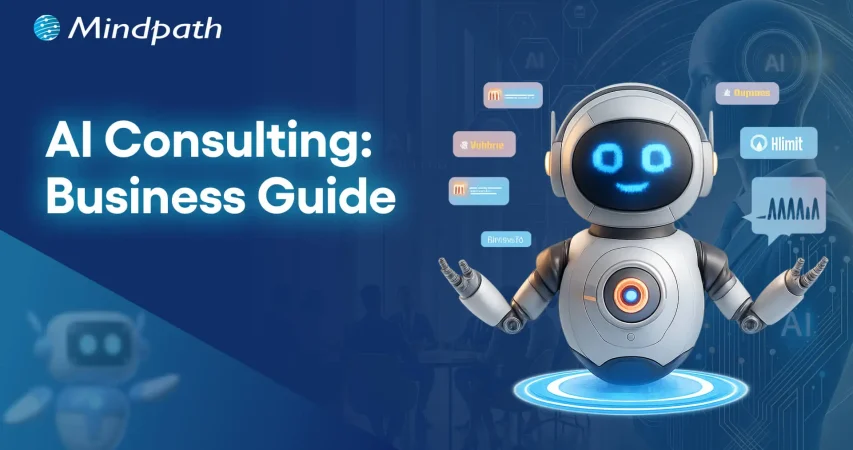
Artificial intelligence is now at the center of business decision-making, creating growth and efficiency across industries. Companies that turn to AI consulting receive better insights, more efficient systems and management, and stronger customer ties. Business leaders today operate in a world where competitors move quickly to leverage evolving technology. The advantage lies in applying AI to directly address their goals and challenges. AI transforming future where consulting provides highly technical solutions into practical applications, enabling businesses to take the next steps with confidence.

Key Takeaways

  • 01
    AI consultants assess data, systems, and workflows before recommending any strategy.
  • 02
    A clear roadmap helps align AI initiatives with measurable business outcomes.
  • 03
    Tailored AI solutions are designed to fit each company’s specific needs.
  • 04
    Ethical governance ensures AI systems remain fair, transparent, and compliant.
  • 05
    Training and ongoing support help teams adopt new AI workflows smoothly.

Ultimately, the biggest challenge we are facing today is implementing AI in a way that produces measurable impact. This is where consulting firms can assist, through methodologies, strategies, roadmaps, and implementation assistance. Consulting makes complexity simple and provides direction and location for leaders in a digital economy that is rapidly changing. In this guide, we’ll provide perspectives on how consulting can help your business stay relevant and future-ready.

Want to get expert guidance on how to use AI in your business to tackle your challenges? Mindpath AI Consulting Services offers personalized strategies that unlock the AI’s full potential.

What is AI Consulting?

AI consulting encompasses bringing value to businesses through AI usage. It is the combination of technical skills and industry knowledge to help organizations realize their objectives, from conceptual planning to operationalizing and managing AI solutions. AI consulting should always address how to make AI work for a particular business need.

Consultants start by investigating how a company operates, what its goals and objectives are, and its data quality. AI strategies and solutions are created and customized in a way that supports the overall goal and aspirational growth of the company.

Key Roles of an AI Consultant

The role of AI consulting firms is vital to the adoption and scaling of artificial intelligence by businesses. The consultants in these firms take on multiple roles and help businesses execute AI projects that are well-designed, actionable, and aligned with their objectives.
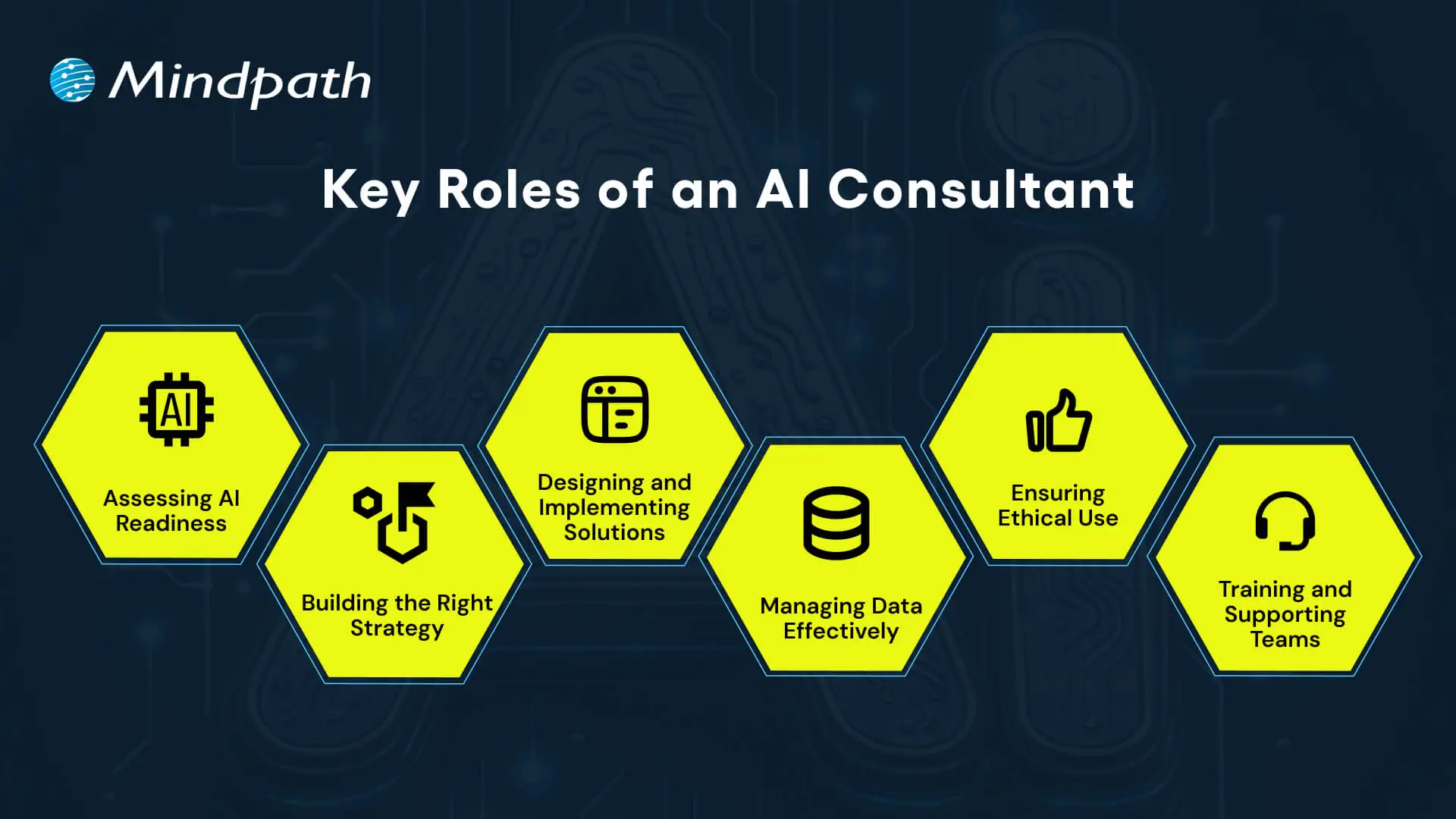
Key Roles of an AI Consultant

1. Assessing AI Readiness

Consultants begin by looking at a company’s current technology and the structure of its data. They examine strengths, gaps, and where AI could be optimally used. This step ensures the business is ready for AI to move forward with AI consulting.

2. Building the Right Strategy

Consultants partner with executives to harmonize AI initiatives with broader business objectives. They outline achievable outcomes, prioritize initiatives, and develop a roadmap that considers both growth and innovation. This allows companies to better understand how AI properly fits in their operating model and reduces any bias that AI strategy consulting can involve.

3. Designing and Implementing Solutions

Consultants develop AI models, tools, or applications to satisfy custom requirements. This can include customizing existing technology when that is more efficient, cost-effective or time-conserving. The consultant is the one who determines the methods used to develop and test the models to create measurable outcomes.

4. Managing Data Effectively

Consultants generally prioritize data quality, security, and organization, as those are all critical parts of any AI project. They create the actual process for collecting, organizing, and engaging with that data. If organizations can manage their data effectively, they can get actionable insights more efficiently and ultimately leverage the long-term value of AI consulting for business leaders.

5. Ensuring Ethical Use

Consultants establish boundaries and frameworks for ethical AI behavior, while assuring AI systems demonstrate fairness, transparency, and compliance. With governance in place, Artificial Intelligence consulting companies help clients build trust and reduce risk.

6. Training and Supporting Teams

Consultants will also prepare employees to use new AI systems confidently. They design and execute traineeships and develop protocols to transition through changes in workflows. This allows for a transition with less friction and allows the teams to adapt to new ways of working.

For a deeper understanding of how AI trends help businesses in achieving digital transformation. Read our blog: Top AI Trends.

AI consulting for small businesses helps with AI adoption to increase efficiency and lower costs while making more informed decisions. AI consultants will help small businesses find the best tools and strategies for their situation and growth objectives.
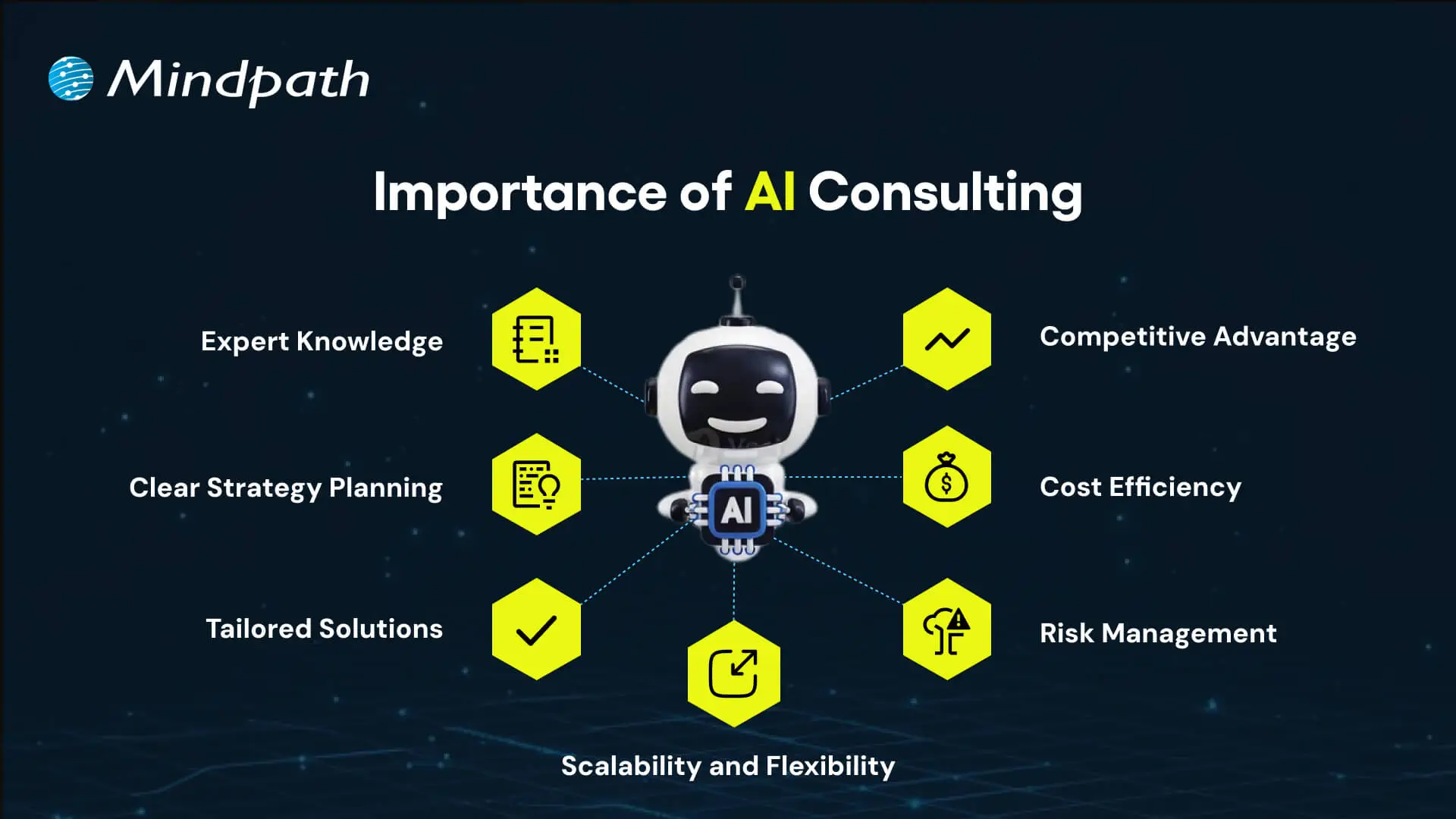
Importance of AI Consulting

1. Expert Knowledge

AI consultants bring deep technical and industry knowledge to guide businesses to learn about and select the best AI technologies available. Such guidance will provide information to make informed decisions and help prevent expensive mistakes that will demonstrate the value of the AI consulting.

2. Clear Strategy Planning

Consultants create an actionable roadmap that aligns the business goals of AI-related projects, identify priority use cases, set measurable outcomes, and provide a path to success through AI adoption consulting. AI in business strategy leads to growth and innovation, which helps the business to stand out from its competitors.

3. Tailored Solutions

Companies are provided with AI solutions based on their needs, problems, and data context. Consultants also confirm that the AI solution can run with their process; this shows the level of expertise offered in AI implementation consulting.

4. Scalability and Flexibility

Consultants design AI systems to be highly scalable and flexible for changing conditions. They also govern projects from small pilots to full deployments while applying proven practices from AI consulting examples.

5. Risk Management

Consultants establish governance standards and monitor AI systems to support bias mitigation, data protection, and a compliant setting. This governance approach reduces risk and adds certainty to AI advancements, which aligns with the goal of AI integration consulting when done properly.

6. Cost Efficiency

The goal is to remove repetitive tasks from the shoulders of employees, reduce errors, reduce resources used, save money, become more productive, and advertise the value of AI consulting.

7. Competitive Advantage

The benefit of using AI for customer service enables organizations to innovate, streamline customer interactions, and make faster data-driven decisions. Expert teams or firms providing consultancy can help organizations stay ahead of competitors and discover new opportunities, particularly highlighting the utility of a well-developed AI consulting guide.

The Process of AI Consulting

The process of AI consulting has a structure that guides businesses from the plan to a successful and assured implementation. Each stage focuses on connecting technology to real business goals to ensure smooth and outcome-driven adoption.

1. Business Review

Consultants examine present systems, data, and workflows to observe strengths and gaps. They look at goals and challenges while creating the right path forward for AI Consulting.

2. Strategy Roadmap

Following that review, consultants synthesise work into a strategy, with priorities and measurable goals. The actual roadmap describes the roadmap for the entire AI journey.

3. Solution Planning

Consultants formulate solutions that are appropriate for business requirements and help determine the right Gen AI tools to choose. They define data requirements and provide planning methods for system integration.

4. Guided Execution

Consultants help businesses build pilot projects to test the value of solutions. They iterate the solutions before proceeding to full deployment.

5. Team Training

Consultants train employees in the use of AI tools and new workflows. They also create change management plans to ensure seamless implementation.

6. Ongoing Optimization

Consultants monitor the performance of AI systems and make adjustments if necessary. They review outcomes on a periodic basis to keep up with the constantly changing needs of the business.

AI consulting helps organizations to make smarter decisions and turn new ideas into real business results. Discover more about why organizations need AI consulting services to unlock growth in your business.

Ready to Transform Your Business with AI Consulting?

AI consulting services give businesses the expertise and structure needed to adopt artificial intelligence effectively. By evaluating, planning, and acting, companies can realize new efficiencies, enhance customer experience, and mitigate risk. When done correctly, business AI consulting navigates to make complex technologies practical and measurable, and helps organizations keep pace competitively in the rapidly changing digital economy.

At Mindpath, we deliver tailored AI consulting services designed to meet your business goals. Our experts focus on AI integration consulting to ensure solutions are scalable, ethical, and results-driven. With proven experience in business AI consulting, we provide strategies and implementation support that bring real impact. Partner with us to accelerate innovation and future growth.

Frequently Asked Questions

1. How does a business know if it is actually ready to start working with an AI consultant?

Readiness usually comes down to data quality, clear goals, and leadership buy-in. If a company has organized data and a real problem it wants AI to solve, that is often a strong starting point. A consultant can also assess readiness during the initial business review stage.

2. What is the typical timeline for seeing results after starting an AI strategy with a consulting partner?

Timelines vary depending on project complexity, but pilot projects often show early results within a few months. Full deployment and measurable business impact usually take longer, since consultants prioritize testing and refining solutions before scaling them across the entire organization for long-term reliability.

3. Can small businesses with limited budgets realistically benefit from working with an AI consultant?

Yes, many consultants offer scalable solutions designed specifically for smaller operations. Instead of large enterprise systems, small businesses often start with focused tools that improve efficiency or customer service. The goal is practical impact, not unnecessary complexity that exceeds the budget or actual business need.

4. How do consultants make sure AI systems remain ethical and fair after they are deployed?

Consultants set governance frameworks that monitor for bias, ensure transparency, and maintain compliance over time. This is not a one-time check. Ongoing monitoring and periodic reviews help catch issues early, keeping the AI system aligned with ethical standards as data and business conditions evolve.

5. What happens if a business tries to implement AI without any outside consulting support?

Without proper planning, companies often face poor data quality, unclear goals, or solutions that do not fit their actual workflow. This usually leads to wasted resources and slow adoption. Consulting helps avoid these common pitfalls by bringing structure, experience, and a tested implementation process to the project.
Support Is One Click Away

Featured Posts

Related Post

Benefits of a Custom WordPress
What if your website could reflect your brand’s identity and leave a lasting impression on each visitor? Customizing a WordPress site can do magic. But is all that hassle worth it? In this blog, we will explore the key benefits and see how customization can transform your online presence WordPress is a free tool for easy creation and management of websites. It is very popular, as it is easy to operate and works for a wide range of websites, starting from blogs, online stores, and business sites to creative portfolios. Even if it is developed with the help of technical tools like PHP and a MySQL database, technical knowledge is not necessary while working with it. On the other hand, this flexibility of WordPress makes it brilliant for creating everything from a small personal blog to a large business website.  Customization is key to making any WordPress website and building a site that really defines your brand and serves your purposes. It enables you to provide a much better user experience and achieve business goals by optimizing design, features, and functionalities. This personalization enables you to be different by creating a single-of-a-kind online presence for you alone, thereby drawing and interacting with your target audience in a unique manner.  Let us delve deep into the key benefits of customizing your WordPress website! 

Key Points to Consider Before Creating a Custom WordPress Website 

1. Appearance

One of the core considerations when developing a personal theme for WordPress, is the site’s appearance. This is done primarily through the theme to be used. It determines the site’s overall appearance, where the menus and widgets will be placed, and the default colors and fonts. Browse and select from over 200 themes at the WordPress theme store that’s designed for different needs, from blogging to e-commerce. WordPress Customizer makes it possible to tweak live the appearance of your website, from its title all the way to its widgets and homepage settings. For those who are not satisfied, you can use CSS to go deeper and style your theme to look truly unique.  

2. Functionality  

Your customized WordPress site can be enhanced by including plugins and widgets. Plugins add extra features to your site. By default, WordPress.com includes most necessary plugins, but on a Business or eCommerce plan on your website, you can add according to extra plugins needed for your more specific needs. Widgets serve as tools to include various components, such as recent posts, categories, or calendars, into the sidebar or widget area of the website sidebar or footer; hence, they offer a very easy way to customize and expand your site’s functionality. 

3. Search Engine Optimization

It is unquestionable that SEO features among the topmost determinants for the success of your website. It further enhances the visibility of your site, and the ranking provided on search engines. Features that make up good SEO may include responsive design and fast load times, which enhance user experience and is an advantage to search engines. With WordPress.com, for instance, you’ll have some of the best-built SEO features, such as Jetpack fast CDN, for fast loading and reliable hosting, which attests that your website is already set up to be search-friendly. Other ways to up your SEO are posting quality content and using descriptive image titles. For a Business or a plan that supports plugins, third-party SEO tools can also be used to increase the look of the site and its visibility in established search engines. 

Benefits Of Customizing Your WordPress Website  

1. Stand Out with a Unique Design 

A custom design in WordPress helps to authentically represent your brand by having a design that is consistent with its identity. This means that every single element of your website, from colors and fonts to layout and imagery, will represent the personality of your business but also its values. Distinctive design lets you stand apart from competition, building trust with visitors and communicating an image of professionalism. This enhances user experience through easier navigation and places focus on what really matters to your audience. A custom design does not only give your website that feel of eye candy, but it also fuels the growth and success of a brand. 

2. Boost Functionality and Flexibility 

A custom WordPress website can offer flexibility, unmatched in their apps, so that you will be able to add precisely the functionality and tools your business needs. Be it eCommerce integration, social media integration, or specialized functionalities— all such needs can be seamlessly met in a custom-built site. This will therefore bring more coherence and flow to the user experience since everything is designed to work in perfect coordination. By customizing your site, you will ensure it serves your business goals, is optimal in performance, and gives versatility and precision to its functionality. 

3. Scalability and Growth 

As your business grows, you need to increase the pace of your website to match. Custom WordPress sites are intrinsically scalable, therefore letting you grow and increase your site with new features and functionalities whenever required. Whether you’re increasing new product lines, integrating advanced tools, or increasing traffic capacity, a custom WordPress site will adapt without compromising on performance. Well, this scalability ensures that your website remains effective and responsive to support the evolving needs of your business and helps in maintaining a competitive edge when expanding. 

4. Improved Security 

Custom WordPress websites are more secure because you can add advanced, customized security measures to your site. In this respect, you will be at liberty to include strong security features against any threats or vulnerabilities within your custom website. This comprises custom firewalls, malware scanning, and secure authentication protocols. The greatest thing when it comes to custom security configuration on your site is the advanced safety of a website and sensitive data of users from breaches, ensuring a much safer online experience. This will help in keeping up the integrity and reliability of your site as it continues to develop and grow. 

5. Dedicated Support and Maintenance 

Many custom WordPress websites include dedicated support and maintenance that are designed to quickly troubleshoot any problems and do updates in a professional manner. You ensure that your website is at its best all the time, with very minimal downtime or disruptions. You are not only buying unique branding and advanced functionality but ongoing support and improvement when you pay for a custom WordPress site that raises your online presence. Such attention to quality and maintenance turns your website into this great asset— a scalable, secure, strong platform for business. 

Ready to transform your online presence?

Our expert WordPress developers at Mindpath will tailor a custom website that elevates your brand and drives results.

Customize Your WordPress Website at Mindpath 

The right WordPress developer will help a business owner come up with a custom website that fully answers business needs. Be it enhancing the presence of the brand, adding some unique features, or ensuring top security, accomplishment of any of these requires a skilled developer. At Mindpath, we understand the need for a custom WordPress site and know how to provide expert guidance throughout the hire. Here are the steps to hire the perfect WordPress developer at Mindpath:  

 1. Define Your Project Scope 

To begin with, engage us to outline the specific needs and goals of your project. Thereafter, we shall carry out a thorough analysis of your vision and give you an exceedingly elaborate proposal of the strategy, timeline, and cost estimates. This very distinct first step ensures that we set the right approach based on your expectations. 

2. Select Top Talent 

We will select the most appropriate WordPress developers for you according to your project requirements. You can peruse the profiles and arrange interviews, so you are 100% sure they are a good fit for your needs and the objectives of the project. This way, it will be a choice for the developers to go for, towards the delivery of services that will match your custom WordPress project. 

3. Seamless Project Launch 

Once you select your developers, we will start the project with a comprehensive kick-off. Our team will ensure there is effective communication and provide regular status updates on the development process to ensure the project will run smoothly and within the scope of your intended goals. 

 4. Detailed Ongoing Support 

Our commitment doesn’t end here. We continue the process further with support and maintenance, which includes fixing errors, performing updates, and changing things when required. It shall, therefore, be assured that it is only at the onset that you are without a custom WordPress site which is fully functional, secure, and updated in line with your growth. 

Conclusion  

Custom WordPress website development is more than having a simple digital presence. More can be done to help your brand, better user experience, and grow with the changing needs of a business. With investment in a tailored WordPress site, you open opportunities for individual design, advanced functionality focused on specific business requirements, and scalable growth at pace with success and improved safety and support in this regard will keep you strong and relevant. We at Mindpath are committed to helping you harness these benefits by walking you through every step for hiring our best WordPress developers: from the definition of your project to ongoing support. Unleash the power of customization and turn your online presence into a powerful and effective business tool. 

Want to achieve a Faster, Safer WordPress Site?

Find Out More About Mindpath’s Maintenance Solutions!

Elevate your brand with a custom WordPress website. Enjoy unique design, enhanced functionality, scalability, and top-notch security for your business.
Web application scaling 

Growing a digital product in 2026 means having to think smarter and act sharper. Web application scaling is a permanent debate of teams that desire continuous growth without performance problems. The higher the user demand, the higher the expectations of speed, reliability, and experience. The pressure mounts up as the traffic increases, and systems become overstretched. This is a moment that is forcing businesses to reconsider the level of preparedness of their platforms.

As the growth escalates, all the technical decisions start to have an impact on stability and user trust. Thus, teams need to think ahead and at the same time, they need to be flexible to change. Scaling must help in momentum rather than decelerate the momentum. An effective strategy assists companies in managing growth with certainty and sanity. When properly done, growth becomes purposeful and manageable instead of being in a rush. The purpose of this blog is to explain how to tackle the idea of scaling websites in 2026 with importance and intent. Are you worried about scaling web applications? Keep reading further to know the best strategies!

Want to ensure your website can handle rapid growth without compromising performance? Mindpath’s web development services help you build scalable websites that grow with your business.

What is Web Application Scaling?

Web application scaling refers to developing an application that is capable of expanding without compromising its speed and performance. It assists apps to deal with additional users and operations without obstruction. Scaling web apps aims at maintaining consistency of performance as demand grows. Teams design systems which remain steady in the process of expanding. This will secure user experience and will help to grow the business in the long term.

With the increase in the number of users, apps need to adapt resources to prevent delays in loading or failure. In order to scale web application capacity, teams anticipate increased traffic and usage. An online service can increase to hundreds and thousands of users each day. This phase of growth ensures that pages remain fast and reliable with smooth interactions as a result of proper scaling.

The following are 2 main types of web application scaling:

1. Horizontal Scaling

Horizontal scaling involves the addition of additional servers to distribute the load. Traffic is distributed through a number of systems and this enhances stability and reliability. This approach increases scalability of web applications and it helps to grow without putting strain on individual server.

2. Vertical Scaling

Vertical scaling refers to the improvement of a single server to support additional work. Teams can be used to increase the CPU, memory, or storage in order to enhance performance. This is a method of maintaining scalability in web applications, but it ceases when the server gets saturated.

Planning to grow your website without compromising security? Discover application security best practices for web and mobile apps to check out strategies for safe and reliable scaling.

Effective Strategies for Web Application Scaling

Modern web application scaling needs proper planning and solid technical selection. In order to scale application growth without failure, teams should create scalable applications that remain fast, reliable and available to the growing demand of the user base. The right scaling strategy encourages long-term performance and contributes to the expansion of businesses.

1. Design for Flexibility First

A flexible structure facilitates growth and not confusion. Smaller services maintain system organization and are easy to manage. The teams make updates more quickly, without working on the entire product. This architecture will enable scalable web applications and alleviate technical pressure on a long-term basis.

2. Make Data Systems Growth-Ready

Powerful data processing maintains apps at high-speed in the case of expansion. Readable schemas assist systems to access information faster. Smart indexing also minimizes the unnecessary work of the database. The steps will create an effective base for web application scaling as the use of the application grows over time.

3. Balance Traffic Across Systems

Evenly distributed traffic maintains the stability of systems. There are several servers that distribute the workload. No individual server is overstrained. Such a balance enhances uptime and improves scalability in web application environments when it is at its peak.

4. Manage User Sessions with Care

Applications are usually executed on more than one server. State in one system should remain accessible in other systems. Interactions are consistent in external session storage. This would ensure that there is a reliable scalable web application experience among the users.

5. Reduce Load with Smart Caching

Caching keeps the repeated data nearer to the users. Reduced system effort is through faster access. Many repeated requests are not processed by the servers. The caching is more efficient in Web application scaling processes by enhancing speed and reliability.

6. Scale Resources Based on Demand

Traffic does not always remain at the same level all day long. Auto scaling will adjust the resources according to the change in usage. There is no lost capacity or performance loss within teams. This approach promotes a regulated expansion of any scalable application.

7. Speed Up Content Delivery

The speed of content delivery enhances customer satisfaction. CDNs will be used to serve files that are local. Smaller assets take shorter time to load in any device. Accelerated delivery enables platforms to scale to any part of the world without slowdown.

8. Watch Performance in Real Time

The growth requires constant visibility. Performance data illuminates the areas of weakness in an early stage. The notifications are directed at teams to take action when concerns extend. Real-time monitoring assists in making successful and predictable scaling choices.

Looking to scale your website smoothly without technical bottlenecks? Check out right tech stack for your web application to learn how the right stack ensures stability and speed.

Core Challenges of Web Application Scaling

Web application scaling is associated with distinct challenges that may influence the performance and user experience. The identification of the major issues assists the teams in planning more effectively and reaching the level of scalability in websites.

1. Limited Flexibility in Large Codebases

Monolithic systems are more difficult to upgrade and expand since each feature is closely interconnected. This restricts web application scalability and impedes the attempt to scale web sites effectively.

2. Slow Database Operations

Slow response is caused by inefficient queries and inefficient database structure. During the growth, teams find it difficult to preserve the performance, which influences the web application scaling.

3. Unequal Traffic Distribution

Excessive load balancing overloads certain servers but leaves others with nothing to do. This slows the web application scalability and also reduces reliability.

4. Managing Sessions Across Multiple Servers

It becomes complicated in order to synchronize user sessions among numerous servers. Due to lack of planning, it restricts the ease of scaling of the web site.

5. Challenges in Caching and Data Updates

Incorrect cache management can serve outdated information to users. This disrupts web application scalability and reduces the effectiveness of scalable web applications.

6. Latency Issues for Distant Users

Applications with users spread across regions may experience slow response times. High latency can affect web application scaling and overall user satisfaction.

Want to plan your website’s growth with a clear development strategy? Explore web app development roadmap to learn how a structured plan ensures smooth scaling.

Ready to Scale Your Web Application Confidently?

Building a scalable web application requires careful planning, smart architecture, and efficient resource management. Teams must focus on performance, reliability, and growth readiness. By balancing traffic, managing sessions, optimizing databases, and implementing caching strategies, businesses can ensure smooth expansion. Following these strategies helps maintain speed, stability, and a strong user experience while scaling for increased demand.

At Mindpath, we help businesses develop scalable web applications through expert web development services tailored to growth and user needs. Our experts design flexible architectures, optimize databases, implement auto-scaling, and improve content delivery. We ensure your app remains fast, reliable, and ready for any increase in traffic. Partnering with us guarantees smooth growth, strong performance, and a consistent user experience.

AI Agents in CI/CD Pipelines

Modern software teams push updates faster than ever, yet speed alone no longer defines success. AI Agents in CI/CD Pipelines are changing how teams build, validate, and release software with greater accuracy and consistency. As delivery cycles grow more demanding, many organizations now look beyond traditional automation. They want systems that can analyze, decide, and act intelligently throughout development workflows.

Key Takeaways

  • 01
    AI agents improve CI/CD workflows through faster analysis, smarter decisions, and automated actions.
  • 02
    Automated code reviews help developers identify quality issues and security risks earlier.
  • 03
    Intelligent testing reduces maintenance work while improving test coverage and pipeline speed.
  • 04
    Predictive insights help teams detect deployment risks before they affect production environments.
  • 05
    AI-driven monitoring and rollbacks support reliable releases and faster incident recovery.

As a result, AI-driven development practices continue to gain momentum across modern engineering teams. Developers now expect faster feedback, stronger code quality, and smoother releases without increasing operational pressure. At the same time, businesses seek reliable ways to improve delivery performance and reduce costly errors. In this blog, we will explore how AI agents are reshaping CI/CD workflows and driving smarter software delivery.

Planning to integrate AI agents into your CI/CD pipeline? Mindpath provides AI Agents development services that improve development efficiency, reduce errors, and accelerate release cycles.

What are AI Agents in CI/CD Pipelines?

AI agents in CI/CD pipelines are intelligent systems that help automate and improve software delivery processes. Powered by large language models and machine learning, they analyze pipeline activities, identify issues, and support faster decisions throughout the AI agents’ software development lifecycle.

Unlike traditional automation tools that follow fixed rules, AI agents can learn from data and adapt to changing conditions. They monitor workflows, recommend improvements, and respond to problems in real time, helping teams maintain efficient, reliable, and scalable CI/CD operations.

What are the Key Functionalities of AI Agents in CI/CD Pipelines?

AI agents bring intelligence and adaptability to every stage of the CI/CD process. They go beyond traditional automation by analyzing data, making decisions, and continuously improving workflow efficiency.

The following functionalities highlight how AI agents help development teams deliver software faster, improve quality, and reduce operational challenges across modern CI/CD pipelines.

1. Autonomous Failure Analysis

AI agents quickly analyze logs, test results, and system activity when failures occur. They identify the root cause faster, helping teams resolve issues without lengthy investigations.

2. Self-Healing Test Execution

AI agents adjust tests automatically when minor UI or code changes appear. This reduces unnecessary test failures and keeps pipelines running smoothly.

3. Intent-Driven Test Generation

Developers can describe testing requirements using simple language. AI agents convert those requirements into executable test cases with minimal manual effort.

4. Proactive Risk and Anomaly Detection

AI agents monitor build history, code changes, and error patterns continuously. They detect potential risks early and alert teams before problems escalate.

5. Intelligent Test Selection and Parallelization

AI agents identify which tests relate to specific code changes. They run only the necessary tests and optimize execution time across the pipeline.

6. Automated Security and Compliance

AI agents scan applications for vulnerabilities and policy violations automatically. They help teams maintain security standards and support compliance requirements.

7. Auto-Remediation and Rollbacks

AI agents respond quickly when deployment issues or production incidents occur. They can initiate corrective actions, perform rollbacks, and support faster recovery.

Why are Traditional CI/CD Pipelines No Longer Enough?

1. Limited Infrastructure Awareness

Complex cloud environments require deeper context than scripts provide.

2. Struggles with AI-Generated Changes

High-volume code updates overwhelm traditional review workflows.

3. Security Risks Increase

Broad credentials create larger attack surfaces across pipelines.

4. Tight System Coupling

Connected processes reduce flexibility and slow scaling efforts.

5. Lack of Intelligent Decision-Making

Static rules cannot adapt to changing development conditions.

How Do AI Agents Improve Modern CI/CD Workflows?

AI Agents for DevOps bring intelligence to software delivery by continuously analyzing data, automating decisions, and responding to issues in real time. Instead of relying only on predefined rules, they help teams optimize workflows, improve code quality, reduce deployment risks, and accelerate release cycles across modern CI/CD environments.

1. Automated Code Review

AI Agents in CI/CD Pipelines analyze code changes and identify bugs, security gaps, and coding issues automatically. They provide instant feedback, helping developers improve code quality before merging changes.

2. Intelligent Test Case Generation

AI agents create test cases based on application logic, requirements, and code changes. This reduces manual effort and strengthens DevOps and test automation practices.

3. Smarter Software Testing

Modern AI software testing tools use AI agents to execute, optimize, and maintain tests continuously. They improve test coverage while reducing repetitive testing tasks.

4. Self-Healing Test Automation

AI agents detect minor application changes and automatically update affected test scripts. This keeps automated testing reliable and reduces maintenance workloads.

5. Predictive Failure Detection

AI agents analyze historical pipeline data, build logs, and deployment patterns. They identify risks early and help teams prevent failures before production releases.

6. Intelligent Deployment Management

AI agents evaluate deployment readiness using performance metrics, test results, and risk indicators. They support safer releases by recommending the best deployment actions.

7. Continuous Monitoring and Incident Response

AI agents monitor applications and infrastructure after deployment in real time. They quickly detect anomalies, investigate issues, and support faster resolution.

8. Automated Rollbacks and Pipeline Optimization

When deployments cause problems, AI agents can trigger rollback actions automatically. They also analyze pipeline performance and recommend improvements for faster software delivery.

Ready to Build Smarter CI/CD Pipelines with AI?

AI agents in CI/CD pipelines help teams improve code quality, strengthen testing, and manage deployments with greater confidence. They bring faster insights to complex delivery workflows while reducing repetitive work. As software releases become more frequent, intelligent automation can help organizations maintain speed, reliability, and control.

At Mindpath, we provide AI Agent development services that help businesses build practical, scalable, and secure solutions. Our team can support your journey with AI agents in CI/CD that align with your development workflows, testing needs, and deployment goals.

Frequently Asked Questions


Test

Hire Talent


Click Here