Home

Cloud Computing Trends 2026: What’s Coming Next?

Cloud Computing Trends 2026: What’s Coming Next?

Join our Newsletter!

cloud computing trends

Have you been following the newest cloud computing trends? It seems that every day, there is something new to change how we store, share, and secure data. Perhaps you’ve been wondering if your business is missing out on smarter ways of working or worried about staying ahead of the game in this digital world. Whatever your thoughts are, there is one thing for sure: cloud technology is not just for tech giants anymore; it is shaping the way we all connect, create, and grow.

As we move to 2026, these cloud trends will continue to open bigger opportunities for businesses, no matter how big or small. With faster, many times AI-driven services, greener cloud solutions, a flexible and secure future is more promising than ever. Being aware of what is next will enable you to make an informed decision about the future and give you a competitive edge. If you’re wanting to find out more about where the cloud is headed, continue reading. In this blog, you will learn what’s coming next.

Looking to build scalable, secure cloud applications that drive business growth? Mindpath offers expert cloud development services to help you design and optimize cloud solutions tailored to your needs

Understanding Cloud Computing

Cloud computing is the on-demand delivery of computing services, including servers, storage, databases, networking, and software, over the internet, instead of storing and accessing everything on your computer’s hard drive. Rather than owning and maintaining physical data centers, businesses and individuals can rent access to these resources from cloud providers, typically on a pay-as-you-go basis. This internet-based model also means less maintenance on your end, which translates into lower costs for storing files, documents, images, and more. Overall, cloud computing offers flexibility while keeping important data secure and available.

It works through remote servers hosted online that store, manage, and process data rather than relying on local hardware. Users can access these resources whenever they need and scale them up or down as their needs change. This makes it easy to save money on physical infrastructure, increase efficiency, and keep operations running smoothly with more reliability and speed.

The market for this technology keeps expanding rapidly as more businesses adopt cloud solutions. According to Grand View Research, the global cloud computing market size was around USD 752.44 billion in 2024 and is projected to reach USD 2,390.18 billion by 2030. This growth is mainly driven by the rise of big data, artificial intelligence, and machine learning, which all depend on powerful and scalable cloud infrastructure.

Curious how modern cloud apps run without servers? Explore our blog on Serverless Architecture in Cloud Computing to see how serverless solutions are shaping the future of cloud trends.

What are the Latest Trends in Cloud Computing?

Staying updated with cloud computing trends 2026 can help your business stay competitive and ready for what’s next. Companies everywhere are paying close attention to the current trends in cloud computing to boost efficiency and security. Here are some key developments you should watch for in the coming year.
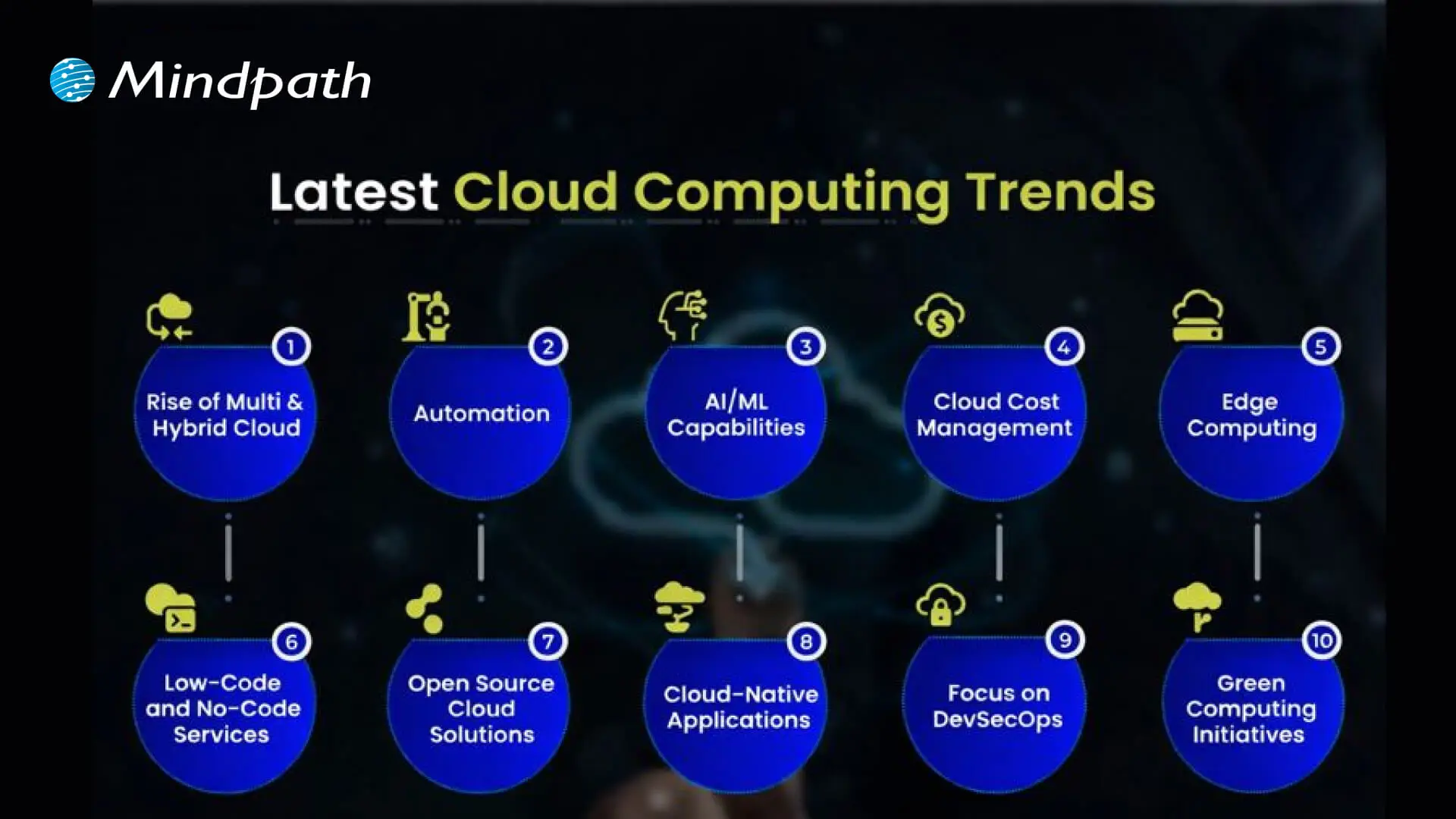
Cloud computing trends

1. Rise of Multi & Hybrid Cloud

Many companies now use a multi-cloud strategy and hybrid cloud approach to run workloads across different cloud providers and their own data centers. This setup lets them combine the strengths of public and private clouds while keeping sensitive data secure. Using multi and hybrid cloud solutions also gives businesses more flexibility and better control over risks.

2. Automation

One of the latest trends in cloud computing is using automation to make systems work faster and more efficiently. Good automation helps teams deliver better results, reduce downtime, and improve overall quality. With better AI tools and user-friendly platforms, cloud providers are making automation easier for everyone to use.

3. AI/ML Capabilities

Better AI and machine learning are becoming the next big thing in cloud computing. Many providers now offer smart tools that help businesses use advanced analytics and automation. These cloud computing trends make it easier to build intelligent applications and boost efficiency without needing deep technical skills.

4. Cloud Cost Management

Managing expenses is a big part of the future of cloud computing as more businesses move to the cloud. New tools and services help companies track and control their spending more easily. These cost management features make it simple to budget, monitor usage, and find ways to save money.

5. Edge Computing

Edge computing is one of the cloud latest trends bringing data processing closer to where it’s created. This helps reduce delays and cuts down on the amount of data that needs to travel long distances. By doing this, businesses can work faster and use their networks more efficiently.

6. Low-Code and No-Code Services

One of the growing cloud services trends is using low-code and no-code tools to build apps faster. These solutions help people create software without needing advanced programming skills. Such cloud computing trends save time and lower development costs for businesses.

7. Open-Source Cloud Solutions

One of the growing cloud computing trends is the move toward open-source cloud solutions. These solutions give businesses more control and flexibility to adjust their cloud setup as needed. Open-source options can also help companies save money compared to traditional cloud providers.

8. Cloud-Native Applications

Building cloud-native applications is an important part of the future of cloud computing. These apps are made to run smoothly on cloud systems and use all the benefits the cloud offers. More tools are now available to help businesses create and launch these apps quickly and easily.

9. Focus on DevSecOps

DevSecOps brings security into every step of software development instead of adding it later. This approach helps teams find and fix issues early, keeping systems safe. Many cloud providers now offer tools that make it easier for businesses to build secure applications from the start.

10. Green Computing Initiatives

One of the important cloud computing trends is the push for greener solutions. Providers are using renewable energy and building energy-efficient systems to cut down on carbon emissions. These efforts help businesses meet their sustainability goals while using cloud services.

Struggling with speed, collaboration, or automation in DevOps? Our DevOps Challenges and Solutions blog explains how modern businesses address these issues.

Which Industries are Adopting Cloud the Fastest?

Many industries are moving to the cloud to work faster and serve their customers better. Companies see cloud solutions as a way to cut costs and stay flexible in a changing market. Let’s look at which sectors are adopting cloud the fastest right now.
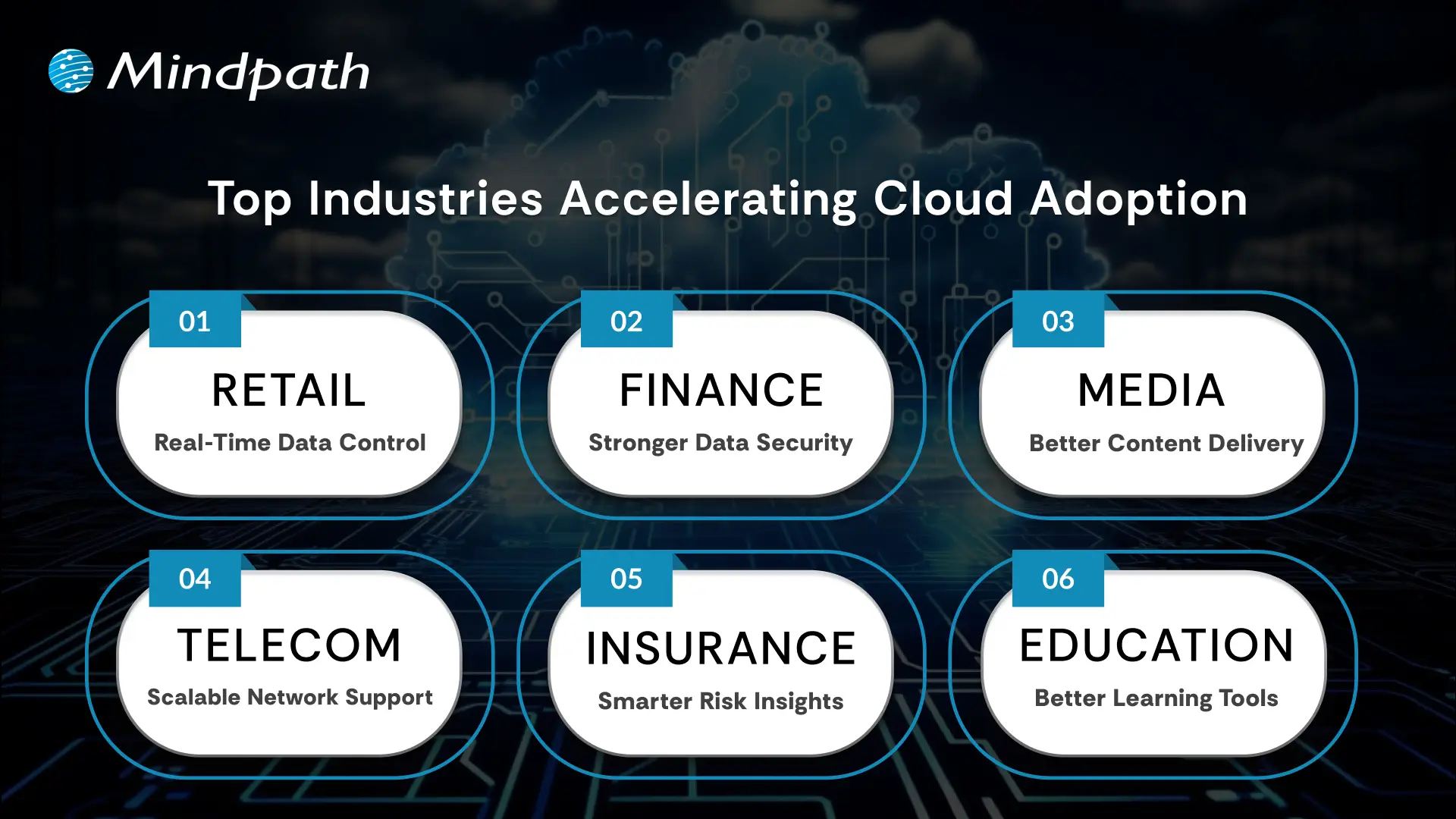
Top Industries Accelerating Cloud Adoption

1. Retail: Real-Time Data Control

Retailers use the cloud to manage sales, stock, and customer data in one system. Real-time updates improve supply chains and marketing campaigns. This boosts profits and keeps work going smoothly.

2. Financial: Stronger Data Security

Banks and financial firms trust the cloud for secure data storage and better protection. They can handle tasks like billing and client help more easily. Better security helps them grow safely.

3. Media: Better Content Delivery

Media companies use the cloud to create, store, and share content worldwide. Teams can work together from different places and finish faster. They handle big audiences without spending more.

4. Telecom: Scalable Network Support

Telecom companies use cloud solutions to manage networks and huge data. This helps them handle changing demands and roll out 5G and IoT services. Cloud computing trends keep people connected and ready for new tech.

5. Insurance: Smarter Risk Insights

Insurance companies use the cloud for flexible data and cost savings. They analyze big data to predict risks and detect fraud early. This helps them stay competitive with better customer service.

6. Education: Better Learning Tools

Schools adopt the cloud to manage tight budgets and get new technology. Teachers and students can share lessons and resources in one secure place. This makes learning flexible and improves teamwork.

Looking for ways to optimize your cloud strategy? Explore our Multi-Cloud Strategy blog to see why businesses are spreading workloads across multiple clouds.

Is Your Business Cloud Ready for 2026?

Staying on top of cloud computing trends can help any business unlock new opportunities, save money, and stay secure. As you’ve seen, trends like automation, AI, green computing, and smart cost management are shaping the way companies grow and compete. Keeping an eye on what’s next means you’re always ready to adapt and make smarter technology decisions.

At Mindpath, we help you stay ahead with trusted cloud computing services designed to match your goals. Our team can support your move to the cloud, help manage costs, and keep your data secure. We focus on delivering solutions that fit your business needs today and tomorrow. Connect with us and see how we can make your cloud journey easier.
Frequently Asked Questions

Choosing the right cloud model depends on factors like data sensitivity, budget, and scalability needs. Businesses should evaluate whether public, private, or hybrid cloud fits their operations best. A clear understanding of workloads and long-term goals helps in making a practical and cost-effective decision.
Common risks include data security concerns, vendor dependency, and unexpected costs. Without proper planning, businesses may face compliance issues or performance challenges. Implementing strong security practices, monitoring usage, and choosing reliable providers can help reduce these risks effectively.
Cloud computing allows businesses to scale resources quickly, launch services faster, and respond to market changes efficiently. It supports innovation by enabling access to advanced tools like analytics and AI, helping companies stay competitive and deliver better customer experiences.
Cloud costs vary based on usage and management. While it reduces upfront investment in hardware, ongoing costs can increase without proper monitoring. Using cost management tools and optimizing resources ensures businesses maintain efficiency while keeping expenses under control over time.
Data security requires a combination of strong encryption, access controls, and regular monitoring. Businesses should follow best practices like multi-factor authentication and compliance standards. Working with trusted cloud providers and maintaining clear security policies helps protect sensitive information effectively.

Support Is One Click Away

Featured Posts

Related Post

augmented staff onboarding

Businesses are in constant need of scaling their IT workforce in the current scenario. This is why many organizations have turned to staff augmentation. It is a viable approach to bring in the external IT experts to work along with your internal teams. As per recent ISACA studies, around 75% of employees are prioritizing hybrid work environments. This has made IT staff augmentation even more powerful.

However, simply hiring augmented professionals is not enough. Without a structured approach, even the most talented developers might struggle to integrate properly with your workflow. In this guide, we will go through some practical steps for staff augmentation onboarding. This can help you successfully adopt remote or hybrid teams while maintaining precise collaboration.

Need a cost-effective way to scale your team with qualified IT talent on demand? At Mindpath, we offer flexible staff augmentation services to help businesses hire top-tier developers and specialists without long-term commitments.

What is Augmented Staff Onboarding and How It Can Upgrade Your Operations?

IT staff augmentation is all about hiring experts temporarily from a third-party organization. Further, the extended team will help your business grow while accelerating the project workflow. They will work under your management while filling the skill gaps.

With proper augmented staff onboarding, you can easily tackle the risks and expenses related to traditional hiring models. A company leveraging these services will match you with all the resources you require for a limited timeframe. Here are the benefits that make staff augmentation an attractive prospect.

1. Minimal Cost

If we compare it to full-scale hiring, augmented staff is a much more budget-friendly solution. Your vendor will cover their recruitment charges and benefits. However, the pricing structure completely depends on the region or the offshore companies you are selecting.

2. Outstanding Productivity

Unlike freelancers or outsourced teams, integrating augmented teams can be managed in real time. You can collaborate with them and encourage your productivity.

3. Global Pool of Talent

With IT staff augmentation, you are breaking the limits of the local talent pool. Further, casting a wider net offers you a better chance of finding skills that exactly match your business objectives.

For your knowledge, an effective onboarding process can upgrade your business productivity by 70%. Organizations with a streamlined onboarding process can boost new hire retention by 82%.

Want to stay ahead of evolving workforce strategies and technology demands? Discover the latest staff augmentation trends that are transforming how businesses scale teams and adopt hybrid work models.

A Detailed Step-by-Step IT Staff Onboarding Process

Integrating augmented professionals into your team needs more than an orientation meeting. So, here is a structured approach to ensure seamless integration of augmented teams into your existing workforce.

1. Define the Roles and Project Expectations

Before the augmented team starts working on your project, you should clearly define your expectations. Moreover, you need to be precise about your project goals and milestones. Make the experts know their individual responsibilities and reporting structure.

Clear expectations can eliminate any type of confusion while allowing your team members to start contributing faster. In the recent scenario, average tech skills are becoming outdated. So, identify their gaps and bring in experts who can make an immediate impact.

2. Prepare the Technical Environment

One of the biggest onboarding delays happens when new employees wait to access new tools and systems. So, before your staff augmentation onboarding, make sure they have access to development environments and other collaboration tools. They should also be aware of your security credentials and permissions.

Offering access to project management tools and collaboration platforms ensures everyone can trace the task and can update the feedback in real time. The new team should be responsible enough to immediately begin exploring the system architecture and your project structure.

3. Conduct a Structured Orientation Session

Orientation can be tagged as the first official step in the remote team onboarding. So, this session should introduce augmented staff to the company’s mission and culture.

You should be vocal about your company’s goals and values. Further, you can discuss the overview of your products or services. Give an introduction to key stakeholders and be sure about the project timelines.

You can also schedule a one-on-one session with the managers or team leads to explain the expectations. This approach will ensure augmented professionals completely understand the bigger picture.

Planning to streamline your recruitment process and onboard experts faster? Check out how staff augmentation hiring enables businesses to quickly integrate skilled professionals into their teams.

4. Introduce Augmented Staff to Your Internal Team

A major challenge in staff augmentation is generating a sense of belonging. So, if your external professionals are not feeling connected enough, the overall collaboration can suffer.

You can introduce your team members through virtual team meetings. Further, you can make informal introductions with your major stakeholders. This is one of the major steps in staff augmentation onboarding as it encourages collaboration.

5. Assign a Mentor or Guide

Assigning a mentor can speed up the learning process. The mentor can help the new members understand the internal workflows. Further, they can answer queries regarding the tools or other internal systems.

A dedicated point of contact can minimize communication gaps, and the augmented staff will also understand who to approach when they find something challenging. This approach can encourage productivity while strengthening collaboration between the internal and external teams.

A professional point of contact can easily fill in the communication gaps, and the external staff will also understand who to contact when they face any issues. This step can upgrade your productivity while strengthening the collaboration efforts.

6. Regarding a Clear Communication Channel

Communication is the backbone of successful staff augmentation onboarding. So, when your team works across multiple regions or time zones, clear communication becomes essential.

To ensure clear communication, define your communication protocols and response expectations. Conduct a meeting and use an individual collaboration platform to assess the doubts of your team. Your organization should also welcome queries and concerns of the augmented staff. In this way, professionals will feel comfortable sharing their innovations or ideas.

Want to optimize your team collaboration while keeping operational costs under control? Discover how cost effective IT staff augmentation helps businesses maintain efficiency and productivity without increasing hiring expenses.

7. Provide Training and Resources

Even experienced professionals or IT specialists need time to understand a company’s internal systems. So, your stretched team should have proper access to your documentation process.

Continuous training and workshops can upgrade the knowledge while making your team understand the overall project environment.

8. Verify Performance and Progress

Your onboarding process shouldn’t be for the first weeks. You should acknowledge continuous feedback to make your external staff know your project needs. Your managers should also check the performance of your team every week. Assess their work and give them reviews for better work processing.

These sessions can help you identify early opportunities to improve collaboration and overall productivity.

9. Follow up on the Onboarding Process

Your business should assess the importance of the onboarding process. Most importantly, consider the concerns and feedback of your internal team. Companies that refine their onboarding strategies over time can scale their augmented teams more effectively while increasing productivity.

Wondering which workforce model best fits your business needs and long-term goals? Learn the key differences between staff augmentation vs managed services to make a more informed decision.

Conclusion

If your business needs quick and scalable IT talent, staff augmentation can be an ideal solution. However, your IT staff onboarding process should be streamlined enough. It can simplify the process while making your augmented teams match the existing workflows.

Companies like Mindpath can help your business upgrade its IT capabilities. Our expert team leverages efficient strategies and streamlined staff augmentation. Our approaches have already been beneficial for many industry leaders. We can be your perfect match for fulfilling the digital transformation your company demands.

Discover best practices for onboarding augmented IT staff, from identifying team needs to seamless integration, ensuring success.
Cloud Computing Trends 2024

Are you curious about how cloud computing will evolve in 2024? What new technologies will shape the way we store, process, and access data? As the cloud landscape continues to grow and evolve, staying updated on these trends is more crucial than ever. In this blog, we will explore the latest cloud computing trends set to redefine the digital landscape this year. 

Cloud computing is the practice of employing internet-based services rather than maintaining everything on your personal computer. Imagine you need to save data, run programs, or use tools, but instead of doing it on your device, you access them over the internet. The real data, such as your files and applications, is stored on large, powerful computers known as servers, which belong to businesses such as Google, Amazon, and Microsoft. They handle everything, so you don’t need to worry about monitoring or maintaining anything. As long as you have internet connectivity, you may utilize everything you need, such as storage or software, at any time and from any location.  

Understanding cloud computing trends is essential for both your career and business. Businesses can pick the finest services and solutions, save money, and increase efficiency by having a thorough awareness of these trends. Staying up to date on what’s new and popular allows you to make better decisions, stay ahead of the competition, and maximize the benefits of the cloud. 

So, let’s dig in to explore the cloud computing trends 2024! 

Cloud Computing Trends 2024

1. Kubernetes and Docker

In 2024, Kubernetes and Docker will be key players in cloud computing. These technologies make cloud application management and deployment easier and more efficient. Docker enables you to organize your program and its dependencies within a lightweight, portable container. This implies that your program can work properly on any platform, including your PC and the cloud. Kubernetes goes a step further, managing and coordinating these containers. It automates processes such as scaling up or down and balancing workloads, ensuring that everything functions smoothly without requiring continual manual changes. As more businesses use cloud computing, Kubernetes and Docker are becoming increasingly important for improving and flexibly delivering cloud services.  

2. DevSecOps

In 2024, DevSecOps will be an essential approach to cloud computing security. It stands for Development, Security, and Operations, and it focusses on implementing security measures from the beginning of the development process. Rather than waiting until an application is complete to check for security flaws, DevSecOps ensures that security is built in throughout. This helps to defend against issues such as hacking, service outages, and unauthorized access to data. Cloud service providers offer tools and services that enable DevSecOps easy to utilize. Businesses may use these technologies to ensure their cloud environments are secure and free of possible dangers. 

3. Disaster recovery and backup

Disaster recovery and backup will be essential in 2024 for ensuring the security of your cloud data. If anything goes wrong—like a server breakdown, a power outage, a natural disaster, a cyberattack, or a hardware failure—having a robust backup strategy allows you to recover your data fast. Cloud computing simplifies this process by keeping copies of your vital data online. This manner, if something occurs to your primary PC, you can swiftly recover everything from the cloud. Many companies automatically store important data and information to cloud servers. This means companies don’t have to worry about losing important information and can keep their operations functioning smoothly even during catastrophes. 

4. Edge computing

Edge computing is changing the way we handle information by bringing it closer to where it originated. This reduces delays and speeds up operations. With the emergence of 5G networks, edge computing is becoming increasingly significant since it enables real-time data processing and enhanced security. Edge computing is becoming increasingly important as more devices connect to the Internet of Things (IoT), allowing for faster data analysis and smoother communications. Edge computing improves speed by bringing data processing closer to the source, ensuring that data is handled safely and effectively. 

5. Internet of Things (IoT)

The Internet of Things (IoT) is a rapidly emerging technological trend. IoT collects massive volumes of data via a network of sensors and devices, which is subsequently stored on cloud servers. This data is analyzed to offer relevant information for making business decisions. IoT connects various devices, computers, and networks, enabling them to communicate and share information. It can collect data remotely and control things from a distance. This smart connection is crucial for IoT’s appeal in cloud computing since it allows for more effective data management and utilization across several platforms. 

6. Low Code and No Code

Low-code and No-code Cloud solutions are transforming the way we develop applications by making it easy for anybody, not just experts, to create software. These platforms enable people to create apps and employ AI technologies with minimum technical knowledge. Instead of writing large amounts of code, you can quickly develop and launch projects using simple, user-friendly tools. This speeds up the development process, reduces errors, and makes technology more accessible to a larger audience. Users can easily construct apps using popular tools like Figma and Zoho, without having to maintain complex coding systems. 

7. AI and ML

Artificial intelligence (AI) and machine learning (ML) are leading cloud computing trends. These technologies demand a significant amount of computing power and storage to manage data and train models, but they also provide strong and cost-effective solutions. In 2024, we can expect AI and machine learning to drive trends such as self-automation, which allows systems to handle themselves, and personalized cloud services that adapt experiences to individual demands. These technologies will also enhance data security and privacy. Major technology businesses, such as Amazon, Google, and IBM, are aggressively investing in AI and machine learning. Amazon’s AWS DeepLens and Google Lens, for example, make use of machine learning to provide enhanced capabilities and improve user experiences. 

Cloud Computing at Mindpath

Mindpath’s cloud computing platform enables businesses to leverage advanced technologies without having to handle it all themselves. Mindpath provides a variety of cloud services that allow you to conveniently and securely store data, execute programs, and access resources online. 

Our cloud solutions are intended to be adaptable and scalable, allowing them to expand alongside your organization. Whether you need to back up important information, operate complex apps, or optimize your IT infrastructure, we have you covered. We guarantee that everything goes smoothly and securely, enabling you to focus on what is most important to your organization. 

Final Thought

As we look ahead to 2024, the cloud computing world is full of intriguing possibilities. Keeping up with these trends is essential from the rising relevance of Kubernetes and Docker in application management to the creative breakthroughs in AI and ML that are creating smarter, more secure solutions. Edge computing and IoT technologies are changing the way we manage and process data, while low-code and no-code platforms make app creation easier than ever. 

At Mindpath, we are dedicated to assisting organizations in navigating these changes and realizing the full potential of cloud computing. Our cloud solutions are adaptable and scalable to match your demands, whether you want to strengthen your IT infrastructure, secure your data, or innovate with cutting-edge technology.  

Ready to Transform Your Cloud Experience?

Dive into cutting-edge technologies with Mindpath’s tailored solutions and keep your business ahead in 2024.

Openai fine tuning api tutorial

In current times of generative AI, prompt engineering is not sufficient to address the requirements of advanced applications. There is a need among content strategists, developers and product teams to have models that can be used to analyze domain-specific language and provide a uniform output. And that is where OpenAI’s fine-tuning tutorial comes in to guide developers through the complicated process of training various models. From healthcare to legal tech, fine-tuning has enabled customization of pre-trained models, opening new opportunities in AI-powered solutions. This blog will allow you to know more via a simple OpenAI fine-tuning API tutorial, as well as some OpenAI fine-tuning examples. We will also talk about why it is crucial for developers. 

Ready to use customised AI models that align precisely with your business data, goals, and customer expectations? Mindpath’s AI development services provide end-to-end solutions from design to deployment.

OpenAI’s Fine-Tuning – What is It All About?

Let’s begin this OpenAI fine-tuning API tutorial by understanding the basics, i.e, what OpenAI fine-tuning is. 

OpenAI models such as ChatGPT are trained on huge web-scale datasets and designed to perform across different domains. However, for specialised use cases, technical support, expert reasoning, or legal context analysis, these models need more targeted control.

OpenAI fine-tuning is a customization process that lets developers take a pre-trained model (like GPT-4o) and train it on a custom dataset using task-specific prompt-response pairs — teaching the model to consistently follow custom instructions, adopt a specific tone, or stick to a rigid formatting style without needing lengthy, repetitive prompts.

The OpenAI fine-tuning API makes this possible by enabling developers to train base models so they acquire new skills and behaviours based on business needs. Regardless of whether you are building a personalized chatbot, advanced summarisation systems, or scaling content generation, fine-tuning provides you with accuracy, performance, and control.

Importance of OpenAI Fine-tuning for Developers

The OpenAI fine-tuning API tutorial focuses on the crucial nature of AI model fine-tuning. Fine-tuning ChatGPT is an essential strategy for developers aiming to create custom AI solutions. By customizing models, they make those models offer more consistent and smarter outputs. The following are a few points that explain why fine-tuning is a necessity for every developer.

1. Better Relevance and Accuracy

For all domain-specific queries, fine-tuned models will perform better compared to generic models. They will offer more contextually relevant and accurate responses.

2. Reduced Cost and Latency

Fine-tuned OpenAI models are more efficient. How? Well, they can attain better results with fewer prompts, lowering token usage. Besides, it leads to a faster response time. 

3. Consistent Communication Style and Tone

Wouldn’t it be great if your AI model could speak just like your brand? You can make that a possibility with fine-tuning. You will be able to train the model with specific style, vocabulary and voice such that the outputs match the brand identity.

4. Enhanced Format Handling

If your application demands outputs in a specific reporting format or JSON structure, fine-tuning ensures the model follows those requirements. 

5. Robust Safety and Control

By training your AI models on domain-safe and curated data, you can reinforce desired behaviour. This, in turn, will significantly reduce the risk of harmful or off-brand responses. 

6. Unlocking New Opportunities

Fine-tuning OpenAI models can be used for multiple applications. Developers can train models to manage tasks, prioritizing expertise and specific interaction styles. 

Curious about the concepts that make AI models like OpenAI’s so powerful? Explore the attention mechanism explained, which shows how attention transforms the way models understand and generate data.e

OpenAI Models Developers Can Fine-Tune for Custom Tasks

As described in this OpenAI fine-tuning API tutorial, the fine-tuning API allows developers to fine-tune various advanced models, increasing their capabilities. Now, let’s have a look at the OpenAI models that can be fine-tuned for specialized applications. 

1. GPT-3.5

Undoubtedly, GPT 3.5 is a top choice among developers. Some major reasons behind this popularity are cost-effectiveness and low latency. Fine-tuning this model allows developers to reduce the complexity and increase consistency. Product recommendation guides, FAQ bots and customer service automation are some of the common uses of GPT 3.5.

2. GPT-4o

This is OpenAI’s flagship multimodal model. It can process images, audio, videos, and text. This model offers users advanced customization features without losing speed and efficiency. It can be optimized by the developers for domain-specific tasks that demand enhanced textual as well as visual comprehension. Financial document analysis and advanced customer support bots are some common OpenAI fine-tuning examples centered on GPT-4o.

3. GPT- 4.1

This OpenAI model is created to handle multi-step tasks, structured problem-solving and extensive reasoning. It is a perfect option for complicated processes. Fine-tuning this model allows developers to introduce the tools capable of adhering to the domain-specific formats, which makes them a great choice in case of technical planning or automating research.

4. O-Series Models

O-series models are based on GPT-4o and are optimized for efficiency and performance. You can use these models for tasks where GPT-4o’s functionality may be excessive. These models can be fine-tuned to be cost-effective and scaled to a large extent without reducing their accuracy. They come in handy with several industry-specific applications in sectors like SaaS, legal tech, and healthcare.

Wondering how large language models work behind the scenes? Explore the Large Language Model (LLM) detailed guide to discover the foundations of AI that make fine-tuning possible.

Tips to Use Open-AI Fine-Tuning API Effectively

The OpenAI fine-tuning API tutorial can provide useful information on the optimization methods of AI models. These practices can improve mode reliability if utilized in the right manner. Here are some best practices to consider for effective fine-tuning.

1. Data Quality

It’s obvious! The AI models will not be capable of providing precise results without clear, well-constructed, and relevant datasets.

2. Right Model

As mentioned above, only a few OpenAI models can be fine-tuned. For instance, GPT-3.5 or GPT-4o.

3. Tune Hyperparameters

Experiment with batch sizes, training cycles, and learning rates. This will help you find the right configuration. 

4. Evaluate Regularly

Properly monitor progress, identify overfitting, and optimize the training approach. 

By focusing on all these factors, developers can fine-tune OpenAI models with confidence. This is the foundation for fine-tuning ChatGPT or other models for tailored applications that can offer precise results.  

Want to know how fine-tuned AI models can improve business decisions? Explore AI in decision-making to discover how intelligence-driven insights optimize strategy and operations.

When to Fine-Tune vs When to Use Prompt Engineering?

This is a common question that most developers would ask when learning OpenAI fine-tuning API concepts. After all, choosing between prompt engineering and fine-tuning is a vital decision for every developer creating AI-powered tools. Let’s break it down. 

Begin With Prompt Engineering

Well, for most use cases, prompt engineering can be an ideal option. A well-developed system prompt, combined with clear instructions and examples, can enable a generic AI model to perform efficiently. In fact, they can attain around 80 to 90 percent task accuracy. Moreover, prompt engineering is cost-effective, fast, and there is no need to maintain a custom model for it. It is also ideal for low-volume tasks and prototyping.

Scenarios Where Fine-Tuning Actually Makes Sense

Based on this OpenAI fine-tuning API tutorial, we can state that in cases where you need to be more consistent and in control, fine-tuning makes a great choice. You can consider it when:

  • You want a consistent style and tone format in communications.
  • You wish to decrease the cost of the API.
  • The existing model offers irrelevant output that can be resolved through curated examples. 
  • You want to enhance the AI model’s ability to accurately process complex instructions. 

Fine-tuning is a major investment. It requires time for accurate data preparation and training costs. However, the long-term results are really impressive. Wondering how? Well, when you learn fine-tuning API methods, you can easily unlock the ability to boost the model’s efficiency, reliability, as well as performance.

Looking to understand where AI is headed next? Discover generative AI trends to explore emerging applications and practical use cases of intelligent systems.

Custom AI: The Future We Will Witness Soon

OpenAI’s fine-tuning API clearly shows a significant leap in making modern AI models bespoke and adaptable. It offers developers who want to go beyond what general AI does the means to add specific domain experience, brand voice, and intelligence to the models. This OpenAI fine-tuning API tutorial proves that it will unlock the next generation of custom AI models.

If you want to join the trend and enhance your business’s functionality with custom AI solutions, you can always count on Mindpath. We provide AI development services that help organizations develop as well as fine-tune their AI foundation models. Our team helps you align AI models with your workflows and domain-specific data. Partner with us today and build a custom AI solution to support your business growth. 

Frequently Asked Questions