How to Convert HTML to WordPress? (Step by Step Guide)

Join our Newsletter!

Featured Posts

Support Is One Click Away

Home

How to Convert HTML to WordPress? (Step by Step Guide)

convert html to Wordpress

How to Convert HTML to WordPress? (Step by Step Guide)

The transition from purely text-based web experiences to interactive websites has been possible due to WordPress. It is the most powerful content management system that has made it easier for anyone to create and manage websites. Therefore, businesses want to convert HTML to WordPress websites and capitalize on its benefits. Does that mean an end to the dominance of HTML in website development?

HTML is still here, with HTML5 offering a promising tool to build high-quality websites without a content management system. However, the rising adoption of WordPress indicates that more people are switching to the CMS platform for its diverse advantages. You have arrived at the right place if you want to switch your HTML website to WordPress. 

Want to convert your HTML site to WordPress but don’t know where to start? Hire expert WordPress developers from Mindpath who assist every step of the way to ensure a smooth HTML to WordPress conversion.

Is it Right to Convert Your Website to WordPress?

The thought of converting your HTML website into WordPress might have given you sleepless nights. You can overcome all doubts regarding the utility of WordPress for your website by learning about its benefits. With a HTML to WordPress converter service, you can transition to a dynamic web presence. WordPress offers more flexibility for modifying the content and design of your website without coding skills. You have the final say in deciding the appearance and functionalities of your website with complete control over design and features.

The biggest strength of WordPress is dynamic content management which removes the burden of writing markups for each page. On top of it, you will find an extensive library of themes and plugins that allow you to change designs and introduce new features in your website. Another prominent reason to embrace WordPress over HTML is the support for search engine optimization with different SEO plugins. As a result, you can not only create and manage websites with WordPress but also ensure that they rank well on search engines.    

Still wondering why businesses prefer converting static HTML websites into WordPress?
Explore the key benefits of converting HTML to WordPress and discover how it improves scalability, performance, and content management.

How Can You Switch to WordPress from HTML?

Once you have decided to convert your HTML website to WordPress, you have three options. The primary objective in each process revolves around changing your HTML design to WordPress theme, which will give it the look and experience of a WordPress website. You can choose any process depending on the time you have, personal preferences, coding skills and amount of money you want to invest. 

1. Manually convert HTML websites to WordPress themes.

2. Use the WordPress Child Theme to convert HTML to WordPress.

3. Import content to WordPress from HTML sites with plugins.

Before finding the best HTML website to WordPress converter tool, you must keep some prerequisites in mind. The foremost things you need to take into account are the time and budget you have for the conversion process. If you want quick results, then hiring professional developers will help albeit with a burden on your budget. 

The other important requirements for the transition from HTML to WordPress include a code editor and hosting service. You must choose a suitable code editor that can help in modifying HTML code of your website according to WordPress guidelines. Similarly, you should pick a hosting service that fits your requirements and delivers credible services. 

Must Read: WordPress vs Drupal

Converting Your HTML Website to WordPress Manually

You are a traditionalist if you want to create a WordPress site for your HTML website from scratch. The traditional approach to converting HTML to WordPress may seem intimidating to many people. However, it is not that difficult once you know each step of the process, and you can get things done without advanced technical knowledge.
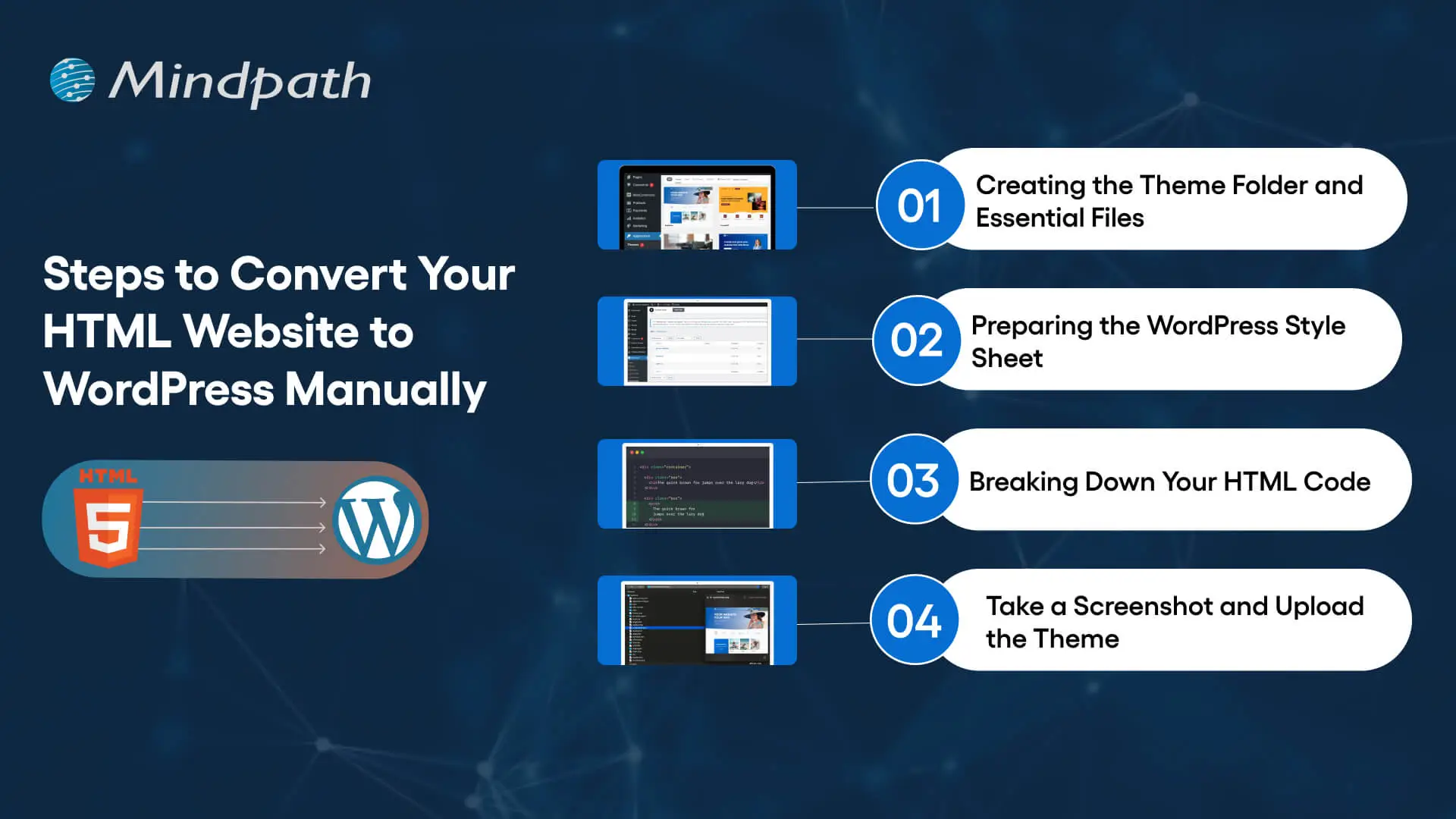
Steps to Convert Your HTML Website to WordPress Manually

Step 1: Creating the Theme Folder and Essential Files

You can begin the conversion process by creating a new theme folder on your desktop. You can follow the same process as you would for creating another directory on your system. Once you have created the theme folder, you can give it a specific name as per your requirements. 

After creating the theme folder, you must open the code editor and create different text files. You can name them as ‘style.css’, ‘index.php’, ‘sidebar.php’, ‘footer.php’, and ‘header.php’. 

The number of files you have to create in this step will depend on the features and design you want in the WordPress theme. You don’t have to do anything else with the files in the code editor now and keep the code editor open as we will need the files in the next step.

Step 2: Preparing the WordPress Style Sheet

You can start the actual preparations for converting your HTML website to WordPress with the WordPress style sheet. Do you remember the ‘style.css’ file you left open in the code editor in the first step? Open it and paste the important details in the style sheet header enclosed within “/*” and “*/”. 

Any guide on HTML to WordPress converter online will focus on the details provided in the style sheet header. The important information included in the style sheet header includes the theme name, theme URI, author name, author URI, description and version. In addition, the style sheet header must also specify license details and tags, which are crucial requirements to add your theme to the WordPress theme directory. 

After providing the essential details in the header, you have to copy and paste the CSS of your HTML website. Make sure that you save the ‘style.css’ file in the theme folder you have created and then close it. 

Is a basic WordPress setup enough to support your growing business needs?
Read more about custom WordPress development and discover how tailored solutions can enhance functionality and user experience.

Step 3: Breaking Down Your HTML Code

One of the most important things you must know about WordPress is that it leverages PHP to extract information from its database. Therefore, you have to break down the existing HTML of your website into different pieces. It will help WordPress put them together in the right way. 

This part of the process of converting HTML to WordPress may seem challenging to beginners. However, it is extremely simple as you have to copy different parts of the HTML document and paste them into different PHP files. Do you remember the PHP files created in the code editor in the first step? They will play a crucial role in this step of the HTML to WordPress conversion process.

You have to open the main file of your HTML website, or ‘index.html’, and copy its content into different PHP files. After copying, you must save the ‘index.php’ file and close it to add the theme to your WordPress website.

Step 4: Take a Screenshot and Upload the Theme

The theme screenshot is a valuable resource that offers a preview of the backend of your WordPress website. It is also important to note that the theme screenshot will also include information from the style sheet header. You cannot convert HTML site to WordPress without knowing how your website works in the WordPress backend. 

Contrary to your assumptions, you don’t have to follow a complex process to take the theme screenshot. You can open the existing HTML site in a browser and take a screenshot with any method you want. After taking the screenshot, you can use an image editing software to crop the screenshot image to 880×660 pixels. Once you save the screenshot as a ‘screenshot.png’ file in the theme folder, you can upload the theme. 

The process to upload your WordPress theme starts with the WordPress Admin Dashboard. You should access the “Appearances” section, where you will find the “Themes” option. Now, you must click on “Add New” and then choose the “Upload Themes” option. Find the theme folder and click on “Install Now,” followed by activating the theme. 

Are you unsure if your website development project is on the right track? Discover our WordPress developer checklist to ensure every critical step is covered for a smooth and successful website launch.

How Will Your WordPress Theme Become More Responsive?

Switching your HTML website to a WordPress theme alone is not enough to get the best results. Anyone who knows how to download WordPress can follow the manual process and get their website on the CMS platform. However, you must also ensure that your website will look good and function seamlessly across all devices. The solution to such problems lies in creating a responsive design, and you can make it happen with a few crucial steps.

First of all, you should choose a responsive framework like CSS or Bootstrap. These frameworks not only save your time but also ensure an effective design that aligns with tested principles. You should also use flexible images to ensure that they don’t pop out of the boxes on mobile devices. In addition, CSS media queries can help you detect small screen sizes, and you should use a mobile menu that offers clean navigation on mobile screens. 

Want to make sure your WordPress website runs seamlessly with the latest technology? Discover how WordPress PHP compatibility can protect your site and enhance its performance.

Final Thoughts

You have decided to convert an HTML website to WordPress to capitalize on the benefits of the most popular CMS platform. With big brands choosing WordPress for their websites, it is reasonable to pick the platform for revamping your website. The manual process of converting HTML-based websites to the WordPress theme is extremely simple and easy to follow. At the same time, you must also ensure that your new WordPress website features a responsive design and works effectively on all devices.

Mindpath has been a pioneer in helping businesses transition to WordPress from outdated formats. We are the trusted specialists in WordPress development with a successful record in empowering websites for the modern business landscape. Our expert WordPress developers conduct comprehensive site analysis and develop custom themes that align with your design needs. With Mindpath at your service, you don’t have to worry about content integration or CMS integration. Consult with our experts and switch to WordPress right now.
Related Post

Unlock the benefits of modernizing legacy systems, from increased productivity to growth, with Mindpath’s expert solutions.

Related Post

Top Skills to Look for When Hiring Node.js Developers in London
When hiring Node.js developers in London it’s important to ensure they possess the right technical skills and experience. The following skills are crucial for building scalable, efficient, and secure applications using Node.js.

1. JavaScript Fundamentals

A solid foundation in JavaScript is required for any Node.js developer. Since Node.js is based on JavaScript, developers should be familiar with fundamental concepts such as closures, scopes, promises, and asynchronous programming. Proficiency in these ideas enables developers to build clean, efficient, and error-free code, resulting in peak application performance.

2. Node.js frameworks

Developers should be familiar with popular Node.js frameworks such as Express, NestJS, and Koa. These frameworks make programming easier by including powerful capabilities for routing, middleware management, and security. The framework of choice is frequently determined by project requirements; therefore, developers should be able to work with a variety of technologies to meet your needs.

3. Database Management

Node.js developers should be familiar with databases such as MySQL, MongoDB, and PostgreSQL. They must be knowledgeable with database architecture, query optimization, and effective data storage and retrieval methods. Understanding both SQL and NoSQL databases is essential for dealing with a wide range of data types and developing dependable, high-performing applications.

4. API Development

The ability to design and implement strong RESTful APIs is essential for Node.js developers. APIs are required for linking different portions of a program and allowing communication with external services. Developers should have prior expertise designing efficient, scalable, and secure APIs that match the demands of your company and customers.

5. Asynchronous Programming

Understanding asynchronous programming and how the Node.js event loop works is essential. Developers should be able to efficiently manage concurrent activities by leveraging callbacks, promises, and async/await. This guarantees that apps stay responsive even under high traffic or while dealing with enormous amounts of data.

6. Security Best Practices

Node.js developers must understand security best practices including input validation, data sanitization, and safe coding strategies. These techniques assist avoid common vulnerabilities like SQL injection, cross-site scripting (XSS), and cross-site request forgery (CSRF), assuring application security and user data protection.

7. Source Control

Proficiency in using Git for version control is essential for any modern developer. Node.js developers should be familiar with Git workflows to manage code changes, collaborate with team members, and track the history of project updates. Using Git ensures that the development process is smooth, organized, and efficient, even in large teams.

Looking for Skilled Node.js Developers in London?

At Mindpath. our Node.js developers bring expertise in JavaScript fundamentals, popular frameworks, database management, API development, asynchronous programming, security best practices, and version control.

Get in touch with us!

Check out our detailed blog on how much it costs to hire Node.js developers in London to better plan your budget. 

Look for JavaScript skills, Node.js frameworks, database knowledge (SQL/NoSQL), API expertise, security practices, and Git proficiency.
reactjs developer skills

The advantages of ReactJS have made every business owner think about its utility in developing web projects. It is the most powerful and commonly used JavaScript library for creating intuitive interfaces. If you want React developers in your team, then you must know the ReactJS developer skills that you should look for in candidates.

The declarative approach and component-based architecture of ReactJS have revolutionized front-end development completely. Knowing what skills to look for saves time and hiring costs. The right developer brings structure, speed, and scalability to your project. In this article, we break down the core ReactJS developer skills every successful web project depends on.

Want to hire ReactJS developers for your next web project? Explore more on Mindpath’s React JS development services to get expertise in developing a web application aligned with your business goals.

Discovering the Skillset of Expert ReactJS Developers

The general assumption about the skillset of ReactJS developers is that they know how to work with React. However, fluency in React itself is not the only addition in the React skill set for any developer. React developers must have a broader skillset beyond the library to craft impactful web projects. The following skills can help business owners identify the best React developers for their next web project.

1. HTML and CSS

The foremost addition in a list of ReactJS skills is the combination of HTML and CSS, which play a crucial role in organizing the styling of the web experience. React developers must know the concepts of semantic HTML and how to use the right HTML tags for better SEO and accessibility. ReactJS developers should have an in-depth understanding of the fundamentals of CSS, such as selectors, CSS Grid, responsive design principles, and the box model.

Apart from CSS fundamentals, the essential React skills for developers also include knowledge of CSS preprocessors and frameworks. Developers can use the pre-processors to streamline styling workflows and improve ease of maintenance in larger projects.

2. JavaScript ES6

JavaScript ES6 or ECMAScript 2015 brought many interesting features to the domain of modern web development. When you hire React developer for the next web project, you should check their level of fluency in JavaScript ES6. The distinctive features of JavaScript ES6, such as arrow functions, template literals, and ES6 classes, make React web development more efficient. For instance, arrow functions can ensure simpler syntax for functions and intuitive management of the context.

ReactJS developers must know how to leverage ES6 classes for a more structured use of JavaScript along the lines of component-based architecture. Developers can also use features like template literals to embed expressions in strings, thereby creating cleaner code.

3. Event Handling and DOM Manipulation

The virtual DOM in React is one of its distinctive features. All the listings for React JS developer jobs showcase the necessity of learning about DOM manipulation. At the same time, you must know that direct DOM manipulation is not required in React. On the other hand, developers must know the process through which the browser renders and interacts with the Document Object Model. DOM manipulation is required in scenarios where you want to build interactive and dynamic user interfaces.

Another crucial addition among skills required for ReactJS developer is event handling. It focuses on responding to different user events through event listeners and callback functions. Therefore, React developers must know the fundamentals of event delegation, capturing, and bubbling.

4. Git

You cannot think about hiring React developers who don’t know how to work with Git, the most popular version control system. Git helps in promoting team collaboration and source code revision management to ensure efficiency in the development lifecycle. ReactJS developers must know the fundamental concepts, such as commits, repositories, branches and merges. On top of it, developers must also know how to work with branching strategies, hosting platforms of Git and conflict management.

Git is a promising tool for frontend development with React as it provides the ideal foundation for collaborative development. Developers who know how to work with platforms like GitLab and GitHub can ensure better efficiency in team collaboration, project management and code reviews.

Must Read: Cost of Hiring ReactJS Developer

5. Redux

The list of technical skills you should search in the profiles of ReactJS developers also includes Redux. It is a specialized library used for state management in larger and more complex React applications. The cost of hiring ReactJS developers is justified when you notice how fluency in Redux can offer credible benefits to your web projects. The most promising features of Redux include centralized state management, application scalability and predictable state updates.

Redux works with a single storage for all states of an application, thereby ensuring consistency in management of state transition. Efficient state management also serves as a catalyst for easier scalability and managing increasing complexity without vulnerability to bugs. Centralized state management with Redux also ensures predictability in the behavior of your web applications, thereby facilitating easier maintenance and debugging.

6. JavaScript XML or JSX

Every ReactJS developer must know how to work with JavaScript XML or JSX. It is also one of the notable additions among react developer must-have skills as it serves a critical role in ensuring simpler development and management of UI components. JSX helps developers write HTML-like structures in JavaScript, offering a seamless blend of markup and JavaScript logic. JSX also provides an easier solution for creating and managing the user interface components of their web applications.

The other notable applications of JSX include data and logic integration. JSX can help in injecting data and logic directly into the UI, thereby ensuring dynamic content rendering, required for modern web applications. On top of it, the declarative nature of JSX ensures that the code is easily readable and accessible for debugging.

7. React Hooks

Professional ReactJS developers must also have strong command on React Hooks, a revolutionary feature for state management. Hooks have introduced new perspectives on managing React features in functional components. It is one of the essential ReactJS developer job skills and aspiring developers must know about the important hooks they must learn to create web applications.

The notable React Hooks that a developer must know include ‘useState’, ‘useEffect’, ‘useRef’ and ‘useContext’. Each hook serves a distinct function such as providing direct access to DOM elements or managing component-specific state. On top of it, ReactJS developers must know how to create reusable logic through custom hooks.

8. Testing, Debugging and Performance Optimization

The most important skill that you can find in expert React developers is testing and debugging skills. You can find answers to “why hire React developers?” in their skillsets that focus on comprehensive testing to create robust apps. The notable testing methods include unit testing, that involves testing the individual components independently or integration testing. React developers must also know how to work with debugging tools and browser developer tools to inspect the code.

Apart from testing and debugging, React developers must also know the best practices for performance optimization. Skilled ReactJS developers can use different techniques such as virtualization, code splitting and bundle size optimization to craft responsive applications.

Want to improve your application’s speed without increasing development time or infrastructure costs? Discover how optimizing React performance benefits business owners looking for efficiency and ROI.

Mandatory Soft Skills

Most of the discussions about skills of ReactJS developers focus only on the technical skills. Choosing a React JS development service for capitalizing on the expertise of skilled developers also requires attention to soft skills. You need developers who have the capabilities for critical thinking and problem-solving with efficient solutions. React developers must have skills for clear and concise communication that empowers them to work in collaboration with other teams.

React developers should also have attention to detail for crafting intuitive user experiences and writing code without bugs. Most important of all, ReactJS developers should strive to learn continuously and improve their skills to stay updated with emerging technologies and recent ReactJS trends.

Are You Hiring the Right ReactJS Developer for Your Project?

Choosing the wrong developer costs more than just time. The right ReactJS skills decide whether your web project scales or struggles long term. Businesses that hire with clarity build faster, iterate smarter, and deliver better user experiences consistently. Knowing exactly what to look for puts you ahead from day one.

The thought of hiring a developer from a reputed ReactJS development company might seem like a challenge. Interestingly, you can find the best ReactJS developers at Mindpath for your next web project; they help you build modern web solutions. The notable technical skills of React developers include knowledge of HTML and CSS, JSX, JavaScript ES6, React Hooks and direct DOM manipulation. On top of it, ReactJS developers must also have soft skills such as communication, adaptability, critical thinking and problem-solving. Learn how to pick the best ReactJS developers for your web projects now.

Frequently Asked Questions

1. How many years of experience should a ReactJS developer have before hiring?

Experience years alone do not define a good ReactJS developer. A developer with two years of focused React JS developer skills and strong project exposure often outperforms someone with five years of scattered experience. Always prioritize skill depth over tenure.

2. What is the difference between a ReactJS developer and a full-stack developer?

A ReactJS developer specializes in building front-end interfaces using the React library. A full-stack developer handles both front-end and back-end development. For projects that demand high-quality UI performance and speed, hiring a dedicated React specialist usually delivers better and more focused results.

3. How do ReactJS developer skills impact the overall cost of a web project?

Developers with stronger ReactJS developer skills write cleaner, more efficient code from the start. This reduces bug fixes, rework, and long-term maintenance costs significantly. Investing in skilled developers upfront is always cheaper than correcting poor development decisions midway through a project.

4. Is ReactJS still relevant for web development in 2026?

ReactJS remains one of the most widely used and actively maintained JavaScript libraries in 2026. Its component-based architecture, strong community support, and compatibility with modern tools keep it highly relevant. Businesses building scalable, fast, and interactive web applications still rely on React heavily.

5. Can a ReactJS developer work on mobile app projects as well?

Yes, ReactJS developers can transition into mobile development using React Native, which shares similar principles. However, mobile and web development require different performance considerations and design approaches. Businesses should clarify project scope upfront to ensure the developer has the right experience for both platforms.

Find out what makes a great ReactJS developer! Explore core skills like component-based architecture, hooks, state management, and more.
AI in business strategy

Think about the potential of AI in business strategy, accelerating your organization with enhanced insights and improved decisions. Imagine having intelligent tools to assess complex data, identify unseen patterns, and let your team have more freedom to genuinely innovate and grow. By adopting the right mindset, companies today are giving themselves a true competitive advantage with AI and changing every aspect of their operations daily.

This intelligent technology is helping companies find new opportunities, create more relevant customer experiences, and briskly adapt to changes in market needs. Embedding artificial intelligence benefits organizations to yield positive results. When used prudently, AI becomes a trusted partner in increasing efficiencies and establishing long-term, viable success.

In this article, you will learn about how AI can transform your strategy and scale your business. Let’s dive in!

Want to enhance your business strategy with artificial intelligence? Mindpath AI development services have a combination of providing strategic insights with hands-on expertise to provide intelligent growth across your organization.

What is an AI Business Strategy?

A business strategy is like an explicit blueprint that directs a company toward its goals. It answers important questions about where a business wants to go, how it plans to get there, and what makes it different from the rest of the marketplace. A clear strategy helps everyone understand the overall objective of the business and keeps colleagues headed in the right direction while working together.

Bringing AI into the plan strengthens the marketing strategy. An artificial intelligence strategy or AI strategy for business growth means using artificial intelligence to better facilitate your business objectives. This could mean improving customer service, making more effective decisions with your data, or even many other entirely distinct initiatives. The aim is to leverage smart tools to execute better, smarter, faster, while staying ahead of your competition.

Also Read: AI in E-Commerce

Benefits of an AI Business Strategy

Having an AI business strategy can open up new opportunities and make your company more competitive. Here are some key benefits that show why investing in AI is worth it:

benefits of an ai business strategy

1. Maximized Efficiency and Productivity

AI can take care of repetitive work, so teams can spend more time on creative ideas and solving problems. It makes daily tasks easier and quicker, which improves workflow in every department. By spotting delays and gaps in processes, AI helps companies get things done faster. This boost in productivity helps businesses stay competitive. Companies can do more with less time and effort when using AI in business.

2. Smarter Data-Driven Decision Making

Using AI in business helps leaders make better decisions based on real data. AI tools can study huge amounts of information and find trends or risks that people might miss. This means managers can act faster and with more confidence. Predictive tools even help businesses see what customers might want next. Smart decision-making is key to staying ahead in a changing market.

You can learn more about how AI can transform decision-making in our guide, Power of AI in Decision-Making.

3. New Opportunities and Innovation

AI encourages companies to try new ideas and find fresh ways to earn money. It supports innovation by helping teams develop new products or enter new markets. With AI, companies can test different ways to work and reach more people. This can create new income streams and keep a business strong in tough markets. Staying open to new ways of working keeps the company growing.

4. Superior Customer Experience

AI for customer service makes it easier to understand what customers like and want. Businesses can offer more personal services, like tailored suggestions or special offers. Chatbots and AI tools give customers quick answers, anytime they need help. This keeps people happy and more likely to come back. Good customer service is always important, and digital transformation with AI makes it even better.

5. Clearer Strategic Direction

AI business strategies help companies plan for the future with clear data. Teams can set better goals because they know what is working and what needs to be changed. AI tools keep an eye on the market and help businesses adjust plans when needed. This makes it easier to stay on track even if things shift. A strong strategy backed by AI keeps everyone moving in the same direction.

Want to know if your business is ready to implement AI in the right way? Explore our blog – AI Readiness Checklist.

How to Build an AI Business Strategy?

Building an AI business strategy takes careful planning and clear goals. Here are some practical steps to help you get started the right way:

How to Build an AI Business Strategy

1. Define Clear Business Goals

Start by deciding what you want to achieve with AI, like increasing sales, lowering costs, or improving customer service. Clear goals strategized by the expert AI consultant help you focus your efforts where they matter most. Knowing what you want makes it easier to pick the right AI tools later. A strong direction keeps your entire team aligned and motivated.

2. Spot the Best AI Opportunities

Look at your daily operations and see where AI can add the most value. This might be in customer support, marketing, supply chain, or product development. Finding the right areas will help you get quick wins and build confidence. Prioritizing these areas makes your investment more effective.

3. Get Your Data Ready

Good data is the foundation for AI success. Collect useful data from different parts of your business and make sure it’s accurate and well-organized. Clean and reliable data will help your AI tools work properly. Better data means better insights and fewer errors down the road.

4. Select Suitable AI Technologies

Explore the AI tools that match your goals and the type of data you have. This could include machine learning, chatbots, or automation software. Choose technologies that are practical and align with your strategy. Pick tools that your team can actually use and manage well.

5. Build or Adopt AI Models

Develop AI models that fit your business needs, either with your own experts or trusted partners. Some companies build custom models, while others use ready-made solutions. Test your models to make sure they perform well in real-world situations. Good models help you solve problems faster and smarter.

Ready to adopt the recent AI trends into your business? Read our detailed blog on Top AI trends, which provides a deeper understanding of how to implement AI into your business for future growth.

6. Connect AI to Your Systems

Make sure your new AI tools work smoothly with your current software and workflows. This may need teamwork between IT, data, and business teams. Good integration helps people use AI with less hassle. Seamless systems keep operations running without major disruptions.

7. Track and Improve Performance

Keep an eye on how your AI strategy is working post-implementation. Use regular checks to fix any issues and update the system with fresh data. A little maintenance keeps your strategy useful and accurate over time. Monitoring helps you spot new opportunities for improvement too.

8. Follow Ethics and Regulations

Think about the rules and responsibilities that come with using AI. Protect customer privacy and make sure your AI solution doesn’t create unfair bias. Stay up to date with local and international laws. Acting responsibly builds trust with customers and partners.

9. Support and Train Your Team

Help your team learn how AI fits into their work. Offer training so they feel comfortable using new tools and workflows. Encourage them to ask questions and share feedback. Well-trained employees make AI adoption smoother and more effective.

10. Measure Results and ROI

Decide which numbers will show if AI is really helping your business. This might be cost savings, higher sales, or better customer feedback. Keep tracking these results over time to see progress. Proving ROI makes it easier to get support for future AI projects.

11. Keep Evolving Your Strategy

Treat your AI business strategy as a work in progress. Keep testing, learning, and improving how you use AI as your goals change. Regular updates keep you competitive in a fast-changing market. A flexible approach helps you make the most of every opportunity.

Planning to leverage the power of artificial intelligence, understanding the technologies that drive it has become a crucial advantage. To dive deeper into the tools and technologies behind AI innovation, explore our detailed guide on the AI programming languages.

Ready to Transform Your Business with AI?

Adopting AI in business strategy helps your company make smarter choices, improve operations, and deliver better customer experiences. By understanding your goals and using AI wisely, you can drive innovation and stay ahead of the competition. Start with clear steps, keep learning, and stay flexible. This approach ensures that AI becomes a real advantage for your business growth.

At Mindpath, our AI development services are designed to help you unlock real results with confidence. We create solutions that match your unique needs, from custom AI models to smooth system integration. Our team works closely with you to ensure your strategy delivers value today and in the future. Let’s build an AI-powered roadmap for your success.

Frequently Asked Questions

1. How can small businesses start using AI without a huge budget?

Small businesses can begin with simple AI tools like chatbots, automated emails, or data analysis platforms. Start with one business problem instead of changing everything at once. Many affordable AI solutions today are scalable, making it easier to grow gradually without large upfront investments.

2. What challenges do companies usually face when adopting AI?

The biggest challenges are poor data quality, lack of skilled teams, and unclear business goals. Some companies also struggle with employee resistance to change. Proper planning, training, and choosing the right AI partner can make adoption much smoother and more successful.

3. How long does it take to see results from an AI strategy?

The timeline depends on the type of AI solution and business goals. Some companies notice improvements in productivity and customer support within a few months. Larger AI transformations may take longer, especially when they involve multiple departments and system integrations.

4. Can AI replace employees completely in business operations?

AI is designed to support employees, not completely replace them. It handles repetitive tasks and data-heavy work so teams can focus on creativity, strategy, and customer relationships. Businesses that combine human skills with AI usually achieve better results than relying only on automation.

5. How do businesses know if their AI strategy is actually working?

Businesses should track measurable outcomes like cost savings, faster processes, customer satisfaction, or increased sales. Regular performance reviews help identify what is working and what needs improvement. A successful AI strategy should create visible value for both the business and its customers.