Home

10 Signs Your Business Needs a Custom Web Application 

10 Signs Your Business Needs a Custom Web Application 

Join our Newsletter!

Custom web application development

A growing business often reaches a point where off-the-shelf solutions no longer match its unique needs. Right? This is where custom web application development comes in. It gives you the web applications that work exactly the way you want them to, based on your specific requirements. Think about how much easier your daily operations would be if every feature were custom-made based solely on how your team works day to day, rather than trying to adapt to a generic application. It happens when technology becomes more than just a tool or a utility and partners with you to scale with your business.

Over time, certain changes in daily operations start to hint that your business might benefit from such a tailored solution. While these changes often seem subtle, they show up as your team performs operations, handles data, or relates to customers. When the shifts appear, it is highly likely that operational efficiency, productivity, or growth will be impacted. Understanding these signals can help you determine the proper time to invest in a strategy that is specifically built to suit the needs of the business.

Every business challenge needs a custom solution. Look how Mindpath’s custom web app development services resolve the issues and support businesses to convert unique needs into powerful digital tools.

What are Custom Web Applications?

Custom web application development for business means you’re building software that is specific to a business’s needs. This means instead of general tools that are often not specific to the goal of the software, you can tailor the application to a business’s workflows and goals, thus providing better efficiency and customer experience. In short, a custom web application for business will be able to manage data, create automation, provide reporting, and centralize operations. This process will result in a secure, scalable solution that supports the overall growth of the business.

Developers choose programming languages, frameworks, and tools relevant to particular project requirements. They communicate with the business to understand the challenges while integrating within the existing systems. During the web application development, the team regularly checks for progress and verifies if everything is aligned, keeping the cost, time, and risk to an acceptable level. The result is a working, well-designed, reliable application that the business finds intuitive, enhances the business, and can adapt as the business grows.

Benefits of Custom Web Application Development

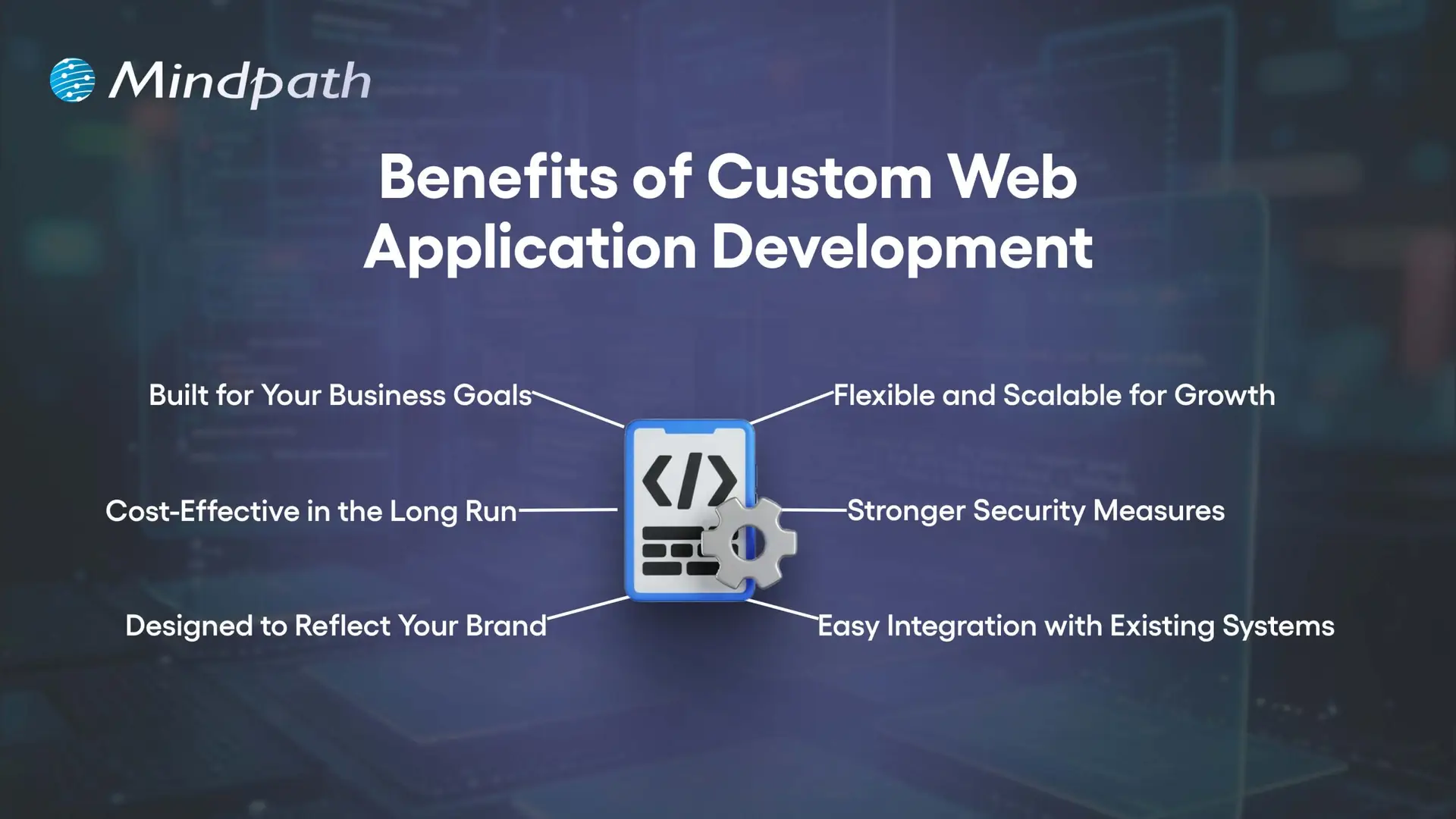
Knowing the custom web application benefits can help you understand how the proper solution can have an impact on how you work. When considering why to build a custom web application, it is usually due to the fact that it can fit your precise requirements, allow you to work more efficiently, and facilitate growth. It is a strategic investment that will provide a return reflecting your investment and your growth aspirations.
Benefits of Custom Web Application Development

1. Built for Your Business Goals

When you use Custom web application development, you have every feature custom development to suit your needs. This makes integrating workflows easier and an easier experience for your employees.

2. Cost-Effective in the Long Run

A custom solution takes out the licensing fees and unnecessary features, which will save you in the long run. You can also reduce some infrastructure and hardware costs if you are going to outsource the development, too.

3. Designed to Reflect Your Brand

Custom web app development allows you to create every aspect of the application, to your brand’s identity. It can give your application a customized, professional, and unique identity that users will definitely recognize.

4. Flexible and Scalable for Growth

Custom-built applications will grow with your business and meet new demands. You will be able to add new features, accommodate increased traffic and usage, and still have a smooth performance.

5. Stronger Security Measures

Security is a key feature of Custom web application development, ensuring that your business is safe from common cyber threats. Custom apps will be fun to breach and take over than commercial apps found on the market.

6. Easy Integration with Existing Systems

Custom web applications will integrate easily with your current systems and databases. This allows you to keep data synchronized, accurate, and consistent across all platforms.

Choosing a custom web application is a strategic business decision! Discover web development trends to ensure your development strategy aligns with current and future digital demands.

10 Signs Your Business Needs a Custom Web Application

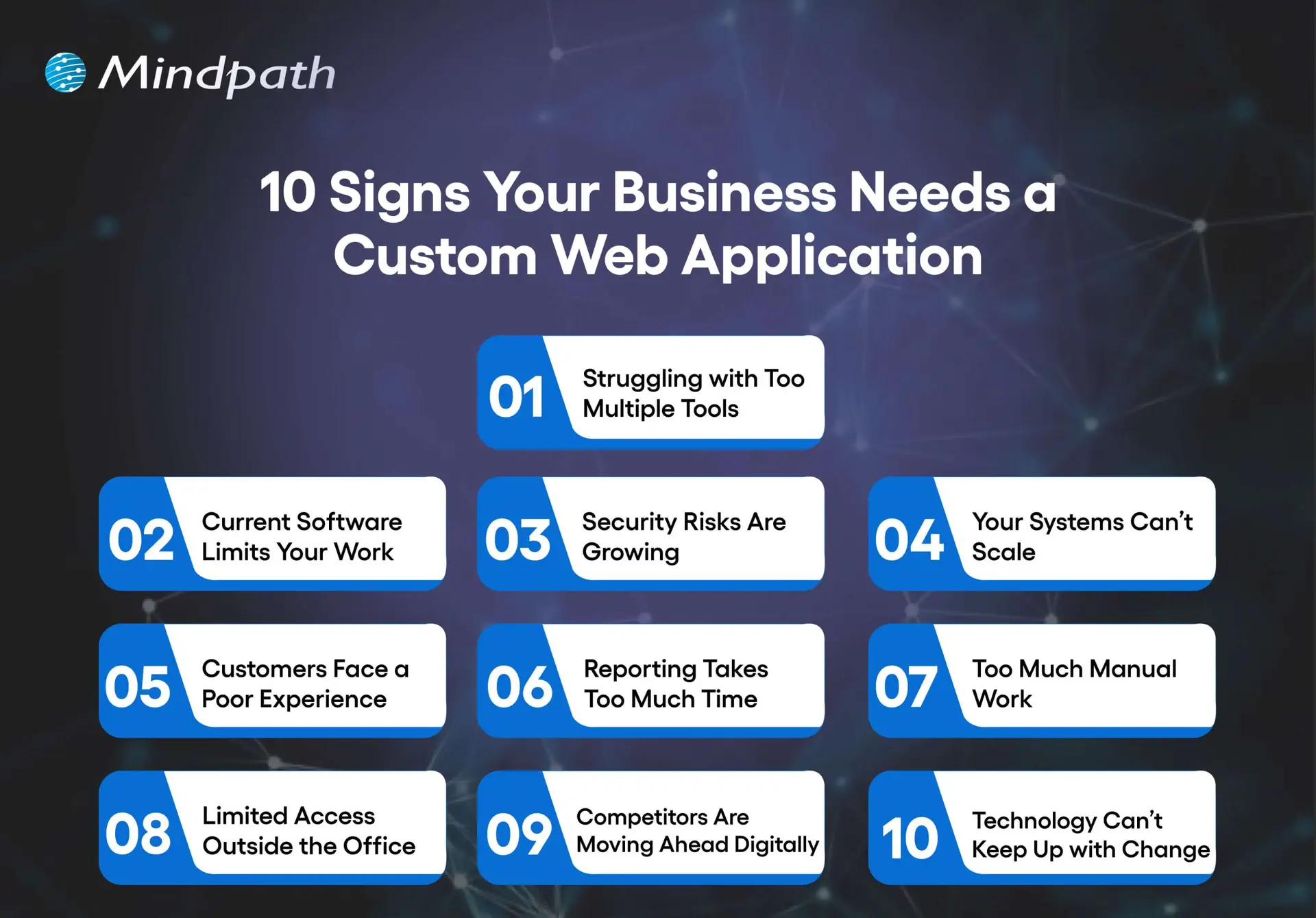
As businesses change, many times their needs exceed what generic software can deliver. Knowing the signs that you need a custom web application will allow you to reduce the damage that can happen before inefficiencies grind your business down.
10 Signs Your Business Needs a Custom Web Application

1. Struggling With Too Many Tools

Switching between spreadsheets, emails, and multiple apps slows work and causes mistakes. A custom web app centralizes your operations in one platform for better efficiency.

2. Current Software Limits Your Work

Generic software forces you to adjust your process to fit its features. Custom web application development creates solutions that match your exact workflows.

3. Security Risks are Growing

Using outdated systems leaves sensitive data exposed. A custom web app includes strong security controls, encryption, and adheres to all industry standards.

4. Your Systems Can’t Scale

Organizations evolve. As your business grows, so should your tools increase their users, data, and functionality. Custom software is built to scale without performance issues.

5. Customers Face a Poor Experience

Using slow, outdated, or limited platforms can leave users frustrated. A custom web app will provide users with modern interfaces, fast service, and customized experiences.

6. Reporting Takes Too Much Time

If your reporting is done manually, or it takes too long to collect and analyze, it will limit your decision-making. Custom web apps will provide real-time dashboards and allow for instant self-serve reporting.

7. Too Much Manual Work

When staff are tied up with repetitive data entry or repetitive tasks, it is hard to be productive. A custom application can be built with automation features to allow staff to concentrate on high-value opportunities or higher-skilled work.

8. Limited Access Outside the Office

If your employees can’t easily access your systems while off-site or, even worse, don’t have access to them at all, your flexibility is limited. A custom web application can be secured and hosted in the cloud, allowing staff to work from anywhere.

9. Competitors Are Moving Ahead Digitally

If you’re used to out-of-date tools and systems, keeping up will mostly be impossible. Custom web application development will give you the opportunity to develop useful features that are unique to your organization.

10. Technology Can’t Keep Up with Change

If your business pivots, expands, or introduces new services, the old systems won’t accommodate this change. Custom applications allow you to adapt to these opportunities, adding integrations, and are designed with flexibility.

Wondering what comes next after deciding to build a custom web application? Explore the web app development roadmap to gain clarity on development stages, timelines, and technology choices.

Ready to Build a Solution That Fits Your Business?

A growing business needs tools that adapt to its pace, processes, and vision. Custom web application development delivers tailored solutions that improve efficiency, strengthen security, and enhance customer experience. Recognizing the signs early allows you to invest in a platform that aligns perfectly with your goals and supports sustainable growth.

At Mindpath, our Custom web application development services create secure, scalable, and user-friendly platforms that integrate seamlessly with your operations. We focus on understanding your unique workflows and delivering features designed to simplify tasks, automate processes, and empower your team. The result is technology that becomes a true partner in your business journey.


Support Is One Click Away

Featured Posts

Related Post

tech stack for web app success

Have you ever asked yourself what makes a web application run perfectly while another one continues to crash, raise issues, or slow down? The answer often relates to tech stack alternatives. Think of technology stack choices as the foundation and building blocks of your project. They can make your web application more robust or scalable, and easier or harder to maintain. So, how do you know which technologies should run your next big idea? It’s a decision that impacts the success of your project.

The options can seem endless, but if you understand your desired outcomes and the function of every piece of the technology stack, then this decision doesn’t need to feel too overwhelming. When you pick the right combination of tools, you could save yourself a lot of time and money. In this blog, we are going to explain the basics/fundamentals for web application tech stacks, highlight important considerations, and hopefully help you feel confident in regard to choosing the right technology stack for your web application project. So, let’s explore!

Planning to build a new web application? Mindpath’s web development services will help you in choosing the right tech stack and developing applications as per your business needs.

What is a Technology Stack?

A technology stack, or tech stack, is a combination of tools, frameworks, and programming languages that work together to build and run a web application. It serves as the base for your project. Each part of the stack reflects a specific function. Whether handling user actions or managing data behind the scenes, and effectively, they all need to work together if your application is going to function well.

Finding the right combination will have a significant effect on how your application performs and compounds. A prudent choice will allow you to build an organized, flexible, and scalable web application that you can easily maintain and grow as your needs change.

Key Factors to Consider While Choosing the Right Tech Stack

Choosing the right tech stack for web development is one of the most important things you’ll do to ensure the success of your project. The tools and technologies you decide to use will dictate how your application performs, scales, and is kept secure. Here are some key factors to keep in mind while selecting the best tech stack for web development.

Key Factors to Consider While Choosing the Right Tech Stack

1. Know Your Team’s Expertise

Look at what technologies your team already knows well. Using familiar tools can help you develop faster and avoid extra training costs. Make sure the tech stack matches your team’s size and experience to keep the project on track.

2. Budget and Licensing Costs

Think about any licensing fees for paid tools and compare them with free, open-source options. Remember to plan for costs related to maintenance, updates, and security. Also, include cloud service expenses that may grow as your project expands.

3. Development Speed

Getting your product ready fast can be a big advantage, especially for new businesses. Choosing proven frameworks and useful libraries can help your team build features quickly. This saves time and lets you focus on improving your web app for users.

4. Security and Compliance

Prioritizing security is essential, especially if your application handles sensitive data. Choose a tech stack that supports robust security features and aligns with industry regulations. This will help protect user information and maintain compliance as your project grows.

5. Maintenance and Support

Choose technologies that have strong community or vendor support so you can get help when needed. A reliable tech stack with regular updates will make it easier to fix issues and improve your application over time. This helps you avoid unexpected costs and keeps your project stable in the long run.

6. Performance and Scalability

Make sure your tech stack can handle the speed and load your application needs. If you expect real-time processing or heavy traffic, choose tools that keep response times fast. This helps your web app run smoothly as more users come on board.

7. Integration with Third-Party Services

Check that your tech stack works well with the third-party services your app needs. Good API compatibility makes it easier to connect features like payments, analytics, or social media. This saves time and helps your app deliver a smooth user experience.

8. Community and Documentation

Choose technologies with an active developer community and plenty of shared resources. Strong documentation makes it easier for your team to build, test, and maintain your web application. This support can save time and help solve issues more quickly.

Wondering how your tech stack fits into the bigger picture of web app development? Explore our comprehensive Web App Development Roadmap for 2026 to see how each decision impacts your project’s success.

Top 8 Tech Stack Examples

Exploring technology stack examples can help you see what works best for different types of projects. Here are some of the most popular examples to consider in 2026.

Top 8 Tech Stack Examples  

1. MERN Stack

MERN includes MongoDB, Express.js, React, and Node.js for flexible, dynamic sites. It’s widely chosen as a modern web application stack for responsive interfaces.

2. LAMP Stack

The LAMP stack combines Linux, Apache, MySQL, and PHP to build reliable, cost-effective websites. It is one of the oldest and most trusted web stacks in use today.

3. .NET Stack

The .NET stack is known for secure, large-scale enterprise applications. Many companies choose this web dev stack for its strong integration with Microsoft tools.

4. MEAN Stack

The MEAN stack uses JavaScript across MongoDB, Express.js, Angular, and Node.js. This tech stack for web development is popular for real-time and single-page apps.

5. Ruby on Rails Stack

Ruby on Rails offers a simple, clean approach for rapid web projects. This technology stack example is still a favorite for startups and MVPs.

6. Python-Django Stack

The Python-Django stack helps developers build powerful sites quickly. Many prefer this as a flexible web development stack with great community support.

7. JAM stack

JAM stack uses JavaScript, APIs, and Markup to deliver fast static sites. It is considered one of the best tech stacks for web development for content-heavy projects.

8. Serverless Stack

Serverless architecture removes the need to manage servers directly. It’s a growing example of a tech stack that cuts costs and improves scalability.

Not sure if your business really needs a custom web application? Discover the key signs that your business needs a custom web application that indicate it’s time to invest in a tailored solution for your needs.

Need Help Choosing the Right Tech Stack for Your Web Project?

Selecting the right tech stack for web development shapes how well your application performs, scales, and adapts over time. By knowing your goals, team strengths, and key factors like security, costs, and integrations, you can make informed choices that save you time and money. A thoughtful approach will help you build a reliable, future-ready web application that supports your business growth.

At Mindpath, we help you build secure, high-performing web applications with the best-fit tech stack for your needs. Our experts offer end-to-end web application development services, covering design, development, testing, and support. We make sure your solution stays flexible, scalable, and easy to maintain as your business grows. Let’s create a web app that works for you.

Frequently Asked Questions

1. How do you choose the right tech stack for a web application without overcomplicating the decision?

Start with three clear questions: What does the application need to do, who will build it, and what is the budget? Matching the tech stack to team expertise, project complexity, and long-term scalability requirements eliminates most confusion. Overthinking the decision often leads to choosing unnecessarily complex technologies that slow development considerably.

2. Can switching tech stacks midway through a web project cause serious problems?

Significantly yes. Changing the tech stack mid-development typically means rebuilding foundational components, retraining the team, and resetting timelines entirely. The cost and disruption are rarely justified unless the original choice was fundamentally flawed. Making a thoroughly researched decision before development begins is always far more efficient than course-correcting later.

3. Is an open-source tech stack always better than a paid licensed one?

Not necessarily. Open-source stacks eliminate licensing fees but may require more internal expertise for maintenance, security patching, and troubleshooting. Paid stacks often include vendor support and compliance features that save time in regulated industries. The right choice depends entirely on team capability, budget structure, and specific application requirements.

4. How does the tech stack choice directly affect a web application’s long-term scalability?

Certain technologies handle growing traffic and expanding features far more gracefully than others. A stack chosen purely for rapid initial development may create serious performance bottlenecks as user numbers increase. Evaluating scalability requirements honestly at the planning stage prevents expensive infrastructure overhauls that become necessary when applications grow beyond their original technical foundations.

5. Does the size of a developer community really matter when selecting a technology stack?

Considerably more than most people initially expect. An active community means readily available documentation, faster bug fixes, regular framework updates, and easier access to experienced developers when hiring. Technologies with shrinking or inactive communities gradually become liabilities, making maintenance harder and recruitment significantly more difficult as fewer developers maintain proficiency in them.

CI/CD Pipelines

Continuous Integration and Continuous Deployment (CI/CD) pipelines have revolutionized modern DevOps best practices. In fact, they are the backbone of DevOps in recent years. CI/CD pipelines allow teams to release high-quality software faster and more reliably. This is possible because a CI/CD pipeline can automate the key stages of the software development lifecycle.

CI/CD Pipelines have empowered software teams and developers like never before. You need to have an in-depth understanding of what is CI/CD in DevOps, as it has been acting as a game-changer. In the business context, a CI/CD Pipeline allows faster product releases and creates value by reducing costs and streamlining the overall development process. It is time to explore what is CI/CD pipeline at a deeper level.

Want to reduce deployment delays and boost business efficiency? Mindpath’s DevOps Consultation and Implementation services streamline DevOps processes to deliver smooth and scalable software delivery.

CI/CD Pipeline Meaning: Continuous Integration and Continuous Deployment

CI/CD, short for Continuous Integration and Continuous Deployment, is an automated workflow that enables software teams to build, test, and release code changes rapidly and reliably. A CI/CD pipeline refers to the series of steps that automate this process, helping teams deliver new software versions while minimizing manual errors and ensuring every code change is validated before it reaches users. CI/CD pipelines are also defined as the practice that improves software delivery throughout the development lifecycle, and they have been transforming the software development process through automation.

CI/CD pipeline introduces automation throughout diverse stages such as development, testing, production, and monitoring.  Teams are in a position to develop top-quality software in a fast and secure manner. The automated testing process allows the identification of dependencies and other issues at an early stage, thereby saving valuable time later. 

Ready to maximize the impact of your CI/CD workflows? Explore the benefits of DevOps to understand how it boosts performance, reduces errors, and accelerates releases.

Mechanism of CI/CD Pipeline

Now that you know CI,CD pipeline full form, and its meaning, it is time to explore its underlying mechanism. The insight can definitely help you understand how a CI/CD pipeline works. To understand how it works, you need to bear in mind that there exist three interrelated methods, including Continuous Integration, Continuous Delivery, and Continuous Deployment.

1. Continuous Integration

Continuous Integration refers to the process of fusing changes to code into a shared repository several times a day. An automated system is responsible for building the app and running tests every time the developer works on the code. CI fundamentally encompasses automated unit tests and static code analysis.

The fundamental goal at this stage is to discover issues relating to integration. In the absence of continuous integration, bugs may surface after multiple changes have been made at the time of a major release. This makes it challenging to find as well as fix them. Continuous Integration minimizes the specific threat by performing tests of every minute change in an isolated manner. 

2. Continuous Delivery

Continuous delivery lays emphasis on the automation of the process that takes place after the code passes the CI stage. CD prepares each change for release so that the deployment can be done smoothly to production at a given time. In the case of a CD pipeline, after the verification of the build, it is moved through the staging environment as well as the pre-production environment in an automatic manner.

It is essential to bear in mind that continuous delivery does not involve the deployment of code to production in an automatic way. The codebase is kept in a deployment-ready state so that software development teams will be able to release as per their need or convenience. CD enables organizations to release software more regularly. 

3. Continuous Deployment

Continuous deployment is responsible for automatically releasing code changes to end-users after passing a series of predefined tests. These predefined tests could be integration tests that test code in a copycat environment and help to ensure code integrity.

This automated process of releasing software code changes directly to the production environment after they have passed all the necessary automated tests eliminates the need for manual intervention. It enables teams to deliver updates and new features to users quickly. It also helps to fix bugs fast. Basically, it accelerates the feedback loop with customers and minimizes the risk relating to large and infrequent releases.   

Looking to understand how CI/CD pipelines are becoming smarter and more efficient? Check out the role of AI in DevOps to learn how automation and intelligence are transforming pipeline performance and reliability.

Key Benefits of CI/CD Pipeline

Now that you know what is CI/CD pipeline it is time to look at some of its key benefits. CI/CD pipeline benefits allow software teams to develop software in an agile manner while ensuring quality. Some of the top benefits include:

1. Faster Time to Market

One of the main benefits of CI/CD pipelines is that teams are able to deliver new features and fix bugs for users faster as well as more often. In fact, this is how major tech giants have been making incremental improvements in their products and creating value for their target market audience. 

With the help of CI/CD tools in DevOps businesses are able to quickly respond to user feedback and develop quality software apps. A typical CI/CD pipeline example automates the build, test, and deployment of a web application, thereby ensuring that the software is introduced in the market in a timely manner. 

2. High-Quality Codes

While releasing software, the role of proper testing is of paramount importance. Now that you know what is CI/CD in DevOps, you can say that high priority is given to testing. A central part of any CI/CD pipeline involves a series of automated tests that are run on every build. 

Automated tests ensure that teams can perform tests in a continuous manner, and the quality of software solutions can be maintained. The automated nature of tests plays a key role in enhancing the quality of code that is generated. 

3. Shorter Feedback Loops

While talking about the CI/CD pipeline example, a thing that is non-negotiable is rapid feedback. Getting feedback early ensures that teams can save sufficient time as well as effort while developing software applications. Teams are able to give frequent updates, which helps in receiving immediate feedback from the users. It thus helps to bring about appropriate changes and increase user satisfaction. 

4. Less Downtime

Even with automated testing, there is a possibility that bugs may sometimes sneak their way through production. A key benefit of using CI/CD tools in DevOps and making regular updates is that it makes it easier to locate the cause of an issue. As the commits are smaller, teams and developers can roll back the change without having to remove necessary elements. This certainly simplifies how issues are fixed and reduces the overall downtime. 

5. Better Communication and Collaboration

One of the main benefits of CI/CD pipelines revolves around improved communication and collaboration among team members. This practice enables members to function in a cohesive manner and make changes to the code. They can also respond to the queries and comments of one another in a transparent manner. The ongoing feedback loop makes sure that there is no communication gap among the team members. The rise in effectiveness in team collaboration is reflected in the ultimate software solution. 

Wondering how CI/CD pipelines are evolving in modern DevOps practices? Discover the latest DevOps trends to learn which tools, methodologies, and innovations are driving smarter and more reliable pipelines.

Final Words

In the prevailing software development arena, the concept of CI/CD pipeline has emerged as a breath of fresh air. It has shown the power that automation can bring while developing software solutions. Some of the key benefits of CI/CD pipelines that you should be aware of include high-quality code, faster time to market, and many more. The explanation of the underlying mechanism of the CI/CD pipeline is there so that you can understand how the process works. 

Mindpath’s top-grade DevOps solutions can certainly assist modern business organizations to leverage CI/CD pipelines to the fullest. Our experts will ensure that, through continuous integration and continuous delivery, your business can develop excellent software applications that can improve user satisfaction. 

Frequently Asked Questions

what is cloud security

In the digital world, cloud computing technology has transformed how business entities store, manage, and process data. The cloud has certainly become the backbone of the modern infrastructure of startups and large enterprises. It not only offers flexibility to business undertakings, but it also offers scalability along with cost efficiency. The rising popularity of cloud has undoubtedly increased the significance of cloud security.

Cloud security involves a series of practices and technologies that can address internal and external threats relating to business security. Businesses operating today must realize the importance of cloud security and be aware of cloud security risks so that they can effectively leverage cloud-based tools. It is time to address the question of ‘what is cloud security’ at a holistic level.

Want to strengthen cloud security without increasing operational overhead? At Mindpath, managed cloud services handle security, monitoring, and optimization so your team can focus on growth.

An Insight into Cloud Computing

Cloud computing is the on-demand delivery of computing resources, including storage, servers, databases, networking, and software, over the internet. Rather than owning and maintaining physical data centers, businesses access these services on an as-needed basis, typically through a pay-as-you-go pricing model. Through the proper leveraging of cloud solutions, businesses have the opportunity to scale quickly while reducing their IT costs.

Several business entities across diverse industries have been adopting cloud technology lately. However, this also means that organisations need to understand cloud security and the potential cloud computing attacks that could compromise their systems. Addressing this key question allows businesses to safely and successfully leverage cloud technology while mitigating risks.

What is Cloud Security?

Cloud security is a collection of cybersecurity policies, controls, technologies, and best practices designed to protect cloud-based applications, data, and infrastructure against unauthorised access, cyberattacks, and data loss. It incorporates key mechanisms such as encryption, identity management, and proactive threat monitoring to prevent and mitigate threats, while also ensuring regulatory compliance for organisations. Some of the key goals of cloud computing security include:

1. Ensure that the security of sensitive and confidential data of organizations is maintained. Moreover, the security of the data has to be maintained when the data is at rest and in transit.

2. Effectively manage multi-cloud challenges that arise when the services of multiple cloud service providers are used by business enterprises.

3. Make sure that only authorized users and devices are able to gain access to the cloud environment.

Wondering how emerging trends are shaping cloud security? Check out the latest cloud computing trends to learn what’s driving secure cloud adoption.

Risks and Challenges Relating to Cloud Security

Poor cloud computing security has the potential to give rise to a broad range of risks as well as challenges. Now that you know what is cloud computing security it is time to look at some of the associated challenges and risks, such as:

1. Data Breach and the Possibility of Fines

Poor quality of cloud cybersecurity has the potential to lead to data breach incidents. When organizations operate in the cloud and security is neglected, it may lead to serious consequences as their sensitive data may be exposed to malicious actors. It means that organizations may fail to comply with the relevant laws and policies. Thus, they may have to pay huge fines.

2. Compliance-Related Violations

In the absence of a cloud security strategy, organizations may end up violating the applicable regulations. With the passage of time, it may affect the credibility of businesses in the operational industry. Violation in this area may give rise to financial and non-financial effects for businesses.

3. Poor Visibility and Monitoring

The lack of security in cloud computing may lead to a lack of centralized visibility. Organizations may also fail to get real-time insight relating to the threat that they may be facing in the cloud environment. With the absence of robust cloud security solutions, organizations may feel crippled and they may not be Able to leverage cloud computing technology to the fullest.

4. Data Losses

Poor practices relating to cloud computing and cybersecurity involve not frequently maintaining backups of your data. Organizations that adopt such practices face the risk of data loss. It may ultimately have an adverse impact on their information integrity. Moreover, systems of the organization may fail because of poor data security practices. As a result, business continuity may be at the receiving end in the long run.

Looking to improve cloud security as environments become more complex? Learn more about cloud-native development and how it supports secure, scalable apps.

Key Benefits of Cloud Security

Organizations need to prioritize both cloud and cybersecurity. Robust cloud security can give rise to a broad range of benefits for businesses operating in diverse industries. Some of the key benefits of cloud security include:

1. Solid Data Protection

Cloud security can play a catalytic role and help safeguard your sensitive business data. It can even employ advanced encryption practices to make sure that unauthorized parties cannot gain access to your data. Along with robust data protection, it can minimize the downtime of businesses and give rise to other advantages, such as the automation of backups and faster disaster recovery.

2. Regulatory Compliance

Proper cloud security can enable organizations to meet different types of compliance standards. They can even help organizations adhere to relevant frameworks such as CIS Benchmark, NIST, and many more. By prioritizing regulatory compliance, the chances of fines and penalties can be reduced considerably.

3. Real-Time Threat Detection

Cloud server security solutions can help in the detection of threats on a real-time basis. The insight can certainly empower organizations to respond to such threats in a timely manner. In current times, when the risks from malicious actors in the cyber setting are immense, real-time threat detection has become non-negotiable for businesses.

4. Scalability and Cost-Efficiency

Cloud security is the ultimate answer to scalability and cost-efficiency for businesses that wish to leverage the cloud to the fullest. Moreover, robust cloud security can certainly help business entities to become more agile, and they do not have to worry about their scalability concerns. Since cloud security is scalable in nature, it can easily adapt to the changing needs of businesses. Thus, organizations can modify their cloud security posture in order to accommodate new users, data, or applications.

Planning to upgrade your cloud security strategy for the future? Check out cloud security tools in 2026 to discover the technologies shaping next-generation protection.

Importance of Cloud Computing Security

In the prevailing times, a greater number of businesses are migrating to the cloud. In order to make the most of cloud technology, it is essential for businesses to understand the importance of cloud security. The role of cloud security is indispensable to ensure that the data and applications of businesses remain safe and secure in the cloud setting.

It is true that third-party cloud computing service providers are responsible for managing the infrastructure. However, businesses have the responsibility to take care of data asset security. Although cloud service providers may adopt best practices, organizations must be vigilant about potential cloud computing vulnerabilities on their side.

As security threats have become more advanced and sophisticated in nature, the importance of cloud computing security has automatically grown significantly. Organizations operating in diverse industries need to take active steps to strengthen their cloud security so that they can function in the cloud setting while maintaining a solid security posture that minimizes the threats from malicious third parties.

Common Types of Cloud Security Solutions

In the prevailing times, there exists a diverse range of cloud security solutions. You need to familiarize yourself with some of the most popular solutions so that you can deploy them in a real-life setting. Some of the key cloud security solutions that exist today are:

1. Identity and Access Management

Identity and Access Management (IAM) services and tools assist enterprises in the deployment of policy-driven enforcement protocols. They are for the users who attempt to access on-premise as well as cloud-based services. The chief functionality of Identity and Access Management is to develop digital identities for every user so that they can be actively monitored.

2. Data Loss Prevention

Data Loss Prevention (DLP) can help organizations gain visibility into the data that they store and process. This is possible by providing them with the capabilities for automatically discovering, classifying, and de-identifying regulated cloud data.

3. Security Information and Event Management

Security Information and Event Management (SIEM) combines security information along with security event management in order to offer automated monitoring, detection, and incident response to threats that arise in the cloud environment. SIEM leverages AI and ML technologies for examining and analyzing log data generated across applications and network devices.

4. Public Key Infrastructure

Public Key Infrastructure (PKI) refers to a framework that is used for managing secure and encrypted information by using digital certificates. These solutions provide authentication services for apps and verify that the data is not compromised and remains confidential throughout transportation.

Planning to build scalable applications without managing servers? Check out our blog on serverless architecture in cloud computing to learn how it simplifies deployment while supporting secure and efficient workloads.

Final Words

The significance of cloud security has been gaining momentum in the past few years. As more organizations across diverse industries and sectors are moving to the cloud, the need for robust cloud security is growing like never before. Some of the main benefits of cloud security include solid data protection, regulatory compliance, and many more.

Mindpath’s top-grade cloud managed services can ensure that your business can effectively leverage cloud computing technology. With our solutions, you can optimally manage, migrate, and optimize your workload with our excellent cloud infrastructure solutions. Moreover, you can rest assured about cloud security aspects, as our experts will take care of everything.

Frequently Asked Questions