Home

Cost to Hire ReactJS Developers in New York: Complete Pricing Guide

Cost to Hire ReactJS Developers in New York: Complete Pricing Guide

Join our Newsletter!

cost to hire ReactJS developers in New York

Hiring ReactJS developers in New York is a strategic investment for businesses building fast, scalable, and interactive web applications. However, the overall cost depends on several factors, including the developer’s experience, the project’s complexity, and the hiring model you choose.

Key Takeaways

  • 01
    Junior ReactJS developers in New York typically charge between $60 and $80 per hour.
  • 02
    Full-time in-house ReactJS developers command annual salaries ranging from $90,000 to $150,000.
  • 03
    Development agencies charge $100 to $200 hourly for complete ReactJS project teams.
  • 04
    Basic ReactJS applications require estimated budgets between $5,000 and $15,000.
  • 05
    Enterprise-level ReactJS applications can demand budgets exceeding $100,000 due to complex architectural requirements.


Whether you’re launching a startup, modernizing an existing application, or building an enterprise-grade platform, understanding these cost factors will help you make an informed hiring decision while staying within budget.

Want to speed up your product development with skilled ReactJS developers who deliver quality results on time? At Mindpath, we offer experienced ReactJS developers who build responsive, scalable, and feature-rich applications for startups and enterprises alike.

Factors That Affect the Cost of Hiring ReactJS Developers in New York

1. Developer Experience

Experience is one of the biggest factors influencing development costs. Developers with different skill levels bring varying expertise, problem-solving abilities, and project efficiency.

Experience Level Average Hourly Rate Best For
Junior Developer $60–$80/hour Small websites, bug fixes, simple React applications
Mid-Level Developer $80–$120/hour Business websites, dashboards, custom applications
Senior Developer $120–$180/hour Enterprise applications, SaaS products, high-performance platforms

While senior developers typically have higher hourly rates, they often complete projects more efficiently, write cleaner code, and reduce long-term maintenance costs.

Tip: For complex projects, hiring an experienced ReactJS developer can be more cost-effective than choosing a lower-priced developer who may require additional revisions later.

2. Hiring Model

The way you hire a ReactJS developer significantly impacts your overall budget.

Freelancers

Freelance ReactJS developers generally charge $50–$120 per hour. They are a suitable option for short-term projects, quick feature development, or ongoing maintenance.

Pros

  • Lower upfront costs
  • Flexible contracts
  • Faster hiring process

Cons

  • Limited availability
  • May not be ideal for large-scale projects

In-House Developers

Hiring a full-time ReactJS developer in New York typically costs between $90,000 and $150,000 annually, excluding benefits, taxes, and operational expenses.

This option works well for businesses that require continuous product development and long-term technical support.

Development Agency

A professional ReactJS development company generally charges $100–$200 per hour.

Although agency rates are often higher, you gain access to a complete team that may include:

  • ReactJS developers
  • UI/UX designers
  • QA engineers
  • Project managers
  • DevOps specialists

This approach is ideal for businesses that need end-to-end development services without managing multiple resources.

3. Project Complexity

The size and complexity of your application play a major role in determining development costs.

Basic React Applications

Estimated Cost: $5,000–$15,000

Suitable for:

  • Landing pages
  • Company websites
  • Simple portals
  • Basic web applications

Medium-Complexity Applications

Estimated Cost: $20,000–$50,000

Examples include:

  • Customer dashboards
  • CRM solutions
  • eCommerce websites
  • Booking platforms
  • Membership portals

These projects usually require API integrations, authentication systems, and custom business logic.

Enterprise-Level Applications

Estimated Cost: $100,000+

Large-scale applications often include:

  • Real-time collaboration
  • AI-powered features
  • Advanced analytics
  • Cloud integrations
  • Third-party APIs
  • High-level security
  • Scalable architecture

These projects require experienced ReactJS developers with expertise in performance optimization and enterprise software development.

4. Location and Talent Availability

New York is one of the largest technology markets in the United States. Because demand for experienced ReactJS developers remains consistently high, development rates are generally higher than in many other regions.

Typical market rates include:

  • In-house salary: $90,000–$150,000 per year
  • Freelancers: $60–$150 per hour
  • Development agencies: $100–$200 per hour

Many companies also hire remote ReactJS developers to access a broader talent pool while managing costs. Remote hiring can provide excellent value without compromising quality, provided you work with experienced professionals.

Tips to Optimize Your ReactJS Development Budget

Before hiring a ReactJS developer, consider these practical recommendations:

  • Clearly define your project scope before requesting quotes.
  • Prioritize experience over the lowest hourly rate.
  • Choose the hiring model that matches your project timeline.
  • Hire developers with proven ReactJS project experience.
  • Request code samples or portfolio examples.
  • Consider long-term maintenance costs, not just initial development expenses.

Making informed hiring decisions can reduce delays, improve code quality, and lower overall development costs.

Why Choose Mindpath to Hire ReactJS Developers in New York?

At Mindpath, we help businesses hire experienced ReactJS developers who build secure, scalable, and high-performing web applications.

Our developers have expertise in:

  • ReactJS development
  • Next.js
  • TypeScript
  • Redux
  • REST APIs
  • GraphQL
  • UI optimization
  • Performance tuning
  • Enterprise application development

Whether you need a dedicated ReactJS developer, a remote development team, or complete project delivery, we provide flexible hiring models tailored to your business goals and budget.

Ready to hire skilled ReactJS developers in New York? Contact Mindpath today to discuss your project and receive a customized development estimate.


Need ReactJS Developers in New York?

Build your team with skilled ReactJS talent.

Frequently Asked Questions

The average cost ranges from $60 to $180 per hour, depending on the developer’s experience, project complexity, and hiring model.
Generally, yes. Agencies typically charge higher hourly rates because they provide a complete team of developers, designers, QA engineers, and project managers. This often results in faster delivery and better project management.
The major cost factors include: 1. Developer experience 2. Project complexity 3. Hiring model 4. Required features 5. Integration requirements 6. Project timeline 7. Ongoing maintenance
Freelancers are suitable for small or short-term projects. For complex or business-critical applications, a dedicated development team provides better scalability, collaboration, and long-term support.
Yes. Many businesses successfully hire remote ReactJS developers to reduce costs while accessing highly skilled professionals from around the world.

Support Is One Click Away

Featured Posts

Related Post

AI Integration Cost

AI integration cost is rarely a fixed figure. It depends on the use case, existing technology stack, data readiness, integrations, security requirements, and business scale. A simple AI feature connected through an existing API can require a very different budget than a complex enterprise AI system spanning multiple applications, data sources, and workflows.

Key Takeaways

  • 01
    AI integration budgets vary based on use case, data readiness, integrations, security, infrastructure, and business scale.
  • 02
    Initial development costs are only part of the investment required to operate AI systems successfully.
  • 03
    Data preparation, legacy integrations, security, API usage, and infrastructure can create unexpected expenses.
  • 04
    Recurring costs include model usage, cloud resources, monitoring, maintenance, optimization, and technical support.
  • 05
    Phased implementation and continuous cost monitoring can help businesses manage AI spending and reduce budget overruns.

The initial development budget is only part of the equation. Model usage, cloud infrastructure, monitoring, maintenance, security, and ongoing optimization can continue adding costs after deployment. For technology leaders, understanding these factors early helps prevent unrealistic estimates and poorly scoped AI initiatives. In this blog, we break down the key costs businesses should consider when planning AI integration in 2026.

Not sure what your AI integration could cost?

We help businesses scope AI projects, identify cost drivers, and plan practical implementation strategies.

Plan Your AI Integration →

What is Included in AI Integration Cost?

AI integration involves more than connecting an AI model to an existing application. The overall budget covers the technical work required to make the system useful, secure, reliable, and compatible with existing business processes. The scope can include several layers, depending on the project.

Common one-time costs include:

1. Discovery and Architecture

Defining the use case, technical architecture, workflows, and integration requirements.

2. Data Preparation

Cleaning, structuring, transforming, and connecting the data required by the AI system.

3. Development and Integration

Connecting AI capabilities with applications, databases, APIs, CRM, ERP, or internal tools.

4. Testing and Deployment

Validating accuracy, security, performance, and reliability before production use.

These initial costs are only one part of the budget. Businesses also need to account for recurring expenses such as model or API usage, cloud infrastructure, monitoring, maintenance, security updates, and ongoing optimization.

How Much Does AI Integration Cost in 2026?

There is no standard price for AI integration. The budget changes significantly based on the number of systems involved, data complexity, security requirements, user volume, and the level of customization required. The ranges below can serve as practical planning estimates.

Business / Project Scale Typical 2026 Budget Common Scope Cost Complexity
Small AI Integration $10K–$30K AI chatbot, single API, basic workflow automation Low
Mid-Size Integration $30K–$100K Multiple APIs, document processing, custom workflows Moderate
Complex AI Implementation $100K–$250K+ Advanced data pipelines, custom AI workflows, several business systems High
Enterprise AI $250K–$1M+ Large-scale AI platforms, governance, security, multiple departments Very High

These figures are illustrative planning ranges, not fixed market prices. A mid-size project with clean data and existing infrastructure could cost less than a smaller project involving legacy systems, complex integrations, or strict security requirements.

What Factors Increase AI Integration Cost?

Several technical factors can significantly change the final project budget. The complexity often comes from the environment surrounding the AI rather than the model itself.

1. Data Readiness

Incomplete, inconsistent, or poorly structured data requires additional engineering before it can support reliable AI workflows.

2. Integration Complexity

Connecting AI with CRMs, ERPs, databases, internal applications, legacy systems, and third-party APIs increases development effort.

3. Model Requirements

A basic API-based model has different infrastructure and development needs than RAG and fine-tuning, or agentic AI workflows.

4. Security and Compliance

Sensitive data may require encryption, access controls, audit logs, private deployments, and additional security testing.

5. Infrastructure

Cloud compute, storage, databases, vector databases, networking, and monitoring can add both implementation and operational expenses.

6. Specialized Expertise

AI engineers, data engineers, solution architects, and security specialists may be required for complex implementations.

The biggest cost increases often occur when these requirements are discovered late. Defining the architecture, data requirements, integration scope, and security expectations early can make the budget far more predictable.

Hidden Costs That Can Increase AI Integration Cost

The initial AI implementation cost does not always reflect the full investment required to move an AI system into production. Some expenses appear during integration, scaling, or ongoing operations and can affect the final budget.

1. Data Cleanup

Business data may require cleaning, restructuring, labeling, or enrichment before it can support reliable AI workflows.

2. Legacy Integration

Older systems may need custom connectors, middleware, or additional development to work with modern AI tools.

3. API Usage

The API integration cost can increase with request volume, connected services, data transfer, and usage-based pricing.

4. Security Requirements

Encryption, access controls, compliance checks, audit trails, and security testing can add development effort.

5. Infrastructure Scaling

Growing usage can increase spending on compute, storage, databases, networking, and other cloud resources.

6. Monitoring and Maintenance

Production AI systems require performance monitoring, testing, updates, troubleshooting, and ongoing optimization.

7. Employee Adoption

Training, documentation, workflow changes, and technical support may be needed for successful adoption.

Accounting for these expenses early gives businesses a clearer view of their total AI investment. It also helps teams distinguish the initial project budget from the ongoing costs required to operate and scale the system.

What are the Ongoing Costs After AI Integration?

Launching an AI system is only the beginning of the investment. Once it is in production, businesses need to budget for the resources required to keep it accurate, available, secure, and cost-efficient as usage grows.

Key recurring expenses can include:

1. Model and API Usage

Costs can increase with higher request volumes, larger inputs, and frequent model calls.

2. Cloud Infrastructure

Compute, storage, databases, networking, and supporting services contribute to monthly operating expenses.

3. Monitoring

Production systems need monitoring for performance, latency, errors, usage patterns, and unexpected outputs.

4. Model Optimization

Prompts, retrieval pipelines, workflows, or models may need periodic improvements as requirements change.

5. Maintenance

Integrations can require updates when connected applications, APIs, or business processes change.

6. Support and Security

Ongoing technical support, vulnerability management, access reviews, and compliance activities can add operational costs.

Businesses should therefore calculate total cost of ownership, rather than evaluating an AI project only by its initial development price. Tracking these recurring expenses against measurable outcomes also makes it easier to determine if the system is delivering the expected business value.

How to Build a Realistic AI Integration Budget?

A practical AI budget starts with the business problem, not the technology. Before selecting a model or development approach, teams should establish what the system needs to achieve and what resources are already available.

A simple budgeting process can include:

1. Define the Use Case

Identify the workflow, users, expected outcomes, and measurable business goals.

2. Map the Technical Scope

List the applications, APIs, databases, data sources, and workflows that need to connect with the AI system.

3. Assess Data Readiness

Determine whether existing data is accessible, structured, secure, and suitable for the intended application.

4. Select the Implementation Approach

Compare existing AI platforms, custom development, and hybrid approaches based on technical requirements and internal capabilities. A build vs buy AI assessment can help frame this decision.

5. Separate Initial and Recurring Costs

Account for development, integration, and deployment separately from API usage, infrastructure, maintenance, and support.

6. Plan for Contingencies

Reserve part of the budget for unexpected data, integration, security, or infrastructure requirements.

7. Use Phased Implementation

Start with a defined scope, measure results, and expand the system after validating its performance and business value. Businesses considering in-house vs outsourcing AI development can also factor internal expertise and long-term maintenance into this planning process.

How Should Your Business Budget for AI Integration?

AI integration requires a budget that accounts for development, data preparation, integrations, infrastructure, security, and ongoing operations. AI integration cost varies with every project, making it important to assess the use case, technical readiness, implementation scope, and recurring expenses before committing to an investment.

Mindpath AI development services help businesses plan and build AI systems around their specific workflows and technical requirements. Our team supports AI architecture, data engineering, integrations, RAG development, fine-tuning, and AI agent development, helping businesses move from planning to production with a practical roadmap.

ReactJS developer in California

Hiring the right ReactJS developer in California is one of the most important decisions for businesses planning to build modern, scalable, and high-performing web applications. California has one of the most competitive technology job markets, making it essential to evaluate candidates beyond their coding skills. The ideal developer should possess technical expertise, problem-solving abilities, strong communication skills, and experience working on real-world projects. Considering the following factors will help you hire ReactJS developers who align with your business goals and contribute to long-term project success.

Looking to hire ReactJS developers who can turn your business ideas into high-performing web applications? At Mindpath, we offer dedicated ReactJS developers who create intuitive, scalable, and user-centric applications that drive business success.

Offer a Competitive Salary to Attract Top ReactJS Developers

1. Understand California’s Competitive Tech Market

California is home to thousands of startups and global technology companies competing for skilled ReactJS developers. Because demand continues to exceed supply, experienced developers often receive multiple job offers. Offering a competitive salary significantly increases your chances of attracting high-quality candidates.

2. Pay According to Skills and Experience

Compensation should reflect a developer’s expertise and experience. Developers skilled in ReactJS, Next.js, TypeScript, Redux, REST APIs, GraphQL, and performance optimization generally command higher salaries than entry-level professionals. Senior developers with experience leading projects or building enterprise applications typically expect premium compensation packages.

3. Include Performance-Based Incentives

Salary is only one part of an attractive job offer. Consider providing:

  • Performance bonuses
  • Annual salary reviews
  • Stock options or equity
  • Project completion incentives
  • Employee recognition rewards

A well-structured compensation package helps attract experienced ReactJS developers while improving employee retention and reducing future hiring costs.

Provide Comprehensive Benefits to Improve Employee Retention

1. Prioritize Employee Well-Being

Today’s developers look beyond salary when choosing an employer. A comprehensive benefits package demonstrates that your company values employee well-being and long-term career growth.

Consider offering:

  • Medical, dental, and vision insurance
  • Mental health support
  • Paid vacation and sick leave
  • Paid parental leave
  • Retirement plans with employer contributions

These benefits improve employee satisfaction while creating a healthier workplace.

2. Invest in Learning and Career Development

Technology evolves rapidly, and ReactJS developers appreciate employers who support continuous learning. Providing access to online courses, certifications, workshops, conferences, and technical training helps employees stay current with the latest React ecosystem.

Supporting professional development not only benefits developers but also improves the quality of your software projects.

3. Offer Additional Workplace Perks

Small benefits can make a significant difference when candidates compare job offers. Popular perks include:

  • Home office allowance
  • Internet reimbursement
  • Flexible working hours
  • Gym memberships
  • Wellness programs
  • Team-building activities

A strong benefits package helps you attract and retain skilled ReactJS developers in California.

Offer Remote and Hybrid Work Flexibility

1. Access a Larger Talent Pool

Many experienced ReactJS developers prefer remote or hybrid work arrangements. Restricting hiring to one city can limit your access to qualified professionals. Expanding your search across California allows you to recruit developers based on skills rather than location.

2. Build an Efficient Remote Development Team

Successful remote collaboration depends on using the right tools and processes. Platforms like Slack, Microsoft Teams, Jira, Trello, GitHub, and Zoom help development teams communicate effectively and manage projects efficiently.

Setting clear expectations for sprint planning, deadlines, documentation, and code reviews ensures productivity regardless of where developers work.

3. Improve Employee Satisfaction Through Flexibility

Flexible work arrangements contribute to better work-life balance, higher job satisfaction, and increased employee retention. Companies that embrace remote work often gain a competitive advantage when hiring top ReactJS talent.

Why These Factors Matter When Hiring ReactJS Developers in California

Hiring ReactJS developers isn’t just about evaluating technical skills. Competitive salaries, attractive employee benefits, and workplace flexibility all influence whether experienced developers choose your company over another. Businesses that invest in their employees are more likely to build stable, productive, and high-performing development teams.

Hire Experienced ReactJS Developers in California with Mindpath

Looking for experienced ReactJS developers who can build scalable, secure, and high-performance web applications?

At Mindpath, we help businesses hire pre-vetted ReactJS developers in California with expertise in modern frontend development, API integration, responsive UI development, and scalable application architecture. Whether you need a dedicated developer, an extended development team, or end-to-end ReactJS development services, our experts are ready to accelerate your project.

Ready to build your ReactJS team? Contact Mindpath today and hire skilled ReactJS developers in California with confidence.

Why this structure is SEO-friendly:

  • Primary keyword: Hire ReactJS Developers in California appears naturally throughout.
  • Clear H2 and H3 hierarchy for featured snippets and readability.
  • User-focused content with scannable sections.
  • Improved topical relevance and EEAT by explaining why each factor matters instead of simply listing features.
  • Commercial CTA at the end to improve conversions.
Discover the ultimate guide to hiring Node.js developers in London. Learn about the skills, benefits, and cost factors involved in finding the right talent for your project.
Html to Wordpress

Anyone who has a HTML website might feel left out in the era of websites that load within seconds. Did you know that HTML websites were a thing when there was not content management system in the market? The transition from HTML to WordPress is no longer an option in an extremely competitive digital market. With static HTML pages, you would have to struggle to get the top ranks in search engine results.

Key Takeaways

  • 01
    WordPress loads faster and ranks better than static HTML websites today.
  • 02
    Anyone can manage a WordPress site without needing advanced coding skills.
  • 03
    Regular security updates and plugins keep WordPress websites well protected.
  • 04
    Mobile responsive themes ensure websites perform well across all devices.
  • 05
    Plugins let businesses add new features without relying on developers.

The biggest problem with HTML websites is that they come with duplicate code on every page, thereby making them slow. On the other hand, WordPress is faster, more secure and offers more flexibility to build any type of website. As a matter of fact, more than 43% of websites in the world run on WordPress. Let us find out why you should ditch HTML and switch to WordPress now.

Want to convert your static HTML site into a fully functional WordPress site with enhanced features and performance? Mindpath offers WordPress development services to help you build a custom website according to your business demands.

The Rise of WordPress in Website Building

WordPress started off as a blogging platform and the open source nature empowered it to transform into a website builder. Before WordPress, you would need a technical team to create a website and manage it. The search for a HTML to WordPress converter tool has been growing because WordPress has made it easier to build websites. You can now install the WordPress software and use the desired themes or plugins to develop websites with sophisticated functionalities and updated designs.

If you have been wondering whether switching to WordPress is a good decision, then you must take a look at websites powered by WordPress. Big names in the world of business such as Disney, Times Magazine, Sony Music and many others use WordPress. The versatile mix of power and simplicity with WordPress has been one of the biggest reasons for its widespread adoption.      

Is WordPress a Reliable CMS for Website Building?

Giving up on HTML, which has been a trusted ally of website developers for a long time, can be difficult. However, the need to convert HTML to WordPress is growing as WordPress is the top content management system in the world right now. It works as an open-source ecosystem that offers benefits for beginners as well as experienced developers.

WordPress offers a user-friendly interface in its dashboard, which you can use to create websites from scratch. The best thing about the WordPress dashboard is that you don’t need advanced technical expertise to use it. In addition, you can also find thousands of themes and plugins in WordPress that help you customize your website the way you want.

Want to build a website that truly reflects your brand’s unique identity and goals? Explore our guide to custom WordPress development to discover how tailored solutions can enhance your site’s performance and impact.

Why Should You Choose WordPress Over HTML?

With so many powerful features, it is hard to ignore the urge to switch to WordPress right away. You should search for a HTML website to WordPress converter that makes it easier to embrace the benefits of WordPress. Don’t you know how WordPress will enhance your HTML website? An overview of the advantages of transitioning to WordPress can offer some help in finding the answer to such questions.

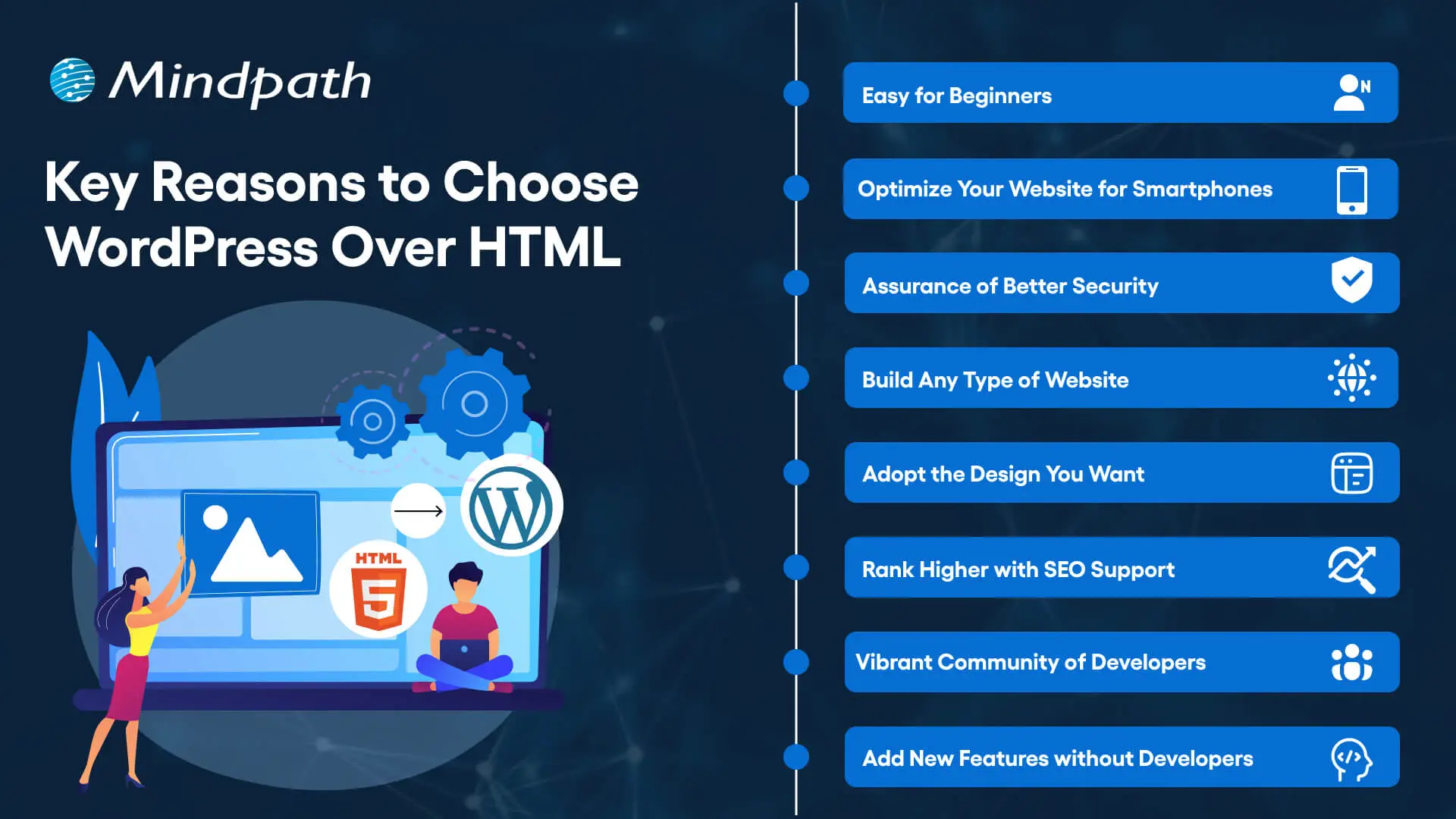
Key Reasons to Choose WordPress Over HTML

1. Easy for Beginners

The best thing about WordPress is that beginners will find it easy to use without any technical complexities. You don’t need coding skills to create your website and manage it on WordPress. The intuitive dashboard of WordPress allows you to create customized layouts, add more pages and update menus at one place. 

WordPress offers better flexibility than traditional website development approaches with more control over design, content management and functionality. Furthermore, the themes and plugins offered by WordPress help you add new features without waiting for developers. In other words, anyone can build a website without technical skills when they know how to use WordPress.   

2. Optimize Your Website for Smartphones

Do you know that most of the traffic to your business will come from mobile users? Many of you would need a HTML to WordPress converter online when you discover that WordPress offers mobile responsiveness. Most of the WordPress themes are tailored to function seamlessly on different screen sizes and device types. 

The interesting part of mobile responsiveness with WordPress is that your website will have the same aesthetic appeal on all devices. Apart from the consistent user experience on different devices, mobile responsiveness also makes your website rank higher on Google. With a few modifications to theme files and some new WordPress plugins, your static HTML website will run seamlessly on all mobile devices.

3. Assurance of Better Security

Businesses should also trust WordPress for its commitment to safeguarding any website hosted on the platform. You will get regular security updates on WordPress, which help in combating new security threats. On top of it, WordPress also offers additional security plugins and SSL certificates to enhance your website’s security. The biggest benefit of converting HTML to WordPress is visible in the efforts made by WordPress to address emerging vulnerabilities.

You must understand that modern approaches to website security need multiple layers of protection. For instance, you will need data encryption, backup systems and malware scanning to maintain the security of your website. WordPress offers the complete package to safeguard your website from hackers and unprecedented security breaches.

4. Build Any Type of Website

In its initial days, WordPress served as a useful tool for blogging alone. The transition of WordPress to a powerful driving force behind some of the biggest websites shows how it has evolved over the course of time. You should know how to add HTML to WordPress for switching from an outdated format to a versatile toolset. You can use WordPress for any type of website, whether it is for a small business or a large corporation.

WordPress is capable of hosting e-commerce websites, communities or social media networks. Businesses can always find WordPress plugins that will make their website better. Most important of all, you don’t have to worry about adaptability when your website needs to grow alongside your business. It is definitely a huge advantage for websites in an extremely competitive business landscape.

Unsure whether your WordPress project is following the right development standards and best practices? Check out our WordPress developer checklist to make sure every essential step is covered for a smooth and successful build.

5. Adopt the Design You Want

The problem with a static HTML website is that you don’t have any control over the design once it’s published. WordPress does not let you worry about changing the design of your website according to emerging trends. When you convert a website to WordPress, you get the advantage of capitalizing on its extensive theme library. You can have a business site, blog or an ecommerce site and still ensure that their design matches with your needs and style. 

The theme library of WordPress offers free and premium themes that you can choose for your website. You can also find additional themes from third-party developers and design marketplaces that bring unique features and layouts. The live previews of each theme help you check each design without affecting website functionality or content.  

6. Rank Higher with SEO Support

WordPress stands out as the most popular option to create websites now because of its SEO support. What will you gain from a website that never shows up on the first page of search results? You can download WordPress and capitalize on its strong SEO foundation to ensure a higher rank on search engines. The advantages of WordPress for SEO revolve around its strict coding guidelines that call for clean and structured code.

The code is not the only thing that makes WordPress websites easier to rank on Google and other search engines. You will also find user-friendly URLs, meta-descriptions and titles to gain more visibility in search engines. On top of it, the SEO plugins on WordPress will provide a lot of support in optimizing your website.

7. Vibrant Community of Developers

The biggest strength of WordPress is its large and active community of developers. As an open-source platform, WordPress continues growing with the contributions of multiple users and developers. The community not only introduces updates to the source files but also makes WordPress more secure and updated along the lines of latest trends. 

Another promising reason to convert HTML to WordPress theme for your website is the accessibility to website creation tools offered by the community. It ensures that developers alone don’t have the exclusive rights to use WordPress tools. Even a blogger or business owner can be a part of the WordPress community and capitalize on its diverse offerings.

8. Add New Features without Developers

Websites have to evolve and add new features to accommodate the emerging requirements of users. WordPress allows you to add new features to your website without the intervention of developers. The collection of powerful plugins available with WordPress can help you introduced advanced features without code changes. 

Plugins are the ideal tools for adding shopping carts, contact forms and other features on WordPress websites. You can also explore custom WordPress plugins by third-party developers to enhance their websites. On top of it, you can activate or deactivate plugins as required, which offers the flexibility for customizing a website to your needs. 

Final Thoughts

The decision to convert your website from HTML to WordPress should not be a difficult one, considering the benefits of WordPress. It allows anyone to create a website without technical knowledge alongside offering the flexibility to add new features. In addition, you cannot ignore the benefits of regular security updates, a supportive community and control over website design. 

Mindpath specializes in converting HTML websites to WordPress for any type of website. We have years of experience in WordPress development that brings more credibility to our services. Our services for switching your website to WordPress also offer the assurance of an easy conversion procedure. If you want a website that is easier to update and maintain, then Mindpath is here to help you.