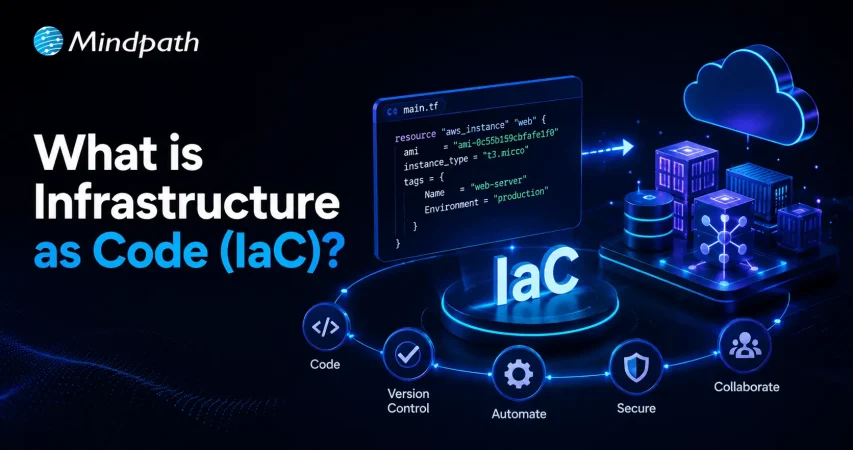
Understanding Infrastructure as Code (IaC) for Modern IT Operations

Join our Newsletter!

Featured Posts

Support Is One Click Away

Home

Understanding Infrastructure as Code (IaC) for Modern IT Operations

Understanding Infrastructure as Code (IaC) for Modern IT Operations

What if you could manage your IT infrastructure with the same ease and precision as writing code? Imagine deploying servers, configuring networks, and managing resources through a few lines of code instead of manual processes. Sounds revolutionary, right? This is exactly what Infrastructure as Code (IaC) brings to the table. But how does it work? Why is it transforming the way we handle IT operations? In this blog, let’s explore the fundamentals of IaC, its benefits, and why it’s becoming a cornerstone of modern DevOps practices. So, let’s dive in! 

What is Infrastructure as Code (IaC)?

Infrastructure as Code (IaC) is a method of configuring and managing your IT infrastructure, such as servers, databases, and storage, using code rather than doing everything manually. It’s similar to sending directions to a computer so it can complete the setup for you. When creating and running applications, developers use a variety of tools and mechanisms to collaborate. This encompasses operating systems, databases, and storage. Normally, putting things up manually takes a long time and can lead to errors, especially when working on large projects. With IaC, you just create a code file that explains how your system should appear and function. The tools will then create and manage everything for you. This saves time, reduces mistakes, and facilitates rapid updates or fixes. Businesses utilize IaC to save money, prevent risks, and respond quickly to new possibilities.  

Advantages of Infrastructure as Code (IaC)

1. Speedy Deployments

Infrastructure as Code (IaC) makes deployment quicker and easier. Instead of manually configuring systems, you can use a single command to create the full environment in a few minutes. This is especially useful for startups and small enterprises that need to move quickly while staying under budget. 

Fast deployment is also vital for testing and development. Developers can rapidly construct test environments that seem identical to the real system. This allows them to devote more time to essential responsibilities such as detecting and fixing problems, evaluating how the system manages high traffic, and enhancing security. By reducing time and effort, IaC allows teams to focus on developing better apps and delivering them faster. It keeps projects on track, increases productivity, and allows firms to adapt swiftly to changes or new possibilities. Whether you’re creating a small app or managing a massive system, IaC makes it easier and faster to complete tasks.  

2. Reduced Risks

Manually configuring and administering systems can give rise to errors since it depends primarily on human labor. Repeating the same procedure increases the likelihood of mistakes and adds additional workload to engineering teams. It can also make addressing or debugging problems more difficult and time-consuming. 

Infrastructure as Code (IaC) reduces these risks by automating the process and ensuring consistency. Instead of depending on a single person’s knowledge to handle crucial systems, IaC keeps all of the relevant facts in code that is accessible to the whole team. This makes infrastructure easier to understand, share, and administer, even if team members leave the organization. Companies can use IaC to reduce mistakes, boost cooperation, and guarantee their systems are always dependable and secure. This not only saves time and effort, but also instills trust in the infrastructure, making it easier to adapt and develop as needed.  

3. Enhanced Security and Quick Recovery

Infrastructure as Code (IaC) improves system security and recoverability. Security measures can be included directly into the system setup process when utilizing code. This guarantees that every deployment is protected without requiring additional evaluations or permissions. If a company’s security standards are updated, the changes can be immediately deployed across all systems via code, ensuring that everything remains consistent and secure. IaC also helps with recovery planning by making it easier to reconstruct systems in the event of a failure. While this strategy may take somewhat longer than other ways, it assures that systems are rebuilt safely and correctly. Businesses can apply IaC to build a solid security foundation and prepare for situations of crisis, all while lowering risks and saving time. 

4. Boosted Operational Efficiency

Infrastructure as Code (IaC) increases the efficiency and productivity of developers, architects, and administrators. Complex cloud systems can be deployed significantly faster using pre-configured IaC components, reducing total development time. One of the primary advantages of IaC is that it provides uniform conditions across several teams. Multiple teams, including development, security, QA, and user testing, can collaborate in synchronized environments using a simple script. This allows everyone to make progress simultaneously, rather than waiting for one phase to finish before going on to the next.  

IaC also promotes continuous integration and continuous delivery (CI/CD) processes, which enable teams to deploy new features or upgrades more rapidly and efficiently. Additionally, IaC makes it simple to automatically shut down environments that are no longer in use, lowering wasteful expenditures and keeping the cloud infrastructure lean. This enables firms to expand and manage their systems more efficiently, while preserving efficiency and lowering operating costs. Ultimately, IaC simplifies procedures, lowers human mistakes, and allows teams to operate more quickly, intelligently, and cooperatively. 

5. Greater Accountability

In the past, engineering teams had to manually record their work for a long period in order to guarantee seamless communication, prevent delays, and handle issues like errors and staff turnover. With Infrastructure as Code (IaC), this is no longer required. Instead of depending on elaborate documentation, all changes are recorded immediately in the source code repository. 

Every modification is explicitly tracked using version control, which shows who made the change and when. This makes it simple to track changes, identify issues, and comprehend the context around them. If an issue emerges, it is straightforward to identify the cause of the problem and who should be approached for clarification. IaC enhances accountability by making all activities public and traceable, ensuring that everyone on the team is on the same page, and enabling teams to collaborate more effectively. 

How Can Mindpath Help in Infrastructure as Code (IaC)?

At Mindpath, we can assist you with leveraging Infrastructure as Code (IaC) to streamline and protect your IT processes. We use IaC to automate system setup and administration, resulting in a more consistent, dependable, and manageable infrastructure. Our staff can create and manage the code that specifies your infrastructure, eliminating the need for time-consuming manual configurations. With IaC, we ensure that your systems are swiftly installed, updated, and fully protected, while minimizing risks and human error. We help you design environments that are simple to reproduce and scale, allowing your development, security, and testing teams to collaborate effortlessly. 

Wrapping Note!

Infrastructure as Code (IaC) is revolutionizing the way IT infrastructure is managed by automating processes, reducing human errors, and enabling faster, more secure deployments. By adopting IaC, organizations can achieve greater operational efficiency, boost security, and ensure better collaboration among teams, all while minimizing risks. As businesses continue to scale and adapt to new challenges, IaC is becoming an essential practice in modern DevOps strategies. At Mindpath, we are dedicated to helping you implement IaC effectively, making your infrastructure more streamlined, reliable, and scalable. 
Ready to streamline your IT infrastructure with Infrastructure as Code?

Let Mindpath help you optimize efficiency, security, and scalability.

Related Post

Hire skilled Node.js developers in Canada with our step-by-step guide. Learn how to source, screen, and hire top talent for your project.

Related Post

web development with ReactJS

Talking about modern web development, scalability has turned out to be a major concern. With the growing complexities and size of your application, its architecture and inclusive technologies should match the pace. This is where React has come out as a famous JavaScript library for creating user interfaces that remain robust. Scalable web development with React is highly adopted due to its ingenious performance and flexibility. As per the recent trends, there are around 2 billion websites available on the internet, and out of these, more than 1.3 million sites have been designed through React.

However, creating a scalable React app requires knowledge beyond basic elements related to the library. You are required to stick to the best practices to ensure your app’s efficiency with its growing customer base. Let us unveil how you can master such abilities in this blog.

What Does Scalable Web Development Actually Mean?

Scalable web development ensures your developed app is handling growth without hampering its quality and performance values. In order to do this, your application might encounter growth in many forms, as given below.

  • Expansion of your site into new market domains.
  • A sudden increase in users to try your services.
  • Inclusion of complex features and integration with third-party applications.

So, scalable web applications can easily adapt to such changes seamlessly instead of complete new code rewriting. This is exceptionally necessary in today’s competitive digital environments where speed and reliability directly affect customer experience and retention.

Why is ReactJS Development Viable for Scalable Web Applications?

React has emerged as a practical library instead of only being popular. Its effective ecosystem and architecture make it a viable preference for creating scalable web applications.

1. Component-Driven Architecture

ReactJS comes with a component-driven architecture. So, you can easily get its reusability features and independent parts. Each part of the component prioritizes specific functions, which enables you to effortlessly integrate React integrations. With such an approach, the more evolving your application gets, React will ensure the code of your application is intact.

Your team of developers can make necessary changes to the functionalities without redesigning the whole structure of the application. You can also enhance the quality of the code through interactive components. For more goal-oriented elements, you can hire ReactJS developers with years of experience.

2. State Management Along with the Inclusion of Context API and Redux

It is very seamless to maintain state management in React with the usage of tools like Context API and Redux. Due to the state management, you can ensure that your developers keep data consistency on large-scale apps. ReactJS, along with Redux for state management, can minimize code repetition.

This makes the app more manageable and scalable. Moreover, the environment of React ensures the UI components have exclusive data flow. So, with tools like this, your scaling efforts can be easier to handle while keeping the app clean and ready for scaling up.

3. Efficient Performance through Virtual DOM

React uses a virtual DOM to update the parts of the interface that actually change. So, instead of reloading the whole page, ReactJS development ensures updating specific components. Accordingly, it results in faster rendering and incredible performance, even if your application becomes more complex.

This valuable performance optimization plays a critical role in scalable web development with React. This is important for applications that require higher user retention.

4. Exclusive Tools and Ecosystem

Some apps come with built-in server-side rendering that easily improves the performance of your React app. Further, this has safeguarded the flexibility to suit the present development of the app. So, you can easily extend the structure of your application without making any major changes to your current app.

Most importantly, React is backed by a major global community and continuously diversifies its tools. So, starting from routing to performance optimization, the ReactJS development services support long-term growth. This also makes React a safe and future-proof library for developers.

How does Create React App Leverage Scalability?

If you want to create React app projects efficiently, CRA offers a seamless starting point. Moreover, it removes configuration risks and sets up a modern development environment quickly. With CRA, you can discover pre-built tools and dedicated development workflows. So, along with your growth needs, you can easily make changes within your projects.

While CRA is specifically designed for small projects, it can also offer an exclusive foundation for large applications when combined with authentic architecture.

Essential Elements to Create Scalable Web Development with React

Scalability is not automatic at all. You need proper planning to execute it. Below, you can go through some proven principles that can offer you long-term success when using React.

1. Target for Growth from the Initial Phase

Many scalability issues happen because applications were built to satisfy immediate requirements. However, they fail to meet the future growth. So, it becomes necessary to plan ahead. You can hire ReactJS developers who can help you structure your folders and define the reusable components. With better knowledge of the concerns, you can make future expansion easier. A well-structured React application grows naturally instead of becoming challenging to maintain.

2. Manage State Smartly

State management becomes more complicated with the scaling up of the application. So, improper handling can give rise to performance issues and unpredictable risks. With structured state management, you can be assured of predictable data flow and reduced unnecessary re-renders. Further, it will be easier for you to debug and make changes as per the requirements of your business. This is very important for scalable web application development with React.

3. Segment the Application into Logical Modules

Your large applications should not feel like one major block of code. With feature-based and module-based structuring, your team can independently work on multiple parts of the app without any conflicts.

4. Enhance Load Times

Your scalable app should adopt the relevance of loading faster, even as it grows with more users. Lazy loading ensures that users download only the code they require at a given moment. This incorporates load speed in the initial phase and user experiences, along with overall performance. Further, scalable web development with React adopts the built-in efficiency of lazy loading. 

5. Be Prepared for Testing

With your application growth, it might give rise to undeniable bugs.  So, automated testing ensures that new features and elements don’t hamper your existing functionality.

Why Are Businesses Consistently Investing in Quality ReactJS Development Services?

React is no doubt accessible, but creating a truly scalable system requires extensive knowledge and years of dedicated experience. This is why many businesses are turning to professional ReactJS development services instead of handling everything on their own.

The expert team always offers strategic architecture planning and has great performance optimization knowledge. Further, professionals include industry best practices to ensure your project meets the requirements while assuring faster time to market. This level of expertise ensures your application is built for growth and not just for the launch. Many companies can’t decide when they should hire ReactJS developers. So, you should prefer hiring experts if your demand is long-term growth, frequent updates, or complex workflows.

  • Skilled developers can help you stay away from costly rewrites.
  • They can design systems that scale seamlessly.
  • Professionals offer consistent user experiences and maintain high performance with the demand increase.

Common Challenges You Might Face in Scaling React Applications

Your scaling might come across certain challenges, even with the right tools. Some common issues include poor state management decisions and overly complex component structures. Further, performance issues and impractical coding efforts can also be a risk. These challenges highlight why experienced developers and structured workflows are necessary to be successful with your ReactJS development.

Conclusion

Choosing the right technology is not enough for you to give rise to a scalable web development with React. It requires smart decision-making abilities and best practices to understand your growth. The flexibility and the robust ecosystem of React make it an excellent choice for creating scalable web applications that adapt to changing business requirements.

So, if you are ready to take a step ahead towards React web development, Mindpath can serve you the values. Here, you can get thoughtful and performance-driven ReactJS development solutions that prioritize usability and scalability. The team approaches every project with a clear understanding and utmost dedication to unique results. So, get ready to support your growth without compromising user experience. 

Learn how web development with ReactJS is flexible, component-based structure and advanced features ensure seamless growth.
Integrating AI into Web Development

Imagine a website that learns from user behavior, offers personalized suggestions, and even predicts what visitors need before they know it themselves. Sounds futuristic, right? But with the integration of AI into web development, this is becoming a reality. In this blog, we’ll explore how AI can be seamlessly integrated in web development.  

Artificial intelligence (AI) is transforming the landscape of web development, going well beyond the fundamentals of site building. Websites nowadays must be smarter, quicker, and more intuitive to satisfy user expectations. AI plays a critical part in doing this by automating repetitive operations, reducing human error, and providing personalized information suited to each visitor. It improves user engagement by analyzing behavior, forecasting trends, and optimizing design to provide a smooth experience. As digital competition heats up, organizations that use AI in their web development strategy not only keep up, but also stay ahead by providing cutting-edge solutions that attract and retain customers. 

Now, let’s dig in to explore how AI can be integrated in web development! 

How is AI Being Integrated in Web Development?

1. Natural Language Processing

Back-end developers can enhance online applications by employing Natural Language Processing (NLP) to comprehend and analyze user-generated natural language input. By using NLP technologies or APIs, applications will become more conversational, allowing users to communicate using normal language rather than technical commands. 

NLP enables online systems to comprehend user intent and respond properly, resulting in more user-friendly and intuitive experiences. The back end processes the language, determines the user’s wants, and provides appropriate replies. This connection improves the whole interface, making online applications smarter and more sensitive to human input. 

2. Intelligent Resource Management

Artificial intelligence (AI) is quickly emerging as a game-changing technology, transforming numerous sectors, including resource management. Every organization requires efficient resource distribution, which entails managing assets such as time, money, and labor to achieve optimal output. 

AI development allows bespoke web development firms to considerably improve their resource allocation tactics and apps. AI aids in the optimization of resource distribution and utilization by analyzing data trends and forecasting demands. This leads to significant cost savings, increased efficiency, and more informed decision-making. Furthermore, AI can predict possible problems before they occur, allowing businesses to respond proactively and maintain smooth operations. 

3. Design Assistance

AI can be an invaluable resource for front-end developers, assisting them in creating visually appealing and user-friendly designs. AI-powered design tools and layout generators can offer design components, color palettes, and layouts that are appropriate for the website’s aims and user preferences. 

AI in design acts as a creative and supporting tool, making it accessible to people of all skill levels. One of the most significant benefits of adding AI into web development is that it allows designers to create high-quality designs more rapidly and affordably than ever before. This not only simplifies the design process, but also enables more experimentation and creativity in online design. 

4. Processing Image and Video

AI can play an important role in image and video processing activities such as image identification, tagging, and summarization. Front-end developers can employ AI-powered APIs for image and video processing to improve the visual content on their websites. 

Integrating these AI technologies allows developers to automate the process of labelling images and videos, making it easier for users to search for and identify relevant information. Video summarization algorithms can also create previews or highlight reels, converting long recordings into brief, compelling chunks. This feature not only enhances the user experience by making navigating easier, but it also encourages users to engage with additional information. 

5. Chatbots and Virtual Assistance

AI chatbots and virtual assistants are quickly becoming vital technologies in front-end development, providing customers with fast support and help. These AI-powered assistants improve customer service and increase user engagement by responding quickly to enquiries. Front-end developers can simply include chatbot APIs into their websites, enabling automated conversations and efficient issue solutions. 

These AI-powered chatbots can handle a variety of duties, including answering frequently asked enquiries, directing users through certain procedures, and aiding with debugging difficulties. Chatbots improve the user experience by simplifying interactions, allowing businesses to better serve their customers while freeing up human resources for more complicated enquiries. As a consequence, including AI chatbots into web development is a wise decision for increasing overall service quality. 

6. Voice User Interface

With the growth of voice-activated devices such as Amazon Echo and Google Home, voice user interfaces (VUIs) have become an important part of web development. The AI technology behind these interfaces recognizes and responds to voice requests, making websites more user-friendly and accessible. 

Integrating a VUI into web development has various benefits. It enhances accessibility for disabled individuals, making it easier to explore websites. Voice interfaces also provide hands-free interaction, which improves user convenience by allowing users to interact with material without the need to type. As a consequence, users can offer orders and receive replies more swiftly and intuitively.  

VUIs also decrease the requirement for manual entry, which saves users time and effort. They also improve user engagement and retention by providing a more engaging experience. Voice interfaces improve web application usability by allowing users to multitask while interacting with the website. Incorporating VUI technology into web construction is a forward-thinking strategy that matches with customer preferences. 

Also Read: AI in Hyperpersonalization: A New Era of Tailored Customer Solutions

Integrating AI in Web Development at Mindpath

Mindpath leverages artificial intelligence to improve web development and boost innovation. Our AI development services use modern algorithms and machine learning. Our Predictive Analytics solution helps you forecast trends, while Machine Learning Applications improve operational efficiency. Automation Solutions frees your team from everyday activities, allowing them to focus on strategic goals. With our Business Intelligence solution, we turn raw data into usable insights, providing visualizations and reports to help you make educated decisions. Our Conversational AI services create chatbots and virtual assistants that increase user engagement and offer immediate assistance. 

Wrapping Up!

Integrating AI into web development is more than a trend; it’s a game-changer that enhances user experience, improves efficiency, and drives innovation. By utilizing technologies like Natural Language Processing, intelligent resource management, AI-assisted design, image and video processing, chatbots, and voice user interfaces, businesses can create smarter and faster websites that cater to user needs. 

At Mindpath, we harness the power of AI to elevate web development. Our AI development services are tailored to help you deliver personalized and engaging online experiences. As the digital landscape evolves, incorporating AI into your web strategy is essential for staying competitive. Partner with Mindpath to embrace the future of web development and propel your business forward. 

Ready to transform your online presence with cutting-edge AI solutions?

Partner with Mindpath today and let us help you create smarter, more engaging websites!

Discover how integrating AI into web development can enhance user experience, improve efficiency, and drive innovation.
MVP development

In the software development context, you must have come across the term MVP or minimum viable product. It is the simplest version of a product or application. MVP just has enough features so that initial users can test and provide their feedback. It is ideal for investors to look at the MVP of a product that is being pitched to them.

The importance of MVP development is vital in the prevailing business environment. Many startups fail today because they create products on the basis of assumptions. However, the best way to test those assumptions is by developing an MVP that the real users can see and use. It is the perfect time to learn about MVP and its relevance.

If you are looking to adopt MVP into your business, but don’t know where to start? Mindpath offers end-to-end MVP development services that help you validate ideas quickly while minimizing financial and technical risks.

An Insight into Minimum Viable Product

A Minimum Viable Product refers to the beta version of a new product that a business plans to create. It encompasses just enough features to capture the attention of early customers and collect feedback from them. The companies that adopt the MVP approach to collect as well as respond to user feedback are able to grow faster in the competitive market setting.

Businesses can use MVP in software development to test if customers are happy with their app before spending too much time and effort. As the needs and preferences of modern customers keep changing, it is fundamental for businesses to prioritize MVP development.

Benefits of Implementing MVP

You need to bear in mind that the concept of MVP product development comes from the lean startup methodology. It focuses on learning as well as building with scalability. When a business builds MVP, it is basically taking the first small step towards a new idea or product. This small step can enable businesses to understand the interest of the market in the product.

1. Gathering User Insights

Businesses can gain valuable insight from MVP development. It can teach them where to make improvements in their offering and scale back. Businesses can also add extra features in order to make their product or application more attractive and useful for the users.

2. Testing Business Idea

The key benefit of MVP is that it serves as a low-risk testing ground before businesses invest millions of dollars into a product. Startup businesses can validate their product through MVP development. It creates an opportunity to interact with customers and understand their needs.

3. Cost Efficiency

You need to remember that an MVP development company can help you in terms of cost-saving. Mature software products need years of development along with considerable investment. MVPs ensure that products are simple for coding as well as functionality, thereby reducing development cost. Once you start gaining customer feedback, you can start spending your money more wisely on the new product.

4. Assessing Market Demand

The MVP encompasses testing as well as analyzing the functionality of a product. Moreover, it helps in evaluating the market demand and helps in the acquisition of new customers in the market. It is vital for business organizations to understand the needs of their customers along with the existing solutions. The MVP approach empowers businesses to refine their offering and know whether their offering has a future in the market or not.

5. Securing Funding

Startups require funding in order to survive in the competitive market environment. MVP development for startups serves as a strategic method that can enable them to test the idea before reaching out to investors and other stakeholders. Such a systematic approach can help businesses to secure funds from investors who trust in their idea and Minimum Viable Product.

Cost of MVP Development

The role of MVP development is indispensable for businesses. So it is time to focus on the MVP development cost. Businesses may wonder – How much does MVP development cost? The answer to the question is not straightforward. The average cost relating to MVP development depends on a number of factors, such as the scope of the project and team composition. Similarly, contractual dynamics may also play an important role in impacting the cost of MVP development.

When it comes to MVP, the cost can be categorized into specific features as well as development phases. The common categories that you may come across include market research, prototyping, and MVP development. It is crucial to bear in mind that the research phase is conducted in parallel with prototyping.

Difference Between MVP, Prototype, and Proof of Concept

In order to get a holistic insight into MVP, you must understand how it is different from Prototype and Proof of Concept. A layman may think that these terms are interchangeable. However, that is not true. Each of the terms has a different meaning that businesses should be familiar with.

1. MVP

MVP refers to a launchable product version. It includes core features. The purpose of MVP development is to validate the market potential of a product and gain valuable feedback from users.

2. Prototype

Prototype refers to a preliminary model of a product. It can also be described as a mock-up that is designed to test the design concepts and technical feasibility. It also helps to assess the functionality of a product before its complete development.

3. Proof of Concept

Proof of Concept is a small experimental project. It is undertaken to demonstrate the feasibility or viability of a concept. It is mostly tested internally before further investment is made.

The main difference between these three terms has been presented in the table below:

Aspect MVP Prototype Proof of Concept
Purpose Market validation Technical exploration Feasibility testing
Complexity Functional product Non-functional model Basic technical demonstration
Audience Potential customers Internal stakeholders Technical team

Misconceptions Relating to MVP

There are a number of misconceptions that startups may have about MVP. It is essential to have proper clarity about MVP so that businesses can take advantage of the approach while developing their offering.

1. A common misconception is that MVP is an inferior quality product. However, in reality, an MVP is crafted in a strategic manner. It focuses on the product or software that can deliver core value while maintaining user experience.

2. Another common myth is related to the investment aspect. You may believe that MVP in web development requires no major investment. However, that is not true. Although MVPs are more cost-effective than the final product, they require resource allocation and technical implementation.

3. Businesses may have the idea that one MVP may be sufficient while developing a product. But the truth is that MVP development is an iterative process. Businesses must continuously incorporate the feedback of users so that the best version of the product can be made.

4. You may think that an MVP is a universal solution for all startups. However, this is a common misconception. Not all startups might be able to validate their product or idea through an MVP.

Ready to launch your MVP without delays? Visit our blog on hiring full-stack developers for MVP to learn how to find developers who can handle both front-end and back-end tasks with ease.

Final Words

In the current business landscape, the importance of MVP development cannot be negated. In order to sustain and survive in the complex business space, it is key for startups to develop a minimum viable product before investing completely in the actual product. It can empower businesses to refine their product or offering and create value for the end-users.

Businesses can take advantage of Mindpath’s minimum viable product development services. Our experts can help you develop your MVP in an efficient manner, and you can obtain relevant feedback to improve your offering. The MVP development process can play a strategic role, and it can give your business an edge.