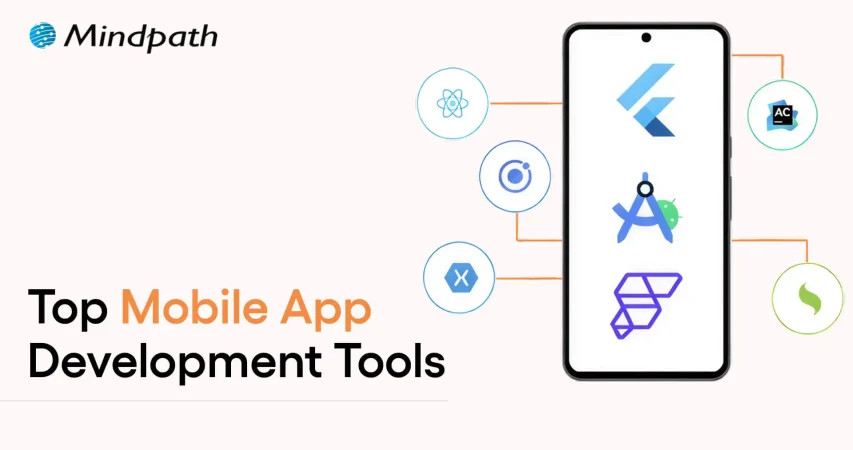
Top Mobile App Development Tools 

Join our Newsletter!

Featured Posts

Support Is One Click Away

Home

Top Mobile App Development Tools 

Mobile app development tools

Top Mobile App Development Tools 

In today’s rapid technological environment, businesses and developers are always trying to find new ways to create apps that engage users and run efficiently. This is why understanding what is mobile application development is essential. In short, mobile application development is the creation of software applications that run on mobile devices, such as smartphones and tablets, involving both creativity and technical skill. Selecting the best mobile app development tools can greatly enhance speed, quality, and innovation. The right tools will make coding, design, testing, and deployment easier for teams of people. It fosters the idea developed into a real app more quickly and effectively.

Investigation into the mobile app development ecosystem demonstrates a rapid and reliable delivery of apps to users. Tools shape the entire process, from user interface design to backend integration. This indicates that choices of tools are critical to success. The right set of tools maximizes people’s efficiency while conserving time, minimizing mistakes, and encouraging collaboration on projects. This provides support for more modern amenities. In this blog, we will highlight some of the best mobile development tools that are leading the industry today. So, keep reading further!

With advanced knowledge and expertise, Mindpath offers mobile app development services that are designed to deliver high-performing and user-centric apps, also ensure that your mobile product stands out in performance and design.

What is a Mobile App Development Tool?

A mobile app development tool is designed to simplify the process of creating mobile applications. It offers developers tools such as integrated development environments, templates, and code-free solutions to make the app-building process faster and easier. These also enable API integration, data syncing, and analytics in the app creation process, while still aiming to build robust and user-friendly apps.

By employing mobile app development tools, developers can operate in a visual environment with hardware reliability and flow design. They also simplify the backend of features such as push notifications and cloud services. App development becomes equitable, faster, organized, and with fewer errors leading developers to be able to innovate and enhance quality.

Want to build a mobile app but don’t know which technology to use for better execution? Learn from the mobile app development technologies blog to understand what suits best for your business.

Top 10 Mobile App Development Tools

Selecting the appropriate mobile app development tools is essential for developing performant and conveniently accessible applications. The right development tool simplifies coding and design, enhances collaboration, and increases testing and deployment features. It helps developers bring their ideas to reality more effectively. Here is a list of some of the best mobile app development tools:

1. React Native

React Native is one of the best mobile application development frameworks for producing high-quality applications across platforms. It lets developers apply their existing expertise in JavaScript and React framework to develop native-like interactions for iOS, Android, and other platforms. The cross-platform features of React Native let developers build applications with a higher degree of speed, efficiency, and consistency while maintaining performance.

2. Ionic

Ionic is another notable cross-platform mobile app development tool that allows developers to create applications for iOS, Android, and the web, all using standard web technologies, such as HTML, CSS, and JavaScript. It offers a vast set of UI components that have been pre-designed to help you build engaging and visually enhancing applications. It allows developers to enhance their engagement in the applications while maintaining a consistent level of speed and efficiency for multi-platform development.

3. Xamarin

Xamarin is a powerful mobile app development software that provides developers the ability to build Android, iOS, and Windows apps using a single C# codebase. It integrates nicely with Microsoft Visual Studio, allowing developers to build apps more quickly and efficiently. Xamarin allows the development of high-performance apps that will feel and appear native-like while multiplexing and simplifying maintenance.

4. Flutter

Flutter is a widely used development framework by Google that enables developers to build native applications for iOS, Android, the web, and even desktop, all from a single codebase. Thanks to its large offering of fully customizable widgets, developing visually attractive, highly responsive applications is easy. Its cross-platform capability allows teams to develop applications rapidly while continuing to provide a level of consistency across devices.

5. Xcode

Xcode is a full-fledged development environment focused on developing applications on Apple devices (iOS, macOS, iPadOS, watchOS, tvOS). It is an integrated development environment (IDE) that has a structured interface, designed to create, debug, and manage a significant project effectively. Additionally, it provides support for a number of languages, enabling developers to produce the high quality of Apple’s native applications.

Also Read: Application Security Best Practices 

6. Swift

Swift is regarded as one of the top tools for mobile application development, specifically for creating apps on iOS, macOS, and watchOS. Its speed, security, and user-friendliness enable developers to build high-performance native applications easily and swiftly. Modern syntax and capabilities make Swift the preferred programming language for application development work on Apple.

7. Kotlin Multiplatform

Kotlin Multiplatform is considered one of the best tools in mobile app development because it allows developers to share code across platforms but still maintain native performance. That is, it allows you to build apps for Android, iOS, and more using a single codebase and reusing your business logic, while still using the native user interface libraries. With support from Google and a growing community, Kotlin Multiplatform is an excellent option for cross-platform mobile app development.

8. Firebase

Firebase is one of the top mobile application development tools. It supplies developers with a complete backend platform for constructing mobile applications and continually enhancing, updating, or developing for future use. It also provides high-level services such as, real-time databases, authentication, analytics, and cloud messaging to make managing a mobile app much easier. Firebase allows developers to solely focus on the front end of the mobile app. Developers use Firebase when they want a fully functioning backend infrastructure that allows for the mobile app to run smoothly.

9. Apache Cordova

Apache Cordova is a mobile app development tool that is popular among developers because it provides the framework to create cross-platform applications using standard web technologies (HTML, CSS, and JavaScript). It makes it easy to develop applications for an entire app by interfacing with native device features through a variety of plugins. Cordova supports faster development and an easy maintenance process while delivering applications that run effectively and efficiently across multiple platforms.

10. Titanium SDK

Titanium SDK is a widely used mobile application development tool framework that affords developers the ability to create native applications for iOS and Android using a single codebase in JavaScript. It also provides access to native device features and enables teams to test simultaneously across platforms. Titanium SDK helps teams iterate faster at development without sacrificing performance or consistency of mobile applications.

Curious how mobile apps can leverage AI to transform your business and stay ahead in 2025? Explore our blog on Mobile App Development Trends to discover how these innovations can enhance user experiences.

Ready to Choose the Right Mobile App Development Tool?

Selecting the right mobile app development tools can make a significant difference in creating high-quality, efficient, and engaging applications. The tools highlighted in this blog help streamline coding, design, testing, and deployment, enabling developers to deliver reliable and innovative apps faster. Choosing the right framework ensures better performance, consistency, and a smoother development process.

At Mindpath, we offer professional mobile app development services that help businesses turn their ideas into fully functional applications. Their team uses modern tools and frameworks to deliver scalable, secure, and high-performing apps for iOS, Android, and cross-platform projects. Mindpath focuses on quality, efficiency, and user experience, ensuring that your app stands out in today’s competitive market.


Related Post

Discover essential security practices to protect your e-commerce website, ensuring safe transactions and building trust with your customers.
Find out what makes a great ReactJS developer! Explore core skills like component-based architecture, hooks, state management, and more.

Related Post

Low-code No-code Development

The app development arena has been undergoing constant evolution. One of the major developments that has captured the attention of one and all is the Low-Code/ No-Code modular approach. It is a must for modern businesses as well as individual app developers to familiarize themselves with low-code no-code development. It certainly holds the potential to revolutionize the application development process. 

According to the recent report by Future Business Insights, the low-code development platform is expected to grow from $ 37.39 billion in 2025 to $ 264.40 billion by the year 2032. This major jump automatically highlights the growing popularity of low-code platforms. In order to leverage this application development model, it is imperative for businesses to have a clear understanding of what is low-code or no-code development.

Want to take your business to the next level with the use of low-code development services? Contact us and get full guidance and support on how you can implement low code/ no code innovation for your organization.

An Insight into Low-code or No-code Development

In the dynamic digital space, low-code no-code have certainly emerged as a transformative force. It can be defined as the app development process that involves minimal coding. It serves as a visual approach in the app development setting. By adopting such an approach, it is possible for businesses or individuals with minimal coding skills to develop applications. 

The key difference between low-code and no-code development lies in the degree of coding that is necessary.  Low-code platforms act as highly effective tools that can help in creating apps. However, one must possess knowledge relating to coding to a certain degree. No-code platforms act as drag-and-drop platforms that entirely eliminate the need for coding. By leveraging top low-code no-code development services, businesses can develop high-performing applications.

Must Read: Low-Code vs. No-Code Development

Mechanism of Low-Code No-Code Development

In the traditional app development process, app developers or programmers had to engage in highly complex coding processes. Such processes were essential to create the features as well as the functions of the intended apps. As a result, app developers were expected to possess solid skills and expertise relating to coding and computer programming languages. 

However, by using the Low-code No-code Development approach, it is possible to visually choose and connect reusable components. By doing so, app developers and businesses can identify the specific components that represent specific capabilities. Then they can link them together in order to develop the desired workflow. 

Low-code and No-code tools undoubtedly simplify how developers create apps. By using such tools, they can easily develop applications as if they were drafting a flowchart instead of writing code in a detailed manner. Moreover, such platforms come with several features that allow developers to experiment during the app development process. The simple drag-and-drop interfaces of low-code and no-code tools streamline the entire application development process. 

As low-code and no-code solutions continue to grow, it’s helpful to see where they fit among the top web development trends in 2026, shaping the industry.

Benefits of Low-Code No-Code

In the past, the development of software applications was quite time-consuming. Businesses would have to deploy teams that would be responsible for app development. However, today the situation is very different as they have the option to use low-code/no-code tools.  These tools have the potential to simplify how applications are developed. Now that you know the low-code no-code meaning it is time to explore its benefits. 

1. Faster app development process

One of the fundamental benefits of low-code and no-code revolves around a faster development process. By using the best low-code no-code platforms, businesses can certainly speed up their app development process. Such tools create the opportunity for app developers to design apps efficiently without having to do complex coding from scratch. 

2. Lower app development cost

The cost relating to app development can give rise to financial constraints for businesses. In fact, conventional app development processes were quite costly. However, by adopting the low-code no-code model, businesses can develop top-performing apps in an affordable manner. By choosing top tools, the need for high-cost development resources can be reduced considerably.  

3. Ideal tool for non-developers

Non-developers who have limited insight into software development can capitalize on low-code and no-code tools to venture into the development space. These tools can act as the perfect partners that can aid in designing a diverse range of applications. Businesses can utilize the model to democratize app development. As a result, the reliance on IT teams for app development can be reduced considerably. 

4. Higher agility

In the prevailing digital context, the low-code no-code approach enables businesses to undertake diverse processes relating to prototyping and testing. By using low-code or no-code platforms, businesses can modify the workflow, data sources, and user interfaces. Moreover, such modifications can be done in a quick and agile way. 

While low-code/no-code tools offer speed, traditional approaches still have value; learn more about optimising development with Custom Web Development Services.

Drawbacks of the Low-Code No-Code Model

To get a comprehensive insight into low-code and no-code development, it is essential to understand the associated drawbacks. Only by being aware of the shortcomings can businesses decide how they can optimally use low-code or no-code. Some of the major drawbacks of low-code and no-code include:

1. Restricted degree of flexibility

One of the main drawbacks of the low-code no-code approach is that it diminishes flexibility for app developers. This is because their ability to customize their app is reduced to a considerable extent. As low-code and no-code frameworks rely on pre-built components, businesses that wish to develop highly tailored apps may not be happy with the outcome. 

2. Issues relating to performance

Another major drawback of low-code and no-code that businesses need to be aware of revolves around performance concerns. Sometimes, the apps that are developed using low-code or no-code tools may struggle to handle a large volume of data. Similarly, concerns relating to scalability may also arise in case there is a surge in user load. Such concerns may have an adverse impact on the overall satisfaction and experience of users. It may even impact the reputation of businesses. 

3. Challenges relating to integration

A common concern that may arise for businesses centers around integration challenges. It might not be easy to integrate the apps that have been developed using low-code or no-code platforms with the existing systems. Thus, app developers and businesses may require extra time as well as resources to address these integration concerns. 

4. Security issues

The use of no-code platforms may give rise to serious security concerns for businesses. This is because such platforms typically have limited security features. In the highly unpredictable and uncertain digital environment, this drawback has the potential to compromise the quality of an app. Moreover, security-related concerns may give rise to severe consequences for not only businesses but also their customers.   

Final Words

In the technology-driven business world, app development is a must for most businesses. Thus, it is crucial for businesses to broaden their insight relating to low-code and no-code development. By capitalizing on this app development model, businesses can certainly develop top-quality apps in an efficient manner. Before applying the specific model, businesses can surely refer to some real-life low-code no-code development examples.

To make the most of the low-code and no-code approach, it is essential to consider the associated advantages and drawbacks as well. The comprehensive insight can definitely guide modern businesses to develop novel apps with the help of low-code and no-code tools. Mindpath‘s low-code development services help you make the strategic use of such tools can empower businesses and shape the experiences of their target audience.  

Discover how low-code/no-code tools are transforming digital development and enabling faster app creation for businesses.
Remote Development Teams

Managing a remote development team can feel like a unique challenge, right? With team members spread across different locations, how can you ensure everyone stays connected, motivated, and productive? What strategies can you implement to keep your team engaged and aligned with project goals? In this blog, we’ll explore practical tips to help you navigate the complexities of remote team management.  

Managing a remote development team is essential because it allows everyone to collaborate effectively even when they are separated by a long distance. Good management ensures that everyone understands their responsibilities and feels connected to the team. When developers are well-managed, they are more productive and satisfied with their job, which leads to better project outcomes. Furthermore, excellent management facilitates issue resolution and keeps the team focused on their objectives. In today’s environment, when many individuals work from several places, qualified management is essential for success. 

So, let’s dive into the tips for managing a remote development team! 

Tips For Managing Remote Development Team

1. Hire Trusted Developers

The first and most significant recommendation is to hire folks that you can trust. Remote work can assist teams become more productive, decrease stress, and save money for the business. However, hiring the wrong individuals might cause serious consequences. When working remotely, it is impossible to manage the team in person. Trust is crucial; team members must be dependable and provide outstanding outcomes. If someone doesn’t appear capable, they can check in regularly via Slack, Zoom, or other methods, which might cause tension and pressure for them. Constant inspection can have an adverse effect on team performance. Establishing a robust recruiting process is crucial for identifying people with the necessary abilities. 

2. Use Agile Methods

One of the most effective approaches is to use the Agile Methodology. This strategy improves communication, cooperation, and project delivery by incorporating market input. Agile works by establishing a flat team structure, eliminating needless hierarchies. It focusses on identifying key aspects of the program to be built based on real-world scenarios. Agile also promotes brief daily meetings known as stand-ups, in which all team members can offer their ideas and updates. Furthermore, the team examines each project update collectively to determine what could be improved, added, or eliminated. Teams that plan and work together can launch a Minimal Viable Product (MVP) as soon as feasible. This ensures that the final product properly fits the demands of the users. 

3. Enhance Communication Tools

An important principle for good communication is to never assume; instead, ask questions and speak out when in doubt. This idea can assist in avoiding misunderstandings within a remote collaboration. Misunderstandings are common while working remotely, so it’s essential to resolve them early with the correct tools and procedures. For example, a team can use Zoom for meetings and special events, Slack for fast reminders and announcements, and Google Drive or Coda for document sharing. These technologies can significantly enhance communication and eliminate misunderstanding. Regular video conferencing is vital for interacting with teammates and fostering collaboration. They let you discuss project progress, identify areas for improvement, and check in on personal problems. These discussions serve to foster trust and transparency in communication. 

4. Hold Regular Performance Reviews

It is essential to schedule frequent performance evaluations to assess both individual and group performance. These appraisals give helpful feedback and assist in identifying areas for development. Setting a constant timetable, whether biweekly or monthly, enables developers to expect comments and focus on improving their performance. These sessions also provide a fantastic chance to acknowledge and appreciate their accomplishments. Encouraging 360-degree input is another great method. This entails getting feedback not only from managers, but also from colleagues and stakeholders. This technique provides a more comprehensive understanding of a developer’s strengths and opportunities for improvement. Developing future action plans is a key component of performance evaluations. Work with each developer to create customized development plans based on the input obtained.  

5. Build Team Spirit

Developing a strong business culture in a remote workplace can be difficult, especially when many people imagine coworkers celebrating birthdays with cake or enjoying themselves after work. However, the essence of workplace culture lies not only in the activities themselves but also in the relationships that they build among team members. It takes purposeful effort to foster a team spirit that boosts everyone’s spirits. Consider organizing virtual team-building events, celebrating accomplishments, or simply checking in with team members. These actions can assist in establishing relationships and foster a positive remote work environment. 

6. Let Them Work Freely

It’s essential to provide engineers with enough room to complete their work. Clients frequently express their worry about how to closely monitor their developers’ work, which can lead to ambiguity regarding progress. The remedy is straightforward: avoid micromanaging. The results speak louder than words. 

While it is essential to analyze performance data, one of the most common mistakes that drive great engineers to quit is attempting to regulate their every move. Developers don’t spend their whole day coding; they frequently require time to think about answers and devise new solutions to challenges. 

The easiest method to evaluate their work is to focus on the results they produce, rather than continually watching their everyday actions. Trusting them to work autonomously leads to a more productive and motivated team. 

7. Know Your Team’s Dynamics

Different teams have distinct meeting and communication requirements. Some teams may benefit from regular meetings to keep focused on project specifics, particularly if their job requires a lot of cooperation. Others might thrive better with fewer, less frequent encounters. To properly manage a development team, you must first learn how each person works best. Recognizing the team’s speed, choosing the most effective tools, and calculating the appropriate number of meetings may all assist to minimize burnout and undue stress. By identifying and respecting individual work preferences, you may foster a productive and peaceful workplace that benefits the whole team’s performance. 

Hire Remote Developer at Mindpath

At Mindpath, we understand that hiring remote developers is a crucial step in bringing your project to life. Our streamlined process is designed to ensure you find the right talent while receiving the support you need throughout the development journey. Whether you’re building a new application or enhancing an existing one, we’re here to help you achieve your goals efficiently. Here’s how our process works: 

1. Gather Your Requirements

Start by reaching out to Mindpath to discuss your project goals and needs. We will review all details and create a comprehensive plan that outlines our approach, timeline, and estimated costs. 

2. Select the Right Talent

We’ll identify remote developers who are the best fit for your project. You will have the opportunity to interview candidates and choose developers who meet your specific requirements. 

3. Kick Off the Project

Once your development team is assembled, we’ll kick off the project with a clear plan and timeline. Our team will maintain regular communication, providing updates to ensure everything aligns with your vision. 

4. Receive Ongoing Support

Mindpath is committed to supporting you throughout the development process and even after project completion. Our goal is to ensure that all your objectives are met and that the project runs smoothly. 

Final Thought!

A remote development team has to be managed effectively using a combination of communication, trust, and culture-building techniques. By prioritizing these characteristics, you can create an environment in which developers feel respected and encouraged to do their best work. Remember that hiring the proper developers is only the beginning. Maintaining an open channel of communication, holding frequent performance evaluations, and cultivating team spirit are essential for keeping your team on track with project objectives. At Mindpath, we streamline the recruiting process to ensure you locate the perfect people for your unique need. We are here to help you throughout your development journey, ensuring that your goals are met and that your projects run smoothly. 

Ready to elevate your project with top-notch remote developers?

Partner with Mindpath for seamless collaboration and expert support.

Discover effective strategies for managing remote development teams, from hiring trusted developers to enhancing communication.
Drupal vs wordpress

At present, the debate of Drupal vs WordPress is more relevant than ever. WordPress is already powering a large number of websites all across the world. Gradually, Drupal has been strengthening its foothold in enterprise as well as government projects. This has given rise to an important question among businesses and professionals: Is Drupal better than WordPress, or is WordPress still the easier choice for users? 

The guide gives a comprehensive insight into both Drupal and WordPress. You need to get a holistic insight into these platforms so that you can choose the best solution that perfectly fits your needs.  An in-depth comparison between these novel platforms has been made, which can simplify your selection process and help identify the right CMS for your needs in 2026.

Want to build a CMS in your online presence that is flexible, user-friendly, and reliable? Our WordPress development services help you with custom solutions focused on delivering a secure and future-proof CMS tailored to your business needs.

WordPress at a Glance

In the year 2026, WordPress certainly remains the world’s most popular web content management system. Within a short span of time, WordPress has been powering over 40% of the web. The platform is known for its ease of use, along with a massive plugin library. The availability of flexible full-site editing tools makes WordPress perfect for professionals as well as small and medium-sized entities. 

Some of the unique attributes of WordPress that make it a useful CMS solution are the availability of a plethora of themes coupled with robust SEO plugin support. The existence of a thriving developer community allows users to get the optimum value by choosing WordPress.

An Insight into Drupal

Drupal has emerged as a powerful enterprise-grade CMS tool. You can use the free open-source web CMS for the purpose of building websites and web applications. Drupal has gained immense trust among government agencies and large organizations within a short period of time.

Drupal is known for its security and flexibility. Moreover, it is capable of handling a large volume of content and complex user workflows. These characteristics make Drupal a world-class CMS platform that is suitable for meeting the needs of content-heavy platforms. It is time to dive deeper and look at the differences, as now you have clarity about Drupal WordPress

Planning to, but don’t know what to look for when hiring a professional to handle your WordPress development needs? Discover our guide to hiring WordPress developers to help you make a smart, confident, and informed hiring decision. 

Comparison Between WordPress and Drupal

Are you wondering – Is Drupal similar to WordPress? The answer is Yes! However, even though WordPress Drupal are web content management systems, they have a number of differences. If you are planning on developing a website or web application, you need to have clarity on Drupal vs WordPress. Some of the main differences between WordPress and Drupal include

1. Ease of Use

When it comes to ease of use, WordPress is undoubtedly the clear winner in the year 2026. WordPress offers unmatched accessibility for beginners. Moreover, it can be scaled to handle complex projects. Some of the key features of WordPress include its Full Site Editing as well as the Gutenberg block editor. These elements make it easy for beginners to not only design but also publish pages without having to rely on coding. Furthermore, thousands of pre-built themes and plugins are available, which allow users to launch a site within a few hours.

However, Drupal has a steeper learning curve. You need to remember that its interface is less intuitive for non-developers. Moreover, configuring its modules requires technical knowledge. Experienced developers can leverage the tool, and it can offer them great flexibility and control.

2. Security

There exist differences between Drupal and WordPress when it comes to security. Security is undoubtedly one of the best features of Drupal. Drupal continues to be the ultimate CMS tool that is preferred by government websites and enterprise organizations. It not only offers a dedicated security team but also detailed advisories for minimizing vulnerabilities.

Even though WordPress can be considered to be secure at its core, it faces a greater risk. This is mainly because of its massive plugin ecosystem. Vulnerabilities may often arise from third-party plugins as well as outdated themes. Thus, in terms of security, Drupal is the clear winner out of the two CMS solutions. 

3. Performance

While making a comparison between Drupal or WordPress, the former shines when it comes to performance. Drupal delivers exceptional performance thanks to its advanced caching as well as API-first design. Moreover, its optimized architecture ensures that users can derive optimum value from the CMS tool. The entities that handle millions of pageviews can certainly rely on Drupal without having to sacrifice speed and efficiency. 

Over the years, the performance delivered by WordPress has improved. The improvement has been mainly because of the modern PHP versions coupled with block-based design. Similarly, the headless options have also contributed to improved performance. Users can derive immense value if they pair WordPress with strong hosting and caching layers. This can certainly help WordPress to scale well. However, users must bear in mind that the CMS tool typically requires more plugins as well as third-party optimizations.

Must Read: WordPress and PHP Compatibility

4. Cost

A common question that one may have is: What is the cost of using CMS tools? The core software is free in the case of WordPress. Moreover, several themes as well as lug-ins are free or low-cost. Furthermore, the development costs are lower because of the availability of a large talent pool.  

The Drupal software is free. However, users need to remember that the development as well as maintenance costs are higher. Currently, skilled and talented Drupal developers are in short supply in the labor market. This automatically makes Drupal development more costly in comparison to WordPress. It is important that users bear in mind while choosing between WordPress and Drupal. 

5. Flexibility

Flexibility is another important dimension that you must take into consideration while comparing WordPress and Drupal. WordPress definitely serves as a more flexible tool for everyday users. However, Drupal is better in terms of flexibility if you are working on highly structured and enterprise-level sites. These CMS tools adopt a different approach, which influences their overall flexibility. 

WordPress mainly thrives on its plugin and theme ecosystem. These elements make it flexible for individuals as well as small businesses. However, Drupal excels in areas such as complex workflow as well as content modeling. The fact that it focuses on granular user permissions and enterprise-grade content management enables developers to tailor Drupal to meet their complex needs. 

6. SEO Capabilities

SEO is indispensable in 2026, and both CMS tools offer solid, strong SEO options. WordPress is known to have popular SEO plugins such as Rank Math as well as Yoast. They provide beginner-friendly tools along with AI-driven optimization tips for users. Another benefit in the case of WordPress revolves around the presence of mobile-first templates.

When it comes to Drupal, it lacks plug-and-play tools. However, it offers granular control over SEO, including URL structure and metadata. These are other features as well relating to multilingual optimization, as well as structured content management. These features are highly appealing to enterprise SEO teams who are in search of precision.

Do you want your website to be accessible to every visitor? Learn how to improve WordPress web accessibility can help you reach more users and create an inclusive online experience.

WordPress vs Drupal: A Quick Comparison

Now that you have gone through the various comparison factors to understand the differences between Drupal and WordPress, let’s have a look at the quick comparison table. The table below gives an overview of the differences between WordPress and Drupal. 

Features WordPress Drupal
Ease of Use User-friendly  Ideal for Experienced developers
Security Low Security High security 
Performance Efficient performance for small and mid-sized sites High performance for enterprise-scale sites 
Cost Less Expensive More Expensive 
Flexibility High flexibility for everyday users Ideal for highly structured websites 
SEO Capability Better for quick SEO optimization Better for advanced SEO strategies 

Which Is Better, WordPress or Drupal?

The answer regarding which is better – Drupal or WordPress depends on your specific needs as a user. Whether you are a professional or a business entity, you need to know – WordPress versus Drupal. The insight can certainly help you choose between the two robust CMS platforms. 

WordPress is better for users who are looking for a user-friendly CMS tool. It can act as an easy-to-use CMS solution that will allow fast setup. The rich plugin options that are available make it ideal for blogs and the marketing sites of small and medium-sized enterprises. 

On the other hand, Drupal is a top content management system for handling enterprise projects. You can choose the solution if you are looking for top-grade security, a custom workflow, and excellent multilingual support. At present, both WordPress and Drupal have established themselves as amazing CMS solutions for businesses and professionals.   

Curious which platform will better support your website’s growth and design needs? Discover WordPress vs Webflow to understand their differences and choose the best option for your business.

Final Words

When it comes to WordPress versus Drupal, you need to bear in mind that there is no one-size-fits-all solution. WordPress has been dominating the market for ease of use, as well as affordability. It is the ideal choice for blogs and small and medium-sized businesses. However, Drupal is built for high complexity. It offers unmatched security along with enterprise-level content management.

If you want to leverage WordPress to the fullest, you must certainly choose our WordPress development services. The experts at Mindpath ensure that you get immense value from the novel CMS solution. Whether you are a business owner or a professional, you must consider leveraging these solutions to witness your website flourish.