Home

What is a Chatbot? Everything You Need to Know in 2026

What is a Chatbot? Everything You Need to Know in 2026

Join our Newsletter!

what is a chabot

In this fast-paced world of business, companies are actively seeking smarter tools to improve customer service and communication. Chatbots are one of the most common, and a great way to get attention. If you have engaged with a virtual assistant on a website, chances are that you have seen it in action. So, what is a chatbot? You may have wondered about this when you are chatting with a brand online or if you are shopping on a website where you are getting instant replies.

As these types of digital assistants proliferate, they are quickly becoming an essential aspect of how businesses operate in 2026. With faster response times and the ability to interact with multiple customers at once, it is no surprise that chatbots are altering how companies relate to their customers. In this blog, we will provide you with everything you need to know about chatbots including benefits, features and examples of chatbots in action.

Struggling to keep up with customer queries or deliver 24/7 support efficiently? Mindpath’s GenAI-driven chatbot development services can help you manage customer service and boost business performance.

What is a Chatbot in Simple Words?

A chatbot is an artificial intelligence (AI) software application that is designed to have human-like conversations. They use natural language processing (NLP) to understand what users are stating and respond in a way that feels natural in a conversation and is helpful. They can help with answering questions, can guide the user, and can perform some tasks.

Chatbots can be a part of a website, an app, a messaging app, or a voice assistant. AI chatbots help businesses communicate with customers 24/7. They can perform tasks like making bookings, solving common problems, and providing information. AI chatbots are invaluable tools for improving customer experience and communication.

How does a Chatbot Work?

Chatbots work by using artificial intelligence and natural language processing to understand what users are saying. When someone types or speaks to a chatbot, it reads the message and tries to figure out what the person wants. It does this by matching the message with words or phrases it already knows.

Once the chatbot understands the request, it picks the most suitable response and replies to the user. Some chatbots follow simple rules, while others learn from past conversations to improve over time. This process allows chatbots to provide quick and helpful replies in a natural and professional way.

What are the Benefits of Using AI Chatbots for Businesses?

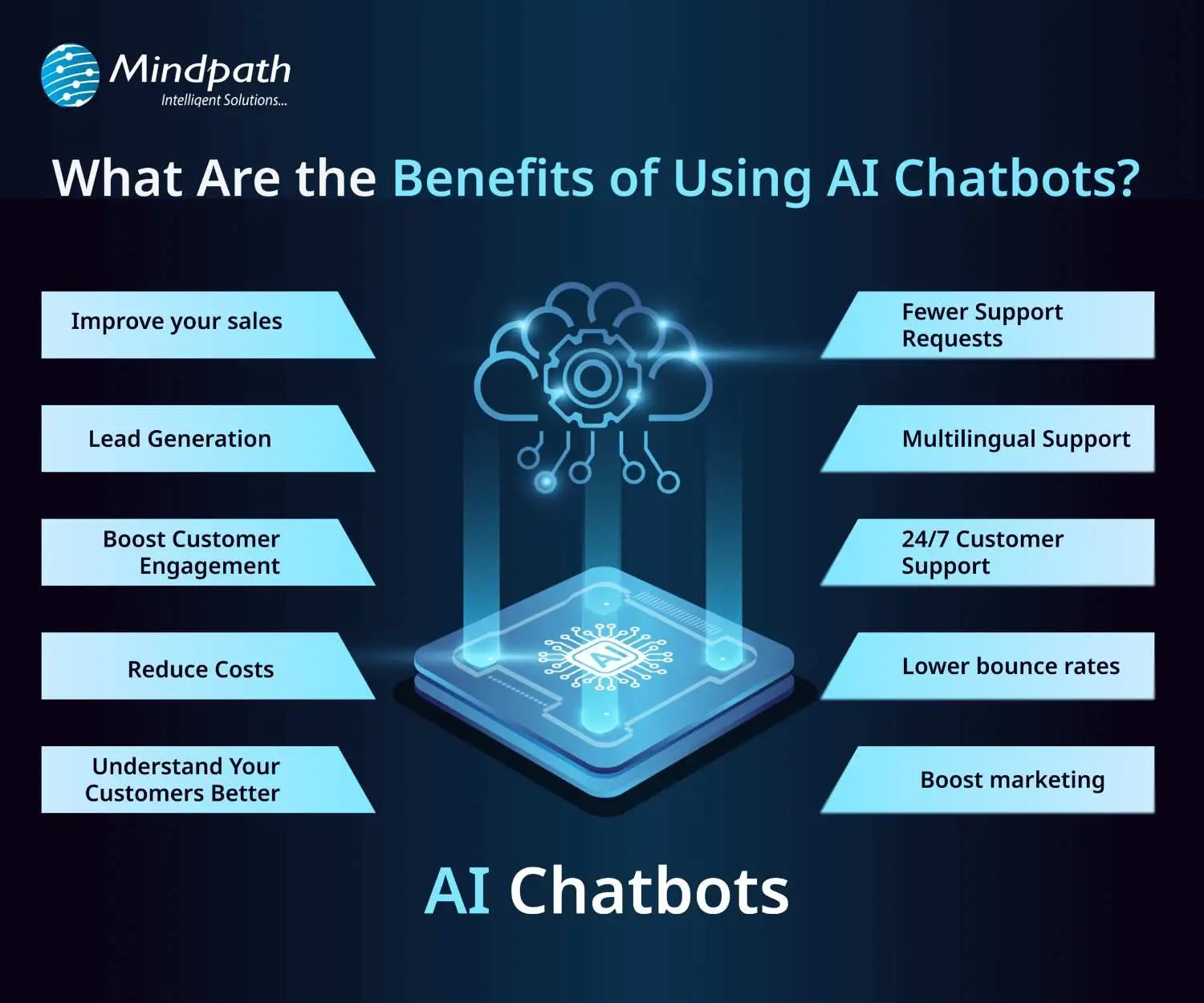
AI chatbots are now widely used by businesses to improve customer interaction and automate routine tasks. Here are some of the key benefits of chatbot technology that can help boost your business:
benefits-of-ai-chatbots-scale

1. Improve Sales

Chatbots can increase sales by showing new products or offering special discounts to website visitors. They send helpful messages that guide users toward making a purchase. These bots also assist in product selection and order placement. This makes it easier for new visitors to become paying customers.

2. Lead Generation

Chatbots help gather leads even before a conversation starts. They ask visitors for basic details like name and email to begin the chat. They can also qualify these leads by asking relevant questions based on customer needs. This helps your sales team know who they’re speaking with and what the customer is looking for.

3. Boost Customer Engagement

Chatbots make online experiences more interactive and personal. Instead of searching through a website, users can chat and get instant answers. Bots reply with clear information based on user questions. This keeps customers engaged and helps them find what they need quickly.

4. Reduce Costs

Using chatbots is more affordable than hiring multiple support agents. They can handle many tasks like answering FAQs or booking appointments, which saves time and money. You’ll still need some team members, but bots make the process faster. This is especially helpful for managing high volumes without extra costs.

5. Understand Your Customers Better

As chatbots collect important customer data during conversations, they can also run surveys to check customer satisfaction. By reviewing these chats, businesses can find out what customers like or dislike. This feedback helps improve products and services over time.

Wondering why chatbots are becoming essential for modern businesses? Explore the top Benefits of Chatbots Every Business Leader Should Know and learn how they drive growth.

6. Fewer Support Requests

Chatbots handle many common questions, which reduces the number of queries sent to human agents. This helps agents focus on more complex issues. It also improves customer satisfaction by providing quick solutions. A chatbot for business can balance automation and personal support effectively.

7. Multilingual Support

Multilingual support allows chatbots to speak different languages. This is helpful if your business has customers from various countries. The bot can reply in the language your customer prefers. This makes a chatbot for small businesses and large companies more accessible to global audiences.

8. 24/7 Customer Support

Chatbots are always available, even when your team is offline. If someone is browsing late at night and needs help, the bot can step in. It can guide them to the right product or answer their questions. This leads to better customer service and more satisfied clients.

9. Lower Bounce Rates

Chatbots can keep users on your site longer by offering help when someone is about to leave. They provide answers or discounts that encourage people to stay. This improves your website’s engagement and SEO performance. Visitors feel supported and are more likely to explore further.

10. Boost Marketing

Marketing chatbots can suggest products, offer deals, and guide customers through the buying process. They also collect useful data for future campaigns. One of the ideas can be a spinning wheel offering discounts, which encourages users to buy. This creates an engaging and effective marketing strategy.

How can conversational AI take your customer engagement to the next level? Explore the power of Conversational AI Chatbots for Business Growth and discover how they drive results.

Real-World Use Cases of Chatbots

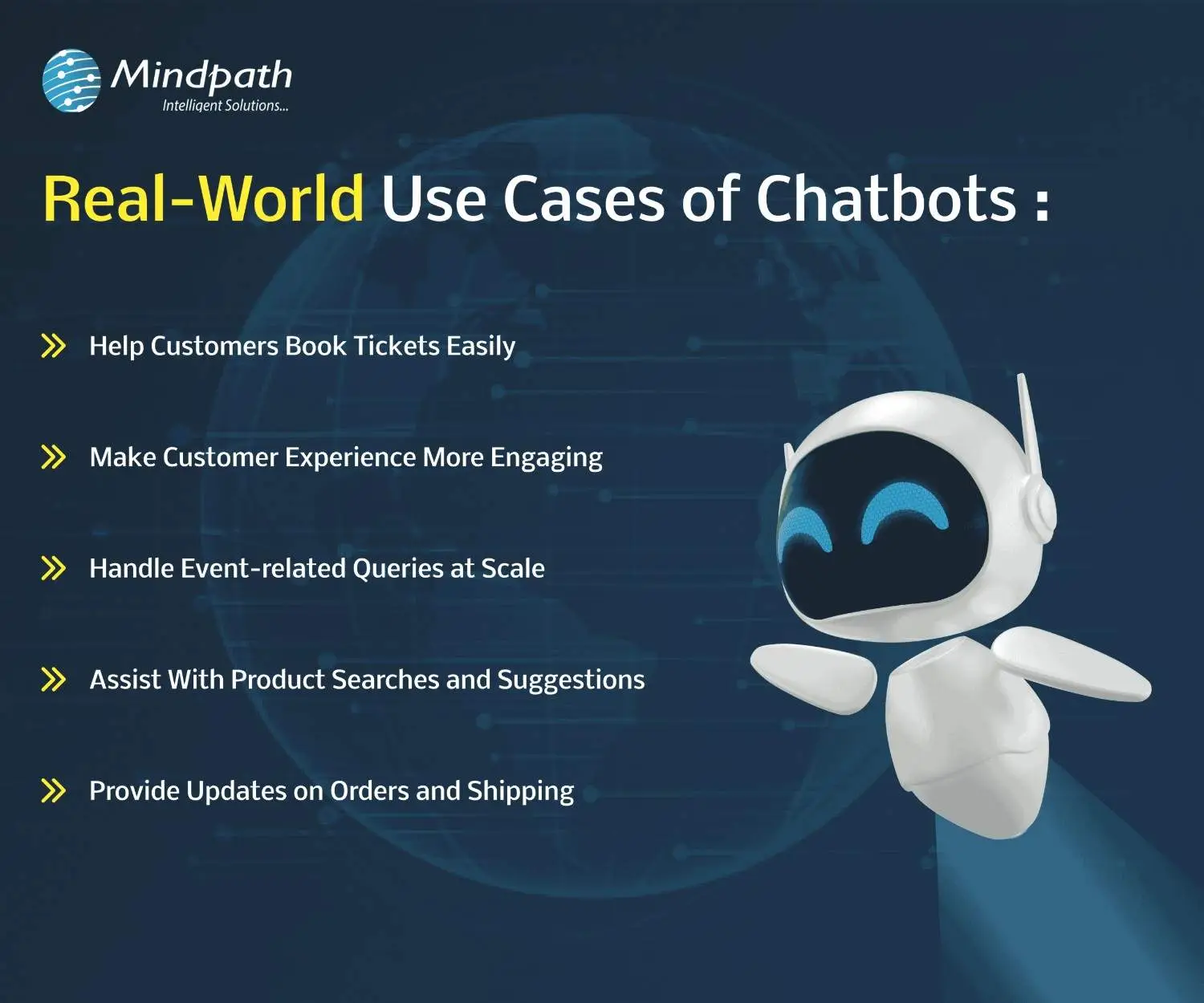
Chatbots are being used across many industries to simplify tasks and improve customer experiences. Here are some real-world chatbot examples that show how businesses are using them effectively for different needs.
use-cases-of-chatbots-scale

1. Help Customers Book Tickets Easily

A chatbot can answer common questions like seat availability, movie timings, and refund policies while guiding users to book tickets smoothly. PVR Cinemas uses this on their website to help visitors quickly complete bookings and check offers.

2. Make Customer Experience More Engaging

Chatbots can add personality by offering quizzes, jokes, and product suggestions in a fun and helpful way. LEGO’s chatbot Ralph helps users find the right gift through playful questions and interactive chat.

3. Handle Event-related Queries at Scale

When thousands of people need answers about an event, a chatbot can respond instantly with details like schedules, speakers, and directions. Slush uses one to manage large volumes of attendee questions efficiently on their event site.

4. Assist With Product Searches and Suggestions

A chatbot can search inventory and offer personalized product recommendations based on customer preferences. Sephora’s chatbot does this well by guiding users to suitable makeup products and checking stock availability.

5. Provide Updates on Orders and Shipping

Instead of navigating emails and websites, customers can enter their order ID in a chatbot to get instant shipping updates. H&M allows shoppers to track their deliveries directly through its chatbot.

Thinking about Using Chatbots to Elevate Customer Experience?

Chatbots are transforming how businesses interact with customers by offering fast, helpful, and personalized service. From booking tickets to answering questions, these tools simplify tasks and improve user satisfaction. With so many benefits, it’s no surprise that more companies are embracing chatbot technology to stay ahead in 2026.

At Mindpath, we offer custom chatbot development tailored to your business goals. Our chatbot development services are designed to help you improve customer interactions, increase engagement, and streamline operations. Whether you need a simple support bot or a fully integrated solution for sales, marketing, or service, our expert team builds smart, reliable chatbots that deliver real results.

Frequently Asked Questions

1. How can a chatbot improve customer experience on a website?

A chatbot improves customer experience by offering instant responses, guiding users to the right information, and reducing wait times. It creates a smooth journey by helping visitors find what they need quickly, which increases satisfaction and encourages them to stay longer on the website.

2. What is a chatbot used for in daily business operations?

A chatbot is used for handling routine tasks like answering FAQs, booking appointments, collecting customer data, and assisting with purchases. It helps teams save time by automating repetitive work while ensuring customers receive quick and consistent support throughout their interaction.

3. Can chatbots work effectively for both small and growing businesses?

Yes, chatbots are useful for both small and growing businesses. They help manage customer queries without needing a large team, making operations more efficient. As the business grows, chatbots can scale easily to handle more interactions without increasing costs significantly.

4. What should businesses consider before implementing a chatbot?

Before implementing a chatbot, businesses should define clear goals, understand customer needs, and choose the right type of chatbot. It is also important to plan integration with existing systems and ensure proper testing to deliver a smooth and effective user experience.

5. What is a chatbot’s role in improving website engagement?

A chatbot plays an important role in keeping users engaged by starting conversations, offering assistance, and providing relevant suggestions. It reduces bounce rates and encourages interaction, helping businesses create a more interactive and user-friendly website experience that keeps visitors interested.


Support Is One Click Away

Featured Posts

Related Post

hiring react developer

You should know what a react developer does in real life before you start hiring. A React developer’s main job is to use JavaScript and the React library to create user interfaces that people can use. They want to know how well front-end apps work and how they do it.

Making UI components, keeping track of the application’s state, integrating APIs, and speeding things up are some of the things they do every day.

Planning to bring your web application idea to life using React? Mindpath offers ReactJS development services designed to deliver smooth performance and great user experience.

A react js developer’s real-life tasks and responsibilities include:

  • Creating reusable UI components
  • Managing data flow and state
  • Optimizing application performance
  • Collaborating with backend and DevOps teams
  • Maintaining clean and scalable codebases

It’s important to be clear about the job because hiring someone without knowing what it is can lead to problems with expectations.

Also Read: ReactJS Trends

Why Hiring the Right React Developer Matters?

ReactJS development services are in high demand right now because people need web apps that can grow and work well. If you hire the wrong developer, the project could take longer to finish, you could have more technical debt, and the user experience could get worse.

But skilled developers can:

  • Deliver clean and maintainable code
  • Optimize performance at scale
  • Build seamless user interfaces

More and more businesses are hiring Dedicated React developers who can help with long-term product growth instead of just getting things done quickly.

Wondering why businesses are increasingly choosing React for their projects? Discover the key benefits of ReactJS for web development and how it improves performance and scalability.

Core Skills Required for React Developer

The first step in a structured hiring process is to find out what skills you need to have to be a React developer. These skills are more than just being able to write code. They know how to build front-end architecture from the ground up.

1. Strong JavaScript Fundamentals

You need to know ES6+ because React is built on JavaScript. Developers should know about things like closures, async/await, and array methods.

2. React Fundamentals and Architecture

You need to know a lot about JSX, the virtual DOM, the component lifecycle, and how to handle state in order to make apps that work well.

3. State Management Expertise

To deal with complicated states in modern apps, you need to know how to use tools like Redux or the Context API.

4. HTML, CSS, and UI/UX Understanding

React is a framework for building front-end applications. This means that programmers need to know how to make user interfaces that are simple to use and work well.

5. API Integration and Backend Communication

Developers need to know how to connect backend services and use REST APIs.

6. Version Control and Development Tools

To get a job today, you need to know how to use Git, Node.js, and npm.

You should never compromise on these reactjs developer skills because they are the technical foundation.

Looking to understand the step-by-step journey to becoming a successful React developer? Explore detailed ReactJS roadmaps to guide your learning and hiring decisions effectively.

Evaluating Advanced ReactJS Developer Skills

The best developers know more than just the basics. They know advanced skills that affect how well the system works and scales.

1. Performance Optimization

A good developer knows how to make big datasets work better, use lazy loading, and cut down on the number of times they have to render.

2. Testing and Debugging

If you know how to use tools like Jest and debug, you will have fewer problems in production and be able to release things faster.

3. Component-Based Thinking

Since React’s architecture is based on reusable parts, it’s important to know how to make designs that can be used again.

4. Problem-Solving Ability

Developers should be able to quickly find and fix bugs and handle problems that come up in the real world.

These advanced skills are often what make a candidate stand out from the rest when hiring a developer.

Looking to create applications that can grow with your business needs? Discover how building scalable applications with React can help you achieve long-term success.

The Role of React Developer 

How much work a modern developer can get done depends a lot on how well they know react developer tools and ecosystem utilities.

These tools are helpful:

  • React DevTools for debugging component trees
  • Redux DevTools for state inspection
  • Build tools like Webpack and Vite
  • Testing libraries like Jest and React Testing Library

These tools can help the developer do well in real life, not just in theory.

Soft Skills You Should Not Ignore

When you hire react developers, make sure they have both hard and soft skills.

Here are some important soft skills:

  • Communication and teamwork
  • Attention to detail
  • Adaptability and collaboration 

React developers often have to work with people from other departments, so being able to get along with others can make a big difference in how well a project goes.

Want to know how artificial intelligence is shaping modern front-end frameworks? Read how ReactJS and AI are working together to create smarter and more dynamic applications.

Practical Hiring Checklist for React Developers

Based on real-life hiring frameworks, this is a helpful list of things you can do to hire people faster:

1. Define Your Requirements Clearly

Find out if you need a freelancer, a developer who works for you, or a team of React developers who will work on your project full-time.

2. Evaluate Technical Skills

Learn how to use APIs, how to manage state, and the basics of JavaScript and React.

3. Review Portfolio and Past Work

Check out real projects to see how well they code, how easy it is to add new features, and how good their user interface is.

4. Conduct Technical Assessments

Give someone coding tests and put them in real-life situations to see how good they are at solving problems.

5. Assess Communication Skills

Make sure the developer and your team can work well together.

6. Check Adaptability and Learning Ability

React changes a lot, so developers need to stay up to date on new features and how to use them correctly.

This list will help you stay on top of things and organized while you hire people.

Curious about how much it really costs to hire skilled React professionals? Explore the cost of hiring ReactJS developers and what factors influence pricing.

Choosing the Right Hiring Model

When companies need to hire ReactJS developers, they usually choose one of three types of models:

  • Freelancers for short-term tasks
  • In-house developers for long-term projects
  • Outsourced or dedicated teams for scalability

There are good and bad things about each model, but companies that want to grow steadily over time usually hire Dedicated React developers.

Final Thoughts

You can’t just hire someone who knows how to use React; you also need to find people who can build apps that are fast, can grow with your business, and meet your needs. You can greatly lower the risks of hiring by using a structured checklist and focusing on the right skills for a React developer.

One of the best things your business can do in a world where user experience is the most important thing for success is hire the right React people.

FAQs:

1. What does a react developer do?

A React developer builds user interfaces using JavaScript and React, focusing on UI components, state management, and performance optimization.

2. What are the key skills required for react developer roles?

Key skills include JavaScript (ES6+), React fundamentals, state management, API integration, and UI/UX knowledge.

3. Why should I hire dedicated React developers?

Dedicated developers ensure consistency, better collaboration, and long-term scalability for complex projects.

4. What tools should a React developer know?

Important react developer tools include React DevTools, Redux DevTools, Jest, and build tools like Webpack.

5. How do I evaluate ReactJS developers for hire?

Assess their technical skills, portfolio, problem-solving ability, and communication skills through structured interviews and tests. 

Hybrid Cloud

Imagine a world where businesses can enjoy the flexibility of public cloud services while keeping sensitive data safe in a private environment. Sounds ideal, doesn’t it? That’s the promise of hybrid cloud! But why is it gaining so much attention? What makes it the perfect choice for modern businesses? Let’s dive into the key benefits of this game-changing approach. 

What Is Hybrid Cloud?

A hybrid cloud is a configuration that combines private and public cloud technologies. It combines private servers in your office or data center with public cloud services from firms such as Google Cloud or Amazon Web Services. This architecture allows enterprises to store and manage their data and apps in the most appropriate location for their purposes. For example, sensitive or vital data can be kept protected in the private cloud, while less crucial operations can be done on the public cloud to save money and enhance speed. Businesses can also shift workloads across various clouds, making it an extremely adaptable and practical option. Hybrid clouds are popular because they provide businesses with the best of both worlds: security and flexibility. They are especially useful during digital transitions, when firms need to change their systems without totally shutting down their existing activities. This strategy enables businesses to work smarter, save money, and expand more effectively.  

How Does Hybrid Cloud Work?

A hybrid cloud combines two or more types of cloud environments, such as private data centres and public cloud services, into a single system. This connectivity enables enterprises to effortlessly transfer data and applications across various environments. The hybrid cloud requires robust networking to function properly. This is accomplished via techniques such as local networks (LAN), virtual private networks (VPN), and APIs, which allow smooth communication between the various elements of the cloud. Virtualization and containerization are two common current technologies used in hybrid cloud systems. These solutions simplify resource management and sharing by producing virtual replicas of hardware or software. These resources are also managed using specialized software, which enables organizations to swiftly change or assign them as needed. 

Advantages of Hybrid Cloud

1. Better Return on Investment (ROI)

A hybrid cloud enables you to integrate your existing private infrastructure with public cloud services. This allows you to simply extend your computer capacity without having to invest in expensive new hardware or run additional data centers. Instead of investing more in physical servers, you can leverage the public cloud to meet additional storage, computing power, and processing requirements. This technique guarantees you only pay for what you use, which helps to keep prices down. By embracing the public cloud’s flexibility and scalability, you improve your capacity to manage rising workloads while saving money on infrastructure. As a consequence, organizations can enhance their return on investment (ROI) by employing cloud services more efficiently and lowering operating costs. This combination of flexibility and cost savings makes hybrid cloud an excellent solution. 

2. Enhanced Speed and Performance

Hybrid cloud solutions enhance performance, particularly for applications that require quick processing and minimal latency. By combining private and public cloud resources, data can be processed closer to end users, saving travel time and resulting in faster response times. This is vital for applications that need real-time processing, such as video streaming, online gaming, and financial transactions. For applications deployed in remote regions or with high performance requirements, a hybrid cloud configuration can guarantee that data is handled quickly by allocating resources to the best location. This can be accomplished by edge computing, which brings processing closer to the user, minimizing latency and improving the user experience. By lowering latency, hybrid cloud enables organizations to provide quicker, more dependable services, hence boosting overall application performance and customer happiness. 

3. Accelerated Innovation

Hybrid cloud solutions allow enterprises to use cutting-edge technologies such as AI and machine learning without having to entirely replace or expand their present infrastructure. This makes it easy to implement modern tools and capabilities while minimizing costs and interruption. Businesses can maximize their existing systems while gaining access to the cloud’s scalability and flexibility by combining private and public cloud services. This allows teams to operate more effectively, minimizing the time required to create and deploy new apps. Organizations can bring innovations to market faster by shortening development cycles and responding to customer needs and industry developments in real time. The hybrid cloud method enables firms to explore, create, and deploy apps more quickly, providing a competitive advantage. This mix of technological access and operational flexibility accelerates innovation, allowing businesses to stay competitive in a rapidly changing digital market. 

4. Stronger Control Over Applications

A hybrid cloud model provides enterprises with more flexibility over where their applications are hosted and how computing resources are distributed. This flexibility enables businesses to select the optimum environment for each application, ensuring that sensitive data is kept safe and regulatory needs are satisfied. This is particularly significant in regulated businesses. Businesses can enhance their data privacy and control by hosting particular apps in private clouds or on-premises. Simultaneously, less sensitive apps can operate on the public cloud, improving scalability and efficiency. Businesses can leverage hybrid cloud to guarantee that their applications are efficiently managed, reducing risks while still benefiting from the flexibility and cost savings provided by public cloud services. This control enables organizations to achieve privacy requirements and regulatory compliance. 

5. Flexible and Efficient Operations

Hybrid cloud computing allows enterprises to pick the environment that best meets their needs. Hybrid solutions, whether in a private or public cloud, enable you to adapt and grow in response to individual requirements. One of the primary advantages of hybrid cloud is the ability to construct apps with containers. Containers make programs portable, allowing them to be seamlessly transferred between public and private clouds. This flexibility enables enterprises to take use of the finest aspects of any cloud environment, therefore improving performance, security, and cost-effectiveness. A hybrid cloud allows you to easily modify your operations to suit changing demands, such as scaling up during peak hours or relocating apps to a more secure environment when necessary. This versatility benefits companies to stay agile, reducing downtime and improving overall operational efficiency. 

Also Read: Multi-Cloud vs. Hybrid Cloud: Key Differences You Need to Know

Cloud Computing Services at Mindpath

At Mindpath, we provide a variety of cloud computing services to help your organization function smoothly and efficiently. Whether you need to store data, operate apps, or extend your operations, our cloud solutions offer the flexibility and security you want. We assist you in selecting the best cloud configuration for your organization, whether it’s a private cloud for sensitive data or a public cloud for ease of access and scalability. Our staff guarantees that your cloud environment is optimized for speed, cost-effectiveness, and security, enabling you to focus on developing your business rather than worrying about technology. Mindpath’s cloud computing services allow you to develop quicker, enhance productivity, and take use of the newest cloud technologies to remain ahead of the competition. 

Wrapping Note!

Hybrid cloud is transforming businesses by offering a mix of flexibility, security, and scalability. It allows companies to optimize resources, improve performance, and innovate faster, all while ensuring data privacy and compliance. At Mindpath, we provide tailored cloud computing services to help you harness the full potential of hybrid cloud, enabling your business to stay agile and competitive. Let us help you take your business to the next level with the power of hybrid cloud. 

Ready to leverage hybrid cloud for your business?

Partner with Mindpath today to explore our tailored cloud solutions and stay ahead in the digital world!

Discover the benefits of hybrid cloud for businesses, including improved performance, innovation, and flexibility.
in-house vs outsourcing AI development

Businesses increasingly adopt AI to improve operations, customer experiences, and decision-making across industries. Many leaders now hire AI development company partners to access specialized expertise, reduce implementation risks, and accelerate AI projects without lengthy recruitment or infrastructure investments.

Key Takeaways

  • 01
    Evaluate business goals before choosing in-house or outsourced AI development approaches.
  • 02
    AI development companies accelerate delivery while reducing hiring and infrastructure challenges.
  • 03
    In-house AI teams offer stronger control, ownership, and long-term organizational expertise.
  • 04
    Compare total ownership costs instead of focusing only on initial development expenses.
  • 05
    Select the approach that best supports scalability, innovation, and measurable business outcomes.

Choosing between in-house vs outsourcing AI development depends on your budget, technical expertise, project complexity, and long-term goals. Each approach offers distinct advantages for different business needs. In this blog, we compare both options, explain their key differences, and help you choose the right approach for your business. So, let’s keep reading further!

Need a reliable partner to accelerate your AI initiatives? At Mindpath, we offer AI Development Services to design, develop, and deploy scalable AI solutions.

What Does an In-House AI Team Mean?

An in-house AI team consists of full-time professionals who design, develop, and maintain AI solutions within your organization. Companies that build in-house AI team capabilities gain direct control over development, workflows, and long-term technology planning.

These teams typically include machine learning engineers, data scientists, AI developers, and product managers with specialized expertise. They collaborate closely with internal departments, understand business objectives, and continuously improve AI systems as organizational needs evolve.

Here are the core benefits of in-house AI team:

1. Strategic Alignment

Internal teams understand business goals and operational priorities. AI initiatives support long-term company growth strategies.

2. Ownership of Intellectual Property

Your organization retains complete control over AI assets. Proprietary models remain protected from external competitors.

3. High Customization and Control

Teams adjust solutions for unique business workflows. You control timelines, priorities, and implementation decisions.

4. Stronger Data Security

Sensitive information stays within company infrastructure securely. Compliance requirements become easier to manage internally.

5. Long-Term Capability Building

Internal expertise grows stronger with every AI project. Knowledge remains within the organization for future innovation.

Challenges at a Glance

1. Talent Shortages

Finding experienced AI professionals remains difficult in a highly competitive market.

2. High Operational Costs

Infrastructure, hiring, and retention significantly increase long-term AI expenses.

3. Data Readiness Issues

Poor data quality delays development and reduces AI model accuracy.

4. Legacy System Integration

Older systems complicate AI deployment and slow implementation timelines.

5. Security and Compliance

Managing privacy, governance, and regulations requires continuous internal oversight.

What Does It Mean to Hire an AI Development Company?

Businesses hire AI development company experts to design, develop, and deploy custom AI solutions for specific operational needs. These companies provide specialized technical expertise, proven development processes, and experienced professionals without requiring businesses to build large internal AI teams.

AI development companies create tailored solutions such as intelligent automation, predictive analytics, machine learning models, and computer vision applications. They align every solution with business goals, accelerate project delivery, and provide ongoing support to ensure long-term performance and scalability.

Here are the core benefits of hiring an AI development company:

1. Specialized Expertise

Access experienced AI professionals with specialized technical knowledge. Solve complex challenges using proven development expertise.

2. Cost Efficiency

Avoid expensive hiring and infrastructure investments. Reduce overall AI development costs significantly.

3. Accelerated Time to Market

Launch AI solutions faster with experienced teams. Streamlined processes shorten overall development timelines.

4. Process Automation

Automate repetitive tasks using intelligent AI solutions. Improve productivity while reducing operational effort.

5. Enhanced Customer Experience

Deliver personalized interactions across customer touchpoints. Increase engagement through AI-powered experiences.

Challenges at a Glance

1. Data Quality Challenges

Poor-quality data reduces AI accuracy and overall project performance.

2. Limited AI Expertise

Inexperienced teams may struggle with complex AI development requirements.

3. Legacy System Integration

Older systems delay seamless AI deployment and business scalability.

4. Cost Overruns

Unexpected infrastructure and maintenance expenses increase total project costs.

5. Business Alignment Issues

Unclear objectives reduce AI effectiveness and expected business value.

In-House vs Outsourcing AI Development: Key Differences

Every AI development approach offers different advantages depending on your business requirements and available resources. The comparison below highlights the key differences across cost, expertise, scalability, security, and long-term management.

1. Cost and Initial Investment

In-House AI Team: Building an internal AI team requires significant hiring and infrastructure investments. Ongoing salaries, training, and technology expenses increase long-term costs.

Hiring an AI Development Company: AI development outsourcing reduces upfront hiring and infrastructure expenses. Businesses pay for specialized expertise without maintaining a permanent AI workforce.

2. AI Expertise and Talent

In-House AI Team: Internal teams develop deep knowledge of company processes and goals. However, hiring experienced AI professionals can take considerable time.

Hiring an AI Development Company: Development companies provide immediate access to experienced AI specialists. Their teams bring expertise from delivering diverse AI projects.

3. Development Speed

In-House AI Team: Building the team and setting up infrastructure extends project timelines. Initial development often progresses slower during the hiring phase.

Hiring an AI Development Company: Experienced teams begin development quickly using established workflows. Faster execution helps businesses launch AI solutions sooner.

4. Scalability and Flexibility

In-House AI Team: Expanding internal teams requires additional recruitment and training efforts. Scaling projects often increases operational complexity and costs.

Hiring an AI Development Company: External teams scale resources according to changing project requirements. Businesses can quickly increase or reduce development capacity.

5. Data Security and Control

In-House AI Team: Organizations maintain direct control over sensitive business information. Internal governance simplifies compliance with company security policies.

Hiring an AI Development Company: Trusted partners implement secure development practices and compliance measures. Clear agreements help protect business data throughout development.

6. Long-Term Maintenance and Support

In-House AI Team: Internal teams continuously monitor, improve, and maintain AI systems. Long-term ownership supports ongoing innovation and optimization.

Hiring an AI Development Company: Development companies provide continuous maintenance and technical support services. Regular updates help keep AI solutions reliable and scalable.

In-House AI Team vs Hiring an AI Development Company: Quick Comparison

Here’s a quick comparison of an in-house AI team and hiring an AI development company. This table highlights the major differences to help you compare both approaches at a glance.

Factor In-House AI Team Hiring an AI Development Company
Initial Cost High upfront investment required. Lower initial project costs.
Time to Start Longer hiring and setup. Faster project onboarding.
AI Expertise Depends on hired talent. Access to experienced AI specialists.
Development Speed Slower initial development cycle. Faster delivery with proven processes.
Scalability Hiring required for scaling. Easily scale development resources.
Technology Access Requires separate infrastructure investments. Ready access to modern AI tools.
Flexibility Limited by internal capacity. Adapts quickly to project needs.
Maintenance Managed by internal teams. Continuous expert support available.
Business Control Complete internal project control. Shared oversight with expert execution.
Data Security Full internal data control. Strong security with compliance standards.
Best For Long-term internal AI initiatives. Faster, cost-effective AI implementation.

When Should You Build an In-House AI Team?

  • Your business has long-term AI goals.
  • AI supports core business operations.
  • You require complete project control.
  • Sensitive data must remain internal.
  • You have budget for AI hiring.
  • Continuous AI innovation is a priority.

When Should You Hire an AI Development Company?

  • You need faster AI implementation.
  • Specialized AI expertise is unavailable internally.
  • Project budgets require greater flexibility.
  • You want lower upfront investments.
  • Your team needs external AI support.
  • Rapid project scaling is essential.

How to Choose Between In-House and AI Development Outsourcing?

Every business has different AI goals, budgets, and technical capabilities. Use this checklist to identify which approach aligns better with your project requirements and long-term strategy.

Business Requirement Recommended Approach Reason
Need an AI solution within weeks Hire an AI development company Faster project delivery.
Building AI as a long-term capability Build an in-house AI team Greater long-term ownership.
Limited AI expertise internally Hire an AI development company Access specialized AI professionals.
Large budget for hiring and infrastructure Build an in-house AI team Supports permanent AI operations.
Want lower upfront investment Hire an AI development company Avoid hiring and infrastructure costs.
AI workload changes frequently Hire an AI development company Scale teams as needed.
AI is central to daily operations Build an in-house AI team Better internal collaboration.
Need niche AI skills temporarily Hire an AI development company Experts available immediately.
Strict internal governance requirements Build an in-house AI team Maintain direct operational control.
Launching your first AI initiative Hire an AI development company Reduce risks with experienced guidance.

Ready to Choose Between In-House vs Outsourcing AI Development?

Selecting the right approach for in-house vs outsourcing AI development depends on your business objectives, available resources, budget, and implementation timeline. A well-informed decision helps reduce risks, improve efficiency, and create a stronger foundation for long-term AI success.

Mindpath supports businesses with expert AI consulting services and flexible staff augmentation solutions for every stage of AI adoption. Our specialists help you plan, develop, and scale AI initiatives with confidence. Contact us to discuss your business requirements and find the right AI solution.

Frequently Asked Questions