Factors To Consider Before Hiring Legal Software Developers
Join our Newsletter!

Featured Posts

Support Is One Click Away

Home

Factors To Consider Before Hiring Legal Software Developers

Need Expert Legal Software Solutions

Factors To Consider Before Hiring Legal Software Developers

Looking for that one legal software developer who will turn your idea into a real project? Choosing a partner may seem truly overwhelming, but it doesn’t have to be. In this blog we will know about the factors to consider while hiring legal software developers. 

The legal tech market is growing beyond walled gardens, with newly built tools fueled by demand from law firms, corporate legal departments, and individual practitioners. Legal software is specialized to be applied in managing specific legal tasks such as secure electronic signatures and contract reviews; it’s not quite like the general genre of technological tools illustrated by email systems or file-sharing services. This can take the form of tools for in-house legal departments that streamline internal processes, such as document management and compliance; law firm management software for keeping cases, billing, and client communications in check; and consumer applications to help them with personal legal problems, whether concerning bankruptcy or parking tickets. 

Hiring legal software developers becomes essential to ensure that your legal software development services runs effectively and does everything that you would want it to do. The developers working on this legal software specialize in creating and customizing solutions regarding case file management, deadline tracking, document management, and more. They help build tools that better law firms by handling tasks such as searching case files, running calendars, following tasks, even access to information on-the-go through their mobile features. By hiring skilled legal software developers, you get the assurance that your software will be well-designed and secure, coupled with features tailored to meet your specific requirements, making the task of managing legal cases and firm operations much smoother and efficient. 

Let us dive deep into this blog to know about the factors to consider before hiring legal software developers. 

Factors To Consider Before Hiring Legal Software Developers   

Factors To Consider Before Hiring Legal Software Developers

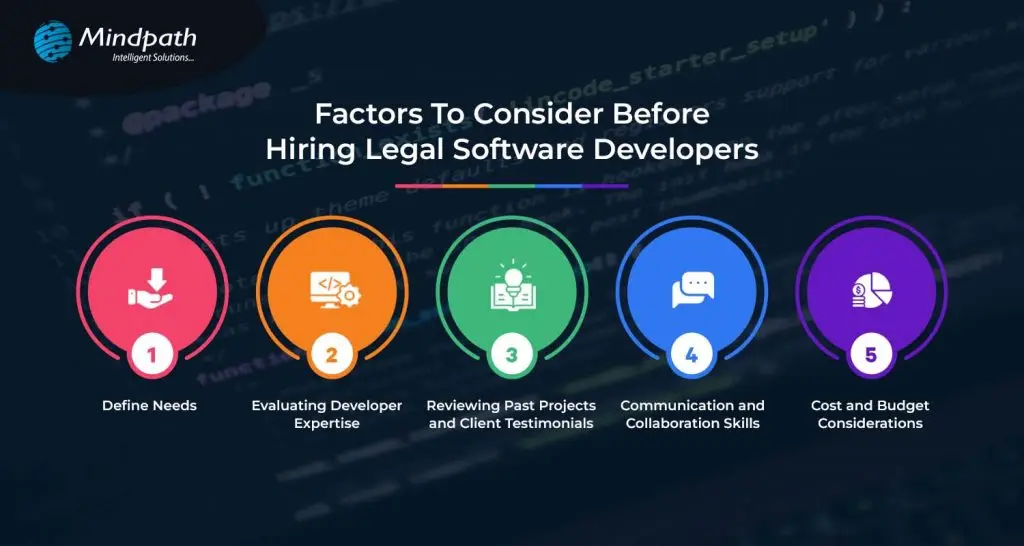
1. Define Needs  

Before you hire legal software developers, the needs must be clearly defined. It means determining what one wants the developers to be able to do. Consider the integration of the software with other systems in use like email and file storage for perfect workflow. This includes setting a budget, which will serve as a guideline regarding priorities and finding a developer or developers to deliver what you will need within your financial limits. Defining your needs will allow you to communicate your needs to the developers, hence bridging to a more successful, tailor-made software solution. 

2. Evaluating Developer Expertise   

Before hiring, critically evaluate the expertise of legal software developers. Are they technically competent? Do they have the skill sets and experience using their tools? Engage developers who have experience in working with legal software. After all, their better understanding of the unique needs of law firms and legal departments is good enough for saying so. Just look at all the client testimonials that app developers have gotten to understand that they do quality work. Make sure they are good at communication and that they are responsive, friendly developers. That way, by appraising their expertise, you can find developers who would be well equipped to build the software for you. 

3. Reviewing Past Projects and Client Testimonials 

Before you start hiring legal software developers, view their past projects; what kind of work they have done, how many projects they have handled. See if they have done any similar projects as you want. They can deliver qualitative software related to the legal field. Moreover, you can look over the client testimonials and reviews to know how the previous clients feel about their experience. It will provide you with positive feedback, thereby giving you confidence in their ability and reliability. This step helps in choosing a developer who has the potential to prove his results and satisfy your needs accordingly. 

4. Communication and Collaboration Skills   

When looking to hire legal software developers, try and pay attention to their communication and collaboration skills. Pick the ones you can talk with easily and hear you out. They should be responsive, updating you on the progress of their work. Good collaboration means they can work well with your team, share ideas, and solve problems together. Effective communication means everyone is on the same page, thus leading to a smoother development process toward a successful software solution. 

5. Cost and Budget Considerations   

The cost or budget for hiring a legal software developer should be considered. It will be important for you to decide just how much you are prepared to pay for your project and then compare legal software developers who can work within your budget. Different pricing models—like fixed price or hourly rate—might suit your needs better. Be sure to discuss extra costs that may arise. This will help you to understand better the financial aspects of the matter and find out the developers who offer maximum value for your money.

Looking for Expert Legal Software Development?

At Mindpath, we offer comprehensive legal software development services to meet your unique needs.

Legal software development services at Mindpath    

We have a variety of legal software development services designed to make your life simple and give you more time. Our solutions improve client service, streamline operations, and help remain compliant with regulations. 
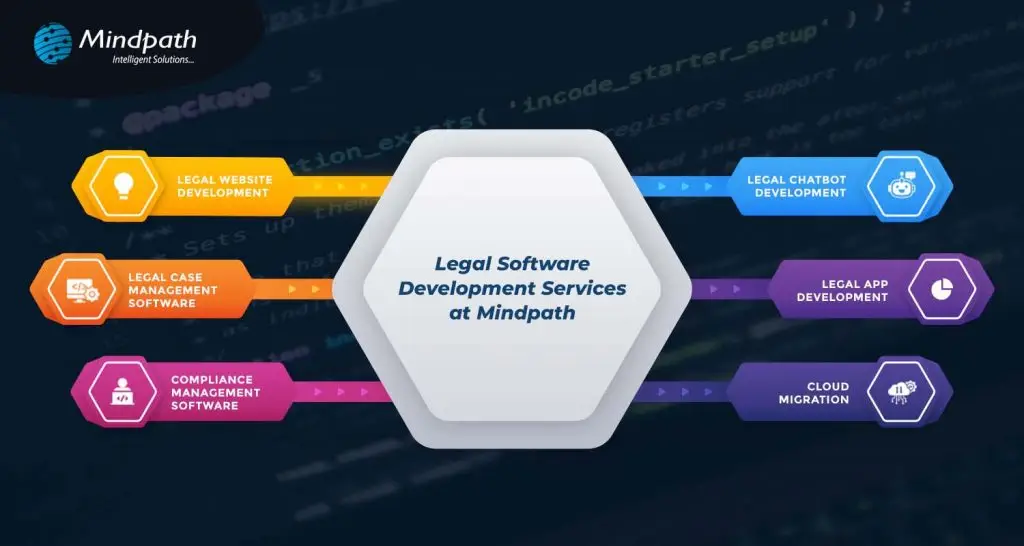
legal software development services designed

1. Legal Website Development 

We provide law firms with professional websites that are attractive, user-friendly, and search engine friendly, so you will have an excellent online presence that really attracts potential clients. 

2. Legal Chatbot Development 

Our chatbots automate client interactions through answering questions, setting up appointments, and providing updates. They offer support 24/7 to help reduce the admin workload and increase client satisfaction. 

3. Legal Case Management Software 

Our software simplifies case management by providing real-time data and automated tasks so you will be able to have full control over your cases and gain valuable insights into their progress. 

4. Legal App Development 

We create user-friendly apps on iOS and Android to handle client interactions and case information from anywhere, creating a better experience for the client. 

5. Compliance Management Software 

This software takes extra care to keep you compliant with the legal framework and provides automated tracking of risk management to keep your practice updated. 

6. Cloud Migration 

We ensure the safe transfer of your data to the cloud so that flexibility and security are enhanced with easy access anywhere, along with system performance during cloud optimization. 

Conclusion 

The fast-changing legal technology landscape dictates that law firms and legal departments should catch up. In the modern world, technology is the way to achieve efficiency, better customer service, and compliance. While hiring a legal software developer, due consideration of things such as defining your needs, evaluating experience, and good communication can result in successful partnering and effective software solutions. 

At Mindpath, we look to simply your process and introduce you to innovation that will automate your legal practice. By choosing Mindpath, you’re putting your money into innovation and expertise to drive your success against competition in the legal arena. Stay ahead with Mindpath and focus on what you do best by providing exceptional legal services.  

Looking to Revolutionize Your Legal Practice?

At Mindpath, we build custom legal software websites, chatbots, and case management systems just for you.


Related Post

Related Post

Reactjs web development

Are you looking forward to finding out what makes ReactJS web development incredibly popular among both developers and businesses today? All those smooth and dynamic websites and apps you use daily, many of them are built with ReactJS. If you’ve ever wanted to know how you can build something just as interactive and amazing, you’re in the right spot because ReactJS development unlocks so many possibilities for bringing your ideas to life.

ReactJS enables you to create UIs that will appear fast and be easy to use for users. Also, developers love that it is component-based and allows projects to progress from simple to complex as you grow them. The real-world project examples will display how individuals are leveraging ReactJS in different industries and how they solve problems using it. If you’re ready to bring your ideas to life, you’ll find plenty to learn in this blog.

Want to present your ReactJS project idea to the world, but don’t know how to bring it to life? At Mindpath, we offer ReactJS development services where our seasoned developers will provide full guidance from concept to launch, ensuring your project’s success.

What is ReactJS?

ReactJS is a popular tool that helps developers build the parts of a website that people see and use. It’s not a programming language, but a JavaScript library used for creating user interfaces. ReactJS makes it easier to build websites and apps that are fast and simple to manage. It uses Webpack to put all the code together and make sure everything runs smoothly in the browser. According to W3Techs, React is used by 7.1% of websites using a well-known JavaScript library, which is 5.8% of all websites.

ReactJS was first created by Jordan Walke, a software engineer at Facebook, in 2011. It was inspired by a tool called XHP that helped Facebook work with HTML better. ReactJS was first used for Facebook’s newsfeed, and then Instagram used it too. Today, it’s one of the most popular front-end tools.

Looking to future-proof your web applications with a technology that scales as your business grows? Discover the strategic top reasons to choose ReactJS for Progressive Web App development for business owners.

Benefits of ReactJS

When it comes to modern web development, understanding React JS benefits can help you decide if it’s the right fit for your projects. Many developers choose this library because it makes building user interfaces simpler and faster. Let’s look at some key ReactJS advantages that make it so popular.

1. Component-Based Structure

A big benefit of React development is its reusable components that make updates and maintenance simple. This keeps your project organized as it grows.

2. Faster Performance

React uses a virtual DOM that makes updates quick and smooth. This keeps websites and apps fast for a better user experience.

3. Cross-Platform Flexibility

With React Native, you can reuse your code for mobile apps too. This saves time when you want to create a React app for both web and mobile devices.

4. Easy to Learn and Use

Many developers choose web development with React because it’s simple to learn yet powerful. Its clear structure and helpful tools make building projects smooth for everyone.

5. Strong Community Support

ReactJS Web Development has a large, active community with helpful resources and tools. This makes building and fixing projects much easier for developers.

Wondering what separates a good ReactJS project from a truly successful one? Read the essential ReactJS Developer Skills for successful web projects to make smarter hiring and development decisions.

What are the Best Projects to Build with ReactJS?

React web development is trusted by businesses and developers to build many kinds of web apps that work smoothly and look great. It’s flexible enough to handle different goals, whether you want something simple or more advanced. You’ll see just how many possibilities open up when you choose ReactJS.

Best Projects to Build with ReactJS

1. Single Page Applications (SPAs)

SPAs load one main HTML page and update content without refreshing the whole page. This makes the user experience faster and smoother. Many developers use ReactJS Web Development to build SPAs like Trello or modern email platforms.

2. Interactive User Interfaces

Apps that need frequent user actions benefit from React’s component-based setup. It keeps interfaces dynamic and responsive to every click or input. Dashboards and social platforms are great examples of this.

3. Social Media Platforms

Social apps handle lots of data and need to stay quick and easy to use. React works well for feeds, notifications, and real-time chats. Platforms like Instagram and Facebook show how powerful it can be.

4. E-commerce Websites

Online stores have many parts, like product pages, shopping carts, and checkout steps. React helps keep all these features organized and easy to update. It’s a smart choice for anyone planning an online store.

Also Read: React vs Vue

5. Data Visualization Tools

React lets you build charts, graphs, and dashboards that help people see and understand data. These tools often need real-time updates as new data comes in. Using React makes complex data feel simple to explore.

6. Custom Web Applications

Businesses often need apps designed just for their work. ReactJS web development gives developers the tools to build custom features and workflows. This could be anything from task trackers to learning portals.

7. Booking Systems

Booking apps help people reserve flights, hotels, or services quickly. React keeps the process smooth with fast updates and clear forms. It’s trusted by many companies to handle large numbers of users at once.

8. Admin Panels and Dashboards

Businesses use admin panels to track performance and manage users or data. React’s reusable components make building these panels efficient. A well-built dashboard makes complex info clear and easy to manage.

Is your current team struggling to handle large-scale React applications? Learn why hiring a React Development Company might be the smarter choice. 

Real-World Examples of ReactJS Web Development

Many well-known companies rely on ReactJS Web Development to power their websites and apps. It helps them build fast, interactive experiences that keep users coming back. Here are some real-world examples of how ReactJS is used successfully.

Real-World Examples of ReactJS Web Development

1. Facebook

Facebook uses React to handle its entire web interface. They also depend on React Native to keep their mobile app running smoothly.

2. Instagram

Instagram depends on React to manage its photo feeds, stories, and user interactions. React’s virtual DOM makes the app fast and helps deliver an easy browsing and sharing experience.

3. Netflix

Netflix uses React to manage its user interface, from browsing shows to streaming. React’s efficient rendering keeps the platform responsive and smooth for millions of viewers.

4. Airbnb

Airbnb relies on React to display listings, filters, and booking options. Its component-based structure makes the platform simple to update with new features.

5. Walmart

Walmart’s online store uses React to manage its huge product catalog and shopping features. React helps deliver a consistent shopping experience with fast page updates.

6. Uber

Uber’s web dashboard for drivers and riders uses React for live updates like ride tracking and driver status. React makes real-time changes visible without slowing down the app.

7. Shopify

Shopify uses React to build dynamic storefronts and checkout pages. This keeps the shopping process smooth for both store owners and customers.

8. Dropbox

Dropbox uses React to create an easy-to-use file storage and sharing experience. The interface stays clear and quick to navigate thanks to React’s reusable components.

Looking to build a high-performance frontend that scales with your business and delivers real ROI? Learn from our ReactJS for App Development guide to understand how React empowers business owners to make smarter, future-ready technology decisions.

Ready to Unlock the Power of ReactJS Web Development?

ReactJS web development has proven its value for businesses and developers who want faster, interactive, and scalable web apps. From single-page applications to custom dashboards, React makes it easier to build projects people enjoy using. Real-world examples show just how flexible and powerful this library can be. With React, your ideas can become smooth, engaging digital experiences.

At Mindpath, we have built successful React and React Native projects for clients in many industries. Our team has strong expertise in developing user-friendly web apps and mobile apps that work beautifully together. We focus on clean code, reusable components, and performance that scales with your business. Let Mindpath be your trusted partner for professional ReactJS development services that bring your ideas to life.

Frequently Asked Questions

1. Is ReactJS suitable for beginners who want to start web development?

Yes, ReactJS is considered beginner-friendly due to its simple structure and component-based approach. It allows learners to build small parts of an application step by step. With strong community support and learning resources, beginners can gradually move toward building complete, real-world projects.

2. How does ReactJS help in handling large and complex applications?

ReactJS simplifies complex applications by breaking them into smaller, reusable components. This modular structure makes it easier to manage, update, and scale applications over time. It also improves collaboration, as different teams can work on separate components without affecting the entire system.

3. Can ReactJS be used for both web and mobile app development?

Yes, ReactJS supports web development, while React Native allows developers to build mobile applications using similar concepts. This shared approach helps save time and effort, as parts of the logic can be reused across platforms, making development faster and more efficient.

4. What kind of businesses benefit the most from ReactJS development?

Businesses that require fast, interactive, and scalable user interfaces benefit greatly from ReactJS. This includes e-commerce platforms, SaaS products, social media apps, and dashboards. Its flexibility makes it suitable for both startups aiming for quick launches and enterprises managing large-scale applications.

5. How important is performance optimization in ReactJS projects?

Performance optimization is essential in ReactJS to ensure smooth user experiences. Techniques like using the virtual DOM efficiently, optimizing component rendering, and managing state properly help maintain speed. Well-optimized applications reduce load times and improve user satisfaction, especially in high-traffic environments.

Explore top projects built with ReactJS, from personal websites to SaaS apps. Learn why ReactJS is ideal for scalable, high-performance web solutions.
what is autoML

Automated machine learning is a process of automating the complex machine learning process that traditionally requires in-depth technical expertise. It is a valuable practice of automating the end-to-end development of ML models. So, if you are asking what AutoML is, it uses non-experts to generate and implement artificial intelligence systems. Other than this, it can align the AI workflows for keen developers and data scientists.

Due to its heavy usage, automated machine learning market value will reach USD 22.3 billion by 2035. Similarly, AutoML tools can simplify your ML model creation capabilities.

Ready to simplify your machine learning processes with the power of AutoML? Contact us today to discover how automated solutions can accelerate your AI journey and drive better results.

What is AutoML Through a Practical Perspective?

If we define AutoML through a practical perspective, it is a framework that automates the complete lifecycle of building, training, testing, and deploying machine learning models. So, instead of manually assessing the algorithms and parameters, AutoML systems can intelligently experiment with multiple combinations. This can help you land on the most efficient solution.

How Does AutoML Process?

After learning what is AutoML, let us proceed towards its working process. So, the solution works by creating a series of machine learning pipelines to handle the given task, and afterwards it identifies the optimal choice. Moreover, model assessment and selection are automated as part of the iterative process of picking the best solution. Here, you can go through the working steps of automated machine learning.

1. Data Creation and Pre-processing

In this step, developers gather raw data and integrate it into a training dataset. With proper data preparation, your training data will remain free from any type of bias and encourage your model to be successful. Accurate data can offer you more authentic predictions and insights.

You should connect the automated machine learning platform with the training data source. Further, you should remember that the data preparation process occurs before the deployment of an AutoML solution. The AutoML solution preprocesses and cleans the data efficiently. So, thorough data processing can also sharpen your AI model performance vastly.

2. Feature Engineering

After we define the AutoML pre-processing step, let us get into feature engineering. So, data features are the major elements of a dataset that ML models use to make predictions or any integral decisions. Feature engineering is a transformative procedure through which a data scientist gathers new information from input data. Further, they prepare it for machine learning.

Automated feature engineering automates the process of finding the feature space and fills the missing values while selecting the best features to use. However, it can be very difficult for you to build a single feature manually. So, let AutoML AI handle the task for you.

3. Model Selection along with Hyperparameter Tuning and Training

Now, as you are well aware of what is AutoML, can you identify which model is required for the use case? When it comes to traditional machine learning, model selection needs expert knowledge about AI model types along with their abilities and limitations.

AutoML tools can easily enhance the traditional process. It helps in automatically creating and training several models at a time with a series of hyperparameter configurations and algorithms. There are many AutoML solutions that put together multiple models in a process called ensemble learning.

4. Testing and Validating the Solution

Data scientists are required to validate the progress of an ML algorithm during the training phase. After the training, the following model is tested with new datasets to assess its performance in real-world conditions. The performance of the model is verified with metrics that include an F1 score, a confusion matrix, etc.

5. Deployment of the Model

Model generation is just the initial phase in the timeline of the product. Thorough models need to be made available to users and should be assessed for their performance. This step ensures they are reliable and serving with accuracy. So, without any automation, development teams need to write scripts and generate systems to integrate the model into the operations.

This structured automation enables organizations to garner faster outcomes with consistent quality. So, when teams define AutoML, they can express it as a productive multiplier that eliminates the gap between raw data and actionable intelligence.

Ready to take AutoML to the next level? Check out how large language models are transforming machine learning with smarter predictions and advanced automation.

Why Automated Machine Learning is Reliable for Modern Businesses?

The increasing importance of automated machine learning is directly related to the growing demand for AI-driven data. Traditional machine learning pipelines need extensive manual intervention, which can significantly limit your speed and scalability. So, automation eliminates such barriers and enables your businesses to operate AI more efficiently.

Major reasons organizations have been adopting automated machine learning include,

1. Consistent model performance.

2. Faster delivery to market for AI solutions.

3. Non-experts can improve their accessibility.

4. Better usage of data science teams.

Planning to leverage machine learning without a large data science team? Explore AI solutions for small businesses to see how AutoML and intelligent tools help streamline processes.

How Do Multiple Industries Use AutoML?

As per the recent scenario, the AutoML market has a CAGR of 38.0%. A series of industries has been adopting AutoML to verify patterns in huge datasets.

1. Telecommunications

These companies can use AutoML to predict which customers are more likely to renew their contracts. This is how the following companies can enhance their decision-making abilities, starting from marketing to customer service.

2. Insurance

AutoML is capable of simplifying the working structure of insurance companies while encouraging their actuarial processes. So, insurers can get more time for in-depth analysis and validation. This is how they can justify their policies to regulators.

3. Data Science

AutoML is generally useful for non-experts, but it can also empower pro data scientists. So, AutoML accesses data scientists to use several algorithms to find the best models effectively.

Curious how to customize AI models for specific tasks? Explore OpenAI’s Fine-Tuning API guide to learn how fine-tuning enhances AutoML workflows and delivers more accurate, tailored results.

What Type of AutoML Tools Have Been Signifying Their Performance in the Market?

There is a series of AutoML tools that creators have been utilizing in recent scenarios. Let us learn about them.

1. Auto-pyTorch

This is an autoML solution curated to automate the ML projects generated with PyTorch.

2. AutoKeras

This is known to be an open-source tool built on the Keras library and TensorFlow.

3. Lale

This is an open-source, semi-automated Python library that helps ensure seamless integration with scikit-learn pipelines.

4. Google Cloud AutoML

It is Google’s AutoML solution available on its Cloud platform for ML.

These are some of the eminent AutoML tools you need to be knowledgeable about. Similarly, AutoML AI has also been seeking the attention of users because of its endless capabilities. This represents the combination of artificial intelligence with automation techniques to optimize machine learning workflows. So, instead of completely depending on static rules, AutoML AI systems can learn from your previous experiments and enhance your future model selections.

Looking to optimize large language models efficiently? Explore Low-Rank Adaptation (LoRA) to learn how it enables fast and resource-friendly fine-tuning for LLMs alongside AutoML workflows.

Advantages of AutoML over Traditional Machine Learning

AutoML serves plenty of advantages over traditional and manual machine learning workflows by reducing complexities and accelerating execution abilities.

1. Quick Model Development

AutoML effectively reduces the time needed to build machine learning models by automating data preparation. Further, it incorporates faster feature engineering, algorithm selection, and hyperparameter tuning.

2. Minimal Skill Barrier

Traditional machine learning needs strong knowledge in programming, statistics, and model optimization. So, AutoML minimizes such a barrier by enabling you to build an effective model without intense data science knowledge.

3. Reduces Human Error

Manual experimentation can give rise to mistakes in pre-processing, feature selection, and tuning. On the other hand, AutoML standardized the workflows by reducing inconsistencies and errors caused by manual approaches.

4. Consistent Evaluation

AutoML ensures models are properly trained, tested, and compared with the usage of consistent evaluation metrics. So, this makes your performance reliable and enables organizations to make data-driven decisions.

Curious how AutoML builds smarter AI systems? Explore AI models to learn how different architectures and algorithms power automated machine learning and enhance predictions.

Disadvantages and Other Concerns

While AutoML can offer an endless automation facility, it can’t completely replace the human expertise requirements. So, it is necessary to understand its disadvantages to be a responsible user.

1. Risk of Over-Fitting

AutoML might create highly authentic models that perform well on training data. But, somehow, they might lack good performance on new data if you do not validate them precisely. So, it is necessary to monitor them continuously.

2. Dependence of High-Range Data

AutoML systems depend heavily on the quality of input data. So, poor data can’t offer you authentic predictions that you desire, no matter how effective the automation process is.

3. Lags Behind in Transparency

This limitation can be a risk in regulated industries where decisions need to be transparent.

Final Words

Understanding what is AutoML necessary for industries that want to remain competitive in this data-driven economy. By automating the complicated aspects of machine learning, AutoML can empower your business to be faster and more scalable with AI initiatives. This is where Mindpath comes as your ultimate partner.

Here, you can get modern AutoML solutions to transform your raw data into meaningful and valuable insights. Further, you can streamline your decision-making abilities while adopting scalability. As a user, the experts here can help you adopt the best features of AutoML that can make you understand the deep learning systems more efficiently.

Discover how AutoML simplifies machine learning for businesses. Learn about its benefits, including cost savings, accuracy, and faster deployment.
Augmented Analytics

Are you ready to take your business intelligence to the next level? Imagine if you could make faster, smarter decisions with the help of advanced analytics tools. That’s where augmented analytics comes in. But what exactly is it, and how can it revolutionize the way businesses unlock insights? Let’s explore how this cutting-edge technology is transforming the world of business intelligence.  

What Is Augmented Analytics?

Augmented analytics is a new approach to data analysis that makes use of technology such as machine learning (ML), artificial intelligence (AI), and natural language processing (NLP). These technologies collaborate to simplify and accelerate the process of gaining insights from data. The fact that augmented analytics does not require extensive technical expertise distinguishes it from other approaches. It is intended to provide relevant information to people at all levels, from business users to data analysts, without the requirement for specialized expertise. Users can ask basic enquiries and receive immediate responses using techniques such as natural language queries and natural language creation. In many circumstances, augmented analytics can deliver more complete and precise insights in minutes, reducing time and boosting decision-making. Even someone with no technical knowledge can now identify crucial trends and patterns in data, which would have previously needed the skills of a data scientist. This makes it a game changer for firms that want to be more data-driven and responsive.  

How Augmented Analytics Work?

Augmented analytics employs artificial intelligence, machine learning, and natural language processing to simplify and accelerate data analysis. It automates the process of gathering, cleaning, and linking data from diverse sources, allowing teams to prepare data without requiring complex technical expertise. Instead of manually developing models, users can ask queries in plain language, and the system will instantly analyze the data and deliver thorough insights. These insights are presented instantaneously via dashboards, with real-time answers and explanations, reducing the time and effort often necessary to create reports and visualizations. This makes data analysis more accessible and efficient for everyone in the organization 

Advantages of Augmented Analytics in Business Intelligence

1. Breaking Data Barriers

In traditional business intelligence, each team frequently develops its own data models to address specific concerns. However, these models may not contain all important data, resulting in missed opportunities. For example, a marketing team can analyze CRM data while ignoring crucial findings from sales or customer support, which could have an influence on their marketing strategy. This results in data silos, in which important information is kept inside one department and not shared across the organization. Augmented analytics accelerates this process by integrating all of your data sources into a single streamlined solution. When you ask a question, the system collects data from all linked platforms, databases, and storage places to provide a comprehensive, correct response. It also updates itself with each query, resulting in tighter links across data sets. The insights and visualizations created are easily shareable across teams, allowing employees to collaborate and access the data they want. This not only eliminates silos but also guarantees that everyone in the organization is on the same page, using the most up-to-date information for improved decision-making and faster solutions to business difficulties. 

2. Smarter Business Choices

Waiting weeks for vital insights can lead to missed chances, whilst speeding the analysis can result in forgetting important facts. Augmented analytics tackles both of these issues by analyzing billions of information in seconds and providing timely and accurate insights. It doesn’t end there; augmented analytics explain the “why” behind each insight, giving you more information to make smarter decisions. This provides business users with not just the answers they want, but also the knowledge to properly comprehend the dataReal-time insights allow teams to act on information immediately, increasing overall efficiency and responsiveness. Whether it’s recognizing new trends, analyzing customer preferences, or making fast changes to strategy, augmented analytics guarantees that business choices are made using the most accurate and up-to-date information. By simplifying the process and lowering the risk of human mistakes, it allows organizations to remain agile and make wiser, more confident decisions, resulting in better commercial outcomes.  

3. Real-Time Data

Unlike standard business intelligence tools, which can take a long time to process data and give insights, augmented analytics returns results practically instantaneously. Simply ask a query, and the AI will process billions of data points in milliseconds. It then offers clear and simple insights and visualizations, allowing you to understand exactly what is going on in your business. Since the insights are supplied in real time, teams can act on them instantly, helping firms to seize time-sensitive opportunities. This speed not only facilitates speedy decision-making but also guarantees that firms remain agile and responsive to change. Whether it’s modifying strategy, recognizing patterns, or resolving difficulties, augmented analytics guarantees that users always have up-to-date, actionable insights at their fingertips, making the process faster, smarter, and more efficient. 

4. More In-Depth Analysis

Getting precise understanding from your data used to be a complicated and time-consuming process. However, with augmented analytics, you can swiftly delve into your data by analyzing billions of data points and many elements in only seconds. This provides you with more precise and granular insights that were previously difficult to obtain. Not only does it help you understand the “why” behind the findings, but it also reveals hidden patterns and trends that can be used to guide future decisions. This higher degree of research helps you to go beyond surface-level discoveries and uncover previously unknown aspects. Augmented analytics can uncover subtle links between variables by analyzing large volumes of data in real time, delivering a more comprehensive view of your organization The capacity to do in-depth analysis assists firms in making well-informed, data-driven choices, whether it’s increasing the customer experience, optimizing processes, or refining strategy. Companies can utilize this powerful tool to more accurately identify growth possibilities, minimize risks, and forecast future trends, providing them with a competitive advantage in an ever-changing market. 

5. Accessible Data for All

Traditionally, business intelligence systems depended significantly on IT teams and data experts to do the majority of the workload. However, augmented analytics transforms this by allowing anybody in the organization, regardless of technical experience, to access precise information. Augmented analytics enables users to study data in real time and construct their own visualizations to make sense of it. This change enables data scientists and analysts to focus on more complex duties, while the rest of the team can freely investigate and use data to make choices. By making data more available to everyone, augmented analytics creates a data-driven decision-making culture throughout the organization. Employees from many areas, including those who lack technological expertise, may now utilize the power of data to improve their processes, solve problems, and spot new opportunities. This data democratization not only boosts the general use of business intelligence tools, but it also helps to break down team barriers, fostering cooperation and creativity. When everyone is on the same page, organizations can make faster, smarter choices and achieve better business results. 

How Mindpath Can Help?

Mindpath makes it easy for your organization to use augmented analytics. Our skilled staff assists you in implementing cutting-edge BI technologies, ensuring that everyone, from data scientists to non-technical team members, has quick and easy access to vital information. We expedite data analysis by integrating new technologies such as AI and machine learning into your systems, allowing you to make better, quicker decisions based on real-time insights. Our technologies break down data silos, allowing your teams to interact and operate more efficiently together. With Mindpath’s help, you’ll have everything you need to maximize the value of your data, making it accessible, comprehensible, and actionable for everyone in your organization 

Wrapping Thought!

In today’s fast-paced corporate environment, keeping ahead requires making better judgements faster. Augmented analytics is the key to uncovering real-time, in-depth insights that improve your company’s performance. This breakthrough solution allows everyone in your organization to make data-driven decisions, regardless of technical skills, by breaking down data silos, allowing smarter decision-making, and democratizing data access. With Mindpath’s experience, your company can easily implement augmented analytics, expedite data processing, and ensure that everyone—from data scientists to non-technical team members—has access to vital insights. We help you incorporate AI and machine learning into your processes to increase collaboration, decision-making, and general efficiency. 

Want to unlock the full potential of your data with Mindpath's augmented analytics solutions?

Partner with us today to transform your business insights and decision-making!

Discover how augmented analytics revolutionizes business intelligence with real-time insights, smarter decisions, and data democratization for faster growth.