Home

An Ultimate Guide to Hire NodeJS Developers in Canada

An Ultimate Guide to Hire NodeJS Developers in Canada

Join our Newsletter!

Hire NodeJs Developers in Canada

Businesses all over Canada are always under pressure to make apps that are fast, scalable, and able to handle real-time interactions in today’s digital-first economy. Your backend technology is very important for long-term success, whether you’re a startup launching your first product or a big company updating old systems. Node.js has become one of the most powerful and widely used backend technologies available today.

This in-depth guide will help you understand Node.js and its benefits, developer skills, hiring models, costs, and best practices if you want to hire NodeJS developers in Canada. This article is set up to give you a full, useful guide to hiring the best Node.js developers in Canada.

Why You Should Hire NodeJS Developers?

Cities like Toronto, Vancouver, Montreal, and Ottawa are at the forefront of innovation in Canada, which is one of the fastest-growing tech hubs in the world.

Important Reasons to Hire in Canada

1. Highly Skilled Talent Pool

Canadian developers are known for having a lot of technical knowledge.

2. Quality Education System

The best universities make good software engineers.

3. Stable Economy

Canada is a safe place to do business.

4. Time Zone Advantage

Works well with businesses in the US.

5. Strong Work Ethics

Employees who are professional and dependable.

For North American businesses, hiring NodeJS developers in Canada guarantees high-quality work and easy communication.

Important Skills for NodeJS Developers

You need to look at both technical and interpersonal skills when hiring expert NodeJS developers.

1. Core Technical Skills

  • Strong knowledge of JavaScript (ES6+)
  • Proficiency in Node.js frameworks like Express.js or NestJS
  • Experience with REST APIs and GraphQL
  • Understanding of asynchronous programming
  • Familiarity with databases (MongoDB, MySQL, PostgreSQL)
  • Knowledge of Git and version control

2. Advanced Technical Skills

  • Microservices architecture
  • Cloud services (AWS, Azure, Google Cloud)
  • Docker and Kubernetes
  • CI/CD pipelines
  • Security best practices

3. Soft Skills

  • Problem-solving mindset
  • Communication skills
  • Ability to work in agile teams
  • Time management

A good developer should be able to write clean code and know how to make a program work for a lot of users.

Hiring Models for NodeJS Developers

The size, budget, and timeline of your project will help you choose the best hiring model.

1. In-House Developers

  • People who work full-time
  • Best for projects that will last a long time
  • Higher cost because of benefits and infrastructure

2. Freelancers

  • Cost-effective and adaptable
  • Great for small or short-term projects
  • Can be hired right away

3. Dedicated Developers

  • Only work on your project
  • Best for new businesses and teams that are growing

4. Remote NodeJS Developers

  •  Get access to talent from all over the world
  • Cut down on the costs of doing business
  • A hiring process that goes faster

Step-by-Step Process to Hire NodeJS Developers in Canada

Hiring the right Node.js developers in Canada requires a well-planned and structured approach. With a rapidly growing tech ecosystem and increasing demand for skilled professionals, businesses need a clear hiring strategy to identify the right talent, reduce risks, and ensure long-term project success.

Step 1: Identify Your Project Needs

Begin by clearly defining your project requirements in detail. This includes outlining the scope of the project, core features, and expected outcomes. Determine whether you are building a real-time application, API, SaaS platform, or enterprise solution. Additionally, establish your budget, timeline, and preferred technology stack. A well-defined project plan not only helps you communicate your vision effectively but also ensures you attract developers who are aligned with your technical and business objectives.

Step 2: Select the Appropriate Hiring Model

Choosing the right hiring model is crucial for balancing cost, flexibility, and control. Evaluate whether you need full-time developers for long-term collaboration, freelancers for short-term or specialized tasks, or remote development teams for scalability. Consider factors such as project complexity, duration, and internal resources. Making the right choice at this stage can significantly impact productivity, communication, and overall project efficiency.

Step 3: Develop a Comprehensive Job Description

Create a detailed and well-structured job description that clearly communicates your expectations. Include required technical skills such as proficiency in JavaScript, Node.js frameworks (e.g., Express.js, NestJS), API development, and database management. Define roles, responsibilities, deliverables, and the level of experience needed. A strong job description not only attracts qualified candidates but also filters out unsuitable applicants, saving time during the hiring process.

Step 4: Explore Talent Through Multiple Channels

To find the best Node.js developers in Canada, use a combination of sourcing channels. Leverage professional networks like LinkedIn, freelance platforms such as Upwork, and specialized tech job boards. You can also explore developer communities, referrals, and recruitment agencies. Using multiple channels increases your reach and improves your chances of finding experienced and reliable developers in a competitive market.

Step 5: Review and Shortlist Candidates

Carefully evaluate candidate profiles by reviewing resumes, portfolios, and past work experience. Focus on previous projects that are similar to your requirements and assess their contributions. Checking GitHub repositories can provide insights into coding standards, problem-solving approaches, and real-world experience. Shortlisting the right candidates ensures you move forward with individuals who have both the technical expertise and relevant experience.

Step 6: Conduct Technical and Practical Assessments

Assess candidates through a combination of technical interviews, coding tests, and real-world problem-solving exercises. Evaluate their understanding of Node.js concepts such as asynchronous programming, event-driven architecture, API integration, and database handling. Practical assessments help you determine how candidates approach challenges, write efficient code, and perform in real project scenarios.

Step 7: Complete Hiring and Ensure Smooth Onboarding

Once you have selected the right candidate, finalize the hiring process by offering competitive compensation and clearly defining roles, responsibilities, and expectations. Provide structured onboarding, including access to tools, documentation, and workflows. A smooth onboarding process helps developers integrate quickly into your team, improves productivity, and sets the foundation for long-term success.

Cost of Hiring NodeJS Developers in Canada

There are several factors that influence the cost of hiring a NodeJS developer in Canada, including experience level, geographic location, and the hiring model you choose.

1. Hourly Rates

(Based on Glassdoor and market salary data) 

  • Junior Developers: $30 – $50/hour
  • Mid-Level Developers: $50 – $90/hour
  • Senior Developers: $90 – $140+/hour

2. Annual Salaries

(Source: Glassdoor Canada & Payscale) 

  • Junior: ~$60,000 – $75,000/year
  • Mid-Level: ~$75,000 – $100,000/year
  • Senior: ~$100,000 – $130,000+/year

Factors Affecting Cost

1. Developer Experience

Senior developers charge significantly higher rates

2. Geographic Location

Cities like Toronto and Vancouver have higher salaries

3. Project Complexity

Advanced applications (SaaS, real-time systems) cost more

4. Engagement Model

In-house, freelance, or outsourcing impacts pricing

5. Technology Stack

Skills like cloud, DevOps, and microservices increase cost

Hiring developers who work from home can save you a lot of money while still getting good work done.

Why Hiring Dedicated NodeJS Developers in Canada is a Smart Long-Term Investment?

Hiring dedicated NodeJS developers in Canada is one of the most effective ways to build scalable, high-performance applications while maintaining quality and long-term consistency. For businesses looking to hire NodeJS developers in Canada, dedicated developers offer greater reliability, stronger collaboration, and better project control. This hiring model is especially beneficial for startups, growing businesses, and enterprises that need continuous development and long-term technical support.

Key Benefits of Hiring Dedicated NodeJS Developers in Canada

1. Full Commitment to Your Project

Dedicated developers work exclusively on your project, ensuring steady progress, faster delivery, and minimal distractions.

2. Consistent Focus and Higher Productivity

Since they are fully involved in your project, dedicated NodeJS developers in Canada can maintain momentum, meet deadlines, and deliver quality results consistently.

3. Better Understanding of Business Goals

Over time, dedicated developers gain deeper insights into your business objectives, workflows, and user needs, leading to more tailored and effective solutions.

4. Improved Code Quality and Maintainability

Continuous involvement helps maintain coding standards, improve system performance, and reduce technical debt.

5. Faster Issue Resolution and Support

Dedicated developers can quickly identify and fix bugs, performance issues, or technical challenges, reducing downtime and improving efficiency.

6. Seamless Team Integration

Dedicated NodeJS developers act as an extension of your in-house team, aligning with your processes, communication tools, and project workflows.

7. Scalability and Flexibility

This model makes it easier to scale your team up or down based on project demands without disrupting progress.

8. Long-Term Cost Efficiency

Although the initial investment may be higher, dedicated developers reduce costs related to hiring, onboarding, and managing multiple short-term resources.

9. Greater Control and Transparency

You benefit from direct communication, better visibility into progress, and more control over timelines, priorities, and deliverables.

Common Mistakes to Avoid When Hiring Dedicated NodeJS Developers in Canada

  • Not clearly defining project requirements
  • Hiring based only on cost rather than expertise
  • Ignoring communication and collaboration skills
  • Skipping technical interviews or coding tests
  • Choosing the wrong hiring model for your project

Hiring dedicated NodeJS developers in Canada can provide significant long-term value when done correctly. By choosing the right talent, setting clear expectations, and avoiding common mistakes, businesses can build stronger development teams, improve product quality, and achieve faster, more sustainable growth.

Hire Top NodeJS Experts in Canada to Accelerate Your Business

Businesses that want to make high-performance, scalable apps should hire NodeJS developers in Canada. Canada is a great place to hire both local and remote developers because it has a lot of talented people, low prices, and a growing tech ecosystem.

You can confidently hire expert NodeJS developers who will help you reach your business goals and get great results if you know what skills they need, how to hire them, how much it will cost, and what the best practices are.


Hiring Node.js Developers in Canada?

Get engineers who work in your time zone and your stack.

Frequently Asked Questions

The average salary is between $80,000 and $100,000 a year, and the hourly rate is between $70 and $140.
Yes, a lot of businesses hire remote developers to save money and find more talented people.
JavaScript, Node.js frameworks, APIs, databases, and cloud technologies are some of the most important skills.
Freelancers can take a few days, while full-time hires can take a few weeks.
Node.js is a great choice for making modern, real-time apps because it is fast and can handle a lot of traffic.

Support Is One Click Away

Featured Posts

Related Post

Upcoming Technologies

Businesses today must make decisions faster while managing changing customer expectations, market competition, and operational challenges. Traditional decision-making methods often rely on historical reports, manual analysis, and individual experience. Although these methods remain valuable, they may not provide the speed and insights businesses need in a rapidly changing market.

Key Takeaways

  • 01
    AI helps businesses analyze data, automate routine decisions, and identify patterns.
  • 02
    Predictive analytics helps organizations forecast demand, customer behavior, and potential risks.
  • 03
    Cloud computing enables teams to access business information and collaborate more efficiently.
  • 04
    IoT and digital twins support real-time monitoring and operational planning.
  • 05
    Cybersecurity and responsible AI practices are essential for trustworthy decisions.

This is where upcoming technologies are creating new opportunities. Artificial intelligence (AI), predictive analytics, cloud computing, the Internet of Things (IoT), and digital twins are helping organizations analyze information, identify risks, and make more informed decisions.

Looking to Make Smarter Business Decisions? Discover how AI, predictive analytics, and modern software solutions can help your team improve efficiency and identify new opportunities.

In 2026 and beyond, businesses can gain a competitive advantage by combining these technologies with reliable data, human expertise, and clear business objectives.

1. Artificial Intelligence and Machine Learning

Artificial intelligence and machine learning are among the most influential upcoming technologies for business decision-making. They enable organizations to analyze large datasets, recognize patterns, and generate recommendations that support strategic planning.

For example, a retail company can use AI to understand purchasing behavior, forecast product demand, and recommend suitable inventory levels. Similarly, a financial services company can identify unusual transactions and assess potential risks.

Machine learning models can also improve their predictions as they receive relevant, high-quality data and are properly evaluated.

Business benefits:

  • Faster data analysis and reporting
  • Improved demand forecasting
  • Better customer personalization
  • Early identification of potential risks

Businesses should remember that AI recommendations depend on data quality, model performance, and the context in which they are used. Human review remains important for high-impact decisions.

2. Predictive Analytics and Advanced Data Analytics

Predictive analytics uses historical data, statistical techniques, and machine learning to estimate what may happen in the future. It helps businesses move beyond understanding past performance toward anticipating possible outcomes.

For example, a manufacturing company can predict equipment maintenance requirements before a breakdown occurs. A marketing team can estimate which customer segments are more likely to convert, helping it allocate campaign budgets more effectively.

Advanced analytics can also help leadership teams compare different scenarios before investing in a new product, entering a market, or changing prices.

Business benefits:

  • More informed strategic planning
  • Better resource allocation
  • Reduced operational uncertainty
  • Improved sales and demand forecasting

To get reliable results, organizations need accurate data, appropriate analytical models, and regular performance monitoring.

3. Generative AI and Agentic AI

Generative AI creates content, summarizes information, and answers questions using patterns learned from data. Businesses can use it to summarize reports, analyze customer feedback, prepare research briefs, and support internal knowledge management.

Agentic AI takes this further by enabling AI systems to plan and execute sequences of tasks toward a defined goal, within configured permissions and safeguards.

For example, an AI agent could monitor inventory data, identify a potential shortage, compare approved supplier options, and recommend a purchase order for human approval.

These capabilities can reduce manual work and help teams respond more quickly to changing conditions. However, autonomous actions require clear permissions, monitoring, and escalation rules.

Business benefits:

  • Faster access to business insights
  • Automated routine workflows
  • Improved internal knowledge sharing
  • More efficient operational planning

Businesses should begin with low-risk use cases and measure accuracy, time savings, and business outcomes before expanding AI automation.

4. Cloud Computing and Real-Time Data Platforms

Cloud computing allows businesses to access computing resources, applications, and data over the internet without managing all infrastructure themselves.

Cloud-based platforms help organizations bring information from different departments into a more accessible environment. Decision-makers can review sales performance, financial indicators, customer activity, and operational metrics without waiting for multiple manual reports.

When combined with real-time data processing, cloud platforms can support faster responses to changing business conditions.

For example, an e-commerce business can monitor product demand and inventory levels across locations and adjust replenishment plans when necessary.

Business benefits:

  • Flexible and scalable infrastructure
  • Easier access to business information
  • Improved collaboration across teams
  • Faster reporting and operational responses

Businesses must also consider cloud costs, access controls, data privacy, and integration with existing systems.

5. Internet of Things (IoT)

The Internet of Things connects physical devices, sensors, and equipment to systems that collect and exchange data. This allows businesses to monitor operations and use real-time information to make decisions.

For example, logistics companies can use connected sensors to monitor vehicle locations and shipment conditions. Manufacturers can track equipment performance and detect unusual operating patterns.

IoT data becomes more valuable when combined with analytics and AI, allowing organizations to identify problems and respond before they significantly affect operations.

Business benefits:

  • Real-time operational visibility
  • Predictive maintenance
  • Improved supply chain monitoring
  • Better asset utilization

Successful IoT adoption requires reliable connectivity, secure devices, effective data management, and integration with business applications.

6. Digital Twins and Business Simulation

A digital twin is a virtual representation of a physical asset, process, or system that uses relevant data to reflect its condition and behavior.

Businesses can use digital twins to understand performance, test scenarios, and evaluate potential changes before implementing them in the real world.

For example, a manufacturing company can simulate production-line changes to estimate their impact on output, costs, and equipment utilization. A logistics organization can model warehouse operations to identify potential bottlenecks.

Digital twins can help decision-makers compare alternatives without immediately changing live operations.

Business benefits:

  • Better operational planning
  • Scenario testing and simulation
  • Early identification of inefficiencies
  • Improved maintenance and resource planning

The accuracy of a digital twin depends on the quality, frequency, and relevance of the data used to maintain it.

7. Business Intelligence and Decision Intelligence

Business intelligence (BI) tools transform business data into dashboards, reports, and visual insights. Decision intelligence combines data, analytical methods, business rules, and decision processes to help organizations choose appropriate actions.

For example, a management team can use BI dashboards to track revenue, customer acquisition costs, and sales performance. Decision intelligence can help the team evaluate different pricing strategies or identify which business actions are most likely to achieve a defined objective.

These technologies are particularly useful when organizations need to connect insights with practical decisions rather than simply produce more reports.

Business benefits:

  • Clearer performance monitoring
  • Faster identification of business trends
  • Better comparison of possible actions
  • Improved alignment between data and business goals

Organizations should establish consistent performance metrics and ensure that decision-makers understand the assumptions behind analytical recommendations.

8. Cybersecurity and Responsible AI Governance

As businesses adopt more connected and intelligent systems, protecting information becomes essential. Cybersecurity technologies help detect suspicious activity, manage access, and reduce the risk of unauthorized data use.

Responsible AI governance complements cybersecurity by establishing policies for data use, model evaluation, human oversight, and accountability.

For example, a company using AI to evaluate customer applications should test its system for accuracy and unfair outcomes, protect sensitive information, and provide appropriate human review.

Business benefits:

  • Better protection of business data
  • Reduced technology and compliance risks
  • More accountable AI-assisted decisions
  • Greater trust among customers and employees

Security and governance should be included during technology planning rather than added after implementation.

How Can Businesses Adopt Upcoming Technologies Successfully?

Adopting every new technology is neither practical nor necessary. Businesses should select solutions based on their current challenges, available resources, and long-term goals.

A practical adoption strategy includes these steps:

1. Identify a business problem

Determine whether the priority is reducing costs, improving customer experience, forecasting demand, or increasing productivity.

2. Evaluate data readiness

Check whether the required data is accurate, accessible, secure, and sufficiently complete.

3. Choose a suitable technology

Compare solutions based on functionality, integration, scalability, security, and total cost of ownership.

4. Start with a pilot project

Test the solution in a limited business process before deploying it across the organization.

5. Measure performance

Track relevant indicators such as decision time, forecast accuracy, operating costs, error rates, or customer conversion.

6. Scale responsibly

Expand successful projects while maintaining employee training, security controls, and regular performance reviews.

The goal is not simply to introduce new software. It is to improve the quality, speed, and consistency of business decisions.

The Future of Technology-Driven Business Decision-Making

The future of business decision-making will increasingly depend on connected data, intelligent automation, and systems that help organizations understand possible outcomes.

Recent industry analysis from Gartner highlights AI agents, stronger data context, and integrated data and analytics platforms as important developments for 2026. These trends indicate that businesses are moving beyond isolated analytics tools toward more connected decision-making systems.

However, technology alone does not guarantee better decisions. Organizations still need reliable data, skilled employees, transparent processes, and clear accountability.

Businesses that combine technological innovation with practical planning will be better positioned to respond to market changes, identify opportunities, and make informed strategic choices.

Conclusion

Upcoming technologies are changing how businesses collect information, evaluate risks, forecast outcomes, and plan for growth. AI, predictive analytics, cloud computing, IoT, digital twins, and decision intelligence each offer different opportunities to improve business performance.

The right approach is to begin with a clear business objective, select a suitable technology, and measure its impact before scaling.

Mindpath helps businesses explore and develop technology solutions aligned with their operational needs and digital transformation goals. If your organization is planning to modernize its systems or build AI-powered applications, connect with our team to discuss your requirements.

Discover the top 8 emerging technologies set to revolutionize business decision-making in the near future, including Generative AI, Web3, Blockchain, and more.
wordpress maintenance

A WordPress website needs regular care to remain secure, fast, and reliable. Without proper maintenance, outdated plugins, broken links, security vulnerabilities, and performance issues can affect user experience and search engine visibility.

Key Takeaways

  • 01
    WordPress maintenance helps protect your website and maintain reliable performance.
  • 02
    Keep WordPress core, themes, and plugins updated.
  • 03
    Include technical SEO checks to identify indexing and crawling problems.
  • 04
    Test forms, navigation, and conversion tracking after updates.
  • 05
    Follow a consistent maintenance schedule to prevent avoidable issues.

WordPress maintenance involves regularly updating website software, checking security, creating backups, improving performance, and fixing technical issues. Whether you manage a business website, blog, or e-commerce store, following a structured maintenance checklist helps keep your website running smoothly.

In this guide, we explain the essential WordPress maintenance tasks every website owner should follow.

What Is WordPress Maintenance?

WordPress maintenance is the ongoing process of monitoring, updating, securing, and optimizing a WordPress website. It helps prevent technical problems, protect website data, and maintain a positive user experience.

Regular maintenance also supports SEO by helping search engines access important pages and ensuring visitors can use your website without unnecessary errors.

Why Is WordPress Website Maintenance Important?

Website maintenance is important for several reasons:

  • Improved security: Updates and security checks help reduce vulnerabilities.
  • Better performance: Optimizing images, caching, and database operations can improve loading speed.
  • SEO health: Fixing broken links, crawl errors, and indexing issues helps search engines access your content.
  • Data protection: Regular backups make recovery easier after accidental changes or technical failures.
  • Better user experience: Functional navigation, contact forms, and responsive pages help visitors find information and convert.

Essential WordPress Maintenance Checklist

1. Update WordPress Core, Themes, and Plugins

Outdated software can create compatibility problems and security risks. Regularly review available updates for WordPress core, installed themes, and plugins.

Before applying major updates, create a backup and test changes on a staging website when possible. After updating, check important pages and website functionality.

2. Back Up Your Website Regularly

Backups protect your website files, database, media, and content from data loss.

Schedule backups according to how frequently your website changes. For example, an active e-commerce store may need daily backups, while a smaller business website may require less frequent backups.

Store copies in a separate, secure location and periodically test whether your website can be restored successfully.

3. Check Website Security

Security monitoring helps identify suspicious activity before it causes significant damage.

Follow these practices:

  • Use strong passwords and enable two-factor authentication.
  • Remove unused plugins and themes.
  • Review administrator accounts and user permissions.
  • Install a reputable security solution.
  • Use HTTPS and monitor suspicious login attempts.

Choose plugins from trusted sources and keep them updated.

4. Improve Website Speed and Performance

A slow website can frustrate visitors and affect conversions. Review your website’s performance regularly using tools such as Google PageSpeed Insights.

Optimize large images, enable appropriate caching, reduce unnecessary scripts, and review hosting performance. Monitor Core Web Vitals, including Largest Contentful Paint (LCP), Interaction to Next Paint (INP), and Cumulative Layout Shift (CLS).

Make improvements based on measured issues rather than installing multiple optimization plugins without testing.

5. Perform Regular WordPress SEO Checks

Technical SEO should be part of your maintenance routine. Use Google Search Console and website crawling tools to identify problems that could affect organic visibility.

Check for:

  • Broken internal and external links.
  • Unexpected 404 errors and redirect chains.
  • Incorrect canonical tags or accidental noindex directives.
  • XML sitemap errors and indexing problems.
  • Missing or duplicate title tags and meta descriptions.
  • Mobile usability and page experience issues.

Review important landing pages after website updates to ensure they remain accessible and indexable.

6. Clean Up the WordPress Database

Over time, your database may accumulate old revisions, expired transients, spam comments, and unnecessary records. Carefully clean up redundant data to support efficient database operations.

Always back up your database before cleanup and avoid deleting records unless you understand their purpose. Database optimization should be based on actual needs, not performed blindly.

7. Test Website Functionality

A website may look normal while important features are broken. Test contact forms, navigation menus, login pages, search functionality, and checkout processes where applicable.

Check your website on mobile and desktop devices. Review analytics and conversion tracking to ensure important actions, such as form submissions and purchases, are recorded correctly.

8. Monitor Uptime and Website Errors

Uptime monitoring helps you identify when your website becomes unavailable. Review server errors, PHP warnings, SSL certificate status, and hosting resource usage.

Set up alerts for downtime and investigate recurring errors promptly. If a problem follows a plugin or theme update, restore a known-good backup or roll back the change using a safe recovery process.

WordPress Maintenance Schedule

A simple schedule makes website maintenance easier to manage.

  • Weekly: Review updates, check backups, monitor security alerts, and test critical forms.
  • Monthly: Review website speed, broken links, Search Console issues, and analytics data.
  • Quarterly: Audit plugins and themes, review user permissions, and assess hosting and technical SEO health.
  • Before major changes: Create a backup, test changes on staging, and verify important functionality after deployment.

Adjust the frequency according to website traffic, update activity, and business risk.

Keep Your WordPress Website Performing at Its Best

Consistent maintenance helps your website remain secure, functional, and ready to support your business goals. By following this checklist, you can reduce avoidable issues, improve user experience, and identify technical SEO problems before they affect performance.

Need expert help maintaining your website? Mindpath can help you explore website development, performance optimization, and technical improvements tailored to your business needs.

Ensure your WordPress site runs smoothly with essential maintenance tasks like updates, backups, security scans, and performance optimization.
AI in e-commerce

Have you ever thought how do online stores seem to know what exactly you are looking for? How do these stores make your online shopping so much easier by showing you the perfect product at the perfect time? Well, it’s not just by luck, but the power of artificial intelligence, which is changing the way we shop online. But how exactly is AI in e-commerce shaping the future of online shopping?

In today’s tech world, artificial intelligence (AI) is making an influential impact across many industries. Businesses are using AI benefits to improve their services and reach more customers. Among all the industries, e-commerce is seeing a major conversion with the help of AI, as it helps in creating personalized shopping experience, increasing sales and offering better customer support. AI also helps retailers to understand customer behavior, recommend the perfect choices as well as build stronger connections with them.

But this raises the question: how can AI help businesses in the e-commerce sector improve their operations and enhance customer experience? Curious to know? Let’s dive in!

Want to transform your e-commerce website with AI to avail its revolutionary benefits? At Mindpath, we offer AI development services designed to elevate your business and enhance customer experiences.

Understanding the Role of AI in E-commerce

AI in e-commerce is the integration of artificial intelligence and machine learning technologies, including natural language processing and predictive analytics, across the retail value chain to automate, personalize, and optimize the online shopping experience. Rather than relying on manual, search-based browsing, AI-driven retail anticipates customer needs, automates decisions like customer service and fulfillment, and surfaces hyper-personalized product recommendations in real time. It is like having a data-driven digital assistant that adapts to both the shopper’s needs and the business’s goals.

E-commerce stores use AI in many simple yet powerful ways. It helps show products that match a customer’s taste, runs chatbots for quick replies, and manages inventories by predicting what people might like to buy. It also helps with creating smart ads and adjusting prices based on demand. Using AI in business strategy helps online businesses grow faster. It improves how customers shop by giving them a more personal and easy experience. It also saves time and money for the business by handling routine tasks. In the long run, it builds trust, keeps customers coming back, and helps the store stay ahead of the competition. 

The Benefits of AI in E-commerce

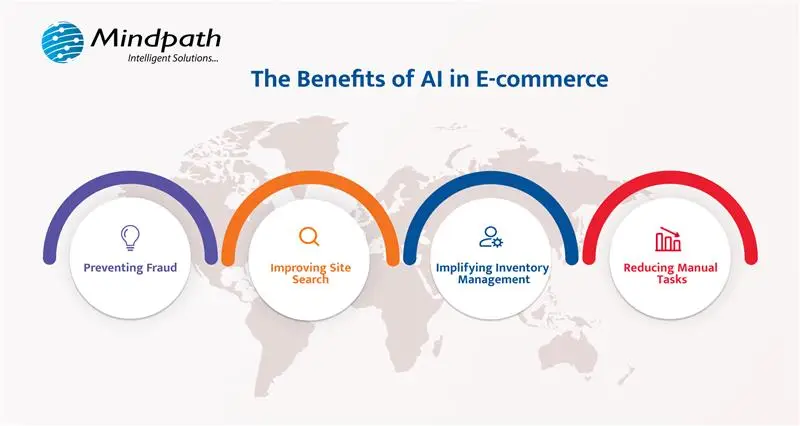
With the rise of artificial intelligence in e-commerce, the ability to predict trends, analyze data and personalize experience has become more easily approachable. Businesses can now improve customer interactions, automate tasks, and stay ahead in a competitive market with AI. Here are some of the key benefits of AI in e-commerce businesses.

benefits of AI in e-commerce

1. Preventing Fraud

E-commerce businesses usually face a huge challenge with online fraud, but with e-commerce AI tools, these frauds can be prevented easily. AI can quickly spot any suspicious activity by understanding the patterns and detecting anything unusual such as incorrect shipping addresses or any other signs of fraud. Also, it can detect fraud even while reviewing thousands of transactions at once which helps to prevent losses and keeps the store guarded. AI has the ability to learn and improve which can benefit in continuously strengthening its fraud detection, helping you to focus on growing your business.

2. Improving Site Search

AI in e-commerce is making site search smarter and more accurate. AI can better understand what customers are looking for due to the advancements in natural language processing. Whenever a customer types to search for something, AI can automatically fix spelling mistakes, suggest synonyms and even fill missing words. It can also help customers in visual search as well search voice search options. With the help of these smart features, AI can reduce customer’s frustration and provides them exactly what they want, improving shopping experience and giving businesses a competitive advantage in the e-commerce market.

3. Simplifying Inventory Management

With artificial intelligence in e-commerce, inventory management has become much easier. AI can predict how much stock you need based on past data and trends which helps to avoid overstocking or running out of items. AI also makes warehouse tasks smoother as bots can help store and retrieve products quickly, saving time and effort. This technology makes managing stock more accurate and efficient, allowing businesses to focus on growing while AI handles the tricky parts of inventory management.

4. Reducing Manual Tasks

AI can reduce the need for manual labor by taking over repetitive tasks in e-commerce. Instead of employees handling simple, time-consuming tasks, AI automates these processes and saves valuable time and improves competence. By handling tasks like answering basic customer queries, processing orders, and managing inventory, e-commerce AI allows businesses to focus on more important activities. While this may change the roles of human workers, it helps businesses cut costs and enhance productivity, making overall operations more streamlined and effective.

Want to reduce manual work and make your e-commerce platform more effective? Discover how AI in Web Development can streamline operations and enhance customer experiences.

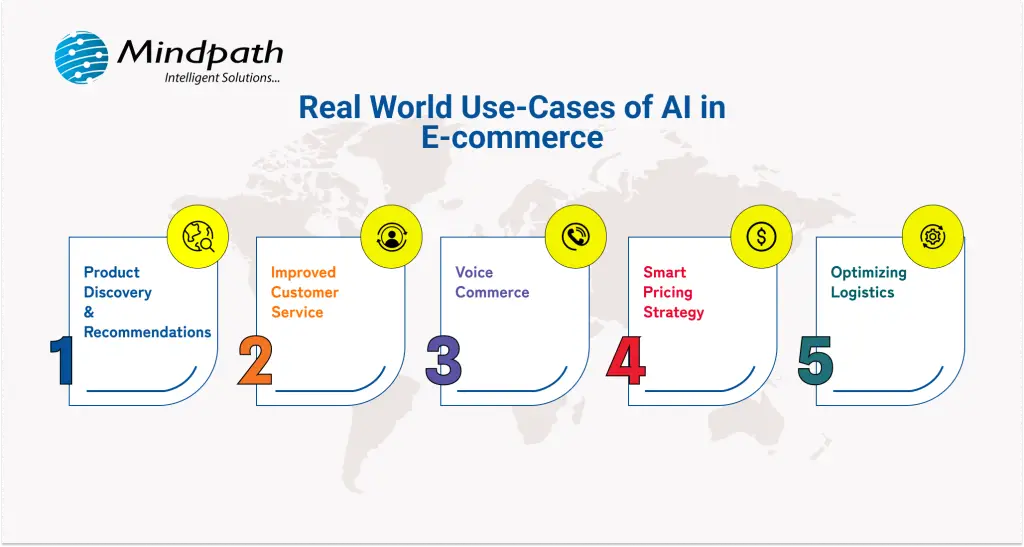
Real-World Use Cases of AI in E-commerce

Artificial intelligence is already making a big impact in the e-commerce world. Many well-known online stores are utilizing it in smart ways to improve the way people shop and how smoothly their systems run. Here are some of the real-world examples showing how AI is used every day in e-commerce.

use cases of AI in e-commerce

1. Product Discovery and Recommendations

AI in e-commerce is shaping how customers discover products online. Websites like Amazon, Shein, Etsy and eBay show products based on the browsing and purchasing history of their customer with personalized product recommendations. For instance, if you search for a purse on Amazon, it will suggest other similar brands of purses that you may like. This AI-driven system makes shopping more enjoyable and also boosts sales and customer trust. E-commerce advertising also benefits from this, as targeted recommendations lead to more engagement, improving overall customer experience.

2. Improves Customer Service

Customer service is improving with the help of AI-powered chatbots and virtual assistants, which can quick and personalized support. Artificial intelligence for customer service in retail stores helps businesses automate responses, answer customer queries, and offer tailored solutions. By using technologies like machine learning and natural language processing, AI can understand customer inquiries and offer accurate responses. For example, H&M uses AI-powered chatbots to help customers with product details, availability, sizing and even delivery options. This makes customer shopping easier and helps businesses deliver faster and efficient customer service.

3. Voice Commerce

Voice commerce, also known as V-commerce, is changing how we shop online with the help of AI. By using voice assistance like Amazon’s Alexa, Google Home, and Walmart’s voice services, customers can shop simply by speaking. These AI-driven assistants understand commands through natural language processing (NLP) and can offer tailored product recommendations. They also help customers with order updates and product inquiries. AI in e-commerce examples include big companies like Amazon, Walmart, and Google Shopping that are leveraging voice technology to improve shopping experience.

4. Smart Pricing Strategy

The role of AI in e-commerce is changing the pricing strategies by allowing price adjustments based on various factors like demand, supply, and competitor prices. AI trends use data analysis to predict demand patterns and automatically modify prices. Major companies like Amazon, Walmart, and Best Buy have adopted AI to implement smart pricing strategies which allow them to remain competitive, attract more customers and improve satisfaction by offering relevant prices. These examples demonstrate how advanced technology can optimize pricing in the ever-evolving market.

5. Optimizing Logistics

In e-commerce, smart logistics powered by AI improves delivery efficiency by using real-time data and predictive analytics. This technology helps businesses track shipments, prevent delays, and make better decisions. For instance, Cainiao, Alibaba’s logistics arm, uses AI to ensure deliveries within 24 hours across China. Similarly, Amazon employs AI to optimize delivery routes, reducing costs and speeding up deliveries. These uses of artificial intelligence in daily life are making logistics smarter, cutting costs, and providing a better customer experience.

Looking to streamline your business operations and enhance customer experiences? Discover how conversational AI chatbots can help your business transform its workflows and boost efficiency in our blog.

Ready to Adopt the AI Revolution?

Artificial intelligence is revolutionizing e-commerce by enhancing customer experiences, streamlining operations, and driving innovation. From smart pricing and personalized recommendations to AI-powered customer service and logistics, the role of AI in e-commerce is transforming the industry in powerful ways. As technology continues to evolve, businesses that embrace AI will stay ahead of the curve, offering better services and smarter solutions.

At Mindpath, we provide top-tier AI development services to help businesses thrive in the world of e-commerce. Our AI solutions are designed to improve customer experience, streamline operations, and boost sales. From personalized recommendations and dynamic pricing to efficient inventory management and smart logistics, we integrate AI to make your e-commerce platform smarter and more efficient. Trust Mindpath to bring AI-powered innovations that will optimize your business and help you stay ahead in the ever-evolving e-commerce landscape.