Home

Offshore Software Development: What You Need to Know

Offshore Software Development: What You Need to Know

Join our Newsletter!

offshore software development

Offshore software development is redefining how businesses are developing digital solutions. Are you still wondering what we mean by offshore? It means working with teams or services located in another country, often to obtain cost-effective expertise and accelerate delivery. In the world of software, this approach opens doors to global talent, allowing companies to develop high-quality products without the high expenses of local hiring

To elaborate, what we are referring to is outsourcing software development tasks to overseas teams that specialize in the technology and services. These teams are often found in areas with proven traditional IT qualifications and strong pricing competitiveness such India, eastern Europe, and southeast Asia. Do you want to learn more about this development? Don’t worry, in this blog we will be going into all you need to know about offshore software development. 

Ready to take your business to the next level? Partner with Mindpath for expert offshore development services that drive innovation, efficiency, and growth. Contact Us!

What is Offshore Software Development?

Offshore software development refers to collaborating with a software team that is located in a different country to manage your tech initiatives. An example for it can be a UK-based company that hires a Philippine development team to build a website or software tool. This helps reduce costs and makes it easier to find the right talent. Businesses prefer this model because they get quality work without spending too much money. The Philippines, for instance, offers skilled developers who are experienced and reliable. While there might be challenges like time zone gaps or communication styles, this kind of software development still helps companies finish projects faster and focus on their main goals. 

Fascinatingly, according to a Business Research Insights survey, the software offshore market was worth roughly USD 160.9 billion in 2024, and is on track to reach USD 413 billion by 2033, with a CAGR of 11.04%. Factors for this growth in the offshore software market include the affordable technology needs to increase usage, the demand for tech solutions to better connect with the global community, and also the need for talented developers. Countries such as India, China, and parts of Eastern Europe have emerged as preferred locations, because they provide access to talent, sufficient infrastructure, and a business-friendly environment.  

What is the Offshore Development Process?

Offshore software development is the development of software with teams in other countries that help you in the efficient building and maintenance of your software. Here is a simple set of steps that companies tend to go through when working with offshore developers: 

offshore software development process

1. Recognizing the Need

The organization recognizes it has additional skills or resources requirements, and they must determine what to outsource like coding, testing, or support work.  

2. Finding an Offshore Partner

They seek a trusted team in another country with a solid skill set and experience, often in a region well known for technology. 

3. Beginning the Project

Both teams establish project goals, working timelines, and methods to communicate, likely via video calls or project tracking software. 

4. Developing and Coding

The offshore team will begin the project and communicate updates consistently, using project tracking and collaboration tools online 

5. Testing and Quality Assurance

The teams will thoroughly test the software to resolve any challenges, ensuring it all works before launching. 

6. Deployment of the Software Solution

The completed software solution will be deployed and the team will continue to provide services or updates according to demand. 

7. Continued Collaboration

The firm will still do business with the offshore team in terms of updating and improving and developing future work. 

While offshore development gives you access to global talent and cost advantages, you may also explore custom software development to better understand when tailor-made solutions are the right choice.

Benefits of Offshore Software Development

Development of offshore software is now a common approach for businesses that want to increase their tech potential. It fosters sustainable growth by providing a more intelligent way of managing development requirements across countries. Let us examine its benefits: 
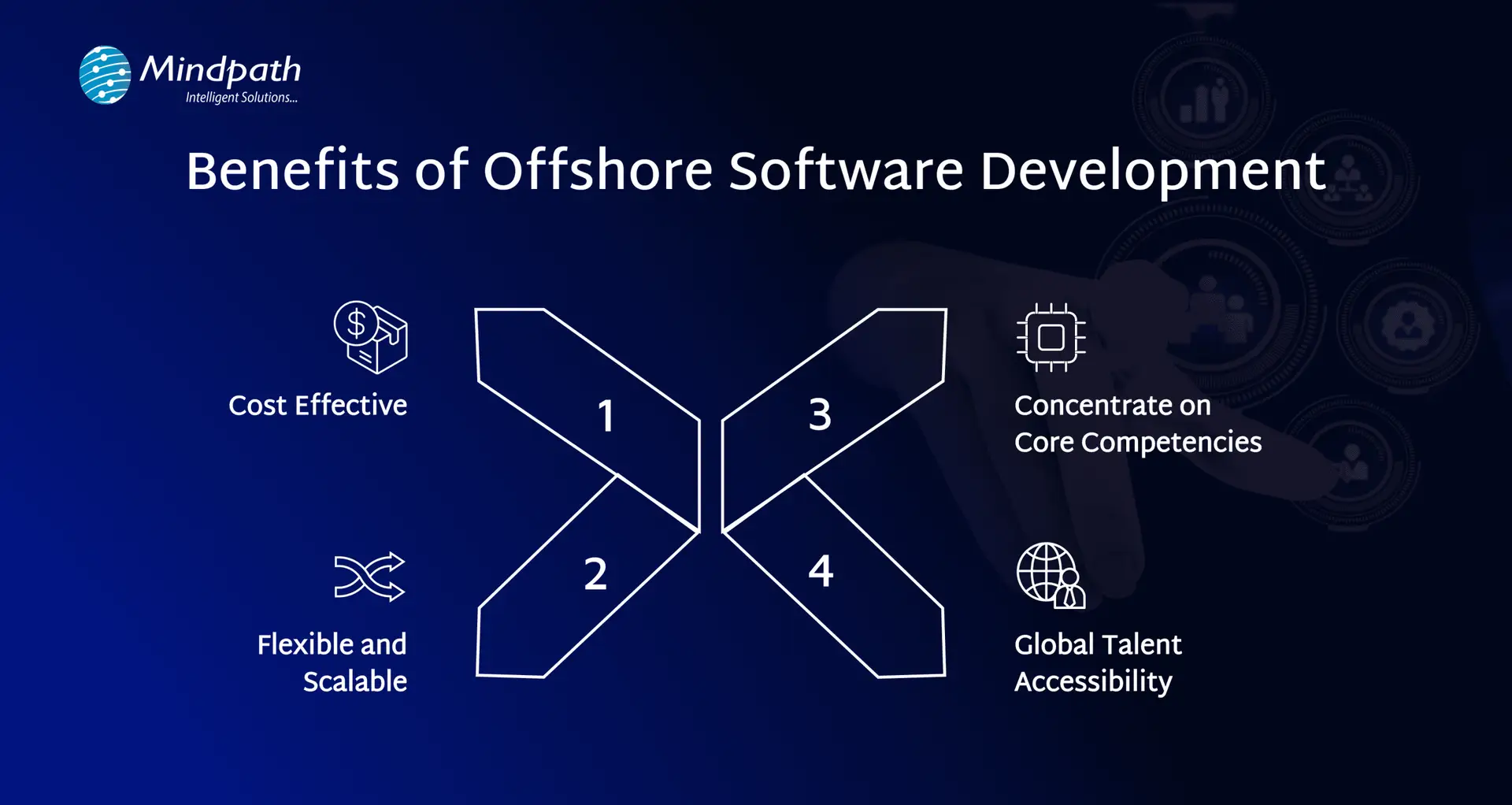
benefits of offshore software development

1. Cost-Effective

Sometimes, hiring developers from other countries can cost less than building a local team. This could help companies save money without sacrificing quality. The additional budget can be utilized to help grow the business, such as marketing or product upgrades. It is a more resourceful approach to balancing costs while remaining competitive.

2. Flexible and Scalable

Offshore development services easily allow you to adapt team sizes and add or downsize developers based on project needs. There is ease of access to add a number of developers to your team when your workload increases, or to scale down easily as workload begins to slow down. This provides operations with greater flexibility, gives you quicker access to talent while avoiding lengthy hiring processes. This engagement allows quicker delivery for your clients and provides a smoother operating working relationship for your offshore team.

3. Concentrate on Core Competencies

Future-proofing by outsourcing software work allows companies to turn their attention back to what they do best. They can manage just the right amount of technical detail, and spend more time on strategy, customer service, or new product growth. While offshore teams will take care of the technical detail while being very diligent and skilled in doing this work, allowing companies to focus on even bigger parts of the operation like overall performance

4. Global Talent Accessibility

Offshore teams also allow companies to expand their access to the world’s best talent. Instead of only hiring locally, your teams have access to experts from around the globe, which can be a huge advantage for partnerships and companies looking for the exact skills they need. Skilled and knowledgeable individuals will lead to improved, more diverse ideas, a wider range of perspectives, and improved quality assurance, all of which will lead to improved and better-quality results. It is a great opportunity to be more intentional about building and fine-tuning more creative teams. 

If reducing onboarding time and accessing a wider talent pool are priorities, our article on the key benefits of hiring remote developers shows how remote hires can complement offshore strategies.

Ready to Work with an Offshore Software Development Company?

Offshore software development has become a powerful strategy for companies looking to build high-quality digital products without stretching their budgets. By working with skilled teams from other countries, businesses can meet deadlines faster, access a wide talent pool, and stay focused on their core goals. While it may come with a few challenges like time zone gaps, the right planning and communication make it a highly effective and scalable approach for long-term success. 

At Mindpath, we provide reliable offshore software development services tailored to your business needs. Our global teams bring technical expertise, timely delivery, and smooth collaboration to every project. Whether you need help with custom software, mobile apps, or support and maintenance, we’re here to support your goals with cost-effective solutions. With clear communication and dedicated teams, Mindpath makes offshore development simple, efficient, and successful for companies of all sizes. 

Frequently Asked Questions

1. How can communication gaps be managed effectively in offshore software development?

Clear communication channels, regular meetings, and proper documentation help reduce misunderstandings. Using collaboration tools and setting overlapping working hours can improve coordination. A structured communication plan ensures both teams stay aligned, even when working across different time zones and cultural contexts.

2. What should businesses check before signing a contract with an offshore team?

It is important to review technical expertise, past projects, client feedback, and security practices. Clear agreements on timelines, deliverables, and communication methods should be defined. This helps avoid confusion later and ensures the partnership is built on transparency and mutual understanding from the start.

3. How does offshore development impact project timelines and delivery speed?

Offshore teams can often accelerate delivery by working in different time zones, enabling near round-the-clock progress. However, proper planning is essential to avoid delays caused by coordination issues. When managed well, it can significantly improve turnaround time and overall project efficiency.

4. Is offshore software development suitable for small and mid-sized businesses?

Yes, it is often a practical choice for smaller businesses looking to access skilled talent without high hiring costs. It allows them to build quality software within budget while focusing internal resources on growth, operations, and customer engagement.

5. How can businesses maintain quality control when working with offshore teams?

Quality can be maintained by setting clear standards, conducting regular reviews, and using testing frameworks throughout the project. Continuous monitoring, feedback loops, and defined performance metrics help ensure the final product meets expectations and aligns with business requirements.


Looking for the Right Offshore Team?

Build and scale software faster with an experienced offshore development partner.

Frequently Asked Questions

Support Is One Click Away

Featured Posts

Related Post

GenAI tools for teachers

The year is 2026 and AI isn’t just knocking at the doors of the education industry as it has become an integral part of the classroom, research lab, and faculty room. Educators have been burdened with expectations and exhaustion due to changing curriculum designs in different parts of the world. The arrival of GenAI tools in the education sector has marked the introduction of many new opportunities for educators.

Generative AI is gradually becoming an indispensable companion of teachers worldwide for many reasons. Most important of all, GenAI tools are not replacing the human element in the teaching experience. On the contrary, generative AI empowers teachers and helps them provide personalized learning experiences to every student. From lesson planning and content creation to assessment and student support, GenAI tools for teachers can make everyday teaching more efficient.

Key Takeaways

  • 01
    GenAI tools can help teachers reduce repetitive administrative work and spend more time interacting with students.
  • 02
    Generative AI can support lesson planning, content creation, grading, assessments, and personalized learning.
  • 03
    Tools such as ChatGPT, Gemini, Canva Magic Studio, and Magic School AI can support different classroom needs.
  • 04
    AI-powered education tools can help teachers create more interactive learning experiences and improve student engagement.
  • 05
    The right GenAI tools can complement teachers by supporting productivity, creativity, personalization, and classroom management.

Want to stay ahead in the education sector by offering smarter, more efficient solutions? Mindpath offers generative AI development services to help education businesses build custom, scalable AI tools tailored to their needs.

Understanding the Significance of Generative AI for Teachers

The biggest problem for teachers in the modern education industry is the burden of tedious and repetitive administrative tasks. Imagine the stress on teachers who have to evaluate the test papers of each student and prepare lesson plans for the next day. The use of GenAI tools for teachers can help reduce the burden of administrative tasks, especially with automated grading and generation of personalized learning materials. Generative AI tools can allow teachers to invest their efforts in interacting with students, fostering creativity, and nurturing critical thinking skills.

Teachers should understand that generative AI is not just another technological trend that will fade away with time. As a matter of fact, generative AI signifies a major paradigm shift in the domain of education. You can notice the broader impact of generative AI in education through solutions such as personalized learning at scale, automated content generation, and better student engagement. Generative AI can help learners through adaptive learning systems that align with the learning style, strengths, and weaknesses of each learner.

The reduced administrative burden on educators helps them interact directly with students and craft innovative teaching strategies. GenAI tools also help educators provide instant feedback on student assignments, thereby allowing students to learn quickly from their mistakes. Teachers can rely on generative AI to improve student engagement by creating interactive content and personalized assessments. As a result, generative AI helps educators transform learners into active participants in the learning journey.

Looking for ways to integrate cutting-edge AI into your teaching strategy? Read this blog on generative AI trends to stay ahead with the newest AI innovations.

What Are the Top Generative AI Tools for Teachers?

The blend of artificial intelligence and education brings promising results for learners as well as educators. The best GenAI tools for teachers can support lesson planning, content creation, assessments, presentations, research, grading, and student engagement. The following list of generative AI tools highlights how generative AI for teachers can support different aspects of the teaching experience.

Here are 15 GenAI and AI-powered tools that teachers can use for planning lessons, creating educational content, engaging students, assessing performance, and organizing learning resources.

1. ChatGPT

The biggest generative AI tool that attracts the attention of educators worldwide is ChatGPT. It is still one of the basic tools that transformed how we interact with artificial intelligence. Educators can trust ChatGPT for its versatility and use it as an assistant for different types of tasks. ChatGPT is one of the top AI tools in education for drafting lesson plans, summarizing research papers, or providing answers to difficult student questions. Educators can trust ChatGPT for brainstorming, content creation, and delivering responsive student support.

2. Sendsteps

Sendsteps AI is a unique platform that makes the process of creating assignments easier for learners. It relies on the power of natural language processing to understand the teacher’s instructions with accuracy. The AI tool uses teacher instructions to craft content personalized to specific needs and learning objectives of students. Educators can also use Sendsteps for creating interactive quizzes with the facility of automatic grading.

3. Google Gemini

Another big name among the best AI tools for students and teachers is Google Gemini. It stands out with multimodal capabilities that make it more versatile than text-only models. Google Gemini can generate text as well as images and audio content, thereby enhancing its versatility for classroom applications. Teachers can rely on Gemini to create lesson materials, interactive quizzes with audio prompts, and explanations of scientific concepts with diagrams.

4. Canva Magic Studio

You cannot think about AI tools in the field of education without focusing on Canva and its Magic Studio AI features. Canva is a distinct AI tool in education that allows you to create visually engaging presentations effortlessly. Teachers can also use it to craft educational videos, infographics, and interactive worksheets. The Magic Studio feature of Canva also provides personalized recommendations for content generation while creating teaching aids.

5. Quizizz

Quizizz is another generative AI platform that helps teachers create interactive quizzes. It can help teachers craft engaging quizzes, interactive lessons, and polls from different source materials. The AI tool can also help generate different types of questions, such as open-ended or multiple-choice questions. Educators can transform quizzes and assessments into fun experiences for students while obtaining an accurate impression of student performance.

6. Socrative

The list of top generative AI tools that can help teachers also includes Socrative, an AI-powered student response system. Socrative is an example of using generative AI for educators to enhance their capabilities for evaluating student assignments. Teachers can use Socrative to create open-ended questions and quizzes to collect formative assessment data. The data obtained from such tests can help teachers recognize student weaknesses and modify their teaching approaches.

7. Nearpod

Nearpod is also a useful generative AI tool for embedding open-ended questions, quizzes, and polls in presentations. Teachers can use Nearpod as one of the top education AI tools to create engaging lessons for students. The tool also provides valuable data on student performance along with creative tools for educators. These creative tools can help create interactive learning experiences that boost critical thinking and creativity among learners.

8. Flipboard

One of the interesting AI tools that teachers can use is Flipboard. It provides educators with a way to deliver education through a completely new and innovative format. Flipboard helps educators combine articles, videos, and other web content on a specific topic in the format of a digital magazine. Educators can share the digital magazines with students through links that can enhance the learning experience.

9. Magic School AI

Magic School AI is a comprehensive collection of AI tools for educators, focused on automating common classroom tasks. It is one of the best generative AI tools for creating subject-specific lesson plans, worksheets, and rubrics. Teachers can find more than 60 tools in Magic School AI for different aspects of the teaching experience.

10. Curipod

The collection of GenAI tools for education must also include Curipod for its capabilities as a lesson planning assistant. It helps make classroom learning more engaging with interactive activities. Curipod can create presentations with interactive elements to encourage student participation. Teachers can use Curipod as a trusted solution for real-time understanding of student performance and fostering active learning.

Could understanding AI applications in other industries help you choose the best tools for your classroom? Discover how generative AI in market research provides insights that can spark innovation in teaching.

11. Eduaide.AI

Eduaide.AI is one of the few generative AI tools created specifically for educators. It helps streamline lesson planning and the creation of learning resources. The AI tool can help generate lesson plans aligned with popular standards. The intuitive interface of the platform, combined with its emphasis on pedagogical support, makes it a valuable tool for educators.

12. Otter.AI

Otter.AI is another notable example of an education AI tool with distinctive features. The AI-powered transcription service leverages generative AI for real-time transcription of spoken language in class lectures or parent-teacher conferences. The tool plays a crucial role in enhancing accessibility in education and improving the efficiency of note-taking.

13. Evernote

Evernote is a comprehensive organizational tool for educators that utilizes generative AI for content curation. Teachers can use Evernote to save videos, articles, and other web content to create educational content. The AI tool helps with the effective collection and organization of research materials, creation of lesson plans, and sharing personalized learning resources with students.

14. Gradescope

Gradescope also showcases another example of using generative AI tools for learning improvement through a simpler and faster grading process. Teachers can use Gradescope for automated assessment of complex assignments such as essays, code submissions, or problem sets. The AI-powered features of the platform not only save teachers time but also support grading consistency and provide analytics for student performance.

15. Raindrop.io

Raindrop.io is another promising addition to the list of top GenAI tools in the domain of education. It is a bookmarking tool that helps teachers save and organize web content alongside creating collections of bookmarks. Teachers can share the bookmarks with learners, which may include videos, articles, or other relevant web content for future reference.

Curious about the most impactful ways generative AI is being applied across different industries and classrooms? Explore detailed generative AI use cases in our comprehensive guide to see how these tools are transforming education and beyond.

Ready to Transform Education with Generative AI?

Generative AI tools are revolutionizing education by reducing administrative burden, enabling personalized learning, and boosting student engagement. Educators can focus on creativity, critical thinking, and meaningful interactions while students enjoy adaptive and interactive learning experiences in the classroom.

At Mindpath, AI development services help education businesses build custom, scalable generative AI solutions. From automating lesson plans and grading to creating personalized learning platforms, our expert team designs tailored AI tools that empower teachers and enhance student engagement.

maintenance and support services

Technology is the source of business development, and any system requires frequent maintenance to remain dependable. Maintenance and support services assist businesses in maintaining, securing, and making software maintainable. A minor problem is likely to slow down the operations and influence the experience of the customers. Sophisticated companies understand that high IT performance requires continuous focus, on-time repairs, and professional management. So, how do companies keep their systems running smoothly while meeting rising digital demands?

Due to the complexity of technology, businesses cannot afford instant fixes to keep up with the competition. Teams need to monitor the health of systems, fix problems quickly, and implement updates in a timely manner. Such a strategy minimizes downtime and ensures that day-to-day activities are not slowed down. It also assists companies in safeguarding data and enhancing user satisfaction. This blog will discuss the ways these services contribute to long-term IT resilience and business performance.

Planning to reduce downtime and keep your business operations consistent? Our maintenance and support services at Mindpath help you manage updates, fixes, and performance with ease.

What are Maintenance and Support Services in IT?

IT support and maintenance services ensure that business technology operates efficiently at all times. Maintenance involves frequent updates, security checks, backups and repair of system problems before they escalate. It assists software to remain stable, secure and effective, thus businesses save time and do not face delays due to unexpected technical issues.

Support services intervene when users have technical problems or require assistance to use systems properly. Support teams resolve problems, answer questions, and direct users through issues within minutes. Maintenance and support together form a stable IT environment, which enhances performance, downtimes, and business needs of the day-to-day business.

Why are Maintenance and Support Services Important for Businesses?

Technology is important in businesses to support daily business activities. The subsequent points demonstrate why maintenance and support services are imperative towards stable IT performance. They assist in minimizing downtime and ensuring systems operate effectively.

1. Stronger Data Security

Companies should have effective security measures to safeguard confidential data against cybercrimes. IT maintenance services mitigate risks by performing frequent security inspections, maintenance, and security measures such as firewalls.

2. Quick Technical Help

Problems in technology require immediate response to prevent delays in work. Proficient support teams are able to resolve issues promptly and provide assistance to users in case they experience system malfunctions or have queries.

3. Better System Performance

Consistent check-ups ensure smooth operation of systems and detecting problems at an early stage. This minimizes delays and ensures that business run smoothly and effectively on a daily basis.

4. Improved Customer Experience

Customers demand rapid and continuous services in all cases. Good system support means less downtime, thus enabling businesses to provide higher quality and more coherent experiences.

5. Timely Bug Resolution

Bugs in the software can impact the performance and cause unpredictable disruptions. Support teams can find out the root cause in a short time and correct errors before they lead to more significant problems.

6. Easy Upgrades and Improvements

The world of technology is rapidly evolving and business software is not left behind. Constant updates and upgrades enhance capabilities, enhance efficiency, and remain competitive.

Types of Maintenance and Support Services

Maintenance and support services cover different areas that keep IT systems reliable and efficient. We can take a look at the primary types that assist businesses in the control of performance, security, and system stability.

1. Software Maintenance Support

Software maintenance services keep software updated, secure, and free from errors. They contain bugs, patches and updates that aid the smooth operation of systems.

2. Hardware Support Services

Hardware support deals with hardware such as servers, computers and network support. Periodic inspections are used to avert failures and maintain devices in proper operation.

3. Network Support Services

Network support ensures that internet connections are maintained in a stable and safe condition to be used in the day-to-day running of business. It also secures systems via firewall configuration and network watchdog.

4. Helpdesk Support and Troubleshooting

Helpdesk staffs offer rapid assistance when customers have technical issues. They find solutions quickly to allow work to proceed without delays.

5. Application Maintenance and Support

Application maintenance services ensure that business applications are maintained and operational. They enhance performance, correct problems, and assist applications to conform to evolving business demands.

6. WordPress Maintenance and Support

WordPress maintenance and support keeps websites secure, updated, and fully functional. It covers the updates of the plugins, security, backups, and error correction.

Factors to Consider While Choosing a Maintenance and Support Service Provider

The following are the factors that you should consider when selecting a Support and Maintenance service provider to your business. The right choice assists in providing quality service, quicker problem resolution, and extended IT stability.

  • Select a provider who has the appropriate technical capabilities and actual industry experience.
  • Ensure response and resolution times are clearly stated in service agreements.
  • Seek positive support that corrects risks before it turns to a problem.
  • Check reviews and client feedback to understand their reliability.
  • Make sure they provide a flexible support that can be expanded with your business.
  • Look at long-term value, rather than making a decision based on low cost.
  • Work with a group that listens effectively and knows what you require.

Best Practices for Implementing Maintenance and Support Services

The right strategy is the best fit with strong maintenance and support. These are the best practices that can assist businesses to run systems smoothly and prevent unnecessary disruptions.

  • Be proactive to find problems and resolve them before they lead to system downtime.
  • Establish an effective ticketing system to monitor, control, and address support orders effectively.
  • Automate common operations and provide self-service in order to handle issues faster.
  • Establish clear objectives of service and regularly measure performance.
  • Develop a robust knowledge base and educate support teams to manage issues.

Challenges of Maintenance and Support Services

Despite its many advantages, maintenance and support services also entail some operational obstacles. The following are some of the problems that businesses can encounter when handling such services.

  • IT systems become more difficult to maintain when the old and the new technologies are managed. It tends to provide unnecessary complexity to support teams.
  • Cybersecurity threats keep increasing and require constant monitoring. Companies should remain ready to safeguard information and comply with safety requirements.
  • The absence of skills may complicate the management of new technologies. Regular training of teams is frequently necessary.
  • Low budgets and resources may influence quality of support. Small teams can be unable to cope with increased workloads.
  • Unforeseen downtime may derail day-to-day business operations at a short notice. Rapid response is required to minimize losses and delays.
  • Ineffective communication may delay the resolution of issues and cause confusion. Proper documentation assists in making teams more effective.

Looking for Reliable IT Support That Keeps Your Business Ahead?

Support and Maintenance services play a vital role in keeping business systems secure, stable, and efficient. Strong maintenance and support services reduce downtime, improve performance, and help businesses adapt to changing technology demands. With the right approach, companies can protect operations and ensure long-term IT reliability.

At Mindpath, we provide maintenance and support services tailored to your business needs. Our expert team helps manage updates, resolve issues quickly, and keep your systems running smoothly. Partner with Mindpath to strengthen your IT environment and support continuous business growth.

Custom web application development

A growing business often reaches a point where off-the-shelf solutions no longer match its unique needs. Right? This is where custom web application development comes in. It gives you the web applications that work exactly the way you want them to, based on your specific requirements. Think about how much easier your daily operations would be if every feature were custom-made based solely on how your team works day to day, rather than trying to adapt to a generic application. It happens when technology becomes more than just a tool or a utility and partners with you to scale with your business.

Over time, certain changes in daily operations start to hint that your business might benefit from such a tailored solution. While these changes often seem subtle, they show up as your team performs operations, handles data, or relates to customers. When the shifts appear, it is highly likely that operational efficiency, productivity, or growth will be impacted. Understanding these signals can help you determine the proper time to invest in a strategy that is specifically built to suit the needs of the business.

Every business challenge needs a custom solution. Look how Mindpath’s custom web app development services resolve the issues and support businesses to convert unique needs into powerful digital tools.

What are Custom Web Applications?

Custom web application development for business means you’re building software that is specific to a business’s needs. This means instead of general tools that are often not specific to the goal of the software, you can tailor the application to a business’s workflows and goals, thus providing better efficiency and customer experience. In short, a custom web application for business will be able to manage data, create automation, provide reporting, and centralize operations. This process will result in a secure, scalable solution that supports the overall growth of the business.

Developers choose programming languages, frameworks, and tools relevant to particular project requirements. They communicate with the business to understand the challenges while integrating within the existing systems. During the web application development, the team regularly checks for progress and verifies if everything is aligned, keeping the cost, time, and risk to an acceptable level. The result is a working, well-designed, reliable application that the business finds intuitive, enhances the business, and can adapt as the business grows.

Benefits of Custom Web Application Development

Knowing the custom web application benefits can help you understand how the proper solution can have an impact on how you work. When considering why to build a custom web application, it is usually due to the fact that it can fit your precise requirements, allow you to work more efficiently, and facilitate growth. It is a strategic investment that will provide a return reflecting your investment and your growth aspirations.

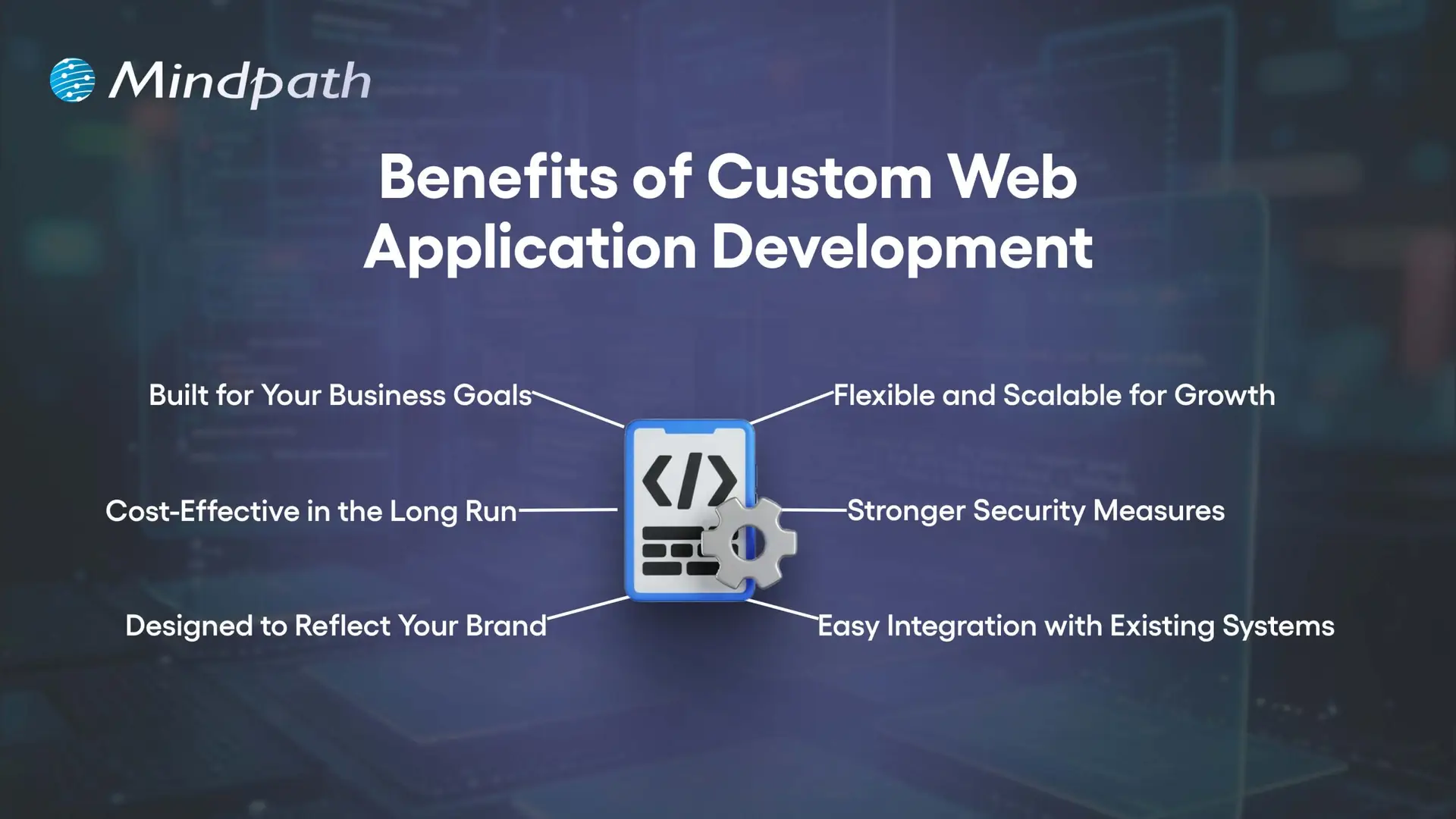
Benefits of Custom Web Application Development

1. Built for Your Business Goals

When you use Custom web application development, you have every feature custom development to suit your needs. This makes integrating workflows easier and an easier experience for your employees.

2. Cost-Effective in the Long Run

A custom solution takes out the licensing fees and unnecessary features, which will save you in the long run. You can also reduce some infrastructure and hardware costs if you are going to outsource the development, too.

3. Designed to Reflect Your Brand

Custom web app development allows you to create every aspect of the application, to your brand’s identity. It can give your application a customized, professional, and unique identity that users will definitely recognize.

4. Flexible and Scalable for Growth

Custom-built applications will grow with your business and meet new demands. You will be able to add new features, accommodate increased traffic and usage, and still have a smooth performance.

5. Stronger Security Measures

Security is a key feature of Custom web application development, ensuring that your business is safe from common cyber threats. Custom apps will be fun to breach and take over than commercial apps found on the market.

6. Easy Integration with Existing Systems

Custom web applications will integrate easily with your current systems and databases. This allows you to keep data synchronized, accurate, and consistent across all platforms.

Choosing a custom web application is a strategic business decision! Discover web development trends to ensure your development strategy aligns with current and future digital demands.

10 Signs Your Business Needs a Custom Web Application

As businesses change, many times their needs exceed what generic software can deliver. Knowing the signs that you need a custom web application will allow you to reduce the damage that can happen before inefficiencies grind your business down.

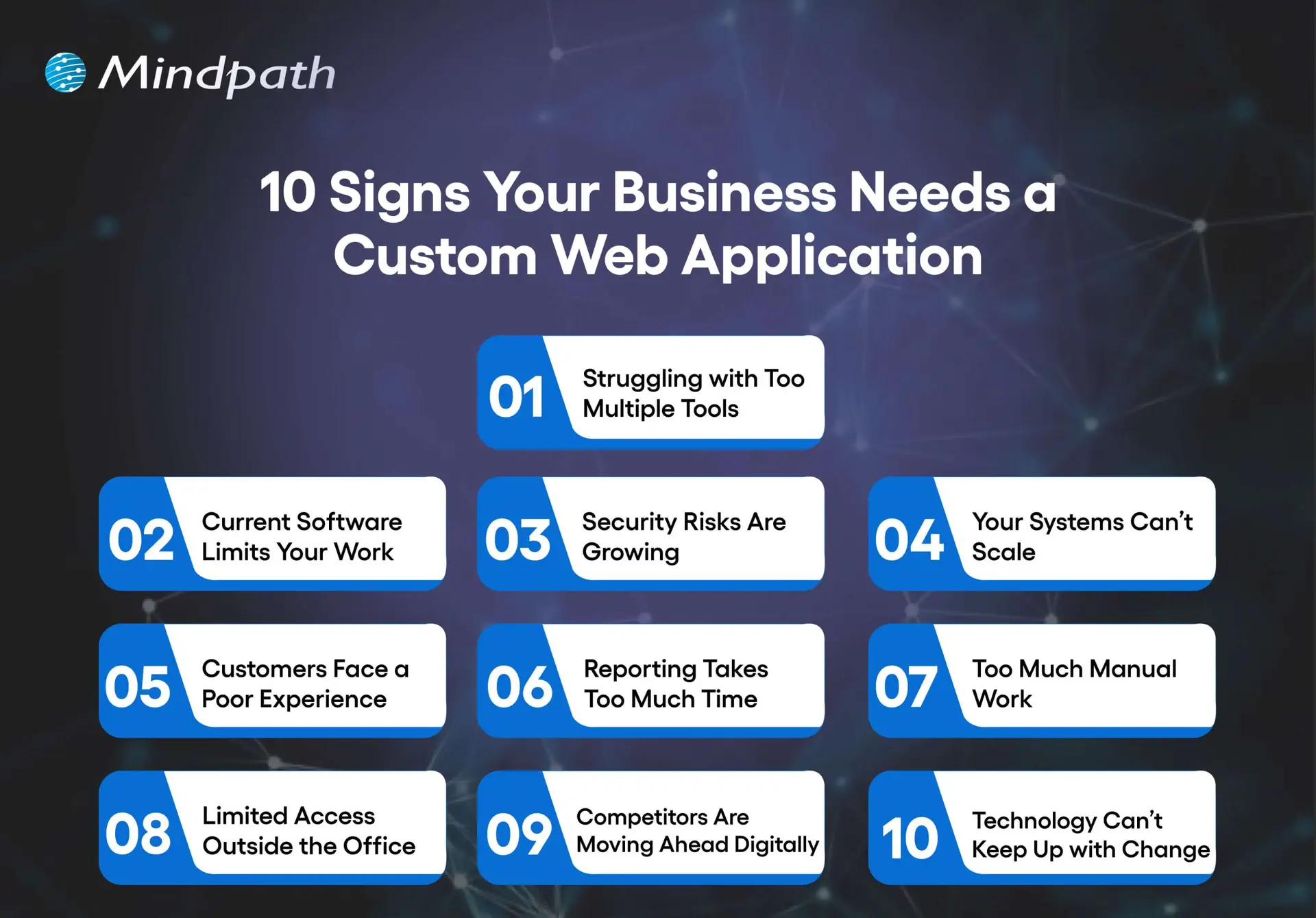
10 Signs Your Business Needs a Custom Web Application

1. Struggling With Too Many Tools

Switching between spreadsheets, emails, and multiple apps slows work and causes mistakes. A custom web app centralizes your operations in one platform for better efficiency.

2. Current Software Limits Your Work

Generic software forces you to adjust your process to fit its features. Custom web application development creates solutions that match your exact workflows.

3. Security Risks are Growing

Using outdated systems leaves sensitive data exposed. A custom web app includes strong security controls, encryption, and adheres to all industry standards.

4. Your Systems Can’t Scale

Organizations evolve. As your business grows, so should your tools increase their users, data, and functionality. Custom software is built to scale without performance issues.

5. Customers Face a Poor Experience

Using slow, outdated, or limited platforms can leave users frustrated. A custom web app will provide users with modern interfaces, fast service, and customized experiences.

6. Reporting Takes Too Much Time

If your reporting is done manually, or it takes too long to collect and analyze, it will limit your decision-making. Custom web apps will provide real-time dashboards and allow for instant self-serve reporting.

7. Too Much Manual Work

When staff are tied up with repetitive data entry or repetitive tasks, it is hard to be productive. A custom application can be built with automation features to allow staff to concentrate on high-value opportunities or higher-skilled work.

8. Limited Access Outside the Office

If your employees can’t easily access your systems while off-site or, even worse, don’t have access to them at all, your flexibility is limited. A custom web application can be secured and hosted in the cloud, allowing staff to work from anywhere.

9. Competitors Are Moving Ahead Digitally

If you’re used to out-of-date tools and systems, keeping up will mostly be impossible. Custom web application development will give you the opportunity to develop useful features that are unique to your organization.

10. Technology Can’t Keep Up with Change

If your business pivots, expands, or introduces new services, the old systems won’t accommodate this change. Custom applications allow you to adapt to these opportunities, adding integrations, and are designed with flexibility.

Wondering what comes next after deciding to build a custom web application? Explore the web app development roadmap to gain clarity on development stages, timelines, and technology choices.

Ready to Build a Solution That Fits Your Business?

A growing business needs tools that adapt to its pace, processes, and vision. Custom web application development delivers tailored solutions that improve efficiency, strengthen security, and enhance customer experience. Recognizing the signs early allows you to invest in a platform that aligns perfectly with your goals and supports sustainable growth.

At Mindpath, our Custom web application development services create secure, scalable, and user-friendly platforms that integrate seamlessly with your operations. We focus on understanding your unique workflows and delivering features designed to simplify tasks, automate processes, and empower your team. The result is technology that becomes a true partner in your business journey.