Home

Offshore Development in 2026: A Strategic Move for Smart Enterprises

Offshore Development in 2026: A Strategic Move for Smart Enterprises

Join our Newsletter!

offshore software development for business growth

Would you like to grow your business quickly without spending a lot of money? If so, offshore software development may be an appealing option for you. Many companies today are choosing this model due to the cost-saving element, access to global talent, and keeping pace with digital technology. So, for companies that want to grow fast and provide more resources to their primary company without the pressure on their in-house or workforce, offshore development is a viable choice.

Now with this increased interest, offshore development services in 2026 are perceived as a way to stay agile and innovate faster while providing the continued influx of technology in the marketplace. Businesses of all sizes, including small startups and large enterprise clients, are increasingly leveraging offshore teams to produce robust and dependable software solutions. In this blog, we will explore why this trend is growing and how your organization can benefit from it.

Ready to take your business to the next level? Partner with Mindpath for expert offshore development services that drive innovation, efficiency, and growth. Contact Us!

What is Offshore Development?

Offshore development refers to hiring a software development team from abroad to either build or manage your software projects. It’s a form of software development outsourcing and allows companies to choose to work with teams located in different countries. It is beneficial for companies to consider going offshore for lower costs, accessing greater developer skill sets, and spending their time on their core business processes.

For instance, if a company in the UK hires a software development team from India to develop its web application, the rates in India will be cheaper than in the UK, while still maintaining high-skilled developers. Thus, using offshore development can help a company scale quickly and effectively with good quality work.

According to a Business Research Insights Survey, the software offshore market was worth roughly USD 160.9 billion in 2024, and is on track to reach USD 413 billion by 2033, with a CAGR of 11.04%.

Offshore Development Benefits for Businesses

There is a growing number of businesses opting for offshore teams to deliver their software needs. The benefits of offshore development have made it a popular option for organizations seeking smart and adaptable options for growth. Let’s have a look:
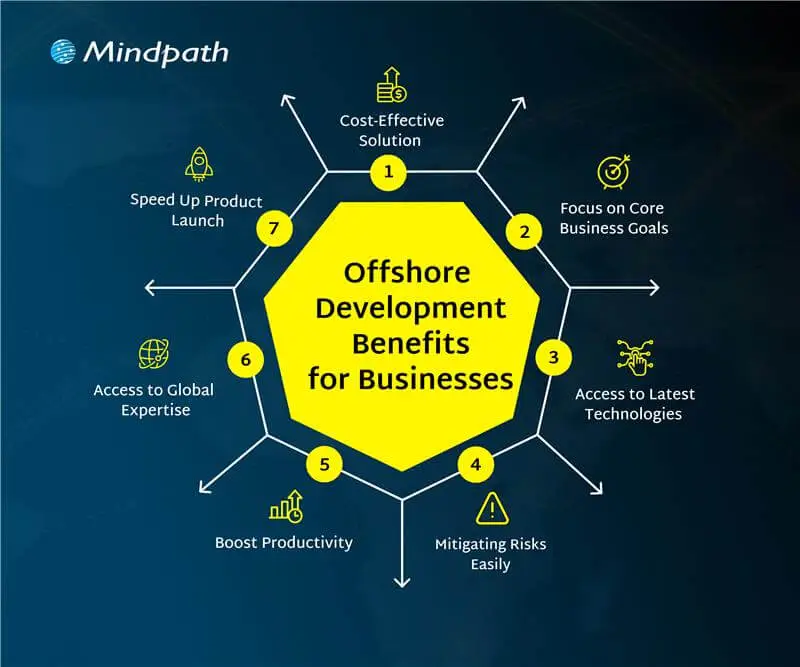
offshore development benefits for businesses

1. Cost-Effective Solution

Offshore development services help businesses lower their software development costs without losing quality. Companies can hire skilled developers from countries where salaries are more affordable compared to local markets. This approach offers a smart way to achieve cost-effective software development without compromising on results. The money saved can then be used in other important areas like marketing, research, or improving infrastructure.

2. Focus on Core Business Goals

Offshore development lets companies’ hand over routine tech tasks to external teams. This helps free up internal staff to work on more important goals and long-term plans. With fewer day-to-day responsibilities, businesses can focus better on innovation and growth. It also gives them more time to strengthen their position in the market.

3. Access to Global Expertise

Working with global software development teams allows companies to tap into a wide range of skills and knowledge. They can bring in experts who specialize in tools or technologies that are hard to find or too expensive locally. This helps businesses build better solutions and stay updated with the latest trends. It also brings fresh ideas and faster problem-solving from experienced professionals around the world.

4. Mitigating Risks Easily

Working with offshore teams helps reduce risks that may affect your local operations. This includes not just natural disasters or political changes, but also technical issues like system failures or delays in development. Offshore partners can quickly step in to handle problems and share responsibility when challenges arise. This setup keeps your projects moving and makes your business more stable and prepared.

5. Boost Productivity

Offshore teams usually have clear roles and focus on getting results. This helps manage projects better and use resources more effectively. Many offshore developers work in well-organized environments that support smooth and efficient work. As a result, they often deliver high-quality work on time and sometimes even ahead of expectations.

6. Access to Latest Technologies

Offshore teams give businesses access to modern tools like AI, cloud computing, blockchain, and IoT. Many offshore developers already have experience with these technologies and know how to use them well. This helps companies stay up to date and try new ideas without spending extra on training or new systems. It also supports faster innovation and better tech solutions.

7. Speed Up Product Launch

Tech talent outsourcing helps businesses work faster by using teams in different time zones. When one team finishes their day, the offshore team can continue the work, keeping the project going around the clock. This constant progress helps fix issues quickly and speeds up development. As a result, companies can launch their products sooner and meet deadlines with ease.

Want to know how this round-the-clock development approach works best ? Understanding the stages of the software development life cycle helps ensure offshore teams collaborate efficiently while maintaining quality and timelines.

Are you facing any confusion between offshore software development and onshore software development? Let us learn about the difference between them.

Offshore vs Onshore Development: A Comparison Table

When planning a software project, businesses often choose between offshore and onshore development based on their goals, budget, and timeline. Both options have their own advantages and challenges. The table below gives a clear comparison to help you decide which model suits your business needs best.

Factor 

Onshore Development 

Offshore Development 

Definition  Development done by a local team Development handled by a team in another country
Location Within the same country Access to cost-effective global locations
Proximity Easy access to the team Remote but manageable with clear planning
Cultural Fit  Shared work culture Diverse perspectives and global work culture
Communication Face-to-face communication possible Efficient digital communication tools
Talent Base Limited to local skills Broader access to global tech talent
Language Barrier Minimal language issues Clear strategies help overcome language gaps
Time Zone Same time zone, easy scheduling 24/7 progress through time zone advantage
Work Cycle Fixed to local business hours Continuous work with round-the-clock development

Looking to Scale Smartly with Offshore Software Development?

Offshore software development continues to be a smart and flexible solution for businesses in 2026. It helps reduce costs, improves access to global talent, and supports faster innovation. By using offshore teams, companies can stay competitive, scale quickly, and focus on their main business goals. No matter if you’re a startup or an established company, offshore development can support your long-term growth.

At Mindpath, we offer reliable offshore development services tailored to your business needs. Our expert teams are equipped with the latest tools and technologies to deliver high-quality solutions on time. With a focus on communication, transparency, and results, Mindpath helps you build the right IT outsourcing strategy for long-term success.

Frequently Asked Questions

1. How do offshore development services ensure quality work when teams are remote?

Offshore teams follow structured processes, regular updates, and clear communication to maintain quality. Many companies also use agile methods, testing practices, and performance tracking tools. With the right planning and collaboration, remote teams can deliver reliable and high-quality results consistently.

2. Is offshore software development suitable for small businesses or only large enterprises?

Offshore software development is suitable for both small businesses and large enterprises. Startups can benefit from lower costs and faster development, while larger companies use it to scale operations. It offers flexibility for any business aiming to grow efficiently without heavy investment in local hiring.

3. What challenges can businesses face with offshore development, and how can they manage them?

Common challenges include time zone differences, communication gaps, and cultural differences. These can be managed by setting clear expectations, using collaboration tools, and scheduling regular meetings. A well-defined workflow and strong project management help ensure smooth coordination and project success.

4. How do offshore development services help businesses stay competitive in a fast-changing market?

Offshore development services give access to global talent, faster delivery cycles, and modern technologies. This allows businesses to innovate quickly and adapt to market changes. With continuous development and cost savings, companies can focus more on strategy and stay ahead of competitors.

5. What factors should be considered before choosing an offshore development partner?

It is important to check the partner’s experience, technical expertise, communication approach, and past projects. Understanding their work process and support system is also key. Choosing the right partner ensures better collaboration, smoother execution, and long-term project success.


Need to Scale Your Development Team?

Access skilled software developers and accelerate product development with offshore teams.

Frequently Asked Questions

Support Is One Click Away

Featured Posts

Related Post

ai app development playbook

Have you ever wondered how AI app development can take a basic idea and create something that is smart, user-friendly, and helpful? Imagine an app that learns, impacts your activities, and improves your life without cognitive load! By developing an appropriate strategy, businesses can build apps that make a difference. A well-thought-out strategy will position you to create something that adds real value to users every day.

That’s why an AI app development playbook is necessary. A good playbook maps out the process into actionable steps, so it doesn’t feel overwhelming. A playbook will guide you through the process of validating your idea, selecting the right tools, developing your app, testing it, and launching it. The playbook provides a roadmap to work from, which can save time, reduce risk, and set you apart from the competition. In this blog, you will learn more about how this playbook can help you succeed. So let’s dive in!

Looking for a way to adopt an AI-powered application? Our AI development services help businesses and teams to build intelligent apps that are secure, scalable, and relevant to the needs of the user.

What Does AI App Development Mean?

AI app development is the process of building software applications that integrate artificial intelligence to perform tasks that typically require human intelligence. Unlike traditional apps that follow fixed, pre-written rules, AI-powered applications use machine learning, data pipelines, and intelligent models to learn, adapt, and make decisions in real time. This includes understanding human language, recognizing images, making recommendations, or learning users’ preferences over time. By relying on sophisticated algorithms, machine learning models, and large data samples, developers can build applications that keep improving and deliver more relevant, valuable experiences the longer they’re used.

In contrast to traditional app development, which has fixed rules and stagnant workflows, AI app development allows apps to update, evolve, and respond in real time. AI development uses data processing, pattern recognition, and predictions to be presented in a flexible state and to solve more complex problems. With the right strategy, app development with AI can equip businesses with solutions that differentiate them from competitors and adapt to new user demands.

What is an AI App Development Playbook?

An AI app development playbook is a structured guide that helps teams and businesses create applications powered by artificial intelligence. It brings together proven methods, industry best practices, and practical tips to manage the unique challenges of building AI solutions.

Instead of approaching development without direction, a playbook provides clarity and keeps everyone aligned with the same vision and goals. It helps you make better decisions, avoid common mistakes, and use resources more effectively. Having an AI app development playbook means you have a clear plan to turn an innovative idea into an intelligent, successful application.

Looking to leverage artificial intelligence to make your mobile apps smarter and more user-friendly? Discover how AI in mobile apps can enhance functionality, personalization, and overall user experience.

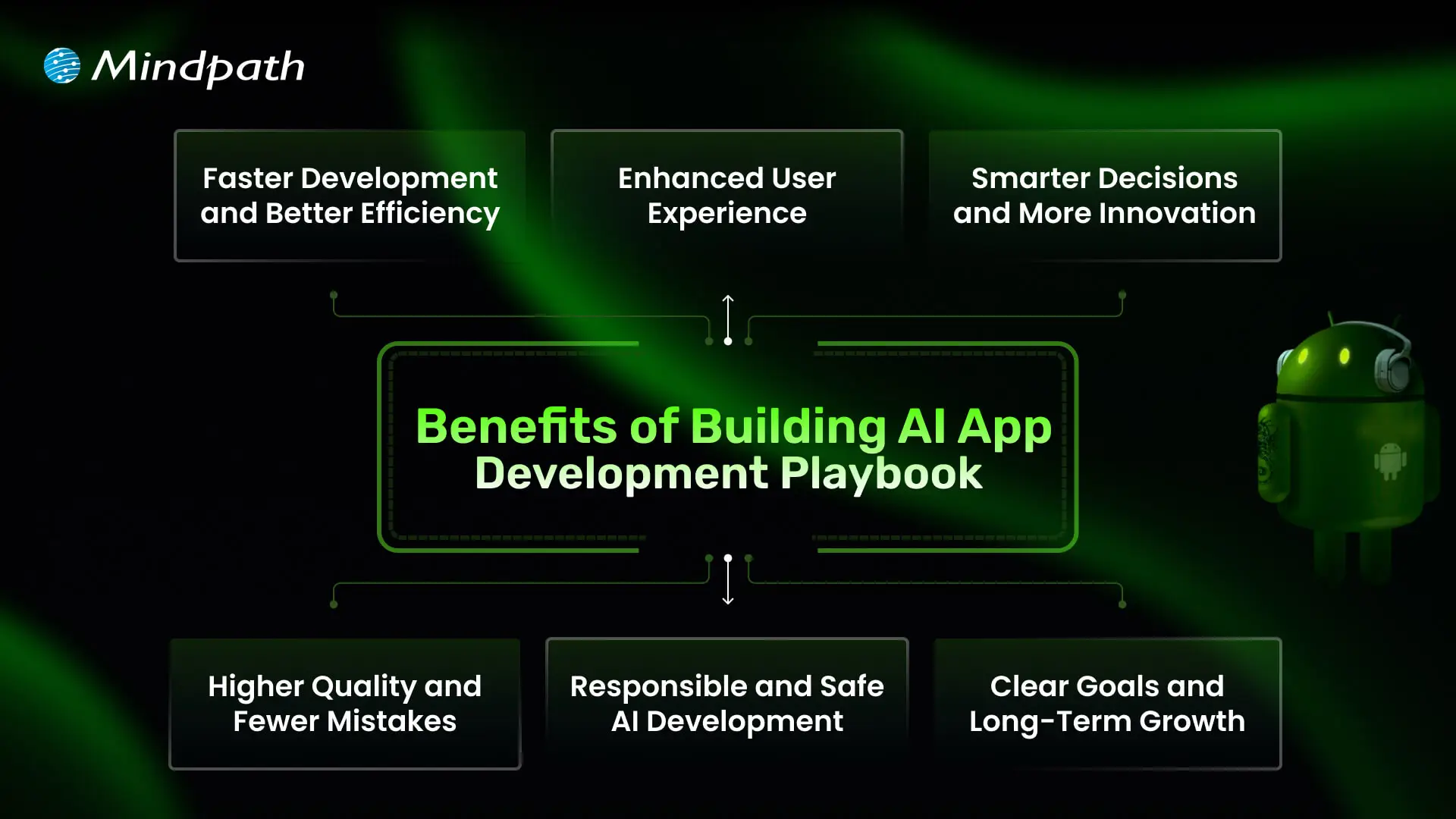
Benefits of Building AI App Development Playbook

A well-crafted playbook does more than just outline steps; it brings clarity to every decision you make during AI app development. It helps you build with confidence and turn innovative ideas into real, valuable solutions. Let’s dive into some of its benefits:

Benefits of Building AI App Development Playbook

1. Faster Development and Better Efficiency

A well-structured playbook helps teams work smarter and avoid wastage of time. By following proven steps and using the right AI development tools, you can speed up tasks like coding and testing. This leads to faster delivery and more efficient use of resources.

2. Enhanced User Experience

A clear plan helps you build apps that feel more personal and easier to use. Smart features like chatbots and recommendations keep users engaged and satisfied. With the right approach, your app becomes something people enjoy using every day.

3. Smarter Decisions and More Innovation

A playbook supports better choices by using data and clear workflows. Teams can experiment and improve quickly, turning ideas into working features faster. This creates an environment where new ideas thrive.

4. Higher Quality and Fewer Mistakes

When you follow a playbook, your team knows when and how to test and debug. This helps catch issues early and maintain a higher standard. In the end, users get a stable app that works as expected.

5. Responsible and Safe AI Development

A strong guide ensures your team builds solutions that are fair, secure, and trustworthy. It helps address risks like bias or privacy concerns early on. This makes your AI software development more reliable and compliant with industry rules.

6. Clear Goals and Long-Term Growth

A playbook aligns your team with clear objectives that support your business goals. It helps you plan where AI fits best, including when to add features like AI chatbot development services that bring real value. This approach keeps you competitive and ready for steady growth.

Want to enhance user engagement and automate interactions in your AI applications? Discover how lead generation chatbot strategies can streamline customer interactions and boost conversions.

Steps to Build an AI App Development Playbook

Creating an AI app development Playbook gives your team a clear roadmap to build smarter, more reliable applications. It helps you plan each stage carefully, avoid common mistakes, and deliver real value to users. Use these practical steps to shape a playbook that keeps your AI projects focused and successful.

Steps to Build an AI App Development Playbook

1. Set a Clear Vision

Begin by defining exactly what your AI app should achieve and why it matters. Know the specific problem you’re solving and the audience it will help. Make sure your vision is realistic and tied to your broader business goals. A clear vision gives your team direction and purpose. It sets the tone for every decision you make during development.

2. Do Your Research

Spend time understanding your market, target users, and any competitors. Identify the data you’ll need and check if you can access it responsibly. Look into what AI features will add the most real value. Planning for data privacy and quality early helps you avoid problems later. Good research lays the groundwork for a stronger build.

3. Build a Strong Team

Bring together people with the right mix of skills in AI, design, development, and testing. Make sure everyone understands their role and how they’ll work together. Clear communication and teamwork keep the project on track. A well-prepared team can solve challenges faster. This creates a smoother workflow and better results.

4. Pick the Right Tools

Choose AI development tools, frameworks, and cloud platforms that fit your app’s goals and budget. Look for trusted solutions that make it easier to train, test, and update your AI models. Make sure your tech stack supports scaling as your app grows. Keep your tools flexible so you can adapt to new trends and needs. The right setup saves you time and keeps development efficient.

Want to stay ahead in the rapidly evolving world of artificial intelligence? Discover the latest AI trends that are shaping applications, development, and business strategies for the future.

5. Design for Real Users

Think about how people will actually use your app in daily life. Keep the design simple, clear, and focused on solving user problems. Test early designs with real users to spot areas that need improvement. A smooth experience builds trust in your AI features. The best AI apps feel helpful and natural, not confusing or intrusive.

6. Build, Train, and Test

Start with a minimum viable product that gets the basics right. Train your AI models using clean, reliable data to get accurate results. Test often to catch problems early, rather than fixing big issues later. Use real user feedback to improve your app’s performance. A strong cycle of training and testing keeps your app working well over time

7. Keep It Safe and Fair

Map out how you will securely and responsibly handle user data. You should address any possible biases in your AI models to ensure your app is fair to all users. Stay on top of current data protection practices and regulations. Establish guidelines for your team to follow for every engagement. Following these steps will help you establish trust and remain ethical with your AI solutions.

8. Launch and Improve

Prepare to launch by testing your app in a real-world environment. Observe the ways your app works and the way users will interact with it. Explore what aspects work well and what aspects need improvement. Record these notations for use very soon after launch. Consistent updates allow you to keep your AI app up to date and trustworthy.

9. Update Your Playbook Regularly

Treat your playbook as a living document that grows with every project. After each launch, review what went well and what you could do better. Add lessons learned, updated tools, and new best practices. This keeps your team ready for future AI projects. A well-maintained playbook is an investment in long-term success.

Looking to ensure that your AI applications are secure and reliable for users? Discover essential strategies for protecting your apps by exploring web application security guide.

Want to Turn Your Smart Ideas into a Powerful AI App?

Creating an AI app development playbook helps you move an idea forward with structure, focus, and confidence. It guides your team through clear steps that save time, reduce mistakes, and make the most of available resources. With a practical playbook, you can deliver apps that adapt, solve real problems, and keep users engaged. It’s the smartest way to stand out.

Mindpath is a renowned AI development company that helps businesses build solutions that work in the real world. Our AI development services cover everything you need to plan, develop, test, and grow your app responsibly. We bring trusted strategies and proven tools to your project. Let’s work together to turn your AI app vision into a successful story.

Frequently Asked Questions

WordPress Vulnerabilities

WordPress powers more than 43.4 percent of the websites (Source: W3Techs), making it a top choice among businesses, developers, and bloggers. However, with immense popularity comes a higher risk. WordPress’s widespread use and open-source nature have made it a prime target for malicious exploits, cyberattacks, and data breaches. So, it is crucial for site owners to understand and mitigate WordPress vulnerabilities.

A compromised website can cause various devastating consequences, including damage to your business reputation and financial loss. Some major reasons behind security breaches are weak credentials, outdated software, insecure configuration, and third-party plugins. 

This detailed guide will help you learn more about the common WordPress security vulnerabilities. Besides, you will explore some actionable strategies to protect your website. 

If you want to safeguard your WordPress site against attacks, expert intervention can make all the difference. Mindpath offers WordPress development services where we focus on building secure websites according to your business needs.

How Secure is WordPress- Is it Really Vulnerable?

Given WordPress’s dominance on the web, it is no surprise that it attracts malicious attacks frequently. Vulnerabilities in third-party plugins and themes are the most common entry points, a pattern confirmed repeatedly in the WordPress vulnerability database. A notable example is CVE-2024-10924, a critical authentication bypass flaw in the “Really Simple Security” plugin. It allowed attackers to log into WordPress sites with administrative rights and execute code across millions of sites remotely.

There are other WordPress security issues that can expose your site to attackers, like exposed endpoints, arbitrary file uploads, and path traversal. These are regularly documented in the WordPress vulnerability database. While this CMS remains a robust platform, these threats have forced businesses to focus more on ongoing vigilance.

Why Should Businesses Prioritize WordPress Security?

Before exploring the “how”, let’s understand the ”why”. Remember that a security breach can lead to disastrous consequences for businesses. Some impactful consequences of WordPress exploits are: 

1. Search Engine Blacklisting

If your website is compromised, search engines can flag it as malicious redirects, malware, or spammy backlinks. As a result, your site may get blacklisted, affecting your organic traffic and visibility. 

2. Dat Breaches

A vulnerable website makes it easier for hackers to access sensitive data, including users’ names, payment details, addresses, passwords, and more. This can erode customer trust and attract legal penalties. 

3. Downtime

Cyberattacks can lead to a complete shutdown or defacement of your website. Besides, it can take several days or weeks to recover your site, leaving your business inaccessible to customers. 

4. Financial Fallout

The cost of a data breach can go beyond just technical cleanup. Affected businesses face legal penalties, reputational damage, and more. For small businesses, it can be catastrophic.

5. Loss of Admit Control

Attackers can lock out users, escalate privileges, and change credentials, making it challenging to regain admin control without technical intervention. 

The only way to avoid such consequences is by securing your WordPress site with proper security measures. Besides, it is crucial to check website safety regularly. Read on to know more about WordPress Vulnerabilities and how to fix them. 

Do you want your website to be accessible to every visitor? Learn how to improve WordPress web accessibility can help you reach more users and create an inclusive online experience.

Major WordPress Security Vulnerabilities and Solutions

While WordPress itself is regularly maintained and updated, WordPress exploits generally arise from outdated components, insecure integration, etc. Understanding those security risks is the first step toward creating a resilient and secure website. Below, we have listed some common vulnerabilities along with effective mitigation tactics.

1. Outdated Components- The Biggest Threat

Most dangerous and frequent WordPress vulnerabilities arise from outdated components, such as plugins, themes, and the core. Outdated components can offer an easy entry point to hackers. WordPress core updates come with crucial security patches, and the same applies to plugins and themes. 

 Solutions:

  • Regularly check for updates to plugins, core, and themes. 
  • Enable automatic updates wherever possible.
  • Remove unsupported and unused extensions. 
  • Use a WordPress vulnerability scanner to check the website regularly. 

2. Brute Force Attacks

Attackers use trial-and-error methods to guess user login credentials, exploiting common and weak passwords. Once they gain access, hackers can take over the site and carry out various malicious actions.

Solutions:

  • Deploy robust password policies and create passwords combining special symbols and numbers. 
  • Enable 2FA or two-factor authentication to access the admin panel. 
  • Use security plugins such as Limit Login Attempts Reloaded to prevent unauthorized logins. 
  • Be careful while assigning user roles. 

3. Vulnerable Themes and Plugins

Not all plugins are the same. Poorly coded extensions can lead to serious security issues, including XSS or Cross-site Scripting, SQL injection, as well as remote code execution. 

Solutions:

  • Check update history, active installations, and reviews before installing a plugin.
  • Install plugins and themes only from WordPress.org and trusted developers, like the WordPress Cue theme. 
  • Use powerful security plugins such as Sucuri and Wordfence to effectively monitor WordPress plugins vulnerabilities. 
  • Stay away from pirated themes to prevent potential malware attacks.  

4. Malware Infections

Malicious software programs are designed to steal data, damage systems, and disrupt regular operations. Malware can take different forms, like trojans, ransomware, or spyware. These infections are challenging to detect. 

Solutions:

  • Keep the system updated and ensure you are using the latest version of WordPress. 
  • Limit admis access and follow secure login practices. 
  • Schedule regular malware and backups utilizing advanced tools. 

5. Cross-Site Scripting

This is a common type of injection attack where attackers inject malicious scripts into websites. Poor security configurations and outdated components let attackers inject JavaScript or client-side scripts into a website. Once injected, attackers can access credentials, session cookies, and can also redirect visitors to a malicious site. 

Solutions:

  • Validate and sanitize every user input. 
  • Prefer to encode output data to avoid script execution.
  • Carry out a detailed WPcheck and use response headers to control browser behavior.

Unsure whether your WordPress project is following the right development standards and best practices? Check out our WordPress developer checklist to make sure every essential step is covered for a smooth and successful build.

6. SQL Injections

This WordPress vulnerability happens when attackers inject SQL code through input fields such as contact forms, login, or signup to access the database. This vulnerability can expose sensitive information, compromise credentials, and alter your site content. 

Solutions:

  • Change the WordPress database prefix in the config.php file. 
  • Install a WAF or Web Application Firewall to prevent injection attempts. 
  • Properly sanitize as well as validate user inputs. 

7. DDoS Attacks

Distributed Denial-of-Service is a type of attack where attackers overwhelm servers with fake traffic, making your website inaccessible to visitors. This can cause SEO damage, and downtime. 

Solutions:

  • Carefully monitor your website traffic patterns for unusual spikes.
  • Use rate-limiting tools and extra server bandwidth.
  • Deploy a firewall service or CDN, such as Cloudflare or Bunny.net, to reduce the risk of DDoS.

8. Poor Hosting Platforms

Shared or insecure hosting platforms can expose your site to various WordPress vulnerabilities from other websites using the same hosting environment. A compromised server can damage multiple websites, causing widespread damage. 

Solutions:

  • Choose a trusted and managed WordPress hosting provider.
  • Ensure that the hosting has strong security protocols.
  • Opt for a dedicated IP address.
  • Ensure the hosting offers regular backups, malware scanning, and firewalls

9. Phishing Attacks

Deceptive messages and emails trick users into sharing personal data or clicking on malicious links. After clicking the links, attackers get access to credentials and can inject malware into websites. 

Solutions:

  • Don’t respond to unknown senders or URLs. 
  • Regularly inspect the website’s code to identify and remove phishing pages. 
  • Take backups of your website regularly and before changing code. 

10. CSRF or Cross-Site Request Forgery

Also known as session riding, it tricks visitors into carrying out unintended activities through deceptive forms or links. A CSRF attack can lead to admin-level exploits, data exposure, and unauthorized transactions. 

Solutions:

  • Deploy session validation and secure coding practices.
  • Educate admins and users about social engineering techniques and phishing tactics. 
  • Verify user requests using CSRF tokens. 

Now that you understand the common WordPress vulnerabilities and how to fix them, it’s time to explore some powerful tools that can help you in this. 

Want to make sure your WordPress website runs seamlessly with the latest technology? Discover how WordPress PHP compatibility can protect your site and enhance its performance.

Top WordPress Security Plugins to Consider

To effectively protect your site from a wp vulnerability, using the right security plugins is crucial. Security Plugins listed below offer proactive monitoring, protection, as well as recovery features, helping to reduce the risk. 

Plugin Key Features
Sucuri Security Remote malware and WordPress vulnerabilities scanning, website firewall, malware removal, CDN, and security activity auditing
Wordfence Security Malware scanner, country blocking, live traffic monitoring, and login security
MalCare One-click malware removal, regular malware scanning, offsite scanning, and brute force protection
SecuPress Anti-brute force, security scanner, 2FA, backup and malicious IPs blocking
Cloudflare Turnstile CAPTCHA, free SSL certificate, email routing, and DNSSEC- Domain Name System Security Extension 
SolidWP Magic Link, version management, regular backups, and continuous monitoring
Defender Pro Firewall rules, malware scanning, IP blocking, login protection, and vulnerability reports
Jetpack Security Real-time backups, brute-force protection, spam filtering, and downtime monitoring 

Selecting the right WordPress vulnerable plugins depends on your WordPress website’s requirements. However, installing any of these can boost your website’s security features. 

Planning to upgrade your website but unsure if switching from HTML to WordPress is the right move? Learn the benefits of converting HTML to WordPress and how it can boost your site’s performance, scalability, and user experience.

WordPress Post-Hack Protocol- Follow These Steps

Even with the best WordPress vulnerability scanner and necessary security strategies, no site is 100 percent safe. If your WordPress site has been hacked, a strategic and swift action is crucial. With a clear post-hack strategy, you can restore functionality and regain control. 

1. Immediately restrict public access to your site to prevent further damage. 

2. Change the database password and administrative passwords immediately. 

3. Restore your website using a backup created before the hack. 

4. Use reliable security plugins to detect infected files, entry points, and unauthorized changes. 

5. After restoring your site, patch all the components with the latest updates. 

6. Change default login URLs, implement strong firewalls, and disable the file editing function. 

7. Establish continuous security scans and monitor activity logs to identify potential threats early. 

8. If the hack has exposed user data, inform your users about the breach. 

9. In the wp-config.php file, change the security salts and keys. 

A proactive WordPress recovery plan ensures your site bounces back more secure and stronger from WordPress vulnerabilities.

Wondering how to hire the right WordPress developer to help your business grow online? Explore our detailed guide on Hiring a WordPress Developer to discover expert insights that guide you toward making the best hiring decision.

Build A Secure and Resilient Website with The Right Security Measures

Securing your WordPress website against these WordPress vulnerabilities is vital in this digital world, where cyberattacks are common and increasing. Understanding major flaws, applying the right security measures, and partnering with a trusted WordPress developer can reduce the chance of cyberattacks while keeping your site running smoothly.

Mindpath’s web development team has years of experience in creating secure, accessibility-compliant, and scalable WordPress websites. Our experts keep themselves updated with the latest WordPress security problems and vulnerabilities to offer you end-to-end WordPress development services. From plugin vetting and WordPress vulnerability audits to security configuration and continued support, we will help you stay ahead of every WordPress exploit while ensuring a seamless user experience. 

Hire Dedicated Developers

Growing a start-up can be thrilling, but every technical choice made carries a lot of responsibility for your company’s future. You need to hire dedicated developers who will be able to transform your ideas into reality. When you look for developers, you are looking for someone with dedication, dependability, and shared intention.

At this point in time, there is usually a lot of pressure and excitement. You want your developers to be able to work together as a team and complete their tasks smoothly and efficiently. You want to set an example of how to maintain a good pace in this process by establishing expectations about pace, important tasks, and accountability.

When the momentum is strong, the hiring mindset gets more and more refined and purposeful. You actually look for clarity, consistency, and long-term alignment. Stable developers make your rapid plans more viable. On the other hand, bad choices can waste your time and confuse your team. Having a well-defined hiring approach saves you from that kind of trouble. It makes it easier to take good decisions and execute your plans without hitches. In this article, we will explain the steps that will give you confidence and guidance in hiring the right developers.

Want to hire dedicated developers who can bring your startup ideas to life efficiently and reliably? Mindpath provides expert developers and custom solutions that help startups build scalable and high-performing web applications.

Why Do Companies Need to Hire Dedicated Developers?

The companies that opt for dedicated teams benefit from their ability to provide consistent focus and measurable results. When you hire dedicated developers who work on a single project, the efficiency and effectiveness of the development team increase. Developers also bring an entirely different approach to the project based on their expertise. They create quality code that is free from errors, thus improving the quality and decreasing the time to market. In addition, dedicated teams are typically less expensive than managing a full-in-house team.

This method enables businesses to be adaptable and grow over time. Firms are able to hire developers according to the requirements of the project. Also, they have the freedom to extend their workforce without any waiting time or interruption. Skilled developers bring down the chances of unsuccessful outcomes by efficient organizing. Experienced developers also provide updates and support after the launch of a new product. Therefore, businesses continue to have direct control over their business goals and outcomes.

Key Responsibilities of a Dedicated Developer

1. A committed programmer assumes full ownership of the product. They deal with frontend and backend and mobile requirements with great ownership and coherency.

2. They create the MVP within a short time to gauge ideas in the market. This assists startups to learn quickly and adapt without wasting time.

3. They develop the product to expand alongside the business. They take care of updates, corrections and long-term support as well.

4. They introduce expertise that startups usually do not have in-house. That is the reason why most startups prefer to hire dedicated developers at an early stage.

5. They are knowledgeable about the startup vision, culture, and roadmap. This orientation maintains development towards actual business objectives.

6. Startups hire remote developers as part of the core team that works in the same direction. This guarantees quickness, efficiency, and good cooperation.

Planning to build and launch your product efficiently? Explore how creating an MVP for startups helps validate ideas faster and ensures you hire the right developers for early-stage success.

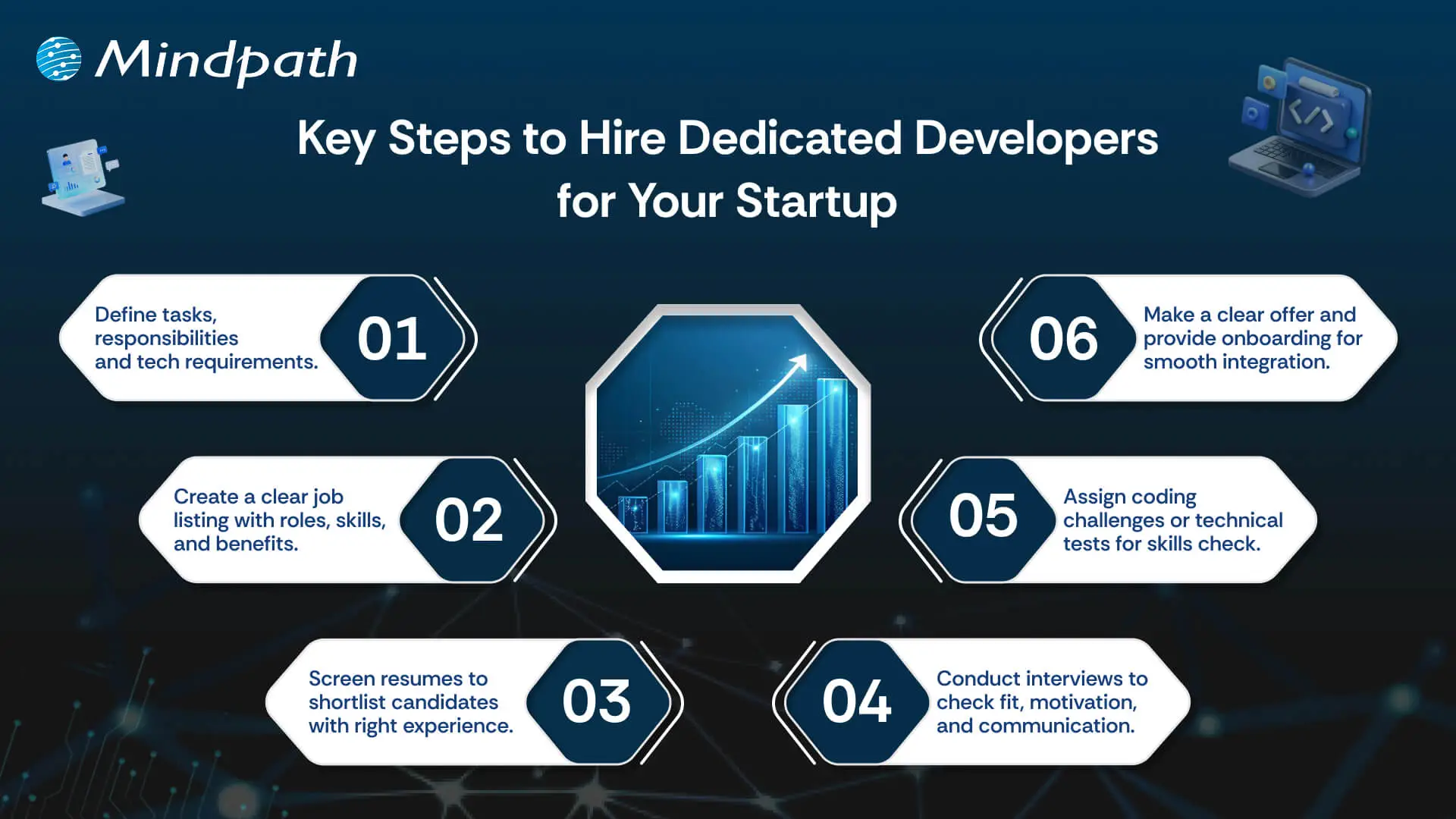
Key Steps to Hire Dedicated Developers for Your Startup

Recruiting appropriate technical talent determines the manner in which a startup is formed and developed. These are the major steps to hire dedicated developers for your startup in a clear-cut and controlled manner.

hire dedicated developer for your startup

1. Define Your Development Needs

Be clear about the tasks, responsibilities, and objectives of the developer position. Choose the technical infrastructure, level of experience, and the soft skills. Share these requirements to get the right candidates that would fit into your startup vision and culture. This will guarantee that you get the perfect match prior to the hiring process.

2. Create an Attractive Job Listing

Prepare a precise and brief job advertisement specifying the job, the requirements, and company benefits. Exhibit growth prospects and culture. Advertise in job boards, social media and professional networks to access competent candidates. A good listing attracts and enhances the quality of response.

3. Screen Resumes Efficiently

Filter through applications to identify those candidates who meet your requirements. Check technical skills, experience and applicable education. Find the transferable skills where necessary. Filter out applicants to proceed to the next step. This can save time and concentrate on the best talent.

4. Conduct Initial Interviews

Screen shortlisted candidates on the phone or via video call. Evaluate cultural fit, motivation, and communication skills. Question regarding experience and problem-solving. Present your business, objectives, and culture. This assists the two parties in assessing their compatibility prior to proceeding.

5. Test Technical Skills

Give coding challenges or relevant technical tasks. Evaluate skills based on your project needs. Ensure tests reflect real-world tasks they will handle. Review results carefully to confirm the candidate can deliver high-quality work. This step ensures practical readiness.

6. Make an Offer and Onboard

Share a clear job offer with salary, benefits, and start date. Upon acceptance, offer adequate on-boarding and support to ensure that they settle as soon as possible. Cultivate learning and development to create long-term engagement. This assists startups to successfully hire dedicated developers and assimilate them seamlessly.

Need to scale your development team quickly without long-term commitments? Explore our staff augmentation guide to learn how startups can add skilled developers on demand while staying flexible and cost-effective.

Ready to Hire Dedicated Developers in UK for Your Startup?

How well you hire the right tech candidate will help you to decide your startup’s future. If you stick to the proper procedure, you can effectively hire committed developers without wasting time. This will allow you to quickly develop and launch products, produce high-quality work, and build for long-term success. Defining what you are looking for, reviewing candidates, and assessing competencies helps minimize risks associated with the hiring process. Using this method will provide your company with a more effective development process and consequently generate superior business results.

Mindpath is your option to get the best solutions if you want to hire dedicated web developers for your startup. Our teams are committed to delivering bespoke web development services that are focused, fast, and of high quality. We are a perfect fit with your objectives as we keep on supporting and updating you. By selecting Mindpath, we guarantee your projects will be carried out efficiently, and with high technical standards.