Home

Top 10 Features Every High-Performing Web App Must Have in 2026

Top 10 Features Every High-Performing Web App Must Have in 2026

Join our Newsletter!

Web apps features

A successful web application requires more than an attractive interface or fast loading times. The right web app features help users complete tasks efficiently, access services securely, and interact with a product across different devices. For businesses, these capabilities can support customer engagement, operational efficiency, and long-term product growth.

Key Takeaways

  • 01
    High-performing web applications need scalable architecture, reliable performance, and security controls to support changing business requirements.
  • 02
    Progressive web app capabilities, real-time functionality, and third-party integrations can improve access and streamline user workflows.
  • 03
    Simple navigation, responsive design, and accessibility help users interact with web applications across devices and abilities.
  • 04
    AI-driven personalization and analytics can support relevant experiences and better-informed business decisions when implemented responsibly.
  • 05
    Clear requirements, testing, deployment planning, and ongoing maintenance help businesses build reliable web applications.

In 2026, users expect web applications to be responsive, accessible, reliable, and easy to navigate. Depending on the use case, they may also need real-time updates, personalized experiences, secure integrations, and useful reporting tools. Businesses must prioritize these capabilities according to their users’ needs rather than adding features without a clear purpose.

This guide explains the 10 essential features of high-performing web applications, how to prioritize them, and the development practices that help maintain application quality over time.

What is a Web Application?

A web application is an interactive software application accessed through a web browser. Unlike traditional desktop software that generally requires local installation, a web application typically runs through a browser and communicates with server-side services to process information and deliver functionality.

Examples include online banking platforms, project management tools, e-commerce systems, customer portals, booking platforms, and business dashboards. Depending on the architecture, a web application may also support installation or selected offline capabilities through progressive web app technologies.

Businesses use web applications to manage information, automate workflows, support transactions, and deliver digital services. Their effectiveness depends on several factors, including usability, performance, security, reliability, and how well the application meets its intended business objectives.

Planning a web application? Review Mindpath’s web development roadmap for guidance on planning, building, testing, and maintaining a web solution.

10 Must-Have Features of High-Performing Web Apps

The right combination of features depends on the application’s purpose, audience, and technical requirements. The following capabilities provide a practical foundation for many modern web applications.
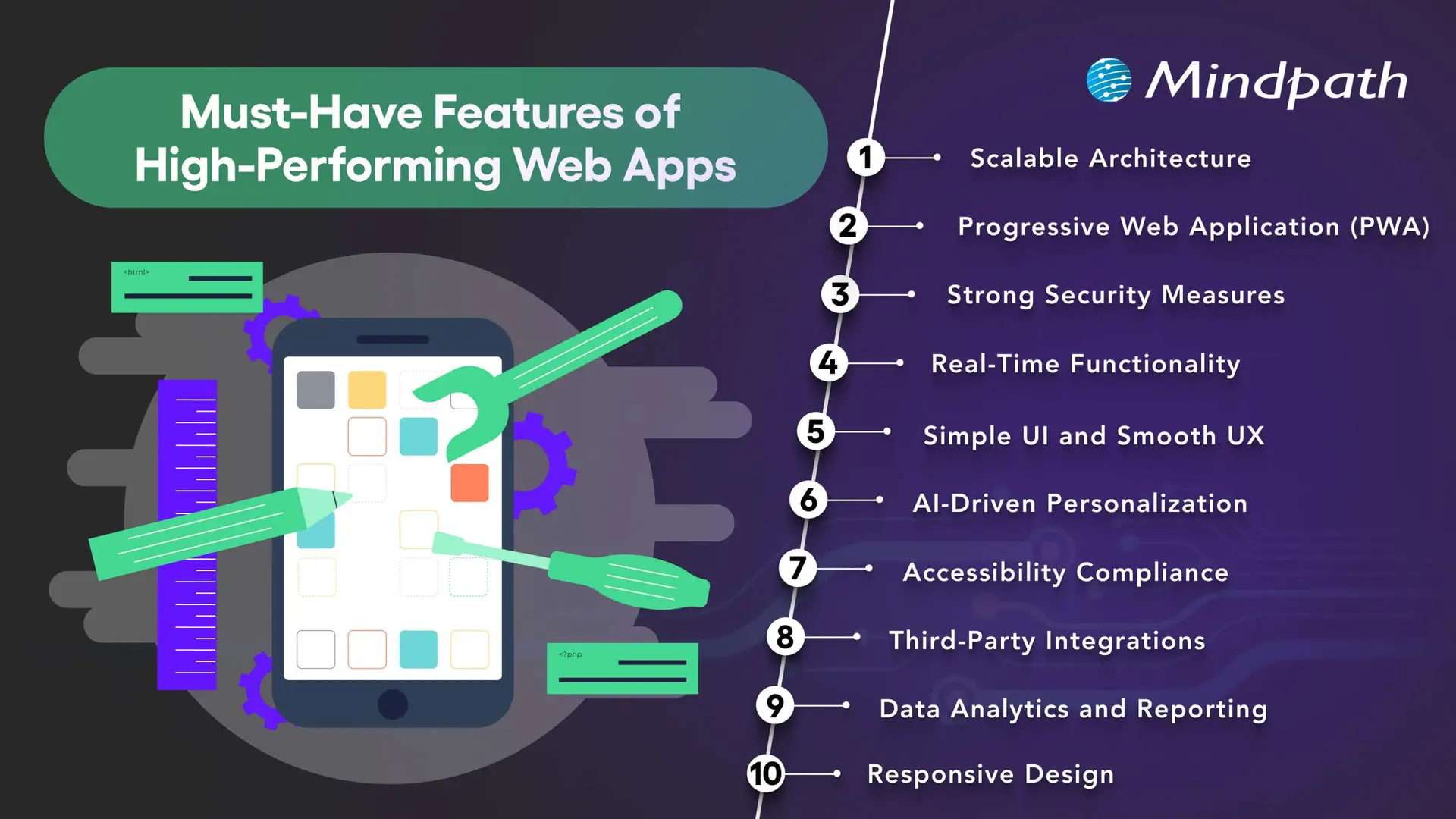
10 essential features of high-performing web applications

1. Scalable Architecture

A scalable architecture allows a web application to accommodate changing demand, new features, and increasing data volumes without requiring a complete redesign every time the business grows.

Depending on the application’s needs, scalability may involve cloud infrastructure, caching, database optimization, load balancing, and modular services. Microservices can be useful for systems with independently deployable components, but they also introduce additional operational complexity. A well-structured monolithic application may be more appropriate for a smaller product.

Businesses should plan for realistic usage patterns, monitor performance, and test how the application behaves under expected and peak workloads. The goal is to choose an architecture that supports growth without introducing unnecessary cost or complexity.

2. Progressive Web App Capabilities

Progressive web apps (PWAs) use web technologies to provide app-like experiences through supported browsers. Depending on the platform, they can offer installation, offline access to selected content, caching, and push notifications.

These capabilities can be useful when businesses want users to access services conveniently across devices without maintaining separate native applications for every platform. Service workers can support offline behavior, while responsive layouts help the interface adapt to different screen sizes.

PWA capabilities vary across browsers and operating systems. Before adopting this approach, businesses should confirm which features their target users’ devices support and test the experience under different connectivity conditions.

Related reading: Progressive web apps.

3. Strong Security Measures

Security is essential for applications that process personal information, business records, payments, or confidential data. Security controls should be built into the architecture and development process rather than added only after the application is complete.

Depending on the use case, important measures include HTTPS, secure authentication, multi-factor authentication where appropriate, role-based access controls, input validation, encryption, and protected API endpoints. Developers should also review third-party dependencies and conduct security testing before and after launch.

Applications that handle sensitive data may require additional privacy controls, retention policies, audit logs, and compliance reviews. No single security feature guarantees protection, so businesses need an ongoing process for identifying and addressing vulnerabilities.

Related reading: Web application security.

4. Real-Time Functionality

Real-time functionality allows an application to deliver updates with minimal delay when the use case requires it. Examples include collaborative editing, live dashboards, messaging, order status updates, and notifications about important events.

Technologies such as WebSockets, server-sent events, and event-driven systems support different types of real-time communication. The appropriate choice depends on whether the application needs two-way communication, server-to-client updates, or occasional notifications.

Not every application needs real-time processing. Businesses should consider the value of immediate updates alongside infrastructure costs, connection management, reliability, and the consequences of delayed information.

5. Simple UI and Smooth UX

A clear user interface and intuitive user experience help people understand an application and complete tasks with less friction. Consistent navigation, readable content, predictable layouts, helpful feedback, and clear error messages make it easier for users to interact with the product.

Businesses should design interfaces around real user journeys rather than simply displaying every available feature. Usability testing can reveal confusing steps, unnecessary fields, and navigation problems before they affect a larger audience.

Useful UX measures include task completion rates, form abandonment, user feedback, and the time required to complete key activities. These indicators help teams identify where improvements are needed.

Want to improve the usability of your application? Read about UI/UX design trends for ideas on designing more effective digital experiences.

6. AI-Driven Personalization

AI-driven personalization can help web applications adapt content, recommendations, search results, or assistance to users’ needs. For example, an e-commerce platform may recommend relevant products, while a business application may help users locate information in a large document collection.

The value of personalization depends on the quality of the data, the relevance of the recommendations, and how transparently information is used. Businesses should provide appropriate privacy controls, avoid unnecessary data collection, and evaluate whether personalization improves the intended user outcome.

AI features should also be tested for accuracy and reliability. Where a generated response or recommendation could affect an important decision, suitable verification and human oversight may be necessary.

Related reading: AI in web development.

7. Accessibility and Inclusive Design

Accessible web applications help people with different abilities use digital services. Accessibility considerations include keyboard navigation, visible focus indicators, sufficient color contrast, descriptive labels, meaningful headings, captions where needed, and compatibility with assistive technologies.

Developers should use semantic HTML and test important user journeys with keyboards, screen readers, and accessibility evaluation tools. Automated checks can identify some issues, but they do not replace manual testing or feedback from people with disabilities.

Businesses should assess applicable accessibility requirements and use the Web Content Accessibility Guidelines (WCAG) as a reference when planning and evaluating their applications.

Related reading: Web accessibility guidelines and improvements.

8. Third-Party Integrations

Integrations allow a web application to exchange information with other software and services. Depending on the business requirements, an application may connect to payment gateways, customer relationship management platforms, analytics tools, inventory systems, identity providers, or communication services.

Well-planned integrations can reduce duplicate data entry and connect workflows across business systems. APIs commonly support these connections, but their reliability depends on authentication, permissions, error handling, rate limits, and the availability of the external service.

Businesses should document integration dependencies, protect credentials, validate incoming data, and plan for service interruptions. Each integration should have a clear purpose and contribute to the application’s intended functionality.

9. Data Analytics and Reporting

Analytics and reporting help businesses understand how users interact with an application and whether key workflows are performing as expected. Depending on the product, useful measures may include feature adoption, completed transactions, search activity, error rates, task completion, and support requests.

Dashboards and reports can turn these measurements into information that teams use to prioritize improvements. Event tracking should be designed around specific questions, and the collected data should be accurate, relevant, and handled according to applicable privacy requirements.

Analytics alone does not explain why a behavior occurs. Teams should combine quantitative measurements with user feedback, usability testing, and operational context before deciding which changes to make.

10. Responsive Design

Responsive design allows a web application to adapt its layout and interactions to different screen sizes and input methods. Users should be able to complete essential tasks on smartphones, tablets, laptops, and desktop computers without unnecessary scrolling or broken layouts.

Responsive implementation typically uses flexible layouts, suitable breakpoints, scalable media, and touch-friendly controls. Developers should also test forms, navigation menus, tables, dialogs, and other interactive elements on smaller screens.

Responsive design supports usability across devices, but it should be combined with good content structure, accessibility, and performance optimization. Businesses should test the application using representative devices and realistic network conditions.

Security should remain a priority throughout development. Review application security best practices for additional guidance on protecting web and mobile applications.

Web App Features: Priority Comparison

Not every application needs all 10 features at the same level. Use the following table as a starting point when prioritizing development work according to the product’s purpose.

Feature Primary business value Priority guidance
Scalable architecture Supports growth and changing workloads. Plan early according to expected demand and complexity.
PWA capabilities Can improve access and support selected offline experiences. Prioritize when installation or offline access benefits users.
Security measures Protects data, accounts, and application functionality. Essential for every application, with controls based on risk.
Real-time functionality Provides timely updates and supports collaboration. Prioritize for workflows where delays affect the user experience.
Simple UI and UX Helps users complete tasks efficiently. Essential for every application.
AI personalization Can improve recommendations and information discovery. Add when there is a clear use case and suitable data.
Accessibility Supports inclusive use across abilities and assistive technologies. Include from the design and development stages.
Third-party integrations Connects application workflows and existing systems. Prioritize integrations required for core user tasks.
Analytics and reporting Helps teams measure performance and identify improvements. Define metrics around the application’s goals.
Responsive design Supports usability across screen sizes and devices. Essential for applications serving users across devices.

How to Develop a High-Performing Web Application

Successful web application development requires a structured process that connects business objectives, user needs, technical decisions, and ongoing improvement.
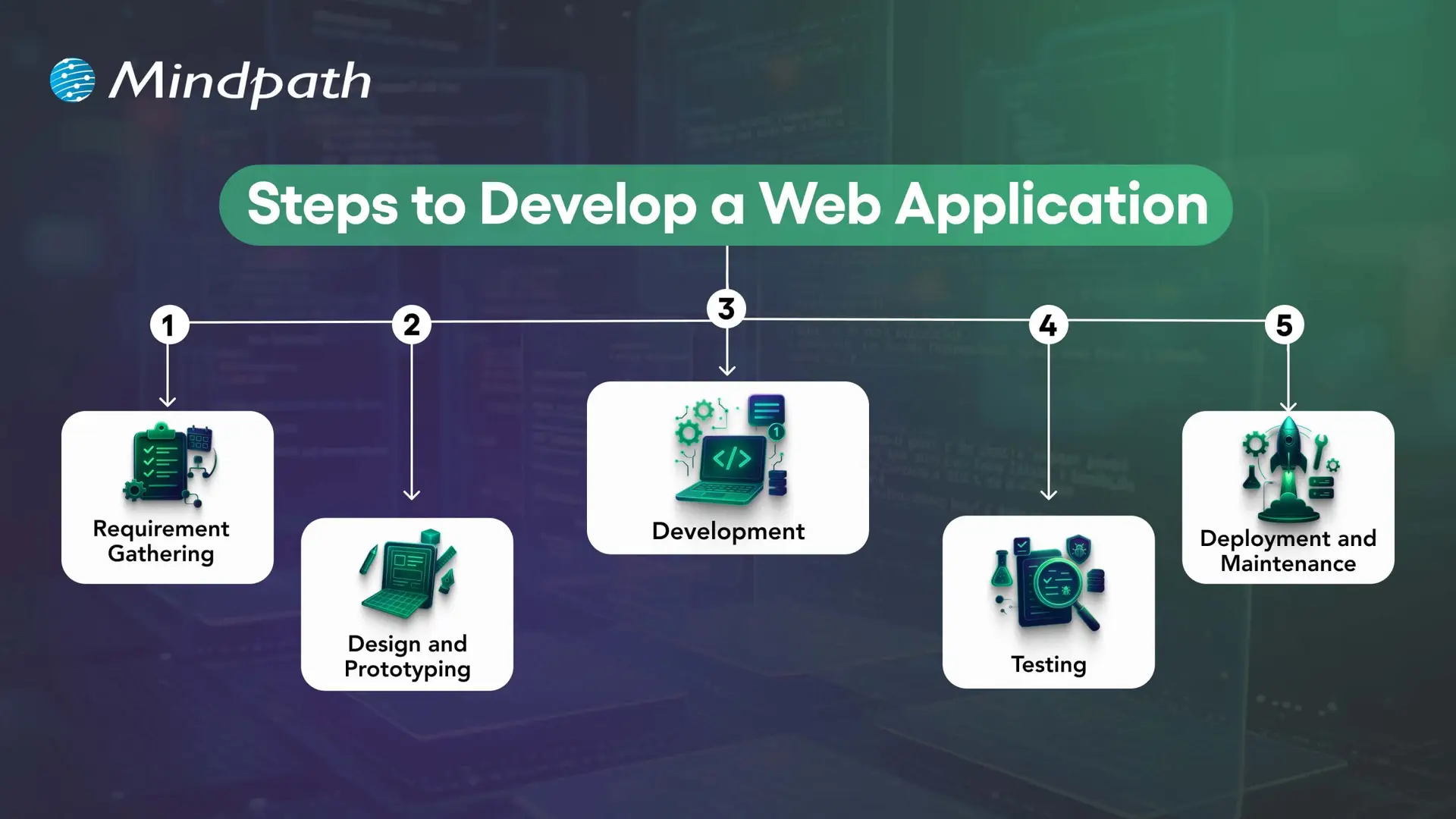
Key stages in web application development

1. Define Requirements and Plan the Application

Identify the problem the application will solve, its target users, essential workflows, and business objectives. Document functional requirements, security needs, integrations, expected traffic, and success measures before finalizing the scope.

2. Design the User Experience and Architecture

Create wireframes and prototypes to validate navigation, layouts, and key user journeys. At the same time, plan the application architecture, data model, integrations, and hosting approach. Early validation helps teams identify usability and technical issues before full development.

3. Develop the Front End and Back End

Front-end development implements the interface and user interactions, while back-end development handles business logic, data access, authentication, and APIs. The technology stack should match the application’s requirements and the team’s ability to maintain it.

4. Test Functionality, Performance, and Security

Unit tests check individual components, integration tests verify interactions between systems, and end-to-end tests validate important user journeys. Accessibility, security, performance, and user acceptance testing should also be included according to the project’s risks and requirements.

5. Deploy, Monitor, and Maintain

Deploy the application using a controlled release process and monitor errors, performance, availability, and user feedback. Ongoing maintenance includes fixing defects, updating dependencies, reviewing security, and improving features as business requirements evolve.

Need functionality tailored to your business? Read about custom web application development and how a purpose-built solution can address specific workflows.

How to Measure Web Application Performance?

Businesses should define measurable outcomes before launching a web application. The most useful metrics depend on the product, but the following indicators can help teams evaluate performance and identify areas for improvement.

Measurement area Example metrics What to assess
Loading performance Largest Contentful Paint (LCP), page load behavior How quickly important content becomes visible.
Interactivity Interaction to Next Paint (INP), task response times How quickly the interface responds to user interactions.
Visual stability Cumulative Layout Shift (CLS) Whether page elements move unexpectedly during loading.
Reliability Error rates, crash reports, service availability Whether users can complete tasks consistently.
User engagement Feature adoption, task completion, repeat usage Whether the application meets users’ needs.
Business outcomes Conversion rate, completed transactions, support volume Whether the application contributes to its intended business goals.

For web performance, Google’s Core Web Vitals provide useful reference thresholds: LCP of 2.5 seconds or less, INP of 200 milliseconds or less, and CLS of 0.1 or less. These are recommended targets, not guarantees of high rankings or business results. Evaluate performance using real-user data where available and test the pages and workflows that matter most.

Build a Future-Ready Web Application With Mindpath

High-performing web applications combine usability, responsive design, security, suitable architecture, and reliable functionality. Additional capabilities such as AI personalization, real-time updates, analytics, and third-party integrations can improve the experience when they address clear user and business needs.

The right development approach starts with well-defined requirements and continues through testing, deployment, performance monitoring, and maintenance. Businesses should prioritize features according to their users’ needs, technical constraints, and measurable objectives.

Mindpath provides web application development services tailored to business requirements. Our approach focuses on building secure, scalable, and maintainable solutions that support effective digital experiences and evolving operational needs.


Ready to Build a High-Performing Web App?

Add the right features to create scalable, engaging, and user-friendly web applications.

Frequently Asked Questions

Important features commonly include security, responsive design, intuitive navigation, reliable performance, accessibility, and an architecture that supports the application’s needs. Integrations, analytics, real-time updates, and AI capabilities may also be important depending on the use case.
A high-performing web application responds reliably, allows users to complete important tasks efficiently, protects data, and works across supported devices. Performance should be assessed using technical measurements as well as user and business outcomes.
No. AI can be useful for personalization, recommendations, search, and selected automation tasks, but it is not necessary for every application. Businesses should add AI when it solves a defined problem and can be implemented with appropriate data, testing, privacy controls, and oversight.
Security helps protect user accounts, business data, and application services from unauthorized access and other threats. Effective security combines measures such as authentication, access controls, input validation, encryption, dependency updates, and ongoing testing.
Responsive design adapts layouts and interactions to different screen sizes and devices. It helps users complete tasks on smartphones, tablets, and desktop computers without requiring separate interfaces for every screen size.

Support Is One Click Away

Featured Posts

Related Post

AI programming languages

In today’s digital world, smart phones are able to recognize voices, answer your queries with virtual assistant and can even sort your photos by location or people. All these features may seem like magic but in reality, it’s the power of artificial intelligence. From chatbots to intelligent assistants, AI is revolutionizing the way we live, work and interact. But behind all these changes lies something as crucial as AI, and they are AI programming languages.

Studying these languages is crucial for technology professionals as well as anyone interested in seeing how the future is being designed. These languages can help developers create smart systems that will be able to understand, learn and react just like humans. In this guide, we will take you through everything that you need to know about programming languages for AI. So, let’s dig in! 

Planning to elevate your business and get a personalized AI solution? At Mindpath, we offer AI development services designed to deliver solutions tailored to your business needs.

What are AI Programming Languages?

Artificial intelligence programming languages refers to the tools that are used to create smart computer languages that can think and learn just like humans. These languages help developers to build systems that can understand speech, read data, and even help in autonomous driving. Each language comes with its own tools and libraries to carry out these tasks easily. 

In programming with artificial intelligence, it’s helpful to use languages that offer strong support for tasks like data analysis and machine learning. For example, Python is well-known because it has helpful libraries such as TensorFlow and PyTorch, R is also great when you are working with statistics and data. So, these languages make it easier to build AI systems that can work well and can contribute in solving real-world problems. 

Must Read: Benefits of AI 

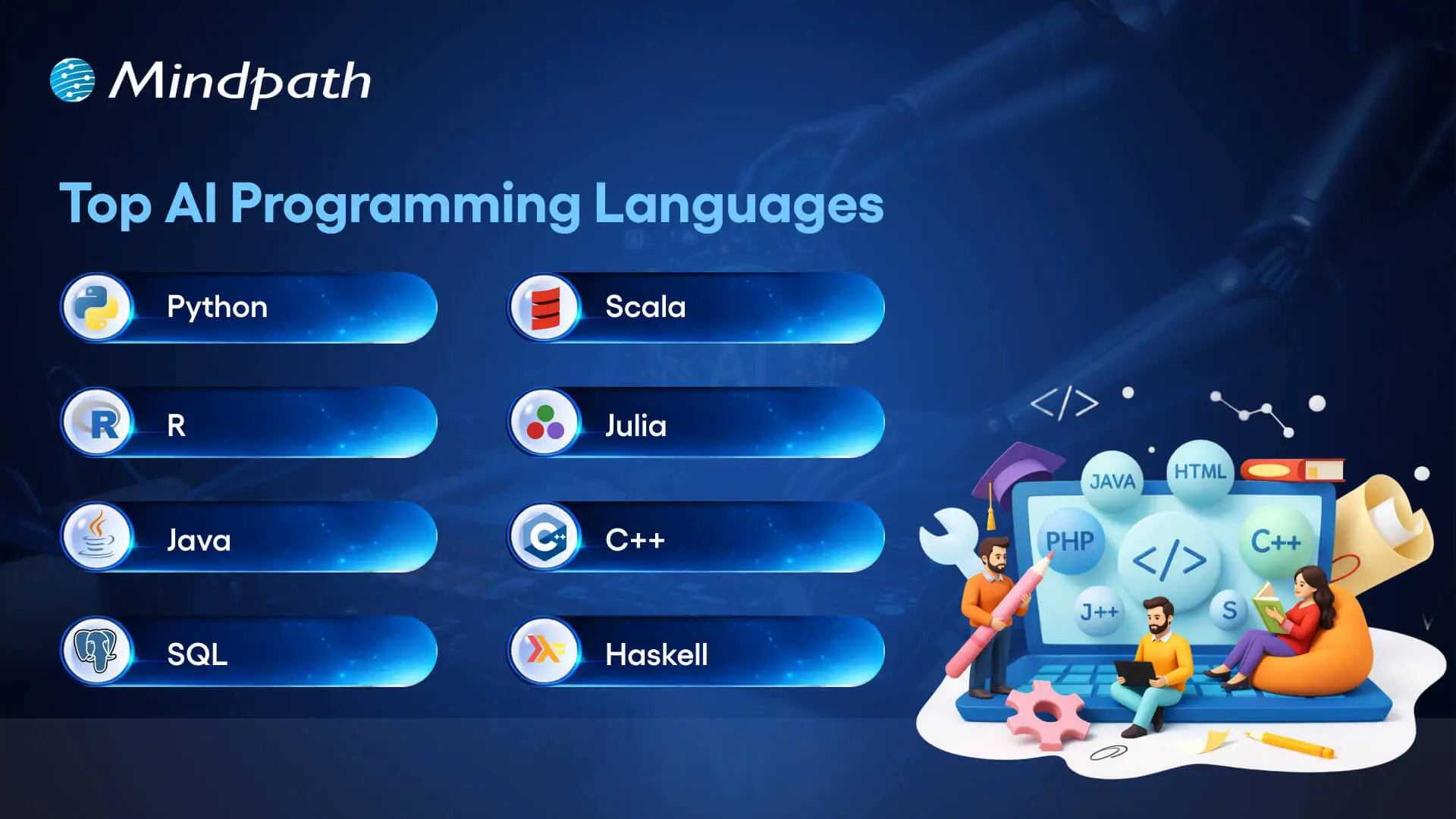
List of Top AI Programming Languages

When you are building smart applications, the choice of programming language plays a major role in it. But with so many options out there, it is important to learn about each and decide which one can provide what benefits. The best AI programming languages can offer the features, libraries, and flexibility needed to handle tasks like machine learning, data processing, and automation. Let’s dive deep!

Top AI Programming Languages

1. Python

Python is one of the top choices for developing smart systems due to the fact that it’s easy and beginner friendly. It’s widely used for training machine learning models, doing data analysis, and building AI tools like chatbots or image recognition apps. Being an AI coding language, Python has numerous strong libraries such as TensorFlow and PyTorch, which make complicated tasks manageable. It also enables rapid testing and development, which is useful in constructing and refining AI models. It is useful for AI in decision-making, where quick iteration on data models is crucial.

2. R

R is an excellent language to use when dealing with lots of data. It makes it easier for individuals to comprehend patterns, generate charts, and analyze results in an easy manner. It is employed by numerous scientists and developers to explore more into data and make intelligent predictions. R is also useful when creating and testing simple machine learning models. With its strong data-handling capabilities, R is particularly valuable for AI in business strategy, helping organizations analyze trends, optimize operations, and make data-driven decisions. R also has numerous tools that assist in making it simpler to verify and compare results. It gets along great with other programming languages as well, so it can be beneficial for other AI projects that require solid data analysis. 

3. Java

Java is a good option for large AI projects, particularly for businesses that require systems to function across different platforms. As an AI language, Java assists programmers in developing intelligent tools that are simple to maintain and expand. It accommodates machine learning, deep learning, and large data tasks through helpful tools and frameworks. Java is also reliable for maintaining things safe and clean, as it has the capability to delete unwanted data automatically.  

4. SQL

SQL is a helpful tool when working with a lot of structured data. It makes it easy to find, manage, and prepare data that can be used to train AI models. Since artificial intelligence needs good-quality data, SQL plays an important role in getting that data ready. It works well with other tools used in AI projects and is great for handling large datasets. As one of the trusted artificial intelligence languages, SQL is simple to use and supports many steps in the AI development process.

Curious to know how AI impacts your industry? Discover the top AI trends that drive innovation and shape the future of business.

5. Scala

Scala is a good choice for building strong AI applications, especially when dealing with big data. It can easily manage large sets of data and is made to work fast and smoothly. Scala also works well with popular tools like Apache Hadoop and Spark, which help developers build and run AI projects more easily. Since it supports multi-tasking and can run many processes at once, Scala is useful for complex AI work. It also works nicely with Java, making it even more flexible. 

6. Julia

Julia is an AI programming language known for its speed and ability to handle complex calculations. It’s great for deep data analysis and training advanced machine learning models. Julia has a user-friendly syntax which is better, making it easier to learn compared to some other languages. It also works well with languages like Python, C, and R, giving developers more flexibility. With powerful libraries, Julia is perfect for building efficient data models and neural networks. 

7. C++

C++ is a powerful language used for AI applications because it offers great performance and uses system resources efficiently. It’s great for running heavy tasks like deep neural networks quickly. Developers often choose C++ for its ability to handle complex jobs, including real-time processing and tasks like computer vision. Its speed and resource management are vital for building sophisticated systems that drive AI transforming the future of technology.

8. Haskell

Haskell is a language that focuses on writing clean and reliable code, making it ideal for AI research and building new algorithms. It is great for prototyping and teaching programming concepts. Many AI developers use Haskell for its strong typing and functional programming style, which ensures precision and reliability. Haskell is also used in roles like AI research, where its features help verify algorithms and improve safety, especially in important fields like healthcare and autonomous vehicles. 

 Important Note: Some programming languages are not the best choice for AI because they don’t have the right tools or are too slow for complex tasks. Here are a few languages that are generally avoided when building AI applications: 

  • PHP: It is mainly used for making websites and doesn’t have strong tools or libraries needed for artificial intelligence and machine learning work. 
  • Ruby: It is easy to read and write, but it runs slowly and doesn’t offer strong support for AI or machine learning tools, which makes it hard to use in real projects. 
  • C: It can be powerful, but it is too low-level for AI and needs manual memory management, which can lead to errors and unstable programs. 
  • Fortran: It is an older language that lacks modern features like dynamic memory and safety, which makes it risky and less useful for today’s AI development. 

Ready to adopt AI programming languages and transform the way websites are built? Read our blog on AI in web development to explore its impact on creating smarter, more dynamic sites.

Curious How AI Languages Are Powering Smarter Technology?

AI programming language is the key to building smart, efficient, and reliable applications. Whether it’s Python for ease, R for data analysis, or Java for large systems, each language has something unique to offer. While some languages lack the tools or speed for AI tasks, the right one can make AI development smoother and more powerful. Understanding these options helps both beginners and experts create systems that truly think, learn, and improve the way we interact with technology. 

At Mindpath, we specialize in Artificial Intelligence development, using the best programming languages like Python, Java, and more to create intelligent solutions that align with your business goals. From automating processes to enhancing user experiences and developing data-driven systems, our expert developers build AI applications tailored to deliver real-world results. 

Hiring the proper ReactJS developer in New Jersey can significantly enhance the success of your project. Whether you’re creating a new web application or updating an existing one, you’ll need a developer with the perfect combination of technical knowledge, experience, and problem-solving abilities. A good ReactJS developer should be proficient in JavaScript, front-end programming, and state management, in addition to React. Their professional knowledge and communication skills are also important in ensuring that projects go well. The following are the most important aspects to consider while hiring skilled ReactJS developers in New Jersey.

1. Strong ReactJS and JavaScript Knowledge

When hiring a ReactJS developer in New Jersey, make sure they understand React principles including components, props, state management, lifecycle functions, and hooks. They should also be familiar with contemporary JavaScript (ES6+) capabilities such as arrow functions, promises, and async/await. A developer with strong JavaScript skills can build efficient, clean code and handle problems successfully. Check their familiarity with state management technologies like Redux or Context API, which are critical for managing data in large projects. A strong foundation in these technologies guarantees that your project runs smoothly and performs well.

2. Expertise in Front-End Development

A skilled ReactJS developer should be familiar with HTML, CSS, and responsive design. They should understand how to employ semantic HTML tags, CSS Flexbox, and Grid to build well-structured, mobile-friendly web pages. Understanding CSS frameworks such as Tailwind or Bootstrap is beneficial. Developers should be familiar with UI libraries like Material-UI or Ant Design, which help to speed up development. They must also be familiar with version control tools such as Git, which assist in managing code effectively. These front-end abilities enable the developer to create visually appealing and user-friendly applications.

3. Relevant Experience and Industry Knowledge

Check a developer’s previous projects to determine whether they’ve worked on apps comparable to yours. If your company is in healthcare, banking, or e-commerce, hiring a ReactJS developer with relevant industry experience can be useful. Their understanding of industry-specific difficulties and best practices helps boost development efficiency. Also, evaluate their degree of experience—junior developers are ideal for smaller projects, but mid-level or senior developers are better suited for more complicated applications. Hiring a developer with suitable expertise means that they can swiftly adapt to your project’s requirements and produce high-quality outcomes.

4. Communication and Problem-Solving Skills

Soft skills are crucial in addition to technical skills. A ReactJS developer should be able to accurately convey technical ideas to non-technical team members and collaborate well with designers and product managers. Strong problem-solving abilities are essential for diagnosing problems and improving performance. Choose someone who is versatile and willing to learn new technology. A strong cultural fit promotes efficient teamwork and increases overall productivity. Hiring a developer with strong communication, teamwork, and problem-solving abilities results in improved project execution and a more efficient development process.

Finding the right ReactJS developer doesn’t have to be difficult. At Mindpath we connect you with highly skilled developers who have expertise in React, JavaScript, front-end development, and industry-specific experience. Whether you need a junior, mid-level, or senior developer, we ensure you get the best talent to match your project needs. Let’s build a high-performance, user-friendly web application together!
Get in touch with Mindpath today and hire top ReactJS developers in New Jersey!

Discover the ultimate guide to hiring Node.js developers in London. Learn about the skills, benefits, and cost factors involved in finding the right talent for your project.

Hiring the right ReactJS developer is essential for building a high-quality online application. A talented developer should have a solid JavaScript background, knowledge of React ideas, and front-end programming experience. They must also be skilled in state management, user interface creation, testing, debugging, and version control to guarantee that the program runs smoothly. Aside from technical capabilities, problem-solving ability and collaboration are equally crucial. The following are the main abilities to look for when hiring a ReactJS developer in New Jersey

1. Strong JavaScript and React Fundamentals

A skilled ReactJS developer should have a solid grasp of JavaScript fundamentals, including ES6+ features like arrow functions, promises, and async/await. They must also be proficient in React concepts such as JSX, components, props, state management, and lifecycle methods. A deep understanding of rendering optimization ensures smooth application performance. Since React is built on JavaScript, hiring a developer with strong expertise in both JavaScript and React ensures they can efficiently build dynamic and responsive user interfaces tailored to your project’s needs.

2. State Management and Component-Based Architecture

Efficient state management is essential for handling complex applications. Look for developers with experience in Redux, Context API, or MobX to manage app-wide state effectively. They should also understand component-based architecture, which helps in building reusable, scalable, and maintainable UI components. A developer with expertise in React hooks and modular design can streamline development, reduce redundancy, and improve overall application performance, making your web solution more efficient and easier to scale.

3. Proficiency in HTML, CSS, and UI Development

A ReactJS developer should have strong HTML and CSS skills to create well-structured, visually appealing, and responsive user interfaces. Knowledge of CSS frameworks like Tailwind, Bootstrap, or Material-UI is a plus. They should also understand flexbox, grid layouts, and media queries to ensure the application works seamlessly across different devices. Well-structured UI components enhance user experience and performance, so hiring a developer who excels in front-end development is crucial for a successful project.

4. Testing, Debugging, and Version Control

Testing is key to building error-free applications, so ensure the developer is familiar with Jest, React Testing Library, or Enzyme for unit and integration testing. Strong debugging skills help identify and resolve issues quickly. Additionally, expertise in Git and GitHub is essential for version control, collaboration, and managing code changes efficiently. A developer with these skills can ensure a smooth workflow, minimize bugs, and maintain high-quality code throughout the development process.

Finding the right ReactJS developer can be challenging, but Mindpath makes it easy! Our expert developers have strong JavaScript skills, deep React knowledge, and experience with state management, UI development, testing, and debugging. Whether you need a junior, mid-level, or senior developer, we help you find the perfect fit for your project.

Let’s build something great together! Contact Mindpath today to hire top ReactJS developers in New Jersey!

Discover the ultimate guide to hiring Node.js developers in London. Learn about the skills, benefits, and cost factors involved in finding the right talent for your project.