Home

Key Benefits of Agile Methodology Every Business Should Know

Key Benefits of Agile Methodology Every Business Should Know

Join our Newsletter!

Benefits of agile methodology

Approaching software development without a flexible mindset can often result in delays and stress. This is where the benefits of agile methodology come into play. Agile allows a team to react quickly to change, provide value continuously, and maintain common goals. Agile fosters teamwork, quick delivery, and incremental updates. If you ever find that you are constantly feeling stuck or that things are moving too slowly, then Agile can provide a steady flow that will keep things moving forward and adjust its plans accordingly.

Agile offers structure while maintaining flexibility. Project work is broken down into smaller bits and allows for feedback and change along the way. This helps keep developers, testers, and clients engaged through the process. People can track progress more easily and receive results faster. Agile doesn’t just focus on completing tasks, but on building something useful at every step. This blog highlights some of the primary benefits of Agile that many of today’s teams prefer to embrace.

Explore how custom software development services using agile methodologies elevate your business performance. Reach us at Minpath, and we will provide expert guidance to you every step of the way.

What is Agile Methodology?

Agile methodology is an adaptive and collaborative method of software development based on the principles set forth in the values of the Agile Manifesto. Agile focuses on teamwork, the ability to adapt, continuous improvement, and the delivery of working software in small, manageable pieces. An agile team is self-organized and can adapt quickly to changes during the development life cycle. So, what is the main objective of agile methodology? It is to be responsive and provide value more quickly.

Agile focuses on helping teams select tools and techniques for their goals rather than abiding by a single standardized process. Each project can look a little different, but they all follow the same Agile principles by planning in short iterative cycles, soliciting feedback, and adjusting from there. Ultimately, Agile allows teams to deal with uncertainty during a project in order to improve at every turn.

Types of Agile Methodologies

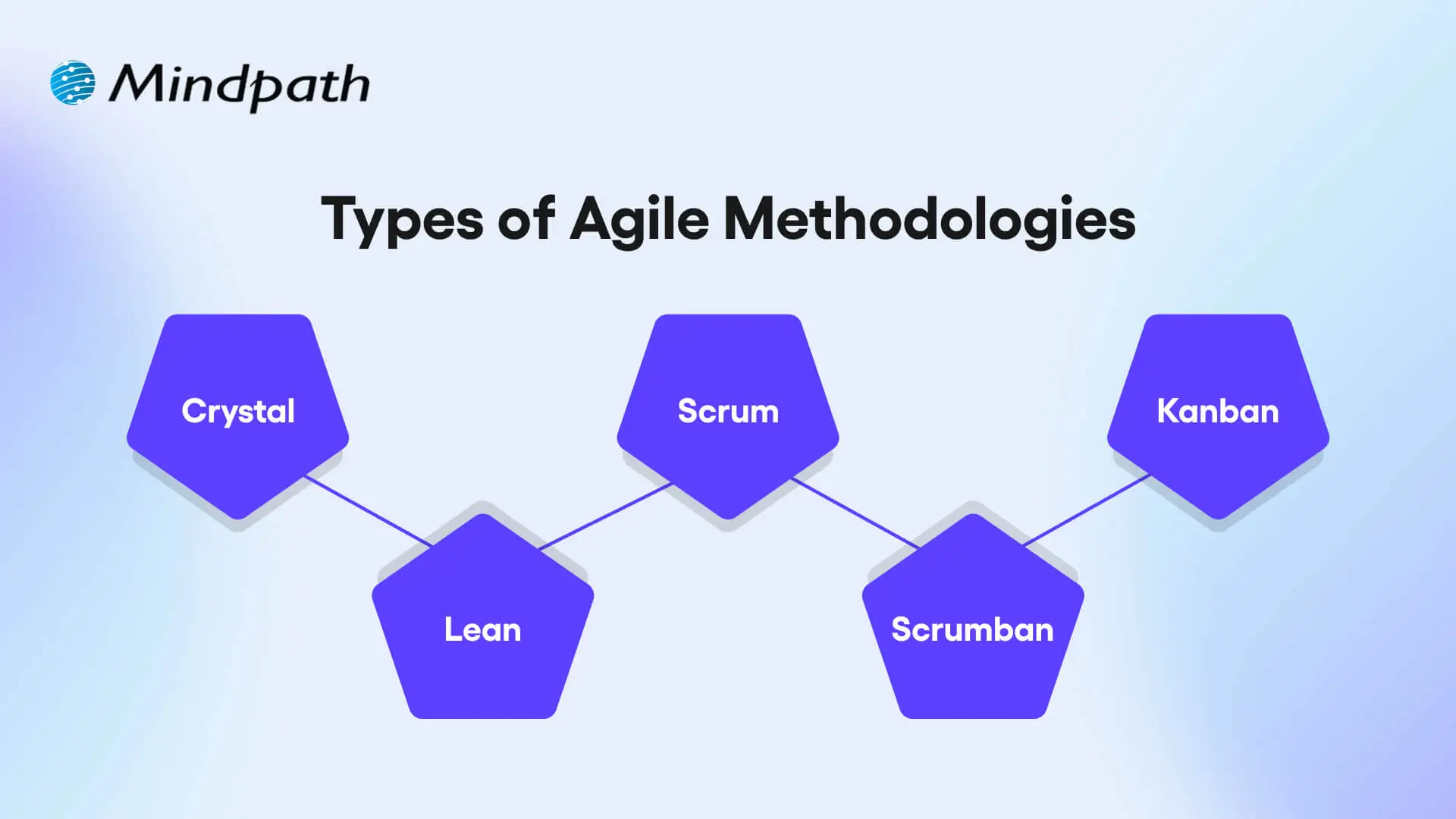
Agile provides several methodologies that adhere to its fundamental principles; however, they differ in structure and practice. Each is intended to foster teamwork, speed, and flexibility in its own unique way.
Types of Agile Methodologies

1. Crystal

Crystal is a lightweight agile methodology that encourages rapid delivery of working software, communication with customers, reducing risks, and frequent releases. It is flexible with respect to team size and project complexity, and it promotes collaboration and communication to improve team and customer feedback.

2. Scrum

Scrum is a prescribed agile framework that arranges work into fixed-length sprints, which allow the team the opportunity to inspect how much work was done so far and adjust based on that. The goal is to enhance visibility, facilitate some level of collaboration consistently, and have continuous improvement as the team works through it with prescribed roles and ceremonies.

3. Kanban

The kanban approach is concerned with delivering work continuously and has a strong lean focus on improving the process. The visual workflow helps teams find bottlenecks, work on reducing cycle times, and allows managing work to be simplified using boards and cards.

4. Lean

Lean focuses on maximizing customer value by eliminating waste and improving efficiency throughout the development process. It supports fast delivery, strong team collaboration, and quick response to feedback.

5. Scrumban

Scrumban fuses the structured planning of Scrum with the visual task management of Kanban to allow flexible value-based delivery. It is an adaptable and process-focused method that allows teams to incorporate regular updates, rapid releases, clear task ownership, and adaptability as project needs change.

Wondering how Agile practices fit into the bigger picture of building high-impact web applications, our web app development roadmap outlines the full step-by-step journey from planning to deployment.

Top Benefits of Agile Methodology

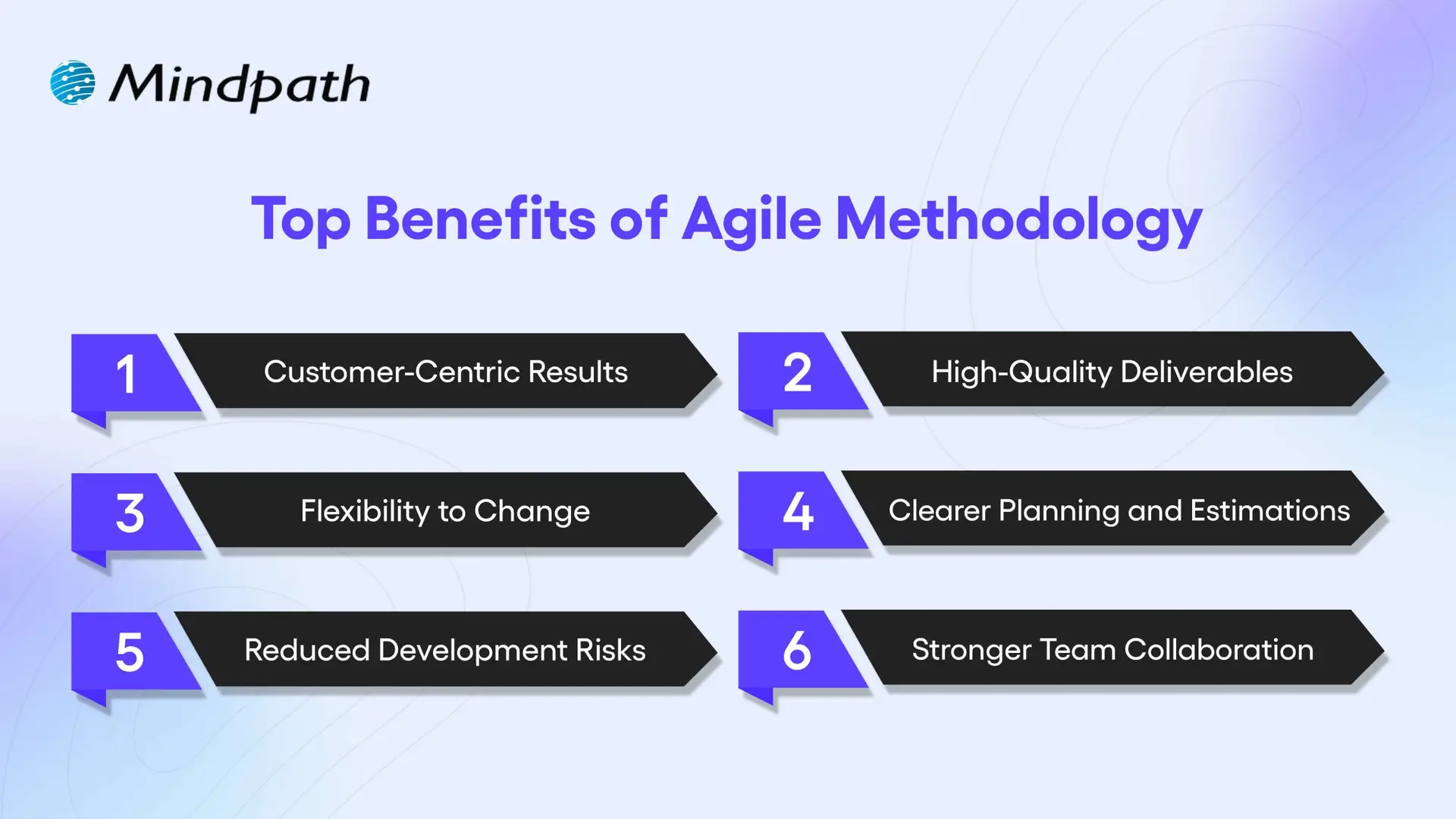
Agile provides a modern approach for the management of software projects, which is focused on flexibility, collaboration, and rapid delivery. Here are some important agile software development benefits that aid teams in creating better products with better timeliness.
Top Benefits of Agile Methodology

1. Customer-Centric Results

Agile methodologies promote regular feedback and involvement from customers in every aspect of development, leading to products that can be tailored to more accurately fit the needs of the user. One of the key agile software development advantages is that this increases customer satisfaction (as perceived by customers during development) and trust moving forward.

2. High-Quality Deliverables

With every sprint of work teams are testing and improving their work. You will note that the ongoing improvement is one of the key benefits of agile software development, and it helps teams develop stable and reliable products. Solving problems early is part of the workflow.

3. Flexibility to Change

Agile teams can quickly adjust plans in response to new feedback or ever-changing goals, and ease of change is one of the greatest strengths of agile software development. The essence of agility is the ability to stay aligned with business needs without spending unnecessary time or going off track.

4. Clearer Planning and Estimations

Agile operates within short, structured cycles, which allow for considerably improved estimation of timelines and budgets. This is one of the most important benefits of agile software development, especially for project managers whose primary goal is to solicit the meters for project planning in the most effective way possible. Predictable progress encourages smarter decisions.

5. Reduced Development Risks

Frequent reviews and updates allow teams to catch issues early when they are still not serious problems. This built-in risk control offered by agile is of major benefit to agile project success. Agile provides full visibility into work progressing at all times.

6. Stronger Team Collaboration

Agile encourages daily stand-ups, a routine dialogue, and real-time feedback/updates. This collectively helps with teamwork, collaboration, and confusion regardless of role. Better communication is one of the fundamental advantages of agile methodology and contributes to an easier, smoother project flow.

Want to know how businesses turn ideas into scalable software solutions? Explore the custom software development process and the role Agile plays in efficient execution.

Ready to Embrace the Agile Advantage?

Agile has changed the way modern teams build software by promoting collaboration, speed, and flexibility. The benefits of agile methodology include higher customer satisfaction, better product quality, reduced risk, and smoother workflows. By using short cycles and continuous feedback, Agile helps teams deliver faster, smarter, and with greater confidence, making it a preferred choice for many development teams today.

Want to apply these custom software development benefits to your next project? At Mindpath, we offer custom software development services built around proven agile methodologies. Contact us and our team will help you with clear communication, flexible planning, and faster delivery that meets your business goals. With Mindpath, you get tailored solutions that revolve around your business requirements and deliver long-term value with every sprint.


Want Faster, More Predictable Delivery?

We run agile sprints with clear demos and steady releases.

Frequently Asked Questions

No, Agile is used in many industries beyond software development, including marketing, healthcare, education, and product management. Any team that needs flexibility, faster delivery, and continuous improvement can benefit from adopting Agile practices in their workflow.
The transition time depends on team size, experience, and project complexity. Some teams adapt within a few weeks, while others may need a few months to fully understand Agile practices and build a smooth collaborative workflow.
Yes, Agile works well for both small and large projects. Large enterprises often use scaled Agile frameworks to manage multiple teams while maintaining collaboration, transparency, and faster delivery across complex projects and departments.
Teams often use tools like Jira, Trello, Asana, and Azure DevOps to manage Agile workflows. These tools help track tasks, manage sprints, monitor progress, and improve communication between developers, testers, and stakeholders.
Agile encourages regular meetings, sprint reviews, and continuous feedback throughout the project. This keeps clients involved in decision-making, improves transparency, and helps development teams stay aligned with changing business expectations and project goals.

Support Is One Click Away

Featured Posts

Related Post

remote work security

Remote work security refers to the practices, technologies, and policies that protect corporate data and networks when employees work outside a traditional office environment. Teams operate across devices, networks, and locations every day, and without corporate firewalls in place, even small gaps can create serious vulnerabilities. The risks evolve quickly, which is why businesses need protection strategies built on strict user verification, encrypted network connections, and continuous endpoint monitoring without disrupting daily workflows or user experience.

Decisions on security must be clear and consistent as organizations increase remote setups. Leaders need to pose the correct questions and take actions. Meanwhile, employees require straightforward and easy to use systems that facilitate day-to-day operations. Consequently, there is a need to have a balanced approach to succeed in the long term. This blog will provide explanations of important aspects of remote work cybersecurity in a clear and practical manner. So, keep reading further!

Ready to secure your remote workforce and protect your business from evolving cyber threats? Contact us to explore how our team can help you build a safer and more resilient remote work environment.

The Growing Cyber Risk in Remote Work Environments

Not only in the office, remote work also faces rising cyber threats today. Remote work security is vital because employees are using their personal networks and devices to access systems. These are some of the weak points that hackers attack. Consequently, minimal security breaches have the potential to compromise business information and interrupt routine business activities within a short time.

Simultaneously, remote workforce cybersecurity is exposed to increasing threats as the techniques of attacks advance daily. Phishing, ransom, and identity attacks are growing at a high rate. Remote setups are fast to adapt to cybercriminals. Thus, organizations need to remain vigilant and increase security to manage these changing threats.

Want to better understand how to scale teams without increasing security risks? Explore the benefits of hiring remote developers to balance flexibility with control.

Here are some of the remote workforce security risks:

1. Unsecured Network Risks

At home or cafes, employees tend to connect to unsecured networks. These connections can easily be intercepted by attackers to get sensitive data.

2. Weak Password Security Risks

A large number of users use the same password on several accounts. A single breach may reveal multiple systems within a short time.

3. Personal Device Security Risks

Individual gadgets frequently lack frequent security patches and safeguards. This provides malware and attacks with easy entry points.

4. Phishing and Social Engineering Risks

To deceive users, hackers use spoofed emails, or messaging. Such attacks seek to steal usernames or confidential information.

5. Shadow IT Security Risks

Employees sometimes use apps without company approval for convenience. This bypasses security controls and increases risk.

6. Software Update Security Risks

Remote devices might not get security patches in a timely manner. This exposes systems to well-known threats and vulnerabilities.

7. Physical Security Risks

The devices may be lost or found in high-traffic or communal areas. Critical business information may be put at risk as a result of unauthorized access.

Looking to simplify how your remote teams stay connected and secure daily? Discover powerful remote work tools that support safer collaboration.

Importance of Cybersecurity in Remote Work

Remote work security is key in safeguarding data and systems when working remotely. Here are the reasons why solid cybersecurity is still needed in the daily remote work setting.

1. Protecting Expanding Digital Entry Points

Remote work adds devices, networks and points of access to systems. Cybersecurity for remote work helps control risks in these expanded environments.

2. Securing Sensitive Business Data

Every day, employees gain access to and share crucial information that is not secured by office infrastructure. Work from home security will also protect data when storing and transferring data.

3. Reducing Phishing and Online Fraud Risks

Users who are distantly located are faced with rising phishing attacks in the form of emails and fraudulent communications. High level of security awareness will avoid unintentional sharing of sensitive login information.

4. Maintaining Strong Security Standards

Both personal and shared devices may not have consistent security updates and protection tools. The use of consistent policies guarantees similar protection standards across all systems.

5. Ensuring Business Continuity

Cyber attacks have the ability to interrupt workflow and slow down processes happening remotely. Good security control mechanisms assist in stability and prompt recovery exercises.

6. Building Trust and Meeting Compliance

Data security breaches may destroy reputation and decrease customer confidence within a short time. Adequate security would keep the rules and guard business reputation.

Planning to strengthen your security foundation as your business grows? Read about application security best practices to protect your systems effectively.

Cybersecurity Best Practices

Remote working security requires effective habits to safeguard information and systems in remote configurations. These are the best practices that can be implemented in order to enhance safety and minimize risks.

1. Safe Network Access (VPN Use)

Connect with secure VPN to all remote work activities on a daily basis. This secures information transfer among the commonly shared and open internet systems.

2. Home Network Protection

Protect home routers by using strong passwords and updating encryption parameters. Store smart devices on different networks to minimize security risks.

3. Timely Software Updates

Automatically update all systems and security applications. Frequent patches seal identified vulnerabilities and thwart cyber attacks in real-time.

4. Stronger Login Protection (MFA)

Implement several authentication measures whenever accessing the company system. Remote work security enhances safety of access via additional authentication measures.

5. Strong Password Management

Use different passwords on each account using secure password tools. Do not use the same passwords in personal and work accounts.

6. Employee Security Awareness

Train employees on how to detect phishing emails and suspicious online activities. Establish a powerful security culture to avoid unintentional data breaches.

Is Your Organization Truly Ready for Strong Remote Workforce Security?

Remote work has transformed the way teams work and exchange information on a daily basis. Powerful Remote Work Security assists in safeguarding information, hardware, and networks during the increase in cybercrime. It guarantees safer communication, stronger control, and minimized risks in the distributed work setting in the long term business stability and trust.

At Mindpath, we offer remote work security solutions to secure modern distributed teams with robust, trustworthy systems. Our strategy revolves around safe access, data security and risk mitigation. We assist companies to create secure remote working environments that do not affect productivity at all.

Learn essential cybersecurity practices for remote work and how Mindpath can help protect your business with expert solutions.
ReactJS Can Benefit

Do you ever wonder what’s the secret sauce of creating a perfect website or web application? It is the right framework! The success of your project depends on the framework you choose in the ever-changing world of web development. ReactJS is a framework that has been more popular among developers because of its comprehensive features, adaptability, and efficiency.

ReactJS is a part of the wide JavaScript library and is quite popular amongst the developer community for its versatility. With large numbers of frameworks available and new ones coming every single year, it could be a tricky decision to choose the right one for your web project.

In this blog, we will take a deep dive into the origins of ReactJS, its key features, and ten compelling reasons to consider ReactJS for your web development needs.

Origin of ReactJS Framework

Facebook invented ReactJS, also referred to as React, in 2011 and made it available to the public in 2013. The framework was created to help developers overcome the difficulties they encountered when creating intricate, high-performing user interfaces.

The component-based design that React introduces makes development easier by enabling developers to create modular and reusable components. ReactJS is one of the most widely used web development frameworks nowadays, maintained by Facebook in collaboration with a sizable developer community.

Features of ReactJS

ReactJS is a great option for web development because of its many capabilities. Important characteristics consist of:

  1. Component-Based Architecture: React makes it possible to create independent components that are capable of independently managing their state, which makes it easier to create intricate user interfaces.
  2. Virtual DOM: React reduces rendering overhead by simply updating the UI elements that have changed, as opposed to re-rendering the entire page, thanks to the use of a virtual DOM.
  3. JSX Syntax: This JavaScript syntax extension makes it possible for programmers to write HTML-like code inside JavaScript, improving the debugging and readability of the code.
  4. Unidirectional Data Flow: Applications are simpler to debug and maintain because to React’s one-way data binding, which guarantees a consistent data flow.
  5. Rich Ecosystem: React boasts a vast ecosystem of libraries and tools that extend its functionality and streamline the development process.

10 Benefits of Using ReactJS

1. Enhanced Performance

The virtual DOM in ReactJS ensures fast and efficient updates, enabling your web application to handle high-user interactions smoothly.

2. Reusable Components

Because of React’s component-based architecture, developers may quickly and consistently create new areas of an application by reusing components across them.

3. Ease of Learning

Learning ReactJS is not too difficult, especially for people who have experience with JavaScript. It is accessible to novice and seasoned developers because of its straightforward syntax and wealth of internet resources.

4. SEO Friendly

React’s server-side rendering features make it possible to greatly improve your web applications’ SEO, which will raise their visibility and search engine ranks.

5. Strong Community Support

With a large and active community, ReactJS developers can easily find solutions, share knowledge, and stay updated with the latest developments, providing valuable support for troubleshooting and skill enhancement.

6. Rich Ecosystem

The extensive ecosystem of tools, libraries, and extensions available for React makes it highly versatile, with solutions available for state management, routing, and testing.

7. Mobile App Development

React Native, derived from ReactJS, allows developers to build mobile applications using the same principles and components, facilitating seamless extension of web projects to mobile platforms.

8. Scalability

React’s modular structure makes it highly scalable, enabling the addition of new features and components without rewriting existing code, ensuring long-term maintainability.

9. Developer Tools

React offers powerful developer tools, such as React Developer Tools for Chrome and Firefox, which help developers inspect component hierarchies, debug applications, and enhance productivity.

10. Backed by Industry Leaders

Supported by Facebook and used by major companies like Instagram and Airbnb, ReactJS is a reliable and future-proof choice, continuously evolving with strong backing from industry leaders.

Hire ReactJS Developers with Mindpath

Now that we have established that ReactJS can benefit your web project in numerous ways, the next question is where you can hire qualified ReactJS developers. Well, look no further as Mindpath can help you hire the best ReactJS developers!

At Mindpath, we understand the importance of skilled developers for the success of your web project. Our team of experienced ReactJS developers is adept at leveraging the full potential of the React framework to create dynamic, responsive, and user-friendly web applications.

Whether you’re starting a new project or enhancing an existing one, our developers can help you achieve your goals efficiently and effectively.

We are committed to delivering high-quality solutions tailored to your unique needs. Contact us today to learn more about how our ReactJS developers can contribute to the success of your web project.

So you can end your search for React developers today with Mindpath. To know more.

Looking for a ReactJS Developer for your next project?


Get In Touch

Discover 10 ways ReactJS can elevate your web project. Learn about its origins, key features, and why developers choose it. Boost your web development today!
Web accessibility guidelines

Your website acts as the gateway to your business’s digital world. It is the first impression that visitors get. However, for millions of users around the globe, those with motor, visual, cognitive, and hearing impairments, that door can remain locked if your website is not completely accessible. This is where web accessibility guidelines become pivotal. 

Key Takeaways

  • 01
    Web accessibility ensures every visitor, including those with disabilities, can use a site.
  • 02
    The POUR principles guide websites to be perceivable, operable, understandable, and robust.
  • 03
    Accessible WordPress themes and plugins make compliance easier without major redesigns.
  • 04
    Proper alt text, color contrast, and heading structure improve usability and SEO.
  • 05
    Regular accessibility testing with tools like WAVE keeps websites compliant and inclusive.

For WordPress website owners, implementing the web accessibility standards not only enhances usability but also increases SEO, brand reputation, and user engagement. In this detailed blog, you will learn more about web page accessibility and explore important accessibility principles and effective strategies. Besides, we have also mentioned some useful tools that can help you ensure your site meets the necessary standards. 

Looking to make your website accessible for your visitors and users? Mindpath’s WordPress development services help you create a user-friendly website that will meet accessibility standards and deliver seamless results.

What are Web Accessibility Guidelines?

Web accessibility guidelines are internationally recognized standards that help make websites accessible to everyone, including people with disabilities. The most widely adopted standard is the Web Content Accessibility Guidelines (WCAG), developed by the World Wide Web Consortium (W3C).

These guidelines help businesses design websites that users can perceive, navigate, understand, and interact with using assistive technologies such as screen readers, keyboard navigation, voice recognition software, and magnifiers.

Following web accessibility guidelines helps organizations:

  • Improve user experience for all visitors
  • Meet accessibility regulations and compliance requirements
  • Increase search engine visibility
  • Reach a larger audience
  • Build trust and strengthen brand reputation

Web Accessibility and Its Importance

In simple words, it means designing and creating websites that can be easily used and navigated by every user, including users with disabilities. Web accessibility ensures equal access to functionality as well as information to all, aligning with various legal mandates and standards, such as: 

1. The Americans with Disabilities Act or ADA

2. Section 508 of the Rehabilitation Act of 1973 (USA)

3. The Rights of Persons with Disabilities or RPWD Act (India)

4. The European Accessibility Act 2019

5. Equality Act 2001 (the United Kingdom)

6. Web Content Accessibility Guidelines 2.1 and 3.0

Accessible sites don’t just benefit individuals with disabilities or temporary impairment. Such websites tend to rank higher in SERPs due to their enhanced usability and semantic structure. 

Web Accessibility Standards- POUR Principles

Apart from the specific requirements, businesses should familiarize themselves with the key principles of web accessibility guidelines. These are known by the acronym- POUR. 

1. Perceivable

The interface and content of websites should be presented in such a way that every user can perceive or interpret, regardless of their disabilities. 

2. Operable

Visitors should be able to interact and navigate with websites utilizing different input methods, including assistive devices and keyboards. 

3. Understandable

Content as well as functionality of a website should be consistent, clear, and comprehensible for users with different cognitive levels. 

4. Robust

Websites should be compatible with various modern assistive technologies. This helps ensure long-term reliability and accessibility. 

Is your WordPress site truly secure from cyber threats and vulnerabilities? Find out how safeguarding WordPress vulnerabilities can help you protect your website and maintain your customers’ trust.

Accessibility in WordPress: Why it Matters?

WordPress powers a major portion of the web, making it an important platform for accessibility. Whether you have an e-commerce platform, a blog site, or a business website, you should carry out a web accessibility test and ensure it meets all the standards. WordPress accessibility is crucial for many reasons, like: 

1. Aider Audience Reach

By creating a website with an inclusive design, you can make it accessible for individuals with disabilities. Besides, it shows your business supports disabled people and understands their needs. 

2. Legal Protection

Following the required accessibility standards, you can avoid penalties and lawsuits. 

3. Better SEO

All search engines favor accessible WordPress websites with proper alt text, semantic structure, etc. 

4. Establishing Reputation

Digital accessibility has become an ethical issue. If you are not following the web accessibility guidelines, it can affect the reputation of your business.

5. Better UX

With the help of various accessibility features, you can boost usability for every user, including those with physical limitations and mobile visitors. 

Want to ensure your WordPress site is running on the right PHP version for top performance and security? Check out our guide on WordPress PHP compatibility to keep your site efficient, stable, and future-ready.

Some Common Web Accessibility Barriers

Before diving into the solutions to meet accessibility web standards, it is important to understand some common accessibility barriers that can significantly affect user experience while limiting your website’s inclusivity. 

1. Use of incorrect and missing Alt Text of images

2. Non-descriptive link text like “read more” or “click here.”

3. Poor color contrast between the background and the text

4. Use of inaccessible forms, lacking keyboard support

5. Keyboard navigation problems

6. Lack of transcripts or captions for multimedia

7. Wrong heading structure

8. Auto-play content with missing controls

Recognizing these issues is the first step toward crafting a more accessible and inclusive WordPress website that can serve every user ethically as well as effectively. 

Are you struggling to decide which platform will best support your business goals? Compare Magento vs WordPress to discover which option offers the features and flexibility your website needs.

Strategies to Boost Your WordPress Website Accessibility

Now that we have understood the importance of web accessibility and common barriers to it, it’s time to move to the practical solutions. Increasing your WordPress site’s accessibility doesn’t require a complete transformation. It can be achieved through the right web accessibility tool, thoughtful adjustment, and an inclusive design. Here are actionable ways to make your website more accessible and compliant. 

1. Opt For an Accessibility-Ready WordPress Theme

When working on web accessibility, always begin with a solid foundation, i.e., themes. You should always choose an accessibility-ready theme. Such themes follow the web page accessibility guidelines, such as keyboard navigation, semantic HTML, and more. 

Some popular accessible WordPress themes you can try are: 

  • Monument Valley
  • Gutenix
  • Neve
  • Icelander
  • OceanWP 
  • Astra

While choosing a theme, always check for WCAG compliance and evaluate the performance with a screen reader. 

2. Proper Heading Structure and Semantic HTML

Semantic HTML allows assistive technologies to properly interpret your website content. Ensure that all the headers are used in a logical order, like H1, H2, H3, so that users can easily understand the page structure. Here are some best practices to keep in mind: 

  • Only use one heading per page, generally the title.
  • Use proper headings for main sections and subsections
  • Don’t skip heading levels 

You can use a web accessibility tool like Axe to check heading structure and make changes accordingly. 

3. Install Right Accessible Plugins

Plugins are great ways to add new functionality and features to your website. However, if not selected carefully, you may end up with various accessibility problems. Always use plugins designed to make your site more accessible. Some recommended plugins are:

  • Equalize Digital: Offers a plugin to test websites for WCAG compliance.
  • WP Accessibility: Helps identify common web accessibility problems. 
  • One Click Accessibility: Allows an easy way to add various accessibility features.
  • Accessible Poetry: Helps enhance accessibility by integrating features such as focus styles and skip links

These plugins can complement your selected accessibility-ready theme and keep your site compliant.

4. Ensure Sufficient Color Contrast

While creating an accessible WordPress website, ensure that the color contrast between background and text meet necessary WCAG guidelines. It should be at least 4.5:1 for normal text. 

High contrast enhances readability for individuals with visual impairment. There are many WordPress accessibility-ready themes that offer easy ways to customize colors to meet web accessibility guidelines.

Apart from this, you should also use a readable font size and line height. Recommended font size is at least 16 pixels. The line height and word spacing should be 1.5x and 0.16x of the font size, respectively.  

5. Tab Indexing

Users with motor skill challenges generally depend on keyboard navigation, especially the Tab key, to navigate through your website. Unlike trackpad or mouse users, they rely on a predictable, logical tab order to access buttons, menus, and other interactive elements. So, ensure that you have enabled tab indexing for your site. 

Furthermore, make sure that all interactive elements follow the correct flow, i.e., left to right and top to bottom. A well-designed tab index can create a more inclusive and smoother browsing experience. 

6. Offer a Consistent and Clear Navigation

Even though you have deployed tab indexing for smooth navigation, there are other important things you should consider.

  • Breadcrumbs: Use breadcrumbs to show users their current location within your website, reducing confusion. 
  • Descriptive links: Prefer to use descriptive link text that clearly shows action or destination. Skip using phrases like “read more” or “click here”. 
  • Consistent navigation menu: Make sure that your site’s menu is consistent across all pages. 

Clear and consistent navigation is vital for user experience as well as accessibility. 

7. Optimize Media and Images

Media and images are crucial elements of a website. To ensure their accessibility, consider these web accessibility examples:

  • Captions and Transcripts: Use captions for videos and transcripts for audio content. This will help users with hearing impairments and who prefer to read instead of listening. 
  • Alt Text: For images, you should use descriptive alt text. This will help a screen reader to describe images to users. 
  • Descriptive File Name: Using descriptive file names for media files and images can help you boost SEO and web accessibility. 

With accessible images and media, it will be easier to make your site compatible with assistive technologies. 

8. Leverage Access Keys

Access keys work like keyboard shortcuts, enabling users to jump to a specific section of the website using assigned keys. For example, by pressing a key like “1”, they can go to the homepage, and by pressing “2”, they can access your contact page. 

9. Avoid Auto-Animations and Flashing Content

Blinking and flashing content can cause seizures in individuals with photosensitive epilepsy. Besides, auto-animations can also cause distraction among users. Best practices to follow here are: 

  • Don’t flash content more than three times per second
  • Allow users to pause animations
  • Utilize motion purposefully

By following the above-mentioned tips, you can ensure that your website welcomes all users while offering a user-friendly web experience. 

Ready to upgrade your HTML site to something more powerful and manageable? Explore why converting HTML to WordPress can streamline updates and improve your online presence.

Tools to Ensure Your Site’s Accessibility

Once you are done with implementing accessibility features following the web accessibility guidelines, you should carry out a comprehensive test to ensure your site is working as intended. Here are some useful tools to test your site.

1. WAVE

Web Accessibility Evaluation Tool, designed by WebAI, helps content creators and developers to make sure their websites are accessible for all. It offers visual feedback on the web content’s accessibility, making it easier to detect and resolve accessibility problems. It’s free to use. 

2. EqualWeb

This tool is designed to offer manual and automated accessibility solutions. Using this, businesses can stay compliant with ADA standards and WCAG 2.1. With AI-powered features, EqualWeb offers an easy way to identify and fix accessibility issues.  

3. Axe

This powerful web accessibility test tool can be integrated into any browser and development environments for a detailed web accessibility analysis. 

4. Level Access

This web accessibility checker provides developers with an API and a web interface, making it a highly flexible tool for testing accessibility throughout the web development lifecycle. 

5. NVDA

NonVisual Desktop Access is an open-source, free-to-use screen reader for Windows. Using this, visually impaired individuals can easily interact with your digital content. Developers can use it to evaluate web applications and websites’ accessibility. 

Wondering how to hire the right WordPress developer to help your business grow online? Explore our detailed guide on Hiring a WordPress Developer to discover expert insights that guide you toward making the best hiring decision.

Create an Inclusive Website that Welcomes Everyone

Web accessibility goes beyond just legal compliance. It focuses on fostering empathy, digital equity, and inclusion. By following web accessibility guidelines and leveraging the robust ecosystem of WordPress, you can create a website that is intuitive, usable, and can help all users. 

Making your site accessible is a journey of continuous improvement, and Mindpath can be an ideal partner in this journey. With our web accessibility services designed for this changing digital space, you can witness the desired results. Our expert guidance and tailored solutions, created based on web accessibility guidelines, will help you meet all compliance requirements and create a website that embodies innovation, openness, and user engagement.