Understanding Causal AI: Benefits for Businesses and Beyond

Join our Newsletter!

Featured Posts

Support Is One Click Away

Home

Understanding Causal AI: Benefits for Businesses and Beyond

Understanding Causal AI

Understanding Causal AI: Benefits for Businesses and Beyond

Ever wondered how some businesses make decisions that seem almost too good to be true? What if there was a way to predict outcomes with greater accuracy and solve problems more effectively? Welcome to the world of Causal AI! In this blog, we’ll explore how Causal AI is not just a buzzword but a powerful tool transforming industries. So, let’s dig in! 

What is Causal AI?

Causal AI is a type of artificial intelligence that focusses on understanding the causes behind events. Unlike other AI systems, that only look at patterns and trends, Causal AI investigates deeper to determine cause-and-effect connections. This implies that Causal AI doesn’t only predict what will happen next based on previous data; it also explains why something happened in the first place. By determining these causes, people can gain greater insights and make more intelligent decisions. In short, Causal AI is about discovering the “why” behind the “what,” making it a valuable tool for analyzing difficult circumstances and enhancing decision-making. 

Why is Causal AI Essential?

Causal AI is significant because it helps us understand the root cause of events rather than simply predicting what will happen next. Most AI systems utilize past information to estimate future results, but they frequently ignore the real reasons for these outcomes, which can lead to errors. For example, if a corporation utilizes AI to anticipate sales but looks at previous sales data, it could overlook why particular goods performed better during specific times of year. Causal AI can determine if greater sales were due to holiday advertising or changes in customer behavior. This greater insight enables the organization to make more accurate projections and better judgments regarding future promotions and inventories. 

Benefits of Causal AI

1. Cost Efficiency

Causal AI is cost-effective as it enables businesses to learn vital information from data without requiring costly and time-consuming experiments. Traditional approaches can include conducting complex and expensive experiments to determine what causes certain outcomes, which can prove both time-consuming and highly resource intensive. Businesses can employ Causal AI to analyze data and determine the causes of events without the need for these complex setups. This method saves both money and time, enabling businesses to get useful insights and make intelligent decisions swiftly.  

2. Risk Assessment

Causal AI enables businesses to identify the true causes of potential problems, making it easier to develop risk reduction methods. Instead of just forecasting that something would go wrong, Causal AI examines the elements that contribute to failures, providing businesses with an improved understanding of what may occur. This allows firms to figure out how many factors may create problems and take preventative measures before they arise. For example, if a corporation is concerned about possible supply chain concerns, Causal AI may help identify the root causes of these risks. With this knowledge, the organization can plan and implement actions to minimize the effects of these issues, allowing them to remain ahead and reduce unforeseen unexpected events. 

3. Durability and Flexibility

Causal AI provides durability and flexibility by focusing on understanding relationships that remain the same even when their surroundings change. This means that AI models established on causal knowledge are durable and adaptive. For organizations, this implies that their AI systems will continue to function well even if external variables change, such as market trends or fresh challenges. Instead of dealing with faulty predictions when things change, Causal AI helps to keep systems functional and accurate. This way, businesses can rely on their AI technologies to work consistently, regardless of how everything changes around them. 

4. Better Decision Making

Causal AI improves decision-making by assisting organizations in understanding how various actions will affect their outcomes. It demonstrates how various adjustments or decisions may affect results, allowing businesses to foresee what may occur and plan appropriately. This implies that firms can prepare for potential future events rather than simply reacting to issues as they arise. For example, if a corporation plans to launch a new product, Causal AI can help them understand how many circumstances can influence the product’s performance. With this knowledge, businesses can make better judgments and manage their plans more efficiently, ensuring they are prepared for many scenarios rather than merely coping with unexpected. 

5. Root Cause Analysis (RCA)

Causal AI excels in identifying the actual causes of issues or failures in business operations. Instead of just knowing that something went wrong, Causal AI investigates further to determine the root reasons of the problems. This thorough insight enables organizations to target particular areas that require improvement. For example, if a production line is constantly suffering delays, Causal AI can figure out if the cause is equipment failure, staffing issues, or something else completely. By identifying the root causes, businesses can implement targeted remedies to avoid future problems. This technique helps avoid continuous problems and reduces downtime and increases operational reliability, resulting in smoother and more efficient company performance. 

6. Clear Explainability

Causal AI models make it easier to figure out how and why decisions are made by highlighting the cause-and-effect relationships within the data. This implies that organizations can understand exactly how different elements contribute to certain outcomes, making the findings more transparent and reliable. For businesses, this level of transparency is essential. It enables people to comprehend how AI systems arrive at conclusions, which is essential for winning stakeholder trust. When the rationale behind AI-driven judgements is transparent, everyone involved may have more confidence in their accuracy and fairness. This transparency promotes confidence and ensures that decisions are made based on trustworthy and clear information. 

Want to stay ahead with cutting-edge technology?

Discover the benefits of Causal AI with Mindpath and drive your business forward.

Implement Causal AI for your Business with Mindpath

Implementing Causal AI for your company with Mindpath may drastically improve the way you utilize data to make decisions.  

Mindpath helps you make smarter decisions using Causal AI by delivering explicit insights into cause-and-effect relationships. Whether you want to improve your products, simplify your operations, or alter your tactics, our expertise guarantees that you receive reliable and useful data. This understanding enables you to address problems more effectively and keep them from being repeated, resulting in smoother and more efficient business operations. 

By choosing Mindpath, you are not only implementing new technology; you are also redefining how you comprehend and act on data, making your company smarter and more efficient.  

Final Thought!

Causal AI represents a significant shift in how organizations comprehend and use data. Causal AI enables organizations to make better decisions, foresee possible hazards, and increase operational efficiency by uncovering the underlying causes of events and outcomes. It provides not just a clearer picture of what transpired, but also a plan for handling future obstacles with greater certainty and accuracy.  

Implementing Causal AI with Mindpath calls for embracing a new way of thinking about data and decision-making. We are here to assist you navigate this new strategy and unleash its full potential to create success and achieve your company objectives. 

Ready to elevate your business with Causal AI?

Partner with Mindpath to unlock powerful insights and make smarter decisions.

Related Post

Hiring ReactJS developers? Follow our expert tips to find the right talent and build a strong development team.
Transform your web development with Node.js: integrate frontend & backend effortlessly, leverage event-driven power, and join a thriving developer community.

Related Post

cloud native development

Cloud-native development is redefining the way organizations are evolving in the digital-first world. It enables teams to develop applications that are resilient, can be easily updated, and allow sophisticated scaling without compromising development speed. An increasing number of organizations are gravitating towards a cloud-native approach to meet the modern-day demands for agility, innovation, and customer experience. If your organization values being competitive and evolving at the speed the digital world enables, but not constrained by legacy solutions, cloud-native development could be the evolution opportunity you are seeking.

This method of breaking up large applications into smaller constituents via microservices allows organizations the opportunity to manage and improve everything much easier. With new technologies enabling containers and automation, organizations with the right supporting tools are able to deliver, test, and fix features faster than ever. It is no longer just about trying to keep pace; it is about leading a system that embraces change. In this blog post, we will discuss how cloud-native development enables organizations to scale up their businesses with greater control, pace, and certainty. So, let’s explore!

Looking to elevate your business with Cloud-Native Development? Contact us, and our experts will turn your ideas into high-performing cloud-native solutions.

What Is Cloud Native?

Cloud-native computing is a way of building and running applications that are built for the cloud. Cloud-native development provides developers with a way to build software that is flexible, adaptable, and able to handle dramatic change without breaking the overall architecture. Instead of building one huge system or application, the developer builds the application in independent pieces called microservices that work together. This approach allows for building and testing in more manageable pieces over time.

According to MarketsandMarkets, the cloud native applications market is expected to grow from USD 5.9 billion in 2023 to USD 17.0 billion by 2028. This shows that more companies are choosing this method to stay competitive and meet user demands. Tools like containers and automation help developers launch updates quickly without stopping the service. Cloud native makes it possible to move faster, reduce costs, and build stronger, more reliable software.

Components of Cloud-Native Development

Cloud-native relies on a set of modern tools and practices that work together to build fast, flexible, and reliable applications. Here are the key components that make this approach effective:

1. Containers

Containers bundle code with everything it needs to run, making apps work smoothly across different environments. Tools like Kubernetes and Amazon ECS manage these containers to help with deployment, scaling, and maintenance. They are a key part of cloud native technologies, ensuring consistency and efficiency.

2. APIs

APIs, or Application Programming Interfaces, allow different software parts to communicate with each other. In cloud native development, microservices rely on APIs to share data and functions. This setup is lightweight and uses fewer resources compared to traditional systems.

3. Microservices

Microservices are small, independent parts of an application that work separately but communicate with each other using APIs. They are easy to update without affecting the whole system, which makes the app more stable. This structure supports cloud native development by making applications easier to build, test, and scale.

4. CI/CD Pipelines

CI/CD pipelines are used to automate the process of building, testing, and deploying code. They allow developers to work faster and reduce errors by using shared code repositories and automated workflows. This approach plays an important role in the cloud native landscape.

5. DevOps

DevOps brings together development and operations teams to automate and streamline the app development process. It helps in delivering software quickly and reliably with a focus on collaboration. DevOps practices are essential in the cloud native landscape to keep up with modern development needs.

Benefits of Cloud Native Development

Cloud-native approach offers clear advantages that go beyond just building applications differently. These benefits are helping businesses improve the way they deliver, manage, and scale digital solutions across industries.

1. Reduced Operational Costs

Using open-source tools and serverless models helps cut down infrastructure and licensing costs. Businesses only pay for what they use, saving money and resources.

2. Effortless Scaling and Deployment

Cloud-native workflows automate how apps and infrastructure are deployed. With container orchestration, apps scale easily based on real-time demand.

3. Modernized Legacy Applications

Older apps can be updated to work better with modern cloud systems. Cloud-native development makes it easier to improve and connect them with new projects.

4. Greater Development Flexibility

Containers package apps with everything they need to run across different setups. This gives developers the freedom to build without being tied to one system.

5. Efficient Microservice Management

Kubernetes helps manage and scale container-based apps more efficiently. It simplifies deploying microservices while ensuring better performance.

6. Improved Application Stability

Cloud systems stay available even when one part fails. Microservices architecture ensures the app keeps working smoothly without full downtime.

7. Aligned Tech and Business Goals

A product-based approach aligns tech efforts with business goals. It boosts teamwork and supports faster responses to changing needs.

8. Boosted DevOps Efficiency

Cloud-native practices help speed up development, testing, and deployment. This leads to quicker, more reliable updates with fewer manual steps.

9. Low-Code and No-Code

Low-code and no-code platforms allow more people to build apps with simple tools. This makes development faster and less dependent on technical teams.

10. Minimized Vendor Lock-In

Cloud-native applications can run across multiple cloud platforms. This gives businesses the freedom to switch providers and avoid getting locked in.

Best Practices for Cloud-Native Development

To get the most out of cloud-native development, it’s important to follow proven methods that support speed, reliability, and scalability. These best practices help teams build stronger applications while keeping systems flexible and efficient.

1. Use Containers Effectively

Containers package apps with their dependencies, making them easy to run across different environments. This boosts reliability and simplifies deployment, helping teams work faster and more efficiently.

2. Take Ownership of Products

Following a product-focused mindset gives teams control over development from start to finish. It encourages innovation and quality, aligning with the goals of the cloud native foundation.

3. Automate CI/CD Pipelines

Continuous Integration and Continuous Deployment (CI/CD) automate testing and delivery, reducing errors and saving time. This helps teams release updates faster with higher confidence.

4. Build with Microservices

Microservices divide the application into smaller, focused services that can be built, deployed, and managed independently. This structure improves fault tolerance, speeds up development, and supports scalable cloud native solutions.

5. Apply Infrastructure as Code (IaC)

IaC lets teams manage infrastructure with code, allowing easy updates, version control, and automation. It brings consistency and reduces the chances of manual errors during setup or changes.

6. Focus on Resilience and Fault Tolerance

Design apps to handle failure using retries, timeouts, and automated recovery. This ensures your cloud native applications stay stable and available during unexpected problems.

Unlocking the Power of Cloud-Native Development

Cloud-native development is helping businesses move faster, scale smarter, and build more resilient applications. From modernizing legacy systems to enabling flexible and efficient operations, it’s shaping the future of digital transformation. By adopting the right strategies and tools, organizations can respond to change with greater confidence and deliver value to customers more effectively.

At Mindpath, we help businesses transform their software approach with our expert cloud-native development services. From planning architecture to seamless deployment, our team supports every step. We simplify operations, modernize infrastructure, and create scalable applications that align with your goals. With Mindpath, you build software that’s fast, flexible, and ready for what’s next.

Discover the power of cloud-native development! Learn its benefits and how it helps businesses enhance security, efficiency, and performance.
what is conversational ai

Companies today understand that it’s essential to have satisfied customers at every touchpoint, to keep in front, and that is where the magic of Conversational AI resides. Are you wondering what is conversational AI? It is the technology that informs smart chatbots and virtual assistants that provide 24/7 interactions for infinitely scalable engagements. Organizations leverage conversational AI to reduce waiting hours, respond to customer inquiries in real-time, and keep delivering a consistent quality of service.

This amazing technology is enhancing efficiencies, saving costs, and maximizing customer satisfaction. Conversational AI stands to revolutionize the performance of an organization, as well as the measurement of its growth, by automating processes with personalized support. If you’re interested in how it works and what benefits it has in store for you, let’s discuss all its amazing features in this blog, step by step.

Are you looking to implement smart chatbots or a virtual assistant in your business to enhance customer engagement? Mindpath’s AI Development Services will help you achieve customer satisfaction with 24/7 support.

What is Conversational AI?

Conversational AI is smart technology that helps artificial intelligence bots like chatbots and virtual assistants talk with people in a natural, human-like way. It’s all about making AI more human, so interactions feel real and engaging. By understanding what we say and how we say it, these systems make conversations easier and more helpful for everyone.

Conversational AI is built using machine learning and natural language processing, and it harnesses the knowledge of millions of conversations. Learning from these conversations allows artificial intelligence bots to improve upon responding to questions, solving problems, and predicting what a customer may need next more accurately. It’s a powerful step toward making AI more human and building better customer experiences.

Also Read: How conversational AI chatbots help businesses!

Types of Conversational AI

There are different types of Conversational AI technologies a business can use to meet customers and deliver its services to them. Each one operates in its own way and could have its own niche when it comes to customer support, sales, or engagement objectives.

1. Voice Bots/Assistants

Voice bots and assistants are a type of conversational technology that interacts with people through spoken language. They listen to what a person says, figure out what they need, and respond naturally. This makes everyday tasks easier, from playing music to managing smart home devices.

2. AI Chatbots

AI chatbots are a powerful type of conversational AI designed to hold natural, human-like chats. These conversational agents use advanced language models to understand context and respond in a way that feels personal and clear. They help businesses handle complex questions and provide better support around the clock.

3. Interactive voice response (IVR)/Interactive voice assistants (IVA)

Interactive Voice Response and Interactive Voice Assistants are a type of conversational AI that helps people navigate phone systems using voice or keypad inputs. They understand what a caller needs and guide them to the right solution without long wait times. This makes customer service smoother, faster, and more convenient.

Wondering how conversational AI is advancing into systems capable of autonomous action and decision-making? Explore how Agentic AI is redefining intelligent, self-directed digital behavior.

Advantages of Conversational AI

Conversational AI has become an important part of how companies connect with people today. Here are some key advantages it can bring to your business.

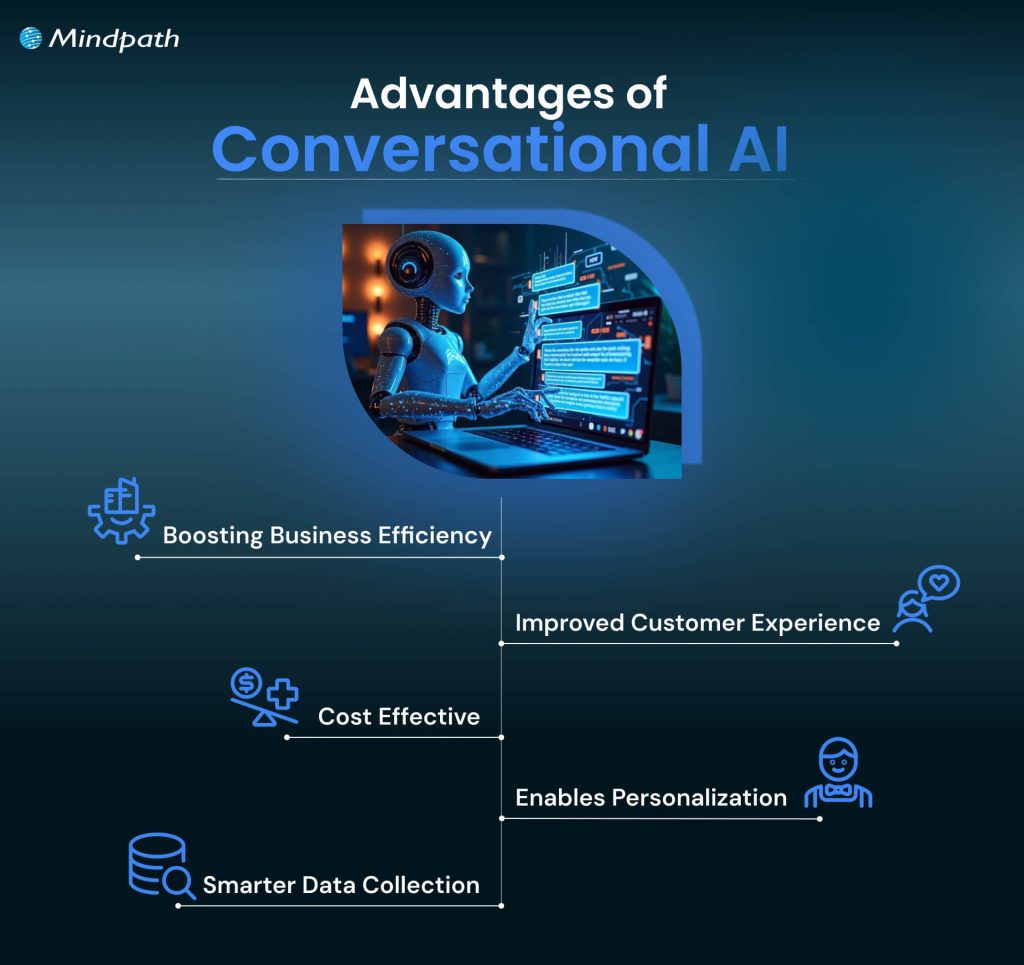
Advantages of Conversational AI

1. Boosting Business Efficiency

Conversational Artificial Intelligence can manage many routine tasks without needing a human agent every time. This means your team can spend more time on important work while the AI handles simple customer conversations. With artificial intelligence conversation tools available 24/7, your business can solve customer queries faster and work more efficiently, showcasing the many benefits of chatbot technology for operational productivity.

2. Cost-Effective

A good conversational AI platform can handle customer calls and chats automatically, with little need for extra staff. By making AI more human and accurate, it helps you manage high volumes of requests without extra cost. This saves money on daily operations and reduces mistakes, keeping your business cost-effective.

3. Improved Customer Experience

Artificial intelligence bots make it easy for customers to get quick answers and help whenever they need it. This technology offers personalized replies and a smooth, contactless service for people all over the world. It creates a better customer experience and keeps people happy with your business.

4. Enables Personalization

This technology learns from each customer’s information, like location and past interactions, to offer a more personal chat experience. It can suggest helpful answers and next steps based on what each person needs. This makes solving problems faster and reduces the need for follow-up calls.

5. Smarter Data Collection

This technology helps you collect useful information from every customer conversation. By tracking what people say and how they interact, you can spot trends and understand what customers really want. This makes it easier to improve your sales and marketing strategies over time.

Want to explore the innovations shaping the future of conversational AI? Explore our blog on the top AI trends to discover the emerging technologies redefining intelligent communication.

Use Cases of Conversational AI

Conversational AI can be used in many ways to make business operations smoother and customer interactions better. Here are some common use cases that show how an example of conversational AI works in real life.

1. Conversational IVR Systems

Modern IVR systems let customers speak naturally instead of pressing buttons to find help. For example, airlines now use conversational IVR to let travelers say things like “Change my flight” or “Check flight status” and get quick answers without waiting for a live agent.

2. Seamless Transfer to Live Agents

When a bot can’t handle a request, it passes the chat to a live agent along with all the details, so nothing gets lost. For example, a telecom company’s virtual assistant can detect when a billing issue is too complex and smoothly transfer the full conversation to a specialist who can resolve it faster.

3. Round-the-Clock Support

These chatbots answer simple customer questions at any time of day without needing a live agent. For example, an online retailer’s chatbot can help shoppers check order status or find return instructions even after business hours.

4. Tailored Product Recommendation

This technology suggests items people might like based on what they’ve bought or browsed before. For example, a streaming service’s chatbot can recommend new shows or movies based on what you’ve just finished watching.

Ready to build conversational AI that boosts sales and strengthens customer engagement? Learn how AI in e-commerce transforms online shopping experiences and drives measurable business growth.

5. Effortless Onboarding

These assistants help new employees feel confident and prepared by guiding them through company policies and tasks step by step. For example, an HR team can use an AI onboarding assistant to help new hires complete paperwork, set up work tools, and get reminders about training sessions.

6. Task Automation

These bots connect chats to your business tools, so tasks like updating customer records or creating tickets happen instantly. For example, the best conversational AI chatbot for an e-commerce store can automatically create a return request and send an update to the warehouse team.

7. Faster Lead Conversion

These chatbots ask visitors the right questions to see if they’re a good fit for your product or service. For example, a real estate company’s chatbot can collect details about a buyer’s budget and location, then connect them with the right agent.

8. Timely Updates

These AI tools send helpful reminders and updates before customers even ask, keeping everyone informed and stress-free. For example, a healthcare provider can use this to remind patients about upcoming appointments or share wellness tips.

If you want to use AI to improve your healthcare services. Learn from our blog AI in Healthcare, where we highlight real-world use cases of conversational systems supporting medical professionals and patients.

Conversational AI Best Practices

Using Conversational AI, the right way can help you get the best results for your business and your customers. Here are some best practices to keep in mind as you build and manage your AI solutions.

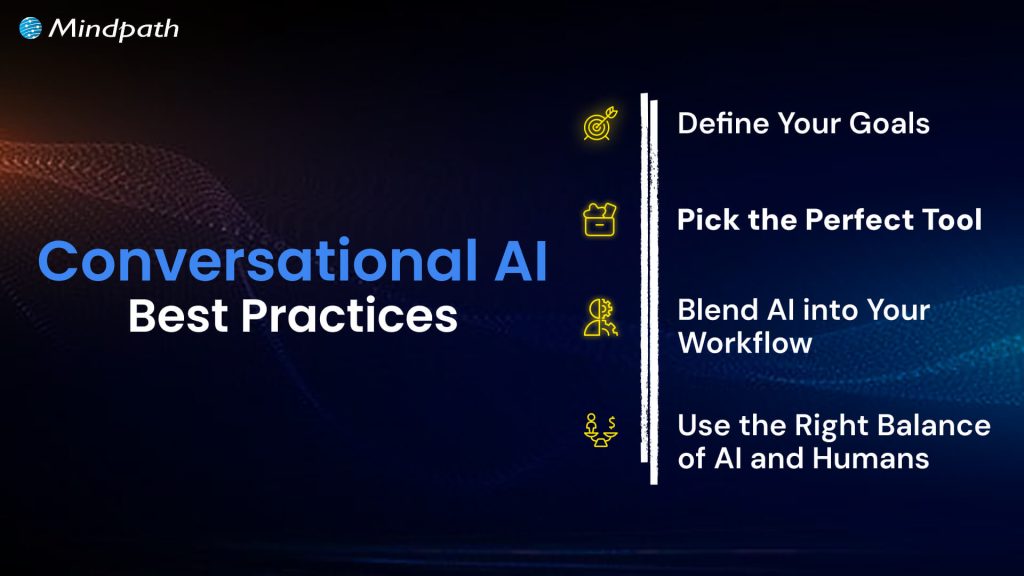
Conversational AI Best Practices

1. Define Your Goals

Always be clear about why you want to use conversational AI and what you want to achieve. Make sure it fits well with your bigger business plans, so it truly adds value.

2. Pick the Perfect Tool

Pick a conversational AI tool that fits your industry and matches your budget and goals. Make sure it can grow with your business, so you get the most value over time.

3. Blend AI into Your Workflow

Connect your conversational AI with your other business tools so it works smoothly with your daily tasks. This makes your processes faster, more accurate, and more useful for your team.

4. Use the Right Balance of AI and Humans

Let AI handle simple, repetitive tasks while your team focuses on work that needs a human touch. Always set clear points where the bot should hand over to a person for the best customer experience.

Curious how AI can optimize your workforce and improve business outcomes? Check out AI redefining job roles in Tech to see how intelligent systems are reshaping employee roles and driving operational efficiency.

Take the Next Step with Conversational AI

Conversational AI is transforming how businesses connect with people by making everyday interactions faster and more personal. It helps companies work smarter, serve customers better, and grow with less effort. Now that you know what is conversational AI, you can start using it to create more value.

Mindpath offers professional AI development services to help you build and launch conversational AI that matches your business goals. Our experts create secure, easy-to-scale chatbots, voice assistants, and smart integrations. Let us help you deliver great customer experiences and stay ahead in the AI space.

Discover the power of Conversational AI! Learn its benefits, features, and how Mindpath can help transform your customer interactions.
Web Scraping with Node.js

Have you ever needed data from a website but didn’t know how to get it without manually copying everything? What if there was a way to automate this process? Web scraping with Node.js makes it possible! Curious to learn how? In this blog, we will explore the basics of web scraping with Node.js which can be the solution to questions.  

Web scraping is the process of utilizing a specialized program to mechanically collect information from websites. Instead of manually copying and pasting data, web scraping allows you to instantly gain pricing, photos, and news items from the internet. It operates by making requests to websites, capturing the necessary data, and organizing it in an understandable format. This is very useful when you need to collect a large amount of information from many pages. 

Web scraping with Node.js involves a way of automatically gathering data from websites. Node.js simplifies this process using tools like Axios for making queries and Cheerio for reading HTML and extracting information such as text or images. This method allows you to collect data fast without having to do it manually, making Node.js an excellent choice for web scraping. 

So, let’s dig in to explore the basics of web scraping with Node.js! 

How to Conduct Web Scrapping with NodeJS

1. Set Up a NodeJS Project

First, create a folder for your web scraping project and name it anything you like. Then, enter this folder and use npm to create a new Node.js project. This will generate a file called package.json that stores your project’s information as well as dependencies. Once your project is set up, make a primary file, such as index.js, in which you will write your scraping code. To make sure everything works properly, include a simple script in package.json to run your main file. Run the script to ensure that your Node.js configuration is right, and you’re ready to start developing web scraping programs! 

2. Install Axios and Cheerio

Now it’s time to install the Node.js web scraping tools. We will use two libraries: Axios for obtaining web pages and Cheerio for simply reading and extracting data from HTML. You may evaluate the target page to determine which libraries are most suited to your web scraping needs. Right-click an empty space on the page, pick “Inspect,” and navigate to the Network tab, especially the Fetch/XHR section. If this section is mainly empty, it means that the data you need is available directly in the page’s HTML, without the need for JavaScript or a headless browser. 

3. Download Your Target Website

Connect to the website you wish to scrape via Axios. This entails requesting the website’s URL to retrieve its HTML content. Since many websites have measures to prevent scraping, include a proper User-Agent header to make your request appear from a legitimate web browser. To do this, include the User-Agent header when delivering the request using Axios. This will allow you to avoid being blocked by the website. Once you’ve received the website’s HTML, you’ll be able to extract the necessary information. Next, examine the HTML of the target page to determine how to locate and extract the precise data you’re interested in. 

4. Examine The HTML Page

To find the data you want to scrape, first inspect the target website’s HTML code. For example, if you want to learn more about industry on a page, right-click on an item and pick “Inspect” to get the DevTools. This will display the HTML code of the selected element. Look at the HTML structure to see how the data is organized. Examine the tags and CSS classes used on the components you wish to scrape. This information will assist you in writing the appropriate CSS selectors for extracting the data. 

5. Use Cheerio to Select HTML Elements

Cheerio can be used to extract data from a webpage’s HTML content. First, load the HTML you acquired via Axios into Cheerio. This configures Cheerio so you can start selecting items from the page. Cheerio lets you select HTML components with CSS selectors, like how jQuery works. For example, you can choose components based on their class or ID. You may also reduce your options by looking for components within other elements. Once you’ve selected the items you’re interested in, you may loop through them to extract the information you want. This approach involves utilizing Cheerio’s methods to filter and iterate over the components based on your scraping objectives. 

6. Extract Data from the Target Webpage Using Cheerio

After you’ve configured Cheerio and selected your HTML components, the following step is to extract the necessary data. Begin by building a structure, such as an array, to store your scraped data. Use Cheerio to extract precise characteristics about each element you’ve selected, such as attributes or text content. When extracting data, be sure to remove any unnecessary information and organize the relevant parts into clear, organized objects. These items should then be added to your database structure. If your webpage has many parts or categories of information, repeat the procedure for each section, modifying your selectors and extraction logic as necessary. By the end of this stage, you should have a well-organized collection of data from the webpage that is specific to your scraping goals. 

Web Scrapping with NodeJS at Mindpath

Mindpath provides web scraping services using Node.js to help you obtain crucial information from websites. Node.js allows us to easily download and extract data from web pages. This procedure entails retrieving the website content and then locating the specific data you want, such as text or photos. 

Our team utilizes Axios to obtain the web page and Cheerio to filter through the HTML and extract the necessary information. This enables us to collect and organize information fast and precisely. Whether you need data for research, analysis, or other uses, our web scraping services using Node.js make it simple and effective to obtain the information you want. 

Wrapping Note!

Mastering web scraping with Node.js brings up a plethora of opportunities for quickly obtaining data from websites. Whether you want to extract information for market research, competitive analysis, or just to simplify data collecting, Node.js offers a robust and user-friendly framework for accomplishing these objectives. You may automate data extraction by using technologies like Axios for downloading web pages and Cheerio for parsing HTML, which saves time and reduces manual work. 

Mindpath uses Node.js to create accurate and organized web scraping solutions that are suited to your specific needs. Our experience guarantees that you receive the necessary data fast and properly, allowing you to make intelligent choices and move your initiatives ahead. 

Looking to streamline your data collection?

Mindpath specializes in efficient web scraping with Node.js to help you get accurate insights fast.