Home

Why ReactJS is Essential for Building Scalable Applications?

Why ReactJS is Essential for Building Scalable Applications?

Join our Newsletter!

Building scalable applications with React

Only adopting modern features for your website in 2026 is not taking you anywhere in the competitive field. You need to think beyond looks and achieve the right performance, visibility, and scalability for your application. Around 92% of businesses in the US consider web performance to be critical for growth. So, if your site has gone missing in the search engines and is not responsive, it might lag behind among the competitors. Here, React can be your foremost solution.

Key Takeaways

  • 01
    React supports scalable applications through reusable components, modular architecture, and optimized rendering.
  • 02
    Server-side rendering and performance techniques can help keep React applications fast and accessible as they grow.
  • 03
    React’s component-based approach makes applications easier to extend and maintain without rebuilding the entire codebase.
  • 04
    Reusable code, AI integration, PWA techniques, and React’s ecosystem can support long-term application growth.
  • 05
    Building scalable applications with React requires thoughtful architecture, state management, and performance optimization.

Building scalable applications with React has become a savior for many developers as it promises high-performing and dynamic results. In the US, around 3,685,454 live websites have preferred React for their front-end operations. So, React is not at all a buzz. In fact, it is a practical and proven tool that ensures businesses of all sizes stay relevant in the market. Let us discover how ReactJS can match your application-building visions.

Want to transform your digital presence with a responsive and high-performing web application that keeps users engaged? At Mindpath, we offer ReactJS development services that empower businesses with scalable and future-ready solutions.

What is a Scalable Website Capable of?

Before we understand why ReactJS excels, it is necessary to understand what scalability in a web application truly includes. A scalable application will be able to handle a growing number of users. Further, it can support increasing data volumes and can adapt to new features without massive rewrites. Most importantly, it will be able to maintain performance under heavy load while allowing multiple teams to work simultaneously.

Moreover, scalability is not only a backend concern. Front-end architecture plays a critical role in assessing how well an application grows. Further, poor front-end development can slow down your development while increasing bugs and degrading user experience with the app expansion. So, building scalable applications with React can address such challenges at the UI level, keeping the core of your app safe.

Why Use ReactJS for Developing a Scalable Website?

ReactJS is a JavaScript library that was created to build interactive user interfaces effectively. In order to do this, its design philosophy prioritizes performance, modularity, and maintainability. This is what you can get by developing a scalable web app with ReactJS.

Moreover, it encourages predictable data flow, reusable components, and optimized rendering to create a scalable website. So, the applications become easier to extend and maintain over time.

1. Faster Development Through Component-Based Architecture

Adopting traditional features to make your modern websites might put you at high risk. If a single change is tangled, it might hamper the overall features of your platform. So, it will be hard for your team to continuously fix them. On the other hand, scalable web applications with ReactJS encourage component-based architecture.

It allows your developers to segment the user interface into tiny and independent reusable units known as components. So, to change something in your application, you don’t need to rewrite or rebuild the entire code. You can easily update a single component and change the flows whenever you feel it.

2. SEO Optimization Through Server Side Rendering

It has become a necessity for developers to keep their websites fast and visible in 2026. So, you can’t compromise its quality. Previously, SEO was all about keywords. But now, Google’s page speed, Core Web Vitals, and mobile responsiveness serve a critical role in your rankings.

React maintains its web application scalability through Server Side Rendering. So, instead of creating the whole page in the user’s browser, it enables pre-rendering the full pages on the server side only. This ensures search engine bots can easily crawl your pages. Moreover, it improves your rankings.

3. Availability of Scalable Framework

Launching is not a big deal, but growing without diminishing performance is the real test. There are many technologies that lag behind when their user traffic increases or new features are added. So, you can avoid such issues by developing scalable apps with React.

Its virtual DOM and modular components ensure you can expand the platform with the growth of your user base and changing features. So, you don’t need to renew the whole process from scratch.

Looking to optimize your React app architecture for growth? Explore our detailed guide on mastering scalable web development with React.

4. Relevance of Progressive Web Apps for Incredible UX

Users of the recent era demand that web applications be extremely seamless and smooth, just like native mobile applications. If you are facing slow responsiveness and inefficient page designs, React can be the deal breaker. It comes with Progressive Web App techniques that help you get reliable, fast, and app-like experiences even in the browser.

Your business will benefit from smoother experiences and higher engagement while keeping your users active. Along with scalability in web applications, you can be assured of better conversion rates.

5. Development Costs Can Be Minimized Through Reusable Code

Launching a scalable application is just the initial phase. Further, feature expansion, updates, and bug fixing can drain your budget vastly, especially if your codebase is not correct. React can assist you in getting rid of such issues.

Due to its component-based architecture, it allows developers to create reusable and small pieces that can be utilized through multiple sections of your apps. This feature can save a lot of time while limiting the risks of inconsistencies.

6. Seamlessly Integrates with Modern AI Technologies

Today’s applications need to be smarter and, most importantly, they should personalize experiences while predicting user requirements. So, building scalable applications with React totally fits into this futuristic concept.

Its modular and flexible features make it a reliable choice for integrating AI, ML, and other essential technologies. Further, such actions don’t require any rebuilding from the beginning.

7. Good Community Support

ReactJS has a broad category when it comes to its efficient features. React offers a broad ecosystem for developers who want to thrive in the digital era. With the availability of proficient tools, you can easily improve your app’s performance while making it scalable for the changing trends.

With its Chrome and React developer tools, ReactJS allows you to verify components and maintain the hierarchies more effectively.

Significant Web Applications Created with ReactJS

ReactJS is an extremely popular library for generating user interfaces. So, there are many large-scale and popular applications that have been built through ReactJS. Here are some reliable examples.

1. Instagram

Instagram is a well-known platform that uses ReactJS to create dynamic and interactive web experiences. This includes story elements, feed, and real-time valuable interactions.

2. Facebook

Facebook is one of the original developers of ReactJS. So, it uses ReactJS for multiple parts of its platform, especially for the user interface elements.

3. Netflix

This high-end platform uses this library to keep its user interface attractive and ever evolving. It particularly uses this library for rendering content like user profiles, videos, and recommendations.

4. Airbnb

It leverages React to improve its web experience, starting from listing pages to booking systems and user dashboards. It adopts an interactive and highly customer-oriented experience to remain at the forefront of the competitive edge.

Curious how ReactJS enhances UI performance and flexibility? Explore our complete breakdown of ReactJS web development to gain clarity on its features, benefits, and real-world use cases.

How Web Application Scalability with React is Different from Other Libraries?

Here is a brief comparison of React with other libraries and why a scalable website with React is more efficient in the current scenario.

Elements ReactJS Other Valuable Frontend Libraries
Scalable features Specifically created to manage scalable applications with reusable components. Scalability highly depends on strict rules and becomes complicated with app’s growth.
Architecture Component-based and works for modular enhancements. It is hard to make large-scale changes.
Performance Updates only essential UI changes with the usage of virtual DOM. Direct DOM manipulation can slow down your large applications.
Code Reusability Highly reusable. Reusability Differs.
Speed Ensures faster development due to a modular structure. Slower as applications become huge.

This valuable comparison reveals that ReactJS excels in creating a scalable website. So, this is ideal for apps that expect user growth and demand to add more features with changing trends.

Conclusion

Giving rise to scalable applications is not an option anymore in 2026. In fact, it has become a necessity for businesses that want to adopt long-term digital success. Starting from modular architecture, performance optimization, and development efficiency, building scalable applications with React remains undefeatable. Further, this library offers everything required to support scalability in the development process.

By accessing smoother experiences and faster growth, ReactJS stands out as an essential technology for modern scalable applications. Businesses that invest in the right frontend foundation today can be prepared for future challenges. So, it’s time to leverage the expertise of companies like Mindpath. Here, the experts can help your organization get the influential potential of ReactJS to generate high-performing solutions. Let experts handle your app’s features while making it result-driven and futuristic with scalable measures.


Planning a Scalable React App?

Build modern React apps for performance and growth.

Frequently Asked Questions

ReactJS supports reusable components, predictable data flow, optimized rendering, and flexible architecture, helping applications handle growing users and features.
React can update specific interface components instead of reloading entire pages, while optimization techniques help reduce unnecessary rendering and improve responsiveness.
React applications can use server-side rendering and pre-rendered pages to make content easier for search engines to crawl and improve discoverability.
Its component-based structure makes applications easier to extend, maintain, and update without requiring developers to rewrite the entire codebase.
Yes, ReactJS can support enterprise applications when combined with suitable architecture, state management, performance optimization, and scalable development practices.

Support Is One Click Away

Featured Posts

Related Post

Drupal vs wordpress

At present, the debate of Drupal vs WordPress is more relevant than ever. WordPress is already powering a large number of websites all across the world. Gradually, Drupal has been strengthening its foothold in enterprise as well as government projects. This has given rise to an important question among businesses and professionals: Is Drupal better than WordPress, or is WordPress still the easier choice for users? 

The guide gives a comprehensive insight into both Drupal and WordPress. You need to get a holistic insight into these platforms so that you can choose the best solution that perfectly fits your needs.  An in-depth comparison between these novel platforms has been made, which can simplify your selection process and help identify the right CMS for your needs in 2026.

Want to build a CMS in your online presence that is flexible, user-friendly, and reliable? Our WordPress development services help you with custom solutions focused on delivering a secure and future-proof CMS tailored to your business needs.

What is WordPress?

In 2026, WordPress remains the world’s most popular free, open-source Content Management System (CMS), enabling anyone to build and manage websites without writing code. Originally launched as a blogging platform in 2003, it now powers over 43% of all websites on the internet. The platform is known for its ease of use, along with a massive plugin library. The availability of flexible full-site editing tools makes WordPress perfect for professionals as well as small and medium-sized entities.

Some of the unique attributes of WordPress that make it a useful CMS solution are the availability of a plethora of themes coupled with robust SEO plugin support. The existence of a thriving developer community allows users to get the optimum value by choosing WordPress.

What is Drupal?

Drupal is a free, open-source Content Management System (CMS) and web development framework built on PHP. Designed for building, managing, and scaling complex websites and web applications, it has earned deep trust from government agencies, large enterprises, and universities worldwide.

Drupal is known for its security and flexibility. Moreover, it is capable of handling a large volume of content and complex user workflows. These characteristics make Drupal a world-class CMS platform that is suitable for meeting the needs of content-heavy platforms. It is time to dive deeper and look at the differences, as now you have clarity about Drupal and WordPress. 

Planning to, but don’t know what to look for when hiring a professional to handle your WordPress development needs? Discover our guide to hiring WordPress developers to help you make a smart, confident, and informed hiring decision. 

Comparison Between WordPress and Drupal

Are you wondering – Is Drupal similar to WordPress? The answer is Yes! However, even though WordPress Drupal are web content management systems, they have a number of differences. If you are planning on developing a website or web application, you need to have clarity on Drupal vs WordPress. Some of the main differences between WordPress and Drupal include

1. Ease of Use

When it comes to ease of use, WordPress is undoubtedly the clear winner in the year 2026. WordPress offers unmatched accessibility for beginners. Moreover, it can be scaled to handle complex projects. Some of the key features of WordPress include its Full Site Editing as well as the Gutenberg block editor. These elements make it easy for beginners to not only design but also publish pages without having to rely on coding. Furthermore, thousands of pre-built themes and plugins are available, which allow users to launch a site within a few hours.

However, Drupal has a steeper learning curve. You need to remember that its interface is less intuitive for non-developers. Moreover, configuring its modules requires technical knowledge. Experienced developers can leverage the tool, and it can offer them great flexibility and control.

2. Security

There exist differences between Drupal and WordPress when it comes to security. Security is undoubtedly one of the best features of Drupal. Drupal continues to be the ultimate CMS tool that is preferred by government websites and enterprise organizations. It not only offers a dedicated security team but also detailed advisories for minimizing vulnerabilities.

Even though WordPress can be considered to be secure at its core, it faces a greater risk. This is mainly because of its massive plugin ecosystem. Vulnerabilities may often arise from third-party plugins as well as outdated themes. Thus, in terms of security, Drupal is the clear winner out of the two CMS solutions. 

3. Performance

While making a comparison between Drupal or WordPress, the former shines when it comes to performance. Drupal delivers exceptional performance thanks to its advanced caching as well as API-first design. Moreover, its optimized architecture ensures that users can derive optimum value from the CMS tool. The entities that handle millions of pageviews can certainly rely on Drupal without having to sacrifice speed and efficiency. 

Over the years, the performance delivered by WordPress has improved. The improvement has been mainly because of the modern PHP versions coupled with block-based design. Similarly, the headless options have also contributed to improved performance. Users can derive immense value if they pair WordPress with strong hosting and caching layers. This can certainly help WordPress to scale well. However, users must bear in mind that the CMS tool typically requires more plugins as well as third-party optimizations.

4. Cost

A common question that one may have is: What is the cost of using CMS tools? The core software is free in the case of WordPress. Moreover, several themes as well as lug-ins are free or low-cost. Furthermore, the development costs are lower because of the availability of a large talent pool.  

The Drupal software is free. However, users need to remember that the development as well as maintenance costs are higher. Currently, skilled and talented Drupal developers are in short supply in the labor market. This automatically makes Drupal development more costly in comparison to WordPress. It is important that users bear in mind while choosing between WordPress and Drupal. 

5. Flexibility

Flexibility is another important dimension that you must take into consideration while comparing WordPress and Drupal. WordPress definitely serves as a more flexible tool for everyday users. However, Drupal is better in terms of flexibility if you are working on highly structured and enterprise-level sites. These CMS tools adopt a different approach, which influences their overall flexibility. 

WordPress mainly thrives on its plugin and theme ecosystem. These elements make it flexible for individuals as well as small businesses. However, Drupal excels in areas such as complex workflow as well as content modeling. The fact that it focuses on granular user permissions and enterprise-grade content management enables developers to tailor Drupal to meet their complex needs. 

6. SEO Capabilities

SEO is indispensable in 2026, and both CMS tools offer solid, strong SEO options. WordPress is known to have popular SEO plugins such as Rank Math as well as Yoast. They provide beginner-friendly tools along with AI-driven optimization tips for users. Another benefit in the case of WordPress revolves around the presence of mobile-first templates.

When it comes to Drupal, it lacks plug-and-play tools. However, it offers granular control over SEO, including URL structure and metadata. These are other features as well relating to multilingual optimization, as well as structured content management. These features are highly appealing to enterprise SEO teams who are in search of precision.

Do you want your website to be accessible to every visitor? Learn how to improve WordPress web accessibility can help you reach more users and create an inclusive online experience.

WordPress vs Drupal: A Quick Comparison

Now that you have gone through the various comparison factors to understand the differences between Drupal and WordPress, let’s have a look at the quick comparison table. The table below gives an overview of the differences between WordPress and Drupal. 

Features WordPress Drupal
Ease of Use User-friendly  Ideal for Experienced developers
Security Low Security High security 
Performance Efficient performance for small and mid-sized sites High performance for enterprise-scale sites 
Cost Less Expensive More Expensive 
Flexibility High flexibility for everyday users Ideal for highly structured websites 
SEO Capability Better for quick SEO optimization Better for advanced SEO strategies 

Which Is Better, WordPress or Drupal?

The answer regarding which is better – Drupal or WordPress depends on your specific needs as a user. Whether you are a professional or a business entity, you need to know – WordPress versus Drupal. The insight can certainly help you choose between the two robust CMS platforms. 

WordPress is better for users who are looking for a user-friendly CMS tool. It can act as an easy-to-use CMS solution that will allow fast setup. The rich plugin options that are available make it ideal for blogs and the marketing sites of small and medium-sized enterprises. 

On the other hand, Drupal is a top content management system for handling enterprise projects. You can choose the solution if you are looking for top-grade security, a custom workflow, and excellent multilingual support. At present, both WordPress and Drupal have established themselves as amazing CMS solutions for businesses and professionals.   

Curious which platform will better support your website’s growth and design needs? Discover WordPress vs Webflow to understand their differences and choose the best option for your business.

Which CMS Is Actually the Right Fit for Your Business in 2026?

When it comes to WordPress versus Drupal, you need to bear in mind that there is no one-size-fits-all solution. WordPress has been dominating the market for ease of use, as well as affordability. It is the ideal choice for blogs and small and medium-sized businesses. However, Drupal is built for high complexity. It offers unmatched security along with enterprise-level content management.

If you want to leverage WordPress to the fullest, you must certainly choose our WordPress development services. The experts at Mindpath ensure that you get immense value from the novel CMS solution. Whether you are a business owner or a professional, you must consider leveraging these solutions to witness your website flourish.

Monolith to microservices

Enterprise systems tend to have one unified architecture that facilitates early expansion. Gradually, construction gets heavy and hard to ascend. Releases slow down. Minor modifications require huge test cycles. Teams become under pressure to be more innovative. This is where monolith to microservices will be a strategic move towards enterprise legacy modernization. It is not a trend. It is a realistic reaction to actual operation constraints that influence operation, agility, and long-term development.

As businesses grow, they require systems that are flexible and capable of constant delivery and autonomous growth. Nevertheless, a monolithic building goes down only with solid architectural design and business focus. The technology leaders need to reconsider their deployment models, data management, and ownership of teams. Each step requires thorough consideration. In this blog, we will discuss how businesses may proceed in a practical manner to modernize architecture with clarity. So, keep reading!

Looking to simplify complex legacy systems for better agility? Mindpath’s legacy modernization services make it easier to break monoliths into microservices while keeping operations smooth.

What is Monolithic Architecture?

A monolithic architecture integrates all the application elements into a single piece of code. The database layer, business logic and user interface are a single system. Teams develop, test and deploy the application as a whole. It is a structure that promotes centralized control and easy management.

This model has been used by many enterprises to embark on their digital journey. Growth, however, makes the process more complex and causes the changes to slow down. Such a challenge tends to motivate the migration of monolith to microservices to enhance scalability and agility. Nevertheless, it is important to comprehend the monolithic basis before strategizing in terms of modernization.

Some of the advantages of monolithic architecture are listed here:

1. Quick initial development

2. Simple deployment process

3. Managing codes centrally

4. Reduced initial infrastructure price

5. Suitable for small teams

What is Microservice Architecture?

Microservice architecture forms an application of tiny, concentrated services. Every service deals with a certain business operation. They have teams that construct and operate. Services interact via APIs or messaging, which are lightweight. It is a structure that enables quicker releases and better ownership over teams.

Companies that switch from monolith to microservices have the goal of enhancing agility and scalability. Complex systems are broken down into services by teams. They enhance update control and performance control. This model facilitates constant delivery and the alignment of technology to evolving business needs.

Some of the advantages of microservice architecture are listed here:

1. An independent deployment of service.

2. Faster feature releases

3. Better fault isolation

4. Loosely planned technology options.

5. Targeted scalability

Want to ensure your move from monolith to microservices follows a clear direction? Explore legacy modernization strategy to build a structured and effective transformation plan.

Why do Organizations Switch from Monolith to Microservices?

As organizations become more and more application-driven, they become more complex. Monolith to microservices migration becomes a strategic decision when traditional architectures start limiting growth and flexibility.

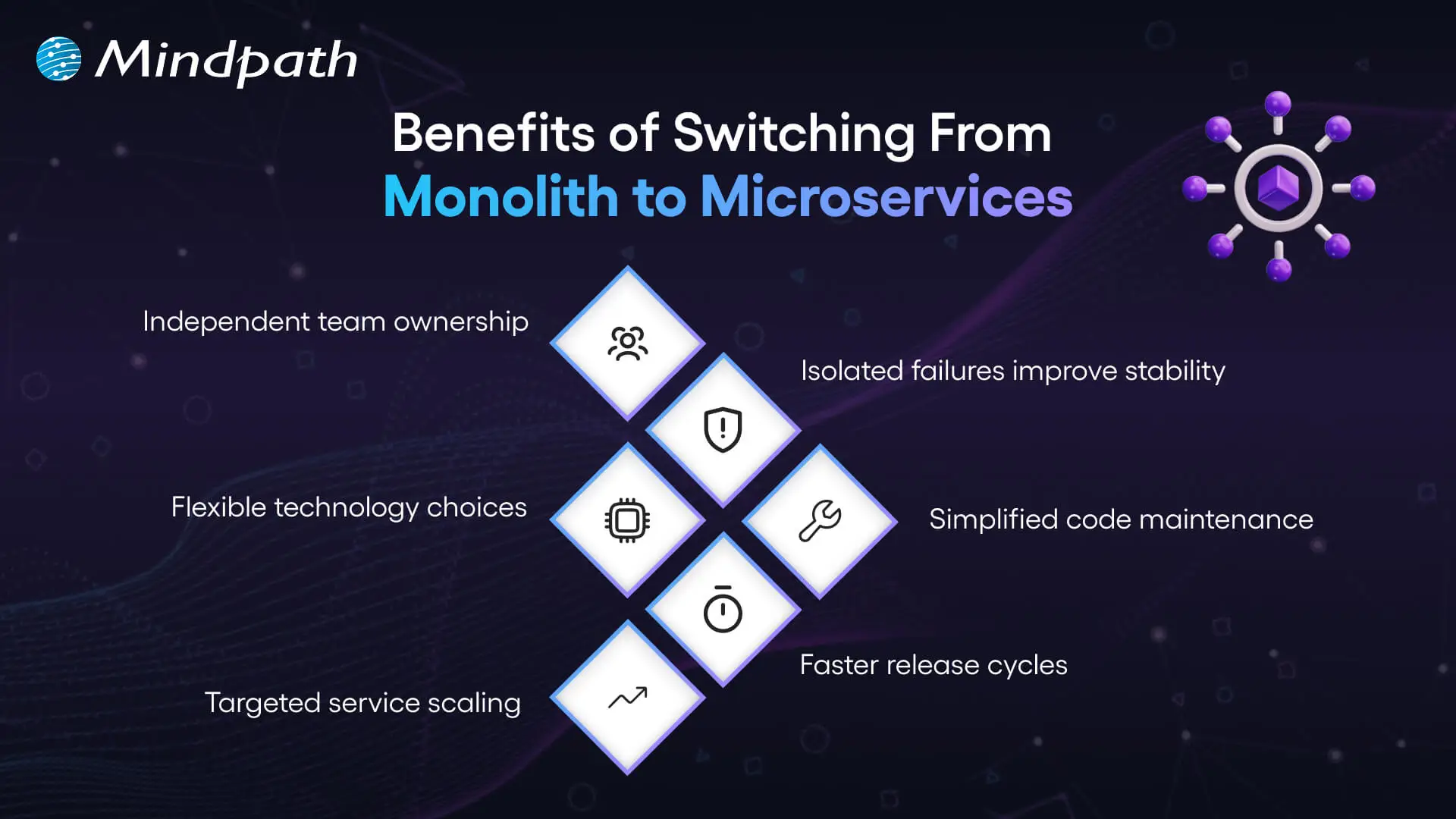
benefits of switching from monolith to microservices

1. Independent Team Ownership

Microservices provide teams with a definite service scope. The teams are in charge of their updates and releases. This construction minimizes wasting of time and enhances concentration. Organizations that follow monolith-to-microservices patterns build stronger ownership models.

2. Flexible Technology Stack

The appropriate tools depend on the service selected by the teams. They do not rely on a common technology. This innovation and future development is supported by this flexibility. It makes architecture flexible to alterations.

3. Targeted Scalability

Monolithic systems need to scale the whole application. Microservices permit the scaling of particular services. This method enhances management of resources. This accuracy is why many enterprises are abandoning monolithic to microservices.

4. Better System Stability

Even a single problem within a monolith is capable of affecting all. Microservice provides isolation of failures in a single service. The teams address the issues without impacting the entire system. This improves reliability.

5. Faster Release Cycles

Teams create and implement services on their own. They make releases without necessarily having to recreate the system. This enhances the speed of delivery. Business enterprises migrate from monolithic to microservice to enhance momentum.

6. Easier Maintenance

The huge codebases become hard to handle. Microservices separate applications into smaller parts. Developers are able to maintain and update services with ease. This facilitates long-term clarity.

Planning to reduce system limitations while adopting modern architectures? Learn from the benefits of modernizing legacy systems to improve overall performance.

Key Steps for Migrating from Monolith to Microservices

Organizations need to strategize before they shred a monolithic system into smaller services. Successful migration to microservices is based on clear strategy and disciplined execution.

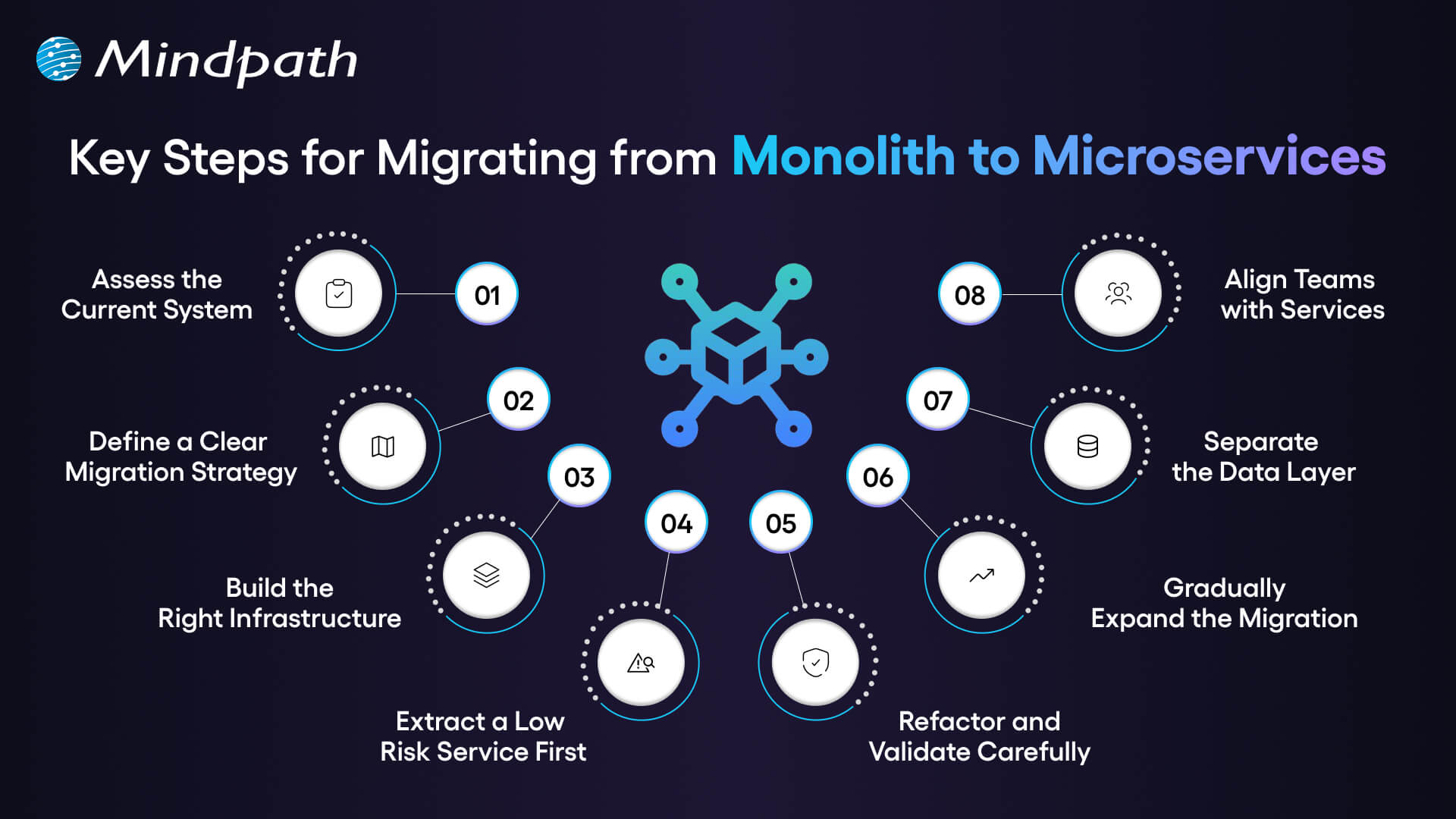
key steps for migrating from monolith to microservices

1. Assess the Current System

Begin by doing a line-by-line audit of your monolithic system. Check review services, dependencies, data flow, and performance gaps. This analysis forms the basis of successful monolithic to microservices migration.

2. Define a Clear Migration Strategy

Establish simple service boundaries on the capability of the business. Make decisions on the size of the service and the style of communication at the early stage. A strong monolithic to microservices migration strategy reduces confusion and prevents rework.

3. Build the Right Infrastructure

Finalize API gateway, service discovery and CI/CD pipelines. Insert containers and orchestration tools to introduce consistency. The powerful infrastructure promotes consistent monolithic to microservices conversion.

4. Extract a Low Risk Service First

Select a valuable module that is loosely coupled. Build it as a stand-alone service having its database. It is a risk-controlled step that is proving yourself.

5. Refactor and Validate Carefully

Refactor the chosen ones into a single service. Implement it and observe behavior closely. Logging and tracing helps to identify problems at an early stage.

6. Gradually Expand the Migration

Move other modules depending on the business priorities. Break-even monolith tasks gradually. This phased approach supports smooth monolithic application to microservices’ evolution.

7. Separate the Data Layer

Discontinue reliance on a corporate database. Allocate domain-owned datastores to each service. Synchronize the plan data keenly to ensure that it is consistent.

8. Align Teams with Services

Establish cross-functional teams for each microservice. Provide them with complete development and operations ownership. This is a structure that reinforces autonomy and long-term scalability.

Looking to enhance your modernization process with intelligent automation? Learn from AI-driven legacy system modernization to boost efficiency and performance.

Ready to Modernize Your Enterprise Architecture?

Contemporary business requires the ability to expand its systems as it grows and facilitate ongoing innovations. A clear shift from monolith to microservices improves agility, resilience, and operational control. The key to success lies in effective planning and implementation in phases and aligning a team. Through proper strategy, companies become simpler and create future ready digital platforms that underpin long-term business objectives.

At Mindpath, we provide legacy modernization services which help companies plan and implement legacy modernization with confidence and clarity. Our specialists evaluate architecture, establish migration roadmaps and deploy scalable microservices. We are performance-based, stability-centered and result-orientated. Collaborate with Mindpath to modify old systems into nimble, growth-motivated digital systems.

FAQs

1. Why should enterprises consider monolith to microservices today?

Enterprises face rapid market shifts and rising customer expectations. Monolith to microservices helps organizations build adaptable systems that support faster innovation. It also aligns technology with business domains, enabling better ownership, governance, and long-term digital growth without increasing structural complexity.

2. How do we know if our organization is ready for migration?

You should assess technical maturity, DevOps readiness, and team structure. Clear service boundaries and business alignment indicate strong readiness. Leadership commitment also plays a key role in successful transformation and sustainable architectural evolution.

3. Is monolith to microservices suitable for every business?

Not every system requires immediate migration. Smaller or stable applications may perform well as monoliths. However, enterprises planning aggressive scaling, multi-team collaboration, or global expansion often benefit from monolith to microservices as a long-term strategy.

4. What technical challenges arise during data separation?

Data decoupling often introduces consistency and transaction complexity. Teams must design domain owned databases and manage synchronization carefully. Event-driven patterns and API governance help maintain reliability during service level transitions.

5. How can Mindpath support our legacy transformation journey?

Mindpath’s legacy modernization services guide enterprises through assessment, planning, and execution. Our experts design scalable architectures and structured migration roadmaps. We help organizations transition confidently using proven monolith-to-microservices approaches aligned with measurable business outcomes.

SaaS Development Cost

SaaS development cost can vary significantly depending on product complexity, technical requirements, and business goals. While a basic application may require a modest initial investment, platforms with advanced integrations, stringent security requirements, and complex workflows demand greater resources. Understanding these cost drivers helps businesses set realistic budgets and make informed development decisions.

Key Takeaways

  • 01
    SaaS development costs depend on product complexity, features, technology choices, and team expertise.
  • 02
    Starting with an MVP helps validate demand before investing in advanced features.
  • 03
    Infrastructure, security, and maintenance contribute to the total cost of ownership.
  • 04
    Clear requirements and contingency planning help prevent unexpected expenses and budget overruns.
  • 05
    Comparing development models and pricing structures helps businesses make informed investment decisions.

Several factors influence the final investment, including feature scope, team expertise, infrastructure, and ongoing maintenance. Without careful planning, overlooked requirements and unexpected expenses can push projects beyond budget. In this blog, we’ll examine the key factors affecting SaaS development cost and practical steps businesses can take to manage expenses and plan their budgets effectively.

Plan Your SaaS Development Budget?

Mindpath provides tailored SaaS development services to help businesses turn product ideas into scalable applications.

How Much Does It Cost to Develop a SaaS Product in 2026?

The SaaS development cost depends on its functionality, technical complexity, and expected user base. A basic product with essential features requires less development effort than a platform with advanced integrations, automated workflows, and complex data processing. The following estimates provide a general starting point for businesses planning a SaaS application in 2026.

SaaS Product Type Estimated Development Cost (USD) Typical Scope
Basic MVP $15,000–$30,000 User authentication, core features, basic dashboard, and essential integrations
Feature-Rich MVP $30,000–$60,000 Custom workflows, subscription management, reporting, and third-party integrations
Mid-Level SaaS Platform $60,000–$140,000 Advanced permissions, analytics, automation, and expanded integrations
Complex Enterprise SaaS $140,000–$300,000+ Multi-tenant architecture, complex business logic, advanced security, and scalability features

These figures are indicative planning estimates, not fixed industry rates. Actual SaaS development cost varies based on team location, hourly rates, technology choices, testing requirements, and project scope. They generally represent initial development expenses rather than ongoing hosting, maintenance, or third-party service charges.

For startups, beginning with a minimum viable product (MVP) can help validate demand before committing to a larger investment. A production-ready MVP should include reliable core functionality, essential security controls, appropriate testing, and a stable deployment process. Businesses can then prioritize additional features based on user feedback and measurable product needs. This approach helps control initial spending while creating a practical foundation for future growth.

What Factors Affect SaaS Development Cost?

Several factors determine the budget required to build a SaaS product. The most important ones include:

1. Feature Complexity

Basic features such as user registration and dashboards require less development effort. Advanced analytics, automation, and custom workflows increase engineering and testing time.

2. UI/UX Design

Standard layouts can keep design costs manageable. Custom interfaces, interactive dashboards, and accessibility requirements need additional planning and implementation.

3. Technology Stack

The choice of programming languages, frameworks, databases, and cloud services affects development effort. Specialized technologies may require experienced developers and additional integration work.

4. Development Team

Team size, experience, and location influence hourly rates and project expenses. An experienced team can help reduce costly rework through better planning and implementation.

5. Third-Party Integrations

Payment gateways, CRM systems, and external APIs can extend product capabilities. Integration complexity, licensing, and usage fees can increase the overall budget.

6. Security and Scalability

Data encryption, access controls, and secure authentication require careful implementation. Products designed for growing user traffic may also need more sophisticated infrastructure and performance testing.

7. Testing and Maintenance

Quality assurance helps identify defects before launch and improves product reliability. Ongoing maintenance, updates, and bug fixes add to the total cost of ownership.

Understanding these factors helps businesses estimate how much it costs to develop a SaaS product in 2026 based on their actual requirements. Defining priorities early makes it easier to allocate resources, avoid unnecessary features, and keep development aligned with the available budget.

Development Team, Timeline, and Pricing Models

The development team’s structure and working model have a direct impact on the cost to build a SaaS product. Businesses can choose an in-house team, outsource development, or combine internal staff with external specialists based on their budget, technical requirements, and delivery goals.

1. In-House Development

Hiring full-time developers provides greater control over product decisions and daily collaboration. However, salaries, recruitment, benefits, and infrastructure can make this option expensive.

2. Outsourced Development

Partnering with a SaaS development company gives businesses access to experienced developers without building an entire team internally. The overall cost depends on the provider’s rates, project scope, and required expertise.

3. Hybrid Development

An internal team can manage product strategy while external developers handle specialized engineering tasks. This approach offers flexibility but requires clear ownership and consistent communication.

4. Project Timelines

Shorter deadlines may require additional developers or parallel workstreams, increasing the initial investment. A realistic schedule allows sufficient time for development, testing, and deployment.

The pricing model also matters. Fixed-price contracts work well when requirements are clearly defined, while time-and-materials arrangements offer greater flexibility when product needs may change. Before selecting a model, businesses should compare deliverables, payment terms, testing coverage, and post-launch support rather than evaluating quotes on price alone. Businesses considering outsourced software development should also evaluate communication, delivery expectations, and the scope of ongoing support.

Infrastructure, Security, and Ongoing SaaS Costs

Infrastructure and security decisions influence both the initial SaaS development cost and the expenses a business must manage after launch. Choosing the right setup helps maintain performance, protect customer data, and support growth without investing in unnecessary resources.

1. Cloud Hosting and Scalability

Cloud platforms provide computing power, databases, storage, and monitoring based on application needs. Costs increase as user traffic, data volume, and processing requirements grow. Appropriate cloud and DevOps services can help businesses manage infrastructure and deployment requirements.

2. Security and Compliance

Encryption, secure authentication, access controls, and vulnerability testing help protect sensitive information. Applicable requirements, such as GDPR or HIPAA, can add implementation, documentation, and auditing expenses.

3. Maintenance and Updates

SaaS products need regular bug fixes, security patches, dependency updates, and performance improvements. Businesses should account for these recurring expenses when calculating the total cost of ownership.

4. Backup and Disaster Recovery

Automated backups, data restoration procedures, and recovery infrastructure help minimize disruption after unexpected failures. The required storage capacity and recovery targets can increase infrastructure expenses.

5. Monitoring and Performance Optimization

Application monitoring helps identify errors, slow response times, and resource bottlenecks before they affect users. Ongoing optimization may require additional engineering hours and monitoring tools.

These are important SaaS development factors because they affect reliability and long-term operating expenses, not just the initial build. Understanding what factors affect SaaS development cost helps businesses choose infrastructure, security measures, and operational tools that match their requirements, budget, and anticipated growth.

Hidden Costs That Can Increase Your SaaS Budget

The initial development estimate may not cover every expense required to launch and maintain a reliable product. During SaaS application development, overlooked requirements, additional testing, and changes to the original scope can increase the final budget.

1. Scope Creep

Adding features after development begins can extend timelines and increase engineering costs. Define essential requirements early and evaluate each new request against the available budget.

2. Quality Assurance and Testing

Functional, security, compatibility, and performance testing require dedicated time and resources. Skipping these activities can lead to expensive fixes after launch.

3. Third-Party APIs and Licenses

External services may charge subscription fees, transaction fees, or usage-based rates. Review pricing limits and renewal terms before integrating them into your product.

4. Data Migration

Moving existing customer records or business data into a new platform may require data cleaning, mapping, and validation. Complex migrations can increase development effort and require additional testing.

5. Deployment and Release Management

Production configuration, domain setup, monitoring, and deployment pipelines can add to the initial investment. Planning these requirements early helps prevent last-minute expenses.

Ready to Plan Your SaaS Development Budget?

Understanding SaaS development cost helps businesses make informed decisions about product scope, technology, infrastructure, and long-term maintenance. A clearly defined MVP, realistic timeline, and transparent budget can reduce unexpected expenses while creating a reliable foundation for future growth.

Mindpath provides tailored SaaS development services to help businesses turn product ideas into scalable applications. Our team supports technical planning, custom development, and deployment based on your requirements.